RSS
 

Posts Tagged ‘Autofocus’

5 Beginner Tips for More Autofocus Success

19 Nov

When you’re just starting out, it can sometimes be frustrating trying to get sharp photos. The camera’s autofocus often seems like it has a mind of its own. Here are five quick tips that can help you get the autofocus under control.
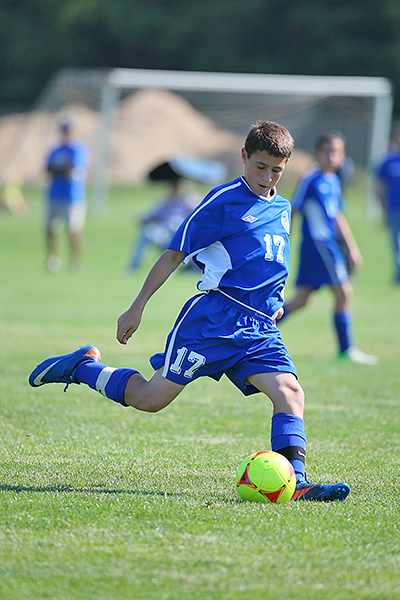
AI Servo AF or Continuous Focus will continue to track moving subjects.

AI Servo AF or Continuous Focus will continue to track moving subjects.

1. What is your subject doing?

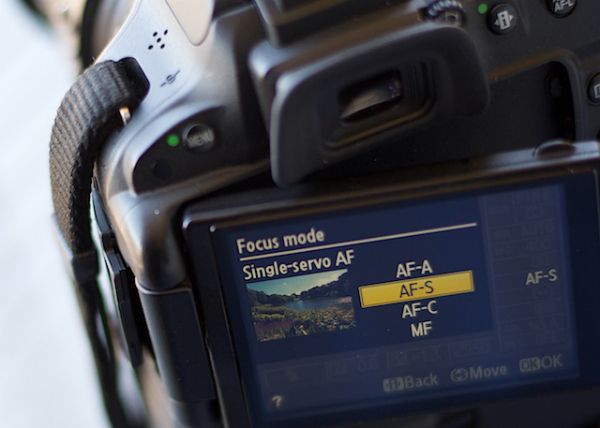
If your subject is sitting still and not moving, be it a person, a still life, or a landscape, you’ll want to choose One-Shot autofocus (AF-S for single on Nikon). One shot AF allows the camera to focus, and then as long as the button is depressed, focus will stay locked. This is useful if you want to focus and recompose your shot, especially if an autofocus point doesn’t cover the area you want to be in sharp focus (see #2 below).

If your subject is moving, such as a child at play, an animal, or a car, change the autofocus mode to AI Servo AF, or Continuous AF (AF-C, depending on the brand of camera you have). This means the camera will continue to focus on the subject even as it moves toward or away from you. Just be sure to keep the AF point on your subject. The image at left was taken using AI Servo AF with the center point as the active focus point. If you use AI Servo (AF-C) with automatic point selection, you will most likely start tracking with the center focus point, and as your subject moves, the AF point will automatically shift to another area to maintain focus. Some cameras offer the option of letting you choose which point focusing starts with before shifting to other points. In manual autofocus point selection mode (not to be confused with manual focus), you choose one point and keep your subject covered with that one point.

2. Check your AF point selection mode
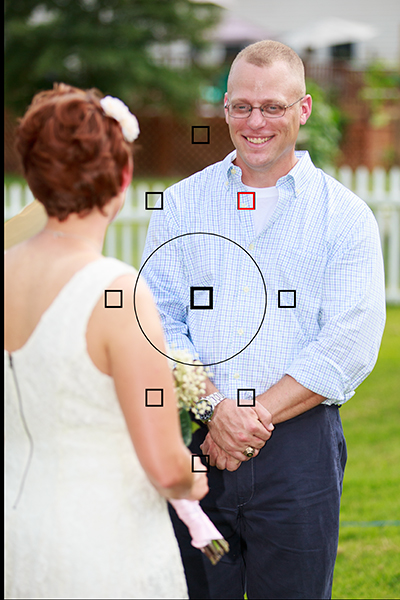
Using Manual AF Point Selection I was able to keep my brother in focus despite the fact that my sister in law was closer and covered by an AF point. Automatic AF point selection would have selected her instead.

Using Manual AF Point Selection I was able to keep my brother in focus despite the fact that my sister in law was closer and covered by an AF point. Automatic AF point selection would have selected her instead.

If you find your camera isn’t focusing where you want it, check your AF point selection mode. All DSLRs offer at least two modes. There may be other options as well, but most people use one of these two main modes. The first is automatic AF point selection. This means that all AF points are active, and in one shot mode, the camera will try to focus on the nearest object to it with detail. This means that if something between you and your subject is covered by an AF point, the camera will focus there, rather than where you want it to. This can be a problem if trying to photograph through a window or fence as well.

To combat that problem, you’ll want to choose a single AF point. This will most likely be called Manual AF Point selection, depending on the brand of camera you have. This mode allows you to choose which AF point you want to use, giving you the ability to choose the one that covers your subject, regardless of what’s between you and the subject.

3. There are two types of autofocus points
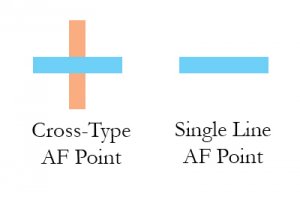
AF_PointsMost modern cameras have two types of AF points: Single-line, and Cross-type.  Single line AF points are able to focus on lines going either horizontally or vertically. Which one it reads will depend on how the AF point is oriented. Horizontally oriented AF points can focus on vertical lines, and vertically oriented AF points can focus on horizontal lines.

Cross-type points are simply vertically oriented AF points, overlaid with horizontally oriented ones. So a single cross-type AF point can read both vertical and horizontal lines, making it more likely that it will be able to focus on the right object. Why is this important? If you have selected an AF point and the camera is unable to focus on the subject, it could be that there isn’t any detail that the AF point can pick up. A cross-type AF point has a better chance of finding a line of detail to focus on. Try selecting one of the cross-type points in your camera. Most of today’s DSLR’s have at least one, if not more.  Check your camera’s manual to find out where the cross-type points are in your autofocus array.

4. Learn how to change AF points without taking your eye from the viewfinder

Once you’ve learned to set Manual AF Point Selection, and have started using a single AF point, you’ll want to practice selecting an AF point quickly without taking your eye away from the viewfinder. Some cameras offer a single control such as the joystick type controller on the EOS 5D Mark III, while other cameras such as the EOS Rebels require a combination of a button push and spin of the dial to change an AF point. The faster you are able to do this, the less likely it is you will miss a key moment.

5. Try to compose with the AF point you are using exactly where you want it
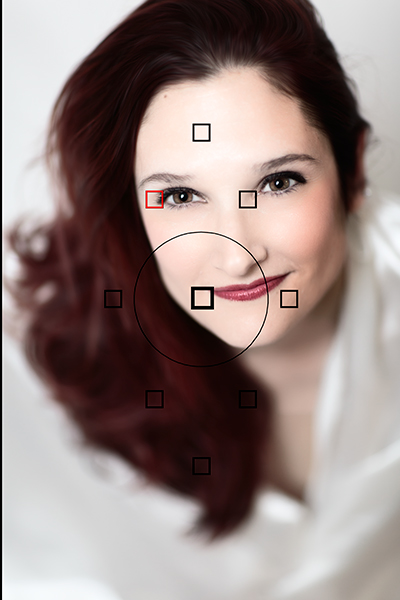
Putting the AF point right on her eye meant that despite having a very shallow depth of field, I was still able to focus on the eyes and keep them sharp, without having to recompose.

Putting the AF point right on her eye meant that despite having a very shallow depth of field, I was still able to focus on the eyes and keep them sharp, without having to recompose.

Many people who are just starting to do photography often stick to the center AF point for focusing, and then lock focus and recompose the shot to put the subject where they want in the frame.  For most shots, this will work just fine. However, there is a chance that when recomposing, you are actually shifting the plane of focus enough that your subject will no longer be sharp.  This is very likely when you are close to the subject with a shallow depth of field.  To avoid this, choose the AF point that is closest to, or covers your subject. For instance, when shooting a portrait, use the AF point that covers your subject’s eye.

Your thoughts

Keep these five tips in mind the next time you take out your camera.  What are your favorite autofocus tips?

I have had people who let running water confuse them, unsure which AF mode to select. Yes, the water is moving, but the stream is not, it stays the same distance from the camera, so you would use One Shot AF for a shot like this.

I have had people who let running water confuse them, unsure which AF mode to select. Yes, the water is moving, but the stream is not, it stays the same distance from the camera, so you would use One Shot AF for a scene like this.

The post 5 Beginner Tips for More Autofocus Success by Rick Berk appeared first on Digital Photography School.


Digital Photography School

 
Comments Off on 5 Beginner Tips for More Autofocus Success

Posted in Photography


Fine Tuning Autofocus on your DSLR

08 Sep

Have you ever used a nice big aperture and got home only to find out the focus isn’t on the part you wanted? Or done a portrait and their ears are nice and sharp not their eyes?

If so, you might have a lens focusing issue. There are ways to test for that and depending on your camera model you may be able to adjust it.

I found a video where the host walks you through the process of fine tuning autofocus for your DSLR. I think her accent is great and I love knowing that people around the world have the same issues and there are great photographers and educators everywhere.

Hopefully that solved your issues and everything is tack sharp now, exactly where you want it.

The post Fine Tuning Autofocus on your DSLR by Darlene Hildebrandt appeared first on Digital Photography School.

Digital Photography School

 
Comments Off on Fine Tuning Autofocus on your DSLR

Posted in Photography


How to Avoid Blurry Photos by Choosing the Right Autofocus Mode

09 Apr

Sometimes the light is perfect, the moment is right, but when you get home you find out that your photo is blurry. Arrgh!

Why are your pictures blurry? One obvious reason might be that your camera isn’t focused properly. Today’s cameras and autofocus lenses can help you quickly take sharp images in a wide variety of situations, provided you choose the right autofocus mode.

Here are some questions to help you diagnose any situation and choose the correct auto focus setting

autofocus modes

Photo by Lynford Morton

Are you using the Auto-area autofocus or Single-point autofocus selection?

Who gets to decide your focus point? That’s the question you are deciding with this option. In an Auto-area autofocus, your camera decides what it should use as your focal point. It usually decides based on what looks most prominent in the viewfinder or closest to the camera. This might work when your subject is obvious and there are no potential distractions.

For more control, choose a Single-point autofocus setting. That mode allows you to choose your specific auto focus point (check your camera’s manual if you aren’t sure how to do this). After all, only you, not your camera, knows where you want to place your subject.

Is your subject moving?

Most DSLR cameras give you four basic options for autofocus settings: single, continuous, auto or manual. To help you choose the right option, ask yourself, “Is my subject moving?”

No, my subject is not moving

autofocus modes

Photo by Lynford Morton

If your subject is not moving, choose “AF-S” for Nikon or “One Shot” for Canon. This mode locks in your focus based on the distance to your subject. As long as your subject stays at that distance, your photo will be in focus. Your subject has to be stationary for this mode to work. In fact, your camera will not take the photo if your subject is moving (or it cannot lock focus).

This mode also allows you to recompose. Let’s say the autofocus point is in the center of the frame, but you want your subject on one side or the other. Keep depressing your shutter button slightly, and focus remains sharp on your subject. Then you can move the camera slightly left or right, recomposing with your subject out of the center of the frame.

Yes, my subject is moving

By Amsterdamized

If your subject is moving, use continuous autofocus (AF-C for Nikon or AI Servo for Canon). In this mode, you place your autofocus point over your subject, and focus continues to adjust while you hold down the shutter button, keeping your subject in focus as it moves.

For example, if someone is riding a bicycle, place the AF point on your subject and slightly depress the shutter. As long as you are pressing the shutter, the autofocus will continually adjust to your subject, keeping them in focus as they move. When you are ready to take the photo, depress the shutter completely, and the camera will focus on your subject for a sharp image.

No, my subject isn’t moving, but it might

A third option merges the functionality of the single autofocus and continuous autofocus. This hybrid mode, (AF-A for Nikon or AI Focus for Canon), starts out as a single auto focus. Your camera won’t focus until you lock in on a stationary subject. Once you have your subject in focus, you can take the photo as you would in a traditional single auto focus mode.

If your subject starts moving, however, the autofocus releases and continues to track your moving subject. It gives you the best of both worlds. One note of caution, I have noticed at times, if you recompose a stationary object quickly in AF-A mode, the camera can be fooled into thinking the subject is moving and release the autofocus.

My autofocus just isn’t getting it right

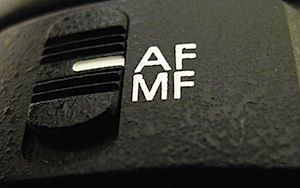
You always have the option of turning off the autofocus function and choosing the Manual setting. If your camera is having trouble detecting your focus point, it might be more efficient to focus the camera yourself.

How about the opposite situation? You turned off your autofocus by accident? Every now and then, when your camera can’t seem to focus, and you don’t hear the motor searching back and forth, check to see if you selected Manual autofocus by accident. This can happen more frequently than you might think.

Other issues to consider

What if you set up your autofocus properly, and the lens still won’t focus? Try these considerations:

  • You might be too close. Try backing away. If you are too near the subject, it might prevent the camera from focusing properly.
  • Your subject might not have enough contrast. Your image needs to have some contrast for many autofocus systems to work. If you try to photograph a solid sheet of white or any single color, most autofocus systems will struggle. Why? The camera compares adjacent pixels and when one is different, it uses that point to determine its focus. If it can’t find any contrast, it can’t focus.
  • You might have an extremely shallow depth of field. In this case, your autofocus is working, but the depth of field is so shallow, it is hard to tell that your subject is in focus.
  • You have camera shake. When you depress the shutter, you move the camera. If the shutter speed is too slow, the camera picks up that movement, and it looks like a blurry photo. Make sure your shutter speed is faster than the equivalent of your focal length. For instance, if you are zoomed to 100mm, your shutter speed should be 1/100th of a second or faster to avoid camera shake.

Why is your picture blurry? If the answer is in your autofocus, your fix could be as simple as choosing the right setting.

Do you have any other autofocus tips or comments you’d like to share? Please do so below.

More tips on sharper images and focus modes:

  • 5 Tips for Getting Sharper Images
  • Understand Exposure in Under 10 Minutes
  • Making Sharper Wildlife Photographs – [Part 1 of 2]
  • Making Sharper Wildlife Photographs – [Part 2 of 2]

The post How to Avoid Blurry Photos by Choosing the Right Autofocus Mode by Lynford Morton appeared first on Digital Photography School.


Digital Photography School

 
Comments Off on How to Avoid Blurry Photos by Choosing the Right Autofocus Mode

Posted in Photography


3 Ways to get Better Control of Autofocus

27 Mar

In this post, Steve Berardi from PhotoNaturalist talks about three ways to get better control of autofocus.

auto-focus.jpgSometimes autofocus can be really annoying. For some shots it’ll focus on the right part of your subject, but then the very next shot it may choose to focus on something far and away into the background.

Sure, you could avoid this problem by always using manual focus, but autofocus is great when you need to focus quickly or when you’re photographing a landscape and you need to focus on a certain spot in the scene.

Well, autofocus doesn’t have to be annoying anymore, because here are three ways to get better control of it:

#1 – Press your shutter button half-way to activate autofocus and then recompose

Set your autofocus point to the center spot, then point this spot where you want to focus and press your shutter button half-way (don’t press it completely yet) to initiate autofocus. Then, while still holding down the button half-way, recompose your shot and press the button completely down to snap the photo.

#2 – Switch to manual focus after autofocusing

Use autofocus as you normally do, but once it focuses on the right spot, just switch off autofocus on your lens to manual focus. Your lens will keep the current focus when you do this. This method works well when your camera is on a tripod and you’re taking multiple exposures from the same spot, like when photographing a landscape.

#3 – Use back-button autofocusing

Normally, your camera will autofocus when you press the shutter button, but with back-button autofocusing, you have to press a button on the back of the camera instead, giving you complete control of when autofocus is initiated.

With back-button autofocusing, you can just set the autofocus point to the center spot, then point that where you want to focus, and finally press the back button to automatically focus on that point. Now for all the shots you take from that position, that focus will be maintained (the camera won’t randomly focus into the background anymore).

You can do the same thing without this back-button autofocusing by switching to manual focus after the camera focuses properly, but using the back button saves time and this way you don’t have to constantly switch back and forth between manual and autofocus (which can inadvertently move the camera sometimes).

Back-button focusing is especially helpful for photographing moving subjects, like birds in flight or other wildlife: just switch on the continuous focusing mode, set the autofocus point to the center spot, and hold down that back button. Now you don’t have to worry about accidentally hitting the shutter button while you’re tracking the subject in your viewfinder.

How to enable back-button autofocusing: Unfortunately, this feature is called something different on each camera, so you’ll probably have to do some digging around in your camera’s manual and “custom functions” to find it. If it’s not labelled clearly on your camera, try changing the settings of the different buttons on the back of your camera (like the AE lock button).

steve.jpgAbout the Author: Steve Berardi is a naturalist, photographer, and computer scientist. You can usually find him hiking in the beautiful mountains and deserts of Southern California. Read more of his articles on nature photography at the PhotoNaturalist and follow him on Twitter.

Post originally from: Digital Photography Tips.

Check out our more Photography Tips at Photography Tips for Beginners, Portrait Photography Tips and Wedding Photography Tips.

3 Ways to get Better Control of Autofocus


Digital Photography School

 
Comments Off on 3 Ways to get Better Control of Autofocus

Posted in Photography


How to use Autofocus in your DSLR

22 Jan

cazillo.com Having proper focus in an image is imperative. No one wants an out of focus picture of themselves or a family member, same goes for other types of photography. This is one of the basics, so you need to get it right all th time. In my video I go over how to use each mode, why you shouldn’t focus then recompose & how I focus. You can also find out what the 1/3-2/3s rule of focus is. Please share this video with your friends! Thanks!


Nikon D5100 Video autofocus young girl

13 Jan

Test Nikon D5100 + Nikon 50mm f/1.8D AF Nikkor My Favourite Game (Kosmopolitans Mix) – OST Omikron Feat. Baby Queen Vintage Cafe Lounge & Jazz Blends (Selected by RoseMary)
Video Rating: 4 / 5

Questions? Go here: www.youtube.com Hands-on review on Nikon 80-200mm ƒ/2.8D AF-S ED-IF. Autofocus available on all DSLRs.


Nikon Autofocus Tutorial (Part 1)

09 Dec

Questions? Go here: www.youtube.com Tutorial on understanding the basics of Nikon autofocus system. Part 1 or 3.

 
Comments Off on Nikon Autofocus Tutorial (Part 1)

Posted in Nikon Videos


Digital Photography 1 on 1: Episode 58: Autofocus Points: Adorama Photography TV

26 Nov

Adorama Photography TV presents: Autofocus Points. The reason for all of these autofocus points is to make it easier for photographers to create off-center compositions and still get the focus right. In this episode Mark will give you tips on how to use the autofocus points. For more articles and videos about focusing your DSLR camera, go here: www.adorama.com Find the following cameras at Adorama.com: Cannon 5D Mark II www.adorama.com Cannon 7D www.adorama.com Nikon D3100 www.adorama.com Nikon D7000 www.adorama.com Visit www.adorama.com for more photography videos! Send your questions to: AskMark@Adorama.com
Video Rating: 4 / 5

In Part 6, Matt runs through 15 tips and custom settings that he uses when shooting a wedding. He also answers a few viewer questions, including how to get into the industry ,and how to get experience as an assistant. In this series ThatNikonGuy Matt Granger will show you all you need to know to get started in wedding photography. From planning, to gear, to shooting and editing tips, Matt will walk you through the process and help you avoid common pitfalls. Whether you are going in full time, or have been asked to shoot at a friends wedding – take the time to research and plan – it will avoid a lot of headaches down the track! Nikon gear – www.nikon.com.au Join our facebook and flickr groups to stay up to date with what’s going on: Join our facebook group HERE: www.facebook.com Flickr group HERE: www.flickr.com www.mattgranger.com

 
Comments Off on Digital Photography 1 on 1: Episode 58: Autofocus Points: Adorama Photography TV

Posted in Nikon Videos


Nikon Autofocus Setting for Action

14 Nov

Questions? Go here: www.youtube.com Instructions on how to use the best AF settings for action shots that will result in sharp images.
Video Rating: 0 / 5

 
Comments Off on Nikon Autofocus Setting for Action

Posted in Nikon Videos


Metabones adds autofocus to Canon-NEX adapter

13 Nov

Smart.png

Metabones has updated its EF to NEX Smart Adapter II, allowing recent Canon lenses to autofocus on Sony E-mount cameras. As with most systems that attempt to use DSLR lenses on contrast-detection-based AF cameras, the focus speed is considerably lower than when used on their native cameras. However, despite not being able to use the hybrid-AF system from the NEX-5R or 6, Metabones claims performance is often better than Sony DSLR lenses being used with the original LA-EA1 adapter. The adapter costs $ 399, with existing Smart Adapter II owners able to upgrade for $ 50.

News: Digital Photography Review (dpreview.com)

 
Comments Off on Metabones adds autofocus to Canon-NEX adapter

Posted in Uncategorized