RSS
 

Archive for April, 2013

10 Pro Motion Control Time-Lapse Tips

19 Apr

As I’ve been documenting landscapes and cityscapes with time-lapse photography the past several years I’ve learned some key lessons, many times the hard way. If you’re new to time-lapse here’s a quick definition from my eBook Photographing the 4th Dimension – Time that discusses slow shutter & video techniques:

Time-lapse videos are produced when hundreds of sequential images are displayed in rapid succession. The line between still photo and video is directly tied to how the human visual system works. Images are retained in our visual memory for roughly one-fifteenth of a second.1 As a result we can differentiate still photos when they’re played to us at a frequency of 10-12 images per second (video lingo being frames per second or fps). Standard video playback frequencies are 24 and 30 frames per second, both of which easily fool our visual system, via the Phi phenomenon, into seeing continuous motion versus still images.

To save you the hardship of enduring the same mistakes I’ve made over the years here are 10 motion control time-lapse tips to get you shooting like a pro including some gear recommendations.

_Q2A4768_full_600c

1. Setup Early
To avoid a last minute rush or worse yet missing fleeting lighting conditions be sure to setup early.  If you’re rushed you’re bound to make careless errors and even put your gear at risk of falling. It pays to take your time, arrive early, carefully setup, review your setup and take a test sequence if time permits. This is a sure fire way to make sure that your actual shoot goes to plan.

jmg-giveaway-HEADERalt
Enter to Win My Ultimate Time-Lapse Photography Setup
Over $ 5000 in prizes – http://bit.ly/WGy7Jw

2. Compose Anticipating Subject Movement
Anticipate the movement of your subject(s). Time-lapse subjects really shine when you take the time to anticipate not only where your camera will move, but where elements in your frame will move during a sequence. Clouds, water, traffic, people, etc. will have a line of movement if you take the time to carefully observe the scene you’re going to photograph you can compose your frame to maximize the impact of this movement. Here again having the necessary time on hand, not rushing, will be advantageous for you to properly evaluate your subject(s).

3. Know Your Move
“The move” is the line of movement your camera will take on a motion control system as your time-lapse sequence runs. As you setup a shot be sure you evaluate the scene and your surroundings to find a move that will highlight your subject best. At the same time be sure that during the sequence your setup won’t be put in harms way during the move either by passing pedestrians, vehicles, losing balance & falling, etc.

_MG_9494-600c4. Variation
Vary the direction of your moves (left to right, right to left, down to up & up to down) and even consider capturing video at a normal 24 or 30 fps. Having a variety of footage will allow you to edit together different sequences with enough variation that your audience won’t find the editing predictable while providing opportunity for smooth transitions between scenes.

5. Know & Read The Weather
As with still photography the most interesting conditions often come about from bad weather (see Make the Best of Bad Weather). Capturing sequences of bad or changing weather can be quite dramatic. To do this the first step is to monitor the weather in the area of your shoot. Time your shot when transitioning weather is most likely to happen. On the flip side since many motion control rigs contain metal, monitoring the weather can also help you say safe by avoiding conditions where lightning might be a possibility.

6. Be Organized Don’t Forget Anything
One best practice I like to follow is to carry the little things that can make or break a shoot. Murphy’s Law always has a way of tripping up a photographer so I like to travel very well prepared even if it costs me in having a heavier bag. Items I carry with me include tools (ex small hex wrench set), extra batteries, extra screws, backup equipment such as an extra camera body & lens, lens clothes, levels, rain covers, filters, etc. There are some very versatile bags out there to help carry these “little” things.  See In Pursuit of the Ideal Time-lapse Camera Bag: Gura Gear Bataflae 32L for the bag I’ve chosen.

7. Choose the Right Equipment & Lenses
Trial and error with gear can be costly both in time and money if you’re not careful. In most instances I shoot with lenses of a focal length ranging from 15mm to 50mm, but for some shots I’ve been known to use a 70-200 or 300mm lens… it all depends on the subject. (see What lens do you use for your Landscape photographs?) When it comes to hardware and software specific to motion control time-lapse my choices are below:

  • Dynamic Perception Motion Control Dolly [win this]
  • eMotimo robotic tripod head (see full eMotimo review with example videos) [win this]
  • Backup Intervelometer(s): Canon TC-80N3 and TriggerTrap
  • Adobe Lightroom
  • Adobe After Effects [win this]
  • BG Render Pro (AfterEffects plugin)
  • For more gear ideas visit my Ultimate Time-Lapse Photography Setup giveaway page

eMotimo & Dynamic Perceptions Examples
http://www.youtube.com/watch?v=1vxQAnfjKrQ
http://www.youtube.com/watch?v=k5HKaplJa_4

8. Don’t Forget Narrative
While it’s great to highlight cool time-lapse sequences always keep in mind how your sequences will piece together to tell a story. Narrative is always important to achieve a deeper connection with your audience. A series of time-lapse sequences without narrative is merely a demo reel.

9. Faster & Higher Capacity CF/SD Cards
When it comes to CF/SD cards faster is always better. As your camera snaps off sequential images you’ll want media that will allow for the fastest write speeds possible. If your CF/SD cards are too slow then your camera’s buffer might fill up and you’ll experience lag in your sequences as your camera tries to empty its cache & write files to your card(s) before taking another photo. Note: A 300X card = 45MB/s write speed. 1X = 150KB/sec Higher capacity cards (ex. 32GB, 64GB and 128GB) will also allow you to capture numerous sequences on the same card.  Use of such cards will also allow you to focus on your subject and less on juggling cards. While some worry use of high capacity cards puts you at greater risk for data loss I’ve yet to experience an issue and chalk this up to regular formatting after downloading images off the card(s).

10. Know Your Time
Don’t lose track of time or mis-calculate sequence times as it can result in the loss of a sequence or keep you tied up for extremely long periods of time. There are now several time-lapse apps for mobile phones to help even the most fatigued photographer get the right sequence calculations. When all else fails once can always revert to the simple use of a calculator

Post originally from: Digital Photography Tips.

Check out our more Photography Tips at Photography Tips for Beginners, Portrait Photography Tips and Wedding Photography Tips.

10 Pro Motion Control Time-Lapse Tips

Digital Photography School

 
Comments Off on 10 Pro Motion Control Time-Lapse Tips

Posted in Photography


What Do You Think of Photos on the New Facebook Timeline?

19 Apr

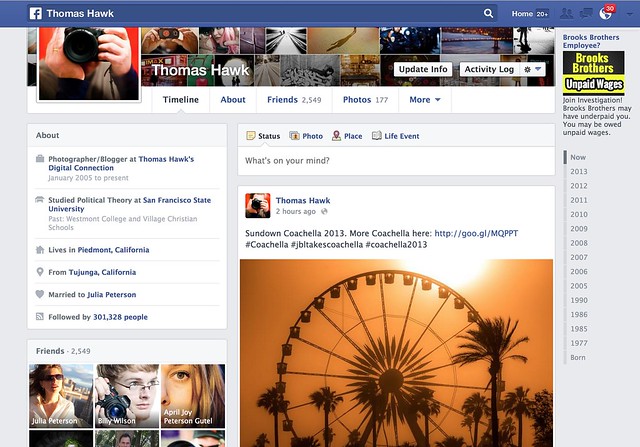
The New Facebook Timeline

I had the new Facebook Timeline turned on for me yesterday. My wife got it about a week ago. Does anyone else have it? Do you like it? Anyone ever seen that movie Memento?

Photos feel larger — I like that — but I don’t really like the way that photos are cropped.

The old timeline forced everything into a square box by default so landscape/portrait crops were still problematic. You could reposition the photo after the fact (sometimes, when the reposition tool worked, which was probably less than 10% of the time for me) but your photo got stuck in a square crop. You could also “feature” the photo which would give it an extreme horizontal crop manually.

By the way, I seem to be able to use the reposition tool again now with the switch over to the new timeline.

Part of me liked the old Facebook timeline format. I love the square photo. It’s my favorite crop of all. When I uploaded a square to Facebook it would then show perfectly on my timeline page. If the other crops suffered, oh well.

The new timeline page goes back to a traditional landscape crop. So now when you upload your landscape oriented photos to Facebook they fit and look great. Unfortunately though, now both the portrait and the square crop are squashed into a landscape box.

Why on earth doesn’t Facebook just display BOTH landscape and square crops in their original crop? This is what they do on mobile btw, so it would seem more consistent. This would mean that square photos would be even bigger on the web version of Facebook, but everybody wants bigger photos anyways, so why make our square crop photos suffer in that landscape oriented box? This is what Flickr does by the way. On Flickr the square crop is king. I love that.

Of course portrait oriented photos get butchered even worse now with the new Facebook timeline — now they are squeezing a portrait photo into a landscape orientation instead of a square. Some of these just look awful.

It does feel like Facebook is trying to somehow more intelligently decide which portion of square and portrait photos get shown in the landscape box. Maybe their algorithm is looking for the eyes and focusing on that. I’m not sure, but it feels like the auto cropping is a little smarter and more intelligent.

Google+ takes a different approach. They retain the photographer’s original crop… but then you are stuck with those damn grey bars on the sides of your square and portrait photos on G+. For the life of Kevin, I’m not sure why G+ doesn’t just let the square photo have the entire envelope. It would look much better than those tiny little gray bars on the side and it’s just giving square photos an ensy weensy more real estate.

Which is what Facebook should do too, by the way. Square crops sort of fit into the landscape envelope, but why make the square suffer that way? Just liberate it. Make the square the king. I thought Facebook was doing this on the newsfeed a couple of weeks ago, but I think they switched back to cramming a square photo in a landscape box with both the new newsfeed and timeline now too.

Is there an answer to this perplexing problem about how best to display our images on the web? Why can’t we have just one big gigantic mosaic wall on both Facebook and Google+, that’s actually my favorite format of all I think.

Other changes on the new Facebook timeline, include moving your follower count over to a smaller less prominent place on the left. They also give the actual number now, instead of something that just said 300K before. You can add or remove certain modules out of the smaller left side column if you want.

Despite the photo crop issues, overall I like the new timeline a lot. I like it better than the old version. It feels more fluid and slick. I do like that overall photos do appear bigger. Landscape oriented photos especially look great there now.

The new comment system drives me a little batty though. I can never figure out who is talking to who and I feel like I’m trapped in some sort of web version of the movie Memento — but that’s a whole other topic entirely. I can never understand who said what in what order to who. I feel like I’m trapped in some sort of online version of that old movie Memento.

Unfortunately, as usual, with the new Facebook timeline we’re still stuck with the damn ads. I wish Facebook’s ads weren’t so especially vulgar. Why is Facebook trying to get me to join some lawsuit about unpaid wages at Brooks Brothers? I hate lawsuits — plus I’ve never worked at Brooks Brothers. Shouldn’t Facebook be smarter than that in terms of what ads it shows me? Why does Facebook think I worked at Brooks Brothers? Next thing you know some other ambulance chaser is going to start advertising at me just in case I’ve ever had Mesothelioma. Facebook should let us pay for a Pro account and exempt us from bad advertising.

By the way, anyone ever seen that movie Memento?


Thomas Hawk Digital Connection

 
Comments Off on What Do You Think of Photos on the New Facebook Timeline?

Posted in Photography


Apple Raw Compatibility Update v4.05 adds X-Trans support

18 Apr

Aperture.png

Apple has added Raw support to its OS-X operating system for four high-end Fujifilm cameras – the X20, X100S, X-E1 and X-Pro1. To install the Digital Camera Raw Compatibility Update v4.05, users require Aperture v3.4 or later and iPhoto version 9.4 or later. Click through for the download link.

News: Digital Photography Review (dpreview.com)

 
Comments Off on Apple Raw Compatibility Update v4.05 adds X-Trans support

Posted in Uncategorized


Offcut Cityscapes: Sketching Sculptures with Band Saws

18 Apr

[ By WebUrbanist in Art & Sculpture & Craft. ]

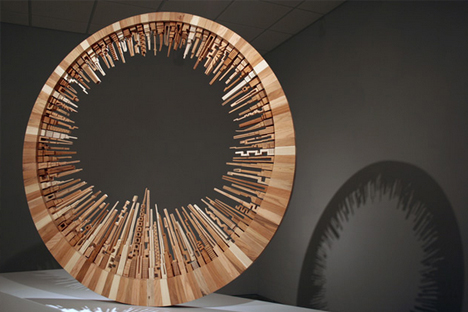
offcut sculptural cityscapes

An adept furniture maker is familiar with scrap – but this designer-and-artist has turned leftover materials into something just as fantastic as his normal finished projects.

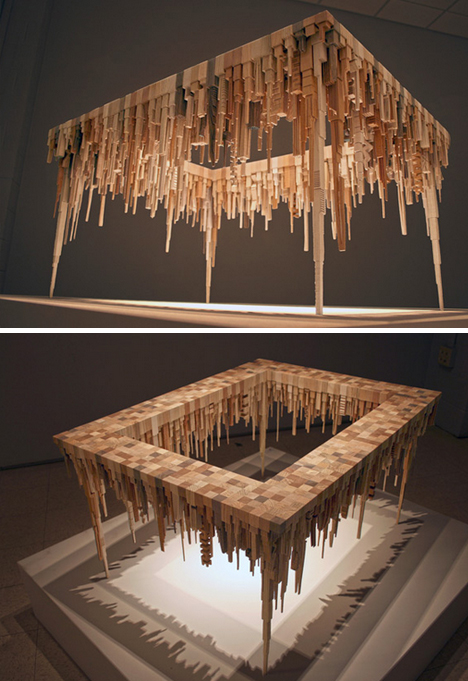
offcut wood urban sculptures

James McNabb has crafted fine wooden designs using lasers and routers, but the band saw drove this stunning series of abstract city landscapes shaped into circles and in some cases patterned after furniture, from tables and shelves to chandeliers.

offcut bandsaw furniture sculpting

He began shaping the individual pieces without picturing them as architectural, but by arranging them on a grid, the sense of buildings emerges from each work.

offcut wooden shadow table

As he assembles each from uniquely-cut shapes, individual structures may be similar but no two compositions are alike.

offcut mfa student debut

offcut wood traditional furniture

Like many stellar artists of history and the present, his creativity comes from a departure from but includes education in traditional forms and techniques – his beautiful furniture forms the basis for these more innovative offshoots.

Share on Facebook


[ By WebUrbanist in Art & Sculpture & Craft. ]

[ WebUrbanist | Archives | Galleries | Privacy | TOS ]


WebUrbanist

 
Comments Off on Offcut Cityscapes: Sketching Sculptures with Band Saws

Posted in Creativity


Nice Visual Art photos

18 Apr

Check out these visual art images:

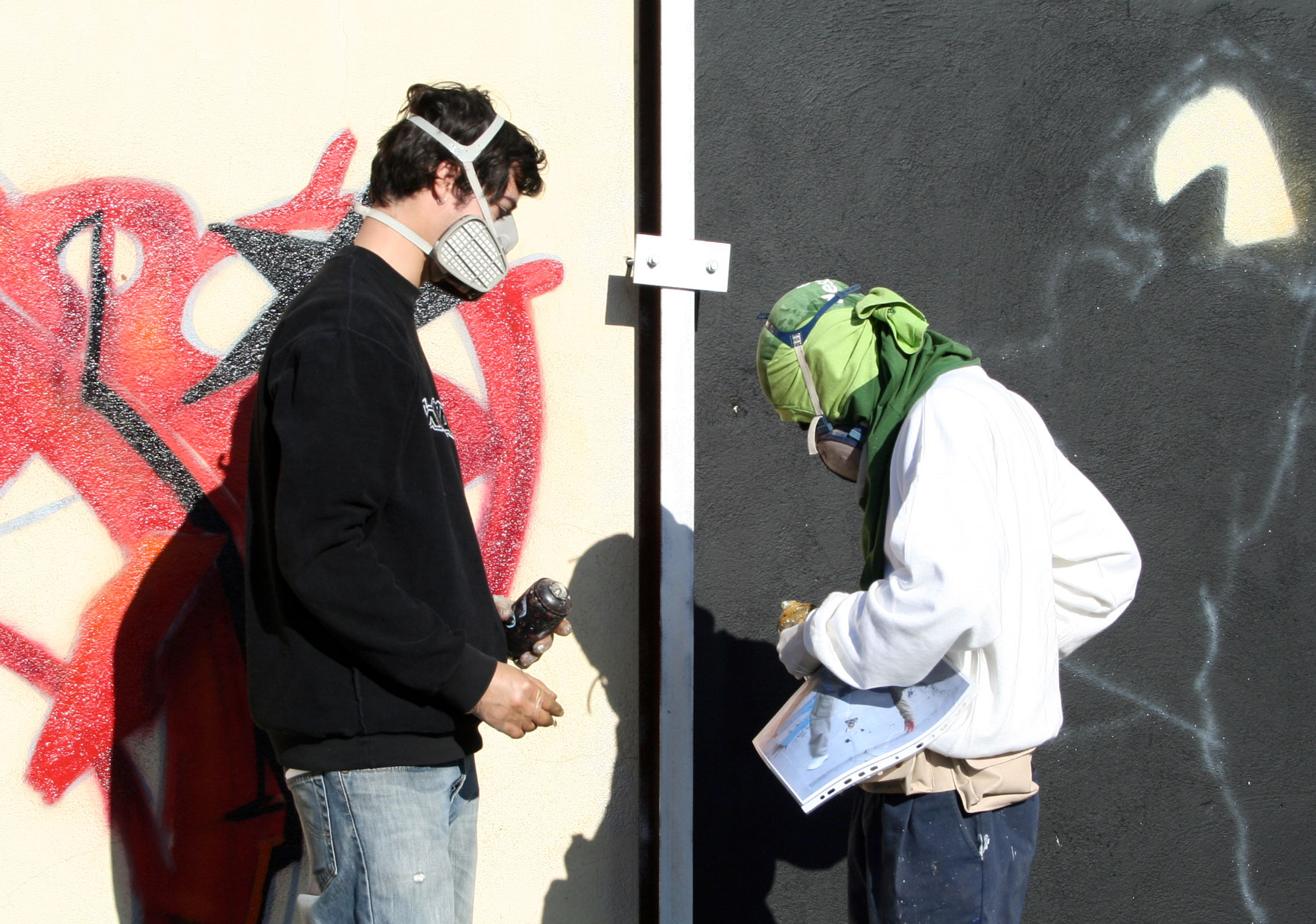
VSP Visual Street Performance 2007 @ Fabrica Braco de Prata, Lisbon, Portugal
visual art
Image by Graffiti Land

 
Comments Off on Nice Visual Art photos

Posted in Photographs


18. April 2013

18 Apr

Ein Beitrag von: David Uzochukwu

© David Uzochukwu


kwerfeldein – Fotografie Magazin

 
Comments Off on 18. April 2013

Posted in Equipment


Boston marathon snapshots take on new meaning

18 Apr

TS520x0~cms_posts_2720003956_photo.JPG

DPReview Connect contributor Lauren Crabbe was among those taking photos with her smartphone at the finish line of the Boston Marathon on Monday. Following the explosion of two bombs in the area just over an hour after she was there, her snapshots took on a new meaning when the FBI asked spectators to submit their images as evidence in the ongoing investigation. Read her first-person account today on connect.dpreview.com.

News: Digital Photography Review (dpreview.com)

 
Comments Off on Boston marathon snapshots take on new meaning

Posted in Uncategorized


Film Grains Meet Digital Pixels: A Complete Guide to Scanning Film

18 Apr

Extra photos for bloggers: 1, 2, 3

iPhones, and internets, and ion implanters! Oh my!

In this tech-savvy world we can return to 100%-analog-photog-goodness and transform them to digital with some simple scanner-wizardry.

This handy guide will show you how to scan your film, merging all of the sweetest parts of analog with the ease and shareability of digital.

The best part? You don’t have to know a thing about rocket science to follow along.

Learn How to Scan Film!

p.s. Our buddies at Printstagram make some of the bestest Instagram prints we’ve seen! You can make it happen right from your phone.

Why it’s Cool:

paint-smWe all know the benefits of analog photography: slower pace, limited number of frames, and those old cameras are just plain fun to use.

The only downside? Your inner tech maven is crying out for all of those lost shares on Facegram, instabook, and PinTube! Or something like that.

This guide will equip you with the tools to get started on making film grains best friends with digital pixels.

Ingredients:

ingred-sm

  • Film Scanner (We used a flatbed Epson V600.)
  • A computer
  • Developed 35mm film
  • Dust Blower, Microfiber Cloth, or Anti-Static Brush

Flatbed Scanners vs. Dedicated Film Scanners

paint-smThere are a few brands of scanners, but they mostly fit into two categories for consumers: flatbed scanners and dedicated film scanners.

This article will be dealing specifically with an Epson V600 flatbed scanner, but many of the techniques will still apply, especially to other flatbeds!

Here’s a quick rundown of the pros and cons of a flatbed scanner.

  • Cost: For the most part, a flatbed is a very reasonable option in terms of price and quality.
  • Uses: In addition to being affordable, many flatbeds are able to do both 120 and 35mm, something usually reserved for very expensive dedicated scanners.
  • Ability: Flatbed scanners are certainly capable of great results, but a dedicated scanner is always better. After all, that’s what it’s built for!

Step 1: Prepping The Film

paint-smHere’s what we need to do to the film in order to ensure the best scan.

Dust bunnies sound cute, but for scanning, they are not your friend! Use a dust blower, a clean microfiber cloth (Extra emphasis on clean! There’s nothing worse than scratched film), or an anti-static brush to get rid of any dust that may have settled on the negative.

Tips for preventing dust:

  • Break Out The White Glove: make sure your working environment is as clean as possible. If there’s no dust in the are to begin with, there won’t be any to go on your film.
  • Pre and Post-Scan Storage: Store your negatives in sleeves or binders to keep exposure to open air as infrequent as possible.
  • Dust During Drying: If you develop your own film, try to limit either the air flow around your film as it dries or the dust in the environment. Wet film and dust stick better than glue!

Step 2:Insert Film Into The Negative Holder

paint-smOne of the greatest challenges with scanning is film flatness.

The scanner works a bit like your camera; it focuses on the film to take a “picture” of it. If your film isn’t flat, it’s harder for everything to be in focus. A little curl is manageable.

Place film under a book to flatten unruly negatives, but make sure they’re in a sleeve so they don’t get dusty or scratched.

Each negative holder is a bit different, but here’s how it’s inserted into ours.

Step 3: Place Negative Carrier Onto Scanner

paint-sm This one’s as easy as it sounds! Each scanner has a specific orientation for the negative carrier depending on the film type.

On the Epson V600, there’s an “A” on the negative carrier that should line up with the “A” on the side scanner bed.

If your scanner doesn’t have markings, make sure to place the negative carrier under the slot of glass in the top of the scanner.

Step 4: Scanning Software

paint-smThis step will also be specific to your scanner. We’re using the included Epson Scan software in Professional Mode.

Here are the main points:

  • Make sure to choose the “Film” setting and then the appropriate type: black and white, color negative, or positive
  • Choose the resolution: for files that are easy to work with and great for web use, we set ours to 1200 DPI. If you have plenty of space on your harddrive or want to print above an 8×10, scan at a higher resolution to get a larger image
  • Don’t forget to switch on Dust Removal to get any spots you missed earlier
  • First, hit the preview button and let the scanner generate a preview. At this point you can rotate the photo and mirror the image if the film isn’t oriented correctly.
  • Lastly, choose the file format for the scan and you’re good to go! We usually scan ours as jpeg. A TIFF can provide more information, but at the cost of much larger files. If you need to make corrections to a scan it’s a better option, but for many sharing purposes a jpeg is sufficient!

There are a few third party software options for scanning as well, and our favorites are VueScan and Silverfast.

The advantage to these programs is that they offer more customizability and control over the scanning process. Plus, they have some neat tricks such as setting the film stock to try to get the most faithful result. They’re both friends with PC’s and Macs!

Step 5: Final Touches

paint-sm Once the scan is completed, you have a few choices of where to go next. You can take the scan “as is” and go from there, or import into Photoshop, Lightroom, and other editing programs to make some slight changes.

Sometimes a few tweaks are needed after the fact so that the imagined picture lines up with the actual picture!

Some post-scan adjustments

  • Contrast: This is a big one for black and white. Adjust the contrast so that it’s more faithful to the look of the negative
  • Color: Sometimes a scan will have a shift in colors or have an overall color cast that’s undesirable. The curves adjustment will be your BFF. Utilize the separate color channels to get the look right.
  • Sharpness: Sharpness can be detrimentally affected by the scan. Apply a little unsharp mask or boost the sharpening slider in Lightroom to taste.
  • Dust and Scratch Removal: Despite our best efforts, dust can still remain on the negative and sometimes they get scratched as well. An easy way to fix this is to use the healing brush or clone brush in Photoshop.

This isn’t to change the look of the film, but sometimes this information gets skewed in the scan and needs to be returned to the appropriate value.

Taking it Further

  • Try it with medium format!
  • Try using your DSLR and a macro lens to scan!
  • Ditch the film. Use your scanner as a Camera!

Related posts:

  1. Meet Mr. Digital Clover, A Keychain Camera with Film Camera Appeal Extra photos for bloggers: 1, 2, 3 Bus rides can…
  2. How-To: Turn Digital Photos into Artistic Sunprints! Extra photos for bloggers: 1, 2, 3 Boy, do we…
  3. Keep Your Film Safe on Plane Trips Extra photos for bloggers: 1, 2, 3 The airport x-ray…


Photojojo

 
Comments Off on Film Grains Meet Digital Pixels: A Complete Guide to Scanning Film

Posted in Equipment


Wir nennen es Wolkenschloss

18 Apr

Ein Beitrag von: Laura Zalenga

Manchmal frage ich mich, wie das alles so vor Facebook war. Also das mit der Fotografie. Ich kann mir ein Leben ohne gar nicht mehr richtig vorstellen. Jetzt werden ein paar Augen verdreht und entnervt „Generation Facebook“ gerufen, aber lest erst einmal:

Facebook hat ja den Ruf, mit unnützen Fotos von Urlaub, Nachspeise und langweiligen Statusupdates einfach nur ein Zeitdieb zu sein, außerdem gerät es immer wieder in große Copyrightdiskussionen, aber für mich hat es sich zu einem sehr wichtigen Ort für meine Fotografie entwickelt.

Nicht, weil es eine weitere Plattform ist, auf der ich meine Bilder zeigen kann, sondern weil ich dort in einem eigenen Fotofreundeskreis zu Hause bin. Der nächste Aufschrei: „Sie nennt Facebook ihr Zuhause!“ Aber wie nennt man denn sonst Freunde, die einen unterstützen, bei Problemen beraten und Wissen austauschen, sich treffen, gemeinsam Ausflüge planen, zusammen lachen?

Und wieso braucht man dazu Facebook? Weil die meisten dieser Freunde nicht aus Deutschland, viele nicht einmal aus Europa kommen. Seit Jahren kannten wir die Bilder der anderen von Flickr, haben hier und da mal einen Kommentar oder eine Nachricht hinterlassen, aber es war kein Raum da, sich wirklich kennenzulernen.

Bis letztes Jahr im Mai jemand auf die Idee kam, eine private Flickr-Gruppe auf Facebook zu starten. Und plötzlich lernte man alle wirklich kennen und aus fremden Fotografen wurden Freunde.

Und aus der Flickr-Gruppe sind bald einige kleinere entstanden. Es gibt zum Beispiel eine Gruppe, in der man ein Bild zur Bearbeitung freigeben kann, um zu sehen, was andere daraus machen würden und um von ihnen zu lernen.

Es ist immer wieder inspirierend zu sehen, auf welche Ideen andere mit den eigenen Bildern kommen und auch das Bearbeiten anderer Bilder bringt viele neue Ideen.

© Laura Zalenga

In einer anderen Gruppe zeigt man Bilder, die schief gelaufen sind. Wir hatten schon die lustigsten Nies-Grimassen, wilde Tiere im Bild und große Windprobleme. Es macht Spaß, gemeinsam zu lachen und zu sehen, dass bei den anderen auch nicht immer alles beim ersten Mal funktioniert.

© Laura Zalenga

Eine viel genutzte Gruppe ist auch die für „Fotografen-Probleme“. Von Bilderklau über unangebrachte Kommentare und Kundenprobleme bis zu Honorarfragen: Bisher wurden in der Gemeinschaft von 300 Mitgliedern fast immer hilfreiche Tipps oder notfalls tröstende Worte gefunden.

© Laura Zalenga

Eine letzte Gruppe, die ich ansprechen möchte, gibt allen die Möglichkeit, gemeinsam Fotokonzepte auszuarbeiten und zu verwirklichen. Oft gibt es ein monatliches Thema, zu dem viele ein Foto machen.

© Laura Zalenga

Sicher gibt es für all diese Dinge auch Foren im Internet, aber mit Leuten zu diskutieren, die man kennt, deren Bilder man kennt und die die eigenen Bilder kennen, die im gleichen Alter sind und die gleichen Ziele haben, macht es zu etwas Besonderem und Vertrautem.

Seit ein paar Wochen bin ich in einer Gruppe, die ein Treffen in Österreich plant. Zwanzig Fotografen (aus Deutschland, Österreich, der Schweiz, Norwegen, Frankreich, Luxemburg, Rumänien, den Niederlanden, England und Irland) werden im August eine Woche lang in einer gemütlichen Berghütte leben und fotografieren.

Die Vorfreude ist riesig und ich werde wohl einen Hintergrundbericht und Fotos für kwerfeldein mitbringen.

© Laura Zalenga

In der ursprünglich großen Gruppe geht es mittlerweile mehr um Allgemeines und man postet hier, wenn man alle erreichen will, wenn man eine Frage hat und eine Bandbreite an Antworten möchte. Es werden zur Zeit etwas utopische Pläne zu einer Gruppenvollversammlung geschmiedet.

© Laura Zalenga

Allein die Vorstellung lässt uns alle in bunte Tagträume versinken. Irgendwann werden wir ein Märchenschloss mieten, alle einfliegen lassen und den lieben langen Tag Fotos machen, lachen, diskutieren und Pferde stehlen.

Bis dahin werden wohl diese Gruppen unser imaginäres Schloss bleiben, unsere ganz eigene Welt.

Die Links zu unseren Gruppen darf und will ich an dieser Stelle nicht verraten. Sie sollen dieser kleine, private Ort bleiben, an dem jeder jeden kennt. Für alle die, die jetzt ihren Unmut über Facebook kommunizieren wollen: Es gibt auch andere Orte, an denen solche Gruppen möglich sind.

Denn es geht hier nicht um Facebook, sondern schlicht um einen Ort, an dem man sich mit Gleichgesinnten austauschen kann. Also gründet doch auch eine solche Gruppe auf Eurer Lieblingsplattform mit Fotografen, die Euch inspirieren und mit denen Ihr Euch austauschen möchtet. Aus meiner Erfahrung ist es die Sache eindeutig wert.


kwerfeldein – Fotografie Magazin

 
Comments Off on Wir nennen es Wolkenschloss

Posted in Equipment


My Favorite Photography Comic “What the Duck” is Back

18 Apr

My favorite photography comic What the Duck is back as a daily.
whattheduck.net
If you’re unfamiliar with What the Duck it’s authored by Aaron Johnson, whom I interviewed several years ago when I was running my EXIF and Beyond podcast. While I’ve never met Aaron I consider him a friend as he’s done such a great job adding to the sense of community amongst photographers with his wit, humor and creativity.

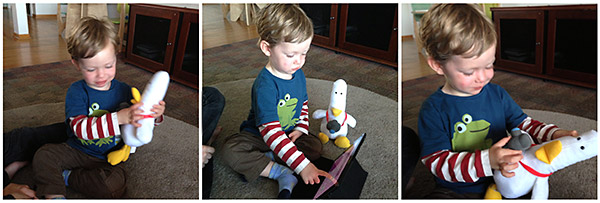
If you’d like to support Aaron he’s selling What the Duck plush dolls of his most popular characters at incredibly reasonable prices with some being limited editions. I picked up one of each and gave an extra to my son. They came out great!

I highly recommend visiting WhatTheDuck.net daily now that he’s back and for old time sake here is the recording of my interview with Aaron in February of 2009.

var flashvars = {
width: “530”,
height: “253”,
autostart: “false”,
repeat: “false”,
backcolor: “111111”,
frontcolor: “cccccc”,
lightcolor: “66cc00”,
stretching: “fill”,
enablejs: “true”,
mute: “false”,
skin: “http://www.jmg-galleries.com/blog/wp-content/plugins/proplayer/players/skins/stylish.swf”,
logo: “http://www.jmg-galleries.com/blog/wp-content/plugins/proplayer/players/watermark.png”,
image: “http://www.jmg-galleries.com/blog/wp-content/plugins/proplayer/players/preview.png”,
plugins: “”,
javascriptid: “5265pp-single-516f895e2eafc”,
image: “http://www.jmg-galleries.com/blog/wp-content/plugins/proplayer/players/preview.png”,
file: ‘http://www.jmg-galleries.com/blog/wp-content/plugins/proplayer/playlist-controller.php?pp_playlist_id=5265pp-single-516f895e2eafc&sid=1366264158’
};
var params = {
wmode: “transparent”,
allowfullscreen: “true”,
allowscriptaccess: “always”,
allownetworking: “all”
};
var attributes = {
id: “obj-pro-player-5265pp-single-516f895e2eafc”,
name: “obj-pro-player-5265pp-single-516f895e2eafc”
};
swfobject.embedSWF(“http://www.jmg-galleries.com/blog/wp-content/plugins/proplayer/players/player.swf”, “pro-player-5265pp-single-516f895e2eafc”, “530”, “253”, “9.0.0”, false, flashvars, params, attributes);


Copyright Jim M. Goldstein, All Rights Reserved

My Favorite Photography Comic “What the Duck” is Back

The post My Favorite Photography Comic “What the Duck” is Back appeared first on JMG-Galleries – Landscape, Nature & Travel Photography.


JMG-Galleries – Landscape, Nature & Travel Photography

 
Comments Off on My Favorite Photography Comic “What the Duck” is Back

Posted in Equipment