RSS
 

Posts Tagged ‘zoom’

Lensrentals proposes ‘Roger’s Law of Wide Zoom Relativity’

31 Mar
Trippy stuff – this is MTF data from nine copies of the Canon EF 16-35mm F2.8L II, at 16mm. Nice and sharp in the center, less so at the edges. That said, all nine of these lenses test as ‘good’ samples. 

Arch lens nerd Roger Cicala has probably handled more lenses this week than an average photographer might use in a lifetime. And recently, he’s been busy testing multiple copies of several popular wideangle zooms to try and prove what he calls ‘Roger’s Law of Wide Zoom Relativity’.

Simply stated, Roger’s ‘law’ states that wideangle zoom lenses are virtually always sharpest at the wide end of their zoom range, softening as the lens is zoomed. Although many of us have often wondered whether this is the case, Roger’s exhaustive testing proves that it holds true over multiple copies of several modern lens designs, all the way from Nikon’s 14-24mm F2.8 to Canon’s stunning new 16-35mm F2.8L III.

Averaged MFT charts for nine copies of Nikon’s 24-70mm F2.8VR on the left, and data from the older 27-70mm F2.8 on the right. Advances in lens design are obvious from increased sharpness and better consistency across the zoom range. 

What does this mean for the average enthusiast photographer? Just that if you’re the kind of shopper that obsessively tests and returns lenses which aren’t up to your requirements (cough, cough – Rishi…) you can save a lot of time by only testing the wide end. 

Also of interest is just how good some modern lens designs are. Compared to its predecessor, the new Canon 16-35mm F2.8L III’s MTF charts are extraordinary. Likewise Nikon’s 24-70mm F2.8 VR, compared to the lens it replaced.

Thanks as always, Roger, for testing nine copies of everything so that we don’t have to.

Read Roger Cicala’s full blog post at LensRentals.com

Articles: Digital Photography Review (dpreview.com)

 
Comments Off on Lensrentals proposes ‘Roger’s Law of Wide Zoom Relativity’

Posted in Uncategorized


Prime Lenses: Can you really zoom with your feet?

16 Mar

There’s a common maxim touted in photographic circles, especially in online forums and message boards. It states that some of the limitations of shooting with a prime lens can be overcome by simply moving your body around. The idea of “zoom with your feet” or SneakerZoom, as it’s sometimes called, is often used as a panacea for those who think prime lenses are limiting in terms of what they can do compared to their zooming counterparts.

To a certain extent this is true. If you want to get closer to your subject you can just physically move your body if you don’t have a zoom lens, but doing so results in images that are not at all the same as using a zoom lens. Zooming with your feet is somewhat of a misnomer because zooming implies a change of focal length. But when you move around with a prime lens you are not changing the focal length at all. Instead, you are recomposing with your feet. In this article I’ll explore why this is a simple but significant difference using a few examples below.

Prime Lenses: Can you really zoom with your feet?

How lenses work

To understand how lenses work it’s important to know a few things. The focal length is a measurement of the distance between the optical center of the lens (the point at which incoming light converges) and the image sensor of the camera to which it is attached.

Many cameras come with what’s known as a kit lens. Most of those cover a relatively modest range of focal lengths, with the most common being about 18mm to roughly 55mm. At 18mm, the lens bends light in such a way that the incoming light converges on a point 18mm in front of the image sensor. This results in a field of view that is about 76 degrees wide. (Assuming you are shooting with a crop-sensor camera like a Canon Rebel or Nikon D3300. On a full-frame camera like a Canon 5D Mark IV or Nikon D810 it would be about 90 degrees.)

At 50mm, the angle of view changes to roughly 31 degrees. The practical implications for this are that you can simply fit more in the frame when shooting at a wider focal length versus a longer one. Take the example of photographing a tree, as you can see in the following illustration.

Prime Lenses: Can you really zoom with your feet?

Angle of view versus moving your feet

Shooting at 18mm would allow the photographer in this example to fit the whole tree in the frame, but unfortunately this photographer is using a 50mm prime lens that does not zoom in and out. At this point, you might be thinking, “No problem, just walk backwards to get the whole tree in the frame”.  My good friend Bob Slydell from the movie Office Space would respond, “Just a second there, professor.” While it’s true the photographer could walk backwards and reposition himself such that he could fit the entire tree in the picture, there are two problems with this solution:

  1. There is a pond filled with crocodiles right behind him
  2. He would still have a 31 degree viewing angle

No matter how far backward, forward, or sideways the photographer in this example repositions himself, the angle of view with the 50mm lens will still be the same. Theoretically, he could construct a raft and float across the pond in order to fit the entire tree in the frame. But doing so would result in a dramatically different picture than if he just uses a wider lens to begin with. Zooming with his feet, or in this case with a boat, will work to get a picture of the tree, but doing so will alter the other compositional elements of the photo.

An example

To see how this works, here’s a revised version of the image above wherein the photographer has retreated far enough to get the entire tree in the frame. In this example, there are five pinwheels behind the tree that are well contained in the wide-angle shot. While moving backward has solved the issue of getting the tree in the frame, the narrow viewing angle means that not all the pinwheels fit in the shot.

Prime Lenses: Can you really zoom with your feet?

The only way to solve this problem using a Zoom With Your Feet solution would be for the photographer to move way back such that the tree and all the pinwheels could fit in the frame. At which point the original subject (the tree) would be so diminished that the image wouldn’t be the same at all.

Real life examples

Of course, this is a theoretical example, but watch what happens when the same type of scenario is replicated in the real world. I shot the following three images using my 70-200mm lens. Watch what happens as the focal length, as well as the distance to the subject, changes.

Shot #1 – 70mm, from far away

Prime Lenses: Can you really zoom with your feet?

70mm, f/4, ISO 100

Can you tell what the subject is in this picture? It’s supposed to be the artwork in the middle–a boy fishing with his dog, carved from the trunk of a fallen cypress tree. The angle of view in this picture is about 34 degrees (I shot this on my full-frame Nikon D750), which is enough to capture lots of scenery in the frame. Notice how in addition to the boy and his dog you can also see trees, a building, and even some foreground elements such as a pond and grass.

Shot #2 – 200mm, from far away

Prime Lenses: Can you really zoom with your feet?

200mm, f/4, ISO 100

Standing in the exact same spot as before but zooming into 200mm has had a dramatic impact on the picture. Now the viewer’s attention is focused squarely on the carving, and the field of view is now limited to a much narrower 12 degrees. Note where the head of the carving is in relation to the building in this image: it is framed between two columns on the first floor above the ground, which is quite different from the next picture.

Shot #3 – 70mm, shot from close up

Prime Lenses: Can you really zoom with your feet?

70mm, f/4, ISO 100

This final photograph was made by zooming with my feet, I repositioned myself to be much closer to the tree carving. The resulting image is similar, in that the carving itself is roughly the same size as in the 200mm shot, but the field of view is 34 degrees because I shot this at 70mm. Even though the subjects are similar in shot #2 and shot #3, the pictures are entirely different!

The wider field of view in shot #3 resulted in an image with a lot of background elements that distract the viewer. The boy’s head is now positioned near the top of the building, despite the fact that my camera was the same distance above the ground. While the classic SneakerZoom technique has certainly worked to get my subject looking how I wanted, the end result is quite different from actually using a proper zoom lens.

Zooming with your feet is NOT the same

These examples show that while you certainly can zoom with your feet, doing so is not the same at all as zooming with a telephoto lens. When you move around you are not really zooming but recomposing. While this is not a bad thing, it is something to be aware of when choosing lenses or honing your photography technique.

As another example of this phenomenon, here are two pictures from a recent session I did with a local family. I shot the first one with my 70-200mm lens. It’s a traditional portrait-style image with a blurred out background with the focus squarely on the faces and upper bodies of both women.

Prime Lenses: Can you really zoom with your feet?

200mm, f/2.8, ISO 100

I then zoomed all the way out to 70mm in order to get a closer, more personal image of the two women. After changing to a 70mm focal length I had to walk much closer to the ladies, essentially zooming in with my feet, in order to get them to appear the right size in the frame. The resulting image feels entirely different, not just because they are sitting on the ground showing off their matching wrist tattoos, but because you can see that they are sitting in the middle of a green field strewn with autumn leaves.

70mm, f/4, ISO 100

Shooting at 200mm meant a highly compressed field of view with only a small slice of the trees and background visible. Whereas in the bottom picture you can once again see the effects of the wider viewing angle afforded by shooting at 70mm.

Different planes

One final example that’s necessary to illustrate this phenomenon, is when you and your subject are not on the same horizontal plane. In these situations, changing your focal length can bring you much closer to what you are trying to shoot, whereas walking around will significantly alter the scene, based on the foreground and background elements, as well as the angle from which you are viewing the subject.

Shot #1 – 70mm, from far away

Prime Lenses: Can you really zoom with your feet?

70mm, f/4, ISO 100

This image looks decent, but I didn’t like how the flags shared the frame with the building behind them, especially the chimney in the corner with the radio antenna. Since I shot this at 70mm I had a couple options to improve the shot; including zooming into 200mm or zooming with my feet to get closer to the flags. I started with the first option and was very happy with the result.

Shot #2 – 200mm, from far away

Prime Lenses: Can you really zoom with your feet?

200mm, f/4, ISO 100

Zooming with my lens gave me a much better picture. One that focuses entirely on the flag pole with no distracting background elements and a nice cloudy sky to help the flag pop out of the frame. One tradeoff is that the Oklahoma flag is no longer visible. I could have zoomed in only partially to 135mm if I wanted to include it, but I decided that the picture would be more impactful if it just had a single subject instead of two flags. After getting this shot I zoomed in with my feet to see if I could get a decent picture at 70mm by moving much closer to the subject.

Shot #3 – 70mm, shot close up

Look at how different this final image is compared to the 200mm version! While I was able to get the United States flag much larger in the frame, I ended up shooting from such a low angle that the flag pole itself draws almost as much attention as the banners it is holding. The Oklahoma flag is also visible in this version, which has the unfortunate side effect of creating an image that is unfocused and busy. There are now two subjects in the frame (three if you count the pole.) This leaves the viewer with a sense that the image is cluttered and unfocused. Zooming with my feet did allow me to get closer to the subject, but it altered the composition so significantly that the resulting image is unusable.

Conclusion

Hopefully, these examples will help you start to visualize why moving around is not at all the same as changing your focal length. Please understand that I’m not saying you should sell all your prime lenses and rush out to buy a zoom lens, though. I use prime lenses all the time, and by far my most-used lens is the Nikon 35mm f/1.8 for its size, weight, and sheer versatility.

My goal is simply to help you understand that when you are shooting with a prime lens you need to know that moving closer to, or farther away from, your subject does not have the same effect as actually changing the focal length. Once you understand that, you can start using this knowledge to your advantage. You can structure your photo techniques around this important limitation of prime lenses, and hopefully, take much better pictures as a result.

The post Prime Lenses: Can you really zoom with your feet? by Simon Ringsmuth appeared first on Digital Photography School.


Digital Photography School

 
Comments Off on Prime Lenses: Can you really zoom with your feet?

Posted in Photography


Field Test: The Hasselblad True Zoom Camera and Moto Z Smartphone

09 Mar

It’s impossible to ignore the fact that camera phones are becoming increasingly better. With impressive image quality and the ability to add on and shoot with mobile phone lenses, the case for replacing your dedicated camera with your cell phone is becoming more compelling by the day. However, one aspect of camera phones really hasn’t seen much improvement: ergonomics. Shooting with a camera phone is for some still pretty awkward and difficult to get used to. Here’s where the Hasselblad True Zoom comes into play.

Below are some notes and observations from a week-long experiment of shooting with the Hasselblad True Zoom and Moto Z smartphone.

Field Test: The Hasselblad True Zoom Camera and Moto Z Smartphone

What is the Hasselblad True Zoom?

The Hasselblad True Zoom makes your smartphone feel and function like a point-and-shoot camera. It is one of many Moto Mods available to add extra features to Motorola Moto Z smartphones, so all mods are limited to use on the Moto Z phones only. All Moto Mods attach to the phone via extra strong magnets, and can easily be detached.

To be perfectly honest, the Moto Z smartphones have superb native cameras. The Moto Z Force Droid, in particular, is very impressive and it even outperforms the Apple iPhone 7. This is to say that image quality is great with or without the Hasselblad True Zoom mod, but it is certainly nice to have some of the mod’s extra features.

Field Test: The Hasselblad True Zoom Camera and Moto Z Smartphone

Hasselblad True Zoom Specs

  • Compatible phones: Moto Z Droid, Moto Z Force Droid, Moto Z Play Droid
  • Dimensions / Weight: 152.3 x 72.9 x 9.0 – 15.1 mm / 145g
  • Sensor resolution: 12MP
  • Video resolution: 1080p Full HD at 30fps
  • Sensor size / Pixel size: 1/2.3-inch / 1.55 um
  • Aperture: f/3.5-5.6
  • Zoom: 10x optical/4x digital
  • Flash: Xenon flash
  • Capture modes: Photo, panorama, video, professional, night landscape, night portrait, sports, day landscape, back light portrait
  • Storage Internal phone: 32GB-64GB microSD
  • Price: $ 250
  • Carrying case included

best smartphone photography camera

The good

By far the best part of about the Hasselblad True Zoom is the fact that it allows you to use a phone (somewhat) like a real camera!

Physical camera controls

For those of us who despise having to pinch to zoom on a mobile phone, the Hasselblad True Zoom is a welcome relief. The mod is complete with a physical shutter release button and a physical zoom switch to operate the mod’s 25-250mm-equivalent range. There’s also an on/off button to turn the camera off and on without having to first unlock the phone.

Field Test: The Hasselblad True Zoom Camera and Moto Z Smartphone

Ability to control the camera via a touchscreen

After the mod is attached, the phone’s stock camera app switches over to “Professional mode.” This mode allows for manual camera control via the phone’s touchscreen. While you don’t have true manual control over every aspect of the camera (more on that below), you can adjust certain features such as ISO, capture mode (e.g. Action, Portrait mode, etc.), and choose to shoot in RAW or JPG format.

Field Test: The Hasselblad True Zoom Camera and Moto Z Smartphone

Professional mode options.

Comes with a carrying case

While you can operate your phone as usual even with the mod attached, you’ll probably want to remove it occasionally. Luckily, a solid carrying case with a wrist strap is included so you can keep your mod safe when you aren’t using it.

What could be improved

For every positive feature listed above, there’s an aspect that could be improved.

Limited manual control

Manual camera control on the Hasselblad True Zoom mod is still pretty limited. While it’s nice to be able to adjust the ISO, it’s not possible to adjust aperture or shutter speed. It’s a real shame, considering the native f/3.5-5.6 aperture available.

Field Test: The Hasselblad True Zoom Camera and Moto Z Smartphone

Extra physical features missing

The addition of a physical shutter button and zoom toggle is very welcomed and makes it easier to operate your phone like a true camera. However, two key features are missing.

First is a wrist strap that attaches to either the phone or camera. Considering how expensive the devices are and how bulky they can get, a strap would add a sense of security.

Second is a tripod thread. Since you don’t have full manual control over the camera, many low lighting shots revert to settings with incredibly slow shutter speeds, resulting in blurry images when shot handheld. Also, trying to take advantage of the mod’s 10x zoom feature while also holding the camera steady is incredibly tricky. There are some sample images below that demonstrate these focusing problems. The ability to shoot with a tripod would greatly enhance the resulting images.

Field Test: The Hasselblad True Zoom Camera and Moto Z Smartphone

Size

It’s impossible to ignore the allure of being able to shoot and carry a Hasselblad camera that fits into your pocket. The only problem is this camera won’t quite fit in your pocket unless you’ve got exceptionally large ones. While the bare Moto Z phone is slim enough to be tucked into most pockets, the camera mod adds just enough bulk to make the device difficult to carry. The carrying case is nice for protecting the mod, but it’s an awkward size that won’t fit into most pockets or purses.

Uncertain future

Moto Mods are a brand new concept for Motorola, a company recently taken over by Lenovo. Thus, the future of the Moto Z phone line and Moto Mods as a whole is pretty uncertain. No one knows if the next generation of Moto Z phones will be compatible with the Hasselblad True Zoom, or if the Moto Z line will continue at all. As a result, this can be a risky investment.

In Conclusion

The Hasselblad True Zoom is a step in the right direction for mobile photography. Having physical controls to better control smartphone cameras are welcome additions, but there is certainly room for improvement in future iterations.

What do you think about the idea of the Hasselblad True Zoom? Would you pick one up to try for yourself?

Hasselblad True Zoom Sample Images

The post Field Test: The Hasselblad True Zoom Camera and Moto Z Smartphone by Suzi Pratt appeared first on Digital Photography School.


Digital Photography School

 
Comments Off on Field Test: The Hasselblad True Zoom Camera and Moto Z Smartphone

Posted in Photography


Throwback Thursday: Panasonic Lumix DMC-TZ1, travel zoom pioneer

02 Mar

Prior to February 2006, if you wanted a camera with a long lens, you had to get something like this. But on the 14th of that month, Panasonic introduced the world’s first compact travel zoom camera with optical image stabilization: the Lumix DMC-TZ1, which had a 10x 35-350mm equivalent lens.  Where even relatively compact long-zooms like the Lumix DMC-FZ5 wouldn’t fit in an average-sized pocket with its dimensions of 108 x 68 x 85mm, the TZ1 came in at 112 x 58 x 40mm. Naturally, it was also lighter: 250 g, compared to the FZ5’s 326 g.

So how did Panasonic manage to squeeze a 10x, F2.8-4.2 lens into a body 40mm thick? The answer is folded optics. As you can see from the cutaway above, light comes through the front elements, hits a prism and then travels through the rest of the elements before hitting the camera’s 1/2.5″, 5 Megapixel sensor. In the ‘folded’ section of the lens is where you’ll also find Panasonic’s ‘MEGA OIS’ image stabilization system.

Panasonic bragged about the DMC-TZ1’s ‘fiercely fast’ linear autofocus system which, at the time, had the best response times of any camera in its class, at least according to the company.

So what other features did the TZ1 bring to the table? Its 2.5″, 207k-dot LCD had a ‘high-angle’ function, which really did make the screen visible when holding it above your head (this is before articulating LCDs were a big thing).

The camera had numerous scene modes, including one for shooting out of airplane windows. If I recall, you’d get a warning similar to ‘When using the camera, follow all instructions from the cabin crew’ whenever you switched to that mode. Another scene mode of note was ‘high sensitivity’, which dropped the resolution to 3MP and increased the ISO to 800. As you’d expect, the results weren’t very good. (Overall image quality was good for its day, though noisy.) For the videophile, the DMC-TZ1 captured VGA clips at 30 fps.

Panasonic really broke new ground with the Lumix TZ1, and continues to crank out compact travel zooms to this day (with longer lenses and more pixels, naturally). They may not be big sellers anymore, but there’s something to be said for a camera that covers all the bases for a family vacation.

Read our review of the Panasonic Lumix DMC-TZ1

Articles: Digital Photography Review (dpreview.com)

 
Comments Off on Throwback Thursday: Panasonic Lumix DMC-TZ1, travel zoom pioneer

Posted in Uncategorized


OPPO 5x smartphone zoom system sample images

01 Mar

Yesterday smartphone maker OPPO announced an innovative 5x zoom system for smartphone cameras that uses a dual-camera in combination with a prism and periscope-style lens design. It’s only 5.7mm tall, and therefore could fit into even the thinnest smartphones. Unfortunately, OPPO did not release too much technical information but there are a few prototype devices available to shoot with at the OPPO both at the Mobile World Congress. We gave the camera a quick try, and had a closer look at the sample images and embedded EXIF to find out more.

The camera app on the prototype phones is kept very simple, with the main feature being a big zoom button. One tap on the latter makes the camera jump from wide-angle to a 2x zoom factor; a second tap jumps to the full 5x magnification. There are no intermediate zoom settings. The sample images below were taken at those respective lens settings and show a well-illuminated test scene at the OPPO booth.

 Wide-angle, ISO 189, 1/189 sec
 2x zoom, ISO 115, 1/100 sec
 5x zoom, ISO 111, 1/50 sec

The camera produces 12MP images and in the EXIF data aperture at all zoom settings is reported as F2.0. At ISO 189, sensor sensitivity is the highest at the wide-angle setting. It decreases to ISO 115 at the 2x zoom setting and ISO 111 at the 5x setting. Shutter speed is reported at 1/100 sec at the wide-angle and 2x setting and 1/50 sec at the tele setting.

There is no way of knowing if the reported EXIF is accurate but, looking at the scene and considering the tele-portion of the lens construction is optically stabilized, it could well be the case that at the tele settings the light fall-off on the OPPO system is much less significant than on a conventional zoom with changing apertures. The image quality of the samples seems to support the ISO data, with the zoomed images not showing noticeably more image noise or less detail than the wide-angle shot.

Of course, we are looking at a prototype device here and the image output of an eventual production phone might look very different. Nonetheless, the sample images out of the prototype do look promising and we hope to see an OPPO device with the 5x zoom system being launched soon.

Articles: Digital Photography Review (dpreview.com)

 
Comments Off on OPPO 5x smartphone zoom system sample images

Posted in Uncategorized


OPPO announces dual-cam 5x optical zoom technology for smartphones

27 Feb

OPPO is not showing any new smartphone models at the Mobile World Congress but, as teased last week, the Chinese company has announced 5x Dual Camera Zoom system for smartphones. The system uses a periscope-style design and fits into a module that is only 5.7mm tall. Light is diverted through a prism and into the dual-camera’s telephoto lens which is arranged at  a 90-degree angle to the accompanying wide-angle. By shifting the path of the entering light Oppo is able to achieve a 3x optical zoom which is combined with a proprietary image fusion technology for digital zoom. The end results is a total 5x lossless zoom factor. 

At longer focal lengths camera shake becomes more of a limiting factor which is why OPPO has also integrated optical image stabilization into the system. Both the prism and tele lens can sense vibrations and compensate for them in real time. The mechanism dynamically adjusts its angle at increments of 0.0025 degree and OPPO promises 40 percent better performance than previous OIS generations for stable shots even at the 5x zoom setting. 

OPPO has not provided any information on sensor sizes and apertures, which would be critical to the image quality of the system, but nonetheless the technology looks like a very innovative approach to zooming on smartphones and we are looking forward to seeing it implemented in a device.

Articles: Digital Photography Review (dpreview.com)

 
Comments Off on OPPO announces dual-cam 5x optical zoom technology for smartphones

Posted in Uncategorized


Kamerar Lens Zoom Kit for iPhone 7 Plus review

24 Feb

Kamerar Zoom Lens Kit for iPhone 7 Plus review

If you’re shopping for accessory lenses, for most iPhone models the choice can be overwhelming. The lenses on offer range from cheap plastic variants for very little money to hefty high-quality glass in metal bodies that require a three-figure investment. However, the situation is slightly different for Apple’s current flagship, the iPhone 7 Plus. Because of the unique design of its dual-camera there are currently still very few attachment lenses on the market. That said, we’ve had a chance to have a closer look at one of the first available options, the Kamerar Zoom Lens kit. 

For $ 50 the kit includes a protective case for the iPhone, two lens modules that slide into the case and two small protective lens-cases. The first module combines a fisheye-adapter for the iPhone’s wide-angle lens with a tele-converter for the longer lens in the dual-cam. The fisheye offers a 160 degree angle of view and the converter comes with a 1.5x zoom factor, giving the 7 Plus tele lens a total zoom factor of 3x when compared to the wide-angle. The second module has two macro lenses that apply a 10x magnification to both iPhone camera lenses. 

The complete kit consists of the phone case and two lens modules with a little protective case for each.

Operation and build quality

Apart from the little plastic rails that the lens modules slide on, the Kamerar-case looks like most plastic phone cases and offers access to all ports. The case’s slightly shiny tile design is pretty much a matter of taste, but with its understated gray tones should work for most. 

Build-quality is pretty much in line with the price point. The plastic material looks a little cheap but the construction of the individual pieces is solid. Attaching and removing the lens modules is very easy but moving them in position in front of the iPhone camera and back requires a little bit of force. When not in use the lens modules can be stored in their cases, protecting them from scratching.

One important thing to consider when shooting with the Kamerar kit has nothing to do with the lenses but with the iPhone camera. As we found in our review, below a certain brightness threshold the iPhone 7 Plus camera switches from its tele lens to the wide-angle and applies digital zoom. When shooting with just the phone this switch is hardly noticeable and you usually only find out when looking at images on a big screen or checking EXIF-data.

However, the impact is much more noticeable with the Kamerar lenses attached. If you are using the tele-converter in low light and the iPhone camera switches to the wide-angle, you end up with a 2x digitally zoomed version of the fisheye image, which isn’t really what you want. To avoid this it’s best to use the kit with a camera app that lets you force the camera to use the tele-lens, even in lower light, for example Camera+ or Manual Camera.

Image Quality

Image quality varies between the conversion lenses. The tele-converter is capable of producing surprisingly sharp images, but photos taken with the fisheye look noticeably softer when viewed up close. All pictures are perfectly usable for social media and similar purposes though. The macro converters produce decent results as well, though as you would expect, the tele-version offers visibly better magnification.

When using the macro lenses the challenge mainly lies in keeping the device as still as possible. You have to get very close to the subject for the lenses to focus and motion on any axis will lead to camera shake and/or focus shift, and therefore blurry images. Overall the Kamerar Zoom Lens kit offers good image quality, especially when considering the affordable price point. 

The two samples below illustrate how the fisheye allows you to capture large objects or the interior of small rooms when there is no space to go further back. The fisheye images look a little soft up close, but color and tonality hardly change compared to the standard image without attachment lens.

 iPhone 7 Plus wideangle, ISO 20, 1/2660
 iPhone 7 Plus wide-angle with Kamerar fisheye, ISO 20, 1/3546

The tele-converter only offers a 1.5x zoom factor over the iPhone’s built-in tele lens. The difference in terms of angle of view is not massive but the lens is certainly useful when photographing objects further away and the image output is surprisingly sharp. Again, the attachment lens doesn’t noticeably alter tones and color. 

 iPhone 7 Plus tele lens, ISO 20, 1/595s
 iPhone 7 Plus tele lens with Kamerar tele-converter, ISO 20, 1/736s

The Macro lenses allow you to get really close to your subjects and, with the right subjects, for some interesting shots. Just make sure you have plenty of light and / or hold the camera very still, otherwise you’ll inevitably end up with shaky images. If the focus plane is in the right place, the macro lenses are capable of capturing detailed images though.

 iPhone 7 Plus wide-angle with Kamerar 10x macro converter, ISO 40, 1/17 sec
  iPhone 7 Plus tele lens with Kamerar 10x macro converter, ISO 320, 1/50 sec

With the macro module, the fact that the the iPhone camera switches lenses in lower light can actually work in your favor. The wide-angle has a shorter minimum-focus distance and combined with a 2x digital zoom captures the subject larger in the frame than tele + macro. 

iPhone 7 Plus wide-angle with Kamerar 10x macro converter and 2x digital zoom, ISO 32, 1/25 sec

Conclusion

The Kamerar Zoom Lens Kit is currently one of the few options for mobile photographers who want to use attachment lenses on the iPhone 7 Plus dual-camera. It’s entirely made out of plastic but feels solid and is very easy to use. As far as smartphone accessory lenses go, the image quality is decent across all four lenses. The kit is currently available for $ 35 on Amazon.com. Whether attachment lenses have been part of your arsenal for a long time, or you just feel like trying them out, at this price point you can’t go wrong with the Kamerar Kit. 

What we like:

  • Easy to use design
  • Affordable kit
  • Relatively good image quality

What we don’t like:

  • Unexpected results when iPhone camera app switches to wide-angle in low light
  • A little force is needed to move lenses into position
  • Macro lenses require a very steady hand

Sample Gallery

There are 14 images in our Kamerar Zoom Lens Kit samples gallery. Please do not reproduce any of these images on a website or any newsletter / magazine without prior permission (see our copyright page). We make the originals available for private users to download to their own machines for personal examination or printing (in conjunction with this review), we do so in good faith, please don’t abuse it.

Unless otherwise noted images taken with no particular settings at full resolution.

$ (document).ready(function() { SampleGalleryV2({“containerId”:”embeddedSampleGallery_9473139005″,”galleryId”:”9473139005″,”isEmbeddedWidget”:true,”standalone”:false,”selectedImageIndex”:0,”startInCommentsView”:false,”isMobile”:false}) });
Articles: Digital Photography Review (dpreview.com)

 
Comments Off on Kamerar Lens Zoom Kit for iPhone 7 Plus review

Posted in Uncategorized


Canon announces Bluetooth remote and 20% smaller EF-S 18-55mm F4-5.6 kit zoom

15 Feb

$ (document).ready(function() { SampleGalleryV2({“containerId”:”embeddedSampleGallery_0950359575″,”galleryId”:”0950359575″,”isEmbeddedWidget”:true,”standalone”:false,”selectedImageIndex”:0,”startInCommentsView”:false,”isMobile”:false}) });

Alongside its updated DSLRs, Canon is offering a new, smaller kit zoom lens and a Bluetooth wireless remote control. The EF-S 18-55mm F4-5.6 IS STM is nearly 20% smaller than the 18-55mm F3.5-5.6 IS STM currently offered by Canon, but sacrifices 1/3-stop of light. Like its predecessor, it offers four stops of shake correction and a minimum focusing distance of 0.25m/9.8in. It will go on sale in April for $ 250. 

Also new is the Wireless Remote Control BR-E1, Canon’s first Bluetooth-enabled remote. It will work up to 16 feet (~5 meters) away from a connected camera. At launch it will only be compatible with the EOS Rebel T7i and EOS 77D; it will go on sale in April for $ 50.

NEW CANON EOS REBEL T7i AND EOS 77D CAMERAS POSSESS STUNNING AUTOFOCUS CAPABILITIES

New DSLR Additions are Joined by New Compact EF-S Lens and Canon’s First-Ever Remote Utilizing Bluetooth® Technology3

MELVILLE, N.Y., February 14, 2017 – Developed and designed to meet the varying needs of entry-level and advanced amateur photographers, Canon U.S.A., Inc., a leader in digital imaging solutions, today announced two new additions to the celebrated EOS system – the EOS Rebel T7i DSLR camera, which adds to the popular Rebel series of entry-level DSLR cameras, and the EOS 77D DLSR camera, which represents a new category of cameras for advanced amateur photographers. Canon also introduced today the new EF-S 18-55mm f/4-5.6 IS STM lens and Wireless Remote Control BR-E1, as well as added functionality for the Canon Connect Station CS100. “In what marks the 30th year since the introduction of the Canon EOS System, the announcement today of these two new DSLR cameras exhibits Canon’s commitment to providing our customers with the tools they need to grow their passion for capturing the best possible pictures of the moments in time that mean the most to them, or inspire them to one day shoot professionally,” said Yuichi Ishizuka, president and COO, Canon U.S.A.

Focused on Innovation

The EOS Rebel T7i and EOS 77D both feature an optical viewfinder with a 45-point All Cross-type AF system* to help enable more precise focusing. In live view mode, both cameras utilize Canon’s Dual Pixel CMOS AF to deliver the world’s fastest AF focusing speed of 0.03 seconds.1 This technical achievement allows users to find their subject, focus accurately, and capture the shot more quickly than ever before. Both models also have built-in Wi-Fi®2, NFC3 and Bluetooth®4 technology for easy transfer of images.

In addition to the focusing enhancements, common features of the EOS Rebel T7i and EOS 77D cameras include:

  • Optical Viewfinder with a 45-point All Cross-type AF System*
  • Fast and accurate Dual Pixel CMOS AF with Phase-detection
  • 24.2 Megapixel CMOS (APS-C) Sensor
  • DIGIC 7 Image Processor, ISO 100–25600
  • Built-in Wi-Fi®2, NFC3 and Bluetooth®4 technology
  • Vari-angle Touch Screen, 3.0-inch LCD
  • Movie Electronic IS
  • HDR Movie & Time-Lapse Movie
  • High-speed Continuous Shooting at up to 6.0 frames per second (fps)

Canon EOS Rebel T7i Camera

The EOS Rebel T7i is the first camera in the EOS Rebel series with a 45-point, all cross-type AF system* within the Optical Viewfinder. It is also the first in the series with Dual Pixel CMOS AF with Phase-detection and the first with a DIGIC 7 Image Processor. Creative filters for both still images and video will allow users to customize the look and feel of their content in new and imaginative ways.

When designing the new EOS Rebel T7i, Canon took into consideration feedback from entry-level photographers who expressed interest in learning to go beyond the program mode of a DSLR camera. Users will now be able to see on-screen how switching modes on the mode dial or tweaking settings can alter the image they are about to capture, guiding photographers on their way to capturing more compelling images, such as ones with a shallower depth-of-field or being able to give moving-subjects a frozen or flowing look.

The Canon EOS Rebel T7i is scheduled to be available in April 2017 for an estimated retail price $ 749.99** for the body only, $ 899.99** with the new EF-S 18-55mm f/4-5.6 IS STM lens and $ 1,299.00** with the EF-S 18-135mm f/3.5-5.6 IS STM lens respectively. For more information please visit, usa.canon.com/eosrebelt7i.

Canon EOS 77D Camera

For advanced amateur photographers looking to expand their knowledge and experience with DSLR cameras, Canon’s new EOS 77D is the ideal next step camera for them. The EOS 77D represents a new category of advanced amateur EOS cameras, a step above the Rebel series. Users of the EOS 77D DSLR camera will benefit from features like the 7650-pixel RBG+IR Metering Sensor, similar to the one found in the EOS 80D camera and Anti-Flicker shooting mode to help combat the on-and-off repetitive flickering from artificial lights found in high-school gyms or auditoriums. The EOS 77D also features a top LCD panel and quick control dial for photographers who desire quicker and easier access to changing and controlling settings on the camera.

The Canon EOS 77D is scheduled to be available in April 2017 for an estimated retail price $ 899.99** for the body only, $ 1,049.00** with the new EF-S 18-55mm f/4-5.6 IS STM lens and $ 1,499.00** with the EF-S 18-135mm f/3.5-5.6 IS USM lens respectively. For more information please visit, usa.canon.com/eos77d.

EF-S Lens and Remote Accessory Utilizing Bluetooth® Technology

The new Canon EF-S 18-55mm f/4-5.6 IS STM lens is nearly 20 percent smaller than the EF-S 18-55mm f/3.5-5.6 IS STM lens, without sacrificing image quality. Features of the lens include:

  • Compact-size, Standard Zoom Lens with High Image Quality
  • Lead Screw-type STM
  • Image Stabilization at up to 45 Stops of Shake Correction
  • Stylish Design

The Canon EF-S 18-55mm f/4-5.6 IS STM lens is scheduled to be available in early April 2017 for an estimated retail price of $ 249.99**. For more information please visit, usa.canon.com/efs1855stm.

In addition, Canon is introducing it’s first-ever remote utilizing Bluetooth® technology3, the Wireless Remote Control BR-E1. This new remote allows photographers to capture images from within a 16-foot radius of the camera. This camera accessory is useful for photographers who are looking to capture images remotely in situations where there could be issues with signal reception or line-of-sight to the camera. The Canon Wireless Remote Control BR-E1 will be compatible with both the EOS Rebel T7i and EOS 77D cameras. The Canon BR-E1 is schedule to be available in April 2017 for an estimated retail price of $ 50.00**.

CS100 Firmware Update
Both the EOS Rebel T7i and EOS 77D cameras are compatible with the Canon Connect Station CS100 device, a go-to-photo and video hub that allows family and friends a way to quickly and easily store, manage view and share unforgettable memorable moment’s wirelessly6. Canon is also announcing today a firmware update to the Canon Connect Station CS100 device and mobile application. The firmware update includes the following improvements:

  • Compatibility for select Canon and non-Canon cameras, with a wider range of supported file formats7
  • Support for video playback of computer-edited movies8
  • Improved smartphone connectivity and compatibility

For more information about the Canon Connect Station firmware update, please visit usa.canon.com/cs100mobile.

* The number of AF points, cross-type AF points and Dual cross-type AF points vary depending on the lens used

** Availability, prices and specifications subject to change without notice. Actual prices are set be individual dealers and may vary.

1 Among all the interchangeable lens digital cameras incorporating the APS-C size image sensors with phase-difference detection AF on the image plane As of February 14th, 2017 (Researched by Canon). Calculated based on the resulting AF speed measured according to the CIPA guidelines. (Varies depending on the shooting conditions and the lenses used.) Internal measurement method. [Measurement conditions] Focusing brightness: EV 12 (room temperature, ISO 100) Shooting mode: M Lens used: EF-S18-55mm f/4-5.6 IS STM (at focal length of 55mm) Live View shooting AF method: Live 1-point AF (with Center AF point) AF operation: One-Shot AF

2 Compatible with iOS® versions 8.0/8.1/8.2/8.3/8.4/9.0/9.1/9.2/9.3/10.0, Android™ smartphone and tablet versions 4.1/4.2/4.3/4.4/5.0/5.1/6.0/7.0. Data charges may apply with the download of the free Canon Camera Connect app. This app helps enable you to upload images to social media services. Please note that image files may contain personally identifiable information that may implicate privacy laws. Canon disclaims and has no responsibility for your use of such images. Canon does not obtain, collect or use such images or any information included in such images through this app.

3 Compatible with Android™ smartphone and tablet versions 4.0/4.1/4.2/4.3/4.4/5.0/5.1/6.0/7.0. 4Compatible with select smartphone and tablet devices (AndroidTM version 5.0 or later and the following iOS® devices: iPhone 4s or later, iPad 3rd gen. or later, iPod Touch 5th gen. or later) equipped with Bluetooth® version 4.0 or later and the Camera Connect App Ver. 1.3.20 or above. This application is not guaranteed to operate on all listed devices, even if minimum requirements are met.

5 Based on CIPA (Camera & Imaging Products Association) standards. Testing performed using the EOS 7D Mark II digital SLR camera at a focal length of 55mm, 35mm-equivalent 88mm. The number of stops may vary based on the camera model used.

6 Compatible with iOS® versions 8.4x/9.2.x, Android™ Smartphone and tablet versions 4.4.x, 5.0.x/5.1.x, 6.0.x. Data charges may apply with the download of the free Canon Connect Station app. The application is available in the apple app store or google play store.

7 Support for playback of all images on this device cannot be guaranteed.

8 JPEG and RAW (CR2) still images, and MOV/MP4 and AVCHD movies are supported.

Canon EF-S 18-55mm F4-5.6 IS STM specifications

Principal specifications
Lens type Zoom lens
Max Format size APS-C / DX
Focal length 18–55 mm
Lens mount Canon EF-S
Aperture
Maximum aperture F4–5.6
Aperture ring No
Optics
Elements 12
Groups 10
Focus
Minimum focus 0.25 m (9.84)
Autofocus Yes
Motor type Stepper motor
Full time manual Yes
Distance scale No
DoF scale No
Physical
Weight 215 g (0.47 lb)
Diameter 67 mm (2.64)
Length 62 mm (2.44)
Sealing No
Zoom method Rotary (extending)
Filter thread 58.0 mm

Articles: Digital Photography Review (dpreview.com)

 
Comments Off on Canon announces Bluetooth remote and 20% smaller EF-S 18-55mm F4-5.6 kit zoom

Posted in Uncategorized


Prime or zoom? LensRentals investigates

11 Feb

In the latest LensRentals blog post, Roger Cicala writes: ‘I’m going to address something I see repeated online all the damn time that just sets my scientific teeth on edge: This zoom is just as good as a prime.’

What follows is a fascinating look in to the mind-numbing complexities not just of zoom lenses, but of optical bench testing in general. It is worth a read for many reasons, as it offers great insights in to gear selection and gear testing.

Read the full article on LensRentals’ blog

Articles: Digital Photography Review (dpreview.com)

 
Comments Off on Prime or zoom? LensRentals investigates

Posted in Uncategorized


How to Create a Dynamic Zoom Burst Photograph

11 Jan

Who doesn’t love warp speed? In this article, you’ll go hurtling into the future at warp speed nine, and you don’t need any federation star fleet spaceships to do it! A DSLR camera with a zoom lens and a tripod is the only equipment you’re going to need for this exciting technique. There are similarities to light painting by camera rotation, and the zoom burst is indeed another form of kinetic light painting. Let’s take a look at this technique, what it will give to your photos, and how to do it.

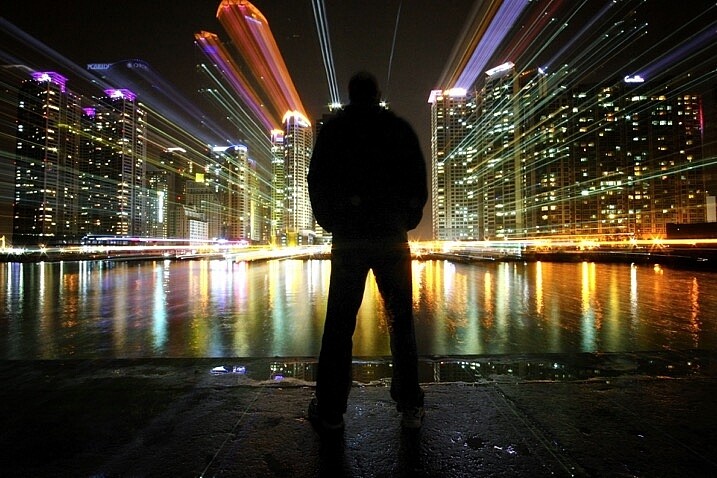
zoom burst photo cityscape

In this photo, a friend stood still in front of Marine iCty in Busan.

What does this technique add to your photograph?

Put simply, this gives a still frame a much more dynamic edge. This article will look at how you can apply zoom bursting to architectural photos and is best used in an urban environment. The nature of still frames is of course that they’re a single moment, by changing the focal length during long exposure you can add movement and urgency to your frame. The zoom also produces leading lines within your frame that all lead up to your main subject within the frame.

How to take zoom burst photographs

Taking a zoom burst photo is a simple technique, in fact, you can even do this handheld. The effect is achieved by changing the focal length of your camera lens during a long exposure. Follow these steps:

  1. Choose a scene that has mixed areas of light. You can use a forest with mottled light, or an apartment building where some lights are on and some are off.
  2. The exposure should be between half a second and 2 seconds long.
  3. You can take this photo handheld but it’s better to use a tripod.
  4. Change the focal length of the lens during the exposure. Zooming out tends to work better during the night for longer exposures, and zooming in works better during the day.
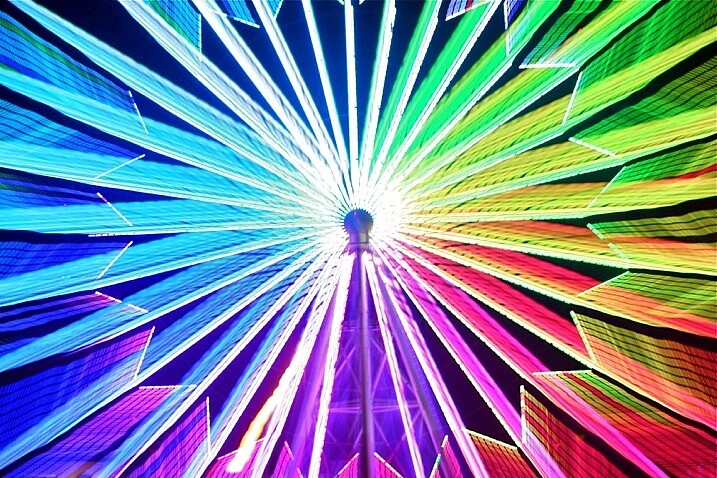
zoom burst lights

A photo that uses zoom with no stationary phase. This photo is colorful and abstract.

How to take zoom burst photos that show structures

Now that you know how to make a simple zoom burst, which looks abstract in nature, it’s time to move a step further. Now you are going to see how you can introduce architectural structures into this frame.

1 – Choose the correct location

Not all locations work well for zoom bursts, especially if they’re too cluttered. You need to choose a building that’s well lit and not surrounded by others. There are other options you can look at as well such as Ferris wheels or sculptures. Any location you choose should allow you to zoom into the structure, and then zoom out on the lights that surround it.

zoom burst too many buildings

When there are too many building in the frame, the zoom burst shot can get busy.

2 – Set the camera on a tripod

If this is going to be a long exposure of 25 or 30 seconds, you will have to use a tripod. You need to secure the tripod in position, making sure it doesn’t move about. A lot of tripods let you hook your camera bag to the extendable center, doing so will steady the tripod. Apply the same logic you would use to attain a sharp image. The focal length movement of the lens will prevent you getting maximum sharpness, though.

3 – Select the right lens

The best lens for this type of photo is a super zoom, one that goes from 18mm-300mm. A super-zoom gives you maximum flexibility over composition and allows for more creative photographs. If you don’t have a zoom with this kind of range, you can use a kit lens. The 18-55mm lens works very well for the zoom burst.

4 – Focus the camera using Live View

Now compose your photograph in the position you intend to finish your zoom burst. The final composition will be at the wider or widest end of your lenses focal length. Turn the camera’s Live View function on, and zoom into the central structure you wish to focus on. Use the lens’s manual focus so that the image on the Live View screen is sharp. Keep the camera lens in manual focus to prevent loss of focus during the exposure. Keep a mental note of the focal length where you focused, especially if that isn’t the widest part of the lens.

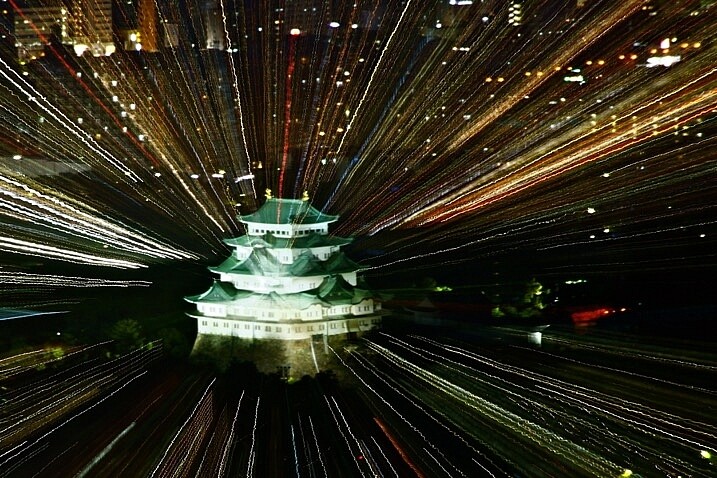
castle zoom burst photo

In this photo, Nagoya castle was focused on using a zoom. I zoomed into the castle.

5 – Zoom into the target area

Select the area of the scene you want to have as the center of your zoom, this should have been decided already during initial scene composition. Ensure that all your settings remain the same, as this is the final step before you begin the exposure. Set the camera to expose for 25-30 seconds, at f/8 or f/11. You can use a smaller aperture if you need to in order to get a longer exposure.

6 – Carry out the zoom burst

Set the camera to the 2-second timer (or 10 seconds if you want to prepare yourself for the zoom). Hit the shutter button to begin the countdown to the exposure. At the point when the shutter is about to open begin slowly zooming out. As the camera is exposing, continue to zoom out keeping it as smooth as possible to avoid camera shake.

You should be zooming out for between two and five seconds, the longer the zoom is the more pronounced the light trails will be in the image. As you zoom keep an eye on the focal length of the lens so you finish at your composed position.

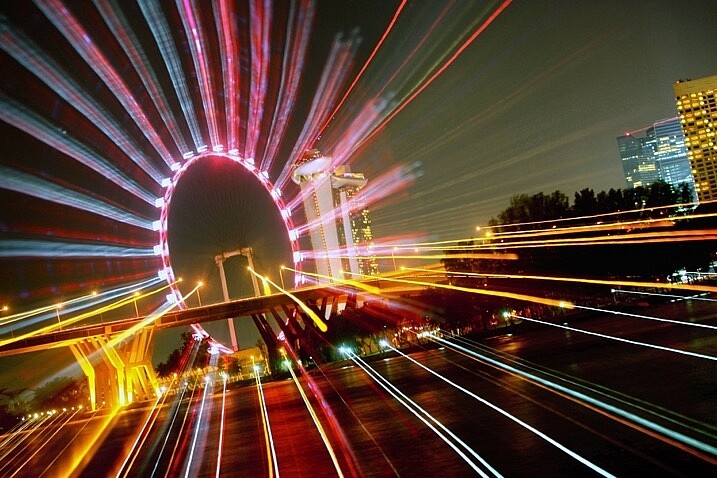
The ferris wheel is a great subject for zoom bursts. The middle is empty, and there is a ring of light to zoom out.

The Ferris wheel is a great subject for zoom bursts. The middle is empty, and there is a ring of light to zoom out.

7 – Allow the camera to finish the exposure

Once you have finished the zoom remove your hand from the lens, without moving the camera. The camera will continue to expose for 20-25 seconds depending on the exposure time you used. The image will now show zoom burst lights and architectural structures in the same exposure.

8 – Carry out post-processing work on the photo

The result in-camera will look nice, but adding contrast in post-processing is important. The image has “lost” five seconds of exposure time, so adjusting the contrast helps. You can use NIK color efex, which has a filter called pro-contrast and is an excellent choice for this type of photo. The centered position of the zoom can’t be adjusted in camera, though cropping the photo in post-processing allows you to move the zoom to an off-center position.

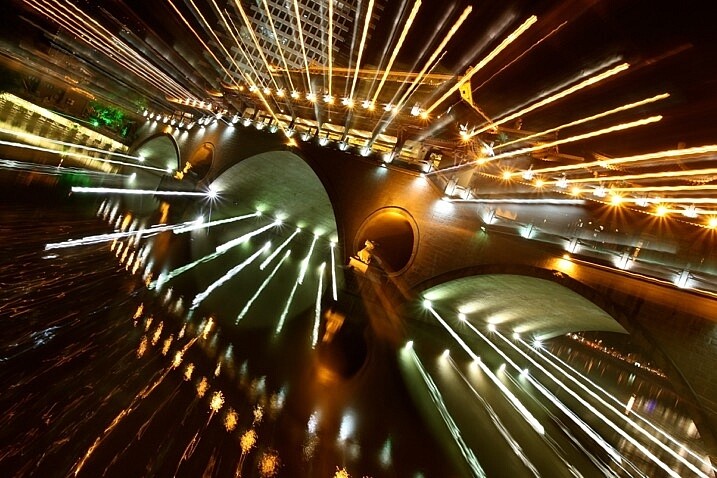
The bridge lit with many lights is a good subject for a zoom burst.

The bridge lit with many lights is a good subject for a zoom burst.

Where should I go to take zoom bursts?

The best place to take this type of photograph is in a city, one that’s well lit, and has interesting architecture. A Ferris wheel is a great structure to use as it’s circular, which helps with the centered nature of the zoom burst. Other architecture can also work as long as it’s alone and not surrounded by other structures. A cityscape with many buildings can look too busy with too many light streaks in one frame.

You can even take zoom burst photos during the day, but you will need an ND filter to do this. An ND filter that allows you to shoot for 30 seconds will allow you to create a zoom burst using the steps listed above, though the zoom should last longer.

img_2957

I look forward to seeing your photos using this zoom burst technique, please post any images you have in the comments section below.

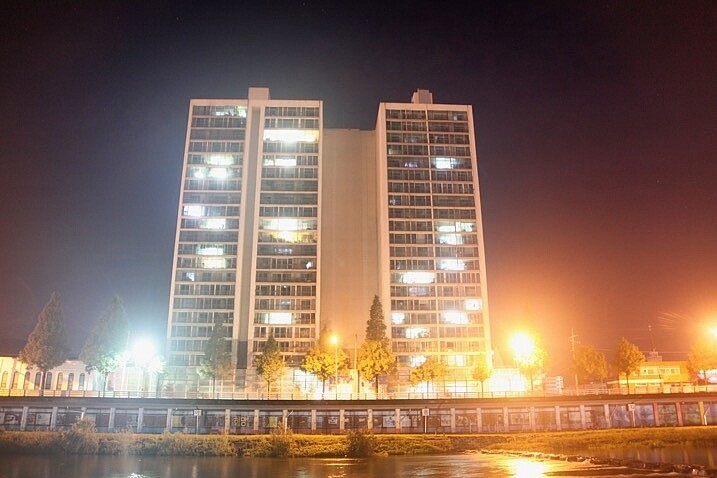
This is a good example of a lone building with lights on.

This is a good example of a lone building with lights on.

In this photo only zoom is used, there is no stationary phase.

In this photo only zoom was used, there was no stationary phase.

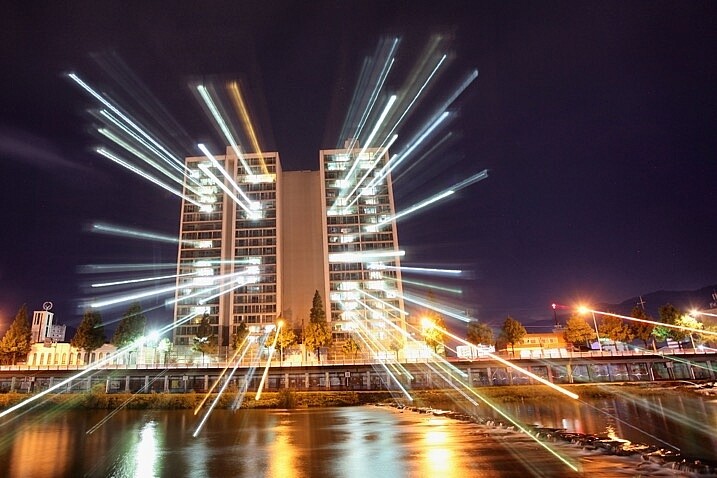
This photo shows how a zoom burst and static phase produces an image.

This photo shows how a zoom burst and static phase produces an image combining light streaks and architecture.

googletag.cmd.push(function() {
tablet_slots.push( googletag.defineSlot( “/1005424/_dPSv4_tab-all-article-bottom_(300×250)”, [300, 250], “pb-ad-78623” ).addService( googletag.pubads() ) ); } );

googletag.cmd.push(function() {
mobile_slots.push( googletag.defineSlot( “/1005424/_dPSv4_mob-all-article-bottom_(300×250)”, [300, 250], “pb-ad-78158” ).addService( googletag.pubads() ) ); } );

The post How to Create a Dynamic Zoom Burst Photograph by Simon Bond appeared first on Digital Photography School.


Digital Photography School

 
Comments Off on How to Create a Dynamic Zoom Burst Photograph

Posted in Photography