Eyefi, the maker of Wi-Fi memory cards, has today launched Eyefi Mobi Pro, a new 32GB WiFi SD card. It improves the existing Eyefi Mobi model by adding wireless transfer of Raw image files, along with new photo categorization and search functions. Read more
Tag: wireless
-
Nissin launches radio-controlled Di700A and Commander Air 1 wireless flash system
Independent Japanese flash manufacturer Nissin has announced a new wireless flash system that uses radio transmission. The first gun to be compatible with the company’s Nissin Air System (NAS) will be an adapted version of the Di700 flash unit. The Di700A will have the same specification as the GN48m/157ft current model, but will also feature a 2.4GHz radio transmitter that will be able to communicate with other NAS guns and the Nissin Commander Air 1 command unit from a distance of up to 30m. Read more
-
Rode unveils RodeLink wireless audio system
Australian microphone maker RØDE has announced a new digital wireless system called RØDELink. It uses 2.4GHz transmission with 128-bit encryption while transmitting on two channels simultaneously. The system can monitor and change frequencies as needed to maintain the strongest signal, transmitting a 24-bit/44.1k signal up to 100 meters. The first product based on the system, the RØDELink Filmmaker Kit, will be of interest to digital filmmakers. Read more
-
Toshiba offers FlashAir III wireless SD card
Toshiba has announced a third generation of its FlashAir wireless SD cards. Like the previous version, the Toshiba FlashAir III acts as its own wireless LAN point for sharing to smartphones, tablets and computers. The newly introduced card boasts ‘enhanced photo sharing and management features,’ and maintains the same Class 10 rating as its predecessor. Read more
-
Western Digital launches My Passport Wireless hard drive with built-in SD card reader
Western Digital has launched a new wireless-enabled hard drive that uniquely features a built-in SD card reader. The My Passport Wireless might be coming to the market after other wireless options like the LaCie Fuel drive, but it’s the inclusion of the SD card reader that makes this product of particular interest to photographers. Read more
-
Casio develops Exilim EX-FR10 two-part action cam with wireless monitor
Casio is set to launch a new action cam in September, featuring a wireless camera unit that is detatchable from the main body. The Casio Exilim EX-FR10, which will initially be only available in the Japanese market, uses a Bluetooth connection with a range of up to 10m between the body and the camera so images can be recorded remotely and monitored on the 2-inch 230,400-dot touch screen. Read more
-
Canon offers three new wireless Pixma inkjet photo printers
Canon has announced three new Pixma All-in-One inkjet printers, the Canon Pixma MG7520, MG6620 and MG5620 (MG7550, MG6650 and MG5650 in Europe). They all offer wireless support with Apple AirPrint connectivity, as well as compatibility with Canon’s Easy-PhotoPrint+ web application and Pixma Printing Solutions. Read more
-
Earin: World’s Smallest Wireless Earbuds Raise $1,500,000+
[ By WebUrbanist in Design & Products & Packaging. ]

Stripping away all non-essential functionality, these sleek audio accessories are tiny enough to be effectively invisible and entirely wire-free. No need to worry about charging, either – their small carrying case lets you power them back up on the go.
Earin just finished raising £972,594 on Kickstarter, over 5 times its original funding goal, reflecting how much so many of us wish to get rid of those pesky wires when listening to music on the move.


Beyond long battery life, ergonomic comfort, snug sport-friendly casing other essential considerations, stretch goals for the project include waterproofing, phone adapters and battery monitors.

From its creators: “No unnecessary functionality has been added. No sensors, no lights and no microphone, that’s right – no microphone! Not because we couldn’t but because we wouldn’t! We use balanced armature speakers, used in professional in-ear-monitors and hearing-aids to deliver the best possible sound and to keep power-consumption at its minimal. High-density rechargeable batteries are used to keep playback time up and size down.”

Much of the technical specs on their Kickstarter page will be of interest to audiophiles (and show just how much these makers have thought about their project), but in summary: “The architecture of the earbud is based on two main covers which are ultrasonically welded to create a water-tight seal, protecting the electrical components. The materials are carefully selected to withstand both climate and impact testing. As all project members have extensive experience of creating similar consumer products, we know what works and what does [not].”
Want More? Click for Great Related Content on WebUrbanist:

Smallest & Smaller: 22 Miniatures, Because Big Gets Boring
Everyone always says bigger is getter, but when big gets boring, these are the awesome miniature inventions you need to see.
Click Here to Read More »»
Hidden Worlds: What Goes on Behind Your Favorite Webpages
It is not often that we get a peek into the behind-the-scenes world of our favorite websites. These pictures give us a peek into what happens on the other side.
Click Here to Read More »»
NeoLucida: Optical Drawing Tool Lets You Trace Real Life
An update on a 19th century optical drawing tool lets artists trace the real world around them. The NeoLucida will soon be available for just $ 40.
Click Here to Read More »»


[ By WebUrbanist in Design & Products & Packaging. ]
[ WebUrbanist | Archives | Galleries | Privacy | TOS ]
-
Spice-Up Your Outdoor Photos with Wireless Off-camera Flash and Gels
Wireless off-camera flash is a great way to add a splash of light and give a scene an added dimension, or to fill in shadows in high-contrast scenes. The TTL (through the lens) exposure feature makes it easier than ever to get a well-exposed image without the need for a flash meter. However, there’s one more ingredient that you can add that will open up a new world of creative possibilities for your photography. That ingredient is easy to find, easy to use, and affordable: colored flash gels.
What’s a gel?
A gel is a piece of colored cellophane that you place over your flash head. Gels are available individually (expensive) or in more pocketbook-friendly multiple gel kits, which may contain anywhere from half a dozen to 20 or more different color variations. Gels come in primary (red, yellow, blue), secondary (green, purple, orange), and tertiary colors (Kelly green, red violet, pink, aquamarine, etc.).
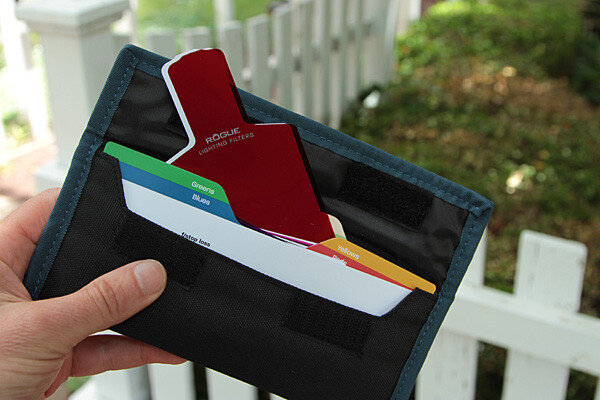
The Expoimaging Rogue Gel Universal Lighting Filter Kit has 20 different gels that are: well-organized in tabbed compartments; housed in a handy-dandy holder; and divided logically into warm colors, cool colors, and color corrective gels. Each gel has information about how many stops of light it blocks, as well as White Balance values. This will help you determine appropriate exposure, flash output, and camera White Balance settings.
Some kits include color correction gels, which are intended to balance the flash (normally balanced for daylight) with artificial light sources, such as incandescent or fluorescent lights. They can also be used to add elements of warm, or cool light, as more subtle effects. While individual gels are larger and can be cut to custom-fit your flash, kits gels are generally smaller but large enough to fit over nearly any shoe-mounted flash, and usually come with a band or fabric fastener strip that affixes the gel to the flash.
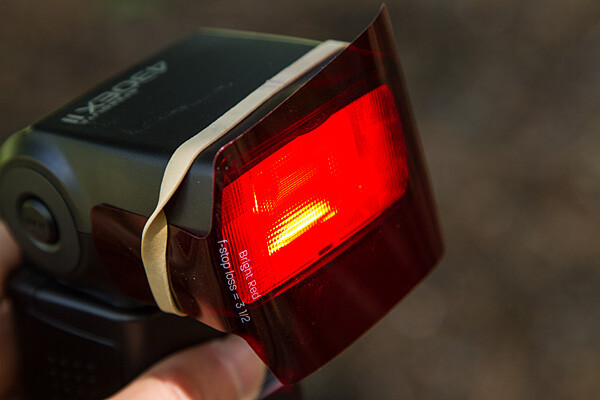
Simple setup
All you have to do is take the gel and affix it to the front of your flash. While Rogue includes a black band that will do the job with just about any flash unit, sometimes a forgetful author needs to make due with a MacGuyver-like solution, such as using a rubber band (see image above).
The key to using a color gel to accent a scene is to use it with an off-camera flash. Fortunately, the cost of a TTL wireless flash is low. For instance, the Canon Speedlite 430 EX II currently costs under $ 260 USD, which is quite affordable. Whether you are using a DSLR, such as the Canon EOS 70D, or an advanced compact with wireless flash control, such as the Canon G16, you can fire the off-camera flash via a pulse from the on-camera flash.
Let’s take a look at one example of gels in action

Blah foreground – this white fence could be a unifying element in this photo of a restored colonial village in Piscataway, New Jersey, but because it’s in the shade, it’s just a boring grey. Gear: Canon EOS 7D, Canon 24-105mm f/4L IS USM lens.

A splash of flash – even if the fence had been more evenly lit, the plain white flash on the fence overpowers the image. Gear: Canon EOS 7D, Canon 24-105mm f/4L IS USM lens, and Canon Speedlite 430 EX II flash.

Bright red adds interest – the idea was to pick up the red tones of the building in the background while leading the eye into the shot by adding a red gel, courtesy ExpoImaging Rogue Gels (read on). Reducing the intensity of the flash output would have changed the color from pink to red. Gear: same as above with Rogue Bright Red Gel added.

Oops, wrong color! In this case, the lavender gel was a mismatch. A color wheel, available at art supply stores, will help you make better choices. Gear: Same as above with Rogue Special KH Lavender Gel.
Step-by-step – how to trigger a Canon off-camera flash wirelessly
Here are the step-by-step directions for triggering a Canon 430 EX II wireless Canon flash from the Canon 7D. If you’re using another camera, check your manual for wireless flash instructions. Among Canon bodies, the directions will be similar to the following:
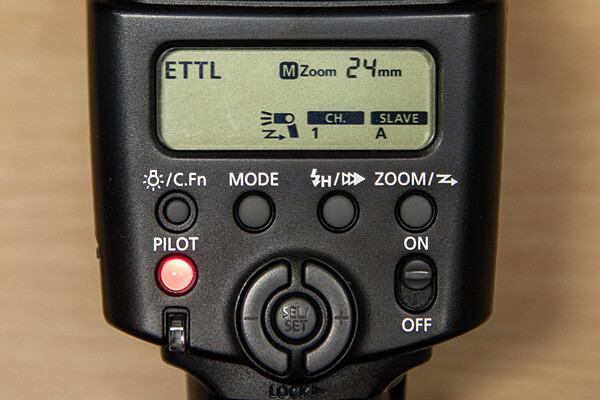
- Turn the flash on, then press and hold the Zoom button for a second or two. You’ll see a new flash icon and Ch 1 Slave A appear in the LCD screen (see photo above).
- Turn the camera on and pop up the flash.
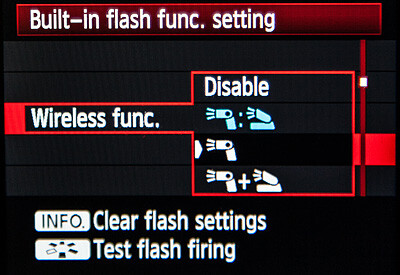
- In Menu in the first tab (camera operation), choose Flash Control, then scroll down to Built-in flash function setting, select Wireless Functions and choose the middle setting of the single flash (see above)
Take pictures!
Although the on-camera flash is flipped up, it will not fire during the exposure. Rather, it will flash a split-second before the exposure, which triggers the off-camera flash to fire during exposure, so your only source of flash illumination during exposure is the off-camera flash. To the naked eye, it looks as if the two flashes are going off simultaneously, but they’re not.
If you want both the on-camera and off-camera flash to trigger simultaneously during exposure, go back to Wireless Functions and choose the bottom setting, which shows the off-camera flash icon + a flip-up flash icon. In this setting, your off-camera flash is your key (strongest) light source, and the flip-up flash is a fill light. Choose the top setting (Off camera flash = flip-up flash) and both will provide equal power. We’ll explore these options in future articles.
The other way to set off a wireless flash is by using a separate wireless transmitter such as the Canon Speedlite Transmitter ST-E2. The advantage of using a transmitter over triggering your off-camera flash via your camera’s built-in flash, is that the transmitter uses infrared signals, and can trigger the flash from farther away, and at greater angles. When using your on-camera flash, your flash sensor must always be within line of sight of your camera. If you’re using a full-frame DSLR, such as the Canon EOS-6D or 5D Mark III, neither of which has a built-in flash, you will need a transmitter to trigger off-camera flash.
Let your imagination run wild! You can add crazy colors and transform a scene, or you can use a more subtle approach to improve a scene without overpowering it. Here are a few examples of both techniques.

Wild and crazy – red tree adds primary color to offset the deep blue sky and add foreground interest. Too much? It’s a matter of personal taste.

Before -this “frame within a frame” composition doesn’t quite work because the foreground is too dark, and the sun-drenched but interesting background is too light.

When lit with an unadorned flash, the foreground was uninvitingly cool. After adding a full CTO gel, the subtle splash of warmer light frames the background nicely.
Experiment. Try different gels to see what they look like. Don’t like your result? Try another one. Here are several variations where different color gels were used against a foreground wall in the shade, to balance a bright, sunlit scene in the background. Camera and flash setup are same as above.

Gel: full CTO, balanced for 3,200K ambient light
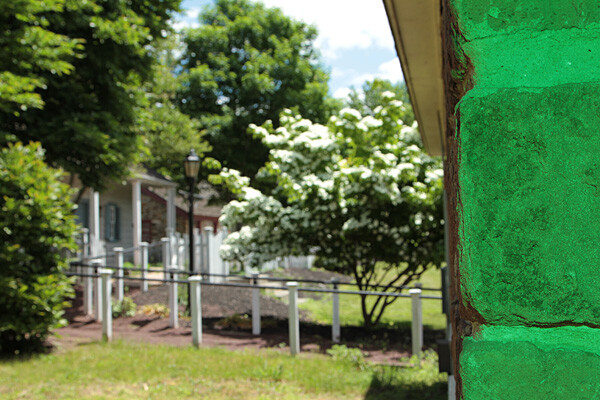
Gel: Moss Green

Gel: Just Blue

Gel: Red

No gel
Have you done any experimenting with colored gels and off-camera flash? Please share your results and comments below.
The post Spice-Up Your Outdoor Photos with Wireless Off-camera Flash and Gels by Mason Resnick appeared first on Digital Photography School.