RSS
 

Posts Tagged ‘White’

Blickfang: White Album

04 Mar

Seit es Internetdienste gibt, die uns kostenlos Satellitenbilder in hoher Auflösung zur Verfügung stellen, haben wir uns an den Blick auf die Erde von oben gewöhnt. Einer, der allerdings schon seit beinahe 15 Jahren regelmäßig aus dieser Perspektive auf die Welt schaut und sie dokumentiert, ist der Fotograf und Filmemacher Bernd Uhde.

Sein jüngst im Verlag Seltmann+Söhne erschienenes Buch „White Album“* hat mich sofort fasziniert. Darin zeigt er schneebedeckte Landschaften und urbane Strukturen immer mit dem orthogonal von oben nach unten gerichteten Blick.

White Album © Bernd Uhde

Die Bilder, wie beispielsweise die hier gezeigte Doppelseite, wirken teils so abstrakt – man könnte meinen, sie wären digital nachbearbeitet und manipuliert. Doch dem ist nicht so. Was hier manipuliert ist, sind die Landschaften selbst, die Uhde zeigt.

Wir sehen hier zwei in Reihen bepflanzte Felder. Die in regelmäßigen Abständen stehenden Bäume werfen lange Schatten auf den Schnee und erzeugen so ein sich wiederholendes und an Textilkunst erinnerndes Muster.

Uhdes Aufnahmen offenbaren die der vom Menschen geformten Landschaft zugrunde liegenden Muster. Sie sind real und abstrakt zugleich und nicht zuletzt – ästhetisch.

* Das ist ein Affiliate-Link zu Amazon. Wenn Ihr darüber etwas bestellt, erhalten wir eine kleine Provision, Ihr zahlt aber keinen Cent mehr.


kwerfeldein – Fotografie Magazin | Fotocommunity

 
Comments Off on Blickfang: White Album

Posted in Equipment


Blob: Oblong White Mobile Home Looks Like a Dino Egg

11 Feb

[ By Steph in Architecture & Houses & Residential. ]

Blob Modern Mobile Home 1

Designed as an extension to a home, this mobile live/work pod eschews conventional mobile home aesthetics in favor of something decidedly more eccentric. ‘Blob VB3′ is an oblong white living space that looks like a gigantic egg when it’s all closed up, but the sides open to reveal a gridded interior for storing small items, working and even sleeping.

Blob Modern Mobile Home 2

Architecture firm dmvA came up with the prototype in response to strict building codes in the client’s city. It contains lots of open niches for storage, multipurpose platforms, lighting, a kitchen and a bathroom. When the airplane-like ‘nose’ is open, it functions as a roof for a small indoor/outdoor space.

Blob Modern Mobile Home 3

Primarily made of polyester, the Blob VB3 is easy to transport, aerodynamic and versatile. It could be used as a guest room, office, pool house or garden house. A circular skylight lets light into the bright white interior.

Blob Modern Mobile Home 4

While the open shelves don’t exactly make it ideal for pulling behind a truck like an Airstream, it’s an interesting way to add a little extra space to an existing building without having to deal with local building regulations.

Share on Facebook


[ By Steph in Architecture & Houses & Residential. ]

[ WebUrbanist | Archives | Galleries | Privacy | TOS ]


WebUrbanist

 
Comments Off on Blob: Oblong White Mobile Home Looks Like a Dino Egg

Posted in Creativity


Nikon Capture NX 2.4.6 adds D3300 support, improved white balance

05 Feb

shared:NikonLogo.png

Nikon has released Capture NX version 2.4.6. The latest update adds Raw image support for the recently announced entry-level D3300 and the improved white balance adjustment options can now match the ‘Auto 1’ setting found in newer DSLR and Coolpix cameras. Version 2.4.6 also expands Fine Adjustment range from 4132–7042k to 2500–7042k when using the Direct Sunlight option for Daylight. Get the update

News: Digital Photography Review (dpreview.com)

 
Comments Off on Nikon Capture NX 2.4.6 adds D3300 support, improved white balance

Posted in Uncategorized


All You Have to Know to Master the Basics of White Balance

04 Jan

As an amateur photographer, you can go a long, long time without knowing what white balance is or why knowing how to adjust it even matters. I had my first DSLR (my current DSLR is a Canon EOS 450D) for five years before white balance entered my photography glossary, and it took another few months until it felt necessary—or at Continue Reading

The post All You Have to Know to Master the Basics of White Balance appeared first on Photodoto.


Photodoto

 
Comments Off on All You Have to Know to Master the Basics of White Balance

Posted in Photography


The Art of Black and White Photography: 75% Off Today Only

19 Dec

On the sixth day of Christmas dPS gave to me, a chance to master Black and White Photography.

You’ll save 75% on acclaimed Udemy course “The Art of Black and White Photography“.

To take advantage of todays deal head here.

NewImage

In this value packed 6 hour course you’ll learn how to create dramatic and compelling black and white images using a range of powerful Photoshop techniques.

What Students Are Saying About This Highly Rated Course

This course is rated as the #1 Photography course on Udemy. Here’s a snippet of what students are saying about this course.

“Extremely comprehensive, completely understandable and even enjoyable. Worth the money, probably double!” – Jeffrey Puritz

“This course showed me simple and effective ways to convert any picture good or bad and improve the life of the picture….. easy to follow steps and fantastic tips …. worth a look!!” – Jillian Martin.

There are many more great reviews just like these.

Discover the Secrets of Taking Beautiful Black and White Images Today

So if you are confused about which black and white conversion techniques to use, unsure about how to adjust the tonal range and balance of your black and white photos using curves and masks, want to make more of your black and white portraits, and you want to learn how to tone your black and white images, this course is for you.

You can enrol right now for just $ 24. Normally this would cost you $ 99 so it’s an absolute steal.

And whilst this deal won’t be gone in 60 seconds, it will be in 24 hours. Don’t miss out!

Grab this deal here.

The post The Art of Black and White Photography: 75% Off Today Only by Darren Rowse appeared first on Digital Photography School.


Digital Photography School

 
Comments Off on The Art of Black and White Photography: 75% Off Today Only

Posted in Photography


4 Tips for a Perfect White Background in High Key Photography

03 Dec

A guest article by Tony Northrup, author of Stunning Digital Photography, on sale 20% off – now at SnapnDeals.

A bright, white background creates a high energy, happy, and distraction free scene, perfect for pictures of your friends and family. Known as high key photography, this technique instantly cures problems with ugly backgrounds and focuses the viewer’s attention on your subject.

Besides being a popular for portrait photographers, it’s a more modern choice, rather than traditional (ie., painted muslin). Here are my favourite tips for creating high key photos.

4 tips for perfect white backgrounds in high key photography

Tip #1 – Use a Solid White Background to Eliminate Distractions

I used a big, white piece of paper as the background for this portrait of my twin nieces because anything natural for a background would have clashed with their colourful outfits. The brightness also perfectly matches their expressions.

high-key-white-background-portraits-01b

High-key backgrounds focus your attention on the subject

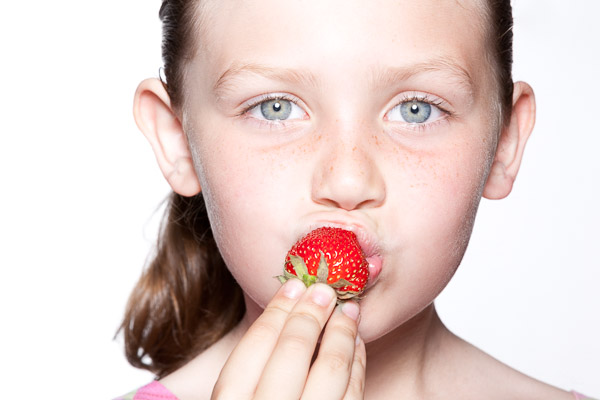
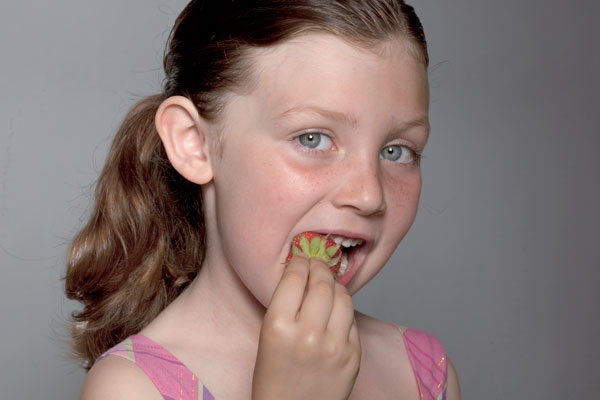
High key photography was the perfect choice for this picture of my daughter eating a strawberry because there’s nothing to distract the viewer from her eyes and the strawberry. You don’t need to use an expensive camera or lens for this type of picture, because you can use any camera for high key photography.
High key white background portraits 02

The solid white background eliminates all distractions

Tip #2 – use sunlight as your background

A white background isn’t everything you need to create a perfect high key photograph, however. You need one additional ingredient – light. A white background without light doesn’t appear white in the photo, it appears grey. My flash failed to fire for this next photo, causing an ugly, grey background.
If you don’t light your background, it will be grey

If you don’t light your background, it will be grey

To create a solid white background, you need to completely overexpose your background without overexposing your subject. That means you’ll need much more light on your background than on your foreground subject; about 16 times more light (or four stops of light).

Fortunately, we all share a very powerful and free light source: the sun. For this photo of a radio talk show host and his dog, I had him kneel in my kitchen at midday when the sun was streaming through the glass doors behind him. I added three stops of exposure compensation to properly expose their faces. Because the sunlit background was much brighter than the shade in my kitchen, the camera captured it as solid white.

High key white background portraits 04

You can use the sun to create a bright background

Tip #3 – use a flash on the background

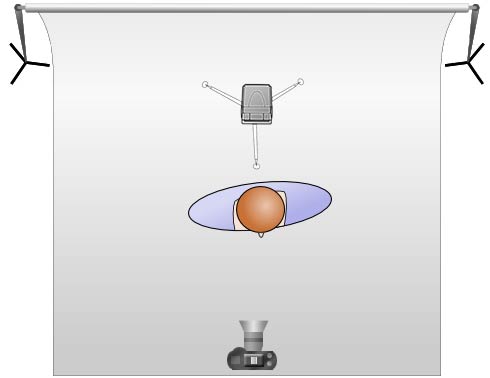
Another easy way to create a bright background is to light it with an off camera flash. Simply move your model four to six feet away from your background and hide a flash behind your model, pointing it at the background. When you take your photo, the flash will light the background to overexpose it and make it appear completely white.

An off camera flash doesn’t have to be expensive. Any manual flash with an optical slave will work, including the $ 60 (US) YongNuo YN-560 that I often use. Simply turn on both the flash’s optical slave and your built-in flash. When you take a picture, your flash will trigger the off camera flash to light the background.
High key white background portraits 05

Place a flash behind your subject to light the background

For more information about using flash both on-camera and off-camera, refer to Chapters 3 and 6 of Stunning Digital Photography.

Tip #4 – don’t over, overexpose the background

You can overexpose a high key background too much. If you bounce too much light off your background, the backlighting will overtake your model and wash out your picture. For example, the picture on the left had too much light on the background, while the picture on the right had just the right amount.

If you have too much light on your background, it’ll wash out your subject

If you have too much light on your background, it’ll wash out your subject

To get a perfectly white background without washing out your picture, start your background light at its lowest power and increase it one stop at a time until the background is barely overexposed. In this video, my wife Chelsea and I show you exactly how to find the perfect flash output. Our book, Stunning Digital Photography, includes more than six hour of video integrated into the lessons, because photography is a visual art, and often it’s easier to learn by watching than reading.

Summary

High key photography is challenging because it requires you to create an intentionally overexposed background while still properly exposing your subject. Once you learn how to use exposure compensation and light your background, you’ll be able to create perfect white backgrounds in just a few minutes.


Award-winning author and photographer Tony Northrup has published more than 30 how-to books and sold more than a million copies around the world. His photography book, Stunning Digital Photography, is the best-selling photography book in the world and the top-rated instructional book of all time. His photos have been featured on magazine covers, book covers, CD covers, TV shows, calendars, and much more. He runs a stock and portrait photography business with his family, Chelsea and Madelyn, out of his home studio in Waterford, CT. He shoots travel and nature photography everywhere he goes.

Post originally from: Digital Photography Tips.

Check out our more Photography Tips at Photography Tips for Beginners, Portrait Photography Tips and Wedding Photography Tips.

4 Tips for a Perfect White Background in High Key Photography

The post 4 Tips for a Perfect White Background in High Key Photography by Guest Contributor appeared first on Digital Photography School.


Digital Photography School

 
Comments Off on 4 Tips for a Perfect White Background in High Key Photography

Posted in Photography


Creating a Black and White High Contrast Portrait Edit in Lightroom

17 Nov

Introduction

The Following is an excerpt from the SLR Lounge Lightroom Preset System v5 and accompanying workshop from the Lightroom Workshop Collection v5.  The Lightroom Preset System is designed to take you from Ordinary to Extraordinary photos in just a few seconds and clicks within Lightroom 4 and Lightroom 5.

Overview

In this tutorial we’re going to go over how to turn a regular color portrait into a nice high contrast black and white image. For this tutorial we have a portrait of a baby out in a field. The overalls, details in the field, and overall background blur will be complimented by a high contrast black and white edit. The SLR Lounge Lightroom Preset System v5 has presets specifically for high contrast black and white portraits which we are going to apply to this photo. If you don’t have the preset system, we’ll list all of our Develop settings so you can achieve the same look.

Here’s what our photo will look like before and after we’re done with the edit.

beforeafter

Unedited Photo on Left | High Contrast Black and White on Right

Lightroom Preset System v5 Mixology

For those who have the Preset System, you can follow the Mixology Recipe below to get to the same results. If you don’t have the Preset System, please read the article or watch the video below to see exactly how this look was achieved.

Develop Mixology

  • 01-10 BASE – SOFT: 13b. Light Crush – B&W
  • 03-70 ADJUST – VIGNETTING: 71c. Neutral – Zeroed

Written Tutorial

Step 1: Checking The EXIF Data

exifdata

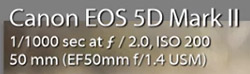
We press “i” to pull up our EXIF data so we can see exactly how this image was shot. This image was shot with a 50mm lens at f/2. We want to keep in mind that the depth of field is shallow, and we may have to add sharpening to this image.

Step 2: Apply Preset

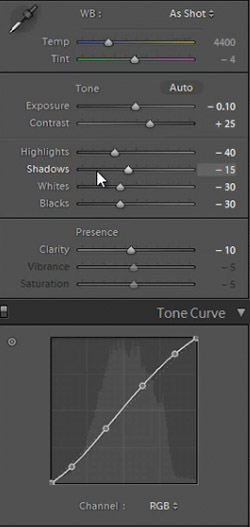
We’re starting with our “01-10 BASE – SOFT: 13b. Light Crush – B&W” preset, and after we lower the Exposure to -0.10 we have a nice high contrast black and white look. Then we apply a “03-70 ADJUST – VIGNETTING: 71c. Neutral – Zeroed” vignette preset so we can get a subtle edge darkening.

In the develop settings the Contrast was raised and the Shadows and Blacks have been dropped. This is giving our nice deep shadows and blacks, and adding to the high contrast look we’re editing for. The Highlights and Whites have also been dropped in order to bring the highlights in the skin closer to the mid tones.

developpanel1

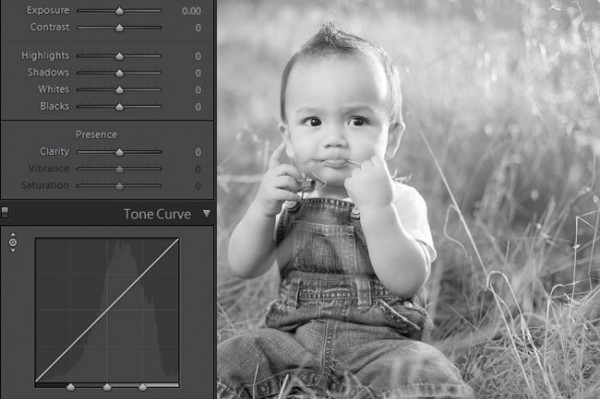
With Settings Zeroed Out

Here’s what our image looks like with a simple black and white conversion (convert by hitting “V”), without the adjustments in Contrast, Highlights, Shadows, Whites, Blacks, and Tone Curve.

Before High Contrast Settings

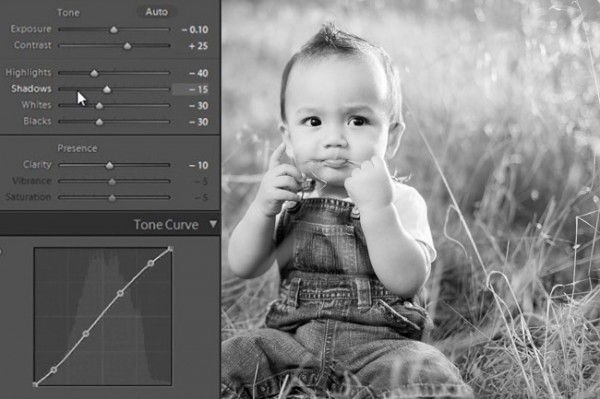
With High Contrast Settings

Here’s our image with Contrast, Highlights, Shadows, Whites, Blacks, and Tone Curve adjustments applied.

High Contrast Develop Settings

In the image below you can see a huge difference that the adjustments make. The eyes stand out, there’s more details in the hair and grass, and there’s more texture in the clothes.  All these subtle details combined add quality to an otherwise flat black and white image.

beforeandafter

All Settings Zeroed On Left. High Contrast Adjustments on Right


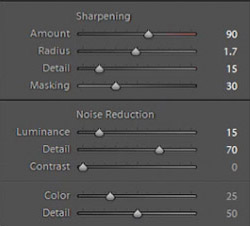
In our Sharpening settings our preset applied our standard amount, but the image is still a bit soft because of the shallow depth of field caused by shooting this image at f/2.0. To get a nice sharp portrait we raise the Amount, Radius, and Detail. The preset also adjusted our Noise Reduction settings, giving the subject in our portrait nice soft skin. All of the “SOFT” presets have this standard amount of Noise Reduction applied in order to soften and smooth out skin without going so far to kill fine details.

sharpening settings

Here’s what our image looks like before and after our presets are applied.

Before

lightroom-5-tutorial-high-contrast-b&w-newborn-0001

After

lightroom-5-tutorial-high-contrast-b&w-newborn-0002

Watch the Video Tutorial

If you would like to see exactly how all of the settings and adjustments were applied, please watch the video from the SLRLounge YouTube Channel.

Conclusion and Learn More

We hope you all enjoyed this tutorial. If you are interested in learning more or purchasing the SLR Lounge Lightroom Preset System v5 or the newly released Lightroom Workshop Collection v5, please click any of the links in this article.

Post originally from: Digital Photography Tips.

Check out our more Photography Tips at Photography Tips for Beginners, Portrait Photography Tips and Wedding Photography Tips.

Creating a Black and White High Contrast Portrait Edit in Lightroom

The post Creating a Black and White High Contrast Portrait Edit in Lightroom by Post Production Pye appeared first on Digital Photography School.


Digital Photography School

 
Comments Off on Creating a Black and White High Contrast Portrait Edit in Lightroom

Posted in Photography


The Power of Black & White

03 Nov

The power of black & white photography

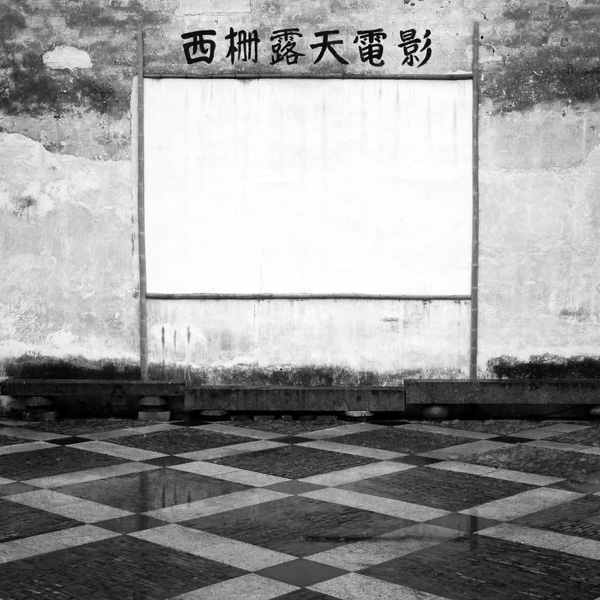
If you read my articles about long exposure photography and intentional camera movement in the landscape you may have noticed a common theme amongst the photos illustrating the articles – most of them were in black and white.

I’ve been thinking about the reasons that black and white photography appeals to me. Regular readers of my articles will know that I’m a big fan of tonal contrast in both colour and monochrome work. I use it as the basis of many of my compositions and it helps me create atmosphere and mood.

But things became clearer today when I read an interview with Joel Tjintjelaar, a well-known fine art photographer who works exclusively in black and white. He is one of the leaders in the discipline of long exposure photography (I interviewed him myself as a case study in my book Slow).

The power of black & white photography

In the interview Joel talks about photos representing the vision, or the essence, of the artist rather than reality. Black and white, in addition to being a beautiful medium in its own right (he uses words like mysterious, nostalgic and dramatic to explain its appeal) is a step removed from reality. Add in changes in tonal values achieved in post-processing, the surreality of long exposure photography techniques and the manipulation of light (also in post-processing) and you finish with a photo (or a work of art, depending on your world view) that is an expression of the artist, rather than the original subject.

Make sense? There are many ways of expressing yourself creatively in photography, and black and white is just one of them, but it certainly is a powerful medium. Trends come and go. Whether it’s the fast film, high grain techniques popularised by Robert Farber and Sarah Moon in the seventies, or the Photoshop based techniques of modern times such as using texture layers or HDR, most of these are ephemeral. They won’t be remembered as anything more than dated trends in decades to come. But black and white will endure.

The power of black & white photography

Learn more about black & white photography

Now that I’ve piqued your interest you’ll no doubt want to learn more about black and white photography. I’ll write about that in the future, but first I think it’s a good idea to go have a look at the work of some of the best black and white photographers out there. I’ve picked out five of my favourite photographers from 500px – looking at their work will help you appreciate the true power of the monochrome image.

Have a think about the following points while you look through their portfolios:

  • Why do you think these photographers have chosen to work in black and white? How would their images look if they were in colour?
  • How important is tonal contrast in the composition of their images?
  • How important are other elements of composition, such as line, texture, form and shape? How does black and white emphasise these elements?
  • How important is light in these images?
  • How far removed from reality are the photos in these portfolios? How do they express the photographer’s vision?

Here are the links:

Hengki Koentjoro

Hengki is an Indonesian photographer who creates beautiful black and white landscapes (read my interview with him here).

Sabrina de Vries

Sabrina is a young Dutch photographer who creates black and white portraits. Some of her work is in colour, so it’s a good chance to compare the way she works in both mediums.

Andy Lee

Andy is a professional film maker and photographer who works in black and white. Tonal contrast is a strong element of his work.

Joel Tjintjelaar

You should definitely take a look at Joel’s work. One of the interesting things about the way that Joel works is his painstaking attention to detail – he may spend 40 hours working on a single image before he is happy with it. This approach is very unusual.

Michael Diblicek

Michael shoots both the landscape and architecture. He is another photographer who uses tonal contrast really well (read my interview with him here).

Mastering Photography

Mastering photography ebook

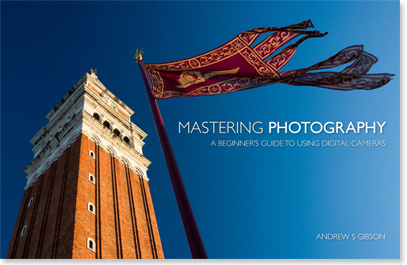
My ebook Mastering Photography: A Beginner’s Guide to Using Digital Cameras introduces you to photography and helps you make the most out of your digital cameras. It covers concepts such as lighting and composition as well as the camera settings you need to master black and white photography and take photos like the ones in this article.

Post originally from: Digital Photography Tips.

Check out our more Photography Tips at Photography Tips for Beginners, Portrait Photography Tips and Wedding Photography Tips.

The Power of Black & White

The post The Power of Black & White by Andrew Gibson appeared first on Digital Photography School.


Digital Photography School

 
Comments Off on The Power of Black & White

Posted in Photography


Newborn Photography Black and White Conversion in Lightroom

25 Oct

Introduction

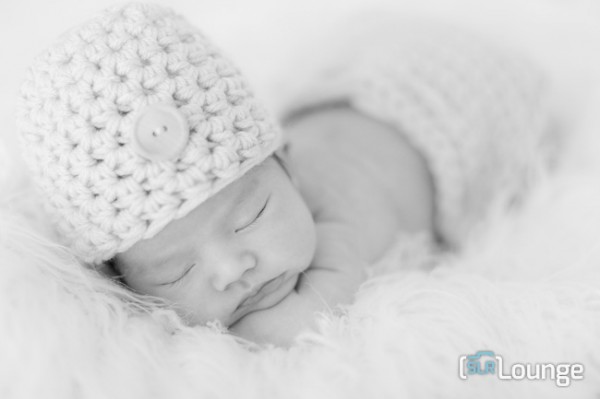
The Following is an excerpt from the SLR Lounge Lightroom Preset System v5 and accompanying workshop.  The Lightroom Preset System is designed to take you from Ordinary to Extraordinary photos in just a few seconds and clicks. In this tutorial we’re going to be creating a nice soft black and white portrait for a newborn baby captured from the Newborn Photography Workshop where we teach photographers how to take beautiful newborn with any camera using simply natural window light and a reflector.

The complete written tutorial is below, and you can also watched the video tutorial at the end of this article. Here’s a sneak peak at what our image will look like before and after our edit.

newbeforeafter


Black and White Conversion for Newborns

The first thing we did to this image was adjust our Color Tempurature to taste, and in this case we used the Eye Dropper Tool (W) taking a reading from the fur that the newborn is sleeping on.

After our Color Temperature adjustment we used our “01-10 Base – Soft: 12b Super Soft – B&W” preset to edit our photo. This preset does all of our work for us and after this preset is applied our photo edit is pretty much finished. So let’s go over exactly what this preset did.

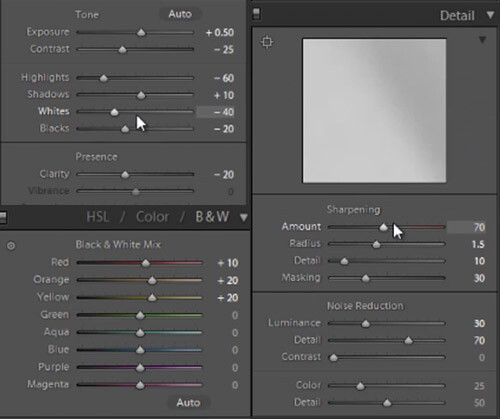
First, the Highlights and Whites have been taken down to -60 and -40. This is to smooth out highlights by bringing them closer to the mid-tones and shadows. This adjustment has the effect of softening highlights over skin tones giving us much more evenly lit skin.

Next, Clarity is being dropped to -20 in order to reduce mid-tone contrast. The reduction of mid-tone contrast again helps us achieve a softer and more flattering look. However, I would caution not to take the Clarity slider down too far as it can create an overly-soft looking image completely lacking in contrast and mid-tone detail.

In this black and white conversion the Reds, Oranges, and Yellows in the HSL are being raised, which again is primarily for skin tones. This brightens up the skin tones, further enhancing the soft flattering look.

We have our standard amount of Sharpening for portraits applied to this image which you can see below.

Also worth noting, the preset we selected dialed in a Noise Reduction Luminance setting of +30. Noise reduction was added to the preset in order to quickly reduce a little bit of the pore detail in the skin giving it a slightly smoother overall look. At an amount of +30, we will see a nice smoothing effect over skin, while retaining the majority of our fine detail in the hair, eyes and so forth.

Below is a snapshot of all of our final settings to achieve this look.

developsettings

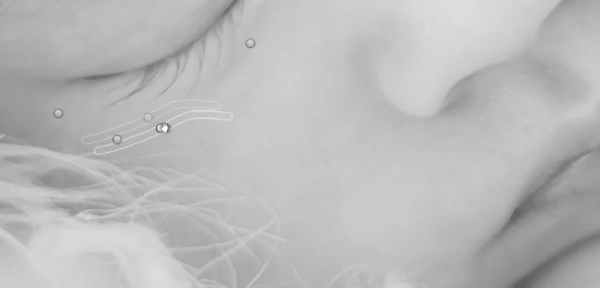
To clean up the skin a little we can use the Lightroom 5 Spot Removal Tool to remove some of the more obvious bits of dry skin and hair. Adobe has modified the Spot Removal Tool in Lightroom 5 to operate more like a brush making the tool much more powerful than in previous editions of Lightroom.

Just remember to keep your Spot Removal Tool size small and just large enough for the area you are working so that it doesn’t look unnatural.

Screen-Shot-2013-07-30-at-9.59.27-PM-650x313

Black and White Conversion for Newborns

Here’s  a look at the final before and after of our newborn black and white portrait.

Before

lightroom-5-tutorial-soft-black-and-white-newborn-0001

After

lightroom-5-tutorial-soft-black-and-white-newborn-0002

Watch the Video Tutorial

If you would like to see exactly how all of the settings and adjustments were applied, please watch the video below from the SLR Lounge YouTube Channel.

Conclusion and Learn More

We hope you all enjoyed this tutorial. If you are interested in learning more or purchasing the SLR Lounge Lightroom Preset System v5 or the newly released Lightroom Workshop Collection v5, please click any of the links in this article. If you are interested in Newborn Photography Workshop please also check out our Newborn Workshop Collection and Lightroom Presets now available via digital download.

Post originally from: Digital Photography Tips.

Check out our more Photography Tips at Photography Tips for Beginners, Portrait Photography Tips and Wedding Photography Tips.

Newborn Photography Black and White Conversion in Lightroom

The post Newborn Photography Black and White Conversion in Lightroom by Post Production Pye appeared first on Digital Photography School.


Digital Photography School

 
Comments Off on Newborn Photography Black and White Conversion in Lightroom

Posted in Photography


Setting The Mood By Adjusting Your White Balance

04 Sep
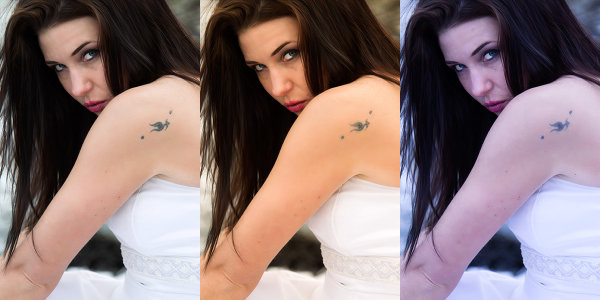
This set of images was taken from a RAW file, with the white balance adjusted using Kelvin white balance in Adobe Camera Raw. The first image was set to Auto in camera. The middle shot was warmed up by setting the white balance to 7500°K, and the third shot was cooled off by setting the white balance to 4000°K. EOS-1D Mark IV with EF 24-105 f/4L IS. 1/200, ISO 100, f/4.

This set of images was taken from a RAW file, with the white balance adjusted using Kelvin white balance in Adobe Camera Raw. The first image was set to Auto in camera. The middle shot was warmed up by setting the white balance to 7500°K, and the third shot was cooled off by setting the white balance to 4000°K. EOS-1D Mark IV with EF 24-105 f/4L IS. 1/200, ISO 100, f/4.

Photographers often deal with a variety of light sources, each of which has it’s own color cast.  When compared to daylight in the middle of the day, tungsten lighting, like that which comes from traditional incandescent bulbs, looks yellow.  Standard fluorescent lighting looks green.  Light in shade, or on a cloudy day will have a bluish cast compared to midday sun.  These color casts are referred to as the color temperature of the light.  Color temperature is measured in degrees Kelvin.  To beginners, color temperature will appear to be a bit backwards.  From 2000°K to about 3000°K are warm tones, and above 5000°K are cooler tones, getting progressively more bluish as the color temperature goes higher.  Midday sun tends to be at around 5500°K – 6000°K, while the sun at the horizon is warmer, at about 5000°K. Overcast daylight will be around 6500°K, and shaded daylight will be around 7000°K.

In this landscape shot, The first shot was processed using the Auto white balance setting, which chose 7500°K.  The second shot was processed to a much cooler tone at 4500°K, and the last shot was processed setting the Kelvin white balance at 11250°K.  EOS-1D X, EF 14mm f/2.8L II. Exposure: 0.5", f/16, ISO 200.

In this landscape shot, The first shot was processed using the Auto white balance setting, which chose 7500°K. The second shot was processed to a much cooler tone at 4500°K, and the last shot was processed setting the Kelvin white balance at 11250°K. EOS-1D X, EF 14mm f/2.8L II. Exposure: 0.5″, f/16, ISO 200.

Thankfully, today’s digital cameras have a tool to correct for the different color casts created by the various light sources we encounter.  For beginners, using the Auto White Balance setting is an excellent start. The camera will try to neutralize the color cast caused by different light sources and give the image a pleasing balance. However, while a neutral color balance is often desirable, there are times when as artists, we may want to use the white balance tool to creative effect.

You can choose what kind of mood you want to set before shooting if you like, by choosing a preset white balance. Most cameras offer Auto, Daylight, Cloudy, Shade, Fluorescent, Tungsten, Flash, Custom, and Kelvin temperature white balance settings.  These settings will neutralize the color cast from the light source they are designed for. For instance, Fluorescent neutralizes the greenish cast given off by fluorescent light.  Custom white balance is a user defined setting where you tell the camera what in the scene should be white, and the camera corrects to make it so. Finally, the Kelvin white balance setting allows you to choose the color temperature of the light source you are shooting in.  If you choose to use the presets in lighting other than what they are designed for, your image will be warmer or cooler, depending on your setting and the available light.

For all of those settings, the camera is simply looking to make white look white.  While that may be what you want, by intentionally setting a different white balance, you can add to the mood.  Choosing  Shady or Cloudy white balance will warm up your image, and choosing tungsten will cool your image. This type of thing is done constantly in movies and television shows to help set the mood.  Photographers as well choose their white balance to set the mood.  A cooler color cast gives the image a colder, harsher feel, while a warm color cast is generally seen as inviting.

If you shoot only JPEG, you’ll be stuck with whatever white balance you had selected at the time of shooting, so if you want to change the mood by adjusting your white balance, you’ll have to choose to do this beforehand.  However, if you shoot RAW, the white balance can be adjusted after the fact, using whichever RAW converter you choose.  You’ll be able to choose from the presets that are loaded in the camera, click in the image to determine what color should actually be white, or you can simply select Kelvin white balance, and using a slider, adjust the white balance in degrees Kelvin and see what the different color temperatures look like.

By taking control of the white balance, you give yourself another tool that can alter the mood of your images and allow you to better communicate what you want to say with your image.  Not every image will benefit by shifting the white balance setting, and there will be some photographers who will be adamant that you should always shoot to the “correct” white balance.  As the artist, this is your time to exercise your creative license and do what feels right to you.

Post originally from: Digital Photography Tips.

Check out our more Photography Tips at Photography Tips for Beginners, Portrait Photography Tips and Wedding Photography Tips.

Setting The Mood By Adjusting Your White Balance


Digital Photography School

 
Comments Off on Setting The Mood By Adjusting Your White Balance

Posted in Photography