RSS
 

Posts Tagged ‘Ways’

Creative Ways to use Keywords in Lightroom 5

05 Dec

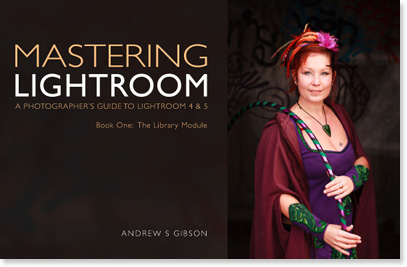
Andrew S. Gibson is the author of Mastering Lightroom Book One: The Library Module, on offer now at Snapndeals for a limited time.
Keywords in Lightroom 5

One of the things about any software, such as Lightroom 5 that does a lot of things, is that many photographers tend to use only a small number of the available features. For example, I’ve never bothered to use the keywords feature much in Lightroom. I’ve always seen it as a waste of time. It takes time to add keywords to images and I don’t really need keywords to search for images – I know where to find them already.

But since I started writing about Lightroom, and reading what other photographers have written about it, I’ve realised that there are a lot of good reasons to use keywords, and that used wisely they can actually save time.

Like many things, it’s a matter of balance. The more keywords you use the harder it is to keep track of them all and the reasons that you added them, and to maintain a consistent approach (exception: if you shoot stock you will want to use lots of keywords as they are an essential part of your work).

If you use just a few keywords, it’s easy to remember which ones you use and why.

Let’s look at a couple of examples of creative ways to use keywords in Lightroom 5. Of course, if you have any suggestions, please leave them in the comments. I’m curious to see how you use keywords.

Keep track of the kids

I really like this one (thanks to Robert Taylor for the suggestion, he left in the comments on Using Lightroom Collections to Improve your Workflow). If you have children, add their name as a keyword when you import the images that you take of them. Then you can create a series of Smart Collections that searches for images with that keyword and organises them by year.

Create a yearbook
Keywords in Lightroom 5

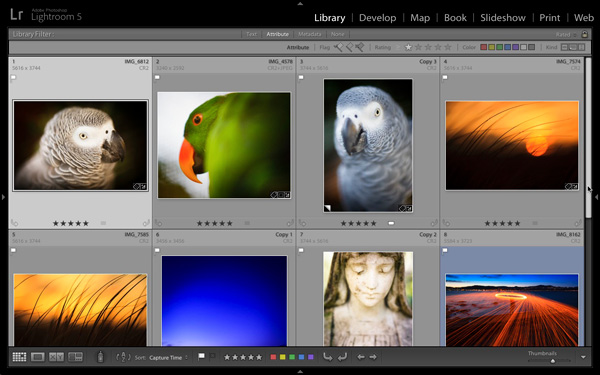
Back before digital photography became the norm, a photographer’s best work ended up as prints or as slides. Today, the finished article is often a digital image stored on a hard drive or uploaded to a website. One of my current projects is organising my best images from every year since I’ve owned a digital camera, and picking the best to create a yearbook. The ultimate aim is to use Blurb to create a book creating my favourite photos taken each year, over the last eight years, and to carry this forward throughout my life. Not just for me, but for posterity. These books will hopefully make great gifts for younger family members.

Method: add the keyword “yearbook” to suitable images, then create Collections to house those images.

Taking it further: This could be applied to all sorts of ideas. For example, I could use it to create a book (or simply a collection) of my favourite images taken here in New Zealand. All I need to do is add the keywords “New Zealand” and “book” to candidate images, then perform a search.

Using keywords

Excited? I hope so, because the more you delve into Lightroom’s Library module ,the more you’ll find ways to simplify how you organise your images. Keywords are no exception. Now let’s look at the different ways you can actually apply keywords to your images in Lightroom. There are several options:
Keywords in Lightroom 5

Adding keywords when you import images

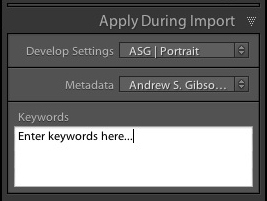
This method works well if you tend to import images in groups, according to subject matter. For example, if you take some portraits one day, some landscapes the next, and import them all in one go you can’t really add subject specific keywords. But if you import the images from both shoots separately you can add keywords at the import stage (for example, the name of the model to the portraits, and the name of the location to the landscapes). You can do this in the Apply During Import panel on the right-hand side of the Import window.

Use the painter tool

Keywords in Lightroom 5

The Painter tool is an easy way to add keywords to images while you are in Grid View. Click on the Painter icon in the Toolbar (it looks like a spray paint can – press the ‘T’ key to reveal the Toolbar if you don’t see it) and select ‘Keywords’ from the drop-down menu. Type in the keywords you want to add (in the box just to the right). Now all you have to do is click on a photo thumbnail to add those keywords to that image. It’s a very fast way of working in Grid View.

Use the Keywording panel
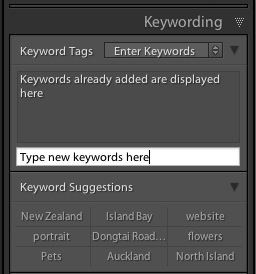
Keywords in Lightroom 5

The Keywording panel is located in the right-hand panel in the Library module. To add keywords, select the image (or a group of images) and type the new keywords into where it says ‘Click here to add keywords’. Any keywords already given to the image are displayed above. You can also add keywords by clicking on any that appear under Keyword Suggestions (populated by keywords you have used in the past).

Use Keyword Sets

Keyword Sets are found at the bottom of the Keywording panel. They are there to help you organise your keywords, and overcome the problem caused by the fact that it becomes more difficult to maintain consistency the more you use keywords.
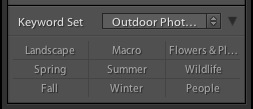
Keywords in Lightroom 5

For example, I live in a suburb of Wellington called Island Bay. If I take photos here then I should keyword them with “Island Bay”. But what if one day I use the keyword “Wellington” instead? Or even forget to keyword them completely? Then the power of keywording is diminished, because those photos won’t be picked up in any search based on the keywords “Island Bay”.

The solution is to use a Keyword Set. For instance, I could create a Keyword Set called Island Bay, and add Keywords such as Island Bay, Wellington, New Zealand, landscape, portrait. Then, when it comes to adding keywords, I can select the Island Bay keyword set first, then click on the appropriate additional keywords. This ensures consistency by ensuring that I select my keywords from a pre-determined pool.

There are several Keyword Sets included with Lightroom, with titles such as Outdoor Photography, Portrait Photography and Wedding Photography. You can access them via the drop-down menu at the top of the Keyword Set section of the Keywording panel. This menu also gives you the options to create your own Keyword Sets.
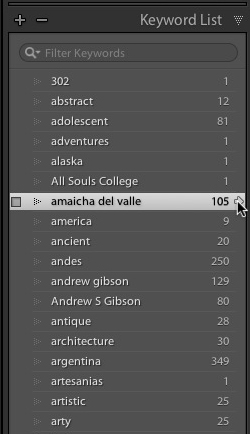
Keywords in Lightroom 5

Keyword List

The Keyword List panel lists all the keywords that you have applied to images in your Lightroom Catalog. If you want to see all the photos tagged with a specific keyword together, hover over the keyword and click on the white arrow that appears on the right-hand side. Lightroom brings them together in Grid View. This is one way of searching images by keyword.

Finding keyworded images

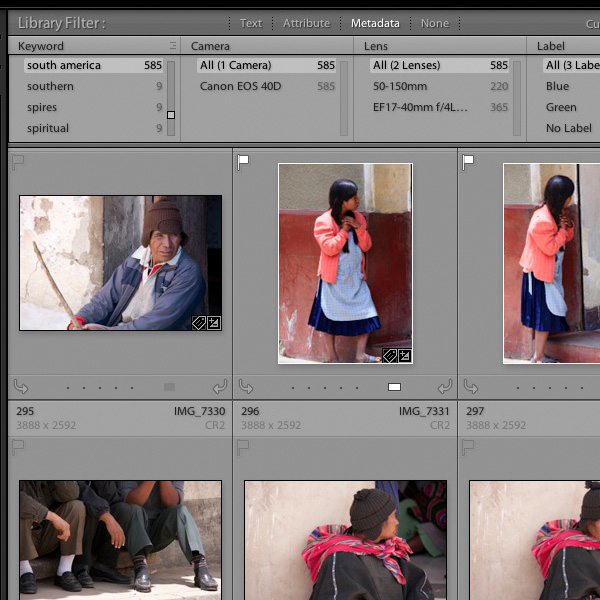
The easiest way to find keyworded images is to go the Filter Bar (press the ‘\’ key if you don’t see it) in Grid View and click on the Metadata label. Select “Keyword” from the drop-down menu in the first column. Lightroom displays a list of keywords underneath. Click on a keyword – Lightroom gathers all images tagged with that keyword together. You can limit the search to specific Folders or Collections by selecting them in the left-hand panels (or select “All Photographs” to search your entire catalog).
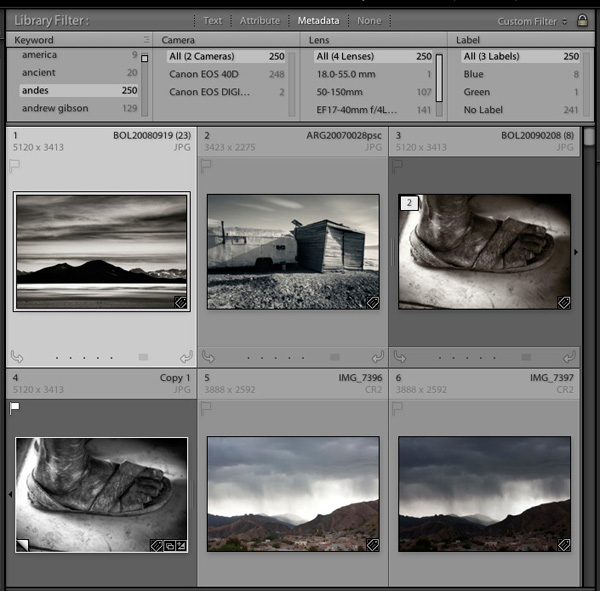
Keywords in Lightroom 5

Using Smart Collections

Keywords in Lightroom 5

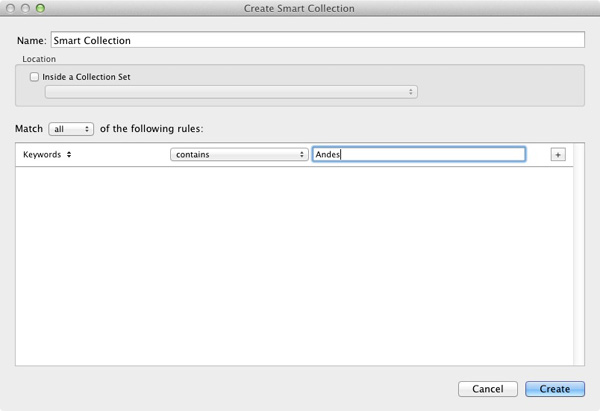
Finally, you can use Smart Collections to gather together images tagged with specific keywords automatically. Go to the Collections panel, click on the ‘+’ icon in the top-right corner and select the Create Smart Collection option. Set Match to All, select ‘Other Metadata > Keywords’ from the drop-down menu in the first column and then type the required keyword in the blank space provided. The example shows a very simple Smart Collection, you can make it as complex as you like by adding extra rules (remember to give your Smart Collection a name, in the example above “Andes” would be applicable).

Additional learning – Mastering Lightroom eBook
Keywords in Lightroom 5

My latest ebook Mastering Lightroom Book One: The Library Module is a complete guide to using Lightroom’s Library module to import, organise and search your photo files. You’ll learn how to tame your growing photo collection using Collections and Collection Sets, and how to save time so you can spend more time in the Develop module processing your photos. It’s available now for a special price at Snapndeals for a limited period.

Post originally from: Digital Photography Tips.

Check out our more Photography Tips at Photography Tips for Beginners, Portrait Photography Tips and Wedding Photography Tips.

Creative Ways to use Keywords in Lightroom 5

The post Creative Ways to use Keywords in Lightroom 5 by Andrew Gibson appeared first on Digital Photography School.

Digital Photography School

 
Comments Off on Creative Ways to use Keywords in Lightroom 5

Posted in Photography


8 Ways to Prepare for an Awesome Landscape Photography Session

13 Nov

What is your photographic specialty?  Do you even consider yourself to have one?  The answer to these questions might depend on whether or not you’re a professional photographer or do it for the enjoyment of the hobby. It’s a commonly known rule amongst professionals that you can usually maximize your success by concentrating in one or two specific disciplines or styles, whether it be Continue Reading

The post 8 Ways to Prepare for an Awesome Landscape Photography Session appeared first on Photodoto.


Photodoto

 
Comments Off on 8 Ways to Prepare for an Awesome Landscape Photography Session

Posted in Photography


5 Creative Ways to Find New Locations to Photograph

05 Oct

There’s truly nothing like visiting a location for the first time – I absolutely love it and I strive to always photograph at least one new location a month.

When I started on my photography journey this wasn’t a hard challenge to meet as even my own backyard was new to me and my camera, but as time went on things got a bit more difficult. New locations became ‘go-to’ spots and there came a point where I was only photographing at places that I had previously visited.

While I’d love to travel the world on a whim I just don’t have the means or time to do so which severely limits the range of my ‘new locations’ to places within driving distance from my house. As a result I’ve developed this list of useful techniques for getting the most out of my local area and I hope that it will help you do the same!

Creative Ways to Find New Photography Locations

#1 – Stuck on Earth

While Google Maps, Google Earth and Google’s Street View tools are great for getting location data, one of the best tools that I’ve used to find locations to photograph is the amazing app created by the people at Stuck in Customs called Stuck on Earth.

It works by fusing Flickr location data with a beautiful map to give you an amazing resource of not only useful locations, but the photographs other photographers have taken at those locations.

On top of searching random locations for photographs that have been tagged in various locations around the world, they have top location lists that have been curated by actual photographers to showcase the best photographs in cities around the world. There’s a bunch of other cool features as well and I highly recommend it as a resource (after all it is free).

You can find out more about it here.

#2 – Join a Photo Club

I’d have to say that one of the best ways to get out and find new locations is by meeting new people local to your area. Even if you’ve lived there your entire life odds are someone else has found interesting locations you haven’t – or better yet – has been able to find a new perspective on a location you thought you’ve picked clean.

Photography clubs often will also hold photo walks which will help you get out to different locations many of which might become your new ‘go-to’ spot when you’re in a pinch to get on location before sunset. It’s a great experience and I highly recommend trying it if you haven’t done so yet.

Have you ever gone on a photowalk? Tell us about the experience in the comments!

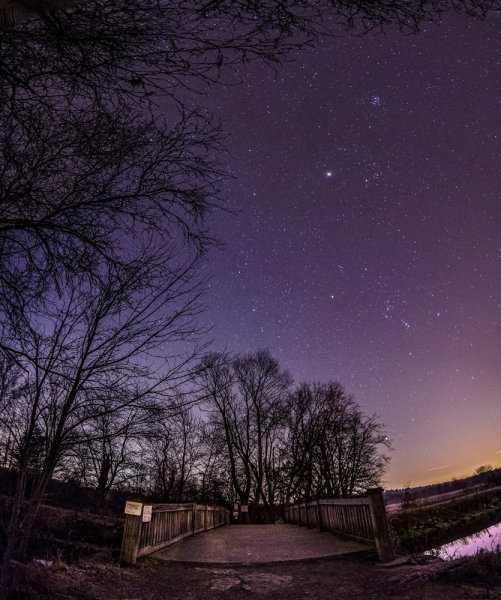
#3 – Make an Old Place New By Going At Night

One trick that I’ve done is not necessarily to find a new location, but instead to photograph the same location in the middle of the night.

A-lot-of-Stars

Night changes the way we perceive the world and will more than likely change the way you see a familiar location. It opens up a whole new set of challenges and pushes your camera to its limits of low light image capture, but in my opinion it’s one of the most fun types of photography there is.

Read more about photographing at night here.

#4 – Buy a Guide Book to Your Local State

Guide books might seem dated these days with instant access to so many great tools online, but there’s something to be said about a good guide book that has a friendly voice guiding you to the spots, telling you what to expect, where to park and when the best time to visit is.

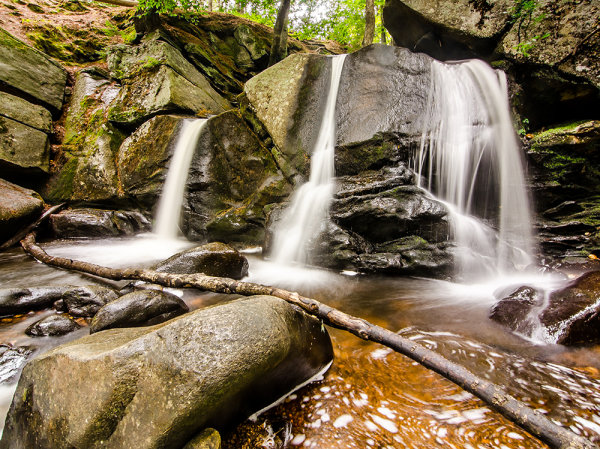
Trap Falls 2013

I never would have found out about Trap Falls (pictured above) if I hadn’t gotten a guide book detailing the hundreds of waterfalls and cascades that New England has to offer. It’s amazing the detail that the book goes into about not only where the waterfalls are, but how difficult the hikes are, and how picturesque the fall is.

There are tons of great guide books on Amazon and other bookstores and many of them can be downloaded as eBooks right to your phone or eReader so you can take it with you on your trip!

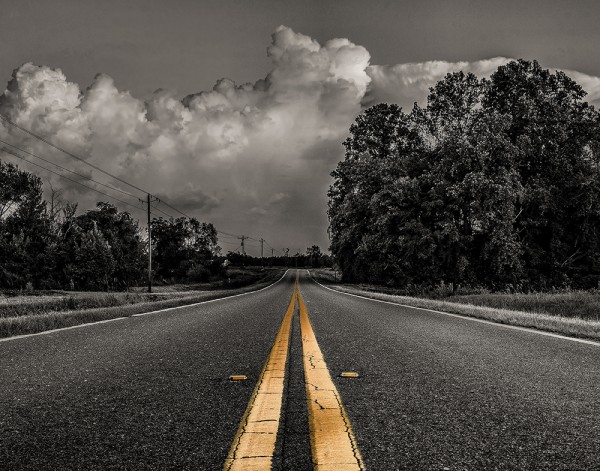
#5 – Fill up your tank and just drive

Finally, if all else fails, just fill up you tank and drive. One of my favorite things to do is pick a highway and a direction and tell myself, “I’m driving for 50 miles and taking the first exit I see after that”. What I end up doing is putting myself into an unknown town with all sorts of new things to see. I like to bring a friend along for the ride to keep me company as well as a second pair of eyes so that I can be sure to see potential photography opportunities.

Double Yellow

Of course it’s not a fool proof plan and driving around aimlessly can be a bit tricky. While it’s certainly possible that you’ll find a location you might otherwise have overlooked – it’s nearly just as likely that you’ll spend your day driving around with nothing to show for the effort, time and gas you burned.

How Do You Find New Locations to Photograph?

Okay now it’s your turn to help build upon this list – I’d love to hear what techniques you use to continue to discover new locations – leave a comment below and let us know!

Post originally from: Digital Photography Tips.

Check out our more Photography Tips at Photography Tips for Beginners, Portrait Photography Tips and Wedding Photography Tips.

5 Creative Ways to Find New Locations to Photograph

The post 5 Creative Ways to Find New Locations to Photograph appeared first on Digital Photography School.

Digital Photography School

 
Comments Off on 5 Creative Ways to Find New Locations to Photograph

Posted in Photography


5 Ways to Take Better Smartphone Photos

21 Sep

When you think about smartphone photography what comes to mind? My guess is you probably think about Instagram, photo filters, bad selfies and any number of other keywords that describe this new wave of photography.

hero

Today, I’m going to share a few tips on how you can improve your smartphone photography and start capturing interesting photographs wherever you are with whatever you have in your pocket. If you like this post you might also want to check out this DPS eBook specifically written for improving your iPhone photography.

Oh and no just because Apple improved their camera in the 5s doesn’t mean that they’ve created a device that will make you a better photographer – you’ll just get the same boring images – unless you learn how to become a better photographer.

Take Your Time and Treat it Like a DSLR

Smartphone photos on Flickr, Facebook and Instagram get a bad reputation for being terrible because well, 95% of them are terrible. One of the biggest reasons that this is the case is because 95% of the photos on these sites are taken not as photographs, but as a way of sharing moments – they’re snapshots.

IMG_0826-650x650

People aren’t thinking about capturing a photograph – they’re thinking about how cool that thing that happened in front of them is. If you want to truly impress people with your smartphone photographs you have to first and foremost start treating your smartphone more like a camera and less like a phone.

In the photo above I noticed that the sun setting behind me was reflecting off the mirror at the other end of the bar. I positioned my beer and spent a few minutes taking different shots, both in portrait and landscape orientation, as the sun quickly passed its way below the horizon.

Think With Filters in Mind

The great thing about smartphone photography is the ease of which you have to process your captured image. While it might not be true that every photograph looks “better” with a filter, it is certainly true that filters can add interest to an otherwise boring photo. That said you shouldn’t simply think “oh well I’ll just add a filter to it to make it awesome” instead think “that would look really cool with this filter!” and then shoot your photo accordingly.

IMG_0104

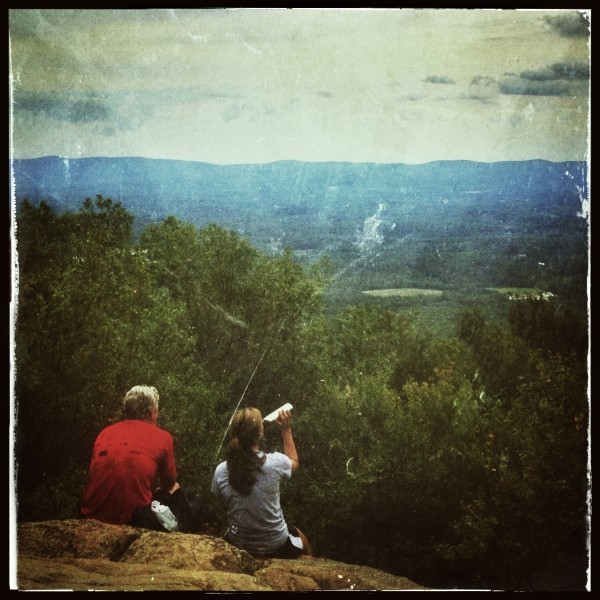
When I saw these two hikers sit down in front of me on a recent hike I knew right away that it’d make for a great “old time” family portrait style photo. I framed the shot and instantly went in that direction when I process the image – there was no doubt in my mind as to how I wanted the image to look from the moment I captured it.

Get Into Strange & Uncomfortable Positions

Smartphones are light, easy to maneuver and have a large screen making it possible to compose your image in awkward positions. Use this to your advantage and don’t be afraid of looking like someone who’s had a few too many hallucinogenic drugs in public. If you’re taking a photo people will understand won’t they?

So get down on your knees, on your back or hang upside down and have fun capturing photos that you would otherwise be unlikely to get with a larger heavier device.

Use Third Party Lenses

In most cases the third party lenses are best used for specialty situations like fisheye or macro photography that the built in cameras just aren’t capable of doing. With the iPhone I use the Olloclip 3 in 1 attachment and absolutely love the macro lens (read my full review here).

Dragonfly Macro

The above photograph was captured using an iPhone 4S with the Olloclip Macro attachment and to be honest the quality of this photograph even stunned me when I finally got it onto my computer. One of the key points to keep in mind here is that when you are using this lens you are required to be about 10-15 millimeters away from your subject to achieve focus – that’s incredibly close to a an insect that typically is fairly skittish.

Use Third Party Camera Apps

Yes the smartphones come with built in functionality, but in most cases they are fairly basic and while they will work well enough if you’re looking to capture a snapshot to go beyond that there are certainly better options out there. Many of the good quality camera apps on the market offer improved stability control, better filter options, and the ability to pick a focus and exposure point separately allowing for better control over the final image. Seeing as there are so many good apps out there rather than listing one that I recommend how about you leave your favorites in the comments below!

Have Fun and Share

Okay so ultimately the best part of smartphone photography is how easy it is to share your creations with the world. So now that you’ve learned how to take better smartphone photos how about sharing some of your favorites below – let us know which phone and apps you’re using to capture the images!

Learn more about taking photos with iPhones with our iPhone PHotography eBook.

Post originally from: Digital Photography Tips.

Check out our more Photography Tips at Photography Tips for Beginners, Portrait Photography Tips and Wedding Photography Tips.

5 Ways to Take Better Smartphone Photos


Digital Photography School

 
Comments Off on 5 Ways to Take Better Smartphone Photos

Posted in Photography


3 Ways to Guarantee Good Exposures

16 Sep

There is no excuse for coming home from a photo shoot to discover that your images are over or under exposed.

Your camera’s light meter will guide you to choose the right aperture and shutter speed settings to get a good exposure, or it will choose them automatically if you are using the automatic or semi-automatic modes.

The problem is that your camera can be fooled by tricky lighting situations and that’s why your image may not come out exactly the way you want it, despite all the advanced technology in your camera.

Below are 3 techniques you can use to make sure you get a good exposure. Choose the technique that works best for the type of photo shoot you are on and how much time you have while making images.

1. Automatic Exposure Bracketing (AEB)

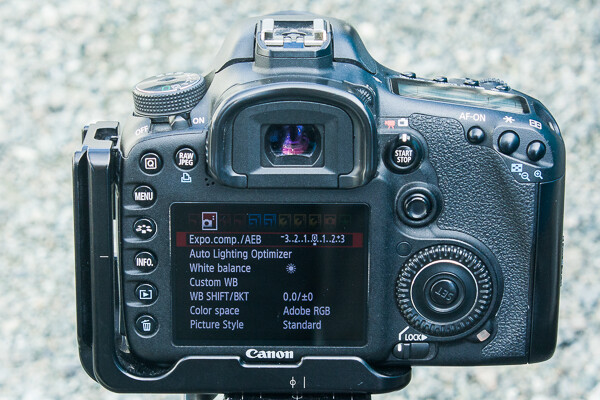
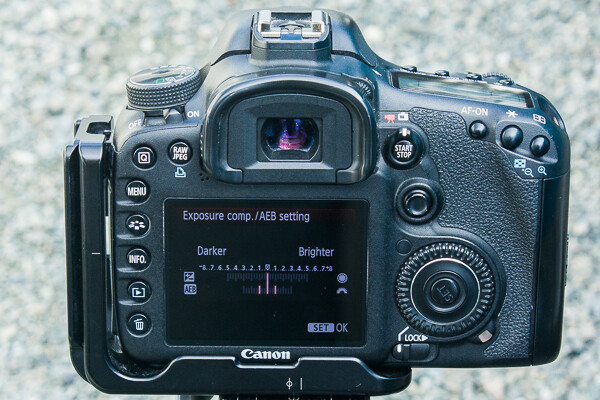
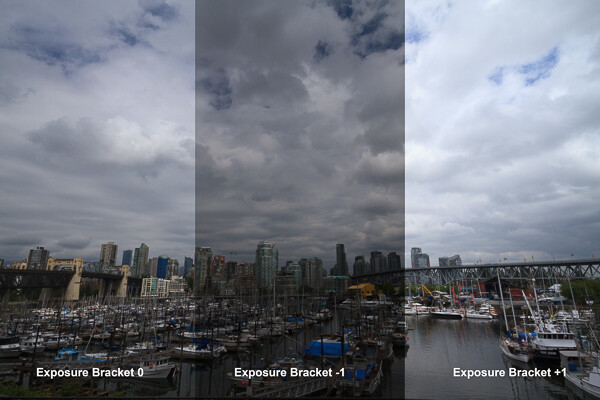
One way to make sure you get at least one image that has a good exposure is to use bracketing, which means that you take one exposure at the setting your camera’s light meter thinks is correct (0 on the light meter) and you take at least two more exposures, one at -1 stop and one at +1 stop.

That might sound like a bit of a hassle, but most cameras have a setting for automatic exposure bracketing which makes it quick and easy. Check your camera manual to see whether your camera has this feature and, if so, how to turn it on.

AEB in Camera Menu

AEB in Camera Menu

AEB showing +1, 0, -1 brackets

AEB showing +1, 0, -1 brackets

With automatic exposure bracketing on, you simply hold down the shutter until your camera takes 3 exposures and voilà. This is even faster if you set your shutter drive mode to continuous high speed.

AEB will work on Aperture Priority and Shutter Priority exposure modes and on some cameras it will even work in Manual mode.

I usually use AEB on Aperture Priority mode because I like to have control over my depth of field for landscape photography. On this setting the camera will take the photo at three different shutter speeds to give you the three different exposures. It is important to use this setting if you think you might want to combine the exposures in post-processing.

Exposure bracketing example

In this scene, the white sky caused the camera’s light meter to choose a darker exposure than was necessary. I decided that the +1 exposure was the best option.

Vancouver, British Columbia, Canada by Anne McKinnell

After processing the +1 exposure, this is the final version of the Vancouver City Skyline image.

If you use AEB on Shutter Priority mode, the camera will take the photo at three different apertures to give you the three different exposures. This is the best option to choose if you need to freeze motion at a fast shutter speed and depth of field is less of a concern.

Using AEB is the best method to use when things are happening quickly and you don’t want to spend any time looking at your LCD (known as “chimping”) after you make an image. When things are happening fast, chimping can cause you to miss a shot.

2. Exposure Compensation

Chimping is not necessarily a bad thing and unless there is a possibility of missing a shot, reviewing your images after you take them is a good practice to double check the exposure, focus and composition.

To use exposure compensation, just take the shot and then evaluate the image using the histogram. It is important to use the histogram for this and not just the picture as it appears on the back of your camera. The LCD is not all that accurate when it comes to exposure. Remember that if you shoot in RAW, what you are seeing on the back of your camera is a compressed version of the image and not an accurate representation of the RAW file. Also, your LCD’s brightness can be adjusted, so if you turn the brightness down when you are photographing at night all your images will appear darker during the day.

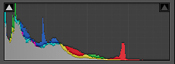
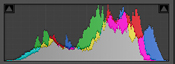
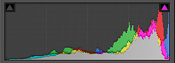
Using the histogram is easy. The blacks are on the left, the whites are on the right, all the mid-tones are in between. All you really need to know is that a spike on either edge of the graph is bad.

Under exposed image.

Under exposed image.

Good exposure.

Good exposure.

Over exposed image.

Over exposed image.

If there is a spike on the left edge, it means part of your image is completely black. You may want to use your exposure compensation to adjust the exposure to the right to make it brighter. But remember that having part of your image completely black, especially for a night shot, is okay.

If there is a spike on the right edge, it means part of your image is completely white and contains no data. Never let any substantial part of your image go completely white. Because it contains no data at all, it will always remain a white spot no matter what you try to do in post-processing. It’s better to keep the graph off the right edge. You only need to worry about this if the spike is right on the very edge of the histogram – if it spikes before the edge it is not a problem.

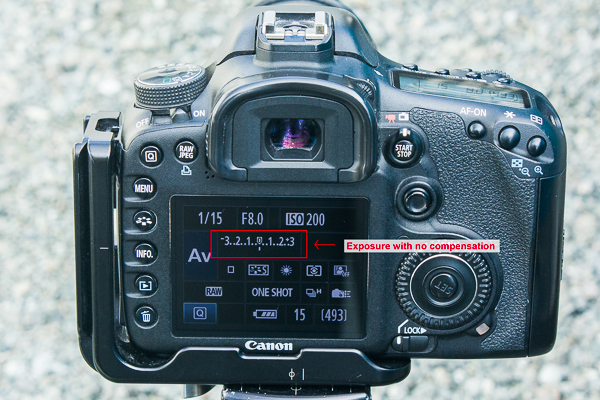
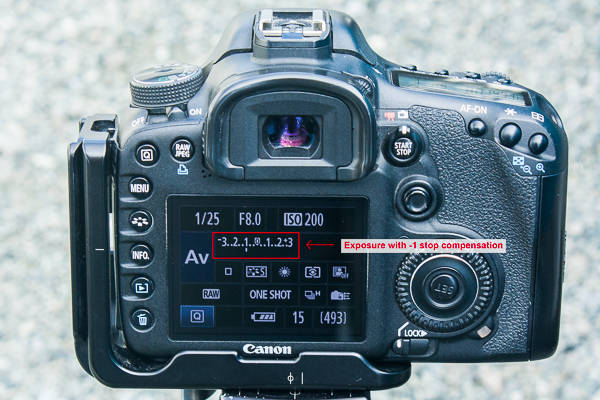
Once you evaluate your image using the histogram, you can use your exposure compensation to make the image darker or lighter without having to worry about changing the aperture, shutter speed, or ISO. If you just want it a little darker, turn the exposure compensation down a little. Or turn it up a little if your image is too dark. You’ll have to check your camera manual again to see how to do this. On my camera, I hold the shutter half way down and move the wheel on the back of my camera to change the exposure compensation.

Exposure with no compensation

Exposure with -1 compensation

This is the quickest method to use when you have time to chimp. While bracketing will ensure one of the three exposures is useable, this method is more precise and deliberate.

3. Exposure Lock

Exposure lock is my favourite method to use when I have lots of time. It actually doesn’t require that much time to do, especially when you get in the habit.

If you have a subject that isn’t moving, such as a landscape scene, and you have time to be purposeful about what you are doing, this is the ultimate method for getting the perfect exposure.

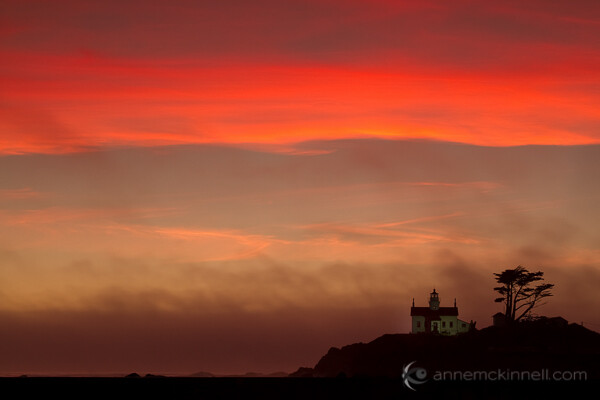
I like to use exposure lock in combination with the “spot metering” exposure mode so that the camera will only take into account the light level at the exact spot in the frame that I tell it to. I decide what part of the image is most important for the exposure. For example, if I am making a silhouette image at twilight, I will point the camera at the sky and use the exposure lock button to exposure for the sky, then I recompose the image, focus, and take the shot.

Battery Point Lighthouse, Crescent City, California, by Anne McKinnell

To make this image of Battery Point Lighthouse in Crescent City, California, I pointed my camera at the bright red band of clouds in the sky, used my exposure lock, and then recomposed the image and pressed the shutter.

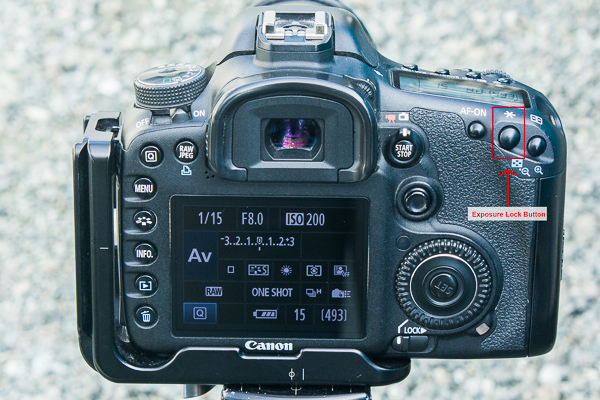
Check your camera manual to see how to use exposure lock. On my camera, I press a button with a * on the back of my camera.

Exposure Lock Button

Depending on the type of subject you are photographing and whether things in your scene are changing quickly or slowly, one of these methods will ensure you always get a good exposure.

Post originally from: Digital Photography Tips.

Check out our more Photography Tips at Photography Tips for Beginners, Portrait Photography Tips and Wedding Photography Tips.

3 Ways to Guarantee Good Exposures


Digital Photography School

 
Comments Off on 3 Ways to Guarantee Good Exposures

Posted in Photography


8 Ways to Make a Difference with Volunteer Photography

29 Aug

There is a well-known saying: “Love what you do, and you never work a day in your life.”  For professional photographers, we can imagine that, more than likely, this holds true for them.  There’s no doubt that the reason we are involved with photography, whether it be for hobby or by trade, is because it is an enjoyable activity, and Continue Reading

The post 8 Ways to Make a Difference with Volunteer Photography appeared first on Photodoto.


Photodoto

 
Comments Off on 8 Ways to Make a Difference with Volunteer Photography

Posted in Photography


4 Ways To Make Money As A Photographer

17 Aug

Wouldn’t it be nice to make money doing something you love – even if it were just enough to cover the costs of that hobby?

I’m going to share with you four ways that I have personally used to try and make money as a photographer. I’ll share with you my experience with each, advice on getting started, and whether or not I was successful in my attempts. I’ve also found a few more posts on DPS that will help you find more information on a few of these topics if they peak your interest.

The Wedding Photographer

Sneak Peak-7

Wedding photography is probably one of the more profitable ventures – I know for me even having only photographed one wedding I’ve made more in that one day than the other three methods I’ve tried combined. It has a relatively low cost to entry and if you’re lucky enough to be in or know a lot of people in their early to mid 20s you have a pontential gold mine of a client base to tap.

I recently was asked to photograph my sister’s friend’s wedding and after some convicing I finally said yes. Instantly I felt the pressure of the task before me. Even though I had nearly a year to prepare before the big day it still felt like I had a mountian to climb. Now I’d suggest that if you don’t feel this pressure when you’re about to photograph your first wedding then you probably shouldn’t be photographing a wedding. It was this pressure that pushed me to get help and make sure that I did the best I possibly could with the experience that I had.

Four words of advice if you’re going to try breaking into wedding photography

  • Don’t do it for free – No matter who it is! If it’s the president of your company or some stranger off the street find a price that works for both of you and be happy with it. Wedding photography is a lot of work and a lot of responsibly. These photographs will have value to your client (even if they’re not the ones she has on her Pinterest board) because they will be the photographs that freeze this day in history.
  • Find a mentor – You’ll want to do the best that you possibility can and if you’ve never photographed a wedding let me tell you you’re not prepared. There is a million things that you need to know and the best way to learn these things is by doing. I found a great professional photographer who’s been in the business for decades and he allowed me to shadow him on two weddings prior to mine – it was the best thing I ever did!
  • Rent your gear – Odds are if you’re just starting out you won’t have top of the line gear – which at a wedding does make a difference. You’ll need something sharp and fast to get the best quality shots, but you don’t have to invest thousands of dollars in your first go. There are plenty of places that will rent you all the gear you want for a couple hundred dollars for a weekend. For example I rented a Nikon D600 and a 24-70mm f/2.8 for under $ 170 for 5 days for the wedding that I photographed.
  • Communicate Often – Stay in communication with your bride and groom. Find out their vision, what they expect of you, and who they want featured in their album. The better the relationship you have with your clients going into the wedding the better the photographs will be.

These are four of the most important ways to get started in wedding photography, but by no means is an exhaustive list of wedding photography tips. Here’s the first post in a great series here on DPS about wedding photography for more information.

The Real Estate Photographer

0

Okay so the global economy is still pretty much in the ICU, but things are starting to look a little better right? After all the housing market is slowly starting to come back to life and as it does there’s an opportunity here for a photographer to make some money on the side photographing interior and exterior shots for real estate agents to use in order to sell the house.

I’ve only done this once and I wasn’t even really looking towards this as an option, but out of the blue a real estate agent who helped me buy my house contacted me after seeing the photographs I share on Facebook and asked if I’d be interested – I agreed to give it a shot.

Again – don’t fall for the working for experience line here if you’re serious about making money the worst thing you can do is start out giving your time away for free so come up with a price and stick with it. The going rate for real estate photography is going to change based on region so you might want to see if you can find local rates in your area.

A Couple Ideas for Pricing Your Real Estate Shoot

  • A Flat Fee – Exterior only typically will be a simple job so you’d probably charge a flat rate for this. If they want interior shots too then you might want to charge on a per room basis.
  • Fee + Commission on Sale – I’ve seen this done before too, but typically you’ll have to have more of a reputation to demand a commission on the sale of the house. That said it’s worth a shot.
  • A Variable Fee – Set your rate based on the property. If you photograph a shack that’s going for less than $ 50,000 dollars you’d probably have a lower rate than if you were photographing something that’s listed for $ 1.5 million.

The best part about this type of photography is you don’t really need too much gear. A DSLR, a wide-angle lens and a tripod will go a long way. Here’s a post with a bunch of DPS reader comments on the subject of entering the real estate photography business if you’re interested in more information.

The Stock Photographer

stockphoto

I’ll be honest here and tell you that I’ve only given stock photography a very half hearted attempt. I signed up for one of the many agencies out there and submitted a handful of my photographs – they didn’t sell – and I gave up.

It’s a very hard industry to break into if you’re just starting out because the agencies typically will feature popular photographer’s work first. One point I’d like to make is that you have to keep in mind that the photographs people are looking for are ones that will help them sell a product or service to their clients and therefore you have to think about that when you take your photos.

Just because I failed at selling anything through a stock agency doesn’t mean it’s not a good source of income for you. After all there are people out there who make good money with stock photography and that’s the main reason I chose to include it in this post.

So if you’d like to know more about getting into stock photography read this article on DPS it’s much more involved than what I’ve gone over here.

The Fine Art Photographer

The Fog Rolls In2

Fine art photography is probably the most competitive and most difficult avenue to break into due to the fact that the market is saturated with photographers trying to sell their photography and the fact that wall space is limited (we all only have four walls in each room to hang photographs on and typically we want those photographs to mean something to us).

Key Points to Think About as You Get Started

  • You’ll Need a Fan Base – Typically people aren’t going to buy a photograph from someone they don’t know or recognize. The best way to start selling your photographs as art is to build a fan base – I’ve done this through sharing my photos on my Facebook page.
  • Quality is Huge – If your sunset photographs look like the ones that dad took on the last family vacation then you’re not going to sell anything. Read more about how to avoid becoming part of the sunset paparazzi here.
  • Uniqueness Will Sell – As a continuation on quality the more unique you can develop your style to be the more likely you will set yourself apart and be able to sell prints to the fan base that you’ve built and even beyond.

Ways To Sell Your Photography

Okay so now that we’ve gone over some of the basics of what you’ll need to do before you even begin to sell your photography how do you actually go about selling it?

  • Direct Sales – If you can build a very loyal and close nit community of people in your town, college, or place of work you might be able to generate sales in this manner. Also, many local coffee shops will allow you to hang your work on their walls for a commission on sales (this is how I got my first print sale). It benefits them in that they get free art to hang on their walls and you get to have a lot of eyes on your photographs. 
  • Online Sales – Smugmug and Zenfolio are the two names that come to mind when I think about online sales (read about why I chose Zenfolio here). There are some other places as well like Etsy, Fine Art America and Redbubble which don’t offer as many features and typically will take a larger percentage of your sale. Again while all of these places will allow you to host your photographs, offer shopping cart options, and even print and ship the photo to your client they won’t promote it for you so we’re back to the first point above about needing a fan base to sell to.

Are you making money with your photography? If so are you using one of the options listed above or do you do something else? Share below!

Post originally from: Digital Photography Tips.

Check out our more Photography Tips at Photography Tips for Beginners, Portrait Photography Tips and Wedding Photography Tips.

4 Ways To Make Money As A Photographer


Digital Photography School

 
Comments Off on 4 Ways To Make Money As A Photographer

Posted in Photography


3 Ways to Improve Your Images With Composition

16 Aug

Along with lighting, subject, perspective, composition is one of the fundamental tools to creating better images. It’s one of the easier ones to begin applying to your own photography as well. Here are a few tips on improving your composition, with examples from a recent fitness photo shoot.

Rule of Thirds

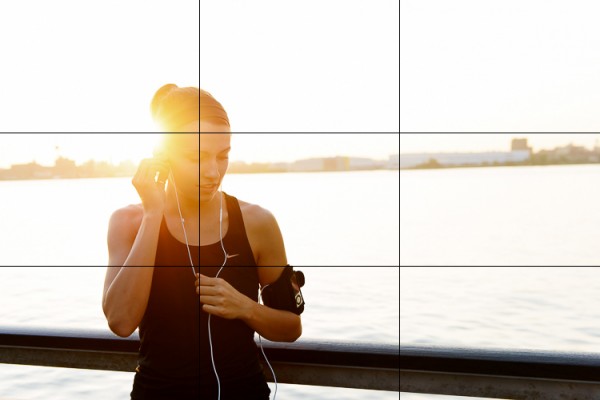
You’ve probably heard this one beat to death, but the rule of thirds is one of the fundamental keys in creating stronger compositions. It involves dividing an image into nine equal grids at the thirds. By placing your subject on the line of a third, or at the intersection of two thirds you’re following your eyes’ natural focus. We find photographs with the subject on one of these thirds simply more pleasing.

Take the below image for example, where this woman is placed on the left third line with the focus of her head near the top left third as well. It creates a more pleasing composition and gives the eye plenty of space to wander in the frame.

RuleofThirds

The rule of thirds isn’t a hard and fast rule and it’s often broken to great success, but that’s a topic you can find in many other posts. It’s a great starting point though to create stronger compositions.

1. Second Point of Interest

Applying the rule of thirds, you can now try adding a second point of interest into your images. Adding a secondary point, whether it’s out of focus in the background or in focus with a deep aperture landscape, gives your image a natural viewing progression. Your eye starts at the first focal subject and then moves along to the second.  Not only does this create more interest in your image, it can help reinforce a theme or perspective.

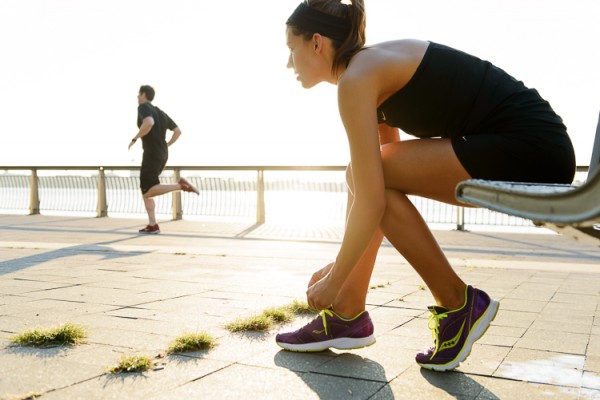
In this fitness image, the woman tying her shoe and preparing for a run is the clear focus of the image. Introducing a second runner in the background now creates another place for the eye to follow through the image. At the same time the “running” theme has been reinforced. Additional factors in leading the eye are; her gaze into the open space of the image, and the leading lines of the banister and concrete blocks.

MDP_5148-Edit

2. Room for Copy Space

If you ever have aspirations to shoot for advertising agencies and many editorials, learning to leave room for copy space is a must. Copy space is the negative area in an image where a brand will place their tag line, logo or product/information. Generally you want this negative space to not be too busy, so that the copy pops out. The effect can be achieved often by using a shallow focus in your images, or by simple ensuring there is a space without too much “busy-ness” in it. A nice open sky often works great in this regard.

In this shot there’s some clear head space in front of the two runners that works great for copy. An important thing to keep in mind though if you do end up applying these principles for a client, is how the images will be placed in publication. Will they be on a poster or against a store wall? Or across the pages of a magazine? This particular image might not work well across a double page spread, as it places the subjects’ heads right where the crease would be. Against a store wall it would work just fine. These are important placement ideas to keep in mind with copy space.

MDP_5190-Edit

3. Bringing It All Together

When you bring all three of these compositional elements into mind you can create a great image that not only holds interest, but appeals to the creative people who hire photographers (always a big plus). The image below is an example when all three work together. The subject is at one of the third grid lines, there’s a secondary point of interest in the background and room has been left below for copy space. When you keep all three elements in mind you’ll be on your way to creating stronger compositions.

EveryDayRun2

Post originally from: Digital Photography Tips.

Check out our more Photography Tips at Photography Tips for Beginners, Portrait Photography Tips and Wedding Photography Tips.

3 Ways to Improve Your Images With Composition


Digital Photography School

 
Comments Off on 3 Ways to Improve Your Images With Composition

Posted in Photography


7 Ways To Create Authentic & Powerful Portraits

11 Aug

Create authentic powerful portraits 1

by Steven McConnell

Do you remember the time you were learning to drive a car?

If you’re like most people, it began as a purely technical, logical activity. You had to think about your every move. You were reacting to your environment, rather than anticipating it.

Over time, that settled into a form of unconscious competence. You began to drive by feeling the car, rather than thinking about it.

Learning to shoot portraiture is similar. Beyond the mechanical, logical world of preoccupation with gear, ISO, f-stops and focal lengths is a realm of feeling your way around your environment, connecting with your subjects, witnessing their stories and sharing them with the world through your photographs.

It’s easy to say, I hear you say. But how do I start moving in that direction?

For me personally this has been a focus of my attention for the past few years and I feel like I’m just starting to scratch the surface. Every time I discover something new I see how much more there is left to uncover.

It’s my aim here to share some of my main discoveries with you. I hope that lessons I’ve learned on my journey to becoming a portrait photographer help you along in yours.

Create authentic powerful portraits 2

1. Forget The LCD

I see so many photographers take a few photos and then bend over to check what they got on the back of their camera.

Meanwhile, their subject is just standing there. Their mood is collapsing. All kinds of weird thoughts are starting to run through their head.

Checking the histograms every now and then is important, but your main job as a portraits photographer is to be aware of, and manage, your subject’s headspace.

You can’t do it effectively if you’re spending more time with your camera than you are with your subject. You need to be completely present with the person you’re photographing.

It means you need to photograph a lot and often, until know with a reasonable degree of confidence when you’ve nailed the shot – without having to check it on the LCD.

Create authentic powerful portraits 3

2. Explore Av & Tv [Aperture and Shutter Priority Modes]

There’s a sentiment in the photographer community that you must always shoot in your camera’s manual mode because “that’s what serious photographers do”.

Manual gives you great creative options in certain situations – for example, when you’re combining ambient light with strobes.

But be aware that you don’t always need it – and sometimes it will shoot you in the foot.

If you’re using only natural light, for example, and it’s likely to be changing while your subject is moving, the last thing you want is to miss moments while you’re chasing exposure.

Try shooting in aperture-priority mode (Av), using aperture to control depth of field as a creative element while dialling the exposure compensation in or out to fine-tune exposure.

3. Lose The Fat Lens

I shoot with prime lens because I like to have as few physical barriers between me and my subjects as I can.

If I can’t look them directly in the eye as I’m photographing them, then I want to look at them through as little metal, plastic and glass as possible.

Also, I think there’s a lot to be said about removing everything you can which will intimidate your subjects.

As photographers we tend to view gear as something to get excited about. But in doing so we forget that something like a 70-200 f/2.8 (even a 24-70 f/2.8!) on front of a DSLR can be unnerving to most people.

Create authentic powerful portraits 6

4. Research Your Subjects

When I started photography, I did enough research about cameras to be able to quote the pros and cons of just about any DSLR body out there.

But if you asked me what the person I was photographing wanted to be when they grow up, I’d have no idea.

How can a photographer tell a story about a subject through the photos if they don’t know anything about them?

What are your subject’s dreams? Obsessions? Fears? Ice-cream preferences? Why do they get out of bed in the morning? What kind of personality they have – quirky, calm, strong, bubbly or intellectual?

Answers to those questions are a great departure point for your creative choices as a photographer.

Create authentic powerful portraits 4

5. Put The Camera Down

I picked this idea up when I was watching this video of Annie Leibovitz photographing Keith Richards:

Notice how at 1:55 she puts the camera down to give him direction. It’s not accidental – by doing so, she injects a healthy dose of warmth and intimacy into their interaction. She reminds Keith that there’s a real human taking his photo.

6. Control Your Purpose

How you come across to your subjects is heavily influenced by your purpose in any moment. And that will determine how they act around you.

My default purpose is “Here I am, the photographer, about to photograph you – the subject”. Needless to say, it’s not very conducive to creating a connection of facilitating a particularly warm dynamic.

Before a shoot I literally have to shift the context through which I view the session to one which helps me set a warmer tone.

If I’m photographing kids, I’m likely to change to a space of “Let’s play – and I’m bringing my camera along”. If I’m with adults, I’ll probably take things in the direction of “Hey, let’s get to know each other – and I’ll take some shots along the way”.

Connection takes first place, photography second.

Create authentic powerful portraits 5

7. Meditate

This looks odd as a piece of advice on a photography blog. But here’s why I think it’s useful.

As photographers, we tend to be quite analytical – we go through the world thinking about it, rather than feeling our way around it. We spend a lot of time preoccupied with our thoughts, which can give our emotional tone a somewhat distant edge.

Meditating 10-15 minutes a day will helps you settle down and feel more centred. You will come across as a warmer, more approachable and confident photographer. You will also be more present with your subjects’ needs and be able to respond to them (rather than react to them).

It’s important because your subjects will largely mirror your emotional tone. The easiest way to help them settle down and connect with you is for you to be calm yourself.

Steven McConnell is a family photographer at Family Photography Sydney. You can connect with him on Google+. and Twitter.

Post originally from: Digital Photography Tips.

Check out our more Photography Tips at Photography Tips for Beginners, Portrait Photography Tips and Wedding Photography Tips.

7 Ways To Create Authentic & Powerful Portraits


Digital Photography School

 
Comments Off on 7 Ways To Create Authentic & Powerful Portraits

Posted in Photography


7 Simple Ways a Blog Can Get You More Photography Clients

04 Aug

By Ramsay Taplin

Are you a photographer who dreams of taking your photography business to the next level?

Well, one of the things that creative people (like artists, writers and, yes, photographers) forget is that you grow a business by marketing it – not necessarily by just being good at what you do. There are plenty of good photographers out there.

So what’s the problem?

Not all photography businesses have a huge budget to spend on marketing.

And that’s where a blog comes into it.

In this post I’m going to talk about how you can start a blog (or use an existing one) to get you more clients for your photography business. I don’t run a photography blog but I’ve got a bit of experience with helping small businesses grow using content marketing.

I’ll use a few examples from photographers I know as well as taking some sweet ideas from similar small businesses doing the same thing.

Not all blogs/websites are created equal

For the purposes of this article I thought it would be important to make a few distinctions.

And let’s start by highlighting the fact that a regular “brochure” website is not the same as a blog. Not by a long way.

What’s the difference between a blog and a website?
So what’s the difference? Well, a website is something that generally has static content – pages like About Us, Services, Gallery, Contact and so on. A blog is something that you update regularly with new content. The newest posts usually appear at the top. This comes with a huge set of advantages – some you might never have considered.

Can the two work together?
Absolutely. In fact, that is the ideal situation. The best way to set your photography website up is to make sure it has a blog integrated seamlessly with the rest of the website. Having a blog on a separate domain name is good but not nearly as good as building one under your main brand name. I’ll explain why later.

Where do I get started?
If you don’t have a blog (or a website) and want to learn more I’ve done a video and a full walkthrough on blog hosting that helps you understand how it all works together and how to get started the right way the first time around. You can also check out this Wiki later on for some hosting alternatives.

So how can a blog bring you more photography clients?

Now that we’ve got some of the preliminary stuff out of the way let’s jump into the meat and potatoes of the post.

1. A blog helps to build trust
The first thing to note about a blog is that it helps you build a lot of trust with your potential customers and clients. This is an extremely important part of growing a business these days because a huge amount of your customers will research you before they engage your services. In fact, some people say that one in three people look at the website before engaging the business.

Part of this means having a well designed website that showcases your work and part of it means showing your personality. This is especially important for things like wedding photography where your client will want to have a good relationship with you as it is such an important day for them.

LisaK

A few cool shots from Lisa K’s blog.

Tasmanian photographer Lisa K does this extremely well by having her blog as the homepage of her photography website. The articles she posts are about her daily life and family but always showcase some stunning photographs that would, no doubt, help to create an initial “buzz” and trust with a potential client.

2. A blog helps to increase your reach
The most important part of marketing a business is reach – you need to get in front of new people as often as possible.

This can be quite a difficult concept to understand because we are usually told that loyalty and repeat customers is the most important. Well, if you have five loyal clients who bring you the majority of your business but one drops off then you’re in trouble. A better scenario is to reach new people regularly and then convert them into loyal customers by providing a quality service. Reach is always more important than loyalty for growth.

So how does a blog help to increase your reach?

Well, it gives people something to share and a platform for you to promote all the cool intricacies of your business. People are very unlikely to share around just a portfolio site (unless it’s incredible!) but if you publish a quirky or unique blog post that’s different to your regular material you might find it makes the rounds on Pinterest or Twitter and brings you some new clients.

For example, let’s say you have some hilarious wedding photos of brides trashing their dresses. They’d look look good in a portfolio but imagine the difference it would make if you combined them into one blog post called 10 Hilarious Photos of Brides Ruining their Expensive Dresses. Much more entertaining and shareable.

3. A blog can get you more exposure locally
Google is now giving a lot of weight to local listings. What this means is that if someone types in “photographer” into a Google search they are going to get result from their local area. Here’s an example:

Screen Shot 2013 08 01 at 1 17 37 PM

As you can see, in South Australia I get a Wikipedia result and then the next few are all local South Australian photographers.

Now, a blog can help you take this to the next level in a few ways. The main one is that every blog post you publish will increase your visibility for local terms. For example, if you do a blog post called 25 Beautiful Landscape Photos from Around Sydney you are more likely to rank for terms relating to those photographs to people in Sydney.

Or, you might do a blog post about every photo shoot that you do with local businesses. When people see those photos on those businesses websites or marketing materials and then look it up on Google you’re more likely to appear. So you can piggyback off the success of your client and your quality photos to get more business.

4. A blog gives your website multiple new points of entry
This point strongly relates to the previous one but is worth mentioning on it’s own.

Every time you publish a blog post it (if set up correctly) publishes with it’s own unique web address called a permalink. For example, let’s say you do a post called 5 Interesting Photos from New York that post’s permalink would be something like www.yourwebsite.com/5-interesting-photos-from-new-york/

The great thing about this is that Google will index each post like this in the search results separately depending on what people search for, and how authoritative your website is. This is quite a complicated field we’re getting into now so if you’re interested you can read this SEO for blogs article or this list of SEO tips from Darren.

The main point, however, is that for every blog post you publish you’re creating a new set of keywords through which people can enter your blog.

A great real-world example is my mate Tim from SA TECHFLOOR who told me the other night that since he started blogging and posting photos of his flooring jobs he’s getting more and more phone calls every day. As each one has a different set of keywords (carpet, concrete, bamboo, timber, etc.) he’s got a lot of entry points he didn’t previously.

5. A blog can help your website rank higher
Now, one of the cool things about the previous few points is that if you do them all within your own website you can cause that website to rank higher on Google for important terms like “photographer in [your city]“.

Google likes to show results that are both fresh and of the highest quality. So if you have a small five page website with not much changing, Google might not think it’s all that useful.

If, on the other hand, your website has an active blog with lots of new posts, people sharing it on social media and so on, Google is likely to think it’s more useful for their customers (people searching) and thus rank it higher.

Organic ctr by search position 1 20 png

A graph of the click through rate of the top search results thanks to Search Engine Watch.

As you can see in the image above, this can lead to an immediate increase in business because the first result in Google gets over 35% of the traffic for that page. Worse still, the first page gets over 95% of clicks so if you aren’t in the first few results you’re getting overlooked.

6. A blog can help you form new collaborations
A good online friend of mine, Jamie Swanson, runs two photography blogs. One of them is embedded in her main business website and acts as a promoter of her main services. Her second blog, however, is called The Modern Tog and it’s all about running a photography business.

I wanted to mention her second site because it is a great example of someone who has set up something slightly out of the box and created a lot of new connections because of it.

For example, Jamie contacted me through Blog Tyrant about a year ago and I put her in touch with the content editor at ProBlogger. This lead to her writing a hugely successful post about Pinterest that, in many ways, has lifted her reputation online as someone who knows about photography and the marketing side of photography.

It wouldn’t have happened without the blog.

7. A blog can help reduce client friction
Client friction is what happens when they visit your site, like your stuff but for some reason don’t make contact. It could be because they don’t like your prices or it might be something a little bit more intangible like not really “feeling the vibe”.

James Field runs one of Adelaide’s best wedding photography businesses and has a great little video on his website that is a cool example of something you can do to get your clients to know you better.

Now, James’s video isn’t on a blog but it’s the perfect kind of cross-platform content that a blog is perfect for. For example, you could do a series of these types of videos showing how the wedding day pans out for your clients. These could then bring you traffic from YouTube as well as reducing client friction on your blog.

Tips for your photography blog

So now you’ve got some reasons as to why you might want to have a blog on your photography businesses website. But once you’ve got the blog what are some things you can do to make sure it succeeds?

  • Be personal
    People will love your photos (if you’re good) but they might not like you. Try to figure out who your audience is an, if possible, make sure you are personal and friendly.
  • Know your brand
    Know who you are targeting and what keyword they might be looking for on Google. This will help you craft the right content.
  • Make sure it loads fast
    People are getting less and less patient when it comes to websites. In fact, a one second delay can affect conversions by up to 7%.
  • Find a way to be different
    Don’t just publish the same stuff everyone else is. Take a leaf out of BuzzFeed’s book and use content we’ve all seen to come up with something fun, shareable and relevant.
  • Make your blog your “home base”
    In my guide to social media I talk about the fact that your blog should be your base for all your social media activities. This way, all the Tweets, Pins and Shares that you get go towards growing your blog’s traffic and rankings.

Do you run a photography blog?

I’d be interested to hear how many DPS readers have photography blogs and whether or not they’ve helped to get more customers vs just a static website. What has worked for you? Leave a comment and let us know!

Ramsay runs Blog Tyrant – a blog about trying to make a living from the couch and other internet marketing ideas. Find him on Google+ today.

Post originally from: Digital Photography Tips.

Check out our more Photography Tips at Photography Tips for Beginners, Portrait Photography Tips and Wedding Photography Tips.

7 Simple Ways a Blog Can Get You More Photography Clients


Digital Photography School

 
Comments Off on 7 Simple Ways a Blog Can Get You More Photography Clients

Posted in Photography