RSS
 

Posts Tagged ‘Ways’

4 Ways to Add a Sense of Motion to Your Urban Photography

27 Sep

It is great to walk around a new city, or a new part of a familiar city, and just explore. You never know what will be on the next block or around the next corner. When you bring your camera along with you, you can often capture a few nice skyline photos, some interesting pictures of buildings, and perhaps some street photos of people going about their daily life.
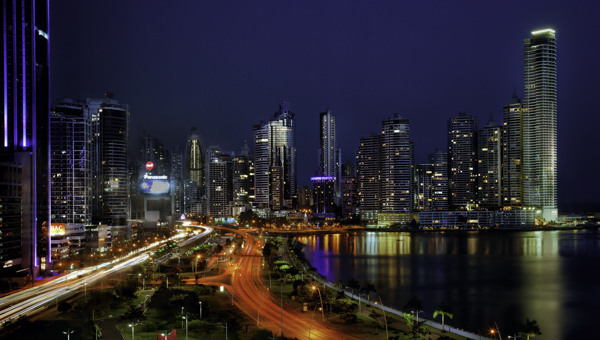
CityMotion1 Panama

But you know what is often missing from these photos? A sense of movement, and that’s what cities are all about. Cities are not just collections of buildings. They are dynamic environments full of hustle and bustle. The trouble, of course, is that it is hard to capture this movement in a still image.

So I want to show you a few techniques for adding that sense of motion to your urban pictures – how to capture the city in motion

#1 – Add streaking headlights and taillights

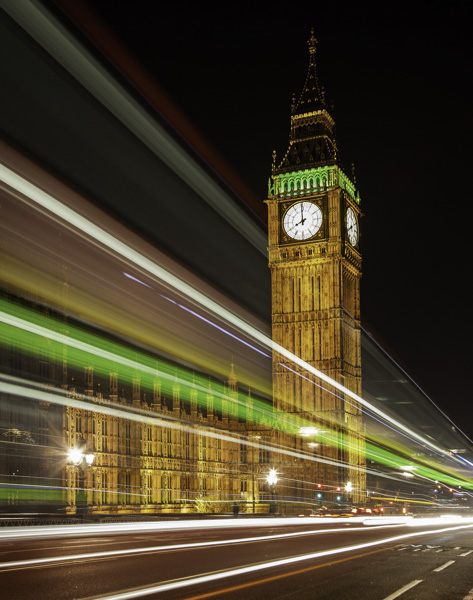
A common way you can add movement to your urban photos is by including streaking headlights and taillights. But don’t stop with capturing only the streaking lights, without regard to capturing the city. Streaking lights can work really well as an accent to a photo of your city. In other words, the streetlights don’t necessarily need to dominate the image, but rather just add a sense of movement to the overall image.
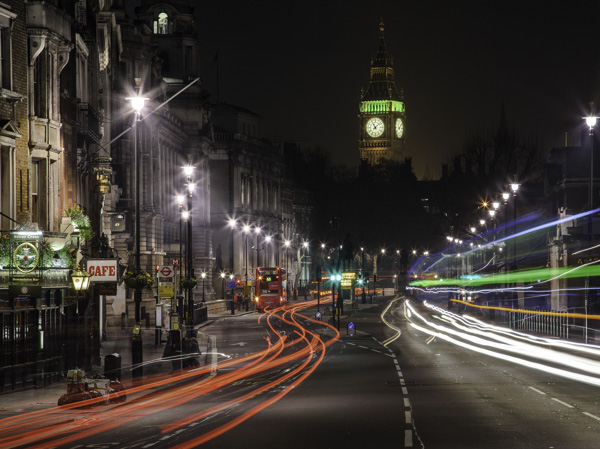
CityMotion6 Whitehall

The key to capturing this effect is to set up your shot on a tripod with a long exposure and take shots as traffic moves past you.
CityMotion4 Westminster

There are no set exposure settings because the ambient light is always different. Start with something like a 20 second exposure at f/8 and adjust from there. Try triggering the shutter just before traffic enters your frame. You will probably need to take several of these pictures to make sure you’ve got it right.

#2 – Panning
CityMotion3 NYCcab

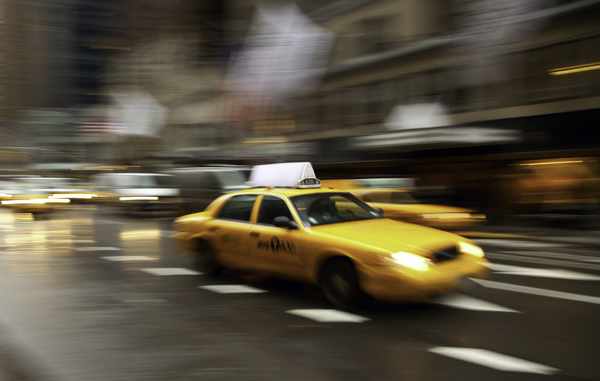
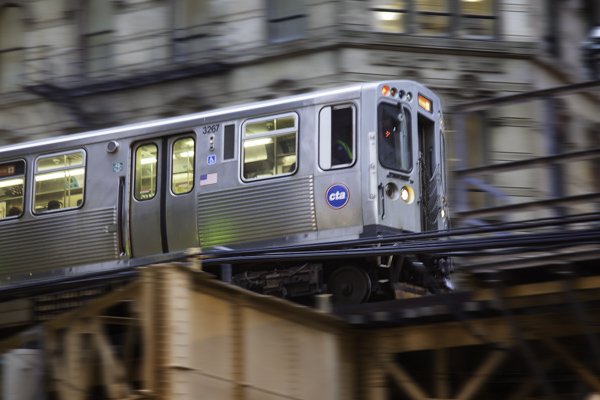
Another great but often overlooked technique for capturing motion in the city is panning. Panning is where you follow a subject with your camera so that the subject is in focus and reasonably sharp, while the background is blurry and shows a sense of motion.
CityMotion11 ChicagoTrain

Panning is great because it doesn’t require a tripod and can’t be done at any time of day. What you do is follow a moving subject with your camera at a moderately slow shutter speed. The best shutter speed for this technique tends to be between a 1/30th and an 1/8 of a second. Since the camera is moving at the same rate as the subject, the subject should be reasonably sharp, while the background will be blurred.

You can use this technique on anything that is moving, whether it be a train, a car, or even a bicyclist or skateboarder. My favorites tend to be the iconic vehicles of the city.

When you get back to the computer, you can accentuate the effect a bit in Photoshop by sharpening your subject a little bit, while at the same time adding a slight blur to the background.
CityMotion5 Trafalgar

#3 – Capture movement of vehicles

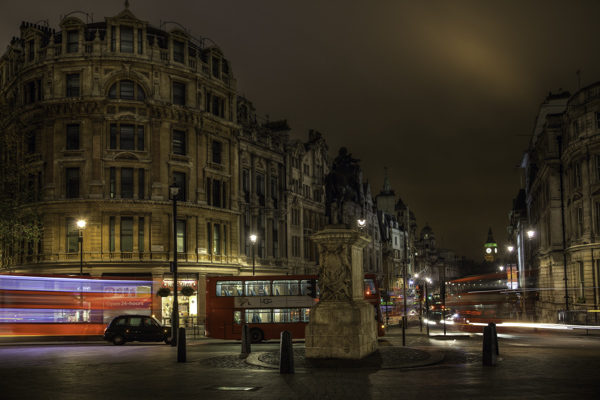
When it comes to vehicles, don’t limit yourself to streaking taillights and headlights. It often works really well just to add a slight blur to vehicles in your frame to add a sense of movement. In fact, a lot of times this adds more of a sense of movement than just having lines streaking across the image.
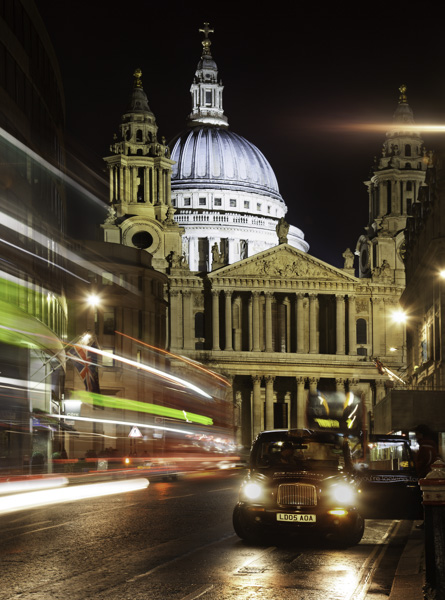
CityMotion8 Ludgate

You will want to use a tripod for these types of shots. It is important that everything be sharp except the blurred vehicle. To capture the movement, a shutter speed of just a few seconds works really well. You will probably have to take several shots to get a good one.

#4 – Capture the movement of people
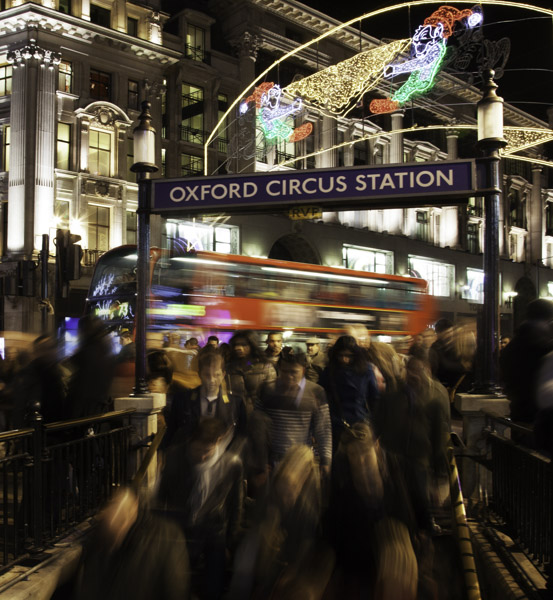
CityMotion2 OxfordCircus

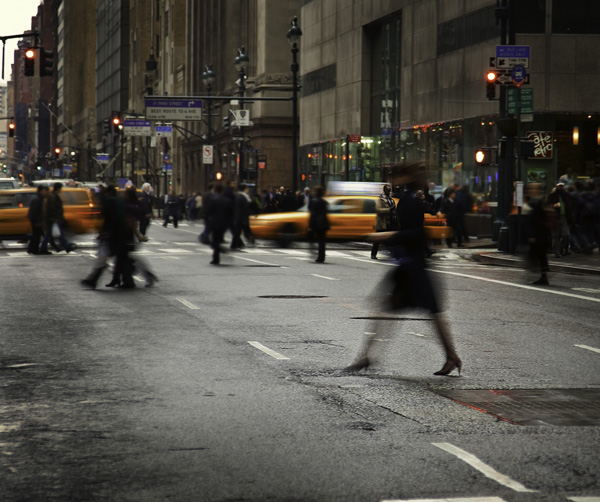
The final way to capture movement in an urban setting is by capturing people in motion. This is used much less than the other techniques, largely because it is harder. People don’t have lights that streak across the screen. In addition, you have to get closer and it is more personal. But when done well, the results can be dramatic.
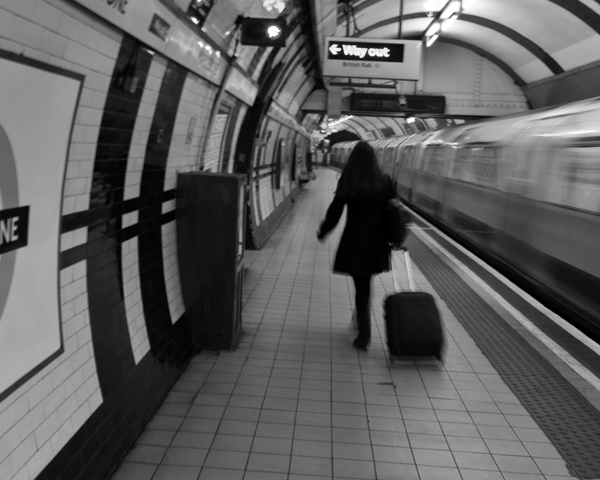
CityMotion9 Tube

The best way to go about it is to set up shop where you know people will be walking past you. Train stations, subway stations, and other places where people rush in and out, work really well for this. If you can use a tripod to keep the background sharp, do so.
The shutter speed will need to be a bit slower than what you use to capture moving vehicles because people move so much slower. Typically a shutter speed of about 1/2 to 1/10th of a second works pretty well.

This is another one you can do any time of day, any day of the year. It is a good thing to work on when conditions are not right for other photography you want to do.
CityMotion7 NYClady

Conclusion

Including movement can add a missing element to your urban and street photography. It is also something that you can get out and do on any particular day or night. Plus it requires no special gear. If you have a camera and a tripod, you are good to go.

So head out and try some of these techniques, and if you have any questions about it just leave it in the comments below.

The post 4 Ways to Add a Sense of Motion to Your Urban Photography by Jim Hamel appeared first on Digital Photography School.
Digital Photography School

 
Comments Off on 4 Ways to Add a Sense of Motion to Your Urban Photography

Posted in Photography


6 Ways to Take WOW Photos in Less Than an Hour

08 Sep

If you’re like most photographers, nothing gets you more excited than a new tip or trick that can help you make your photographs more awe inspiring. The problem is that a lot of these processes can take some time to learn and execute correctly. Pretty quickly you realize that it may take you more than a few tries to master the new technique to become a better photographer.

IMG_6179

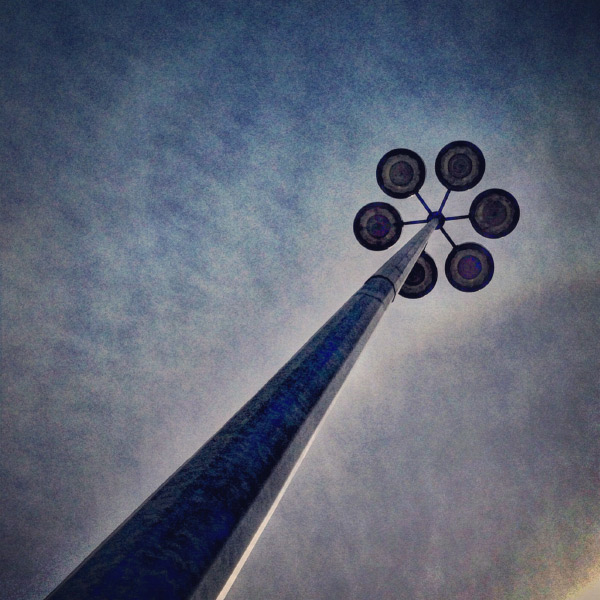
A mundane parking lot light stand can become something wondrous.

You’re also busy with more than just photography to take care of, and with instant gratification pervading all aspects of our lives, who wouldn’t appreciate a few SIMPLE photo strategies that provide immediate results?

Forget about aperture and shutter speed, focal length, ISO, and all the technical stuff for now. If you use the techniques in this article, alone, or mix and match, I guarantee you’ll learn how to take WOW photos in less than an hour. I use my “Snapshots to WOW Shots” process with many of my photography classes, from grade one kids who’ve never seen a camera before, to seasoned professionals who need to inject a quick fix into their  photographic repertoire. It works for everyone, guaranteed. Give it a try!

Method One: Bird’s Eye View

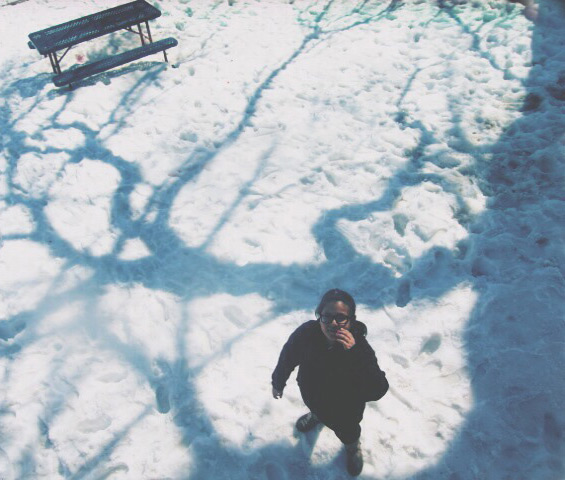
In our day to day lives we see the world from a height of about five to six feet. To create a WOW shot you need to alter that perspective. Show your viewers a point of view they don’t normally see. Just about any subject can be transformed into a WOW if you shoot it with your camera pointing straight down. This is what is called the bird’s eye view.

IMG_3957.Wjpg

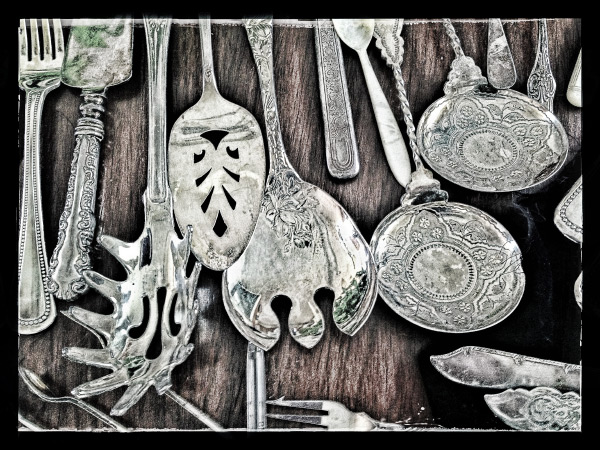
Looking straight down on antique silverware – a different point of view.

IMG_4813W

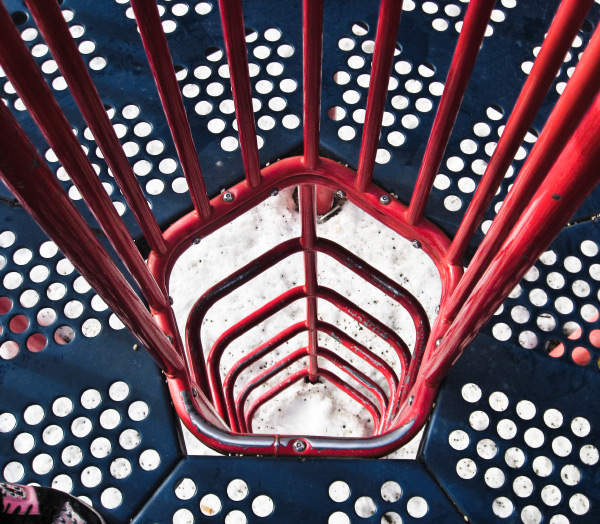
Shot by one of my grade 4 students – atop the play structure, pointing the camera straight down. 

Picture-197W

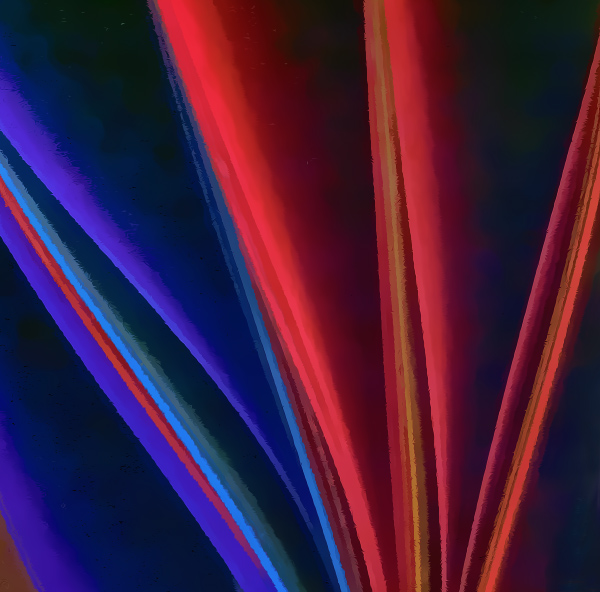
A crazy abstract shot looking down at colored pages in a binder.

Picture-366

An herbal still life shot through a glass coffee table, straight down.

Method Two: Worms Eye View

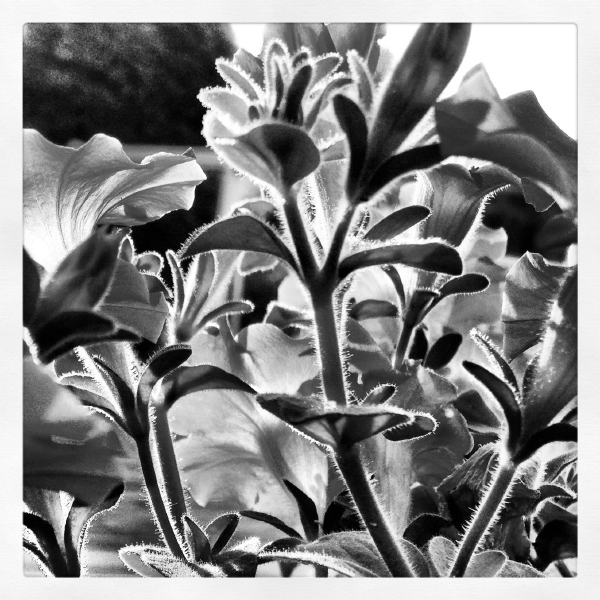
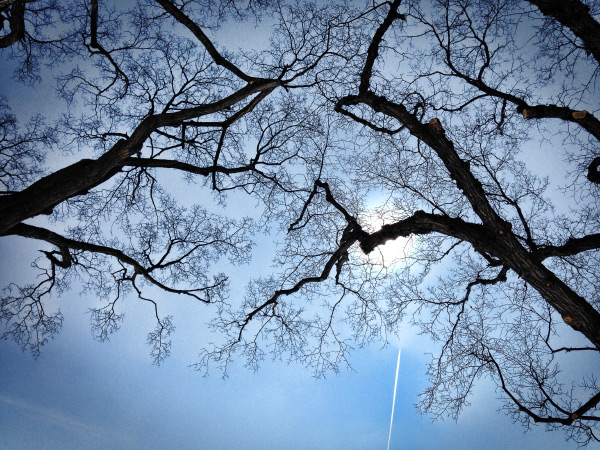
Similarly, not too many of us spend our days down on the ground. So shoot from a very low angle, and point your camera up, or just explore the world from the point of view of a worm (down on your belly!) and mundane things look a whole lot more interesting. Instant WOW shots, from the worm’s eye view.

These shots usually have the added benefit of helping to eliminate distracting backgrounds such as buildings, tree,s or other objects that you don’t want in your image. Bonus!

_DSC7921W

Feeling so small…the worm’s eye view.

DSC04831-eyes

One of my school students shot this one – taking the worm’s eye view literally, but it’s a very freaky WOW Shot.

nat_fieldW

nat_hamlton-bank-copy5W

Taken lying on the floor of the lobby looking up at the top of the staircase. 

Method Three: Shoot at an Angle

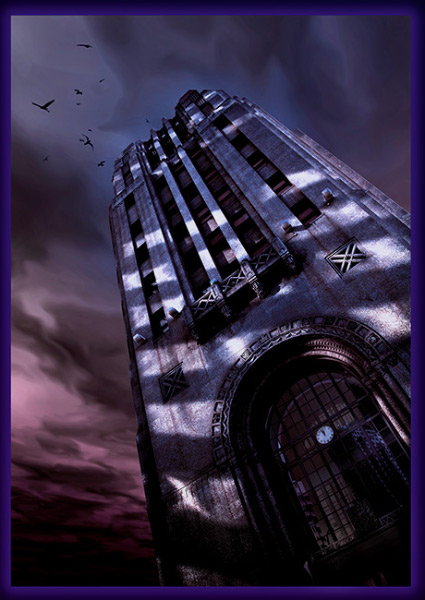
Just as our five foot world gives us a consistently average perspective, it also provides us with horizontal lines and vertical angles. We see the world this way 90% of the time, and there’s nothing particularly WOW in that. But give your camera a twist; a 45 degree angle can add dynamism and drama, instantly!  Just make sure that it’s a big enough angle that it’s clear you did it on purpose, and not by mistake.

Buildings, trees, large objects, and even people look great with a bit of angular rotation when you want to make a point or add impact.

A bit of an angle - on purpose, give the image a more dynamic feel.

A bit of an angle – on purpose, gives the image a more dynamic feel.

A little "off kilter" makes us pay more attention.

A little “off kilter” makes us pay more attention.

Method Four: Get the Sun Behind Your Subject

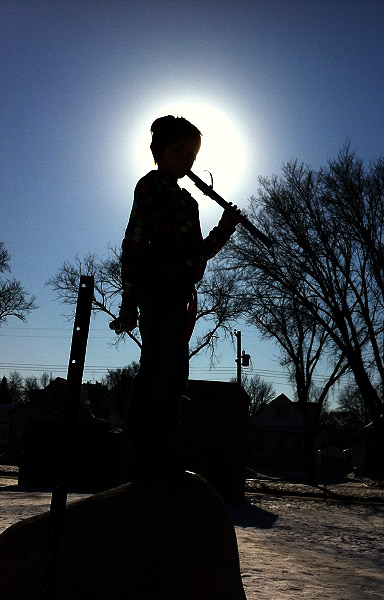
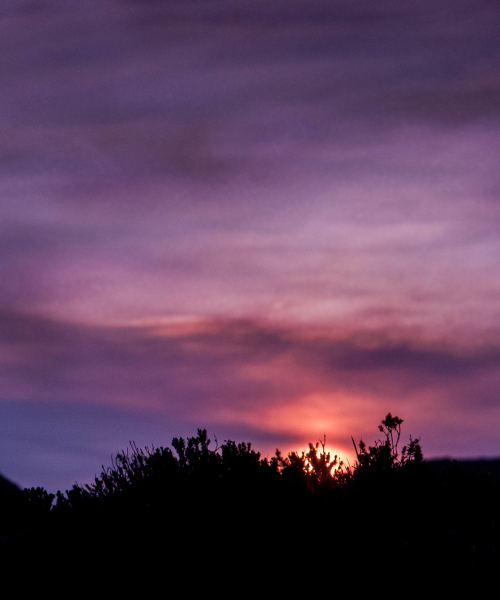
There are all sorts of fabulously detailed techniques for shooting silhouettes, rim lighting, and other back-lighting effects. But really all you need to get an instant WOW Shot is to either place your subject so that the sun or light source is directly behind them, with their head or body blocking the main point of light. Shoot in manual mode and be sure your flash is off.  Point and expose for the sun, then recompose with the sun directly behind your subject.  Whether it’s an animal or a person or an object, use that subject to block the sun, and you’ll have a winner.

Picture-053W

Drama abounds in this simple shot – just a quick iPhone grab during a school photo class.

Picture-388W

Method Five: Use Shadows

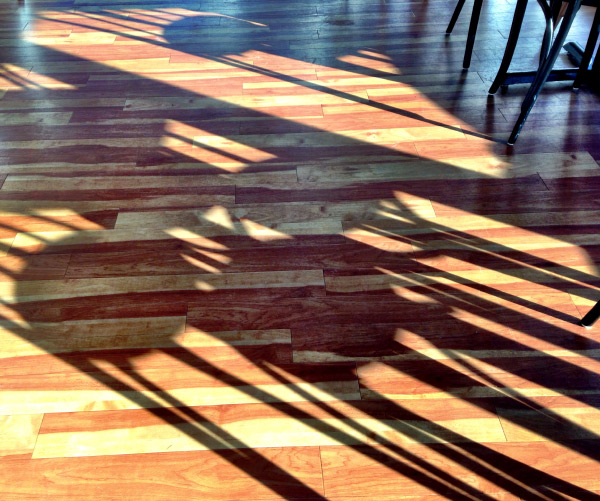
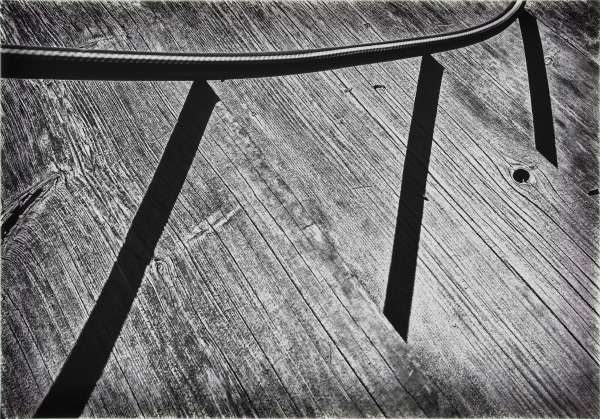
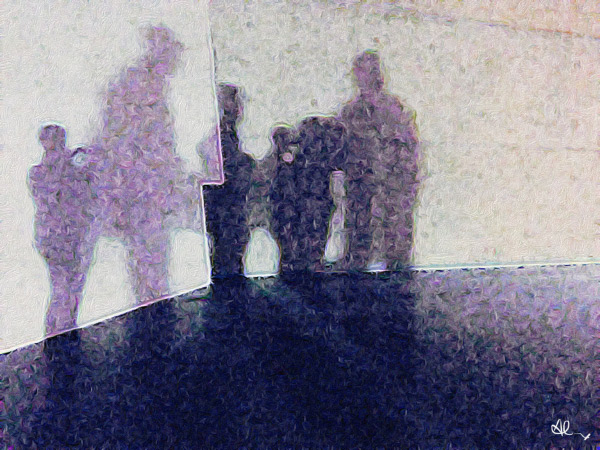
Nothing tells a story more than shadows – they are ethereal, transient, and mystical. Incorporate shadows into your image, or shoot only the shadows. They always tell an intriguing story, and create a captivating image.

Picture-955

Abstract or editorial, the shadow knows.

IMG_6203W

Do you know what’s happening here – the shadows are a riddle and the answer.

photo-1

The Ultimate WOW Shots

The ultimate WOW shots are created when you use one of more of these techniques by combining elements, angles, and points of view.

_2DS2507W

Combining the worm’s eye view AND the sun behind the subject.

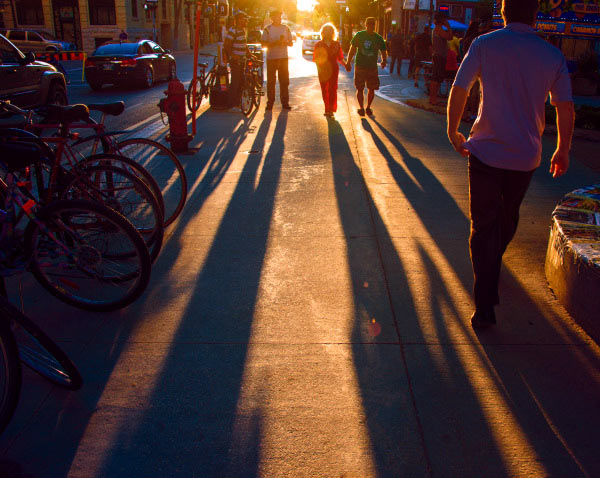
A simple street scene is so much more dynamic with long shadows.

Combine shadows with the sun behind the subject. A simple street scene is so much more dynamic with long shadows.

Combine a bird's eye view with shadows. It adds interest and drama.

Combine a bird’s eye view with shadows. It adds interest and drama.

A worm's eye view and the sun behind the subject. Simple. Wow!

A worm’s eye view and the sun behind the subject. Simple. Wow!

Apply what you have learned

To wrap it all up, these five easy methods will give you dramatic results, and if you’re already proficient with a camera and have a bit of knowledge about composition, color theory, and light, you’ll be shooting like a rock-star photographer in less than an hour –  including the time it took to read this article.  If you’re already a skilled shooter, give these a try and it will help simplify your photographic life while adding more finesse to your portfolio.

Show me your WOW shots, I’d love to see how you put this into action! Share in the comments below.

The post 6 Ways to Take WOW Photos in Less Than an Hour by Alex Morrison appeared first on Digital Photography School.

Digital Photography School

 
Comments Off on 6 Ways to Take WOW Photos in Less Than an Hour

Posted in Photography


Sneaky Ways to Avoid Camera Theft

26 Aug
Extra photos for bloggers: 1, 2, 3

The greatest days are full of fun photo ops, not bad guys creepin’ on your turf. Protect your gear!

Cover your phonecam in junky camouflage and trick those thieves into stealing something else less cool, like a stack of old CDs.

Go “normcore” and try carrying your fancy camera in a something less fancy, like a tote bag covered in cats.

Sometimes all you need are confusion tactics … like a picture of a bright pink donut on your fancy camera lens.

Learn Three Tricks For Outsmarting Camera Snatchers

(…)
Read the rest of Sneaky Ways to Avoid Camera Theft (237 words)


© Britta for Photojojo, 2014. |
Permalink |
No comment |
Add to
del.icio.us

Post tags:


Photojojo

 
Comments Off on Sneaky Ways to Avoid Camera Theft

Posted in Equipment


Collaboration – 8 Ways to Work With Other Photographers

08 Aug

In an industry where marketing strategy and professional branding are needed to survive and to “make it” fiscally, we are missing something that should define our artistic craft. Just like in any other industry, collaboration is not an ideal that limits photographers, but one that can propel us personally and professionally. Understanding that photography is not usually seen as a “team sport”, how can we collaborate with each other while retaining our individuality as visual artists?

Here are 8 ways to work with other photographers

#1 Photos – create something together

Photos

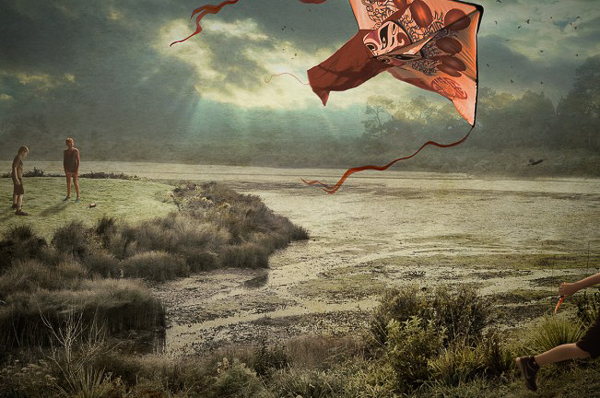
The Kite (created by Francisco Diaz and Deb Young)

To varying degrees, we are each protective of our images. We watermark. We utilize Google’s image search function to ensure that our work is not being borrowed. We even occasionally check to see that the photographer down the road is not emulating our brand, or photographic style. Yet, with a bit of deep thinking and reflection, we should understand that there is little in the photographic world that is fresh or new. Realizing this, we are able to detach a bit from our work and open our minds to the possibility of collaborating in the production of photographs.

One example of collaborative creation can be found in the work of Francisco Diaz (USA) and Deb Young (New Zealand). The pair work continually on their appropriately titled The International Collaboration Project that crosses borders and photographic norms. Frank “wondered if disparate individuals from countries halfway around the world could work together in real time as a positive model for creation rather than destruction.” Diaz and Young’s project proves that not only a positive model of creation exists, but that photographers can work together to produce meaningful imagery collaboratively.

#2 Assist another photographer

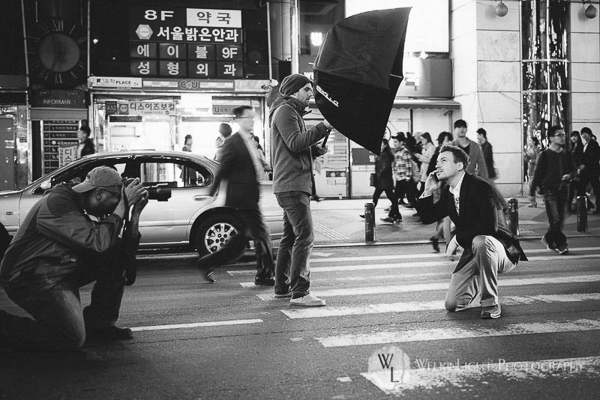
Owning your own photography business has many perks. Yet, working for someone else does not mean that you have degraded yourself or your position as a pro shooter. Working for someone can be likened to helping. By assisting a fellow photographer, you not only have the chance to learn a new technique, you have the opportunity to give back to the photographic community. With the right attitude, experienced shooters can prove to be amazing assistants and can aid their comrades.

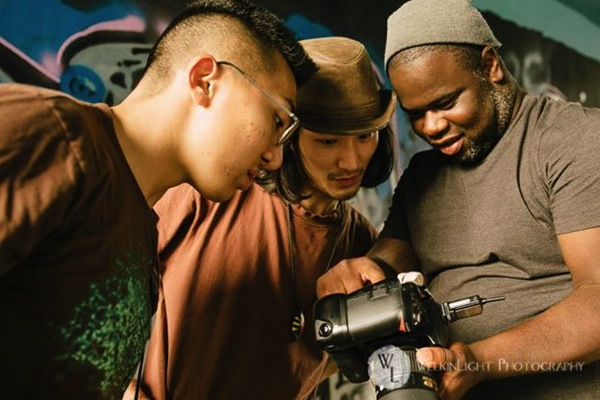
Assist

Photo courtesy of Welkinlight Photography

#3 Pose for another photographer

You don’t have to be a hundred pound, six-foot bombshell to be a model. Posing for a fellow photographer is incredibly helpful for both you and the shooter. Your collaborator will be able to test new techniques (such as posing and lighting) with a patient model. Moreover, as a photographer, you will be accepting, and let faux pas like chimping (reviewing the screen after every click of the shutter) slide. Perhaps the most important perk of modelling is that you get the opportunity to see how your own clients feel posing and being directed by a photographer. This empathetic exercise will have immediate benefit as you transition back to photographer.

Model

Glen Riley of GTR Photographic Images modelling

#4 Constructive Critique

Fairly regularly, friendly photographers and I sit down with a coffee or beer to share and critique our recent work. In addition, each participant shows work that they are currently inspired by. In this way, members of the group gain valuable feedback from their respected peers, and have the chance to view their work from an alternate perspective. Additionally, there is an opportunity to learn about inspirational industry professionals (or hobbyists). By constructively acknowledging one another’s work, we collaboratively prompt each other to improve our craft.

#5 Trade services with another photographer

Every weekend we clean and pack our kits to meet clients for sessions, or to head out to shoot personal work. Yet, when was the last time the camera was pointed at you and your loved ones? Sure, quality photographic services can be expensive (just check your own pricing guide). Why not reach out to other photographers and propose trades? Fellow photographer Dylan Goldby (Welkinlight Photography) and I do just that. We both receive portrait packages of our loved ones that would normally cost hundreds of dollars. Yet, with a collaborative mindset, those lifestyle packages become free.

Trade

Photo courtesy of Welkinlight Photography

#6 Send referrals to other photographers

It is important to try multiple genres of photography (landscape, architecture, lifestyle, fashion, nudes, etc.). However, if you have already honed your craft and identified your photographic niche, don’t gobble up every assignment that comes your way. If approached by a client but your “competition” shoots the genre or project better than you, send the client their way. I repeat, send your competition assignments! I promise that practicing this habit will come back to benefit you in the end. Your competition will remember your kindness and return the favor. Generally speaking, those photographers who are considerate of their colleagues have an easier time filling their calendar.

You Are Soft

Portrait of a client that was referred to me by a fellow photographer

#7 Share – gear and links

Gear is expensive and anyone with GAS (gear acquisition syndrome) can testify that it is easy to see a zero bank account balance with one trip to B&H or your local camera store. There is a more economical option of renting gear from a photographic supply store, or better yet, borrow gear from fellow photographers. Need a Wescott Apollo Orb for a studio session? Simple, ask a fellow photographer. Keep in mind that it will soon enough be your turn to lend.

Hint: Under no circumstance should you lend gear to shooters you don’t trust or know well. Also, be sure to add extra care when handling gear that is not yours.

Yet, sharing isn’t limited to material goods. From name-dropping in casual conversation, to displaying the work of others on your Facebook photography page, spread the work of others. By sharing the work of fellow photographers, you are helping generate camaraderie and showing that you are not solely self-interested. An excellent model of this practice can be found in the fine art photographer Mark Eaton. Pulling up Mark’s blog, it is immediately obvious that Mark cares just as much about supporting his fellow photographers, as he does his print sales.

Vision Reduced by Mark Eaton

Vision Reduced by Mark Eaton

#8 Teach

When was the last time you taught someone something? There is an indescribably satisfying feeling gained when you share knowledge. Let’s face it. Everything we know about photography, we were taught. There is no such thing as a “self taught” photographer. Learned about lighting on YouTube? Guess what, a fellow pro took the time to make that YouTube tutorial.

We each have the responsibility to pay knowledge forward. Teaching photographic skills and strategies to others will not increase competition (remember, it takes more than technical expertise to distinguish an accomplished photographer). Take an amateur, or less experienced photographer, on a photo walk. Write a tutorial detailing a technique you use. Instruct a workshop at a local community center. Who knows, you might enjoy teaching so much that this aspect of collaboration becomes part of your business plan. Examples of photographers turned teachers can be found in the great workshops offered by Flash Light Expeditions or the tailored Southeast Asian tours led by fellow dPS contributor Etienne Bossot.

Teach

Students learning at a course offered by Flash Light Expeditions

While many of us feel that photography and artistic creation are solitary actions, we should be careful not to isolate ourselves in our vast industry. No man (or woman) is an island. By collaborating with fellow photographers, the opportunity to grow, both personally and professionally, is limitless.

Have you tried any of these things? Do you have other ideas of tips on how to collaborate? Please share in the comments below.

The post Collaboration – 8 Ways to Work With Other Photographers by Andrew Faulk appeared first on Digital Photography School.

Digital Photography School

 
Comments Off on Collaboration – 8 Ways to Work With Other Photographers

Posted in Photography


Six Ways to Take Care of Your Creative Spirit

07 Aug

I like photographers. Some of my favorite people and closest friends are photographers. In general, I find us to be a likeable bunch: witty, intelligent, wildly attractive. I also find that we reside in a grey area where we aren’t quite regarded as artists. We are the redheaded stepchildren of the art world, and I can say that because I both am a redheaded stepchild and have a redheaded stepchild. Truth be known, she is the easiest kid of the bunch. She pulls no punches, just tells it like it is. Much like photography.

lynsey_mattingly_1

But we are artists! As much as any painter or sculptor, or person that is covered in bronze paint and stands as still as a statue on a street corner. Have you seen these people? My eyes water just thinking of the shower they have to take every night when they get home from work. I have always been grateful that photography is fairly low on the mess scale. So instead of showering off bronze paint for hours, or ceremoniously ridding the clay from our hands, here are six ways you can care for and nurture your creative artist soul.

Take care of your eyes

When I get home from a long shoot, I always complain that my eyeballs hurt, and they do! It’s not that they are dry or that something is wrong with my vision, it’s just that after being on high alert for hours, my eyes are stressed out. So much so that I actually saw an eye doctor to make sure that I wasn’t going to need to have my eyeballs removed anytime soon. Do you know what the doctor told me? That I need to rest my eyes before and after a shoot just like a professional baseball pitcher would rest his arm before a game. For some reason having an actual doctor, with a high degree in medicine and lots of fancy initials after his name, telling me this, made me actually listen. I’ll save you the office visit; be good to your eyes. They are the only lenses you can’t replace.

lynseymattingly_4

Have other hobbies

Like many pros, I started photography as a hobby. I am the classic “MWAC” (Mother With A Camera), having a career that’s spanned a decade, but rooted from pictures I took of my own children, with a fancy camera I didn’t know how to operate at the time. My former mother-in-law told me I took nice pictures and I figured if she said that, considering that she hated everything else I did, they must be fairly good.

I then immersed myself in photography, reading every blog, shooting every single thing my kids did in hopes that it would be portfolio building. Photography was what I lived and breathed. It’s the only thing people knew about me, but it wasn’t enough. One day, pushed past the brink, frustrated and burnt-out, I sold all of my back-up equipment and extra lenses in a week and had convinced myself, and everyone else, that I was never going to do it professionally again. I kept my Canon 5D and 50mm f1.2L, thinking that I would want to take pictures of my kids someday with something other than the camera on my iPhone.

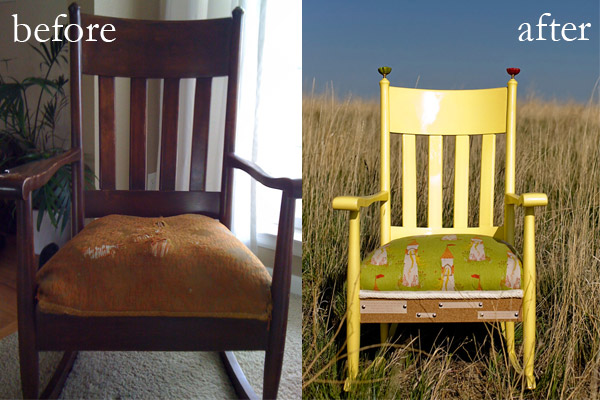
One outlet is not enough for the average creative person. You owe it to yourself, and to your photography, to be great at something else. Or to be really horrible at something else, but regularly try something else. I make chairs. I find old chairs in flea markets or on the side of the road with “free” signs and I bring them home, let them sit in my garage for months or longer, and then rehab them with new ideas and fresh materials. Sometimes I sell them, sometimes I give them away, and sometimes they turn out really awful and I put them out in my yard with a “free” sign. The point is that this gets out all of my creative energy, and when I am stuck in a photography rut, I make a chair. When a chair frustrates me, I grab my camera.

lynsey_mattingly_chairs

Take Chances

One of my first national publications only happened because I contacted a celebrity that lived a few hours away, who had just had a baby, and asked if I could take her pictures for free. I honestly thought she wouldn’t even respond, assuming she even got the email, because I did some crazy research to even find an email address that might be hers. Not only did she respond, and say yes, but she actually had two publications that were wanting to buy photos of her and her new family. There’s opportunity and there’s flat-out luck, and when you strike both you have a say in your own destiny.

I had been taking pictures professionally for four years, but this was my first huge break and having an international publishing gig, and continuous contacts, has opened doors for me, no doubt. Put every cliche about trying: not knowing until you do, you’ve got nothing to lose, etc., into a pot, and stir. It turns out our parents were right, and all of those silly sayings are true.

lynseymattingly5

Stop Comparing Your Work

When I first became interested in portrait photography I was obsessed with this one photographer’s blog. Not just because her images were beautiful, but also because I loved her words. We had similar backgrounds and a similar style, and when she talked about her life outside of photography, I understood. When she shot images that were different, I got it. Had she sent me a note before study hall, oh how I would have checked every single box. The only thing keeping me from hanging out on her front lawn confessing my profound crush was about a thousand miles. I was infatuated; with her photographs, her business, her life, her success. I wanted it for myself. And because of the similarities, I found myself doing things the way she did, hoping for, and sometimes even assuming, the same outcomes. I wasted a great deal of time trying to align my path with hers and holding her work in a higher regard than my own.

A decade later and my business is, my by own account, every bit as successful as I thought hers seemed. But it is not the same. Until I realized that what worked for her wasn’t always going to work for me, and that perhaps her end goal was different than mine, I wasn’t in any way being inspired by her. My obsession with a woman I hadn’t even met at that point was my focus (and yes, I would later meet her, and boy what a disappointment that was, is best saved for another article). No one else’s tips, ideas, or work can be your focus. Be inspired, yes, but don’t let jealousy, or in my case, crazy obsession, get the best of you. Your images are yours, and they can be whatever in the world you want them to be, so long as you don’t run them through another photographer’s filter.

lynsey_mattingly2

Don’t Stop Taking Snaps

When you are a professional photographer, or perhaps just a really good photographer, it’s easy to put extra scrutiny on your everyday snapshots. The pictures you take on your cellphone or with a Polaroid or point-and-shoot – a pretty landscape, a funny face of a friend, the loaf of zucchini bread you just baked that came out of the oven poofy and golden brown. Those shots are easy to over-think, to obsess over, or to give too much time and attention to, and miss the very point of taking them.

I find myself checking the background when I take pictures of my cat. The world doesn’t need perfect pictures of my cat. I don’t need perfect pictures of my cat. The internet doesn’t even need perfect pictures of my cat (I checked). Let the snapshots be snapshots and view them completely different than your “work” so you don’t tire of doing the everyday picture taking that was likely what gave you a love of photography.

lynseymattingly_halloween

Respect Your Gift

That’s what photography talent is – a gift. You have been entrusted to all its amazement whether you are just beginning, doing it professionally, or as a hobby that enables the creative piece of you to speak. You’re here on this very site, reading about photography, because photography calls to you in some way, due to your natural ability. Treat your gift with compassion, cut yourself some slack when needed, and allow yourself as many periods of rest as you do challenges. I was never a cheerleader and getting sappy kind of freaks me out, so when I say that you (yes, YOU) are a creative force to be reckoned with, you know I mean it.

What’s something you do to take care of your creative spirit?

lynsey_mattingly3

The post Six Ways to Take Care of Your Creative Spirit by Lynsey Mattingly appeared first on Digital Photography School.

Digital Photography School

 
Comments Off on Six Ways to Take Care of Your Creative Spirit

Posted in Photography


3 Ways to Embellish Your Engineer Prints

07 Aug
Extra photos for bloggers: 1, 2, 3

Unless you’ve been living under a big fat rock, you are all over our Engineer Prints right?

Yup folks, we are now printing your photos human sized in lo fi black and white ink. Deck the walls! And floor. And ceiling!

If you’ve done just that and want EVEN more pizzazz, we’ve got you covered.

Three ways to give your prints color with some personality to boot coming atcha. Go go go!

Make Your Engineer Prints Even More Amazing

(…)
Read the rest of 3 Ways to Embellish Your Engineer Prints (126 words)


© Erika for Photojojo, 2014. |
Permalink |
No comment |
Add to
del.icio.us

Post tags:


Photojojo

 
Comments Off on 3 Ways to Embellish Your Engineer Prints

Posted in Equipment


5 Ways to Create Better Images Without Buying More Gear

17 Jul

You are a photographer. You love getting out there and doing your best to create great images. Photographers also love something else. Camera equipment. Sometimes you may find that you spend more time searching for a new lens, filter or accessory than actually photographing with it. When you meet other photographers you will hear them talking about the latest piece of equipment that has just launched.

Why is this? Why are some photographers obsessed with equipment. My personal opinion is that we fall into the marketing trap. Sometimes we really do think that a new lens, or new camera body, will improve our images simply because it is a better piece of equipment. That might be true, but it’s only half true. A new lens might make your images a little sharper or have better bokeh, but the best way to get better images is to improve your ability as a photographer. Here are some thoughts that may help you create better images.

The key ingredient in any image is light

The key ingredient in any image is light

1. Become a light snob

Light is the key to every image you make. If you want a good image, shoot in good light, if you want a dramatic image, shoot in dramatic light. There really is no such thing as bad light, there is simply better light for creating images.

Light is the all important component of great photography. You may feel that shooting in the middle of the day is best because it is bright, and all the light you need is in that shot. Yes, there may be lots of light, but there is also a lot of contrast (bright highlights and dark shadows). The resulting shot may be unappealing because the light is flat or uninteresting.

How do you overcome this tendency to photograph at any time? Become a light snob. What does that mean? I mean in a good way, try this next time you go out with your camera. Make a point of shooting in the golden hours. Think about the light you are shooting in, go out in the early morning or early evening. Choose your subject carefully, compose your scene purposefully and shoot it with intention. Don’t shoot the same scene twice, work with the light, make sure you think about the exposure, try your best to get the shot and walk away from the scene. Make sure you expose for the light the results will speak for themselves.

2. Become more flexible – in more ways than one

POV2

How often do you photograph from your standing height and mostly in landscape orientation? I know I do, it is natural to do that, we shoot they way we feel comfortable. Change this up a little. Look for unusual angles and vantage points. We have all seen the photographs of children looking up at the camera. Change that, kneel down or even lie down in front of a child you are photographing. Turn your camera to portrait orientation, that changes the scene immediately. If you are photographing a street scene, maybe get to a higher vantage point on a balcony. If you are in a city, shoot straight up! The key thing here is, change your viewing angle and you will change the view of your image. You will give your viewers a unique perspective on a familiar topic and that can make for some very dramatic images.

A unique point of view can make for dramatic images

A unique point of view can make for dramatic images

3. Time it right

You have probably heard this about many things, particularly sports:  “its all about the timing”. This is true in certain genres of photography too. In street photography, timing can be crucial to making or breaking the image. The famed street photographer Henri Cartier-Bresson spoke about “The Decisive Moment”. What he was saying was this, if you take the shot a moment too soon, the scene has not yet unfolded, if you are a moment too late, the scene has passed, you have to release the shutter at the precise moment.

This is not easy to get right. It requires lots of practice and the ability to sense or anticipate what will happen next. With practice you will get better and better, and in time, you will find that you will “time” the shot better. When is the right moment? It is different for every photographer and every photograph. It might be the moment before a smile, or the moment the first tear appears, the moment of surprise or elation. Each moment is different and each photographer will shoot it differently. You will know when you get that moment captured because the image will be memorable. The moment will come, but you have to be ready and you may have to be patient.

Photographing fireworks is often about timing.

Photographing fireworks is often about timing.

4. Get your exposure right

We all know this one, it’s an old one, but exposure is all important. How do you affect exposure? You take control of your aperture and your shutter speed. This alone is a topic for another article, but what is important is that you, as the photographer, need to take control of your image exposure and not let the camera do that. If you still shoot on Auto and hope for the best, now might be a good time to start venturing into the world of shooting on manual or even aperture priority. Learning how the aperture and shutter speed affect your images will help you make stronger images in just about any light. This is what makes the difference between a good image and a spectacular image, the exposure.

Mastering exposure will make a big difference in your images

Mastering exposure will make a big difference in your images

5. Use what you have

You have a great camera, seriously, you do! If your camera is less than five years old, it is perfect for taking astounding images. A new camera body will take pictures with more megapixels or better noise reduction, but I am pretty sure, in fact I am CERTAIN, that you can get some amazing images on your current camera. One key element in getting great images is choosing the right lens for the scene. The lens is the eye to the camera. If you are going to invest in any equipment, save up and buy good lenses. Buy some prime lenses and see the results.

First though, use the current lenses you have, make sure you know how each lens affects a scene. A wide angle lens has the effect of making everything in the scene seem far away and spread out, a telephoto lens (say a 200mm) has the effect of compressing everything in the scene (bringing the elements closer together). If you were to photograph a mountain scene with a wide angle lens and switch to a long (or telephoto) lens and shoot the same scene, the elements in that scene would look really different. The perspective and viewing angle changes on each lens, so make sure that you use your lenses and understand the effect that they have on your scene.

Exposure2

Putting it all together

By using these techniques with light, composition, timing, exposure and current equipment, your images will improve. You need to practice, constantly. Keep pushing the boundaries, do the weekly challenges that dPS puts out, try different techniques. Only buy new equipment if your current setup is limiting your photography. The best way to create better images is by practicing and spending hours and hours behind the camera.

I heard a story that a professional golfer who was one of the top three golfers in the world used a very unique way of practicing. Before playing a golf course in an upcoming tournament, he would book the whole course for a week. He would then take 300 golf balls and set up on the first tee. He would tee off from there, hitting each ball from that tee. He would then play each ball from where it landed. He did this on every hole of the golf course. By the end of the week he knew every inch of that course and he knew exactly which clubs he could use from where on the course. Try this in photography. Shoot 100 shots on aperture priority or shoot 100 shots with your 50mm only. Don’t change lenses until you have 100 shots with that lens. Then move to your next lens and do the same. Try each lens with different subject, use a 500mm and shoot some sports, landscapes and macro photos. Mix it up, but learn how that lens works and learn how your camera works and pretty soon, you will be making great images with all your equipment and that shiny new camera will not seem so tempting!

Look for the light, work with the scene and practice, practice, practice.

Look for the light, work with the scene and practice, practice, practice.

I will end off with a quote from the actor Will Smith, which sums it up in a good way:  “The separation of talent and skill is one of the greatest misunderstood concepts for people who are trying to excel, who have dreams, who want to do things. Talent you have naturally. Skill is only developed by hours and hours and hours of beating on your craft.” – True enough!

Have you put in the hours? Do you have any other additional tips? Please share in the comments section below.

The post 5 Ways to Create Better Images Without Buying More Gear by Barry J Brady appeared first on Digital Photography School.


Digital Photography School

 
Comments Off on 5 Ways to Create Better Images Without Buying More Gear

Posted in Photography


4 Ways Self-Critique Can Improve Your Photography

09 Jul

Self-Critique-PhotoLearning how to analyze and judge your own artistic work correctly is a valuable skill that can be a bit tricky to learn properly. I’m sure you’ve heard the saying “I’m my own worst critic” thrown about, you may have even said it yourself in reference to your own photography. However, there are ways that you can harness this self-criticism and learn from it rather than allowing it to consume you and destroy your self-confidence.

Learning how to constructively critique your own photography can not only help you make better photographs each time you pick up a camera, but it will also build your confidence as a photographer, and prepare you for the inevitable critiques from your peers and colleagues.

This article is a bit different in the sense that the images that I’ve used to illustrate the post showcase one particular case of how I used self-critique to iterate a photograph over the course of a shoot. I will cover the benefits of self-critique and how it can help you become a more confident photographer – so read both the article and the captions of each photograph as you continue along.

#1 Reinforces your knowledge of the craft

improve-photography-self-critic-2

After looking at what I’d captured here on the LCD of my camera I decided that the prominent features of this landscape wasn’t the sky or the foreground, but the large boulder along the right side of the frame.

You read eBooks and tutorials to learn all the technical skill required to make stunning photographs, but in the heat of the moment technique will often slip, especially when you’re just learning. That’s okay, but it’s important to learn how to notice when this is happening and correct for it along the way.

Providing yourself with a thoughtful self-critique from time to time can really help you locate the most common faults in your photography. After performing a few of these critiques you may notice that you commonly forget to double check your settings leading to poorly exposed photographs or improper Depth of Field, or you may notice that you commonly struggle to compose a photograph with purpose resulting in a photograph that doesn’t capture the emotion that you had intended.

#2 Teaches you how to look at a photograph critically

improve-photography-self-critic-3

A second setup left me with a feeling that I was on the right track, but now the scene felt too cluttered and confined.

The ability to articulate what it is about a photograph that makes it special and what needs improvement, as specifically as possible, can drastically improve your photography. This is something that is learned over time and can be difficult at first, especially when looking at your own work.

Eventually, you’ll get to the point where this sort of critical analysis will come naturally. You’ll find yourself fine-tuning your composition and settings in the field, as I’ve done with the photographs that illustrate this point. You probably won’t even be consciously aware of the fact that you’re doing this.

#3 Helps build your confidence

improve-photography-self-critic-4

Now, I had the composition that I wanted. Something that featured the boulder prominently, yet allowed there to be enough room to breath in the foreground., but the water just wasn’t right. Time to adjust the settings to allow for a longer shutter speed.

No one enjoys being told what’s ‘wrong’ with something that they’ve created, but it’s going to happen, whether you ask for it or not. Even the best photographers have their critics so it’s not a matter of skill, it’s simply the way the world works.

By finding the ability to critique your own photography you’ll have an idea of what people might say when they are viewing your work, and as a result, you’ll be more prepared to defend the choices you made to create the image.

#4 You’ll become better at offering advice to others

While this might not directly affect your skill as a photographer, it does help to reinforce the other three points listed above. When you are able to offer constructive feedback to someone who’s just starting out you’ll not only feel great by helping them improve, but you’ll be more confident going forward with your own work at the same time.

improve-photography-self-critic-5

The longer exposure sealed the deal for me creating that milky water effect around the base of the boulder that I was featuring in the shot.

The post 4 Ways Self-Critique Can Improve Your Photography by John Davenport appeared first on Digital Photography School.

Digital Photography School

 
Comments Off on 4 Ways Self-Critique Can Improve Your Photography

Posted in Photography


7 Proven Ways to Come Home with Better Travel Photos

26 Jun

It s all about the light

Your next vacation or around-the-world escapade is the perfect time to brush up on your photography skills.

After all, taking a great photograph is never more important than when you’re seeing people and places you may never see again. Travel opens your eyes to other cultures, and if you prepare before you leave, it can also open the eye of your camera lens to infinite possibilities.

But first things first – let’s make sure you have a basic understanding of photography before you step onto the plane. Here’s a list of seven proven ways to come home with better travel photos.

#1 Take a good look at your gear

You don’t need to spend a million dollars on crazy-expensive gear. However, you do need a camera from this century. Better yet, a camera that was made in the last five years. Technology is changing so rapidly that you’re really going to notice a difference with newer cameras.

Also, don’t be afraid to check out the new lightweight DSLR cameras that are all the rage. You may feel cooler hauling around a huge Nikon D5300, but a more compact model can take great pictures too (plus compact is always better when you’re traveling).

#2 Get intimate with your settings

Get intimate with your settings

You haven’t just been leaving your camera in Auto mode, have you? What fun is that? Now I’m not saying you have to learn how to manually focus before you take-off for say, Fiji, but at least get familiar with these three need-to-know settings (the Exposure Triangle) on your DSLR camera.

#3 Do your research

Dive into Google Images, Flickr, or 500px to look for photos (and photographers) you love. Choose at least three travel photographers and follow their blogs.

Not only will get some great ideas for photographs, you’ll be able to find tips and techniques for getting specific effects you’ve seen in the photos you admire.

#4 Get to know your subject

Get to know your subject

Photographing people is one of the most exciting parts of travel photography. Imagine getting great shots of Buddhist monks in Laos, a tribesman in the African bush, or mountain people in the Himalayas. But you’re not just going to walk up to someone you’ve never spoken to and stick a camera in their face (promise me you won’t do that).

So how are you supposed to approach your subject? The #1 tip is to make friends first. That can be tough in and of itself when there is a language barrier, but it’s not impossible. Read: Practical tips to build your street photography confidence (which also applies when travelling).

#5 Get lost

Get Lost

You’re not going to get great travel photographs taking pictures of the monuments and sites that every other tourist on earth has already photographed. When you travel, get lost! Venture out into villages and unknown areas that no one else goes to. Don’t be afraid to get off the beaten path.

The most exciting photos you’ll take won’t be of the Empire State Building, they’ll be of the ancient bartender in that random dive bar in Astoria, Queens (the one you never would have found if you hadn’t gotten completely lost).

#6 Get close

Repeat after me: “I will not be a lazy photographer.”

Get close

Lazy photographers use lenses instead of legs. I want you to use those legs of yours to walk, run, jump, swim, crouch, bend, and move any way you can to get close to your subject. Why? Because the simple act of getting close to your subject will drastically improve your travel photographs.

Once you’ve followed step #4, don’t be afraid to put your camera as close as possible to your subject, sometimes right in their face even.

Disclaimer: this tip does NOT apply to house fires, political violence, or wildlife safaris.

#7 It’s all about the light

It s all about the light

The other day a student of mine showed me a photograph that was taken in the middle of the day, under the hot Hoi An sun. There were several problems with the shot, but the main reason it looked flat and lifeless was simply because of the time of day it was taken.

I told her what I tell everyone; don’t bother getting out your camera between the hours of 8 a.m. and 4 p.m. The light is too harsh. Get up before the sun and/or wait until the sun is about to set, and you’ll enjoy amazing light that will work wonders for your photographs.

That same student sent me a photo the following day, this time taken just before sunset. It was 10x better. Had she suddenly become a better photographer in less than 24 hours? Yes. But only because she learned to tell time.

Follow these seven tips and I have no doubt you’ll be taking amazing travel photographs on your next trip. Have any additional tips you’d like to share? Please do so in the comments below.

Safe travels!

The post 7 Proven Ways to Come Home with Better Travel Photos by Etienne Bossot appeared first on Digital Photography School.

Digital Photography School

 
Comments Off on 7 Proven Ways to Come Home with Better Travel Photos

Posted in Photography


5 Creative Ways to Process Infrared Photographs in Photoshop

21 Jun

Digital cameras have made the process of infrared photography relatively simple and very accessible, compared to the days of shooting with infrared film. No darkroom is required and all you need to get started is an infrared filter on your lens (click through to read my article on How to do Surreal Digital Infrared Photography Without Expensive Gear or Camera Conversions) and to mount your camera on a tripod. Maybe you’ve tried digital infrared photography already. You’ve learned all the correct infrared shooting and compositional techniques so you know you have great images in your camera, but how do you transform those strange looking red or violet frames into stunning infrared photographs?

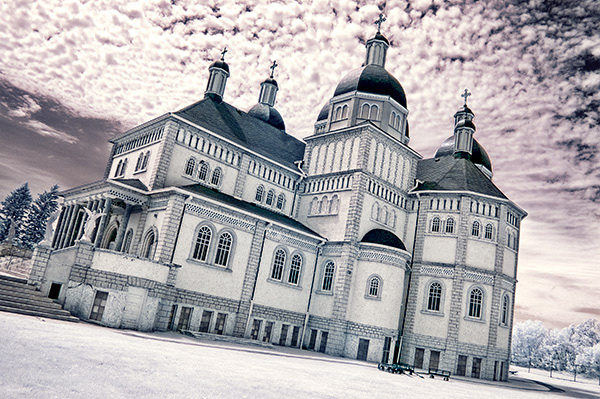
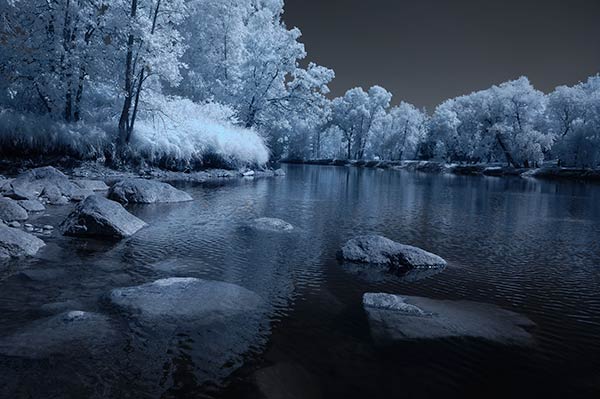
Here are 5 creative ways to process your digital infrared images in Photoshop to create arresting photos in color, and Black and White.

1) Color infrared one-click post-processing method

_DSC5456AsShot

As shot, before Auto Tone

This is the quick and instant method. Open your image in Photoshop and go to Image> Auto Tone. Look at the difference this one click makes! In fact Auto Tone should be the first thing you do to all your infrared images.

infrared image with autotone applied

Same image after Auto Tone has been applied

This has become a perfectly delightful infrared image. It has a variety of textures and colors for interest. However you may want to further process it to add more WOW and impact. The next step adds a few more tweaks that will help you do this.

 2) Color infrared gradient method

After you apply Auto Tone, you can also apply a Gradient Layer and set the blending mode to Soft Light, or Hard Light – you’ll need to experiment a bit depending on the tonal qualities of your original image. You can also adjust the opacity of this gradient layer.  If you are familiar with layer masks, you may want to mask out any areas where the gradient might be too strong.

Here is the same image with the Gradient Layer added. Can you see how it adds a little more depth and drama?

infrared image with post processing added.

Infrared Image with a Gradient Layer Added

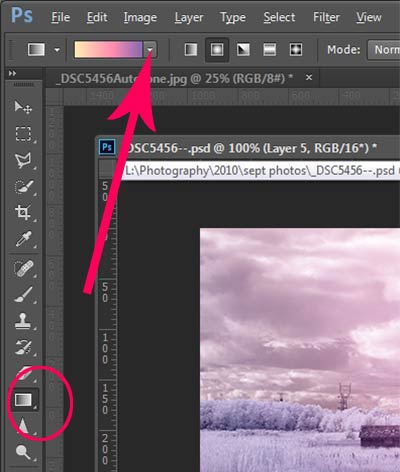
gradient-toolTo add a Gradient Layer, go to your Layers palette, and click on the new layer icon at the bottom (it’s the one that looks like a sheet of paper with the corner turned up) or you can use  the keyboard shortcut Shift+Ctrl+Alt+N.  I find it quicker to use the icon in this case. While this new layer is active, go to the Tools palette and select the Gradient tool. On the context menu on top of the window you’ll see the Gradient library and you can select your pre-set gradient from there.

Now, back on your layer, drag your mouse to get the gradient on your image.  Select the blending mode to soft light or hard light and then adjust the opacity. This is where your artistic eye comes into the picture.  Play around with these settings until you have something you like.

Here is another infrared image processed the same way. You don’t have to use the same gradient each time – experiment a bit and see how things turn out. It’s art after all!

infrared image with a gradient texture.

3) Using the Camera Raw filters and the Channel Mixer

One of the key concepts in infrared photography is to have a very distinct separation of color tones between the sky, and your high infrared reflecting subjects. This is usually the grass and foliage in your scene, or it could be buildings or other subjects that reflect infrared light because of their paint or construction materials.  But it’s important to have this separation because you need the sky to be dark, and you’ll want the foliage to be light, if not pure white.

Happily, in Photoshop you can give a tonal boost to your images in a couple of way,s in addition to the Auto Tone setting.  After you’ve applied Auto Tone, look for the Camera Raw Filter under Filters. If your image is not a RAW file you can still use these adjustments, although it is best to shoot RAW when capturing infrared photos.

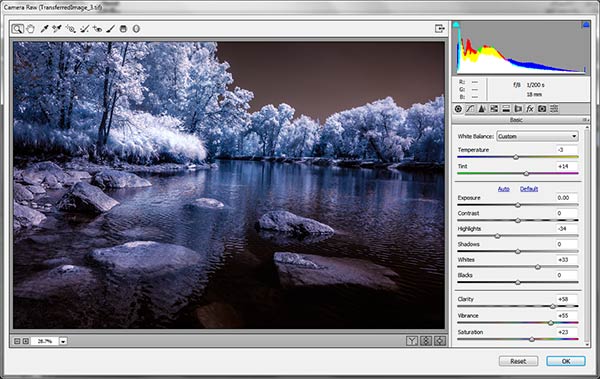
In the Camera Raw Filter, to get this color separation between the light and dark areas of your image, use the the Basics filters and  HSL/ Greyscale Slider to adjust the colors until you get a clear difference between the cyan and red shades.

 Original image as shot:

1as-shot-infraredimage

After applying Auto Tone and Using the Camera Raw Filters:

2cameraraw

Notice how these adjustments bring out the red in the sky and the blue in the leaves.

Now to the Channel Mixer

Go to Image>Adjustments>Channel Mixerchannelmixer

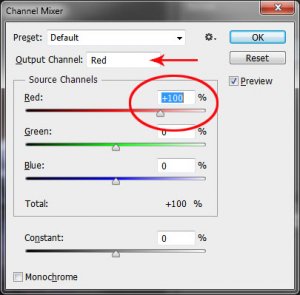
Here we will “swap” the channels to get a nice  blue sky and red or purple, and in a few quick steps, white foliage. Your Channel Mixer will look like this:

In the Red Output Channel, change the Red slider from +100 to 0, and the Blue slider from 0 to +100. Change the Output Channel drop-down to Blue, and make the Blue slider +100 and the red slider 0.  Your image will look something like this:

3infraredwithchannelmixer

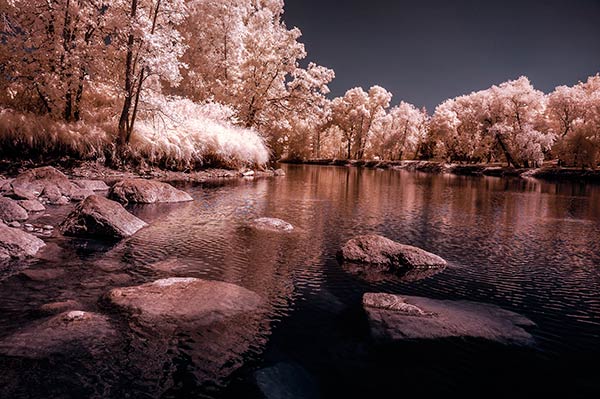
There is a clear color difference now between the blue sky and the red foliage.  It doesn’t matter if the foliage of your image is purple and  the sky blue, as long as you can see a clear difference in colors with the sky having some shade of blue.

Now the last part. Go back into your Raw Filters, and in the Basic panel, move the White Balance Color Temperature slider to the left to get a nice blue sky.  In the HSL/ Greyscale tab, use the sliders in the Saturation tab to desaturate the colors of your foliage.  Your image should have a blue sky and white leaves and grass. Gorgeous!

The final image

4infraredwithcameraraw2-FINAL

 4) Instant Black and White infrared processing

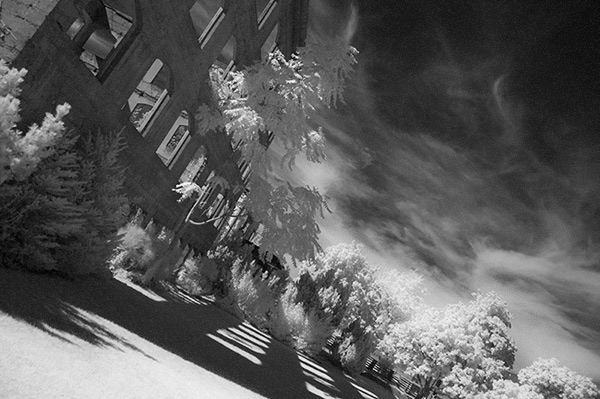
This is a “quick and dirty” method for getting the classic infrared look from your captures. You’ll get the tell-tale light colored foliage, and dark skies. For best results your image should have a clear sky with some clouds for effect. Overcast skies detract from the image, leave things without enough contrast, and very flat. No clouds make the sky seem like a vast black void – not too interesting.

2StepprocessingblackandwhiteinfraredClassic black and white infrared images tend to be non-contrasty, so from an artistic perspective a blue sky with wispy or puffy clouds can really add interest to your image, create a powerful story, and keep that soft contrast intact.

  1. Open your image in Photoshop
  2. Go to Image>Auto Tone
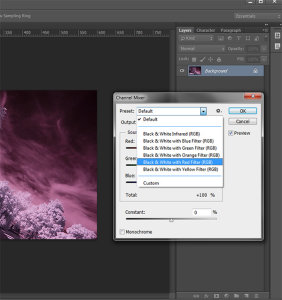
  3. Next go to Image>Adjustments>Channel Mixer>Black and White with Red Filter (From there you can adjust the sliders to get the effect you want)
  4. To get the classic infrared glow, check to make sure that in the Tools palette the colors are set to the default – black foreground and white background. To be sure, a simple way to set this is to hit the letter D to reset the colors to the default state.
  5. Then duplicate your layer (Ctrl J), and go to
  6. Filters>Filter Gallery>Artistic>Diffuse Glow
  7. In the Diffuse Glow filter, set the sliders so you can see some halo glows around the white areas of your image. You will have to adjust these to suit your image but it will create the classic graininess and glow of film infrared photos.

If the glow amount is too strong and you’re getting blown out highlights, you can decrease the opacity of your glow layer in the Layers Palette. A little experimentation goes a long way. Remember your History palette in case you want to go back a few steps.

4blackandwhiteinfraredFianlwithglow

5) Advanced Black and White infrared processing

This is the method I use most for processing Black and White infrared images. It’s easy and it gives you far more control of your final result.

  1. Open your image in Photoshop
  2. Go to Image>Auto Tone
  3. Now create an adjustment layer for Color Balance.
  4. Layer> New Adjustment Layer> Color Balance

Again, the idea is to get as much color distinction between the sky and any foliage. Color Balance provides an addition method of doing this – in Black and White processing, as well as for color.

  • Move the sliders for Midtones, Shadows and Highlights until you have a nice, distinct separation of your color tones betweeb your foliage and your sky.
  • Finally add a new adjustment layer for Black & White
  • Layer> New Adjustment Layer> Black & White
  • Now use the sliders to get the full range of Black and White tones, paying special attention to maintaining detail in the white highlights in the trees, while making sure that the dark areas also have some detail
  • To apply the infrared glow, follow from Step 5 in the first method.

This image is called CREEP. Can you see why?

blackandwhiteinfrared

flowerheartCW

I love the softness and translucency of Black and White, infrared photography. Post-processing really brings out all the infrared characteristics that draw viewers in, and gets the emotions flowing. Using these five processing techniques will get you off to a fine start, but these are only five of many ways you can process your digital infrared images in Photoshop. If you have a favorite post processing formula I’d love to see how you do it. Post your infrared shots too.

The post 5 Creative Ways to Process Infrared Photographs in Photoshop by Alex Morrison appeared first on Digital Photography School.
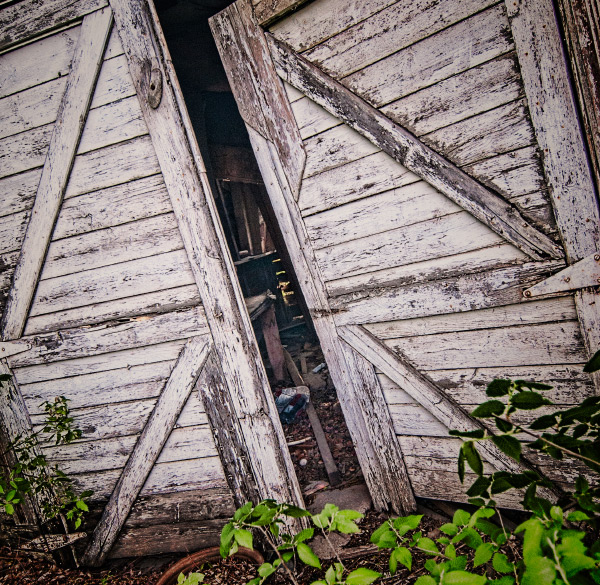

Digital Photography School

 
Comments Off on 5 Creative Ways to Process Infrared Photographs in Photoshop

Posted in Photography