RSS
 

Posts Tagged ‘Ways’

6 Ways to Skill Up Your Night Photography on Halloween

30 Oct

Lights, camera, action. Photography is often referred to as painting with light, and one of the more enjoyable ways to experiment with photography is to grab your camera and capture the lights of the night. Halloween offers a unique opportunity to have fun photographing the lights and colors of the season while honing your nighttime skills. 1. Have fun with Continue Reading

The post 6 Ways to Skill Up Your Night Photography on Halloween appeared first on Photodoto.


Photodoto

 
Comments Off on 6 Ways to Skill Up Your Night Photography on Halloween

Posted in Photography


6 Ways to Use Live View to Get Sharper Images

27 Oct

The LED monitor on the back of a camera is most often used to review captured images. But here’s a tip: Live View can also be a useful tool, helping you to focus your camera before taking the shot. In fact, Live View may be the most accurate means of focusing a camera. Let’s take a look at six ways you might use Live View to focus.

1 – Focus Stacking

Use live view to focus on different depths of field to use for focus stacking

Use Live View to focus at different distances for focus stacking.

Focus Stacking is similar in principle to HDR. However, when doing Focus Stacking, images are captured with different parts of the image in focus, then combined in Photoshop to create an image with more depth of field than would be possible with a single exposure. This method is a useful tool when doing macro photography. Calm winds are a must to capture focus stacking images. Use Live View to accurately focus each image. Here is the step-by-step outline of the process:

  1. Set up your camera on a sturdy tripod (a must!)
  2. Frame or compose the image
  3. Turn on Live View
  4. Zoom the Live View in so you can adjust the focus of each image to different distances
  5. Use Photoshop to process and blend the stacked images

2 – Manual Trap Focus for Macro Photography

Use live view to manually trap focus a macro photography subject.

Use Live View to manually trap focus a macro photography subject.

Manual Trap Focus can also be useful in macro photography. Set your camera to manual focus, and using Live View move the camera until the subject is in focus. Used in conjunction with a focusing rail on a tripod, or hand held, move the camera to focus the image. Another benefit of this method is that it also gives you a Live View of the depth of field for the image you plan to capture. See steps below to give this method a try:

  1. Set camera to manual focus
  2. Turn the focus ring on your lens to the closest focus distance
  3. Turn on Live View
  4. Move your camera closer to your subject until it is in focus. (Using a focusing rail can help you master this method.)

To fine-tune the focus, use the zoom feature in Live View to get the most accurate focus point possible.

3 – Focus on any point in your scene

Live View is not restricted to the usual focusing points in your camera’s main focusing system. Most newer camera models will have 51 or more focusing points. However, these points are clustered around the center of the image. In Live View, you can move your focusing point all the way out to the edge of the image.

4 – More Accurate Focus

Use live focus to zoom in for a more accurate focus on waterfalls.

Use Live View focus to zoom-in for a more accurate focus on waterfalls.

Live View also provides a more accurate focus than a camera’s main auto focusing system. The Live View system is based on the contrast of the image actually captured by the camera’s sensor. It is slower-focusing than your camera’s regular phase detection autofocus system, but it is more accurate. This works great for focusing in on subjects within landscape, and portraiture where a slower-focusing method doesn’t affect the ability to capture the shot.

5 – Manual Focus in Low Light

When photographing in low light situations, such as astrophotography, auto focusing often fails to provide a desirable result. Using Live View, in conjunction with manual focusing, can help obtain a sharp image. While in Live View, use the zoom to enlarge the subject’s image and then use manual focus to tweak the photo’s sharpness.

Use live view to focus when capturing low light images.

Use live view to focus when capturing low light images.

6 – Focusing on the Eyes

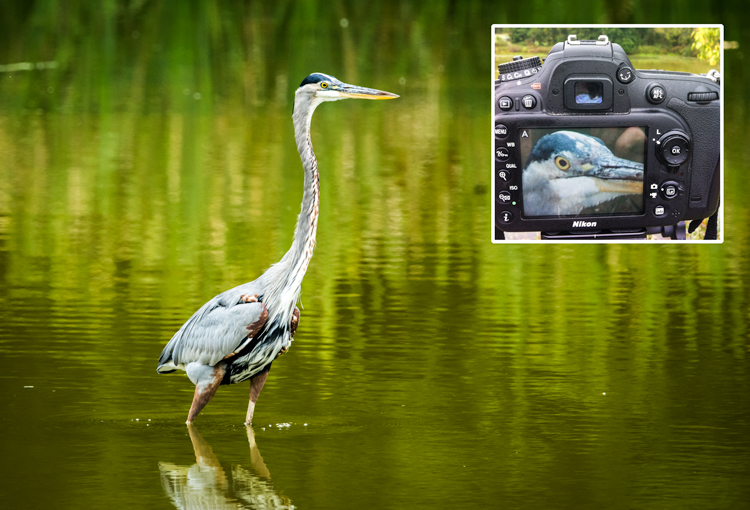
For the most compelling portraiture and wildlife photography, the most important focus is on the eye(s) of the subject. Using Live View, it is possible to isolate the eye for either auto focus or a manual focus. This method is limited to images that are posed, or with little movement.

Use live view to focus on the eye to fine-tune the focus in select wildlife images.

Use Live View to focus on the eye to fine-tune the focus in select wildlife images.

Conclusion

These are just a few ways that you can use Live View mode to focus your camera. Remember that using these methods will be much harder on your battery life. Always keep a spare, fully charged, battery with you when you are shooting. If you have any other ideas for using Live View for focusing, please leave them in the comments below.

googletag.cmd.push(function() {
tablet_slots.push( googletag.defineSlot( “/1005424/_dPSv4_tab-all-article-bottom_(300×250)”, [300, 250], “pb-ad-78623” ).addService( googletag.pubads() ) ); } );

googletag.cmd.push(function() {
mobile_slots.push( googletag.defineSlot( “/1005424/_dPSv4_mob-all-article-bottom_(300×250)”, [300, 250], “pb-ad-78158” ).addService( googletag.pubads() ) ); } );

The post 6 Ways to Use Live View to Get Sharper Images by Bruce Wunderlich appeared first on Digital Photography School.


Digital Photography School

 
Comments Off on 6 Ways to Use Live View to Get Sharper Images

Posted in Photography


4 Ways the Time of Day Affects Your Photographs

07 Oct

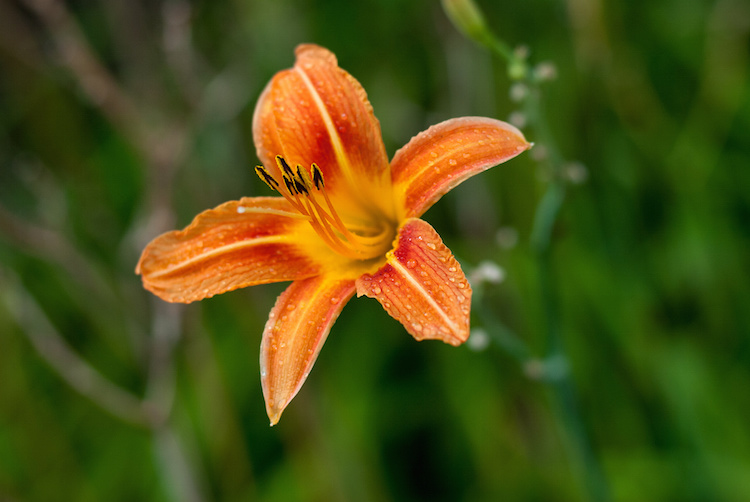
You have probably heard the saying, “The early bird gets the worm,” and in some ways that phrase can be repurposed to apply to photographers as well. “The early photographer gets the picture” isn’t always true in a literal sense, but learning to recognize changes that happen throughout the day, and how they affect your pictures is critical to developing a deeper understanding of photography in general. If you’re looking for a way to enhance your own photography, get better shots, or just try something new, getting up early to take some photos in the morning hours can have a dramatic impact on your pictures.
morning-vs-afternoon-flower-morning

What you will see below is a collection of shots that are similarly-composed, but taken at different times of the day. The idea is not necessarily to see which picture is better, but to help you visualize and understand how much impact the time of day has on your outdoor pictures.

1 – Colors and Shadows

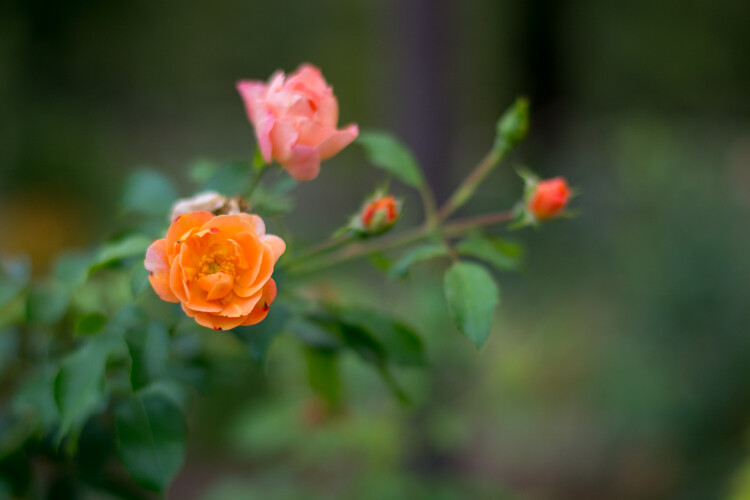
One advantage of shooting in the morning is that the sun is not directly overhead, which means light is diffused in the sky, and essentially coming from all directions. This helps your subjects have more even  lighting, and makes it easier to get a good overall exposure since there isn’t the same degree of high contrast between light and dark areas that happens later in the day. This picture of some flowers in the morning illustrates the concept, and shows how diffused morning light can affect not just the shadows, but the color and vibrance of the picture as well.
morning-vs-afternoon-flowers-730am

Flowers at 7:30am: 50mm, f/1.8, ISO 200, 1/180th of a second

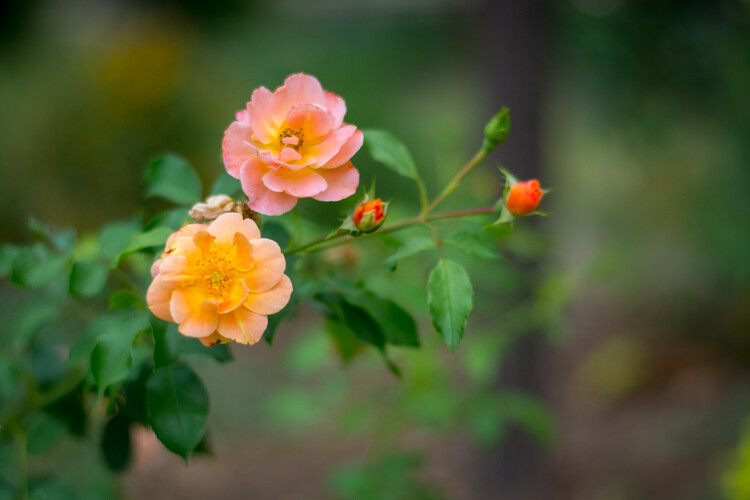
Revisiting the same scene later in the day revealed an image that is similar in overall composition but quite different in some significant ways. The colors on the orange flower are not as rich and vibrant as they are in the morning photo, and the individual petals create harsh shadows that can be somewhat distracting.
Flowers at 1:45pm: 50mm, f/1.8, ISO 200, 1/6000 second

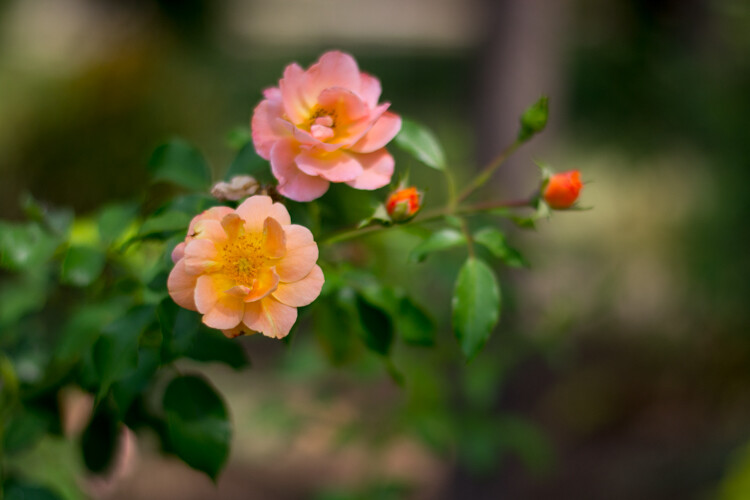
Flowers at 1:45pm: 50mm, f/1.8, ISO 200, 1/6000 second

While taking photos later in the day often means you have more light available, it comes with an important tradeoff: the midday sun often often leads to a greater degree of contrast with brighter highlights and darker shadows.  However, this is not to imply that shooting later in the day is an inherently bad idea. Learning to shoot at different times of the day is not just about knowing how things are lit, but understanding how nature itself changes. Different times of day are not necessarily better or worse, but each has its own set of opportunities and challenges.

Notice how the pink flower has opened up and is much more vibrant than in the morning. No amount of early sunlight can coax a flower into full bloom, and sometimes you simply have no choice but to shoot later in the day if you want to get a particular picture. Wildlife shooters often take pictures in the morning or evening, but not necessarily because of the light. They do it because many animals are simply much more active at that time, than in the middle of the day.

One of the best solutions, which is not always possible but does offer some creative opportunities, is when you can get pictures in the middle of a cloudy or overcast day. That scenario gives you the nature advantages of shooting in the middle of the day, with the lighting advantages of morning or dusk. In this final picture, which was taken during a moment of thick cloud cover, you can see how the pink and orange flowers are in full bloom, while the light is much more similar to the morning image. The shadows are soft and diffused, which lends a warm and pleasant feeling to the image.
morning-vs-afternoon-flowers-1215pm

Flowers on an overcast day: 50mm, f/1.8, ISO 400, 1/6000 second

2 – Background Elements

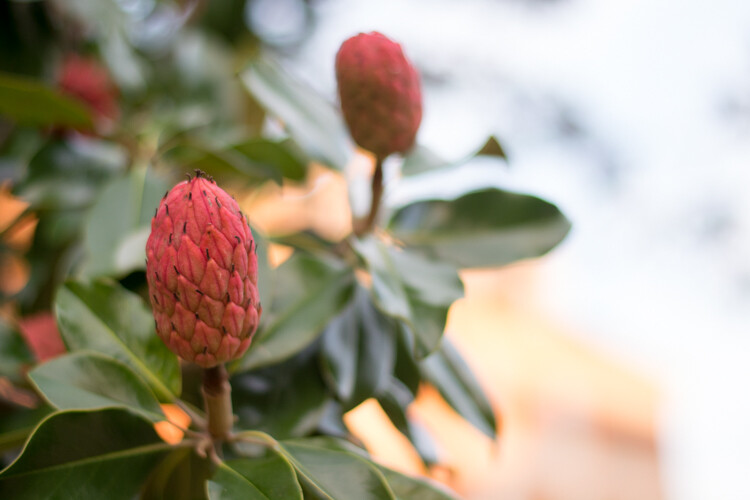
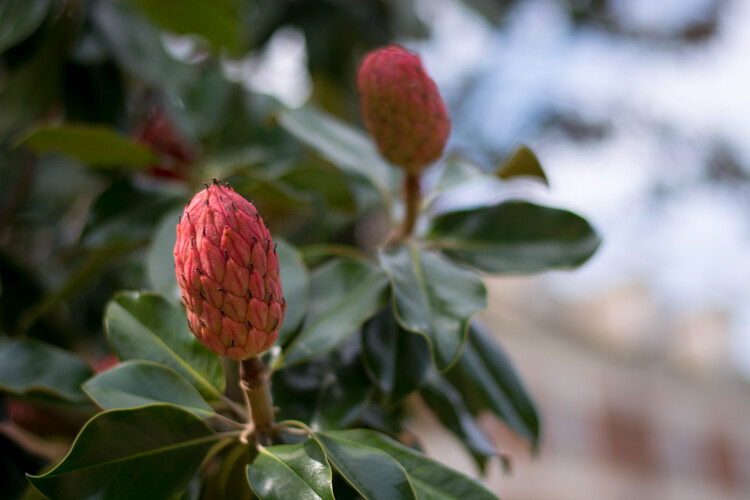
One nice thing about shooting pictures in the morning is how the early sun can cast a nice even light on your subject. But, there are other elements of a photographic composition to take into account as well. Here are two pictures of some seed pods on a magnolia tree, taken a few hours apart. In these examples you can see that the morning light doesn’t just affect the color and shadows on the subject, but has a notable impact on the background elements, and other parts of the picture as well.

In the first image the subject (i.e. the seed pod in the foreground) is evenly lit, with nicely saturated colors, and the composition has a nice warm tone overall. There are a few drawbacks though – the building in the background which faces to the east is so brightly lit it’s distracting, and the sky does not yet have the rich blue tones that can happen later in the day.
morning-vs-afternoon-magnolia-735am

Magnolia seed pods at 7:30am: 50mm, f/1.8, ISO 400, 1/500 second

Here’s the same composition taken a few hours later, which illustrates that shooting in the bright sunlight has some tradeoffs tradeoffs that are both good and bad. While the building in the afternoon photo is not overexposed and the sky has more of a pleasing blue tint, the subject is somewhat backlit which causes a bit too much contrast for my liking.
morning-vs-afternoon-magnolia-1435pm

Magnolia seed pods at 2:35pm: 50mm, f/1.8, ISO 100, 1/1500 second

Again, the message here is not about why taking pictures at a particular time of day is better or worse, but understanding the effect it will have on your images. Some of the problems with the afternoon picture could be mitigated if I simply took the picture from a different angle or used another subject. I could also have used the pop-up flash on my camera as a fill flash which would have fixed some of the shadows on the subject. These challenges also become a little easier to work with if you are taking pictures of people and not immovable inanimate objects because you can tell them where to go, bring umbrellas, or use structures to manipulate the light.

3 – Even Lighting

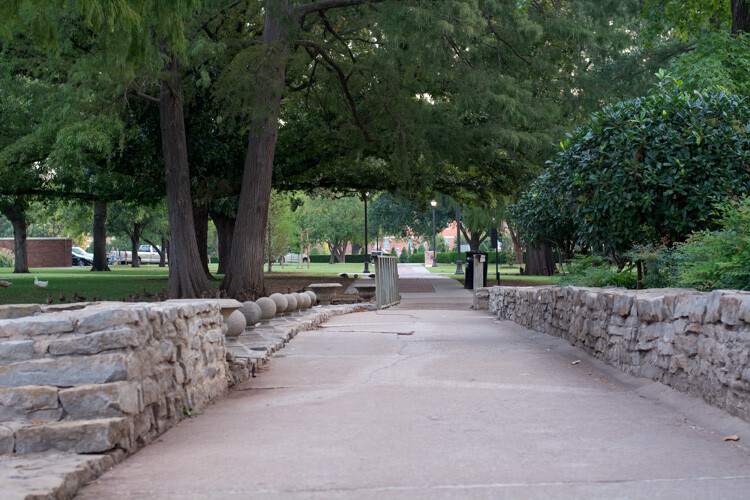
I already gave some examples of how the early morning sun can have a pleasant effect on a single subject, but it can also cast an entire scene, or even a landscape, in an entirely different light compared to the afternoon. This image of a path on the Oklahoma State University campus is one of the most pleasing examples of how shooting in the morning can give you an incredible advantage when it comes to just working with light. The entire scene is evenly lit, and even the undersides of the tree branches are green. There are no harsh shadows and the morning light creates a warm and welcoming feeling overall.
morning-vs-afternoon-path-730am

Path at 7:30am: 50mm, f/4, ISO 400, 1/60 second

In the next image you can clearly see evidence of some of the challenges posed by midday sunlight. The image is awash with contrasting areas of light and dark, and the shadows on the path are disjointed and distracting. There is no one clear focal point for the image, and the undersides of the leaves are so dark they are almost unrecognizable. It looks like an entirely different scene, even though it was the same location.
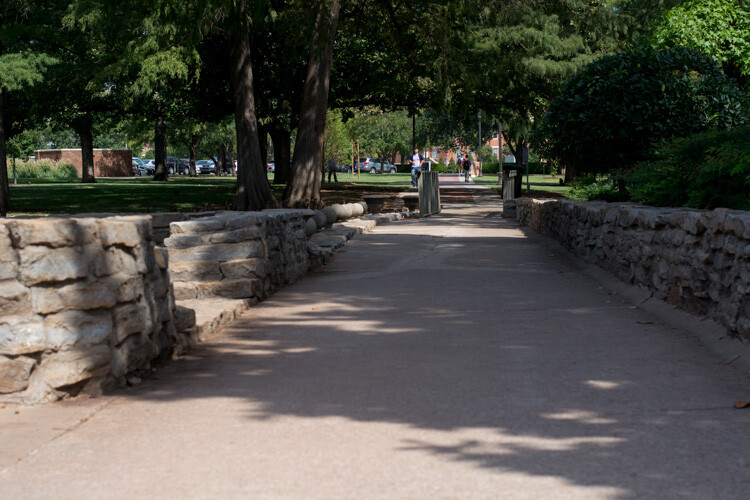
morning-vs-afternoon-path-1345pm

Path at 1:45pm: 50mm, f/4, ISO 200, 1/1500 second

The final image in this series illustrates one additional hurdle that must be overcome when shooting during the day – other people. In most parts of the world, and especially on a college campus, there simply is not much human activity in the early morning. Later in the day you will usually find yourself contending with workers, pedestrians, students, tourists, children playing, or a variety of other types of individuals who might inadvertently get in the way of letting you take the picture you want.
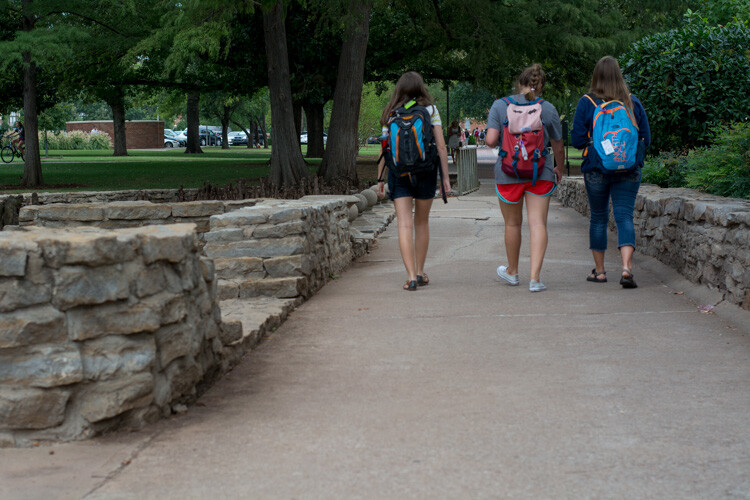
morning-vs-afternoon-path-1215pm

Path at 12:15pm: 50mm, f/4, ISO 400, 1/1500 second

Almost any outdoor photographic situation will have far fewer people around in the wee hours of the morning, which can not only give you better pictures, but a greater sense of peace and calmness as you go about the business of taking photos. The other point to note about the image above with the students walking, is that even though there was plenty of cloud cover which meant nice evenly-diffused lighting, the undersides of the trees are much darker than in the 7:30am photo. This illustrates how even though cloudy and overcast days are great for photos, there are still some aspects of shooting in the morning or evening that can be advantageous.

4 – The Human Impact

Finally, here’s one more example of how pictures in the morning can be much different than pictures later in the day. This bronze statue is a friendly sight for shoppers and drivers in downtown Stillwater, Oklahoma. Taking his photo as the sun is creeping over the horizon yields a well-lit image with a hometown feel, as the shops of main street recede into the background. Colors are even and not overly-saturated, and there is neither too much, nor too little, contrast on the statue itself.
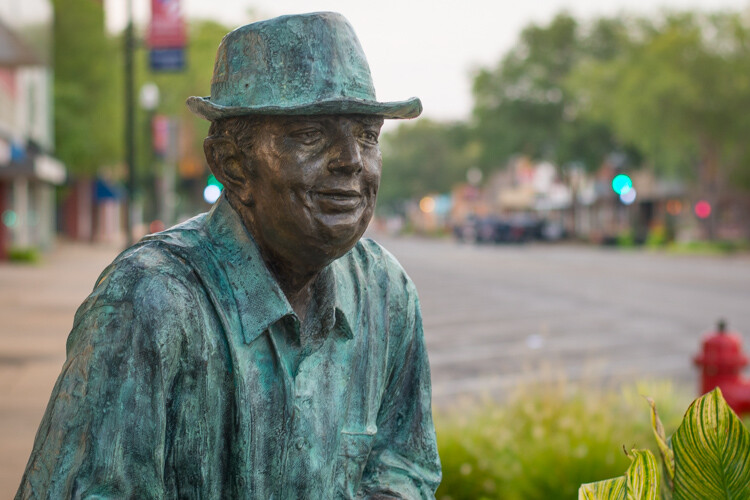
morning-vs-afternoon-bronze-730am

Bronze Man at 7:30am: 50mm, f/2.8, ISO 200, 1/60 second

The same photo in the late afternoon looks dramatically different, but not just because of the lighting. In the second picture (below) the light is clearly coming from overhead, as the top of his shoulders and side of his hat are much brighter and the contrasting light is creating much deeper shadows on his overcoat. This is not necessarily a bad thing, as the result is an image that shows more texture on the statue, even though one of the tradeoffs is that the side of his head is shrouded in shadow. However, the most critical difference here is the background, which is now filled with passing shoppers and parked cars. The picture seems cluttered, the focal point is less obvious, and instead of a friendly small town main street it now seems like a sterile commercial shopping center.

morning-vs-afternoon-bronze-415pm

Bronze Man at 4:15pm: 50mm, f/2.8, ISO 200, 1/1500 second

Hopefully these examples give you a better idea of how the time of day in which you take pictures can dramatically affect not just the lighting, but many aesthetic elements of your photographic compositions as well. What are your favorite tips for shooting at different times of the day? Leave your thoughts in the comments below.

googletag.cmd.push(function() {
tablet_slots.push( googletag.defineSlot( “/1005424/_dPSv4_tab-all-article-bottom_(300×250)”, [300, 250], “pb-ad-78623” ).addService( googletag.pubads() ) ); } );

googletag.cmd.push(function() {
mobile_slots.push( googletag.defineSlot( “/1005424/_dPSv4_mob-all-article-bottom_(300×250)”, [300, 250], “pb-ad-78158” ).addService( googletag.pubads() ) ); } );

The post 4 Ways the Time of Day Affects Your Photographs by Simon Ringsmuth appeared first on Digital Photography School.


Digital Photography School
 
Comments Off on 4 Ways the Time of Day Affects Your Photographs

Posted in Photography


7 Ways to Take Advantage of Autumn in Your Portrait Photography

29 Sep

Fall is my favorite. At least it used to be before it was Pumpkin Spice Everything. I’m so tired of Pumpkin Spice Everything, but I’ll never tire of chilly weather, or scarves, or leaf piles. Or even shorter days, mainly because long summer days are just too much pressure for me.

lynseymattingly1

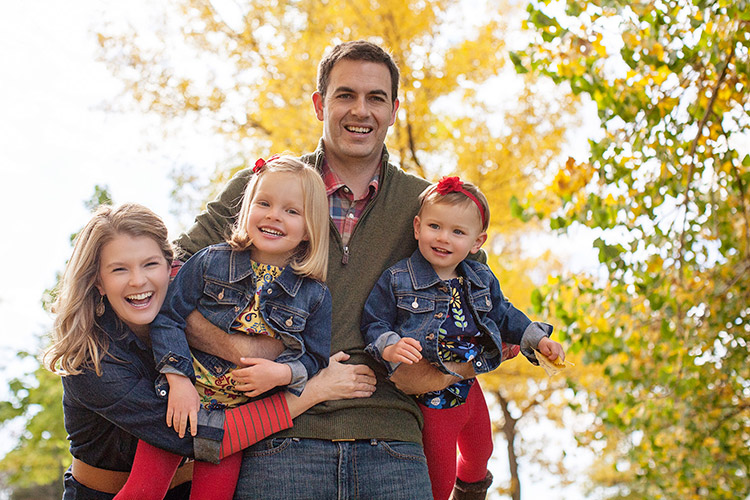
I like everything about fall including, maybe especially, that it’s ripe for portraits. Here are seven ways to help you take advantage of all of autumn’s goodness in your portrait photography.

lynseymattingly2

1) The light is phenomenal 

Yes, there is less of it, but it is so golden and delicious. I’m sure there is a very scientific reason for that, which of course I know and understand exactly, but I don’t want to bore you. I like a warmer image, so to get one without having to add a filter is fantastic. I prefer to shoot in the morning and early evening hours but in the fall, the light reflecting off of the warmer tones in the trees make even the deadest of shady patches come alive.

While people don’t normally wear yellows and oranges for picture day, the golden tones found in nature compliment all skin tones. This is why I always tell my clients to dress in colors that are found naturally outside—not only does it keep people from showing up in lime green, but the palette works for whatever background we find that day, and this time of year dressing in earth tones can really make a portrait pop.

lynseymattingly4

2) Clients dress in their finest

I’m not big on fancy clothes, but even I agree that flip flops take a back seat once we can bust out boots and scarves. Fall is when people tend to take it up a notch, plus it’s layering season. Layering is the best way to achieve portraits that look high-end or even fashion shoot-like. You won’t ever find me in boots, a t-shirt, a jacket, a skirt, tights, a scarf and a hat in real life….but on picture day, I’ll happily dress everyone in five layers and make them stick with it for 20 minutes if it makes my ragamuffin family look like we bathe regularly. I’ve found that my clients feel the same. Which is not to say that my clients are ragamuffins, I’m sure they always look as sharp as they do on picture day.

lynseymattingly3

3) Fall adds a playful feature to portraits

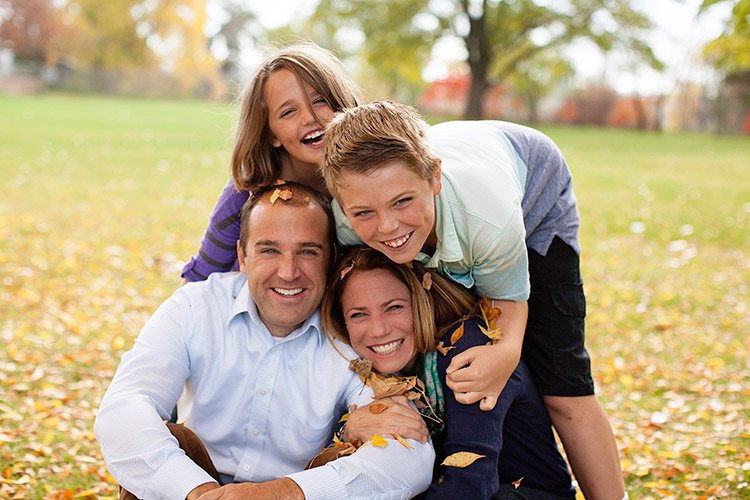
I don’t like traditional posing so fall adds so many more options: throw leaves, lay on leaves, climb in colorful leaves, throw leaves at me! (Try to watch out for sticks please) You get the idea. The colors are almost like an extra family member that matches everyone, and isn’t making things more difficult. Use it to your every advantage. It’s not possible to look like you’re miserable in five layers of fancy-pants clothes when you are having a leaf fight. I know, I’ve done the research.

lynseymattingly5

4) Don’t forget black and white

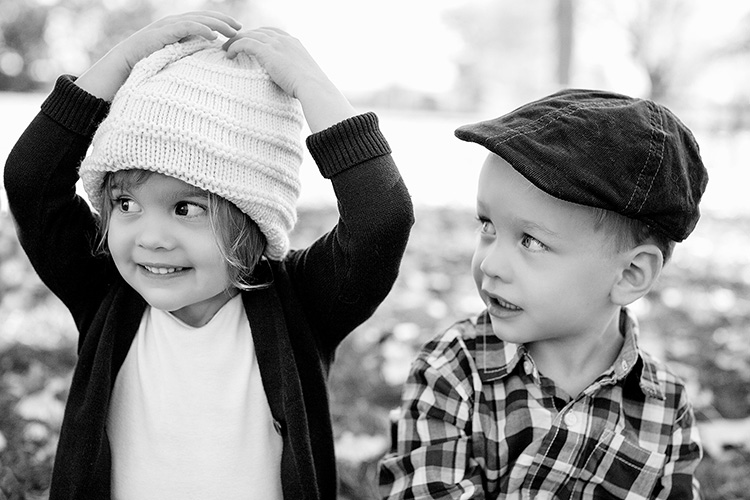
While the changing fall season offers colors, it also offers texture. Black and white portraits can still feel the magical spell of autumn through texture, tone, and playfulness. Plus, that phenomenal light thing goes for black and white too (see #1). I love black and white portraits, and while I am likely to do more color this time of year, I still proof a few black and whites for all of my clients.

lynseymattingly6

5) Compensate for the warmer tones

Sometimes if I am hitting the light just right, and my subjects are in perfect clothes, and the moon isn’t void of course, I find that images can get too warm. I know that sounds crazy, but it can happen. A custom white balance can help you on the front end, but if you didn’t notice it until after, don’t despair. An auto color run (under Image in Photoshop) or a cooling filter can fix everything. For as much as warm tones are flattering, no one wants to look like a seasonal gourd.

lynseymattingly9

6) Fall weather is perfect for cuddling

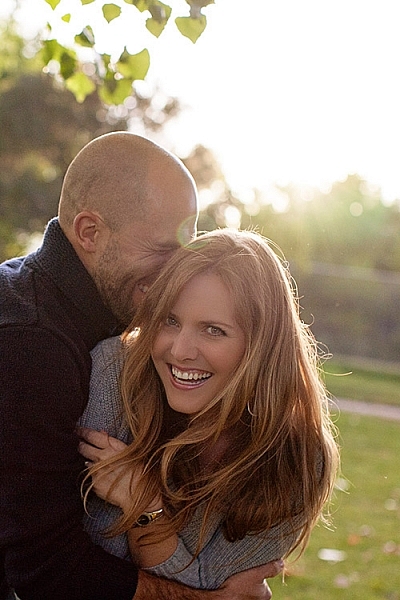
Now I’m not one to cuddle, much to my husband’s dismay; I can’t take people in my personal space for an extended period of time. Last weekend a client that knows how I feel about hugging and all that, giggled at how often I tell people to “snuggle up” when I’m shooting family portraits. I guess I figure that most people enjoy it. Or are at least willing to pretend they do for the sake of the pictures (even I am willing to do that for a good Christmas card), especially if it’s not 100 degrees F (30c) outside. And a snuggle feels like a lot less pressure than cuddling, now doesn’t it?

lynseymattingly8

7) The holidays are around the corner

In the US, the changing colors of the trees means that winter is almost here, which puts portrait photographers square into Holiday Card Season. Most of the clients I photograph this time of year are planning on using their images for sending out cards, or even creating holiday gifts.

So this is the only time of year I’m likely to offer a sale or special on portrait sessions, and every time I do, they sell out. That also means that this is the time of year that I can lose my mind in a pile of editing if I am not careful. To try to prevent both a nervous breakdown and spending a month staring at my computer screen, I usually offer mini sessions—10 to 15 minute shoots where I promise five or so pictures that I deliver as high resolution files. This takes any printing or card creating out of the equation, and also limits the amount of images I promised, rather than a full session which for me can be 50 or more. In turn, my clients get a few choices of images for their holiday cards and gifts, including that one great picture that was likely the whole reason they wanted portraits anyway. And I don’t have a nervous breakdown. Probably.

lynseymattingly7

So throw back a pumpkin spice latte and put on a pair of boots and go shoot some portraits, even if you usually don’t. Everything is on your side in the fall – great light, fabulous surroundings, and more clients than any other time of year. That doesn’t happen very often (well, it happens once a year, but still).

lynseymattingly10

googletag.cmd.push(function() {
tablet_slots.push( googletag.defineSlot( “/1005424/_dPSv4_tab-all-article-bottom_(300×250)”, [300, 250], “pb-ad-78623” ).addService( googletag.pubads() ) ); } );

googletag.cmd.push(function() {
mobile_slots.push( googletag.defineSlot( “/1005424/_dPSv4_mob-all-article-bottom_(300×250)”, [300, 250], “pb-ad-78158” ).addService( googletag.pubads() ) ); } );

The post 7 Ways to Take Advantage of Autumn in Your Portrait Photography by Lynsey Mattingly appeared first on Digital Photography School.


Digital Photography School
 
Comments Off on 7 Ways to Take Advantage of Autumn in Your Portrait Photography

Posted in Photography


3 Fun Ways to Enhance Your Landscape Images in Photoshop

18 Sep
title-day-moonlight

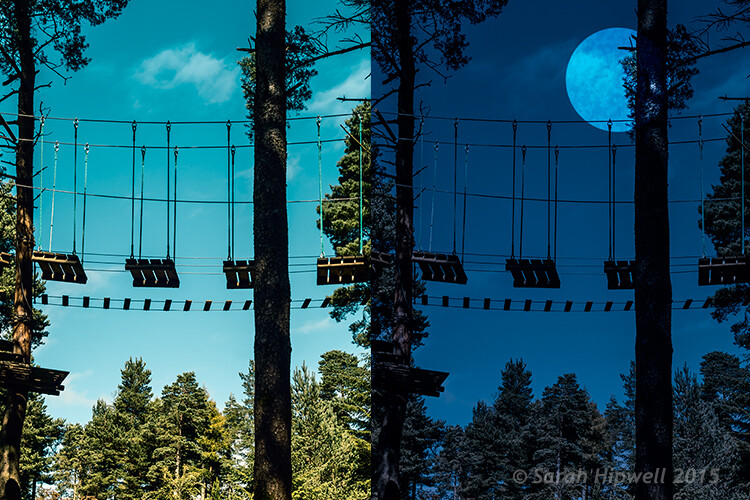
Turning Day into Night using Color Lookup and easy-to-do moon in Photoshop.

As the theme for this month is on landscape photography, I thought I would share three fun ways to add features to your landscape images that already come embedded in Photoshop as presets. Let’s take a look at the first one.

#1 The Rainbow

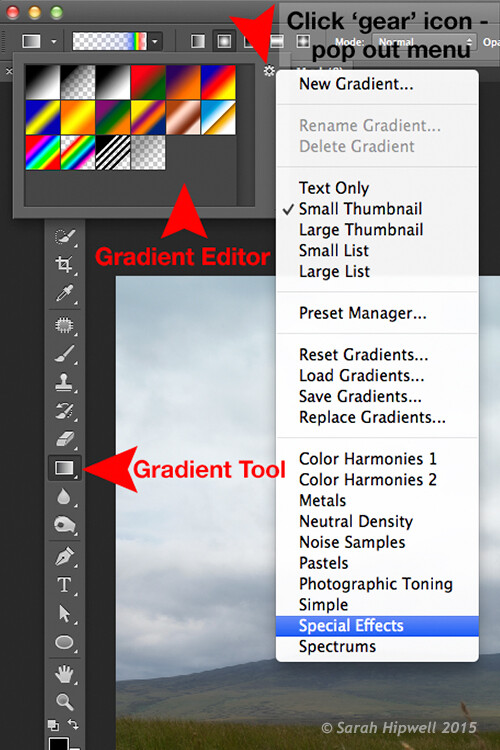
Open an image that you want to add the rainbow to. Click on the Gradient tool, then click on the Gradient box in the Options bar to bring up the Gradient Editor dialog box.

Click on the gear icon at the top right corner of the Presets section and another pop-up menu appears. Choose Special Effects near the bottom of the list. When you click on it, a dialog box appears asking you to replace the current default gradients with the ones that you are loading. Click Ok. It contains only five presets, the last one being Russell’s rainbow is the one I’m going to use. Click ok, then go back up to the Options bar and click on Radial Gradient.

Gradient-editor-pop-out-menu-special-effects

The rainbow preset is in the Gradient Editor under Special Effects.

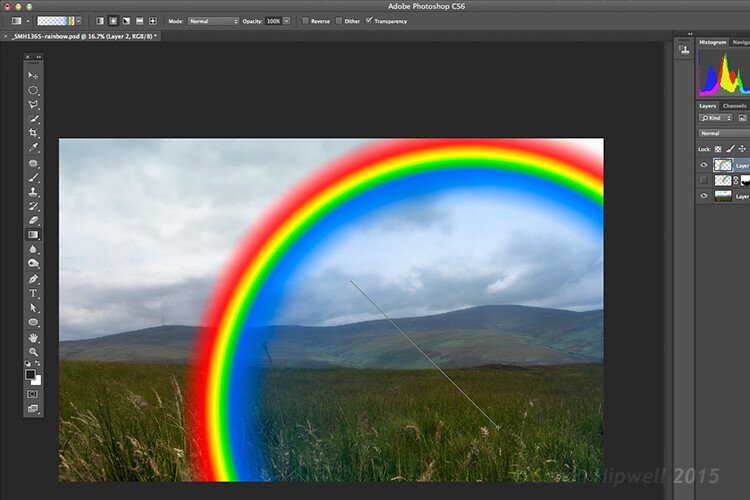
Make sure you have a new layer over the image that you are using. Start at the bottom of the image and drag upwards at a 45 degree angle and release. Depending on the size of the rainbow that you want, you can press CMD Z to undo and restart again (see image below). At first, it looks way too extreme and unrealistic, but using the free transform tool (CMD+T), resize and rotate and place it into position.

Creating-rainbow-using-rainbow-effect

With Russell’s rainbow preset selected and the gradient changed to radial. Click on a low part of the image and drag upwards at an angle to create the rainbow.

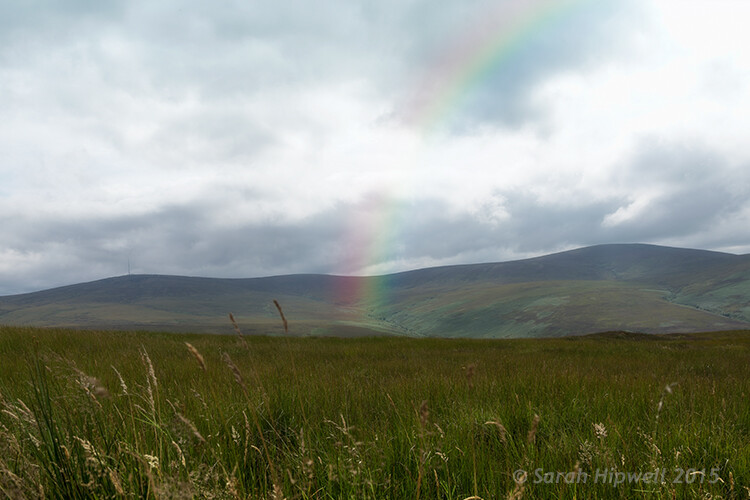
Change the layer blend mode to Screen. You can see the rainbow appears behind and in front of the clouds. Add a layer mask and with a big soft brush, soften the end of the rainbow where it hits the ground. I also converted the layer to a Smart Object and applied a Gaussian Blur. I then Lowered the Fill and Opacity to get an almost translucent effect. Voila, a real simple but effective rainbow.

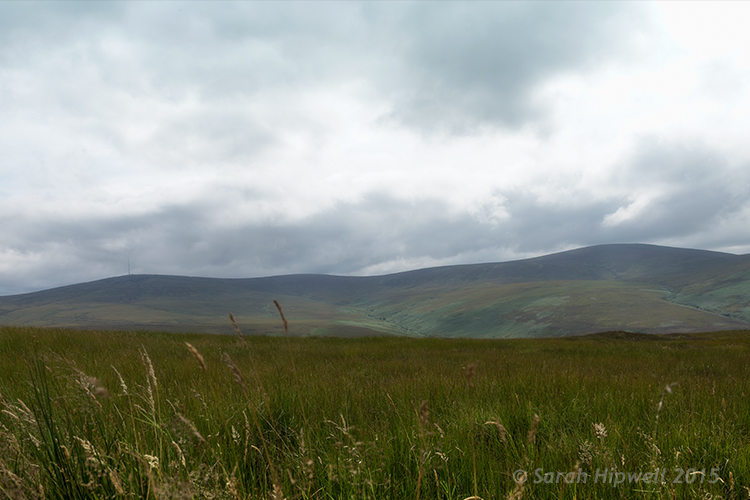
mountain-view

The original image without the rainbow.

mountain-view-rainbow

The rainbow effect added to the image.

Rainbows happen when sunlight and rain combine in a very specific way. And this brings me to the next preset…

#2 Rain

This particular preset is not as effective as the other two. I think a custom rain brush would be better, nevertheless, it does an okay job.

Depending on the image that you use, it is better to have an image with clouds rather than a clear blue sky. I desaturated this image by using a hue/saturation adjustment layer and I also added a vignette to give it more drama.

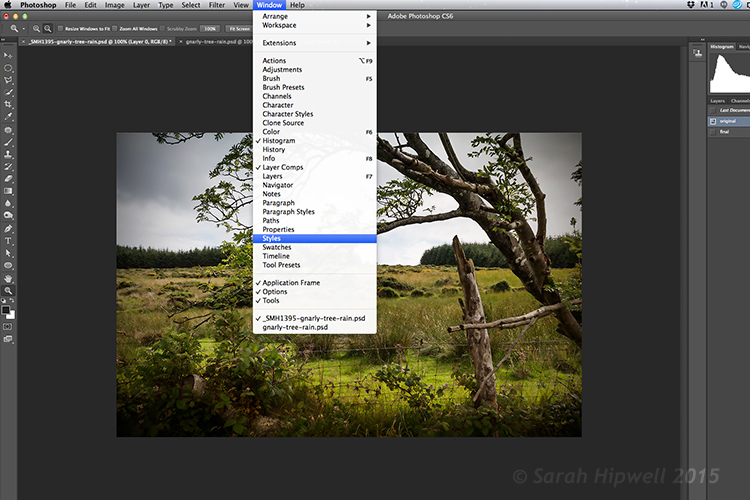
If you go up to Window in the menu bar and open up the Styles panel, or the Adjustments panel has a Styles tab to its right. Over to the far right corner is an arrow, click on this icon and a pop out menu appears. Choose Image Effects from near the bottom. Similar to the Gradient Editor, a dialog box appears asking you to, “Replace current styles with the styles from Image Effects?” Click Ok. The Rain style is down near the bottom.

Window-Styles

The Styles Panel is located under Window in the Menu bar.

arrow-icon-styles-panel

You’ll see this arrow icon to the far right corner of the Styles Panel. Click on tit and a pop-out menu appears (right).

pop-out-menu-styles-image-effects

This is the pop-out menu. The rain preset is located in the Image Effects.

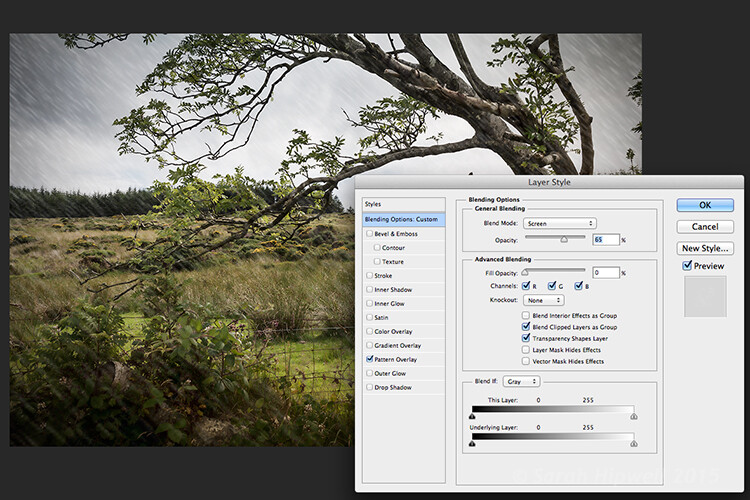
But first, create a new layer over the image that you have opened. Name this layer, Background rain. Fill it with 50% gray. Now click on the rain style. It creates a Pattern Overlay. At first, you just see small white diagonal slashes against a gray background. Change the blend mode to Screen. Then click anywhere to the right of this gray layer to bring up the Blending Options Layer Style dialog box. All you need to do here is bring the Fill opacity under Advanced Blending down to zero. Click Ok. Now you see just the the rain, the gray color is gone.

Layer-style-blending-options

This is the Layer Style Blending Options dialog box where you set the Fill Opacity to zero to get rid of the gray background. You could also reduce the Fill Opacity in the Layers panel.

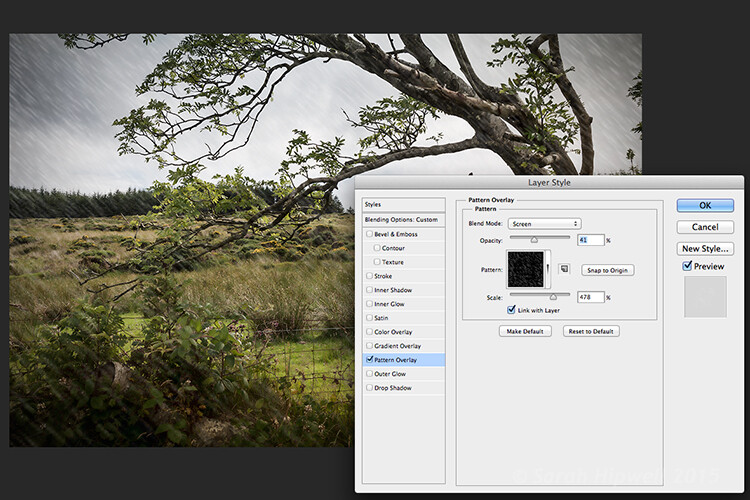
You need to alter the size of the rain, it needs to be smaller as if it’s in the background. Double-click just underneath the layer where it says Effects>Pattern Overlay, this brings up the Pattern Overlay Layer Style dialog box. As you move the scale slider to the right or left, you can see the rain increasing or decreasing in size. I chose 207% and reduced the opacity to 52%. Click Ok. I added a layer mask, and with gradient tool, I masked away the rain at the bottom (you can equally use a soft brush to mask instead). I reduced the Opacity on this layer to 85%.

Layer-style-pattern-overlay

This is the Pattern Overlay where you can adjust the size of the rain by using the scale slider, and its opacity, quick and easily.

I created another layer and named this Foreground rain. I repeated the same steps as above but I changed the scale of the rain. I wanted the rain to appear bigger. So again double click on the Effects>Pattern Overlay to open the Pattern Overlay Layer Style dialog box. Increase the scale to 478% and reduce the opacity to 41%. Click Ok. I then reduced the Opacity on this layer to 65%. This gives the rain a bit more depth and adds a more realistic effect.

field

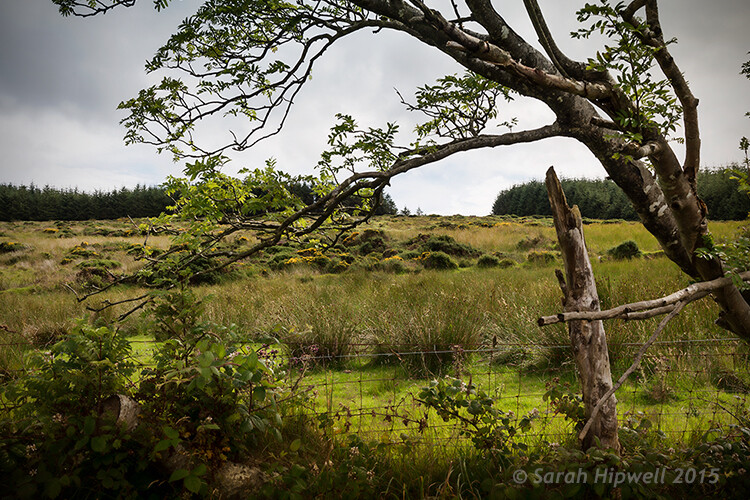
Original image taken with no rain.

Rain-in-field

Rain applied using the rain preset in the Styles panel. I also desaturated and added a vignette to the image before adding the rain.

#3 Day to Night

Now for the third effect. This is a really quick and easy way to turn a photo from day into night with a preset already in Photoshop (CS6). Go up to Layer>New Adjustment Layer>Color Lookup. Where it says 3DLUT File, click on the tab beside it and a pop-up menu with different effects appears, scroll down to Moonlight.3DL. These presets are known as lookup tables, or LUTs, they’re mainly found in the film industry.

For added effect, I’m going to add a moon. Create a new layer, Go to your eclipse tool and hold down the Shift key and draw a circle, roughly 200px. Fill it with white. Deselect (CMD+D). Go up to Filter>Filter Gallery>Artistic>Sponge. Choose the Brush tool set to: Size 7, Definition 3 and Smoothness 5. Click Ok. Move the moon near the top of the tree. I reduced the size a little by using the Free Transform Tool (CMD+T). Change the blend mode to overlay. Duplicate this layer and reduce the Opacity to 55%. See image below.

title-day-moonlight

I hope you enjoyed these fun and quick techniques using these presets found in Photoshop. Do you use presets or other plugins? Please share in the comments below.

googletag.cmd.push(function() {
tablet_slots.push( googletag.defineSlot( “/1005424/_dPSv4_tab-all-article-bottom_(300×250)”, [300, 250], “pb-ad-78623” ).addService( googletag.pubads() ) ); } );

googletag.cmd.push(function() {
mobile_slots.push( googletag.defineSlot( “/1005424/_dPSv4_mob-all-article-bottom_(300×250)”, [300, 250], “pb-ad-78158” ).addService( googletag.pubads() ) ); } );

The post 3 Fun Ways to Enhance Your Landscape Images in Photoshop by Sarah Hipwell appeared first on Digital Photography School.


Digital Photography School
 
Comments Off on 3 Fun Ways to Enhance Your Landscape Images in Photoshop

Posted in Photography


5 Ways a Telephoto Lens Can Improve Your Landscape Photography

04 Sep

2-for-1 special

As part of Landscape Photography Week here on dPS, we’re offering TWO for the price of ONE on our best-selling Living & Loving Landscape Photography ebooks!

Click here to take advantage of this offer.


While it may seem counter-intuitive at first, the most sophisticated compositions are often the simplest. For this reason, ultra wide angle lenses are not typically the ideal choice for outdoor images. By including too much information, you risk losing the subject to visual clutter. This creates a unique challenge for landscape photography. While it’s tempting to include the vast expanse of a splendid horizon, a stronger image may only contain a small portion of it. This is where a telephoto lens becomes an invaluable part of your kit.

Here are five ways using a telephoto lens can help you do better landscape photography:

1) Eliminate Clutter

It’s rare to come upon a landscape that doesn’t require decluttering. Common sights include power wires, fences, trail head signs, unsightly dirt patches, and dumpsters. You can try to compose with your feet at first, but what about those situations when you can’t go any further?

Where a wide angle lens falls short, a telephoto in the 70-300mm range, will be very useful. With such a lens, you can pick the precise area where all of the essential elements come together, and work to eliminate everything else.

2) Isolate Your Main Subject

A telephoto lens gives you the ability to pick a single part of a larger landscape and bring attention to it. Of course the increased reach isn’t the only part of the equation. You’ll still need to consider various methods of composition, like the rule of thirds and a strong foreground element. Try shooting from a low vantage point, through flowers or grass for added depth. At wide apertures foreground elements will become a nice wash of color that lead the eye to the subject.

3) Expand Your Horizons

The potential for subject matter multiples with a longer focal range. For instance, wildlife that would appear very small at 55mm, become much more prominent at 420mm. No longer are you just shooting landscapes, but possibly wildlife as well. Just remember that good technique is essential for sharp telephoto images. Even the slightest bit of camera shake will be magnified if your shutter speed is too slow. When shooting hand-held, try to set an exposure no slower than 1/500th of a second. Image stabilized lenses and camera bodies absolutely offer some flexibility here, but it’s best to err on the side of caution if your goal is to make tack sharp enlargements.

4) A Different Perspective

If you look at the front cover of many photo magazines, they often encourage the use of ultra wide angle lenses for landscapes. While it’s true that certain scenes come to life at 16mm, it’s the exception rather than the rule. If you’re looking to create a unique representation of a scene, a greater focal range can help you find it. At a time when it seems just about everyone has a camera, going beyond the reach of a normal kit lens can lead to extraordinary results.

5) Finding Patterns

By searching for organized patterns and repetition with a long lens, you can bring order to the world around you. This method of seeing will help to further develop your eye and strengthen your compositions. Rather than looking at the bigger picture, you’re choosing to focus on the smaller details.

While this particular strategy of composition doesn’t require any overly technical methods, it does require a different approach. The trick is to zoom in and carefully scan the landscape through your viewfinder. Patterns don’t always reveal themselves right away, so take your time and compose carefully. You may be surprised at where you’ll find these unique photo opportunities as they can appear just about anywhere.

All of these images were captured in Iceland where landscapes often have an abundance of empty space. There were definitely times when the wide angle came in handy, in tight quarters for example, or at the base of a waterfall. For just about everything else, a 40-150mm (Olympus OMD EM1 with the 40-150mm f/2.8, effective 80-300mm) proved more effective. In fact, many of my favorites were shot at the long end of the lens’ range. The next time you head out to photograph scenery, think long, and make a telephoto lens your first option.


Here on dPS it is landscape week. You can see the previous ones listed below. Watch for a new article (or two) on landscape photography daily for the next week.

  • 6 Tips for Better Low-Light Landscape Photography
  • Landscape Photography and the Human Element

googletag.cmd.push(function() {
tablet_slots.push( googletag.defineSlot( “/1005424/_dPSv4_tab-all-article-bottom_(300×250)”, [300, 250], “pb-ad-78623” ).addService( googletag.pubads() ) ); } );

googletag.cmd.push(function() {
mobile_slots.push( googletag.defineSlot( “/1005424/_dPSv4_mob-all-article-bottom_(300×250)”, [300, 250], “pb-ad-78158” ).addService( googletag.pubads() ) ); } );

The post 5 Ways a Telephoto Lens Can Improve Your Landscape Photography by Chris Corradino appeared first on Digital Photography School.


Digital Photography School
 
Comments Off on 5 Ways a Telephoto Lens Can Improve Your Landscape Photography

Posted in Photography


5 Ways to Change Your Composition For Better Photos

28 Aug

If there is one thing in photography that every photographer can work on, it’s composition. Like many of the other techniques in photography, your composition will improve the more you practice. Very often, photographers seem to go to their comfort zone of the rule of thirds. I personally like the rule of thirds as a starting point, not every photograph however, needs to be composed on the rule of thirds. In fact, it is a good idea to shoot the same scene in a few different compositions, even depth of field can be used as a compositional tool.

A good way to work on your composition is to start with the rule of thirds, then change it up, try a few different compositions and see how that works. The challenge is this, what other compositions can you use? Let’s take a look at some advanced compositional techniques that you can try out on your next shoot.

1. Left to right

The smooth curving water leads our eye to the rock on the right of the image

The smooth curving water leads your eye to the rock on the right of the image

In the western world, we read the words on a page from left to right. It is logical to think that when someone views your image, they will generally begin on the left side of the image, and move to the right. You can use this technique in a few ways.

Firstly, you could place your subject on the right hand side of the frame with a leading line drawing the eye to your subject. The leading line could be a river, a road, or a railway track – it doesn’t really matter, all that it needs to do is allow the eye of the viewer a natural entry point, then lead them to the subject.

Secondly, if you were shooting street photography, you might have a person in the frame on the left hand side, looking toward your subject on the right. You might even have a vehicle such as a car or a motorcycle, moving from left to right. These techniques will immediately draw the eye to the right side of your image.

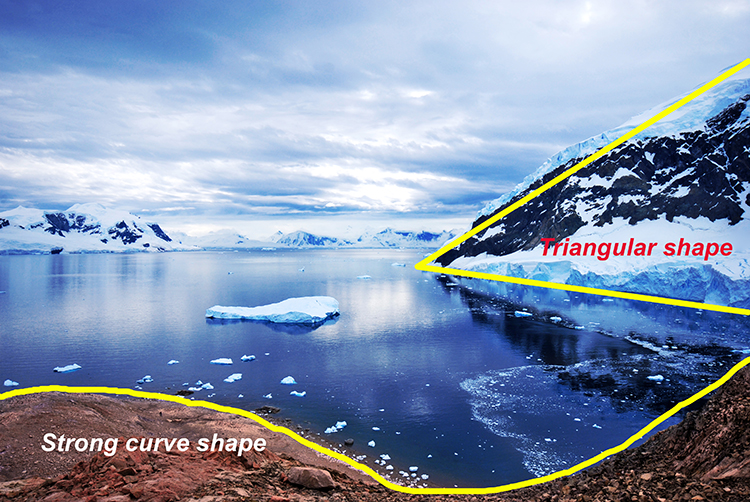
2. Use shapes – both seen and unseen

In many images, there are hidden and visible shapes. Window frames are square or rectangular, doors are rectangles, and so on. Look for shapes in your images, look beyond what the actual object is and see its shape. You can also compose the scene to create a shape. Sand dunes can become triangular shapes, open fields can be green rectangles, so look for shapes in your scene and compose your image to include them.

There are many shapes in each scene, use them to enhance your composition

There are many shapes in each scene, use them to enhance your composition

3. Use numbers – not literally!

If you are shooting a scene with trees or leaves, or even a river with some exposed rocks, try and use odd numbers of things. Odd numbers tend to create a dynamic feel in your scene – three trees or rocks will feel more dynamic than two trees or four rocks. This also works well for groups of people. If you have a large group of say 12 people, try not to make three rows of four people, maybe have them pose in two rows, one with seven people and one with five. For people photography, you can also try and create a triangle shape with your subjects. Three people naturally creates a triangle, give it a try!

Odd numbers work well in most images

Odd numbers work well in most images

4. Use negative space

Negative space can really make an image interesting. Negative space is essentially blank space, but really, it helps to anchor your image. It provides really important information about the image. A blue sky can be used to create negative space. The blueness of the sky tells the viewer that it was a sunny day. Your blue sky may have one small cloud in it and that can make the negative space seem interesting.

The blue sky and the hint of a cloud makes this negative space interesting

The blue sky and the hint of a cloud makes this negative space interesting

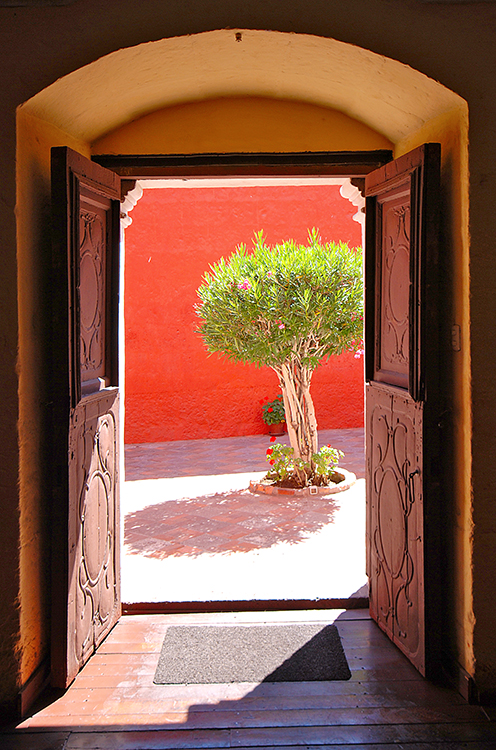
5. Framing

Framing can be used very effectively to showcase your subject. You can use a window, a door, or even trees to frame a subject. The idea is to create a frame around the subject that does not distract from the subject, but causes the viewer to know immediately where to look.

A tree, framed by an old wooden door.

A tree, framed by an old wooden door.

When you are looking at a scene for the first time, try some of these techniques, or try a combination of them. Shoot from different angles and move around your subject before settling on a composition. You will find that by looking at the scene in many different ways, you will unlock more creativity. Your best shot, may not be your first compositional choice. Composition is one of the more flexible tools in your creative toolbox. You don’t need any particular piece of equipment to change it, you simply need to move your camera around. Give it a try, load your results up in the comments!

googletag.cmd.push(function() {
tablet_slots.push( googletag.defineSlot( “/1005424/_dPSv4_tab-all-article-bottom_(300×250)”, [300, 250], “pb-ad-78623” ).addService( googletag.pubads() ) ); } );

googletag.cmd.push(function() {
mobile_slots.push( googletag.defineSlot( “/1005424/_dPSv4_mob-all-article-bottom_(300×250)”, [300, 250], “pb-ad-78158” ).addService( googletag.pubads() ) ); } );

The post 5 Ways to Change Your Composition For Better Photos by Barry J Brady appeared first on Digital Photography School.


Digital Photography School
 
Comments Off on 5 Ways to Change Your Composition For Better Photos

Posted in Photography


5 Ways to Avoid Problems and Conquer Summer Photography

20 Aug

I’m a big fan of summer. In fact, I dislike winter greatly, and my favorite season is spring. But summer is probably number two on my favorite season list. Summer is great because it’s not cold. But it can also be so hot that you may walk a couple steps during a hot and humid day and return drenched in sweat.

Not cool, sun – not cool.

15_June_05_NxNW2015__DSC5091.dng

But in all seriousness, summer can be fantastic for photography because you can literally go out anytime with shorts and a t-shirt. In a way that’s liberating. In the winter you’re wearing layers upon layers; in the spring you may be wearing rain gear more often than not.

With this all said, I want to share some things to avoid during summer, and ways to conquer those avoidances. With these tips, you can improve your summer photographs.

1. Carry Less

Quite often photographers carry so much gear when they’re out making photographs. But how much of that is really necessary?

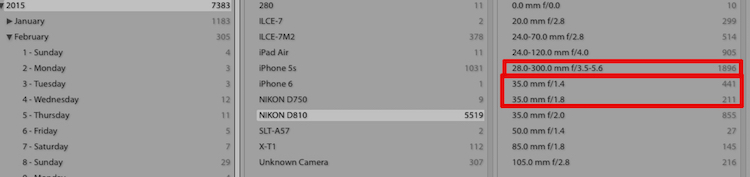
Look at your Lightroom catalog by using the Metadata Library Filter. Filter by the past year or two, and see what lenses you use the most. You can also dig in deeper by using the Lightroom Dashboard website to determine your most common focal lengths.

Lightroom Metadata

The Lightroom Library Filter for Metadata

Once you know which lenses you use the most, stick with those.

For example, as I’m writing this I have my bag packed for a huge photowalk tomorrow in New York City. I’m only bringing my 35mm lens for most of the walk and the 28-300mm lens for distance. I could bring others, but why? I know from experience that I don’t need others for this type of event (photowalk).

Carrying less means a lighter camera bag, which means less struggle in the heat.

2. Wear Less

I mentioned in the intro that in the summer you can wear less. On hot summer days I am outside photographing in shorts and a t-shirt. I might keep a Scottevest jacket with me (rolled in a ball in my bag) just in case it rains.

I won’t be wearing flip-flop,s because those are horrible for standing or walking on for extended periods of time. But I will be wearing low-top sneakers made for walking. But before my sneakers are on, I will also have socks designed for hot temperatures, and walking. Arch support is extremely important, and in the summer if you don’t have proper sizing or support then your feet will feel it.

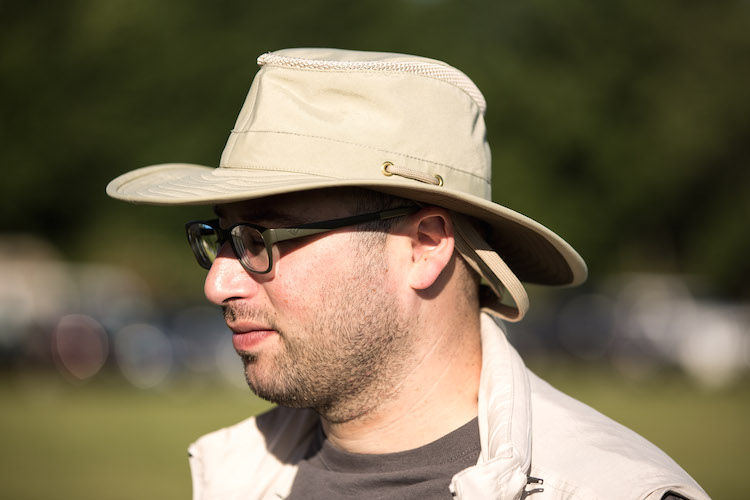
Don’t forget a hat as well. The hot summer sun can easily cause sunburn. Usually I wear a simple hat, but if I’m traveling I keep my Tilley hat with me, which covers my ears and neck at the same time as my head.

Tilley Hat

Me in my Tilley hat. Photo by Joseph Hoetzl

The hat’s brim is also very soft and flexible, so it doesn’t get in the way when you hold your camera up to your eye.

3. Squint Less

With the sun comes harsh light, strong light, and blinding light. The last thing you want is for photographs of people squinting. My suggestion for this problem is to avoid photographing in the direct sunlight, and instead, find a shaded area as there you still get a lot of light, but it’s diffused.

portrait-direct-sunlight

The other option is to still photograph in direct sunlight, but to add your own diffusion. Lastolite and many other companies make products perfect for that job.

portrait-shade

On your side of things (the photographer), wear sunglasses, and remove them as needed when looking through your camera’s viewfinder or at the LCD.

4. Go Sunless

The summer is an amazing season to photograph during sunrise or sunset. Don’t plan a photo session during the strongest sunlight, like noon. Instead wait until sunset like 7:00 or 8:00 P.M. The sunset can make a great backdrop, and can produce really fun golden light.

If you are photographing portraits, then bring a reflector or flash to add some fill-light on your subjects.

5. Let Less Light Into Your Camera

The last tip is to let less light into your camera using neutral density filters. Sometimes the sun is just so harsh that your can’t get your camera’s settings where you want. By using a neutral density filter you can extend the shutter speed for landscape photos or moving objects, even in harsh sunlight.

For portraits neutral density filters enable apertures like f/2.8 even in direct sunlight, because the filter is blocking light.

Neutral Density - Long Exposure Mid Day

A long exposure made just around noon on a hot day, made possible by using neutral density filters.

I have now shared five ways for improving your summer photographs. Remember that if you are comfortable, then your photographs will improve. If you are overheated, then that worry, stress and discomfort will come through in your work.

So get comfy and enjoy the rest of the summer weather.

googletag.cmd.push(function() {
tablet_slots.push( googletag.defineSlot( “/1005424/_dPSv4_tab-all-article-bottom_(300×250)”, [300, 250], “pb-ad-78623” ).addService( googletag.pubads() ) ); } );

googletag.cmd.push(function() {
mobile_slots.push( googletag.defineSlot( “/1005424/_dPSv4_mob-all-article-bottom_(300×250)”, [300, 250], “pb-ad-78158” ).addService( googletag.pubads() ) ); } );

The post 5 Ways to Avoid Problems and Conquer Summer Photography by Scott Wyden Kivowitz appeared first on Digital Photography School.


Digital Photography School
 
Comments Off on 5 Ways to Avoid Problems and Conquer Summer Photography

Posted in Photography


5 Simple Ways to Create Expressive Photos in Black and White

14 Aug

Can you visualize the world around you in black and white? It’s not easy to do at first with an array bright colors competing for your attention. Look a little closer however, and you may recognize the broad potential for expressive imagery. Of course, not every situation lends itself to this artistic style. There are however, certain characteristics you can look for, to identify the best opportunities.

1) Embrace High Contrast

A subject with dark shadows and bright highlights would not be ideal for a color photograph. In fact, it’s one of the reasons techniques like HDR have become so popular. Yet, for black and white photography, this type of high contrast light can be extremely effective. The harsh mid-afternoon sun is no longer a detriment, but an enhancement. This is a major shift in the way one thinks about exposure. To help recognize these chances, look beyond what is immediately evident and pre-visualize the scene in grayscale. A scene you passed on, in color may prove quite dramatic in black and white.

As is always the case in all good art, rules are meant to be broken. The same is true with black and white exposures. You have even more flexibility as shadows can be inky black, and highlights can clip the histogram while retaining the image’s visual appeal. To maximize the dynamic range of the camera, use the “ETTR” technique (expose to the right). Rather than a muddy exposure, you’ll enjoy the crisp contrast of the full tonal range.

2) Simplify with Shape and Form

In the absence of color, shapes and patterns become more pronounced. Lighter tones will stand out boldly when placed in front of a darker area. This is an effective way emphasize the important parts of a subject while minimizing distractions. To compose this way, think about the process of subtraction. What can you remove from the image that’s not essential to the story? As you simplify, the design of the photo will get stronger.

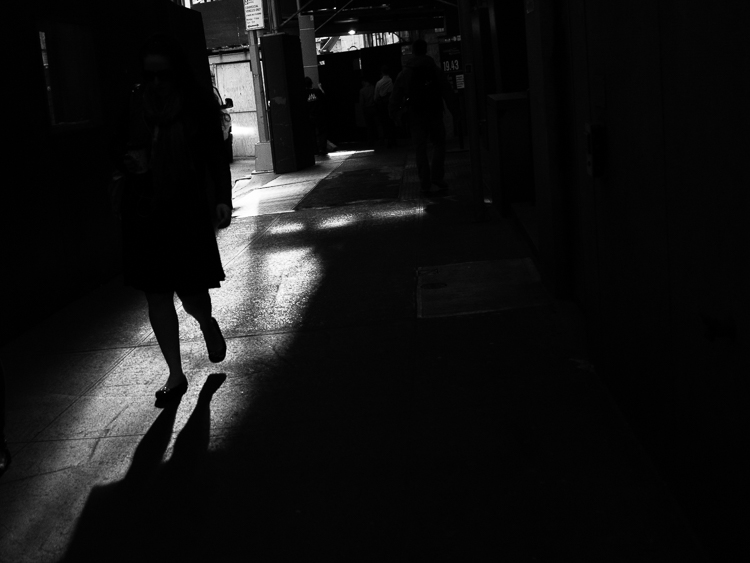
Even something as simple as a shadow on the ground can be used creatively. To the human eye, detail is evident in the pavement, but with a camera they can be rendered as inky black. This may be a very different style of seeing for you. To practice, I recommend taking a photo hike in which you search for nothing but shadows. You may be pleasantly surprised by how many interesting shots you’ll find.

3) Details Tell a Story

It’s been said that a person’s eyes are the windows to their soul. Their character however, can often be revealed in their hands. In black and white, the subtle details that often go unnoticed become more evident. Wrinkles and texture, for example, benefit from a deeper more textured appearance. This method is especially effective when using flat or overhead light. Typically this direct light would be undesirable, but in grayscale it can be preferable to that of a softer, diffused quality light.

4) Imagine a Mood

Blue skies are often used to symbolize happiness. You’ll see this pattern in magazine ads, television commercials, and even movies. Black and white images however, are associated with a different variety of moods. The precise emotion is ultimately up to the viewer, but a few common themes include solitude, contemplation, and pensiveness. Photographers of all genres can work with these traits to effectively portray their vision.

Use your imagination to visualize the mood you want an image to have. A great place to start is to study some of the masters. While Ansel Adams’ landscapes in black and white are very well known, go further in your research. For example, look at the emotion in Edward Weston’s famous “Pepper No. 30”. Another fine representation of this medium is “White Sands, New Mexico” by Ernst Haas. Of course the list goes on, but these are a good place to start. A visit to a local library will undoubtedly prove inspirational as you may discover work by artists you are not yet familiar with.

5) Dark Spaces and Silhouettes

Subjects that linger in darkness are sometimes more compelling than well-lit scenes. Using black and white photography, you have the ability to show the world in a completely different way. Instead of eliminating the shadowy areas, use them to your advantage. An empty space can actually be an effective method of composition. This type of artistic exposure is more edgy than a literal interpretation.

Take a look through your own catalog of images. There will likely be a number of photos that could be quite dramatic as a black and white. As you convert them from color, experiment with different post production filters to see how it impacts the scene. For example, a blue filter may lighten the sky dramatically, whereas a yellow filter will make it darker. If you’re looking for even greater control, there are a number of excellent plugins available. One of my favorites is Exposure by Alien Skin as it offers nearly endless customization. More terrific options include software by Nik, Topaz, and OnOne.

Editor’s Note: This is the first article in a week full of features on black and white photography. Look for another one later today and daily over the next week.

googletag.cmd.push(function() {
tablet_slots.push( googletag.defineSlot( “/1005424/_dPSv4_tab-all-article-bottom_(300×250)”, [300, 250], “pb-ad-78623” ).addService( googletag.pubads() ) ); } );

googletag.cmd.push(function() {
mobile_slots.push( googletag.defineSlot( “/1005424/_dPSv4_mob-all-article-bottom_(300×250)”, [300, 250], “pb-ad-78158” ).addService( googletag.pubads() ) ); } );

The post 5 Simple Ways to Create Expressive Photos in Black and White by Chris Corradino appeared first on Digital Photography School.


Digital Photography School
 
Comments Off on 5 Simple Ways to Create Expressive Photos in Black and White

Posted in Photography


6 Ways to Use Color for Eye Catching Compositions

04 Aug

A painter only needs to look at their palette before applying color to the canvas. Photographers have a different challenge, as they must locate their tones by studying a scene. Of course, this can be easy to bypass when you’re thinking about shadow, highlight, depth of field, shutter speed, and all of the other technical details that go into a photo. Still, as the great painter Kandinsky said, “Color is a power which directly influences the soul.” To use it in your compositions can infuse your work with a new level of sophistication.

1) Background Separation

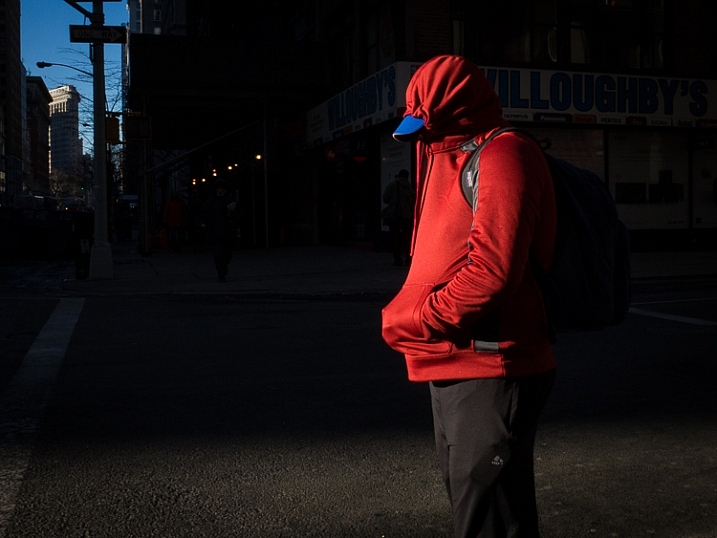
To maximize the effect of bold colors, you’ll want to start by looking for dark, muted backgrounds. This type of stark contrast will deemphasize the surrounding areas, bringing the viewer’s attention directly to the subject. Of course, mixed lighting can trick even the most sophisticated metering systems. For the most accurate exposure, use the camera’s internal spot meter to take a reading of the brighter part of the scene. By purposely underexposing by approximately half a stop, vibrant colors will take on a deep, rich tonality.

2) Just a Dab of Color

If you want to draw people into your photograph, try including just a small amount of color. This subtle method gives your subject importance by allowing it to stand out from the rest of the frame. These thoughtful compositions are aided by a different approach to photography. Instead of working to add more visual interest, you want to eliminate any competing colors, and simplify the frame. While looking through the viewfinder, check all four corners carefully for distracting elements.

3) Cut the Glare

Each autumn, brilliant displays of fall foliage attract scores of photographers looking for that classic outdoor landscape. Yet, in many of these scenes, the glare of wet shiny leaves will actually detract from the desired color. An inexpensive solution is to add a circular polarizer to your kit. As you rotate the front element of the filter, you’ll actually see the surface reflection disappear to reveal only color. For added warmth you can even adjust the white balance using the cloudy or shade preset.

4) Make it Glow with Backlighting

Of all the directions light can come from, perhaps there’s no finer option than shooting directly into the sun. This is particularly true when working to emphasize color. When lit from behind, your subject will appear to glow. If the contrast is too great, eliminate the sun from the frame. This will make for a more even exposure, while still providing the dramatic benefit of backlighting. If you’re not comfortable with metering manually, take several shots using exposure compensation. Bracketing this way is a quick way to handle an otherwise tricky scenario.

5) Set the Mood

For added impact in your outdoor photography, consider using complementary colors. Although blue and yellow reside on opposite sides of the color wheel, they can be used together with outstanding results. On one side of the spectrum, blue is ideal for creating a quiet introspective mood. Warmer tones however, will infuse your subject with a dynamic energy. Each are effective on their own, but when used simultaneously, the contrast will bring attention to your main subject.

6) Use the Silhouette

During the magic hours around sunrise and sunset, you’ll enjoy a splendid display of color in the sky. Meanwhile, your subject will likely be in heavy shadow. If you properly exposed the subject, the sky would become pale, or even washed out. One simple option to retain the vibrant color is to create a silhouette. This is especially useful with moving subjects when HDR is less than ideal. To do this, simply expose for the sky, and let the subject’s tonality fall to black.

Conclusion

To fine tune your vision, give yourself an assignment where capturing a specific color is the only goal. For example, head out for a photo walk with no specific objective besides seeing and shooting – red. Rather than looking at subjects literally, you will be thinking in color. By studying the world around you with this in mind, you may be surprised at just how many opportunities reveal themselves. With practice, you’ll soon recognize color as an essential element of composition.

googletag.cmd.push(function() {
tablet_slots.push( googletag.defineSlot( “/1005424/_dPSv4_tab-all-article-bottom_(300×250)”, [300, 250], “pb-ad-78623” ).addService( googletag.pubads() ) ); } );

googletag.cmd.push(function() {
mobile_slots.push( googletag.defineSlot( “/1005424/_dPSv4_mob-all-article-bottom_(300×250)”, [300, 250], “pb-ad-78158” ).addService( googletag.pubads() ) ); } );

The post 6 Ways to Use Color for Eye Catching Compositions by Chris Corradino appeared first on Digital Photography School.


Digital Photography School
 
Comments Off on 6 Ways to Use Color for Eye Catching Compositions

Posted in Photography