RSS
 

Posts Tagged ‘Virtual’

Virtual Heist: 2 Artists Secretly 3D-Scan an Ancient Artifact

04 Mar

[ By WebUrbanist in Culture & History & Travel. ]

3d art figure scan

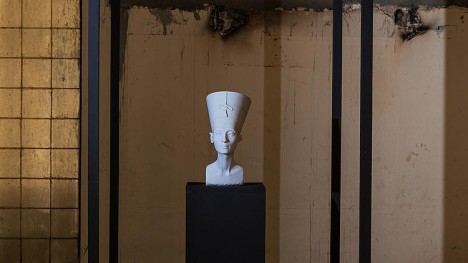
An usually high-tech form of pseudo-theft, executed by a pair of artists, has resulted in a high-resolution scan of the famous Queen Nefertiti statue at the heart of a dispute between Germany and Egypt. Avoiding the watchful gaze of four guards at the Neues Museum in Berlin, Nora Al-Badri and Jan Nikolai Nelles painstakingly scanned the 3,500-year-old bust over the course of three hours using a Kinect.

3d nefriti statue scan

Technically, nothing was taken, but the exact contours of the bust are now publicly available, open-sourced by the artists in question.

3d rendered egyptian artifact

Their work, itself a sort of art project, is in part a commentary on the question of art ownership and accessibility. The statue in question has been in Germany for over 100 years, but the Egyptian government has been lobbying to get it back.

3d figure copy

Since the release of their data dump, thousands of people have downloaded a virtual copy of the statue either to examine or 3D-print a copy. While this is not the same as preservation, it does add layers of redundancy for future researchers should something ever happen to the original figure. Many galleries are already making high-resolution images of famous paintings and drawings available on the web, and there is no reason a similar tactic could not be taken with three-dimensional works as well.

Share on Facebook


[ By WebUrbanist in Culture & History & Travel. ]

[ WebUrbanist | Archives | Galleries | Privacy | TOS ]


WebUrbanist

 
Comments Off on Virtual Heist: 2 Artists Secretly 3D-Scan an Ancient Artifact

Posted in Creativity


5 Ways to Use Lightroom Virtual Copies Better

20 Nov
Virtual Copies in Lightroom

Virtual Copies in Lightroom

Imagine that you have just processed a colour image and you are happy with the result, but you’d also like to experiment with it a little. Perhaps you’re curious to see how it will look if you convert it to black and white. Maybe you’d like to apply a Develop Preset or two, or crop to the square format, or even all three.

It’s easy in Lightroom. All you have to do is make a Virtual Copy and experiment.

A Virtual Copy is an exact replica of the original photo, including all edits made in Lightroom. Once you have made a Virtual Copy you can process it any way you like without affecting the original.

Virtual Copies are a fantastic tool because they let you make multiple copies of a single image, while using very little hard drive space (it only makes a new thumbnail it doesn’t duplicate your image file). You can try out different techniques, and keep all the results. Each Virtual Copy exists as a set of text commands in the Lightroom Catalog, an addition measured in kilobytes rather than megabytes.

You can review this by reading A Brief Introduction to Lightroom if you are unsure how it works.

Are you making the most of Virtual Copies? Here are five ways to use them better in Lightroom.

Creating Virtual Copies

There are four ways to create a Virtual Copy.

Start in Grid View in the Library module (press the G key to go there from any part of Lightroom). Select the image (or images) that you want to make Virtual Copies of:

1. Go to Photo > Create Virtual Copy. Lightroom creates the Virtual Copies and places them in the same Collection as the original images.

2. Alternatively, use the keyboard shortcut. If you’re using Windows press Ctrl plus apostrophe (Ctrl + ‘), on a Mac press Command plus apostrophe (Cmd + ‘).

3. Alternatively, right click on one of the selected photos and choose Create Virtual Copy.
Virtual Copies in Lightroom

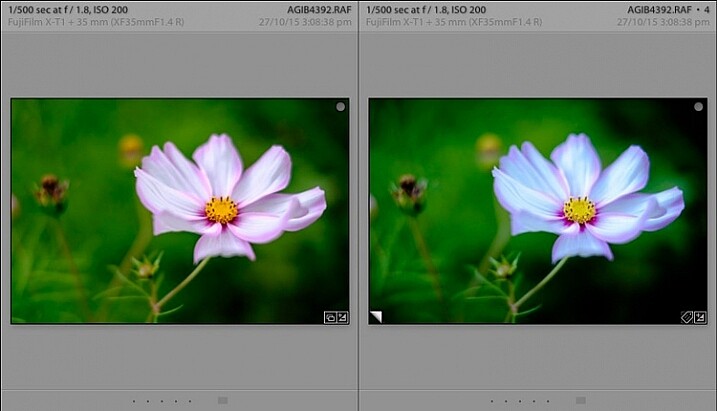
When you create a Virtual Copy it appears alongside the original in Grid View, and is identical in every way. You can make as many changes to the Virtual Copy as you lik,e without affecting the original.

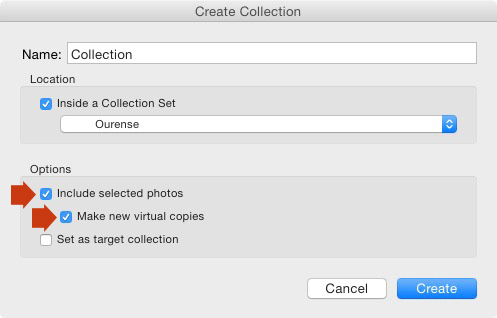
4. The fourth way is to go to Library > New Collection. The Create Collection window opens. Under Options, tick the Include Selected Photos and Make New Virtual Copies boxes. Lightroom creates a new Collection (with the name you give it), and adds Virtual Copies of the selected images.
Virtual Copies in Lightroom

Using Virtual Copies Better

Now you know how to create Virtual Copies, let’s look at some ways you can use them better in Lightroom.

1. To create multiple versions of the same photo

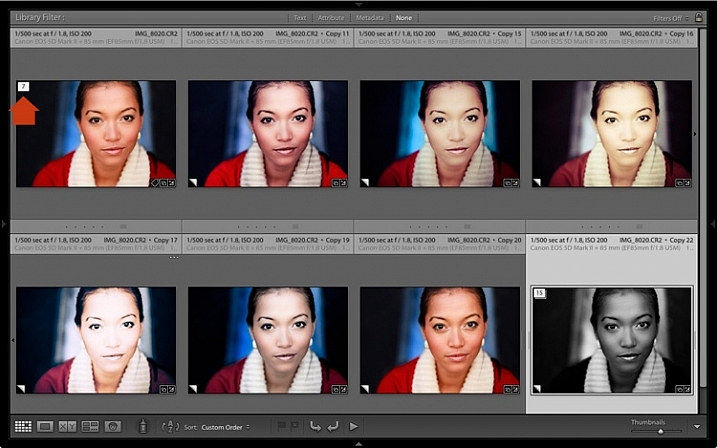
This is the main reason that you would want to create Virtual Copies – so you can process the same photo, a number of different ways. The photo shown below is a great example. I created a colour version first, then made a Virtual Copy and converted it to black and white. Then I made some more Virtual Copies and experimented with different Develop Presets and split tones. I ended up with 22 different versions in a mixture of colour and black and white.
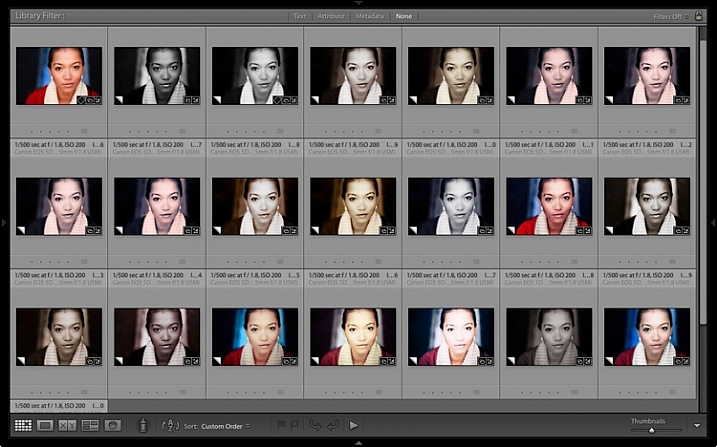
Virtual Copies in Lightroom

2. Stacking Virtual Copies

You can use Stacks to simplify the thumbnails displayed in Grid View. In this example I’m going to create two Stacks – one containing colour photos, and the other black and white.

  • Select the photos you want to place in the same stack. Click and drag thumbnails to rearrange them in Grid View if you need to. Here, I grouped all the colour photos together.
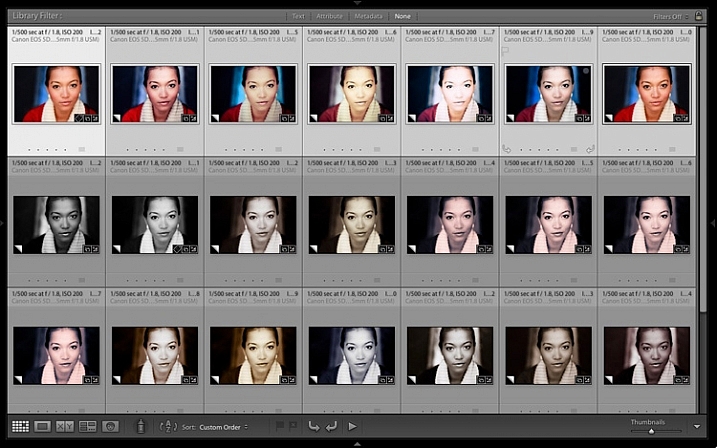
Virtual Copies in Lightroom

  • Go to Photo > Stacking > Group into Stack. You can also find this option by right-clicking a thumbnail. Or use the keyboard shortcuts, Ctrl+G (Windows) or Cmd+G (Mac).

Lightroom places the photos into a Stack. The first photo in the selection is used as the cover image. The Stack icon is displayed in the top left corner of the thumbnail (marked below). The number inside tells you how many photos are in the Stack.
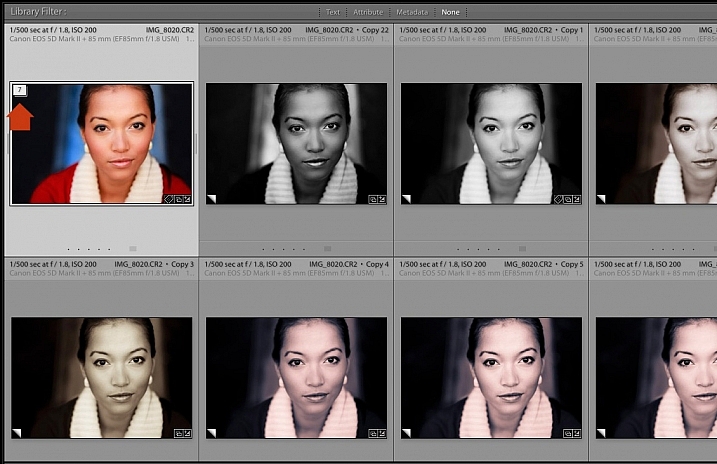
Virtual Copies in Lightroom

Repeat if you want to group other Virtual Copies into another stack. Below, you can see that I did the same with the black and white versions.
Virtual Copies in Lightroom

To view the photos in a Stack, click on the Stack icon in the thumbnail. Click it again to hide the stacked photos.
Virtual Copies in Lightroom

3. For working with plug-ins and Photoshop

If you want to send a photo to a plug-in or Photoshop, the recommended approach is to process it in Lightroom first (applying at least basic settings such as Camera Calibration, Lens Corrections and tonal adjustments in the Basic panel).

Before the export, make a Virtual Copy and send the Virtual Copy to the plug-in or Photoshop. Then, when you return to Lightroom, you can compare the two. You can also make more Virtual Copies from the original to send to other plug-ins, or to work on in Lightroom.

4. Set up View Options to show which images are Virtual Copies

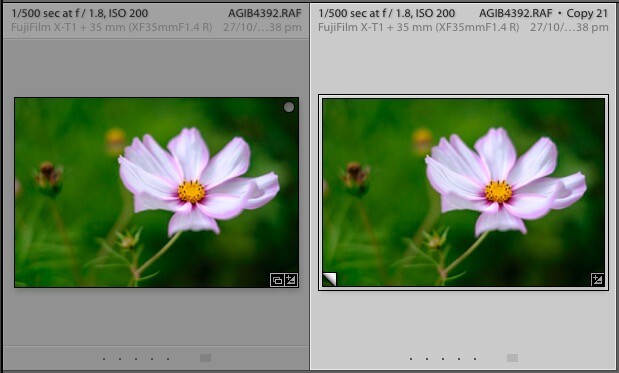
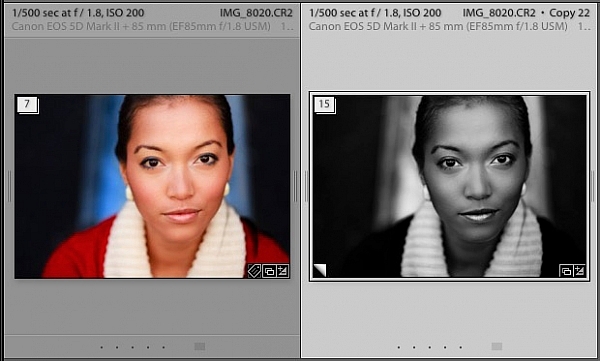
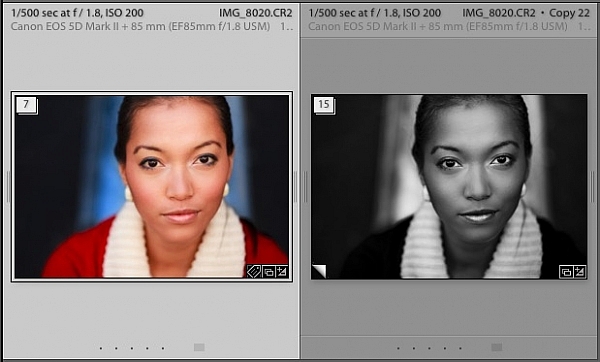
In the screen shot below, you can see that the image on the right is a Virtual Copy as it is labelled Copy 22. The image on the left is the original and just has the file name.
Virtual Copies in Lightroom

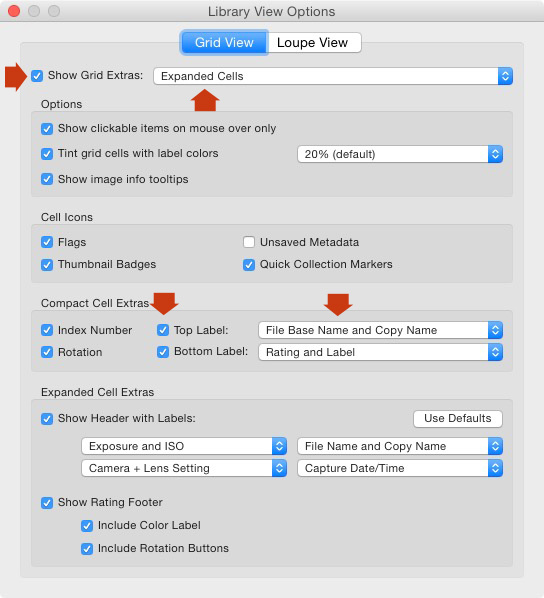
You can set this up in View Options (View > View Options or Ctrl+J/Cmd+J). Tick the Show Grid Extras and Top Label boxes (marked below). Set Show Grid Extras to Expanded Cells and set Top Label to File Base Name and Copy Name (the other options in the same section do a similar thing).
Virtual Copies in Lightroom

5. Use the Excessor plug-in to create a Collection of photos processed with different Develop Presets

The Excessor plug-in creates Virtual Copies and applies a different Develop Preset to each one. This is how to use it:

  • Go to the Capture Monkey website and download the Excessor plug-in. It is available on a shareware model – you can download and use it, and if you find it useful, you are encouraged to pay a one time registration fee of $ 10. Add it via the plug-ins manager (my article Useful Lightroom Plug-ins explains how – scroll to the bottom for instructions).
  • Select the photo you want to work with. Go to Library > Plug-in Extras > Excessor.
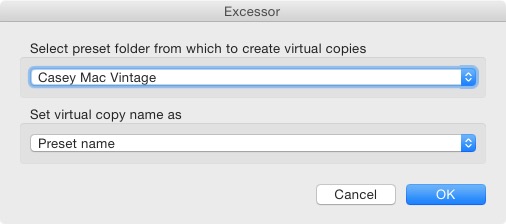
  • The Excessor window opens. Use the top menu to select a Develop Presets folder. Select Preset name from the bottom menu to give each Virtual Copy the name of the Develop Preset used to process it. Press OK.
Virtual Copies in Lightroom

  • Lightroom creates a Virtual Copy for each Develop Preset in the selected folder.
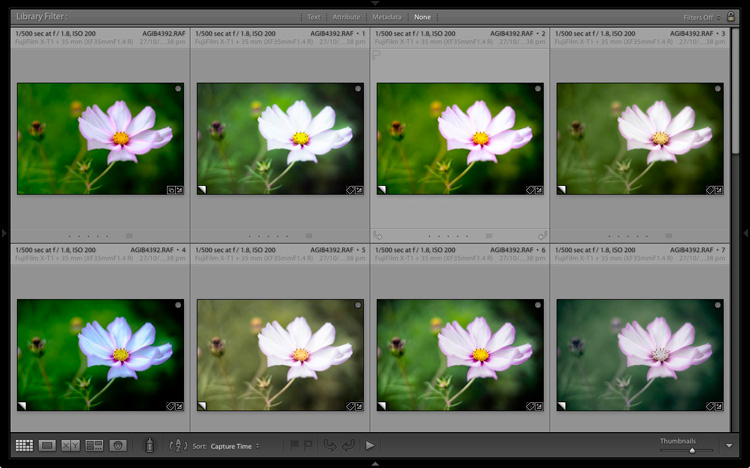
Virtual Copies in Lightroom

Tip: Create Preset folders containing your favourite Develop Presets. You can create different folders for different subjects: e.g., a folder for portraits, another for landscapes, another for black and white, another for vintage presets, and so on. Then you can use the Excessor plug-in as a shortcut to applying your favourite presets to a photo.

Your turn

These are my five suggestions for using Virtual Copies better in Lightroom, but how do you use them? Have you come up with anything that I haven’t thought of? Let me know in the comments.


The Mastering Lightroom CollectionMastering Lightroom ebook bundle

My Mastering Lightroom ebooks are a complete guide to using Lightroom’s Library and Develop modules. Written for Lightroom 4, 5, 6 and CC  they  show you how to import and organise your images, use Collections, creatively edit your photos and how to work in black and white.

googletag.cmd.push(function() {
tablet_slots.push( googletag.defineSlot( “/1005424/_dPSv4_tab-all-article-bottom_(300×250)”, [300, 250], “pb-ad-78623” ).addService( googletag.pubads() ) ); } );

googletag.cmd.push(function() {
mobile_slots.push( googletag.defineSlot( “/1005424/_dPSv4_mob-all-article-bottom_(300×250)”, [300, 250], “pb-ad-78158” ).addService( googletag.pubads() ) ); } );

The post 5 Ways to Use Lightroom Virtual Copies Better by Andrew S. Gibson appeared first on Digital Photography School.


Digital Photography School
 
Comments Off on 5 Ways to Use Lightroom Virtual Copies Better

Posted in Photography


Could the future of photo viewing be virtual reality? Flickr thinks so

15 Sep

This past weekend Flickr demonstrated an early preview of a ‘virtual reality experience’ designed for viewing 360-degree panoramic photos. The demonstration used the Oculus DK 2 headset connected to a computer, and allowed wearers to completely immerse themselves within the panorama. Read more

Articles: Digital Photography Review (dpreview.com)

 
Comments Off on Could the future of photo viewing be virtual reality? Flickr thinks so

Posted in Uncategorized


VRchitecture: Interactive Virtual Reality House Feels 90% Real

18 May

[ By WebUrbanist in Conceptual & Futuristic & Technology. ]

vr house

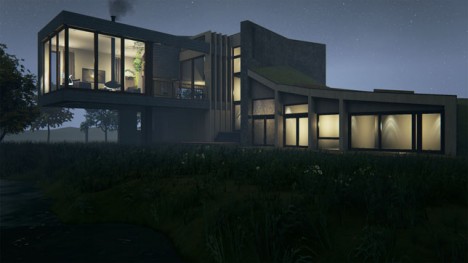
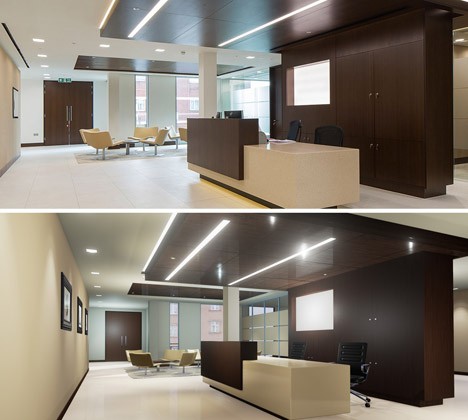
No matter how many drawings and models a client is shown, there is still a leap of imagination needed for someone to understand how a building design will really look and feel when it is realized. The gap, however, is rapidly closing between representation and reality, with digital models that can be experienced and interacted with in realtime.

virtual right real left

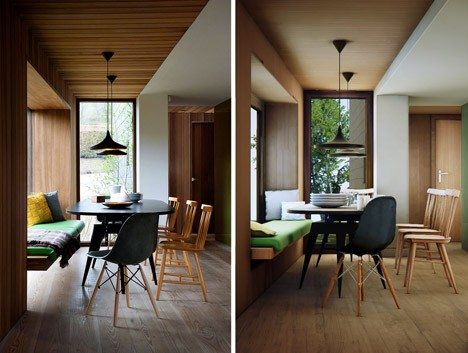
Olivier Demangel of London 3D imaging company IVR NATION modeled the home shown above using images found online, and as impressive as the walk-through video above may be, it does not compare to the experience of the space via an 3D Oculus Rift headset.

virtual real comparison

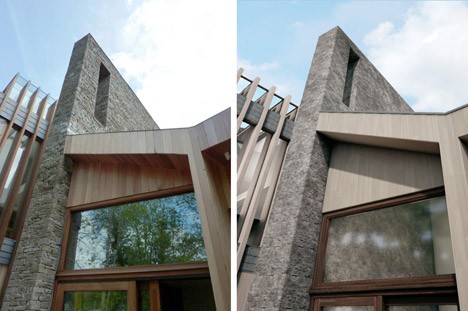
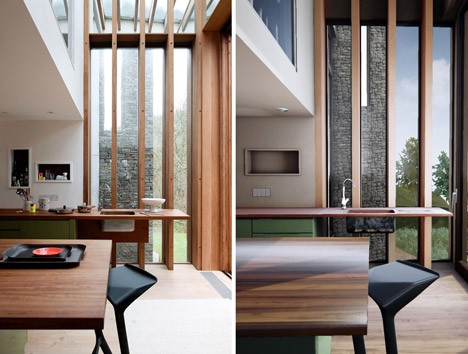
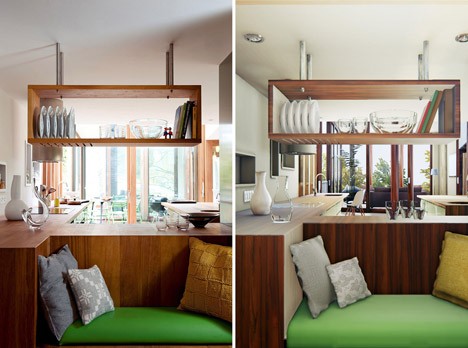
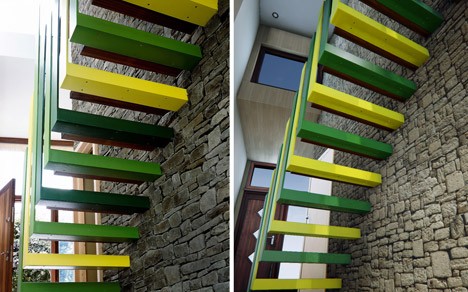
The model’s creator expects full 100% realism to be a reality in just 5 years. In some of the side-by-side images above and below, it is already hard to tell the real from the virtual.

virtual and real

In an interview with Dezeen, Demangel explains the interactivity built into the model, letting you open “doors and turn on the lights” as well as “instantly change materials for the walls, the floor, the position of lights. [Y]ou can experiment with a lot of different options — design, materials, lighting, weather — very quickly.”

virtual real room

The real power lies partly in being able to show designs to clients, but also in the ability to see how every detail of a design works together (or falls apart) from a first-person perspective, essentially a 1:1 scale model complete with every view available, each time of day easy to simulate.

virtual versus real


virtual and real house

Will this window really show what the designer intended? Will that patio really get the daylight promised? Individually-rendered scenes and perspectives used to take hours to days to compute, sometimes using multiple machines – now the same can be done in seconds.

Meanwhile, the ‘simulation singularity‘ may be approaching – a day when we will no longer be able to distinguish between virtual and real: “The technological singularity is a hypothetical moment in the future when artificial intelligence becomes indistinguishable from human intelligence—and capable of creating smarter iterations of itself. Apply the same general idea to simulations and you get the simulation singularity: when a simulated world is indistinguishable from reality.”

Share on Facebook


[ By WebUrbanist in Conceptual & Futuristic & Technology. ]

[ WebUrbanist | Archives | Galleries | Privacy | TOS ]


WebUrbanist

 
Comments Off on VRchitecture: Interactive Virtual Reality House Feels 90% Real

Posted in Creativity


The Void: World’s First Virtual Reality Theme Park Coming Soon

14 May

[ By Steph in Gaming & Computing & Technology. ]

The Void 1

“Why play a game when you can live it?” ask the creators of The Void, the world’s first virtual reality theme park slated to open in Utah in summer 2016. Gamers will soon be able to immerse themselves in 4D environments, with all sorts of eye-popping effects layered onto real spaces. Imagine: first-person shooters meet paintball or laser tag – this is the future of gaming.

Screen Shot 2015-05-13 at 1.07.31 PM

The flagship Pleasant Grove location will feature sixteen 60-by-60-foot rooms with different themes for different experiences, and they even plan to change these virtual stages every three months so repeat players never get bored.

Want to find out what it feels like to wander around in the jungle during the Jurassic age, or explore a truly terrifying haunted house? Zoom around skyscrapers in a flying car? The Void basically enables you to star in your own action movie, alone or with a group of friends, in a VR experience that far surpasses anything you could do with a headset on your couch.

Screen Shot 2015-05-13 at 1.06.30 PM

Each stage not only has custom architecture and sculptures to make it feel more real – you’ll also feel blasts of air and shifts in temperature, take in scents and strap yourself into motion simulators for activities like flying. Individual rooms hold up to 10 gamers at a time who can work as a team or play against each other. The Void has created a virtual reality headset of its own design, called Rapture HMD.

Screen Shot 2015-05-13 at 1.07.04 PM

Screen Shot 2015-05-13 at 1.06.49 PM

You won’t necessarily have to fly to Utah to experience it, either – they’re planning on opening other locations around the world.

Share on Facebook


[ By Steph in Gaming & Computing & Technology. ]

[ WebUrbanist | Archives | Galleries | Privacy | TOS ]


WebUrbanist

 
Comments Off on The Void: World’s First Virtual Reality Theme Park Coming Soon

Posted in Creativity


Gary Fong launches virtual camera tutorial service

15 Jan

Gary Fong has launched a new online instructional service, giving photographers a way to become proficient with select camera models in a unique way. Rather than providing a rote list of video tutorials, users are presented with a virtual version of a camera model that is fully interactive: buttons can be pressed, switches can be toggled, and menus can be explored. Read more

Articles: Digital Photography Review (dpreview.com)

 
Comments Off on Gary Fong launches virtual camera tutorial service

Posted in Uncategorized


Virtual Light: Facade Installation Casts Fake Illumination

30 May

[ By WebUrbanist in Art & Installation & Sound. ]

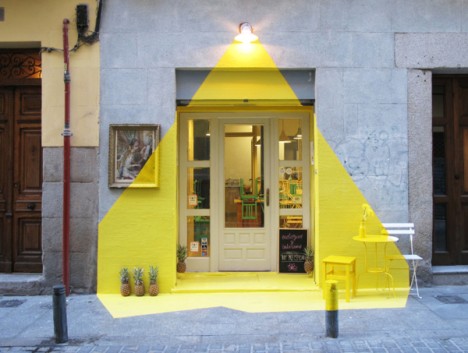
facade light cast installation

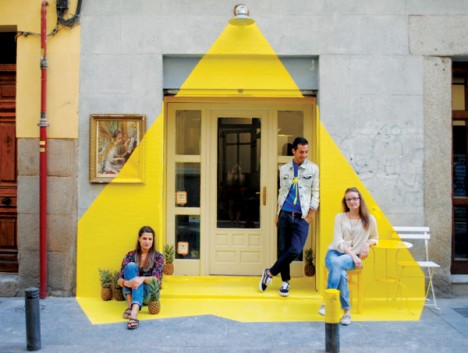
A temporary project set in Madrid, this bright yellow artistic reconfiguration was rendered all the more engaging due to its location in a semi-dark alleyway of the city.

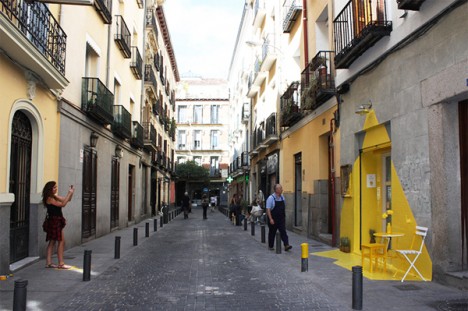
facade passers by viewing

facade across street photo

It was created by (fos), an alliance of artists and designers (the word meaning ‘light’ in Greek and ‘melted’ in Catalan), utilizing the front of a vegan restaurant in the semi-secluded Lope de Vega street.

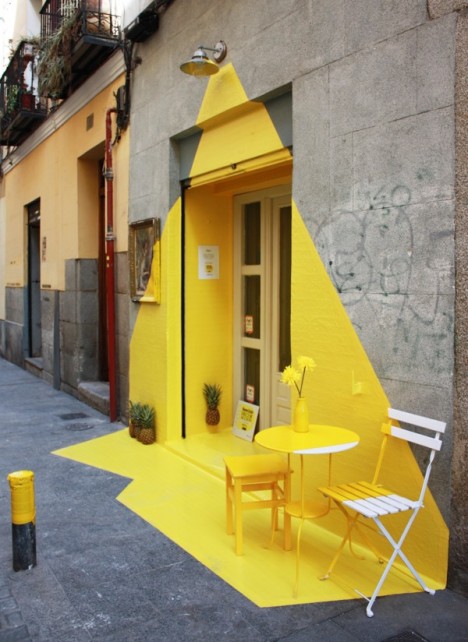
facade art detail temporary

facade painted detail temporary

A combination of sun-bright yellow tape and paint were deployed in a pattern intended to abstractly simulate the casting of light, surrounded by shadow, with a few artistic liberties taken in terms of angles and scope.

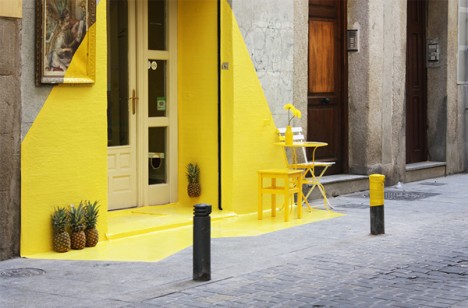
facade paint yellow closeup

facade yellow white meet

facade project design creators

The context, mostly made of stone or painted in muted tones, made the vivid yellow intervention stand out as something extreme, drawing a great deal of attention from passers by through its stark contrasts.

Share on Facebook


[ By WebUrbanist in Art & Installation & Sound. ]

[ WebUrbanist | Archives | Galleries | Privacy | TOS ]


WebUrbanist

 
Comments Off on Virtual Light: Facade Installation Casts Fake Illumination

Posted in Creativity


Get Your Virtual Wings: Oculus Rift Machine Simulates Flight

17 May

[ By Steph in Gaming & Computing & Technology. ]

birdflapping

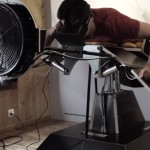
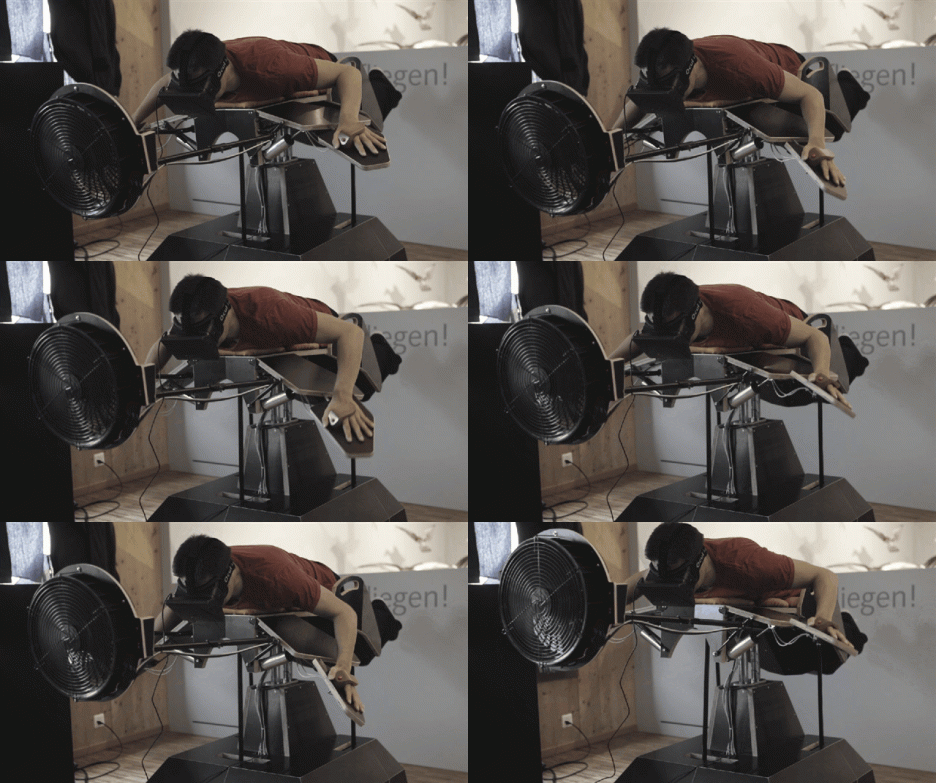
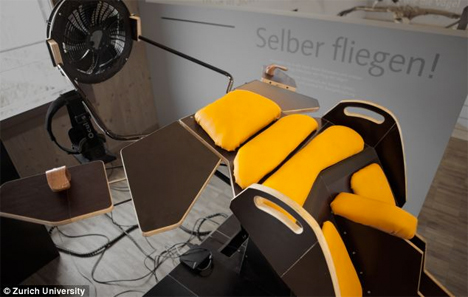
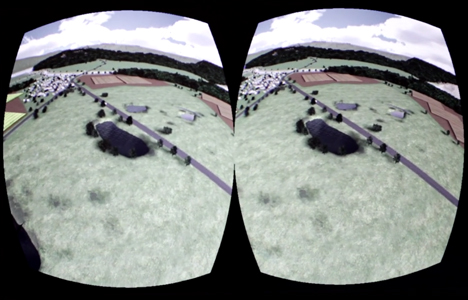
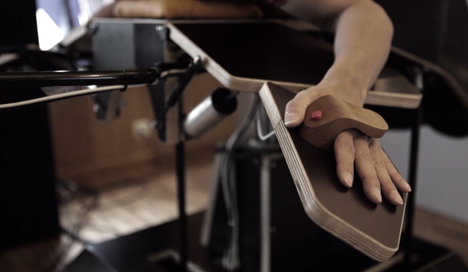
Feel the wind on your face and smell the pine sap of the forest as you gaze down at the scenery far below – without ever leaving the ground. ‘Birdly’ is a new machine developed by the Zurich University of the Arts that simulates flight using an Oculus Rift virtual reality headset, a motor-powered machine that mimics flying movements, a fan to fake the feeling of wind and even olfactory feedback tailored to the landscape of your choice.

Oculus Rift Flight Simulator 2

The creators studied the movement of the Red Kite bird and translated it to a sensory-motor coupling that enables you to flap your ‘wings’ as if you’re really flying. The movement of your arms directly correlates to the flying sensation you experience through the Oculus Rift headset.

Oculus Rift Flight Simulator 4

Once strapped in, you’re embedded in a virtual landscape as if you were the Red Kite itself for the closest possible simulation of flight that’s possible without ever actually going into the air. The faster you go, the stronger the air pushed out by the fan positioned right in front of your head.

Oculus Rift Flight Simulator 3

While it’s easy to imagine Birdly becoming a fixture at amusement parks, so far, it’s just an art installation, with no plans for commercialization. The creators say there are a few tweaks still needed to keep users from getting sick during the flight experience. This device is just the latest in an intriguing line of creations using Oculus Rift to bend reality, like a recent Gender Swap experiment that allows the user to switch to the point of view of someone of a different gender.

Share on Facebook


[ By Steph in Gaming & Computing & Technology. ]

[ WebUrbanist | Archives | Galleries | Privacy | TOS ]


WebUrbanist

 
Comments Off on Get Your Virtual Wings: Oculus Rift Machine Simulates Flight

Posted in Creativity


Virtual LEGO Blocks: Build with Chrome, Set on Google Maps

05 Feb

[ By WebUrbanist in Gaming & Computing & Technology. ]

build with chrome page

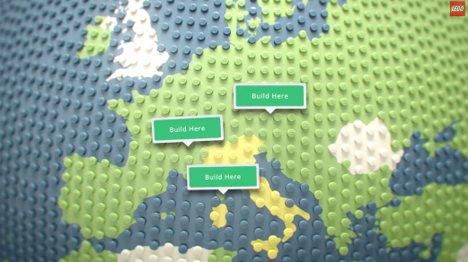
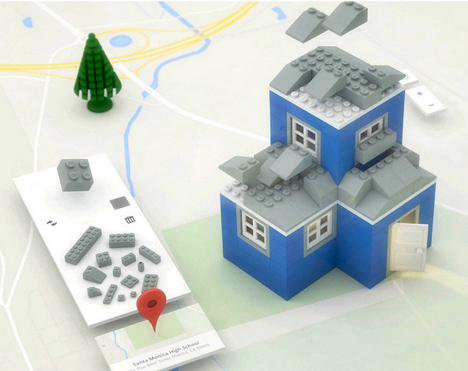
Build with Chrome is the new, fast and simple model-maker in town, and this one lets you create structures faster than digital SketchUp or physical LEGOs ever could.

build lego google maps

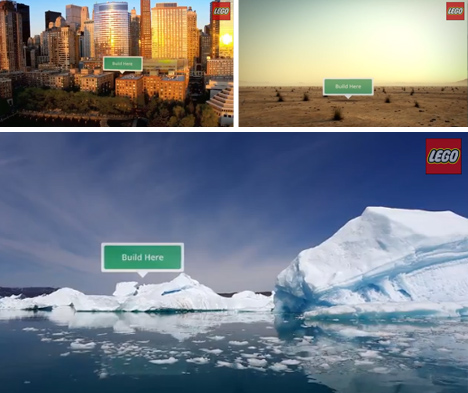
Of course, this Chrome Experiment project would not be complete without Google Maps integration, allowing you to deploy your creations around the world and interact with others.

build lego online browser

Architecture seems the most obvious, but infrastructure, ships and other complex shapes are all ultimately possibilities as well.

build lego pirate ships

Like SketchUp (previously owned by Google), the tool set is relatively simple, except in this case the learning curve is even faster, making it possible for anyone to participate with ease.

build lego house architecture

Users can select blocks, change colors, rotate with a key click, drop them into place then keep on stacking, then save or reset at any time. From private estates to pirate ships, anything is possible.

Share on Facebook


[ By WebUrbanist in Gaming & Computing & Technology. ]

[ WebUrbanist | Archives | Galleries | Privacy | TOS ]


WebUrbanist

 
Comments Off on Virtual LEGO Blocks: Build with Chrome, Set on Google Maps
Posted in Creativity


Virtual & Reality: 15 New York City Data Visualizations

31 Dec

[ By Steph in Design & Graphics & Branding. ]

NYC Infographics Main

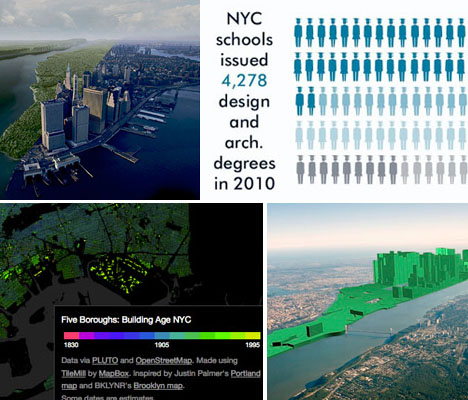
Data is much easier for most of us to process when it’s presented in visual form, and these 15 infographics and visualizations give us a (literal) picture of New York City that would be hard to come by otherwise. Exploring things like income inequality, building age, how the city has evolved and what its most popular hot spots are, these maps and charts illuminate the city in new ways.

Inequality and New York’s Subway

NYC Infographic Subway Inequality

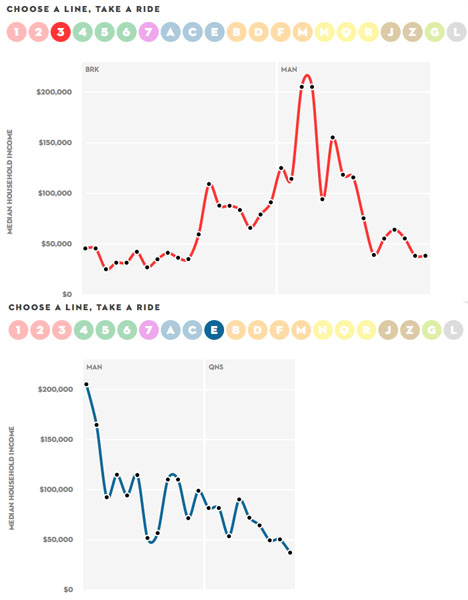
New York City’s inequality problem is even clearer when viewed by subway line, as this interactive infographic from The New Yorker illustrates. Using data on median household income from the U.S. Census Bureau, it allows you to see the areas where earnings range from abject poverty to sky-high wealth.

Building Age, NYC

NYC Infographics Building Age

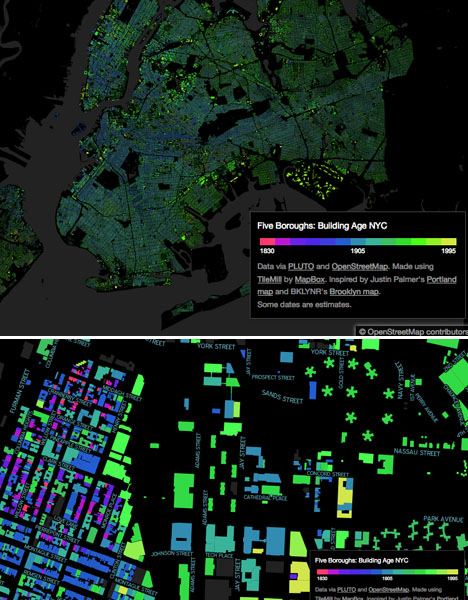
Where are the city’s oldest buildings? You could read a list of them, but seeing them laid out visually on a map makes them easier to spot. See the ages of one million New York buildings mapped in vivid colors, zooming in and exploring by neighborhood, at BDON.org.

10,000 NYC-Based Tweet Locations

NYC Infographics Tweet Locations

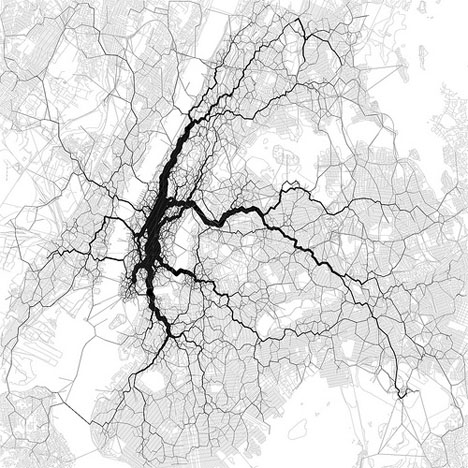
Ten thousand New York City-based tweets are laid out on top of a map in this interesting data visualization. The creator, Eric Fischer, asks “Is this the structure of New York City?” Perhaps it’s really just bored people in subways and cabs taking a moment to tell the world what they ate for lunch.

Growth of Manhattan Island, 1650-1980

NYC Infographic Growth of Manhattan

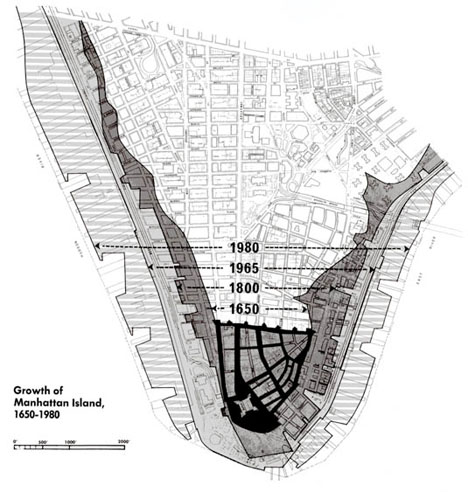
It’s easy to forget that  much of Manhattan Island (and the rest of New York City) used to be a marsh. The borders of the island were much further inland way back in 1650 when the first settlement was founded. By 1980, they had extended by a good 1,000 feet.

Manhattan Past, Present and Future

NYC Infographic Past Present

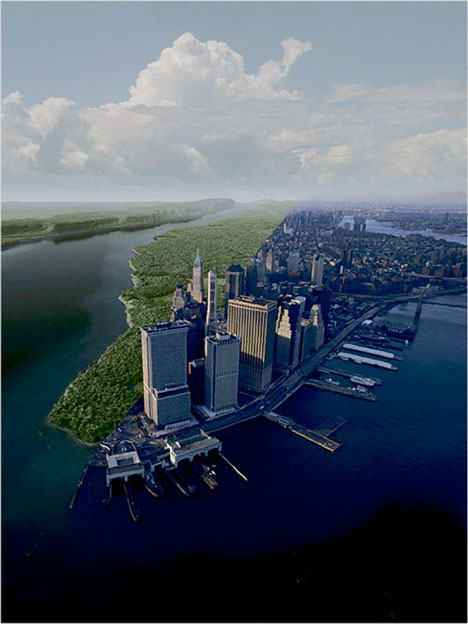
Here’s another visualization that shows the drastic changes in the island from the way it was when European settlers first arrived to how it looks today. The composite image shows the left side of the island as it was 400 years ago and the modern-day city on the right. How will it change in another 400 years?

Next Page – Click Below to Read More:
Virtual Reality 15 New York City Data Visualizations

Share on Facebook


[ By Steph in Design & Graphics & Branding. ]

[ WebUrbanist | Archives | Galleries | Privacy | TOS ]


WebUrbanist

 
Comments Off on Virtual & Reality: 15 New York City Data Visualizations

Posted in Creativity