RSS
 

Posts Tagged ‘Virtual’

Make your own Google Street View virtual tours

11 Dec

google.png

Google is reaching out to photographers to help capture and record the planet’s most hard-to-reach places using Android’s Photo Sphere feature. A new tool lets users upload and connect their 360-degree photo spheres to create virtual tours that can be shared in Google’s Street View. Learn more on connect.dpreview.com.

News: Digital Photography Review (dpreview.com)

 
Comments Off on Make your own Google Street View virtual tours

Posted in Uncategorized


Real Street Photographer Documents Virtual Life in GTA V

25 Oct

[ By WebUrbanist in Gaming & Computing & Technology. ]

gta v street photos

Advanced artificial characters and enhanced in-game graphics have increasingly made in-game worlds look and feel like real-life places. It was only a matter of time before photographers hit the digital pavement to shoot the resulting scenes, equipped with an in-game camera no less.

grand theft street art

Fernando Pereira Gomes has shifted from the actual streets of New York to the simulated ones inside the San Andreas of Grand Theft Auto V. People and buildings come alive with lighting, reflections, details and detritus, all captured in his photo series Street Photography V.

gta v lonely walker

“Being a big fan of GTA, I went to the midnight launch and played the night away,” Gomes explains.  “As I played, I noticed that the characters had cameras on their phones… With this new tool, and the huge world of Los Santos, I started experimenting with the camera and the digital streets.” His resulting (and ongoing) series captures everything from passed-out drunks and hungover street walkers to ambling pedestrians and everyday business people heading to and from work.

grand theft auto street

“What I found was remarkable. The game is so realistic that it felt like being in the streets outside, running around for shots, anticipating passersby’s movements and reactions. In a way, it was also incredibly frightening that these algorithms could look so real, or is it that we ourselves are becoming ever more algorithmic?”

gta v character art

As with many forms of art, there are limitations one can see as restrictive or liberating, like the inability to tilt the camera significantly up or down. Also as in real life, there are many shots of opportunity that only come once – you have to look around, see what is happening, snap an image and hope for the best.

Share on Facebook


[ By WebUrbanist in Gaming & Computing & Technology. ]

[ WebUrbanist | Archives | Galleries | Privacy | TOS ]


WebUrbanist

 
Comments Off on Real Street Photographer Documents Virtual Life in GTA V

Posted in Creativity


Photographer creates ‘virtual panoramic tour’ of North Korea

15 Oct

Screen_Shot_2013-10-14_at_6.02.12_PM.png

What’s it like to visit one of the world’s most secretive countries? Singapore-based photographer Aram Pan wanted to find out for himself. North Korea is notorious for stage-managed and highly restricted access for foreigners, but Pan decided to have a go at simply asking North Korean authorities whether he could enter the country and document what he saw. Click through for extracts from his story, and some of his stunning images.

News: Digital Photography Review (dpreview.com)

 
Comments Off on Photographer creates ‘virtual panoramic tour’ of North Korea

Posted in Uncategorized


Virtual Interior Design: Augmented Reality IKEA 2014 Catalog

07 Aug

[ By WebUrbanist in Design & Furniture & Decor. ]

augmented reality ikea catalog

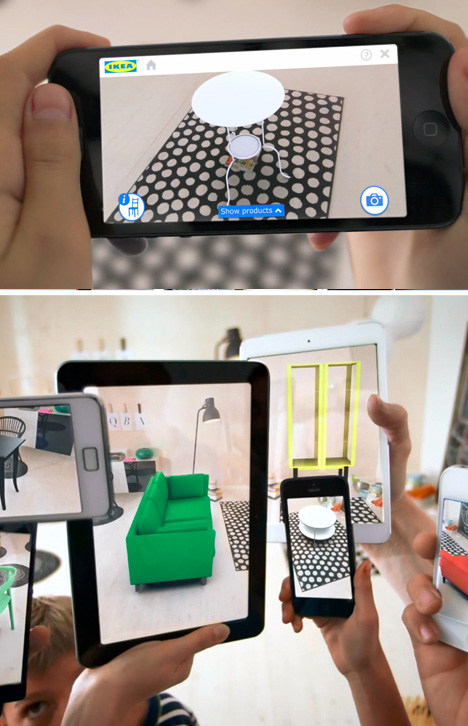
Imagine no more: now you can scan items right out of a physical catalog and watch them pop up in your own bedroom, kitchen, living or dining room at home, on-screen and in real-time before your eyes.

Watch as couches, sofas, chairs, beds, bookcases and more are picked off the page and planted in place, letting you see how that piece you like would really look context, automatically scaled to size on the spot from the digital source object.

augmented virtual interior design

IKEA notes that its European customers in particular have small spaces and need to know before they buy just how much room something will take up and where it will go – and its shoppers more broadly rarely know their home dimensions by heart.

ikea new catalog revealed

From IKEA: “The 2014 IKEA catalogue gives you the ability to place virtual furniture in your own home with the help of augmented reality. Unlock the feature by scanning selected pages in the 2014 printed IKEA catalogue with the IKEA catalogue application (available for iOS and Android) or by browsing the pages in the digital 2014 IKEA catalogue on your smartphone or tablet. Then simply place the printed IKEA catalogue where you want to put the furniture in your room, choose a product from a selection of the IKEA range and see how it will look in your home!”

augmented furniture product placement

How it works: “Customers can put the physical Ikea Catalogue into their room in the space where they want to test a product. The Ikea Catalogue App picks up the catalogue and uses it to gauge the correct scale for products that will be shown on-screen. The product then appears on the customer’s mobile phone camera within the Ikea Catalogue App so it can be tested for colour and size. Customers can then test different products to find the right one for their home – finding the perfect fit.”

Share on Facebook


[ By WebUrbanist in Design & Furniture & Decor. ]

[ WebUrbanist | Archives | Galleries | Privacy | TOS ]


WebUrbanist

 
Comments Off on Virtual Interior Design: Augmented Reality IKEA 2014 Catalog

Posted in Creativity


Virtual Retail Stores Repurpose Unused Public Spaces

18 Apr

[ By Steph in Architecture & Cities & Urbanism. ]

Virtual Retail Stores 1

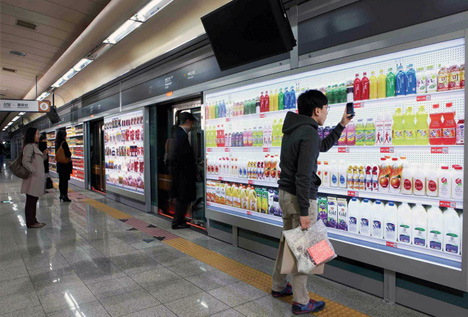
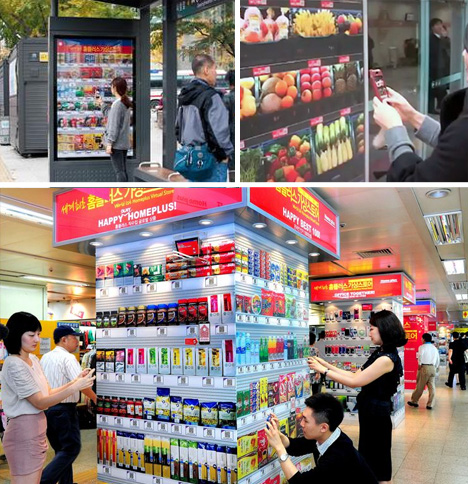
Photos of products with codes that can be scanned by smart phones transform cramped spaces like the walls of subway stations into virtual retail stores, saving space and potentially adding function to disused city spots. PayPal is among the main companies pioneering quick and easy virtual shopping with QR codes plastered on billboards and ad spaces. Online grocery service Peapod already has virtual shelves on subway and commuter train platforms in Philadelphia.

Virtual Retail Stores 2

The concept is simple: you download an app to your smart phone, scan the codes of the products you want to purchase, and enter your payment information. The goods you buy are then delivered to the location of your choice. The process is streamlined when payment info is saved – just scan and confirm.

While brick-and-mortar stores with physical products won’t disappear completely, since there are plenty of times we just want to grab something and run, this concept could help meet the evolving needs of both customers and the cities they live in. Virtual retail stores could go up on the outside of abandoned buildings, or give use to areas that are under transition.

Virtual Retail Stores 3

Experts have predicted that shopping will change more in the next three years than it has in the past twenty, with more and more people choosing the convenience of mobile shopping and self-checkout. PayPal has expanded a portion of its ‘Shop and Pay on the Go’ services by adding QR codes to the exterior of physical stores, for those times when you need something and the store is closed. Another service, ‘PayPal Here’, enables customers to check in with their phones, grab their items and pay for them virtually without having to pull out cash or a credit card.

Share on Facebook


[ By Steph in Architecture & Cities & Urbanism. ]

[ WebUrbanist | Archives | Galleries | Privacy | TOS ]


WebUrbanist

 
Comments Off on Virtual Retail Stores Repurpose Unused Public Spaces

Posted in Creativity


Lightroom 4 Virtual Copies 101

25 Mar

Introduction

This tutorial has been transcribed from the SLR Lounge Lightroom 4 Workshop on DVD, a 14 hour Lightroom 4 A – Z guide with over 130 tutorials for mastering Lightroom from start to finish. The Digital download can be purchased from SLR Lounge while the physical copy is available through Amazon Prime.

Overview

The way an image is post-produced can drastically change the mood and feel of that image. We often take pictures that would look great in color, black and white or even with vintage effects. Virtual Copies are great for creating duplicates of an image with different develop settings applied to them. In this tutorial, we will go over the basics of Virtual Copies in Lightroom 4 and how they differ from Snapshots.

What is a Virtual Copy?

Virtual Copies are not copies of the original RAW file (that’s actually what makes them so awesome to begin with). Instead, a virtual copy is only a copy of the develop settings, represented as a new image within the Lightroom catalog. When you export the image, Lightroom will create outputted images based on each virtual copy of a particular image. Virtual Copies are great because they do not take up much space on the hard drive since only the settings of the photo are saved within the catalog. However, once you export these images out from Lightroom, they will take up more space because Lightroom is creating different versions of the original image.

Creating Virtual Copies

There are several ways to create a virtual copy of an image. We can right-click on an image and hit “Create Virtual Copy.”
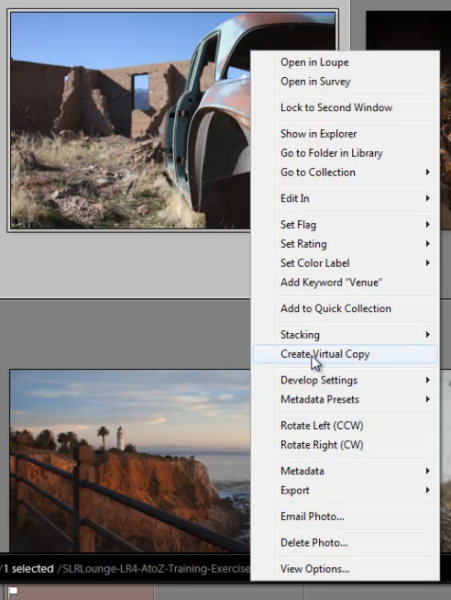
01_right-click-create-virtual-copy

But, my favorite method is simply to use the shortcut. To create a Virtual Copy at any point hit (Ctrl + ’) on the desired image.

Filtering and Deleting Virtual Copies

At times, it might be beneficial to view all the Virtual Copies within our Lightroom catalog. To aid us, we can actually filter by Virtual Copies in Lightroom. First, you need to bring up your Filter Menu. To do this, you need to be in the Library Module. Once there, hit “\” to bring up the Filter Menu. Click on “Attribute” and on the far right of the panel there are 3 little box icons. To select Virtual Copies, click on the middle box, as shown below. Once you turn this filter on, you can see all the Virtual Copies in your catalog.

02_virtual-copies-filter

Filtering by Virtual Copies is very handy if say you wish to clear out all of your Virtual Copies in your catalog. Often times I also like to filter by Virtual Copies when I want to create a “universal look” with the develop settings for all of my Virtual Copies.

Remember, if you delete a Virtual Copy, the original file with the original settings will still be in your catalog. Deleting a Virtual Copy has no effect over the original image. Delete Virtual Copies the same way you would a regular image, simply right-click on the images, and hit “Delete Photos.”
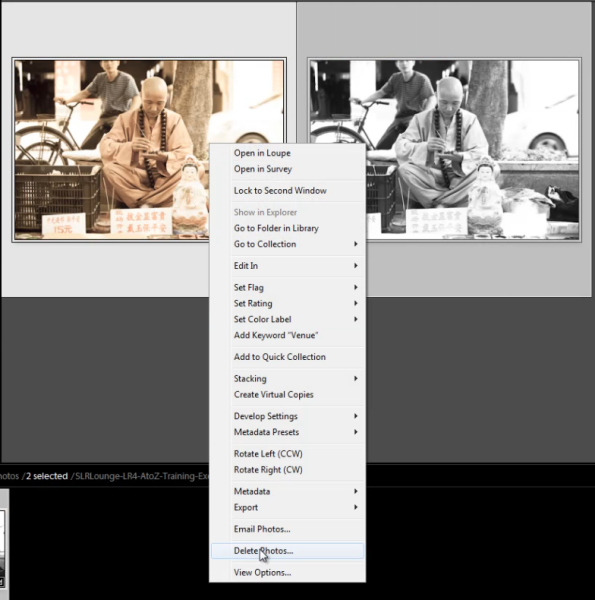
03_delete-virtual-copies

A dialogue box will then appear, asking if you want to remove the Virtual Copies. Once again, this will not remove your original image from your catalog (so long as the original image isn’t selected for deletion).
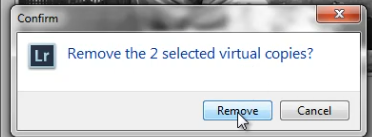
04_confirm-remove-virtual-copies

Virtual Copies vs. Snapshots

We are often asked what the difference is between a Snapshot versus a Virtual Copy. Given that both functions are used to create different looks for an image, it can seem similar. However, in reality, these two functions are very different, particularly when it comes to exporting.

When you create different looks via Snapshots, only the “active” or selected Snapshot develop settings will be exported to the final image. Let’s illustrate with an example.

Let’s say we have an image with 3 different looks created with Snapshots, and another image with 3 different looks created with Virtual Copies.

When we export the image with the 3 different Snapshots, Lightroom will create one exported image with the develop settings from the “active” snapshot.

When we export the image with the 3 different Virtual Copies, Lightroom will actually create 3 separate exported images using the develop settings from each Virtual Copy.

To keep it simple. Virtual Copies will create additional exported images while Snapshots will not.

Learn More with the Lightroom 4 Workshop Collection!

This was a sample tutorial from the Lightroom 4 A to Z DVD which is one of the DVDs in the Lightroom 4 Workshop Collection. A collection of nearly 30 hours of video education teaching everything from Lightroom basics to advanced raw processing techniques.

The LR4 Workshop Collection also includes the critically acclaimed Lightroom 4 Preset System which is designed to enable users to achieve virtually any look and effect within 3-5 simple clicks. From basic color correction, vintage fades, black & white effects, tilt-shift effects, faux HDR, retouching, detail enhancing, and so much more. Click the links above to learn more.

Post originally from: Digital Photography Tips.

Check out our more Photography Tips at Photography Tips for Beginners, Portrait Photography Tips and Wedding Photography Tips.

Lightroom 4 Virtual Copies 101


Digital Photography School

 
Comments Off on Lightroom 4 Virtual Copies 101

Posted in Photography


Stop Shops: Virtual Store Shelves in Subway & Bus Stations

20 Mar

[ By WebUrbanist in Conceptual & Futuristic & Technology. ]

virtual shopping

If you are going to have to wait for a ride anyway, why not do some shopping? No, not on your laptop or that tiny screen of your smartphone – right there on the wall, via virtual aisles on a life-scaled billboard full of products.

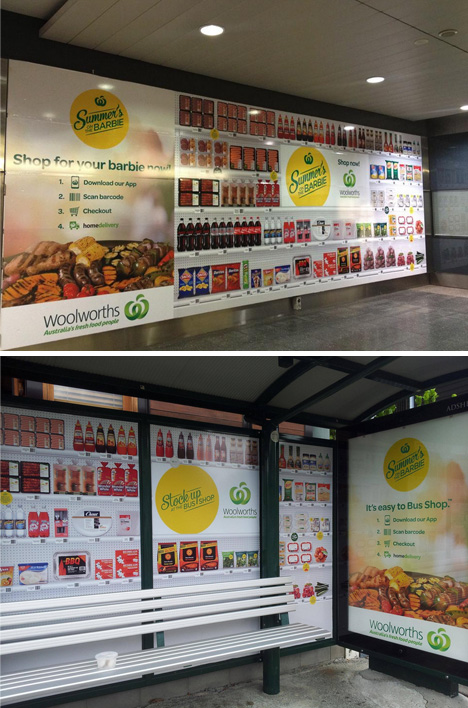
First in South Korea thanks to Tesco, and now popping up in Australia and other countries, it works something like this: a range of popular everyday products is displayed on the wall; scan the QR codes of the ones you want and your purchase will be added to a digital shopping cart.

virtual shopping south korea

In many cases, your purchases will arrive the next day – in some, they will be waiting for you when you get home, saving you that side trip to the corner store or local supermarket.

virtual shopping australia stations

If nothing else, this presents an interesting technology-bridging mechanism for those reluctant to shop online. They choose from real products, presented at actual size, in a potentially more familiar mode of browsing than via the internet.

Share on Facebook


[ By WebUrbanist in Conceptual & Futuristic & Technology. ]

[ WebUrbanist | Archives | Galleries | Privacy | TOS ]


WebUrbanist

 
Comments Off on Stop Shops: Virtual Store Shelves in Subway & Bus Stations

Posted in Creativity


Enhancing Spatial Cognition in Immersive Virtual Environments

31 Oct

SPEAKER & AFFILIATION: Victoria Interrante, University of Minnesota DESCRIPTION & LINK: This lecture has been videocast from the Computer Science Department at UNC. The abstract of this lecture and a brief speaker biography is available at research.csc.ncsu.edu A full transcript of this presentation is available at www.ncsu.edu
Video Rating: 0 / 5

 
Comments Off on Enhancing Spatial Cognition in Immersive Virtual Environments

Posted in Retouching in Photoshop


Virtual 3D Tactile Touch – NTT COMWARE : DigInfo

27 Oct

DigInfo – movie.diginfo.tv NTT COMWARE has developed a system which not only creates the illusion of depth visually, but also the tactile feeling to go with it, allowing people to shake hands or hold solid objects from across the globe. The system combines a stereoscopic camera setup with a haptic glove connected to a 3D display. When the user sees the object in front of them and touches it, the hand is manipulated by various components in the glove to make it feel as if it is touching a solid object. As the process is happening in real time, when the object, such as a hand, moves, the user can also feel the movement. Possible applications include video conferencing, education or making rare museum exhibits touchable.

 
Comments Off on Virtual 3D Tactile Touch – NTT COMWARE : DigInfo

Posted in 3D Videos


HakTip – Enhancing Windows with Virtual Desktops

21 Oct

Virtual Desktops are a super easy way to save some money and keep yourself organized. While many operating systems like OS X and Linux support Virtual Desktops out of the box, Windows does not. Shannon covers three free programs to add this functionality and picks her favorite.
Video Rating: 4 / 5

 
Comments Off on HakTip – Enhancing Windows with Virtual Desktops

Posted in Retouching in Photoshop