RSS
 

Posts Tagged ‘Versus’

Remote Shutter Release Versus the Built-In Delayed Shutter

21 Oct

It’s no secret that being a photographer, amateur or professional, can be quite expensive. We both travel and we want the latest and best equipment but we can’t always afford it all. Being selective with the equipment we choose to purchase can be wise as it’s better to spend a few dollars extra purchasing something of quality. A lot of the gear we have isn’t essential and can easily be done inside the camera itself. Let’s look at using a remote shutter release versus the delayed timer built into the camera.

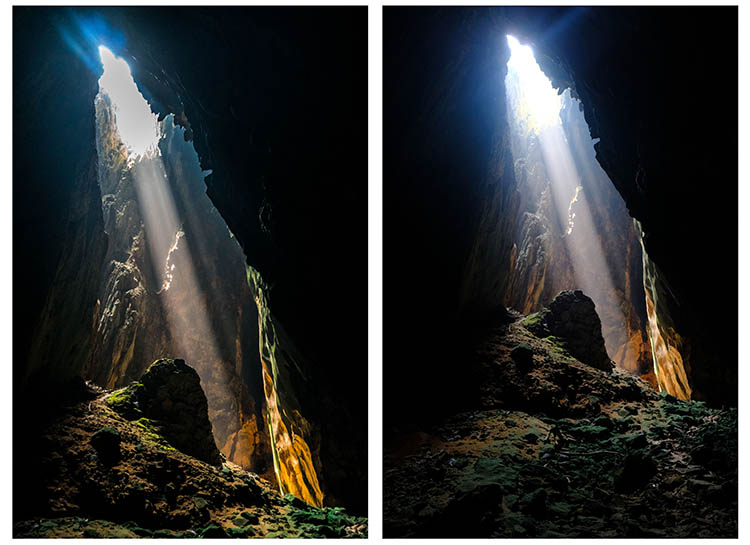
SelfieVoringsfossen

A self portrait captured by using a remote shutter

A remote shutter is something you may have heard repeatedly that you need to purchase, especially if you’re into landscape photography. One of the main uses of a remote shutter is to minimize the vibration when taking a image to get a sharper result. What you also may know is that your camera has a delayed shutter function, typically of 2 and 10 seconds. So do you really need to purchase a remote shutter when you can do it in the camera? Let’s look at some pros and cons of using each – a remote shutter release and delayed shutter.

Delayed Shutter

Most digital cameras have a Delayed Shutter function. In fact, even smartphones have it.

Since I was close to the camera I could use a delayed shutter

Since I was close to the camera I could use a delayed shutter

A delayed shutter is, in simple words, a function that tells the camera to wait a few seconds after you push the shutter before it takes the picture. This allows you to either run in front of the camera and take a selfie or reduce the amount of vibration. This function is especially useful when you’re using a slow shutter speed and have your camera mounted on a tripod. If you use a shutter speed of 0.5 seconds and press the shutter you’ll see that the image will come out less sharp than if you use a delayed shutter.

Pros of the Delayed Shutter:

  • It’s a standard function in most digital cameras and smartphones.
  • It’s free.
  • It reduces vibration and leads to a sharper image.
  • You can choose between a short delay or a longer delay.
  • You have the time to position yourself in the image after pressing the shutter.

Cons of the Delayed Shutter:

  • It’s not flexible.
  • If you’re photographing something with motion it’s hard to time the shutter release perfectly and you might miss the shot.
  • In some cameras, the function is found deep in the menu.

Remote Shutter Release

Remote shutter release can vary in form, shape, and price. Some are tiny and inexpensive, while others are larger, with more options but also a less attractive price tag.

I used a remote shutter and interval timer to photograph myself on the edge

I used a remote shutter and interval timer to photograph myself on the edge.

Choosing the right remote shutter release can be a hassle sometimes as you may not know your needs. You may only need a simple one to avoid any motion when taking the image, or may need something more advanced that lets you do interval timing or perhaps something that has a “Bulb lockup”.

Once your needs are established, you have to sort out if you want a cable release or wireless. I won’t get into the topic of which is better, but again you need to consider your needs for a remote.

remote-timer-nikon

Pros of remote shutter releases

  • Wireless remotes allow you to stand far away from the camera and take pictures.
  • Advanced models have many options such as interval timers.
  • You can use “Bulb Mode” without having to hold the camera’s release button and cause vibration.
  • Many models have LCD screens with a timer.
  • Take a picture at the exact moment you need.
Freezing the exact moment with a cable release

Freezing the exact moment with a cable release

Cons of remote shutter releases

  • More advanced models can be very pricey.
  • It takes extra space in your bag.
  • It might be hard to choose the right model.
  • Cables break quickly on low-end cable releases.
  • Small, wireless remote shutters are easy to loose.

What is best?

To be honest with you, they both have their advantages. It would be wrong to say that one is better than the other in any case.

That being said, as a landscape photographer, I am dependent on my remote shutter. A lot of the time I can’t wait the extra two or three seconds before the image is taken, as the moment is gone by then. When I’m photographing rushing waves I need to capture the image at the exact moment I want, ergo I need a remote shutter. If I’m in the woods and not photographing anything that might move, I don’t need the remote shutter (even though I use it by habit).

Shutter speeds over 30 seconds requires a remote shutter

Shutter speeds over 30 seconds require a remote shutter

If you only photograph still landscapes and you don’t need a shutter speed of more than 30 seconds, I don’t see a reason to purchase a remote shutter. If you photograph anything with motion or need a shutter speed of more than 30 seconds I recommend you to purchase one.

googletag.cmd.push(function() {
tablet_slots.push( googletag.defineSlot( “/1005424/_dPSv4_tab-all-article-bottom_(300×250)”, [300, 250], “pb-ad-78623” ).addService( googletag.pubads() ) ); } );

googletag.cmd.push(function() {
mobile_slots.push( googletag.defineSlot( “/1005424/_dPSv4_mob-all-article-bottom_(300×250)”, [300, 250], “pb-ad-78158” ).addService( googletag.pubads() ) ); } );

The post Remote Shutter Release Versus the Built-In Delayed Shutter by Christian Hoiberg appeared first on Digital Photography School.


Digital Photography School

 
Comments Off on Remote Shutter Release Versus the Built-In Delayed Shutter

Posted in Photography


Sony a6300 versus a6500: what’s changed, and what still needs to change

18 Oct

Sony a6300 versus a6500

That was quick.

Just eight months after Sony introduced the a6300, a higher-end sister model to the a6000, we now have another higher-end sister model in the a6500. The sheer speed of Sony’s product releases lately is somewhat appropriate, given the outright shooting speed these cameras are capable of.

Both cameras feature the same 24MP APS-C CMOS sensor, the same 425-point on-sensor PDAF system, the same viewfinder, the same video specification, and the same 11 fps burst shooting rate (8 fps with Sony’s implementation of ‘live view’). Wait a second – what exactly is new to the a6500?

Turns out, there’s a handful of changes that can have big implications for how photographers will interact with and use these cameras, but are they worth the $ 400 premium on the new model? Let’s take a look.

Continuous shooting

Patrick Murphy-Racey discusses using the a6500 for peak action (like drag races) due to its burst speed and autofocus system.

A deeper buffer combined with a newly developed front-end LSI (which stands for Large Scale Integration – it’s basically an additional chip providing more processing power) promise more responsive performance when shooting bursts – 300 JPEG or 107 Raw images can be captured at 11 fps with full autofocus and autoexposure. Users can also instantly review or check focus on the last image that the camera has written to the card (though that might not necessarily be the last image in that burst), with the added plus of an indicator showing just how many images remain to be written to the card.

Comparatively, the a6300 can still shoot at 11 fps with full autofocus and autoexposure, but only for 44 JPEG or 21 Raws. And while the camera is writing to the card, you can’t enter playback, or magnify the displayed image (if you have image review on). We’re particularly happy to see that last limitation go, as it makes the camera eminently more usable.

In-body 5-axis stabilization

Sony consolidated the shutter charge and shutter mechanisms to one side to make room for the IBIS unit in the a6500.

Without increasing the depth of the camera body, Sony has redesigned the a6500’s shutter mechanism to not only be more durable (tested – though not guaranteed – to 200,000 cycles), but also to incorporate 5-axis stabilization with non-stabilized lenses. What’s more, when you pair an optically stabilized lens with the a6500, the camera knows to pass of pitch and yaw correction to the lens’ stabilization system. This doesn’t increase the effectiveness more than the rated 5 stops, but is likely to help maintain effectiveness when shooting at longer focal lengths.

There’s also the intriguing possibility of shooting full 4K stabilized video with any lens – but we’re withholding our verdict on the resulting image quality until we can test it for ourselves. After all, core video specification and performance hasn’t changed from the a6300 to the a6500, and we’re curious to see if the stabilization system has any effect on the rather lackluster rolling shutter performance of the a6300.

And, of course, the a6300 offers no in-body stabilization.

Touch and see

The a6500’s screen is touch-enabled, whereas the a6300’s isn’t. They share the same resolution (and the touch-panel doesn’t seem to have affected glare or fingerprint-resistance), but on the a6500, you can now use the screen to quickly place an AF point, move your AF point around by acting as a ‘touchpad’ with your eye to the finder, and also double-tap to zoom and swipe around an image in playback.

So while AF performance will likely remain the same on the a6500, you may now find you’re more quickly able to adapt to a scene in front of you by using the touchscreen as opposed to the cumbersome sequence of button presses most Sony cameras require for focus point movement.

That said, in touchpad mode, the control of the AF point is unfortunately always relative, rather than (at least an option for) absolute, so you swipe to move the AF point from its current position, rather than touching exactly where you want it to be. This meant we found ourselves often swiping repeatedly to get the AF point from one side to the other. This could be obviated with absolute positioning in combination with limiting the touchpad area to the upper right quadrant, something we suggested to Sony in-person. Lastly, we found the touchpad performance to be decidedly laggy, especially when compared to competitors’ offerings.

When it comes to video, the a6500’s touchscreen is particularly useful for focus pulls, since you can just tap to change the focus point and initiate a rack focus (and as always, you can control how quickly the camera will rack focus). Less easy is getting the camera – in video – to continue to track your subject around the frame after you’ve tapped on it, since Lock-on AF is unavailable in video (something we continue to request Sony to address).

There appears to be a workaround, though: if you turn the old, vesitigial ‘Center Lock-on AF’ on, then tapping appears to initiate subject tracking. Unfortunately, ‘Center Lock-on AF’ isn’t always the most reliable, and it’s still somewhat cumbersome to work this way as you have to first turn this feature on, which requires either a (Fn/main) menu dive or a dedicated button assigned to it, plus a couple more button presses before you tap.

Controls and usability

Autofocus and video options are among the new ‘groupings’ within the updated Sony menu system.

Besides the touchscreen, the other major control change on the a6500 compared to the a6300 is the addition of C2 | C1 custom buttons on the top plate, a7-style. They’re nicer buttons than the soft-press C1 button of the a6300, providing more haptic feedback. The a6500’s grip has also been redesigned to be ‘chunkier’ and deeper than that on the a6300, again much like the a7 Mark II cameras, which should help when using heavier or longer lenses.

The a6500 also inherits the redesigned menu interface that debuted in the a99 II which is, in our opinion, much more user-friendly than the interface on the a6300 (and a6000, for that matter). The tabs are now color-coded, but more importantly, similar functions like autofocus, image parameters and movie settings are grouped. This makes it much less likely that you’ll miss a moment while rocketing through the menu to find a setting you swear you saw somewhere in there last week. It’s one of our favorite additions to the a6500, and it’s about time.

Unfortunately, you still can’t make a custom ‘My Menu’-like page in this menu system. A shame, as it’s an easy way to group most-used menu items into one section for quicker access, particularly ones – like movie options – that can’t be assigned to the custom Fn menu.

What hasn’t changed (and should have been)

There’s no question that the a6500 is incredibly well-specified camera in an impressively small package. In terms of usability, Sony has made great strides on this new model with the addition of a touchscreen and a revamped menu system. Unfortunately, there’s still a few aspects of the a6500 that we can’t help but wish Sony would have addressed.

Unfortunately, like the a6300, the a6500 lacks a control dial on the front of the camera – an omission that is all the more glaring at its higher position in the market. Unlike the a6300, all of the a6500’s direct peers offer twin control dials, and a front control dial would further aid usability in our opinion (though we’d also happily take the ‘Tri-Navi’ system of the old NEX-7 flagship as a compromise).

The core stills and video specification hasn’t changed at all since the a6300 (although the new front-end LSI is supposed to help with JPEG performance at higher ISO values). Now, the a6300 already produced great results under almost any circumstances with one big exception – rolling shutter in 4K. While the detail level is impressive and the capture aids are extensive (S-Log, zebra patterning, focus peaking, etc.), we would really have liked to see Sony address the rolling shutter issue in this new model. And a headphone monitoring port wouldn’t hurt, either.

Limited battery life is a problem endemic to mirrorless cameras as a whole, and the a6000-series is no exception. Still, probably thanks to the additional processing and touch-screen, the a6500’s battery life rating has actually decreased compared to the a6300 by over 10%. It goes without saying that’s a change in the opposite direction than we would like.

Adding it all up

The a6500’s additions over the a6300 are small in number, but potentially huge for what they offer users. Sure, the new model comes at a $ 400 premium over its mid-range sibling, but the upgrades in the new flagship model have the potential to be significant.

Of course, whether they’re significant to you depends on whether they line up with what you like to shoot. If you don’t shoot long bursts, or don’t find yourself checking focus all that often, the additional buffer performance isn’t likely to matter. If you shoot a lot of video and want more flexibility with lens choice, the in-body stabilization is likely to be very helpful. One thing that we feel will positively impact all users – even those who primarily use the viewfinder – is the touchscreen. That said, its laggy behavior is disappointing considering just how much processing power this camera has.

We generally feel that, given the sheer capability of this camera, the price premium over the a6300 is warranted. The Sony a6500 represents a lot of camera in a very lightweight package, and it’s encouraging to see that Sony is continuing to refine its APS-C offerings.

Articles: Digital Photography Review (dpreview.com)

 
Comments Off on Sony a6300 versus a6500: what’s changed, and what still needs to change

Posted in Uncategorized


Tripod versus Monopod – a Comparison and When to Use Each

12 Oct

Tripods and monopods, you’re very likely to have seen them. They both have their uses and their purposes for existing. But when do you use one over the other and what advantages do each have? In this article, I’ll look to explain when you would use a tripod versus a monopod and how they’re not necessarily exchangeable in their properties.

Tripods

Jake Khuon

By Jake Khuon

Uses and pros of tripods

Let’s start off with tripods. You know, those three legged stands that nearly all photographers have?! They provide your camera with a sturdy platform to which you attach your camera. Tripods come in all different sizes and have a huge variety of heads (the actual mounting point) to suit different shooting styles. They are especially helpful for avoiding camera shake when using slow shutter speeds. This is most useful when you want to blur water in a stream, show car light trails at night or simply do a long exposure.

tripod versus monopod - use a tripod for long exposures

With this frame, I used a tripod to prevent camera shake that would have been caused by the 3.2 second shutter speed. This shutter speed was used to blur the water.

Tripods can also be extremely helpful with macro, still life, and studio photography as they hold the camera in the exact spot you want while you set your shot up. Time-lapse photographers can also benefit from using a tripod over a monopod as it will ensure that there is no jumping between each frame as the camera is securely locked in one position. However, tripods are not without their cons.

tripod versus monopod

Use a tripod for long exposures like this.

Cons of tripods

However, tripods are not without their cons. They can be heavy to carry around and take some time to set up. Depending on which head you are using, tripods can also be very limiting for quick camera movements which you may need when photographing moving objects. Everything about using a tripod is slower. So if it’s speed, and ease of portability that you’re looking for and stability isn’t your main priority, then perhaps a tripod is not the best item for you.

Monopods

tripod versus monopod - use a monopod for more mobility

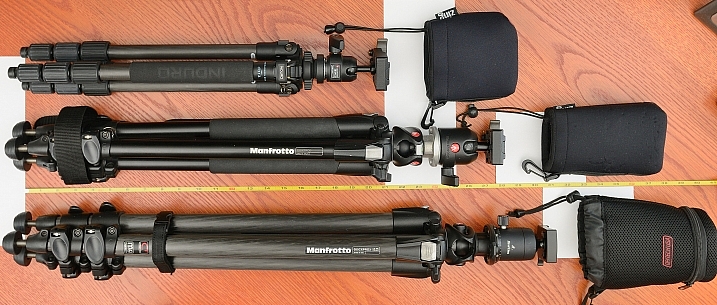
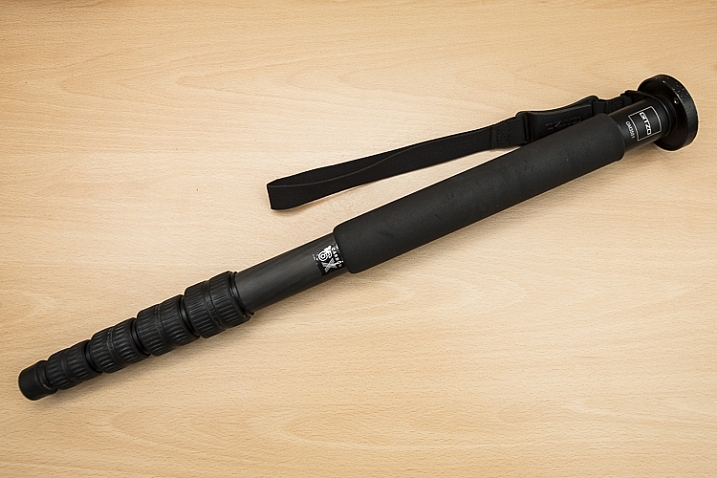
This is the monopod I use. Here, it is compacted (54cm/21.26″) but it extends to be 192cm (6’2″). It is made of carbon fibre and weighs in at only 620g (1.36lb) but can hold up to 18kg (39lb).

Uses and pros of monopods

When a rock solid platform for stability isn’t a priority many photographers turn to a monopod for their camera support needs. Just as the TRI in tripod means three, the MONO in monopod means – you guessed it – one! They are simply a single leg support on which you can mount your camera and/or lens. They too come in different sizes and will support different weight limits.

Monopods are perfect for taking the weight of a heavy lens/camera combination to stop aches and pains from a long day of shooting. If you’ve ever seen sports photographers with their long lenses, then you may have noticed that they are often being supported by a monopod. Monopods also offer much more versatility in movement as you now have only on one leg, not three, and they are much quicker to set up than their three-legged brethren.

tripod versus monopod - use a monopod for more mobility

This photo was taken using a 400mm f/2.8 lens. These lenses are quite heavy, so using a monopod is a great way to take the weight off your arms. Daniel Smith/Getty Images.

Cons of monopods

A monopod, however, will not offer you the same stability as a tripod, so if you’re considering a monopod as a lighter alternative to a tripod, do remember this. If it’s milky streams and flowing car lights that you’re after, a monopod will not help you here at all; you will still need a tripod.

But if your arms get tired from holding your camera up all day, then a monopod may well be very suited to your needs.

Conclusion

tripod-versus-monopod

While tripods and monopods offer extra support and in some cases, stability for your camera, there are times when one is more useful than the other and one cannot always be used in place of the other. Generally, for very long shutter speeds or time-lapse photography you’ll want to use a tripod to avoid camera shake and to maintain consistency between each frame. But if it’s a little extra support and to take the weight of a camera/lens combination, you can’t go wrong with a monopod.

Do you have either or both of monopod and tripod? How do you find using each of them?

googletag.cmd.push(function() {
tablet_slots.push( googletag.defineSlot( “/1005424/_dPSv4_tab-all-article-bottom_(300×250)”, [300, 250], “pb-ad-78623” ).addService( googletag.pubads() ) ); } );

googletag.cmd.push(function() {
mobile_slots.push( googletag.defineSlot( “/1005424/_dPSv4_mob-all-article-bottom_(300×250)”, [300, 250], “pb-ad-78158” ).addService( googletag.pubads() ) ); } );

The post Tripod versus Monopod – a Comparison and When to Use Each by Daniel Smith appeared first on Digital Photography School.


Digital Photography School

 
Comments Off on Tripod versus Monopod – a Comparison and When to Use Each

Posted in Photography


Circular Polarizers Versus Graduated Neutral Density Filters for Landscape Photography

22 Aug

Whether you’re a professional or hobby photographer, odds are you’ve come across a beautiful, scenic landscape, that you absolutely had to photograph. Unless you’re an experienced landscape photographer, there’s a good chance the color in that photo wasn’t as saturated, or balanced as you were expecting. That’s because there’s generally a wide disparity in the dynamic range between the foreground and background of landscapes, as well as between the upper (sky) and lower (earth) halves of the frame. Thanks to a couple of lens filters, this hurdle can easily be overcome without having to spend hours of post-processing in Photoshop.

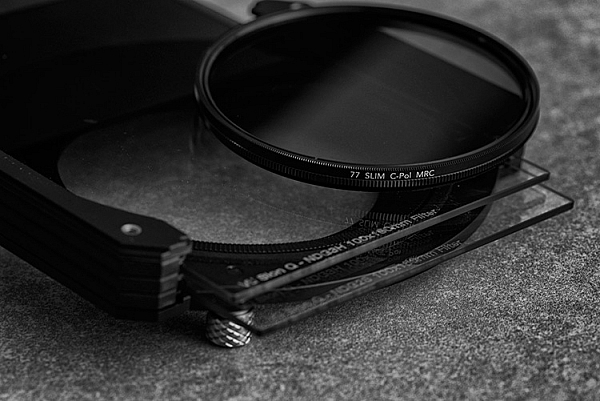
Drop-in and screw-in filters

What are lens filters?

Lens filters are lightweight pieces of glass that screw onto the front of most camera lenses (or drop-in using a holder system) in order to offer additional protection of your lens while also improving image quality. There are a variety of filter sizes that must match up to the size of the thread on your camera lens, so it is very important to make sure you get the correct size for the lens you plan to use it on (tip look on the back of your lens cap).

In addition to varying sizes, lens filters can also serve several different purposes. Most basic lens filters are ultra-violet (UV) reducing filters (also known as haze filters) that come with an anti-reflective coating to cut through the effects of atmospheric haze, thereby improving overall image quality. Besides UV/haze filters, there are two others that are particularly useful for landscape and outdoor photography – polarizers and graduated neutral density filters.

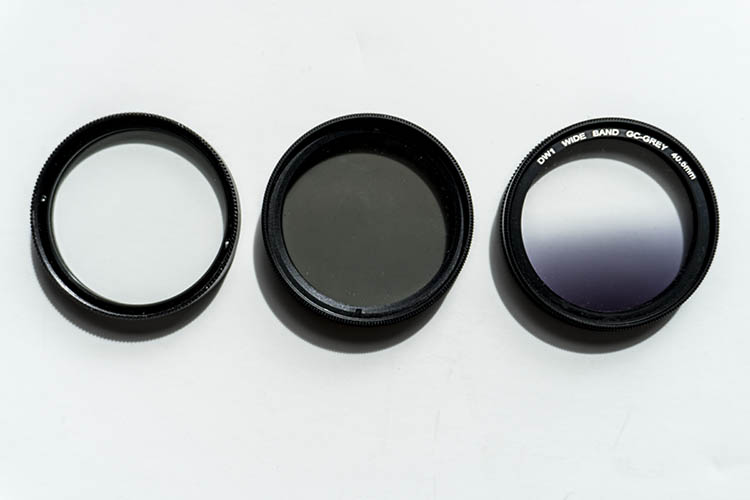
From left to right: A clear UV filter, a polarizing filter, and a Graduated Neutral Density filter.

From left to right: A clear UV filter, a polarizing filter, and a Graduated Neutral Density filter.

What is a polarizing filter?

The next filter we’ll discuss is the polarizing (usually circular) filter, which attaches to the front of a lens and can be spun around to produce varying degrees of saturation throughout an image. This quality of the polarizing filter is important to pay attention to, because it’s easy to produce uneven shades of saturation if the polarizer is even slightly off, such as in the example below.

Circular polarizer versus ND grad filter

Landscape photo with uneven polarization. Notice how the sky is very uneven in color.

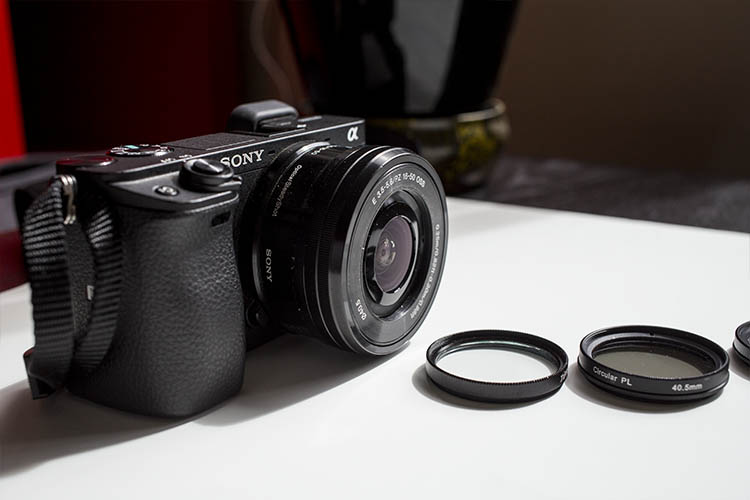
Sony a6300 camera with bare kit lens - no filter applied. UV and Polarizing filters on the table.

Sony a6300 camera with bare kit lens – no filter applied. UV and Polarizing filters on the table.

Polarizing filters do two things: first, they help reduce glare or reflections cast by non-metallic reflective surfaces such as glass or water. Second, they saturates colors and enhances image clarity by reducing the overall exposure of an image. The benefits of the polarizing filters are best seen when you are shooting at a 90-degree angle to the sun.

Take a look at the landscape photo below that was taken with no filter, the colors are muted and not very exciting. However, once the polarizing filter is added, you can see a huge boost in overall color saturation. It’s a pretty dramatic difference without even post-processing the photo.

Circular polarizer versus ND grad filter

Landscape photo with no filter.

Circular polarizer versus ND grad filter

Landscape photo with a circular polarizing filter. Notice how overall the colors are intensified.

What is a neutral density filter?

Another effective filter for landscape photography is a neutral density (ND) filter, which reduces the overall exposure of an image. ND filters are uniformly dark in color and they come in different strengths depending on density.

The best use of ND filters is in situations where you wish to use a long exposure or wide aperture to capture an image, without risking overexposure. Some example scenarios when a ND filter would be effective include:

  • Producing a smooth, blurred movement of water in a waterfall, lake, or the sea.
  • Blurring moving subjects to convey movement or motion (such as panning).
  • Reducing diffraction by using a large aperture.
  • Shooting with a shallow depth of field in bright lighting.

What is a graduated neutral density filter?

ND filters also come in a graduated form, also known as a split ND filter. The top half of the filter appears dark, while the bottom half is clear. Similar to the circular polarizer, the graduated ND filter can also be spun around to produce varying degrees of saturation, so it’s important to be careful when using it to avoid unevenly saturating your image.

The best scenarios for a graduated ND filter to shine are when you wish to reduce light, or darken just part of your image. Think landscape photos where the earth is balanced, but the sky is blown out. This would be an ideal time to use a graduated ND filter to darken the sky.

Circular polarizer versus ND grad filter

The above landscape photo with a soft edge ND grad filter. Notice how the sky is darker and more saturated, while the water hasn’t changed.

There are two types of ND grad filters: hard edge, and soft edge. You’ll want to use a hard edge filter when the light and dark sections are very clearly separated, while a soft edge filter is best used when the light and dark sections are not distinctly separated.

Circular polarizer versus ND grad filter

Landscape photo with no filter.

Circular polarizer versus ND grad filter

Landscape photo with a circular polarizer.

Circular polarizer versus ND grad filter

Landscape photo with a graduated ND filter.

Over to you

Do you use polarizers or neutral density filters with frequency in your photography? Please share your thoughts and images in the comments below.

googletag.cmd.push(function() {
tablet_slots.push( googletag.defineSlot( “/1005424/_dPSv4_tab-all-article-bottom_(300×250)”, [300, 250], “pb-ad-78623” ).addService( googletag.pubads() ) ); } );

googletag.cmd.push(function() {
mobile_slots.push( googletag.defineSlot( “/1005424/_dPSv4_mob-all-article-bottom_(300×250)”, [300, 250], “pb-ad-78158” ).addService( googletag.pubads() ) ); } );

The post Circular Polarizers Versus Graduated Neutral Density Filters for Landscape Photography by Suzi Pratt appeared first on Digital Photography School.


Digital Photography School

 
Comments Off on Circular Polarizers Versus Graduated Neutral Density Filters for Landscape Photography

Posted in Photography


Sony a7R II versus a7 II: Eight key differences

07 Aug

Sony a7R II versus a7 II: Eight key differences

Sony’s a7-series marked the debut of full-frame mirrorless, and Sony still dominates this market with its a7S II, a7 II and a7R II. Sony has developed a reputation for rapid development cycles, and since they all look basically the same, it can be hard to figure out the differences between its current a7-series offerings.

The higher resolution a7R II costs almost twice as much as the a7 II, and in this article we’ll be explaining why. So join us, as we take a detailed look at the major differences between the Sony a7 II and the a7R II.

Resolution

The a7R II was the first camera to offer a BSI-CMOS full-frame sensor, when it was released last year. The additional resolution compared to the a7 II makes it possible to print significantly larger images, and of course there’s lots of scope for cropping.


Like all of the cameras in Sony’s a7-series, the a7 II and a7R II are both built around full-frame CMOS sensors, and the a7 II uses the same 24MP as its predecessor, the first-generation a7. The a7 II’s sensor is perfectly capable, and can deliver excellent image quality, but it’s not a patch on the 42MP sensor in the a7R II.

The increase in resolution isn’t the only reason we say that. The flagship a7R II features a back side illuminated (BSI) CMOS sensor, which offers significantly greater dynamic range, far better low light performance, and features 399 phase detection autofocus points (more on that later).

Dynamic range

The Sony a7R II boasts a significantly higher base ISO dynamic range than the a7 II, and this relationship is maintained until the two camera’s highest ISO settings. Both are superior to Canon’s EOS 5D III. Source: Bill Claff


The a7 II’s older 24MP sensor lags behind the newer a7R II in terms of dynamic range at all ISO sensitivity settings. At the all-important base ISO (ISO 100 in both cameras) the difference is a little under one stop. The gap closes a touch from ISO 200-400 but widens again thereafter.

Very few things ignite (or should that be ignorate…?) quite as much argument on DPReview forums and comment sections as dynamic range, but the basic fact is this: greater dynamic range, especially at base ISO, means greater latitude for exposure adjustment in Raw mode. In cameras that offer very good dynamic range, like the a7R II and Nikon D810 (just to take two examples) this effectively negates the requirement for graduated neutral density filters, and greatly expands a photographer’s ability to capture a full tonal range in a single exposure.

The a7R II is better than the a7 II in this regard, but both are better than full-frame DSLRs in this class (we’ve plotted the EOS 5D III in this graph, from Bill Claff), which are also limited by relatively high levels of noise in shadow areas. This can become problematic when Raw files are manipulated too heavily.

ISO sensitivity / low light

Even at ISO 12,800, the a7R II’s Raw files contain bags of detail, and more dynamic range than the a7 II. When normalised at 24MP, the higher-resolution a7R II also offers superior perceptual detail and lower noise levels than the a7 II. As well as image quality, the a7R II scores over the older camera again in terms of low-light AF performance.


In the good old days, it was generally believed that the more pixels you packed onto a sensor, the noisier the images you’d get out the other end. These days of course we’re much more enlightened, and as we all know, the idea that more pixels = more noise isn’t necessarily true. And everybody is happy now because we all understand that pixel-level noise isn’t the whole story, and the time we used to spend arguing about such things on the Internet we now spend with our families, when we’re not out in the sunshine taking photographs.

Only some of that last sentence is true, but what is true is that despite having almost twice as many photo-sites as the a7 II, the 42MP a7R II offers superior high ISO image quality. When files are normalized to 24MP and viewed side-by-side, the a7R II offers at least one stop better perceptual image quality in terms of Raw noise levels, and in terms of detail retention it’s more like two stops better than its 24MP cousin.

Part of the reason for this performance gap is simply the fact that the a7R II’s sensor is a couple of years newer than a7 II’s, and sensor technology (especially at Sony) moves quickly. But fundamentally, the sensor in the a7R II is of a very different design. BSI-CMOS sensors move a lot of per-pixel electronics to the back of the sensors, out of the way, so they’re more efficient when it comes to converting photons into usable signal. As such, the a7R II isn’t just better than the a7 II, it’s better than almost every other full-frame camera we’ve ever tested. Up to around ISO 25,600 it even holds its own (when files are normalized at 20MP) against the Nikon D5.

Shutter

Another benefit of BSI-CMOS sensors is the extra room afforded for more sophisticated circuitry – in the case of the a7R II that means faster readout circuitry. This allows the camera to record high frame-rate video (more on this shortly), autofocus faster than any comparable full-frame mirrorless camera (again, more shortly), and also to offer a fully electronic shutter.

Shutter-induced vibrations plagued our experience of using the original a7R, and have proved a serious headache in several other high-resolution cameras, including the Nikon D800-series. The a7 II and a7R II mitigate these issues with an electronic first-curtain shutter feature, but the a7R II also offers a totally electronic shutter option that comes with an almost negligible penalty in terms of additional noise (a traditional side-effect of electronic shutters).

We don’t recommend shooting with the fully electronic shutter option all the time, because there is the risk of some rolling-shutter distortion (i.e. if you’re panning to follow a fast-moving subject). But it is extremely handy for situations where you want to be discreet, like a performance space or a wedding ceremony.

Video

The a7R II is a 4K-capable camera with a raft of high-end features, intended to appeal to professional videographers just as much as stills shooters. 


The a7 II is increasingly looking like the odd one out in Sony’s current a7-series lineup, due to its lack of a 4K video capture. Of the two cameras, the a7R II is significantly more capable for shooting video, thanks not only to the addition of 4K, but numerous other features aimed specifically at the needs of professional filmmakers.

These include an oversampled Super 35mm (~APS-C) crop mode for 4K, internal recording in both HD and 4K modes and the super flat S-Log2 profile, for additional flexibility when it comes to grading footage.

The quality of the a7R II’s footage blows away the a7 II. Not only can the older camera not record 4K video, but its HD footage is softer and less detailed than the full-frame 1080 output of the a7R II. Interestingly, while the a7R II delivers superior quality 4K footage in its oversampled Super 35mm crop mode (notwithstanding a higher risk of rolling shutter), it gives much more detailed 1080 video when using its entire sensor. But the basic takeaway here is that regardless of the resolution or crop mode, the a7R II delivers better-looking video than the a7 II.

Autofocus

When combined with continuous focus, Eye-AF is a great feature for capturing portraits – especially of kids that won’t stay still.


The a7 II uses the same AF hardware as its predecessor the first-generation a7, but Sony claims that autofocus performance has been improved by around 30%. In our testing we have no reason to dispute this figure, and in everyday use the a7 II’s AF is more than capable of keeping up in most situations.

The a7 II’s autofocus might be perfectly acceptable, but the a7R II is in another league. Both cameras use a ‘hybrid’ system which combines on-sensor phase-detection pixels with conventional contrast-detection but with more than twice as many phase-detection AF points as the a7 II, and the ability to focus third-party lenses (later added to a more limited extent to the a7 II via firmware) the a7R II’s AF specification impressed us greatly when it was first announced.

While it can’t keep up with the action as well as the market-leading 3D AF Tracking system found in Nikon’s current DSLRs, the a7R II’s ability to find and track an eye in Eye-AF mode for example is incredibly useful for wide-aperture portraits, and low-light AF reliability with fast lenses is almost a match for the best DSLRs.

That’s the good news – the bad news is that there’s still no way to position AF point by touch on either camera, and the a7RII and a7 II’s control and menu ergonomics make it annoyingly tricky to find, set and master their extensive autofocus settings.

Performance

In terms of autofocus, the a7R II roundly outperforms the a7 II but when it comes to general operational speed it is markedly more sluggish in some ways. Image review especially can be very frustrating, as the a7R II’s huge files (made even larger if you select uncompressed Raw) can take several seconds to become available to review and zoom to check focus after they’ve been shot. When capturing sequences of images, the a7R II gives the kind of buffer-clearing times that we’ve not been used to since the early days of digital DSLRs. And we don’t say that in a nostalgic way.

The a7 II isn’t exactly a speed champion when it comes to processing speed, but it’s a little more nimble than its 42MP cousin.

Battery life

Although both the a7 II and a7R II have relatively poor rated battery life, it is possible to charge the cameras over USB, and you can continue shooting while they’re charging.


With a CIPA-rated battery life of 350 shots, the a7 II offers greater endurance than the a7R II, which clocks in at a mere 290 shots per charge. But it’s a bit of a stretch to call 60 hypothetical exposures a ‘key difference’ in battery life. Honestly, they’re about in the same ballpark, and both are pretty poor. Both the a7 II and a7R II offer significantly less endurance than equivalently-priced DSLRs at 350 shots and 290 shots per charge, respectively (CIPA standard in both cases).

The a7 II has a better CIPA-rated battery life than the a7R II, but endurance in heavy real-world from either camera varies from just ok-ish to downright terrible, depending on things like the ambient temperature and the amount of video you end up shooting. We’d strongly recommend taking at least one spare battery out with you when working with either camera, but if possible, take a couple. Ideally, take several. Pop round and borrow a couple of ours. We trust you.

The somewhat lower quoted battery life of the a7R II can be explained by its more power-intensive 4K capture mode, but even if you’re mostly shooting stills and keeping image review to a minimum, don’t expect to get through a busy day’s shooting with either camera without changing your battery at least once. The good news is that both cameras feature in-camera USB charging and can still be used while charging. This might not help much if you find yourself in the middle of nowhere, but could be a life-saver when shooting at an event or in a studio.

In summary

It should be obvious if you’ve read this far that the Sony a7R II is a significantly more capable camera than its stablemate the a7 II. They might look identical, but a quick run-down of just the major feature differences makes the distinction obvious enough: more pixels, 4K video, a vastly more capable autofocus system, fully electronic shutter, and more complete support for third-party lenses.

Whether these differences justify the enormous increase in price over the more basic a7 II is of course something that you have to decide for yourself. If you’re primarily or exclusively a stills shooter and you don’t have much need for continuous autofocus, the a7 II might suit you just fine. Its 24MP sensor isn’t the best around, but it’s not bad, and its 5-axis image stabilization system is very useful when shooting hand-held in poor light or at long focal lengths.

All this being said, if you’re new to the Sony a7 system, the a7 II doesn’t bring much to the table that you can’t find duplicated or outmatched in other, competitive DSLR models. The a7R II, on the other hand, offers some unique features that we suspect will make it distinct from competitive DSLRs for some time yet.

  • Read our full Sony a7 II review
  • Read our full Sony a7R II review

Did we miss anything? Let us know in the comments.

Articles: Digital Photography Review (dpreview.com)

 
Comments Off on Sony a7R II versus a7 II: Eight key differences

Posted in Uncategorized


Flagships compared: Canon EOS-1D X Mark II versus Nikon D5

31 Jul

Flagships compared: Canon EOS-1D X Mark II versus Nikon D5

2016 is an Olympics year, and while Brazil may be scrambling to get everything ready, Canon and Nikon are fully prepared. Both manufacturers launched brand new flagship DSLRs this spring, just in time for the world’s sports and action photographers to learn how to use them ahead of the games, which start next month.

Having two major DSLRs launched into the same marketplace aimed at the same kind of photographers at the same time is a good opportunity to see how they compare. We’ve recently published full, detailed reviews of both the Canon EOS-1D X Mark II and Nikon D5, but in this article we’ll be highlighting the major differences between the two models.  

Dynamic range

The Canon EOS-1D X Mark II offers greater dynamic range at base ISO than the Nikon D5 – and than any previous Canon DSLR. Source: Bill Claff


On the face of it, the Canon EOS-1D X Mark II and Nikon D5 offer a very similar sensor specification. And at 20 and 21MP respectively, their output resolution is indeed almost identical, but there are differences.

Unusually, in the contest between Canon and Nikon, the EOS-1D X Mark II’s sensor has the wider dynamic range at base ISO, which represents a major step forward for Canon’s pro lineup. Although not a match for the best-in-class performance offered by Sony’s current full-frame sensors, the 1D X Mark II bests the D5 by around one stop. Oddly, in terms of dynamic range, the D5 has moved backwards compared to its predecessor, the D4S.

The practical upshot of this is that the EOS-1D X Mark II is much more suitable for the sort of ‘expose for the highlights and pull the shadows up later’ approach to photography that makes sense in tricky lighting conditions. With the D5, you have to chose. Expose for highlight detail and color and lose definition in midtones and shadows, or expose for midtones and say goodbye to the brighter areas. With the EOS-1D X Mark II, while not best-in-class, Raw files are much more flexible.

High ISO performance

Even at ISO 64,000 the Nikon D5’s image quality is superb, and the AF system is capable of 3D Tracking in near darkness.


Of course, not everyone requires super-wide dynamic range from Raw files. For some photographers (and we suspect most photojournalists) high ISO Raw, and particularly JPEG, image quality will be more important. In this respect the D5 offers marginally superior performance to the EOS-1D X Mark II, although the difference isn’t that great within what any sensible photographer would consider a ‘normal’ ISO sensitivity span.

The D5 yields better quality JPEGs at ISO 409,600 (the EOS-1D X Mark II’s maximum setting) but above this, its additional ISO sensitivity settings (all the way up to 3.28 million) become progressively less useable. More useful is the D5’s backlighting of major controls, which is a huge benefit when changing settings at night.

Autofocus

The Nikon D5’s 153-point AF system is the most capable that we have ever seen.


As flagship sports and action cameras, the Canon EOS-1D X Mark II and Nikon D5 incorporate the best autofocus systems that their respective manufacturers know how to make.

In Canon’s case that’s a 61-point AF system, supported by a 360,000-pixel metering sensor to aid with subject tracking (‘iTR’ in Canon-speak) and face detection. Of the full 61 points, 41 are cross-type and the center point is sensitive down to -3EV in single-shot AF mode. Additionally, the 5 central points are dual-cross type, containing a long base-line x sensor in addition to the and + cross sensor for enhanced AF precision with F2.8 and faster lenses. Indeed, we’ve found these 5 points to have nearly mirrorless (contrast-detect) levels of precision, important for shallow depth-of-field photography.

The D5’s AF system features 153 points, 99 of which are cross-type, and of which 55 can be directly manually selected. The entire AF array is sensitive down to a rated -3EV, and the center point can still be used at -4EV. The D5’s metering sensor features 180,000 pixels, and works with the autofocus to create a ‘3D AF tracking’ system with face detection.

While the Canon EOS-1D X Mark II’s autofocus is very good, and leagues ahead of earlier-generation professional Canon cameras, the D5 leaves it in the dust. The D5’s AF system is without question the most capable of any camera that we have ever seen. The almost spooky reliability of 3D AF tracking, despite a lower resolution metering sensor for subject analysis, is a game-changer for all kinds of photography – not just fast action. 

Easy to miss in the D5 (partly because Nikon hides it so well) is automatic AF point calibration. This is a massive time-saver when calibrating fast lenses for accurate focus, and a major selling point over the EOS-1D X Mark II (and earlier Nikon cameras).

Video

Both the Canon EOS-1D X Mark II and Nikon D5 offer 4K video, but the Canon is the better video camera. Its 1.34X crop in 4K mode is less aggressive and Dual Pixel AF transforms performance.


Again, in terms of video specification the EOS-1D X Mark II and D5 might appear to offer a very similar set of features. Both can shoot high-definition video, and both also boast 4K recording. But the exact breakdown of features – and how they are implemented – is quite different.

Of the two cameras, the EOS-1D X Mark II is unequivocally the better choice for video. Canon has been producing high-end video cameras for a long time (although in the DSLR market, Nikon got there first – just – with the D90) and the company’s experience in this field really shows. The EOS-1D X Mark II can shoot HD footage up to 120fps, which is great for slow-motion capture, and 4K at up to 60p. The D5 tops out at 60p and 30p respectively.

The EOS-1D X Mark II also imposes a less aggressive crop factor in 4K video mode: 1.34X as opposed to ~1.5X. This isn’t a huge difference, but it does mean that it’s easier to shoot wide-angle footage on the 1D X II. In addition, the EOS-1D X Mark II’s Dual Pixel AF system works brilliantly well in video mode, both in terms of speed and accuracy of AF acquisition, and also tracking. The combination of DPAF and touch-to-focus makes for a very refined shooting experience, and even swift and accurate AF for static subjects in stills. The D5’s contrast-detection AF system in live view and video is primitive by comparison.

There are a couple of points in Nikon’s favor though – unlike the EOS-1D X Mark II the D5 can offer zebra striping for highlight monitoring, and it can output clean 4K footage over HDMI to an external recorder. In addition, the D5’s entire ISO sensitivity span is available in 4K video recording, whereas by default, the EOS-1D X Mark II caps ISO at 12,800 (expandable to 204,800 with a custom function).

Rear LCD

The Nikon D5’s rear LCD screen offers 2.36-million dot resolution, color calibration, and a broad range of touch-sensitivity features.


The rear screens on the Canon EOS-1D X Mark II and Nikon D5 are the same size, but the D5’s display offers significantly higher resolution, at 2.36 million dots (to the 1.62 million dots of the 1D X II). Although the Canon’s screen is very sharp and detailed, the D5’s is noticeably better when compared side by side.

It’s not all about resolution though, and the D5 has a couple of extra tricks up its sleeve. If you find that how pictures look on the back of the camera is different to how they appear on a profiled computer, the D5’s rear LCD can be calibrated using a blue-amber, magenta-green color wheel.

And while the screens on the back of both cameras are touch-sensitive, the implementation of touch features on the Nikon D5 is much broader. In the EOS-1D X Mark II, pretty much the only thing you can do by touch is to set AF point in live view. In combination with Dual Pixel AF this works brilliantly, but touch-sensitivity is much more deeply integrated into the Nikon D5’s ergonomics. Move to the next slide to read more.

Operation and Handling

The Nikon D5’s touch-sensitive feature set is much more useful than the Canon EOS-1D X Mark II. In review mode, images can be scrolled or ‘scrubbed’ through and focus can be checked with a double-tap.


In terms of handling, as always when comparing cameras from different manufacturers, the question of which is ‘better’ is largely subjective. But that’s not to say that there aren’t some measurable differences between the Canon EOS-1D X II and the Nikon D5. For starters, there’s that rear LCD screen.

Canon is determined that no unwary professional photographer should ever do anything by accident. That was the logic behind the original EOS-1D’s ’press button A, press button A again, scroll, stand on your head then press button B’ control logic, and it remains a Canon obsession to this day. As such, the company has basically deactivated the EOS-1D X Mark II’s touch-sensitivity feature except for one action – AF point selection in live view. 

Nikon isn’t as stingy in this regard, and on the D5, you can perform several operations by touch – possibly the most useful being scrolling through and zooming (by pinch or double tap) quickly into images in image review mode.

In terms of customization, both of these cameras are highly configurable, but the D5 is a level up from the EOS-1D X Mark II. Nearly every custom button on the D5 gets a comprehensive list of assignable functions, much more generous than that offered by the EOS-1D X II. Furthermore, nearly every custom button can be assigned to activate and initiate any AF mode – uniquely allowing for things like momentary disabling of subject tracking, or the ability to switch between tracking a subject you specify vs. one the camera automatically chooses. This makes it easy to adapt to changing scenarios, or instantly try a different AF mode when one doesn’t work.

Shooting speed

The Canon EOS-1D X Mark II can shoot at up to 14fps with autofocus. This comes in very handy for capturing fast and erratic action like this rodeo rider.


Both the Canon EOS-1D X Mark II and Nikon D5 are – probably – approaching the limit of how fast DSLRs can be made to take pictures before shaking themselves to bits. The EOS-1D X Mark II is the quicker of the two cameras, topping out at 16 fps in live view mode, while the D5 lags a little behind at 14 fps. With autofocus and autoexposure, the Canon can shoot at up to 14 fps, while the D5 maxes out at 12 fps. It’s worth noting the Canon can shoot at 16 fps and still display a review image between each shot – allowing you to follow your subject – while the screen on the Nikon stays blacked-out when firing at its 14 fps maximum frame rate. 

Furthermore, the 4K frame grab feature on the EOS-1D X Mark II effectively allows for a 60 fps silent shooting – with AF. Rolling shutter is minimal, so this is actually a usable way of capturing the decisive moment when it comes to very fast action. The D5 can shoot silently at 30 fps for 5s, but you only get 5MP stills out of it in this mode.

On the numbers alone, the EOS-1D X Mark II has the edge in terms of speed – just. But frames per second is only one part of the equation when it comes to action photography. Remember what we said about the two cameras’ AF systems…

Memory cards

Both the Canon EOS-1D X Mark II and Nikon D5 support CompactFlash media, but the EOS-1D X Mark II offers an additional slot for faster CFast media. The Nikon D5 is available in two versions – one with twin CompactFlash slots, and one with twin XQD slots.


Here’s a funny thing – there are actually two Nikon D5s on the market. There’s one with twin CompactFlash slots, and another one with twin XQD card slots. There’s only one version of the Canon EOS-1D X Mark II, and it comes fitted with one CompactFlash slot, and one CFast slot. Confusingly, CF and CFast cards are not mechanically cross-compatible, but the slots for both media – and the cards themselves – look almost identical at a glance.

So the risk of accidentally jamming the wrong card into the wrong slot is certainly higher in the EOS-1D X Mark II than the D5, but which media choice is better?

Currently available XQD and CFast 2.0 cards provide roughly similar performance (400-500mb/s max read speed). The biggest practical difference right now is price: a high-speed (510mb/s read) 128GB CFast 2.0 card costs about twice as much as a 440mb/s XQD card of the same capacity.

Of course if you don’t shoot high frame-rate bursts in Raw mode and don’t want to record 4K video, all of this is academic. Just stick with good old trusty CompactFlash.

Battery life

The Nikon D5’s incredible battery life means that it can shoot for thousands of frames per charge – a huge selling point for action photographers and anyone working in remote conditions.


It goes without saying that the Canon EOS-1D X Mark II and Nikon D5 are tough, durable cameras. Maybe one is tougher than the other, but to be honest we don’t have the time (or the necessary credit limit) to test them to destruction. But there’s more to durability than just physical toughness. A major consideration when using a camera in rough conditions – especially in remote or primitive locations – is battery life.

The Canon EOS-1D X II’s battery life is CIPA rated at 1210 shots per charge. Not bad. But the D5 is rated at an incredible 3780 shots – almost three times as many pictures per charge.

Now, CIPA ratings should be taken with a pinch of salt, since they’re based on a series of use-case tests meant to approximate ‘normal’ use and in our experience, actual battery life is almost always better than the rating. We’ve shot well over 2000 frames per charge on the EOS-1D X Mark II without coming near to running its battery flat. But the Nikon D5’s endurance in normal use really is quite extraordinary. Unless they’re shooting a lot of 4K video, we suspect that most D5 shooters will never need to carry a spare battery.

How do they compare?

Obviously, very few (if any) photographers out there are seriously asking ‘which of these two cameras should I buy?’ For one thing, we suspect that a large portion of of eventual EOS-1D X Mark II and D5 shooters will have had their gear purchased by an agency or publication. Meanwhile, those who pay for their own gear have most likely been locked into one or other system for so long that a comparison between the two flagships is of academic interest only.

But that’s not the point of this article. In examining the two flagship DSLRs from the two biggest camera manufacturers, we’re effectively looking at the state of the art for DSLRs at this point in time. So in the final summing up, how do they compare?

It’s not a huge surprise that overall, both cameras perform very well indeed. Their identical scores and gold awards testify to that. The Canon EOS-1D X Mark II is slightly faster when shooting stills, and significantly better as a video camera. Meanwhile, the Nikon D5 offers a market-leading AF system (for stills, at least) and a much more satisfying touch-screen implementation, with more extensive customization options.

The D5’s extraordinary battery life means also that it can keep shooting for much longer between charges, and it can capture full-color images in conditions literally too dark for the human eye to discern anything. On the other hand, at base ISO in daylight, the EOS-1D X II’s extra Raw dynamic range makes it more useful for shooting in brighter, more contrasty conditions. 

Ultimately, on the understanding that the question ‘which should you buy?’ is largely hypothetical in this case, we’d certainly recommend the Canon EOS-1D X Mark II for landscape photography and 4K video. If you need the world’s best AF system, and a camera that can shoot forever and literally see in the dark, then the D5 is the better option.

  • Read our full Canon EOS-1D X Mark II review
  • Read our full Nikon D5 review

Did we miss anything? Let us know in the comments.

Articles: Digital Photography Review (dpreview.com)

 
Comments Off on Flagships compared: Canon EOS-1D X Mark II versus Nikon D5

Posted in Uncategorized


Nikon D500 versus D750: Which one is right for you?

25 Jul

Nikon D500 versus D750: Which one is right for you?

The Nikon D500 and D750 scored 91% and 90% respectively when we reviewed them. They both received gold awards. They’re about the same size, pretty much the same weight and currently, they both cost about the same amount of money, too. So if you’re a Nikon shooter looking to upgrade your camera, which one is right for you?

Join us, as we take a look at the main differences between the D500 and D750.

Sensor size

The largest difference – no pun intended – between the Nikon D750 and the D500 is in terms of sensor size. There’s a small disparity in resolution (the D750 offers 24MP whereas the D500 lags a little, at 21MP) but more significant is the fact that the D750’s sensor is full-frame. The D500, by contrast, is built around a smaller, DX format (APS-C) sensor, which introduces a 1.5X crop factor, meaning that a 50mm lens on the D500 offers a field of view equivalent to a 75mm lens on the D750.

Leaving aside the effect of the crop factor, typically, we’d expect full-frame sensors to offer better image quality in poor light, at high ISO sensitivity settings, and broader dynamic range, compared to APS-C and smaller sensors. The D500’s sensor is very good, but physics is physics, and at any given ISO sensitivity, the D750′ noise performance is about one stop better than the D500.

In terms of dynamic range, the D750 offers around 0.8EV more dynamic range at base ISO than the D500, which might not seem like a lot, but it’s enough to make a difference in some shooting scenarios (like the scene above, which was exposed in Raw mode for highlights, with shadows and mid-tones brightened in post). On the flip side, the D500 provides an electronic first curtain shutter option, which allows landscape photographers to ensure vibration-free images – something that can be a challenge with the D750. 


Verdict: Both cameras offer excellent image quality, but if you need the extra dynamic range, the D750 is the best choice.

Crop factor

We’ve already mentioned the crop factor inherent to shooting with the DX-format D500, but there are other consequences of the smaller sensor. For one thing, it’s slightly harder to achieve shallow depth of field with APS-C sensors compared to full frame (you would need a 16mm F1.2 lens to achieve the same DoF as Rishi’s 24mm F1.8 FF shot above).

This is because an F1.4 lens on APS-C is equivalent in DoF terms to an F2.1 lens on full-frame (and so on – F2.8 becomes equivalent to F4.2, F4 becomes equivalent to F6…). This might not matter much in everyday shooting, but if you’re a fan of very shallow depth of field portraiture, the effect is both easier and cheaper to achieve on full-frame, if you consider the typical price (and size) difference between F1.4 primes and F1.8 equivalents. 

This is the reason why lens manufacturer Sigma introduced its 18-35mm and 50-100mm F1.8 zoom lenses – they’re intended to provide a fast maximum aperture for APS-C users equivalent to the unofficial professional standard F2.8 on full-frame. 

There is a plus side to shooting on a DX-format camera though – the 1.5X increase in effective focal length is very handy for telephoto shooting. 


Verdict: If you need shallow DoF, go for the D750, if you want extra reach, the D500 is a better choice.

Lens choice (part 2)

Still on the topic of lenses, another thing to consider when weighing the D500 against the D750 is the fact that lenses designed specifically for the smaller APS-C format of the D500 won’t work very well on full-frame. Nikon’s DX and FX lens ranges are technically cross-compatible with all FX and DX format Nikon DSLRs, but most DX lenses vignette heavily on full-frame, greatly reducing the usable image area.

Also bear in mind that Nikon has a considerably better developed range of FX lenses than DX, and we strongly suspect that this won’t change any time soon. As such, given that FX lenses can be used without any technical limitations on DX, if you’re inclined towards the D500, you might still be better off investing in FX lenses – especially if you think you might move up to full-frame in future. The downside is that you might start off with some weird equivalent focal lengths (i.e., a 24-70mm will behave like a 36-105mm).


Verdict: We’re calling this one a draw.

Speed

When it comes to speed, the D500 is a clear winner. In many respects a scaled-down D5, the D500 is significantly faster than the D750 and much better equipped to cope with the demands of action photography. A maximum frame rate of 10fps and seemingly infinite buffer (200 Raws) leaves the D750 in the dust.

It’s not just about frame rate though. The D500 (pictured above) can also accept faster XQD memory cards, capable of data transfer rates up to 8 Gbit/s.

 A USB 3.0 interface and 1/8000sec maximum shutter speed (compared to USB 2.0 and 1/4000 respectively) cement the D500’s action-shooting credentials.


Verdict: D500 wins, by a mile.

Autofocus

It’s a similar story with autofocus. While the D750’s 51-point AF system is extremely capable, and more than a match for pretty much any competitor in the sub-pro full-frame market segment (including the D810), the D500’s AF system is in a different league.

The D500’s AF system features 153 AF points, of which 99 are cross-type. Of this total of 153, 55 points can be manually selected, and the center point is sensitive down to -4EV. The D500’s smaller sensor actually benefits its AF system, because it means that frame coverage is much broader than the D750 (and any other Nikon full-frame DSLR).

Combine an AF array that covers almost the entire imaging area with a huge degree of AF customization and 3D AF tracking (the D500’s 180,000-pixel RGB metering sensor significantly boosts the performance of an already market-leading system) and you get an autofocus powerhouse.


Verdit: D500 wins.

Video

On paper, the D500 roundly beats the D750 in terms of video specification, thanks to the addition of 4K video – a feature that Nikon only offers on two DSLRs (the other being the flagship D5). But as good as the D500’s 4K output is, using this mode does come with one big limitation.

In 4K video mode, the D500’s crop factor increases from 1.5X to 2.25X. This is pretty limiting when shooting anything that requires a wide field of view, purely from the standpoint of finding a wide enough lens. Even Nikon’s super-wide 10-24mm DX format zoom becomes an pretty standard 23-55mm equiv. (with a maximum aperture equivalent to F8-10 in depth of field terms). In HD video mode, there’s not much to separate the two cameras. The D500 and D750 offer an extremely similar specification and deliver similar-looking video footage. The addition of a touchscreen on the D500 makes AF point positioning easier, but that’s about it (and bear in mind that AF in video mode is pretty poor on both cameras, so you might find that you don’t make use of this function much anyway), 


Verdict: If you need 4K, go for the D500 – just make sure you have a wide enough lens.

Flash

Nikon is pitching the D500 as a ‘professional’ DSLR, despite its sub full-frame sensor. As such, like the flagship D5, it lacks a built-in flash. This cuts down on weight, and also means a theoretically increased resistance to dust and water incursion. The downside is – well, there’s no built-in flash.

We actually really like the small built-in flashes on cameras like the D750 and D810, not because they’re particularly useful as flashes, but because they can be used to wirelessly trigger groups of Speedlites off-camera. That’s conventional optical triggering, but unlike the D500, the D750 is not compatible with Nikon’s WR-A10 wireless controller ($ 200), which allows off-camera flashes to be radio triggered (important when line-of-sight won’t cut it).


Verdict: D750’s built-in flash offers greater versatility (unless you need radio control), at the expense of reduced environmental sealing.

Ergonomics

Ergonomics and handling are pretty subjective. One person’s ideal control system might be maddeningly complex to someone else. Some people really like touchscreens, some people can’t see the point of them. Some members of the DPReview editorial team (who shall remain anonymous) actually like Olympus menu systems.

The point being – ergonomically, which of these two cameras is better depends on your personal preferences. Their basic control layout is extremely similar, but they do feel somewhat different in the hand. Despite its smaller sensor, the D500 is actually the larger, heavier (by more than 100g) of the two cameras. The D750 is surprisingly svelte for a full-frame camera, but the D500 feels like it could be used to bang in a few nails.

The D500 provides many more options for customization than the D750, available via a dedicated custom settings GUI. This makes it more versatile for a professional moving between different shooting scenarios.

It also offers a couple of other pretty major features that the D750 doesn’t: a touchscreen, and backlit controls. We’ve found the D500’s touchscreen invaluable for things like AF point positioning in live view (especially from awkward low angles) and backlit controls are a huge benefit if you do a lot of shooting at night. 


Verdict: D500 offers more. A touchscreen, more customization and backlit buttons.

Nikon D500 versus D750: Which one is right for you?

So if you’ve got a couple of thousand dollars burning a hole in your pocket, which camera should you buy? 

The Nikon D750 (above) is one of our favorite DSLRs – ever. Its combination of refined handling, a highly capable autofocus system, a surprisingly small and light body and excellent image quality make it fantastic camera for everyday use. The D750 is one of those cameras that we consistently recommend to friends and family, and for most Nikon photographers, there are very few reasons to spend more on the D810.

But then along came the D500. It’s an APS-C format camera, but not only is it more ‘pro’ than any previous DX format DSLR from Nikon, but it outperforms most of the company’s full-frame DSLRs, too. The D500 is designed for heavy professional use, with an emphasis on speed and reliability. As we’d expect from a camera that shares so much with the flagship D5, the D500 is a real workhorse, and in many respects (shooting speed, autofocus, video spec, to name just the obvious things) it outmatches the D750, sometimes very significantly.

The D500 also offers 4K video, of course, but unless you really need it, we wouldn’t recommend deciding between these cameras purely on the basis of this feature. The aggressive 2.25X crop in 4K mode is pretty limiting, apart from anything else. 

Final verdict

At the end of the day, if it were our money, we’d probably recommend the D500 over the D750. For a photographer interested in capturing sports or fast-moving action it’s a no-brainer. The sheer speed and focus of the camera, combined with the telephoto-boosting 1.5X crop factor make it a superb tool for this kind of photography. And of course, if you can live with some awkward effective focal lengths, the D500 is fully compatible with all of Nikon’s current lenses. 

If you’re not a keen sports photographer, you don’t need 4K video, and you don’t mind not having quite the latest and greatest AF system – go for the D750. You won’t be disappointed.

  • Read our full Nikon D500 review
  • Read our full Nikon D750 review

Did we miss anything? Let us know in the comments.

Articles: Digital Photography Review (dpreview.com)

 
Comments Off on Nikon D500 versus D750: Which one is right for you?

Posted in Uncategorized


Concept To Creation: Editorial Versus Campaign

18 Jul

Editorial vs. Campaign


Hey FashionPhotographyBlog.com readers.


Thanks for joining us on our “Concept to Creation” series where we walk you through the process of taking an idea into an image. If you were here with us last time, we investigated examples of how working fashion photographers in the industry turn their inspirations into a concepts.


Concept – crucial to binding your images together. You’ll find that any high end magazine only published editorials that has a concept holding the story together so today we are going discuss the difference between editorial and campaign images and how these can affect the concept for your shoots.


There’s a bit of a formula to it all. A set of rules that can, and are, broken.. But for the most part hold true to all editorials and campaigns you see.


Campaigns


Typical, successful campaigns do a few things. Obviously, they showcase the clothing. If you can’t see the clothing, you’re not getting paid. In fashion, clothing is king. It comes before all else.


You’ll notice that campaigns shot on location tend to stick to one area. If you’re on a sofa in a house- you’re on that sofa, in that house, for all of the images. A lot of campaign images tend to look the same. That’s a job well done! It’s this repetition that makes you remember “Oh, the girl on the blue couch with a million men is that Brian Atwood campaign.” So every time you see a girl on a blue couch with a million men, what do you think? That’s right! Subconsciously you recall Brian Atwood’s name!


Brian Atwood’s Fall 2012 Campaign by Mert & Marcus:


Notice all the images have the same general perspective, are in the same place, and are essentially the same image (with variations).

brian-atwood-fall-2012-campaign-by-mert-and-marcusbrian-atwood-fall-2012-campaign-by-mert-and-marcusbrian-atwood-fall-2012-campaign-by-mert-and-marcus


Louis Vuitton Spring 2012 by Steven Meisel

Notice a pattern?louis-vuitton-2012-by-steven-meisellouis-vuitton-2012-by-steven-meisel

EDITORIALS


With an editorial, you have more freedom! You’re not glued to one location, you can play with lighting (it should be relatively consistent but doesn’t necessarily have to be exactly the same in every shot), you can play with angles, etc.


As long as all the images are tied together via concept, have some fun with it. Editorials do showcase clothing however you can be a bit more liberal and artistic with how it’s shown. And one day, if you have enough power in the fashion world like Steven Meisel or Steven Klein, you can sometimes get away with having the dress you’re supposed to feature laying on the floor or hardly showing. (This only applies to the big players in the fashion photography industry.. don’t get any ideas!)


Steven Klein for Interview Magazine


Observe that there is a definite concept. However, unlike a campaign, there is more variation between the shots.

steven-klein-for-interview-magazinesteven-klein-for-interview-magazinesteven-klein-for-interview-magazinesteven-klein-for-interview-magazine 

Tim Walker (& Tim Burton!) for Harper’s Bazaar


tim-walker-and-tim-burton-for-harpers-bazaartim-walker-and-tim-burton-for-harpers-bazaartim-walker-and-tim-burton-for-harpers-bazaartim-walker-and-tim-burton-for-harpers-bazaar

I hope you all enjoyed discovering the difference between editorial and campaign images. It’s definitely something you want to keep in mind when you’re translating your inspirations into concepts. With a better understanding of the concept to creation process, you’ll be able to turn your shoot ideas into reality.

As always, if you have any questions, feel free to shoot over an email!


Alana


IMAGE SOURCE:

Feature image & images 1-3: Mert & Marcus for Brian Atwood’s Fall 2012 Campaign

Images 4 & 5: Steven Meisel for Louis Vuitton Spring 2012 by Steven Meisel

Images 6-9: Steven Klein for Interview Magazine

Images 10-13: Tim Walker (& Tim Burton!) for Harper’s Bazaar


Fashion Photography Blog

 
Comments Off on Concept To Creation: Editorial Versus Campaign

Posted in Uncategorized


Fujifilm X-Pro2 versus X-T2: Seven key differences

17 Jul

Fujifilm X-Pro2 versus X-T2: Seven key differences

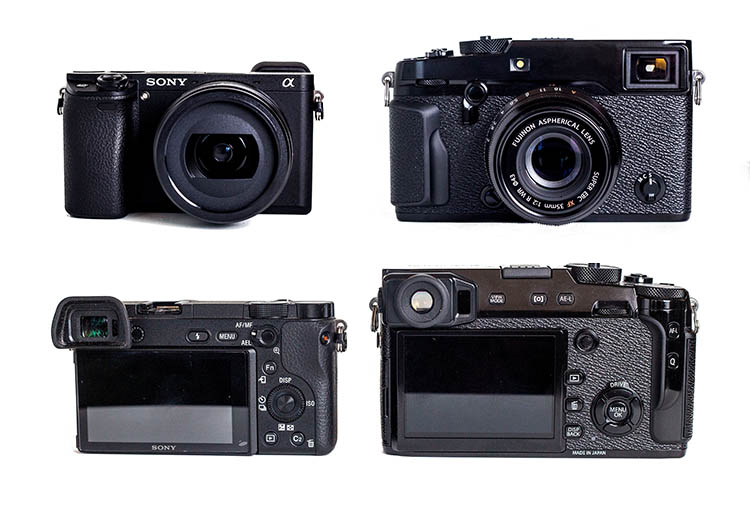
In the X-T2 and X-Pro2, Fujifilm offers two flagship cameras that have a lot in common, but are designed for slightly different purposes. So which one should you buy? We’ve broken down the key differences.

Video

Let’s get probably the biggest differentiator out of the way right up front – the X-T2 offers 4K video, while the X-Pro2 makes do with standard HD. The addition of 4K to the X-T2 surprised us a little when we first saw it on the spec sheet, but it’s clear that Fujifilm sees this feature as an important ‘must have’ in a camera as versatile as the X-T2. The X-T2 can record video in clips up to 10min duration, or 30min when the optional power booster grip is attached. 

The X-Pro2, on the other hand, is meant for a different kind of photographer – one who is more stills-oriented, and more likely to shoot with prime lenses than zooms. The addition of 4K to the X-Pro2 would have certainly increased its cost – and the engineers tell us that it would also have increased its size and weight as a consequence of the necessity for a beefed-up heat sink. So if you need 4K, the X-T2 is the camera for you. 

Rear LCD screen

The X-Pro2, being the more ‘traditional’ of the two cameras, has a simple, fixed rear LCD. In contrast, and in keeping with its ultra-versatile ‘do anything’ design philosophy, the X-T2 features a complex, multi-articulating screen that enables easy framing from high and low angles in both landscape and portrait orientations. This articulating design is also more useful for video work.

The decision by Fujifilm (which actually manufactures capacitive membranes for touchscreens) not to include touch sensitivity in either camera is a little disappointing. Also a bit odd is the resolution difference between the screens on the back of the X-T2 and X-Pro2. The X-Pro2’s screen resolution is 1.6 million dots – somewhat higher than the 1.04 million-dot screen on the back of the X-T2 (it’s the difference between 900 x 600 rather than 720 x 480 pixels).

So in summary: If you want screen articulation, go for the X-T2. If you don’t mind a fixed screen, you’ll get slightly higher resolution from the X-Pro2.

Viewfinder

At a quick glance, the electronic viewfinder specifications of the X-Pro2 and X-T2 are very similar. Both are centered around the same 2.36 million-dot OLED display, and both offer a window on the world that is both sharp and detailed. But the X-T2’s electronic viewfinder is the better of the two, for a couple of important reasons.

First is the addition of ‘burst mode’ to the X-T2, which increases the refresh rate of the live view image in the camera’s viewfinder to 100fps. And second is the complex optical assembly (shown above) that focuses the viewfinder’s image into your eye. The X-T2’s EVF is one of the best electronic finder that we’ve ever used. Its unusually high magnification of 0.77X and 100% frame coverage place it a level above the 92% coverage and 0.60X of the X-Pro2.

But before we dismiss the X-Pro2 altogether…

Viewfinder

The X-Pro has one major trick up its sleeve – its viewfinder is a ‘hybrid’ type, that also offers a rangefinder-style optical view, which employs frame-lines to preview composition.

The difference between an optical and electronic viewfinder experience is hard to explain until you’ve compared them directly, but if you’re shooting with prime lenses between 28 and 50mm equivalent, the X-Pro2’s optical finder is a delight. Electronic manual focus assist in optical finder mode is an added bonus. The X-T2’s fully electronic finder is a better choice if you’re primarily a zoom lens user.

Ergonomics

While the basic control logic of the X-T2 and X-Pro2 is very similar (and more or less standard across the entire X-series) the two cameras are ergonomically quite different. The rangefinder-style X-Pro2’s viewfinder is positioned off to the left of the camera (with its back facing you) while the X-T2’s finder sits in a DSLR-style ‘hump’ in line with the lens axis. 

Which of these designs appeals more to you is a matter of personal preference (skip back to the previous slide for a better explanation of the technical differences between the two cameras’ viewfinders) but the experience of shooting with them is subtly different as a result.

The X-Pro2 (shown above) is designed with stills shooters primarily in mind, and more specifically, stills shooters who like to use prime lenses. The X-Pro2 doesn’t handle quite as well with Fujifilm’s longer, heavier zooms, whereas these are the kinds of lenses that the X-T2 is specifically designed to be paired with. With the optional power booster grip attached, the X-T2 balances nicely, even with Fujifilm’s beefiest lenses. And of course, that grip also duplicates key controls for vertical format shooting. 

Faster…

Of these two cameras, the X-T2 is the faster. Designed to cater to the needs of sports and action photographers the X-T2 boasts a maximum continuous shooting rate of 8 fps, with continuous autofocus. This can be increased to 11 fps in boost mode, with the optional grip. The fastest framerate with live view maintained is less, at 5 fps, but this is still plenty fast enough for most subjects. In fully electronic shutter mode, maximum framerate caps out at 14 fps.

The X-Pro2, in contrast, is limited to 8 fps with autofocus, and a mere 3 fps with live view maintained in the viewfinder.

These are different horses designed for different courses. The speed-oriented X-T2 also boasts a USB 3.0 interface, capable of considerably greater data transfer rates than the USB 2.0 interface of the X-Pro 2. In addition both the X-T2’s SD card slots are compatible with the latest UHS-II interface type, whereas only the #1 slot of the X-Pro2 can make full use of these cards.

…and longer

As well as increasing the X-T2’s speed and duplicating its controls for vertical format shooting, the optional power booster grip also triples the camera’s battery life. It’s not magic – the grip simply accommodates an additional two batteries, bringing the total number of available cells to three. Hence three times the endurance, to a rated ~1000 exposures.

The X-Pro2 lacks an accessory grip, and endurance caps out at around 250 exposures with the EVF, and ~350 when the optical finder is used (CIPA ratings in all cases).

Autofocus

The X-T2 incorporates Fujifilm’s most advanced autofocus system yet. It boasts 325 AF points (169 of which offer phase detection) which work in concert to offer a ‘hybrid’ autofocus system. Extensive customization of the X-T2’s continuous autofocus performance is made possible with Canon-style AF setting ‘sets’.

For now, the X-T2’s AF is superior to the very similar system found in the X-Pro2, but this is Fujifilm we’re talking about – the most firmware updatey company of them all (except perhaps Samsung – RIP). As such, we’re told that the X-Pro2’s autofocus system will be brought up to par with the X-T2’s in terms of baseline performance by way of a firmware update scheduled for autumn.

Autofocus

Note that the X-T2’s AF-C customization options (above) will remain unique to this model though, meaning that the X-T2 will remain a better choice if AF performance – or action photography in general – are your priorities. 

Which one should you buy?

If you’re in the market for a new camera and the Fujifilm X-Pro2 and X-T2 are on your list, chances are that both will keep you pretty happy. As far as image quality is concerned, we’re very pleased by the output from their 24MP APS-C sensor, and in video mode, both models are lightyears ahead of previous-generation X-series cameras. The X-T2 scores over the X-Pro2 in terms of video simply by the addition of a pretty impressive 4K specification, and both cameras produce good-looking HD footage.

Beyond the basics, the X-Pro2 is probably a better choice for prime lens photographers, thanks to its off-center hybrid viewfinder which offers both electronic and optical viewing options. If you mostly shoot candids, street portraits or non-moving subjects in general, its lower maximum shooting rate, (slightly) more basic AF system and non-articulating LCD screen might not bother you at all.

In contrast, the faster, more action-oriented X-T2 is a better all-rounder. It can take pictures more quickly, its viewfinder can refresh more quickly, the rear LCD articulates in useful ways, and with the optional power booster grip attached, it offers a vastly better battery life. It’s also much more comfortable to use with Fujifilm’s heavier zoom lenses than the boxier X-Pro2.

Did we miss anything? Let us know in the comments. 

Articles: Digital Photography Review (dpreview.com)
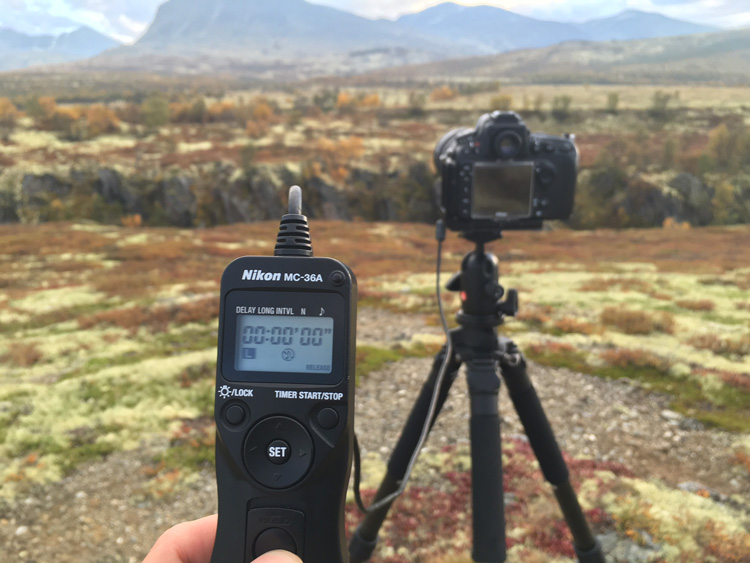
 
Comments Off on Fujifilm X-Pro2 versus X-T2: Seven key differences

Posted in Uncategorized


Side by Side Comparison: The Sony a6300 Versus Fujifilm X-Pro2

17 Jul

The Sony a6300 and Fujifilm X-Pro2 are two mirrorless cameras that debuted very recently as updated versions of their popular and beloved predecessors. Both cameras are comparable in technical specs and appeal, but how does each fare when compared side-by-side? Find out below!

Fujifilm X-Pro2 versus Sony a6300 6

Technical Specs: Main Similarities

Camera Sensors and Format

Both the a6300 and X-Pro2 are APC-C crop sensor bodies with a 1.5x crop factor. Each has a CMOS sensor with 24-megapixel resolution and is capable of shooting in both JPG and RAW on SD memory cards.

Solid, Weather-Resistant Body

Perhaps the biggest cosmetic upgrade that Sony made to the a63000 was including a tougher, more weather-resistant body. Like the X-Pro2, the a6300 is composed of magnesium alloy promises to be dust and moisture resistant.

Fujifilm X-Pro2 versus Sony a6300 6

In-Camera Wi-Fi

Like most modern digital cameras, both the X-Pro2 and a6300 have built-in Wi-Fi, making it a snap to transfer photos from your camera to your mobile phone, or shoot remotely via a mobile app.

Technical Specs: Main Differences

Price

The a6300 can be purchased body-only for $ 998.00, while the X-Pro2 is quite a bit more expensive at $ 1,699.00. Accompanying Fujifilm lenses also tend to be pricier than Sony equivalents.

Size and Weight

The X-Pro2 is quite a bit bulkier and heavier, weighing in at 15.70 ounces (445 g) body-only compared to the a6300’s 14.25 ounces (404 g). In terms of dimensions, the X-Pro2 is also slightly bigger with dimensions of 5.5 x 3.3 x 1.8″ (141 x 83 x 56 mm), compared to the a6300’s dimensions of 4.7 x 2.6 x 1.9″ (120 x 67 x 49 mm). Accompanying Fujifilm lenses are also heavier and larger than Sony equivalents.

Sony a6300

Sony a6300

Fuji X-Pro2

Fuji X-Pro2

Both shot with the same settings. Images are straight from the camera, unedited.

Video

The a6300 can record 4K video, while the X-Pro2 can only record video at 1080p. Interestingly, the Fujifilm offers two SD-card slots compared to the Sony’s single SD-card slot. You’d think Sony would squeeze in another slot to accommodate their higher-quality video formats.

Viewfinders

Among the unique features of Fujifilm’s digital cameras is their signature hybrid viewfinder which really shines on the X-Pro2. For those unfamiliar, the hybrid viewfinder offers the ability to switch between optical (rangefinder style) and electronic viewfinders , which can be a huge advantage for photographers who dislike shooting with electronic viewfinders only, which is what you get with the a6300.

Focus Tracking

Besides the inclusion of 4K video, the main selling point of the a6300 was its brand new sensor, and what Sony claims is the world’s fastest autofocus (dubbed “4D focus”) with 425 phase detection autofocus points. Combined with the Sony’s ability to shoot at up to 11 frames per second and accurate lock-on AF, the a6300 is a beast for shooting sports and action photography.

Comparatively, the X-Pro2 sports a total of 273 AF points including 169 embedded phase-detect AF points, plus a maximum burst rate of 8 frames per second.

Sony a6300

Sony a6300

Fuji X-Pro2

Fuji X-Pro2

Display Screen

While both cameras have a 3-inch rear LCD screen, the a6300 has a pop-out tilting screen, while the Fujifilm’s screen is melded to the camera body.

Built-in Flash

The a6300 offers a small pop-up flash that can be angled to bounce off the ceiling, in addition to a hot-shoe mount, while the X-Pro2 does not have a built-in flash (only a hot-shoe mount).

In Practice

Given the technical similarities and differences above, how did it actually feel to handle both cameras? The Fujfilm’s weight and size were definite factors, especially while switching between the smaller, lighter-weight Sony. With that being said, one could definitely argue that Fujifilm’s heavier, more solid camera and lenses felt like a higher-quality investment compared to some of Sony’s lightweight, plastic-based lenses.

Sony’s newly engineered 4D focus tracking was incredibly spot-on and accurate, especially compared to the Fuji. However, unless you’re shooting a ton of action scenes, Sony’s ultra-fast autofocus is a luxury that isn’t a make or break feature. One feature on the Sony that did come in handy was the flexible pop-up flash that would have been nice to have on the Fuji.

Fujifilm X-Pro2 versus Sony a6300 6

Sony a6300 photo on the left; Fujifilm X-Pro2 photo on the right. Both shot with the same settings. Images are straight from the camera, unedited.

The X-Pro2 has a clear vintage, rangefinder look and feel to it, which some photographers may prefer. Personally, I preferred the feel and overall button placement of the Sony, and was ultimately able to customize buttons and settings to operate it similarly to my Canon 5D Mark III.

On both cameras, the built-in Wi-Fi was a little tricky to set up, but from then on was incredibly intuitive and easy to wirelessly transfer images straight from the cameras to cell phones.

Sony a6300

Sony a6300

Fuji X-Pro2

Fuji X-Pro2

One last consideration – lens availability

Since both the a6300 and X-Pro2 are interchangeable lens cameras, compatible lens selection is another crucial difference between the two brands. Fujifilm lenses, while more solid and often more expensive, are contained to primes with a rather limited selection of zoom lenses, most of which have variable maximum apertures. In comparison, Sony offers a slightly more varied selection of lenses from primes and wides to mid-range and telephoto zooms.

Which is better for you?

Both the X-Pro2 and a6300 are feature-packed, brand new cameras that will appeal to different types of photographers.

Go Sony: If you value wicked fast autofocus, enhanced video recording capabilities, and/or are on a bit of a budget, the Sony a6300 is probably best for you.

Go Fuji: If you love the look and feel of a rangefinder camera, value Fuji’s unique hybrid viewfinder, and/or have a larger budget, the X-Pro2 will be your new favorite camera.

Sony a6300

Sony a6300

Fuji X-Pro2

Fuji X-Pro2

Have you tried either or both of these cameras? What are your thoughts?

googletag.cmd.push(function() {
tablet_slots.push( googletag.defineSlot( “/1005424/_dPSv4_tab-all-article-bottom_(300×250)”, [300, 250], “pb-ad-78623” ).addService( googletag.pubads() ) ); } );

googletag.cmd.push(function() {
mobile_slots.push( googletag.defineSlot( “/1005424/_dPSv4_mob-all-article-bottom_(300×250)”, [300, 250], “pb-ad-78158” ).addService( googletag.pubads() ) ); } );

The post Side by Side Comparison: The Sony a6300 Versus Fujifilm X-Pro2 by Suzi Pratt appeared first on Digital Photography School.


Digital Photography School

 
Comments Off on Side by Side Comparison: The Sony a6300 Versus Fujifilm X-Pro2

Posted in Photography