RSS
 

Posts Tagged ‘Using’

How to Create Amazing Reflection Photos using Puddles

17 Jul

People are captivated by reflections, and photographers eagerly seek out still bodies of water in order to capture stunning reflection shots. But a perfect reflection may be closer than you think, especially if it has just been raining.

puddle, reflection, symmetry, how to

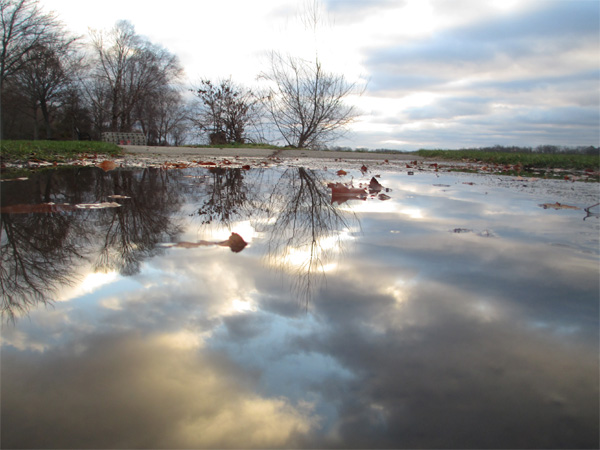
Puddle reflection

Photographing puddle reflections

Puddles are an incredibly useful if perhaps surprising source for reflections. Puddles are generally shallow and found in protected areas or depressions, which means that they are likely to hold smooth, still water. They can also be found in many different locations, providing a variety of options for subjects and compositions. Finally, puddles are so mundane and small that they are often overlooked, so you can create unique and surprising images that others likely missed.

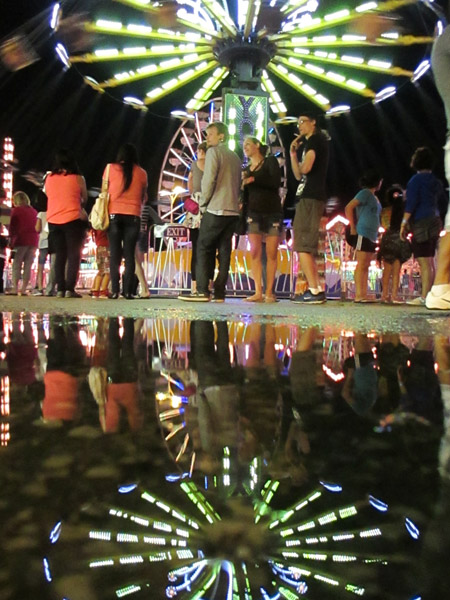
The trick with capturing amazing reflection photos using puddles, is to get down low. You want your camera to get as close to the surface of the puddle as possible. This will make even a small puddle appear expansive in your final image. I recommend putting your hand or a finger under your camera to steady it and keep it out of direct contact with the water. It is also useful to have a small bubble level attached to your camera to judge whether your composition is level.

puddle, reflection, symmetry, how to

This puddle reflection technique works equally well whether you have a DSLR camera or a point-and-shoot. I often use my point-and-shoot for these types of shot, as it is much easier to simply lean down and hold it near, or over, the puddle when shooting, and I am much less worried about it getting wet. When shooting puddles with my DSLR, I am much more likely to squat down to better support the camera with both hands and keep it out of the water or mud.

puddle, reflection, symmetry, how to, sunset

puddle

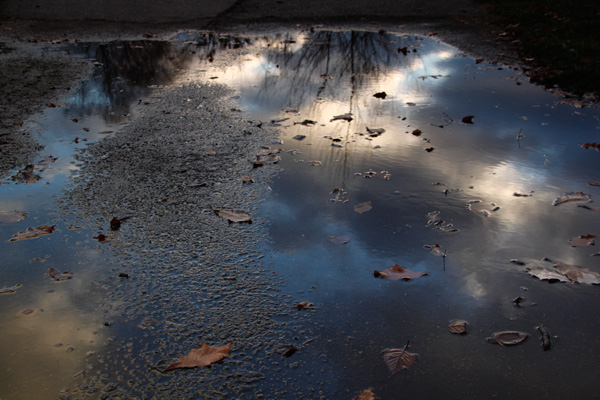
Puddle used for the reflection above

Puddles do not need to be very large for such photographs, but an ideal puddle would be at least a foot or more, long and wide. Puddles that have formed naturally on roads, or on the ground, provide a better transition from subject to reflection than puddles that are surrounded by a set boundary like a curb or a bank. You can also think beyond traditional puddles and try the same technique with wet roadways or stone pillars, which often become highly reflective when wet.

An example: puddle versus puddle reflection

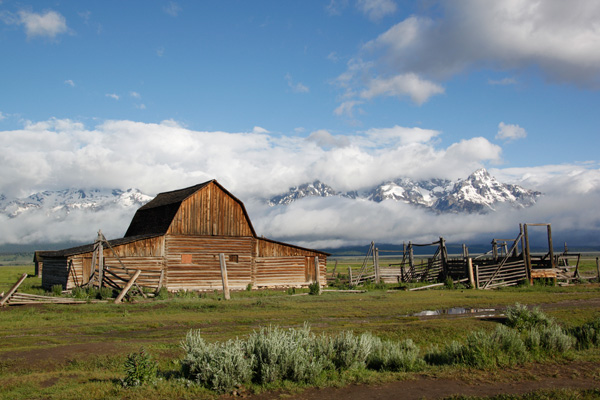
Grand Teton National Park, Tetons, Mormon Row, mountains, landscape, barn

Above is one of the classic scenes from the Grand Tetons: the abandoned houses of Mormon Row. It had rained the previous day, and much of the night, and in the lower right-hand section of the photograph, you will notice a fairly unassuming puddle remaining in the mud.

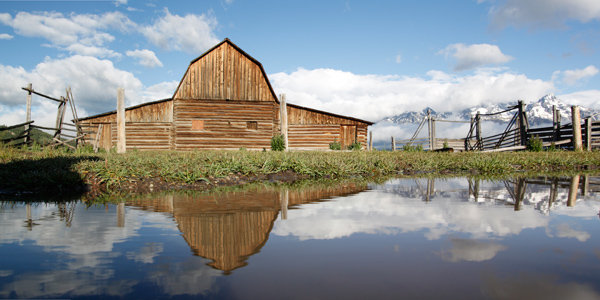
Grand Teton National Park, Tetons, Mormon Row, mountains, landscape, barn, reflection, puddle

Getting down low and holding my camera just above the surface of that puddle allowed me to capture this shot. Despite the slight breeze and rippling of the water, this reflection clearly highlights both the abandoned building and the incredible mountain view behind it. Merging three different compositions provided the panoramic view below.

McEnaney-Tetons-panorama-final

Seek out puddle reflections

Next time you find yourself in a wet situation, make the most of the puddles around you. Get down low, and you may be surprised at what your camera captures compared to what the scene looks like to you standing up higher. Do not limit yourself to taking the same shots as everyone else – try something new!

puddle, reflection, how to, carnival, night, street photography

The weekly photography challenge a little while ago was reflections. If you’re still working on that one try these tips out. Want to see more reflections – try this collection.

The post How to Create Amazing Reflection Photos using Puddles by Katie McEnaney appeared first on Digital Photography School.


Digital Photography School

 
Comments Off on How to Create Amazing Reflection Photos using Puddles

Posted in Photography


Using Slower Shutter Speeds to Show Motion in Your Images

15 Jul

Changing shutter speed not only changes the amount of light that enters the camera, it also changes the way your images look. By changing the shutter speed, you’re allowing the film or digital sensor to be exposed for a longer or shorter period of time. That affects how motion is portrayed in your image. A short (or ‘fast’) shutter speed will freeze motion, whereas a long (or ‘slow’) shutter speed will allow you to show motion.

Let’s take a look at a few examples using slower shutter speeds to show motion in your images:

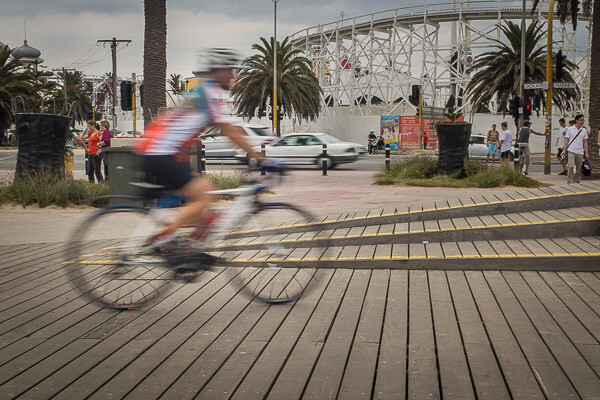
Img 1 Cycling on the boardwalk Melbourne 600px

Slow speeds – camera stationary

The image above shows what happens when you use a slow shutter speed while holding the camera still. In this case the shutter speed was 1/40th of a second, which allowed me to hand-hold the camera while still showing some motion on the cyclist. The slower the shutter speed, the more movement in your subject.

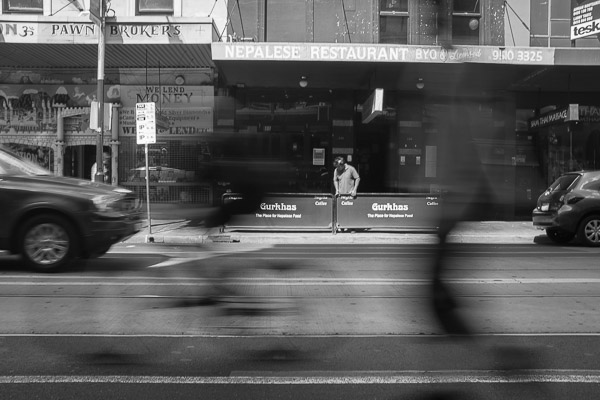
The image below was made with a shutter speed of 1/15th of a second. That’s starting to get a little slow for hand-holding so I rested the camera on the top of a fence rail on the side of the road. The image shows a cyclist riding along the road, followed closely by a skateboarder. Both the cyclist and skateboarder are blurred quite a lot, but they’re still identifiable, while the rest of the image is still in focus. It gives a feeling of movement, without moving the camera.

Img 2 Skateboard and bicycle Melbourne 600px

Panning the camera to add motion

Moving the camera while making an exposure is another way to show movement in an image. Instead of keeping the camera still and using a long shutter speed – you move, or pan, the camera with your moving subject as you expose the image. That way the subject remains sharp, while the background becomes blurred.

This image of another cyclist riding along a boardwalk was also taken at 1/40th of a second, panning with the rider and following him from right to left as he passed by. The shutter speed was slow enough that the background is blurred, while the bicycle and rider are relatively sharp.

Img 3 Orange bicycle Melbourne 600px

Remember, the subject doesn’t have to be ‘tack sharp’ when you’re showing movement. Sometimes a little blur on the subject helps to enhance the feeling of movement in the image, as it does in this case. Notice the spokes of the bicycle’s wheels are blurry too, which also helps to show movement. Using a faster shutter speed while panning would have resulted in the background not being as out of focus and the wheels would have been frozen in time with the spokes clearly visible. In essence, the cyclist would have looked like he was stationary and balancing on the boardwalk, not moving as he actually was.

Moving water

Cyclists and other fast moving objects are not the only subjects for slow shutter speeds. What about shots including moving water. I think it’s fair to say we’ve all seen images of the sea or a river with water that looks buttery smooth. That smoothness is also achieved by using a slow shutter speed.

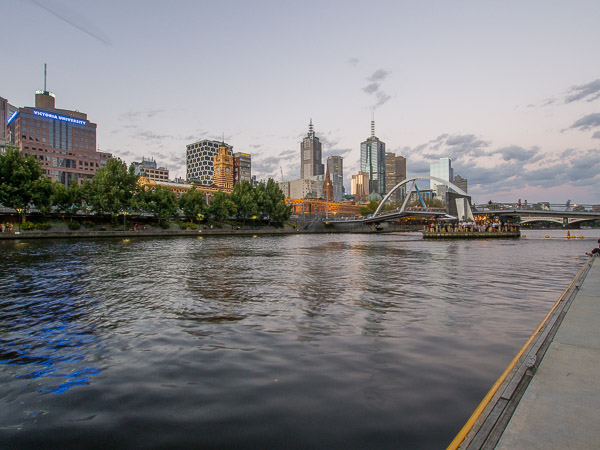
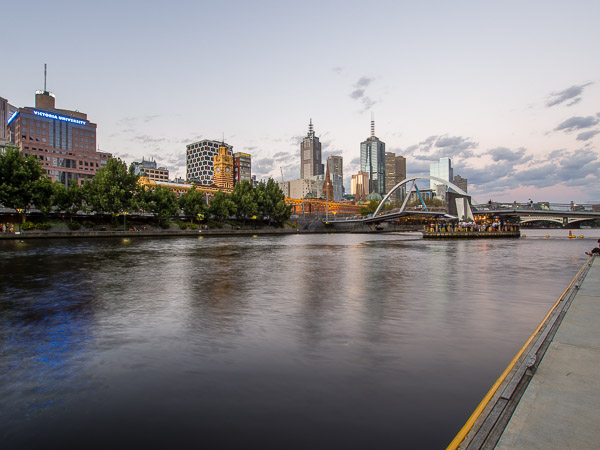
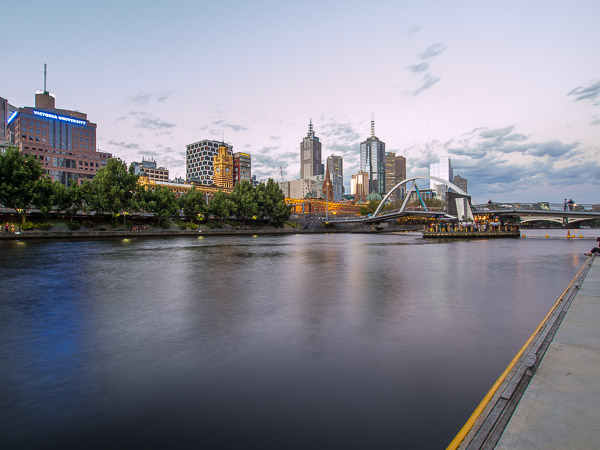
The following three images were all taken from the same location on the side of the Yarra River in Melbourne, Australia. The camera was mounted on a tripod for stability and the images were made at different exposure values. The first image was made with a shutter speed of 1/4 of a second, which is relatively fast for this type of photograph. The individual ripples in the water are clearly visible. You can see some movement, but not much.

Img 4 Melbourne skyline Melbourne 600px 2

The second image was made with a shutter speed of 2 seconds. The water is starting to get smoother due to the longer shutter speed. The individual ripples are starting to disappear.

Img 5 Melbourne skyline Melbourne 600px

The final image in this series was exposed for five seconds. The water has now become much smoother due to the movement while the shutter was open. Photography is an art form and there is no right or wrong way to photograph any subject, but for me, the third image with the smooth water is much more appealing than the first two versions.

Img 6 Melbourne skyline Melbourne 600px 3

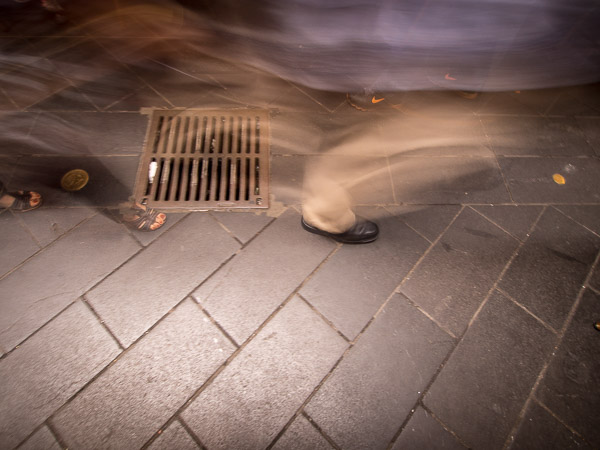
Why not experiment with different shutter speeds next time you go out to make photographs. It’s a great way to add interest to an otherwise static and maybe boring subject! All it takes is a little imagination and patience and you can come away with some really interesting and different images – like this water drain for example, which was hand-held with a shutter speed of one second. The ghostly images passing over the drain make it a little more interesting than just the drain grate itself. The most important thing is to experiment – and have fun!

Img 7 Ghostly legs Melbourne 600px

The post Using Slower Shutter Speeds to Show Motion in Your Images by Ken Lyons appeared first on Digital Photography School.


Digital Photography School

 
Comments Off on Using Slower Shutter Speeds to Show Motion in Your Images

Posted in Photography


Seven more DIY photography tips using household objects

12 Jul

The Cooperative of Photography received a lot of attention recently for a video featuring seven easy photographic hacks using household items. Now they’ve released a follow up video with seven more neat tips and tricks. It might just help you kick of a fun weekend photo project. Learn more

Articles: Digital Photography Review (dpreview.com)

 
Comments Off on Seven more DIY photography tips using household objects

Posted in Uncategorized


Create Better Black and White Photos Using Local Adjustments in Lightroom 5

08 Jul

Local adjustments in Lightroom

I showed you how to convert your photos to black and white in Lightroom in an earlier article. But, considering it dealt purely with global adjustments, the piece only gives you half the story. Global adjustments get you started, but in order to get the best black and white conversion possible you need to make local adjustments as well. This article will show you how to do this.

First, a couple of definitions:

Global adjustments: Any adjustments (to brightness, contrast etc.) that affect the entire image.

Local adjustments: Adjustments that affect only part of the photo.

Before I show you how to make local adjustments, let’s think about why you would do so. Certain things pull the eye more than others. For example, when you look at a photo with people in it, your eye will go straight to them, even if they are small in the frame. This is probably down to human curiosity more than anything, but it works.

Two other things that pull the eye are highlights and contrast. The idea behind making local adjustments is that you can alter the brightness or contrast of certain areas in the frame to influence where the eye goes. This creates a better, more beautiful photo.

Dodging and burning

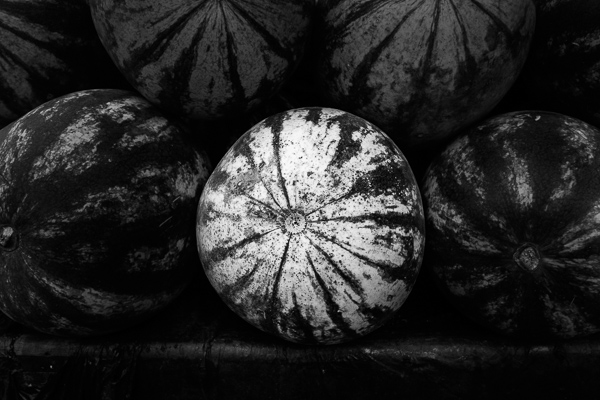
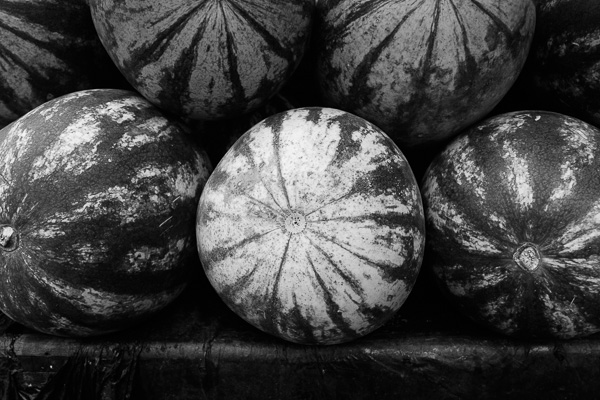
Here’s the photo we’re going to work with in today’s article. I’ve already converted it to black and white using global adjustments.

Local adjustments in Lightroom

As you can see, it lacks a focal point. It also contains lots of beautiful textures which will look great in black and white if we can bring them out.

In order to make effective local adjustments you need to decide what you want to achieve before you start. Here, I decided to make the central watermelon the focal point of the composition. Decision made, it’s just a question of how to achieve it.

Dodging and burning

Although Lightroom itself doesn’t use these terms, you will find them referred to time and again in post-processing. Dodging is the act of making part of the photo lighter, and burning is the act of making it darker. They originated in the chemical darkroom and are also done in photo editing programs like Photoshop.

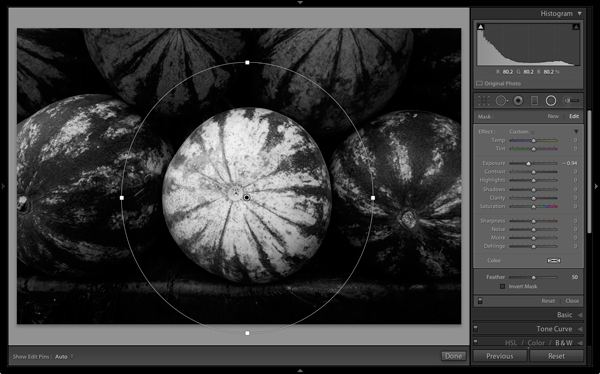
The first step to achieving my aim of making the central watermelon the focal point, is to make the rest of the photo darker. I did that by placing a Radial Filter over the central watermelon and moving the Exposure slider left.

Local adjustments in Lightroom

Note: The Radial Filter is new to Lightroom 5. If you have an earlier version of Lightroom, you can use either Post-crop Vignetting or the Adjustment Brush instead.

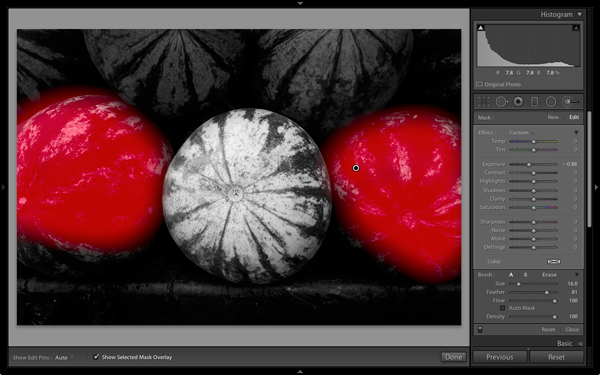
The two watermelons either side of the central one are a little too bright. So I used the Adjustment Brush to select (mask) them and moved the Exposure slider left to make them darker. The screenshot below shows the area covered by the mask. Note how I only painted the top parts of the watermelons as the bottom part was already dark.

Local adjustments in Lightroom

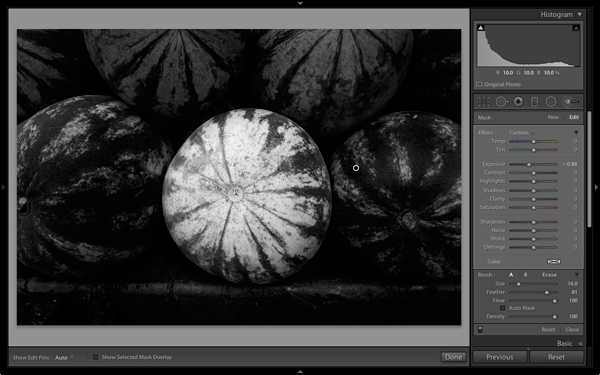
This is the result of the local adjustment.

Local adjustments in Lightroom

Contrast and Clarity

The next step is to improve the appearance of the central watermelon. I can do that by increasing contrast to bring out the beautiful textures of its skin.

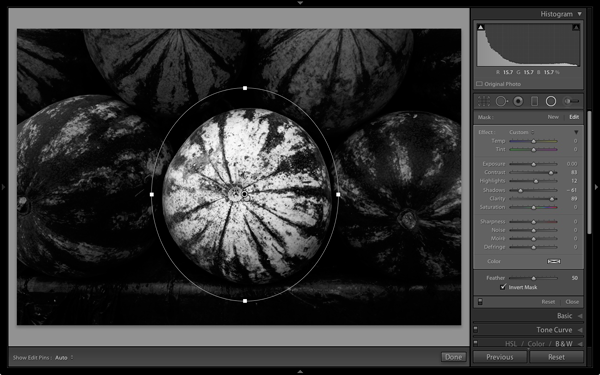
I placed another Radial Filter over the watermelon (you could also use the Adjustment Brush) and ticked the Invert Mask box so the adjustment was applied inside, rather than outside, the filter. Then I increased Contrast and Clarity, and moved the Highlights slider right and the Shadows slider left. The result is a big increase in contrast, bringing out the texture of the watermelon’s skin. Here’s the result.

Local adjustments in Lightroom

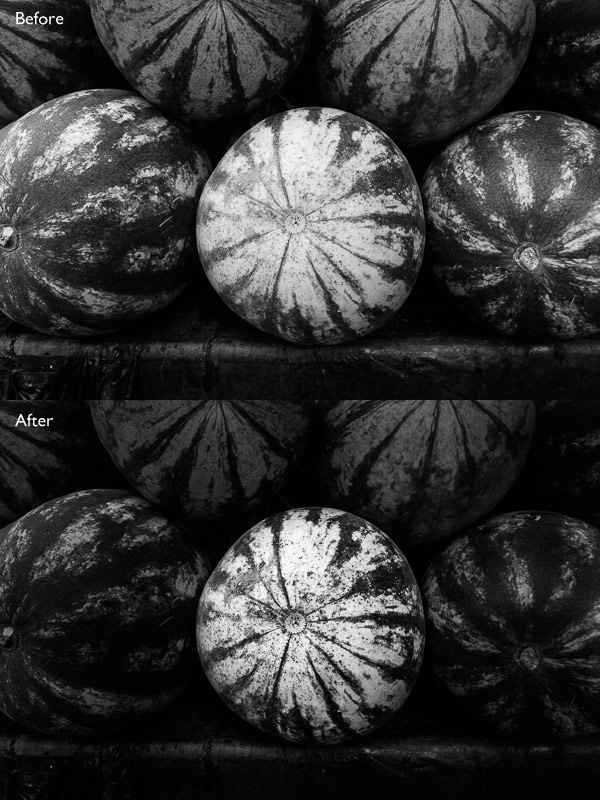
Here are the before and after views so you can see the difference, which is entirely down to the local adjustments.

Local adjustments in Lightroom

That completes my overview of using local adjustments in Lightroom. As you can see, the local adjustments turned an average photo into a much stronger one. There is nothing overly complicated about it, it’s more a matter of training your eye to see in black and white and then deciding how to use the tools that Lightroom gives you to realize your vision.

I’m curious to hear how you use local adjustment when you convert your photos to black and white. Please let us know in the comments.


Mastering Lightroom: Book Three – Black & White

Masterlng Lightroom: Book Three – Black & White by Andrew S GibsonMy ebook Mastering Lightroom: Book Three – Black & White goes into the topic of black and white in depth. It explains everything you need to know to make dramatic and beautiful monochrome conversions in Lightroom, including how to use the most popular black and white plug-ins. Click the link to visit my website and learn more.

The post Create Better Black and White Photos Using Local Adjustments in Lightroom 5 by Andrew S. Gibson appeared first on Digital Photography School.


Digital Photography School

 
Comments Off on Create Better Black and White Photos Using Local Adjustments in Lightroom 5

Posted in Photography


Using Depth of Field and Perspective for Better Composition

01 Jul

We all know this problem. You take a picture of a beautiful scene but it just doesn’t turn out the way you want. Something is missing. It usually isn’t a matter of your camera or the settings you are applying. But what is it then? The question at hand is how do you get from a snapshot to an interesting, unique, and well composed photograph.

To answer this, we have to move away from the technical aspects and go more into the creative and artistic aspects of photography. You might say that this is a very subjective matter and that beauty is in the eye of the beholder, but there are a few building blocks that will help to improve your photography and also develop your own unique visual language.

Depth of field for a more three-dimensional Look

An important aspect of photography is that we want to capture a three-dimensional reality by taking a two-dimensional image. When we are out in the field, our eyes in collaboration with our brain create very complex images within split seconds. The most important factor in this context is that our eyes are constantly moving while focusing on different subjects. The focal plane is shifting with a subject in focus and everything in front or behind appearing to be blurred. This “Depth of Field” is one the most important techniques we can utilize to simulate depth and three-dimensionality.

Begginner photography tips 06

Utilizing depth of field to create a more three-dimensional look

In order to play with depth of field, we need a scene with a defined foreground and a background. Whereas the background is usually a given, a lot of images lack foreground which makes an image appear flat and boring. Choosing a defined foreground will enable us to actively compose an image and become creative.

Once you have chosen a background and a foreground you like (ideally both complementing each other), you have to find the right position for you and your camera in order to combine both for an appealing overall image. To find the right position, you should try different angles, move around, get low to the ground and don’t solely rely on your zoom. By using a large aperture (small f-stop number) and a selective focusing, we can isolate the foreground from the background by making the foreground objects sharp and the background blurry (or vice versa). This will convey a sense of depth and three-dimensionality.

Begginner photography tips 10

No foreground. Lack of depth and composition.

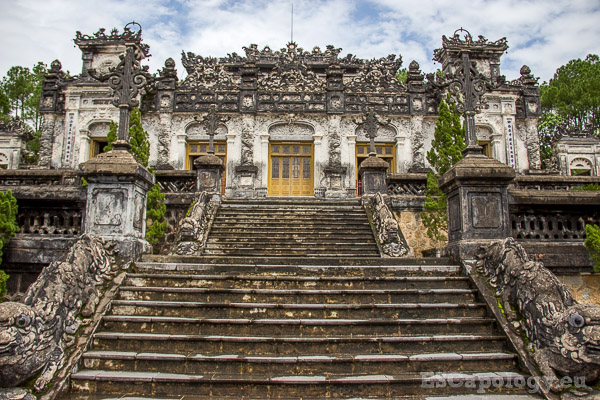
This image (above) of one of the ancient tombs around Hue, Vietnam looks flat. There is no depth, no three-dimensionality and it lacks a clear composition. Because a foreground is missing, the image is too busy and distracting.

Begginner photography tips 04

Foreground and background nicely isolated to create a sense of depth.

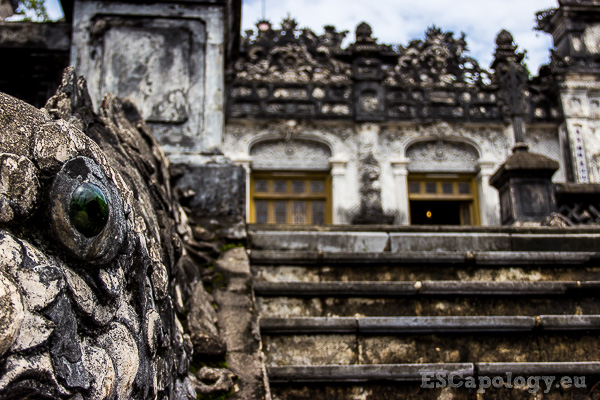
Above an image of the same subject but with a much better composition. The focus is on the eye of one of the dragons, making it our foreground. The rest of the tomb is our background, slightly blurred and nicely separated. It generates a sense of depth and also appears much calmer and structured than the first image. The viewer is being led into the picture. You can use this technique when photographing very popular places like for example the Eiffel Tower, Angkor Wat or other monuments. Instead of taking the same shot as every other tourist, experiment with different backgrounds and foregrounds, get creative, move, and I am sure you will end up with an original and authentic image.

Begginner photography tips 03

Cambodian Fighter. Focus on the subject, still including the environment.

You can also apply this technique to your people and portrait photography. It not only helps to really put emphasis on your subject, but also to incorporate some of the environment, which will help to tell a story. In the picture above, the focus is on the weary fighter, catching his breath during a fierce Khmer Boxing fight in Cambodia. We are at eye level with the fighter and again, the foreground is nicely separated from the rather blurry background. Yet, we can still see parts of the surrounding environment which is the ring and the crowd in the back. The focus however always remains on the main subject.

Leading lines for a sense of perspective

Of course depth of field is not the only means to create a sense of depth and three-dimensionality. The concept of leading lines is another one of those building blocks that you can apply. The viewer of a photograph usually associates diagonal lines which are leading into an image, to a vanishing point perspective. This means that objects which are farther away also appear smaller. This context automatically and unconsciously gives the viewer an impression of three-dimensionality.

Begginner photography tips 02

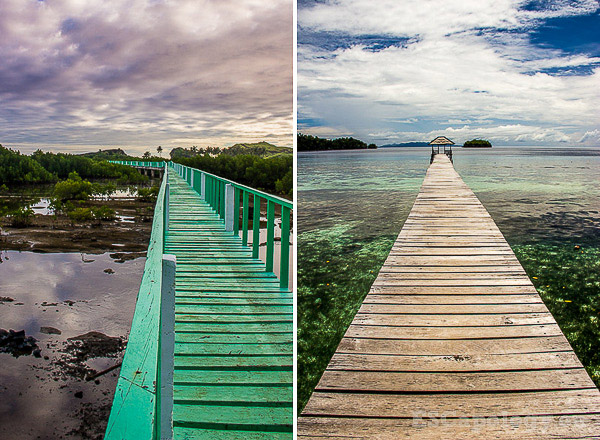
Two images with a clear vanishing point perspective.

As you can see in the images above, a shallow depth of field is not necessarily needed to convey that sense of depth we are looking to achieve. Here it’s all done by using a jetty as lines, which connect different layers of the picture – the image becomes much more plastic and complex.

Begginner photography tips 01

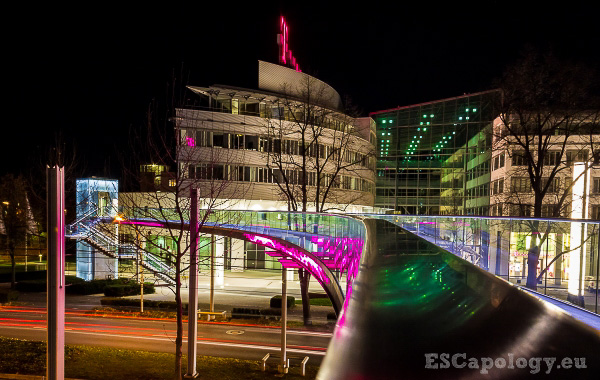
Night Scene: The bridge leading into the picture.

Similarly the image above becomes three-dimensional because the pedestrian bridge is leading into the image. It also appears to become smaller and smaller as it leads into the background. This way the image has that sense of depth even without applying a low depth of field. The bridge as a leading line is connecting our different layers, the foreground and the background.

Begginner photography tips 07

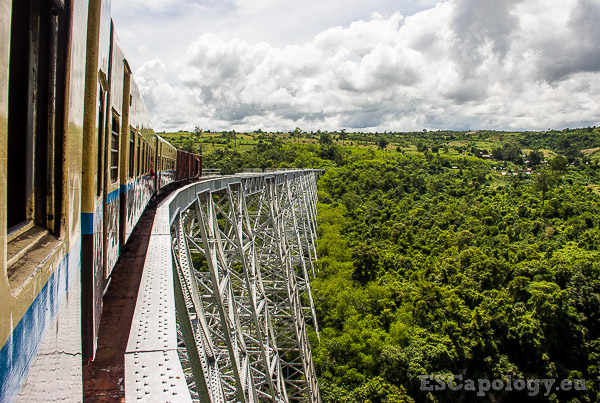
The bridge and the train convey a sense of depth.

Providing a relationship in size

When regarding a picture, the viewer often needs a reference point in order to correctly interpret the information our two-dimensional images provide. We can do this by establishing proportions and providing a relationship in size. Often this isn’t needed as we know a lot of the subjects we are capturing. In the image above we were dealing with familiar objects like a pedestrian bridge, a street and a commercial building. It was easy to put everything into context. But a lot of times, when we are confronted with unfamiliar things, this isn’t as easy.

Begginner photography tips 09

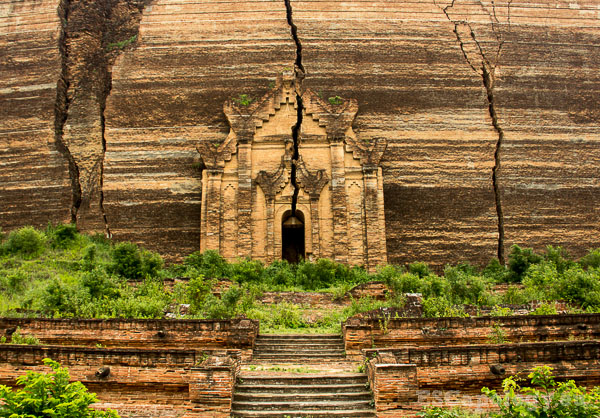
Mingun Pahtodawgyi in Mingun, Myanmar. Can you tell how big it actually is?

In the picture above is Mingun Pahtodawgyi, a temple in Mingun, Myanmar. Left unfinished, this huge construction was planned to become the world’s biggest stupa with a height of 150 meters. It is huge and impressive but the picture above somehow doesn’t manage to convey this. Just by looking at this image it is impossible to gauge the sheer size of the temple. A reference is missing.

Begginner photography tips 08

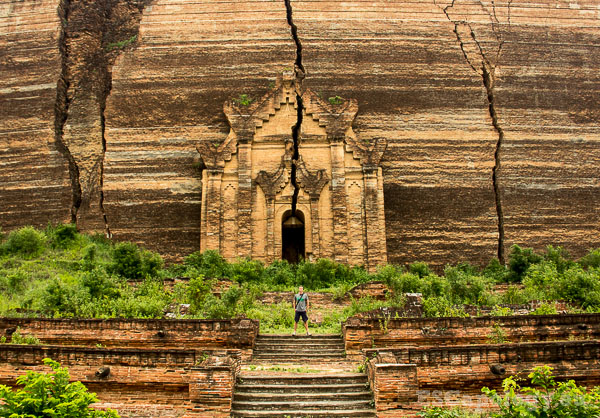
Mingun Pahtodawgyi. Are you getting a better sense of dimension?

Here I have added myself to the picture and despite my rather stupid pose, it instantly provides a point of reference. This relationship in size helps to categorize the stupa and establishes a sense of dimension. To achieve this effect and to provide a relationship in size, you can also use other elements which help the viewer to better comprehend an image.

Begginner photography tips 05

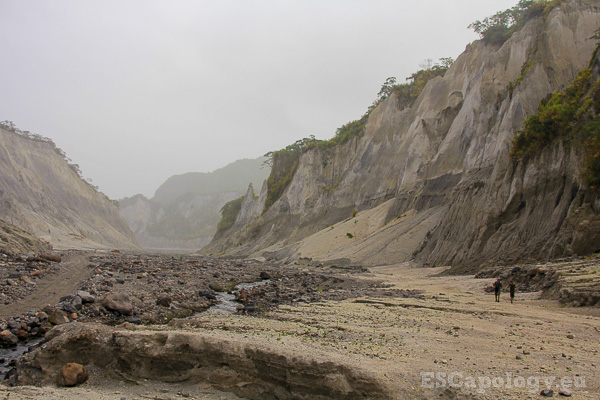
The hike up Mt. Minatubo, Philippines. Another example of relationship in size.

Try to practice, and utilize, these three building blocks to improve your photography. You can also try combining two of these techniques to generate an even greater sense of depth. Of course these concepts are by far not the only factors that make for a good and well composed image. There are many more things to take into account but for now, it should give you a good starting point.

Begginner photography tips 11

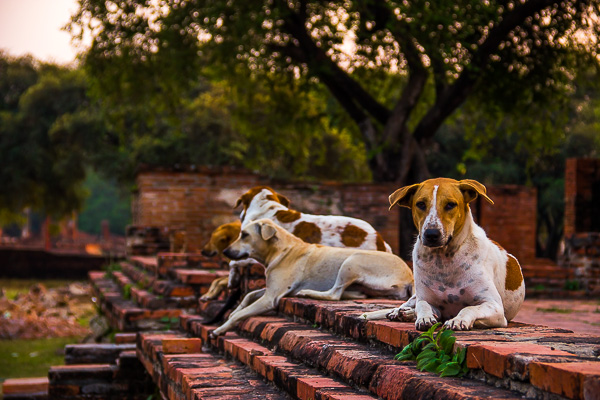
Temple dogs – a shallow depth of field and leading lines combined.

I hope you liked this article. Feel free to comment below and let us know what other techniques or concepts you found helpful on your quest of becoming a better photographer.

The post Using Depth of Field and Perspective for Better Composition by Philipp Dukatz appeared first on Digital Photography School.


Digital Photography School

 
Comments Off on Using Depth of Field and Perspective for Better Composition

Posted in Photography


Reader showcase: Using a Sony NEX as a digital back on an antique camera

29 Jun

Our DIY forum isn’t a month old and we’ve already seen it fill with interesting projects. Some solve a problem, while others are pure fun. Decidedly in the latter category, dpreview forum member vkphoto has put a Sony NEX-F3 ‘digital back’ on a vintage ICA Toska camera from the early 1900s and a Carl Zeiss Tessar 135mm 1:6.3. See how he brought new life to an antique with a $ 15 modification. Learn more

related news: Digital Photography Review (dpreview.com)

 
Comments Off on Reader showcase: Using a Sony NEX as a digital back on an antique camera

Posted in Uncategorized


Reader showcase: Using a Sony NEX as a digital back on an antique camera

25 Jun

1.jpg

Our DIY forum isn’t a month old and we’ve already seen it fill with interesting projects. Some solve a problem, while others are pure fun. Decidedly in the latter category, dpreview forum member vkphoto has put a Sony NEX-F3 ‘digital back’ on a vintage ICA Toska camera from the early 1900s and a Carl Zeiss Tessar 135mm 1:6.3. See how he brought new life to an antique with a $ 15 modification. Learn more

News: Digital Photography Review (dpreview.com)

 
Comments Off on Reader showcase: Using a Sony NEX as a digital back on an antique camera

Posted in Uncategorized


23, June 2014 – Landscape Aerial Photography Using Unmanned Aerial Vehicles

24 Jun


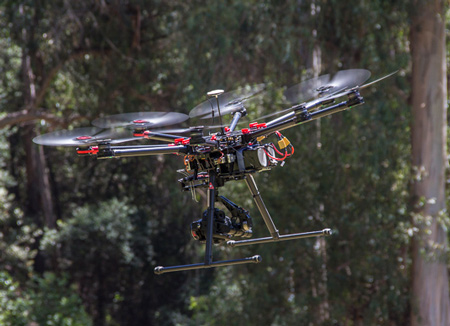
Unmanned Aerial Vehicles (UAVs) have been making a lot of headlines lately within the photography community.  These remotely controlled aircraft have enabled photographers a new way to gain new perspectives on a scene.  They have also caused a lot of controversy in regards to safety and privacy.  Stephen Wheatcraft’s article Landscape Aerial Photography Using Unmanned Aerial Vehicles introduces you to this new method of making images. 

Last week Kevin Raber and Chris Sanderson spent the week on the road working on a new video tutorial with William Neill in Yosemite and Mono Lake areas.  More on this new video in the near future.


The Luminous Landscape – What’s New

 
Comments Off on 23, June 2014 – Landscape Aerial Photography Using Unmanned Aerial Vehicles

Posted in News


Using Off-camera Flash to Fix Lighting Problems for Outdoor Portraits

23 Jun

Model holding flash better

When you’re taking pictures of family and friends outdoors, you are often not in control of the light, and that can lead to poor portraits.

A few of the possible problems include:

  • Raccoon eyes – deep shadows in the eye sockets (and other the nose) caused by bright overhead sunlight or light overcast skies
  • Bright background obscuring the subject’s face – although some cameras automatically compensate for it, if you’re shooting in the shade and there’s a really bright background, that can mislead your camera into underexposing the image, leaving your subject’s face too dark.
  • No control over direction of the light – the sun is here, and you are there. You can move around the person you’re photographing to get better light, but then you may lose the desired background.

With a wireless flash, these problems can be overcome, and it’s surprisingly easy. Canon’s Rebel line, D-series DSLRs and advanced G-series compact cameras let you control off-camera flash wirelessly, which opens up many possibilities when it comes to changing the quality and quantity of light that you use to photograph someone outdoors.

Raccoon eyes – below (left) is a typical portrait shot under direct midday sunlight with our model, Leanne. The sun, almost directly overhead, casts deep shadows over eye sockets, below the nose and chin, and wherever hair blocks the light. Gear: Canon EOS 70D, 85mm f/1.8 USM Canon lens. Exposure: 1/320 second at f/4.5, ISO 100.

Raccoon eyes before 600 Raccoon eyes after 600

Raccoon eyes fixed – (above right) the flash was mounted on the camera’s hot shoe and provided enough fill light to blow away the shadows, but the light is flat. Gear: same as above plus Canon 430 EX II Speedlight. Exposure: 1/250 second at f/10, ISO 100.

Raccoon eyes, cloudy skies (below left) the clouds move in and soften the light. Better, right? Well, sort of. Leanne’s eyes are still in the shadows. Gear: Canon EOS 70D, 85mm f/1.8 USM Canon lens. Exposure: 1/250th at f/3.5, ISO 100.

Raccoon lightcloud before 600 Raccoon lightcloud after 600

A lighter touch with light – (above right) in this case, less light was required to lighten the shadows, so I used the on-screen flash intensity control (on the Canon 70D, press Q and then touch the flash power icon to access this feature) and reduced the flash output. Determining the right amount of flash output is often a matter of trial and error. In this case, the default setting was too dark, +2 was too bright, but +1 was perfect. Gear: same as above plus Canon 430 EX II Speedlight. Exposure: 1/250th at f/7.1, ISO 100.

Balancing light when shooting in the shade

The ideal way to take a portrait in the shade without flash is to shoot with the bright area behind you (behind the camera). This will give you a wide light source and with nice, flattering light. However, you may not have this option, or you want to include interesting background elements that are, alas, drenched in sunlight.

While an on-camera flash will add enough light, you can add more dimensionality and features to your subject’s face by taking the flash off the camera and moving it around. By combining ambient (existing) light with your off-camera flash, you introduce infinite creative portrait-taking possibilities.

(Not sure how to use wireless? Scroll down to read our primer)

It’s best to have what flash guru Joe McNally calls a “voice-activated light holder” (also known as a human being, a friend, relative or cooperative stranger) to move around and hold the flash wherever you need it. If it’s just you and your model, however, an inexpensive light stand and shoe-mount flash adapter, such as the Flashpoint Heavy Duty Lightstand and Adorama Universal Swivel Holder, will do the job. Total cost? Less than $ 50!

Fixing harsh backlighting without flash

Exposed for the background – in the photo below (left), the background is perfectly exposed but Leanne, standing in the shade of a large Maple tree, is in deep shadow. Gear: Canon 70D, 85mm f/1.8 Canon Lens mounted on a Velbon GEO E535D Carbon Fibre Tripod. Exposure: 1/320 second at f/4, ISO 100.

Exposed for background Exposed for openshade

Add one stop of exposure – (above right image) better, but Leanne’s face is still too dark. Gear: same as above. Exposure: 1/200th at f/3.2, ISO 100.

Spot meter on the subject – by taking a spot meter reading you can eliminate the misleading bright background from the exposure equation and get a pretty good exposure on the face (below left). But the eyes are still too dark, and the background is getting blown out. Gear: same as above. Exposure: 1/160th at f/2.8, ISO 100.

Exposedforface Exposed for shadows

Exposed for the eyes – now you can see Leanne’s eyes clearly (above right), but overall the image is too bright, especially the background. So let’s introduce a flash and balance things out. Gear: same as above. Exposure: 1/125th at f/2.5, ISO 100.

Adding flash to balance with the ambient light

Balanced light, image below left. Now the exposure is spot on! If you hold a flash up a foot or so above your camera while shooting, you should get this kind of light. The slight angle gives Leanne’s face a bit of dimensionality. Gear: Canon 70D, 85mm f/1.8 Canon Lens, Canon 430 EX II Speedlight flash mounted on Flashpoint Heavy Duty Lightstand via an Adorama Universal Swivel Holder. Exposure: 1/200th at f/5.6, ISO 100.

Balanced flash background Balanced flash 45degrees Left

Flash at a 45 degree angle (image above right). By moving the flash (now mounted on a light stand) further to the left of the camera and about a foot above eye-level you get this classic Loop pattern portrait lighting. Note how Leanne is turned slightly towards the light, and how the light falls off her left cheek, creating a more flattering, dimensional look. Same gear and exposure as above.

Flash at 90 degree angle (image below left). Now the flash is directly to camera left, and her face is divided into light and dark halves (also known as Split Lighting). This is a more dramatic look. Same gear and exposure as above.

Balanced flash 90degrees Left Backlit flash with refl

Backlighting (above right) – even though the sun was to the right of the camera, after placing the flash above and behind and slightly to camera left, it looks like she is backlit by the sun. These are the kinds of effects you can get by moving the light around. Same gear and exposure as above.

Add a reflector

If one additional light source isn’t enough, you can easily, and inexpensively, add a second by using a reflector. The Glow 5-in-1 32-inch Reflector Kit, for $ 26, is a versatile option. This dramatically increases the possibilities for controlling and shaping the light, and bringing out the contours in your subject’s face.

One problem – running out of hands. The solution? Have your subject hold the reflector and compose a nice tight headshot.

Balanced flash 45 degree refl2

The reflector adds a new dimension. Here Leanne is holding a silver reflector to her left, which is bringing light back to her face in an approximately 2:1 lighting ratio (the reflected light is half that of the direct light from the flash). Notice how the more angular cross-light brings out her facial features. Same gear as above plus Glow 5-in-1 32-inch Reflector Kit. Exposure: 1/160th at f/7.1, ISO 100.

What if you take away the reflector and put a flash in the model’s hands?

Model holding flash better

Flashie? In another setup, Leanne is holding the flash to her side as the sole light source. This is kind of like a “selfie” but with a flash.

Model holding flash vertical

She’s holding the light. In this tight headshot, Leanne is still holding the flash in the same position as above, but with a reflector to camera left adding light on the other side of her face.

Adding an umbrella

While a stand-alone flash (or one used in tandem with a reflector) is great for close shots, light falls off quickly and may not illuminate the person in a longer shot. To solve this, consider adding an umbrella to your arsenal. This will enlarge the light source and will result in more even illumination when shooting a full body or ¾ length portrait. Using an umbrella is worth an article of its own.

Umbrella sidelight modelfull

While a stand-alone flash (or one used in tandem with a reflector) placed near a subject can be great for close shots, it won’t evenly illuminate your portrait subject in a wider shot such as this one. Normally, the solution is to move the flash farther away, but in this scene, an outdoor porch, there was a wall immediately to the left of the camera. In this situation, bounce the flash off an umbrella. This will enlarge the light source to create more even illumination. Be sure to increase flash power approximately one stop to compensate for the light loss that results from bouncing the flash into the umbrella. (Using an umbrella is worth an article of its own!)

Step-by-step instructions on how to trigger Canon off-camera flash wirelessly

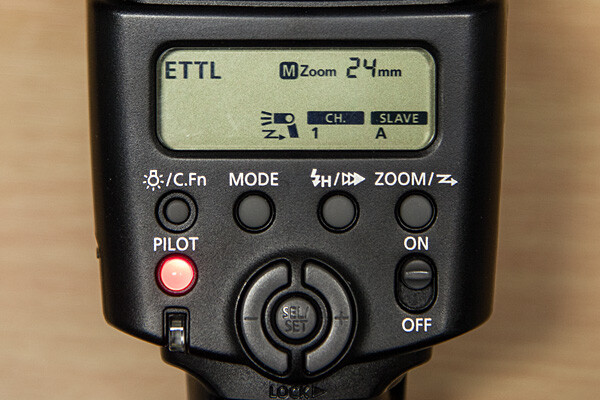
Here are the step-by-step directions for triggering a Canon 430 EX II wireless Canon flash from the Canon 70D. If you’re using another camera, check your manual for wireless flash instructions. Among other Canon systems, the directions will be similar.
flashsettings

  1. Turn the flash on, then press and hold the Zoom button for a second or two. You’ll see a new flash icon and Ch 1 Slave A appear in the LCD screen (see photo above).
  2. Turn the camera on and pop up the flash
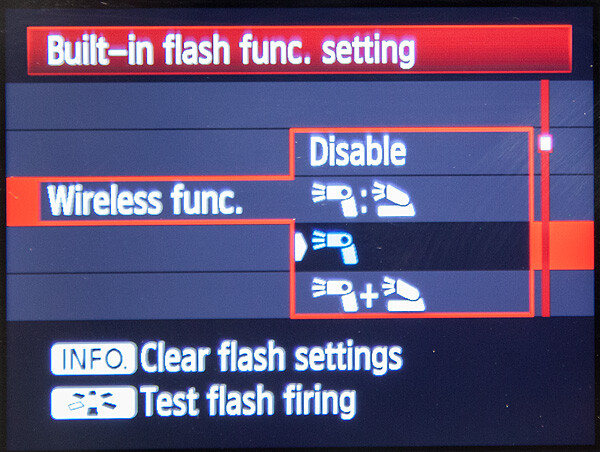
  3. Go to Menu; in the first tab (camera operation), choose Flash Control, then scroll down to Built-in flash function setting, select “Wireless Func.” and choose the middle setting of the single flash (see below) Note: Although the on-camera flash is flipped up, it will not fire during the exposure. Rather, it will flash a split-second before the exposure, which triggers the off-camera flash to fire during exposure, so your only source of flash illumination during exposure will be the off-camera flash.
canon-built-in-flash-function-setting

Hopefully you can take these off-camera flash tips and apply them in your photography to help you make better portraits outdoors. If you have any additional questions or tips please share in the comments below.

The post Using Off-camera Flash to Fix Lighting Problems for Outdoor Portraits by Mason Resnick appeared first on Digital Photography School.


Digital Photography School
 
Comments Off on Using Off-camera Flash to Fix Lighting Problems for Outdoor Portraits

Posted in Photography


10 Reasons Why a Pro is Using a Mirrorless Camera for Personal and Paid Jobs

19 Jun

Image01

Everyone can take a picture, but as photographers (professional or aspiring), we have the skill set and the tools to create great images in any situation. We have the ability to turn the ordinary into extraordinary through photography. As the saying goes, the shoemaker’s kids have no shoes, and similarly, we often don’t put the same emphasis on images for ourselves and our family as we do for others and their families.

Personally I’ve always struggled with feeling like the “photographer” during personal affairs; I don’t feel right bringing a big DSLR, lens and flash to a family function, vacation or personal outing. Often this means that I either trust others to take pictures, or I take my own quick snaps with a point-and-shoot or with my iPhone.

My wife and I welcomed our first daughter Ava last March, and as a photographer, I know the importance of documenting those young, tender moments, and how impactful it can be to tell the story of childhood through photography. At the same time, I didn’t want to be “that Dad” who is always lugging around a camera bag. Quick aside: if that’s you, that’s perfectly fine, it just doesn’t work for me personally. I wanted to get great pictures of Ava on vacation, I wanted to be in the pictures myself, I wanted to capture happy moments around the house and I wanted to document her first Christmas. All the while, I wanted to leave the “big guns” in the studio.

Image02

With my mirrorless camera (I use the Fuji X-T1, X-E2 and the X100S), I can still take those great images while not standing out as a photographer. In fact, all of the images in this blog post are taken with my Fuji mirrorless cameras, and you probably didn’t know the difference

Creative Loop Versus Business Loop

Let’s back-up to 9 years ago. My story of discovering photography is not all that different from most photographers. I got into it because I loved the creative side of photography: the art, the composition, the lighting and the medium’s storytelling ability. We all start out in a “Creative Loop” that is a cycle of being creatively inspired, practicing, educating ourselves, learning and then gathering feedback.

Once you start out in business as a photographer, though, priorities often shift. As an entrepreneur, we have so many other aspects to think about outside of the creative process, such as marketing, pricing, branding, clients, workflow, customer service, and so on. We enter into the “Business Loop” that pulls our energy and attention away from the creative side.

For me, after a few years of being a professional photographer, I was becoming recognized, awarded, and known for my skills as a photographer. I became comfortable with my creative abilities and therefore much of my focus shifted to the business side of being a photographer.

Mirrorless Love

In October 2013, I attended a workshop with world-renowned photographer David Beckstead where he taught his approach to light, shadows and composition. What inspired me the most though was David’s shooting style with his Fuji X-E1, and how it forced him to be purposeful, be intentional and slow down. From the moment I looked through the electronic viewfinder (EVF) and saw the ability to shoot in Black and White and see in terms of tone and mood. I was hooked.

Fast forward to today and I am now shooting 60% of my professional work with my Fuji mirrorless camera, and 100% of my personal work with it. Here are the 10 reasons that I love shooting with a mirrorless camera.

Mirrorless Photography Love #1: Intentional and purposeful photography

I photograph mostly with my Fuji camera set to B&W mode and my Nikon full-frame camera set to colour, so when I am photographing, I am intentionally choosing to create an image in colour or B&W as I shoot. It is almost as if I am post-processing my images as I shoot. What I love most about this process is that it makes me think about these things before I press the button and it makes me photograph with greater purpose.

Image03

Mirrorless Photography Love #2: More thoughtful photography

Admittedly, the processing and usage of most mirrorless cameras aren’t as “snappy” and quick as the high-end DSLRs, but I actually like that. My Fuji mirrorless cameras makes me more thoughtful and forces me to slow down and be more methodical about my compositions and timing. This has made me a better photographer with more intentional images and less “spray and pray” sequences.

Mirrorless Photography Love #3: Seeing light, tone and mood

The electronic viewfinder (EVF) in my mirrorless cameras opens up a whole new world of possibilities. You’re looking at a processed image as it’s happening, it’s “what-you-see-is-what-you-get”. This has several benefits:

  • You can see the image as you are capturing it, which means you don’t have to review and look at the screen (chimp) afterwards.
  • You can see the exposure as you’re creating it, so you can more accurately fine-tune your exposure and get it right in the camera with more accuracy.
  • In my case, where I shoot in B&W mode, it allows me to see that monochrome image as I’m making it so I am free from distraction of colour. It allows me to focus more on the light, tone and mood.
  • When I’m shooting in colour mode, I can see the image in its “enhanced” state – with saturation, contrast, tone and sharpening adjustments applied. Sometimes I’m seeing an image better than what it looks like in real life!

Mirrorless Photography Love #4: Saves time

It’s obvious to see how shooting with a mirrorless camera, and an EVF specifically, will save you a ton of time on the back-end of your workflow. Shooting with greater purpose, while seeing mood and light more effectively and making exposure adjustments as you shoot, will result in more refined images right out of the camera, which eliminates a lot of post-processing work.

Mirrorless Photography Love #5: Low-profile presence

The physical appearance of a mirrorless camera is closer to that of a point-and-shoot instead of a DSLR. This is a good thing if you’re a photographer, like me, who wants to “blend in” with a crowd and not stand out.

Image04

Mirrorless Photography Love #6: Lighter and smaller

The smaller physical size also takes significant weight off of my shoulders and back, which I appreciate during a 12-hour wedding day. It also means that I can have a smaller camera bag. For the travelling photographer, you’ll appreciate the compactness as well.

Mirrorless Photography Love #7: Being a part of the picture-making process

This is highly subjective, but for me, the physical form factor of my mirrorless camera has a certain “feel” to it that makes me feel as though I am a part of the picture-making process. The raw, hard, mechanical and manual feel to my Fuji camera is so much more inviting and intimate. This inspires me to shoot differently and puts me in a different place creatively.

Image05

Mirrorless Photography Love #8: Improved autofocus

The benefit of not having a mirror involved in the picture-making process means that there is less to go wrong in terms of autofocus. The accuracy of autofocus in mirrorless cameras is significantly better than DSLRs because of this. Secondly, because the mirrorless camera doesn’t have to rely on a separate phase-detection AF chip to focus, the focus points aren’t limited to the center of the frame. This means that your autofocus points have great coverage and more flexibility.

Mirrorless Photography Love #9: Easier AF refinement

The EVF in mirrorless cameras means a whole new world of possibilities with regards to manual-focus. Specifically, split-image and focus-peaking are huge benefits that make manual focus and AF focus refinement much easier with a mirrorless camera.

Mirrorless Photography Love #10: More intimate subject engagement

The LCD screen on a mirrorless camera is the same as the EVF, and therefore you can use them both interchangeably without limitation. Being able to use the LCD screen has a huge benefit in that it allows me to engage and have eye-contact with my subject when it’s needed.

Image06

The Future of Photography

What does the future of photography look like? Is mirrorless a part of it? I believe so. There are three main reasons why I feel that mirrorless cameras and the mirrorless market will shape the future of photography:

Technology

The technological gap between the mirrorless line-up and the DSLR line-up is narrowing. Already there are so many reasons that mirrorless cameras are better for many photographers, as I’ve outlined above. The remaining areas where DSLRs have the leg-up on the competition are diminishing. My estimate is that within the next two to three years, the mirrorless technology will have caught up, and in six to eight years, the only real option on the market will be mirrorless cameras.

Innovation

The attention that mirrorless cameras have been getting has done wonders for the photography industry. What I love most about it is that it’s no longer a monopoly, and competition ultimately fuels innovation. Every camera manufacturer needs to be thinking forward, and this will push the industry and the technology in a positive direction.

Why Not?

Lastly I ask – why not? Why shouldn’t mirrorless technology be a part of the future? Maybe I should ask this a different way – why do we need the mirror in cameras today? It’s an old technology that is clunky, outdated and unnecessary. If we can use the same sensors, have the same kind of processing power, have the same autofocus, and ultimately achieve the same kinds of images without the mirror, wouldn’t you just say that it’s one more thing to break or to worry about?

Image07

Further Discussion

If the topic of mirrorless photography intrigues you and you’d like to further the discussion, I would love to talk! Please post your comment in the section below.

The post 10 Reasons Why a Pro is Using a Mirrorless Camera for Personal and Paid Jobs by Bryan Caporicci appeared first on Digital Photography School.


Digital Photography School
 
Comments Off on 10 Reasons Why a Pro is Using a Mirrorless Camera for Personal and Paid Jobs

Posted in Photography