RSS
 

Posts Tagged ‘Users’

Using Daminion with Lightroom [for Advanced Users]

04 Apr

daminion-opener

If you have Lightroom you might assume that you have all you need for managing your images. That may not be the case and many professional and keen amateur photographers benefit from combining Lightroom with the image management software Daminion.

Daminion is an image management solution which helps you manage large image libraries. You can think of it as being the rough equivalent of the Lightroom Library module operating on steroids. Daminion’s biggest advantage is that it is true multiuser software so, with Daminion server installed, multiple users can access a single catalog. This is something that Lightroom is notoriously poor at doing and which Adobe has so far failed to address despite multi-user/multi-computer access being one of the top ten feature requests for Lightroom.

You can download a version of Daminion at Daminion.net using the Download link. At the time of writing the current release version is 2.5 and version 3 is still in beta. Daminion comes as both a standalone and a server version. The Daminion standalone Free version handles up to 15,000 images per catalog. The for fee versions are Basic, Standard and Pro which give you 25,000, 75,000 and unlimited images in a catalog respectively. There are also multiple Daminion server versions, one for noncommercial use and others for individual professionals and small teams. Daminion is available for the PC only and not for the Mac.

You can install both the server and client versions on the same computer – the server version will run faster than the client version so it has value when you have a lot of images in a catalog. When you consider that some Daminion users have catalogs of a million or more images, speed of accessing and filtering these images becomes important.

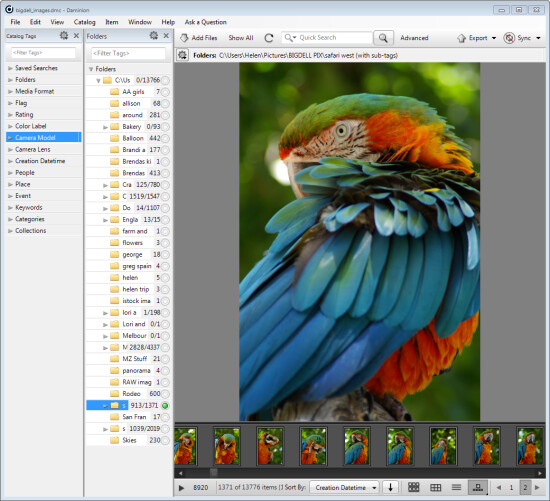
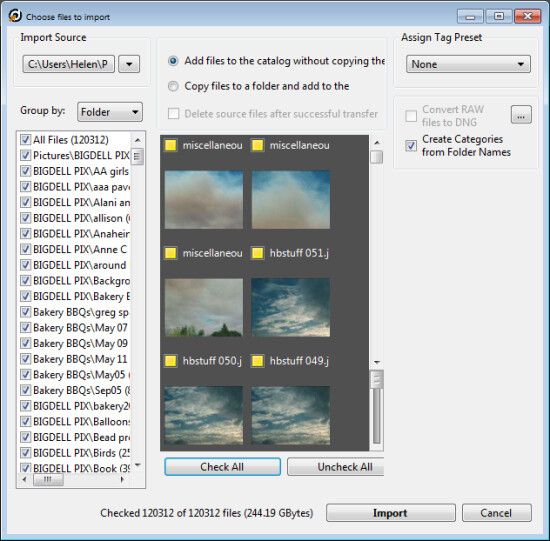
Once you have downloaded and installed Daminion, launch it and you can create a catalog. Like Lightroom you must import the images you want to manage with Daminion into the catalog. If the Add Files dialog doesn’t open automatically you can find it by choosing File > Add Files and then select the folders to import from.
daminion-import

While you can create and manage multiple catalogs in Daminion, like Lightroom, you can’t search across multiple catalogs so you should be careful about how you organize your images in catalogs. What makes sense in terms of catalog organization will depend on how you work with your images and if it makes sense to have them all in one catalog or in separate ones.

Daminion will recognize and manage a wide range of file types including common raster and vector formats as well as camera RAW images, video, music, and PDF formats. This gives it a broader scope as a management tool for digital media collections than Lightroom which is limited to photo and video formats only.

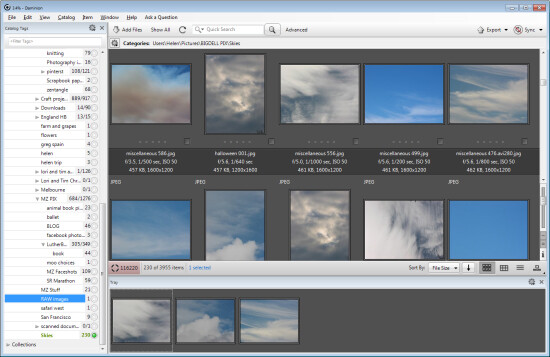
You can copy the images to another location on import or import them from their current locations. You can also group images by folder, date or file type on import. As the images are being imported you can begin to work with those already imported.
daminion-work-while-importing

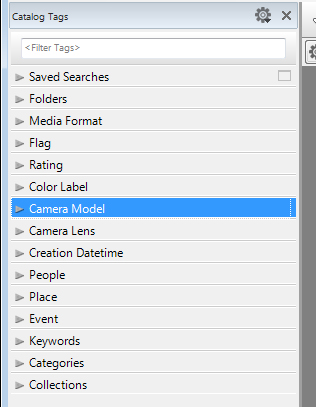
When you have some images imported into Daminion you can investigate the tools you have for managing and organizing them. The Catalog Tags panel on the left of the screen is pre-populated with tags. Some of these are created from the image metadata, such as Camera lens and Camera Model, and others are those that you may have applied to the images in other programs such as keywords, ratings and color labels.
daminion-catalog-tags

To filter the images by any catalog tag click the tag group and the tag to view and click the circle icon to view images that match that tag. You can perform AND and OR filtering using the Find dialog which you can find by clicking the Advanced link immediately to the right of the search box on the toolbar.
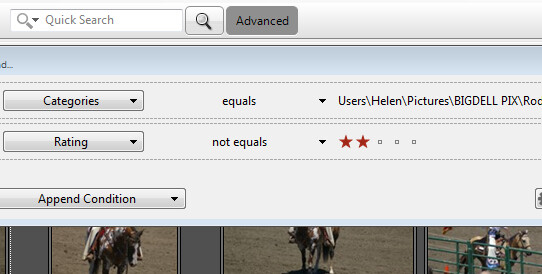
daminion-searches

You can also add tags and keywords to your images using the Catalog Tags panel. These can be written to the image XMP metadata so they will be accessible not only within Daminion but also in other applications such as Lightroom and Bridge.

There are benefits to using Daminion for image management and filtering in preference to Lightroom. Daminion provides multiple ways to categorize your images including Categories, Collections, Events, Places, People and more. It also supports hierarchical tags, with no limitation on nesting levels. So you can configure hierarchical tags for categories, people, places, keywords, events and so on whereas in Lightroom you can create hierarchical keywords only. You can also create your own custom user defined tags in Daminion to categorize images by criteria that are meaningful to you. Daminion can write metadata directly into the RAW images rather than needing to do so to sidecar .xmp files, and it makes it easy for you to filter your image collection by writing complex searches using Boolean (AND/OR) operators.
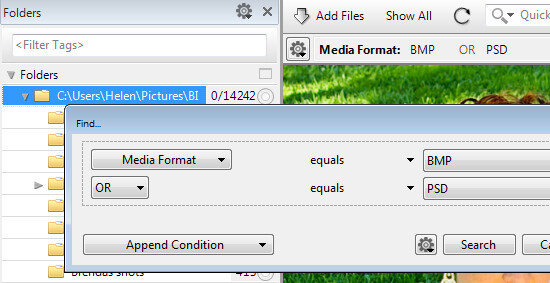
daminion-boolean

Viewing your images
You can view your filtered images in one of a number of ways. You can sort them using a range of sort options including by shutter speed, file size, file name and so on. You can also view the images as thumbnails, using a compact view, details or filmstrip view.
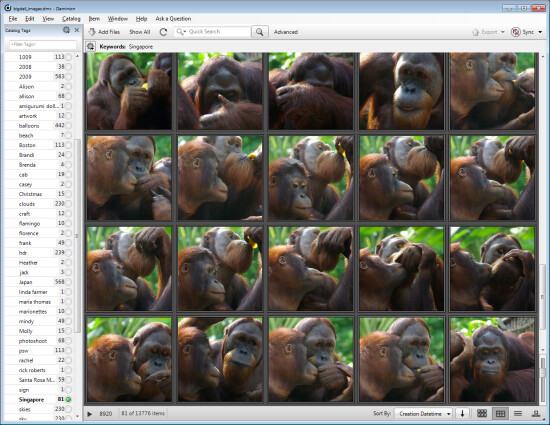
daminion-compact

In Thumbnail view you can customize the information displayed above and below the image so it is easy to see the image properties that are meaningful to you. At any time you can view an image full screen by pressing Enter or click View.

You can select any image and view and edit its properties using the Properties panel. And while Daminion is not an editor you can use it to rotate your images.
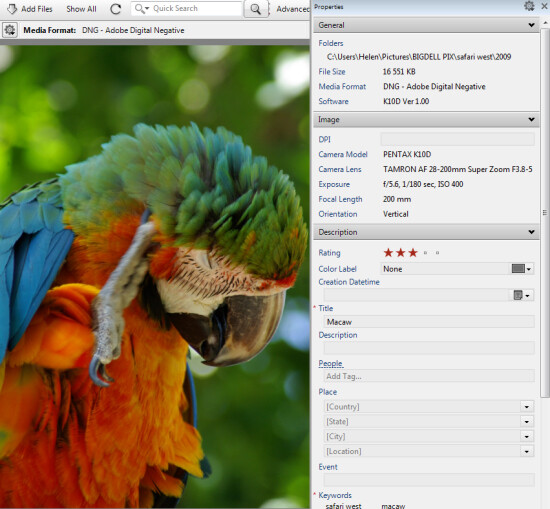
daminion-properties

As you work through your images you can drag images you want to do something with into the Tray. The Tray stores these images until you are ready to work with them such as by sending them to an external editor or using the multiuser checkout feature. The checkout feature helps you manage multiple people working with the same catalog, it maintains an audit history and gives you the ability to undo changes if, for example, a newer version of an image is replaced by an older version.

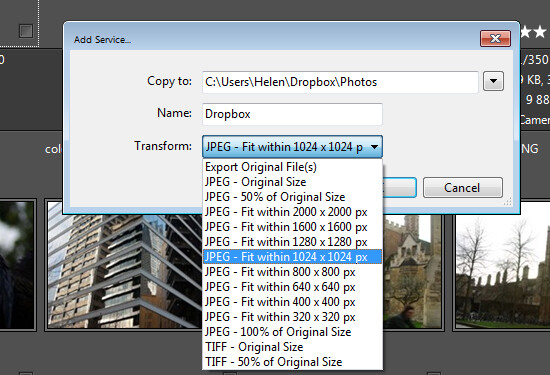
One handy feature of Daminion is the ability for you to publish images from Daminion direct to Dropbox so they are viewable on your iPad or other device. The Publish panel can be set up to convert and resize images including raw format images and then export them to a Dropbox folder on your computer. When this folder syncs to Dropbox the uploaded images can then be viewed on other devices.
daminion-publish

If you’re looking for a way to allow multi-user access to your image collection then Daminion is a great tool. It can be used along-side Lightroom for managing and organizing images which you then develop in Lightroom. The metadata changes made in either program can be easily viewed in the other program and the two work in tandem very well.

The post Using Daminion with Lightroom [for Advanced Users] by Helen Bradley appeared first on Digital Photography School.

Digital Photography School

 
Comments Off on Using Daminion with Lightroom [for Advanced Users]

Posted in Photography


Adobe hack affects 38 million users, not 2.9 million

30 Oct

Adobe-Creative-Cloud-Logo.jpeg

A security breach at Adobe Systems earlier this month is more widespread than first reported. Adobe now says hackers stole information from at least 38 million customer accounts, including part of the source code to Photoshop, the widely used photo editing software. Earlier in the month, Adobe said data from 2.9 million user accounts were hacked. Learn more

News: Digital Photography Review (dpreview.com)

 
Comments Off on Adobe hack affects 38 million users, not 2.9 million

Posted in Uncategorized


Flickr Rolls Out New Photo Preview Page to All Users

16 Oct

Flickr Opens Up New Photo Preview Page to Users

Yesterday Flickr opened up their new photo page preview to the world. I opted in to the new photo page this morning and here are my initial thoughts on it. Overall I like it.

1. Photos are bigger. The bigger the photo the better. Flickr eliminated top menu items on the page. They also eliminated the hint area to encourage people to scroll below the fold. By moving the top and bottom non-photo information to the side of the photo, this allows bigger photos.

2. You no longer have to scroll to see a lot of the important information around a photo. Having a lot of the information that people care about to the side of the photo, makes it easier to get to this information. You know, sort of like how Google+ does it. ;)

3. I’ve got mixed feelings on the new hashtags. I do like the fact that Flickr has added #tags to all Flickr tags… I think. This is the new methodology for tags in social media (i.e. Twitter, Instagram, Facebook, Google+ and everybody else in the world), so it would make sense that people would be more familiar with this concept, especially new users.

On the other hand, hashtags don’t really work very well for multi word tags and descriptions (the space between words gets stripped out). So “Saved by the Deleteme Uncensored Group” on the old Flickr photo page now becomes #savedbythedeletemeuncensoredgroup, which looks like a big mess. A lot of Flickr users would tag phrases and thoughts in the tag section of their photos and these are now pretty much unreadable.

Also Flickr now hides a lot of tags underneath a “more” button. This to me would seem to discourage users from using lots of descriptive tags, which I think are important for organizational and search reasons on Flickr. I don’t think any tags should be hidden under a “more” button. All tags should be shown on the photo page.

Groups and others who relied on multi word tags for photo games, may not like the new tagging structure.

4. A lot of the full functionality of the new photo page is being developed. This new photo page is by no means the final product. I think it’s good that Flickr lets people opt in and opt back out, to try it out. It’s a little bit of perpetual beta in a way and I like that Flickr is willing to put itself out there without having everything at 100%. Move fast and break things (as they say over at Facebook).

5. The new Flickr photo page is an under-developed preview, this means that there are quite a few things that still need to be done (some of which are planned and in the works by Flickr).

We need to be able to generate html code to blog images off site still (it’s coming). We need to be able to see all sizes of our photos and download our photos (it’s coming). We need to be able to click on favorites and see who has favorited an image. We need to be able to click on a date an image was taken and have it take us to the calendar archive view for that day of our photos. You can’t edit a comment on a photo after you make it (you can only delete your comment and start over). HTML formated links seem to be borked in photo descriptions.

Lots of little things still need to be added in to the photo page. It’s missing a lot of functionality still. The design looks good though and I hope they implement all these little things quickly.

6. My favorite thing about the new photo page is that it really highlights your sets. Sets are one of my favorite things on Flickr. I’ve made over 1,800 sets on Flickr. With the new photo page, Flickr now shows other thumbnails of photos from the same set and not just a link to the set. I think this will drive more views to people’s sets on Flickr, which is a great thing. [Note: this seemed to be working earlier today, but now it seems like this feature is not showing on my photos]

7. According to Neil Howard, the new Flickr photo page doesn’t support secure SSL browsing. SSL is the “https://” that makes a connection encrypted which is used by a lot of people.

8. I do like the new feedback forum that Flickr is also pushing with this preview. It has a way to vote answers up or down. This seems like an interesting way for staff to pay attention to the things that need to be fixed the most. The forum is already full of the “who moved my cheese” cheeshead bellyaching that comes with every Flickr change, but there is some useful criticism and feedback there that seems to bubble up to the top at the same time.

One other thing worth noting with these new bigger photos. A lot of photographers have told me over the years that they only load small, low res images on social media sites like Flickr. They think that these smaller photos are “good enough” and fret about having their larger images “stolen.”

I’ve always uploaded my full high res originals to the Flickr. As display sizes keep getting bigger and bigger, some of the people who have uploaded low res, small photos are going to see their photos begin to look bad in the larger size formats. On the other hand, those of us who always upload high res photos, our photos will still look good at these larger sizes. Especially as more and more photos are being consumed on things like the Flickr app on AppleTV, people ARE actually looking at your photos in much larger format than what you may have initially considered. Everything with photos on today’s web is going BIGGER — just something to think about.

It is pretty cool that Flickr gives everyone a full terabyte of high res original sized images for free — which means virtually unlimited free storage for your high res photos on Flickr. Google and Facebook should do that too.

These are my initial thoughts. Now I’m actually going to revert back to the old photo page (so that I can get the html code to blog the image in this post) and then revert back to the new page and keep testing it out.

What do you think of the new Flickr Photo Page? Do you like it? Love it? Hate it? And why?

More from The Verge here.


Thomas Hawk Digital Connection

 
Comments Off on Flickr Rolls Out New Photo Preview Page to All Users

Posted in Photography


MetaRaw plugin offers Photoshop and Elements users broader Raw support

18 Jun

metaraw.png

The Plugin Site has created the MetaRaw plugin for Photoshop and Photoshop Elements that allows the conversion of Raw files not supported by the associated version of Adobe Camera Raw. The MetaRaw plugin offers access to three Raw conversion methods – ACR, DNG Converter or its own, dcraw-based converter. It also allows Elements 10 and 11 users to access ACR’s lens correction and chromatic aberration tools.

News: Digital Photography Review (dpreview.com)

 
Comments Off on MetaRaw plugin offers Photoshop and Elements users broader Raw support

Posted in Uncategorized


Flickr Users Uploading 71% More Photos to Flickr Since New Design Rolled Out

28 May

Founder of Flickr Likes the New Flickr

Recently I blogged about the new design on Flickr noting that engagement on my own personal photostream had skyrocketed. By my own estimation, activity (comments/faves) have increased approximately 294% on my stream since the redesign.

Despite a loud, vulgar, disrespectful chorus, by a small group of torch and pitchfork type haters in the Flickr Help Forum, I’ve wondered how the larger Flickr community has felt about the site changes. To hear it told by the haters, *everybody* on Flickr hates the new design and they are all leaving in droves for other sites on the web.

One of the interesting things about Flickr, is that each photo on Flickr is assigned a unique ascending number on upload that signifies its numerical place as a Flickr upload. Because of this structure, it is fairly easy to measure the pace of uploads at any given time on Flickr.

I wanted to see if users were uploading more or less photos since the changes.

My measurement is approximate, but would seem to indicate that the number of uploads to Flickr since the site redesign have increased *dramatically*, about 71%.

To measure this, I tried to find a photo about as close to the redesign implementation as possible. In this case I found this photo taken by Veronica Belmont posted at about 3pm PST on the date of the change, May 21. This was within minutes of the change as implemented on Flickr. This is what I’m using as a baseline image. It is Flickr photo number 8,776,546,808 (you see this number in the url of the photo).

Next, I went and looked at a recent photo uploaded today. This photo by my contact rollerphoto works. This photo is upload number 8,855,853,505

So roughly between today and the changes made by Flickr, users have uploaded almost 80 million photos to the site. The time measured is about six hours short of six days.

Next, I went and found an older photo uploaded about six days *before* the change was implemented. In this case I found this photo taken by my contact Jazzyblue TR. This photo is one hour short of six days from the changes. This photo is upload number 8,730,146,140.

So, in the 6 days prior to the change, users uploaded about 47 million photos to the site.

So, roughly, as measured in the six days before and the six days after Flickr’s new site design, uploads are up about 71% site wide.

Now, number of photos uploaded is only one metric to measure when looking at the effect of this change. As I mentioned earlier, personally my own engagement numbers are up even higher — but to hear it told by a loud, vocal contingent of about 3,000 members in the Flickr Help Forum, 99% of users hate this change. This simply is not true. The vast silent majority of Flickr users are chugging along just like they always have been and I suspect Flickr signups have *far* exceeded deletions since the change has been made.

Flickr can view much more data internally than I can from the outside, but I suspect that by every way they measure success on the site, this most recent change has been an absolute homerun for them.

Unfortunately, with all change comes haters. Flickr would do well to ignore these haters. Of the almost 100 million Flickr users, we may lose a few thousand of the most vulgar and vitriolic accounts on Flickr, but I suspect what we gain in terms of new users is far greater.

Interestingly enough, earlier last week, the Founder of Flickr himself, Stewart Butterfield, had high praise for the new design on Flickr. Butterfield left as General Manager of Flickr back in 2008, but remains a user still today. In a tweet, Butterfield described the new design as “fantastic,” noting that history will ultimately vindicate the work as “nicely done.” I posted about this praise by Butterfield in the hatefest in the Flickr Help Forum and it only took about 21 minutes for one of the haters to compare his words with Adolph Hitler.

Hopefully the worst of these haters *do* actually leave the site as they keep threatening to do over and over and over and over again, and let the rest of us who *do* like the changes enjoy the new design for what it is, a new, better, fresher version of Flickr.


Thomas Hawk Digital Connection

 
Comments Off on Flickr Users Uploading 71% More Photos to Flickr Since New Design Rolled Out

Posted in Photography


Holy Mash Potatoes Batman! Flickr to Offer All Users 1 Terabyte of Free Photo Storage!

21 May

Wow! Well just when you thought the Tumblr acquisition was the big Yahoo news of the day, Yahoo drops yet another bombshell. All free accounts on Flickr just got upgraded to 1 terabyte of FREE storage!

Yep, you heard that correctly; the Flickr 200 photo limit for free accounts is being done away with. If you’re one of those Flickr users who, in the past, complained about Flickr holding your photos beyond 200 in a free account “hostage,” well, the Navy Seals at Flickr HQ have just set them all free.

Starting today, everyone will be able to upload full high res photos up to 50MB to Flickr for FREE up to 1 terabyte. For the .01% of the population who might store more than a terabyte on Flickr, Flickr will sell you an additional terabyte beyond your free one for $ 499 per year. By comparison, Google would charge you about $ 1,199 for 2 terabytes of storage per year and only gives you 15GB of high res storage for free. Facebook doesn’t allow high res photos at all and won’t allow photos larger than 2048px on the site.

While this might sound really great for today’s free account users, it should be noted that the new free 1 TB account will contain advertising. If you want to opt out of advertising on your free account, you will need to pay $ 49 per year….

…unless…

you are already an existing Pro account member. While Flickr will no longer offer new Pro accounts, existing Pros will be allowed to keep their Pro account and continue paying $ 24.95/year for full unlimited high res ad free storage (still the best deal in my opinion).

If a user wants to downgrade from their current paid Pro account today, Flickr will allow them to do this and claim their 1TB free/ad supported account and rebate back the residual remaining value on their Pro account early.

In my opinion, this is a game changer. Just last week at Google I/O, Google upgraded everyone from 5GB of free, high res storage to 15GB of free, high res storage, but upgrading from 15GB to 1TB is quite a leap from there.

Of course, on Google+ there are no ads, and on a 1TB free Flickr account a user would see ads.

You have to love competition in the online photo space and today Flickr is raising the stakes. This will likely put more pressure on Google and Facebook both to consider increasing high res storage for users as well.

While giving all users 1TB of free storage was the biggest news from Flickr today, it is only the beginning.

In addition to offering all users 1TB of free storage, today Flickr also ships their highly anticipated Android app. Many users were super excited late last year when Flickr rolled out their new iPhone app. I reviewed the iPhone app here. Now Flickr is bringing a similar, amazing mobile experience to Android users. I was able to see the new app prior to release and it is truly awesome — I’d say even BETTER than the highly regarded 4.5/5 rated iPhone version — one more reason to switch to Android right?

But there’s more…

In addition to an increase in storage limits and a new Android app, Flickr is also shipping today a complete redesign of the entire site. The new version is amazing and beautiful and full of mosaic walls of photos with infinite scroll everywhere. Gone are the days of tiny little thumbnail results using Flickr image search (my favorite feature in today’s new site redesign). Instead, now you see big, bold images of whatever your looking for.

Sets on Flickr were also given this same facelift. With the old Flickr, the sets page looked the same as it had since as long as I can remember (I joined Flickr in 2004). Sets contained super tiny little teensy weensy thumbnails of square icons for photos. Today’s release showcases photos in sets in much larger format.

The Flickr photo page now shows a giant, oversized version of your photo with just enough basic photo info above the fold on the page to tempt the user into scrolling down for more. The Flickr recent activity stream now shows giant, oversized photos by your contacts and lots of new information.

It really is a whole new Flickr in the best way possible.

Undoubtedly there will be some critics of the new Flickr site, just like there were critics when the automobile came out and some crotchety old folks still wanted to use their horse and buggy. This is, however, in my opinion the single most positive day for innovation being released by Flickr ever.

Last night when digesting all of the Yahoo Tumblr news, I posted on Twitter, Flickr + Tumblr = chocolate + peanut butter. I’m a huge fan of Reeces Peanut Butter Cups and I think that, in addition to this Flickr news today, future innovation coming from Tumblr and the Tumblr team will only be positive for Flickr. Already, I get the most viral views on my Flickr photos from Tumblr more than any other site. By deepening the Flickr/Tumblr integration, this will create even more synergy for Yahoo.

Maybe instead of titling this post “Holy Mash Potatoes Batman,” I should have titled it “How Yahoo got its Groove Back” — because with what’s gone on there over the past 24 hours, I’d say Yahoo, once again, is a power player in social media.

There is still work at Flickr that needs to be done — groups still need a refresh, for example — but after failing to innovate for years, Yahoo is showing the world that Flickr is indeed super important to their company and that photos are very important to a biggr, boldr, more beautiful Yahoo going forward. Yahoo is investing heavily in Flickr (they are hiring), the first Yahoo CEO ever has an actual active Flickr account, and staff morale feels super high. Flickr VP Brett Wayn and Flickr Head of Product Markus Spiering, are leading the charge, backed by strong commitment from senior management and an enthusiastic all-star team who is pushing out the most significant innovation we’ve seen at Flickr yet.

Congrats to the Flickr team on a wonderful release today.

You can find me on Flickr here and posting again on Tumblr now here.


Thomas Hawk Digital Connection

 
Comments Off on Holy Mash Potatoes Batman! Flickr to Offer All Users 1 Terabyte of Free Photo Storage!

Posted in Photography


Wearable Tech: Mask Gives Users Superhuman Senses

16 May

[ By Steph in Gadgets & Geekery & Technology. ]

Superhuman Senses Mask 1

Put on a futuristic-looking, geometric white mask and you’ll suddenly have superhuman senses, hearing targeted sounds from long distances or applying effects to images in real-time. The ‘Eidos’ masks were developed by a group of students from the Royal College of Art in London, fitting over the mouth or ears to enhance sensory perception.

Superhuman Senses Mask 2

The mask that fits over the mouth and ears features a directional microphone to capture audio, which is processed by software to eliminate background noise. The sound is transmitted directly to the inner ear through bone vibrations to make it seem as if someone else’s speech is coming from inside your own head.

Superhuman Senses Mask 3

Superhuman Senses Mask 4

The second mask, which fits over the eyes, adds visual effects to the wearer’s range of vision, and can also analyze visual data. That data is sent to a computer, where software processes it and picks out patterns and movements that are invisible to the naked eye.

Superhuman Senses Mask 5

“Eidos has broad application in areas where live audio and video analysis is valuable. For example, sportspeople can visualise and improve technique in real time. Eidos also has healthcare benefits where it can be used to boost or refine sensory signals weakened by ageing or disability. In the arts, Eidos can augment live performance such as ballet, fashion or music concerts. It allows us to highlight previously invisible or inaudible details, opening up new and customisable experiences.”

Share on Facebook


[ By Steph in Gadgets & Geekery & Technology. ]

[ WebUrbanist | Archives | Galleries | Privacy | TOS ]


WebUrbanist

 
Comments Off on Wearable Tech: Mask Gives Users Superhuman Senses

Posted in Creativity


BlackBerry’s OS update means HDR for Z10 users, new Q5 also announced

14 May

TS520x0~cms_posts_4696307075_blackberryq5.png

BlackBerry is offering up the first major update to its new operating system. The update brings a more restrictive work-only setting, better visualization of device information and an HDR camera mode for users of the Z10 handset. The smartphone maker also debuted a new phone today: the Q5 includes a Qwerty keyboard as well as two BlackBerry capture features, TimeShift and StoryMaker. Read more at connect.dpreview.com.

News: Digital Photography Review (dpreview.com)

 
Comments Off on BlackBerry’s OS update means HDR for Z10 users, new Q5 also announced

Posted in Uncategorized


Instagram hits 100 million monthly users milestone

27 Feb

Instagram-logo.png

Popular photo-sharing service Instagram has reached a milestone of 100 million monthly active users. The mobile app, among the most popular ways of sharing images worldwide, was launched in October 2010. The platform has seen exponential growth since then. Read more about its two-and-a-half-year journey, including the Facebook acquisition in 2012, controversial changes to its Terms of Service and more at connect.dpreview.com

News: Digital Photography Review (dpreview.com)

 
Comments Off on Instagram hits 100 million monthly users milestone

Posted in Uncategorized


Did Instagram Lose 25% of Their Users Over Their TOU Debacle?

29 Dec

The NY Post is out with a somewhat sensationalistic article this morning suggesting that based on data by AppData that Instagram MAY (emphasis on MAY) have lost 25% of their users based on last week’s TOU debacle. From the Post:

“[We are] pretty sure the decline in Instagram users was due to the terms of service announcement” on Dec. 17, AppData told The Post.

Instagram, which peaked at 16.4 million active daily users the week it rolled out its policy change, had fallen to 12.4 million as of yesterday, according to the data.”

The NY Post of course has a certain reputation when it comes to journalism (remember the photo of the guy about to be hit by the subway train?).

Staci Kramer, whose journalistic reputation is stellar, pointed me to another article on the subject written by Zach Seward suggesting that the Post story was “bogus.”

Seward does a bit of analysis on the Post’s piece and suggests that it’s flawed for a number of reasons. The first reason is that the data is based on a subset of the users not the entire user base. This is of course the first way to attack any sort of statistical data. It’s why we have the famous margin of error. I don’t know how big a subset of Instagram users this data represents, but in general if you have a large enough subset, you should get a reasonably representative view of things.

Is the Instagram data flawed for this reason? Who knows.

I find Seward’s second claim more questionable though. Seward seems to be suggesting that the reason for the decline in activity has less to do with the Instagram TOU debacle and more to do with something much more obvious, Christmas.

From Seward: “But more to the point, the drop in active daily users of Instagram’s application on Facebook occurred between Dec. 23 and Dec. 25, according to AppData. (Look for yourself!) Instagram released its new terms of use on Dec. 17, igniting controversy almost immediately, but AppData doesn’t show any significant decline in usage until Christmas.”

So this little bit got me thinking. Historically speaking the holidays are a very strong time for photo sharing sites. It makes sense. People take a ton of photos of family during these times and like to share these photos. Just last month, for example, Instagram was crowing about how great a Thanksgiving Holiday they had had. They had a blog post especially dedicated to the “record usage” on Thanksgiving.

Is Christmas really a time when people slow down on photo sharing, as Seward might suggest? Do we like to share photos of our turkeys and stuffing but not our Christmas trees and stockings? Do people share fewer photos on Christmas than Thanksgiving?

Flickr of course is seen by many as a natural beneficiary of Instagram’s TOU debacle. Anecdotally I’ve been seeing more and more and more of these sorts of posts. So I wonder when people posted more photos on Flickr — Thanksgiving or Christmas?

My analysis is fairly crude, and I’m not at all calling it scientific, but you can get a rough idea of the number or photos posted on Flickr during a time frame by looking at the unique number that Flickr affixes to every new photo uploaded.

I post pretty much every single morning on Flickr, so let’s look at my stream for an example.

The very first photo I posted on Thanksgiving morning this year was this one. I posted it at 6:12 a.m. This photo represents the 8,208,796,934th photo posted to Flickr. Almost 24 hours later when I posted my first photo the day after Thanksgiving at 5:43 a.m. it was given the number 8,210,250,875.

This means that in the (almost) 24 hour span between early Thanksgiving on the West Coast and the day after there were about 1,453,941 photos posted to Flickr.

Now, how many photos were posted to Flickr during the similar time frame on Christmas?

I published my very first photo to Flickr on Christmas morning at 5:55 a.m. It was given upload number 8,306,197,725. A little over 24 hours later on the day after Christmas at 6:02 a.m. I uploaded photo number 8,309,811,751 at 6:02 a.m.

So between these two time periods there were 3,614,026 photos uploaded to Flickr.

Roughly speaking there were over twice as many photos posted on Flickr over Christmas than over Thanksgiving. Even if you average out the exact number of minutes between the two days (my time between posts on Christmas had an extra 36 minutes between posts) the Flickr data would still seem to hold up.

While people may share photos differently on Instagram than they do on Flickr, both are basically photo sharing sites where you share photos of your friends, family, holidays, etc.

I find Seward’s suggestion that Christmas is possibly the real reason for Instagram’s usage decline to be dubious in light of this Flickr data.

Why would people upload 2x as many photos on Flickr at Christmas over Thanksgiving but not on Instagram? One answer of course could be Flickr’s awesome new mobile app. Of course this new mobile app would seem to be aimed most directly at Instagram users leading me to believe that Instagram probably has actually lost ground between Thanksgiving and Christmas.

How much of this is attributed to the TOU debacle and how much of this is attributed to the new Flickr app I don’t know, but I certainly don’t think “Christmas” is a very good reason for why the Post’s data is flawed, or worse, “bogus” as Seward would suggest.

Flickr also recently gave every user 3 months of free Pro service — they certainly seem to be taking advantage of Instagram’s misstep here.

So where did those 25% of Instagram users go who MAY have left the service POSSIBLY over the TOU issue? Well, MAYBE at least SOME of them went to Flickr.

Apparently Instagram denied the 25% number to Gizmodo but didn’t really clarify much beyond that.”

‘”This data is inaccurate,” an Instagram spokesperson told us. “We continue to see strong and steady growth in both registered and active users of Instagram.”‘


Thomas Hawk Digital Connection

 
Comments Off on Did Instagram Lose 25% of Their Users Over Their TOU Debacle?

Posted in Photography