RSS
 

Posts Tagged ‘trigger’

Review of the CASE Remote Trigger and App

16 Mar

The CASE Remote from Cheering Tech is a small box that connects to a DSLR camera via a USB cable and lets you wirelessly control almost every function, and some more.

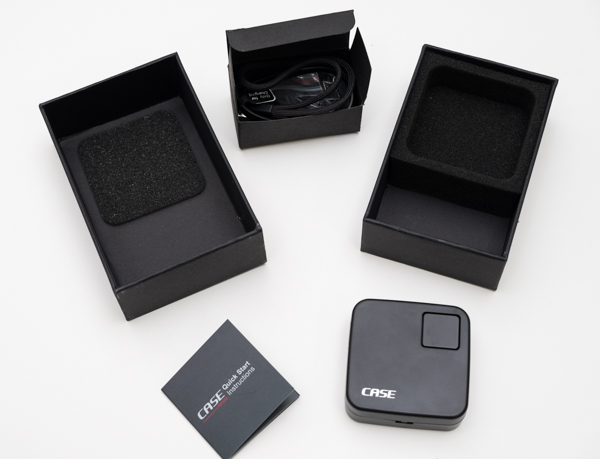
I was offered the device for review from Cheering Tech and decided to try it on without many expectations. When I received the unit I was surprised by the quality of the packaging and presentation. The design of the CASE Remote is really nice, fairly small at two inches square and 70 grams (2.5oz). The size makes the remote convenient, and easy to throw anywhere in the camera bag.
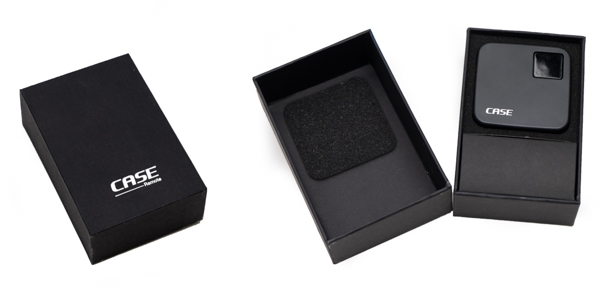
20150214_untitled_0025-Edit

20150214_untitled_0027

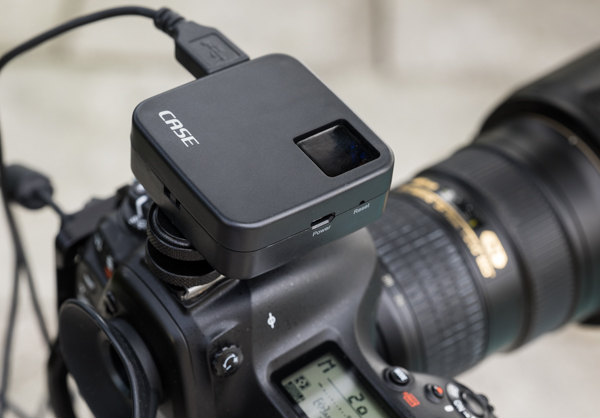
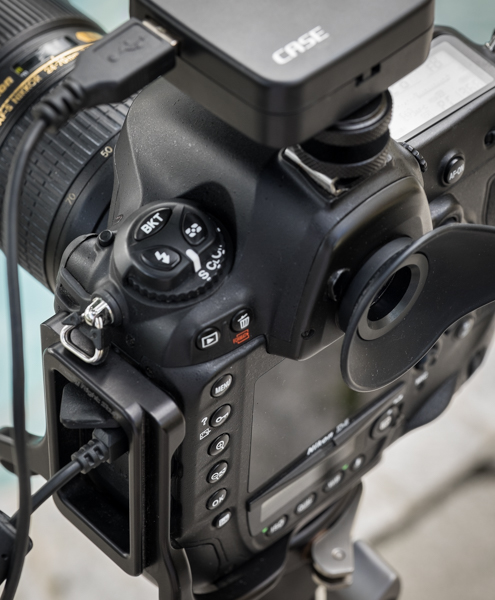
The CASE Remote ships with a convenient hot-shoe adapter so you can easily attach it to the camera, and a USB cable to charge it. Something worth mentioning is that it does not include the USB cable necessary to connect it to the camera though – you need to use your own (one that came with the camera).

Mounting it to the camera was a snap. You turn it on by pressing one square button at the top of the unit, which also contains lights which indicate battery life and system status. Once powered on, the CASE Remote creates its own WiFi network to which you connect your mobile device to access the app. The SSID and password for the connection comes in the back of the little instruction manual. I couldn’t find a way to change it or reset it to my own.
20150221_untitled_0037

20150221_untitled_0040

What you can do with the CASE Remote:

  • Live view support on iOS (iPhone, iPad) and Android devices
  • Download photos to your device
  • Set camera functions right from your phone or tablet
  • HDR function
  • Time-lapse function
  • Focus stacking function
  • GPS function

The device is ideal for different types of shooting, but especially for landscape or architectural work. The app is well designed and easy to use; however, something that I’d love to see improved in future iterations is the shutter lag. There is a delay on the live view function from the camera to the app, and there is also a brief delay when you press the shutter before the camera fires. But this is not usually an issue for the type of photography mentioned above.
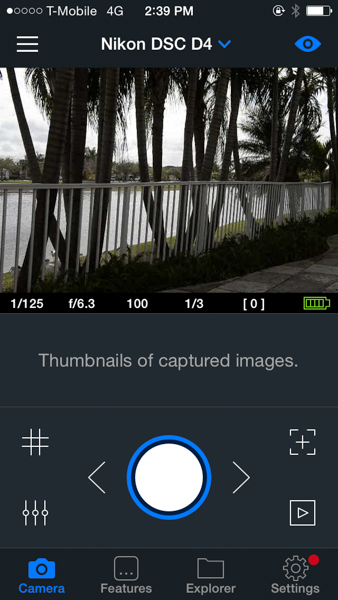
IMG_1370

From the main screen of the app, you can control and access almost any function of the camera. Live view can be turned on or off, and you can also activate a grid on top of the image if you want.
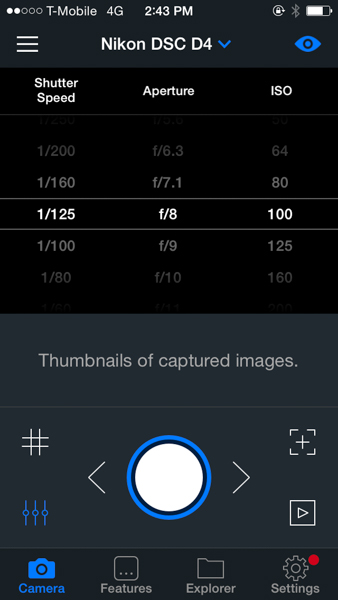
IMG_1373
There is a quick way to control shutter speed, aperture and ISO straight from the main screen by just pressing the lower left icon; that really comes handy and is a fast way to change settings.
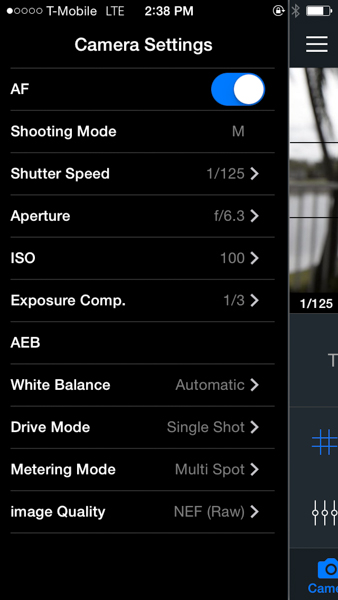
IMG_1369

The camera settings menu lets you control almost every aspect of the camera. From there you can turn on and off the autofocus function, the shooting mode, shutter speed, aperture, ISO, exposure compensation, white balance, drive mode, metering mode and image quality. I find this really complete as once you are in the app you don’t really need to go back to the camera to change anything – every function can be handled from there.
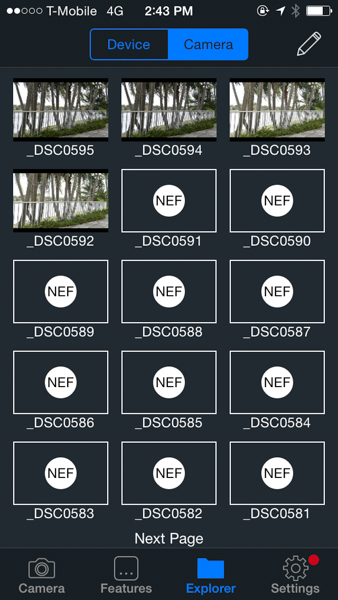
IMG_1374

The Explorer function lets you see the photos taken from the camera. You’ll only be able to see JPGs, the RAW files will show as icons. However, you can download both types straight to your phone or tablet from there.
IMG_1380

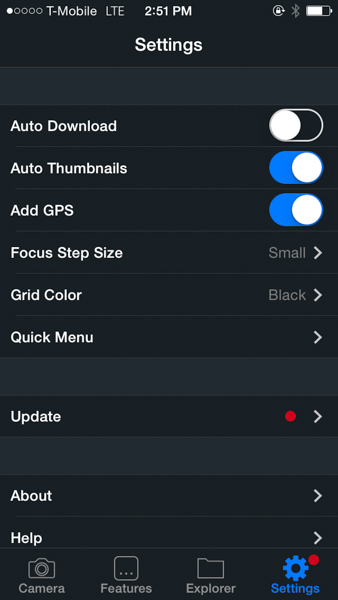
The Settings function lets you control several general settings, like auto-download the photos to your device or add thumbnails to the main screen of the app. You can also control the GPS function from there.
IMG_1382

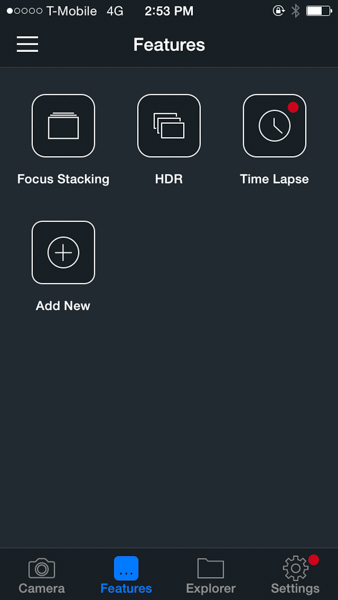
The focus stacking, HDR and time-lapse functions are accessed via the Features menu. As you can see on the screen shot, there is plenty of room for more to be added in the future.

At this time, the CASE Remote is only compatible with Nikon and Canon cameras, you can see the full list of supported models on their website. The company promises lifetime free updates via firmware upgrades and they claim to be working on support for Sony, Pentax and Fuji for later this year. The current asking price is $ 129 – a good value compared to other more expensive alternatives available in the market.

I’d really like to see improvements in the application delay and lag, but I think that overall this is a great product with lots of potential for future developments and features.

googletag.cmd.push(function() {
tablet_slots.push( googletag.defineSlot( “/1005424/_dPSv4_tab-all-article-bottom_(300×250)”, [300, 250], “pb-ad-78623” ).addService( googletag.pubads() ) ); googletag.pubads().enableSingleRequest();
googletag.pubads().disableInitialLoad();
googletag.pubads().collapseEmptyDivs( true );
googletag.enableServices();
} );

googletag.cmd.push( function() { googletag.display( ‘pb-ad-78623’ ); } );

googletag.cmd.push(function() {
mobile_slots.push( googletag.defineSlot( “/1005424/_dPSv4_mob-all-article-bottom_(300×250)”, [300, 250], “pb-ad-78158” ).addService( googletag.pubads() ) ); googletag.pubads().enableSingleRequest();
googletag.pubads().disableInitialLoad();
googletag.pubads().collapseEmptyDivs( true );
googletag.enableServices();
} );

googletag.cmd.push( function() { googletag.display( ‘pb-ad-78158’ ); } );

The post Review of the CASE Remote Trigger and App by Daniel Korzeniewski appeared first on Digital Photography School.


Digital Photography School

 
Comments Off on Review of the CASE Remote Trigger and App

Posted in Photography


CamsFormer is a programmable smartphone trigger for DSLRs

06 Dec

The feature-rich CamsFormer, currently looking for funding through Kickstarter, is a device that plugs into your camera or flash and is controlled wirelessly from a smartphone or tablet. It can trigger up to two cameras and allows you to remotely view and change a range of shooting parameters on your camera. Read more

Articles: Digital Photography Review (dpreview.com)

 
Comments Off on CamsFormer is a programmable smartphone trigger for DSLRs

Posted in Uncategorized


Cactus Launches $55 Radio Trigger For Multiple TTL Flash Systems

24 Jul

Hong Kong-based manufacturer Cactus has launched a wireless flash trigger that it claims will work with any hotshoe or PC sync socket-equipped camera and can control the power output from Canon, Nikon and Pentax-compatible flash units all at the same time. According to the manufacturer, even photographers working with multiple flashguns designed for different TTL systems will be able to link them via the wireless trigger. Click through for more information.

Articles: Digital Photography Review (dpreview.com)

 
Comments Off on Cactus Launches $55 Radio Trigger For Multiple TTL Flash Systems

Posted in Uncategorized


Yongnuo YN622C TTL Flash Trigger Review

28 Jul

Phil Steele from Steele Training has put together this good review of the Yongnuo YN622C TTL Flash Trigger.

Get more from Phil Steele in his great course – How to Shoot Professional looking head shots on a budget with Small Flashes.

Post originally from: Digital Photography Tips.

Check out our more Photography Tips at Photography Tips for Beginners, Portrait Photography Tips and Wedding Photography Tips.

Yongnuo YN622C TTL Flash Trigger Review


Digital Photography School

 
Comments Off on Yongnuo YN622C TTL Flash Trigger Review

Posted in Photography


Satechi introduces BT Smart Trigger wireless shutter release for Canon

01 Mar

satechi_1.png

Accessory maker Satechi has announced the BT Smart Trigger, an iOS-controlled Bluetooth 4.0 shutter release for Canon DSLRs. It features multiple shooting modes including timelapse and long exposures, via the free Smart Trigger app. The trigger has a claimed battery life of up to 10 years and range of 50 feet. It is currently available for an introductory price of $ 44.99. An Android-compatible version will be available from March 2013.

News: Digital Photography Review (dpreview.com)

 
Comments Off on Satechi introduces BT Smart Trigger wireless shutter release for Canon

Posted in Uncategorized


Review: Cheap Wireless Trigger

11 Jan

www.facebook.com www.twitter.com Been wanting to try off camera lighting? On this episode we take a look at a cheap wireless trigger for Nikon, Canon and more! Equipment used in this video: Cowboy Studio Wireless Trigger – amzn.to Nikon D7000 – amzn.to Nikkor 50mm F1.4 – amzn.to
Video Rating: 4 / 5

This Afternoon i took My Canon 600D to the woods to do some filming with my Canon Efs 10-22. It was around 5 pm and the sun was coming down allready giving me some cool light situations. I used my 3 stop nutural density filter and most was shot between 100/200 iso. Filmed at 25f at 1080p in my flat preset i use in my camera. Color corected and edited in Adobe Priemere CS 5.5 Please Enjoy Jacques Camera used: www.amazon.com Lens Used: www.amazon.com ND Filter Used: www.amazon.com
Video Rating: 4 / 5


Nikon launches WR-10 radio-frequency camera trigger system in US

08 Jan

AR-R10.png

Nikon US has announced a radio-frequency camera triggering system compatible with all its current DSLRs. The WR-10 system works over a 60m range and, unlike the current infrared system, does not require a line-of-sight between the trigger and the camera. Users of mass-market Nikons (D600 and below) can use the WR-T10 transmitter to focus or fire cameras with WR-R10 receivers attached to them. Owners of pro-grade DSLRs with 10-pin connectors can use the WR-A10 adapter to connect the R10 to their camera. This combination allows the camera to act as a host that can remotely trigger up to 64 other cameras.

News: Digital Photography Review (dpreview.com)

 
Comments Off on Nikon launches WR-10 radio-frequency camera trigger system in US

Posted in Uncategorized


Review of the Flashpoint Remote Flash Trigger Kit

18 Dec

www.WeeklyPhotoTips.com www.ThePhotographyPodcast.com We had the pleasure of getting our hands on the Flashpoint Remote Flash Trigger Kit and started falling in love as we were unpacking it. Once we began actually using the flash trigger kit the love was complete. Head over to the blog and learn more about what we liked, why we liked it, see sample images, and links to where you can get it (with free shipping). See you over there! www.WeeklyPhotoTips.com www.ThePhotographyPodcast.com
Video Rating: 4 / 5


Using a wired shutter release/remote trigger with the EasyTag GPS Module

25 Nov

www.easytagger.ca The EasyTag has a 2.5mm jack to pass-through remote triggers/shutter releases. This ensures that compatible Nikon DSLRs like the D200, D300/s, D700, D3s, D5000, D3100, D7000, D90, etc. do not lose any functionality when the EasyTag is plugged in, using the data connection. This gives the EasyTag a significant advantage over the di-GPS, Geometr or Nikon GP-1 modules. www.easytagger.ca There are wired, wireless and (wired) timer releases available. There is also a 10-pin adapter which allows the remote to be connected directly to Nikon 10-pin DSLRs such as the D200, D300/s, D700 and D2/3: www.easytagger.ca
Video Rating: 3 / 5

This is a selection of some of my Landscape and seascape images. Check out my site if you want to see more. If you are interested to learn how to capture such images then maybe one of my workshops is what you are looking for. Contact me at my website www.dannyirvine.com or join me on my facebook page http

 
Comments Off on Using a wired shutter release/remote trigger with the EasyTag GPS Module

Posted in Nikon Videos