RSS
 

Posts Tagged ‘trigger’

Studio portraits taken with the Godox A1 smartphone flash trigger

08 Aug
Photo: Godox

When Godox first teased its off-camera flash and 2.4GHz flash trigger for smartphones, the Godox A1, on Facebook a few weeks ago, people got very excited. Unfortunately, we weren’t really able to see what this trigger could do since the only images Godox released of the flash trigger in action were some silly behind the scenes toy photos.

Today, they fixed that.

In a new blog post about the release event for the upcoming flash and trigger, Godox didn’t just rehash the same details about the A1 that we already knew, they also showed off some professionally-shot studio portraits captured with an iPhone 7 Plus, the Godox A1 and a Godox 600II monolight. You can see a photo of the setup above.

All of the photos were shot wide open at f/1.8 (no other option really…) with the ISO set to 25 and the shutter speed at either 1/30 or 1/20 sec. Have a look for yourself:

$ (document).ready(function() { SampleGalleryV2({“containerId”:”embeddedSampleGallery_5198490931″,”galleryId”:”5198490931″,”isEmbeddedWidget”:true,”standalone”:false,”selectedImageIndex”:0,”startInCommentsView”:false,”isMobile”:false}) });

The post is mostly about the big reveal itself, which will happen at an event on August 12th at 1:30pm Shenzhen time (1:30am Eastern). But the sample portraits give you a good idea of the kind of photography a product like the A1 opens up to smartphone photographers.

Still no word on how much the Godox A1 will cost or when you’ll be able to order one for yourself, but we’ll get that info to you just as soon as it becomes available. In the meantime, take a look at the sample gallery above, and let us know what you think of the A1 and these smartphone studio portraits.


All photos courtesy of Godox.

Articles: Digital Photography Review (dpreview.com)

 
Comments Off on Studio portraits taken with the Godox A1 smartphone flash trigger

Posted in Uncategorized


Godox teases the A1: An off-camera flash and 2.4GHz trigger for smartphones

25 Jul

Chinese flash brand Godox teased an interesting new product on its Facebook page this weekend. It’s called the A1, and it’s a ‘phone flash system’ that works both as off-camera flash and as a 2.4GHz flash trigger.

Unfortunately, Godox didn’t reveal too many details about the new trigger, teasing it alongside just a few lines of marginally-readable text. “I can only tell you that the product A1 has three built-in LED lamps and one hernia flash, support flash, away from the machine automatically,” reads the Facebook post. “You can control Godox flash which has 2.4G system through it!”

Below the text are a few photos: the product shot you see at the top of this post, and the three sample photos below that show the A1 in action as trigger, flash, and continuous light source:

No word yet on how much the Godox A1 will cost, or when it will officially arrive, but we’ll let you know as soon as we hear anything. Our question for you is: will you actually use this when it does ship? If you’re going to go to the trouble of breaking out a speedlight, wouldn’t you also grab your ILC?

Let us know in the comments.

Articles: Digital Photography Review (dpreview.com)

 
Comments Off on Godox teases the A1: An off-camera flash and 2.4GHz trigger for smartphones

Posted in Uncategorized


PocketWizard releases MultiMAX II trigger with 20 ControlTL channels and more

18 Jul

Radio flash trigger manufacturer PocketWizard has reintroduced its much-loved MultiMAX transceiver, having added more control options and improved handling. The MultiMAX ll offers a total of 52 channels, including 20 dedicated to ControlTL devices, as well as improved features for time-lapse and sequential triggering.

The new version of the MultiMAX features a PowerControl function that allows the user to manually control the output of up to three groups of flashes compatible with the ControlTL system from the MultiMAX display panel. The screen is now illuminated by a blue LCD backlight, which the company says improves contrast and legibility, and the keypad is said to be brighter than that of the previous model.

The system’s intervalometer has had the burst limit lifted so users can set it for any number of flashes for as long as they like, making the mode useful for timelapse photography, and the SpeedCycler mode is now equipped to perform sequential firing of up to sixteen cameras or flashguns in sequence. That last part is useful in fast moving situations, when you can’t wait for an individual flash to recharge, so the MultiMAX just fires the next one in line.

The PocketWizard MultiMAX ll costs $ 230 and is available now. For more information, watch the video below or head over to the PocketWizard website.

Press Release:

The Best is Back –Introducing the MultiMAX II

More timing features, same great reliability, all at a lower price.

LPA Design, manufacturers of PocketWizard Photo Products, the global leader in reliable wireless control of cameras, flash lighting and light meters, announces the MultiMAX II and the return of unique timing features that only PocketWizard technology provides. Whether you are a sports, wildlife or wedding photographer, you will be happy to learn that the most powerfully-featured wireless radio on the planet, the PocketWizard MultiMAX, is back and fully compatible with all other PocketWizard radios.

Building on the legendary MultiMAX, the MultiMAX II takes its place as the most versatile, reliable and predictably compatible radio on the market. For the past 16 years, the MultiMAX has helped capture amazing images, many of which have landed on magazine covers throughout the world. MultiMAX Transceivers continue to be found in frequency crowded environments triggering arena flashes or remote cameras behind soccer goals, hockey nets, basketball nets, horse jumps, bull chutes, and the finish line of major International Track and Field events.

After a brief hiatus, the MultiMAX II returns with new features including 20 ControlTL channels, Manual Power Control and an improved blue backlit LCD which provides better contrast for improved viewing in dimly lit studios or on-site locations. The key pad is brighter too, allowing photographers to easily change settings on the fly. Its 344 MHz frequency sets it apart from 2.4 GHz noise in crowded venues.

“The MultiMAX II continues to provide incredible features that professional photographers have come to rely on. It has a whole suite of built-in tools designed for the demanding sports shooter like Patterns, programmable delays, and a settable contact time. The MultiMAX II is also Custom ID ready. Photographers can create incredible depth of field or stroboscopic effects with Multi-pop, give rear curtain sync to any camera, and even synchronize multiple cameras together, states Patrick Clow, Technical Support and Customer Service Manager.

The MultiMAX II has a total of 52 channels: 32 Standard Channels and 20 ControlTL Channels. Photographers can creatively control groups of lights or cameras allowing them to work in crowded venues or with multiple flash set-ups. And now with Power Control, photographers can remotely adjust the manual power settings of ControlTL compatible radios and flashes in up to three zones with as many flashes in each group as you want.

“Professional photographers have clamored for years to bring back the MultiMAX. We listened and we responded by making a great radio even better and offering it at a lower price. The MultiMAX II Transceiver is and remains the only radio on the market that performs special PocketWizard features including Infinite Intervalometer, SpeedCycler and Ultra Long Range. It is the most reliable Transceiver on the market for capturing life’s most amazing moments, states Karen Marshall, CEO of LPA Design

The MultiMAX II will be available at retail and on line in the US and Canada starting July 17, 2017. The retail price will be $ 229.00 USD in the US and $ 309.00 CAD in Canada.

Articles: Digital Photography Review (dpreview.com)

 
Comments Off on PocketWizard releases MultiMAX II trigger with 20 ControlTL channels and more

Posted in Uncategorized


Alpine Labs’ Spark 3-in-1 camera trigger seeks funding on Kickstarter

17 Apr

Alpine Labs, the company behind the Pulse camera remote, is back on Kickstarter with a more powerful and versatile triggering device. The Spark camera remote allows for triggering your camera in three ways: you can either use it as an infrared wireless remote, control, plug it into your camera with a cable and use it as a wired remote, or connect it to your smartphone and a dedicated app via Bluetooth to unlock a variety of creative trigger options. 

The app offers customizable settings and lets you shoot timelapses, HDR brackets and long exposures and can trigger up to three cameras at once. Using the infrared connection you can trigger single shots or capture time lapses at one-second intervals by holding-down the shutter button.

The cable connection offers more reliability and doesn’t require line of sight to your camera’s infrared sensor. According to Alpine Labs the button battery will work for over 2,000 hours of use. In addition the device works with a large number of cameras. The Spark Kickstarter campaign will be running until May 20. Until then you can reserve a Spark device for $ 44 which is 25 percent off the envisaged future retail price.

Articles: Digital Photography Review (dpreview.com)

 
Comments Off on Alpine Labs’ Spark 3-in-1 camera trigger seeks funding on Kickstarter

Posted in Uncategorized


Overview and Test of the New Cactus V6II Wireless Flash Trigger for High-Speed Sync

28 Oct

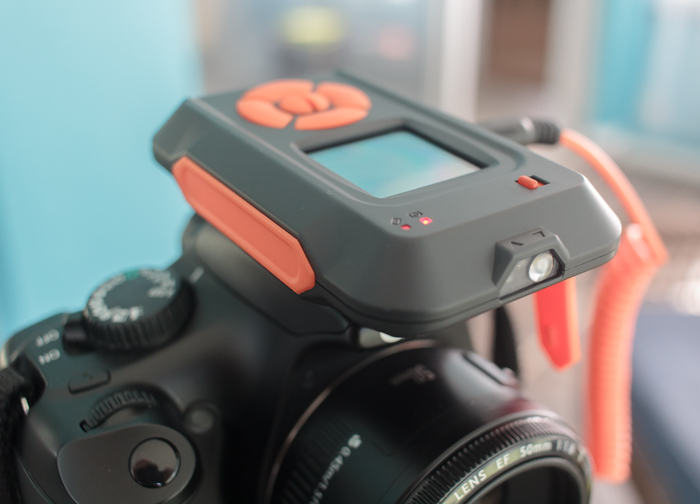
Cactus Image recently launched a new version of their radio trigger for speedlights and strobes, the Cactus V6II. In this review, I’ll go over the features of this trigger, how to use it, and do some example photo shoots to test it.

Features of the Cactus V6II Wireless Flash Transceiver

This is a 16 channel system with 4 groups. That means 16 systems can run concurrently, and each photographer could have four sets of flashes of which they can control the power (and zoom for the RF-60/TTL Flashes). It runs off two AA batteries, mini-USB 2.0, or a 5v DC input. Like most modern flash triggers, it runs at 2.4Ghz, which helps it work reliably up to 100 meters. It supports High-Speed Sync up to 1/8000 sec (if your camera goes that high).

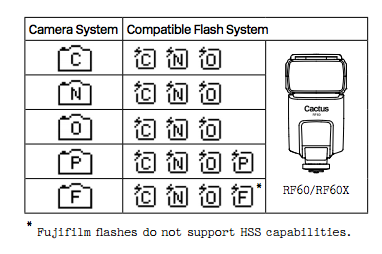
The mini-USB port also allows you to update the firmware on the device, giving it a certain amount of future proofing. The main difference between the V6 and the V6II is that the latter allows you to use High-Speed Sync across a range of cameras and flashes, including that of the Fuji X series (which lacks the ability normally). The V6II HSS is based on the use of camera and flash profiles. This allows both Cactus and the photographer to make profiles for flashes they may not already have in the system.

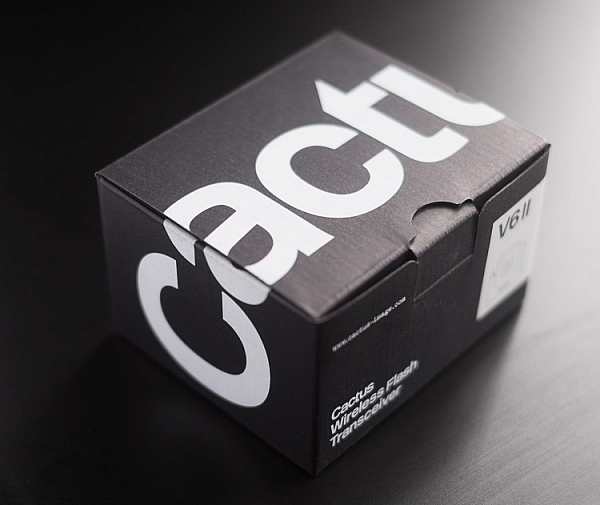
Cactus Wireless Flash Transceiver V6 II - box

The Cactus V6II transceiver box.

This means there’s practically universal support for any flash you may have. The exception is flashes that have a high sync voltage. The units are cross compatible between systems, so you can use Pentax cameras with Olympus flashes, etc.

Camera and flash compatibility list for the v6II

Camera and flash compatibility list for the v6II

There are two High-Speed Sync modes; Normal and Power. Normal High-Speed Sync works up to 1/8000th of a second and uses a pulsing flash fire. Power Sync uses the full power flash as a normal fire, but allows you to exceed the normal sync-speed of the camera.

Getting started with the Cactus V6II

The trigger comes in a nicely designed box, containing the user manual, the trigger, and a hotshoe foot. Unlike other hotshoe feet, this one doesn’t have a screw thread for a lighting stand. It’s not an issue as I wasn’t expecting one anyway. The unit can be configured as either a transmitter or a receiver by selecting Tx or Rx from the power switch.

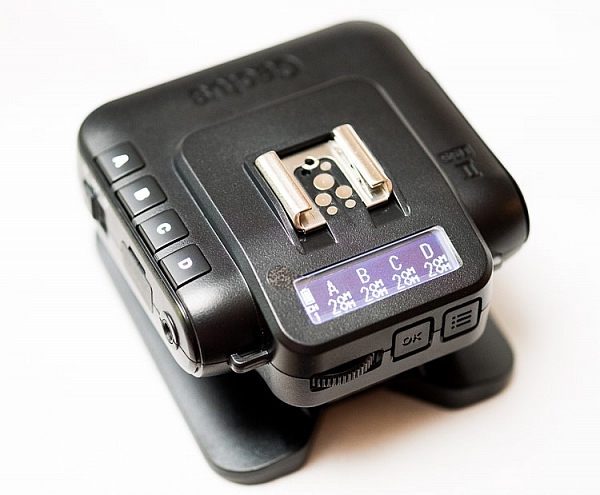
When it is on-camera as a transmitter, you have the four groups visible on the camera left-hand side. Marked A, B, C and D, pressing one toggles it on and off. This way you can select a specific group of flashes to change settings on. This works especially great with Cactus’ own flash, the RF60. Using the dial on the back you can change the power of the flashes on the group, or by pressing in the dial, swap to the lens zoom setting and change that instead.

The unboxed Cactus V6II

The unboxed Cactus V6II

On the right hand side at the front is the test button. You can press it to test that the signal is going to either the RF60, or to another V6II set to receiver mode. One other useful feature is that there’s a hotshoe on the trigger, where you can add your existing trigger system, or another flash. Using your current triggers will allow the High-Speed Sync signal to pass through the V6II and into your flash system.

Setting up

My main portable system is based around Godox v850 flashes (more precisely, the Neweer versions rebranded as the TT850 – it’s the same flash). I also have the more powerful AD360, which responds to the same trigger (the older FT-16), so I find it a really useful system. All of the flashes are High-Speed Sync capable and have profiles in the trigger. I don’t actually use the built-in profiles for High-Speed Sync with Fuji cameras.

The Gear Setup for HSS

Using the older triggers, I set up the flash as normal. Once it’s all working I take the trigger off the camera and put the Cactus V6II on instead (switched to Tx mode). Next I put the old (FT-16) transmitter on top of the hotshoe on the V6II. Finally I set the flash to HSS mode by pressing a two button combination on the back. Each system has its own way of turning on HSS. Yes, this does mean you only need one Cactus V6II trigger with this system to get HSS working.

To get started, press the Menu button on the back right of the V6II unit. Turn the dial to Camera and Flash Setup. Set Camera to Auto, then set Flash to the brand that you use. Next use the Auto Profile for your Flash. For Fuji, you have an additional step, where you make the trigger learn the HSS response of the flash. For the AD360, I set the Flash to Nikon and the Profile to Auto (Nikon).

The Beta Test

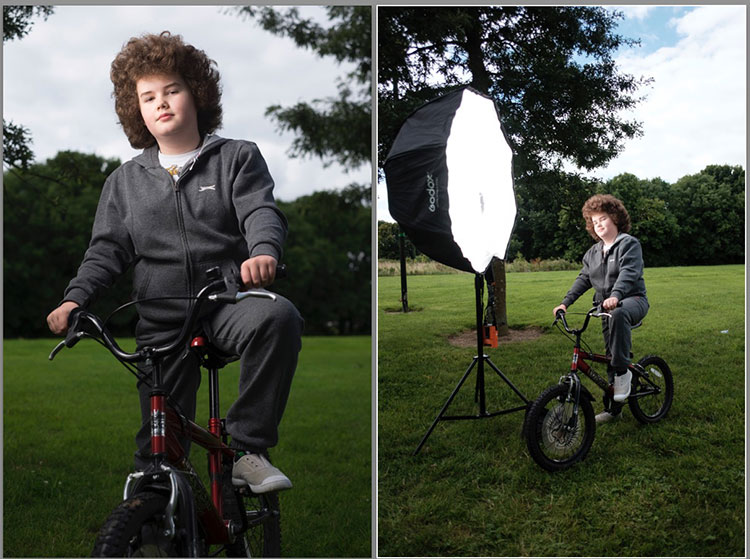
So I set it all up, and with my trusty Godox 120cm Octabox on the Ad360, I sweet-talked my son into posing on his bike. That’s roughly three minutes of attention span before boredom hits. I’ve included some behind the scenes shots as well. The exposure was 1/4000th, f/2.8, ISO 200 with a 35mm f/1.4 lens. Even the nearby trees are out of focus. I absolutely love the bokeh in my first shoot with the trigger.

Cactus image v6ii review matt

Test Shoot #1

Testing means dragging out a range of people to shoot with. It also means working around their schedule. So this next shoot happened a little later than I would’ve liked, but I still got some good shots.

Once the trigger is set up, your main issue is dealing with power. Normally with manual flash, only the aperture has an effect on the apparent power of the flash. Below sync-speed, you can change the shutter speed to your heart’s content, and it won’t affect the flash. Not so with High-Speed Sync. Any change of shutter speed changes the flash power. The faster the shutter speed, the more flash power you need. It’s a new experience if you’ve gotten used to normal manual flash. Each stop increase in shutter speed requires about a stop of increase in the flash power.

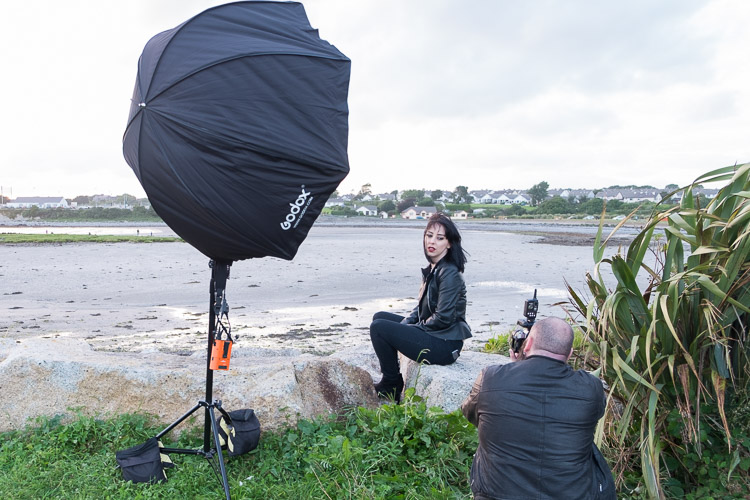
Here’s the first setup and the resulting image.

Cactus image v6ii review sunset 1

Behind the scenes shot showing the Godox AD360 flash with Godox 120cm Octabox. Taken by Ola.

The shot with HSS. The background is beautifully out of focus. ISO200 f1.8 1/4000sec 35mm on Fuji X-T10

The shot with HSS. The background is beautifully out of focus. ISO 200, f/1.8, 1/4000th, 35mm on Fuji X-T10.

I still managed to blow out the sun slightly, but the flash was at full power, so I couldn’t change the aperture to compensate. The octabox was just out of frame too. Normally, I shoot vertical portraits but for articles, horizontal looks better, so I just recovered this highlights in Lightroom.

Test Shoot #2

For the second shoot, I had more time, better planning, and less wind! Due to the model’s availability, it was later than I’d have like, but still had enough light to get shots using HSS (out of want rather than need!).

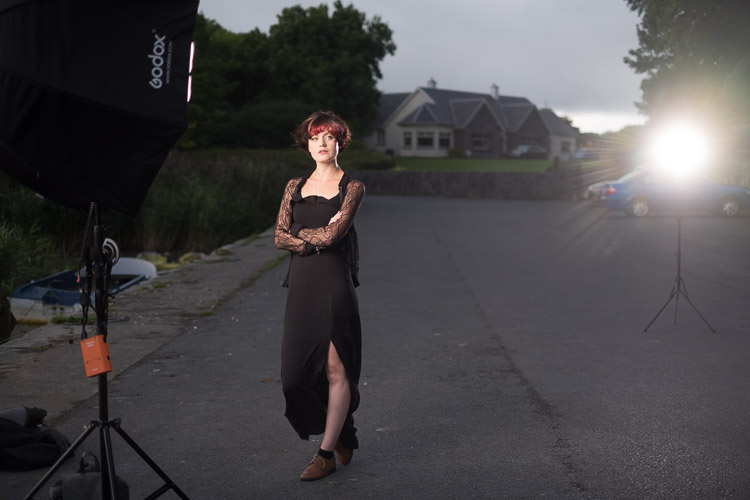
Here I’ve used my typical short lit Godox Octa setup for this using the Fujifilm X-T10 with a 35mm f/1.4 lens. I wanted to create tension and go for a cinematic feel to the image. The grass at the bottom is well out of focus and gives a slightly ethereal feel to the shot. The black clothes and the model peering out of frame seem to reference things in the past as if a loved one has passed.

cactus-v6ii-review-emma-1

ISO 200, f/1.4, 1/1600

For the second shot, I wanted to bring in an additional element – a back light. I could’ve used one of the 850’s, but instead, I opted for the Cactus RF-60 flash. This has the receiver built-in and communicates directly with the Cactus V6II receiver. I set this to Group B and zoomed the flash to 105mm to allow it to throw the light further. Once in HSS mode, it triggered every time along with the AD360. I also went for the 50-140mm lens to get further back and compress the background more.

ISO200 f2.8 1/500sec. Shot with the 50-1400 f2.8 lens

ISO 200, f/2.8, 1/500th. Shot with the 50-140mm f/2.8 lens.

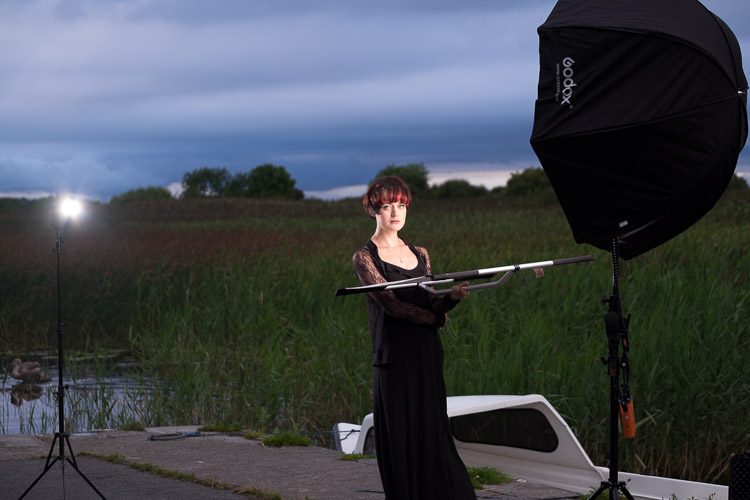
Here’s how the gear looked behind the scenes:

Cactus image v6ii review emma 3

Headshot variation

For the final look, I went for a headshot, so the Octa was moved to give her a soft loop light. I got the model to hold a reflector (in this case a California Sunbounce silver-white mini, using the silver side for contrast). It’s very similar to the last setup with the Cactus RF-60 acting as a kicker.

cactus-image-v6ii-review-emma-3

ISO 200, f/2.8, 1/500th.

Here’s the setup shot:

Cactus image v6ii review emma 5

By swapping the side the Octa is on, so the kicker and the key are on the same side, you get a very different look for only a few minutes work.

cactus-image-v6ii-review-emma-5

Cross Platform Test: Fuji Camera – Canon Flashes

Using a second Cactus V6II trigger, I added a Canon 580EXII Speedlite to the setup to use with the Fuji camera. In this case, I set the flash up as Canon with an Auto Canon Flash Profile. Again with the flash set to HSS, I went through the learning process for HSS, and the flash worked perfectly with the Fujifilm in HSS mode. The 580EXII was set to ETTL, and I could control both the flash power and the flash from the V6II transceiver on the camera.

I still have my Canon 5D MarkIII (not for much longer), so I did a quick test with that as a system check. Again I used the Canon 580EXII Speedlite on ETTL, set to HSS. Because both transceivers were set to Auto, switching the units off and back on began a new detection cycle, successfully recognizing both flash and camera as Canon. After one or two test fires, it all worked perfectly. No pretty models for this demo, but something close to my heart instead.

Shooting the X-T2 using a Canon 5DIII. The 580EXII flash was set up off camera, with the trigger set to auto detect camera, and the receiver set to auto detect flash. Set to ETTL mode, both power and zoom can be controlled from the trigger. The flash was bounced into the ceiling. ISO200 1/500sec f1.8.

Shooting the Fuji X-T2 using a Canon 5D MarkIII. The Canon 580EXII flash was set up off-camera, with the trigger set to auto-detect the camera, and the receiver set to auto-detect the flash. Set to ETTL mode, both the power and zoom of the flash can be controlled from the trigger. The flash was bounced into the ceiling. ISO 200, 1/500th, f/1.8.

Firmware Updates for the V6II

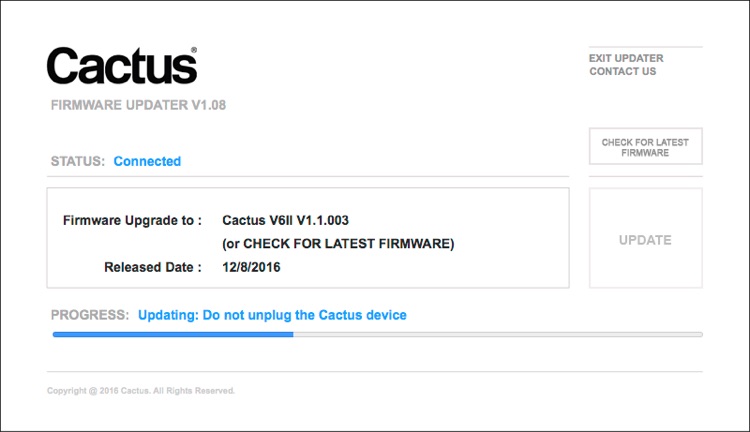
Another feature of this trigger is you can update the firmware as new features and profiles are added. During my testing period, two firmware updates became available. I also had the chance to test a beta version of the new Fuji X-T2, another testament to Cactus’ support for their product. For the public updates, I simply downloaded the updater app, ran it, and followed the instructions.

Cactus Firmware Updater

Cactus Firmware Updater

Pros of the Cactus V6II Triggers

  • Gives you High-Speed Sync ability across a range of camera systems and flashes.
  • Firmware upgradeable.
  • Works directly with the Cactus RF-60 flash.
  • Good range of channels and groups.
  • Power Sync allows additional sync speed options for non-HSS flashes.
  • Can work with only one transmitter and your existing triggers.

Cons of the Cactus V6II Triggers

  • Clunky – the shape isn’t as elegant as many others with a hotshoe passthrough.
  • One of the units I had suffered from a really tight battery clip. It’s more an annoyance than a real con as the batteries last a really long time. The clip on the other unit was perfect.
  • For Fuji users, there’s more work to get it going. For everyone else, no problem.

Verdict

I’m delighted with the Cactus V6II wireless flash trigger. It really works.

During the short time I’ve had the trigger, I’ve used it on a few magazine shoots, as well as the fun shoots I did to test it. It’s been great. Their support has been fabulous, and there’s a lot of information on their community page.

Would I recommend these triggers? Absolutely. They bring a new dimension to shooting portraits outdoors that can change your style completely.

googletag.cmd.push(function() {
tablet_slots.push( googletag.defineSlot( “/1005424/_dPSv4_tab-all-article-bottom_(300×250)”, [300, 250], “pb-ad-78623” ).addService( googletag.pubads() ) ); } );

googletag.cmd.push(function() {
mobile_slots.push( googletag.defineSlot( “/1005424/_dPSv4_mob-all-article-bottom_(300×250)”, [300, 250], “pb-ad-78158” ).addService( googletag.pubads() ) ); } );

The post Overview and Test of the New Cactus V6II Wireless Flash Trigger for High-Speed Sync by Sean McCormack appeared first on Digital Photography School.


Digital Photography School

 
Comments Off on Overview and Test of the New Cactus V6II Wireless Flash Trigger for High-Speed Sync

Posted in Photography


Overview of the Yongnuo RF-603 Wireless Flash Trigger

26 Oct

Off-camera flash is a key technique that can really differentiate your photography style and make you and your imagery appear more professional. The tools needed to achieve off-camera flash are relatively simple, consisting of just a flash unit and a cord or triggers to connect the flash to your camera. While a cord is by far the cheapest and most straightforward option, it’s also inconvenient since it physically binds you to your camera. Wireless triggers are a simpler solution, but they tend to be pricey, especially if you opt for Pocket Wizards. Enter a budget option: the Yongnuo RF-603 wireless flash trigger.

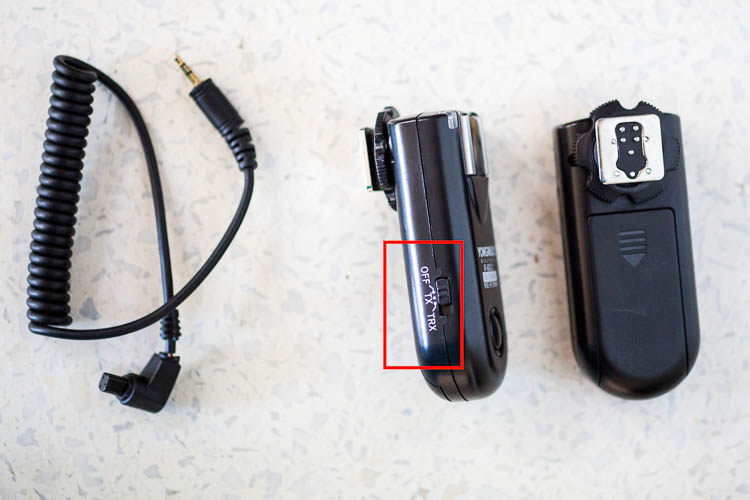
Yongnuo RF-603 wireless flash trigger

Features

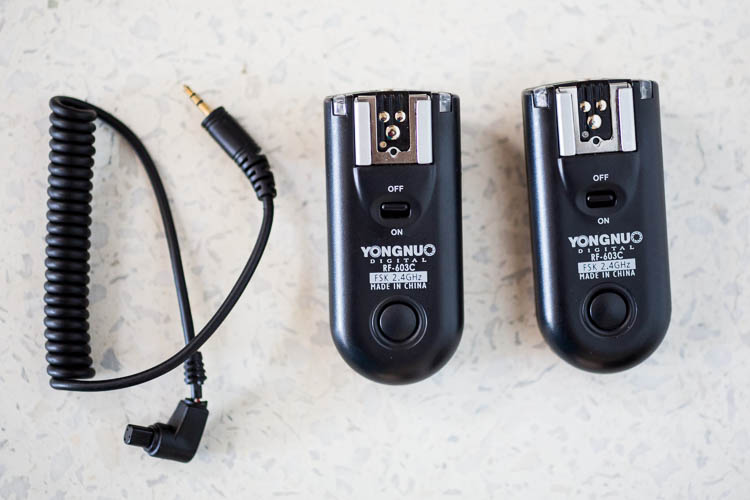
Priced at under $ 35 for a set of two, the Yongnuo RF-603 works as both a wireless flash trigger and receiver. It can also function as a remote shutter release for your camera.

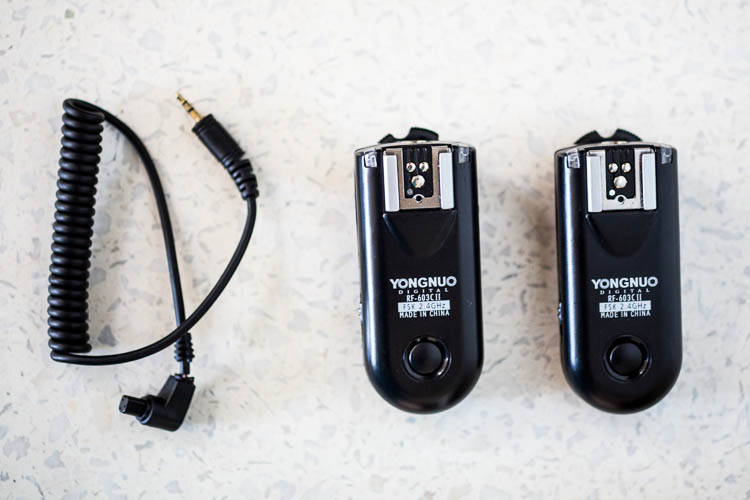
Yongnuo wireless flash triggers

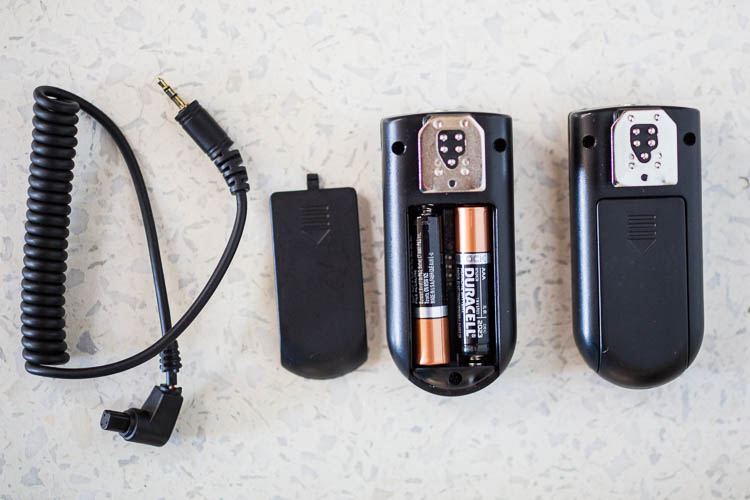
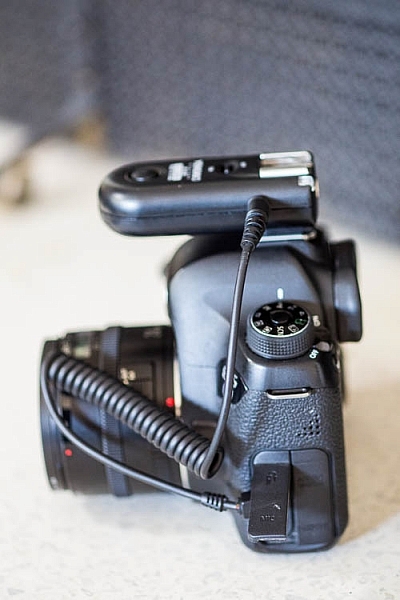
What’s in the box: two (2) flash triggers, one (1) N1 shutter release cable. AAA batteries not included.

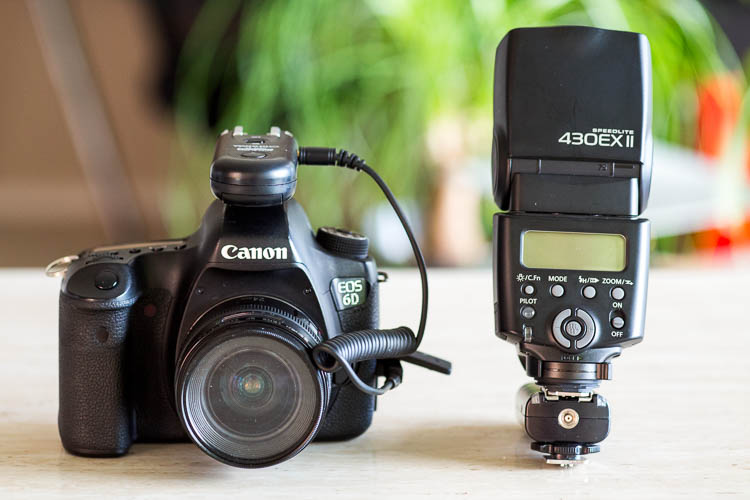
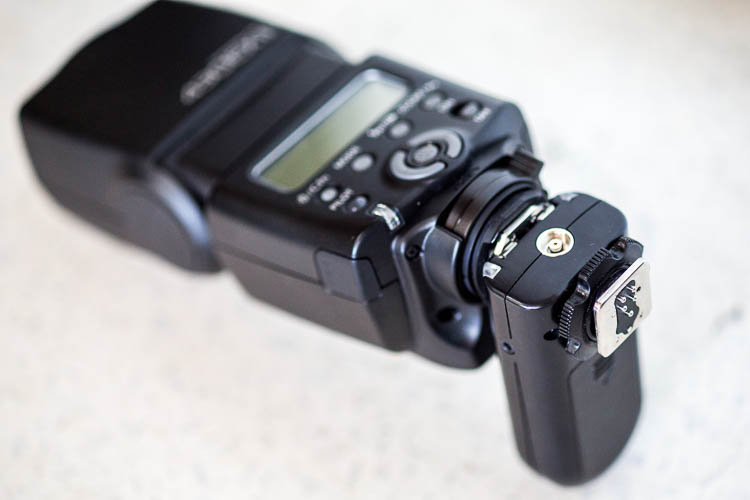
One of the triggers attaches to your off-camera flash unit via the hot shoe mount. Ihe other slides onto your camera’s hot shoe mount and also connects via the included N1 shutter release cable. Then you simply turn the triggers, camera, and flash on and you’re good to start firing away!

You can also purchase additional Yongnuo transceivers to trigger multiple flashes at once. To use the Yongnuo RF-603 as a shutter release, simply attach one unit to your camera’s hot shoe mount, turn both units on, and use the second unit to remotely fire your camera.

Yongnuo wireless flash triggers

How to Yongnuo RF-603 trigger attaches to your camera.

Yongnuo wireless flash triggers

Batteries

Besides being very reasonably priced, these Yongnuo triggers are powered by two normal AAA batteries. They use the battery power very efficiently, meaning you won’t have to constantly switch out drained ones. The triggers are also very slim and lightweight in size at just three inches long, making them easy to slip into a bag or pocket. These triggers are compatible with most DSLR cameras, but double check to make sure you order the correct model that is compatible with yours.

Yongnuo wireless flash triggers

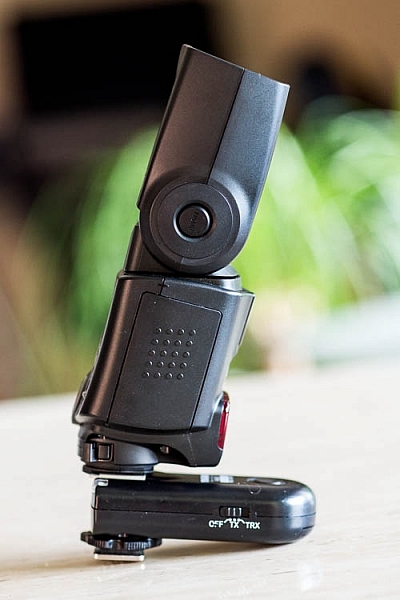
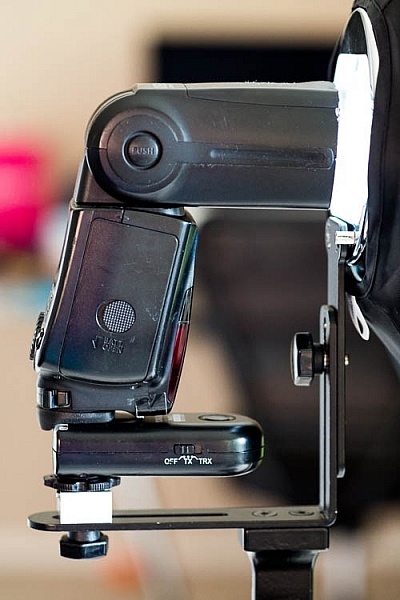
Slim and low-profile, the Yongnuo RF-603 doesn’t add a lot of bulk to your flash unit.

Shooting distance

Another point to note is that these Yongnuo triggers use a 2.4GHz wireless frequency, and the remote control distance is up to approximately 100 meters (328 feet). Synchronization speed can reach 1/320, but may only reach 1/250 depending on the exact scenario you’re shooting in.

Yongnuo wireless flash triggers

Yongnuo RF-603, the original version.

Yongnuo wireless flash triggers

Yongnuo RF-603 II, the latest version.

Why the Newer Version is Better

When shopping around, you might notice that there are two Yongnuo RF-603 models: RF-603 and RF-603 II. The older, original version looks like it has recently been discontinued by the manufacturer, but it is still available for sale. Thus, it’s important to note several key differences between the two models, and why you’ll probably want to opt for the newer version. Also note that the original and newer transceivers are compatible with each other, so you can mix and match if you happen to have both versions.

Yongnuo wireless flash triggers

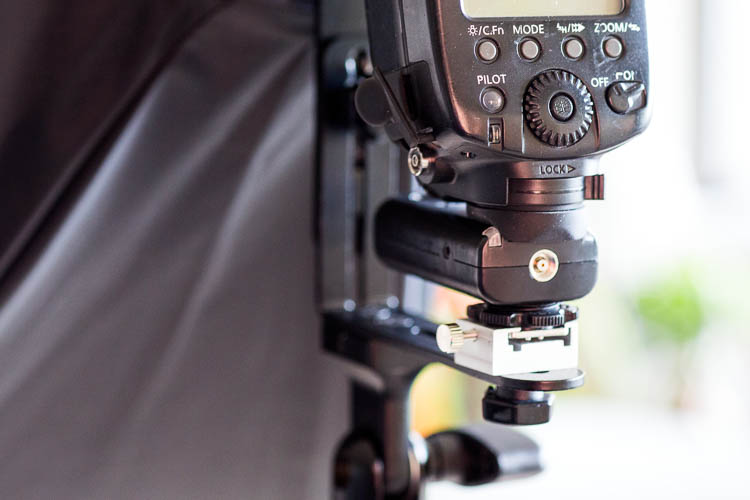
The round locking mechanism above the metal hot shoe of the Yongnuo RF-603 II (the original version does not have this feature).

Yongnuo wireless flash triggers

An example of the locking mechanism being used to attach the flash to a lighting stand.

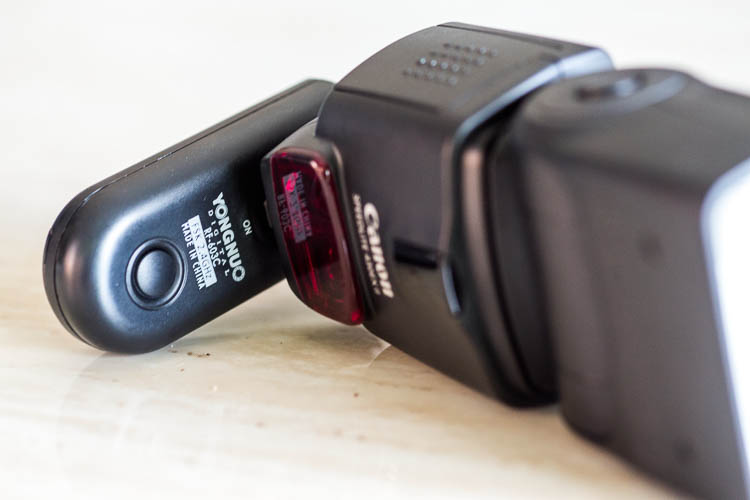
Enhanced on/off switch is on the side for easier access

The original trigger has the on/off button on the top surface, which means it is completely covered up when attached to your flash. Thankfully, Yongnuo fixed this problem in the second version, and moved the on/off button to the side of the trigger. The newer version also includes the option of designating the trigger as off, in TR mode or TRX mode, rather than simply on or off.

Yongnuo wireless flash triggers

Even before the flash unit is fully attached, the on/off switch of the original Yongnuo RF-603 is already covered and hard to access.

Yongnuo wireless flash triggers

The newer Yongnuo RF-603 II added options to the on/off button and moved it to the side of the trigger.

Yongnuo wireless flash triggers

Having the on/off button on the side of the trigger makes it easier to access with the flash attached.

Who should use Yongnuo RF-603 Triggers

If you’re a photographer looking for a low-cost way to experiment with off-camera flash, Yongnuo triggers and even their own brand name flash units are highly recommended. Based on multiple user reviews and my own experience with Yongnuo products, they are dependable, efficient, and incredibly easy to use despite being considered budget options.

The only downside to these Yongnuo RF-603 triggers lies in their simplicity. Since this base model trigger only has a simple on/off button, you still have to manually adjust your flash settings if you want to tweak the flash power, flash zoom, etc. Upgrading to a more sophisticated trigger system such as the Yongnuo 622N TX ($ 85 for a pair approx.) gives you the full power of adjusting flash settings without having to even touch your flash. However, given the extra cost and complication of the Yongnuo 622N, only opt for this version if you truly need the extra features (in other words, stick with the RF-603 if you’re a beginner or on a budget).

googletag.cmd.push(function() {
tablet_slots.push( googletag.defineSlot( “/1005424/_dPSv4_tab-all-article-bottom_(300×250)”, [300, 250], “pb-ad-78623” ).addService( googletag.pubads() ) ); } );

googletag.cmd.push(function() {
mobile_slots.push( googletag.defineSlot( “/1005424/_dPSv4_mob-all-article-bottom_(300×250)”, [300, 250], “pb-ad-78158” ).addService( googletag.pubads() ) ); } );

The post Overview of the Yongnuo RF-603 Wireless Flash Trigger by Suzi Pratt appeared first on Digital Photography School.


Digital Photography School

 
Comments Off on Overview of the Yongnuo RF-603 Wireless Flash Trigger

Posted in Photography


Review of The MIOPS Smart Trigger

10 Jul

The MIOPS Smart Trigger is many things you’d want in a photography accessory; small, rugged, and multipurpose. It may not be the perfect answer to any solution, but its range of modes and really cool connectivity options, make it a very useful and intriguing tool nonetheless.

At the time of this writing, the MIOPS Smart Trigger is available for $ 199.99 at Amazon (for the standard versions), which makes it a bit pricey for its size, but a great value when you consider the depth of its functionality. The trigger features seven different modes of operation, all available with various sensitivity settings, they include:

  1. Lightning mode
  2. Sound trigger mode
  3. Time lapse mode
  4. Laser mode
  5. HDR mode
  6. DIY mode (experts only)
  7. Scenario or custom mode

MIOPS Camera Trigger

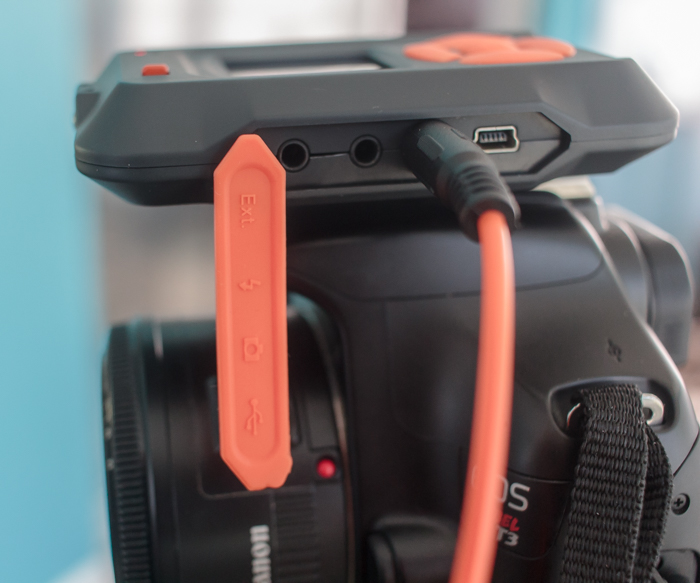
The exterior of the unit is very rugged and appears it would be extremely durable. You definitely get a feeling of solidness when holding it. A 128×128 pixel, full color display, is mounted just above the large buttons, used for operation and selecting menu options on the front of the trigger.

The device is powered by a 3.7 volt/1020 mAh lithium ion battery, which is rechargeable via the provided USB cable. It is also possible to provide power through the USB connection, with no battery in place.

This new trigger kit from MIOPS is an evolution (and apparent replacement) to the Nero Trigger previously available from the company. The newer version was reworked, inside and out, to be a more rugged and competent accessory. Versions of the kit are available for Canon, Nikon, and Sony camera systems, as well as other brands including Olympus, and certain smartphones.
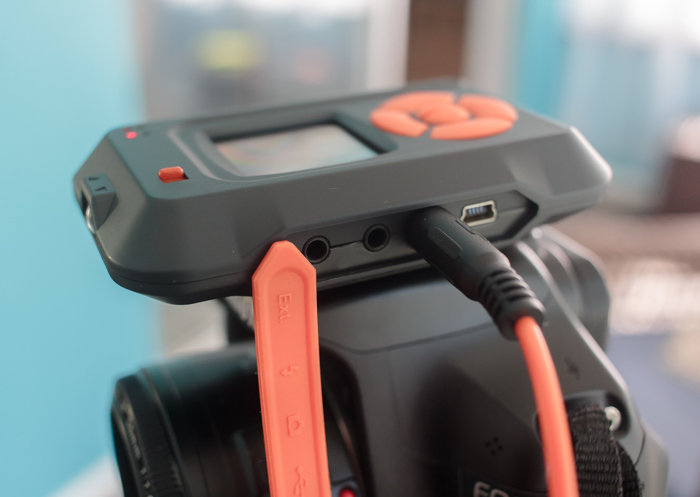
MIOPS7

The various camera connection cables mean that one unit can operate with many different camera makes and models, and extends the usefulness of the accessory.

The trigger unit itself is connected in one of two ways, either to an external flash unit, or to the camera itself. Cables for each are included with each unit. This allows the trigger to sync and fire, either the flash system, or the camera shutter itself. Flash units are connected via the PC sync jack, and cameras are connected through the remote shutter release jack, meaning any camera or flash unit with these common connectors can be potentially be paired with the MIOPS trigger.
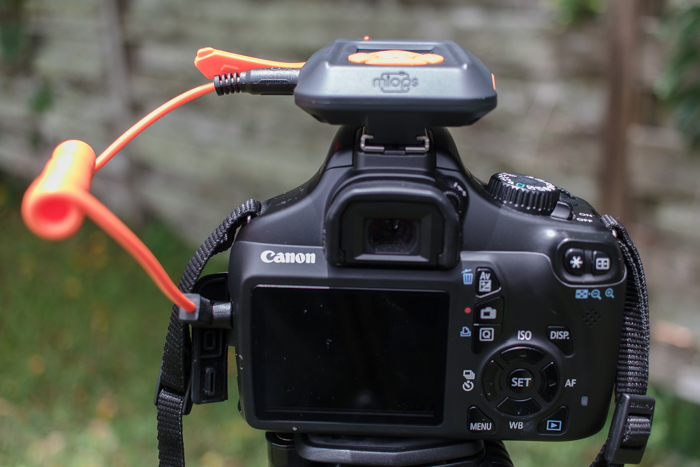
The MIOPS trigger can either mount on your DSLR’s hotshoe connector, or on your tripod via a standard screw-in connection.

The MIOPS trigger can either mount on your DSLR’s hotshoe connector, or on your tripod or light stand, via a standard screw-in connection.

The unit can be connected for charging via a micro-USB cable, which basically means most smartphone charging cables, which are readily available. The trigger housing is rugged plastic, with raised, easy to press controls and features a large color screen for displaying information, a microphone, and a light sensor that is used for the Lightning and Laser modes. Lastly, an additional port is available for connecting various external sensors in DIY Mode.

The trigger slides on a standard camera hot shoe, but also has a screw mount for placement on a separate tripod or light stand.
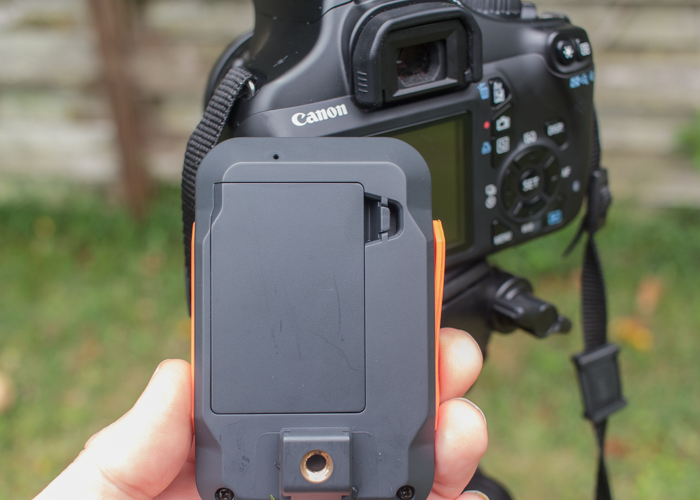
The trigger will accept a standard screw-in type connection for mounting on a tripod.

The trigger will accept a standard screw-in type connection for mounting on a tripod.

To me, one of the best features of the unit is its available remote connectivity via the MIOPS smartphone app. The app is free (available for Apple and Android phones), and allows you to access and control all modes offered by the trigger. After downloading the app, I found it connected to the unit without issue, and I was able to access all modes and modify the settings quickly, without having to even look at the unit mounted on top of my camera.
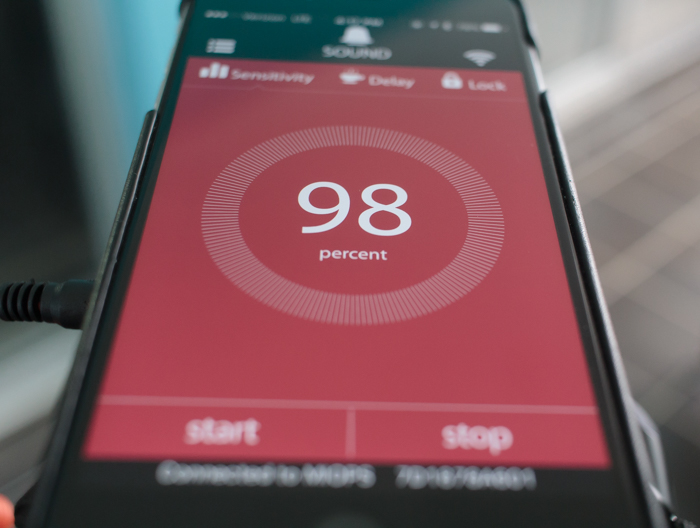
The accompanying MIOPS smartphone app is a highlight of the system, and allows you to control everything remotely.

The accompanying MIOPS smartphone app is a highlight of the system, and allows you to control everything remotely.

1 – Lightning Mode

Lightning mode is intended to allow you to capture flashes of lightning with your camera, without having to run series of long exposures or using bulb mode. You can set the sensitivity from 1 to 99, and start the sensor to capture the event. This mode is also sensitive to other types of light, such as fireworks, sparks, as well as artificial light, widening the gamut of possibilities. I didn’t get an opportunity to test the unit in a lightning storm, but I did attempt to trigger the MIOPS with a burst from a flashlight, and found that it picked up the light immediately and accurately.

As with several modes on the product, you’ll need to have your camera’s lens in manual focus in order for it to work.

2 – Sound Mode

Although this is the mode you’d expect to be the most useful, (and the biggest draw to the device) I found this one less intriguing due to the way it works. Without using the device, I’d expect it to allow me to trigger the shutter (cables are included to hook the MIOPS unit up to either your camera shutter, or an external flash unit), and capture the image, such as a balloon being popped, for example. This isn’t possible however, due to a slight lag, and the ridiculous shutter speeds necessary.
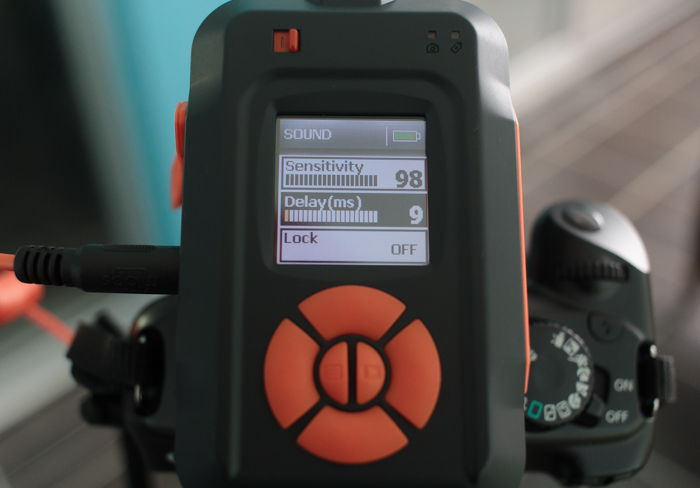
Each mode features several customizable parameters, each adjustable on the unit itself as well as the smartphone app.

Each mode features several customizable parameters, each adjustable on the unit itself as well as the smartphone app.

Instead, you have to perform any captures of this type in total darkness, a pretty big drawback in my book. The idea is to leave your camera shutter open (which is why darkness is needed), and use the MIOPS unit to trigger a separate flash and capture the action.

As a natural light landscape photographer, I don’t have external speedlites available to me. The one I was finally able to get ahold of ended up not being a TTL enabled flash, and didn’t have the connection port I needed to use it.

In the end, I became frustrated and gave up. But of course, this isn’t the trigger’s only feature, and there were plenty of other modes to keep me busy and satisfied.

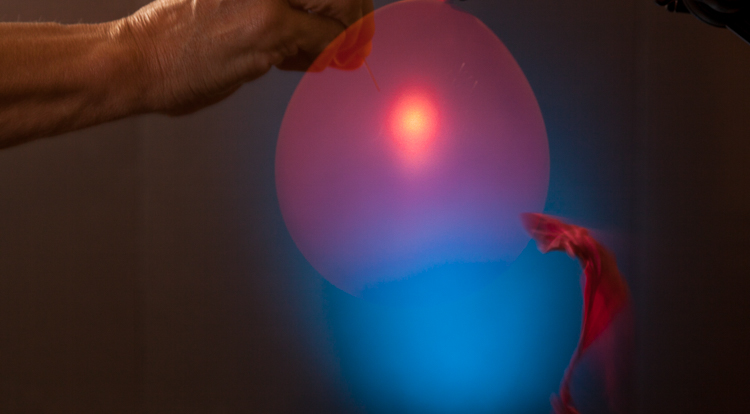
Editor’s note: I actually had a chance to try out the Miops trigger as well and was playing with sound mode. My friend and I had the same issues – we realized we had to fire the flash with it, in total darkness and somehow pop the balloon. We tried it on a balloon and smashing a light bulb. This is all we managed to get:
miops-sound-750px-01

Not exactly frozen or what we were hoping for. We learned later that by turning down the power on the flash the duration is shorter and more freezing occurs. Would have been good for more helpful instructions to come with the unit. We struggled to make this work.

miops-sound-750px-02

The best bulb smash we got after many attempts. Be careful if you try this at home! – Darlene

3 – Time Lapse Mode

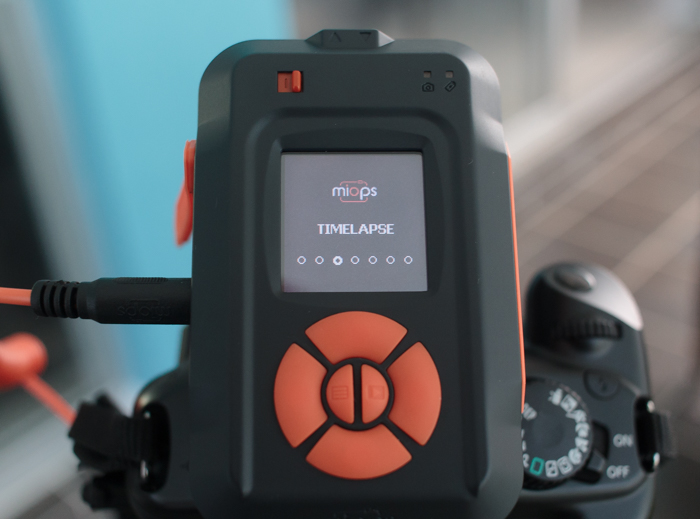
Another extremely useful mode is the time lapse feature. With this mode you’re able to set a few parameters, to produce a set of images showing changes to a scene over a period of time. With this feature, you must set your camera to bulb mode so that the trigger can override your camera’s settings.
MIOPS5

After switching to time lapse mode on the unit, you can set the interval (how often the camera takes a shot), the exposure (this is why your camera must be in bulb mode), as well as the total number of images that will be shot before the process completes.

In my testing, I found it very easy to set these parameters, and after a couple of trials, was pleased to find all of the functionality of this mode worked perfectly, without any issues.

4 – Laser Mode

This is another mode that I was unable to try out, but based on the accuracy of the sensor, I believe it would perform well. This mode requires a constant laser beam to be fed into the front sensor, and will trigger the camera when this beam is broken.

The laser doesn’t have to be a particular type or color, meaning a $ 10 pen laser pointer from an electronics store will do just fine. The hardest part of the operation will probably be mounting the laser on a stable surface and preventing the beam from being broken prematurely. After you’ve setup the laser, you can adjust the delay on the unit up to 999 milliseconds. A final setting allows you to designate a set number of frames to capture in this mode before the trigger stops.

This mode could be used to capture animals moving into the frame (could be tricky to setup) or something falling or moving like pouring shots or freezing water droplets.

10

Image by dPS author Ivo Guimaraes

5 – HDR Mode

HDR is a familiar term for most photographers; it is a technique where two or more images of varying levels of exposure are combined in post-production to capture a higher dynamic range, more equivalent to what the human eye sees. The MIOPS trigger allows you to set these parameters on the unit itself, including the center value (the middle value in the range of exposure levels to be captured), the difference in exposure value from one frame to the next (such as 1 stop between, or 1 1/2 stops between), and the total number of frames to expose, up to 7.

A 3 shot HDR composite from the MIOPS trigger.

A 3 shot HDR composite from the MIOPS trigger.

While this feature definitely extends the functionality and usefulness of the device, it must be said that it doesn’t really offer anything that most DSLR’s can’t do already, and I would almost always prefer to just set this up in-camera.

6 – DIY Mode

DIY mode is one of the modes that really makes the MIOPS unit shine, as it adds functionality not standard on most cameras. The trigger has a 3.5mm stereo jack on the side of the housing, and this allows you to connect a multitude of external sensors, adjust the threshold (percentage of change from the sensor), the delay of the trigger event in milliseconds, and mode, which lets you set what type of event detected from the external (add-on) sensor will trigger the unit, such as change, increase, or decrease.

This mode is advanced, and requires multiple connections in most cases, but the possibilities are almost endless. Sensors that measure changes in temperature, pressure, humidity, or motion can all be used to trigger the camera’s shutter.

7 – Scenario Mode

Scenario mode basically allows the user to program the unit by stringing together a series of functions, and having them execute based on a unique situation. Up to 5 steps can be saved for each custom scenario, and a total of 3 scenarios can be stored on the trigger. This entire function can then be executed via the Miops unit itself, or remotely via the smartphone app.

For example, let’s say a thunderstorm is approaching and you want to capture different types of shots during the event. You could program Lightning Mode as the first step, capturing a set number of stills of the lightning, and then immediately activating Time Lapse Mode in the second step, capturing photos at 5 second intervals to assemble later.

For each step, all of the usual parameters for each mode are available.

I didn’t get the chance to try this scenario out during an actual thunderstorm, but I did attempt to string together a couple of functions and execute them, and the results were excellent. Once the first step was completed (a 5 shot HDR photo), the trigger immediately went into Sound Mode, and stopped after it detected a loud sound (the clap of my hands from a few feet away).

I’d definitely chalk this mode up as one of the most useful features of this unit.

Remote Release

To me, this is one of the most useful features of the MIOPS trigger. I can connect the unit via bluetooth, fire up the accompanying app, and control my shutter from several feet away, wirelessly.

I tried this in a normal scenario I often find myself in, which is my tripod lowered to a short height, legs planted into the surf of a local beach, taking low angle, long exposure shots.

MIOPS_LowAngleBeach

I was able to snap off many perfectly-timed images, without ever having to worry about holding on to my usual corded cable release, keep the camera as still as possible, while avoiding the high winds blowing the cord around and smacking my camera.

I will use this, all the time!

Conclusion

The MIOPS Camera Trigger is a sturdy, rugged little unit that was easy to set up and use (note: this device is more aimed at intermediate to advanced photographers and could easily be confusing for beginners). It has a couple of features that almost make it worth the price of admission in my book, but a few issues linger that keep it from being the perfect tool, including a highly-touted Sound Mode. It promises high-speed photography but requires total darkness and a flash setup to accomplish, as well as a couple of modes that feel a bit tacked on, and not anything you couldn’t do already with existing camera settings (HDR and time lapse).
MIOPS6

Still, the MIOPS is a fun tool to use, the Remote Release mode, DIY mode, and smartphone connectivity are extremely useful, and if you’ve got $ 200 bucks burning a hole in your pocket for a new gadget, this might be one to pick up.

Have you had any experience with the MIOPS Camera Trigger, or triggers in general? Sound off below and let us know what you think, and show us some of the work you’ve accomplished!

googletag.cmd.push(function() {
tablet_slots.push( googletag.defineSlot( “/1005424/_dPSv4_tab-all-article-bottom_(300×250)”, [300, 250], “pb-ad-78623” ).addService( googletag.pubads() ) ); } );

googletag.cmd.push(function() {
mobile_slots.push( googletag.defineSlot( “/1005424/_dPSv4_mob-all-article-bottom_(300×250)”, [300, 250], “pb-ad-78158” ).addService( googletag.pubads() ) ); } );

The post Review of The MIOPS Smart Trigger by Tim Gilbreath appeared first on Digital Photography School.


Digital Photography School

 
Comments Off on Review of The MIOPS Smart Trigger

Posted in Photography


Hands-on Review – Nissin Di700A Speedlight and Wireless Trigger Kit

09 Aug

Following the big bang that introduced capable and affordable digital cameras, the digital photography universe has been expanding at an astounding rate. So much amazing imagery is being produced, and equipment manufacturers are working tirelessly to develop, and improve upon, the products you use to create those images.

Despite the tendency of some photographers to not even consider third party brands, that market exists and is flourishing. It seems that there are more players in it than ever before, and the competition is stiff.

Photography accessories

The market for third party photography equipment and accessories is bustling.

If you are considering adding a speedlight to your arsenal of gadgets, it’s definitely worth having a look at third party brands. Don’t make the mistake of assuming that a product is inferior because it’s not the same brand as your camera.

Although the industry dominators (Nikon and Canon) have a large array of speedlights to choose from, you just might find that you have to pay for features which you will never use, or their products may not have the features you need.

One company that has gained some ground, making a name for themselves in the third party sector, is Japan-based Nissin. They are a dedicated photographic lighting company who just released a new flash system for Nikon and Canon (Sony version coming in September) and one just showed up on my doorstep.

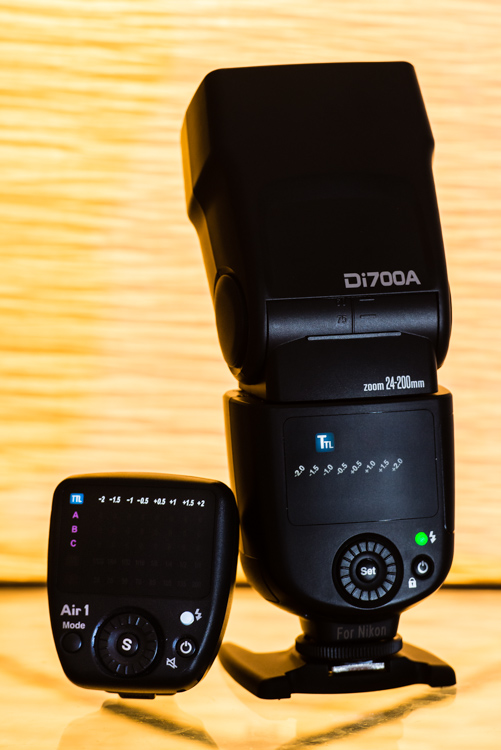
The Nissin Di700A speedlight shown with the Air 1 wireless commander.

The Nissin Di700A speedlight shown with the Air 1 wireless commander.

I shoot Nikon so they sent me the dedicated Nikon system but don’t worry, the Canon and Sony versions are similar, so this review is still worth reading even if you’re not a Nikon shooter.

First of all, this is exciting for us Nikon shooters. Unlike Canon, Nikon doesn’t have any flashes with radio triggers built-in, only optical. Why? Good question. Get it together Nikon.

First Impressions

Excavating the Nissin Di700A out of its packaging – yes, that’s the alphabet soup name they gave this unit – it was instantly apparent that it is meant to rival the SB-900/910, at least in size and weight.

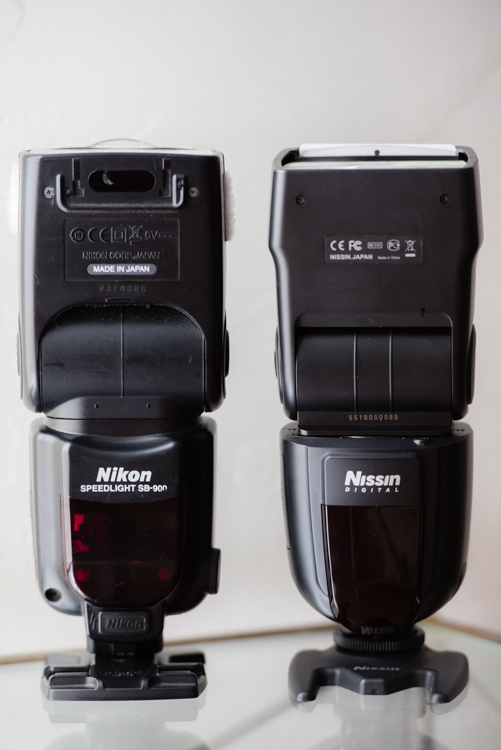
Side by side comparison of the Nissin Di700A and the Nikon SB-900

The Nissin is in many ways comparable to the Nikon SB-900.

A quick inspection of the unit shows it to be sleek, simple, and solid. The plastic seems heavy-duty and I suspect it would survive some abuse. The locking head swivels and swings into the same positions as its Nikon counterpart – 7-degrees down, 90-degrees up and 180-degrees left and right (as every flash should).

On the back, below the matte-finish LED screen, is a dial with a Select button in the middle, a flash test button, and the power button. They went for the minimalist approach which I applaud. It has a small rubber cover on each side; one with a socket for a battery pack hiding behind it, and the other with a PC cable and auxiliary sync inputs.

The metal hot shoe mount is a welcome sight but the circular threaded disc for tightening the flash onto the hot shoe seems a bit archaic. A slide-out diffuser and reflector panel are also familiar features.

You may have noticed that earlier I called this a camera system. The kit they sent me comes with a radio trigger called the Air 1 Commander. The hot-shoe-mount Air 1 matches the flash in most respects, but has an extra Mode button. It automatically locks into place when slid onto the hot shoe, and has a button which is held in to release it. Personally, I would have preferred the same button on the speedlight instead of the threaded disc.

Firing it up

I popped in four AA batteries, hit the power button, and a kaleidoscope of colorful lights sprung to life on the rear panel. However, the flash was effectively frozen and would not work at all. Come to find out, the Eneloop XX rechargeable batteries that I prefer to use for all of my speedlights do not work in this unit. I swapped them out for the regular Eneloops which work fine. The only difference that I’m aware of is the XX are 2,500 mAh compared to the regular’s 2,000 mAh (any electrical engineers out there please chime in).

Following the thread of simplicity that Nissin has going, I just tightened that baby down onto my hot shoe and it did what it is supposed to do, fired away in TTL metering mode.

I instantly fell in love with the rear display. Various bright, vivid colors, clearly visible in any lighting conditions, indicate the six different menu settings:

  1. A (automatic)
  2. TTL (through the lens metering)
  3. M (manual)
  4. SD (slave digital)
  5. SF (slave film)
  6. And the wireless setting identified by a little radio tower symbol

A few things I liked immediately were: a quick press of the power switch locks all functions of the flash so you don’t inadvertently change settings, the tactile feel of the buttons and wheel are soft but feel very sturdy, and changing modes and adjusting exposure compensation is quick and easy.

Another issue I encountered was that the zooming flash head feature didn’t work. It zooms all the way out when deploying the small diffusion panel but did not respond when changing the zoom on any of my lenses as the manual says it should, nor does it respond to the manual zoom control feature of the Air 1. We’ll assume I got sent a defective unit. To play devil’s advocate, this can happen to any brand so I’m not going to throw them under the bus just yet.

The controls on the Di700a are intuitive and very easy to adjust to get the exposure just how you want it.

The controls on the Di700A are intuitive and make it quick and easy to adjust and get the exposure just how you want it.

A detail that could prove handy is the standalone battery magazine. Spares can be purchased which can be pre-loaded for easy swapping. This can save you time and prevents fumbling around for batteries in the heat of the moment.

Perusing the instruction manual divulged that the flash has an overheating circuit which supposedly shuts it down for 15 minutes, to recover after firing 20 to 30 times (presumably at full power). This is a significant detail as 15 minutes might as well be an eternity for professional shooters. I immediately had flashbacks of the SB-900 which would overheat and shutdown often, and at the most inopportune times.

The system supports all of the nifty features found on the camera body: high-speed sync (FP for Nikon and HSS for Canon) to 1/8,000th of a second, red-eye reduction, slow and rear -curtain shutter, and on-camera exposure compensation which is added onto the unit’s own exposure compensation, covering two stops in both directions.

The Nissin Di700A not only has a built-in wireless receiver, but can also be optically triggered by the camera’s built-in flash. This is cool because you can mix and match flashes that have optical receivers. The Di700A and the Air 1 can be purchased separately. The Air 1 wireless commander claims a 100 foot effective range. Although this may seem generous, and plenty for most applications, the Cactus transmitters I use boast three times the range but do not support TTL metering, so it’s a trade off.

Using the Air 1 with the Di700A proved undependable. My first attempt at about 50 feet, with the flash behind a motorcycle for backlighting, was met with intermittent results. The signal seemed weak, and I had to move around to get the flash to finally fire.

Testing the Nissin Di700a and Air 1 commander.

I had mixed results using the Air 1 to trigger the Di700A. The system struggled having the motorcycle between the flash and transmitter at about 50 feet.

The Air 1 can also support three groups of flashes, on eight separate channels, with exposure compensation for each group in half stop increments.

I would certainly recommend the kit to beginning through intermediate shooters, but despite Nissin’s efforts to offer some pro-level features, it falls a little short to meet the demanding needs of working photographers.

All in all, for a sub $ 300 kit, that is sleek and easy to use, versatile, and capable of wireless TTL shooting, the Nissin kit is definitely a strong contender.

googletag.cmd.push(function() {
tablet_slots.push( googletag.defineSlot( “/1005424/_dPSv4_tab-all-article-bottom_(300×250)”, [300, 250], “pb-ad-78623” ).addService( googletag.pubads() ) ); } );

googletag.cmd.push(function() {
mobile_slots.push( googletag.defineSlot( “/1005424/_dPSv4_mob-all-article-bottom_(300×250)”, [300, 250], “pb-ad-78158” ).addService( googletag.pubads() ) ); } );

The post Hands-on Review – Nissin Di700A Speedlight and Wireless Trigger Kit by Jeremie Schatz appeared first on Digital Photography School.


Digital Photography School

 
Comments Off on Hands-on Review – Nissin Di700A Speedlight and Wireless Trigger Kit

Posted in Photography


How to Trigger an Off-Camera Flash with the Pop-up Flash

21 Jul

If you have ever wanted to explore off-camera flash but don’t know where to start, I have some good news. Many consumer-grade cameras such as the Canon Rebel series and the Nikon D3000 and D5000 models have a fantastic feature that might be just what you are looking for.

One challenge with off-camera flash is that you need a way to fire them at precisely the right moment. That usually means outfitting them with tiny little remote controls called triggers, that are tied into a transmitter unit affixed to the flash hot-shoe on your camera. When you want your off-camera flashes to activate, the transmitter sends a radio signal to them, and they go off at precisely the right time to give you the photo you want. Some triggers are inexpensive, while other, more customizable one,s will set you back hundreds of dollars. But, if you own one of the cheaper Canon or Nikon bodies, you already have a handy trigger built right in to your camera; the pop-up flash.

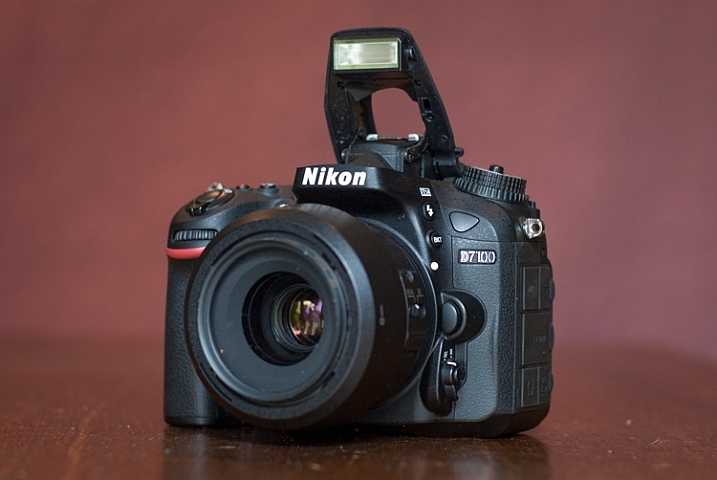
trigger-off-camera-flash-popup-flash

Your built-in flash can probably do a lot more than you might think.

Several manufacturers have this feature built-in to their cameras, but since Canon and Nikon are the most popular, those are what I’m going to focus on in this article. Both types of cameras require you to change a few menu settings that may seem a bit confusing at first, but get easier with practice.

Setup for Nikon cameras

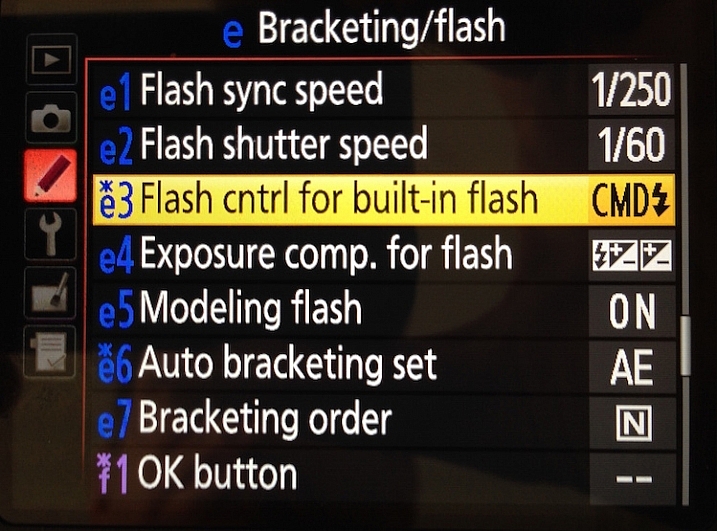
On a Nikon camera the first thing you will need to do is set your internal flash to Commander mode. This means it will still fire a burst of light when you take a picture, as a way of communicating with your external flashes. You will see this when you take a picture, but don’t worry, this brief burst is not bright enough to have much of an impact on your photo. This quick flash instead serves as a signal to your external speedlights that they need to fire. To do this, press your camera’s Menu button, then choose Custom Setting Menu (Bracketing/Flash) and the “Flash control for built-in flash” option.

trigger-off-camera-flash-nikon-menu-flash

Select the “Flash control for built-in flash” option

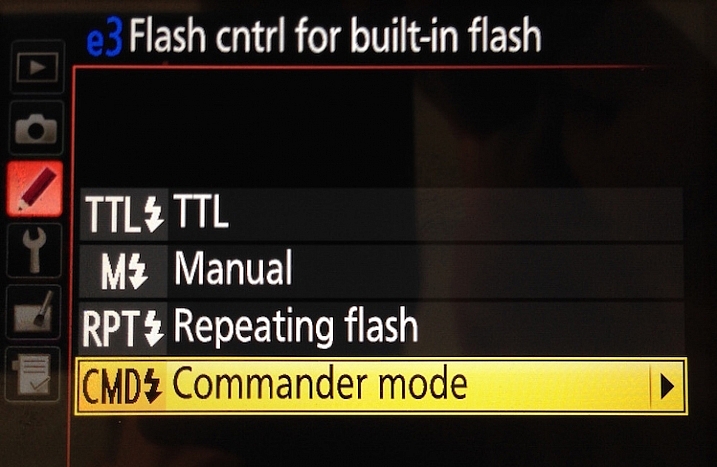
The default value for the “Flash Control” option is “TTL,” which means that your built-in flash functions exactly how you normally expect, and has no control or interaction with any off-camera flashes. Change this value to “Commander mode” which will then allow you to use it to trigger external speedlights.

trigger-off-camera-flash-nikon-menu-commander

Next, select “Commander mode” – press the right button to get to the next menu below

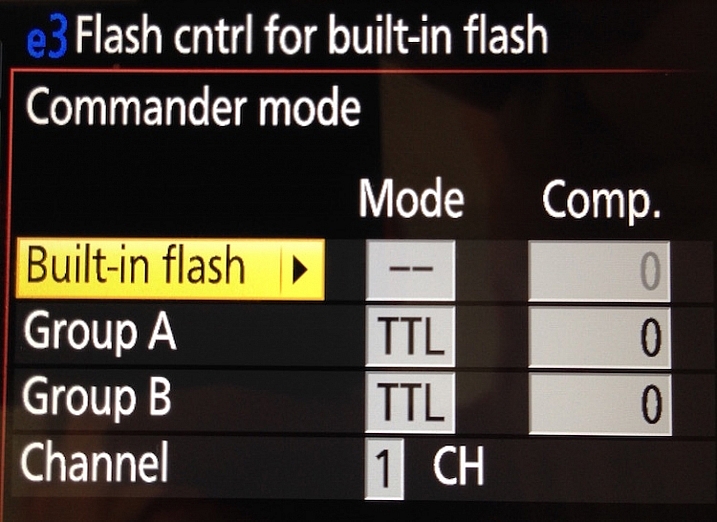
The final menu looks a bit complicated, but you only need to change a few settings in order to get everything set up initially. Change the Built-in flash option to display two dashes (–) and leave the rest of the values as shown below; Group A TTL, Group B TTL, and Channel 1.

trigger-off-camera-flash-nikon-menu-commander-control

Change “Built-in flash” to “–” and you’re all set.

You can do more complicated operations involving multiple flashes or even groups of flashes, but for a basic off-camera trigger setup not much else is required.

Setup for Canon cameras

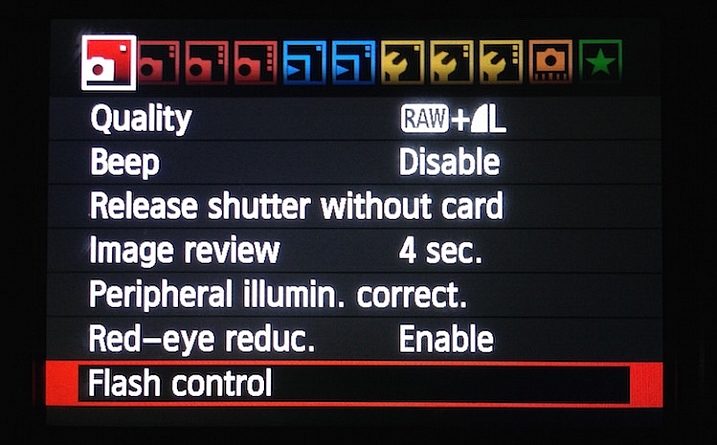
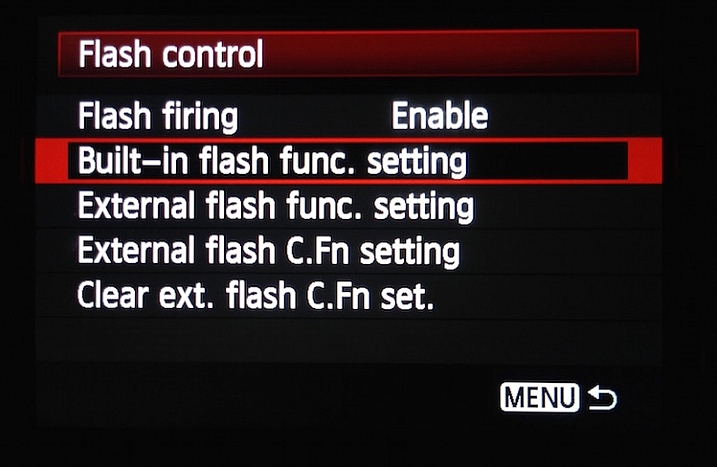
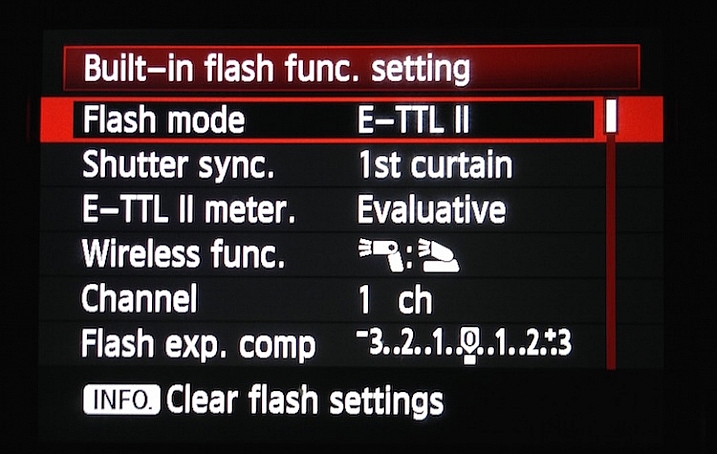
If you have a Canon camera, the process is similar but involves a few different menus. Go to your main camera settings menu and choose Flash Control. Then select Built-in flash settings and choose the EasyWireless option. Make sure your channel is set to 1, and you’re ready to go. If you have a higher-end camera like a 60D you won’t see EasyWireless, so leave Flash mode as E-TTL II and change Wireless function to an image of two flashes with a colon between them. As with the Nikon settings there are other options you can change to customize how your external flashes behave, but this is enough to just get you started.

trigger-off-camera-flash-canon-menu-flash

On Canon cameras, start by choosing the Flash control menu.

trigger-off-camera-flash-canon-menu-flash-control

Next choose Built-in flash func. setting

trigger-off-camera-flash-canon-menu-flash-settings

Set Flash mode to E-TTL II, and then set Wireless func. to the icons displayed above. Alternatively, you can select EasyWireless if that appears as an option.

Testing your setup

Now that your camera is set up, all you need to do is put your flash in Remote (Nikon) or Slave (Canon) mode and make sure there is an unobstructed line of sight between the receiver on the speedlight, and the flash on your camera. Some speedlights allow you to twist the base so it faces a different direction than the flash itself which is useful if you want to get a little more creative with your lighting angles.

Before you get too far into all this you should be aware of two caveats: Canon cameras can only control Canon flashes, and same with Nikon cameras and Nikon flashes. Also, most third-party flashes such as those made by companies like Yongnuo are not compatible with the on-camera remote trigger setup described here. To use those you will need to purchase a remote flash trigger, but since the flashes themselves are cheaper than their first-party counterparts you should have a bit of money leftover to buy a trigger setup.

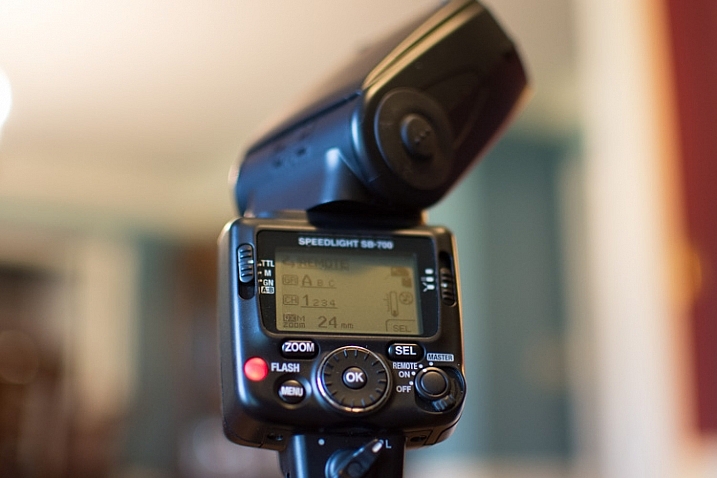
trigger-off-camera-flash-nikon-sb700

Makesure your external flash is set to “Remote” (Nikon) or “Slave” (Canon). It should also be in the same Channel and Group as your camera, but if you have never changed these then the default values should work fine.

As you get more experience with off-camera lighting you might find yourself wanting to expand your horizons with diffusers, colored gels, additional flashes, and more. But if you just want to get some basic experience with this technique, learning to use your built-in flash as a remote trigger is a fantastic way to get started.

Have you tried using this method before? What has your experience been like, and what are some of your favorite off-camera flash tips? Leave your thoughts in the comments below.

googletag.cmd.push(function() {
tablet_slots.push( googletag.defineSlot( “/1005424/_dPSv4_tab-all-article-bottom_(300×250)”, [300, 250], “pb-ad-78623” ).addService( googletag.pubads() ) ); } );

googletag.cmd.push(function() {
mobile_slots.push( googletag.defineSlot( “/1005424/_dPSv4_mob-all-article-bottom_(300×250)”, [300, 250], “pb-ad-78158” ).addService( googletag.pubads() ) ); } );

The post How to Trigger an Off-Camera Flash with the Pop-up Flash by Simon Ringsmuth appeared first on Digital Photography School.


Digital Photography School

 
Comments Off on How to Trigger an Off-Camera Flash with the Pop-up Flash

Posted in Photography


Tric is a wireless flash trigger for the iPhone

09 Jun

The LED flash units in smartphones are usually poor performers compared to the Xenon flashes in dedicated cameras or even external flashguns. If you feel your iPhone photography has been held back by your Apple device’s underpowered LED light, Tric’s new Kickstarter project might just be what you’ve been waiting for. The team behind Tric is looking to fund the final development and mass production of a wireless trigger unit for the iPhone. Read more

Articles: Digital Photography Review (dpreview.com)

 
Comments Off on Tric is a wireless flash trigger for the iPhone

Posted in Uncategorized