RSS
 

Posts Tagged ‘Tips’

Tips for Indoor Sports Photography – Part 1

17 Jan
Shooting indoor sports isn't always easy, but you can get professional-quality results by following these tried and true tips/

Shooting indoor sports isn’t always easy, but you can get professional quality results by following a few tried and true tips.  1/180, f/4, 80mm, ISO 1250, flash.

A few weeks ago, we asked our dPS Facebook followers what topics they’d like to see covered here on the blog, and a few of you were in search of tips for indoor sports photography. For purposes of this article, I’m going to concentrate heavily on high school basketball, because it brings all of the challenges of shooting indoor sports together; bad lighting, fast action, ornery coaches, inconsistent referees, and–of course–the unpredictability of sports.

The Right Gear for the Job

I’m not going to spend a lot of time here discussing camera bodies. As long as you are photographing with a reliable DSLR, your bigger concern should be the glass. Fast glass. That doesn’t mean I advocate running out and spending all of your money on the most expensive lenses that you either can ,or can’t afford, but a long zoom with a large aperture is going to be a must.

Unfortunately, while many gyms may be well-lit for sports, most are poorly lit for photography.  Adding to the challenge, many high school sports have a prohibition against using flash. You have to do your homework. In my experience, I’ve never had a problem using flash for basketball. As long as you are shooting from an off-center angle, you should be fine. You have to be careful, though, because you don’t want to blast a player in the face with flash full, and possibly change the outcome of the game. That’s the best way to make sure they never let you in with your camera again. Flashing action on the floor? Shouldn’t be a problem. Flashing a player on the free throw line before the ball leaves his hands? Not so much.  As with any type of shoot, make sure you have all of the necessary backups: batteries, memory cards, etc., as well as a backup body if possible.
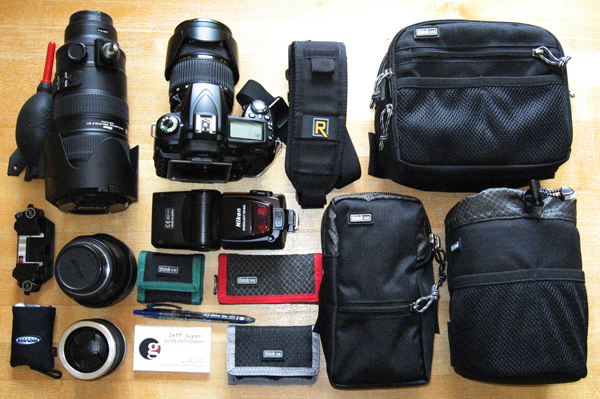
Contrary to popular belief, it is possible to travel light while shooting sports.

Contrary to popular belief, it is possible to travel light while shooting sports. Shown: Nikon D90, 24-70mm f/2.8, 70-200mm f/2.8, SB800 speedlight, plus spare batteries, memory cards, etc., that all pack into modular components shown for the Think Tank Pro Speed Belt.

Get There Early

Trust me when I tell you that you are going to want to get there early.  Pre-game  warm-ups offer some of best opportunities for quality shots of individual players.  For starters, players tend to move a little more slowly in warm-ups than in the actual game.  You’ll have an easier time capturing motion, and more of an opportunity to isolate individual players in the frame.  You can get a little closer to the action during warm-ups, but PLEASE BE CAREFUL!  Each half of the court is going to be filled with players, coaches, managers, officials, and other personnel. The players are big, fast, and not paying attention to you.  Their job is to play basketball–not give you the best photo op.

Know the Sport
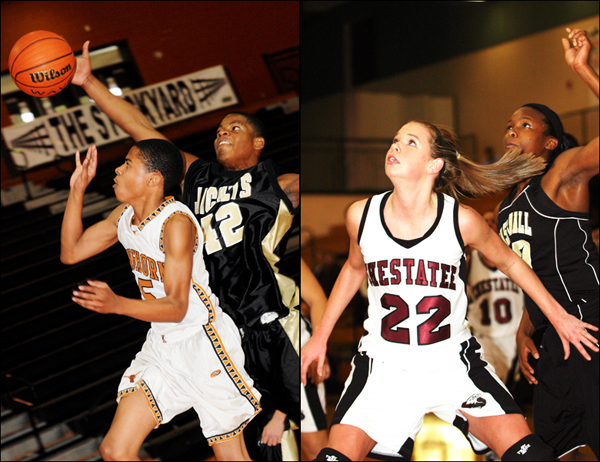
The most compelling shots will have offense, defense, and the ball. You can get good shots without the ball, but they will be better with it.

The most compelling shots will have offense, defense, and the ball. You can get good shots without the ball, but they will be better with it.  LEFT: 1/250, f/5, 80mm, ISO 2000, flash.  RIGHT: 1/320, f/2.8, 80mm, ISO 1250, flash.

The biggest key to getting quality photos of any sport is to have a solid understanding of the game and how it is played.  Every sport has a rhythm all its own. Are they playing a zone defense or man-to-man? Is it a run-and-gun, or are they burning the clock? Can #33 sink the three with impunity, or is he dishing it off to the open center for a lay-up? Do you need to be on the sidelines or under the bucket? Which side is best: the home side of the stands or the visitors’?

Remember that there is a big difference between shooting as a media photographer and shooting as a parent.  As a reporter or school photographer, you are there for “the big picture.”  As a parent, you are mostly concerned with getting photos of your son or daughter, and they’ll be easy to track with the number on their back.  In either case, the more you understand the subtleties of the game the better prepared you will be.

Focus

When I say “focus” I’m not just talking about your photography.  I tell this story a lot because I think it’s important. You have to be aware of your surroundings. I once saw a photographer stand his ground on the sidelines at a football game, despite the fact that a player was being pushed out of bounds right at him.  I watched as his camera, lens, and monopod all went flying in three different directions–as he flew in a fourth.  He was wheeled off the field with cuts to his face, and a leg that had been broken in two places. He was out of commission for six months. No photograph is worth that. Be safe. Focus on where you are and what is going on around you.

Now let’s talk about the other kind of focus.  Obviously, it’s an action sport and you want action photos.  Some of the best sports photos are those that capture the eyes. Things move fast, though, and your subjects are not always going to be standing still long enough for you to focus on their eyes. Your camera’s auto focus works by looking for contrast. Uniforms usually have a lot of contrast between the color of the jersey and the color of the numbers.  If you can get the eyes, great.  If not, your best bet is to try locking on either those numbers or the ball once players start moving.
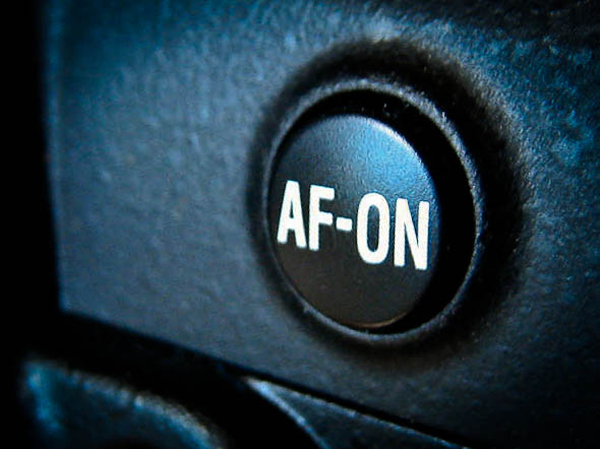
Most professional sports photographers use back-button focus. Check your manual if you aren't sure where to find this feature in your camera's menus.

Most professional sports photographers use back-button focus.
Check your manual if you aren’t sure where to find this feature in your camera’s menus.

Try Back Button Focus

Another focus option you might wish to try is back button focus. Most DSLRs have an option that allows you to assign auto focus functions to a button on the back of the camera. When AF is linked to the shutter button, the camera continuously maintains focus as long as the shutter button is pressed halfway.

When a player passes between you and the player you’d been focusing on, your focus will be shifted to the new player in the frame. Pressing the shutter button halfway down to regain focus on your original target starts the process over again and probably means missing the intended shot. With back-button focus, however, all you have to do is remove your finger from the button when another player enters the frame. Pressing the back button again when the distracting player leaves the frame resumes your original focus.

Continuous Focus Mode

Part of the secret to shooting sports is using AI Servo (AF-C on Nikon) auto focus mode. With “one shot” AF (AF-S on Nikon) focus locks on a point and cannot move until you release and reengage the auto focus. In AI Servo (AF-C), however, the camera continuously focuses whenever you are pushing the AF button (or shutter button halfway if you haven’t reassigned it). It not only helps you lock focus, but also keep it when trying to photograph bodies in motion.

Camera Settings

As with any type of photography, there is not necessarily a “right” or “wrong” exposure.  But this is a sport, after all, and if you come home with 300 blurry photos you aren’t going to be happy–nor will your editor, or your daughter, the MVP.  Remember that since shutter speed controls ambient exposure, the faster your shutter speed is the better your chances will be of freezing the action.  I generally like to start with a shutter speed of 1/500 and adjust my settings accordingly until I get the look I want.  Since this is an indoor sport, your lighting will probably be consistent over the course of the game, unless the gym has windows. Don’t forget, though, that “consistent” can also be “consistently bad.”

If you are using flash, it’s going to be important for you to determine the maximum shutter speed your flash will allow (usually 1/250, check your manual for “flash sync speed”). Start with that and adjust your aperture and ISO accordingly. This is going to take some practice, so  be prepared for some trial and error. The good news is that cameras are getting better at capturing action in low light.

Look for interesting backgrounds, like the game clock or opposing fans.

Look for interesting or dramatic backgrounds, like the game clock or crowded bleachers.  LEFT: 1/180, f/3.5, 135mm, ISO 800, flash.  RIGHT: 1/200, f/8, 80mm, ISO 1600, flash.

Vantage Points and Camera Angles

Obviously, the closer you are to the action the better your photos .  Unlike some sports, you’re going to be a bit more confined to certain areas. You really only have access to one sideline in basketball because the player benches and scorer’s table take up one complete side of the court. The end zones are often the domain of the cheerleaders, so your time there might be sporadic at best. As noted earlier, a solid understanding of the game will definitely help you decide where to be and when.  This is one reason why veteran sports photographers are hardly ever in one place for very long.
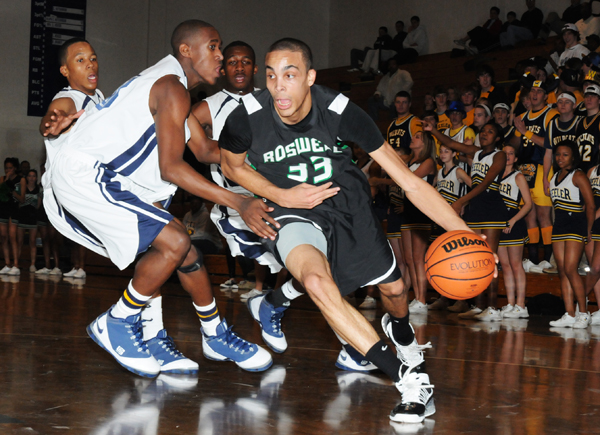
Basketball is a very vertical sport, but don't forget to get some horizontal shots as well.

Basketball is a very vertical sport, but don’t forget to get some horizontal shots as well.  50mm, 1/250, f/8, ISO 1600, flash.

The entire length of the court opposite the player benches offers some great angles. It gives you great vantage points not only for the action on the court, but also for coach and player reaction shots on the bench. Be sure to also take advantage of higher angles from the bleachers (timeout huddles) and the track above the court (players jostling under the net), as well as getting down low for those dramatic larger-than-life shots.

Be Creative: the Action’s Not Just Between the Lines

It’s sports. They go one direction. Then they go the other direction. Four quarters of back and forth. That doesn’t mean, though, that you can’t be creative with your angles and composition. Look for interesting or dramatic backgrounds. In the set below, including the game clock over the coach’s shoulder as it ran down provided interesting contrast to his calm demeanor.
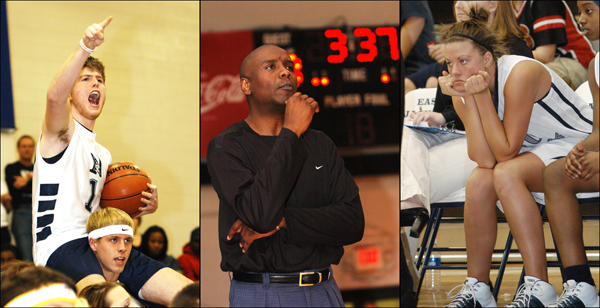
Keep your head on a swivel. Don't miss the fans, coaches, and player reactions.

Keep your head on a swivel. Don’t miss the fans, coaches, and player reactions.

Don’t fall into the trap, though, of assuming that everything worth photographing is right there on the court in front of you. Spend some time in the stands. Shoot the crowd reactions.  Photograph the band and the cheerleaders. Capture the traditions. There is so much more going on in that gym than just a basketball game. Turn your back on the action once in a while and take a look around. There are stories everywhere. Use your camera to tell them.

Get Your Motor Running?

Welcome to photography, where five photographers will give you five different answers for everything, and tell you why the other four are wrong. When I first started shooting high school sports I had a slow camera with an even slower buffer that couldn’t handle me just leaning on the motor drive and hoping for the best. I hated it at the time, but it was probably a good thing. I learned to compose my shots and choose my moments more carefully. I developed a pretty fast shutter finger, and, I think, a better eye for the action. Even now, with better equipment, I still tend to leave my camera set for single clicks. That may put me in the minority, but it’s what works for me.

Etiquette

If you are covering a particular school or team over the course of a season, introduce yourself to the coaches. Your job will be easier if they know who you are and why you are there game-after-game. These kids may be big and strong, but they are still kids and it’s a coach’s job to look out for them. If a coach or official tells you something, listen to them. If they ask you to move, you move. You’re in their house and you have to play by their rules.

If one of those rules is no flash, then it’s no flash. It may sound silly to you, but you have no idea what the consequences might be. There may be college scouts in the stands, and you momentarily blinding the point guard with your flash might have an impact on whether that kid gets a scholarship, or if he’s even recruited at all.

If play stops for an injury, show some respect and PUT YOUR CAMERA DOWN.  While it might make for compelling photography, it is entirely possible that you just witnessed the end of a kid’s dream or their only chance of going to college.  You don’t want them or their parents seeing you clicking away while everyone else in the gym is holding their breath. This is high school, not the NBA. Be sensitive and keep it in perspective.

Any seasoned photographer will tell you that photographing sports is not easy– particularly indoors. We can debate endlessly on which sport is the hardest to shoot, but with practice, preparation, and the right gear, you’ll see your images start to improve quickly and steadily.

Stay tuned for Part 2, where we take a closer look at some of the other indoor sports you may find yourself shooting.

The post Tips for Indoor Sports Photography – Part 1 by Jeff Guyer appeared first on Digital Photography School.


Digital Photography School

 
Comments Off on Tips for Indoor Sports Photography – Part 1

Posted in Photography


5 Tips to Take Better Images in a Zoo

14 Jan

5 Tips to Take Better Images in a Zoo

Many photographers think that taking a great animal photo requires extreme patience, sitting and waiting for hours in the wild. Yes, this is how a great wildlife shot is captured. However, if you just want to get some practise, you can still capture great animal photos in a zoo. Taking pictures of animals in a zoo is easier than shooting in the wild. Yet, it is not too easy.
Many people think that taking a picture in a zoo is not challenging, but I don’t agree. It is not as simple as you think to take a good picture in the zoo. Here are some tips that will help you to capture a better photo next time.

#1 Be Aware of Both Foreground and Background

At the zoo, animals usually live in cages. If you are able to shoot inside the cage, beware you do not capture the cage as a background. On the other hand, for those animals you can observe through a thick glass wall, what you can do is to shoot as close to the glass as possible and open up the aperture as wide as you can so as to minimize flare and dirt on the glass.

Crocodile

For example, I shot this crocodile outside a glass wall. I used a 200mm lens at f/2.8 because I wanted to blur out all the dirt on the glass. When I was shooting, I removed the hood and stuck the lens to the glass so that no flare would affect my image. You can also use this same technique to blur out the cage if you can only shoot outside a cage.

#2 Learn About the Animal’s Behaviour

Although you do not need to wait for your target animal to appear when you photograph in a zoo, you still need to understand their behaviour so as to capture a good image. Most animals feel hot and find shelter at noon. They tend not to move around and just sit still or sleep instead.

Firefox

You may not able to get a good pose because they are not going to keep the same pose for hours. One of the solutions is to find out when the feeding times are. When the zoo keeper takes the food into the cage, or glass house, you are going to have the best chance to get the best angle.

Stilt

#3 Use a Wider Aperture and Higher ISO

Do not be afraid of noise. Noise is so much better than a blurry image. When you shoot with a 300mm lens hand held, you have to get at least 1/300 shutter speed in order to achieve a sharp image. Boost up your ISO. I normally use automatic ISO selection so I can focus on composition and catching the target’s movement. You can set a minimum shutter speed and a maximum ISO with most camera models. You will need this because when the target is moving, it will move between both brighter and more shaded areas. You are not going to have enough time to change the ISO if you shoot with Aperture priority or Manual mode.

Parrot

On the other hand, open up to the widest aperture unless you are shooting in good sunshine. A larger aperture can give you a faster shutter speed which can reduce the chances of handshake. It can also help to blur out the foreground and background.

#4 Try a Different Angle

Unlike shooting in the wild, shooting in a zoo is limited by many restrictions. You cannot step into the cage, or even get as close as you want. Therefore, you need to look for the best angle. You can shoot behind a rock with a telephoto lens.

Monkey

This will provide you with a blurry rock as foreground and the photo will have more depth. You may also get a nice perspective by shooting from an extremely low angle.

Practice, Practice and More Practice

A zoo is the best place for practicing animal shoots in my experience. You can take more time to think about your images.

Panda

You are extremely safe when shooting. Hence, you can get more practice with both your camera and lens. Get the feel for how fast your 300mm focuses. Practice and develop better hand held skills so you may use 1/40 sec for a 300mm lens. (I still cannot do this. Learn how to press the shutter just as an egret is beginning to hunt. When you have enough practice, you can try going ‘wild’.

The post 5 Tips to Take Better Images in a Zoo by Kevin Choi appeared first on Digital Photography School.


Digital Photography School

 
Comments Off on 5 Tips to Take Better Images in a Zoo

Posted in Photography


Winter Photography Tips and Ideas to Make You Master the Season

08 Jan

Winter is an amazing time of the year, especially if you live in a region that produces tons of snow. Don’t hibernate even if there is no snow outside since winter is the best season for outdoor photography. Cold weather is not an excuse for sitting at home. Warm, comfortable clothes and special, cropped gloves could help you easily overcome Continue Reading

The post Winter Photography Tips and Ideas to Make You Master the Season appeared first on Photodoto.


Photodoto

 
Comments Off on Winter Photography Tips and Ideas to Make You Master the Season

Posted in Photography


Lost your Photo Mojo? Ten Tips to Bring Back the Magic

08 Jan

We all go through creative blocks. Is it such a bad thing? Or, on the contrary, is it a sign that we need to push ourselves, and grow in the process? I think that a loss of passion may be an opportunity to renew and refresh your vision and turn it in a positive experience, instead of staying in a rut and feeling sorry for yourself.

Ten Tips to Get your Photo Mojo Back

1 – Get out of your comfort zone

You may hear this one often, but have you done it yet? I’m not suggesting that you go out and shoot your first wedding, but try something that may seem out of character for you. I consider myself more of an urban photographer than anything else. But I have experimented with other genres, such as B&W flower photography. Did I enjoy it? Sure I did, tremendously! But I also realized that I’m happier shooting street photography. That realization alone gave me a boost to get out and do more of what I love most.

I'm mostly a street photographer but I enjoy trying new genres and techniques. It gets my creative juices flowing! ©Valérie Jardin

I’m mostly a street photographer but I enjoy trying new genres and techniques. It gets my creative juices flowing!
©Valérie Jardin

2 – Hang out with other photographers

Hanging out with like minded people is like therapy. Admit it, you often experience some frustration when you are on an outing with non-photographers. Being able to enjoy a photo walk without having to justify why you need to take your time to get the shot is priceless. Join a group or start your own. The latter option is a good way to make sure that you will show up for all the photo walks!

3- Start a new project

Before you embark on a long project, make sure you’ll be able to handle the commitment. For example, a 365 project is a great way to grow as a photographer but it can also become a burden and be counterproductive. If you end up quitting after a few weeks, you may end up feeling worse about yourself and photography in general. If you decide to go for the 365, don’t be too hard on yourself. Don’t get to the point where you’ll shoot just about anything to get your pic of the day. Remember, it’s supposed to be fun! You may also consider starting something a little bit more manageable such as a 52-week project, a short term photo essay, a series of portraits of strangers or selfies, etc. Whatever you decide to do, make sure you share with the world! Which leads to the next point…

Some project ideas to help you out

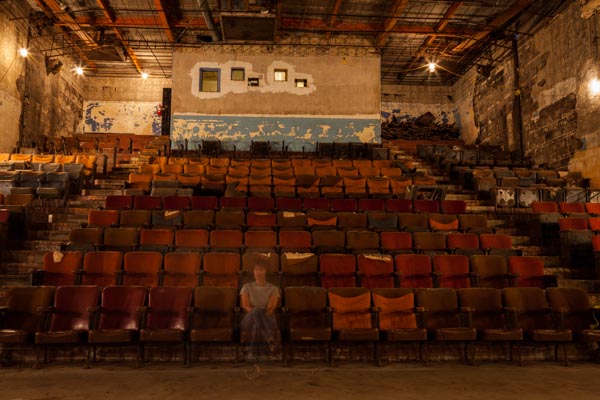
Don't forget that you are your most readily available subject. Have fun with selfies! Here I played with long exposures and ghost images in an old theater.  ©Valérie Jardin

Don’t forget that you are your most readily available subject. Have fun with selfies! Here I played with long exposures and ghost images in an old theater.
©Valérie Jardin

4 – Try a new lens

Rent or borrow something completely different such as a fish eye, a macro lens or a Lensbaby Composer for a few days, see the world differently and embrace the new possibilities.

See a list of the most popular lenses – survey of dPS readers

5 – Share your work, start a blog!

Share your work on social media, or consider starting a photography blog. You don’t need to be a writer to start a photography blog, think of it as a journal in pictures. It’s so much more fun than keeping your images in your hard drive. It will also give you a boost in your confidence and push you to shoot more and better.

This is my personal blog where I write about projects and things I'm working on outside of my photography business.

This is my personal blog where I write about projects and things I’m working on outside of my photography business.

You can get a free, or inexpensive blog using resources like:

  • Square Space – starts at $ 8/month
  • WordPress.com – starts at free

6 – Page through a good photography book

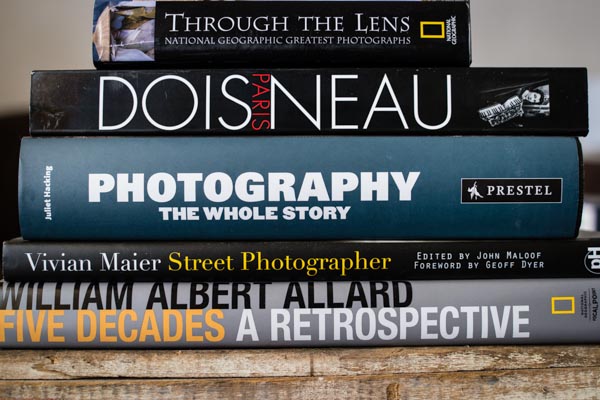
We get inspiration online all the time. Everything we do seems to be online. The Internet is a wonderful thing and we are exposed to the work of so many amazing artists from all over the world and in real time. Sometimes we need to slow down and sit down with a big beautiful book of photographs. Visit a real book store or a library for a change of pace and for renewed inspiration.

Valerie Jardin Photography - books-1

Take the time to page through a real book once in a while.

7 – Visit museums

Photography exhibits are a wonderful way to get some inspiration, but do not neglect looking at art in general. Sculptures, paintings, etc. See the passion that fueled the works of art showcased at your local museum.

8 – Teach a child

Give a camera to a child and go on a photo walk. You’ll be amazed to discover the world from a child’s perspective. Better yet, this could ignite a life-long passion thanks to you!

9 – Write a list of techniques you’ve never tried and give it a shot!

There isn’t a single technique that is not explained in detail online, so you have no excuse for not experimenting with something new. You never know, this light painting thing may just be what you need to feel inspired again, so get to work!

10 – Simply pick up your camera and photograph something in your house

There is no reason to stay in a rut, all you need to do is pick up a camera, any camera. You can even stay home and do it. Pick an ordinary object and make it look extraordinary! This simple step will get the creative juices flowing again.

Just pick up the camera and photograph something, anything, around your house!  ©Valérie Jardin

Just pick up the camera and photograph something, anything, around your house!
©Valérie Jardin

Okay it’s your turn

It’s okay to feel down and uninspired, it’s all part of being an artist. Turn it around and use it as an excuse to push yourself and try something new!

Please take a minute to share your experience dealing with creative block and how you found your muse again.


Books mentioned above and in Valerie’s stack:

  • Through the Lens: National Geographic Greatest Photographs (National Geographic Collectors Series)
  • Paris – Robert Doisneu
  • Photography: The Whole Story
  • Vivian Maier
  • William Albert Allard: Five Decades

The post Lost your Photo Mojo? Ten Tips to Bring Back the Magic by Valerie Jardin appeared first on Digital Photography School.


Digital Photography School

 
Comments Off on Lost your Photo Mojo? Ten Tips to Bring Back the Magic

Posted in Photography


5 Tips for Better Long Exposure Landscape Photography

03 Jan

David’s Long Exposure and DoF eBook Long Exposure and Shooting Shallow DoF eBook Bundle (Long Exposure comes with Lightroom Presets) is currently 43% OFF at SnapnDeals – grab it now! (only until January 16th AUS time)

Even if you are an experienced landscape photographer you will know there is lots to consider when approaching the area of long exposure, landscape photography.

The following five tips are just some of the things I have learned, (often the hard way) on my own journey with landscape photography and I hope you are able to take advantage of them and apply them in your own work.

Long exposure landscape photography 05

5 Tips for Better Long Exposure Landscape Photography

1 – Consider the scene without the camera

When arriving at a location you may find yourself rushing to your camera bag in haste to set up your gear. With long exposure photography your mind can often be busy doing the math, calculating exposure times, juggling tripods and fiddling with filters.

Take your time and behold the scene, forget you are capturing a long exposure image and get the framing right. I use the Lee filter system on my Fuji X cameras, which is easy to attach and remove the Neutral Density (ND) filter to the camera between shots. I often remove the filter and capture shorter exposure images to review on the LCD screen. If these images don’t look good there is little chance of the long exposure version looking look.

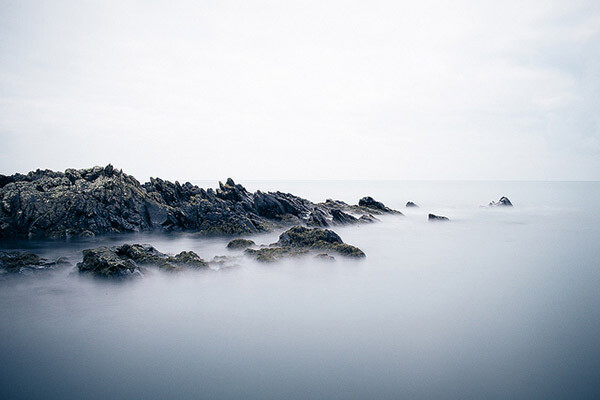
Don’t be fixated on getting the water looking smooth; instead fixate on framing the water in the photograph to create contrast and make the scene visually interesting.

Long exposure landscape photography 04

2 – Maximize your images with morning or evening light

If you are using an ND10 filter you will know how brilliant they are at stopping light from reaching the camera sensor. Although, theoretically it is possible to capture long exposure images even during the sunniest part of the day, it generally isn’t the best time to shoot.

Prioritize the late evening or early morning for capturing long exposure images so you don’t rely on the ND filter doing all the work. You will find you have much more creative control and will capture more atmospheric images by shooting at the extremes of the day.

Long exposure landscape photography 02

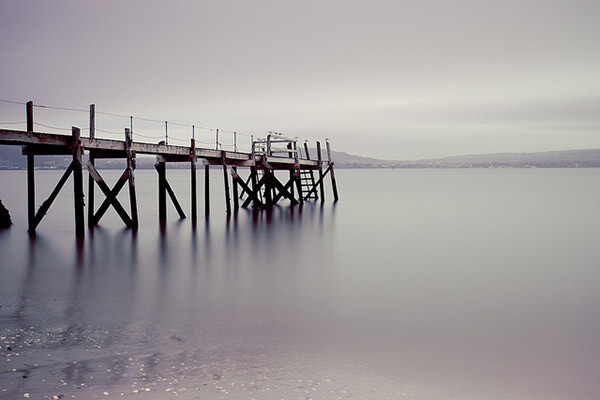
If you are shooting the ocean, then the second part of this tip is to research tide times. I’ve ventured out on more than one occasion to shoot a jetty to find it would be hours before the tide was in. There are various services online that will tell you high and low tide times for your specific area.

3 – Use the rule of thirds

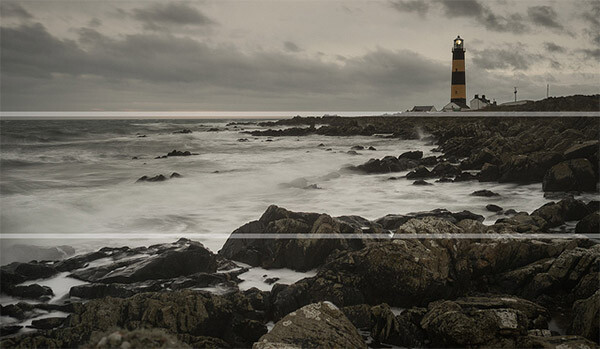
As with the first tip I really recommend that you spend time studying your location. Imagine your image as three separate layers. The top and bottom layers need to contain something of visual interest with the middle layer tending to be the smoothed out water. Sandwiching of the smooth water between foreground and background detail can add a real sense of drama to a long exposure scene.

Long exposure landscape photography 06

4 – Keep your gear clean

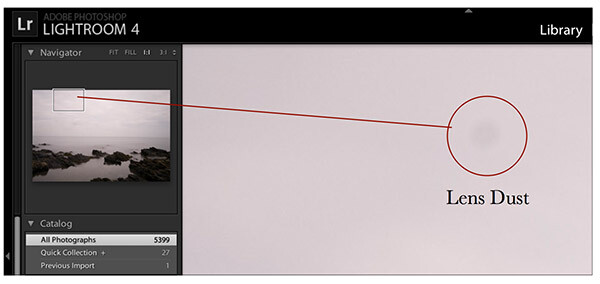
Having the camera shutter open for long durations means any dust or dirt on your lens or filter has a greater opportunity to impact on your image. Your post-production software (such as Adobe Lightroom) will go some way to automatically clean up dust but quite often larger spots are visible in long exposure images that wouldn’t be obvious in normal conditions. Having a lens cloth handy and cleaning the filter (both sides) in-between shots can result in less post-production work later on.

5 – Enhance in post-production

When it comes to postproduction processing for long exposure photography I recommend focusing on three areas. Initially you should correct any colour cast created by the ND filter. This is a relatively simple process; in Lightroom use the ‘temperature’ slider to warm the image to a more natural hue.

You should then zoom in and check for any dust spots, these are generally more obvious in the highlights, such as the skyline. Use the Spot Removal tool (Shortcut Q) to remove these blemishes easily.

Long exposure landscape photography 01

Finally my top tip is to use the graduated filter tool in Lightroom 5 (shortcut M) to soften the water. You can do this by clicking on the horizon and dragging to the base of the water. Once you have created the filter you can then soften the smooth water by reducing the level of ‘Clarity’. You can also do the opposite of this technique to increase the ‘clarity’ of your skyline.

Long exposure landscape photography 03

Summary

These five tips, I hope will go some way to improve how you approach long exposure photography, but the most important thing to remember is to relax. There is something ultimately therapeutic about the experience of capturing long exposure images of landscapes, moving water or the night sky, isn’t that what the creative process is all about?


long-exposure-bookcover-250David’s Long Exposure and DoF eBook Long Exposure and Shooting Shallow DoF eBook Bundle (Long Exposure comes with Lightroom Presets) is currently 43% OFF at SnapnDeals – grab it now! (only until January 16th AUS time) 

The post 5 Tips for Better Long Exposure Landscape Photography by David Cleland appeared first on Digital Photography School.


Digital Photography School

 
Comments Off on 5 Tips for Better Long Exposure Landscape Photography

Posted in Photography


Tips to Protect your Gear in Harsh Weather Conditions

18 Dec

Do you live in a cold and snowy climate? Are you planning a trip to a desert or a tropical island? Although adverse weather or harsh environments can yield some of the best images, those situations can also play havoc with your camera gear if you don’t plan accordingly. Here are some simple steps to help you shoot without ruining your equipment.

Tips to Protect your Gear

Rain

I love photographing in the rain. Of all adverse weather conditions, rain is one of the easiest to deal with to protect your camera. ©Valérie Jardin

I love photographing in the rain. Of all adverse weather conditions, rain is one of the easiest to deal with in regards to protecting your camera. ©Valérie Jardin

Don’t let a rainy day stop you from making amazing photographs. Just protect your camera, and yourself, and get out there! Although some of the most expensive DSLRs and lenses are weather sealed and can be used in the rain without protection, most cannot. The good news is that they can easily be fitted inside a rain sleeve specifically designed to keep them dry on rainy days. Rain sleeves will cost from a few dollars for a clear plastic model, to $ 30+ for a more durable water proof material. The more expensive rain sleeves come is different sizes to fit your lens. Note that they work best when you use a lens hood.

It’s harder to find rain protection for smaller camera systems. A makeshift cover with a shower cap or a freezer bag will usually do the trick. Since I mostly shoot street photography with a mirrorless camera, I find that holding an umbrella is quite convenient if it’s not too windy. The camera is small and light, one hand to shoot is all you need!

Snow and cold

Again, what most would consider adverse weather makes for a photographer’s ideal playground. Heavy snow falls should be treated like rain and the same protection applies. Dealing with the cold, on the other hand, is a different story. When out in the cold, your camera doesn’t need any special protection as long as it stays dry. One of the biggest issues with shooting in cold weather is the moisture and condensation that can build up on your camera and lens when you go from cold, to the warmth of your home or car. Excessive moisture on your lenses can cause mold to form inside the lens, which will ruin it.

To prevent damage from condensation, here is what you need to do: Before you go back inside your house or car, make sure you seal your camera in an air-tight plastic bag. This will allow the camera to reach room temperature while the condensation builds on the outside of the bag, not on your precious gear.

Mirror lock-up can also happen in very cold temperatures when the lubricant that helps activate the moving parts freezes. Cameras can usually handle colder temperatures than stated in the manual, but be aware that this type of lock-up could happen if you end up in the arctic circle.

Another thing to worry about when the temperature dips, the battery will drain much faster. So, make sure you carry a spare or two that you keep in a pocket, as close to your body heat as possible. Smaller cameras don’t have as many moving parts, and no mirror freeze up to worry about, but their batteries will drain even faster, so be prepared for that.

Your camera needs some special attention in cold and wet conditions. ©Valérie Jardin

Don’t hibernate with your camera in cold weather. Just take some special steps to protect it and yourself! ©Valérie Jardin

Extreme humidity

Besides the obvious inconvenience of your lens fogging up as soon as you leave your air conditioned room and step into the hot and humid environment, humidity can also lead to mold. You can alleviate the fogging up of the lens by placing your gear in a sealed plastic bag and letting it slowly adjust to the change of temperature. Avoid changing lenses as much as possible and remember that zooming in and out will pump humidity inside. Favor prime lenses!

Keep sensitive equipment in sealed bags and keep small silica desiccant packets in your camera bag to absorb some of the moisture. Dry your hands before you change batteries or memory cards to prevent trapping moisture in the compartment.

Tropical environments bring a lot of great photo opportunities, just make sure the moisture doesn't get inside your camera! ©Valérie Jardin

Tropical environments bring a lot of great photo opportunities. Just make sure the moisture doesn’t get inside your camera! ©Valérie Jardin

Heat

Just like extreme cold, the opposite can also give you some gear trouble. Use common sense and avoid prolonged exposure to direct sunlight. Keep your camera cool, and in the shade when not in use. Cameras can overheat and this can cause damage to the internal components. You can use an empty cooler which will help keep your camera cool when you’re not using it. It’s also a good idea to carry one of those space blankets when you are out in the wild or extreme weather. You can use it to protect your camera from the sun as well.

Sand and dust

Have you ever been on a beach during a sand storm? I have! No matter what you do, sand will get everywhere! If you are going to be in an extremely dusty environment, I would highly recommend protecting the front element of your lens with a good quality filter. An occasional scratch from wiping some of the dust or sand off the front of your lens won’t hurt as much if it happens on the filter rather than the lens itself. Also, don’t set your camera bag on the sand! Camera bags are perfect sand traps.

Salt

If you shoot near the sea on a windy day, there will surely be some spray of salty water on your gear. Again, a UV filter will help protect the front element of your lens. Make sure your battery is full and your memory card is empty before you head out so that you avoid opening the battery or memory card compartment at all costs to prevent corrosion to form inside. It may not be a good time to change lens on the beach either.

Never leave home without them

A blower such as the Giottos Rocket blower. It’s such a small investment and one of the best accessories you can have in your camera bag at all times. I not only use it to blow any dust from the lens before I wipe it with a lens cloth. But I also blow the back of the lens before I put it on the camera to prevent dust from reaching the sensor. I also use it to blow air on the lens and camera before I wipe them clean.

Microfiber cloths. Keep one separate that you will use for the front of your lens only. Carry extras to wipe the dust or water from your lens and camera body. The key is to remove as must moisture or dust as quickly as possible.

Common sense when changing lenses

Avoid changing lenses in adverse weather. If you absolutely have to, follow these simple steps: Do it in your car if you can. If not, turn your back to the wind and be ready to do it quickly. Place the new lens on a clean, flat surface. Unscrew the back cover but leave it on. While shielding your camera from the elements with your body, put the camera upside down and quickly switch lenses. This should only take a second or two to minimize the amount of dust that will get to your sensor.

Protect yourself

Protecting your gear from extreme weather won’t do much good if you don’t make it back alive! Whether you are dealing with extreme cold or heat, don’t mess with extreme weather if you’re not prepared. No picture is worth risking your life for!

I hope you found some of those tips useful. Please share your own with the community in the comment section below.

More reading on this subject

  • How to protect your gear in extreme conditions
  • Storm jacket cameras cover – a review by Valérie Jardin
  • 7 digital camera predators and how to keep them at bay
  • Camera insurance – assure peace of mind


The post Tips to Protect your Gear in Harsh Weather Conditions by Valerie Jardin appeared first on Digital Photography School.

Digital Photography School

 
Comments Off on Tips to Protect your Gear in Harsh Weather Conditions

Posted in Photography


Tips for Learning to Love Photoshop Actions

13 Dec

This is a guest contribution from Meghan Aileen Schirmer at The Shoppe Designs & Photoshop Actions. Their In Vogue Action Set is available on Snap N Deals now for just $ 29! (until December 24, 2013)

Learning to Love Photoshop Actions

Photoshop actions tips 04

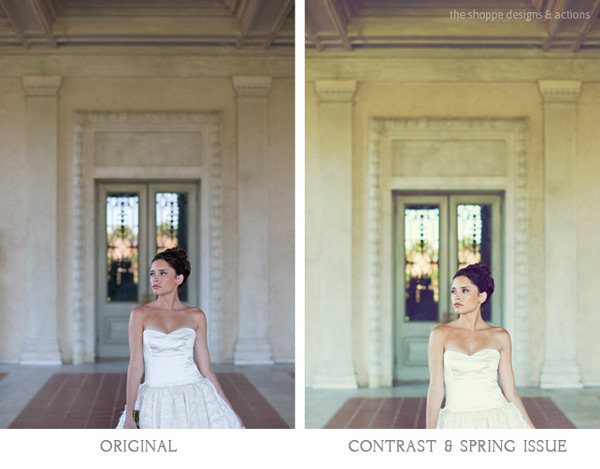
When it comes to Photoshop Actions or presets photographers tend to love them or hate them. But, when done right they can really enhance a digital image in a way that a straight out of the camera digital image cannot achieve. If you use film, that is very different, and the variety in types of film and processing techniques allows for a greater variety of beautiful looks for your images. However digital photography, in general, is limited to that digital look we all know, especially when we are in the context of a commercial photography workflow. You can of course edit your images individually in Lightroom, ACR or Photoshop. But when you use Photoshop Actions and presets it is simply speeding up this process. When you have hundreds of images to edit, time savers are very valuable.

What can you use Photoshop Actions for?

Photoshop Actions can be used for workflow speed, such as simply adding a little contrast and saturation to all of your straight out of camera images. They can also be used to specially edit key images or to add a unique style or look to your images that makes you memorable amongst the sea of competition. Action sets at The Shoppe Designs & Actions usually each contain, several specialized Photoshop Actions that you can use at different opacities and different combinations for various style looks, as well as some utility Actions such as adding contrast or grain.

Action styles

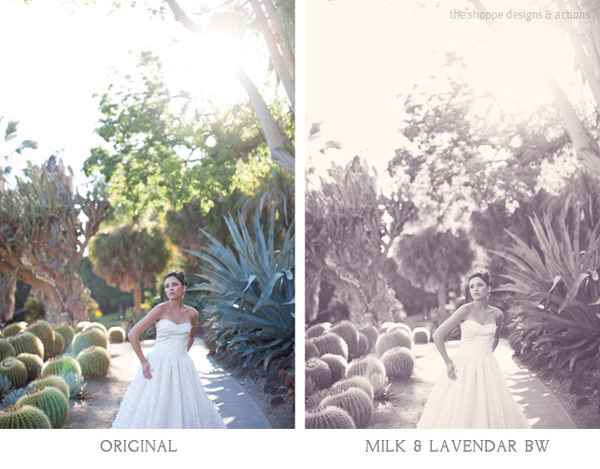
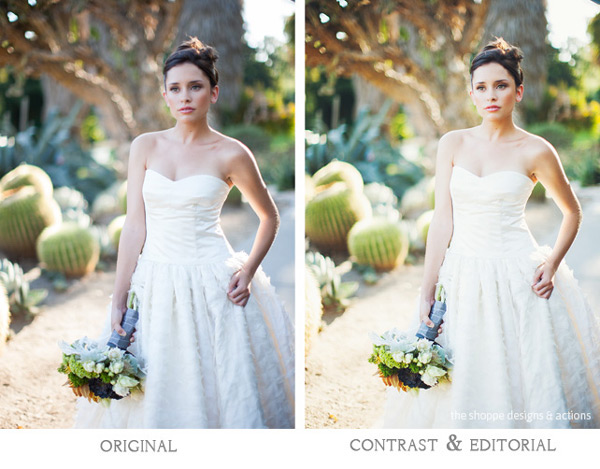
Our In Vogue set was inspired by the pages of high end fashion magazines. In this set you will see the matte look and slight toning of modern fashion photography, as well as the clipped blacks of vintage black and white film. When shooting film is not an option, using Actions to mimic the look of film is a great alternative. Maybe you love the look but are not in a position to switch to shooting film.

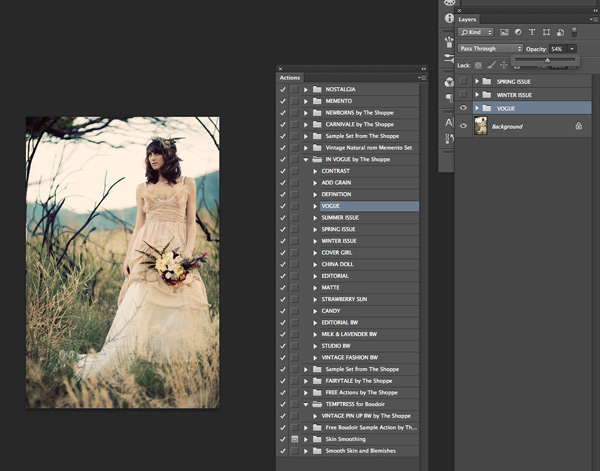
Here you can see the plain digital image and then the sample using the In Vogue Action Set. Our Actions are set up to leave you with a folder on top of your background layer in Photoshop, so that you can easily adjust the strength of the action. We give them to you at 100% strength or a bit less, and then you can adjust them to say 20% for a more subtle look. Perfect when you don’t want the image to look like you edited it with Actions, but just want to get rid of that digital feel. See how in these samples the actions are used at a lower opacity to simply enhance the image and not heavily alter it.

Photoshop actions tips 01

Photoshop actions tips 02

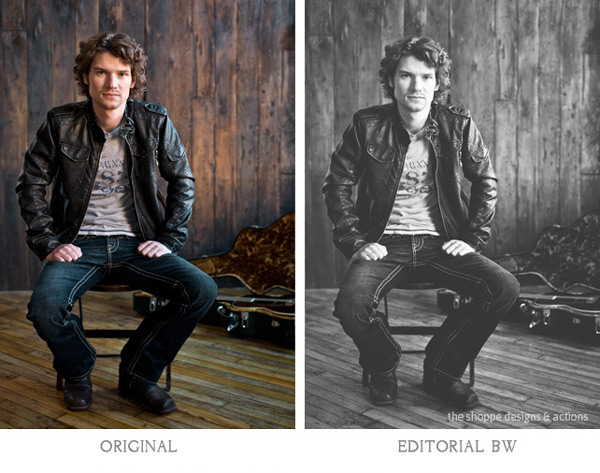
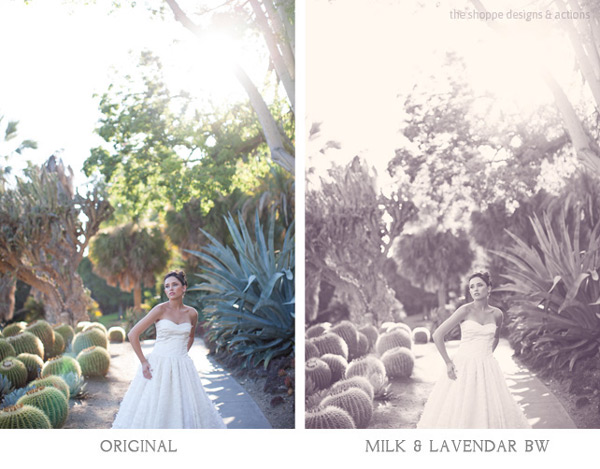
Black and white Actions

Using Actions to make your images black and white is an excellent use of them. Especially if you like the black and white film look. Just reducing the saturation on an image in Photoshop is not going to get a gorgeous black and white image, it will be flat and digital looking. Our Actions create different tones, different depths of contrast, flat or deep blacks and some even add grain for that authentic film look.

Photoshop actions tips 03

Photoshop actions tips 04

Applying Photoshop Actions

When using Photoshop Actions, we recommend trying a variety of them on several different types of photos with different lighting conditions. Not all Photoshop Actions work the same on all images, it is just not possible. Some greatly enhance one image, but may not work at all on another. As you use them often you get to know which works best on the different types of images. Some will really bring out the color in one image, while diminishing the color in another. As I mentioned our Photoshop Actions leave a folder on top of your image in your layers palate in Photoshop. We recommend playing each one on an image, then turning the folder off and on to see the effects. Then adjust the opacity of the entire folder and see what looks best. Then you can play another to add different effects and keep adjusting the folder opacity until you love it. It is best to go back to the background layer before playing each one.

Photoshop actions tips 05

In general, I recommend doing basic image editing in a RAW editing program before starting to play with Actions, unless you are using the utility Actions such as ADD CONTRAST. Stylized Photoshop Actions are simply meant to enhance while utility Actions like adding contrast, boosting saturation and sharpness can be used on original camera images.

If you want to use a utility type Action on a bunch of images at once, or a stylized action on a set of similar images, you can do that as well. In Adobe Bridge, go to TOOLS > PHOTOSHOP > BATCH and then choose the folder of images, the action to use, and the destination for them. I recommend saving them in a different folder and not saving over your originals in case you want to edit them differently later.

However you decide to use them, Photoshop Actions can be very versatile and very useful. It is a matter of fitting them into your workflow and discovering how Photoshop Actions in general as well as which Photoshop Actions in particular work best for you and the way you work.

The Shoppe Designs & Photoshop Actions has many well respected action sets to choose from, and the In Vogue Action Set from is available on Snap N Deals now for just $ 29! (until December 24, 2013)


Designer and Photographer Meghan Aileen Schirmer is the owner of The Shoppe Designs, Inc. Meghan has designed and photographed for some of the most well-known companies in the world over the past 15 years. From Sony to Nickelodeon, as well as Grammy winning artists and musicians. She lives in Nashville, TN with her family.

  • Try a FREE sample set of Actions by liking The Shoppe Designs Facebook Page
  • See more available Actions on their website  The Shoppe Actions
  • See the In Vogue Actions set, regular price.

The post Tips for Learning to Love Photoshop Actions by Guest Contributor appeared first on Digital Photography School.

Digital Photography School

 
Comments Off on Tips for Learning to Love Photoshop Actions

Posted in Photography


Photoshop Tips – Using the Blend If Feature

12 Dec

blendif_opener_alt

The Blend If feature in Photoshop blends one layer into another based on the content of either of the two layers. It can be used, for example, to replace a sky by making it easy for you to knock out the blue sky without having to make a complex selection.

In this article, you’ll learn some Photoshop tips on how to use Blend If to replace a sky.

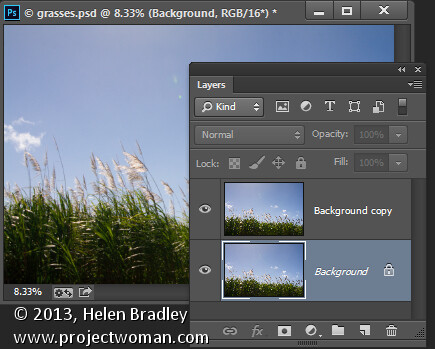
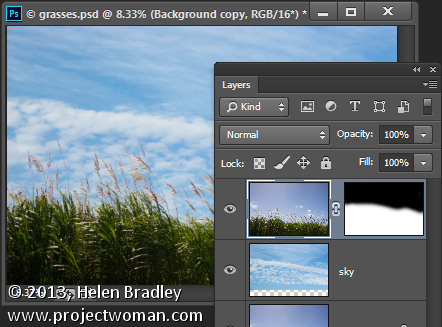
Start by opening an image such as the one shown here. Right click on the background layer and choose Duplicate Layer to make a second copy (keyboard shortcut is “command/control + J”). You now have two layers with the same content.

using the "blend if" feature in Photoshop

Make a duplicate layer

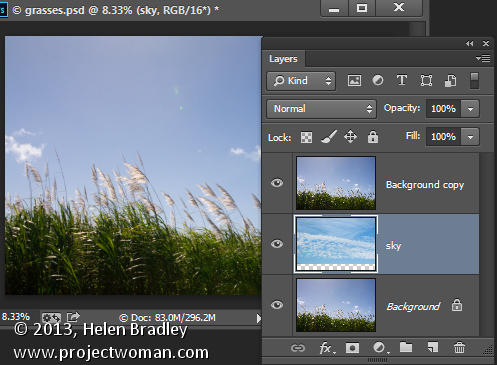
Open an image with good sky. Choose Select > All and then Edit >Copy. Click on the main image and choose Edit > Paste. Drag the sky layer between the two image layers. Size the sky layer, if necessary, so it is big enough to replace the unwanted sky in the original image. Alternately you can use File>Place to choose the new image, and Photoshop will automatically add it as a layer and make it a Smart Object (so it can be resized without any quality loss).

blendif_2

Put the layer of the new sky in between the other two

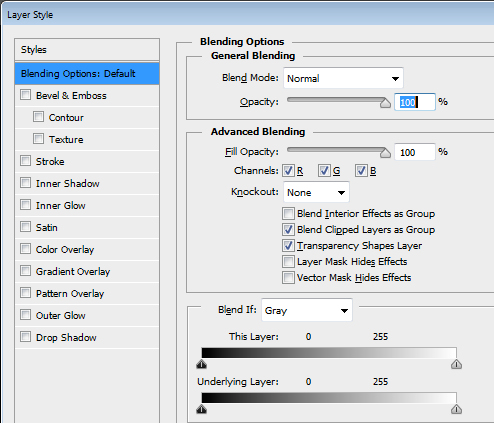
Target the top layer, click the Add Layer Style icon (fx)at the foot of the Layers palette and click Blending Options to open the Layer Style dialog box (see below).

blendif_3

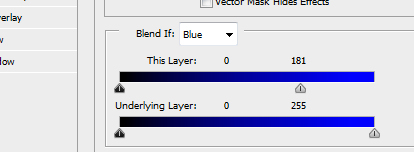
The Blend If sliders and channel selector are at the foot of this dialog. To start, you will choose the channel to use. The Gray channel is the luminance channel so it lets you make your adjustment based on the lightness/darkness of either the image layer or the layer below. If you choose Red, Green or Blue you’ll be using that channel as the basis for your blending.

blendif_4

The layer underneath the current layer contains the sky that we want to use. So you will use the sliders called This Layer to remove the existing sky, to be able see through to the sky underneath. If we were to select the Gray channel we won’t be able to make the selection very easily because both the sky and the grasses have similar luminosity or lightness values.

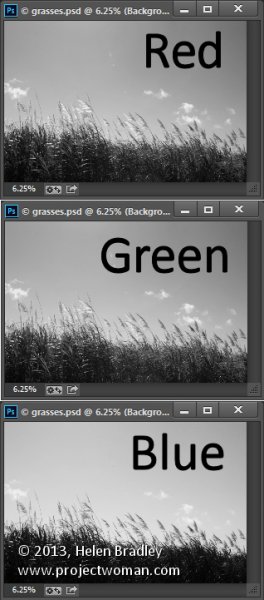
However if you exit this dialog for a minute and take a look at the individual channels in the image, you may find one where there is plenty of contrast between the area you are seeking to hide (the blue sky) and the areas you want to keep (the grasses).

To do this close the dialog box temporarily, choose Window > Channels and click on the Red, Blue, and Green channels in turn to view them.

In this case the Blue channel displays the sky as a lighter tone than the grasses, which are darker. This channel has the most contrast in the area we are interested in so it will be a good one to use.

Select the RGB channel again before you leave the Channels palette. Return to the Layers palette and target the top most layer again. Display the Blending Options dialog again and choose the Blue channel in the Blend If pull down.

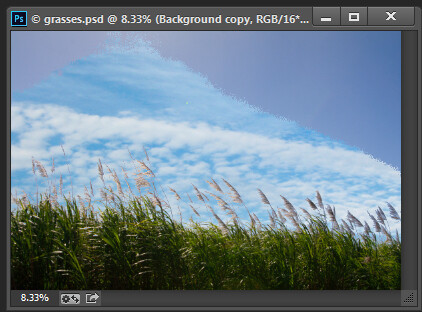
Drag the right most slider in the This Layer area to the left. As you do so, the lighter blue areas will disappear and you will see through to the sky layer underneath.

Blendif_5a

Pull the right slider for “This Layer” to the left

Blendif_5b

The result is the the layer below will start to appear, but the transition is not smooth

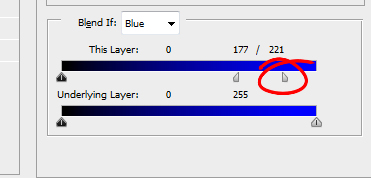
To smooth out the transition between the area being removed and the area which remains, break the slider in two. You do this by holding the Alt key (Option on a Mac) and drag half of the slider away from the other half.

The rightmost half of the slider indicates the point at which the blending effect is fully impacting the image. So pixels which have a value greater than the value indicated by this slider will be fully transparent. The left half of this slider controls the point at which the blending ceases. Any values in the blue channel that are smaller than the value indicated by this slider will be fully opaque. Pixels which have values in the blue channel that match the values between the two sliders are partially transparent.

blendif_6

For some images you may get better results by combining multiple channels. So you might use the blue and the red channels but use the rightmost slider on the blue channel and the leftmost slider on the red channel. You’ll need to experiment to see what works for your image. When you have a good result click Ok.

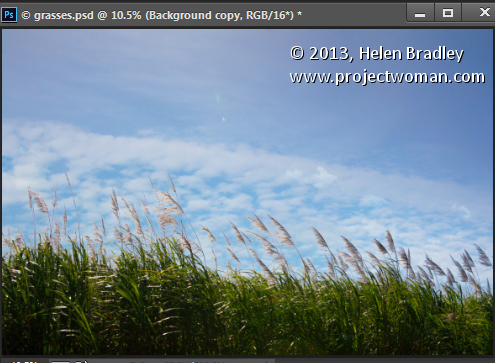
In a perfect world you’ll be able to fully remove the unwanted sky with just this adjustment. Chances are your results will be less than perfect! Mine certainly are, see below.

blendif_7

If this is the case, make sure that the Blend If adjustment gives you the best results in the area that would require you to make a complex selection. For me that is where the grass meets the sky. Selecting around the grass would be a big job so I want the Blend If results to be good in this area. That it doesn’t get rid of the rest of the sky is just fine – that it is easy to get rid of manually.

Target the top layer and click the Add Layer Mask icon at the foot of the Layers palette. Target the mask by clicking on it. Choose a soft round brush and paint using black over the mask to hide the remainder of the sky. Using a soft brush (0% Hardness) will ensure you get a seamless transition between the original image and the new sky.

blendif_8

Problems elsewhere

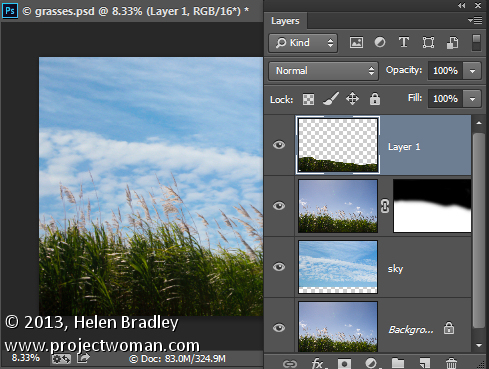
Occasionally you will find that using the Blend If sliders to remove the sky also results in some unwanted transparency appearing elsewhere in the image. If this occurs you can use content from the background layer to fill the transparent areas.

Make a selection over the area to fix, click on the Background layer to target it and choose Layer > New > Layer via Copy. Drag this layer to the top of the image and it will cover the areas that were made transparent.

Although this wasn’t a problem with this image, this is what the layer stack might look like if you do need to fix some transparency appearing elsewhere in the image.

blendif_9

The Blend If sliders are a useful way to blend layers without needing to make complex selections. You can make even better use of these sliders when you use the channel data as a guide to determine which channels to use for your blending.

Post originally from: Digital Photography Tips.

Check out our more Photography Tips at Photography Tips for Beginners, Portrait Photography Tips and Wedding Photography Tips.

Photoshop Tips – Using the Blend If Feature

The post Photoshop Tips – Using the Blend If Feature by Helen Bradley appeared first on Digital Photography School.


Digital Photography School

 
Comments Off on Photoshop Tips – Using the Blend If Feature

Posted in Photography


Tips for Landscape Photography in Exotic Places

11 Dec

The Exotic Landscape

Landscape photography is difficult. If you live in a location that lacks spectacular landscapes, or you just fancy going somewhere new, travelling to a new location – especially a beautiful one – may seem like the solution. A few days ,or a week, in a national park or other beautiful spot with your tripod and camera sounds like a great way to create some wonderful new images. What could go wrong?
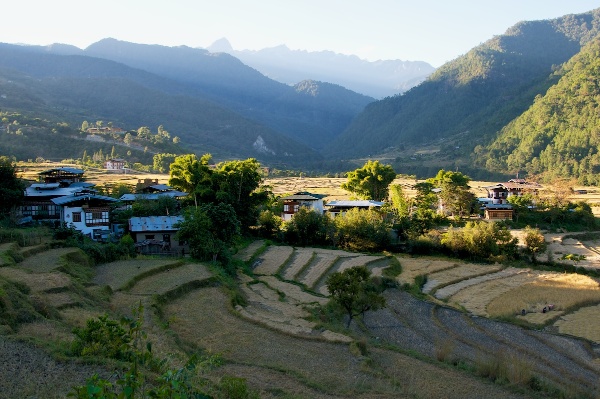
Actually, plenty. The weather (and consequently the light) might not do what you want. If you are shooting by the sea, the timing of the tides may not be conducive to taking great photos. You may not have time to find the best places to take photos, and be able to get on location when the light is at its best.

I wrote more about that, and the advantages that concentrating on your local landscapes here, in my article The Intimate Landscape – 5 Tips for Better Landscape Photography.

Does that mean you should give up the idea of travel altogether? Of course not. Travel broadens the mind and provides fantastic new photo opportunities. It’s also a lot of fun. But because time is tight when you are travelling, you need to plan well to make the most of the opportunities that come your way. I’m going to show you how in this article.

Do your research before you leave

Research is very important. If your visit is brief, you’re going to be under time pressure. The more preparation you do, the better prepared you will be.

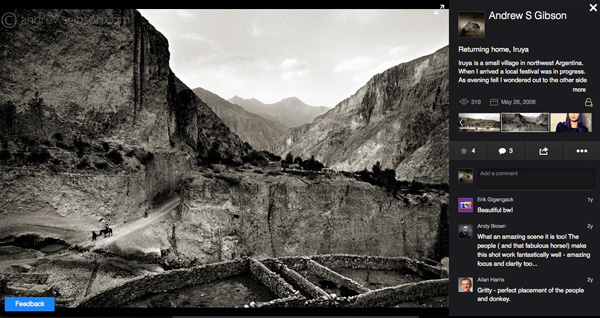
1. Use Flickr and 500px

The Exotic Landscape

Get on both of these websites (Flickr and 500px are both free to join) and search for photos taken in the place that you are going. The results will give you a great idea of the potential of that location. You might also find some new spots, away from the ones that everybody else seems to photograph.

If you are going to a coastal location, try and figure out how the changing tides affect the composition of the images you see. Some places are at their best at high tide, and others are at low tide. If this is the case, do an online search for tide tables. If the best photo opportunities are at low tide, for example, then the ideal time to travel there is when low tide coincides with sunset or sunrise, so you can take advantage of the golden hour and twilight.

Got a question about an image? Why not send the photographer a message and ask for their advice? Not everybody will reply, but you may receive invaluable advice from those that do.

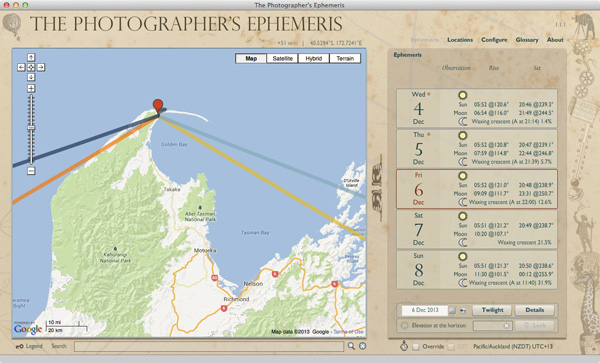
2. The Photographer’s Ephemeris

The Exotic Landscape

When you are looking at other people’s photos, bear in mind that the light, and the direction it comes from as the sun rises and sets, changes during the year. There’s an easy way to calculate where the sun will rise and set in any given location, at any time of the year. Simply download The Photographer’s Ephemeris – this application will do the calculations for you. It’s free for Windows and Mac OS X; ideal for research before you go, and you can buy apps for smart phones and tablets; useful if you may need to use it while out in the field.

3. Check the weather forecast

The Exotic Landscape

It sounds almost too obvious to mention here, but it’s important to check the weather forecast before you go. Most trips are booked ahead of time, but long range forecasts are only accurate a few days in advance. Checking the forecast helps you prepare.

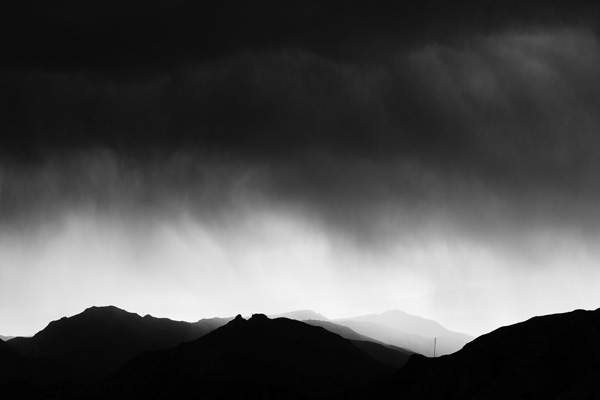
What if the forecast is for rain and cloudy skies? Then you need to work out how you are going to cope with that (for example, you could work in black and white, or concentrate on creating evocative images showing the background blurred out by the rain). If rain is forecast, make sure you have a waterproof camera bag to protect your gear and lens cleaning tissues or cloths to clean water off your front lens element. A cover to protect the camera is also a good idea (you can buy them from Amazon or BH Photo & Video).

4. Take minimal gear

Think about the gear you need to take. It’s a personal choice, but the trick is to find the balance between taking enough lenses and accessories to create great images, but not carry so much that you are so worn out when you arrive at your destination that you are too tired to take photos. For example, on a recent trip I took my 17-40mm wide-angle zoom and an 85mm prime lens (plus cable releases, filters etc). That’s it – because of my preparation I knew that I wouldn’t need anything else.

Tripods are tricky. You need to compromise between weight and stability, not always easy. If you need to buy one, this article (How to Buy a Tripod) covers the factors you should consider.

Don’t forget personal items, such as protective clothing, rain coats, food, wather etc. They all add weight to your load.

5. Be flexible

Good planning gives you a great head start, but don’t be afraid to change plans when you’re on location if you learn something new. Use local knowledge to your advantage. Why not ask the person you deal with in your accommodation, the best places to take photos? You might see postcards, or a local photo book in a shop, that show you new places to take photos. The weather may do something unexpected. Don’t get so locked into your plans that you are unable to see fresh opportunities.

Above all – have fun. Enjoy yourself and create some beautiful images.

Mastering Photography

Mastering Photography

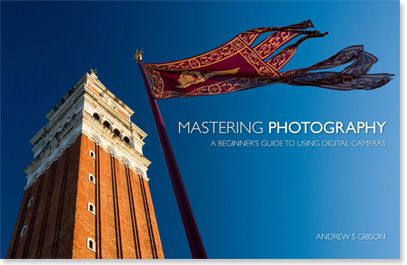
My ebook Mastering Photography: A Beginner’s Guide to Using Digital Cameras introduces you to photography and helps you make the most out of your digital cameras. It covers concepts such as lighting and composition as well as the camera settings you need to take landscape photos like the ones in this article.

Post originally from: Digital Photography Tips.

Check out our more Photography Tips at Photography Tips for Beginners, Portrait Photography Tips and Wedding Photography Tips.

Tips for Landscape Photography in Exotic Places

The post Tips for Landscape Photography in Exotic Places by Andrew Gibson appeared first on Digital Photography School.


Digital Photography School

 
Comments Off on Tips for Landscape Photography in Exotic Places

Posted in Photography


How to Capture the Essence of a Place – Travel Photography Tips

11 Dec

How to Capture the Essence of a Place

Storytelling  Sangay Walking Up Trail to Tiger s Nest Monastery  Paro Bhutan  Copyright 2013 Ralph Velasco

Travel Photography Tips

If you’re a traveler and you enjoy bringing back photos of the places you’ve visited – let’s face it, who doesn’t – then it’s extremely important to capture a set of images that more completely tells the story of the place. To me, the best way to ensure this in my own work is to work from a well thought out and organized shot list. Then I don’t have to worry about trying to remember the categories of images I have yet to photograph, as I have a check list at the ready all the time and I can easily track my progress.

Creating a shot list

The idea of creating a shot list is nothing new. It’s a concept that’s been around since the dawn of photography, and it’s so easy to incorporate into your photography workflow. I research what’s unique about the place so that I know what to be on the lookout for and then I make a list of all the categories of images I’d like to capture before I even set foot in a location. I find the more I know what I’m looking for, the more likely I am to find it. It really is as simple as that.

Scouting a location

Recently I had the opportunity to spend 10 days scouting in the reclusive Kingdom of Bhutan. It is one of the few countries in the world that require you to work with a local guide to drive and show you around the country at all times, that is unless you’re from a small number of surrounding countries, like India, whose citizens can come and go as they please.

Scouting trips are essential to laying the groundwork for the future photo tours I lead to any country, but even more so to this landlocked nation, about the size of Switzerland, but with only about 700,000 inhabitants. During a scouting trip I have a chance to meet, assess and bond with the local guide(s); visit the sites our group will visit; have the experiences they’ll be having; figure out the best times of days to be in certain locations and from where to shoot; and even test out the hotels, modes of transportation, restaurants and other services we’ll be using. But of course I’m also out to capture the quality images necessary to help market the trip to potential clients and to add these to my ever-growing portfolio from around the world. Additionally, although I’m often shooting right alongside my groups, having been to the location allows me to more fully concentrate on helping each participant to bring back the best possible images from their trip.

Dream location – Bhutan

Bhutan is a photographer’s dream, and there seems to be a photo opportunity around every corner from most of the categories on my shot list. But instead of shooting randomly, I try to use my list to track and organize the images I’m after. Maintaining your own shot list is as easy as using a piece of pen and paper, creating a spreadsheet, or simply using a free Notes app on your smart phone. Although, I did find the use of a shot list so important that I actually created an app for iPhone, iPad and iPod touch® called My Shot Lists for Travel to aid me in doing this, and it’s always in my pocket.

Below is a set of images I culled from the many thousands I made during that initial scouting trip, as well as several from the photo tour itself. This select group of images is meant to give viewers a high level sense of what the country of Bhutan is about, and what one might expect on a visit there. I could, of course, add dozens of other images from additional categories (food, interiors, sacred sites, details, etc.) to help create a complete cultural portrait of Bhutan, and when I put together my slideshow presentations I certainly have the chance to do that, but unfortunately space doesn’t allow here. Perhaps in a follow up article I’ll continue this theme.

The following categories are presented in alphabetical order:

ARCHITECTURE

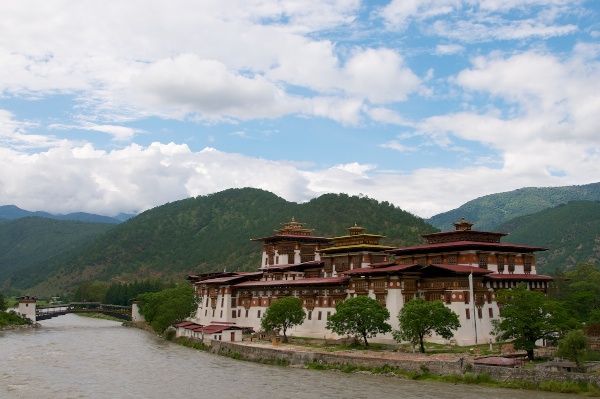
Travel Photography Tips Architecture  Punakha Dzong  Punakha Bhutan  Copyright 2013 Ralph Velasco

The architecture in Bhutan is extremely unique and it’s rare to find a single building that doesn’t adhere to this strict building convention. The “dzongs,” or fortresses (Punakha Dzong is pictured here), that dot the country are icons, and as such they’re an essential part of the visual story I want to tell.

EVERYDAY LIFE

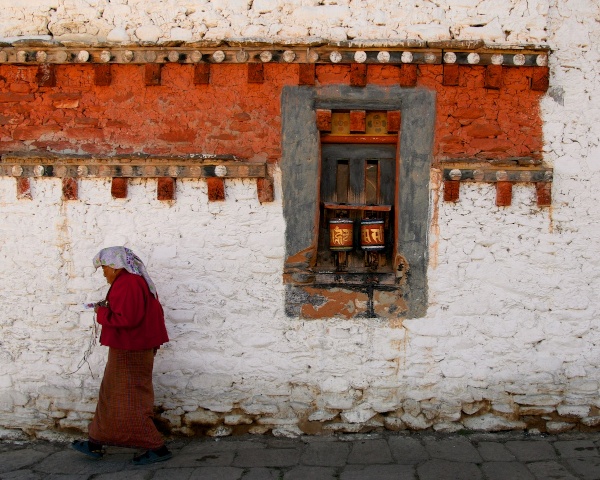
Travel Photography Tips - Everyday Life  Woman Spinning Prayer Wheels at 7th Century Monastery  Bumthang Bhutan  Copyright 2013 Ralph Velasco

It’s extremely important to show the local people just doing what they do. It might be standing in doorways, sweeping the local monastery courtyard, or filling butter lamps. As is the custom in Bhutan, many people, from young to old, are found at the local monasteries spinning everything from very large prayer wheels (with the right hand only and in a clockwise direction) to personal ones as they walk, again clockwise, around the building.

LANDSCAPES

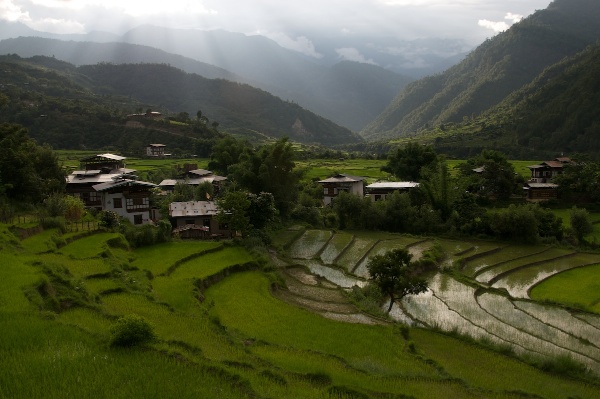
Travel Photography Tips Landscapes Sunset Over Rice Paddies  Punakha Bhutan  Copyright 2013 Ralph Velasco

Capturing the landscapes in Bhutan is a must. Here, venturing just outside the town of Punakha, on a fairly rough dirt road, we came upon yet another series of rice terraces spilling down the hillside. At this time of year (image above), during the summer monsoon season, the fields are an almost neon green, and just as the sun was falling behind the nearby mountains, considered foothills to the mighty Himalaya nearby, we pulled off the side of the road and I was able to make a few images before the good light was gone. Summertime is a great season to highlight the very green rice fields and other local vegetation. Come fall and winter, however, this area is completely dry and brown and a different photo opportunity presents itself (below).

Travel Photography Tips Landscapes Dried Up Rice Paddy Landscape in November  Punakha Bhutan  Copyright 2013 Ralph Velasco

MAN-MADE WONDERS

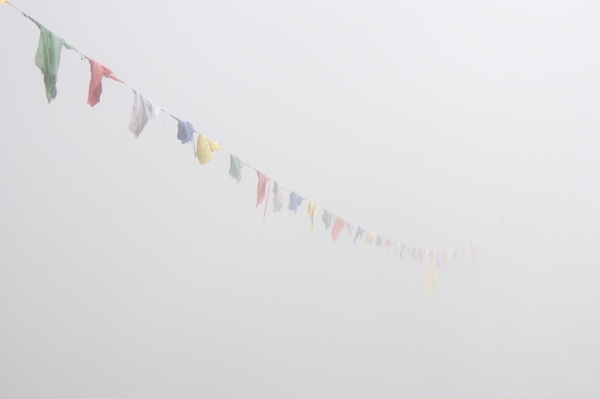
Travel Photography Tips - Man Made Wonders - Tigers Nest Monastery in Complete Fog  Paro Bhutan  Copyright 2013 Ralph Velasco

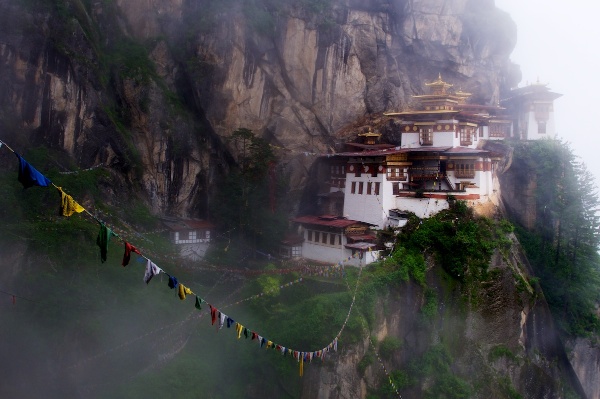
Travel Photography Tips - Man Made Wonders - Tiger s Nest Monastery in the Mist  Paro Bhutan  Copyright 2013 Ralph Velasco

The Tiger’s Nest monastery is a classic example of a man-made wonder. First constructed in the late 1600s (it’s since burned down and been rebuilt several times) at almost 3,000 feet above the valley floor on a sheer cliff face, this architectural wonder is a great way of demonstrating man’s ingenuity and building skills. These images were made from the local viewpoint, just across a gaping chasm with a 1,000-foot drop. In the summer, weather is a bit unpredictable, but that can make for some great photo opportunities. I’d prefer to shoot on the fringes of inclement weather any day, as opposed to a plain blue sky, it just makes for much more interesting images. In the first image above I wanted to show what the scene looked like upon arrival, the prayer flags disappearing into the fog. But a bit of patience, one of the photographer’s best qualities (along with curiosity), paid off as the low lying clouds came and went, eventually revealing the Tiger’s Nest in an otherworldly haze, adding to its mystery.

NATIVE CLOTHING

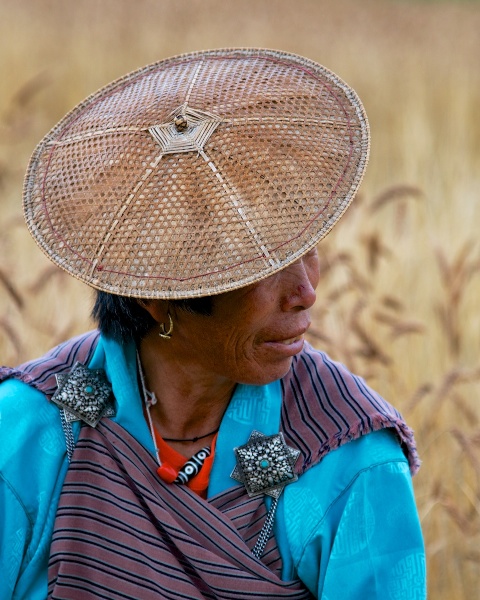
Travel Photography Tips - Native Clothing - Woman in Kira in Wheat Field  P  Bumthang Valley Bhutan  Copyright 2013 Ralph Velasco

The people of Bhutan wear very distinctive clothing. The women wear what’s known as a “kira,” often accented by two broaches, as in the first image above. Some of these broaches are antiques and have been handed down to each successive generation and can be worth thousands of dollars. Again, something very distinctive to this place. I encountered this particular woman as she was picking wheat in a field in the Bumthang Valley. Asking my guide/driver to pull over to the side of the road, I climbed over several fences and negotiated some muddy trails to get closer, but I like to think the result was worth the effort. She’s also wearing a traditional bamboo hat often seen in this part of the country, and I certainly want to highlight that.

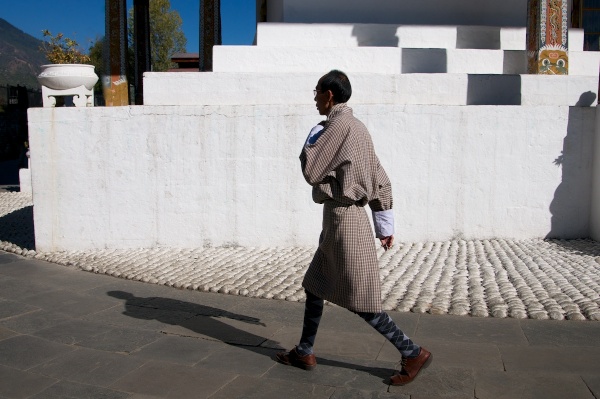
Travel Photography Tips- Native Clothing - Man in a Gho with Shadow  Thimpu Bhutan  Copyright 2013 Ralph Velasco

Men, on the other hand, wear what’s called a “gho.” This single piece of cloth, expertly wrapped around the man’s body and accented by the often white, rolled up sleeves, is seen everywhere in Bhutan, from the young school boys to the older men spinning their prayer wheels. The addition of a simple shawl is required to be draped over the man’s shoulder and around his waist as he enters the very sacred dzongs where it’s of the utmost importance to show respect for country and king. Our guide, Sangay, said that it’s law that during working hours a man must wear a gho. One of my tour participants asked him what the penalty is if a man is caught not wearing a gho, and Sangay said, “There is no penalty, it just doesn’t happen.”

PEOPLE

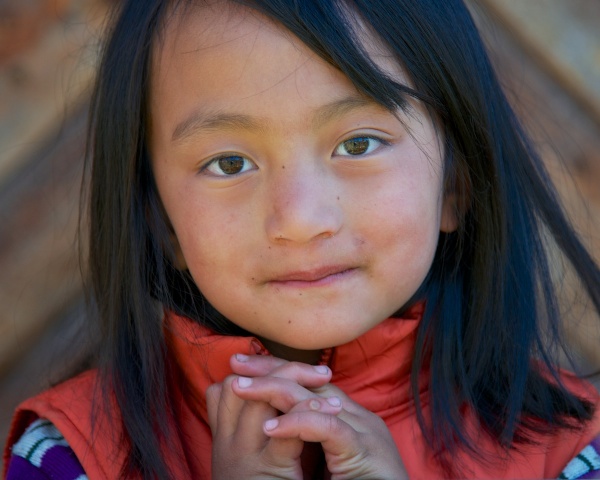
Travel Photography Tips - People - Little Girl with Hands Folded at Pepper House  Bumthang Valley Bhutan  Copyright 2013 Ralph Velasco

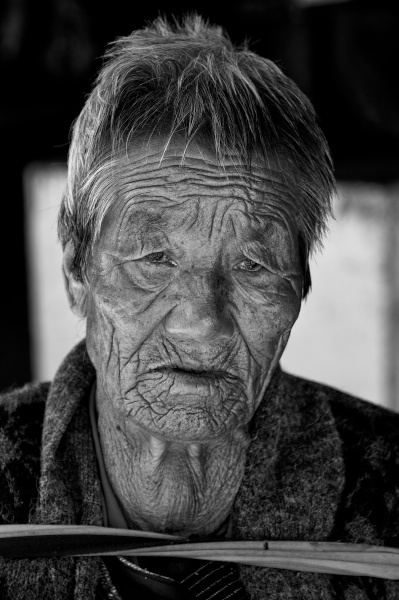
Travel Photography Tips - People -  Time in a Face  Thimpu Bhutan  Copyright 2013 Ralph Velasco

As in any country, a people are their culture, and undoubtedly Bhutan is no exception. The people photo opportunities are virtually endless in this nation where everyone seems to be outside most of the time (the interiors of the houses can be very dark and smoky from the wood burning stoves and lack of quality electricity). Although I do make an effort to get inside of people’s homes to experience this essential part of a place, as well. Getting out early in Bhutan will often be rewarded, allowing you to capture the children on their way to school, and the adults on their way to work, all generations dressed in their traditional ghos and kiras.

STORYTELLING

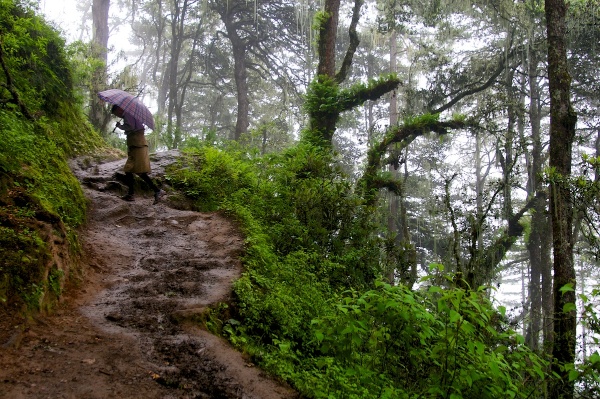
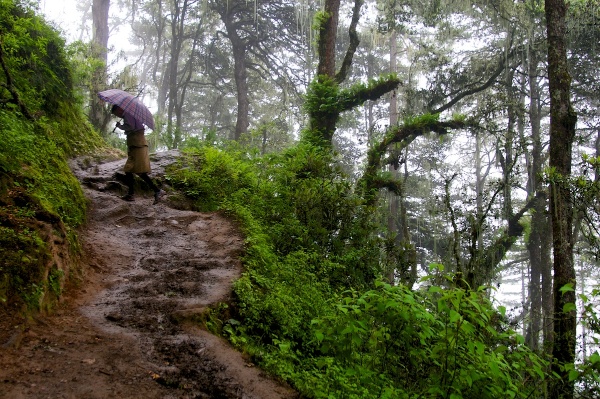
Travel Photography Tips - Storytelling  Sangay Walking Up Trail to Tiger s Nest Monastery  Paro Bhutan  Copyright 2013 Ralph Velasco

Although it’s a good aspiration, not every image has to be worthy of a magazine cover. Sometimes it’s important just to make an image so that you can convey the story behind it. In this shot I simply wanted to show the condition of the trail we took to get up to the viewpoint overlooking the infamous Tiger’s Nest Monastery near Paro, Bhutan. It’s not going to win any awards, but I think it conveys this idea, which was my intention.

Final words of advice

So my recommendation is to work from your physical shot list, not try to commit it to memory or shoot whatever presents itself at the time. The more prepared you are for the photo opportunities you seek, the more you’ll find them, I can almost guarantee it. Have a goal of five solid images in each category before you tick it off your list, as this will provide you with options when it comes to putting together that book, website or slideshow presentation later.

Finally, know that any single image may represent two, three or even five or more categories, so there can be some crossover.

Post originally from: Digital Photography Tips.

Check out our more Photography Tips at Photography Tips for Beginners, Portrait Photography Tips and Wedding Photography Tips.

How to Capture the Essence of a Place – Travel Photography Tips

The post How to Capture the Essence of a Place – Travel Photography Tips by Ralph Velasco appeared first on Digital Photography School.


Digital Photography School

 
Comments Off on How to Capture the Essence of a Place – Travel Photography Tips

Posted in Photography