RSS
 

Posts Tagged ‘Tips’

5 Easy Photoshop Tips for Beginners

20 Feb

Photoshop CC iconPhotoshop has changed the way we transform our imagination. If you are into any digital workplace, learning Photoshop can be a great help. Photoshop today is certainly a centre of creativity to which almost every digital domain; from web designing to animation; from photography to digital magazine, is deeply connected. Today, when it comes to photography, it is not possible to imagine it without Photoshop.

Good Photoshop skills can’t make a mediocre picture perfect unless you are into manipulation. However, it can certainly help you to enhance your best photo into an amazing masterpiece. Learning Photoshop is a slow process, and you should try it with enough practice, after all it is a digital art.

In this article I will walk you through some basic Photoshop retouching skills. These 5 easy Photoshop tips for beginners will be a great start to learning to proces your photographs.

1. Learning Keyboard Shortcuts

Learning keyboard shortcuts will help you to speed up your processing workflow. There are few key shortcuts for different tools in the tool bar. A few of the most widely used shortcuts are:
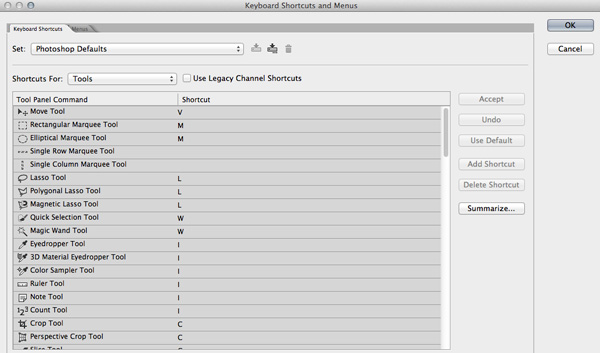
Photoshop keyboard shortcuts

  • V = move tool
  • F – toggles through display screen modes
  • Space bar = temporary hand key
  • B – paintbrush tool
  • D – sets the foreground/background colorss to default
  • X – swaps between background and foreground color
  • E – eraser tool
  • S – stamp or cloning tool
  • W – quick selection tool
  • Ctrl+j – duplicates the selected layer

There are just few of the most regularly used Photoshop shortcuts. When you start using the program more, your knowledge of shortcuts will gradually increase. Once you are aware of the most used shortcuts retouching pace will be faster than ever.

2. Color Enhancing – Saturation versus Vibrance
Photoshop tips vibrance

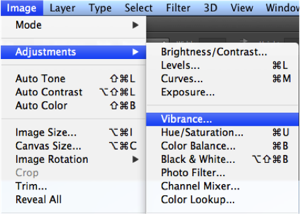
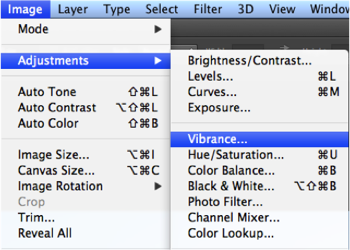
Color is another domain you can try while enhancing your photographs. Generally when you are beginning in photography, enhancing the color of every image looks good, as if the colors are speaking out of the photographs. It will be lot more helpful if you can understand the difference between how saturation and vibrance works. Go to Image menu and choose Adjustment under the menu

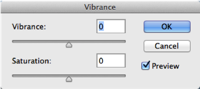
As shown in the image to the right, select the Vibrance option. You will get two options under the menu – Vibrance and Saturation. Vibrance increases the saturation of less saturated colors. This option avoids yellow and orange skin tones. Basically vibrance works best for portraits.
Photoshop tips saturation color adjustments

On the other hand, saturation increases the intensity of all the colors in your image equally. This may not be a good option for portraits or peoples photos. What I can recommend is this: slowly start with vibrance for the color enhancement and use saturation later if you want to pump up the color more.

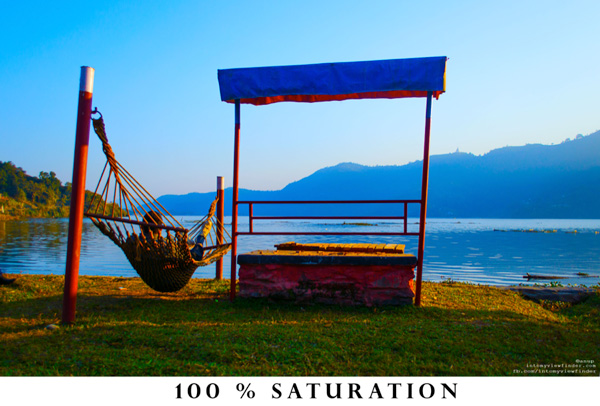
If you compare the two photos below, you will understand how vibrance is only responsible for increasing the intensity of less saturated colors, where as saturation increases the intensity of all colors equally.
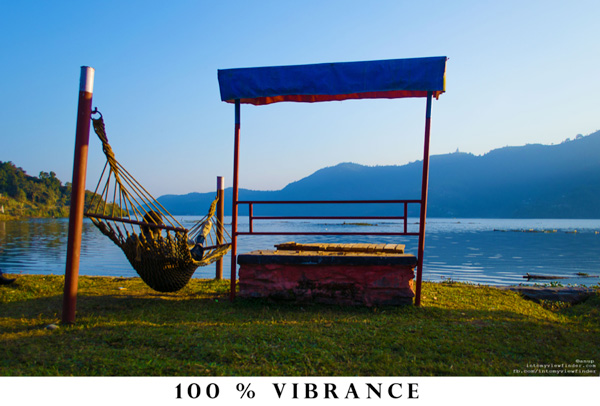
Photoshop vibrance adjustment

Photoshop saturtation adjustment

3. Adding a Vignette

Photoshop vignette

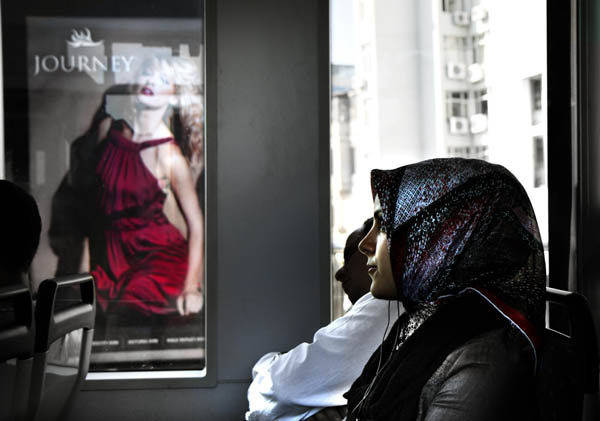
Vignetting is basically a technique to darken the edges of your frame so that the eyes move to the subject more easily. This procedure works best when you have a subject in the center. Our eyes tend to move towards the brighter part of the image and recede on the darker side. This technique will result in dark space around the subject.

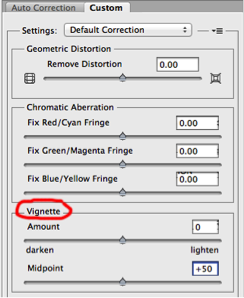
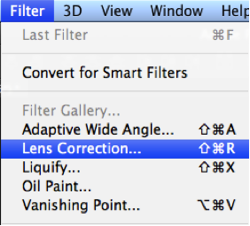
There are lots of manual ways you can add vignetting in your photos but I will talk about how to easily add vignetting in your images via Photoshop. Go to Filters Menu at the top and select “Lens Correction”, then choose the Custom Tab on the right. The third section down is for adding a vignette. Slide the Amount to the left to darken, and Midpoint to adjust the size of the circle.
Photoshop tips vibrance Photoshop tips vignetting

4. Adding Sharpness and Details

Photoshop filter lens correction vignette

Adding sharpness is another technique for beginners in Photoshop. This will make your image look more detailed. I would suggest detailing most of your images with appropriate values. But make sure you sharpen, or detail your images with a small value if you are going to upload images on Facebook because it compresses the images and adds some detail to make it took a bit sharper. So when an already sharpened image is uploaded in Facebook, there is a change of it looking too edgy.

Like any other technique, there are many ways you can add details in Photoshop. I will show you a very simple technique. Once you understand how this works you can experiment with some of the other techniques.
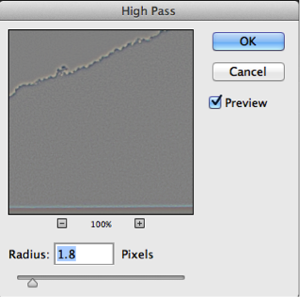
  • Photoshop high pass filterStep 1. Duplicate the selected layer with a keyboard shortcut Ctrl+J (PC) or Command+J oP MAC
  • Step 2. Open the High Pass filter: Filter > Other > High Pass on the top layer
  • Step 3. Apply an appropriate value (just to see the edges in the image) and click Okay
  • Step 4. Change the blending mode of the top layer to Overlay
  • Step 5. Adjust the opacity of that layer to your taste
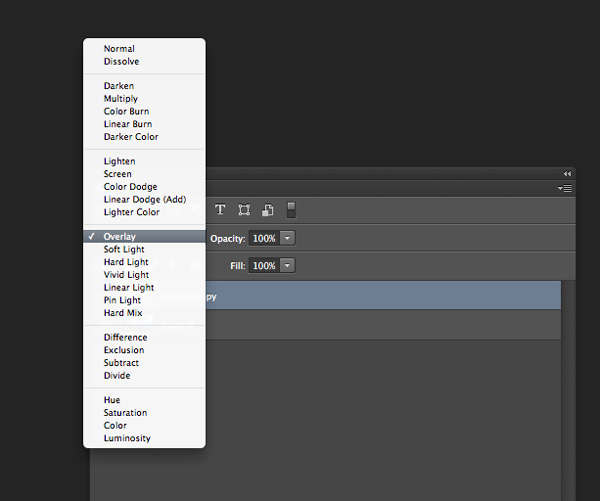
Photoshop-tips-layer-blend-mode

Layer blend mode

5. Photoshop Filter Gallery
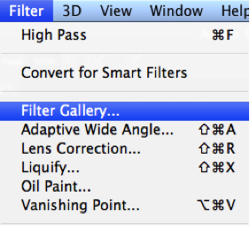
Photoshop tips filters

Filters are basically automated effects that you apply to your images with a few clicks. Filters can help you to achieve certain special effects or looks. There are various filters in Photoshop, which you can pick individually, each filter results in different effect when applied to different images. You an also apply more than one and stack them. Though I don’t use filters much, it’s good to explore if you are just starting out in Photoshop. Later, when you are more familiar with advanced tools and techniques you can try to create the similar effect from manual options and controls.

To apply a filter select the layer and go to Filter > Filter Gallery. Before you apply any filter in the gallery make sure to change your image to 8 bit. You can do that by going to Image > Mode > 8 bits/channel
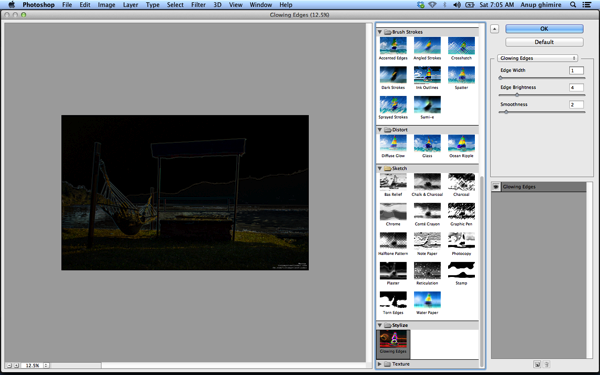
Photoshop filter gallery

I hope these 5 basic Photoshop tips will help you to retouch and enhance your photos. If you have others suitable for beginners please share in the comments below.

For further reading on Photoshop head to:

  • Photoshop Tips
  • Photoshop “blend if” feature
  • 18 Useful Photoshop shortcuts
  • How to replace a face in 6 easy steps

The post 5 Easy Photoshop Tips for Beginners by Anup Ghimire appeared first on Digital Photography School.


Digital Photography School

 
Comments Off on 5 Easy Photoshop Tips for Beginners

Posted in Photography


Valentine’s Day Photography Tips to Color You Red With Passion

10 Feb

Ah, amore. That’s what Valentine’s Day is all about, at least nominally. So whether you believe in love, don’t or just think it’s something that Hallmark made up to sell more cards, one thing can’t be denied. The occasion makes for a brilliant photography opportunity. It’s true! Valentine’s Day allows for all sorts of unique and interesting photography because there’s Continue Reading

The post Valentine’s Day Photography Tips to Color You Red With Passion appeared first on Photodoto.


Photodoto

 
Comments Off on Valentine’s Day Photography Tips to Color You Red With Passion

Posted in Photography


Winter Photography Tips | Bendy straws and Ziploc bags?

06 Feb
© Paul Burwell Photography

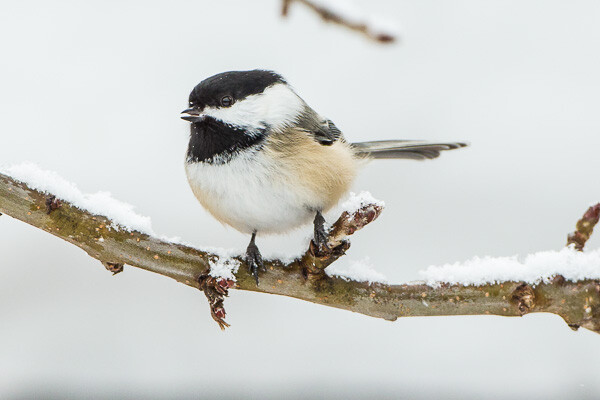
Black-capped Chickadee on a snowy branch

While a lot of photographers find that winter is an excellent time to hibernate, there are really no good excuses for staying indoors and avoiding winter.  But, you do need to take steps to protect your equipment.  Here’s a few ideas to keep things safe.

WINTER PHOTOGRAPHY TIPS

One of the biggest problems for cameras in cold weather is condensation.  Condensation occurs when you bring a camera from the dry cold temperatures outdoors, to the warm and relatively moist conditions in your vehicle or home. When that warm moist air reaches the sensor on your cold camera, condensation occurs which can leave your sensor covered in spots or even damage the electronics.  The solution to this issue is to remove your memory card and battery(s) from your camera and then transfer your gear into a Ziploc type of bag and seal it in there with the cold air while you are still outside.  Now when you bring the camera gear into a warm area, the moisture can’t get to the camera to condense  on the camera’s sensor.  Once everything warms up to room temperature you can remove it from the baggy.asj-222_1z

Another issue for winter photography is battery life.  Cold is the mortal enemy of battery life and unfortunately there just isn’t a lot you can do about that.  But, what you can do is keep a spare battery or two in an inside jacket pocket, next to your body.  The warmth of your body will keep the batteries toasty warm and when the battery in your camera succumbs to the cold, all you need to do is swap it for a warm battery.  The cold battery will slowly warm and you’ll probably find it has renewed energy when called upon.

Bendy StrawAnother bit of winter annoyance comes from having your breath condensate and freeze on your camera’s viewfinder while you’re trying to focus.  The solution for this frustration  may just be the cheapest photography accessory you will ever own. Are you ready for this brilliant invention?  Okay, here it is:
You can use a bendy straw as a type of snorkel to direct your warm moist breath away from your camera’s viewfinder so that you can continue to make those great winter shots. This  tip also provides endless entertainment for anyone who happens to be watching you.  Try it, it works!

Fight back against the winter doldrums and get out there and make some great photographs! Hopefully these tips will make your winter photography sessions more tolerable!

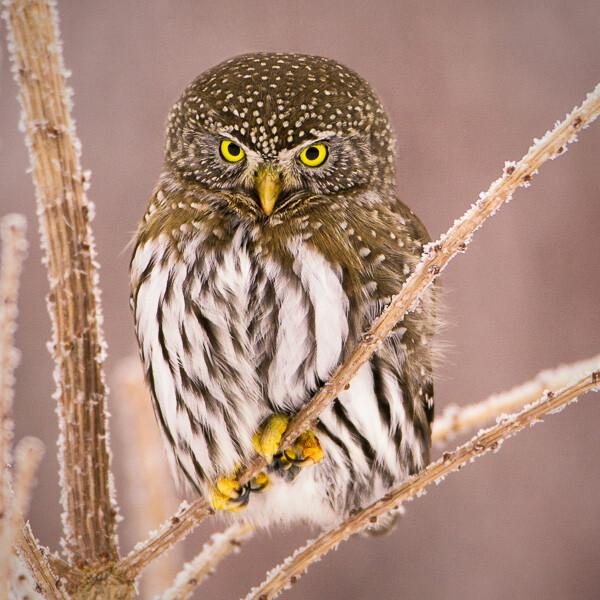
© Paul Burwell Photography

Northern Pygmy Owl on a frosty branch


Further reading on shooting on cold or inclement weather:

  • Tips to Protect your Gear in Harsh Weather Conditions
  • How to Protect your Camera in Extreme Conditions
  • 30 Foul Weather Photos for Inspiration

The post Winter Photography Tips | Bendy straws and Ziploc bags? by Paul Burwell appeared first on Digital Photography School.


Digital Photography School

 
Comments Off on Winter Photography Tips | Bendy straws and Ziploc bags?

Posted in Photography


15 Tips for More Powerful Portraits

04 Feb

15 tips every portrait photographer must know for making more powerful portraits!

Powerful portrait tips 01

Here are 15 tips on getting powerful portraits

1. Have respect

This is my number one rule. It doesn’t matter if I am photographing a poor boy in Laos or the CEO of a large company in New York-I always respect the people I photograph. I live by the motto: “you should never get close to people in order to take their photo; you should take their photo in order to get closer to them”. Act as if your camera is a bridge and not a weapon. I have friends who are amazing street photographers, who manage to work with such discretion that they can get the portrait without the person realizing he was photographed. Certainly, there are some exceptions, but I believe that people are not zebras and we are not hunters. To summarize the point, I photograph old people in same manner I would like someone to take pictures of my grandmother.

Powerful portrait tips 04

2. Ask yourself – Do I understand what a portrait is?

“A Portrait is painting, photograph, sculpture, or other artistic representation of a person […] the intent is to display the likeness, personality, and even the mood of the person” (from Wikipedia)

While this is a very basic definition of the concept, it can help us to understand the true nature of good portrait photography. A portrait must tell a story. What kind of story? A story about the person in the image. How can you tell a story of a person in one image? You can’t! You can never capture the whole story, because human beings are too complex. You can either choose to focus on a specific emotion expressed by the subject or by yourself. I call the first method “highlighting”, in which you zero in on a specific story, at a specific time.

Powerful portrait tips 02

For example: when I took the photo of the Japanese girl (above) I was trying to highlight this specific moment, when she held her mother’s hand, when she has not yet decided – whether to leave or hold on tight. Sometimes the best stories don’t reveal the whole story at once. Like in this image from China (below). Do you think this girl is waiting for someone who should be coming soon, or is she watching someone leave?

Powerful portrait tips 03

The second method, in which you imprint your on feeling onto the story, can start with answering the following question: How did you feel when you met this person? Because a good image is told by two people – the one in the image, and the one behind the camera.

3. Look for emotion

Someone’s exotic face from some remote tribe is nice to look at, but for it to be a true visual storytelling portrait, this face must evoke emotion. Steve McCurry called this the “unguarded moment”, the essential soul peeking out. It can be happiness, fear or excitement. Emotion is the best way to create a bond between the image and your viewers.

The best way to “catch” emotion on your camera’s sensor is by choosing the right moment to click the shutter. Be on the lookout for a specific powerful moment that can evoke the story on the person’s face.

Powerful portrait tips 05b

4. Start with your comport zone

Going out to the streets to shoot portraits of strangers is not an easy task to start with. The best way to hone your craft is by starting with a person you already know. By skipping the need to “break the ice”, it will be easier for you to think about other important elements in your portrait, such as: the light, composition, posing and color. You don’t have to travel far for an interesting face; you can start with friends and family.

Powerful portrait tips 11b

5. Get out from your comfort zone

A day without learning something new is a wasted one. One of the most important things to note when dealing with portrait photography is that usually, the problem is with ourselves. “I do not want to hurt or offend”, and “I do not want to invade someone’s privacy” are all excuses which we tell ourselves on why we photograph people with a telephoto lens from a distance. So, if you truly want to take your portrait photography to the next level and be able to evoke emotion in your work, you must, as my mother says: “fake it till you makes it”. It is not as complicated as it seems in your head. Get out to the streets, find an interesting person and just go for it by saying: “Hello, I am a photography enthusiastic and I would like to take your photo…I would love to send you a copy as well”. You might be surprised with the results. By using this technique, the worst thing that can happen is that you will get a refusal and then just move on to the next person.

Powerful portrait tips 08

6. Choice the right focal length

“What is the best lens for portraits?” is a very common question among my students, and the answer is simple – there is no one best lens for portrait photography. You should adjust the focal length to your working style. When considering your next lens, you should take into account the following elements:

  • The distance from which you usually like to photograph people
  • The weight you are willing to carry around
  • What is the maximum aperture for low light photography and for shallow depth of field?
  • And of course, price

For me, most of my portraits are done with an 85mm or 24-70mm lens.

7. Choice the wrong focal length

Try this creative exercise. Go outside and take a portrait with a lens you are not used to working with. If you always work with a telephoto lens, try using a wide angle one. If you prefer to get close to your subject, take a step back and wait for the decisive moment. A good photographer is a flexible one.

Powerful portrait tips 10b

8. Study the great masters of portrait photography

Whenever I need inspiration, I turn to the portfolios of this great photography masters:

  • Dorothea Lange – one of the first photographers of Social realism
  • Steve McCurry – probably the best color portrait maker in history
  • Richard Avedon – unique fashion and portrait photography
  • Sebastião Salgado- outstanding B&W documentary portraits
  • Annie Leibovitz- Editorial portraits

(Please add your own in the comments section)

Powerful portrait tips 19c

9. Experience variable depth of field

We all love portraits with that sweet low depth of field, which makes everything blurry in the background. In portraits, shallow depth of field is usually good because it leads the viewer’s eyes directly to the subject by making it sharper than the rest of the image. YET, please note that there is such a thing as a too shallow depth of field. In this case, the sharpness by the AutoFocus may be on the eyebrows or eyelashes instead of the eyes. Practice in order to understand the elements that affect the depth of field: the distance to the subject, focal length and aperture.

Powerful portrait tips 13

10. Leave the flash behind

The more gear you have with you, the less available you are to give attention to the person you are photographing. If we are dealing with studio photography, then the person knows what to expect. There is no need take your flash to India or China when there is so much beautiful available light. Craft your skill while working with natural light only BEFORE jumping to the next step of using reflectors, flashes or any other extra gear.

Powerful portrait tips 14

11. Don’t follow the crowd

Try this little exercise: type “woman with cigar in Cuba” into Google and see what happens. The same woman appears in almost all the images right? Those are images of many different photographers. I do not mean to hurt anyone, but how come with 3 million people visiting the country each year and with a population of 5,612,165 women, the same woman comes up in almost every image? Here’s a tip for you, before heading somewhere, anywhere, near or far, you should understand the place, culture and the “story” of the person in front of you. By doing your homework you will not fall into the trap of the “fake authenticity”

Powerful portrait tips 15

12. Think about the background

Many elements are required to create an interesting portrait: light, composition, angle, etc.., but one element is so important that I sometimes give it my pure attention: the background. You can think of the background in two levels. First, as an aesthetic element. Make sure there are no distracting elements, such as bright colors or moving objects in the background. Secondly, another level of using the background, is as an element to bring your story to life.

Powerful portrait tips 16

13. Keep it fun

If you are dealing with subjects who are not paid models, you should give something back as well as taking the photo. I do not want to discuss paying the person (maybe in another post) but you should make it easy and fun for your subject: telling a joke, showing the image on the back of the camera and making sure they are not in the sun are good points to start with.

Powerful portrait tips 17

14. Always ask for the person’s name

It doesn’t matter if you do travel portraits of strangers or work as a wedding photographer; always ask for the person’s name and if promised, send the photo. Don’t make excuses about the language barrier. If I don’t work with a fixer (a local man or woman, who can help with the translation) I will always have a phrasebook or try to use drawings and images that can help me to communicate.

15. Add depth to your images by the a 45 degrees light

Think carefully about the direction of light. By placing the subject at an angle of 45 degrees from the light source, you can create a wonderful effect of volume. As I made this picture (below), which was taken at a grocery store Georgia, using only natural light by a window on the right.

Powerful portrait tips 18

And one more…

ENJOY

It does not matter if you’re photographing people as a hobby or to pay your rent. Teach yourself to enjoy to process and not just the outcome (the finale image). Enjoy getting closer, getting to know each other and overcoming cultural barriers. If you do what you do with passion, your viewers will see it right away.

I would like to thank Linda Burnette for her help in writing this article.

The post 15 Tips for More Powerful Portraits by Oded Wagenstein appeared first on Digital Photography School.


Digital Photography School

 
Comments Off on 15 Tips for More Powerful Portraits

Posted in Photography


Architectural Photography Tips to Make Any Building and Structure Look Fantastic

27 Jan

Architectural photography is for people who have an eye for buildings and structures. It’s the art of taking pictures of buildings as well as structures that are aesthetically welcoming and trustworthy representations of their subjects. Many of the best photographers who specialize in this discipline are normally well-trained in the use of both sophisticated equipment and methods. Architectural photography is Continue Reading

The post Architectural Photography Tips to Make Any Building and Structure Look Fantastic appeared first on Photodoto.


Photodoto

 
Comments Off on Architectural Photography Tips to Make Any Building and Structure Look Fantastic

Posted in Photography


10 essential time-saving Photoshop tips

24 Jan

thomaspark-polaroid.jpeg

Fashion and fine art photographer Thomas Park shares the shortcuts that he finds most useful, along with tips for combining them in a fast, fluent manner. While many of these shortcuts and techniques may be familiar to you already, they can be combined to minimize context switches for maximum efficiency. Learn more

News: Digital Photography Review (dpreview.com)

 
Comments Off on 10 essential time-saving Photoshop tips

Posted in Uncategorized


Black-and-White Photography Tips for Beginners

22 Jan

There are some photographers who like to click images and convert them into black-and-white photos in the post-production phase. There’s nothing wrong with this procedure; it’s just that it is time consuming. So, instead of converting the photos into black and white later, wouldn’t it be better to shoot photos in black and white in the first place? In today’s Continue Reading

The post Black-and-White Photography Tips for Beginners appeared first on Photodoto.


Photodoto

 
Comments Off on Black-and-White Photography Tips for Beginners

Posted in Photography


Tips for Indoor Sports Photography – Part 2

21 Jan

As the title of the article says, this is Part 2. I strongly encourage you to read Part 1 first, where I covered some of the indoor sports photography basics like gear, auto focus, camera settings, and looking for creative angles. While Part 1 centered primarily on basketball, here in Part 2 we’ll take a quick look at some of the other indoor sports you might find yourself shooting.

Fencing

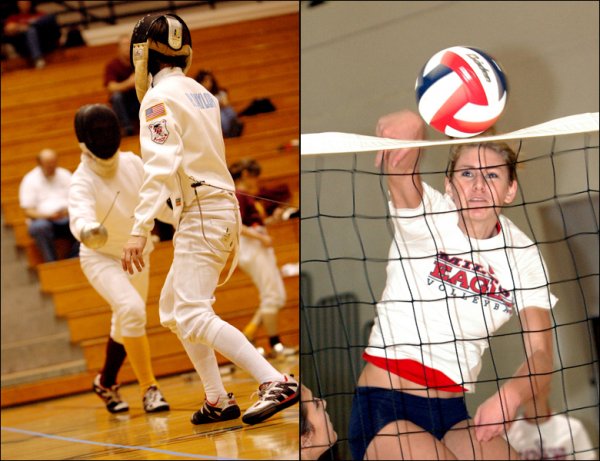
Whereas flash might be allowed for basketball, it will NEVER be okay for fencing. You’ve got two combatants trying to stab each other with swords. Anything you do that can possibly affect the vision of either fencer–even if just for a moment–can also affect the outcome of the match, and possibly result in injury. Open up your aperture, dial down your shutter speed a bit, crank up your ISO. Rapid-fire mode may not be such a bad idea here, because a certain number of blurry photos are to be expected.

Fencing and volleyball-- two very fast, unpredictable sports.

Fencing and volleyball– two very fast, unpredictable sports. FENCING: 100mm, 1/160, f/2.8, ISO 1600.  VOLLEYBALL: 80mm, 1/200, f/4, ISO 1250, TTL Flash.

Volleyball

I love the game of volleyball, but I absolutely hate shooting it. The unpredictability of bump, set, and spike can be maddening. Anticipating where the ball is going is perhaps more difficult in volleyball than any other sport. Again, flash may or may not be your friend when photographing this sport. Make sure to talk with the referee before the match begins. In volleyball, there is one referee at the net. Most will allow you to use flash, as long as you are not shooting towards them. That means shooting from the same side as the ref. You’ll most likely have spectators behind you, so try to stay low and be respectful.

Gymnastics & Competitive Cheerleading

Just like fencing, flash will never be allowed when photographing gymnastics or competitive cheerleading. Both are a photographic challenge, requiring you to capture very fast action in very low light. Most professionals like to shoot these events at 1/1000 with very high ISO. Being able to anticipate the action is possibly more important in gymnastics than almost any other sport.  Gymnastics moves so fast that if you see it in the viewfinder, chances are you’ve already missed the shot. Watch them warm up. Getting familiar with a routine during practice will help you know what to look for when it’s real.

No flash allowed when balance is the difference between winning and losing.

No flash allowed when safety and balance can be the difference between winning and losing, or injury.
1/250, f/4, 80mm, ISO 3200.

Swimming

For swimming, flash is generally allowed, but never on the start. When officials need to signal a false start, swimmers see a flashing light at the end of the pool. Hitting them with flash before they even hit the water can confuse them into thinking a false start has been signaled when it hasn’t. There is no do-over if they mistakenly think it’s a false-start and stop swimming. They are out of the race and it’s your fault.  Also, get there early. At least one hour. This is absolutely crucial for swimming events. Your camera is going to have to adapt to the humid conditions. Getting there in enough time for your gear to acclimate will keep your lenses from fogging up.

Other than no flash until they're in the water, swimming doesn't place too many restrictions on photography.

Other than no flash until they’re in the water, swimming doesn’t place too many restrictions on photography.  1/180, f/3.2, 200mm, ISO 800.

Wrestling

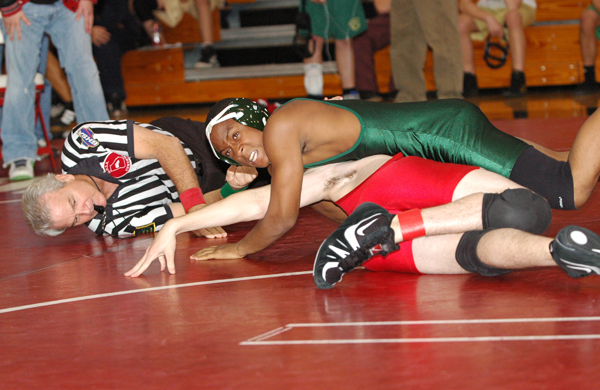
I love shooting wrestling. Love it. For starters, I’m off my feet, getting my best shots either sitting or lying down on the mat. Many wrestling meets involve a dozen or more teams, with several matches going on simultaneously. If you’re lucky, you can find a spot on the mats with four matches going on around you at the same time. When one bout slows down or ends, simply rotate around to another. The key here is speed and efficiency. Bouts can go for several minutes, or they can be over in the blink of an eye. Flash is generally allowed at the high school level, but a newer model camera with high ISO, combined with some fast lenses, can mean great captures without the use of flash. Experiment and see what works best for you.

Don't blink. You might miss it.

Don’t blink. You might miss it.  1/250, f/3.2, 85mm, ISO 640.

Boxing

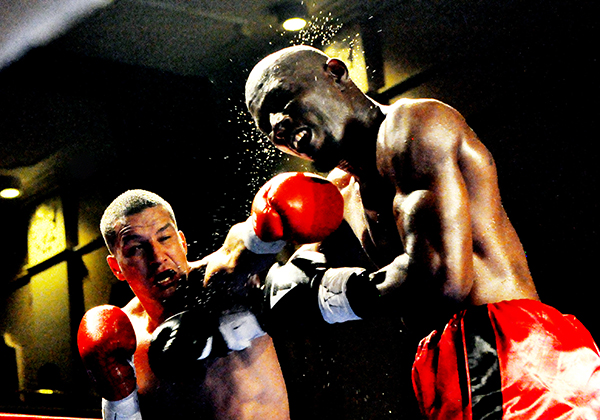
Similar concerns to fencing, but this time it’s much more up close and personal. Flash is definitely not allowed, but the good news is that the lighting at these events is usually really good. Pay attention to where the light falls on the ring and play to those angles for dramatic results. You are going to be fairly restricted in terms of where you can stand, because fighters take up two corners and judges are situated on all four sides of the ring. You’re shooting up, between ropes, at in-your-face action. Stick to a standard zoom like the 24-70mm or a wide-angle 16-35mm.  This is one of those rare sporting events where the 70-200mm is not your friend.

Ring-side. 1/500, f/4.5, ISO 6400, 48mm. Leave the 70-200mm at home, but bring a towel.

Ring-side. 1/500, f/4.5, ISO 6400, 48mm. Leave the 70-200mm at home, but bring a towel.

Shooting indoor sports is tough. If it was up to me, all sports would be played outside under optimal, natural lighting conditions. Hey, a guy can dream, right? Don’t let the challenges or stumbling blocks get you down. With practice, preparation, and the right gear, you’ll see the quality of of your images improve dramatically.

Do you have a good tip for shooting indoor sports? Share it with us in the comments.

For additional reading, one of the best books ever written on the subject of sports photography is “Peter Read Miller On Sports Photography.”  Miller has been photographing the NFL, the Olympics, and portraits for “Sports Illustrated” for almost 40 years. He has over 100 S.I. covers to his credit, as well as 35 Super Bowls, 9 Olympic Games, and countless other sporting events around the world. You can check out my review of the book, as well as my conversation with Peter, by clicking here. The book is available on Amazon.com.

The post Tips for Indoor Sports Photography – Part 2 by Jeff Guyer appeared first on Digital Photography School.


Digital Photography School

 
Comments Off on Tips for Indoor Sports Photography – Part 2

Posted in Photography


In the Dark: 10 Tips for Street Night Photography

21 Jan
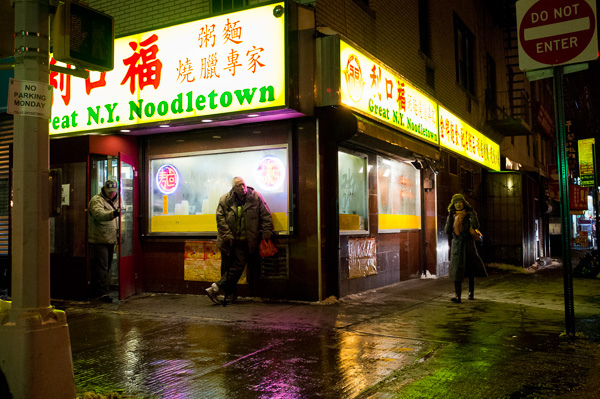
1/80th at F2.8, ISO 1600.

1/80th at f/2.8, ISO 1600

Much is spoken about photographing during the twilight hour, but what about after that?

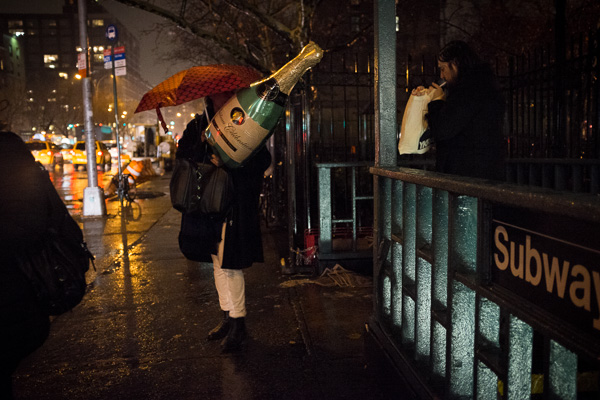
Night is my favorite time for street photography. Cityscapes are lit with a myriad of interesting and colorful light sources, such as lampposts, neon signs, store windows, car lights, and bare bulbs. People dress in their favorite outfits to go out. Bland scenes by day can suddenly turn ominous and fascinating at night.

Here are 10 tips for night photography to get you thinking about starting your next street photography session at twilight, rather than ending it.

1. Ideal camera settings for sharpness at night

To freeze motion during the day, I prefer to use a shutter speed of 1/320th, with 1/160th as my lower threshold.

At night, this changes. In the brightest areas, you will be able to photograph at 1/250th, but most of the time it will be best to use a shutter speed somewhere between 1/160th and 1/60th. You need to have: steady hands; a wide-angle focal length; and to stop your own motion completely to be able to photograph handheld at speeds around 1/60th, but with some practice it can be done.

1/125th at F2.5, ISO 6400.

1/125th at f/2.5, ISO 6400

A wide-angle lens is necessary for this type of photography because the longer the focal length, the faster the shutter speed needed to keep an image sharp. With a 28mm or 35mm lens (up to 50mm) it becomes much easier to handhold the camera at slower shutter speeds.

It will also help to use a fast, prime lens, such as a 35mm f/2. It is possible to shoot at f/4 in brighter areas, but being able to shoot at f/2.8, f/2, or even 1.8 will greatly expand your opportunities.

Finally, you will need to raise your ISO significantly. With modern digital cameras you can photograph anywhere from ISO 1600 to 6400 with decent or good quality. It’s just not possible to photograph handheld at night otherwise. I prefer to shoot at ISO 3200 and sometimes at ISO 6400 if needed.

To learn more about photographing with a high ISO, you can read about it here: Reasons to Shoot High ISO Images.

2. Seek out the light sources first

1/60th at F2.8, ISO 3200.

You should always pay attention to the main light sources in a scene, no matter where or when you are photographing, but at night this becomes even more important. Start by finding a beautiful light source, or an area with good lighting, and wait around for something to happen.

Focus on how these light sources hit your subjects. If you are leaning against a shop with a lit sign behind you, like the man in the photograph above, then as subjects pass you they will be lit with a strong light that has a gorgeous color to it. If your lens aperture doesn’t go wider than f/4, this is a fantastic way to get around that limitation.

On the other hand, if you stand in the street and aim the camera at the light source, as I did in the above photo, then the light will be less pronounced on the subjects, however, you will get the beautiful sign in the scene.  Notice the difference between the light on the left and right side of the man’s face in the photo.

3. Photograph nightlife

1/125th at F2, ISO 6400.

1/125th at f/2, ISO 6400

Some of the most interesting night street photographs occur where the most people are, and that is often where the nightlife is. A fantastic project to look at for inspiration is Maciej Dakowicz’s Cardiff After Dark.

4. Alternate between getting close and stepping back

I’m a proponent of the Robert Capa advice that, “if your photos aren’t good enough, you’re not close enough.” However, at night I often alter this strategy.

I try to get close to many of my subjects, but I will also try to create scenes where the subjects are small aspects of the overall scene. At night, backgrounds can be much more beautiful than during the day, so it often works to have people become the secondary element to the scene, rather than the primary focus.

The technical advantage to this is that you do not need to use as fast a shutter speed to capture the motion of subjects when you are further away. You can freeze a moving subject at 1/60th of a second from further away, whereas you will need to use at least 1/125th when close.

5. Tripod and crowd blur

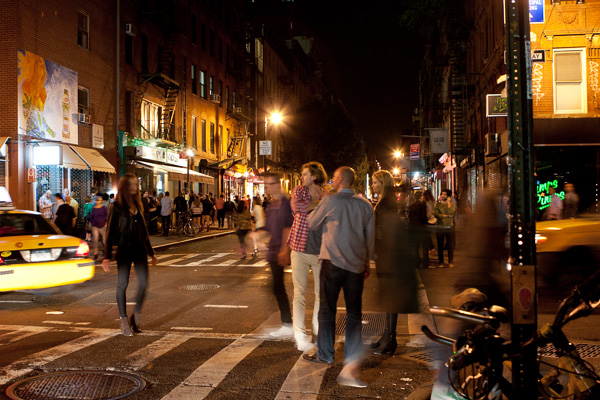
1/8th at F4, ISO 800 (Tripod).

1/8th at f/4, ISO 800 (with tripod)

For street photography, it’s usually best to go handheld since you never know what interesting thing is going to happen, and where it’s going to happen. However, one of the times to use a tripod is when you want to capture a busy scene, with lots of people and motion.

Experiment with slower shutter speeds, such as 1/8th of a second and take a lot of images.  It took me a long time to capture the image above because I wanted the people spread out evenly throughout the entire scene and I also wanted something interesting within the foreground, which is the pose of the woman in the street and the man looking at her. It took some time, and a lot of captures for this to happen.

6. Use a flash

Whether you want to try flash on the street is up to you, but keep in mind that it can easily lead to some confrontations.  I prefer to work with the constraints of the natural light on the street and I also get uncomfortable flashing strangers in the face in dark settings, but many prefer to photograph this way. It creates a fantastic look when done well.

Using a flash means that you are freed from a lot of the constraints of photographing at night. You can use a faster shutter speed and include more depth of field in the photo and less grain (noise).

You can either have the flash do all of the work lighting the scene, where the foreground area within reach of the flash is lit and everything else is dark, or you can set the camera to expose for the scene, similar to what you would do without the flash, and then use the flash to add some fill light to your main subjects in the foreground.

7. Noise and the dreaded underexposed image

1/250th at F2, ISO 3200.

1/250th at f/2, ISO 3200

Always expose correctly when photographing with a high ISO.

That being said, even with the best settings, some of your images will be taken in areas that are too dark to be exposed correctly. It’s impossible to photograph this way and expose every image perfectly within the camera. For the occasional shots with excellent content that you want to save, you will have no choice but to raise the exposure when editing.

For these photos, I will first ignore the noise and get the exposure and look correct in Lightroom. After I do this, if I’ve had to raise the exposure setting a significant amount, the grain will look terrible. Luckily, there are some keys to saving an image like this as long as you are photographing in RAW.

What I do is to first remove the grain and then I add it back. I want the image to look grainy, but I want the grain to look pleasing.  There are many noise reduction programs, such as PhotoNinja, Topaz DeNoise, and DxO. I like Lightroom’s built in Noise Reduction. If the noise is still bad after noise reduction I will sometimes bring it into Photoshop and add a very slight Gaussian blur.

Then I will use Lightroom’s grain settings to add grain back into the photo. This grain looks much more pleasing to the eye than brightened, extreme digital noise and it can further hide some of the technical deficiencies in underexposed images. The result will not be a perfectly sharp image, but it will still be pleasing and beautiful.

8. Blur and imperfection

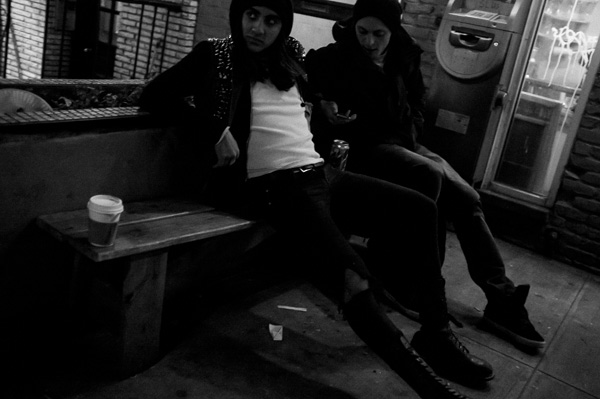
On this note, aim to get your photos as sharp as possible when you want sharpness, but know that a photo can still look fantastic even if it’s not tack sharp.

You don’t need to freeze motion perfectly when photographing at night for the image to still look great. I hold my day images to a higher standard than my night images when it comes to sharpness.  They need to be interesting and look good and that’s what counts.

Also, at shutter speeds around 1/60th to 1/30th, you can experiment handheld with slight blur, where your subjects are somewhat sharp but have a little motion to them. It’s a great way to add an energetic feeling of movement into an image.

9. Night images should be dark

1/250th at F2, ISO 3200.

1/250th at f/2, ISO 3200

This is an overly general statement, so feel free to disagree, but I want to make a point here.

I believe that night shots should look like they were taken at night.  They should be dark, with deep shadows and areas that are hard to see and make out.  When you look at the histogram of a night image it should be further towards the dark end (left) than a day image.

When you expose a night shot, especially on automatic settings, the camera will often misread the scene and overexpose the image.  It will be bright and you will be able to see everything as you would during the day, but it will not feel like a realistic night scene.  In these cases, you will want to lower the exposure compensation on your camera slightly (-).

There are many situations where bright night images are a good thing, but don’t be afraid to make your night images dark and realistic.

10. Be careful

Depending on where you live, going out at night with a camera is not always the safest idea. Travel light with equipment and be careful about where you go. Use your best judgment on who to photograph and think about bringing a friend along. You don’t want to suddenly find yourself in a bad situation.

Do you have any addition tips you’d like to add? Please do so in the comments below.

For more reading on night photography in general check out these:

  • Tips for Photographing Star Trails
  • Nightscapes: Photographing the City at Night
  • How it was Done – Zooming the Exposure
  • Painting with Light in the Landscape
  • 5 Tips for Creating fun Campfire Photos

The post In the Dark: 10 Tips for Street Night Photography by James Maher appeared first on Digital Photography School.


Digital Photography School

 
Comments Off on In the Dark: 10 Tips for Street Night Photography

Posted in Photography


Lightroom 5 Tips – Hidden Gems

19 Jan

Lightroom_iconAdobe Photoshop Lightroom instructor Julieanne Kost goes over some of the lesser known, yet less exciting features and some Lightroom 5 tips. If you haven’t upgraded from Lightroom 4 yet this will be a little preview. I would personally highly recommend that you do upgrade to LR5 if you haven’t yet.

Some of my favourite LR5 new features are:

  • the Radial Filter
  • that the heal/clone tool is paintable now and not just a dot
  • the auto correct for perspective to correct buildings and tilted images
  • the BOOK module is greatly improved for ordering Blurb books
  • Smart Previews which I didn’t think I’d have a use for but have used a few times now

What are your favourite new features?

Do you have any other hidden gems that aren’t covered in this video? If so please share with us in the comments!

For more Lightroom 5 tips and learning check out these articles:

  • Lightroom Tips for the Develop Module – the Magic Alt Key
  • 3 Lightroom History Tips
  • 4 Quick Tips For Getting The Most Out of Lightroom Presets
  • How to use the new Radial Filter Tool in Lightroom 5

The post Lightroom 5 Tips – Hidden Gems by Darlene Hildebrandt appeared first on Digital Photography School.


Digital Photography School

 
Comments Off on Lightroom 5 Tips – Hidden Gems

Posted in Photography