RSS
 

Posts Tagged ‘Tips’

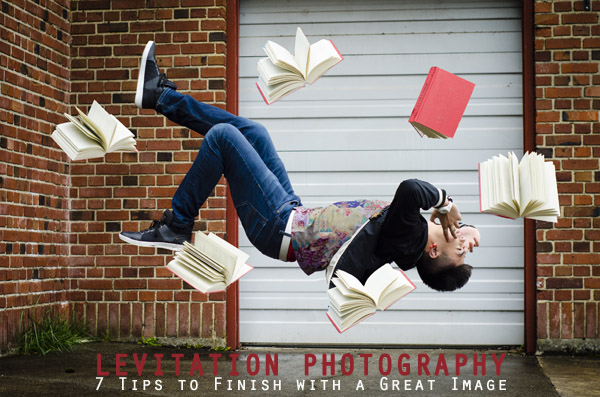
Levitation Photography 7 Tips for Getting a Great Image

11 Jun

Image1

Levitation images are magical! They draw the viewer in and make them think about what’s not quite right. If you search the internet for levitation photography, you will find amazing examples. However, levitation photography hasn’t become wildly popular yet. I assume it’s because levitation photography looks really difficult. I think most people would be surprised to learn that in its most basic form, it’s just compositing two or more images in editing software.

Like most portrait photographers, I shoot what I’m good at, and mostly stay inside my little portrait box. Recently, I decided I needed to get my creative juices flowing again and get out of my comfort zone. Levitation photography caught my eye. I learned the basics of how to create such images from posts like this: How to Shoot a Mysterious Levitation Photo.

My first levitation experiment was rough, to say the least. I knew the basics of how to accomplish a levitation photograph, but the images turned out mediocre. The best part though, was coming home after the shoot and writing down all the things I had learned to make my levitation images better for the next time. Below, you’ll see the lessons I learned, so you don’t have to learn the hard way.

Preparing for the Shoot

Tip #1 – Gather Your Equipment

In order to create a levitation photograph, you must have: a camera (that has manual focus capabilities), a tripod, a willing model, a strong fan (if your model has medium to long hair), and something to prop your model up (a stool, chair, or ladder). If you have a camera remote, bring that along too.

Tip #2 – Tell Your Model What to Wear

Clothing can make or break a levitation image.

  • Solid color clothing is best. Prints and patterns can make it difficult if you need to clone out certain parts of clothing or liquefy fabric.
  • Tell your model not to wear a jacket or sweater. Anytime the model lays upside-down, or sideways, the garment should be hanging down. But if he/she is laying on a stool, the jacket won’t be able to naturally hang leaving the image looking less realistic.
  • If you’re going for a feminine levitation shot, long dresses, skirts, or extra flowing fabric can help create the look you’re going for.

Tip #3 – Shoot on a Cloudy Day

Sun and harsh shadows have the potential to create a lot of extra work for you in post-production. Editing out the stools and ladders, yet keeping a realistic shadow of your subject can turn into a job for Photoshop experts.

During the Shoot

Tip #4 – Shoot from a Low Angle

You will want to shoot from a low perspective to give the illusion that your subject is high in the air. However, be mindful of how low you are. If you are lower than the prop your model is standing/laying on, the prop will block parts of his/her body. It is safest to shoot in line with the top of the prop your model is on. Having your model situated at the very front of the prop will also lessen the chance of cutting into the body.
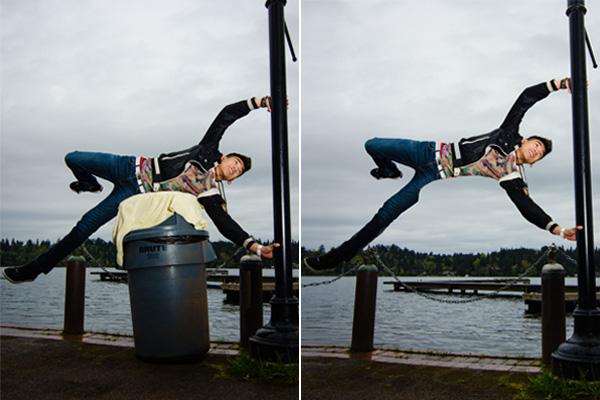
Image2

When I erased the garbage can, parts of the model’s body looks like it went missing since it was hiding behind the garbage can.

Tip #5 – Always Photograph the Empty Background

When preparing to photograph the frames that will create your final levitation image, follow these steps.

  1. Set up your shot with your model in the frame.
  2. Plan the angle you are going to shoot from and set up your camera on the tripod.
  3. When your model is in place, choose the focus point on your subject.
  4. Set your camera to manual focus and don’t touch it!
  5. Take the different shots suggested below, in Tip #6, without moving your focus point or your camera.
  6. After you’re sure you’ve captured all the images you need with your model and props, remove EVERYTHING from the scene. Photograph ONLY the empty background. This is the most important image you will take.
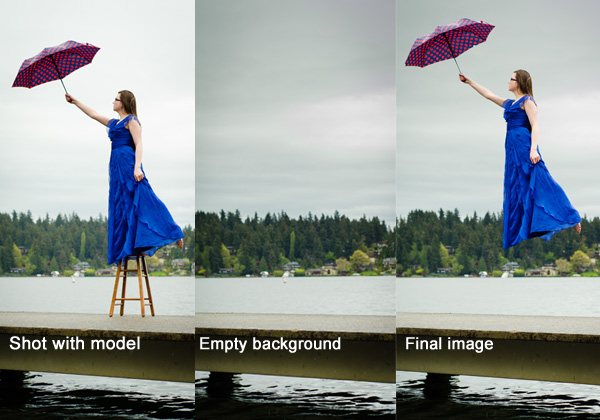
Image3

Tip #6 – Take Multiple Shots to Create One Image

The most basic levitation image is a composition of two or more frames. At the bare minimum, you will need at least a shot of the background and one of the model in that background.

Most great levitation images use a few more frames to add interest and make the final image more provoking. Here is a list of some shots you might want to take all without changing the focus and position of the camera:

  1. Model on the prop(s) – the focus of this shot is on what the arms, legs, and body are doing.
  2. Hair and facial expression – the focus of this shot is to capture the models expression and hair moving like it would naturally if the model was really in that position (floating straight up, blowing behind her, etc.). *Hair dryers and small fans are not strong enough to propel hair in specific directions. The longer and heavier the hair, the more powerful the fan needs to be.
  3. Clothing – the focus of this shot is to capture the movement of the clothing (if needed). If your model is being pulled one direction, what direction should the loose fabric be moving?
  4. Additional props – the focus of this shot is to photograph any extra props you want in the picture (if desired).
  5. Empty background – see Tip #5 above to learn more about the importance of this shot.
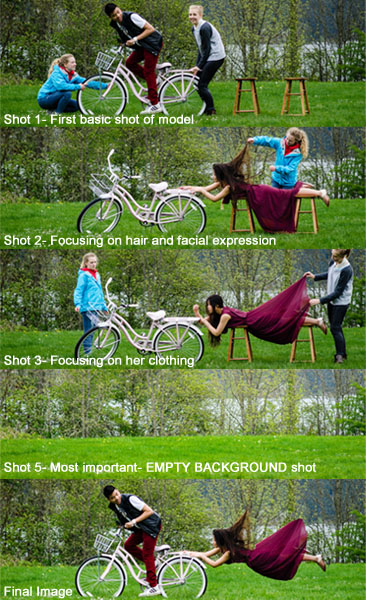
Image4

Shot 2 is a perfect example of how a strong fan would have made the shot more realistic with her hair blowing behind her instead of being held up by an assistant. We did not need to photograph additional props for this image, therefore, we did not do a “Shot 4″ for this composition.

After the Shoot

Tip #7 – Putting the Images Together

Many levitation photographers use Adobe Lightroom and Photoshop to create their final images. Regardless of your software choice, it is recommended to first color correct the series of shots so they are all the same. Lightroom has a great “sync” feature to make sure the exact same settings are applied to the entire series of images.

Next, open the images in an editing software like Photoshop. Start with the empty background image. Next, add in the main image of your model as a layer with a “Reveal All” mask. Simply use a black paintbrush on the mask to remove the props supporting your model. The end of this article describes each step in more detail. Repeat those steps for each frame you’d like to add. Finally, you can merge your layers and put the finishing touches on your final image. Then voila, you have a gorgeous piece of levitation art.
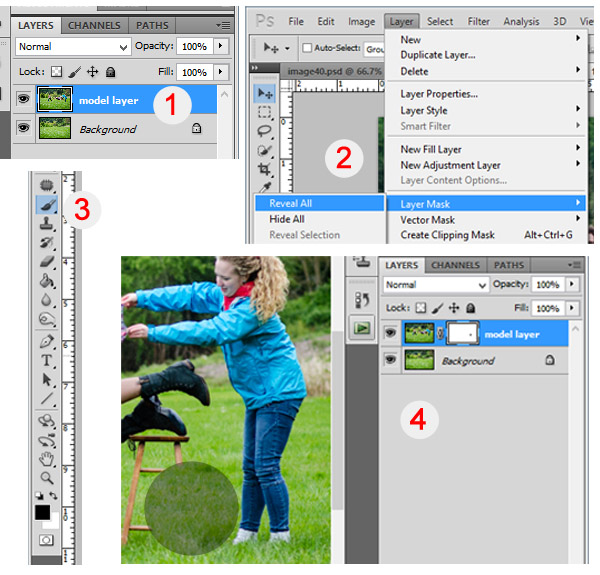
Image5

1 – Empty background shot is the bottom layer, with the model image above it. 2 – Select the model image and go to “Layers”> “Layer Mask” > “Reveal All”. 3 – Select the paintbrush, make sure it is black. 4 – Simply brush over the props that you don’t want to show in the final image.

Creating levitation images lets your fantasies become “realities”. Don’t let the laws of physics prohibit you from creating true art For more inspiration, search 500px.com for levitation images. You’ll be amazed.

Your Turn

Have you tried creating a levitation photograph? What was your experience? Do you have any additional tips that would help those getting started? Let us know in the comments. Also, feel free to include a link in the comments to your levitation work. We’d love to see what you create!

The post Levitation Photography 7 Tips for Getting a Great Image by Danielle Ness appeared first on Digital Photography School.


Digital Photography School

 
Comments Off on Levitation Photography 7 Tips for Getting a Great Image

Posted in Photography


Top 10 Photo Shoot Tips Using UV Paints

10 Jun

Hong Linh Photography UV Paint Shoot inspired by African Tribes featured on Fashion Photography Blog (FashionPhotographyBlog.com)Last time FashionPhotographyBlog.com spoke to Linh Le from Hong Linh Photography she had informed us that she had finished a photo shoot over a weekend that involved UV paints. The results resulted in a beauty shoot inspired by African tribes. From the feedback that we received about that post, we asked Linh if she could tell us more about the technical aspects of putting a shoot together for our readers. Linh shares with us her top tips for photographers who are thinking about taking on a shoot with UV paints and the key things to look out for.

1) Control all lights, including the ambient light! Linh revealed that failure to do so can have unflattering results, as she explained “My rehearsal shoot was a complete disaster! I set everything up in my living room and it was quite late at night, so there was no light coming through the window blinds, doors etc. My plan was to use our dim light as the ambient light. But the results were just horrible. The skin looked extremely uneven and red. It was really frustrating; I tried all sorts of settings. But that was not the problem; the problem was the lighting, the colour temperature of the lights. They were too yellow. So, I changed the LED fairy lights, which I used as back light, to a different set and because the shoot was during the day, I was able to use the daylight coming through the thin curtains and the results were completely different.”

Hong Linh Photography UV Paint Shoot inspired by African Tribes featured on Fashion Photography Blog (FashionPhotographyBlog.com)

2) Use a tripod, Linh recommends, in order to get sharp images, it is essential to use a tripod here.

3) Use a fast shutter setting and a low ISO, the settings Linh used were 1/8 sec, f2 and ISO 200.

4) To help your camera focus in such low light, Linh also recommends that it is also helpful to use a torch.

5) Test the colors first – Linh advises that “Some of the colours such as gold and silver glow less than others, so make sure you test them out first and mix them if necessary.”

6) You don’t need to go all out on expenses. You can pretty much get all you need cheaply in one site as the photographer revealed that “Getting all the supplies for the UV shoot was easier than I expected. I ordered the colours and two UV light tubes on Amazon, which were about £60 altogether.”

7) Use low wattage for subtle effects as Linh explained “As I did not want the glowing effect to be too extreme, I only used 20W UV lights, so this will depend on your personal style and taste.”

8) Using fabric as backdrops has its advantages. You can play with the effects of different backgrounds simply by changing the color or pattern of fabrics. Linh shared that “For the background, I bought curtain fabric which was dark but had interesting patterns on them which I wanted to be visible on the image.”

9) To get some back light in order to separate the model from the background, you can use fairy lights as the photographer has done on her shoot.

10) When asked if she can give us one last secret, Linh shared that getting the balance of lighting right is essential, “I think the secret lies in finding the perfect balance between the UV light and the ambient light, which is a matter of trial and error.”

There you have it, according to Linh Le, that’s basically all you need to set up a shoot with UV paints. Of course, shoot requirements may vary, depending on the result you want to achieve.
According to the photographer, the biggest challenge with doing UV shoots is to find the best lighting setup and camera settings and finding the right balance for your shoot can only be figured out through experimentation.

I hope this anyone who is thinking of doing a UV shoot and don’t know where to start. We’d love to see and hear about your results! Once again, we’d like to thank Linh Le from Hong Linh Photography for sharing her top tips for doing a shoot using UV paints. Do you have another tip? Post them in the comment section below.

Hong Linh Photography UV Paint Shoot inspired by African Tribes featured on Fashion Photography Blog (FashionPhotographyBlog.com)

To find out more information and see all the images from Linh Le’s UV shoot as well as other shoots, you can check the blog on her website www.honglinhphotography.com

You can contact her via e-mail: mhlinh.le@gmail.com

message Linh on her website: www.honglinhphotography.com
or Facebook page (Hong Linh Photography).

Photo Credits:
Photographer: Hong Linh Photography
Make Up Artist: Sophie Le
Models: Wendy Ng & Ana Santos


Fashion Photography Blog

 
Comments Off on Top 10 Photo Shoot Tips Using UV Paints

Posted in Uncategorized


The Most Valuable Photography Tips Ever – Results of a Social Media Survey

10 Jun

I recently asked the following question on social media: “What was the most valuable photography tip you ever received?” Needless to say, I received a plethora of really useful tips from the audience. Some were spot on, others were debatable. I thought it would be fun to post a few here and expand on them briefly.  Let’s get started with the most valuable photography tips ever.

The best zoom lens is your own feet

That is often true but please don’t try it if you are photographing a polar bear and her cubs or a bulky football player running for touch down. Get the right tool for the job! On the other hand, I must say that on any given photography workshop, the day my students do their best work is when they use a fixed focal length lens. I really believe in the power of limitations.

Look for the light

The day I understood how to see the light and how to harness it, is the day my photography took a leap forward. There is no bad light, learn to assess the quality and quantity of light and work with. It’s all about learning to use it to your advantage.

See the light and use it to your advantage. ©Valerie Jardin

See the light and use it to your advantage.
©Valerie Jardin

Get close. Then Get Closer

Okay, I had to smile because this one came from one of my former students. I could hear myself say that exact same sentence. Learn to see photographically and make stronger images. Photographers tend to leave too much ‘stuff’ around their subject. The viewer gets lost in the chaos and doesn’t know where to look. Less is often more. It’s important to learn to crop in camera and using a prime lens is a great way to learn to see photographically. Learning to remove distracting elements from your frame before your press the shutter is essential to improving your photography.

Get close. Then get closer! ©Valerie Jardin

Get close. Then get closer!
©Valerie Jardin

Stop thinking and shoot

Before you press that shutter you should know why you composed the way you did. Using the ‘spray and pray’ approach will certainly get you some lucky shots but not much satisfaction. You obviously stopped because you saw something that grabbed your attention, work the scene and follow your instinct. Don’t over analyze at the risk of making a technically perfect image with no story or feeling. Perfection is not always the goal.

Never stop practicing

There is no better way to improve your craft than by exercising those ‘visual push-ups’ daily. You don’t even need to leave the house. Experiment with anything, make an ordinary object look extraordinary. Go ahead and use your camera phone even. The tool doesn’t matter, your vision does.

Don’t use the flash

Okay, I have to use a ‘Sammonism‘* here and remind you to “Turn the darn flash off!” This tip applies to your camera or your phone.

After you’ve taken the shot, look behind you.

For sure! If you are photographing another sunset, the scene lit by the golden light behind you may be even more spectacular.

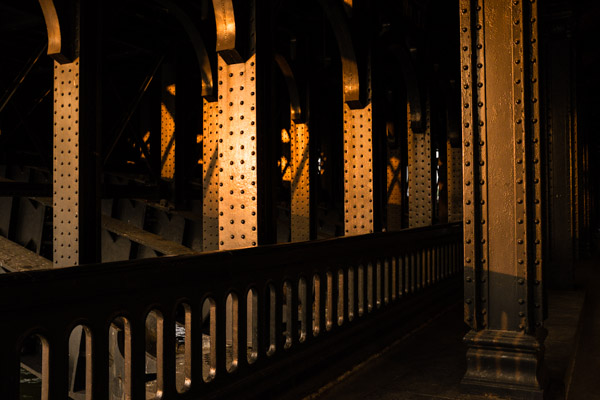
Look behind you! Everyone was looking at the sun setting over the river Seine in Paris, I looked back and was struck by the beautiful golden light hitting the bridge posts.  ©Valerie Jardin

Look behind you! Everyone was looking at the sun setting over the river Seine in Paris, I looked back and was struck by the beautiful golden light hitting the bridge posts. – ©Valerie Jardin

Shoot in manual mode

That may not always be your best choice. If you are shooting landscape then I would say yes, by all means, shoot in manual and take full control. If you are shooting street photography for example, shutter priority or aperture priority may be better choices. There is no coming back to get the shot again, so let the camera do some of the thinking for you or you’ll miss the moment.

Lighten your load and expand you creativity

A comfortable photographer is a happier photographer. Take one camera, one lens and let those creative juices flow.  It will save your back too.

Shoot for yourself. Don’t try to get approval of others.

So true, unless you need to please a client, of course. If photography is a hobby, why should you care what other people think of your pictures, as long as you like them? That said, having a critique of your work in order to improve on it is one thing, and I would highly recommend it. But, the need for gratification via ‘likes’ on social media is something you should try to learn to live without. If that is the goal then I would recommend posting a daily kitten picture to get your fix. Then just shoot what you love (if it’s kittens, then it’s a win-win). In all seriousness, not every genre of photography will get ‘Oohs and Aahs’ on social media. For example, street photography is not understood and appreciated by the general public like landscape photography. Is that a reason to shoot landscape if your heart is in street photography? I hope not or you’re a photographer for the wrong reasons. Follow your heart and your work will shine!

Stop reading and start clicking

It’s good to read about photography and get inspiration online and in books but that should not replace your time behind the camera. You are not going to get instantly better after reading an article or watching a tutorial. You are only going to get better if you shoot often. Period.

Slow Down

Having unlimited shutter clicks without a cost factor attached is both good and bad. Good for the learning curve. Bad because it tends to make us lazy. Start shooting as if you were shooting film, make every shot count and you will have more keepers at the end of the day. Slow down and know why you are about to press the shutter.

Practice, practice, practice. Any ordinary object can be a great learning subject to exercise those 'visual push-ups' ©Valerie Jardin

Practice, practice, practice. Any ordinary object can be a great learning subject to exercise those ‘visual push-ups’  ©Valerie Jardin

Never pack your camera away until you are back home

You never know what is going to cross your path. Keep that camera handy, and always on.

Take the lens cap off

Better yet: Leave it at home.

Happy shooting!

Please share some tips that made a difference in your photography in the comment section below.

*In reference to our friend and photographer extraordinaire Rick Sammon

The post The Most Valuable Photography Tips Ever – Results of a Social Media Survey by Valerie Jardin appeared first on Digital Photography School.


Digital Photography School

 
Comments Off on The Most Valuable Photography Tips Ever – Results of a Social Media Survey

Posted in Photography


Highly Intelligent ‘About Me’ Page Tips for Photographers to Build Their Brand

09 Jun

Crafting a compelling bio and writing the perfect pitch are quite challenging. Working in a service industry requires its own rules. Nobody wants to hire a person he doesn’t know, doesn’t trust or doesn’t like. That’s why talking about yourself is extremely important while creating your own brand. If you check your Google Analytics, you’d see that the ‘About Me’ Continue Reading

The post Highly Intelligent ‘About Me’ Page Tips for Photographers to Build Their Brand appeared first on Photodoto.


Photodoto

 
Comments Off on Highly Intelligent ‘About Me’ Page Tips for Photographers to Build Their Brand

Posted in Photography


8 Tips to Get You to Take Better Smartphone Pictures

05 Jun

Sometimes the best camera is the one you have with you, and most of the time, this will be your phone camera.  This doesn’t mean your photos have to be terrible; it just means you must work on your picture-taking process a little more, as smartphones have limited capabilities. Besides accessibility, one of the main advantage smartphones have is that Continue Reading

The post 8 Tips to Get You to Take Better Smartphone Pictures appeared first on Photodoto.


Photodoto

 
Comments Off on 8 Tips to Get You to Take Better Smartphone Pictures

Posted in Photography


Top 10 Sports Fashion Photography Tips

05 Jun

Yannick Wolff Photoshoot Swimming with Yannick Lebherz - Fashion Photography Blog (FashionPhotographyBlog.com)

Upcoming fashion and sports photographer, Yannick Wolff has generously taken time to offer some of his tips for executing energetic action photos as seen in his Swimming story with German Olympic swimmer, Yannick Lebherz. Yannick kindly shares his best tips for those who want to be successful in sports fashion photography:

1) Be familiar with the models sporting background, he says “You really should inform yourself about your model and especially about the sport the model is doing.”

2) Get resourceful and creative to make your pictures stand out, “You have to add something special (for example smoke, water, great angle of view…) in your picture what makes the difference between your pictures and the work of other photographers, especially if you don´t have a mind blowing location.”

3) Engage with the model to capture his or her sporting spirit, “You have to capture the passion that your model/athlete is following.”

Yannick Wolff Photoshoot Swimming with Yannick Lebherz - Fashion Photography Blog (FashionPhotographyBlog.com)

4) For photographers starting out who are interested in getting into sports fashion photography, Yannick recommends that you should inform yourself about different sports to work out what you like and to be able to relate to a range of potential clients in the sporting industry.

5) Yannick suggests that you visualize and have some framework around how you want the shoot to look like. Think about what could be interesting to take pictures of. How can you make that sport look interesting?

6) Networking plays a big part in booking shoots. According to Yannick, speaking the athlete’s managers or even the athletes themselves is achievable and doable. He says, “Athletes and their management are quite cool, so just give them a call and ask for an athlete to shoot a free/personal project with.”

Yannick Wolff Photoshoot Swimming with Yannick Lebherz - Fashion Photography Blog (FashionPhotographyBlog.com)

7) Practice makes perfect. When asked how much time needs to be taken to become proficient in sports fashion photography, the photographer pondered on the question and said “That’s quite hard to say. I think it depends on how often you are able to shoot some athletes. Of course you have to try different things in lightning and other stuff. Some upcoming photographers need 8 years, some of them just 2-3”. So it’s a matter of persistence.

8) The skills that you gain from sports fashion photography can translate into other areas of photography regardless of experience in the field.

9)  Get equipped and use short flashes to capture action shots. I asked Yannick what photographic equipment he used to create his “Swimming” story with German Olympic swimmer Yannick Lebherz he answered that “We had to use a flash with a very short flash duration. The Elinchrom Ranger was the perfect equipment for this shoot. The story was shot with my Nikon D700 right before I bought the D800.”

10) Find your voice & get inspired. Yannick’s last secret to share about sports fashion photography, he imparts these last words “Be different and get yourself some inspiration of other photographers work.”

To find out more information about Yannick Wolf’s “Swimming” story check out our interview with him in this article or look up his website (www.yannickwolff.com), there is a small behind the scenes video of this shoot as well(posted above) as well as his Facebook Page (www.fb.com/yannickwolffphotography). What do you think of Yannick’s tips? If you would like to comment or include one of your own please post it in the comments section below.

Credits “SWIMMING”

Photographer: Yannick Wolff (www.yannickwolff.com)

Athlete: Yannick Lebherz (German olympic team/London 2012)

Assistant: Kai-Philipp Nosper / Roman Paeske


Fashion Photography Blog

 
Comments Off on Top 10 Sports Fashion Photography Tips

Posted in Uncategorized


Tips for Shooting and Processing Better Black and White Photographs

01 Jun

Photography, as you know, is fundamentally the capturing of light; you are not taking pictures of objects as much as you are recording the light that is bouncing off of them. In the early days of photography, the only medium available to capture this light was monochromatic film, commonly known as black and white. In the 1930s, the invention of Kodachrome, the first successfully mass-produced color film, ushered in an age of color to the art form.

Bw article3 NEW

Instead of fading away, however, black and white photography remained throughout the birth of color, and even increased in popularity in the following decades, due to its simplicity and ability to display tones more dramatically than color usually can.

What makes black and white photography retain its timelessness? A compelling picture is always based on the same fundamentals; lighting, tonal range, shapes, patterns and textures. A black and white photo breaks these fundamentals down to their basics, and is not hindered by the distraction and complexity that color can sometimes contribute. It is truly an art form. The reality of a scene depicted in color is transformed into an artistic interpretation when shown in shades of grey.

So what do you need to understand in order to produce a great monochrome photo?

Visualize in Black and White

One of the most helpful things you can do is something that takes place before you even click the shutter button. Training yourself to envision a scene in black and white will help determine if it will work in that state, or if it would be better left to color. Since you won’t have color in the final shot, you’ll need to visualize the core of the scene instead:

  • How is the light behaving on the objects in the scene?
  • What forms are involved?
  • Are there lights, darks, and shades in between, giving you a good tonal range?

Scenes that contain contrast and texture will usually provide a good end result when converted to black and white. Fortunately, you can apply monochrome to almost any type of photography, including landscape, portrait, and street photography. The resulting feel of the image depends on the subject; landscape shots of the ocean will have more highlighted textures of the waves, and street portraits done in black and white can have a grittier, more dramatic feel.

031814 siestaguarshack2 sized

Taking the Shot

Many of the basic principles of photography apply when shooting for black and white as well. You’ll need to compose the scene properly, utilizing the rule of thirds where applicable, and properly expose the shot. As always, you’ll want to shoot in RAW, so that any necessary adjustments can be made such as exposure and levels before you begin post-processing.

When composing, pay special attention to the lines and shapes in the image. These components are even more important when the photo is desaturated.

Finally, you may benefit from using a polarizing filter. This lens attachment will reduce, or remove, reflections that may be apparent in water or other shiny surfaces. Since these reflections could take away focus from your subject matter, it’s best to do this during the shooting process rather than post-production.

040613 siesta feet sized

Post-production

The most important step in this process is actually converting the shot into black and white. While almost all DSLRs have the ability to shoot in black and white initially, you’re losing an important advantage; the photo will permanently be monochrome. Photographers sometimes think that a poor image can somehow be “saved” by being converted into black and white; this is not always the case. If you shoot in JPG format and the black and white (monochrome) setting on your camera, you’ll be producing a black and white JPG image, and lose the ability to convert to color or take advantage of RAW adjustments. BUT if you shoot in RAW in this mode you will still have all the colour data but have the advantage of seeing a black and white preview on the camera screen.

Black and white conversions in an image editor such as Photoshop can usually be categorized in two ways; destructive, and non-destructive. Obviously, destructive methods actually modify pixels and cannot be easily adjusted. Converting directly to greyscale is a long-used example of this method. Preferably, you want to use a non-destructive method that will allow you to make continued adjustments to the image until you have the tone and shading desired.

The easiest method (and the one that I prefer) is to use the Hue/Saturation/Luminosity tab in the RAW importer in Photoshop (the HSL panel in Lightroom also does the same thing). Alternatively, you can accomplish the same thing (albeit with a bit less control) by using a Channel Mixer adjustment layer after you’ve imported the RAW file into Photoshop.

Converting to Black and White with the RAW HSL Controls

Not only does this method offer more control than simply desaturating the image, it keeps the color profile loaded into the RAW (.CR2) file, allowing you to reopen and adjust it as you see fit. To convert using this method follow these steps:

  • Select the RAW file you wish to convert and open it. The file will open within Adobe’s RAW import dialog.

Bw article ps1 FINAL

  • Click the HSL/Greyscale tab on the right side of the dialog box (this should be the 4th tab).

Bw article ps2 FINAL

  • Tick the “Convert to Greyscale” box.

Bw article ps3 FINAL

  • You will be presented with eight color sliders. Adjust these sliders individually (ensure the “Preview” checkbox is ticked near the top) to see real-time changes in those color channels, and how those changes impact your desaturated image. With a color image, moving the “yellow” slider would modify the yellow in your image, but here, it will make the portions of the image that were yellow change in shading, either lighter or darker depending on which direction the slider is moved.

Bw article ps4 FINAL2

That’s it, you’re all done. Few accomplishments in photography are as satisfying as producing a well-done black and white image. You have discarded color, and envisioned your story instead with shapes, lines, shadows, and textures. You’ve opened up a new world of imagery to yourself, and exponentially expanded your repertoire.

Now…what will you do with it? Share in the comments below if you have anything to add or would like to show us your new black and white images.

The post Tips for Shooting and Processing Better Black and White Photographs by Tim Gilbreath appeared first on Digital Photography School.


Digital Photography School

 
Comments Off on Tips for Shooting and Processing Better Black and White Photographs

Posted in Photography


Tips for Great Beach Sunset Portraits

28 May

Beach sunset portraits are always so beautiful; they make for a unique backdrop as each sunset is a little bit different from the next. With an hour long portrait session photos with the sunset over and over can sometimes get a little repetitive. This article will show you how to create diverse images out of a beach sunset session, and also explain how to use off-camera flash to expose for the background and capture the true colors that you see.

IMG_9507-600

To plan this right, you first need to know exactly what time the sun dips behind the ocean horizon. The time and date website allows you to look up this exact time for different cities all over the world. For an hour long session, have your clients meet you at the beach 45 minutes before the sun goes out of sight. The lighting at this time is just perfect for photos, it is known as the golden hour because of the warm hues it casts.
The 15 minutes immediately after the sun sets also offers a wonderful soft light.

Before you begin posing your subjects you need to get your exposure right. Turn off all flashes, set your camera to Manual Mode, and simply expose for the sunset. If you take a picture of your subject in front of the background like this you will see that they are very underexposed, if not a silhouette. In order to get a proper exposure for the sunset, and for your subject, we need to add light to the subject. Since the sunset is so far away, your flash will not affect the exposure of the background.

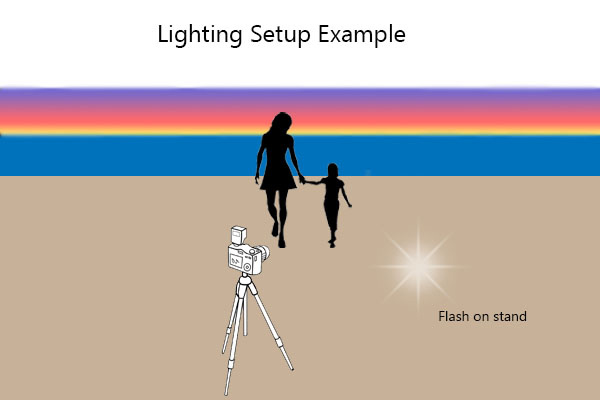
You can use an on-camera flash for this, but an off-camera flash will make the lighting look more natural and is therefore the ideal. To setup an off-camera flash you will need a flash, a light stand, and a way to trigger the flash. There are many different ways to do this, but I would suggest wireless radio triggers. Once you have your light setup, place the stand about 10-15 feet away from where your subject will stand, and about 4-5 feet to the right of the camera position. This will have the light coming at your subject from the side, instead of straight on which will create a much more flattering picture.

diagram-600

Turn your flash on and switch it to manual mode. Set the flash strength to half power and take a test shot. If your subject is too bright try moving the flash back a few feet. If the face is too dark increase your flash power or move the flash a little closer to the person. Adjust the flash power and distance from your subject until they are nicely exposed. Your flash can be bare, without any modifiers, or with a shoot through white umbrella for a softer light.

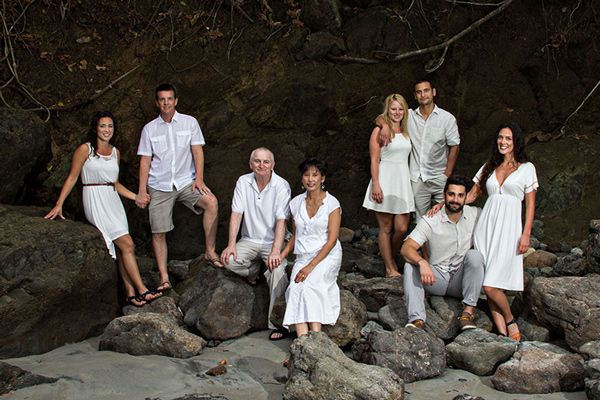
Once everything is setup you can pose your group or subject, facing away from the sunset, and take a set of images. Vary the pose and take a few more. Next look around and see what else is available to use as a backdrop. Large rocks, palm trees, sand dunes or greenery all make for diverse images. A boardwalk leading up the beach can also be a great spot. Aim to use two to three different backgrounds.

015-600

IMG_9360-600

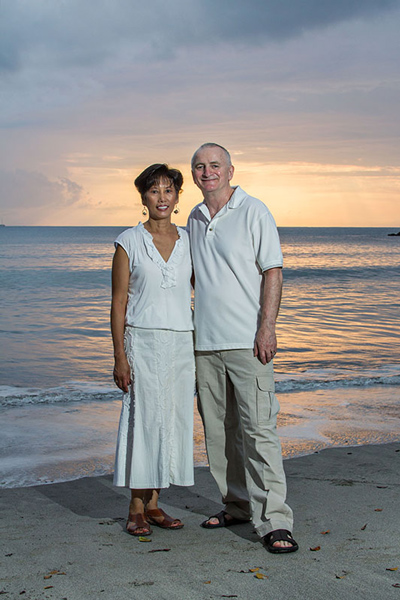
By this time the sun has gone down quite a bit, and the colors have changed a lot from your first set of photos. Adjust your lighting and exposure to match the new conditions and take a few more portraits in front of the ever changing sunset.

IMG_9393-600

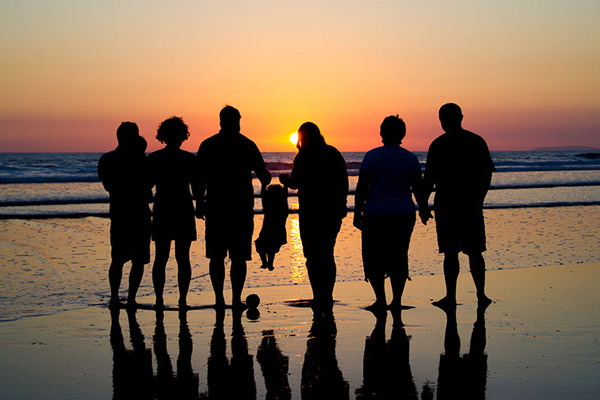
Turn your flash off, adjust your exposure and take some beautiful silhouette images of your subjects.

048-600

Just after the sun dips down below the horizon, turn your subject towards the sunset and capture the beautiful soft light that spills onto their face. Make sure your flash is off for this, as the natural light is perfect, and adjust your exposure as needed. This is a great moment for candid shots of the group walking along the beach and laughing, or of parents tossing their children up in the air.

Lastly, try to look for where your subject’s reflection falls on the water when the tide pulls out. Capture an image with your subject and their reflection, or just their feet and the reflection.

042-600

During a one hour session, at only one location, you can capture a diverse set of images for your customers (or friends) that they will love. Just remember to always be on the lookout for a different background, or unique area of the beach. Also if you will be taking pictures that will get them sandy or wet, make sure to save those for last so they their clothes aren’t wet or full of sand in the rest of the photos.

IMG_9522-600

Have you done any beach portraits? Do you have any other tips you can share, please do so in the comments below.

The post Tips for Great Beach Sunset Portraits by Madison Baltodano appeared first on Digital Photography School.


Digital Photography School

 
Comments Off on Tips for Great Beach Sunset Portraits

Posted in Photography


5 Advanced Tips for Light Trail Photography

27 May

If you’ve never shot light trails before, start with Darren Rowse’s excellent article How to Shoot Light Trails. Once you’re comfortable with the basics, here are five advanced tips for creating your own unique light trail photography.

1. Go big or go home

Smith 1

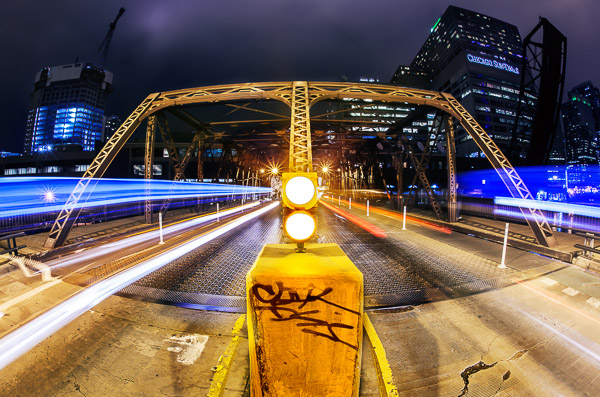
You don’t want an image with tiny light trails. You want big, Texas-sized, light trails streaking across the photo. As with any subject, if you want the subject to appear large, get close to it. Exaggerate the effect by using a wide-angle lens. Another way to add a sense of size to a subject is to shoot it from below. Shooting a person from a low point of view makes the person appear larger and more powerful. The same is true with light trails.

Get as low as you can, and as close as you can safely, to the traffic. If you’re shooting along a busy street, place two of your tripod legs barely into the street so that they are resting against the curb. Lower your tripod as far as you can and point it up. By getting as low and close as I could in the Chicago Theatre image (above), the top trails of the bus appear taller than the theatre marquee.

2. Visualize and compose for the light trails

Look at any of the images in this article and picture them without the light trails. You’re left with a boring composition that doesn’t work. When photographing light trails, you need to visualize how the trails will look in the image and compose your image with them in mind.

Treat light trails as if they were a river meandering through your image. You wouldn’t compose the shot so that the river moved straight across your frame, so don’t do it with light trails either. Pay attention to where the trails enter and leave the frame. Your eye will be drawn to the spot in the frame where the cars are beginning as it will have some of the densest and brightest trails. Place this location as you would place a main subject using the rule of thirds. The trails should move across your image and end at either the corners of the frame, or a vanishing point. Place this vanishing point in the opposite third of the frame. If the light trails enter in the lower left, have them end in the upper right. This lends a sense of movement to your composition.

Smith 2

If you can get to the middle of the road with traffic on either side of you, consider going for a perfectly symmetrical shot. You’ll need an interesting subject to go along with the trails, so look for a bridge or interesting buildings on the side of the road. Wait to hit the shutter until you have traffic on both sides of you to create a balanced composition. More importantly, make sure that you’re in a safe position. Stand in the median, or off the street. Never set up in the middle of a busy street.

Smith 3

3. Isolate the light trails from the scene

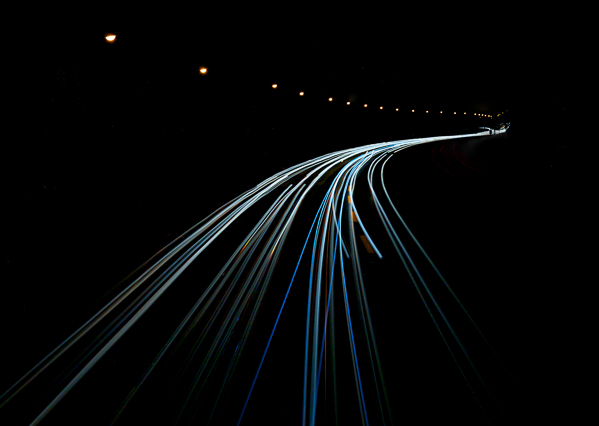
To create an interesting abstract image of light trails, put yourself in a position where the lights from the cars are the only light source. An expressway overpass is an ideal location. You don’t want any buildings or other light sources in the frame. Find a location where the road takes an interesting path and underexpose the scene so that the only things that appear are the light trails and streetlights.

When you open the photo on your computer, increase the exposure of the light trails while keeping the black areas black. You can increase the exposure of just the trails by increasing the whites slider in Lightroom, lowering the white point, or making an adjustment to the tone curve in Lightroom or Photoshop. You’ll be left with an image that shows only the path of the trails that makes for a unique abstract image.

Smith 4

4

. You don’t need cars for light trails

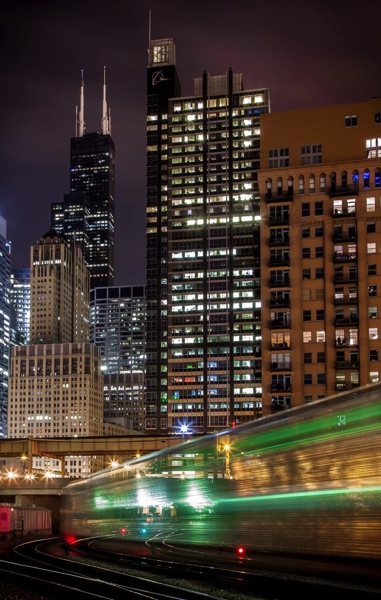
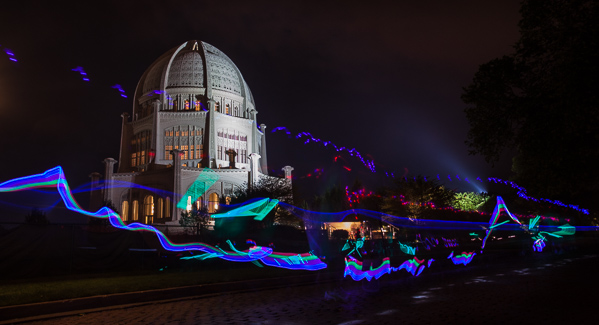
You can create light trail images at night by shooting anything that is moving and emitting light. If you’re photographing a city like Chicago, you’ll mostly shoot cars and buses, but don’t forget about trains, bikes, horse-drawn carriages, or even a bunch of kids walking by swinging glow sticks. The rules for photographing any of these is the same as with cars, but you’ll be able to shoot them in locations that cars don’t drive, and the trails that they leave are different than your standard cars.

Smith 5

Smith 6

5. Make your own light trails

Who says that you need to stand around and wait for something to drive by? If you’re in a more remote location, set up your tripod, set up a long exposure, use the 10-second delay feature in your camera, jump in the car, and drive around in front of your camera. You can drive in any path that you think might be interesting. Experiment until you find something you like. You’re essentially light painting with your car lights. This technique works even better with a friend. One person drives while the other shoots! Find an empty parking lot or a winding road and make your own light trails.

Smith 7

What do you do to spice up your light trail shots? Have you tried any of these techniques? Tell us in the comments below.

The post 5 Advanced Tips for Light Trail Photography by Chris Smith appeared first on Digital Photography School.


Digital Photography School

 
Comments Off on 5 Advanced Tips for Light Trail Photography

Posted in Photography


Street photography tips with Zack Arias

24 May

Screen_Shot_2014-05-22_at_2.03.28_PM.png

Photographer Zack Arias is particularly known for is his street work, and in a new video he shares some street photography tips while shooting with a Fuji X-T1 in Marrakech, Morocco. Even though the video is clearly sponsored by Fujifilm, it’s more than just a video tour of a new camera system. Arias talks about subjects and framing, composition and timing, and shows the resulting images after each technique. Learn more

News: Digital Photography Review (dpreview.com)

 
Comments Off on Street photography tips with Zack Arias

Posted in Uncategorized