RSS
 

Posts Tagged ‘Tips’

Tips for Photographing in Different Weather Conditions

31 Jul

You’ve figured out that photography is awesome. You have your equipment. You’ve got the basics down. You know all about the “triangle” of ISO, shutter speed, and aperture. Now, you’re ready to put them to use. You’re ready to go outside and experiment. But wait. You haven’t yet considered the weather. This is a little side note to photography that we often forget about. If you’re not shooting in a studio, then the weather will definitely be a factor to consider when going out on a shoot.

MDWeather 01

There are a few basic weather scenarios that you will surely encounter as a photographer: cloudy or overcast, rain, bright sun, high temperatures, and snow to name a few. Each of these conditions has its benefits and limits. I’ll cover a few of those here as well as tips for photographing in different weather conditions.

Cloudy or overcast

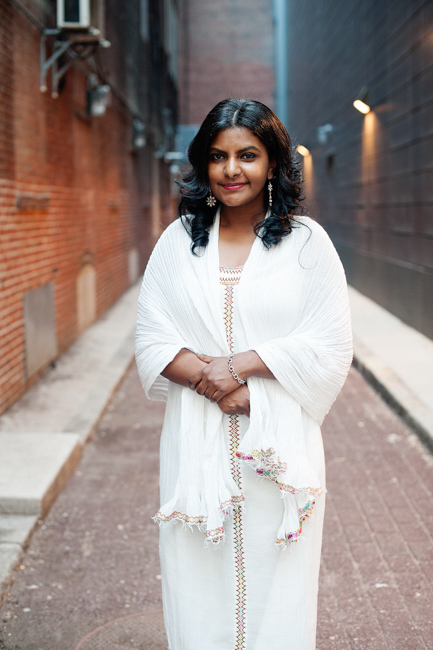
These are some of my favorite conditions to shoot in for portraits. An overcast day brings about an amazing amount of diffused light. You can shoot in the middle of the day with little worry about harsh lighting or unwanted shadows. You do want to pay close attention to lighting the face. It’s great to have a reflector to bounce light into the face of your subject(s). Make sure you’re taking a look at the images, as this will help you know if you’re underexposing or overexposing. You’ll also be able to tell if you need to reflect more light on them. See portrait above.

Shooting landscapes in overcast conditions can also be challenging. Overcast skies are gray and don’t usually add a lot of interest to that mountainscape, or field of cows you want to photograph. Look for stormy weather clouds, that add a sense of place and dimension. You can also crop your shot so that you don’t get those unwanted gray skies, but still get great lighting.

Benefit: beautifully diffused lighting
Limit: ugly gray skies
MDWeather 02

Rain

So what happens when your cloudy day turns into a rainy shoot? Well, you make the most of it. A little rain never hurt anybody. One of the best ways to work with rain is to bring an umbrella. Try to keep a nice umbrella in your arsenal of supplies for shoots. Look for one of those clear umbrellas that comes down over your head. It looks amazing in photos. You can also get one that has a nice little pop of color. Try polka dots even. Make the umbrella part of the shoot. You don’t have to use it in every photo but don’t be afraid to incorporate it.

Also look for areas that are shielded from the rain. Overhangs, alleys, even coffee shops can provide you with great areas for your photos. The rain can help you tell a story if you let it. At the end of the shoot, ask your subject if they’re okay getting wet. Work with that and see what you get. Try out different things as you’re learning to work in this condition.

Of course the rain can work against you. You’ll want to make sure your equipment is protected. You don’t have to get fancy coverings if they’re not in the budget. Get a grocery bag and some tape and protect the main body of your camera. If the weather is horribly bad, reschedule your shoot for a less harsh day. Again, safety is key here.
MDWeather 03

Rainy landscapes tell an amazing story. Make sure you’re careful with setting focal points. Your camera will often try to focus on the rain drops and will blur out your landscape. This can be nice if it’s what you intended, if not, you’ll end up with a bunch of blurry photos.

Benefit: added dimension and sense of story and place
Limit: harsh on equipment and uncomfortable for subjects

Bright sun

Many people think that bright sun is the photographer’s worst nightmare for portraits. I beg to differ. Bright sun can create beautiful light and you can play with shadows if you wish. (Read Dispelling the Myth of Good Light and Bad Light for more on this topic.)

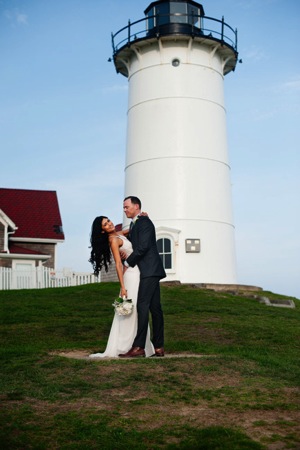
When shooting in bright sun, you will find that your camera meter will want to expose for the super bright background or the subject that’s in front of you. This causes your subject to be super dark or your background to be blown out. Try shooting in “open shade”. This means that you’ll place your subject in the shady part close to the light, and bounce light with a reflector back at them. You can also use a flash to make sure your subject is lit without blowing out the background. A flash in the sun? I know it sounds weird but it works. Use your flash to light your subject while exposing for the background. You can also look for natural reflectors around you. Look for a white building or even a white sandy beach. These help reflect light on your subject without blowing out the background too much.

Landscapes in bright sun are absolutely beautiful. Try shooting the beach in the full sun of the day. Practice exposing for the beautiful blue skies as well as the sand.

Benefit: tons of light and the ability to play with shadows
Limit: can create harsh lighting on your subject
MDWeather 04 MDWeather 05

High temperatures

A lot of us shoot in the summer months. This can be beautiful for the late sunsets and beautiful skies, but the temperature can be brutal. It’s great to shed the coats and heavy clothing but the heat isn’t always fun. You want to make sure that you and your subjects will be comfortable and safe. The most important thing is safety. I like to limit my shoots to when the temperature or heat index is below 90f (32c). This may vary depending on where you are shooting. In Puerto Rico, 90 on the beach feels great. In Boston, 90 in the city feels miserable.

Take note of how your subject is feeling on the shoot. If you notice that they’re becoming uncomfortable, ask them and schedule a reshoot if necessary.

Benefit: you and your subjects can come out of limiting coats and clothing
Limit: high temperatures can be draining and uncomfortable

Snow

Shooting in the snow is magical. It’s beautiful and the white stuff reflects light amazingly! Shooting in a blizzard, not so much. Shooting in 10f (-12c) degree weather, even worse. When shooting in the snow, pay special attention to ice and hazards under the fluffy stuff.

MDWeather 06

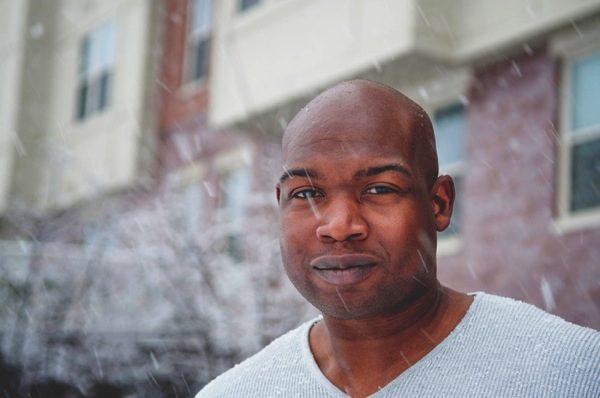
You can shoot while it’s snowing or once the snow has stopped falling. If you shoot while it’s snowing, treat your camera as if it is raining. The snow melts and water can get into the inner workings of your camera body and lens.

Don’t be afraid to ask your subject to shed that coat. If you’re in an area that gets a lot snow then you know that snow doesn’t necessarily mean unbearable cold. Have your subject shed the coat and shoot for a few frames and then warm up a bit.

Also, play around with capturing the falling snow. When it’s snowing, the sky is generally overcast. The white snow acts as a bit of a reflector so you’ll most likely be able to forgo that. Just go out and practice shooting and see what you’ll need. You probably don’t want to venture into a blizzard though.

If the snow has stopped you’ll need to watch out for ice and hazards under the snow. It doesn’t hurt to protect your camera just in case you take a little tumble. Again, the snow reflects beautifully. Make sure you’re metering for your subject and paying special attention to not blow out the white snow.

Benefit: it’s beautiful and shows a sense of time
Limit: it’s cold and damaging to your equipment
MDWeather 07

Remember, take special care to insure safety at all times. Safety of you, your subjects, and your equipment are all important. Use the weather to your advantage and work with the lighting you have. Don’t be afraid to bring in flash or reflectors. Finally, just have fun with whatever condition you’re shooting in.

The post Tips for Photographing in Different Weather Conditions by Monica Day appeared first on Digital Photography School.


Digital Photography School

 
Comments Off on Tips for Photographing in Different Weather Conditions

Posted in Photography


Ten Go-to Editing Tips for Using Photoshop

28 Jul

PS CC launch

The recent release of Adobe Photoshop Creative Cloud (CC) 2014 (which is the 15th release of the product) got me thinking about my own workflow. Photoshop is an amazing piece of software. I have been using it commercially since version 5. However, I don’t necessarily think the latest version is the best one. I’ve just recently upgraded to CS6 and I’m loving it but I can’t see myself going the CC route just yet, as it doesn’t suit my business model.

The beauty of this software is the power that it can bring to your images, but it is a complex piece of software and coming to grips with it as a beginner can be daunting. Time and practice will be your allies in learning Photoshop.

As a photographer, Photoshop is the main editing software package I use in my photography workflow. Every photographer or designer has their own unique approach to editing images using Photoshop. I find this fascinating.

I’m constantly refining, and tweaking my editing workflow. I get such a buzz when I find an alternative method or a shortcut, that I wasn’t aware of before, which makes things more efficient. Having said that there are a lot of the features in Photoshop I wouldn’t use, and there are some that I use more than others.

Before I start editing my images in Photoshop, I open them with Adobe Camera Raw (ACR) since I shoot RAW format. I need to make basic adjustments such as exposure, white balance, correcting chromatic aberration and any lens distortion. From there, I take my images into Photoshop as Smart Objects.

The following tips for using Photoshop are my regular editing techniques in no particular order. These can be used in most versions of Photoshop. These are a small set of useful tips. I could have extended it by a dozen more.

Ten go-to editing tips for using Photoshop

1. Duplicating Layer Masks for other Adjustment Layers

To save time when you need a copy of a mask from one layer to another adjustment layer; when you’ve used the brush tool to create a mask. Simply hold down the Option key on a Mac or CTRL key on a PC, click on the layer mask and drag it to the adjustment layer in question. This makes a copy of the layer mask without having to redo the same again.

Gorilla duplicating masks on other adjustment layers

2. Add a Curves Adjustment Layer with a Difference

Normally in the Curves adjustment, you adjust points on the curve line which affect the image’s tonal range. The S-shaped curve is a classic tonal tweak for boosting contrast and color saturation. However, if you add a curves adjustment layer, change the blend mode to Soft Light and reduce the Fill down to approximately 55% (the reduction amount will depend entirely on your image & preference), this gives a similar boost to color and contrast. For demonstration purposes, I have left the Fill at 100%, so that you can see a difference as outlined within the white square.

Field in France curves softlight

3. Dodge and Burn

Create a separate layer, change the blend mode (Mode) to Overlay and fill the layer with 50% gray. Name this layer “Dodge and Burn”. The Dodge and Burn tools are my go-to method for making selected areas of an image lighter or darker. Dodge is for lightening and the Burn tool is for darkening an area. Use a soft Brush and set Exposure to between 6-12%. In most cases, I leave Range set to Midtones. If you find that you have overdone it in the specific areas, just reduce the Opacity on the layer. The image on the right (below) shows the areas where I used the Burn tool to darken his arm, his face, and the bright spots in the background, and also where I lightened his back shoulder.

Secret Agent Dodge Burn

4. Layer Comps

I find the Layer Comps feature in Photoshop invaluable. It is a useful guide to the different editing stages as a before and after comparison. It is so easy to overdo it and get carried away with over-editing your image. This has five stages from straight out of camera, to the final image.

Poker

5. Stamp Visible

Cmd+Shift+Alt+E (Mac) or Ctrl+Alt+Shift+E on a PC is the command to keep all the layers in a Photoshop file and make a merged copy on top of them. I find this particularly useful, especially at the end of my editing process, where I apply some sharpening or contrast by using a Topaz effect (plug-in for Photoshop).

6. The “Place” Command

This is found under File>Place. I normally work with multiple images in the same document. Therefore, I find using this method really handy as it imports the image as a Smart Object automatically, which is great for resizing the image without any degradation.

7. Patch Tool

The Patch Tool was my favorite of the Healing Brush Tools in Photoshop CS5. But now that I’ve upgraded to CS6, the Patch tool has just gotten even better. You can now use the Patch tool to fill using the Content-Aware on a new empty layer. I prefer to set the Adaption to Loose. Make sure Sample All Layers has been ticked. The Healing Brush also feels more intuitive to use than before.

Ringbuoy Patch Tool

8. CMD+T or Transform

I seem to use this shortcut a lot. If I’m working on multiple images in the same document, I may need to resize one or two of the images accordingly. As I import my images using the Place command, this means they are converted to Smart Objects, so the resolution of the images isn’t affected when transforming or resizing.

9. CMD+T+Warp Tool

Similar to the above point, the Warp tool is great for fine-tuning an element of an image, especially if you are working on composites. In the image below, I was using my own stock photo of Heron’s talons to replicate the Owl’s talons for the purpose of realism.

Owl Warp tool

10. Opening a Second Window for the Same Document

When you are retouching your image to get rid of dust and blemishes and so forth, you may need to zoom in as much as 300% or more. Open another window for the same document by Window>Arrange>New window for new_filename.PSD but keep it at 25% (or fit to window). This way, instead of zooming back out to see how the image looks and then zooming back in to resume your retouching, just click on the second window where you have the same document viewed at 25% (or fit).

Do you have another other go-to Photoshop tools or tips you’d like to share? What is in your workflow? Please share in the comments.

The post Ten Go-to Editing Tips for Using Photoshop by Sarah Hipwell appeared first on Digital Photography School.


Digital Photography School

 
Comments Off on Ten Go-to Editing Tips for Using Photoshop

Posted in Photography


How to Photograph Beverages – Video Tips

27 Jul

Earlier I shared a collection of some great images of beverages. If you want to know more about how they may have been created, check out these video tutorials.

Photograph I offer you another drink! by Ivan Gevaerd on 500px

I offer you another drink! by Ivan Gevaerd on 500px

This first video by Phlearn features photographer Rob Grimm, and walks you through how to photograph a beer bottle and glass of beer. I used to do food photography and beverages were part of that. It’s a very specialized, and highly detailed area of commercial photography that requires a lot of lights, reflectors, and patience. A shoot like this might take several hours to get it just right, and it’s a game of inches moving things into the right places.

See more of Rob’s amazing drink shots on his website.

This next video is by Phillip McCordall as we demonstrates shooting a bottle using a slightly different lighting setup and approach. It’s well done (aside from the slight echo in the audio) and has some good tips.

This last one is by The Slanted Lens and go over how to photograph a bottle and combine it with a photo of a person for the final image. Lighting is key when photographing any kind of beverage. More good tips and a little fun at the end of this one.

So if you are doing this week’s photography challenge, beverages have a watch of these videos and remember to share your images on the challenge page.

The post How to Photograph Beverages – Video Tips by Darlene Hildebrandt appeared first on Digital Photography School.


Digital Photography School

 
Comments Off on How to Photograph Beverages – Video Tips

Posted in Photography


Three Tips to Help you Capture Beauty in the Everyday Moments

27 Jul

When it comes to creating family photo albums, there can be a tendency to create a book filled with your family’s “greatest hits”, the best moments of the year, if you will. Of course, those special moments like birthdays, vacations, and that one perfect Christmas card photo are important to include, but for most of us, they really don’t do a good job of capturing the little moments that make up the majority of our lives.

MeredithClark6

The other day, I was looking through a photo album with my four-year-old daughter Lizzy. As usual she skipped right past all the formal photos of her and her sister, and went right to a candid snapshot of her crying on the floor when she was about two. She’s heard the story of why I took that photo a number of times, but she always asks to hear it again, and so I told her;

“You were crying because I made us blackberry cobbler with whipped cream for breakfast one morning, can you believe that? I thought it would be a special treat, but you just wanted cereal like you had every day, and you were so mad at me that I’d made you something else!”

We both sat on the couch long after that laughing, talking, and telling stories about what Lizzy was like when she was two. To her, those are the important pictures – not the sunset sessions, not the formal portraits of her and her sister, not the perfectly composed family photos (which carefully observe the rule of thirds). To her, the little day-to-day moments really are the big things in life. They are the things that she remembers, and the more I think about it, the more I have realized that they really do belong in our family photo albums, perhaps more than anything else.

So, without further ado, here are my top three tips to help you capture the moments of beauty in the everyday:

1. Tell a Story

MeredithClark1

Look through the camera with the goal of capturing what’s happening in your life right at this moment. Maybe it’s the way your girls are sitting together, heads touching, reading a book. Maybe it’s the collection of coffee mugs on your table that speak to late nights at work. Maybe it’s the dirty feet of your kiddos hanging off the swings that speak to summers spent playing in the backyard.

MeredithClark2

Maybe it’s the collection of bottles drying on the counter that you really wish would hurry up and dry so that you could put them away and not look at them again until tomorrow. I’ve been there. Trust me when I tell you to take a picture of them before you put them away today. Because in a few years, when your kids are older and bottles are the last thing on your mind, you’ll look back on that photo and instantly be transported back to what life was really like with a young baby, counter full of bottles and all.

2. Look For Beauty Everywhere

MeredithClark3

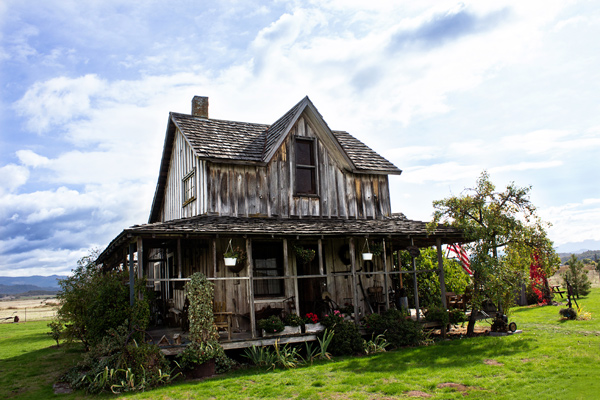
It can be easy to overlook people, places, and things that you see every day, but there’s still beauty there if you take some time to look for it. Last fall, I was commissioned by a client to take some photos of the town that we live in. At first, I had a very difficult time thinking of any place that I’d want to photograph, because everything just felt ordinary to me. I wanted to do something unique and special, and had a difficult time thinking of how to make that happen. It took a few weeks of walking around town while holding my camera, shooting nothing, and sighing heavily before I started to be able to look at things with fresh eyes. I began to see color texture, and character, even in the old wooden house that I drive by all the time. It may be a normal and everyday thing for me, but that doesn’t mean there’s no beauty in it.

MeredithClark4

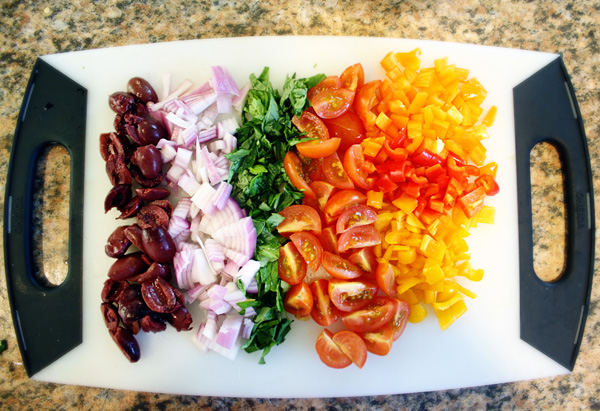
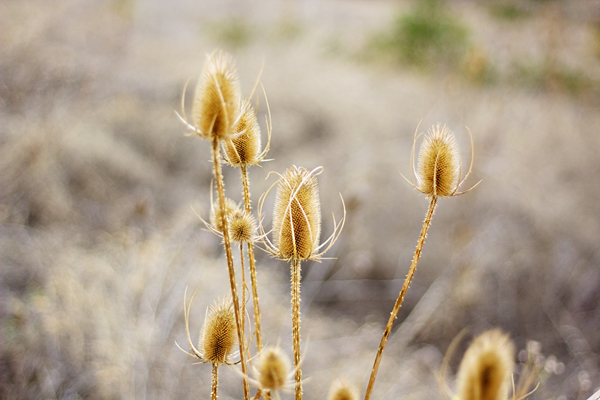
Is your dinner preparation particularly colorful? That can be beautiful. Are your kids holding hands on the couch one morning? That can be beautiful too. Is that homemade vanilla ice cream slowly dripping down a waffle cone? There’s beauty there. Those weeds outside that really need to be mowed, but in the meantime have grown into tall, prickly, textured creatures? I think they can be pretty beautiful as well.

MeredithClark5

3. Sit Back and Watch

One of the best ways to make sure that your family photos truly capture your family’s personality is to make sure that you include many candid photos. But of course, capturing true candid shots can be easier said than done, especially with children around! My best tip is to spend a lot of time sitting, watching, and holding your camera. It may not happen the first time you bring out your camera (or even the second!), but as your family realizes that you’re not going to be saying “Look right here and say cheese!” over and over, they’ll start to relax and do their own thing, and that’s when the real magic happens. Quietly pick up your camera and start shooting. You’ll start to see their real smiles and expressions, and when it comes to photos of your family and friends, those genuine smiles are always the best ones!

MeredithClark7

For more family photo ideas and projects check out these articles:

  • 10 Ways Photography Makes You a Better Parent
  • How to Create a Family Photo Essay
  • Documentary Photography – Six Tips for Creating a Legacy

The post Three Tips to Help you Capture Beauty in the Everyday Moments by Meredith Clark appeared first on Digital Photography School.


Digital Photography School

 
Comments Off on Three Tips to Help you Capture Beauty in the Everyday Moments

Posted in Photography


How to use Lightroom Develop Presets to Learn Processing Tips

24 Jul

Learn Lightroom from Develop Presets

In my previous article you learned how to create a vintage effect using Lightroom. I started by showing you some Lightroom Develop Presets you can use as a shortcut, and finished by demonstrating some techniques you can use yourself. The hidden message in the article was that one way to learn how to use Lightroom is to buy some Develop Presets (or download some free ones) and analyze them to see how they work. You can then apply the same techniques to your own photos, and even create your own Develop Presets.

Today I’m going to give you some tips on analyzing other people’s Develop Presets. I’m going to do it using some presets I downloaded from onOne Software. These are free presets that anyone can download and use themselves (just follow the link), so it is easy for you to follow along.

Preset: onOne Instantastic – Daisy

The Daisy preset, part of the onOne Signature Collection Presets (Vol. 2), gives an Instagram filter effect. There is a slight matte effect and a blue colour cast.

Learn Lightroom from Develop Presets

A. Original photo B. Daisy preset

Vibrance and saturation adjustments

This preset uses two techniques to create the colours. The first is applied in the Basic panel. The preset increases Vibrance to +20, and reduces Saturation to -20.

Learn Lightroom from Develop Presets

To understand the effect of these tweaks you need to know the difference between Saturation and Vibrance. Saturation affects all colours in the photo evenly. Reducing Saturation to -20 has a uniform effect on all the colours within the frame.

Vibrance, on the other hand, affects the least saturated colours in the photo the most. The net effect of decreasing Saturation and increasing Vibrance is that the strongest colours in the frame are desaturated while other colours are not desaturated nearly so much.

Learn Lightroom from Develop Presets

A. Vibrance 0, Saturation 0 B. Vibrance +20, Saturation -20

Tone Curve adjustments

The rest of the colour adjustment is carried out in the Tone Curve panel, with two adjustments to the blue and red Tone Curves. Here’s what the adjustments look like.

Learn Lightroom from Develop Presets

Raising the blue curve on the left creates a matte effect and a blue colour cast. Pulling the right hand side of the curve down adds yellow (the opposite of blue) to the highlights. This comparison shows the difference.

Learn Lightroom from Develop Presets

A. Blue curve lifted on left. B. Blue curve lifted on left and pulled down on right.

The red curve adjustments are also a subtle colour and tonal adjustment. Moving the bottom left corner to the right adds cyan and makes the shadows a little darker.

Moving the top right corner to the left adds magenta and makes the highlights a little brighter.

This comparison shows the difference the red Tone Curve adjustment makes. The difference is subtle, so you may have to look closely.

Learn Lightroom from Develop Presets

A. Blue Tone Curve adjustment only. B. Blue and red Tone Curve adjustments combined.

Preset: Nicolesy Matte 3

The Matte 3 preset, part of the Nicolesy Matte Presets for Adobe Lightroom 5 set, creates a subtle matte effect and a red colour cast.

Learn Lightroom from Develop Presets

A. Original photo. B. Matte 3 preset.

The Develop Preset does its work in the Tone Curve and Split Toning panels. Let’s take a look at each.

Tone Curve adjustment

The Tone Curve adjustment combines two adjustments in one to the RGB curve (the colour curves haven’t been touched). First, the bottom left corner has been moved upwards to create a matte effect. Second, the center of the RGB curve has been pushed gently upwards, making the mid-tones brighter. The net effect of this Tone Curve adjustment is to add a matte effect and make the mid-tones brighter at the same time. This comparison shows the difference it makes.

Learn Lightroom from Develop Presets

A. Linear Tone Curve. B. Adjusted Tone Curve.

Split Toning

The colour has been added to the photo using the Split Toning panel. The preset adds hot pink to the Shadows, and a luminescent green to the Highlights, with the Balance slider pushed to the right to give prominence to the green tone. This comparison shows the difference the split tone makes:

Learn Lightroom from Develop Presets

A. No Split Tone. B. With Split Tone.

Putting it all together

In my last article I wrote that buying Lightroom Develop Presets made by other people (or downloading free ones) is a shortcut to creating effects like these. One benefit of using other people’s presets is that you can take advantage of their knowledge and hard work and use the presets for yourself.

But the main advantage is that other people’s presets can introduce you to new and creative ways of processing your photos, using techniques that you may never have thought of by yourself. The real benefit comes when you take a close look at the settings altered by the preset and take the time to understand how they work. Your understanding of Lightroom will become deeper as you do, so that you can use these techniques in your own photos.

For example, in this article you have learned how to use the Tone Curve panel to create a matte effect and change the colours in your photos. You have also learned how to use the Split Tone panel in combination with a Tone Curve adjustment to create another type of matte effect. The rest is up to you.

Can you come up with ways to use these techniques creatively on your own photos? What Tone Curve adjustments can you make? What Split Tone combinations can you apply? Have fun, experiment and good things will surely follow.


Mastering Lightroom: Book Four – The Photos ebookMastering Lightroom: Book Four – The Photos

My new ebook Mastering Lightroom: Book Four – The Photos takes you through ten beautiful examples of photography and shows you how I processed them step-by-step in Lightroom. It explores some of my favourite Develop Presets and plug-ins as well as the techniques I use in Lightroom itself. Click the link to learn more.

The post How to use Lightroom Develop Presets to Learn Processing Tips by Andrew S. Gibson appeared first on Digital Photography School.


Digital Photography School

 
Comments Off on How to use Lightroom Develop Presets to Learn Processing Tips

Posted in Photography


10 Tips on How to use Photography as a Tool for Personal Transformation

20 Jul

Have you ever found yourself in a relationship that’s not really working, or a job that has you feeling trapped? Or maybe your day in, day out lifestyle has you feeling glib.

Whatever the case may be, we’ve all been there. We use different things to cope. Some people drink, while others go to therapy or journal. Well, there is a way that photography can play a part in raising you up out of that negative mindset.

From the Nap Series, Nov.09th, 2012 @Catherine Just

When I was a new mom, my son Max was not really napping. It was driving me absolutely crazy. So I decided to take my iPhone to nap time and when he fell asleep I’d take a photograph. When I saw the photo, I realized that I was so caught up in what I wanted to do that I was missing this very sacred moment between the two of us. It became a three year photo project, and changed my own perception of what was important. I teach a course called In Plain Sight that was inspired by this experience. Below I share some tips from that course, and my own life, so that you can partake in the transformation as well.

You can use whatever camera you wish, and you don’t need to be a pro photographer to make this work for you. I used my iPhone for the Nap series and it worked perfectly.

Here are 10 tips on how to use the camera as a tool for transformation:

#1 Identify the issue

Identify what the issue is that you want to focus on. Let’s say you’re in the middle of a bad breakup, or you’re moving across country.  That’s going to be the topic of your photography project.

NapSeries_CJust2

#2 Photograph the thing that frustrates you most

Instead of taking photos of that person, or of the things about this situation that drive you mad, instead, focus on how to create a gorgeous photograph of the thing that is frustrating you the most. Sounds pretty hard doesn’t it? But if you detach a bit from the story line, and start to look at things through your viewfinder as a photographer, you’ll find light wrapping itself around the subject in a way that means more than it did before.

napseries_Cjust4

#3 Take one photo every day for 30 days

Make this an investigative process. What could you learn every day about your life and how light, composition, shadows, objects, and the space around these objects all intersect with the story line that’s running in your head?

napseries_Cjust3

#4 Get closer

Remove the details that don’t serve the photograph. See what can be said with less.

#5 Pay attention to the light

Notice when things are illuminated and how that plays a roll in creating a more dramatic or emotional image.

napseries_Cjust5

#6 Go slow

No need to just snap a billion photos. Take one a day. Be thoughtful and on purpose.

#7 Move around the subject

Move around your subject to find the best way to express the emotion. Don’t just hold up the camera and take the photo. Be more in charge of what you create and remember that you can change your vantage point.

Nap series_CJUST_06

#8 Organize your photos

Keep all of your images in a folder on your computer and label them with the date and time you took the photo. Over time you will start to see something emerge that you didn’t expect. Something shifting about how you view this situation. A deeper awareness of who you are, and what this situation wants to tell you.

#9 Share your photos

Post your photos daily on your Instagram feed, and make up a hashtag for the project. People will want to join in and it’s actually an amazing thing to get feedback and support as you move through this process.CatherineJust_Naptime_1

#10 Keep going

You don’t have to stop at 30 days. My Nap Series turned into a three year project. The frustrating situation may stay the same, but you will have a new relationship with it. It’s about progress rather than perfection. If you miss some days, it’s no big deal. You’re not getting graded. This is for you. My Nap series is not a perfect daily project. I missed days for sure, but the transformation happened regardless.

So just keep going and pay attention to what the photographs are telling you. The shift will happen and you’ll be amazed before you are half way through. You’ll be more present for the moments that matter and be a little more curious within the areas of life that are triggering you. You’ll see them in a new light.

The post 10 Tips on How to use Photography as a Tool for Personal Transformation by Catherine Just appeared first on Digital Photography School.


Digital Photography School

 
Comments Off on 10 Tips on How to use Photography as a Tool for Personal Transformation

Posted in Photography


Bird Photography Tips for Beginners

19 Jul

The colour and texture of birds’ plumage makes them fascinating subjects for photography, made all the more exciting by their fleeting and elusive nature. With a lot of patience and practice, and the help of these tips, you’ll soon be on your way to making memorable photographs of our feathered friends.

Roseate Spoonbills in Flight by Anne McKinnell

Equipment

To capture the best bird photography, the most important thing you’ll need is a lens with a very long focal length. How long, exactly? Generally, the longer the better for maximum magnification. But keep in mind that lenses get remarkably heavy – if you’re hiking up a mountain, it might not be practical to carry an extreme telephoto lens, which can weigh in at over ten pounds.

A 70-300mm zoom lens is one of my favourites because it is very versatile and some of them are fairly lightweight. But you’ll get a sharper image with a fixed focal length lens. I recommend trying out a 300mm or 400mm prime lens.

The extra weight of a long lens will increase the likelihood of hand shake blur, which will then be magnified by the distance between you and your subject. If you’re working with a heavy lens, a tripod or monopod will be a great benefit for taking the weight of the lens.

Great Blue Heron by Anne McKinnell

If you want the increased flexibility you’ll get by not using a tripod or monopod, be sure to use a very fast shutter speed to compensate for the hand shake blur.

Camera Settings

Exposure

When photographing birds, using shutter priority mode and a fast shutter speed will ensure you are ready for any action that might happen, even if the bird is standing still at the moment. You never know when it will take flight and you want to be ready when that happens.

Using a wide aperture like f/2.8 or f/4 will give you a shallow depth of field, which helps to isolate the bird from its background and direct attention to its shape and colour.

When you want to have total control over the shutter speed and aperture, use manual mode and set the ISO to auto. That way, the camera will decide which ISO is the best to balance the exposure.

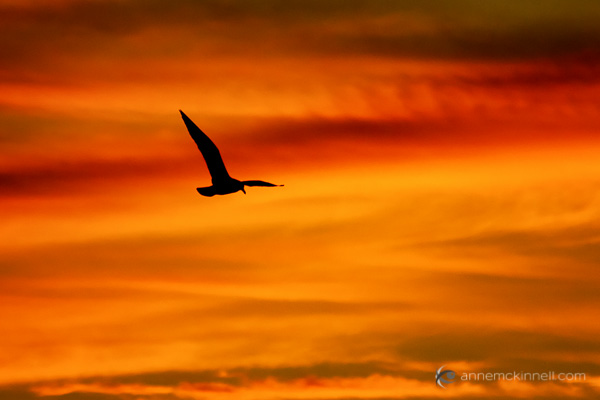
If you have a colourful sky, one option to try is to expose for the sky and allow the bird or birds to become silhouettes.

Seagull In Flight at Sunset by Anne McKinnell

Focus

How you focus on your subjects will depend on which approach you’re taking, as well as what equipment you have. Some lenses and some camera bodies auto focus faster, and much more accurately than others, so some experimentation is needed to get a sense of how quickly your auto focus motor moves.

Birds are moving subjects, so if you do use auto focus, change it to the “continuous focus” mode (usually called AF-C or AI Servo) which tracks motion. However, you might find that you get better results by learning to focus manually.

There should be an AF/MF switch on your camera and/or lens. If you switch it to MF (manual focus), you can turn the focus ring on your lens to adjust it by hand. This is fairly easy when your subject is still, but it takes a lot of practice to be able to do this quickly enough to lock in on a moving subject.

Juvenile Bald Eagle flying by Anne McKinnell

One method is to set up a perch (such as a bird feeder), with your camera on a tripod, and pre-frame and pre-focus your shot where the bird will be. When it lands, you just have to hit the shutter. There will be no focusing delay, so you can get the exact moment you have been waiting for.

Getting the Shot

Timing and Location

Birds are very active in the spring – the ground softens, plants and seeds starting coming out, and bugs are everywhere. They finally get the feast they’ve been struggling to find all winter. Similarly, in autumn they are avidly gathering food before the frost sets in. Both of these seasons are the best for finding birds near the ground – and whatever the time of year, early mornings and sunny days will draw the most action.

American White Pelicans at the Salton Sea, California, by Anne McKinnell

You might get lucky walking along a forest path, making photos of birds as you see them, but because birds see us as predators they will usually flee at the sound of our footsteps.

Instead, you may have better luck by finding a location birds enjoy, hiding yourself, and waiting. This is where the patience comes in to play! The better you hide yourself, the safer they will feel coming near you. Tuck yourself in next to a tree or bush, or hide behind a blind to camouflage yourself, and try to stay as still and quiet as possible.

One of the best places to start photographing birds might be your own backyard. Keep your camera handy with the right lens and camera settings for bird photography so that when one lands in your yard, you’re ready.

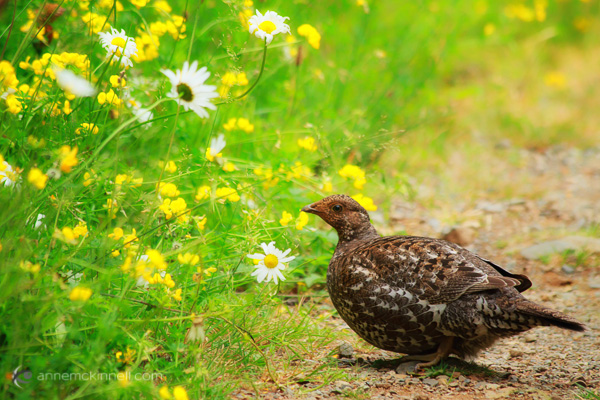
Female Sooty Grouse by Anne McKinnell

You can also seek them out in their natural habitats such as local forests, waterways, and beaches. You can find exotic and interesting species by visiting zoos, bird sanctuaries, and humane societies, or you can take a trip to a nearby national park or nature preserve. Birds that live in areas with more frequent human visitors will likely be less skittish and camera-shy.

Composition

Take care not to neglect your background. It should be clean and simple. Too much clutter will distract attention from the subject itself. Use your perspective and point of view to remove unwanted background objects from the frame, and choose a large aperture to blur them out.

Tips for the Field

  • The better your camouflage, the more likely the birds will come near you. Cover your camera with a green or brown sweater to mask its strange appearance.
  • Wear neutral clothing and avoid bright colours.
  • Make sure to remove or cover all reflective objects on and around you, including your equipment, camera bag, cell phone, and any jewelry you might be wearing.
  • If you do find yourself needing to get closer to a bird, keep a low profile. Don’t approach them directly, but rather move toward them in a zig-zag pattern. Keep very quiet and avoid making quick movements and startling them.
  • Birds often choose favourite perches. Even if it flutters off before you can get your shot, if you wait silently for a few minutes, it may come back.
  • Birds are easily startled, so a beeping camera can frighten them away. Turn off any beeps your camera might make.
    The same goes for flash – turn it off or your bird will be startled by your first shot and quickly leave.

Do you have any other bird photography tips you’d like to add to this list? Please share in the comments below.

The post Bird Photography Tips for Beginners by Anne McKinnell appeared first on Digital Photography School.


Digital Photography School

 
Comments Off on Bird Photography Tips for Beginners

Posted in Photography


6 Tips to Take Your Architecture Photography to the Next Level

18 Jul

Liams Seattle

Architectural photography may seem like an incredibly boring subject, but there is lots of creativity involved with shooting buildings, not to mention it’s a rather lucrative way to make a side income as a photographer. However, the rules of photographing a building versus a person are quite different. Whether you are a relatively seasoned architectural photographer looking to refine your approach, or a budding photographer curious about how to create impactful architectural photos, these tips should help take your photography to another level. This post is written for a photographer approaching an official architectural photography assignment, but the tips also apply to casual shooters.

1. Do your homework and see if there are any photos of the space online

Most buildings in the world have been photographed at least once thanks to Google. A quick Google Image search of the space you’re looking to shoot should pull up a variety of photos by both professionals and amateurs. Use the work of others to your advantage. Check to see what angles other photographers may have already shot, and which ones they haven’t. Examine the photos for any potential challenges that may arise, such as tall interiors or exteriors, or areas that look better when naturally lit by a sunset. Do what you can to anticipate your needs on site before you arrive.

Puerto Vallarta

2. Know the geographical aspect of your building

Speaking of natural light, this can be your friend or your foe. Many modern buildings today are being built with lots of features that offer natural light such as floor-to-ceiling windows and skylights. While these may seem great for the actual building occupant, these features can make or break your architectural photo shoot. More than ever, it is important to know the geographical aspect of the building you are shooting. Is it east-facing or west-facing? Depending on the time of day, it truly matters. Be sure to consider the geographical aspect in relation to the time of day you choose to shoot.

3. Always walk through the space first

There are a couple reasons why a walk through is essential. First, it is much easier to remove any clutter or unorganized elements. Two things to always look out for are trashcans and wrinkles in fabrics such as curtains or bed spreads. These are two things that are much easier to remove before you shoot rather than in post-production. Second, think of the walk through as your scouting mission. Look for any “special access” places such as nooks and crannies or elevated spaces, that you may be able to squeeze yourself into to get an alternative view of the space. In this day and age where just about everyone has a camera, capturing stand out photos is about finding the angles of a space that aren’t so obvious.

Hecho Seattle

4. See if the space has been styled

Before you walk through the space, check with your photography coordinator to find out if the space has been staged or styled by a designer. If so, you’re in luck! Staged spaces tend to look like they’re straight out of a magazine with furniture, artwork, and props carefully placed in the area, making your job much easier. If the space hasn’t been staged, you will have to put in more effort to figure out the architectural importance of the space and have these elements shine through in your images. Ask yourself, “without furniture, what is it about this space that makes it special?”. Perhaps it’s the exposed brick and wood beams, or the floor-to-ceiling windows. Whatever it is, make sure these elements become the focal points of your photos.

5. As you begin shooting, watch for vertical lines

When shooting architecture, you almost always want to use a wide-angle lens such as a Canon 16-35mm, but these lenses have a tendency to cause converging verticals. This happens when two parallel lines in an image appear as if they are leaning in towards each other. To make your photos appear more professional, and the architectural subject appear more structurally sound, it is important to correct these converging verticals. The easiest way is to simply change your perspective. Take a few steps away from your architectural subject, or elevate yourself until your vertical lines appear more parallel. Other ways to correct for converging verticals is to fix it in Photoshop, or if you have the budget, invest in a perspective control or tilt-shift lens.

Fairwinds Seattle

6. Elevate yourself

There are two main reasons why you want to get to higher ground while shooting a building. The first is to correct for converging verticals as mentioned above. The second reason is to strive for a different photographic perspective. If you’re lucky, the space you’re photographing may come with a balcony, staircase, or natural element that lets you rise several feet for a taller perspective. However, keep in mind that again this is an obvious element that many other photographers will make a beeline for. This is why in 90% of architecture photography situations it pays to have a foldable, portable ladder or step stool and a monopod with you always. Having these two relatively cheap and lightweight items will help you achieve different, elevated perspectives of interiors and exteriors from atypical angles. Keep them in the trunk of your car; you never know when they will come in handy.

EMP SFM Seattle

Architectural photography at face value may not seem like an interesting subject, but think of it this way: when you travel, how many buildings do you see that you end of taking a photo of? Use these tips not only for approaching a real estate photo job, but whenever you plan to take semi-professional photos of buildings or just for yourself.

Have any other tips you want to share, please do so in the comments below.

The post 6 Tips to Take Your Architecture Photography to the Next Level by Suzi Pratt appeared first on Digital Photography School.


Digital Photography School

 
Comments Off on 6 Tips to Take Your Architecture Photography to the Next Level

Posted in Photography


Sam Horine:Travel Photography Tips and Tricks

17 Jul

How do you capture the magical feeling of traveling to a new city for the first time?

Heck if we know! So … We found someone who does.

Sam Horine shoots cityscapes so stunning a scroll through his Instagram feed feels like a trip around a whole new world.

We wanted to know just how he captures the cities he visits so very well, so we asked him … and he told us!

Learn to Shoot Cityscapes Like a Pro (Sam Horine Specifically)

(…)
Read the rest of Sam Horine:
Travel Photography Tips and Tricks (859 words)


© laurel for Photojojo, 2014. |
Permalink |
No comment |
Add to
Travel Photography Tips and Tricks”>del.icio.us

Post tags:


Photojojo

 
Comments Off on Sam Horine:Travel Photography Tips and Tricks

Posted in Equipment


7 Tips for Shooting Alluring Photos of Your Girlfriend

15 Jul

What can I say…I’m a sucker for a pretty girl. Not so much the super-airbrushed models who look inhuman as much as real women in everyday situations, just being themselves. This is why I’ve often photographed the girl I was dating. At first though, I remember being to shy to ask. Too worried about offending her, making her feeling like Continue Reading

The post 7 Tips for Shooting Alluring Photos of Your Girlfriend appeared first on Photodoto.


Photodoto

 
Comments Off on 7 Tips for Shooting Alluring Photos of Your Girlfriend

Posted in Photography