RSS
 

Posts Tagged ‘Tips’

5 Tips to Help You Take More Natural Looking Portraits

05 Dec

Writing for dPS has afforded me several opportunities, the best one being getting to converse with photographers – hobbyists to professionals and everything in between – from all over the world.

lynseymattingly3

Each time an article I write is published, I get the loveliest emails and comments, and I do my very best to respond to each of them. The question I get most often is one I ask other photographers all the time: How do you make your pictures look like……..that? The question may be worded differently, but ultimately it is the same:

  • How do you get your colors to pop?
  • What lens do you use?
  • How come the people all look so happy/comfortable/natural in your pictures?
  • What’s your editing process?

When we ask another photographer these questions, we are all asking the same thing: How do you make your pictures look like that?

When an image grabs you – makes you take an extra second to look at, to admire it, or to wonder if your own images look that great, (or throws you into a jealous rage over picture envy (please tell me I’m not the only one) – it’s as though the photographer has such a defined style, their entire message comes across in that one photo staring back at you. Since my style is candid portraiture, or lifestyle photography, or whatever the latest buzzword is we are calling it now, my subjects’ expressions and poses are what I typically get asked about most. Or maybe that’s just the only part I can explain very well, as the science and equipment piece of it is just not my cup of tea.

lynseymattingly8

So here are the five things I say and do during a portrait shoot that I feel make the biggest difference in the comfort level of my clients, and ultimately is the reason I occasionally strike gold. It’s these things that are the answer to how I make my pictures look like that.

#1 Explain the process

Before I take a single picture – whether my subjects are nine or 90 years old – I tell them exactly what to expect from the session, and what I expect from them. It nearly always goes like this: “I’m going to take some pictures. I’m going to take some pictures of just the kids, some pictures of just Mom and Dad, and some pictures of everybody. You can smile if you want to smile, but you don’t have to if you don’t want to, and at the end I’m going to give you a little prize.” This short little introduction often immediately puts my clients at ease and I am able to set the tone of the whole shoot based on their response.

lynseymattingly6

If I am photographing kids, I always sit down on the ground so I am closer to their level, but I say this exact thing to children and adults alike. Yes, I carry around lollipops. My gear bag has an entire area just for that, and people I have photographed before know it. A lollipop is a tiny treat and while it’s fun and funny, though not usually a huge motivator for teenagers and certain adults, you’d be surprised how far it gets me. Obviously for most, it’s not the prize itself, but rather that I am acknowledging that this is going to be a bit of work, and it’s going to have an end point. It’s an offering to them, silently asking for them to go all-in for photos and perhaps have a little patience with me.

Also important is that I tell them they don’t have to smile. I don’t want anyone smiling because they think they have to – smiles out of obligation makes for terrible pictures. I want them to smile because we are having so much fun, they do it instinctively.
lynseymattingly1

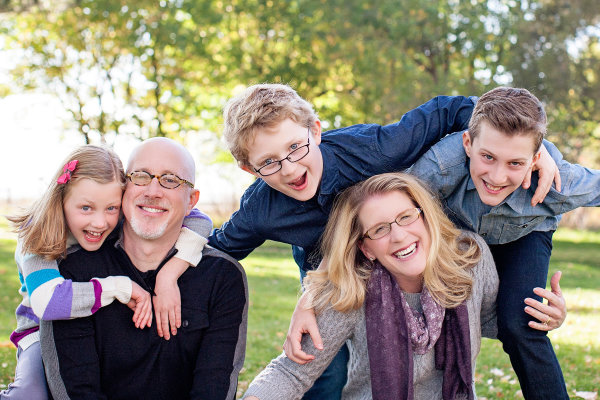
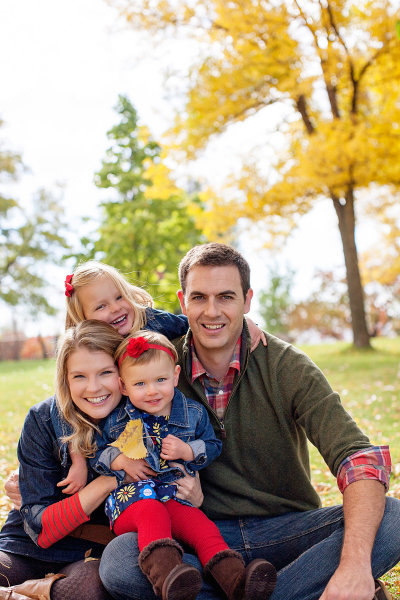
#2 Strive for interaction and reactions, not poses and smiles

If I have to choose between a picture of every face looking at me, smiling, or one of a family looking and laughing at each other, I will chose the latter every day and twice on Sunday. It is my personal and professional belief that 50 years from now, those images of people being themselves with their loved ones will be much more treasured than portrait studio shots that only show everyone together. I do my best to set-up a moment and let my subjects take it where they want. I can’t declare their reaction to something, so therefore I set the tone for funny or serious, or as I would say to a child: a loud picture or a quiet picture. I see myself as a third wheel on a great date – I’m along for the ride, I just happen to be photographing it.
lynseymattingly5

#3 Shoot everything

I am a massive over-shooter. I carry more memory to a quick portrait shoot than some photographers would pack for a day-long wedding. Changing a card mid-shoot is completely normal for me. This no doubt adds to the backend of my process, as I have so much more to sort through, but this means I can feel confident enough to guarantee my clients a minimum number of images. This also means, I very rarely have a client ask: “Did you get it?”.

I shoot looking through the viewfinder, and not. I line up the shot and then peek my head out so my subjects aren’t just staring at a black box. I make funny faces. I have a fake sneeze that can get even the most serious of baby giggling and that requires several sneezes, shots, and me not having a camera affixed to my face. I shoot an average ratio of one to 30. Meaning for every 30 images I shoot, one of them will get edited and delivered to the clients.

This would be terrible if I shot film. To be honest sometimes it’s a little overwhelming the first time I upload all of the images from a shoot. Often it’s even a lesson in self-loathing, wondering how on earth I will ever get through them, and why do I do this to myself every – single – time. In the end, it always works out. Plus, I always have the images I was hoping I caught.

lynseymattingly9

#4 Be a giant cheerleader during a shoot

I am a giant cheerleader during a shoot, to the point that it’s a bit eye-roll-inducing. If it’s dark and gloomy out, I show-up saying this is what we call perfect, even, light! If it’s bright and sunny, and miserably hot? What a perfect day for photos!

Every single thing my clients do during a photo session is perfect and if it’s not, I tell them I’m going to fix it. I want my clients on the other side of that lens to feel beautiful, and like they are doing a perfect job. Having them feel awkward, or be in poses or positions that feel unflattering, will make for bad pictures. Being told that they are doing a great job and that the pictures are coming out perfectly, gives clients the confidence to be themselves. I’m their friend during a shoot – kids and adults alike. And if I’m not behaving in a way that people would want to hang-out with me when I am not taking photos, why would they want to hang-out with me when I am?
lynseymattingly7

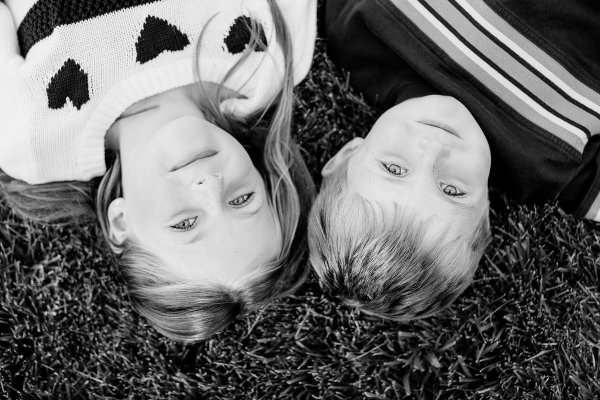
#5 Know you are just a piece of the process

I don’t want to get all cheesy on you or anything, but I don’t feel like any picture I have taken of someone is mine. The photo belongs to the person in it, and whomever they chose to share it with. I don’t do any printing. When someone pays for a photography session with me, they get the high resolution images as jpg files, and a release to print and use them as they would like. I honestly feel like this creates a comfort level that I didn’t see when I used to offer prints only. They know they are going to get the best of what I shoot and they aren’t going to have to pick a favorite for an expensive enlargement. They know there isn’t going to be a hard sale in a few weeks where we look at everything together. I don’t put watermarks on my images ever and I encourage them to share their pictures on social media. In fact, I often share their pictures on social media.

lynseymattingly2

Here’s why: if they didn’t hire me, show-up, look great, have fun, etc., I wouldn’t have the pictures to show in the first place. I’m only a piece of any picture I’ve ever taken. You may argue, what if someone steals your images? To do what? Claim them as their own? I have never run into a situation where that would truly hurt me. If there is a wild rampage of stealing other photographer’s images out there and mine are being stolen, I would honestly be a little flattered. That means they’re good! I’ve already been paid for my work. Though I would never use an image where my client hasn’t signed a release allowing my use, I don’t see how getting my images out there is anything but free advertising. I want my clients to love their photos so much they print them all in large sizes to hang up for their friends to see. I want them to talk about how fun the shoot was, how happy they are to get all of the images, and how they will hire me again and again. Those people know who took the pictures, and that’s all that really matters.

How do you help clients feel comfortable during a photo shoot? Share your comments and suggestions with us below.

googletag.cmd.push(function() {
mobile_slots.push( googletag.defineSlot( “/1005424/_dPSv4_mob-all-article-bottom_(300×250)”, [300, 250], “pb-ad-78158” ).addService( googletag.pubads() ) );
} );

The post 5 Tips to Help You Take More Natural Looking Portraits by Lynsey Mattingly appeared first on Digital Photography School.
Digital Photography School

 
Comments Off on 5 Tips to Help You Take More Natural Looking Portraits

Posted in Photography


5 Tips for Planning a Winter Photography Excursion

04 Dec

If you have seen the recent photos of the record snowfall in Buffalo, NY, you know that for much of the world winter is here and it’s coming fast, whether you like it or not.

While your feet might be cold for the next four months, a reason to get excited is the photographic opportunities that will come from it. I am writing this to convince you to prepare now for photographing that next snowstorm because it will creep up on you, and you want to take full advantage of it.

Tips for planning a winter photography excursion

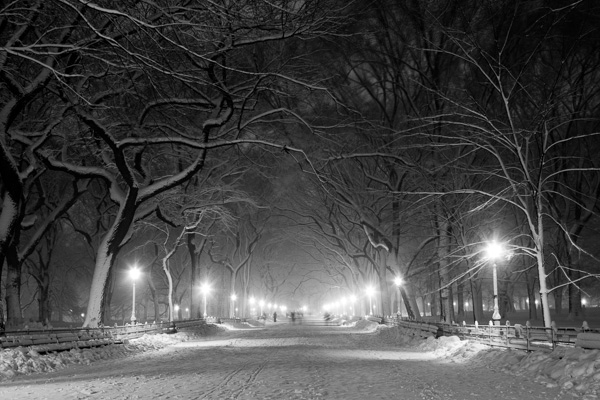
Poets' Walk, Central Park

Poets’ Walk, Central Park, NYC.

1. Plan to go out in the middle of the storm

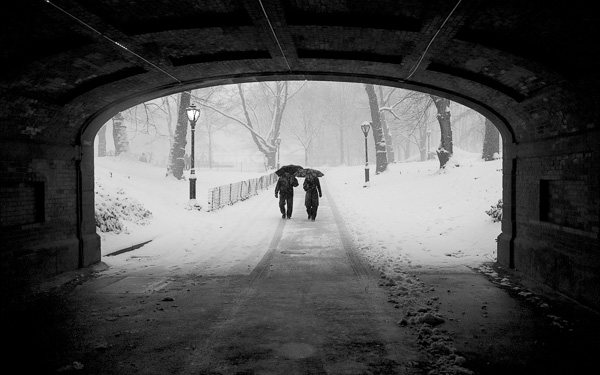
A lot of photographers choose go out the next morning after the storm has hit, when the weather is clear and the snow is bright and crisp. You should do this as there are some fantastic photographic opportunities, however, in my opinion the best opportunities occur in the middle of the storm, when the weather is fierce and the skies are gray.

If you are going to shoot in the middle of the storm, be careful. Make sure to be safe and that the storm will not have a chance to be severe enough to get you in trouble. Make sure you have a working and fully powered cellphone, the correct clothing, and any supplies that you might need should you get stuck for awhile. It will only be more fun with friends along but always make sure that someone who is not along on your excursion knows exactly where you are going.

Couple in Snowstorm, Central Park

Couple in Snowstorm, Central Park, NYC.

2. Scout your route

Create your route ahead of time. You can always explore and veer off, but it will help to have a plan of action. The key to photographing snowstorms is that you are not going out to just photograph the snow, you are going out to photograph interesting places in the snow.

Create a route with scenes that you think will look good in the snow. This could be a house, a barn, a lamppost, a main street, a park, or a scenic landscape. In addition, creating this route ahead of time will allow you to share it with someone beforehand should you get stranded.

3. Protect your camera

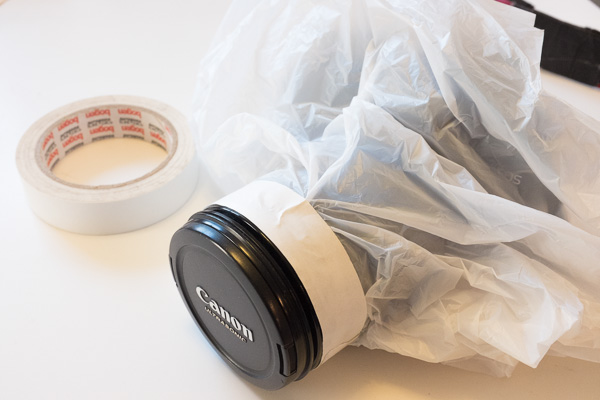
The best camera weather protector, a small plastic bag and some tape.

The best camera weather protection – a small plastic bag and some tape.

Digital cameras are tough, but you still want to treat them carefully. In extremely cold and severe weather conditions you might want to take further precautions, but for most winter situations there are only a few things that you will need to do.

Pick a lens for the day and keep it on your camera. Some people might disagree with this, but in this situation, I personally do not want to risk getting moisture inside the camera, so I will not change the lens. If anything, I will take a second camera with another lens on it, but mostly I will take either my 24-105mm or 70-200mm lens and only use one of them.

I have tried so many rain protection devices for my Canon SLR and I have given up on every single one of them. They have all been too bulky and cumbersome to use with the camera freely in harsh weather. I have yet to find one that works better than a simple plastic bag with a hole in it, and tape to attach it to the lens or lens hood. I use the typical pharmacy plastic bags. Bring multiple bags and the roll of tape because they will have to be replaced a couple times during the day. I use this setup for shooting in the rain as well.

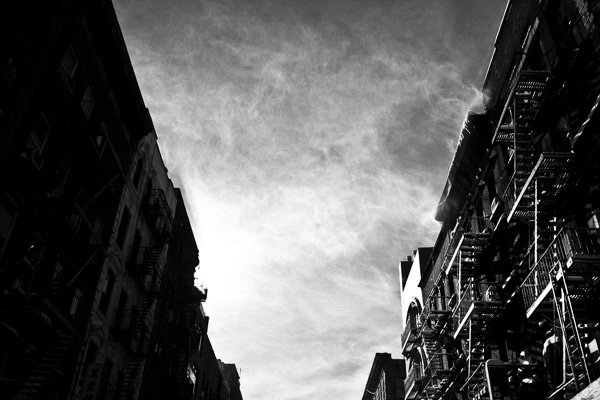
Tenement Rooftops, Lower East Side.

Tenement Rooftops, Lower East Side, NYC. You do not want that getting into your camera while you change lenses.

Bring multiple hand towels and microfiber cloths to dry off the camera, and to keep the front of the lens clear from fog. A lens hood can add further protection. If the snow is light, then I will keep the camera uncovered and will often use a small umbrella, while drying off the camera frequently. When the snow gets stronger then I will use the plastic bag and sometimes I will use it in combination with the umbrella. In between shots I keep the camera covered and I always keep the front of the lens pointed down until I actually take the shot, to keep it clear of snow.

You will also want to bring along extra batteries, since they do not work as well when they are cold.

Finally, be careful about suddenly changing the temperatures on your camera. This is what can really hurt your camera. You do not want to go from shooting in the middle of a snowstorm to putting it by a warm fire right away. Let the camera warm up slowly in your car, garage, or in a cooler area of your house.

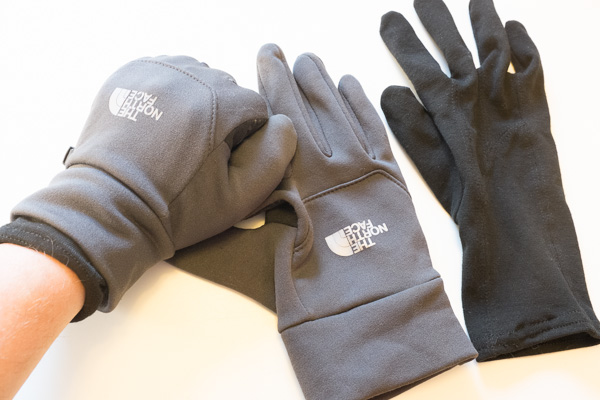
Photography gloves.

North Face touch screen gloves with inner linings. Still not as warm as heavy duty gloves, so not ideal for Arctic exploration, but they are much easier to work with when handling a camera.

4. Prepare your clothing and equipment ahead of time

Sense a theme here? Set up everything ahead of time so that when the storm hits all you have to do is get dressed and walk out the door. It is so easy to procrastinate and ultimately decide to stay in with some hot coffee. Planning and packing everything right before the shoot just adds another layer to stop you from doing it. I know this from experience. If everything is set, then the only thing that is standing between you and the outdoors is you.

You might try to tell yourself that there will be another storm but that is never guaranteed. If the weather is perfect, then you need to take advantage of the opportunity while it is there. It could be a once in a lifetime experience.

Use two layers of thinner gloves. Gloves are a huge problem with photography as the warmest ones are too bulky to adjust the fine controls on the camera, and the thin ones are not warm enough. I use a thin inner layer glove combined with a medium strength pair of North Face gloves. This is still not as warm as a heavy duty pair, but the mobility is a big advantage.

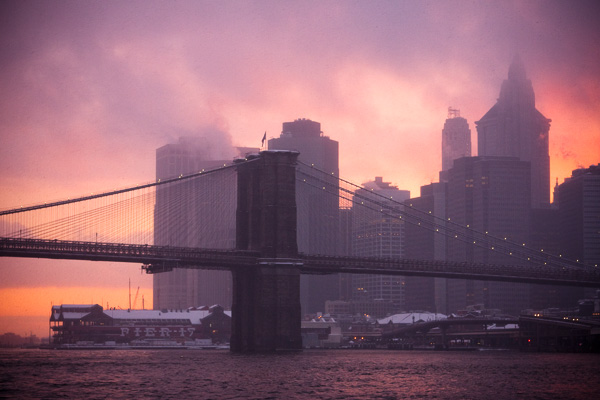
Brooklyn Bridge in Snowstorm, at Sunset

Brooklyn Bridge in Snowstorm, at Sunset, NYC.

5. Plan a sunset into dusk route

The most uncomfortable times to shoot often yield the best results. You may have heard to shoot during the golden hour, or at night, or during a snowstorm, but the real magic happens when all of these come together in one. Plan out exactly where you want to be during the golden hour and after the sun sets. If it is in the middle of a hard storm then the sunset might not shine through the fog, but everything will still get magical as it transitions to night.

Make sure to bring a tripod for dusk. Also a strong flashlight can help for focusing, because it can be tough for the camera to lock onto dark scenes. You can also use manual focusing to select the focus distance that you want.

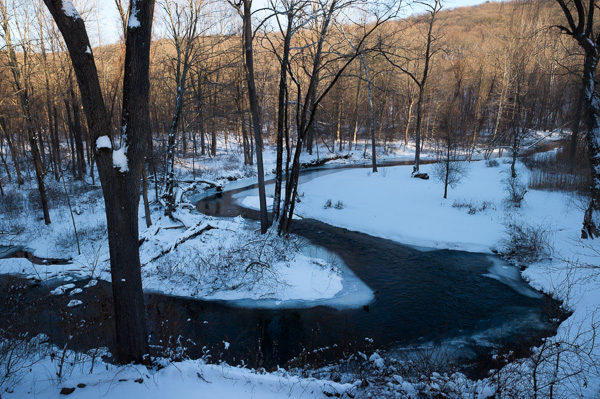
Cold Spring, New York.

Cold Spring, New York. The warm sunset light contrasted with the blue shade adds an interesting aspect of contrasting color.

Bonus: Technical tips

If you are not shooting in full manual, all that white snow is going to trick the camera’s light meter to make the images darker than they need to be. It is common for people to come back from a day shooting in the snow to wonder why the photos all look so gray. Raise your exposure compensation (+/-) to combat this and make the snow whiter, but make sure to not blow out the details completely.

The opposite side of this tip is that a gray snowy scene can be fantastic, so you might not want the snow be very white. You have creative control here and can use the +/- on your camera or manual mode to achieve the exact look that you want. It is better to do this in the camera rather than in post-production.

Also, pay attention to make sure that your focus point is correct and if you are shooting digitally then take a few shots of the same scene. Snowy and harsh conditions can make focusing tough and can make the problem of back-focus even easier to occur. Make sure the focus point is locked onto the area that you want to be the sharpest and not the area behind it.

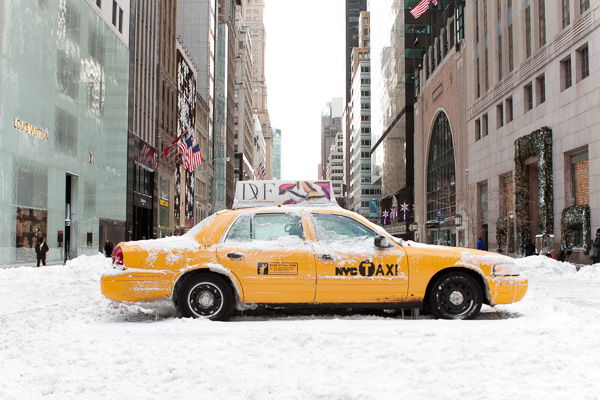
Broken Taxi, 5th Avenue.

Stuck Taxi, 5th Avenue, NYC.

Be adventurous. This is not just about getting that ideal photo, it is about enjoying the process as well. The camera is a wonderful tool to force you out the door to explore gorgeous locations when you might otherwise decide to stay inside in the warmth. A camera is a gift in many ways.

googletag.cmd.push(function() {
mobile_slots.push( googletag.defineSlot( “/1005424/_dPSv4_mob-all-article-bottom_(300×250)”, [300, 250], “pb-ad-78158” ).addService( googletag.pubads() ) );
} );

The post 5 Tips for Planning a Winter Photography Excursion by James Maher appeared first on Digital Photography School.

Digital Photography School

 
Comments Off on 5 Tips for Planning a Winter Photography Excursion

Posted in Photography


6 Tips for Creating Leading Lines to Make Your Photos Stand Out More

04 Dec

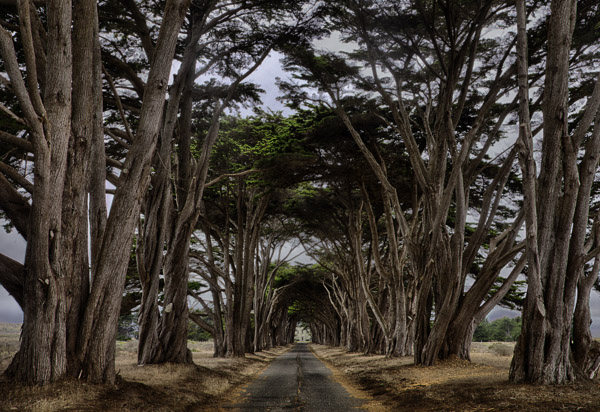
There is perhaps no more important tool in composition than lines. The eye will virtually always follow an actual or implied line across the picture. Because of this tendency, many lines are referred to as leading lines They are actual, or implied lines that control the eye of the viewer through the frame.

PointReyesTrees

Some leading lines guide the viewer entirely through the frame. Some lines are the subject of the photo themselves. But others, and my favorite sort of leading lines, are the ones that draw the viewer into the picture. They add depth to your image. So today I want to focus on that particular kind of leading line, giving you some examples and ideas for how to create them.

1.  Plan for opportunities

Lines that you can use to lead into your viewer into the frame are everywhere, but you’ve got to look for them. In fact, it is a good idea to plan a few shots ahead of time so that you can consider what to use as a leading line. Leaving it to chance when you are out shooting will often result in the idea of leading lines being overlooked while you are focused on other things.

When you are thinking about possible lines leading into the frame, think about roads and paths, which work great. Plus they are everywhere so you almost never have to search for them. The edges of the road will converge in the distance, thereby pointing the viewer to the center of the frame. Although certainly not as prevalent as roads, railroad tracks also work great. Finally, don’t overlook the use of shadow to create a line toward the center of the picture.

QueensWalk

2.  Finding and using urban opportunities

In an urban environment, besides roads, you can use buildings and other structures. Obviously rows of buildings can work. Perspective will make the buildings appear smaller as they become more distant, resulting in lines pointing to the center of the picture. Fences are another good choice.

Keep your eye open for rows of streetlights, which we often overlook, but which can work great. In addition, don’t forget to look up, as the natural convergence of buildings toward the center of your frame (due to the distortion of your lens) can actually work for you in this context, and create lines that point to the center of the frame.

TubeEscalator

3.  Opportunities in nature

When you are out in the wild, nature often provides you with the leading lines you seek. Patterns on the ground, whether it be paved, sand, or grass, can often provide markings that lead to the center of the frame. In addition, similar to the convergence of buildings mentioned above, looking up into tall trees will create the same effect.

Sand

Leading lines on the ground can be difficult if not impossible to see with the naked eye though. There are times you have to walk around with the viewfinder held to your eye (or looking through your LCD with the camera in Live View) in order to see the lines on the ground. Moving water can also provide lines toward the center of the frame. Again, however, these might not be visible to you. Frequently looking at a a long exposure after the fact is the only way you can actually see these lines. Take test shots when you can.

4.  Manufacture your own lines

Sometimes there are no leading lines tha to use and you have to make your own. There are many ways to do this. One of my favorites is by adding streaking lights that go into the frame. Taking a long exposure of moving water will also result in lines.

GreyWhaleRock

5.  Stay cognizant of lines when shooting

Once you identify leading lines to draw your viewer into the frame, you need to take your picture in such a way that it will show them. We already mentioned shutter speed, which is particularly important when you are allowing lights or water to flow through your frame to show a leading line. But you will also want to keep an eye on your aperture setting. Most of the time you will want the entire leading line sharp, along with the subject that you are leading the viewer’s eye toward. You’ll want to use a small aperture in that case, which will create a large depth of field for your shot. On occasion, however, you want to blur out the background by using a large aperture. In any case, the important thing is to have a plan for showing the leading line in the final picture.

WiseCoRoad

6.  Accentuate the lines in post-production

Finding and using leading lines to draw your viewer into the picture does not end when the shutter closes. Usually you can accentuate them in post-processing. The main way is through selective brightening and darkening. Oftentimes you will want to brighten your leading line to draw the viewer’s eye to it. Sometimes you might want to darken other parts of the frame for the same reason. You also might want to increase the contrast in, and around, your leading lines since the eye is attracted to contrast.

The best way the accomplish this selective lightening and darkening is through curves adjustment layers. Just create a curves adjustment layer (Layer – New Adjustment Layer – Curves). Then brighten the picture by pulling the middle of the curve upward bit. Use whatever selection tools you are most comfortable with to mask away the brightening everywhere you don’t want it (which will be pretty much everywhere except for your leading lines). To darken portions of the picture, just do the same thing on a new adjustment layer, but instead of pulling the curve up, pull it down. Again, mask away the effect where you don’t want it (which, this time will be areas away from your leading lines).

NYC

Effort and reward

The use of leading lines to draw the viewer into the frame is a great way to add depth to your pictures. Rather than looking at the picture the viewer is looking into the picture. But it isn’t always easy. It requires thought before, during, and after the shot. But with the right pre-planning, a little attention while shooting, and some accentuation during the post-processing, you can add an element to your photos that sets them apart.

googletag.cmd.push(function() {
mobile_slots.push( googletag.defineSlot( “/1005424/_dPSv4_mob-all-article-bottom_(300×250)”, [300, 250], “pb-ad-78158” ).addService( googletag.pubads() ) );
} );

The post 6 Tips for Creating Leading Lines to Make Your Photos Stand Out More by Jim Hamel appeared first on Digital Photography School.

Digital Photography School

 
Comments Off on 6 Tips for Creating Leading Lines to Make Your Photos Stand Out More

Posted in Photography


6 Tips for Creating Leading Lines to Make Your Photos Stand Out More

03 Dec

There is perhaps no more important tool in composition than lines. The eye will virtually always follow an actual or implied line across the picture. Because of this tendency, many lines are referred to as leading lines They are actual, or implied lines that control the eye of the viewer through the frame.

PointReyesTrees

Some leading lines guide the viewer entirely through the frame. Some lines are the subject of the photo themselves. But others, and my favorite sort of leading lines, are the ones that draw the viewer into the picture. They add depth to your image. So today I want to focus on that particular kind of leading line, giving you some examples and ideas for how to create them.

1.  Plan for opportunities

Lines that you can use to lead into your viewer into the frame are everywhere, but you’ve got to look for them. In fact, it is a good idea to plan a few shots ahead of time so that you can consider what to use as a leading line. Leaving it to chance when you are out shooting will often result in the idea of leading lines being overlooked while you are focused on other things.

When you are thinking about possible lines leading into the frame, think about roads and paths, which work great. Plus they are everywhere so you almost never have to search for them. The edges of the road will converge in the distance, thereby pointing the viewer to the center of the frame. Although certainly not as prevalent as roads, railroad tracks also work great. Finally, don’t overlook the use of shadow to create a line toward the center of the picture.

QueensWalk

2.  Finding and using urban opportunities

In an urban environment, besides roads, you can use buildings and other structures. Obviously rows of buildings can work. Perspective will make the buildings appear smaller as they become more distant, resulting in lines pointing to the center of the picture. Fences are another good choice.

Keep your eye open for rows of streetlights, which we often overlook, but which can work great. In addition, don’t forget to look up, as the natural convergence of buildings toward the center of your frame (due to the distortion of your lens) can actually work for you in this context, and create lines that point to the center of the frame.

TubeEscalator

3.  Opportunities in nature

When you are out in the wild, nature often provides you with the leading lines you seek. Patterns on the ground, whether it be paved, sand, or grass, can often provide markings that lead to the center of the frame. In addition, similar to the convergence of buildings mentioned above, looking up into tall trees will create the same effect.

Sand

Leading lines on the ground can be difficult if not impossible to see with the naked eye though. There are times you have to walk around with the viewfinder held to your eye (or looking through your LCD with the camera in Live View) in order to see the lines on the ground. Moving water can also provide lines toward the center of the frame. Again, however, these might not be visible to you. Frequently looking at a a long exposure after the fact is the only way you can actually see these lines. Take test shots when you can.

4.  Manufacture your own lines

Sometimes there are no leading lines tha to use and you have to make your own. There are many ways to do this. One of my favorites is by adding streaking lights that go into the frame. Taking a long exposure of moving water will also result in lines.

GreyWhaleRock

5.  Stay cognizant of lines when shooting

Once you identify leading lines to draw your viewer into the frame, you need to take your picture in such a way that it will show them. We already mentioned shutter speed, which is particularly important when you are allowing lights or water to flow through your frame to show a leading line. But you will also want to keep an eye on your aperture setting. Most of the time you will want the entire leading line sharp, along with the subject that you are leading the viewer’s eye toward. You’ll want to use a small aperture in that case, which will create a large depth of field for your shot. On occasion, however, you want to blur out the background by using a large aperture. In any case, the important thing is to have a plan for showing the leading line in the final picture.

WiseCoRoad

6.  Accentuate the lines in post-production

Finding and using leading lines to draw your viewer into the picture does not end when the shutter closes. Usually you can accentuate them in post-processing. The main way is through selective brightening and darkening. Oftentimes you will want to brighten your leading line to draw the viewer’s eye to it. Sometimes you might want to darken other parts of the frame for the same reason. You also might want to increase the contrast in, and around, your leading lines since the eye is attracted to contrast.

The best way the accomplish this selective lightening and darkening is through curves adjustment layers. Just create a curves adjustment layer (Layer – New Adjustment Layer – Curves). Then brighten the picture by pulling the middle of the curve upward bit. Use whatever selection tools you are most comfortable with to mask away the brightening everywhere you don’t want it (which will be pretty much everywhere except for your leading lines). To darken portions of the picture, just do the same thing on a new adjustment layer, but instead of pulling the curve up, pull it down. Again, mask away the effect where you don’t want it (which, this time will be areas away from your leading lines).

NYC

Effort and reward

The use of leading lines to draw the viewer into the frame is a great way to add depth to your pictures. Rather than looking at the picture the viewer is looking into the picture. But it isn’t always easy. It requires thought before, during, and after the shot. But with the right pre-planning, a little attention while shooting, and some accentuation during the post-processing, you can add an element to your photos that sets them apart.

The post 6 Tips for Creating Leading Lines to Make Your Photos Stand Out More by Jim Hamel appeared first on Digital Photography School.

Digital Photography School

 
Comments Off on 6 Tips for Creating Leading Lines to Make Your Photos Stand Out More

Posted in Photography


7 Tips for Better Beach Photography

01 Dec

The beach can be a great place for photography. You are in a scenic environment. You typically have friends or family members with you. You are usually there on nice days. All these can contribute to great photographs.

But the degree of photography problems you will face on the beach might surprise you. Exposure can be tricky given the bright environment. Often, there is nothing but sand, so the composition can be dull. And of course there are elements like sand and salt-water that do not mix well with electronics. So I want to give you some tips for beach photography, dealing with these potential problems and make it a great place for photography.

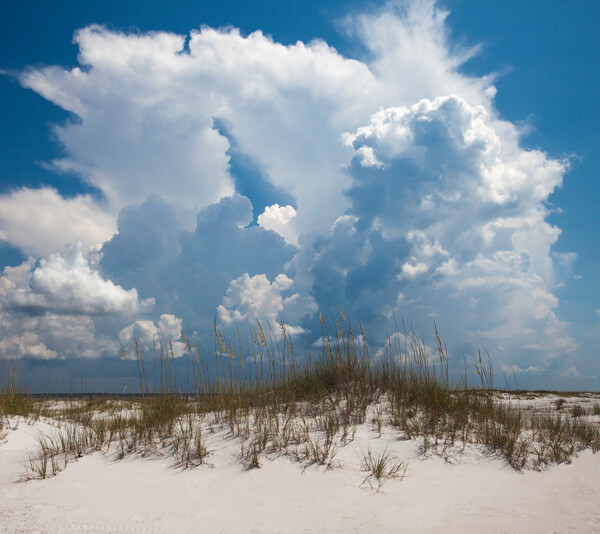
SantaRosa

1.  Control Your Exposure

If you are shooting in automatic mode, you might find that your pictures are darker and flatter than you anticipated. That is because your camera will try to reduce all things to a middle grey. Try shooting in Manual or Aperture Priority mode, which will give you additional control over your exposure. Use that control to slightly overexpose your picture. Set the exposure so that the meter in your camera is a little to the right of zero. If your camera uses numbers instead of a scale to show your exposure, start by setting it at +1. This will make your picture accurately capture the bright scene that you see in front of you.

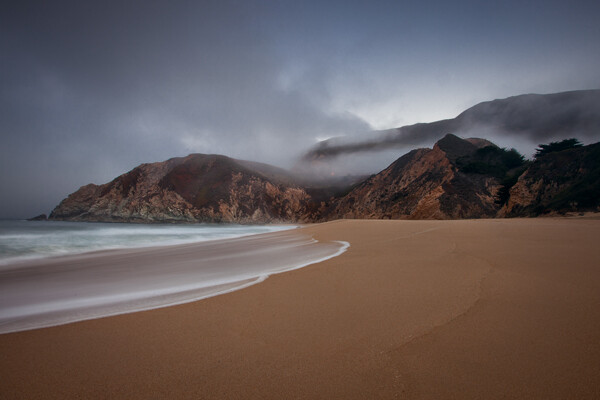
GreyWhaleCove

2.  Watch the Dynamic Range

At the beach, you will almost always be looking at a bright sky. Even though the foreground may be well lit, the sky will usually be much, much brighter. That can cause a dynamic range problem and, if you are not careful, your sky will be blown out or pure white.

To deal with this problem, break out a graduated neutral density filter. This is a square filter that fits on a holder in front of your lens. The top of the filter is be dark, while the bottom of the filter is clear glass. When you attach the filter to the front of your lens, it will darken the top portion of your picture while keeping the bottom portion at the same brightness level. This keeps everything within the dynamic range of your camera. The upshot for you is that it will darken your sky a bit to bring it in line with the foreground and keep the sky from blowing out. The beach is an ideal place to use these filters because the horizon is typically a straight line with nothing sticking up over it (such as trees or buildings).

If you do not have such a filter, try bracketing your exposures. You can then merge them later using Photoshop or an HDR software.

3.  Use Fill Flash

It might seem counter-intuitive to you, but the beach on a bright sunny day is a great place to break out your flash unit. You can expose your picture with an eye on the brightness level of the sky, and brighten up the person or thing in the foreground using the flash. Because the overall scene is so bright, the flash should not overpower it. I personally find that the beach on a sunny day is one of the best times to use a flash unit. Adding fill flash can dramatically improve your beach photos.

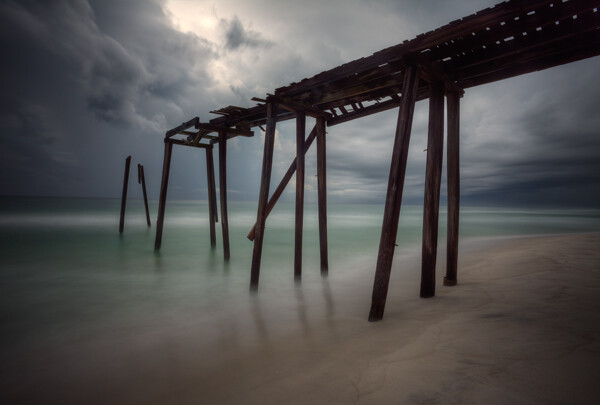
Pier

4.  Seek Out Subject Matter

I once complained to a friend that I was having difficulty taking good pictures at the beach. He responded, “Of course you are, there’s nothing but a bunch of sand.” Sometimes, that sentiment is right. So you will have to work on finding a good subject to add to your composition. If you do so, you can turn your beach photos something great.  Some ideas to look for are:

  • Piers
  • Rocks
  • Driftwood
  • Beach chairs
  • Beach umbrellas
  • Fences
  • Sea oats
  • Abandoned boats
  • And, of course, people

GreyWhale

5.  Work the Foreground

At the beach, you already have a ready-made background for your photos; that being the ocean and the sky. What will separate a great photo from a snapshot will frequently be the foreground. Focus nearly all your energy on making the foreground look as good and as interesting as you possibly can.

Using the subject matter set forth above can help you with your foreground. Having any of those elements in the frame will usually go a long way in making the foreground an interesting part of the photo. If none of those items are available, a lot of times interesting formations in the sand can also create a good foreground. Look for a pattern. They can be difficult to see though, sometimes you will need to have your eye to the viewfinder or be looking at the LCD to find them. Take a test shot if time permits.

Once you find your subject matter, consider your angle of view. Very often, we tend to shoot directly out towards the ocean. However, there are usually much more interesting views looking down the coast. Sometimes it is actually best to put your back to the ocean and get the sand and land formations in your frame. Just be sure you’ve considered all the angles.

PensacolaPanorama

6.  Get the Best Light

As with most other forms of outdoor photography, the best light is usually predawn, or just after sunset. Try to get up early or stay late. These are virtually always the best times for photography, and many serious shooters will not shoot at any other time of day.

Of course, getting up before dawn or staying after sunset is not always possible. Rather than just put the camera away, you might want to try some midday shots. If you do, there are a few ways you can make your photos look as good as possible. I already talked about using a fill flash, and that can be a great way of cutting down on the harsh shadows you might encounter. In addition, to make your sky look as good as possible, consider using a polarizing filter. This will make your sky appear a deeper, richer, blue. Polarizers actually work best near midday, so you will get the maximum benefit from it if you are shooting at that time.

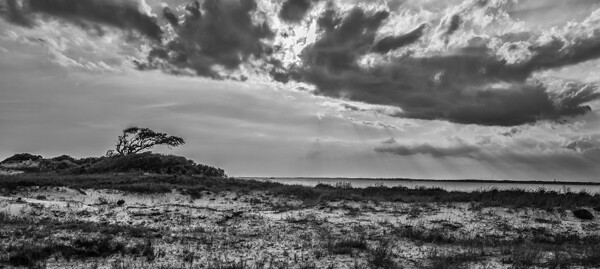
One final tip if you are shooting at midday and dealing with harsh contrasts is to consider converting your photos to black and white; it loves contrast. The overly contrasty light of midday photography can go from a liability in a color photo to an asset in a black and white photo. Once you’re back in front of your computer, try converting a few photos to black and white and see how you like them.

DestinChairs

7.  Beware of the Elements

Sand and salt water do not mix well with expensive electronics. It is difficult to keep them away from your camera sometimes. Sand seems to get in everything.

Further, a crashing wave can send spray into the air and get into your camera. You will want to take a few precautions to avoid any such problems. You could actually buy a waterproof case for your camera, but these are amazingly expensive. The cases can cost more than the camera itself. They are often more than is necessary, particularly if you are making efforts to keep away from the water and sand. In normal situations, you can get a rain sleeve to cover your camera for just a few dollars. You might use one of these if there’s any chance that sand or spray get near your camera.

Another idea is to purchase a waterproof point-and-shoot camera. I normally recommend that you steer clear of point-and-shoots because of the inherent problems with them, largely stemming from the small sensor size. However, because you are typically shooting in bright light at the beach, a lot of the limitations of point-and-shoots are somewhat muted. Further, you can use the camera with confidence, even taking it into the water. They can be a lot of fun, and they are pretty cheap (relatively speaking).

Conclusion

These tips should make photographing the beach the fun occasion that you expect. If you know how to deal with the bright light, your pictures will look better. Finding good subject matter and using an interesting angle will make them interesting. And finally remember to keep your equipment safe from the elements to keep your day from being ruined.

The post 7 Tips for Better Beach Photography by Jim Hamel appeared first on Digital Photography School.

Digital Photography School

 
Comments Off on 7 Tips for Better Beach Photography

Posted in Photography


Simple Post-Processing Tips For Minimalists

30 Nov

Pink Flowers on a cloudy day

Are you a minimalist in terms of your photography? Do you crave simple composition and clean lines in your images? There are many wonderful articles on minimalist photography and simple imagery. In fact Valerie Jardin has a fantastic article on Minimalist Photography – 4 Tips To Keep It Simple right here on Digital Photography School.

This article encourages you to take that approach a step further into post-processing to achieve a clean, timeless look to your imagery. A clean, crisp image always stands the test of time. You don’t have to look very far, just dig into your own image archives from prior years and see which images appeal to you the most.

As a photographer, your greatest achievement is when you are able to capture images exactly as you envision them or see them with your mind’s eye. When you import your images to your computer and the SOOC (Straight Out Of Camera) image simply takes your breath away, you know you’ve got what it takes. While all of us aim for that exact moment of shining glory, sometimes we need to add just a little bit of oomph to the image, simple adjustments that take the image from great to awesome.

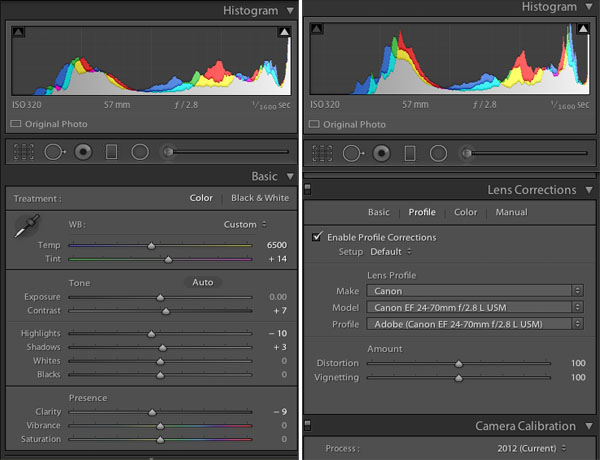
Here are some post-processing tips on achieving a great look using simple adjustments. These are all done in Lightroom 5 – a great processing tool for you – using only the Basic and Lens Corrections Panels. The Basic Panel in LR contains adjustment sliders like: Temperature and Tint which adjust White Balance, Exposure and Contrast, Highlights, Shadows, Whites and Blacks which adjust Tone and Clarity, and Vibration and Saturation which adjust Presence. The Lens Correction Panel in LR primarily contains profile corrections for various Lenses.

Lightroom 5 Basic Panel and Lens Profile Correction Panel

Another point to note is: Use RAW format for your images if your camera has the ability to record images in that format. This type of file format has a lot more leeway in terms of post-processing adjustments. There are several articles in the Digital Photography School’s archives that discuss RAW file formats in great detail.

Post-Processing Steps for Minimalist

1) Enable the Lens Correction

Certain lenses, particularly wide angles, introduce some distortion in the images, especially around the edges of the frame. This is generally more obvious in images that either have horizontal lines, curved lines  or the horizon in the frame. Lens Correction can be done in the Profile tab where you can Enable Profile Corrections. Selecting that box, should bring up the profile of the lens used for that particular image. With each new version of LR (we are currently in LR 5.6) more and more lens profiles are being added to the software.

Note: if you cannot find your lens you can try looking on the manufacturers site or use one that is similar.

In the Profile mode, LR automatically detects the lens used and corrects the distortion. Finer adjustments can be done using the sliders under the Lens Profile. You may have to drop down the list and find your particular lens. Enabling Profile Corrections first eliminates the distortion and sometimes brightens the images just a tad – which might be just what the image needs. For more control, switch to the Manual tab for individual profile correction adjustments.

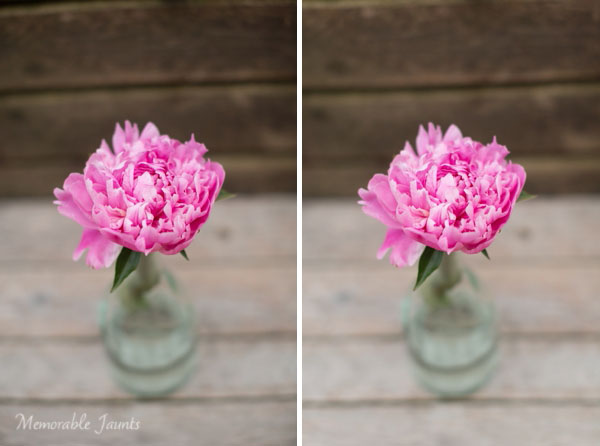
Left is SOOC; Right is Lens Correction adjustment (notice the wood panel in the top of the image)

The left image is SOOC; the right has Lens Correction adjustments done (notice the wood panel in the top of the image)

2) The Basic Adjustment Panel is your BFF (best friend forever)

80% of all minimalistic adjustments happen in the Basic Panel. White Balance (Temperature and Tint) are the most commonly used sliders. Most adjustments are quite minimal. A few stops up or down generally gives you exactly what you are looking for. Take note that small adjustments are very subtle. If your photograph has people, be cognizant of skin tones and colors as they can vary a lot among people and hence the WB slider numbers will also vary. Other variables that affect white balance are; the type of light (artificial versus natural) as well as the time of day (morning, high noon, or dusk). If your camera has the ability to do custom adjust white balance in camera, you can use that to further reduce this adjustment step. Photographing in Auto White Balance versus Custom White Balance is a personal choice.

Left is SOOC; Right has Lens Correction, White Balance (Temp/Tint) adjusted

The left image is SOOC; the right has Lens Correction and White Balance (Temp/Tint) adjusted.

3) Exposure and Contrast go hand-in-hand

The easies way to explain exposure is its ability to brighten or darken an image. Moving it to the right (+) adds brightness to the overall image and moving it to the left (-) reduces brightness. Often times when adjusting exposure more than half or one full stop (i.e. adding more brightness) the overall contrast of the image is affected. The Contrast slider adds more definition between the darks and the lights in the image. Play with the contrast sliders (Contrast and Clarity); they provide an additional pop to the colors in the image that are generally blown out when exposure is drastically increased.

Left is SOOC; Right has Lens Correction and White Balance (Temp/Tint) adjusted

The left image is SOOC; the right has Lens Correction and White Balance (Temp/Tint) adjusted.

Left is SOOC; Right has Lens Correction, White Balance and Contrast adjusted

The left image is SOOC; the right has Lens Correction, White Balance, and Contrast adjusted.

Left is SOOC; Right has Lens Correction, White Balance (Temp/Tint), Exposure and Contrast adjusted

The left image is SOOC; the right has Lens Correction, White Balance (Temp/Tint), Exposure, and Contrast adjusted.

In most cases, minimalistic editing is done at this point. Highlights/Shadows/Whites and Blacks can be adjusted to taste depending on the image. With Portraits, you can also adjust the Clarity slider a bit just to smooth out the skin. For more information on Clarity Slider check out Peter West Carey’s article Lightroom’s Clarity Slider – What Does it Do? in the dPS archives. The easiest thing to remember about the Clarity slider is that it adjusts the edge contrast in only the mid-tones of the image. Go easy with this slider because a little does go a long way and too much clarity, particularly on skin, can provide a very plastic looking skin.

Left is SOOC; Right has Lens Correction, White Balance (Temp/Tint), Exposure and Contrast, Clarity and Highlights adjusted

The left image is SOOC; the right has Lens Correction, White Balance (Temp/Tint), Exposure, Contrast, Clarity and Highlights adjusted.

Left is SOOC; Right has Lens Correction, White Balance (Temp/Tint), Exposure and Contrast, Clarity and Highlights adjusted

The left image is SOOC; the right has Lens Correction, White Balance (Temp/Tint), Exposure, Contrast, Clarity and Highlights adjusted.

As always, the amount of post-processing you do to an image is a personal choice, including the minimalistic option; but it definitely provides for a faster workflow – less than a few minutes per image. In most cases of minimalistic post-processing the adjustments are very subtle. Less time in front of the computer equals more time spent perfecting the art of photography to get those nearly perfect images right out of the camera.

The post Simple Post-Processing Tips For Minimalists by Karthika Gupta appeared first on Digital Photography School.

Digital Photography School

 
Comments Off on Simple Post-Processing Tips For Minimalists

Posted in Photography


3 Tips to Take Better Landscape Photos Regardless of the Weather

26 Nov

Photographers are a special type of people that usually pay a lot of attention to detail. They’re also known to be patient and perseverant. However, in my opinion, landscape photographers are a unique breed. I’m sure that only a hand full of people are willing to hike 10 miles with 25 pounds of photography gear on their back, just because they hope to seize the perfect moment.

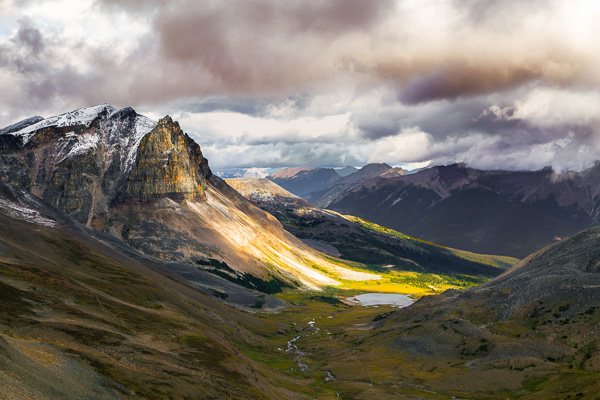
Golden Hour in Pyramid Mountain  Jasper National Park  Alberta  Canada

Generally, in photography, practice leads to improvement. However, practicing landscape photography is a bit trickier since you don’t have control over the light setup, the weather, or the subject. Sometimes, you might plan a trip for three months; you research the best spots, and you bring all your equipment. Then, when it’s show time, you walk outside to face a cloudy, rainy day, if not a snowy mess. All that can be very frustrating. Over the years I’ve learned a few tricks to deal with that. In this article, I will share three simple tips to help improve your images and take better landscape photos, regardless of the weather.

1. Using clouds to avoid harsh light

Let’s start by talking about one of the most important topics in photography, light. Usually, landscape photographers revolve their schedule around the Golden Hour, meaning the early morning or late afternoon. Photographers choose those portions of the day to take full advantage of the magical, warm, rich, natural light available. Yet sometimes, you cannot reach the planned location by car, making a strenuous hike of 10 miles the only available option to get to the desired place. Hiking is great, and if you love landscape photography you probably love the close contact with nature, but sometimes this passion doesn’t translate into mountain exploration at 3:30 a.m. Occasionally, you will find yourself starting your day hike around 6:00 a.m. to reach the desired area around 10:00 a.m., meaning that you will have to work with hard sunlight.

Portrait photographers have an easy fix for that problem, move the model to the shade. I’ve tried using the same approach in landscape; but I’ve never had any luck trying to move mountains and lakes around. Another approach that portrait photographers use to avoid hard light is using light modifiers such as diffusers and softboxes. Unfortunately I don’t believe you can buy one of those big enough to use on a mountain. What you can certainly do is use the clouds as a light diffuser, thus avoiding the harsh sunlight from midday. Depending on how you capture your image, clouds can also help improve your composition by adding depth or a sense of movement. After I grasped this concept my mindset shifted, now I’m always hoping for the perfect cloudy day.

Bald Hills  Maligne Lake  Jasper National Park  Alberta  Canada

2. It’s all about the drama

If this tip wasn’t enough to make you enjoy a cloudy day, let me tell you about a second trick that involves clouds when capturing landscape images. We all like to go online to wonder around photo sharing communities, looking for inspiration, a different point of view or even a new technique. I’m no different. I like to believe that I’m very active in some of those social media channels, however, when I look through pictures, I avoid focusing on landscapes. I like to explore portraits, Black and White, macro, pretty much anything but landscape. I can imagine you asking yourself, “Why would a landscape photographer do that?”. The answer is quite simple; I like to borrow successful techniques used in other fields. Sometimes, when I’m trying to capture an image of a mountain, I don’t face it as a landscape. I try, for example, to approach that image as a portrait. Once you learn how to repurpose techniques from one type of photography to another you will notice an improvement in your art.

In most types of photography, the most striking photos are those with strong contrast; images that harmonize shadows and highlights seamlessly. One side effect of the current advances in digital photography, sensors, and the digital darkroom, is that a lot of landscape artists try to capture everything in one single image. Some will use HDR to bring up the shadows, others will use masking and blending to create a final image. I was no different.

Lately, inspired by the work of great masters such Ansel Adams and Henri Cartier-Bresson, I’m trying to play with the shadow to highlight ratio in my images. Portrait photographers are very good at using artificial light (strobes or speedlights) to create dramatic images. In landscape it might be a bit more difficult to position the sun at a different angle. Still you can use clouds as a light filter, concealing light from distracting spots while revealing patches of bright sunlight that will accentuate your main subject. Once you start to play with this idea you will be able to create very dramatic images during those dreadful cloudy days.

Tekarra Mountain  Skyline Trail  Jasper National Park  Alberta  Canada

3. The path of balance

Finally, keeping up with the idea of creating a dramatic image, photographers must be able to understand an important concept called balance. Not only the shadow and highlights balance, but also color balance, subject positioning, overall image balance and so forth. I remember some of the first photos I took, very often I liked the concept behind the photo, but the final image just didn’t convey what I had envisioned. That was when I discovered the concept of balance.

This concept is very basic, yet extremely powerful. A well-balanced image will stand out on its own and will captivate your audience. Balance, simply put, is how you distribute the elements, colors, and brightness in the frame. There are countless ways to achieve balance, so many that we would probably need another entire article just to talk about it. As a general rule though, a well-balanced picture aims to distribute the elements evenly throughout the image. So next time you are out capturing an image, try noticing how you arrange the elements in the frame. Check if the amount and position of the shadow and highlight are reflecting what you want to show in your photograph. Finally, before you press the shutter, ask yourself if all the elements in the frame are contributing to the overall image. Sometimes, you can get overwhelmed by the landscape, and in an attempt to capture all the beauty you end up with a busy, unbalanced, and unappealing image.

Silence  Banff National Park  Alberta  Canada

I will leave you here, but next time you’re out there during a cloudy day, instead of complaining about it, just try your luck. You might be surprised by what you can achieve when you open your mind to work with whatever mother nature throws at you.

Mountain tops  Banff National Park  Alberta  Canada

Do you have any other cloudy day or landscape tips? Please share in the comments below.

The post 3 Tips to Take Better Landscape Photos Regardless of the Weather by Diego Lapetina appeared first on Digital Photography School.

Digital Photography School

 
Comments Off on 3 Tips to Take Better Landscape Photos Regardless of the Weather

Posted in Photography


10 Tips for Getting the Most Out of Ello

24 Nov

10 Tips for Getting the Most Out of Ello

Ello is the most exciting new social network to appear in years. It’s a vibrant place full of interesting thinkers and artists — I spend more time on Ello than any other network right now. Every day new and interesting people are signing up, plugging in and joining. Although Ello is a social network like many others, it is also unlike many others as well. Ello has it’s own way of organizing things and after spending a few months on the site I thought I’d share some best practices for getting the most out of Ello.

1. NSFW. As a community with a lot of artists as early members, Ello seems to have a healthy tolerance for all forms of expression, including fine art nudes and other adult oriented material. I’m a big fan of the human body as form and expression and think this is great.

You won’t be bounced off Ello or censored (like Facebook) because you express the beauty of the human body in your art. If this sort of work is your thing, then Ello asks that you set your account as NSFW. I’m guessing that if you don’t do this voluntarily, they can/will do it for you.

Similarly, it is up to you whether or not you want to *see* this sort of work on Ello.

These are two independent settings.

So there are two things for you to consider. Do you want to see NSFW content AND do you yourself in fact post NSFW content. A lot of people get this setting wrong. They check NSFW for both when they produce work that is entirely SFW. Be sure to understand the distinction and manage your settings (you can do that here: https://ello.co/settings) accordingly.

If you are not posting nudes or other adult oriented materal, then make sure the “post adult oriented content” button is checked no. You can still check yes that you want to view it, but more people will see your stuff if you manage this setting correctly.

2. Don’t overshare. I see a few people posting 10, 15, 20 photos in a row on Ello. Most people won’t want to see 20 of your photos in a row. They want variety. They want to see other stuff by other friends too. If you overshare, there is a very good chance that people will move your account into their noise bucket and a lot less people will see your work. The right number of items to share on Ello per day is probably a matter of personal opinion, but realize that every time you post you give people an option of moving you into the noise bucket where your work will be much less (if at all) visible to them going forward.

I’d say anything over 4 or 5 posts a day on Ello is probably too much and starts to feel spammy. Save your very best work for Ello and self edit a bit more. I probably post 1 – 3 images there a day depending on the day. That might even be too much.

3. Quality counts. Never has quality been as important. Again, people can easily move you into the noise category so consider that in what you post. Post your best work for others to see. Nothing makes me want to move someone to noise like thoughtless, mediocre work.

I probably sound like a broken record with my dislike for watermarking and signatures, but on Ello it’s more important than other places to avoid these distasteful aesthetically displeasing nuisances. If you put ugly watermarks and signatures on your photos people will move you to noise (if they follow you at all) and your work will not be seen. Even your best friend might do this and you will never know. So put your best foot forward and only share what you consider to be your highest quality content.

4. Be social. Ello is a *social* network, so be social. I see people already complaining that it doesn’t feel like they are getting enough attention on Ello. You shouldn’t expect to just post content and have people flock to your brilliant work. You need to engage with others. The best way to do this is to participate in conversations on other people’s posts. Find some interesting people who are engaging on the site and jump into conversations that you find. Ello is a place best served by meaningful, articulate dialog. Offer up considered thoughtful contributions to other people’s work and I think you’ll make friends fast there. Lurk and you will be alone.

If you are new and are looking for some interesting and engaging people you may find some here. Also, don’t forget about the invite button. Do you know some really great people who should be on ello? Then make sure you send them an invitation to your new party. Inevitably people will start saying that “none of their friends,” are on Ello. This is your fault. It’s up to you to get them here. It’s also up to you to make new friends. :)

Post about Ello on your other networks and encourage people there to come join you. Tweet, FB, G+, Flickr, etc. letting people know that you are hanging out there and offer to get an invitation to anyone who wants one.

5. “I think everybody should be nice to everybody.” — Andy Warhol It goes without saying that you should be nice to others. This is one of the most important things that Andy Warhol ever said. Especially on Ello where there is not only a block function, but also a noise feature, people who are antisocial assholes will quickly be marginalized out of the experience. Being nice does not mean being bland, uncontroversial and boring. It just means that when you disagree with others, try to do it as respectfully as possible. Don’t personally attack people. Rise above that. Great ideas can be discussed on Ello and people can disagree on things, but respect is the key.

6. Be visible. Make sure you have an avatar, a profile, and links to your other sites as the *very first thing* you do when you join Ello — then add some interesting content of your own. You only get one chance to make a strong first impression. When someone new follows me, a lot of the time I’ll go look at who they are by clicking on their profile link. If I’m taken to a blank page with a blank avatar and minimal description, I probably will not follow them back or engage with them. On the other hand if I find a thoughtfully written profile, links to other places where I can check out your work, and some compelling content already uploaded to your Ello account, I just might try to make friends by adding you back.

7. Be active. If you want to get the most out of Ello, you should consider making a meaningful contribution to the site. Especially after you first join you should plan on spending some time on the site every day. Post content yourself daily, but also participate in posts by other people every day, and this means more than just typing “nice photo.” If you post a few photos and then disappear for a week, when people look at your account you’ll be passed over as a dead account.

8. Understand Ello’s advertising position. Ello does not have ads on the site. Also, they don’t profile you and sell your personal data to advertisers (like they do on Facebook). This does not mean that brands are not welcome on Ello though, they are. They just won’t be able to advertise to people by paying Ello. Brands may not fully understand this and think that they need to stay away. One of Ello’s founders Paul Budnitz spells this position out clearly here:

“Because Ello doesn’t have ads, the only way for brands to be on Ello effectively is to post interesting things that people want to see.

Another way to say it is, the worst way to for a company to use social media is to advertise, because that is essentially paying money to show us things that we don’t want to see. Brands are welcome join Ello, but if their content sucks, nobody will want to follow them.”

Budnitz’s own company Budnitz Bicycles has a brand page on Ello. And you know what, it features kick ass beautiful artistic quality photographic works of their bicycles. That’s a pretty good example of how you should think about Ello if you are a brand. Just because the anti-advertising ethos runs strong on Ello, this doesn’t mean your business/company/brand should not be there. It just means you are going to really have to work to get people’s attention by providing them interesting content and not typical advertising crap.

9. Watch your activity. Click on the little lightning bolt frequently on Ello. Are new people following you? Go check them out. Did someone make a meaningful comment on a photograph of yours or ask a question? Go respond to them. Did someone mention you in one of their posts somewhere else on Ello, then acknowledge that and go say hi back. It’s important that you use this tool regularly. While you may not be able to get back to everyone who mentions you or look at everyone who adds you as a contact, be sure to spend time on your activity when you can and participate.

10. Understand and respect both imagery and text. Are you a writer? Consider adding an interesting photo to your post (or borrowing one from an image creator with attribution and permission). This will make things more interesting than just a wall of text.

Are you a photographer? Consider using the strong text function on Ello as a way to tell people more about you and your work. I’m sharing more about myself personally on Ello than I ever have on any network. When I post a photo, frequently, I write about where I was when I took it, how I made it, what my feelings are/were around the image. And I use my space on Ello as a sort of personal diary through text just as much as a visual diary through my imagery of America.

A lot of people don’t get Ello yet. Many never will. It’s so early for Ello, but I do believe that Ello has the potential to become the most substantial social network going forward — bigger and more important than Facebook or Twitter or Google+.

Being early there, you have an opportunity to participate in shaping this important new community — what it will be today and what it ultimately will become.

You can find me most days on Ello here. :)


Thomas Hawk Digital Connection

 
Comments Off on 10 Tips for Getting the Most Out of Ello

Posted in Photography


Tips for Using Shutter Speed Creatively

23 Nov

Shutter speed is one of those things that is initially a problem to be solved, but once you do that it becomes a tool that allows you to take better and more creative photos.

First you should understand how shutter speed works and how to change it. You will need to make sure it is fast enough that your pictures turn out crisp. But once you’ve mastered those things, you can start using shutter speed to your advantage. You can slow it down to create a sense of movement, or speed it up to stop the action.

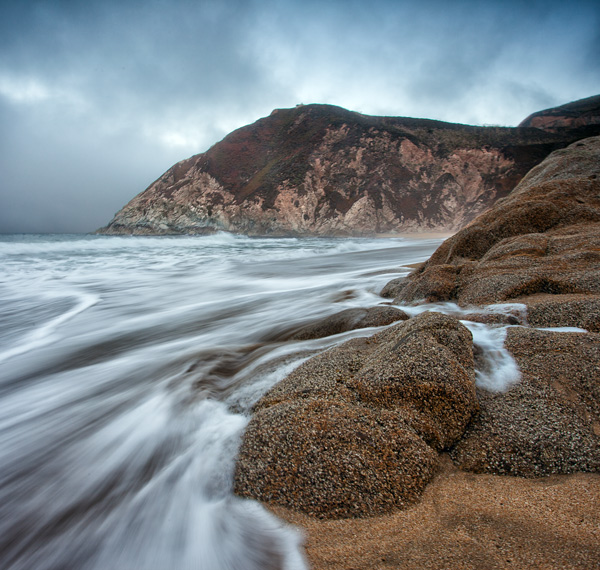
GreyWhale

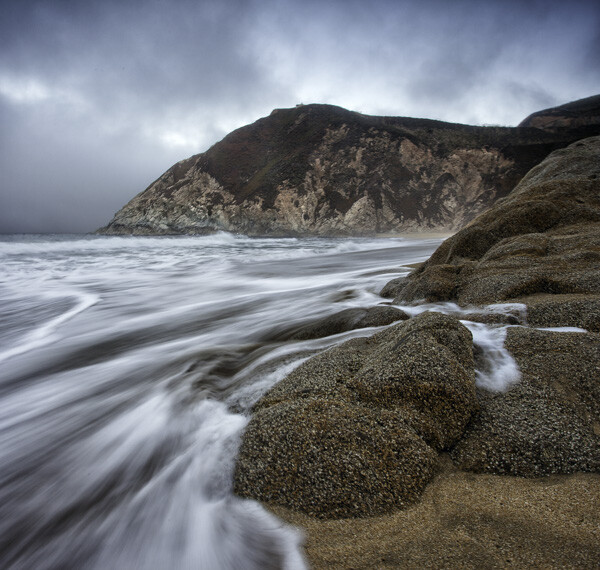
Grey Whale Cove: 1/4 second at f/16, ISO 100

This article will show you the basics of what you need to know regarding shutter speed and get you started with some creative effects using different shutter speeds.

What is Shutter Speed?

Shutter speed is simply the amount of time the shutter inside the camera is open, allowing light onto the digital sensor to expose the picture. The longer you hold the shutter open, the more light is let in to the camera to expose the picture.

But holding the shutter open longer than a tiny fraction of a second has consequences. The camera must be held completely still during the exposure or the picture will be blurry. Without using a tripod or some other means of support, you cannot hold the camera still for longer than about 1/60th of a second and blur will start to creep in to the picture (more on this in a second).

Shutter speed is recorded in fractions of a second. So a shutter speed that says 1/60 (it may just show 60) means that when you take the picture the camera will open the shutter for 1/60th of a second.  Most cameras have shutter speed ranges between 1/4000 of a second (on the short side) and about 30 seconds (on the long side). In addition, many cameras have a Bulb mode that allows you to hold the shutter open as long as you wish.

Make Sure Your Shutter Speed is Fast Enough

One of the first issues you will confront as a photographer is making sure your shutter speed is fast enough. If you have a tripod, this will not matter as much and you can leave the shutter open a long time (sometimes even several minutes). But assuming you are hand-holding your camera, a long shutter speed will introduce camera shake and make your image look blurry.

But how fast is fast enough? There is something called the Reciprocal Rule designed to help you with that answer. This rule states that your shutter speed should be at least the reciprocal of your focal length. That sounds complicated, but don’t worry it is easy to figure out. You just put a one over your focal length and that is your minimum shutter speed.  So, for example, if your focal length is 60mm, just make sure your shutter speed is 1/60th of a second or faster. If you are zoomed in and your focal length is 200mm, make sure your shutter speed is 1/200 of a second or faster (remember to consider lens factor as well if you have an APS-C sensor) Any slower than that and it is time to break out the tripod (or raise open your aperture and raise the ISO).

Beam

1/200th at f/2.8, ISO 3200

Changing Shutter Speeds

The next question you will confront is how to change your shutter speed. The actual physical changing of the shutter speed is pretty simple, it’s typically done via a dial on top of your camera. The more important question is how are you to offset the change to shutter speed, assuming you are in manual mode (if you are in Aperture priority or Program mode the camera will make the change for you).

If you use a faster shutter speed, the shutter is not open as long so the camera gathers less light. So, without something else changing, your picture will be underexposed by using a shorter shutter speed. To make a proper exposure, additional light has to come from somewhere. You can add that extra light to offset the use of a faster shutter speed in one of two ways:

  1. Open up the aperture: The aperture is the hole your the lens that allows light to pass into the camera. A larger aperture allows more light into the camera. So if you open up your aperture by one stop, you are letting in twice as much light during the same period of time.  But be careful, a larger aperture also creates a shallower depth of field, which you might not want.
  2. Increase the ISO: The ISO is the rating assigned to how sensitive your digital sensor is to light. It is adjustable, and the higher the number, the more sensitive you make your camera’s digital sensor to light. But this comes at a cost, digital noise, which increases as you increase the ISO.

There are separate controls on your camera to make these changes.  Use either of these methods to add more light to your exposure whenever you are shortening your shutter speed.

Using Shutter Speed Creatively

Now that you understand shutter speed a little bit, you will want to put it to use creatively. There are several ways to do this, and we will work through some of them from the faster shutter speeds to the slowest.

Stopping the Action

In times of high action or drama, you can stop the motion by using a very fast shutter speed.

To do this, you will want your shutter speed to be 1/250 of a second or faster. At times, like with the picture below of the water droplets being flipped through the air, you may want the shutter speed to be significantly faster. This particular picture was shot at 1/8000th of a second.

Water

1/8000th at f/2.8, ISO 250

Accomplishing shutter speeds this fast, even on bright sunny days, will require offsetting moves. For example, you will need to open up the aperture to its widest setting. Doing so will result in a shallow depth of field, but in this sort of picture that usually won’t matter. You will also probably need to increase the ISO (a little on bright days, a lot on cloudy days or indoors).

Another key for these type of shots where you are stopping the action, is to anticipate the shot. With the speeds at which modern cameras shoot, you may often want to just hold the shutter button down and blast away, this rarely works though. The decisive moment is usually only captured by anticipation and triggering the shutter at precisely the right moment.

Panning

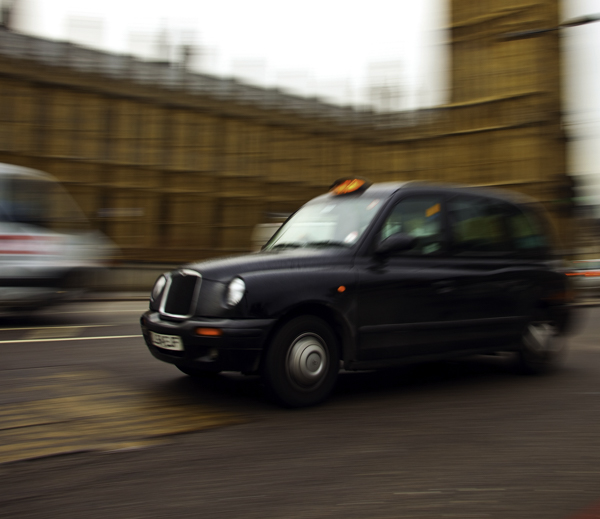
Another way to use shutter speed creatively in times of action is to pan the subject. Panning is where you move the camera during the exposure to follow the subject. Done properly (or when you get lucky) the subject is relatively sharp, while the background is blurred and conveys a sense of motion.

LondonCabPan

1/15th at f/7.1, ISO 50

Accomplishing this is usually best at slower shutter speeds between 1/8 and 1/30 of a second. Being able to slow down the shutter speed is typically welcome news, as it will mean you do not have to crank up your ISO, or make other offsetting moves. Getting a good result will frequently require at least a few attempts, while you gauge the speed, and other settings.

If possible, get your exposure set up before you attempt to pan. That way you are only thinking about the panning during the shot, as opposed to worrying about all your other settings.

Creating a Sense of Motion

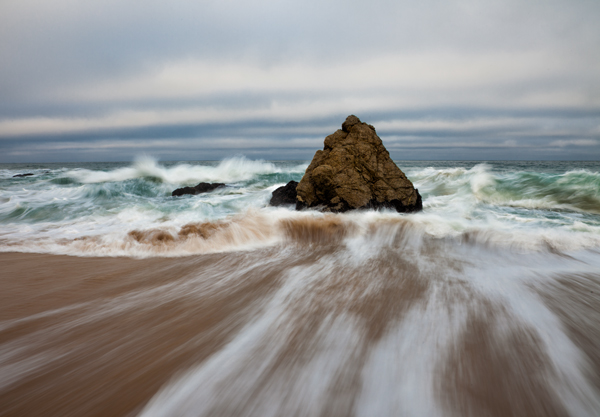
Still another creative use of shutter speed is slowing it down to create a sense of motion. This is accomplished when the subject is moving slightly through the frame during the exposure. This idea is for the subject to be identifiable, but slightly blurred.

GreyWhaleRock

1/4 second at f/16, ISO 50

Shutter speeds for this type of shot are between 1/4 and 1/10th of a second. That is virtually always too slow for you to hand-hold your camera, so you will probably need to break out the tripod for this type of shot.

Long Exposures

The final creative use of shutter speed we will cover here is a long exposure. This is where you hold the shutter open for a long time and allow certain parts of your picture to move through the frame. You will always need a tripod for this technique.

DavenportRock

20 seconds at f/8, ISO 400

Long exposure shutter speeds are between 10 and 30 seconds. Most cameras offer you the ability to go even longer by using Bulb mode, where the shutter will stay open as long as you hold the shutter button down. A remote shutter release, which is always a good idea when you are shooting from a tripod, is almost a necessity for this type of shot.

Long exposure is a great technique whenever there is moving water involved, such as coastal scenes, rivers, and waterfalls. It is also great for streaking lights in night photography.

Whereas most of the time, your challenge with shutter speed is to get enough light into the camera; in this context getting the shutter speed you want usually involves the opposite problem. The challenge is to limit the amount of light entering the camera so that you can leave the shutter open a long time without overexposing the image. To do that, first close down the aperture to its smallest setting and use the lowest ISO setting on your camera. The lowest ISO setting is usually 100, but some cameras contain an expandable ISO range that will allow you reduce the ISO further, so be sure to check your camera’s menu for that.

But if those moves don’t restrict the light enough, you will need to use a neutral density filter. These are filters that restrict the amount of light coming into your camera. They come in different strengths, with typical values between two and 10 stops of light. Get one of these (or a few different strengths) and keep it in your bag if you think you will have any long exposures in your future.

Guadalupe

15 seconds at f/8, ISO 500

Conclusion

Once you have mastered the basics of shutter speed, it is a great tool for adding creativity to your photography. It is perhaps the most effective way to make our photos more interesting. So lock down the basics, and then give some of these techniques a try.

The post Tips for Using Shutter Speed Creatively by Jim Hamel appeared first on Digital Photography School.


Digital Photography School

 
Comments Off on Tips for Using Shutter Speed Creatively

Posted in Photography


5 Beginner Tips for More Autofocus Success

19 Nov

When you’re just starting out, it can sometimes be frustrating trying to get sharp photos. The camera’s autofocus often seems like it has a mind of its own. Here are five quick tips that can help you get the autofocus under control.

AI Servo AF or Continuous Focus will continue to track moving subjects.

AI Servo AF or Continuous Focus will continue to track moving subjects.

1. What is your subject doing?

If your subject is sitting still and not moving, be it a person, a still life, or a landscape, you’ll want to choose One-Shot autofocus (AF-S for single on Nikon). One shot AF allows the camera to focus, and then as long as the button is depressed, focus will stay locked. This is useful if you want to focus and recompose your shot, especially if an autofocus point doesn’t cover the area you want to be in sharp focus (see #2 below).

If your subject is moving, such as a child at play, an animal, or a car, change the autofocus mode to AI Servo AF, or Continuous AF (AF-C, depending on the brand of camera you have). This means the camera will continue to focus on the subject even as it moves toward or away from you. Just be sure to keep the AF point on your subject. The image at left was taken using AI Servo AF with the center point as the active focus point. If you use AI Servo (AF-C) with automatic point selection, you will most likely start tracking with the center focus point, and as your subject moves, the AF point will automatically shift to another area to maintain focus. Some cameras offer the option of letting you choose which point focusing starts with before shifting to other points. In manual autofocus point selection mode (not to be confused with manual focus), you choose one point and keep your subject covered with that one point.

2. Check your AF point selection mode

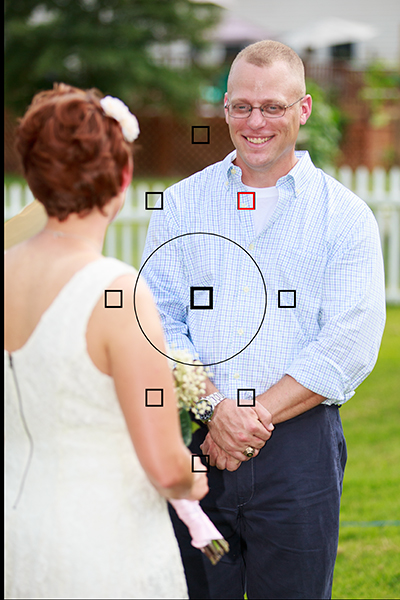
Using Manual AF Point Selection I was able to keep my brother in focus despite the fact that my sister in law was closer and covered by an AF point. Automatic AF point selection would have selected her instead.

Using Manual AF Point Selection I was able to keep my brother in focus despite the fact that my sister in law was closer and covered by an AF point. Automatic AF point selection would have selected her instead.

If you find your camera isn’t focusing where you want it, check your AF point selection mode. All DSLRs offer at least two modes. There may be other options as well, but most people use one of these two main modes. The first is automatic AF point selection. This means that all AF points are active, and in one shot mode, the camera will try to focus on the nearest object to it with detail. This means that if something between you and your subject is covered by an AF point, the camera will focus there, rather than where you want it to. This can be a problem if trying to photograph through a window or fence as well.

To combat that problem, you’ll want to choose a single AF point. This will most likely be called Manual AF Point selection, depending on the brand of camera you have. This mode allows you to choose which AF point you want to use, giving you the ability to choose the one that covers your subject, regardless of what’s between you and the subject.

3. There are two types of autofocus points

AF_PointsMost modern cameras have two types of AF points: Single-line, and Cross-type.  Single line AF points are able to focus on lines going either horizontally or vertically. Which one it reads will depend on how the AF point is oriented. Horizontally oriented AF points can focus on vertical lines, and vertically oriented AF points can focus on horizontal lines.

Cross-type points are simply vertically oriented AF points, overlaid with horizontally oriented ones. So a single cross-type AF point can read both vertical and horizontal lines, making it more likely that it will be able to focus on the right object. Why is this important? If you have selected an AF point and the camera is unable to focus on the subject, it could be that there isn’t any detail that the AF point can pick up. A cross-type AF point has a better chance of finding a line of detail to focus on. Try selecting one of the cross-type points in your camera. Most of today’s DSLR’s have at least one, if not more.  Check your camera’s manual to find out where the cross-type points are in your autofocus array.

4. Learn how to change AF points without taking your eye from the viewfinder

Once you’ve learned to set Manual AF Point Selection, and have started using a single AF point, you’ll want to practice selecting an AF point quickly without taking your eye away from the viewfinder. Some cameras offer a single control such as the joystick type controller on the EOS 5D Mark III, while other cameras such as the EOS Rebels require a combination of a button push and spin of the dial to change an AF point. The faster you are able to do this, the less likely it is you will miss a key moment.

5. Try to compose with the AF point you are using exactly where you want it

Putting the AF point right on her eye meant that despite having a very shallow depth of field, I was still able to focus on the eyes and keep them sharp, without having to recompose.

Putting the AF point right on her eye meant that despite having a very shallow depth of field, I was still able to focus on the eyes and keep them sharp, without having to recompose.

Many people who are just starting to do photography often stick to the center AF point for focusing, and then lock focus and recompose the shot to put the subject where they want in the frame.  For most shots, this will work just fine. However, there is a chance that when recomposing, you are actually shifting the plane of focus enough that your subject will no longer be sharp.  This is very likely when you are close to the subject with a shallow depth of field.  To avoid this, choose the AF point that is closest to, or covers your subject. For instance, when shooting a portrait, use the AF point that covers your subject’s eye.

Your thoughts

Keep these five tips in mind the next time you take out your camera.  What are your favorite autofocus tips?

I have had people who let running water confuse them, unsure which AF mode to select. Yes, the water is moving, but the stream is not, it stays the same distance from the camera, so you would use One Shot AF for a shot like this.

I have had people who let running water confuse them, unsure which AF mode to select. Yes, the water is moving, but the stream is not, it stays the same distance from the camera, so you would use One Shot AF for a scene like this.

The post 5 Beginner Tips for More Autofocus Success by Rick Berk appeared first on Digital Photography School.


Digital Photography School

 
Comments Off on 5 Beginner Tips for More Autofocus Success

Posted in Photography