RSS
 

Posts Tagged ‘Tips’

5 Tips for Photographing Wildlife in Low Light Conditions

08 Nov

The post 5 Tips for Photographing Wildlife in Low Light Conditions appeared first on Digital Photography School. It was authored by Will Nicholls.

NOTE: Check out our Ultimate Guide to Nature and Outdoor Photography.

Most wildlife is active during dawn or dusk, and photographing animals in low light can be frustrating when you’re pushing your equipment to the limit. Even if you’re shooting on the latest and greatest DSLR camera, you’re still going to reach a point where the light is too low to use the ideal settings. It’s at this point that you need to start calling on your skill and technique to improve your success rate.

Here are a few tricks that I use in my own wildlife photography to get better, more usable images in low light.

roe deer in low light

1. Choose the perfect aperture and shutter speed for low light

When shooting in low light, you should use the widest aperture you can (i.e., the lowest f-number) to let in the most light possible.

If you’re using expensive telephoto lenses, then you’ll probably have a maximum aperture of f/4 or even f/2.8. However, the majority of midrange and budget telephoto lenses have a maximum aperture of about f/5.6 or f/6.3. Still, keep the aperture as wide as possible to give yourself the optimum baseline.

With regard to the shutter speed, the rule most people learn is to use a speed of at least 1 over the focal length of your lens. For example, a 400mm lens would need a shutter speed of at least 1/400s to eliminate camera shake effectively. However, this rule often isn’t possible in low light conditions. So you’re going to need to break it!

Drop your shutter speed as much as you can while still keeping the image sharp. You can go much slower than you think. 1/100s is totally plausible.

To prevent camera shake, enable any image stabilization technology offered by your lens. It’s important to use a tripod, too, as it’ll keep things steady.

wildlife low light
This bear photo was taken at 1/30s, f/4, and ISO 8000.

Try panning

Once your shutter speed starts to get really slow, then you’ll almost definitely introduce motion blur from the subject moving. But if your subject is walking or running along, you can pan your camera along with it.

With practice, you can move your camera at the same rate as the animal and freeze its body – even with a slow shutter speed. You will get a blurred background, but it’s actually a rather cool effect (see the bear photo above!).

2. Don’t be afraid to boost your ISO

ISO might be the most feared setting among photographers. However, it shouldn’t make you tremble! I meet many photographers who don’t move the ISO above 400, even if their cameras are more than capable of handling the increase.

Sure, higher ISOs introduce noise into your photo, but a noisy image is better than a blurred one.

Test out your camera and see how far you can feasibly increase the ISO before shots become unusable. You can also remove noise in post-production, so you can sometimes salvage a too-noisy image.

The image below was taken at ISO 5000, but you’d be forgiven for thinking the value was much, much lower. The camera in question was a Nikon D4, which has notoriously good ISO capabilities. But this is an extreme example, and at ISO 5000 there was still noise. Even lower-level DSLR cameras can still be pushed to ISO 1600 or so while achieving fairly good quality images.

eagle in low light
An eagle photo taken at 1/100s, f/4, and ISO 5000.

Be brave and increase your ISO when you need a faster shutter speed. It’ll help you keep shooting as the light gets lower, meaning you’ll have more time to wait for wildlife!

3. Be careful when using a zoom lens

Zoom lenses sometimes use a variable maximum aperture.

What does this mean?

Zoomed out, you may have an aperture of f/4 – but as you zoom in, this can increase to something like f/6.3. If your lens has a constant aperture throughout, then you don’t need to worry. But if it doesn’t, then be conscious of the fact that you’ll have less light reaching the sensor when you’re zoomed in.

When your lens is limited by a variable maximum aperture, think about zooming out and taking a more atmospheric or environmental image. You’ll have a larger aperture to play with, and you may be able to achieve a more usable shot than if you zoom in all the way with less light.

bear in environment
If your lens has a variable aperture, try zooming out to utilize the widest option and take environmental images that don’t focus only on the animal.

4. Utilize burst mode

Don’t forget that you have a burst mode. If you’re worried about blurry images, fire off as many frames as possible. This will increase your chances of ending up with a usable shot.

You see, slower shutter speeds mean more chance for both camera blur and motion blur. If an animal moves its head, your shot may well be ruined. But if you’ve been shooting multiple images at once (via burst mode!), then chances are that you’ll get another shot, taken a fraction of a second later, that isn’t blurred.

Burst mode is honestly one of the most useful things you can do when photographing wildlife in low light. It really helps to get usable photos and works like magic alongside the other techniques in this article.

5. Don’t underexpose

It can be tempting to underexpose your photo, knowing that you can brighten it later. While this may give you a quicker shutter speed, the photo will likely need significant brightening in post-production. And lightening an already-dark scene will introduce a lot of digital noise.

low light wildlife photography
This photo was taken at 1/60s, f/4, and ISO 5000.

Instead, try to keep your exposure as balanced as possible. If you can keep your histogram happy, then you’ll have a smoother ride through the editing process. The worst thing would be to take an underexposed shot, only to find out later that it’s unusable because brightening it up ruins it.

I prefer to risk blur but fire multiple frames than to take an underexposed, sharp shot. Maybe that’s just me, but the technique frequently works in my favor.

Photographing wildlife in low light: conclusion

No matter how good you are at photography or how good your gear is, you’re going to have times when your shots are ruined by low light. That’s just part of the game – but, with luck, you will manage to capture strong low light shots some of the time.

With practice, you’ll learn when there’s no point battling against depleting light levels. And a combination of the techniques I’ve shared here should keep you in action for longer.

Do you have any other low light tips to add? Please share them in the comments below!

FURTHER READING: Check out our new Ultimate Guide to Nature and Outdoor Photography.

The post 5 Tips for Photographing Wildlife in Low Light Conditions appeared first on Digital Photography School. It was authored by Will Nicholls.


Digital Photography School

 
Comments Off on 5 Tips for Photographing Wildlife in Low Light Conditions

Posted in Photography


Tips for Photographing Birds in Flight

01 Nov

The post Tips for Photographing Birds in Flight appeared first on Digital Photography School. It was authored by Bruce Wunderlich.

birds in flight

This article introduces some key concepts for photographing birds in flight.

One of the most necessary ingredients is patience; you may often photograph an entire day and not get a single usable image. In most cases, there is some luck involved – you have to be in the right place at the right time, after all!

But hopefully, this article will give you the tools you need to improve your luck and capture stunning birds in flight photos.

heron in flight

Choosing a location

Let’s begin with how to choose the best location for your birds in flight shoot.

Near rivers or lakes is a great place to set up, because of the abundant food sources for the birds. Find a position on a hill that will put you at eye level with the birds.

And check out the position of the sun, because you should not be shooting into it. Light coming from behind you or from the left or the right of your position is preferred.

Also, birds will generally take off and land into the wind, so knowing the wind direction of your location will help you predict the flight direction of the birds you are photographing.

canada gees in flight

Lighting

Good lighting plays a key role in successful birds in flight photography.

As with any other kind of outdoor photography, the golden light of morning and evening is best. However, because you are shooting birds in the sky, these times can be extended and you’ll still get nice lighting on your subject.

Make yourself invisible

Some birds will not venture near humans, so you need to make yourself as invisible as possible. 

In some cases, this might be as simple as not wearing brightly-colored clothing. However, avid bird photographers may also want to set up some kind of blind. Blinds can be purchased inexpensively from most hunting stores.

Also, sitting down will make you less noticeable to the birds than if you are standing.

Study your subject

Study the birds you enjoy photographing to learn their habits.

How does this help?

Knowing the birds can help you predict their movements. For instance, many birds, especially the larger species like herons or eagles, will relieve themselves just before they fly. Knowing this can help you be ready to shoot just before your subject takes off.

flying heron in fall

Lens

Choosing a good lens for birds in flight photography can be a challenge. I recommend you use the fastest and longest lens you can afford.

For your best chance at a great shot, you’ll need at least a 300mm lens, but a 500mm to 600mm prime lens is preferable.

(Unfortunately, these lenses don’t come cheap!)

Tripods

A great tripod head for birds in flight, especially if you’re using a large lens, is a gimbal head. It balances your camera and lens while requiring very little force to pan left and right or up and down.

A less expensive option is a pan head, which also allows for movement in all directions on two different axes. And while ball heads can be used for birds in flight photography, they’re not a very stable solution for large lenses.

sparrows

Exposure

When setting up your camera to shoot birds in flight, keep in mind how the exposure triangle of shutter speed, aperture, and ISO plays an important part in getting the perfect exposure.

  • Shutter speed – You need your shutter speed to be fast enough to freeze the bird’s wings in your photo. While small birds’ wings may flap at approximately 40 beats per second, larger birds, like herons and eagles, flap around 2 beats per second. Many species of duck are fairly fast flappers, at around 5 to 10 beats per second. So the question remains: How fast should you set your shutter speed to freeze wing motion? Go for at least 1/1000s to 1/2000s. Even faster is better, if possible!
  • Aperture – In order to gain as much depth of field as possible, you should use the smallest aperture you can afford. Select your f-stop (the aperture number) based on your lens’s sweet spot (where your lens focuses most clearly), which is probably around f/8.
  • ISO – You want to keep your ISO setting as low as possible to avoid digital noise (graininess) in your photos, although most modern camera models do a decent job with higher ISOs.
heron as a bird in flight

So how do you bring all three elements of your exposure triangle together to get the best exposure? You may consider simply using your camera’s Shutter Priority mode, in which you set the shutter speed and the camera sets the aperture (and ISO on some models).

However, I recommend you try this alternative method:

  1. Set your camera to Aperture Priority mode
  2. Set your aperture to f/8 (the sweet spot) to get the sharpest-possible images
  3. Using your camera’s light meter, check the exposure of the scene where you hope to photograph your birds in flight. You will probably find that some areas of the scene are darker than others.
  4. Using the exposure reading you get from the darkest areas of the scene, adjust your ISO to bring your shutter speed up to at least 1/1000s. It follows that when your bird flies by and you are panning your camera into a lighter area, your shutter speed will increase to above 1/1000, and when your subject is in the darker areas, your exposure will still be appropriate.

Now, here’s one final step to tweak your exposure:

Have you ever noticed how, when photographing birds in flight, your image will seem dark and be missing details, especially in dark feathers? To bring out more detail in dark areas, change your EV (exposure compensation) setting to +0.3. This will add a little more light (though depending on the lighting, you may need to add a bit more exposure compensation).

On the other hand, what if you are photographing a white bird, such as a swan? The white bird’s image will tend to get “blown out,” so that you’re missing detail in the whites. To compensate, adjust your EV value to -1.0 to -2.0. This will pick up the detail in those white-feathered birds. (If you are thinking that your background will be underexposed, you’d be right – but you are photographing the swan, not the background!)

Focusing

To keep your flying bird in focus, set your camera’s focusing mode to continuous focus.

In this mode, as long as you have the shutter button depressed halfway and are focused on the bird, the camera will continuously acquire focus as the bird moves. Canon calls this function “Al Servo,” while Nikon calls it “Continuous Servo” or “AF-C.”

Also, both Nikon and Canon will allow you to expand your AF points so that your camera can identify moving subjects at adjacent points (which will help you keep your moving subject in focus).

Nikon also offers two AF area modes that can work for birds in flight:

The 51-point Dynamic Area AF and the 3D Tracking area mode.

Both of these AF area modes will search at all 51 AF points for the movement of your subject, although these modes can be a little too slow when focusing in some situations.

bald eagle flying over nest

Composition

Composition can be the most difficult aspect of photographing birds in flight.

But all the basic rules of composition remain valid here. You always want to have more space in front of the bird than behind it; a good rule is to have a least two to three times the space in front of the bird.

One thing that helps maintain this space is to place your focus point in the center of the frame and try to keep it on the bird’s eye. This method works really well on large-beaked birds, such as herons.

Also, while most birds in flight images include just one bird, look for those occasions where you can capture two or three birds at once (for a great result!).

gull flying in snow

Technique

As the bird is flying toward you, quickly get your focus locked.

Then, when the bird is close and in a position you like, fire away. Keep panning even after you’ve stopped shooting. This follow-through motion will keep your last image in focus better than an abrupt stop.

When panning as the bird flies by, you want to match your panning speed to that of the bird. And depending on your shutter speed, this will help keep the bird in focus while the background may be blurred.

You want to keep the bird’s eye in focus and sharp; this is key. If you are handholding your camera, try to keep your left hand under the barrel of your lens and your elbows close to your body, as this will help you maneuver the camera as steadily as possible. If you are standing, keep your legs spread out to create a good sturdy base.

If you are planning to hold your location and position for a time, I recommend using a tripod. This will help keep your camera steady, especially if you are using a very heavy lens.

birds in flight duck

So stay alert and look for opportunities to capture great birds in flight images. It will take lots of practice to get that perfect shot.

But once you get it right, you will be hooked!

Also, if you’re interested in more bird photography tips, check out these articles:

  • 10 Incredible Bird Photography Tips for Beginners
  • A Turn of the Head – Creating More Compelling Bird Portraits
  • An Introduction to Bird Photography

The post Tips for Photographing Birds in Flight appeared first on Digital Photography School. It was authored by Bruce Wunderlich.


Digital Photography School

 
Comments Off on Tips for Photographing Birds in Flight

Posted in Photography


Food Photography Techniques and Tips

24 Oct

The post Food Photography Techniques and Tips appeared first on Digital Photography School. It was authored by Jonathan Pollack.

Editor’s note: This article was updated in October 2020.

I originally wrote this article in 2009 when I was beginning to take pictures for my wife’s baking blog and various local magazines. Since then, I’ve had a lot of practice, and I’ve honed my food photography techniques.

I’m thrilled to update everyone with what I’ve learned, and I hope that you find the information here helpful when taking pictures of your food.

food photography techniques example

Food styling

food photography techniques spread

When you’re taking pictures of food, it’s critical that your subject looks as good as it hopefully tastes. If you don’t have the budget to hire a food stylist, it’s important to know some basic styling techniques that can make food look its best.

Make more food than you think you’ll need, and always photograph the examples that look the best. You cannot make a burnt waffle or soggy asparagus look appetizing.

food photography techniques

Props can help you set the mood for your food photos. I have a basement full of plates, platters, chargers, cups, glassware, utensils, napkins, tablecloths, surfaces, and cutting boards at my disposal. With those, I can pull together what I need to set a table (or a portion of a table) for a picnic setting, a fine-dining scene, or something in between.

While you don’t need to have a ton of food photography props, I recommend that you at least have a few place settings and utensils, as well as a nice surface to photograph on.

ice cream and berries

Plating your dish properly can elevate it from mundane to extraordinary. If you aren’t working with a professional chef or food stylist, I recommend you read articles and watch video tutorials about plating as a starting point.

Think about ingredient placement, creating height or depth, adding color, or increasing contrast.

Here are a few plating tips to improve your food photography:

  • Plate an odd number of the item you’re photographing.
  • Add garnish where appropriate, such as with soups.
  • Lean longer flat items against those with some height.
  • Use edible flowers or fresh herbs to add some contrasting color to your plate.

Food photography composition

cake with cherries

When taking pictures of food, you have the advantage of a subject that is stationary. This means you have complete control over the camera’s position and angle, and how close or far away the camera is from the scene.

To get the best composition, I recommend you start with a few food photography techniques:

  • Use the traditional rule of thirds to yield strong compositions if you don’t have a lot of experience. Mentally divide your frame into a 3×3 grid and place key elements at the gridlines or intersections. Once you’re familiar with the rule of thirds and you can see how it can lend power to your scene, treat it as a suggestion and experiment.
  • Draw the viewer into your composition. Show part of the plate in your photo rather than the entire dish. Use utensils or napkins to help guide the viewer’s eyes to what you want them to focus on. And remember that the same contrasting elements that help you style a plate will also work in your favor when it comes to composition.
ice cream dish
  • Use negative space to make a powerful photo. Clutter in your scene causes visual confusion, so remove it. The less your viewer is drawn to, the better.
  • Think of how the dish would best be viewed. Head-on views, overhead shots, and views looking slightly down into the dish are always preferable to looking down at a plate from a 45-degree angle.
  • Keep your camera level. Early in my food photography career, I felt that angles conveyed a sense of excitement to the viewer. They did – because they made it look like the food was falling off the plate! I stopped rotating my camera, and my photos became much stronger overnight.
  • Zoom with your lens and your feet. There are times when macro photos of food work well, and there are times when a wider shot conveys a better sense of place and atmosphere. See if background compression helps remove distractions from your dish. Try a number of options with your food and see what works best.

Food photography lighting and exposure

food photography techniques cupcakes

While you don’t need the absolute best equipment to photograph food – I’m using camera equipment that’s a decade old! – you do need to think about how your choice of lighting, exposure, and even camera equipment affect your photo.

Placing your dish with natural light to the side and behind generally yields great results, but it’s also not consistent or reproducible; a passing cloud or thunderstorm can suddenly destroy all of your styling and composition efforts.

If you’re working on taking photos over the span of a few hours and you want them all to look similar, I highly recommend that you use artificial light of some sort. Most food photos I’ve taken indoors are photographed using flashes with diffusion from behind or off to the side of the food. I use reflectors to bounce some light back to the front of the dish, if needed.

If you’re working within a budget, consider getting inexpensive work lights and putting white linens between the lights and your food.

food photography techniques

Learn how to use the exposure triangle whether you’re using natural or artificial lighting, and start setting everything on your camera manually. Aim to blur out your background while keeping the foreground nice and sharply focused. And, of course, make sure everything is lit just right.

Equipment for food photography

The best camera equipment in the world won’t help if you haven’t learned what to do with it. I always advise people to start by renting equipment or buying cheap, used gear.

To start off, I recommend a tripod, a camera body that supports detachable lenses, and a medium zoom lens. I encourage you to learn to shoot and edit RAW photos, as you can adjust far more in post-production with them than you can with JPEG images.

If you’re ready to move on from your basic camera setup, I recommend you buy color calibration equipment and lighting. And when you feel confident that you have a good understanding of all of the gear you have and you feel that your current gear is holding you back, finally commit to a full-frame camera system and professional lenses.

Food photography techniques: conclusion

What food photography techniques have worked for you? What techniques have been problematic? Please let me know in the comments!

The post Food Photography Techniques and Tips appeared first on Digital Photography School. It was authored by Jonathan Pollack.


Digital Photography School

 
Comments Off on Food Photography Techniques and Tips

Posted in Photography


10 Tips for Improving Your Wildlife Photography

18 Oct

The post 10 Tips for Improving Your Wildlife Photography appeared first on Digital Photography School. It was authored by Guest Contributor.

A guest post by wildlife photographer Morkel Erasmus.

wildlife photography tips

Ever since DSLRs became readily available, more photography enthusiasts have started venturing into wildlife photography.

It seems that wildlife photography, in conjunction with landscape photography, has really seen a huge growth spurt over the last few years, at least as it pertains to the number of people practicing it as serious hobbyists or budding professionals.

This is especially true in my native country of South Africa, where it’s long been many a family’s tradition to visit legendary self-drive safari locations such as Kruger National Park. Having neighboring countries like Namibia, Botswana, and Zimbabwe doesn’t affect this trend negatively!

Yet spend some time on your favorite online photography forum (at least those that allow the posting of photos) or on other sites like Facebook or Flickr where photosharing is common, and you might notice that not every photo taken of a wild animal really speaks to you.

I’m not sure whether many folks just snap away and hope the image comes out half-decent, or whether many just think they’re doing their subjects justice (when that is not at all the case). Let me say outright that no offense is intended, and I also take photos that fall into the above categories.

In fact, I do it on every photographic trip I take.

But it’s stepping beyond that and getting a rare wildlife image that ticks all the right boxes that we all need to strive for. And we must be prepared when the opportunity comes along.

zebras fighting

In today’s article, I will attempt to provide you with some easy-to-apply tips and advice for improving your wildlife photography.

Some of these tips might seem like common sense, and you’ve probably read a similar list of “how-tos” elsewhere. But remember that common sense is not so common at all these days and that everyone has their own take on things, however similar it may be.

I do think I will cover a few points that are not just based on pure technical skill; photography is, after all, an art-form. Sometimes we need to be freed up to capture the vision we have in our mind’s eye, rather than stick to conventions and norms.

Here is a quick overview of the points I will cover in this article:

  1. Know your gear
  2. Know the wildlife
  3. Know the wildlife photography “rules;” break the wildlife photography “rules”
  4. Work the light
  5. Shoot wider; shoot closer
  6. The more, the merrier
  7. How low can you go?
  8. The content-technical dichotomy
  9. Patience isn’t a virtue; it’s a necessity
  10. Be there and enjoy it

These are the points that I try to cover when leading a photographic safari or presenting a workshop.

(Also note that I include the genre of bird photography in my definition of wildlife photography.)

Let’s get cracking!

a wildlife photography example of a lion on a dune

1. Know your gear

This sounds like the biggest cliché, but you know that it’s true.

The really great, action-packed moments in wildlife photography last, on average (based on my experience), between 5 and 20 seconds. If you are not deeply familiar with the settings of your camera or the abilities of your chosen lens, you will either miss the shot or blow the images you do manage to capture.

Here’s what’s important:

  • Know the minimum shutter speed at which you can obtain a sharp image with your camera/lens combo
  • Know any added margins that the in-camera or in-lens stabilization gives you
  • Know how to quickly toggle between focus points or focus modes
  • Know how high you can push your camera’s ISO setting and still achieve acceptable results

In general, I like to say that you need to be able to make most, if not all, of the necessary adjustments to your exposure/focus settings without lifting your eye from the viewfinder.

The action you see between the cheetahs in the following image lasted all of 10 seconds, even though we sat with them for more than an hour:

cheetahs playing

2. Know the wildlife

This goes without saying, right? Since much of wildlife photography is based upon capturing fleeting moments of natural history (read: interesting poses or behavior), it pays to be able to somewhat predict your subject’s behavior beforehand.

Granted, not every species is as predictable as the next. But there are patterns of behavior ingrained into every animal species. Knowing your subject can make the difference between being ready and prepared for capturing that “golden moment” and watching in agony as it flies by.

Now, there is only one way to get to know wildlife:

Spend time with it. Don’t just hang around for a few minutes and seek out the next subject if the one you are observing or photographing isn’t delivering the goods. Sit with wildlife. Watch wildlife. Wait.

(This also ties into patience, which I will discuss in more detail later.)

This image was captured by knowing what the Lilac-breasted Roller was going to do to its grasshopper-lunch, and being ready for it:

roller eating lunch

3. Know the wildlife photography “rules;” break the wildlife photography “rules”

There are certain unwritten rules that form the foundation of good photography, regardless of genre. And, of course, then there are certain “rules” that find their application mostly in the genre of wildlife photography.

Understanding proper exposure and the use of the histogram, as well as creating proper compositions using a guideline such as the rule of thirds, are all important to ingrain in your subconscious. You want to be able to instantly capture that fleeting moment properly.

In wildlife photography, much is made about eye contact with the subject, as this gives life to the image. In the case of avian photography (birds), you can take this a step further: the head angle in relation to the camera’s imaging sensor needs to be at least perpendicular to it, but ideally turned a few degrees towards the sensor (and therefore turned towards the viewer, who ultimately gets to view the image captured by the sensor).

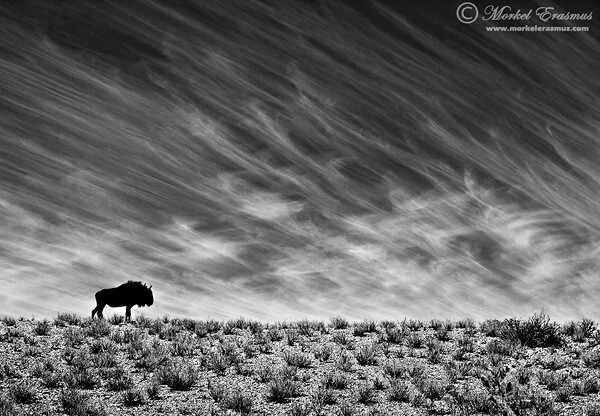
The image below, for example, follows strong rule-of-thirds compositional guidelines:

wildebeest on a dune as stunning wildlife photography

Once you know the “rules” and the guidelines, and once you know when and how to apply them, it’s time to start breaking them. You should test the boundaries a bit, you know? You don’t want your photos to always look like the standard images that every photographer is getting.

Take a look at the image below. I mentioned the “need” for eye contact. Yet sometimes it can work to shoot an image in which the subject is not giving the photographer eye contact (this often means the animal is busy with something else and too busy to turn its attention to you).

thirsty Zebra foal makes for intimate wildlife photography

4. Work the light

The first piece of advice I got from a professional wildlife photographer when I started shooting is to stick to the hours of golden light.

This means getting up early in the morning and being in the field before sunrise, and going out in the afternoon to make the most of the last hours of sunlight. The light at midday (mostly between 11:00 and 16:00, at least where I live) is generally harsh and robs images of that spunk that they need. The exception is on overcast days, when the clouds act like a massive softbox and filter out the light evenly.

On days like that, I shoot all day (as long as there are willing subjects!).

Since photography is all about painting with light, you need to know how to use the light to your advantage in wildlife photography. Often, we will find ourselves in a position where the light isn’t ideal or, heaven forbid, the light is sweet but from the wrong direction (and we aren’t in a position to move to a better spot).

The good news is that light from the wrong direction can add lots of mood to an image. Shooting into the light is tricky to pull off, but if you adhere to my first tip (to know your gear), you can get some pretty interesting images from a less-than-ideal light position. The image below is one such photo:

backlit sprinboks at dawn

5. Shoot wider; shoot closer

Too many wildlife photographers get fixated on what I call the “focal-length debacle,” where it becomes an obsession to have the longest/biggest lens possible.

Now, I know this is location-dependent, as you might need more than 600mm just to get any shot at all in certain wide-open spaces. But the issue I want to tackle is more related to our obsession to get as close as possible to the animals and isolate them totally from their environment. The result is often an image that looks like it could be taken of a captive subject in a controlled location, with a perfectly smooth background and no idea of the real environment in which the animal finds itself.

Instead, challenge yourself to shoot at a wider angle to give the viewer a better idea of where you took the image and where your subject has to eke out a living in the wild. This is applicable to any species you photograph, from a squirrel to a deer to an elephant.

The elephant below was photographed with a wide-angle lens and a polarizing filter to give you a sense of the environment, as well as to make the most of the clouds and sky:

elephant in the landscape as wildlife photography

The flip side to shooting wider is (you guessed it!) shooting closer.

And I mean way closer. Get in-your-face close (by changing your position or by using a longer lens with an optional teleconverter) to create different and interesting studies of the animals and birds you photograph. This will also help you think in terms of more abstract compositional arrangements.

Have a look at this photo of a Cape buffalo, for example:

buffalo abstract close-up of ear

6. The more, the merrier

No real intricate explanation needed on this one. In wildlife photography, one is company and two is often a crowd, especially when there’s food or shelter involved. If you have a good view of more than one member of a species, stay a while!

Look at the images below. First up: a solitary African spoonbill, minding its own business on a perch, happy as can be. Throw another spoonbill into the mix, and you have a recipe for good interaction:

spoonbills in the trees; the more the merrier wildlife photography tip

7. How low can you go?

This is not a trick question, nor is it a call to do the limbo. The point of view of a wildlife photograph is just about everything. How you portray your subject can make all the difference in the world.

In short, try to get an eye-level perspective (or go even lower if you can). This brings the viewer of your image right into the scene and confronts them with the view of the world from your subject’s perspective.

Obviously, what counts as eye-level is relative (you will pretty much always be at a lower perspective than a giraffe, for example), but you get the idea.

Always bear in mind the constraints of your environment. In most reserves in South Africa, you are not allowed to get out of your vehicle in the field. This restricts you to a certain perspective.

Look at the images below for illustration. The first African painted dog was photographed from an open game viewer. The result is a somewhat bland shot; it’s nothing special to my eyes.

The second image, however, was taken lying flat on my stomach in a sandy riverbed not 20 meters from the pack of canines, and the alpha male was checking me out. This perspective makes the image come alive.

wild dogs

8. The content-technical dichotomy

This is an interesting one. Does great content trump a technically great image that includes average content every time?

It may be different where you live, but I am particularly relating this one to the African safari experience. Every tourist wants to see the “big 5,” or at least a lion. But if you’ve ever spent time around wild lions in the daytime, you will know that they are actually shoddy models for photography. They sleep up to 20 hours per day.

Conversely, I have had great photo opportunities from impala, who are the most common ungulate you’ll come across down here in the bush. My advice to the discerning photographer would be to look for great opportunities regardless of the species when the light is good!

Have a look at the contrast between these two images: an impala jumping gracefully and a “standard” portrait of a male lion, both in good light. Which do you prefer?

a lion (above) and a leaping impala (below)

Let’s use a second example, lest it look like I am becoming blasé about the subjects I am fortunate to be able to photograph in our wonderful part of the world:

Squirrels.

Everyone photographs squirrels, right? In the images below, the top squirrel is munching something with nice soft light and a nice low angle. And at the bottom, a mommy is carrying her youngster at a precarious height over a large branch at speed by biting down on the youngster’s stomach flap with it holding on for dear life. The light in the tree canopy wasn’t the best, but this is clearly a case of content trumping a technically good image.

squirrels

The jury is still out on this one. Awesome sightings of lions won’t always provide awesome images. Learn to see the potential in the mundane to create amazing photographic moments, then go out and make good images.

The obvious ideal is to capture a wildlife image with great content in great light shot with just the right settings: the utopian photo that most of us will never get right.

9. Patience isn’t a virtue; it’s a necessity

As a wildlife photographer, your images are predicated on the fact that things in nature are unpredictable.

Anything can happen at any time, but most things happen only rarely. Or, at the very least, they rarely coincide with the exact time that you are in that specific spot.

It is therefore imperative that you become patient. Very patient.

Now, I sometimes catch myself being very impatient out in the field. It’s something you constantly have to work on.

In fact, it’s almost a culmination of many of the things we’ve discussed so far. Observing your subjects and getting to know their behavioral patterns requires a great deal of patience.

Often, the implication is that you need to return to the same spot for days before things start to happen. And even if you do that, you run the risk of nothing happening and wasting your time.

The image below was captured after staking out the tree with the impala kill for more than five hours. I had also driven past this tree many times earlier that day to see if there was any action. I knew the leopard would return, but I had no guarantee that it would return before nightfall.

a leopard ascends a tree to find its kill

10. Be there and enjoy it

I will conclude this lengthy article with the following advice (I do hope you haven’t been bored to tears reading this!):

Be there and enjoy it!

running cheetah wildlife photography example

By this, I don’t just mean that you need to physically show up and be at the right place at the right time (although of course that applies).

I actually mean that you need to be present in the moment. Don’t get so caught up in the technical issues and your settings that you don’t take in the moments you are witnessing while out photographing birds and wildlife. We need to be mindful of the privilege of spending time in nature and being in places where humans haven’t quite exerted their full force.

landing kingfisher wildlife photography example

Maybe for you this is just the most isolated spot in your local park where you can sit and observe and photograph squirrels and birds. Or maybe it’s facing a wild Kodiak bear on the Alaskan floodplains.

giraffe with a rainbow in the background wildlife photography

Regardless, enjoy what you are doing! Have fun doing it! How does it help us to spend so much time on this amazing hobby cum art form if we are not enjoying the time spent?

I hope these wildlife photography tips will stand you in good stead out there in the field. They have for me. Good light and good sightings to you all!

About the author: Morkel Erasmus

After having been an avid naturalist from a very young age, picking up a camera for the first time early in 2009 proved to be a pivotal moment in the life of Morkel Erasmus. Since then, he has been infused with an unbridled passion for capturing forever fleeting moments of natural history and sharing them with people to showcase the wonderful natural heritage of his native Southern Africa, and to create awareness to conserve this heritage for future generations.

“I absolutely love being in the wild and unspoiled places of this world,” says Morkel, “and living in South Africa means there are plenty of those to choose from.”

An industrial engineer by profession and an accomplished artist across many genres, from music to poetry, Morkel has always enjoyed whatever allows him to express his creativity to the fullest. Photography turned out to be the perfect marriage of his engineering brain and artistic soul. Showing off God’s glorious creation is something he enjoys immensely. He is also a Nikon South Africa ambassador.

Besides being widely published, Morkel has been honored for his commitment to his craft with various awards in the short span of his photographic career, most notably by receiving a “Highly Commended” award for one of his images in the 2010 BBC Veolia Wildlife Photographer of the Year competition. Morkel is a devoted husband and a proud father of a beautiful daughter and soon-to-be-born son.

See more from Morkel on his homepage or blog, and connect with him on Facebook, Twitter, 500px, and on Instagram.

The post 10 Tips for Improving Your Wildlife Photography appeared first on Digital Photography School. It was authored by Guest Contributor.


Digital Photography School

 
Comments Off on 10 Tips for Improving Your Wildlife Photography

Posted in Photography


6 Tips for Near-Macro Photography with a Telephoto Lens

04 Oct

The post 6 Tips for Near-Macro Photography with a Telephoto Lens appeared first on Digital Photography School. It was authored by Elliot Hook.

Macro photography is the art of capturing the fine detail of very small subjects that may not be seen by the naked eye. Technically, to fall under the category of “macro,” the subject should be captured with a reproduction ratio of 1:1 (i.e., the subject will be captured on the sensor at 100% life-size).

Macro lenses are specially designed to minimize the focusing distance, allowing the photographer to get closer to the subject and therefore increase the reproduction ratio.

There are a number of techniques that can be used to help achieve the desired magnification without a dedicated lens (extension tubes, close-up filters, and reversing rings). However, one of the less common techniques is to use something that you probably already have in your bag: a telephoto lens.

Milking Bonnet Fungi (Mycena galopus)

Milking Bonnet Fungi (Mycena galopus)

Telephoto lenses offer extreme magnification, but generally have much larger minimum focusing distances. This pushes the photographer farther from the subject and therefore reduces the reproduction ratio. Some telephoto lenses, when combined with camera systems utilizing smaller sensors, are able to offer 1:1 magnification (true macro). However, typically, telephoto lenses are limited to close-up photography at near-macro reproduction ratios.

Using a telephoto lens for this kind of work offers a couple of advantages over a dedicated macro lens that are a direct result of the large minimum focus distance. Because the working distance to the subject is in the region of 1 meter (compared to the 15-30 cm working distance of standard macro lenses), the risk of disturbing your subject as you compose your shot is much reduced.

Also, given the extra distance between the camera and the subject, you are much less likely to cast a shadow over your subject, and you have a lot of freedom with the lighting you can employ to light the subject, both natural and flash.

Common Blue butterflies, mating (Polyommatus icarus)

Common Blue butterflies, mating (Polyommatus icarus)

Using a telephoto lens for such precise work is not without challenge, so here are a few tips to help maximize your chances of getting that near-macro shot with your telephoto lens:

  1. Due to the extreme focal length, the risk of reduced sharpness due to camera shake is higher. Therefore, it is imperative to use a tripod and a remote shutter release to try to limit lens/camera movement.
  2. Even on a tripod, images can still suffer from camera shake. Try to use a tripod collar for your telephoto lens, so that the lens is clamped directly to the tripod, reducing the chances of “lens wobble.” If not, use the “1/focal length’” shutter speed rule to help capture sharp images. (I always use 1/effective focal length, where you multiply your focal length by the sensor crop factor to give the focal length in 35 mm terms.)
  3. Be aware of the depth of field. Using extreme focal lengths at such close distances can reduce the depth of field to fractions of a millimetre. Therefore, to ensure the subject is sharp throughout, use a small enough aperture to ensure the depth of field extends across your whole subject (there are websites and apps to help you do this).
  4. If you want to capture your subject in focus from front to back, ensure that it is parallel to your sensor. The depth of field will be so narrow at the extreme focal lengths that you may not have more than a few millimetres to play with. Therefore, position yourself accordingly to maximize your chances of capturing a sharp image.
  5. If your telephoto lens as an AF/MF switch, switch it to manual focus and compose/focus the shot manually. You may find that, when focusing manually, the minimum focusing distance decreases, meaning that you can get closer to your subject, increasing the magnification.
  6. Use a teleconverter to increase the focal length, but retain the same minimum focusing distance. This will allow you to significantly increase the magnification of the subject, without having to move any further away. Increasing the focal length in this way will have consequences on your choice of shutter speed and aperture, but as long as it is taken into consideration, a teleconverter can successfully be used to increase the reproduction ratio.
Common Blue Damselfly (Enallagma cyathigerum)

Common Blue Damselfly (Enallagma cyathigerum)

Using a telephoto lens for near-macro photography will typically not allow you to magnify your subject as far as if you were using a dedicated macro lens, but you will be able to test the water to see if macro photography is something you enjoy without having to splash out on any additional kit.

If you do decide that macro photography is for you, by putting this technique into practice, you will learn a lot of good fieldcraft that will be beneficial when you get around to picking up that new macro lens.

The post 6 Tips for Near-Macro Photography with a Telephoto Lens appeared first on Digital Photography School. It was authored by Elliot Hook.


Digital Photography School

 
Comments Off on 6 Tips for Near-Macro Photography with a Telephoto Lens

Posted in Photography


Wedding Photography – 21 Tips for Amateur Wedding Photographers

03 Oct

The post Wedding Photography – 21 Tips for Amateur Wedding Photographers appeared first on Digital Photography School. It was authored by Darren Rowse.

Wedding Photography Tips

“Help me, I’m photographing my first wedding! Give me some wedding photography tips, please!”

It’s a question that photographers frequently ask. So while I’m not a pro wedding photographer, I thought it was time to share a few tips on the topic of wedding photography.

I’ll leave the technical tips for photographing a wedding to the pros. But, as someone who has been asked to photograph numerous friends’ and family’s weddings, here are a few suggestions.

1. Create a shot list

Wedding Photography Shot List

One of the most helpful tips I’ve been given regarding wedding photography is to get the couple to think ahead about the shots that they’d like you to capture on the day.

Then compile a list so that you can check each shot off. This is particularly helpful in family shots. There’s nothing worse than getting the photos back and realizing you didn’t photograph the happy couple with Grandma!

2. Wedding photography family photo coordinator

I find that the family photo part of the day can be quite stressful. People are going everywhere, you’re unaware of the different family dynamics at play, and people are in a “festive spirit” (and have often been drinking a few spirits) to the point that it can be quite chaotic.

Get the couple to nominate a family member (or one for each side of the family) who can be the “director” of the shoot. They can round everyone up, help get them in the shot, and keep things moving so that the couple can get back to the party.

Wedding Photography Tips

3. Scout the location

Visit the locations of the different places that you’ll be shooting before the big day.

While I’m sure most pros don’t do this, I find it really helpful to know where we’re going, to have an idea of a few positions for shots, and to know how the light might come into play. Before one or two weddings, I’ve even visited locations with the couples and took a few test shots (these made nice “engagement photos”).

4. In wedding photography, preparation is key

So much can go wrong on the day, so you need to be well-prepared. Have a backup plan (in case of bad weather), have batteries charged, memory cards blank, think about routes and times to get to places. Get an itinerary of the full day so you know what’s happening next. If you can, attend the rehearsal of the ceremony, where you’ll gather a lot of great information about possible positions to shoot from, the lighting, the order of the ceremony, etc.

5. Set expectations with the couple

Show the couple your work/style. Find out what they want to achieve, how many shots they want, what key things they want to be recorded, how the shots will be used (for prints, etc.). If you’re charging them for the event, make sure you have the agreement of price in place upfront.

6. Turn off the sound on your camera

Beeps during speeches, the kiss, and vows don’t add to the event. Switch off your camera sounds beforehand and keep them off.

Wedding Photography

7. Shoot the small details

Photograph rings, backs of dresses, shoes, flowers, table settings, menus, etc. These help give the end album an extra dimension. Flick through a wedding magazine at a newsstand for a little inspiration.

8. Use two cameras

Beg, borrow, hire, or steal an extra camera for the day, and set it up with a different lens. I try to shoot with one wide-angle lens (great for candid shots and in tight spaces, particularly before the ceremony in the preparation stage of the day) and one longer lens (it can be handy to have something as large as 200mm if you can get your hands on one; I use a 70-200mm).

9. Consider a second wedding photographer

Having a second photographer can be a great strategy. It means less moving around during ceremony and speeches, and it allows for one photographer to capture the formal shots while the other gets candid shots. It also takes a little pressure off you as “the one” who has to get every shot!

10. Be bold but not obtrusive

Wedding Photography Tutorial

Timidity won’t get you “the shot,” so sometimes you need to be bold to capture a moment.

However, timing is everything, and thinking ahead to get in the right position for key moments is important so as not to disrupt the event.

In a ceremony, I try to move around at least 4-5 times, but I try to time my move to coincide with songs, sermons, or longer readings. During the formal shots, be bold, know what you want, and ask for it from the couple and their party. You’re driving the show at this point of the day and need to keep things moving.

11. Learn how to use diffused light

The ability to bounce a flash or to diffuse it is key. You’ll find in many churches that light is very low. If you’re allowed to use a flash (and some churches don’t allow it), think about whether bouncing the flash will work (remember that if you bounce your flash off a colored surface it will add a color cast to the picture), or whether you might want to buy a flash diffuser to soften the light.

If you can’t use a flash, you’ll need to use a fast lens at wide apertures and/or bump up the ISO. A lens with image stabilization might also help. Learn more about using flash diffusers and reflectors.

12. Shoot in RAW

I know that many readers feel that they don’t have the time for shooting in RAW (due to extra processing), but a wedding is one time that it can be particularly useful, as RAW gives so much more flexibility to manipulate shots after taking them. Weddings can present photographers with tricky lighting that results in the need to manipulate exposure and white balance after the fact, and RAW will help with this considerably.

Wedding Photography

13. Display your shots at the reception

One of the great things about digital photography is the immediacy of it as a medium. One of the fun things I’ve seen more and more photographers doing recently is taking a computer to the reception, uploading shots taken earlier in the day, and letting them rotate as a slideshow during the evening. This adds a fun element to the night.

14. Consider your backgrounds

One of the challenges of weddings is that there are often people going everywhere, including the backgrounds of your shots. Particularly with the formal shots, scope out the area where they’ll be taken ahead of time and look for good backgrounds.

Ideally, you’ll want uncluttered areas and shaded spots out of direct sunlight where there’s unlikely to be a great aunt wandering into the back of the shot. Read more on getting backgrounds right.

15. Don’t discard your “mistakes”

The temptation with digital is to check images as you go and to delete those that don’t work immediately. The problem with this is that you might just be getting rid of some of the more interesting and useable images. Keep in mind that images can be cropped or manipulated later to give you some more artsy/abstract looking shots that can add real interest to the end album.

Wedding Photography picture

16. Change your perspective

Get a little creative with your shots. While the majority of the images in the end album will probably be fairly “normal” or formal poses, make sure you mix things up a little by taking shots from down low, up high, at a wide angle, etc.

17. Wedding group shots

One thing I’ve done at every wedding I’ve photographed is attempted to photograph everyone who is in attendance in one shot. The way I’ve done this is to arrange for a place that I can get up high above everyone straight after the ceremony. This might mean getting a tall ladder, using a balcony, or even climbing on a roof. The beauty of getting up high is that you include everyone’s face, and you can fit a lot of people in a single shot.

The key is to quickly be able to get everyone to the place you want them to stand, and to be ready to get the shot without having everyone stand around for too long. I’ve found that the best way to get everyone to the spot is to get the bride and groom there and to have a couple of helpers herd everyone in that direction. Read more on how to take group photos.

18. Fill flash

When shooting outside after a ceremony or during the posed shots, you’ll probably want to keep your flash attached to give a little fill flash. I tend to dial the flash back a little (a stop or two) so that shots are not blown out. But, particularly in backlit or midday shooting conditions where there can be a lot of shadow, fill flash is a must. Read more about using fill flash.

19. Continuous shooting mode

Having the ability to shoot a lot of images fast is very handy on a wedding day, so switch your camera to its continuous shooting mode and use it. Sometimes it’s the shot you take a second after the formal or posed shot when everyone is relaxing that really captures the moment!

Wedding Photography Rain

20. Expect the unexpected

One more piece of advice that someone gave me on my own wedding day: “Things will go wrong, but they can be the best parts of the day.”

In every wedding that I’ve participated in, something tends to go wrong with the day. The best man can’t find the ring, the rain pours down just as the ceremony ends, the groom forgets to do up his fly, the flower girl decides to sit down in the middle of the aisle, or the bride can’t remember her vows.

These moments can feel a little panicky at the time. But it’s these moments that can actually make a day and give the bride and groom memories. Attempt to capture them, and you could end up with some fun images that sum up the day really well.

I still remember the first wedding I photographed, where the bride and groom’s car crashed into a tram on the way to the park where we were going to take photos. The bride was in tears, the groom stressed out. But after we’d all calmed down, people began to see some of the funny side of the moment, and we even took a couple of shots before driving on to the park. They were among everyone’s favorites.

21. Have fun

Weddings are about celebrating; they should be fun. The more fun you have as the photographer, the more relaxed those you are photographing will be. Perhaps the best way to loosen people up is to smile as the photographer (warning: I always come home from photographing weddings with sore jaws and cheeks because of my smiling strategy).

The post Wedding Photography – 21 Tips for Amateur Wedding Photographers appeared first on Digital Photography School. It was authored by Darren Rowse.


Digital Photography School

 
Comments Off on Wedding Photography – 21 Tips for Amateur Wedding Photographers

Posted in Photography


Tips for Using Photographic Minimalism to Great Effect

01 Oct

The post Tips for Using Photographic Minimalism to Great Effect appeared first on Digital Photography School. It was authored by Simon Bond.

In today’s article, you’ll learn a key tip for improving your photography. After all, when you understand that photography is the art of subtraction, it makes sense that minimalism works so well for photography.

This means that employing photographic minimalism in your work will immediately improve your results. Let’s take a look at what minimalism is, where you’ll find it, and how to use it in your own photos.

photographic minimalism fisherman example
Shooting upward toward the fisherman helped produce a minimalist photo.

What is minimalism?

Minimalism, as the name suggests, is about keeping things simple. It means avoiding clutter, which in photography equates to removing unwanted elements from your photos.

You do want a main subject, though; this is needed for the minimalist parts of your photos to have something to contrast with.

Key elements of photographic minimalism

The great thing about minimalism is that it can be applied to almost every genre of photography, including portrait, landscape, and still life. The only area where minimalism doesn’t always work well is street photography, where you often want to show more of the scene.

Therefore, the key aspects of photographic minimalism are the following:

  • Negative space: This refers to an area of empty space in your photo. The negative space still needs to work compositionally, but that space is what will give your photo its minimalism.
  • Small main subject: The main subject should not fill the frame. It needs to be present, but have enough space around it for the photo to breathe.
  • Avoid clutter: When you compose a photo, do so in such a way that you include the main subject and the background with little else.
photographic minimalism ice cream cone
This photo uses a wall similar in color to the ice cream.

The best location for photographic minimalism

It’s possible to produce photographic minimalism in almost any location.

The important factors are the angle you photograph at and the focal length of your lens. Here are a few possible ideas you can use:

  • Minimal locations: Places like coastlines and deserts offer minimalism pretty much wherever you point the camera.
  • Urban settings: Look for a plain wall and use this as a background for a minimalist portrait.
  • A shard of light: Go for low-key minimalism by locating a shard of sunlight, or by putting a snoot on a flash and aiming it at a person. Then expose for the light on that person, while leaving the background underexposed and dark.
  • Product photos: Use a lightbox to produce high-key product photos that are surrounded by white (or by the background color that you choose).
photographic minimalism boat on ocean
The ocean is minimal by nature. The ripples on the water add interest to the negative space.

Which lens works best?

The lens that works best for minimalism will depend a lot on the location you’re photographing. It may be hard to produce minimalism with a wide-angle lens in an urban setting, but take the same lens to a desert and it’ll do a great job. The following is a guide to help you choose the correct lens:

  • Wide-angle: Use a wide-angle lens in a location where you can fill the frame with one particular background. That background will often be the sky, but could equally be rolling green hills. This works best in rural areas.
  • Telephoto: It’s easier to produce minimalism when you use a telephoto lens. This is because you can zoom in on a specific area to avoid elements that clutter the frame. When using a long focal length, ensure there is enough negative space around your main subject.
street photo photographic minimalism
It’s possible to take minimal street photos, as well. Simply find a wall with a strong color to photograph against.

Change the angle

A simple change of angle can have a big impact on your photos and help you produce photographic minimalism. Stepping to the side or crouching down to the ground can be all it takes to remove a distracting element from your composition.

Here are some options that will turn a cluttered scene into a minimalist one:

  • A bird’s-eye view: This works best where you have fields or a coastline, so the location is already minimalist.
  • Crouching below a wall: Use a wall as the horizon line and aim up towards the sky. The wall blocks out the usually busy horizon, and you can add a person as a silhouette against the sky.
  • Compression: I already talked about this in the section about lenses and focal length, but zooming in to remove distracting elements from the edge of the frame works well.
  • Move to the side: A single step can be all it takes to change the background from cluttered to minimal.
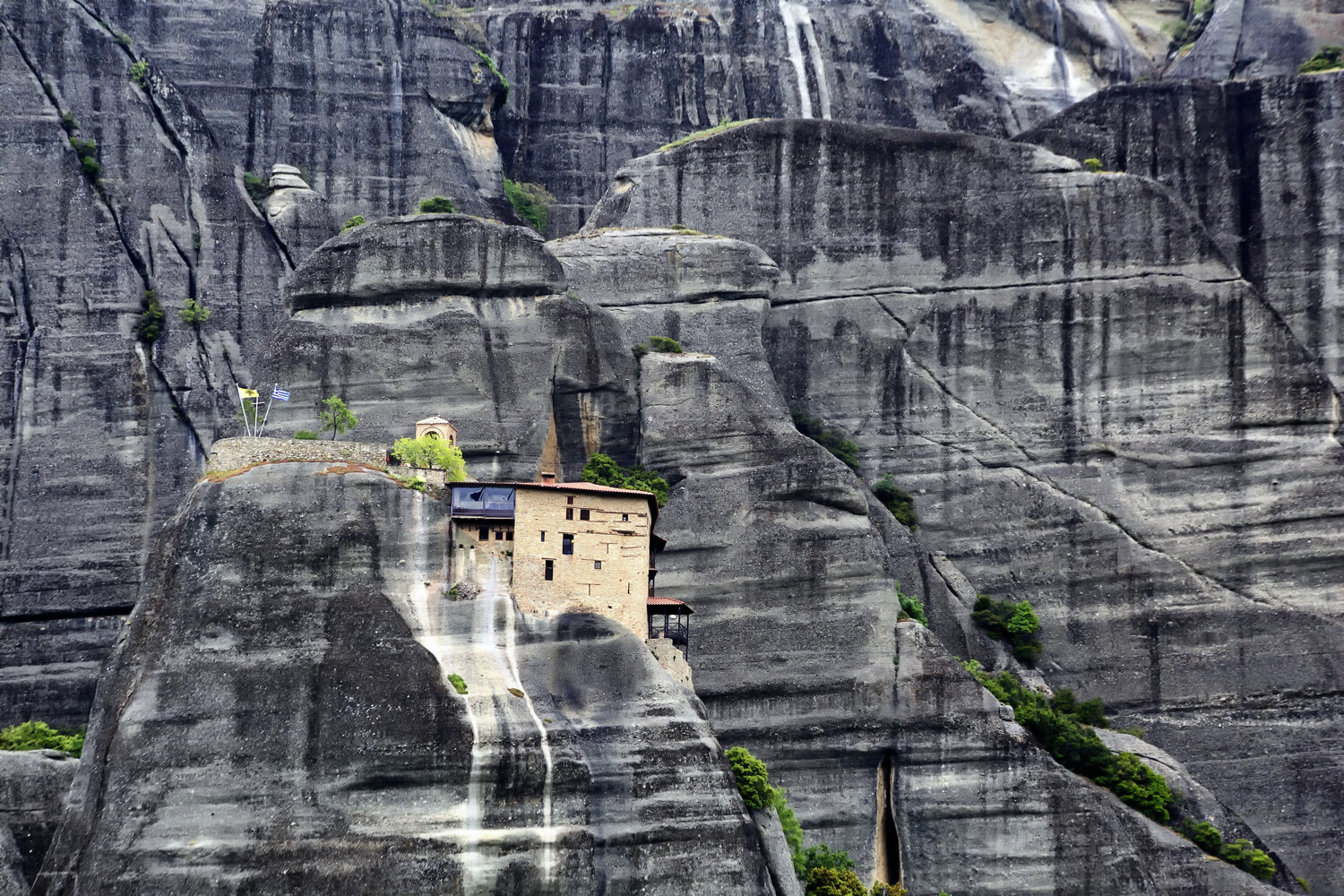
photographic minimalism Greek monastery
This photo shows a monastery at Meteora in Greece. A long focal length is used and the rocks create a minimal, textured background.

Post processing can help

Now, it’s best to get your photo right from the start and simply change your position so that you can compose a minimalist photo.

That said, there are times that creating a minimalist composition in-camera isn’t possible, yet the photo is still very much there to be taken. There could be a lamppost or an electric pylon that comes into your frame.

Fortunately, it’s increasingly easy to clone out unwanted elements from your photo. And once you’ve done that, you’ll have created minimalism.

photographic minimalism farmworker in Laos
This farmworker in Laos works as a great main subject to add interest to the composition.

Maximize your photos with minimalism!

A lot of successful photos use minimalism to great effect. Are you a minimalist with your photography? If so, how do you go about taking photos in the minimalistic style? If you have ideas and photos you’d like to share, please do so in the comments section below.

Now it’s time to maximize your creativity with photographic minimalism!

The post Tips for Using Photographic Minimalism to Great Effect appeared first on Digital Photography School. It was authored by Simon Bond.


Digital Photography School

 
Comments Off on Tips for Using Photographic Minimalism to Great Effect

Posted in Photography


Tips for Culling Images for Better Results and More Efficiency

30 Sep

The post Tips for Culling Images for Better Results and More Efficiency appeared first on Digital Photography School. It was authored by John McIntire.

When it comes to a photographer’s workflow, there is one stage that might be more important than any other. It is the image selection process, also known as the culling stage. This critical stage is the point where you get your images into Lightroom (or other software) and start choosing which to work on.

But while this is the stage where you choose the photos that ultimately end up representing your work as a photographer, without systems in place it can turn into a huge time sink.

So focusing on the process of culling images can help speed up image selection significantly. 

Have a system for culling images to help you get to your best results faster.
Being able to quickly whittle down a set of photos is an important skill for any photographer. At 36 images, this is a small set of photos, but the principles are the same whether it’s 36 images or 360.

This article aims to show you why having a good system for image selection can be beneficial to your photography and your portfolio. It will also provide an overview of a basic system that you can start to use in your workflow right away, and it will provide tips on how to use Lightroom’s built-in functionality for this purpose. 

Note: My examples here are portraits, but the system applies to just about any genre in photography. There are instances where you might not be able to apply some of these principles and the criteria you apply in different genres will be different, but they are exceptions. 

The forest for the trees

Take a moment to imagine that you’ve just finished a big session and imported all the images into Lightroom. Now you may have hundreds of images that you have to sift through to find the ones that you want to work on.

Having a lot of photos from a shoot makes culling images even more important.
When you have hundreds of photos from a shoot all in one place, and test shots, outtakes, and misfires are still included, it can feel like a chore to go through them all.

Without a system for culling images in place, it’s all too easy to find yourself continually scrolling through the same set of images and reviewing the same ones multiple times. This may not be a problem if you only have a handful of frames, but once you get into larger shoots, you can waste a lot of time doing things this way.

Additionally, after going through the same images over and over again, it can also become discouraging. This makes it easy to give up and leave some gems unspotted, which are ultimately relegated to obscurity on your hard drive. 

culling images
By using Collection Sets to divide a large shoot into ten outfit changes, the images become much easier to manage.

So what type of system can you create?

Using Collection Sets to divide up large shoots into smaller, more manageable chunks is a good place to start.

This is just a small reason why you should consider developing a system for your editing process. 

Editing

The image selection process is also known as editing. Now, I know that the word edit (and editing) has come to mean something else in everyday vernacular for photographers. You can call it whatever you want, as I am not one to dictate or prescribe. But as you will be going about image editing in the future, consider thinking about your post-processing workflow in terms of these two job descriptions:

Photo (Picture) Editor: Someone whose job it is to select photos appropriate for the use in question. 

Retoucher: Someone whose job it is to alter the appearance of photos and manipulate photos to achieve a final result. 

Tools

Lightroom has a huge variety of tools that makes culling images easier. While this is not an exhaustive list, here are a few features that I use regularly: 

Fullscreen Mode

Culling images in full screen mode ensures that you are focusing on one image at a time.
Using Fullscreen Mode during the image selection process will help to remove any distractions from your screen. You’ll see the photo that you are evaluating and nothing else.

Being able to view a single image at a time makes this whole process go more smoothly. It also takes away the distraction of Lightroom’s standard interface on the screen. To enter Fullscreen Mode, select any single image in the Library Module and press the “F” key. 

Compare

culling images
If you want to look at two similar images side by side, use the Compare feature in Lightroom.

The Compare feature allows you to look at two images side by side. Although you won’t use this until later in the selection process, it becomes very useful when you are trying to choose between two similar images with minor differences.

To use the Compare feature, select any two images in the Library Module and press the “C” key. To get back to your normal view, press “G.”

Reject

Lightroom lets you mark photos as rejects, which makes culling images a breeze.
When you reject a photo in Lightroom, the image will be grayed out and marked by a black flag with an “X.” Any images you mark in this way should be recognizable at a glance.

If you follow my process, you are going to use this tool a lot. When you press the “X” key while any image is selected, you flag that image as a reject. This marks the image with a black flag with an “X” in the upper left-hand corner, and it grays the image out in the Library Module. This makes it very easy to see which images you have already reviewed and marked as unsuitable.

Pick

Mark photos you like with a Pick when culling images.
Marking an image as a Pick will annotate it with a highly-visible white flag.

When you are going through your images, you will eventually come across a photo that you love. You’ll know that you want to work on it no matter what.

In this instance, press the “P” key; the image will be flagged as a Pick. A little white flag icon will appear at the top left of the image in Lightroom.

Star ratings

culling images using the Lightroom star ratings
Using the star ratings in Lightroom is another quick and useful way to annotate images that you want to review again later.

Because you will be going through your images multiple times, you can use the star ratings in Lightroom to mark any images you are unsure of or aren’t able to make a final decision on yet. You can mark them with one to five stars by using the corresponding number key. This makes them clearly labeled when you return to them in the future. 

On being ruthless

Before we get into the actual steps of the editing process, there is one thing to discuss. Most everything outlined in this article can be changed up as required, but there is one thing that will be important for you to follow no matter what.

To make this process faster and more efficient, and to ensure that you are only left with your best images, you have to be ruthless. If something is not right about an image, reject it. If you have to think about it for more than a few seconds, reject it. If you have even so much as a niggling doubt, reject it. 

Being able to spot obvious flaws will make culling images a fast process.
Being able to quickly recognize obvious faults will allow you to reject images quickly. Overexposure, outtakes, reflections in glasses, cropped body parts, and awkward arm placements are some of the reasons these images were rejected at first glance.

A lot of the wasted time in this part of the workflow comes from hemming and hawing over an image for a length of time when the image doesn’t wind up getting used anyway. Make decisions fast. Be ruthless.

The system

culling images
Keeping the images you are working on separate from the rest will make this process go much more smoothly.

Now that you know the desired end result, you can get started with the actual process of image selection.

The first step is to isolate the set of images you are working on from everything else. There should be no distractions. If you are working on a set from a portrait session where there were multiple outfit changes, separate each outfit into its own folder.

In Lightroom, this is easy. You can create a Collection Set for your shoot, and then create a Collection for every outfit change inside that set. This will keep all of the images from a session in one place, but separated by things like outfit changes or lighting changes. 

Criteria

Chances are that you already have preconceived notions of what you don’t like in photos. Whether these ideas come from things you’ve heard from other photographers or opinions you’ve developed yourself, it doesn’t matter. Knowing what these things are is going to help you speed through the process much, much faster. 

Technical: Things that fall on the technical side are relatively easy to identify. What you are evaluating for here are things like focus, exposure, the absence of motion blur, etc. When you are going through your images, learn to identify technical faults at a glance.

Culling images is easy when you know what to look for
Technical faults, like reflections in glasses, are easy to spot and make quick decisions on.

Aesthetic: This one is all down to your personal tastes. If you can figure out what you don’t like, then you can spot those things in an instant and rule the photos out of the selection process.

Don’t like when portrait subjects bring their hands to their face? That rules out any photos fitting that description. Don’t like it when catchlights appear in the whites of the eyes? You get where I’m going with this. 

culling images
Aesthetic faults come down to personal preference and taste. Here, the eyes are dark and the pose isn’t the best.

The first pass

culling images
The goal of your first pass is to reject as many images as possible as fast as possible. If you can identify a reject at a glance and mark it as such, you won’t waste any time later going over that image multiple times.

Once you’ve isolated the images that you’re working on, you can begin the first pass of the culling process.

The only goal here is culling images as fast as possible. Select the first photo in your folder and enter Fullscreen Mode in Lightroom (press “F”). Use the right arrow key to scroll through your images one at a time.

You should have an idea of what isn’t a good photo in your mind. You’re looking for things that fall into that category. Did the flash misfire? Are the eyes partly closed? Is the facial expression not flattering? Is the lighting not quite right? Is the focus off? 

If there’s a fault in the image, find it and press “X.” 

The second pass

Now that you have completed the first run through your images, you should find that you’ve rejected most of them. The next step is to isolate the images that you haven’t culled from the ones you need to review again.

There are a few ways you can do this. You can create a new Collection and add the images that are to be reviewed. Or you could remove the rejected images from the Collection you are working in. 

Sorting options will help you when culling images.
Using the sorting options on the bottom toolbar, you can sort by Pick. This will put all of your rejects at the bottom of the catalog, making it easy to go through for the second pass.

You could also use the sorting options on the bottom toolbar in the Library Module. This will put any rejected images at the end of the gallery. From there, you can select all of the unflagged images and enter Fullscreen Mode again. As you cycle through the images a second time, you’ll first see the shots you have selected.

For this pass, you are trying to achieve the same thing as the first: to reject as many images as possible. This time it will take longer, as these are images that you have already decided don’t have any immediate faults. Feel free to take extra time and have a careful look over the images. Just remember that you are still not picking any photos yet, merely getting rid of the ones that aren’t suitable. 

You can repeat this stage as many times as you need in order to narrow down your Collection to the few best images. For the sake of brevity, we’ll move directly on to the next stage and assume you’ve narrowed your images down as much as possible. 

The third pass

the third pass when culling images
Using this method, I was able to narrow down this set to three images in a little over ten minutes.

At this point, you should have a much smaller group of images to work with.

(If you still have a lot of photos, go back and be more ruthless.)

You can now go through and start making your final selections. It should be a lot easier now that you have a much smaller pool to go through. Use the Pick flags or star ratings to indicate the photos you want to work on and reject any photos that still need rejecting.

At the end of your culling sessions, you should have a concise selection of images that reflect the best shots from a particular set. 

How many should you aim for?

If you’re wondering how many images you should aim to have left once this is all over, the answer is: it depends. 

The number of final images is going to vary wildly depending on how you shoot and what you are shooting for. For example, if I am shooting for myself, I will be looking for one or two images per set. That set may start with 10 photos in it. It may start with 100. I am still only looking for one or two.

If I’m doing a short portrait session for a client, I might end up with 15-20 proofs to present. If I was photographing an event, I would go through and get rid of the obvious rejects and keep everything that was left. 

culling images example photo
Canon 5D Mark III | Canon EF 85mm f/1.8 | 85mm | 1/2000 sec | f/2.8 | ISO 200

There is no right answer. Only you can answer how many images you need in the end. This whole process of culling images is there to get you to those final photos faster, rather than get you to a certain number.

Keeping it basic

The tools and the process outlined in this article are very basic. It’s how I do it and it’s like that for a reason. The process is uncomfortable and forces you, for a little while, to focus on your mistakes.

When I am culling images, I want it completed as soon as possible, and I don’t want my tools to get in the way of the process. That said, Lightroom has a whole host of other features that could be used in the culling process. By all means, use them if they suit you. It doesn’t matter how you get the job done as long as you get it done.

Conclusion

I know that this can be a difficult process. You have a catalog of images on the screen that you created and poured all kinds of effort into. You just want to look through them and feel good about the photos you’ve made. You don’t want to jump in and start finding faults with 90% of them. I understand. I’m the same.

However, as disheartening as it feels at first, once you start culling images and the best images from a shoot start showing themselves (usually after a short while), that allows you to focus only on the best.

Trust me: The images that you cut get quickly forgotten, anyway. It’s best to be done with them fast; that way you can focus the rest of your time and effort on the images that will benefit you and your portfolio. 

The post Tips for Culling Images for Better Results and More Efficiency appeared first on Digital Photography School. It was authored by John McIntire.


Digital Photography School

 
Comments Off on Tips for Culling Images for Better Results and More Efficiency

Posted in Photography


S’cuse Me While I Tweak the Sky: Tips for Dramatic Skies in Your Photos

23 Sep

The post S’cuse Me While I Tweak the Sky: Tips for Dramatic Skies in Your Photos appeared first on Digital Photography School. It was authored by Rick Ohnsman.

Singing Home on the Range, a cowboy might picture the perfect place where the skies are not cloudy all day.”

A cloudless day might appeal to many people, but not to landscape photographers.

The so-called “bluebird day” generally makes for poor landscape photographs with a boring, featureless sky. Maybe you’ve also heard this: “When the weather gets bad, the photos get good.”

So what do you do when Mother Nature gives you few or no clouds to work with? Let’s look at some tips for dramatic skies.

Tips for Dramatic Skies - Sky needs work
There’s a good sky here, but it’s going to take some coaxing to bring it out.
Canon 6D | Canon EF 24-105 f/4 | 1/4 sec | f/18 | ISO 200

In camera

If there are no clouds at all to work with, your options while shooting are pretty limited. You may want to compose your shot so that there is little, if any, sky. However, if you have even a few clouds to work with, here are some ways to make the most of them:

Use a polarizing filter

Polarizing filter effectiveness depends on the angle of your shot in relation to the angle of the sun. The strongest effect is with the sun 90 degrees to the direction your camera is pointing; you get varying degrees of effectiveness at other angles.

Look through the viewfinder, rotate the polarizer, and watch as the contrast between the sky and clouds changes. Sometimes this will be very dramatic, especially with white puffy clouds on a blue sky.

Adjust to your taste, backing off a bit if needed. There is such a thing as too much, however, so remember:

What you do with a polarizer when making the shot can’t easily be undone later in post-processing. Be careful when using a polarizing filter in combination with a wide-angle lens. Parts of the sky may darken more than others across the shot, giving an unusual look you probably won’t like, one that is tough to fix later.

Tips for Dramatic Skies - Wide angle plus polarizer a bad combination
A wide-angle lens (this shot was made at 17mm) plus a polarizer can be a bad combination. Note how the sky is darker in some places than others. This would have been better without the polarizer.

Use a graduated neutral density (GND) filter

Landscape photographers often deal with a wide dynamic range between a bright sky and a much darker foreground. Should you expose for the sky or the land, the highlights or the shadows?

A graduated ND filter that goes from a darker density at the top to clear at the bottom can help even out the exposure. The advent of digital editing tools that emulate this in editing has caused many photographers to dispense with using these filters.

One advantage to working without a GND is that you can change your mind later if you don’t want a GND effect. You can also better deal with scenes where the horizon isn’t perfectly straight across. Still, some photographers favor the traditional graduated ND filter in certain circumstances.

Bracket

Rather than use a graduated ND filter in the field to even-out a composition with a bright sky and dark foreground, take multiple bracketed shots while varying the shutter speed (but not the aperture).

Many cameras have this feature built-in, so you can make a series of bracketed shots with one press of the shutter button. Having a series of the same shot taken at varied exposures will give you the raw materials for some of the editing techniques we’re about to explore.

In edit

Sometimes you are able to capture an image that has clouds in the scene, but they are underwhelming and need some editing help to give them extra pizzazz. Let’s look at some tips for dramatic skies using standard editing techniques.

Basic sky editing

Lightroom is usually my editor of choice, and so the techniques I’ll mention next will use it as a reference. The concepts should translate fine to other editors, however, so if you grasp the ideas you’ll be able to implement the same changes, whether you use Capture One, ON1 Photo RAW, ACDSee, or something else.

Whatever you’re photographing, work to keep your exposure “in-bounds.” That is to say: Don’t blow out the highlights on the right side of the histogram or block up the shadows pushing them past the left side of the histogram. Whether working with a dark or light shot, or maybe an image with both light and dark extremes, if the entire histogram is “between the goalposts,” then you have an image that is workable.

That said, whenever possible, use the ETTR (expose-to-the-right) method. If you are not familiar with this, I suggest you read up on it. The greatest amount of data in a photo file is in the brighter tones. If you have a bright sky (and are trying to get some detail in the clouds) combined with a darker foreground, it is better to have to darken the image while editing. You can purposely expose for the highlights and get the sky correct in-camera, but then you may be later faced with trying to brighten up the shadows. A cleaner, less noisy image will result if you have to later bring down the highlights rather than if you drag up dark shadows “out of the mud.”

Also, we are talking about editing a RAW file, not a JPEG. If you are still shooting JPEGs then you have already limited what you can recover. If you don’t shoot RAW images, I suggest you stop here, learn why and how to shoot and work with RAW files, and then come back.

It’s maybe harsh, but if you want to be a more skilled editor and do things like recover cloudy skies, then learning how to work with RAW files is a prerequisite. ‘Nuff said.

Here is my standard workflow in Lightroom for just about any image. If there are clouds in the shot, it’s Step One that brings them alive.

  • Adjust the exposure slider. Don’t worry too much about making it just right. you’ll fine-tune again later.
  • Bring down the highlights. How much? Look at your image and watch the histogram as you work.
  • Open up the shadows. Move the slider to the right. Watch the image and the istogram.
  • Set your white point. There are several ways to do this. I like this method: Hold down the Alt key (Option on Mac). Click and hold the Whites slider. The image will turn black. Now while holding the key and the mouse button down, slowly move the slider to the right until you see a few specks of white on the image. Slide back left a bit if necessary. What you’re doing is making the points that you should into the brightest (whitest) points in the image. They will set the extreme right point on the histogram.
  • Set your black point. This technique is the same: Holding down the Alt/Option key, click the Blacks slider, hold, and drag left. The screen will go white until you reach a point where some black specks appear. I sometimes find I will allow a few more black specks (totally black) points to affect an image than white points, but that depends on the image.
  • Re-adjust your exposure and contrast. You may need to go back now and re-adjust your Exposure slider a bit and/or adjust the Contrast slider.
Tips for dramatic skies - Basic Lightroom editing
With just some basic Lightroom editing, the clouds look better already.
Canon 6D | Canon EF 24-105 f/4 | 1/4 sec | f/18 | ISO 200

How much to adjust any of the sliders will depend on the image. In general, this simple workflow will get your image “in the ballpark” and likely help start bringing out detail in the sky.

You may want to move onto other global adjustments like Texture, Clarity, Dehaze, Vibrance, and Saturation, because you can adjust those to your taste. If, however, your sky needs special help, it’s time for some local adjustments.

Going local

It’s quite possible your sky will need some local adjustments to give it the look you seek. If you’re not familiar with Lightroom’s local adjustment tools and techniques, DPS writer Andrew S. Gibson has written a good article on that subject.

I will add a couple of things to try when using Lightroom’s local adjustment tools to help accentuate your sky and clouds:

  • Try the Range Masking tools to better select your sky. Used in combination with the Graduated Filter, the Radial Filter, and the Adjustment Brush, you’ll be able to apply your effects where you want them and not where you don’t.
  • Try using the Clarity and Dehaze sliders when seeking to tune the sky to achieve the look you want. Go easy, though. It’s easy to go way overboard, especially with the Dehaze slider.
Tips for dramatic skies - Local editing in Lightroom
Combine a Graduated Filter with the Luminance Range Mask in Lightroom to select the sky. Then use the sliders to get the look you seek.
Tips for dramatic skies - After Lightroom treatments
Now we’re talking! Compare this to the original image at the top of the article.
Canon 6D | Canon EF 24-105 f/4 | 1/4 sec | f/18 | ISO 200

Multiple shots: HDR in Lightroom

I mentioned bracketing your shots while shooting high dynamic range subjects, such as with the bright-sky/dark-land combination you may often encounter.

When editing, having multiple bracketed images to work with will offer all kinds of possibilities. One of them is the ability to do HDR (high dynamic range) work within Lightroom. This is a whole lesson unto itself, and I suggest you learn it.

Tips for dramatic skies - Lightroom HDR
5 bracketed images are merged into a single HDR photo in Lightroom.

After producing an HDR image from multiple images merged in Lightroom, you’ll have a 32-bit file to work with, rather than the standard 24-bit single image files you are accustomed to dealing with.

The image will now have 10 stops of exposure adjustment (the Lightroom Exposure slider will go from a +/- 5 range to a +/- 10 range).

Make your bracketed shots so the darkest image captures all the bright sky detail and the brightest image picks up all the shadow detail. Combined into a single 32-bit HDR DNG image in Lightroom, you’ll have lots of adjustment possibilities to get a just-right exposure with good sky detail.

Tips for dramatic skies - finished Lightroom HDR
The 32-bit DNG file created after a merge-to-HDR routine in Lightroom gives a much larger exposure range to work with.

Moving to Photoshop

You can do a lot in Lightroom, but sometimes you need more control and more power. One of the things Photoshop offers that Lightroom doesn’t is layers. Here are some tips for dramatic skies using Photoshop for editing.

Blending

You will need at least two shots with different exposures for this technique. Let’s outline a very simple approach.

(You will need to use layers and masks in Photoshop, so if you’re not familiar with those, here’s your chance to learn.)

  1. This will work best if you shoot from a tripod so your images are identical except for exposure. Shoot at least two shots, one exposed to capture all the bright details in the sky, the other exposed for the darker areas of the land.
  2. If you’re coming from Lightroom, highlight both images, then click Photo>Edit In>Open as Layers in Photoshop. Have the lighter image on top.
  3. To be sure the images are sized and aligned perfectly, select both layers in Photoshop (F7 turns on the layers palette), click the first layer, hold down Shift and click the second layer, and then from the top menu click Edit>Auto-Align Layers>OK.
  4. Create a mask on the top layer. (With the top layer selected, click the Add Layer Mask icon, which looks like a rectangle with a circle in it).
  5. Use the Brush Tool with the color set to Black. Click on the mask you just created. Now paint over the sky. As you do, you will reveal the darker sky layer underneath. Adjusting brush size, opacity, and brush softness will help you better control things.
Tips for dramatic skies - Exposure Blending with two exposures in Photoshop
One shot exposed for the sky, the other for the land. I then layered, aligned, and blended using a mask in Photoshop.
Canon 6D | Canon EF 24-105 f/4

The multi-layer masking approach can also work well if you use Photoshop selections to choose what you will keep from one layer and use from the other layer. Selection techniques can be simple or very complex in Photoshop, depending on how complex a selection you need to make. I will point you to a good entry point for further study: this article by DPS writer Yacine Bessekhouad.

Tips for dramatic skies - Targeted Adjustment tool in Lightroom
Here’s a different technique to try when you have a blue sky and not much additional blue in your shot. Use the Lightroom targeted adjustment tool in the HSL/Color panel to bring down the luminance level of the blue. You can go even further with a monochrome conversion. The look is similar to having used a polarizing filter.

Do some multiplying

Perhaps you only made one shot, didn’t bracket and, despite some of your editing techniques, the sky and clouds still seem a little wimpy. Never fear.

Here’s something else to in Photoshop:

  • Make a duplicate of the layer. (Ctrl/Cmd + J.) You will have two duplicate layers on top of each other.
  • Duplicate that copy again so you now have three duplicate copies. Temporarily turn off the bottommost layer (probably labeled “Background”) by clicking the eyeball icon.
  • Now, change the blend mode to Multiply. The detail and contrast in the clouds should be amplified.
  • Duplicate again for further amplification.
  • Repeat with additional duplicates; hit Ctrl/Cmd + J as desired to keep duplicating. until the sky turns the way you’d like. Don’t worry about the foreground just yet.
  • To reduce the duplicates into one layer, merge the visible layers: Layer>Merge Visible (or Ctrl/Cmd + Shift + E).
  • You will now have just two layers, the merged layers and the background layer. Turn the Background layer back on by clicking the eyeball again.
  • You will now need to use one of the selection and masking techniques to mask out (“erase”) the probably over-darkened land/foreground portion of the top layer.
Tips for dramatic skies - Using a multiply blending layer
Here I brought the shot into Photoshop, made a duplicate, and then applied the Multiply blend mode to the top layer. Bringing back the darker portion was easy here with a straight horizon line. This look is similar to what you might get with a traditional glass graduated ND filter.

S’cuse me while I switch the sky

In the rock classic “Purple Haze,” Jimi Hendrix sang, “S’cuse me while I kiss the sky.” Some people later thought the lyrics to be “kiss this guy;” that’s called a misheard song lyric or mondegreen. A website is devoted to them. As a photographer, I prefer to sing my own version: “S’cuse me while I switch the sky.”

Tips for dramatic skies - The boring original
Could this sky be any more boring? Let’s help it.
Canon 6D | Canon EF 24-105 f/4 | 1/60 sec | f/8 | ISO 100

Sometimes when there’s no clouds at all, or a plain blue sky, a plain gray overcast sky, or maybe you blew out the sky and there’s nothing to recover, you’re left with no alternative. A sky replacement is needed.

Other times, you just want a different sky for a more dramatic effect.

Whatever the case, substituting skies is a great way to get some nice images and a really great way to polish your editing skills.

Tips for dramatic skies - Nice donor sunset
Now here’s a nice sunset. Let’s work a piece of this in.
Canon 6D | Canon EF 24-105 f/4 | f/11 | ISO 200

With Photoshop

Tips for dramatic skies
Put the clouds layer on top, then use a black brush on a white mask and paint to reveal the lower beach area again.
Tips for dramatic skies
Back in Lightroom for some more fine-tuning. Isn’t this a much nicer image than the original?

Sometimes sky replacement is an easy task, such as when you have a flat horizon or perhaps a hard-edged building against the sky.

Of course, if you have trees with leaves or intricate details to select, it can be much more challenging.

Tips for dramatic skies - A No-Cloud day
Some might have called this a perfect day when this historic train rolled into the Boise (Idaho) Union Pacific Depot. Not a cloud in the sky. Boring! At least with the hard, straight lines and continuous blue color, making a selection is easy.

My goal here is not to teach you the various techniques of sky replacement. There are many instructional articles and online tutorials for that. Here’s an example from DPS writer Simon Ringsmuth for basic level sky replacement. Here’s an online Youtube tutorial where a more detailed foreground tree is dealt with. Here’s yet another tutorial with different techniques.

As I said, sky replacement can be a deep dive into Photoshop tools and techniques. But what if there was a simpler way? We’re now beginning to see one-click tools that do a pretty good job of sky replacement.

Tips for dramatic skies - Good clouds
Here’s a dramatic sky. But will it work?
Tips for dramatic skies - Does it work?
Impressive, but does it work? Might you question if this really was the sky that was present when the photo was taken?

With Luminar 4

Sky replacement software has been around for a few years, but it’s only been recently that it’s produced good results with relatively complex subjects. The use of artificial intelligence in applications has made a huge difference in the quality of the finished image.

The “king of the hill” at this writing may be Skylum’s Luminar 4.

Tips for dramatic skies - Luminar 4 Before and After
This was an easy job for Luminar 4 and this stock sky looks pretty convincing.

Luminar 4 comes with a few dozen skies you can use as replacement, and you can add your own skies.

(If you’re serious about getting into sky replacement, I would strongly encourage you to start collecting sky images, snapping shots whenever you see an interesting sky and adding them to a folder for possible later use.)

Tips for dramatic skies - Before Luminar 4
Nice shot, but it would be better with a dramatic sky.
Canon 6D | Canon EF 70-200 f/2.8 | 200mm | 1/30 sec | f/16 | ISO 100

Something to bear in mind when deciding whether to use the included skies or your own is resolution. The replacement sky should have a resolution at least as great or greater than the image to which you’ll be adding it. Using a low-res sky image with a higher-res original image will just look bad and degrade your shot.

Tips for dramatic skies - After Luminar 4
This sunset sky in the Luminar 4 collection was just right for this shot. The program also let me tune the color balance of the original image to match more effectively.

A confession here:

I have only dabbled with sky replacements in Luminar 4 using the free demo version, so I don’t claim to be an expert. I am reasonably impressed with what I’ve seen so far. Even with a fairly complex subject, such as the harbor shot below with lots of sailboat masts and rigging extending into the sky, it did a very nice job.

Might you do better with Photoshop? I guess that would depend on your skill level. Artificial intelligence has not yet reached the level of human skills and intelligence. Then again, much will depend on your level of proficiency with Photoshop. Speaking for myself, I’m not sure I could currently do better than Luminar at this time.

And doing it with a few simple clicks? Good stuff, if you ask me!

Tips for dramatic skies - A tougher challenge for Luminar
With the masts and rigging extending into the sky, replacing the sky with Photoshop selection tools, layers, and masks would be challenging. With Luminar 4, it was done with a few clicks. Perfect? Maybe not, but impressive. It added the birds, too!

Other tools

Luminar isn’t the only program for doing sky replacements. I work on a PC and my tablet and phone are Android devices, so I’m not as familiar with what’s on the Apple side of this kind of software. I do know other forms of software are moving toward the use of AI and doing sky replacement.

I was pleased to stumble across an Android app that may not be as refined as Luminar. And for images you might shoot with your phone and want to do a sky replacement for the web, Enlighten’s Quickshot does an admirable job and is very easy to use, right on your phone. I see it is also available for iOS.

Tips for drmatic skies - sky replacement with Quickshot on Android
I replaced the sky in this shot right on my Android phone. I used Quickshot, a pretty good little app. For online work that will be posted on the web, it seems plenty capable.

Ethics of sky switching

So if you can, does that mean you should? If you can replace the sky in a photo, should you? When does the result stop being a photograph and become an art piece, a reflection of the skills of a photo editor and not those of a photographer? Would you enter an image in a photo contest where you had replaced the sky?

I don’t claim to have the answers, but I have raised the ethical questions surrounding sky replacement before. Take a look at this article I wrote several years ago which dives deeper into that subject.

If you’re going to do magic…

Have you ever had the misfortune of watching a really bad magician? A show where it is clearly evident the performer really did have something up his sleeve or where there was no doubt about how the trick was done? I’d use that example as a lesson in what not to do if you decide to do sky replacement with your photos.

A shot where the light in the sky comes from one side while the subjects in the foreground are lit from the other side would be an example of “bad magic.” So would different light temperatures between land and sky or evident fringing where poor selection and masking was done. Rather than embarass yourself with a poorly executed sky replacement where even non-photographers can spot the fakery, practice your skills for yourself only. I believe only when you’re ready for “primetime” should you begin showing your sky replacement images.

Then, of course, you will face a new dilemma. Once people are aware you can produce shots with amazing skies, even when you do capture a photo in-camera with a gorgeous sky they will wonder, “Is that real or did you add it?”

Tips for dramatic skies - Real or Not?
If you’re going to “do magic” and replace skies, it had better be convincing. You tell me: Is this the original sky or not?

Conclusion

I hope you picked up some good tips for dramatic skies in this article. I also hope you’ll give consideration into not just when and how to implement these techniques, but if you should or shouldn’t.

Some people really don’t enjoy photo editing and would prefer to do everything in-camera as much as possible. For others, editing is part of the craft and no photo is complete until it has undergone an extensive edit session.

As I write this, the Covid-19 crisis lingers, and so maybe you have more time at home to work on your editing skills. Meanwhile, let me leave you with this sign-off used by Garrison Keillor, host of the radio show, “A Prairie Home Companion.”

“Be well, do good work, and keep in touch.”

The post S’cuse Me While I Tweak the Sky: Tips for Dramatic Skies in Your Photos appeared first on Digital Photography School. It was authored by Rick Ohnsman.


Digital Photography School

 
Comments Off on S’cuse Me While I Tweak the Sky: Tips for Dramatic Skies in Your Photos

Posted in Photography


10 Incredible Bird Photography Tips for Beginners

22 Sep

The post 10 Incredible Bird Photography Tips for Beginners appeared first on Digital Photography School. It was authored by Prathap DK.

What is the most important factor in getting your bird photographs noticed by a large audience? Is it the camera or the lens or the bird?

Bald Eagle Flying Away With A Catch

Imagine you have a Canon 1D X Mark III or a Nikon D5 and an 800mm lens. You have been to a place to photograph the magnificent bald eagles. Everything seems perfect! Isn’t it?

But what if you do not know what makes a good bird photograph? Do you think, just by shooting a burst of photographs, you’ll get the best results?

Definitely not. You may get snapshots, but not photos.

“There is nothing worse than a sharp image of a fuzzy concept.” – Ansel Adams

Today you will learn some of the core principles of bird photography. These will give you an understanding of what makes a good bird photo.

1. You don’t need expensive lenses for great bird photography

A great bird photograph does involve several factors, such as:

  • Quality and direction of the light
  • Composition
  • Knowledge about the bird and its activities
  • Background
  • Knowledge about the gear you are using
  • Proper settings
  • Proper exposure
  • Your position
  • 3 + 1 Ps (Patience, Perseverance, Practice + Passion)

You see, it takes a lot to become a good bird photographer. A decent APS-C or DX-format camera body with a telephoto lens of up to 300mm is more than sufficient to really get great bird photographs.

It is important to realize that bird photography is much more than just the camera or the lens. There is no denying the fact that the longer the lens, the easier it is to photograph birds that are skittish. But the lens itself cannot make a great bird photograph.

Also, if you do not have a longer telephoto lens, nothing stops you from taking a great photograph of birds like mallard ducks, geese, gulls, and herons that are easily approachable. If you cannot take a close-up of a bald eagle, nothing stops you from taking a unique photograph of a bald eagle in its habitat.

Everything boils down to how you view the situation. “Is the glass half empty or half full?”

2. Light and composition

Green Heron Standing TallPhotography is all about light. Light has a few characteristics that will make a photograph wonderful.

Early morning and late afternoon light is usually the best time for bird photography. The light during these times is soft. As a bonus, the birds are very active.

Soft light has some wonderful characteristics, such as:

  • It does not cast harsh shadows on the bird
  • It brings out a glow in the bird’s plumage
  • It creates a catchlight in the bird’s eye

Composing a bird photograph helps you convey your message in the best possible way. Bird photography composition is generally very simple. Following a few basic composition principles will help you make a difference:

  • Use the rule of thirds compositional technique to place the bird off-center
  • Use color contrast by aiming for a complementary background
  • Fill the frame with the bird
  • Use a clean background

3. Transport the viewer into the bird’s world

We see our world at five to six feet high, but birds see the world in few inches to few feet. To get a feeling of the bird’s world, get down on their level!

Go low and go slow.

Always try to photograph the birds on their eye level, except for birds in flight, of course. Getting down low has greater benefits that will overshadow any of your complaints, such as not wanting to bend down, lie down, etc. Some of the obvious benefits are:

  • You get more intimate photographs of birds since you will get eye contact
  • You will get pleasing blur both in the foreground and background
  • You make the bird less scared since you can hardly move
  • You will transport the viewer into the bird’s world

Goslings Crossing the Road

4. It’s all in the eye

Take a look at any photograph of a bird. What is the first thing you want to see?

It’s the eye, right?

We tend to make an eye connection with any living being. It is no different than with birds. The eyes are the windows to the soul. If there is no light in the eyes, then they look dull or lifeless. Birds look lively when there is light in their eye.

This light in the eye is called a catchlight.

Sparrow perching on a tree branch

By following a few guidelines you can easily get better bird photographs:

  • Always keep the bird’s eye in sharp focus
  • Check for a catchlight in the bird’s eye (this is easy to get if the bird is front-lit)
  • Make sure to photograph from the bird’s eye level

5. Fill the frame

In bird photography, we generally photograph an individual bird. When photographing individual birds, it is always a good idea to fill the frame.

Advantages of filling the frame with the bird are:

  • It is easy for the viewer to focus on the bird
  • It is easy to achieve a pleasing blur or bokeh effect in the background
  • It is easy to properly expose for the bird
  • It is easy to compose in the field

Juvenile Blue Heron Close Up

6. Tell a story

Storytelling in bird photography should not be confused with stories in books and newspapers. Storytelling is a way to express the time of the day, mood, place, or activity of the bird in a single photograph. Viewers should be able to picture themselves in the scene.

Simply put, a photograph of a bird plus its surroundings will give a better sense of story than just the bird filling the frame. Though the story may not always be true.

Great Egret in Misty Morning

Here are few tips you can follow while you photograph a bird in its habitat:

  • Make the bird an integral part of the photograph by including its natural habitat
  • Show the interaction of birds if there is more than one bird in the photograph
  • Indicate the weather conditions by including snow, rain, or mist
  • Take photographs during sunrise and sunset
  • Show season by including flowers in bloom, autumn colors, or snow

7. Capture their action and behavior

Birds are always in action. They hardly sit still. Capturing birds in action involves more effort and patience compared to photographing perched birds.

Here are a few tips for capturing birds in action:

  • Photograph early in the morning or late in the afternoon when birds are very active
  • Use burst mode to take several photographs during the action
  • Track the bird until focus is locked before pressing the shutter
  • Learn to anticipate the action either by observing or reading about birds

Juvenile Blue Heron with a Fish

Birds tend to ignore you when they are very hungry. It is very easy to photograph them in action during these times. But care should be taken not to disturb them and to maintain considerable distance.

Capturing a bird’s behavior is much tougher than any other aspect of bird photography. This is generally because birds become alert the moment they see you.

The alert bird is always trying to fly away, so you’ll rarely see its behavior. You can observe the actual behaviors of a bird when it is truly comfortable.

There are few ways to make a bird comfortable:

  • Use a natural place to hide, like a bush or tree or something that obscures you
  • Wait patiently until the bird ignores you
  • Visit the location several days in a row until the bird becomes comfortable with your presence or you get the right opportunity

Juvenile Great Egret Behavior

Remember to research and learn everything about the bird you are photographing. This will definitely make you a better bird photographer; also, you will enjoy knowing about the bird.

8. Capture their magnificent flight

The most interesting part of bird photography is capturing their magnificent flight. This is very tricky for beginners and pros alike. It is not easy to take flight photographs that will wow viewers.

Your success photographing birds in flight largely depends on the bird, as well as the technique that you employ. Smaller birds are generally very erratic in their flight and also a bit difficult to track, since they are generally small in the frame. But larger birds are slightly less swift and are not as difficult to track.

If you want to be successful with flight photography, start with larger, slower-moving birds. Learn all the field techniques to capture the perfect photographs of these birds.

Belted Kingfisher in Flight

Here are some simple tips that will help you capture those magnificent flight photographs:

  • Learn about the bird’s flight patterns
  • Know the bird’s landing and take-off patterns
  • If there is more than one bird, it is almost always the case that, if one flies, the rest will follow suit
  • Track the bird for a while and let the camera achieve focus before pressing the shutter
  • Use Aperture Priority so you do not have to worry much about the changing light conditions

9. The background makes the picture

This is one of my favorite questions: Is it the background or the bird that makes the picture?

Go through all your favorite bird photographs and see it for yourself.

Except for extreme close-up portraits of birds, every other type of bird photograph will look great when the background is clean and complements the bird.

Seagull the Eagle

It is very important to keep an eye on the background while taking bird photographs. Just follow these simple tips:

  • Avoid taking bird photographs when the background is too distracting
  • Avoid taking bird photographs when the background is plain and boring
  • Wait for the bird to assume a good position or change your position to get an interesting background
  • Choose maximum aperture values to throw the background slightly, or completely, out of focus

10. Practice with common birds

I urge you to practice photographing common birds. You might have understood by now that these techniques are not dependent on your camera, your lens, or the bird. I was using an 18-200mm lens for the first four years of my bird photography. I learned and practiced most of my birding techniques with common birds like seagulls, mallards, geese, and herons.

I spend most of my time photographing these common birds, and I challenged myself to make some unique photographs of them; this challenge has fueled my passion for a long time.

I put more importance on learning and practicing photography than on whatever gear I possess. I am very happy to say that I learned most of the photography basics here at Digital Photography School.

I hope my story so far is an inspiration to you to embrace the beauty of these common birds.

Wrap up

Barn Swallow Taking OffFocus your time and energy on learning all the core principles outlined above. Prove to yourself that you have the passion to go out and photograph birds every day, or as often as you can.

Remember that proper techniques will always outsmart equipment. Make every attempt to create amazing photographs of the common birds. Enjoy photographing birds. That is the secret to success.

The post 10 Incredible Bird Photography Tips for Beginners appeared first on Digital Photography School. It was authored by Prathap DK.


Digital Photography School

 
Comments Off on 10 Incredible Bird Photography Tips for Beginners

Posted in Photography