RSS
 

Posts Tagged ‘Tips’

2 Video Tips for Using the Print Module in Lightroom

13 Mar

Julianne Kost is the premiere Adobe instructor who teaches us about both Lightroom and Photoshop. In these two videos she gives us tips for printing from Lightroom.

In this first one learn some general tips using the Print Module inside Lightroom:

The second video below is a handy tip on how to print multiple images directly to a JPG, using a the Print Module again but this time saving a file, not making a print. This is really good to know if you want to make images to share on social media, your blog or website, etc.

If you want more printing tips check out these dPS articles:

  • Image Size and Resolution Explained for Print and Onscreen
  • Two Useful Lightroom Print Module Custom Layouts
  • How to Create a 2015 Calendar in the Lightroom Print Module (you can figure out how to make one for 2016 too!)
  • Next Steps to Getting Started in the Lightroom Develop Module

googletag.cmd.push(function() {
tablet_slots.push( googletag.defineSlot( “/1005424/_dPSv4_tab-all-article-bottom_(300×250)”, [300, 250], “pb-ad-78623” ).addService( googletag.pubads() ) ); } );

googletag.cmd.push(function() {
mobile_slots.push( googletag.defineSlot( “/1005424/_dPSv4_mob-all-article-bottom_(300×250)”, [300, 250], “pb-ad-78158” ).addService( googletag.pubads() ) ); } );

The post 2 Video Tips for Using the Print Module in Lightroom by Darlene Hildebrandt appeared first on Digital Photography School.


Digital Photography School

 
Comments Off on 2 Video Tips for Using the Print Module in Lightroom

Posted in Photography


13 Snow Photography Tips: A Beginner’s Guide

09 Mar

Does your heart jump a little on a beautiful winter day?

snow photography tips a beginners guide

Are you ready to run outside and start shooting? I know how you feel, I love snow photography too. Here are a few things to keep in mind:

13 snow photography tips: a beginners guide

The tips in this article will help you get some great photos in the snow, and keep your camera safe.

beginners tips for photographing show

1. Focus on contrast

Autofocus can have a hard time locking on, when everything is white. It helps to focus on something dark, like the bark that’s just below a lump of snow on a tree branch. Your camera’s autofocus system needs contrast to focus on, so a plain white mound of snow may cause issues.

photographing snow beginners tips

Press your shutter half way. If the focus won’t lock on, move your focusing point to a darker area of the subject, and try again. This usually does the trick.

2. Camera settings

Set your camera to shoot in RAW. When you take photos in RAW, you will have more to work with in editing. JEPG files are already condensed, and don’t allow for much editing. Learn about 5 reasons to shoot in RAW.

Choose Evaluative (Matrix for Nikon) metering. Evaluative metering will do a good job. That’s what I used for all the photos in this post. If it’s really sunny, you may also want to try Spot or Partial metering to see if it handles the light better.

Exposure Compensation – Your camera will try to make snow look gray, so set your exposure compensation to +1 or +2. That will keep the snow looking white. You can also adjust exposure compensation while editing.

3. Shoot in Aperture Priority Mode

Aperture Priority (AV on Canon, A on Nikon) will allow you to quickly change your depth of field. When shooting in Aperture Priority the camera will choose the ISO, (if the camera is set to auto ISO) and the shutter speed, so all you have to do is switch between aperture settings. This is great in cold weather, and allows for a lot of creativity.

4. Capture it fresh

There’s noting like a fresh snowfall.

snow photography tips

If you want footprint free snow, you might want to plan which photos you’re going to take, and what order you’ll take them in. This might also mean going out early, before the kids get up.

5. Keep your batteries warm

In cold weather your batteries won’t last long. Charge two, and keep one in an inside pocket. When the one in your camera runs low, replace it with the warm one. Then put the drained one in your pocket, you may be able to use it again once it warms up.

6. Bag your camera

Condensation can form on the outside, and inside of your camera, when you bring it in from the cold. That’s scary, but it’s easy to avoid.

When you are heading out, just bring along a large zip-lock bag. I usually keep one in my camera bag or jacket pocket. When you are ready to go inside, put your camera in the bag, and make sure it’s sealed tight. Then, once you’re in the house put your camera somewhere it can warm up slowly. Once it reaches room temperature, you can take it out of the bag and use it normally.

I leave my camera bag in the car while I’m taking photos. Before getting back into the car, I put my camera in the zip-lock bag, then in the camera bag. This way the camera comes up to temperature slowl,y and condensation doesn’t form.

7. Don’t let the weather stop you

Snowy landscapes look good, in both sunny and cloudy weather.

On cloudy days, when everything is white, include elements that will break up the white, and add interest to your photo. If it’s snowing, use an umbrella to protect your camera. Or if it’s too cold to go out, roll down your car window, grab your shot, and roll it back up.

snow photography tips for beginners

While I don’t take my camera out in super cold weather, some people do. Read more about protecting your camera and yourself in cold weather (by David Shaw who’s in Alaska and knows about cold weather!)

8. Act fast

Snow can change quickly. It can start, or stop falling in an instant. When the sun comes out, snow can start melting really fast too. Those beautiful trees can go from dazzling to drab in no time.

snow photography tips for beginners 2

Don’t wait. Get out there and photograph it.

9. Be patient

Light can also change really fast. The sun can go behind a large cloud and totally change how the snow looks. You may need wait for the sun to come out again. This can be hard when it’s cold, but it’s worth it!

photographing snow beginners guide

Sunshine and shadows, add beauty and drama to a snowy scene.

10. Keep all your images

Don’t delete any photos from your camera, wait until you’re warm and comfy, sitting in front of your computer. You’ll be able to see your photos more clearly, and your fingers won’t freeze.

11. Play with perspective

Shoot from different perspectives. Try to show the way snow blankets the ground, weighs things down, and clings to everything.

tips for photographing snow

Watch out for falling snow. It’s not so nice to have a clump land on your camera.

12. Play with shutter speed

Shutter Priority allows you to choose your shutter speed, while the camera takes care of the rest. With a fast shutter speed, you can freeze falling snow in mid air. With a slow shutter speed, you can turn those flakes into long white streaks.

13. Capture some Bokeh

A sunny winter day, is a great time to create bokeh. With all that sparkling snow and ice, it shouldn’t be too hard.

To create bokeh in your photos, look for a subject that has something bright or shiny in the background. This could be the light reflected off of ice, melting snow or some sunspots. Use a wide open aperture (a small number like f/3 or f/5), and make sure there is some distance between your subject, and the shiny background objects.

13 tips for photographing snow

With a shallow depth of field (from the wide aperture), your subject will be in focus, but the objects in the background won’t. This will create bokeh. See 28 wintery white snowy images.

Let it snow

Will you be out experimenting on the next snow day? I’m planning on it. Have fun with your snow photography. Experiment with different settings on your camera. Just remember to dress for the weather, and bag your camera.

If you have some snowy photos to share, I would love to see them. I hope you’ll share your tips too. Please add to this article by commenting below.

googletag.cmd.push(function() {
tablet_slots.push( googletag.defineSlot( “/1005424/_dPSv4_tab-all-article-bottom_(300×250)”, [300, 250], “pb-ad-78623” ).addService( googletag.pubads() ) ); } );

googletag.cmd.push(function() {
mobile_slots.push( googletag.defineSlot( “/1005424/_dPSv4_mob-all-article-bottom_(300×250)”, [300, 250], “pb-ad-78158” ).addService( googletag.pubads() ) ); } );

The post 13 Snow Photography Tips: A Beginner’s Guide by Dena Haines appeared first on Digital Photography School.


Digital Photography School

 
Comments Off on 13 Snow Photography Tips: A Beginner’s Guide

Posted in Photography


10 Tips for Photographing Great Headshots

04 Mar

Photographing a headshot can seem like a daunting prospect. To have one person in front of your camera, looking to you for direction and positivity, is an intense environment. People are generally very critical of themselves in photographs, and feel very nervous. However, there are some simple things that you can do to make it a lot easier for everyone.

Headshot on Black Background 1

Here are 10 tips to help you photograph headshots:

1. Have a pre-session consultation

Before your session make sure you know how the images will be used and what style they would like. This can be on the phone or face to face. Talking to them, will help them relax so much more than email. This will allow you to help them prepare for the session. Make sure they know what to expect, and are as relaxed as possible.

Headshot on White Background 1

Find out about what profession your subject is involved in; a corporate lawyer may well opt for a clean white background look (above), while a more relaxed style of business (yoga instructor) may prefer a more colourful, environmental image (below). Find out in the consultation what they want so you are prepared on the day.

Indoor Headshot

2. Help them to choose the right clothes

Generally speaking, solid, neutral colours, work best for headshots, as you want to avoid anything that distracts away from people’s faces. If it is a formal style you are looking to achieve, make sure that everyone gets the message, and remembers to bring formal work clothes with them. Men often forget their jackets, so for a consistent look, try and have a spare one on hand, even if you need to clip it at the back. If you have time with a person, get them to bring a few items of clothing. Remind them to iron their clothes as well.

Here are some example of good clothing choices:

What to wear

What to wear 2

What to wear 3

3. Create separation from the background

Make sure that your subject doesn’t stand too close to the background. If you are using a studio background (or wall in an office) and you stand someone close to it, you may see shadows on the wall, which makes the images look less professional. For environmental headshots outdoors, I still recommend separation from the background. The bokeh creates a nice nondescript background, especially when shot at a wide aperture. Typically I aim for an aperture of f/4 for environmental and natural light sessions, and f/8 for studio style sessions with lights.

4. Starting the session

Whether you are photographing headshots for a single person, or a whole team, make sure you have a general chat with each person first, to help them relax. This can be just a 10 second, confident handshake, and a “how are you?”. People generally feel very tense about having their photograph taken, and talking about something in their comfort zone (where they live, if they have children or pets, etc) will really help them appear and be more comfortable.

5. Silly Faces!

A great way of helping people to relax in front of the camera, if you don’t have much time with them, is to ask them to pull a funny face for the first frame. Use this as a lighting test for a new person as well. This is great at breaking the ice, and very few refuse to do it. Once they have pulled a daft face, everything else is easy!

Funny faces

Headshot Photography London 0997

6. Lighting and positioning

For business and actors’ headshots, I tend to light quite evenly. There are a few circumstances when the images are low-key, but for the main part, they are evenly lit. A classic beauty lighting setup works well, with one light above, and a second light, or a reflector filling from below.

I ensure the subject is turned with their body 45 degrees away from the camera, and towards the main light source (if your lighting allows for this). Their face should be straight towards the camera. You may need to guide people to look straight down the lens. It’s surprising how many people look off camera, at the flash, or somewhere random.

Headshot setup

Posing example

7. Sit people down

People may be more comfortable sitting down, and by asking them to rest their hands on the tops of their thighs, it gives them something to do with their hands. It also ensures that the subjects all know where they need to be, and they don’t move around too much.

8. It’s all about the little adjustments

What separates a great headshot from an average one, are generally very small changes. These little adjustments can make all the difference. The slight tilt to the head, leaning forward, a gentle but intriguing smile. Don’t be afraid to ask someone to make very specific changes to their expression and position, until you get the image you’re looking for.

Headshot Photography London 1052

9. Keep talking and be positive

When you’re in the midst of taking photographs, make sure that you keep talking to your subject. Reassure them that they’re doing it right, and you’re getting great images. Even if you’re not satisfied with the images when someone turns their head in a certain direction, or how the light is falling on them, never express that to your subject. Silence will kill the atmosphere, so no matter what is happening, just keep chatting and being positive.

10. Shoot tethered

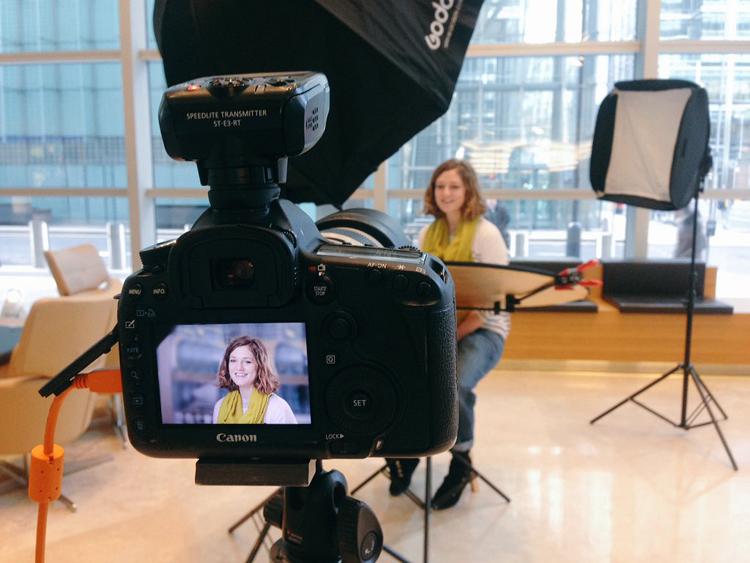
If you have all the necessary equipment, shooting tethered is a fantastic way the get great headshots. When people see a couple of shots on the screen, they can very quickly get an idea of what needs to be changed. The immediate feedback on the screen will help everyone massively.

I hope you find these tips for better head shots helpful. Do you have any others we missed? Please share them, and your headshot photos in the comments below.

googletag.cmd.push(function() {
tablet_slots.push( googletag.defineSlot( “/1005424/_dPSv4_tab-all-article-bottom_(300×250)”, [300, 250], “pb-ad-78623” ).addService( googletag.pubads() ) ); } );

googletag.cmd.push(function() {
mobile_slots.push( googletag.defineSlot( “/1005424/_dPSv4_mob-all-article-bottom_(300×250)”, [300, 250], “pb-ad-78158” ).addService( googletag.pubads() ) ); } );

The post 10 Tips for Photographing Great Headshots by Sean Gannon appeared first on Digital Photography School.


Digital Photography School

 
Comments Off on 10 Tips for Photographing Great Headshots

Posted in Photography


Tips for Minimizing Reflections When Photographing Through Windows

03 Mar

Have you ever wanted to take a photo through a shop window, but couldn’t work out how to cut the reflections? Or been up on an observation deck, trapped behind glass that had so many stray lights shining into the glass, that you couldn’t get a good shot of what was on the other side?

LeanneCole-photography-through-glass-1028

It is hard to take photos through glass and not get lots of unwanted reflections.

Glass can be one of the hardest things to take photos through. It doesn’t seem to matter where you move, you will find more reflections. Then just when you think you have the perfect shot, you put it on the computer only to find that they are still there.

Shop Windows

One of the most commons places to take photos, is through shop windows. But, they are often in well-lit places, and they are tough because you will be getting reflections from all directions. There are ways of minimizing the reflections, and things you can do to help prevent them.

Polarizering Filter

A polarizer filter will help reduce the reflections. It may not remove them all, but it will help you to eliminate many of them. Take the images below, it has all the lights on the outside of the store reflected in the glass, and with a polarizing filter.

LeanneCole-photography-through-glass-1036

The reflections of the lights from outside the shop can be seen on the glass.

LeanneCole-photography-through-glass-1037

The reflections have been removed by the help of the polarizing filter.

A circular polarizing filter was put on the lens, and in order to remove the reflections, it was turned until they just disappeared. Take a look at the image above right, the filter has helped remove many of them.

It doesn’t always work, but it can help reduce reflections. In some cases, you are going to find that reducing them is better than having them ruin your images.

Using a Lens Hood

If you can get your lens right up to the glass of the window so that it sits on it squarely, it can stop any unwanted reflections from getting in front of the lens. However, it means that you can only take photos of what is directly in front of the camera, what do you do if you want to take some at an angle? There is no doubt that once you move it on an angle you will start to see reflections.

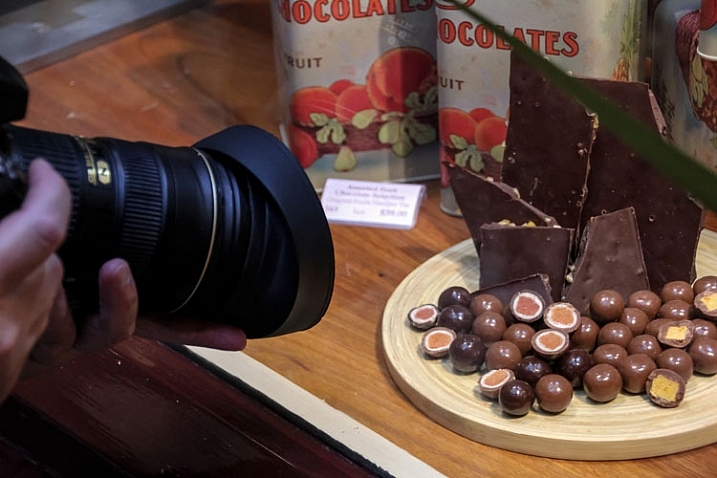
You want to be able to create a seal around the end of the lens, and a rubber lens hood can do that. Look at the following photo, you can see one on the lens.

LeanneCole-photography-through-glass-1038

The rubber lens cap is on the lens, and pushed against the window.

The advantage is the flexibility, and how you can move it around and change the angle of your lens. The following two images show one with reflections, and one without. The latter is the one taken using the rubber lens hood.

LeanneCole-photography-through-glass-1034

Reflections on the glass are apparent here.

LeanneCole-photography-through-glass-1035

The rubber lens hood has eliminated the reflections.

They used to be very common and a lot of people would have the rubber hoods for their lenses, but slowly the hard plastic ones have taken over. It is good to see that if you hunt around on the internet, you can still find them. The one used for this demonstration was found on Ebay.

Trams, trains and cars

There are numerous places you could use it, and on a recent trip to the mountains around Lake Tahoe, it would have been great in the tram up Squaw Valley. The glass in the tram had so many reflections it wasn’t worth trying to get any photos. It was the same on the tram that runs from Roosevelt Island to New York.

Trains and other moving vehicles have the same problems with windows and reflections. The rubber lens hood would help you to get an image free of any distracting reflections. However, there is one place in Melbourne where it wouldn’t help at all.

Eureka Skydeck

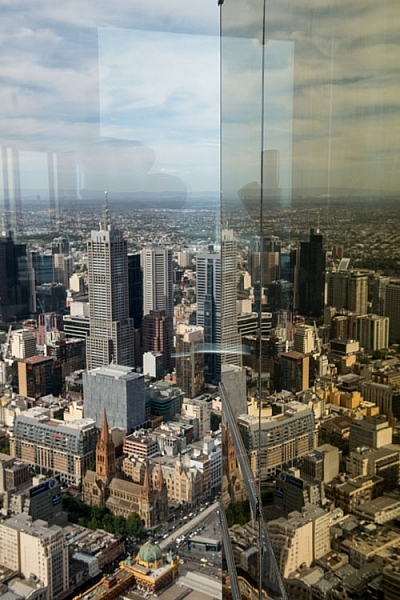
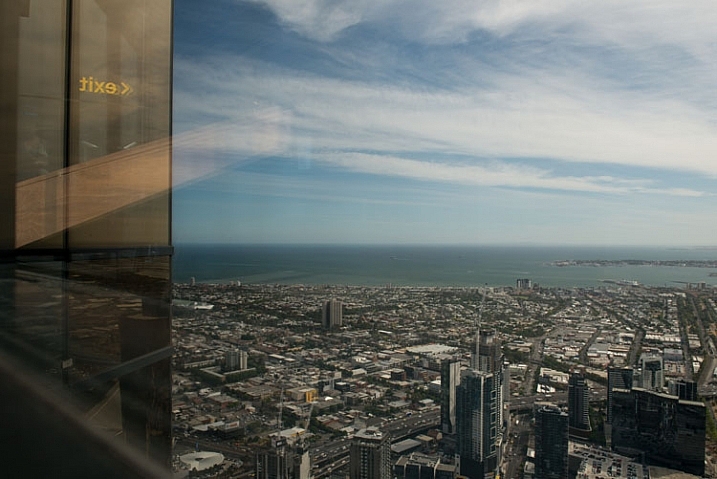
In Melbourne there is an observation deck that is 88 floors up, Eureka Skydeck, that provides some stunning views of Melbourne. It is a great place to see the city, but a terrible place to take photos.

There is glass all around, and it reflects everything else in it. The one place where you can go outside has mesh across it and for most cameras the holes in it are not big enough to take photos through. At night there are lights on the floor that create their own effects on the windows.

If you go up to the glass to take photos, you will find that if you use the rubber lens hood method won’t work as there are two panes of glass. You might get rid of the reflections off the first pane, but there is not much you can do with the second.

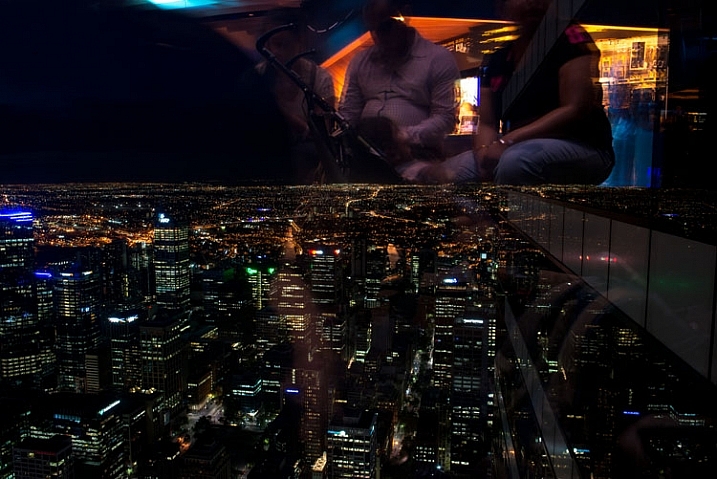
Here are two images, the first was taken during the day and you can see the reflections. The second image was taken at night and you can see all the lights that are there reflected in the glass.

LeanneCole-photography-through-glass-1027

Taken during the day and you can see the reflections.

LeanneCole-photography-through-glass-1030

At night the lights inside reflect everywhere, and you can also get portraits shots, whether you want them or not.

Like everything in photography, there are always ways to get around problems.

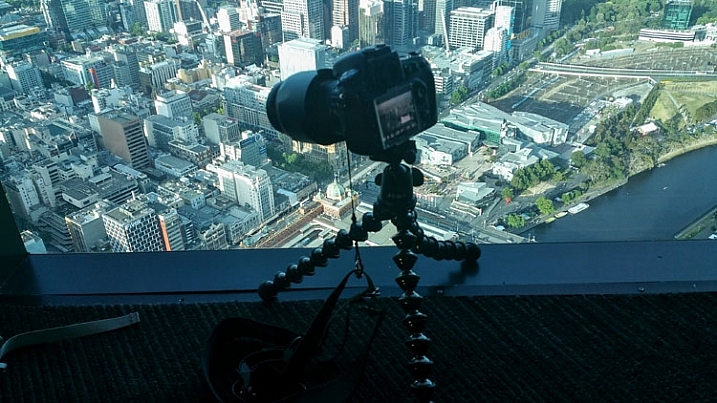
To eliminate the reflections, you will need to put your camera on a tripod, or something similar, for the following image a GorillaPod was used. It was placed close to the ground, as you can see in the image. At the Eureka Skydeck they have lights in the floor, so you have to make sure that light isn’t coming from under the camera.

LeanneCole-photography-through-glass-1025

The camera on the gorillapod on the floor.

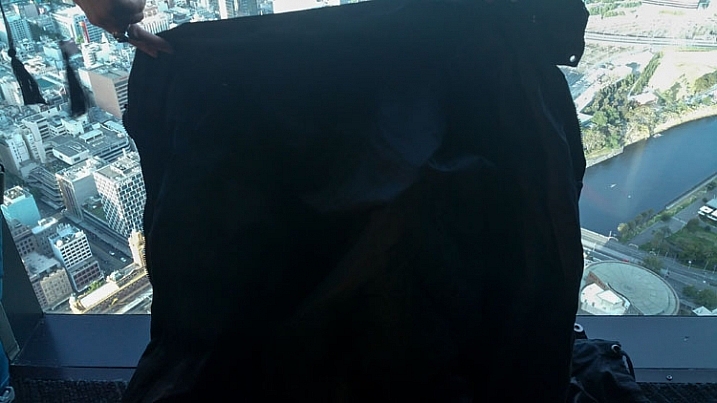
Set up your image and create a seal around the camera with fabric, you could use a piece of black cloth. It needs to be dark as a lighter colour will reflect as well. For these images a lightweight black jacket was held up against the window, to help prevent the reflections. You want to be able use the fabric or jacket to create a closed-in area around the camera, so you don’t get unwanted views in your image. Look at the following image.

LeanneCole-photography-through-glass-1026

The jacket is placed around the camera to stop reflections.

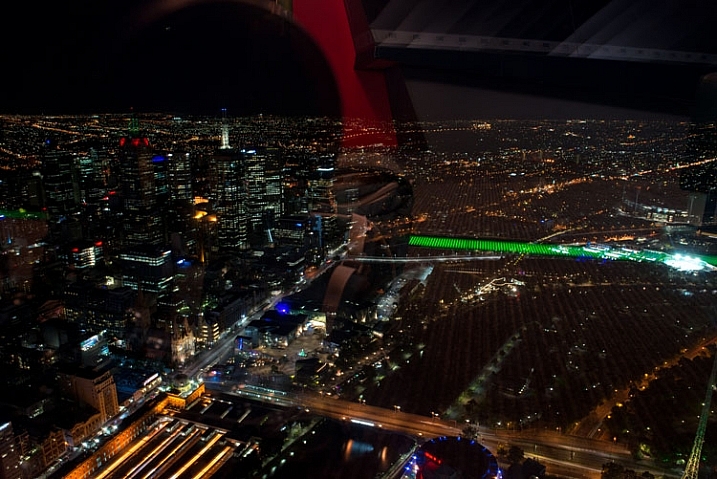
Of course no system is going to be foolproof, but, if you compare the following two images, you can see that it does make a big difference. The first image was done without any protection, and the jacket was used for the second one.

LeanneCole-photography-through-glass-1033

This image has had nothing done to stop the reflections.

LeanneCole-photography-through-glass-1032

This was taken using the above method with a jacket to block the reflections.

You have to judge each situation as you get to it. While one technique might work in one place, it may not work elsewhere. There is no doubt that glass and windows are one of the hardest objects to photograph through, a bit like photographing a mirror. Take care, and I hope the next time you are taking photos of a shop window, you get some great photos.

googletag.cmd.push(function() {
tablet_slots.push( googletag.defineSlot( “/1005424/_dPSv4_tab-all-article-bottom_(300×250)”, [300, 250], “pb-ad-78623” ).addService( googletag.pubads() ) ); } );

googletag.cmd.push(function() {
mobile_slots.push( googletag.defineSlot( “/1005424/_dPSv4_mob-all-article-bottom_(300×250)”, [300, 250], “pb-ad-78158” ).addService( googletag.pubads() ) ); } );

The post Tips for Minimizing Reflections When Photographing Through Windows by Leanne Cole appeared first on Digital Photography School.


Digital Photography School

 
Comments Off on Tips for Minimizing Reflections When Photographing Through Windows

Posted in Photography


3 Tips to Maximize Your Road Trip Photos

29 Feb

Road-Trip-Photo-Tip-Wide-Angle-06

Road trips have been hailed as one of the greatest pastimes ever, and something that everyone should do at least once in their lifetime. It is a great way to experience a lot in a short span of time, and as a photographer, there will be many opportunities and moments awaiting your perspective. Sometimes preserving your creative spin in the midst of all the new discoveries, can become sensory overload and feel overwhelming.

Here are three tips that can help you make better photographs on your journey and maximize your road trip.

Road-Trip-Photo-Tip-Wide-Angle-03

1. Plan, plan … plan?

Most successful photo sessions involve a level of planning, this is no different for road trips. The plan does not have to be detailed, it can start out with some basics, such as final destination and must-see places/events, then you determine what should happen daily. Research your routes, note interesting things along the way, and make a priority list. Keep in mind that when traveling you are subject to the unforeseen, such as inclement weather, or places inaccessible for one reason or another, so be ready to switch to Plan B.

Road-Trip-Photo-Tip-Wide-Angle

As a light chaser, planning should include knowing when the most flattering light will hit your must-see locations or subjects (e.g. sunrise or sunset), and getting there on time. Thankfully there are now many smartphone apps that will help you plan for the golden hours, work out directions, as well as drive times (and distance) between destinations.

Road-Trip-Photo-Tip-Wide-Angle-01

The last part of planning is building flexibility into your days. Sometimes even the best laid plans end up with hiccups and delays, and you still need to make the most of it. The main objective of any road trip is to have fun, so build in a little flexibility, and who knows, you could find something worth exploring, or maybe you will be forced to get creative when you least expect it.

Road-Trip-Photo-Tip-Wide-Angle-05

2. Gearing up

So with your destination(s) planned, it’s time to figure out what gear you need. The last thing you want to do is lug around everything you own, in fact, quite the opposite – you will want to travel light. This is why knowing your destination is key to packing. Will you be driving through amazing scenery? If yes, then you may want to pack a wide-angle lens. If wildlife is your focus, you may decide on a telephoto zoom, which is also great for capturing portraits of people in their natural environment, without being too obtrusive.

Note: Good advice, when it comes to portraits, asking permission is a nice approach.

Road-Trip-Photo-Tip-Zoom-03

Road-Trip-Photo-Tip-Zoom-01

It all depends on what your end game is, and what lens (or two) you will be using the most. There will always be regrets over what you left behind, such as that one photo that would have been awesome if you had packed a fish-eye or macro lens – but think about the extra weight, and whether of not it’s justified for the duration of the trip.

Road-Trip-Photo-Tip-Wide-Angle-04

If you really want to travel light, a mid-range zoom is a great compromise and a good broad spectrum lens to have during your journey, so research your surroundings and decide if this could work for you. A tripod is a safe bet if you plan to do any night photography, but use the same rule and take it only if you need it.

Road-Trip-Photo-Tip-Night

3. Road trip story

When you shoot with a story in mind, it can make your photos take on a life of their own. Are you documenting something specific along the way, such as small towns or diners, breath-taking landscapes, or the road itself?

Road-Trip-Photo-Tip-Zoom-02

There are many different ways to tell a story, and your objective and style will dictate the way you tell yours. If your destination includes places that are prone to lots of tourists – decide how this fits into your vision. Do you make them a part of the photo (i.e. use their presence for a sense of scale) or would you prefer the location desolate (which probably means rising early to beat the rush). What story are you trying to tell?

Road-Trip-Photo-Tip-Wide-Angle-02

Road-Trip-Photo-Tip-National-Park

Conclusion

Road trips are fun, and are a great way to make memories with hundreds of photo opportunities. Planning goes a long way, and will help you determine which gear to travel with, and what photos will make up your story line. So whether you are journeying to a National Park or just venturing out to a new place – a journey that spans two weeks or just two hours – know before you go, have lots of fun, and make awesome photo memories.

What other important tips would you add for fellow photography road trippers?

googletag.cmd.push(function() {
tablet_slots.push( googletag.defineSlot( “/1005424/_dPSv4_tab-all-article-bottom_(300×250)”, [300, 250], “pb-ad-78623” ).addService( googletag.pubads() ) ); } );

googletag.cmd.push(function() {
mobile_slots.push( googletag.defineSlot( “/1005424/_dPSv4_mob-all-article-bottom_(300×250)”, [300, 250], “pb-ad-78158” ).addService( googletag.pubads() ) ); } );

The post 3 Tips to Maximize Your Road Trip Photos by Nisha Ramroop appeared first on Digital Photography School.


Digital Photography School

 
Comments Off on 3 Tips to Maximize Your Road Trip Photos

Posted in Photography


Tips to Help You Start a Successful Photo Blog

29 Feb

As you learn more about using your camera, and start taking beautiful pictures, you might also want a way to share them with the rest of the world. There are many social networking platforms that are ideal for this sort of thing like: Instagram, Flickr, Google Photos, Tumblr, and Facebook, along with hundreds more.

However, one of the most popular, and effective ways, to share your pictures is a simple, humble, tried-and-true blog. Even though blogs are sort of like grandpas in our modern internet age, there’s a reason they have stuck around for more than two decades: they’re intuitive, easy to set up, and they allow you to have full control over your content. Many photographers enjoy using blogs because of their flexibility and customizability, and if you want to spent a bit of money for a dedicated blog platform like Squarespace, or a self-hosted WordPress installation, you can get even more creative.

If you are thinking about pursuing this route there there are some things you need to consider before setting up your own photo blog.

There are many sites that let you build photo blogs, several of which do it for free.

There are many sites that let you build photo blogs, several of which are free.

Know why you are doing a blog

This first point seems kind of obvious, but a lot of photographers find their blogs stalling out, and gathering dust after a few months, because they did not define their purpose for doing the blog when they first began. Many people start blogs because they just want to share random pictures, but if you want a viable long-term blogging solution, you’re going to need something more.

Are you starting a photo blog to get your name out there, and generate sales leads (potential customers)? Do you want to make a mark in your community? Do you want to simply post photos you think are interesting? Whatever your reason for doing a photo blog, it’s important to make sure you at least have one, in the first place. If you have never done a photo blog, then it’s likely you are doing it for personal reasons, such as trying to learn and grow as a photographer. That is an outstanding goal, and one that has helped many other bloggers, become much better at photography as well.

Once you know precisely why you are doing your blog, it will serve as a guide for everything you post. Brandon Stanton started the well-known Humans of New York blog with a specific purpose: to photograph 10,000 people living in New York City. This helped him have a sense of purpose and direction when taking and posting photos, and doing the same thing can greatly benefit you as well. If you cannot explicitly state why you are doing a blog, it is much more likely to gather virtual dust after a short time, and any readers you do manage to pick up, will possibly stop investing their time in it as well.
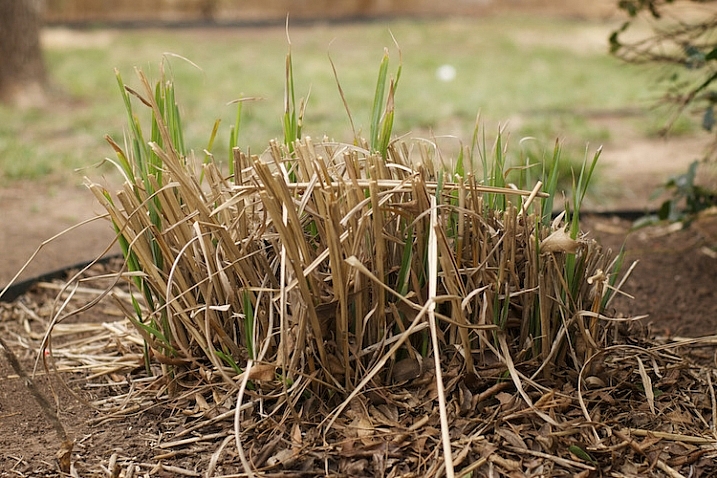
One of the first pictures I ever posted to my blog. It's not even an interesting photo but I was just starting out and can look back on this to see how much I have learned since then.

One of the first pictures I ever posted to my blog. It’s not even an interesting photo, but I was just starting out, and can look back on this to see how much I have learned since then.

In 2008 the web analytics firm Technorati found that roughly 95% of the blogs it tracked, went more than 120 days without being updated. When your blog goes four months without anything new, it is more than likely a failure. So how can you keep your blog not only surviving, but thriving past 120 days, and well beyond? Here are few more tips that might help:

Clearly articulate the purpose of your photo blog to your viewers

Attention spans are short, and people today have a never-ending stream of tweets, news clips, soundbites, app updates, and cat videos coming their way, almost every waking moment. So,how on earth can you make your blog stand out, and get noticed amid all the other sites, apps, and feeds that people check on a daily basis?

New readers should be able to tell within five seconds, what your blog is about. The best option is to have a specific niche that your photo blog serves (e.g. wildlife, surfers, snowflakes, street pictures, etc.). But, even if it’s just pictures you like taking for no particular reason, you should at least make that clear to your readers upfront. You’re basically setting expectations right from the outset, and giving your audience a clear sense of what they will get out of reading your photo blog. Some people do this by having a descriptive name for their blogs, a brief tagline, or a set of pictures that instantly conveys a sense of purpose (e.g. flowers, cattle, cars, sunsets, etc.). Whatever the purpose of your photo blog is, if your readers can’t figure it out, they’re going to quickly move elsewhere.

My blog is specifically for photos I take with my 50mm lens, and I make that clear to my readers immediately when they visit the site. If you don't let your readers know what your blog is about they will probably not stick around very long.

My blog is specifically for photos I take with my 50mm lens, and I make that clear to my readers immediately when they visit the site. If you don’t let your readers know what your blog is about, they will probably not stick around very long.

Post new content regularly

Not every blog that is updated regularly is going to be a success, but every successful blog is updated regularly. I have seen too many photographers start blogs that are updated daily, then weekly, and before long, the rate at which new pictures are posted slows to a trickle. Soon it’s a photo every couple weeks, then one a month, and then a written apology by the blogger about how he or she has just been so busy lately, but they promise to start posting more photos soon. More often than not, soon becomes later, then later becomes never, and a once-promising photo blog becomes another statistic of failure rates.

The best way to combat this problem, is to not post pictures whenever you feel like it, but instead post them on a regular and predictable basis. This gives your readers something to expect, and also imparts upon you, the blogger, a sense of accountability, which helps keep your camera in your hands and out of your closet. My photo blog is titled “Weekly Fifty”, and because it requires me to post a picture every single week, I almost always carry my camera with me, and am constantly looking for photo opportunities. In almost three years I have never failed to post a photo each Wednesday morning, which has helped me build a nice following, with regular commenters as well.

A few years ago I ran out of ideas for pictures to post, but I knew I had to stick with my weekly schedule so I made this image that turned out to be one of my more popular photos.

A few years ago I ran out of ideas for pictures to post, but I knew I had to stick with my weekly schedule. So, I made this image, that turned out to be one of my more popular photos.

One trick I like to recommend for photo bloggers, is to schedule your posts in advance. This doesn’t work well for blogs about news or current events, but as a photo bloggers you do not have to be timely in the same manner. I currently have complete posts (each with a photo, written explanatory text, and an accompanying 4-minute audio commentary) scheduled for the next six weeks. I use WordPress, which allows me to schedule posts in advance, so each of these six posts will be automatically published on subsequent Wednesdays at 1:00 a.m. This gives me a bit of padding, if I ever find myself in a position with lots of things going on in my life, and my readers know that they will get a new picture each week, no matter what.

Of course the catch here, is that I can’t merely sit on my laurels in the meantime. I have to keep taking pictures, and producing new blog posts, so that six weeks from now I don’t run out of material. This type of accountability is enormously helpful for photo bloggers, and if you’re not sure where to start, I always recommend doing one picture each week. If that’s too much you can lower it, and if it’s not often enough you can increase it, but I have found that a weekly schedule is a sweet spot that gives you enough time to take pictures, and doesn’t overload your readers with so much new content that they start ignoring it.

Engage with your audience

Building a loyal audience is the holy grail of almost every blogger, but it’s not easy to do. Your readers have many obligations, alerts, people demanding their time, and often it’s difficult enough just to get them to visit your blog in the first place, much less comment on a photo, or offer some kind of reaction to it. Early in the life of your blog, visitors will usually not be invested in your pictures enough to leave comments. But, as you start to build traffic, and readership over time, you will likely have a few people who start to offer feedback on your images.

When you do get commenters it’s essential that you interact with them, in order to build a sense of community, respect, and mutual sharing. If someone likes one of your pictures, say “Thank you” and ask if you can see some of their photos too. If someone offers a bit of constructive criticism on a picture, try re-taking a similar photo using their suggestions. You can offer a Call to Action by posting a photo, and encouraging your readers to take, and share similar photos in the comments section. This type of audience engagement benefits all parties; by giving you even more reasons to continue your blog, giving your readers a reason to keep coming back, and giving new readers a sense that your photos are interesting and worthy of comments.

I ran my blog for almost a year and a half before getting any regular commenters. Now I get about 40 comments each month, a number with which I am very happy.

This chart shows my comment statistics for calendar year 2015. I ran my blog for almost a year and a half before getting any regular commenters, and now I get about 40 comments each month. It’s not huge, but it’s a number with which I am very happy.

If your blog grows to mammoth proportions, and you start getting hundreds of comments on each picture, it might not be reasonable to reply to every single one, but until that happens you need to take care to give each commenter a personal response. If people are taking time out of their day to leave comments on your pictures, knowing that you personally read and responded, will make them want to keep visiting your blog, and engaging with you as well as other readers.

On my blog I have a few loyal readers who comment on every single picture, and it’s well worth a few minutes of my time each week to respond to the things they write. This helps make my commenters feel valued, and builds a sense of community that would not exist otherwise.

Push content to your readers

People rarely go out of their way to visit a blog, so instead you need to find a way to push your new pictures to them. One of the most effective ways of doing this is to ask your readers to sign up for email updates, but you can also use social networks to get the word out about each new post.

Every Wednesday my email subscribers get that week’s photo in their email inbox, but I also publish a link to my blog on Facebook and Twitter, and put that week’s image in my Instagram feed as well. (With the last option people are not directed to my blog, but I still get to engage with them about my pictures.) If you would like to ultimately generate revenue from your blog you might want to focus on ways of pushing content to your readers that, as often as possible, will bring them directly to your site and not to somewhere else that also has your photos.
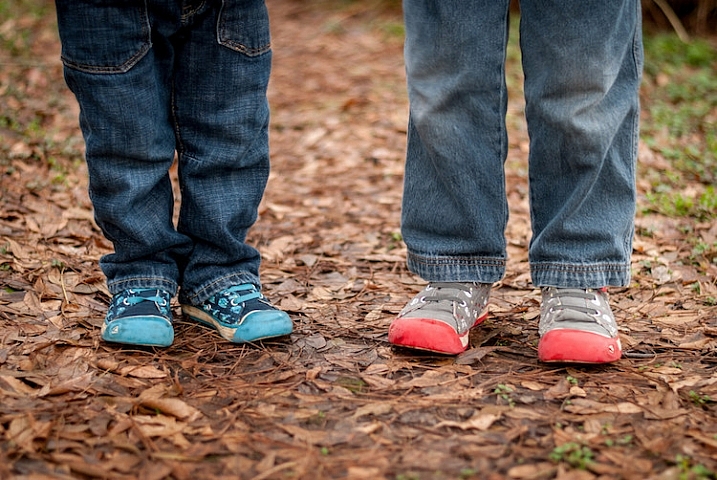
I woke up the morning this photo was published and found two comments had already been posted at about 2am. This type of engagement is possible because these people subscribed to email updates. If you don't have a way of pushing content to your readers you will likely not get the same level of engagement as you would otherwise.

I woke up the morning this photo was published and found two comments had already been posted at about 2am. This type of engagement is possible because these people subscribed to email updates. If you don’t have a way of pushing content to your readers you will likely not get the same level of engagement as you would otherwise.

Define your success criteria

I teach a Project Management class at Oklahoma State University. One concept we talk about often is how to tell if a project is successful, and the same holds true for your photo blog. At what point will you know that your blog has succeeded in meeting your goals? Will you be happy if you have two comments, and 10 social media shares for each picture you post? Are you looking for a way to generate a specific amount of revenue from your blog? Or is your success criteria more esoteric, such as using your blog for a sense of personal growth and development?

Having a set of clearly-defined success criteria is not necessarily essential for a blog, but it will give you something to shoot for, and a way of knowing whether you have gotten there or not. Whatever your success criteria is, take care to not compare it to anyone else’s. For example one of your photos might get five comments and 10 social media shares, but then you talk to a friend who just had five thousand visitors to his blog. Whose blog is more successful? The answer is…they both are.

Success depends entirely on how you define it, and thankfully the internet is big enough for millions of photo blogs to coexist. Congratulate your friend, and ask to see the photo that was so popular. Don’t make your blog’s success a competition, because and as long as you are happy with how things are going, then that’s the only thing that matters.
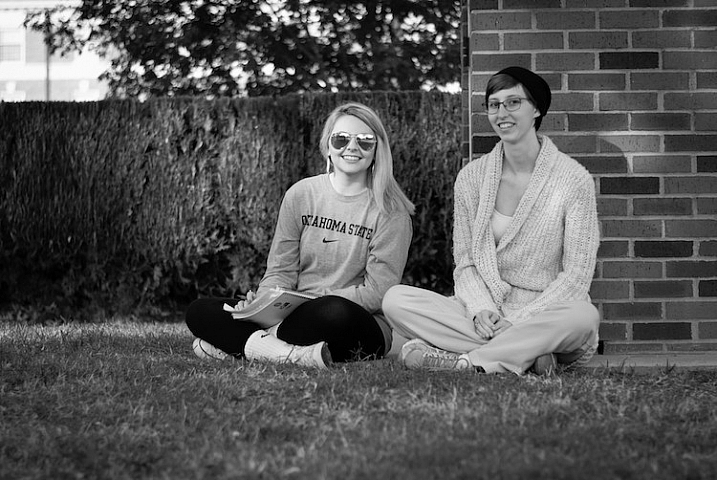
This photo had a great deal of personal meaning to me, but it generated very little traffic and almost no comments. If my success criteria is only quantifiable through numbers I would have been let down, but instead taking this photo forced me out of my comfort zone and made me try something new. Because of that I considered this one of my better photos even though raw numbers might say otherwise.

This photo had a great deal of personal meaning to me, but it generated very little traffic, and almost no comments. If my success criteria was only quantifiable through numbers I would have been let down, but instead the sheer act of taking this photo, forced me out of my comfort zone, and made me try something new. Because of that I considered this one of my better images, even though raw numbers might say otherwise.

Ignore the numbers

Visitor statistics can be so exciting, but they can also lead you down the path to the blogging dark side. It can be fun to log in to your account dashboard, and see that a recent picture generated 200 visitors, but those numbers don’t mean anything, if they don’t translate to reader engagement. Imagine building a store and getting hundreds of people to come see your wares, but having every one of them leave without making a purchase. Not only would your store be a failure, but you would quite likely be disappointed on a deeply personal level.

As a photo blogger you need to strive for quality over quantity, and look for ways to build a loyal following, not just try to increase raw visitor statistics. You might get a nice feeling seeing one of your photos get hundreds or thousands of views, but what happens when a different (or far better) picture you post gets only a couple dozen views? Visitor traffic is a fickle mistress, and if you pin your blogging hopes and dreams on simply making the numbers go up, you could very well be setting yourself up for a painful failure.

February 2015 was a big month for my blog, but the numbers have gone down dramatically ever since. Since my success criteria is not measured in raw numbers this drop in traffic makes no difference to me, but if numbers are your goal then you could very well end up chasing a white whale that can never be captured.

February 2015 was a big month for my blog, but the numbers have gone down dramatically ever since. Since my success criteria is not measured in raw numbers this drop in traffic makes no difference to me, but if numbers are your goal then you could very well end up chasing a white whale that can never be captured.

I used to run a movie and TV review website, and wrote an article about the now-defunct show, “Man versus Food” on The Travel Channel. Somehow the host of the show found out about the article, tweeted it to his followers, and that single article generated more traffic than anything else we had ever posted. The problem was that those visitors did not stick around, and within a few weeks we were back to the same relatively low numbers we always had. At the time I figured blogging success meant getting sky-high traffic numbers, and when those numbers did not pan out I thought we had failed.

When I started my Weekly Fifty photo blog, I took an entirely different route and tried hard to ignore numbers about visitor statistics, and have been much happier as a result. I do my blog because it helps me learn and grow as a photographer, and I get a great deal of personal satisfaction out of it. I appreciate the continual challenge it offers. In short, I’m a happy and successful small-time photo blogger, because I don’t let numbers and statistics define what success means to me.

This is by far the worst photo I have ever posted on my blog, and it's almost painful to look at it now. But early on in my blog I had no idea what I was doing, and it was only through taking lots of bad pictures that I learned how to make a good image. Even though this picture is kind of embarrassing, it served a valuable purpose both on my blog and for me as a photographer.

This is by far the worst photo I have ever posted on my blog and it’s almost painful to look at it now. But early on in my blog, I had no idea what I was doing, and it was only through taking lots of bad pictures that I learned how to make a good image. Though this picture is kind of embarrassing, it served a valuable purpose both on my blog, and for me as a photographer.

Do you have a photo blog, or are you thinking about starting one? I’d love to hear any tips you would like to share, and will try to answer any questions you might have as well. Leave your thoughts in the comments section below and I’ll do my best to engage with you, the dPS readers, so you feel valued and keep coming back to our site. :)

googletag.cmd.push(function() {
tablet_slots.push( googletag.defineSlot( “/1005424/_dPSv4_tab-all-article-bottom_(300×250)”, [300, 250], “pb-ad-78623” ).addService( googletag.pubads() ) ); } );

googletag.cmd.push(function() {
mobile_slots.push( googletag.defineSlot( “/1005424/_dPSv4_mob-all-article-bottom_(300×250)”, [300, 250], “pb-ad-78158” ).addService( googletag.pubads() ) ); } );

The post Tips to Help You Start a Successful Photo Blog by Simon Ringsmuth appeared first on Digital Photography School.


Digital Photography School

 
Comments Off on Tips to Help You Start a Successful Photo Blog

Posted in Photography


7 Tips for Better Adventure Photography

28 Feb

Adventure photography has continuously become more and more popular for outdoor photographers, thanks to new technology in cameras, and the outlets of social media platforms like Instagram, that are very photography-friendly. You may have seen some posts that are routinely labeled as “epic” and want to know how to create the same awe-inspiring feeling in your own photographs.

The good news is you can! But, just like in other fields of photography, composition is extremely important when you want to start dabbling in epic scenes. Let’s look at some tips to help you start shooting better adventure photography.

1- Always have your camera on

PHOTO 1

Like a lot of photographers, you may suffer from battery anxiety, the fear that your battery is going to die and you’ll miss that one shot you’ve been waiting for your entire life. Well, when you constantly have your camera turned off, you’re probably going to miss more amazing split second shots, than if your battery died. That’s why you should always leave your camera on when you’re out shooting adventure photography.

Are you out hiking with your friends? Leave the camera on. What about spelunking in some caves? Leave the camera on. What if you’re zip-lining through a jungle canopy? First, leave your camera on, and then hold on to your camera tightly.

You won’t have to worry about battery anxiety if you properly pack, including extra batteries to take with you. Simply leave your camera on, never put your lens cap on, use a lens hood to protect the lens, and take a micro-fibre cloth to clean the lens. Your fear of the battery going dead should never stand between you, and freezing an adventurous moment in time.

2 – Put yourself in the frame

Adventure photography features people living their lives to the fullest, by placing them in amazing landscape scenes. But, what if you aren’t in nature with anyone else? I’m sure you’ve faced that dilemma before. Well, instead of feeling like all is lost, think outside the box and put yourself into the frame.

PHOTO 2

It may feel a bit strange at first to feature yourself in a photograph, but sometimes you have to do what you have to do,in order to get the shot! If you’ve never done this before, all you have to do is mount your camera on a tripod, and set it to the 10-second delayed timer. Once you press the shutter and the timer starts, get into position, and wait for the camera to do its thing.

You might want to also set your camera to take a series of shots once the ten second timer is complete, to be sure you get a suitable photograph. Many cameras have the option to use the timer, or one with continuous shots. Sometimes you might not get in place fast enough, but using a multiple shot sequence will allow you to have a couple more frames to get into position.

3 – Subject placement in adventure photography

Subject placement is extremely important in adventure photography. You want to feature your subject (the person out adventuring) in the landscape, without any distractions or limitations. Anyone viewing your adventure photograph should never be confused about where the subject is, or what they are doing.

It doesn’t matter whether your subject is close to the camera, or way off in the distance. What matters is their placement in space. So, when you’re inspecting a landscape, and trying to decide where to place your subject, always look for a solid color or a negative space to place them.

PHOTO 3

The people in the landscape will stand out against a solid color and negative space, to allow your audience to locate the subject immediately. The last thing you want when you show a photo, is someone trying to find your subject because they are right on the horizon line, or lost in a pattern of shadows.

Not only will placing your subject in negative space clearly reveal where and what your subject is, but it will also eliminate any boring spaces in the photograph’s composition.

4 – Choose a better perspective

Perspective, or point of view, in photography ia always important when you’re trying to show a scene more creatively. Think about it; everyone walks around all day seeing everything at eye level. So, if you want to show something differently, shoot a perspective that isn’t at eye level.

Getting lower to the ground gives your subject in adventure photography a larger than life feel. This is usually shot with a wide angle lens, to fit a low perspective foreground, and the landscape into one photograph. Low perspectives show the importance of a person or activity, more than the landscape surrounding them.

PHOTO 4

Higher perspectives feature the landscape more than the subject, making the natural elements of the frame seem larger than they actually are in reality. These points of view are usually used to look down on your subject, while allowing you to show more of a landscape as well.

5 – Show scale

Do you remember doing science projects in school where you’d have to collect photo evidence of your specimen, by placing a pencil or coin next to it to show its size? Well, that’s called scale. You use an object of a well-known size next to your find, to give your audience an idea of the actual size of the specimen shown.

You can actually do the exact same thing in adventure photography. Everyone knows the average size of a human. However, when you show a photograph of just a cliff, it’s difficult for someone to get a really good idea of how large the cliff actually is.

The solution is to incorporate a well-known average size (in adventure photography that would be a person) into the frame, so your audience is able to get a much better idea of how large and grand the landscape actually is. This is a tremendous composition technique to use whenever you feel absolutely dwarfed in nature.

PHOTO 5

6 – Think about using silhouettes

Silhouettes are another great technique that you can use in adventure photography. Whenever you’re stuck in a bad lighting situation, one that has too much dynamic range to be able to capture both your subject and the landscape in good light, go directly for the silhouette shot.

To use silhouettes effectively in adventure photography, place your subject on a solid line within the scene. This could be either a horizontal or a vertical line. For example, you could place your subject on a hiking trail, or on a vertical wall, while rock climbing. Next, compliment your subject by placing an interesting background behind them, such as a forest or sunset.

The key to an effective complementary background is to create a composition that features your subject first. This goes back to what you learned on subject placement in adventure photography. Never overpower the subject of the photograph by hiding them in a complementary background.

PHOTO 6

7 – Make your audience jealous

Lastly, make your audience jealous with your adventure photography. Compose an adventure photograph in a way that makes people want to go where you went, and do what you did. The overall goal of adventure photography is to get people outside, exploring new places.

Let your audience live vicariously through your photography. When you’re able to do that, you’ve definitely stepped up your adventure photography game.

PHOTO 7

So, by all means, get out and document your adventures!

Do you have any other adventure photography tips to share? Or perhaps some of your favorite adventure photography images? Please do so in the comments below.

googletag.cmd.push(function() {
tablet_slots.push( googletag.defineSlot( “/1005424/_dPSv4_tab-all-article-bottom_(300×250)”, [300, 250], “pb-ad-78623” ).addService( googletag.pubads() ) ); } );

googletag.cmd.push(function() {
mobile_slots.push( googletag.defineSlot( “/1005424/_dPSv4_mob-all-article-bottom_(300×250)”, [300, 250], “pb-ad-78158” ).addService( googletag.pubads() ) ); } );

The post 7 Tips for Better Adventure Photography by David Johnston appeared first on Digital Photography School.


Digital Photography School

 
Comments Off on 7 Tips for Better Adventure Photography

Posted in Photography


8 Tips to Improve Your Photography by Creating Instead of Taking Photos

22 Feb

If you’re like most photographers you use your camera to capture a moment; you see an interesting subject, so you photograph it to the best of your ability. But a worthwhile experiment is to try staging a photo. Rather than waiting for all the elements to perfectly arrange themselves, take control and create the moment yourself.

It’s an important lesson in thinking about the story and composition, and it’ll improve your photography in no time. I spent three years photographing everything in sight, but it was only after taking control of my images that I was able to turn my hobby into a profession.

Field of Dreams

Creating a photo can be as simple, or elaborate, as you wish. If you’re interested in street photography, this could involve asking an interesting stranger to pose in a particular place or way. For macro photography, setting up a backdrop behind a pretty flower can make the subject more dynamic. For portraits it could be a photo of your child dressed in their favourite costume, acting out a scene in your backyard. As long as you have actively directed the subject in some way.

Elements to consider are:

  1. Story
  2. Subject
  3. Setting and location, era, time of day
  4. Props
  5. Wardrobe
  6. Pose
  7. Lighting
  8. Framing / Composition and angle, lens used

Let’s break these down one by one.

#1 – Story

What’s happening in your photo? What’s your subject or character doing? A story isn’t always necessary, but having answers to these questions certainly helps make it more engaging, and gives you an idea of what extra elements can help enrich the story.

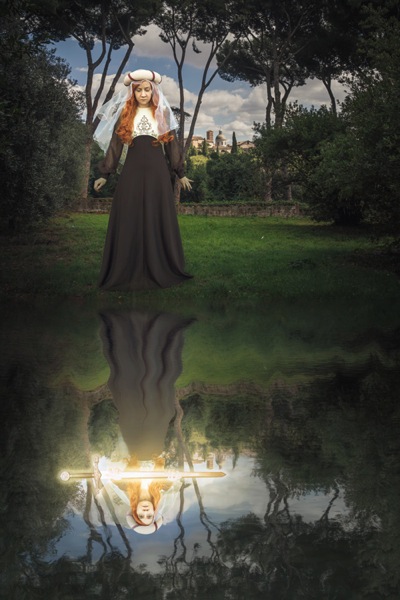
In “Return of the Sword” (below) I was playing with the idea of King Arthur’s Excalibur, and I wanted my character’s reflection to look as if it were offering her the sword. To be able to tell this story I needed to have the right prop, costume, and location, to help the viewer understand what was happening, and associate it with the original story.

Return of the Sword

#2 – Subject

Who is your character? What physical attributes do they need to have? If you have a willing family member or friend on hand, that’s great! Otherwise you can recruit models through places like ModelMayhem. However, your subject needn’t be a person, an object or an animal are fine too.

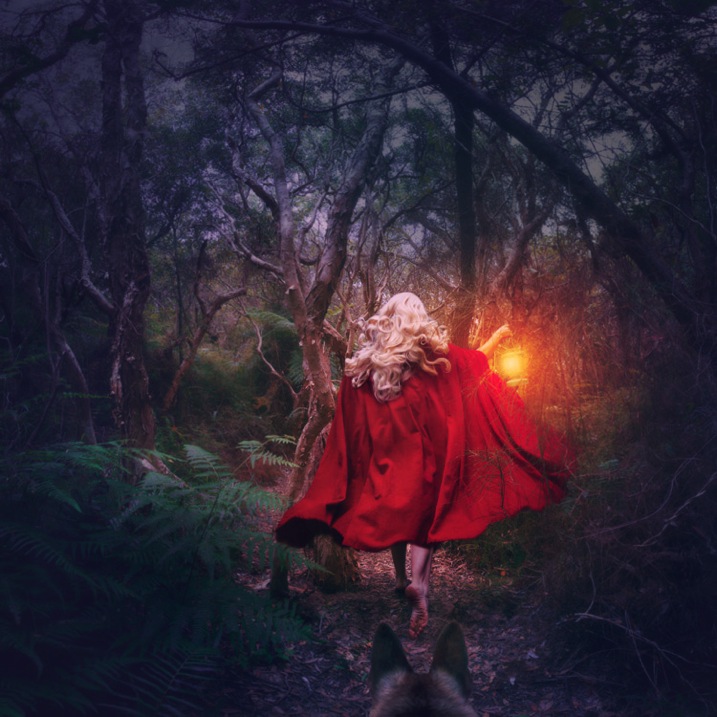
I shoot self-portraits, primarily because it’s convenient, but I’m certainly no classic beauty, so I try to disguise my face as much as possible. In “Red Runs” below, I wanted to show Red Riding Hood running through a forest, followed by a wolf, so my character needed a red cape and blonde hair. This was easily achieved with the help of a blonde wig and my dog, Koda.

Red Runs

#3 – Setting

Where and when is your story taking place? To find interesting locations, assess your local area for unique landmarks. Use Google Maps to discover what’s nearby, then use your car and your feet to explore further. If your goal is to photograph an interesting insect, your where might be in front of some black cardboard to cut out the background clutter, and your when might be early morning when the light is soft and appealing.

In “Siren’s Sorrow” below, I used an impressive local relic, the Gayundah Shipwreck, to tell the story of a regretful mermaid. I shot at sunset to add interest to the sky, and I wanted the time period to be non-specific, so I was sure not to include any objects in the shot, that would anchor it in time. There were many walkers passing by, and an active construction site overlooking the area, but you’d be surprised how quickly you stop being self-conscious when you start doing self-portraits.

Siren s Sorrow

#4 – Props

Having your subject interact with something will make your shot more interesting and further your story. You can buy props from cheap used clothing shops, eBay, or just use things you have lying around the house. If you’re going for something simple, spraying water on a flower adds interest, as does adding people to a landscape.

In “The Blue Girl” I wanted to tell the story of a girl who had cried for so long, that she filled a room with tears, and turned it into an ocean. I placed polyfill behind her head for the clouds, and added birds and a friend’s model ship, to give interest to the scene.

The Blue Girl

#5 – Wardrobe

What would your character be wearing? I have a rack full of costumes, specifically to be used in photoshoots, that I’ve bought from eBay and op shops, but you needn’t get this involved. My main considerations are usually whether the outfit suits the story, and if its colour will contrast with the surroundings, to make it stand out. If my face will be seen, I generally wear basic make-up I’ve applied myself.

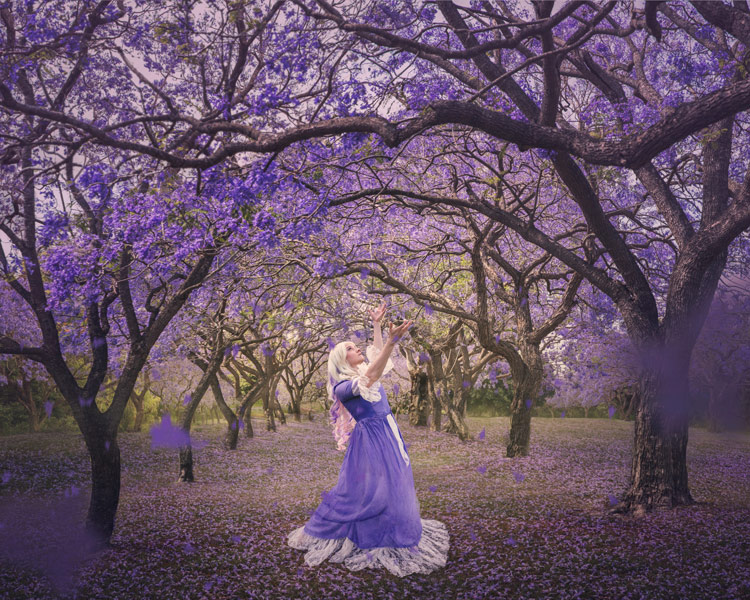
In “Dance of the Jacarandas” I used a $ 30 wig from eBay, and a $ 5 dress I bought at a local theatre’s costume sale. The dress was the perfect colour and shape, to make my character look like a Jacaranda flower.

Dance of the Jacarandas

#6 – Pose

What would your character naturally be doing in their story? Are they powerful or submissive? I tend to shoot the main pose, and then do a few variations so I have options to work with.

In “I Tried to Drown My Sorrows”, I wanted to show a girl who looked like she’d fallen into a glass. The pose had to be compact to fit in the glass, yet rigid to show the shock of the fall. I did this by jumping around in my backyard, then flipping the image upside down so I was falling instead of jumping. The movement caused by jumping makes the pose more dynamic and my hair look like it’s floating.

I Tried to Drown My Sorrows

#7 – Lighting

Lighting can be tricky, and expensive, so it’s always best to start out with natural light, positioning your subject so the light sculpts their features. Shoot early, or late in the day, and aim for overcast or cloudy days to avoid harsh shadows (unless that’s what you want). You can start experimenting cheaply with lamps and candles.

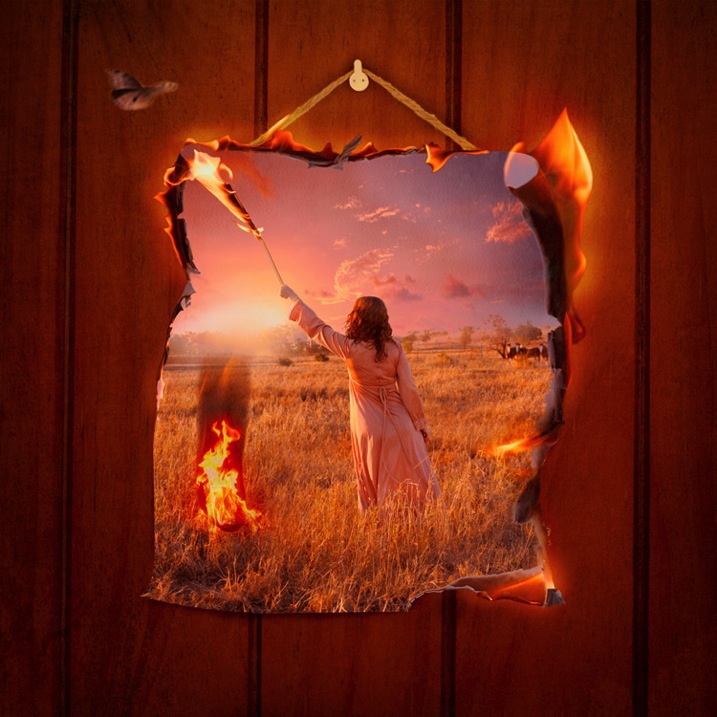
I usually like to work with natural, overcast lighting, because it makes compositing easier. But, in “Self-Destruct” I wanted the character to look as if she were burning the world down, so I shot as the sun was rising which would make the landscape a warm orange.

Self Destruct

#8 – Framing

Do you want a wide shot to see the location, or a tight shot to really focus on your subject? Do you want to shoot from low down to make them look powerful, high up to make them look submissive, or straight on to let the image alone tell the story? Do you want the whole scene in sharp focus, or do you want the background to be blurry?

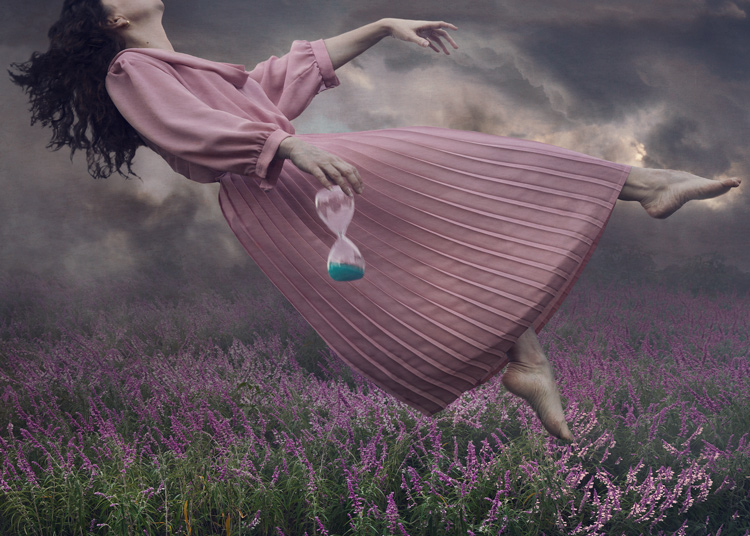
I shot the three elements (sky, character, flowers) of “Time Flies” straight on, so they were easy to composite together. I cropped the image so the girl filled the frame, but removed her face to add mystery to the image. The loosely pointed hand directs the eye around the scene.

Time Flies

Summary

When planning your image, try sketching out your idea beforehand, as this helps you visualize what it will look like, and if any extra elements are needed to strengthen your story. My images often take on a life of their own, different from my original concept, so don’t get too disheartened if your shoot doesn’t work out. You’ll still have learned a ton of things from the experience that you can use next time.

Naturally your concepts don’t need to be as involved, or as heavily Photoshopped as mine, but I’m certain you’ll find the process of creating something from your imagination incredibly fun and rewarding. I’d love to see the results of your own staged shoots, please share in the comments below.

Rosewater

googletag.cmd.push(function() {
tablet_slots.push( googletag.defineSlot( “/1005424/_dPSv4_tab-all-article-bottom_(300×250)”, [300, 250], “pb-ad-78623” ).addService( googletag.pubads() ) ); } );

googletag.cmd.push(function() {
mobile_slots.push( googletag.defineSlot( “/1005424/_dPSv4_mob-all-article-bottom_(300×250)”, [300, 250], “pb-ad-78158” ).addService( googletag.pubads() ) ); } );

The post 8 Tips to Improve Your Photography by Creating Instead of Taking Photos by Hayley Roberts appeared first on Digital Photography School.


Digital Photography School

 
Comments Off on 8 Tips to Improve Your Photography by Creating Instead of Taking Photos

Posted in Photography


Tips for Removing Digital Noise in Lightroom

17 Feb

One of the most significant advantages that modern cameras have over their film-based counterparts of days gone, by is their ability to change how sensitive they are to light with the touch of a button.

Back in the days of film you had to decide ahead of time whether you wanted to shoot at ISO (then called ASA) 100, 200, 400, or in extreme cases, 800. If you were going to take pictures outdoors, a roll of 24 or 36 exposure, 100 or 200 film would work fine, but woe betide the unsuspecting photographer who wandered inside a dimly-lit building with that same film still in his or her camera. To change sensitivity, and shoot in the new lighting conditions, you had to shoot the rest of the pictures on a given roll of film, remove it from your camera, and hope you brought some ASA 400 or 800 film with you.

Nowadays you just spin a dial on your camera to instantly switch between ISO values like 100 or 200, that work great in broad daylight, to ultra-high values like 6400 or 12,800, that would be positively unthinkable with film. It’s not all sunshine and roses though as one of the biggest issues with high ISO values is that of digital noise. Even the newest cameras produce pictures with noise and grain when shooting at high ISO values, but thankfully Lightroom can help mitigate some of the effects of this noise.

Shot at ISO 5000, the original image was too noisy for practical use. Lightroom enabled me to clean things up significantly.

Shot at ISO 5000, the original image was too noisy for practical use. Lightroom enabled me to clean things up significantly.

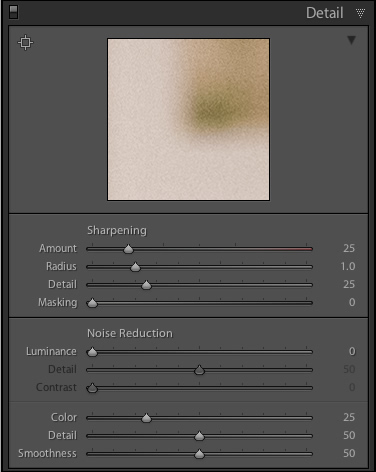
To get started with the noise reduction options click on the Develop module, then find the Detail panel on the right side. Note: this process works best if you shoot in RAW, not JPG.

You will find several options that can seem a bit confusing and overwhelming at first. You can experiment all you want, by just moving the sliders around to see what effects they have on your pictures, but it also helps to examine each one individually, to know precisely what they do. You will also see the Sharpening options, which are related to noise reduction, but I’m not going to focus on them specifically just yet. Before you look at the sliders themselves in the noise reduction area, it’s important to understand the two types of noise that are produced when taking a picture, Luminance and Chroma.

lightroom-noise-reduction-develop-panel

Luminance noise

This kind of noise affects the brightness, but not the color, of individual pixels. If you had a picture of a dark grey piece of paper with a great deal of luminance noise it would appear similar to old-school television static with lots of light and dark fuzz.

Chroma noise

This shows up as oddly-colored pixels, scattered throughout an image, almost like someone has tossed a handful of red, blue, and green grains of sand at it. Lightroom calls this “Color” noise, but it’s just another term for Chroma noise.

Both types of noise are byproducts of how digital image sensors capture data, and while they can be corrected somewhat in Lightroom and other post-processing software, it’s almost impossible to completely remove noise from a picture while still ending up with a usable image. Lightroom does give you some tools to get your digital noise under control, and if you know what you’re doing you can get some fairly decent results. Using separate controls for luminance and chroma noise, in combination with some sharpening adjustments, can help you salvage what you may think is a useless picture. As an example, here’s a picture that I took at ISO 6400, without any noise reduction applied.

35mm, f/5.6, 1/60 second, ISO 6400

35mm, f/5.6, 1/60 second, ISO 6400

Not bad, right? If this is what ISO 6400 looks like, you might as well shoot like this all day long! Well, before you go and spin your ISO dial all the way up to Ludicrous Mode, you might want to take a look at the same 24-megapixel image zoomed in to 100%.

lightroom-noise-reduction-scene-no-noise-reduction-100-percent

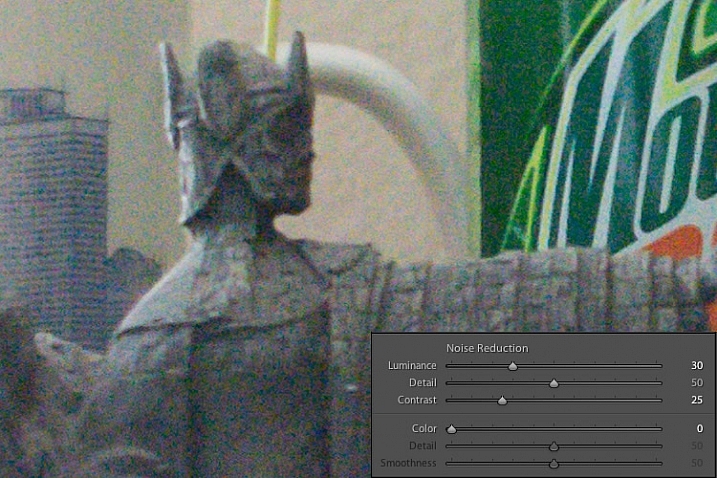
Ow, my eyes! The noise, it hurts! Not only is the picture full of color blotches, but shooting at ISO 6400 has resulted in an image that is far less sharp than it could be at a lower ISO. A great deal of color noise is evident on the torso of the figure, as well as the slanted lines on the left side, and you can see lots of luminance noise in the green letters on the right side too.

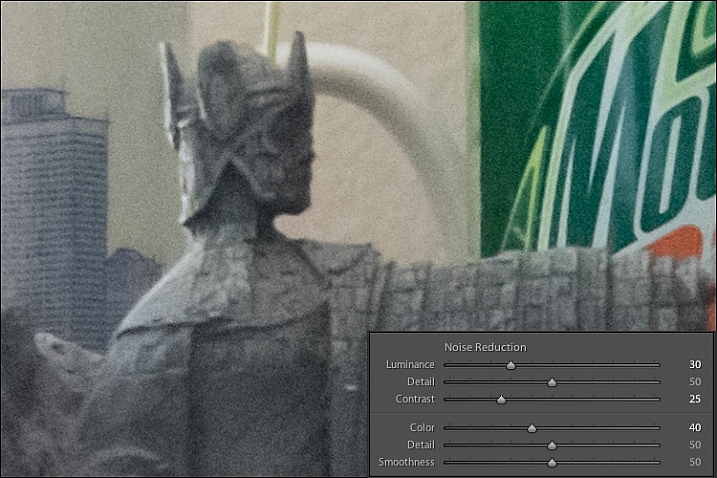
This noise is not always visible when you shrink  your files down to share online, but if I were to print this picture it would look like my cat threw up on the paper. Lightroom can help us fix things, and a good place to start, in this case, is with the luminance slider at a value of 30.

lightroom-noise-reduction-scene-luma-noise-reduction-100-percent

Much of the black and white static has been removed, but there are still splotchy patches of color scattered throughout the image, which can dealt with using the color slider next. Before you start thinking that this is a magical cure-all for your noisy images, take a closer look at the picture. Much of the details have been lost, or blurred, such as the lines on the side, and the patchwork of the figure’s tunic.

You can mitigate these effects somewhat by using the detail and contrast sliders, but again the results are not going to be ideal. Detail acts as sort of a threshold control, allowing you to tell Lightroom what should be treated as noise and what should be left in. I usually leave this slider at 50 but you can experiment with it to get the results you need. The contrast slider helps bring back some of the edges that have gotten blurry, thanks to the noise reduction algorithm, and even though I have set it to 25 in this example, you can clearly see that much of the edge contrast is not as good as the noisy original. Move this slider too far though, and your photo will start looking fake and artificial, so you’ll have to find a good balance depending on your needs.

To continue with the noise reduction, the color slider can be used to get rid of the weird splotches of red, green, and blue, but again you are going to see some tradeoffs.

lightroom-noise-reduction-scene-chroma-noise-reduction-100-percent

The results look fine at first, and you may notice that Lightroom automatically applies some degree of Color noise reduction (value 25) to every photo by default. This is because low-grade Color noise reduction is almost always good to have, and generally won’t result in too many tradeoffs for the image as a whole. In this case I used a value of 40, to show the effects a bit more. Even though the result is decent, you might notice something else that’s missing, if you look at the soda bottle label on the right-hand side. Compare it to the original picture and you will see that along with removing some of the color noise Lightroom has actually removed some color from the whole photo.

The Detail slider slider, similar to its counterpart in Luminance noise reduction, acts as somewhat of a threshold so you can tell Lightroom what is, and is not, noise to remove. The Smoothness slider is a fairly recent addition to Lightroom, and can be used to control what’s known as “low-frequency” color noise. Basically, slide it to the right to remove larger splotches of noise or to the left to keep these more intact.

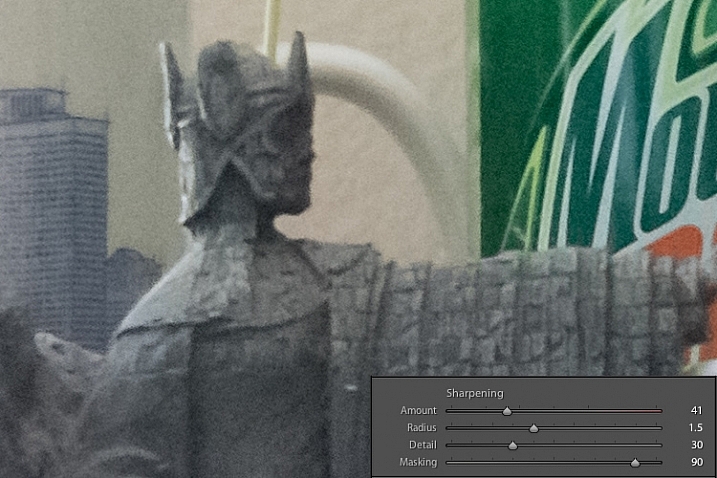
Every time you use Lightroom’s noise reduction tools you will deal with tradeoffs, and one of the most significant of these is the overall sharpness of the image. Photos with more noise reduction will almost always be softer, particularly where there are sharp contrasting edges, and you can bring a bit of this back by using the sharpening tools.

Here’s yet another 100% crop of the image above with the same noise reduction employed in the previous image, but with added sharpening.

lightroom-noise-reduction-scene-sharpened-100-percent

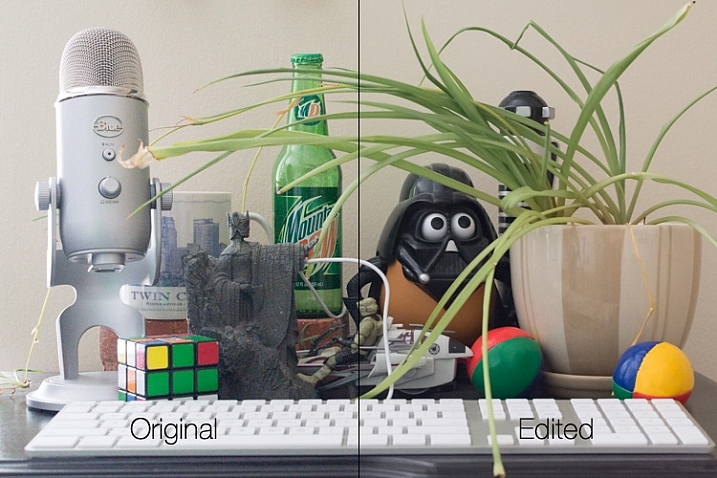
After a bit of sharpening, the detail in the lines on the left side has returned, and so has the texture of the tunic, but the lower-left corner is still a muddy mess of grey, whereas in the original noisy picture it was more defined. Here’s both the original and edited image side-by-side which might help you get a macro view of how these noise reduction and sharpening tools can affect a picture.

lightroom-noise-reduction-scene-both

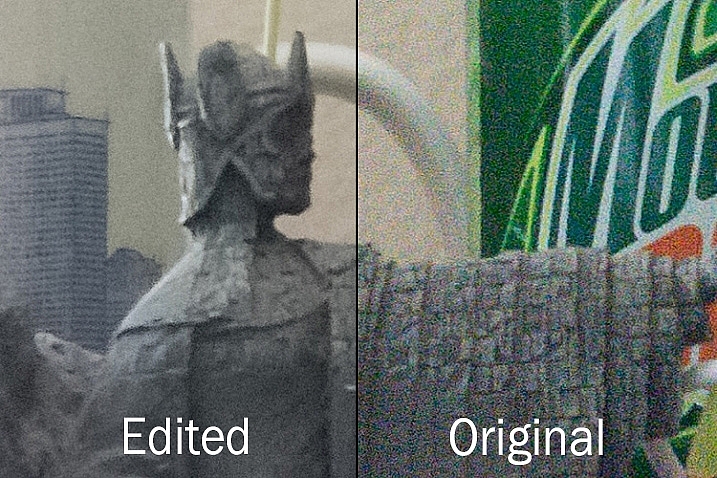
At first glance you might not notice too many differences, but one of the most glaring problems with the edited picture is the complete lack of texture on the wall behind the scene, as well as a smoothness to the plant that is almost unnatural. Here’s a side-by-side zoomed in to 100%.

lightroom-noise-reduction-scene-no-noise-reduction-100-percent-before-after

Is it worth these tradeoffs to get a photo with less noise? That question can only be answered by you, but one rule of thumb I like to follow, is that a noisy image can be corrected and edited in postproduction, albeit somewhat imperfectly. A blurry image cannot be fixed.

So, if there is a situation in which I find myself having to choose between a faster shutter speed and higher ISO (i.e. more noise), or a slower shutter speed and lower ISO (i.e. less noise) I’ll usually err on the side of noise, if the slower shutter speed would result in an image that is too blurry.

I also make liberal use of my camera’s auto-ISO feature, which allows me to set a minimum shutter speed and a maximum ISO value. That way I can concentrate on adjusting the aperture to get the composition I want, and always know that my pictures will be free of blur, even if does mean there will be a bit of noise I have to clean up in Lightroom.

The light here was quite dim which required a high ISO value. I didn't mind a slightly noisy image that was sharp and in focus, because I was able to get rid of most of the noise in Lightroom.

The light here was quite dim, which required a high ISO value. I didn’t mind a slightly noisy image that was sharp and in focus, because I was able to get rid of most of the noise in Lightroom.

One final note worth mentioning is you can also use Lightroom’s local adjustments like the Radial Filter, Graduated Filter, and Adjustment Brush to apply noise reduction in specific areas of an image only. However, this is a bit limited, in that these adjustments only perform luminance noise reduction, so you might still be left with some ugly colored spots, that can only be removed using the global adjustments in the detail panel of the develop module.

What are some of your favorite tips and tricks for removing noise? I’d be interested to hear any thoughts you have in the comments section below.

googletag.cmd.push(function() {
tablet_slots.push( googletag.defineSlot( “/1005424/_dPSv4_tab-all-article-bottom_(300×250)”, [300, 250], “pb-ad-78623” ).addService( googletag.pubads() ) ); } );

googletag.cmd.push(function() {
mobile_slots.push( googletag.defineSlot( “/1005424/_dPSv4_mob-all-article-bottom_(300×250)”, [300, 250], “pb-ad-78158” ).addService( googletag.pubads() ) ); } );

The post Tips for Removing Digital Noise in Lightroom by Simon Ringsmuth appeared first on Digital Photography School.


Digital Photography School

 
Comments Off on Tips for Removing Digital Noise in Lightroom

Posted in Photography


4 Tips for More Dramatic Beach Photos

13 Feb

For some of us, the beach is a way of life. Whether it’s barefoot strolls at sunset, surfing in the big waves, or simply relaxing in the sun, the beach can be a magical place that is food for the soul.

Capturing it in a photograph though, can be a completely different story!

Suddenly you notice things that weren’t so apparent before you took your camera out: super bright harsh light, and photos that look boring and that don’t convey the feelings you experienced when you were at the beach.

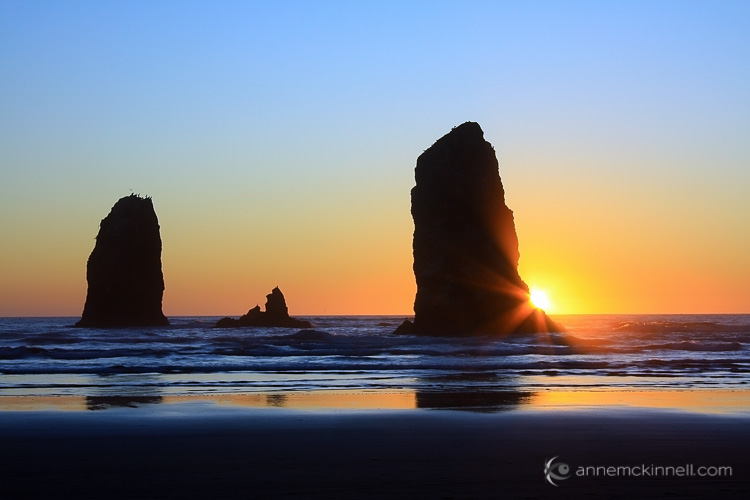
Bandon Beach, Oregon by Anne McKinnell

These tips will help you make the most of your time photographing at the beach, and ensure you come home with photos that are just as dramatic and memorable as your fun day in the sun.

1. Photograph during the Golden Hour

The middle of the afternoon, when the sun is high in the sky and the light is bright, is a great time for swimming and sunbathing, but not such a great time for photography. Just like other types of landscape photography, beach photography is all about the quality of the light.

At the edges of day, when the sun is low in the sky, you’ll find more gentle golden light that will make your photos glow. Sometimes you can photograph during the day too, but only when there are big puffy clouds in the sky that diffuse the light and create drama. If you have a big bright blue sky, it’s better to enjoy the afternoon swimming and visiting with friends, and save the photography for later.

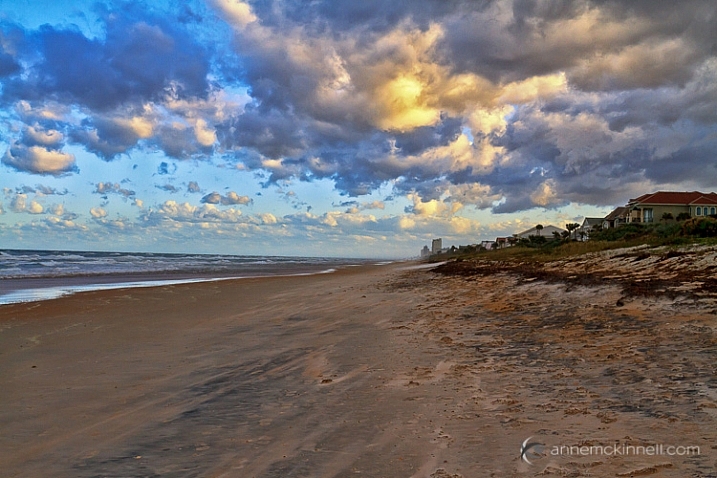
Ormond Beach, Florida by Anne McKinnell

2. Use a Graduated Neutral Density Filter

Even at the edges of the day, the sky is usually quite a bit brighter than the sand or rocks in the foreground of frame, which makes it difficult for your camera to get a good exposure, without blowing out the highlights and creating dark shadows.

Try to even out the exposure by using a graduated neutral density filter which is kind of like sunglasses for your camera. It’s a piece of plastic or glass that is dark on the top, and light on the bottom, and you use it to darken the just the sky portion of your image.

3. Use foreground elements to create an interesting composition

The beach always looks inviting when we’re just about to step onto the soft sand with our bare feet. But when you photograph it just as you see it, it can end up looking boring.

Try using a foreground element in your composition to add interest to the scene. Is there something unique about your particular beach? Perhaps it has colourful rocks, big boulders, driftwood, or seashells. Try incorporating the unique element into the foreground of your image, to make your photograph more interesting.

Rebecca Spit, British Columbia by Anne McKinnell

You can also use a low angle and get really close to your unique element to emphasize it. If you have big colourful rocks, getting down low, and angling your camera upwards, will make them seem even larger. Whereas if you photograph them from eye level they may not look nearly as dramatic as you remember them being.

Gros Morne National Park, Newfoundland by Anne McKinnell

Look around and see what you can use for leading lines that will guide the eye out to the sunset, or towards an important feature in the frame, like sea stacks, or a house in the distance.

Ross Bay, British Columbia by Anne McKinnell

4. Sunbursts and silhouettes

Try some new techniques to create dramatic images. If you are looking towards the sun, you can create a sunburst by including the sun in your frame and using a small aperture like f/22. It also helps if you can partially hide the sun behind an object.

If you have an interesting foreground element with a strong shape, use it to create a silhouette. To do this, use spot metering and expose for the sky, allowing your foreground element to go completely black.

You can even do the silhouette and sunburst together for even more drama!

Canon Beach, Oregon by Anne McKinnell

Next time you go to the beach remember these tips to help you come home with photos that are just as much fun as you had playing in the surf.

Do you have any other beach photography tips, or some favorite beach photos? Please share in the comments below.

googletag.cmd.push(function() {
tablet_slots.push( googletag.defineSlot( “/1005424/_dPSv4_tab-all-article-bottom_(300×250)”, [300, 250], “pb-ad-78623” ).addService( googletag.pubads() ) ); } );

googletag.cmd.push(function() {
mobile_slots.push( googletag.defineSlot( “/1005424/_dPSv4_mob-all-article-bottom_(300×250)”, [300, 250], “pb-ad-78158” ).addService( googletag.pubads() ) ); } );

The post 4 Tips for More Dramatic Beach Photos by Anne McKinnell appeared first on Digital Photography School.


Digital Photography School
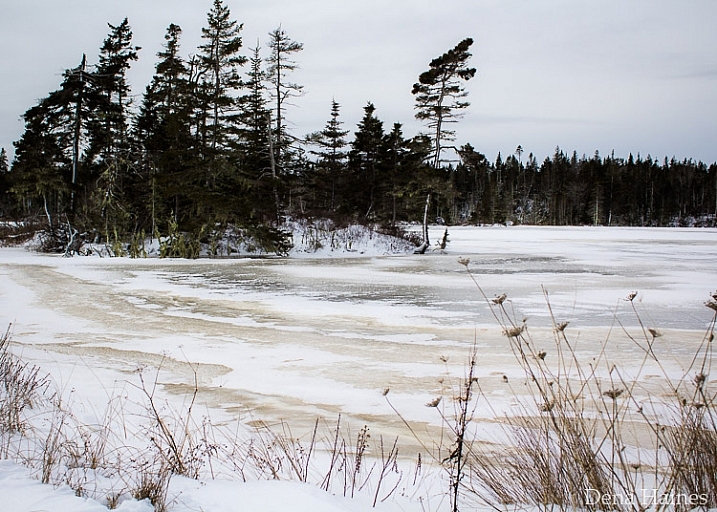
 
Comments Off on 4 Tips for More Dramatic Beach Photos

Posted in Photography