RSS
 

Posts Tagged ‘Tips’

5 Tips to Guarantee Great Road Trip Photos

10 Dec

The post 5 Tips to Guarantee Great Road Trip Photos appeared first on Digital Photography School. It was authored by Simon Ringsmuth.

1 - 5 Tips to Guarantee Great Road Trip Photos

Few things say “Midwest United States” like hay bales and rolling hills. You won’t find scenes like this on most interstates and major highways though.

For some people, the idea of taking a road trip can seem like a dull proposition. One fraught with mundane scenery and near-endless hours of staring out of the window watching the world outside whiz by at 70 miles an hour. However, with a little planning and creativity, you can turn any long car ride into a precious opportunity for amazing pictures.

The countryside you are traveling through may seem uninspiring. You may have already made the drive dozens or even hundreds of times. Still, there are a few things you can do to set yourself up with some fantastic photos, of which to be proud, at the end of your journey.

Take the road less traveled

I live about 400 miles from my parents and siblings, so I end up making the drive back to my old stomping grounds a few times a year. The easiest route to take involves a turnpike, followed by hundreds of miles of interstate. Due to the speed limit being higher, and the drive straighter, I don’t have to slow down every 20 minutes to pass through a small town. However, when it comes to photo opportunities, this type of travel precludes a lot of good chances for picture-taking.

2 - 5 Tips to Guarantee Great Road Trip Photos

I was driving down a highway when I saw this dirt road off to the side, so I pulled over and got a picture while also taking a minute to stretch my legs.

Interstates and other thoroughfares are great for getting to your destination quickly, but not so great for photos. Instead of taking the quick and easy path, as Yoda might say, look for alternate routes to your destination. Alternative routes that may not be as fast but are far more photogenic.

Pull up your preferred mapping software, or unfold a physical map, and look for highways or other types of two-lane roads. When you are driving down these types of roads, you pass by scenery that is more interesting than you find on the interstate.

Moreover, you also have the luxury of being able to pull over and stop without causing a traffic jam.

Plan your photos

When taking a road trip, have an idea in mind of the types of pictures you want to take. Keep a sharp eye out for those opportunities when you are on your drive. Hoping to find something interesting along the way to your destination may work out, however, planning ahead to photograph something specific, is likely to achieve much better results.

3 - 5 Tips to Guarantee Great Road Trip Photos

On this particular drive I wanted to take pictures of windmills and sure enough, once I had that thought in my mind I started noticing windmills all over the place.

The Baader-Meinhof phenomenon is a weird trick your brain plays on you. When you start taking notice of one particular thing, say a specific type of car or style of clothing, you start seeing it everywhere. This concept comes in handy on road trips. While you may not know what you are going to encounter along the way, you can plant the seeds for some great photos with a little mental preparation in advance.

For instance, on a recent drive back home, I pulled out a map and found some slower, but more interesting, highways to take. I told myself to look for windmills along the way. I couldn’t recall ever seeing windmills before.

However, given that I was going across the midwest United States, I felt sure I would end up going past at least a few. I was stunned when, as the hours ticked by on my drive, I kept passing one after the next and ended up with some excellent pictures as a result.

4 - 5 Tips to Guarantee Great Road Trip Photos

Try applying this method next time you’re on a road trip. You might be equally surprised at how well it works. Before you leave, think of a particular subject or type of picture you want to take. Then look at how often you see those opportunities along the way. Things such as dilapidated barns, weathered billboards, old bridges, tall cacti, mountainside vistas, or even dirt roads can all be exciting subjects for road trip photos.

If you plant these seeds in your mind, by the time you reach your destination, they could very well grow into fascinating and beautiful photos.

Time of day is paramount

Sunlight can make or break almost any type of photo. The same holds true when it comes to making images on a road trip. The journey you are taking might be perfect for some sunrise or sunset shots, but those aren’t going happen if you set out at noon! It might seem too simple to mention, but just knowing that your photos are dramatically affected by the sunlight affects your departure time and helps you plan accordingly.

5 - 5 Tips to Guarantee Great Road Trip Photos

There’s about a two-minute window for getting sunrise shots like this. Plan your drive accordingly.

If you aren’t sure what type of pictures you want to capture on your road trip, plan to leave at least 30 minutes before sunrise. You may see something compelling. Alternatively, if you know you are going to pass by a particular photo location, make sure you get a good picture of it by adjusting the timing of your trip. That way you maximize the chances of getting good light in that particular spot.

6 - 5 Tips to Guarantee Great Road Trip Photos

Allow more time than you need

If I take the interstate to get back to my hometown and plan on stopping only once, I can make the trip in about six and a half hours. However, that’s not how I prefer to make the drive. Taking less-traveled roads and stopping half-a-dozen times for possible photo-ops, I usually get there in seven-and-a-half hours. So, when planning for the drive, I always allow at least eight hours for unexpected photo opportunity stops.

One of the worst situations a road-trip photographer encounter is coming across a stunning sight or landmark only to realize they don’t have enough time to stop and take a picture. Give yourself some wiggle room by adding an extra half-hour into your drive schedule. Make sure that time is not a limiting factor.

Having extra time is also an excellent excuse to get out, stretch your legs, and see the scenery even if you’re not sure of the photographic possibilities.

7 - 5 Tips to Guarantee Great Road Trip Photos

On one recent drive to see my folks, I ended up driving past a vast field of beautiful sunflowers by accident. The lighting wasn’t great, but I stopped for some pictures nonetheless. I made a mental note to go back to the same spot on my return drive. Not knowing how long I would need, I made sure to build in plenty of extra time on my drive and achieved the shot you see above. This extra time gave me the ability to pull over a few hours later to capture this shot of an oil pump and wind turbine.

8 - 5 Tips to Guarantee Great Road Trip Photos

Don’t worry about your gear

At this point, you might be thinking about how to apply some of these tips on your next drive. However, you may not think you have the right gear for the job. On the contrary, the nice thing about road trip photos is you probably already have the camera equipment you need to take great photos. Something as simple as a mobile phone camera is enough to capture sweeping landscapes or beautiful countrysides.

9 - 5 Tips to Guarantee Great Road Trip Photos

I shot this with some expensive camera gear but based on the exposure settings (f/4, 78mm, 1/180 second, ISO 220) a nearly identical image could have easily been taken with a basic DSLR with a kit lens.

Don’t let your camera gear, or lack of it, hold you back from taking good photos the next time you are in a car for hours on end. Fantastic shots are achievable with a mobile phone, a DSLR, or anything in between. If you have a tripod, go ahead and bring it because you never know when it might come in handy. However, don’t stress over whether your camera is good enough.

As you develop your skills, you may find yourself gravitating towards a particular lens, or camera depending on the shots you like to take. Things such as lighting, planning, and taking less-popular roads achieve better results than merely buying a new camera.

10 - 5 Tips to Guarantee Great Road Trip Photos

I took this shot on a road trip with a simple point-and-shoot camera, and all it required was some good light and an observant eye.

What about you? Do you have any favorite tips or tricks for getting good pictures while out driving? Share your thoughts in the comments below!

The post 5 Tips to Guarantee Great Road Trip Photos appeared first on Digital Photography School. It was authored by Simon Ringsmuth.


Digital Photography School

 
Comments Off on 5 Tips to Guarantee Great Road Trip Photos

Posted in Photography


7 Top Tips For Running Photography Mini-Sessions

09 Dec

The post 7 Top Tips For Running Photography Mini-Sessions appeared first on Digital Photography School. It was authored by Lily Sawyer.

For many photographers, especially those who photograph families and children, there are certain times of the year which can be great opportunities for photography mini-sessions.

1 - 7 Top Tips For Running Photography Mini-Sessions

If you have done mini-sessions before, you’re probably already a seasoned pro. But if this is your first time doing one, these tips may help. It’s better to start planning months in advance to get the word out before people’s diaries fill up.

Mini-sessions are a quicker photographic session that is captured at lower than your full photographic session rate.

The most obvious opportunity is the Christmas mini when parents book photo shoots for their children or their family for holiday cards or to give to grandparents and family as gift prints. Then there’s Valentine’s day, Mothering Sunday, Easter/Spring, Father’s Day, Summer shoots, Autumn shoots.

Unless mini-sessions are all you do, I suggest deciding on which one to do from the above opportunities instead of offering a mini-session for each month of the year!

2 - 7 Top Tips For Running Photography Mini-Sessions

I thought it would be fun to do this in a DO and DON’T format. DON’T forget these are only my suggestions. Ultimately, DO decide for yourself what is best for your business.

1:

DON’T do more than two in one year.

DO select carefully the ones you want to do and whether you vary them each year or stick to the one or two. Running them more often than this only encourages a client culture of waiting for mini-sessions, much like waiting for a sale. You may lose full-paying clients. Whilst you end up with many new contacts and families, you may be missing the opportunity to market to clients who want to have a longer session with you.

2:

DON’T invite everybody.

DO invite only the clients who don’t usually go for full-price packages in the first instance or those who have a budget. Extend the invitation to their friends if spaces remain. If you don’t fill up, then you may well decide to make the invitation public. You may find that clients have like-minded friends. Knowing their friends do a mini instead of a full shoot, they may tend to follow suit, even if they can afford the full package. You don’t want your normal full-paying clients to suddenly switch to mini-sessions for their annual photoshoots.

3 - 7 Top Tips For Running Photography Mini-Sessions

3.

DON’T do several days or weeks.

DO specify one day (2 if you have more than you can take in one day), one location and short time slots. Make sure your time-slots do not have long breaks in-between. Be clear as to the duration of the mini-session, that is, when their time starts and ends. Make this much shorter than your usual photo shoot. It helps to have a short time in-between slots for a bit of leeway in case a shoot runs over. However, not too long in between so your client knows you have to wrap it up as there is another family waiting after their slot is over.

4.

DON’T overshoot.

DO have a maximum number of images to shoot in mind so you don’t take far too many and end up with more editing hours equivalent to a full shoot. When shooting very young children, we normally have to shoot plenty to make sure we get good ones but don’t labor a pose. Take a few and move on. It helps to have a mental (or physical) list of shots and combinations as well as spots and locations for poses or positioning of subjects to help keep to the session’s time duration.

4 - 7 Top Tips For Running Photography Mini-Sessions

5.

DON’T leave all the outfit planning to your clients.

DO give your clients an idea of the set or backdrop color beforehand so they can plan outfits to suit or you can suggest clothing. I usually ask them to send me photos of their outfits beforehand so we decide together. Having great outfits really make a difference to the final look of your images and may even help strengthen your branding if and when you decide to blog the session.

6.

DON’T allow an unlimited number of props.

DO ask them to bring only one or two props or items from home. For example, special teddies or toys for the kids to use as a prop or to comfort them if necessary. Usually, something that has special meaning works well. It’s a bonus if it goes with the outfits too. Again, you can discuss this with your client beforehand during the planning stage.

5 - 7 Top Tips For Running Photography Mini-Sessions

7.

DON’T send the children off without a little gift after their session.

DO show your appreciation. Applaud their effort and reward their time with one small gift like a small bottle of bubbles, sticker sheets or a little car. They will feel appreciated and that their hard work is recognized and valued. Who knows, this might set you up nicely for the next shoot with them where they warm up to you quicker than the last and be more obliging too. It’ll be a win-win.

I hope these tips are helpful. Do share your thoughts on photography mini-sessions and comments below, or if you have more tips to add.

The post 7 Top Tips For Running Photography Mini-Sessions appeared first on Digital Photography School. It was authored by Lily Sawyer.


Digital Photography School

 
Comments Off on 7 Top Tips For Running Photography Mini-Sessions

Posted in Photography


Photography Equipment Tips for an Africa Photo Safari

06 Dec

The post Photography Equipment Tips for an Africa Photo Safari appeared first on Digital Photography School. It was authored by Andrew Sproule.

There’s no doubt that booking and planning for an Africa photo safari is an exciting time, especially if it’s your very first venture. As a photo safari tour leader, I’m used to the process. Nevertheless, I still behave very much like a child in anticipation of what Christmas brings. As your departure date draws nearer, your thoughts move to packing for your trip. Although the appropriate clothing is essential, these trips are really about amazing wildlife encounters, shared experiences and capturing memories. It’s time to think about your photography equipment, – your gear.

It’s time to pack your camera bag!

Author’s Note

Before I dive in, I would like to state that this article represents my tips for maximizing your experience while on an Africa photo safari. It’s a guide with a mix of opinion and facts based on my on-location, in-the-field experience. It’s a summary, an introduction and not a laboratory review and therefore should be treated as such.

Secondly, I always recommend photography enthusiasts choose a safari designed explicitly with photographers in mind. General ‘tourist’ safaris have their place, but they’re much more likely to be governed by a species timetable. Lion, check. Move on. Buffalo, check. Move on. You get the picture. On a dedicated Africa photo safari trip, not only will you share a vehicle (often customized for photographers) with liked minded people, you’ll also benefit from being able to spend much more time with an individual animal or group of animals. You’ll be able to witness unusual behaviors and explore different angles and lighting situations. Explicit and invaluable guidance and advice are also on tap.

Thirdly, you’ll notice that I’ve included my camera settings below a number of the images. These settings worked for me in those particular situations, under certain conditions to produce the type of image I was after. I suggest you use these posted settings as a guide only. Instead, think about how these images might look if you were to adjust the shutter speed, aperture or ISO. Then, take that information into the field with you. The relationship between these elements can create widely different outcomes and also help you to define your style.

Leopard, Botswana. Canon 1DX, Canon 70-200mm(at 105mm), f/2.8, ISO 400, 1/125th sec handheld. Image © Andrew Sproule

Cameras for an Africa Photo Safari

Notice I have stated ‘cameras’ in the title and not ‘camera.’ I recommend you take at least two camera bodies with you. On the surface, this may seem like overkill or even a touch extravagant, but there are valid reasons why.

Firstly, it’s peace of mind. Imagine the heart-sinking moment if your camera fails. That emotion is tenfold if it happens on day one of a two-week photo safari! Whether you take two DSLRs, two mirrorless cameras, a combination of both, or an alternative solution, possessing a backup prevents any unnecessary anxiety. Before I purchased a second camera body, I used to hire one for my Africa trips. I still do this on occasion. It’s a great way of testing and trialing gear in the field beforehand and working out what works best for you.

Secondly, Africa is an extraordinarily harsh and dusty environment. Sand and dust particles are the enemies of sensitive camera sensors. Consequently, eliminating the need to swap lenses while on location can be a huge plus.

Furthermore, having two cameras armed with different lenses (for example a telephoto lens and a mid-range zoom), you’ll find it easy to switch between them. Switching between them is useful when wildlife comes too close, or if you are pulling away for a wide shot of wildlife in context of its habitat. Being able to adapt to shifting conditions can mean the difference between capturing, or not capturing the shot.

Not everyone is in a position to take two cameras. It also doesn’t matter whether your camera is full-frame, crop-sensor or another type, as there are pros and cons to all. What is fundamental is that you know your camera intimately. Practice on your dog, your cat or deer in a local park. Whatever you can. The more familiar you are with your camera’s features, the quicker you’ll be able to adjust to conditions that unfold in front of you with confidence.

Lenses for an Africa Photo Safari

Super-telephoto lenses with a focal length of 300mm plus are the staple for most Africa photo safaris. For crop-sensor cameras, 300mm should be ideal. If you intend to photograph birds as well as large game, the longer the focal length, the better. Full-frame cameras usually need lenses of 400m+.

Wild dog, Botswana. Canon 1DX, Canon 500mm, f/5.6, ISO 200, +2/3 EV, 1/160th sec, monopod. Image © Andrew Sproule

Although my go-to lens is a 500mm, I believe the versatility of zoom lenses make them ideal for African safaris. There’s such a wide variety of birds and mammals of a degree of varying sizes and distances that a good lens option would be something like the 100-400mm.

A short-zoom lens in the range of 24-70mm is also a great option as it provides the flexibility to pull away to present wildlife within its environment, adding real context to an image. Because I’m also a landscape photographer, I also favor super-wide lenses in the range of 16-35mm or 14-24mm.

Much of Africa’s wildlife is active in the early mornings and late evenings meaning you’ll be battling low levels of light. Lenses with larger apertures, such as f/2.8, allow more available light into the camera, so you’ll be able to use a reasonably high shutter speed for much longer. These lenses are a luxury item though, so an alternative solution is to increase the ISO. Doing so most certainly increases noise, but most photographers would rather have a sharp shot with an acceptable amount of noise than an out of focus shot with no noise. In many cases, you can eradicate most noise in post-production.

Filters for an Africa Photo Safari

I often use filters when composing landscape images, and on an Africa photo safari there are most certainly circumstances when the use of a filter is advantageous. For filters that reduce glare, saturate colors and darken skies, I recommend using a polariser filter.
If you need help to correctly expose bright skies, while preserving exposure detail in the foreground, then I recommend an ND filter.

Camera Support on an Africa Photo Safari

Burchell’s Zebra, Kenya. Canon 1DX, Canon 500mm, f/4, ISO 200, 1/50th sec, bean bag. Image © Andrew Sproule

Bean Bags

Bean bags are my go-to support, especially in East Africa. They are a simple, yet extremely effective support for your camera. Bean bags can be used to rest your lens on a vehicle’s doorsills, window frames, roof rails and the actual roof itself. Also, wildlife is often on the move, so you’re not limited to one position within the vehicle. Many reputable Africa photo safari tour operators provide beanbags. However, that said, it is always worthwhile double-checking beforehand. Bean bags can pack light and get filled with rice or beans on arrival. Some photographers prefer to fill their beanbags with lightweight polystyrene balls before they leave. It’s bulkier but a lightweight alternative. I’ve been using a couple of Kinesis SafariSacks 4.2™ for a while. As well as being a great support, the quick release straps secure the bags in place, so you never lose them in the bush.

A typical East Africa safari vehicle. Image courtesy of Governors Camp, Maasai Mara, Kenya

Unfortunately, bean bags are not a universal solution, contrary to what you may have read in certain books or magazine articles. Although they’re a fantastic solution in East Africa, they’re not as useful in Southern Africa (including South Africa, Botswana, Zambia, and Zimbabwe). The reason is that the vehicles there are radically different. Safaris in Southern Africa use open Land Rovers and Land Cruisers with no sides at all – often there isn’t even a windshield! So, there is nothing on which to rest the beanbag. In Namibia, both open Land Rovers and closed vehicles are in common use.

A typical Southern Africa safari vehicle. Image courtesy of Motswari Private Game Reserve, South Africa

Monopod

If a bean bag is not an option, a monopod offers a lightweight and more practical alternative to use within the confines of a safari vehicle. Especially in Southern Africa. You don’t need to extend it entirely, and it takes the strain from your arms and shoulders while seated. It’s surprising how effective it can be. I have tested many monopods over the years and have found that Gitzo Monopods™ best suit my needs. I also use a Really Right Stuff™ lever-style, quick release that makes the process of taking lenses on and off the monopod very fast.

Tripod

A tripod is useful or even an essential piece of kit for evening photography, longer exposures or for around the camp. Although, the wide-spread tripod legs make them impractical and ill-advised for most safari vehicles. However, if you’re in an open vehicle on your own, or perhaps with one other, a tripod can be rigged to provide an excellent platform for larger lenses. To avoid badly damaging your camera from vehicle shake, always remove your camera from the tripod while on the move.

Some airlines take a dim view of tripods, and you may find it difficult to persuade them to let you take it in the cabin as part of your hand luggage. If it’s going in the hold, it can take up more of your baggage weight allowance.

Clamp

I often use a ball head or gimbal head on a Manfrotto® Superclamp that can be bolted almost anywhere, including a vehicle’s roof bars. If I’m on my own, or part of a tiny group, I may even have several of these clamps placed in strategic points around the vehicle making it extremely easy to switch from side to side and back to front.

Manfrotto 035 Superclamp. Image courtesy of Manfrotto®

Storing Images while on an Africa Photo Safari

Laptop

You could easily take 300-500 images a day. Trigger-happy photographers may even have over 1,000, so a small laptop with external hard drives are useful for securely backing up your photographs. If weight restrictions allow, two hard drives that mirror each other is a great solution. Remember to pack essential items such as connecting cables, chargers and memory card readers.

Memory Cards

An alternative solution to external hard drives is to bring extra memory cards. You can file these away at the end of each day. That way, you are safe in the knowledge that your data remains untouched until you arrive home. If you don’t like the idea of swapping out memory cards too often, go for larger capacity ones such as 32GB. That said, I don’t like to put all my eggs in one basket, and therefore I opt for 2 or 3 smaller cards in favor of one larger one.

Accessories for an Africa Photo Safari

Batteries

Get to know what you can expect out of your camera with regards to battery life and take enough spares to get you through each day. Cold is a battery’s nemesis, so make sure they’re not getting too cold overnight. I have two spare batteries for each camera body, and that’s always been more than adequate for my purposes.

Lens Cleaning Cloth

Remember lens cleaning cloths. I would also recommend a camera and lens cover that helps protect your camera in the event of a rain shower and for protecting your gear against the dust mentioned above.

Others

Don’t forget your smartphone, binoculars, head torch, notepad and pen, personal medication, malaria medication, toiletries, money, your passport, and visa.

For detailed, up-to-date information on vaccinations and more, you are best to consult an official website.

Packing for an Africa Photo Safari

I recommend packing high-value items like cameras, lenses, and laptops in your hand luggage. Some airline safety requirements require you to pack batteries in your hand luggage, so ensure you charge your items, as airport security often requires you to demonstrate that laptops and cameras are all in full working order. A simple rule of thumb is to pack items essential to your photography, travel, and health in your hand luggage.

Pack your gear very carefully with disruption in mind. Some Africa photo tours can consist of two or three successive flights to get to various destinations in Africa. There may be two or even three layers of airport security on each of these flights. You may be required to unpack large cameras, lenses, and laptops. If you can, avoid placing smaller accessories on top of larger items that you may need to take out repeatedly and re-pack. Pack cables and batteries together in small pouches rather than loose in your bag.

Your camera bag should be large enough for your gear but small and light enough for all cabin limits. When packed you should be able to safely lift your bag in and out of the overhead lockers without assistance. Check the maximum sizes and weights for all the airlines and be aware that different flights often have different rules.

For small internal charter flights within Africa, total baggage allowance (hand luggage plus hold luggage) can be as little as 20kg and bags must be soft and pliable.

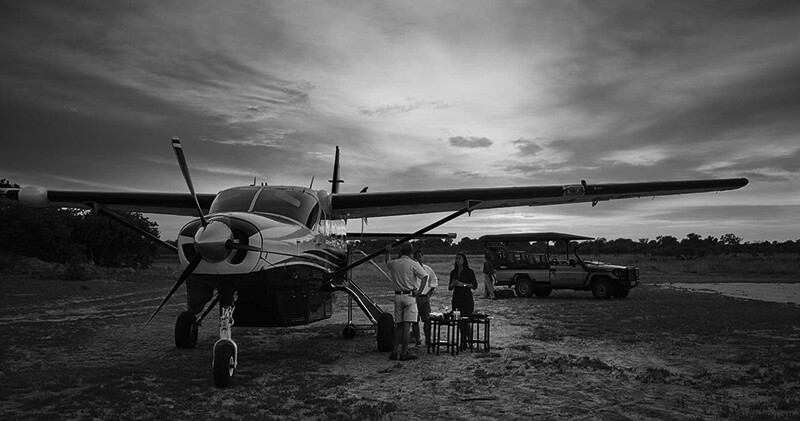
Typical Southern Africa internal charter flight. Image courtesy of Moremi Game Reserve, Botswana

Final Thoughts on an Africa Photo Safari

An Africa Photo Safari is an incredible experience. For many, it is a-once-in-a-lifetime opportunity both to experience incredible scenery and wildlife and to take amazing photographs.

There’s no doubt that it can be a daunting experience packing expensive and essential photography equipment for a safari. Even for seasoned photographers. Just remember to seek out advice. If you are booked on a photographer-specific tour, you can request support from your guides and or Africa safari tour facilitator. They have the experience and knowledge to help you make it the through this process with as little stress as possible.

The post Photography Equipment Tips for an Africa Photo Safari appeared first on Digital Photography School. It was authored by Andrew Sproule.


Digital Photography School

 
Comments Off on Photography Equipment Tips for an Africa Photo Safari

Posted in Photography


4 Tips for Building a Photography Portfolio and Business

06 Dec

The post 4 Tips for Building a Photography Portfolio and Business appeared first on Digital Photography School. It was authored by Lily Sawyer.

dps-Building a Photography Portfolio and Business

For some of us, a photography business springs from a hobby and grows into a paid endeavor, and so we feel it just landed in our laps. To others, it was more of a dream that was kept close and dear and planned to make a reality for a long time. For others, doors of opportunity open at the right time and place, and they’ve grabbed it.

Regardless of how your photography business has come about, for your business to take shape and grow, there are necessary steps to take. These steps require many initiatives and work and do not depend on luck or open doors of opportunity.

Let me share with you a few tips for building a photography portfolio and business. This article is of benefit if you are building your business from scratch or have been in operation but have relocated, requiring you to start afresh in a new location.

2-dps-Building a Photography Portfolio and Business

1. Build a Strong Portfolio

Now, don’t get me wrong – I don’t expect that you have a massive pile of photoshoots under your belt in the beginning (although that would be great.) All you need is a handful of carefully curated photos for your portfolio. If you have any images from practices or hobby shoots, choose your very best images. The best of the best, even if you only end up with a handful. If you are brave enough to do so, choose one genre and focus on that!

Usually the more niched, the stronger the portfolio.

3-dps-Building a Photography Portfolio and Business

2. Call for Models

If you don’t have any images to use or you feel your images are not good enough yet, plan a model call-out. Shoot new images that are more focused and consistent – your portfolio benefits from more consistent images. The goal down the line is that you are the one people think of when they need a photo shoot of a particular type.

You’re the expert in that field, and therefore you can also command decent prices. Having this in mind at the very start of your portfolio-building helps you streamline your model call plans in regards to age group, style, outfits location, and set-up. Branding is vital, especially at this stage. One could go as far as saying branding is everything.

3-dps-Building a Photography Portfolio and Business

You have two choices for model calls:

1. You can ask friends or friends of friends. You can do a public call on your social media platforms. If going the friends’ route, you may decide not to charge as you may feel they are doing you a favor. That is your call. However, money doesn’t grow on trees in business. Money comes from clients or investors who want a return on their investment.

Therefore, don’t be quick to offer your services for free, especially if you want to start charging decent fees or market rate. It’s hard for a potential paying client to start paying good money after initially being offered a freebie.

2. There are other options far better than offering freebies. You can do a barter of some sort. Think of something that either party finds beneficial with relatively equal values. You can also charge a fair rate for portfolio building that is lower than the market rate. You can offer the session at no charge in exchange for the model call but sell the prints. That way it’s not a total freebie.

Right off the bat, learn to accept money from clients without feeling guilty or feeling that you don’t deserve it. Also, don’t be embarrassed about it!

4-dps-Building a Photography Portfolio and Business

3. Have a Web Presence

Nowadays, if you are not on the web, you are not on the map. You don’t need a super-fancy website either if you feel that is out of reach at the moment. Although, it is easy enough to start a website using readily adaptable templates. More importantly, use social media platforms that are free and easy to set up such as Facebook and Instagram.

If possible, have both. However, if you are only doing one, a top tip is to think about your audience. What platform is your target market using? Parents with children are usually on Facebook. Younger age groups, like seniors, early 20s and 30s, are on Instagram. If you are after more real-time conversations and engagement with your followers, you could also link your accounts on Twitter.

5-dps-Building a Photography Portfolio and Business

A Web Presence is Your Virtual Office

Having a web presence is like having a virtual office. People can contact you and view your strongest images in your portfolio. This tool can be leveraged to reach more people, especially friends of friends. You can tag friends, share on their page, and ask them to share. All of these methods help to spread the word about you.

By tapping into your contacts’ friends, you are starting from a position of trust. You are no longer a stranger to a potential client but a referral. Use that to your advantage. By being reached easily on social media channels, you become more of a real person than just a webshop.

6-dps-Building a Photography Portfolio and Business

4. Print Some Business Cards and Stationery

While they may seem old-fashioned, business cards are useful because some people expect them, and they are great if you are networking in-person. If you want to be memorable, make your cards into a magnet, so you stay on people’s fridges! Think of something quirky, or at least different, so that you stand out more.

Having some printed promotional materials like mini-brochures and vouchers are invaluable. They come in handy if you want to collaborate with other small businesses in your area, such as your local health clinics for baby and maternity shoots, or boutique shops that sell outfits that fit with your branding.

6-dps-Building a Photography Portfolio and Business

I hope the tips in this article will help you in some way as you start your photography business. If you have any other tips, please share them in the comments below.

You may also find this article helpful.

The post 4 Tips for Building a Photography Portfolio and Business appeared first on Digital Photography School. It was authored by Lily Sawyer.


Digital Photography School

 
Comments Off on 4 Tips for Building a Photography Portfolio and Business

Posted in Photography


7 Tips for Beautiful Photos in Icy Cold Weather

26 Nov

Winter is a beautiful season to take photos. In order to capture the beauty that winter offers you’ll have to overcome cold temperatures for both you and your gear.

Here are seven tips that will help you protect your gear and take beautiful photos during the winter season.

Remember that exciting feeling you had as a kid when the first snow came? If you’ve become a grumpy grown up when it comes to winter, challenge yourself to recapture the wonder of winter this year!

1. If You Hate the Cold, Stay Inside!

When you think of winter photos you might imagine being bundled up outside in the howling cold trying to avoid frostbite while taking photos. I’ve certainly been in that situation a time or two!

Maybe the thought of crazy winter weather keeps you from ever stepping outside to take photos during winter months. But who says you have to go outdoors to take nice winter photos?

Before stepping outdoors, think about what you can accomplish inside.

A few years ago I spent the whole winter indoors studying. I loved the way the icicles looked hanging from our house. Rather than take my camera outdoors, I photographed the icicles from inside my house.

Ever since I was a kid I’ve always had a bedroom that faces the sunrise. I love waking up to golden hour.

These are the icicles during the afternoon.

These are the icicles at sunset. In Ontario, Canada, sunsets often have deep and vibrant colors.

These icicles are being lit by the cool light of the full moon.

2. Preparing Your Batteries

Now suppose you do want to head outdoors to take winter photos; you had better be prepared.

Make sure your batteries are fully charged (including your spare ones). Batteries tend to drain faster in the cold, so find a warm pocket to keep them in. A pocket should allow the batteries to be up against your body; perhaps an inner chest pocket. Also, try keeping a hand warmer or baked potato in the pocket!

While you’re waiting for your batteries to charge, enjoy a hot cup of tea! Steam is a lot of fun to photograph and works best when it is backlit.

3. Metering for the Snow

Most people use some sort of auto setting on their camera such as ‘landscape’ or ‘portrait’ mode. You may even be using aperture or shutter priority. With all of these settings, your camera uses its internal meter to calculate the right exposure or brightness for your photo.

This can be a problem.

When the landscape is covered in bright white snow, your camera will want to darken the exposure. This means that you’ll snap a photo and the snow will turn our looking very gray. The camera doesn’t realize that you want the snow to appear bright white in your photo. Of course, it doesn’t even know it’s looking at snow!

There are two ways to fix this. The first is to use full manual mode so that you have control over the exposure, not your camera.

If you’re not comfortable using manual mode yet, then try using exposure compensation. Set your camera to aperture priority, then use exposure compensation to increase the exposure by a full stop. Keep making adjustments until you’ve got it just right. Consult your camera manual on how to adjust exposure compensation.

Prior to using exposure compensation, I used to have to brighten all my winter photos with Lightroom. Notice how gray the snow is in the photo on the left.

Even though you can brighten your photos later with an editing program, it’s far better to get the exposure correct the moment you take the photo.

4. Look for Contrast

Once you’ve got the hang of exposure and metering it’s time to make some creative photos.

The first thing I look for in a snowy landscape is contrast. Since the snow is bright white, I look for dark objects that will stand out in contrast to the snow.

Contrast is what will help your photo to ‘pop’ and give it more dimension.

In a landscape, this might be trees, buildings, animals or people.

The dark trees in the background help the shape of the snow-covered hill to stand out. The boy sliding down the hill really pops too.

5. Think in Black and White

You’re already looking for high contrast scenes. Bright white snow together with dark objects create a perfect high contrast black and white photo.

Seeing our photos in black and white allows us to appreciate the lines and texture in the photo without being distracted by colors.

The bright snow is contrasted by the dark trees.

There are two options to get a black and white photo. You can change your camera settings to photograph in black in white. Or, you can photograph in JPEG or RAW mode and convert the photos to black and white later.

I recommend using RAW mode and set your camera to black and white. This way your RAW photo will retain its color even though it appears black and white on your camera. Using RAW mode offers you the chance to see your photos in black and white as you take them, but still have the option to keep them in color when you look at them later on your computer.

A silhouette is a perfect choice for a high contrast black and white photo.

6. Slow Shutter Speed

I love to be out in snow storms watching the wind whip the snowflakes around. The constant motion of the snowflakes will allow you to get creative with your shutter speed.

You can set your shutter speed to freeze the movement of the snowflakes, but you can also slow your shutter speed down and capture the movement of the snowflakes.

You can’t see the wind with your eyes, but you can see how it blows the snowflakes around. When you slow down your shutter speed, you’ll capture the blurred movement of the flakes.

You can slow your shutter speed down just a little bit and capture some slight motion blur.

You can slow the shutter speed down to about 1/30 of a second to capture even more motion blur. Just make sure that both your camera and your subject are held very still (consider a tripod).

I recommend using shutter priority. Slow down your shutter speed until you achieve the desired amount of blur in your photo. Remember the third tip I gave you about metering for the bright snow? If you’re having trouble getting the right exposure then try manual mode or exposure compensation.

7. Protect Your Camera Before You Come Inside

People who wear eyeglasses know how annoying it is to come inside from the cold. As soon as they step indoors, their glasses fog up! This is called condensation. It’s moisture from the warm air collecting on a cold surface.

This will happen to your camera too. When you bring it inside from the cold, moisture will collect on it, getting into all the tiny little parts of your camera. Naturally, this can be a problem for the long-term health of your camera.

Here’s what you can do to bring your cold camera into the house without having to worry about condensation:

While you’re still outside, put your camera into a large heavy-duty airtight bag. Seal the bag so that no moisture can get in. Now when you bring your camera into the house no moisture will get into your camera. Allow your camera to return to room temperature before taking it out of the bag. When you do take it out, no moisture will collect on it!

This airtight bag will keep all the condensation off my camera until it returns to room temperature.

Beautiful Photos in Icy Cold Weather

Whether you’re taking winter photos from the warmth of your cozy home, or you’re going to brave the winter chill, remember these simple tips:

  • Charge your batteries and keep them warm.
  • Get perfectly exposed photos through manual mode or exposure compensation.
  • Make your winter photos look creative by finding contrast, converting them to black and white, or using a slow shutter speed.
  • Keep your camera safe from moisture by sealing it in an airtight bag before coming back inside.
  • Be ready for your next adventure by recharging your batteries as soon as they are warm!

The post 7 Tips for Beautiful Photos in Icy Cold Weather appeared first on Digital Photography School.


Digital Photography School

 
Comments Off on 7 Tips for Beautiful Photos in Icy Cold Weather

Posted in Photography


5 Tips for Capturing Nature Across Different Seasons

23 Nov

Taking photographs of nature can be an incredibly rewarding experience. During the year the change in seasons provides you with wonderful photo opportunities to capture the variety of nature subjects on offer. Here are some tips for capturing nature across the different seasons.

Lavendar, Provence, France

1) Shoot The Same Location in Different Seasons

You may have a favorite location that you like to visit. For example, it could be a local woodland, a landscape or a place of interest you enjoy visiting during a holiday. When visiting there, you may find the scenery looks unique at different times of the year. The changing seasons mean the conditions may vary dramatically from one period to the next. Snowfall in winter makes way for spring flowers and lush green vegetation in the summer, which can have a significant effect on the look and feel of your image.

Frosty sunrise, Kings Sutton, Oxfordshire, England

Frosty sunrise, Kings Sutton, Oxfordshire, England

A blanket of snow or frost transforms the landscape, giving the most mundane subjects, such as your favorite tree, some magical appeal. While winter provides a striking and crisp scene, spring’s greens and blues can give a more vibrant and colorful image. I recommend you return to your favorite place, observe the scene during a few different seasons and capture the seasonal changes.

2) Shoot More Sunrises and Sunsets in Winter

One significant advantage of photographing nature during winter is that sunrise and sunset times are more favorable than in summer. Many people prefer to spend the colder months of the winter season indoors. However, this is a great time to head outdoors while the days are shorter and timings are better than the rest of the year. Later sunrises allow you more sleeping time, and earlier sunsets mean you do not have to wait around for hours to capture it.

3) Capture the Season of Changing Colours

Autumn is a magical season to be out with the camera and is the favored time of year for many landscape photographers. The season brings a fantastic variety of warm and vivid colors. You can capture a variety of subjects during the fall from woodlands to foliage and wildlife.

Consider the light and decide what you want to capture. You could zoom in on the leaves, or find a striking scene that is well lit. You can also shoot into the sun and work with backlight to create a dynamic image.

4) Capture the Changing Light

The Black Mountains, Brecon Beacons

Dramatic lighting and changes in weather occur at any time of the year. Striking storm clouds replace sunny spells in an instant providing fantastic subjects for your nature photography. I find that during the summer months, storms can be very dramatic and give great moments of fleeting light. Passing rains can give way to radiant glows and if you are lucky – beautiful rainbows. I captured this scene in June while out walking. The change in light that occurred as the sun re-emerged after a considerable downpour was wonderfully atmospheric.

I recommend capturing the change in light during autumn and winter seasons too, as the sun stays lower in the sky compared to the summer. Thus, providing longer shadows with which to play. The height of the sun can make an image look very different in the winter compared to the summer. In winter the sun strikes the scene from a lower angle making the overall composition and lighting unique.

5) Capture the Seasons in All Weather

Come rain or shine you should go out with your camera to capture the various seasons during all weather conditions. Don’t be discouraged from venturing out with your camera if it’s raining outside or the skies are grey and leaden. There may be breaks in the weather, and the rain eventually stops. Mist can often form after periods of rain making an attractive scene to photograph.

Misty landscape, Northern Ireland

If the rain is persistent, think of other ways to photograph the adverse weather. Photographing abstract scenes, water droplets, and close-ups of flowers or fresh water on lush landscapes can work. Waterfalls look good with overcast skies, and additional rainfall adds beauty with more water.

Conclusion

In summary, capturing nature in different seasons can be very enjoyable at any time of the year. Photograph your favorite place in changing seasons, take advantage of early winter sunsets and capture the changing light in all weathers.

Whatever Mother Nature serves you next, get out there and capture the fantastic changes in our beautiful world in all its seasons. Once you do, please share your images with us below.

The post 5 Tips for Capturing Nature Across Different Seasons appeared first on Digital Photography School.


Digital Photography School

 
Comments Off on 5 Tips for Capturing Nature Across Different Seasons

Posted in Photography


Top Tips for Editing Music Photography

21 Nov

So in my last article, we looked at how you can get to shoot live music. Hopefully, some of you will have used that article as the motivation to actually get out there and shoot. Great! If you haven’t, what are you waiting for?

This time, I want to write based on a comment I received about how to edit music photography, with some top tips to get your music editing to rock god standard. There is no right or wrong way to edit photos. You have your style of editing, and I have mine, so when looking at this if you think ‘I prefer more contrast’ then simply add more contrast.

I use Capture One Pro editing software. I know a huge percentage of you use Lightroom, but in reality, things are very similar. The buttons are in different places, but they do the same thing. What I want to do with this article is give you some pointers, rather than an exact step-by-step guide. Like all good recipes, you need to adjust for your oven and how spicy you like your food. With that said, let’s get cooking.

Speed

The thrill of a gig fades, for the fans, for the bands and for the publications that put the images out there. While speed is not super important when editing for small bands, I would always advise you to get your editing done as soon as possible. That way if you are delivering images to the band, they will still be hyped about the show and seeing your amazing photos will make them even more excited.

When I am editing for a publication, the idea is to get the images out as soon as possible. Therefore my editing technique is designed with speed as a factor.  For portfolio images, or ones you love, by all means, go into Photoshop and remove things, touch up the skin, etc., But in general, this is not required.

This tight deadline means you have to sometimes decide against removing the distracting lights or fire exit sign. It is much quicker to do now that Capture One, Lightroom, et al. have these features built-in. However, be warned, you can still easily get caught up in this process.

Many of you may be starting out, so you can spend time finessing the details a little more. There are many great tutorials on DPS about Photoshop and more advanced editing techniques, so make sure you read up on them if this is something you want to do.

Editing Starts in Camera When Shooting

I can’t stress this enough. The tendency to overshoot is strong! In a digital age, we can shoot and delete so quickly that we get carried away. The thrill of being at an event shooting live music can add to this, as you want to get THE shot. However, try to restrain yourself a bit. Every image you shoot is something you have to go back to and edit, so bear this in mind. That said, I have been guilty and when a singer is bursting around the stage, shooting at the camera’s max FPS is something that can help you get that great shot.

Metadata (AKA the Boring Habit That is Good to Get Into Early)

Metadata is the information that is attached to your file. It includes camera settings etc., but when you shoot for organizations or stock agencies, you need to include metadata within your images. It is best to get into this habit early.

Make your contact information into a preset, so it can be added easily on import to save time. The first data you need to add is the content field, which contains the following sections:

Headline

Description

Category

The ‘Headline’ is simple. Put the name of the band performing live at XYZ Venue. If you have a shot of the lead singer, then add that information. For example, on this image, the Headline is ‘Diet Cig. Live at The Rescue Rooms Nottingham. Dot to Dot 2015.’

With the description following as ‘Alex Luciano of the New York band, Diet Cig play at Nottingham’s Rescue Rooms as part of the Dot To Dot Festival.’

I saved the most important until last – ‘Keywords.’ You use Keywords for image searches within your catalog, or within a picture library or publication where you have submitted the image. For example, on this shot, the image includes keywords such as ‘Fender Guitars’ and ‘Vans.’ It’s amazing how many times people ask for a musician playing a specific guitar brand, or playing in a particular brand. So make it easy on yourself and use keywords to find them. I think the weirdest request I had was for artists performing in slippers. Unfortunately, I have none in my catalog. However, this goes to show how keywording in all the details, may come in handy.

Start this process early. Otherwise, before you know it, you’ve shot so many gigs without it that the thought of adding metadata to so many images means you don’t do it at all. Get into the habit, and it is painless. Leave it until later, and you won’t do it. Trust me! My first year of shooting live music has no metadata to this day!

Culling Images

You now need to narrow it down to a reasonable set of images to edit. I recommend around 10 to 15 max. You have to be ruthless in this selection process! When choosing shots, you may need to focus on minute details (and sometimes even perceived differences) to narrow it down. The key here is to be ruthless. Just like a holiday slideshow from your relatives – no matter how fantastic you think they are, nobody wants to see all 128 shots of a band that are in focus and well exposed. You want a small set of images that capture the intensity of being there. That way, they have much more impact. You will wow people rather than have them thinking ‘isn’t this shot just the same as the last one?’

This is what a typical image out-of-camera will look like. The color is out, there are some exposure issues, but this is a great starting point.

White Balance / Color Correction

White Balance and Color correction are the hardest part. You find so many variations of color at a concert that getting a realistic skin tone may be impossible. In this case, you can either embrace the colors or go to black and white. It comes down to your eye, and you may have to compromise.

As the screenshots show below, in mixed light, this can be quite extreme because your cameras’ white balance can miss by quite a way. Regarding camera setting, I leave the white balance on auto. Lighting changes so much in a concert situation, that even guessing what mode to set it to is not practical. Leave it in auto. Let the camera do its best, and then (and I hate to use this term) fix it in post.

This is where you choose if you want it in black and white. Sometimes you have a great shot, but the color is beyond fixing (red light is killer, and for some reason, lighting guys love red!). So the only option is black and white. Now as I said in my last article when doing this for media outlets, black and white is generally a no-go, but for personal work (and even portfolio) there is nothing wrong with black and white. I love the look.

The other option is to go with the color and let it be part of the atmosphere of the photo. I have a shot of Ian Brown from the Stone Roses (whom I idolized as a youngster) looking through his tambourine and straight down the lens. The lighting meant that I would never be able to get natural skin tones, so I embraced the color and edited it with that in mind.

Alex Luciano of the New York band Diet Cig

Colour balance makes this image much better, but there is still work to do.

Exposure

Once you have your color set, you can begin to work on exposure. Similar to any other editing you do, but the main difference is how much you use the ‘recover highlights’ and ‘shadows sliders.’ Concert lighting is usually high contrast, especially if you have the background lights in the shot. Using the recovery sliders can help here. Background lights are generally the only time I do a bit of retouching. If I have a fantastic photo with a distracting background light, I quickly remove it. This is the beauty of only having ten images to edit rather than 75. You can spend a little more time with each image, even when you are on a tight turnaround. Another tip here is to lower the saturation to help take the edge of hard colors. You can also work with individual colors too, which helps.

For the image we are working with here, I reduced exposure by just under 1-stop and recovered the highlights. I also added a little clarity & contrast to the image for more punch.

Levels/Curves

For my final tweaks, I use ‘curves.’ You can also use ‘levels,’ but this is down your preference. Whichever you use, it is a case of working with each color channel to create a more balanced final color. Tweak the contrast until you are happy.

With the image we are using here, I tweaked the ‘mid-tones’ a little. I adjusted each of the red and green channels, making subtle changes (subtlety is key here) to get a better balance of color in the image.

Crop

If needed, you can crop the image. I’m not going to bore you with how to, but it is just something to keep in mind. Remember, a little crop can remove things like fire exit signs a lot quicker than Photoshopping them out.

Final Tweak

I always like to add a small vignette to my images. Usually very subtle, but I just like the way it draws attention to the subject. I think sometimes it is more a force of habit rather than necessary. Again, this is up to you.

Last Check

Walk away from your monitor for a couple of minutes. Grab a drink, or go to the bathroom. The key is to get away from the screen for a couple of minutes. You can easily push things like contrast too far without realizing. So take 2-minutes away then come back and check if you are happy.

The final image that went to the publication.

Copy, Paste, Tweak, Repeat.

When editing more images from the same show, the starting point is always copying and pasting the settings form the image you already edited. Generally, this gives you a great starting point. However, the lighting for the first song and the third song are not always the same, so you may have to start from scratch. As with anything, the more you do, the easier it becomes. 

Black and White

The color version of this show just wasn’t working for me, but I loved the energy, so decided to go black and white.

Finally, let’s go through black and white. I always follow the same process as for color photos as above. It helps me to know if a photo works best in black and white or color. With this image, I couldn’t get the color right. To me, it lacked something, but I loved the energy. So, I decided to try black and white instead.

When converting to black and white, I always start with a preset because I find ‘Capture One’ has some great ones. The preset is used to get the image close to what I want and then I tweak to my taste. Using black and white is a savior for when the light is mostly red. Red can make for some amazing black and white photos. However, when you know you have to deliver in color, it’s great that the sound of the music drowns out your swearing at the lighting technicians!

Black & White made this image pop, and a quick crop removed the distracting photographer to create this final image.


I hope you found this article helpful. Unfortunately, there is no preset or magic bullet to offer, as all lighting situations are different. However, I hope you found this article helpful for editing music photography images of your own. 

As always, pop any comments below and I will do my best to answer.

The post Top Tips for Editing Music Photography appeared first on Digital Photography School.


Digital Photography School

 
Comments Off on Top Tips for Editing Music Photography

Posted in Photography


Maternity Session Tips For Better Client Experience

13 Nov

There are many different types of portraiture. Maternity is probably one type that is truly one-of-a-kind. Each maternity session is different, however, these tips will help you have the same approach to your sessions so they run smoothly from beginning to end.

Maternity Session Tips For Better Client Experience 1

Keep Posing Simple

When women get a maternity session photographed, they are usually between 7-9 months pregnant. As a photographer, you should know that a growing belly is tiring. Therefore, keep posing simple and move your client to a minimum to help her stay comfortable while you are photographing this beautiful moment in her life.

Maternity Session Tips For Better Client Experience 2

In order to keep the focus on the belly, use your client’s hands to frame the belly. One hand on top and one below, both below, both on top, or rubbing the belly. All are great ways for your clients to connect with their belly. They will also appear more natural in photos as the bump is the main focus.

Maternity Session Tips For Better Client Experience 3

Popping one knee out can help give your client a little more shape. This is especially helpful if she is wearing a long maxi dress or wardrobe that hides her natural shape. Make sure that your client pops out the knee that is closest to the camera. She can do this by putting one foot on tip-toe or just bending the knee.

Maternity Session Tips For Better Client Experience 4

In order to make the belly stand out while still giving your client a bit of shape to her body, angle her at 45 degrees from the camera. This makes the maternity silhouette more prominent in the photographs.

Maternity Session Tips For Better Client Experience 5

Pose your client with a knee pop and at 45 degrees toward the camera to put the focus on the belly silhouette.

Posing with Partner or Siblings

When posing with siblings, make sure to pose your client first and then have her children surround her. Or if she is willing to carry one sibling. Try different poses and allow for natural posing to happen. Children might be excited to rub or kiss the belly, and you can capture many natural expressions.

Maternity Session Tips For Better Client Experience 6

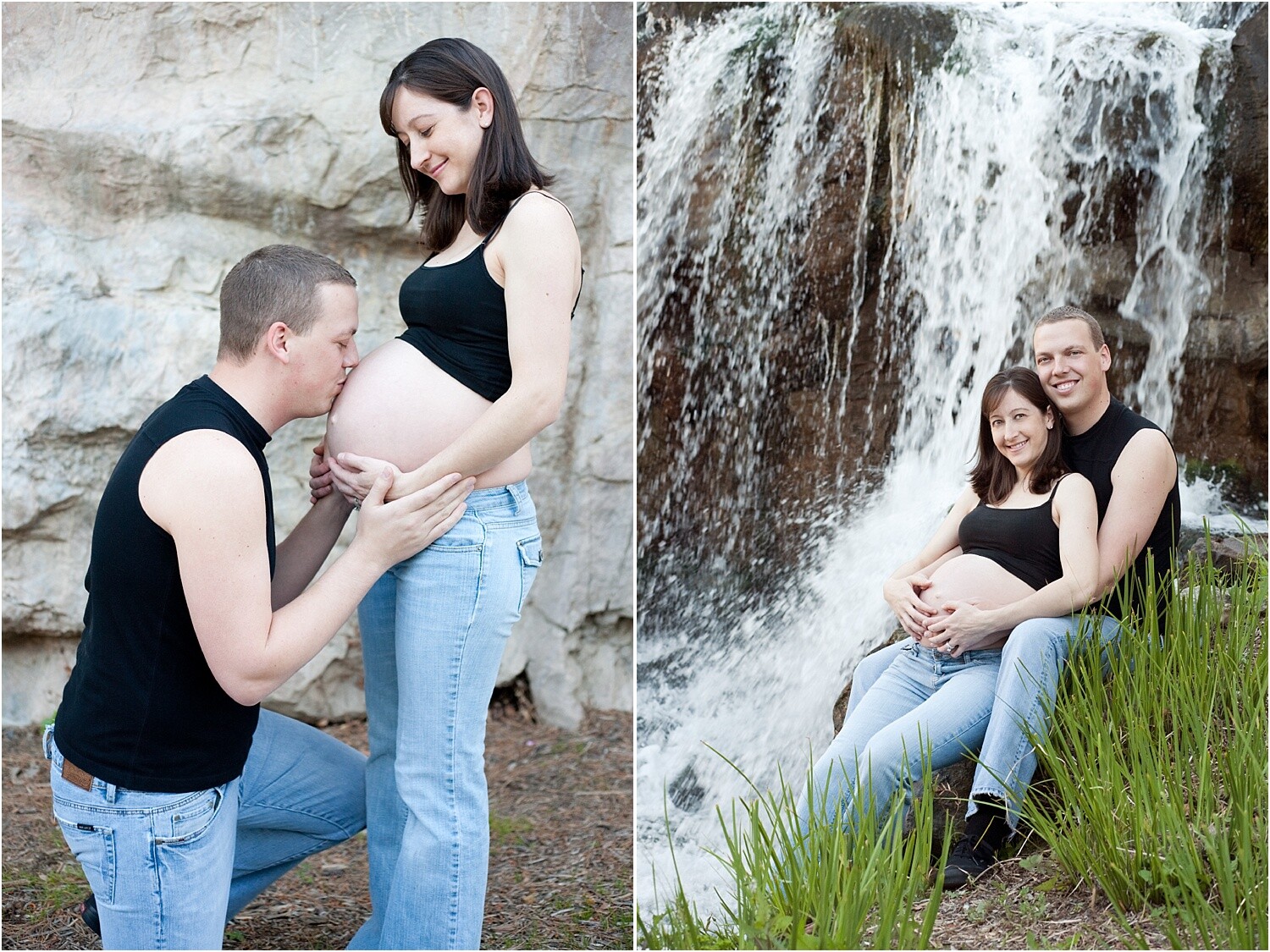
When posing with partners, make sure that they are interacting or connecting with the belly as well. A hand on the belly, or kneeling, rubbing or speaking to the belly can really bring out a connection. Don’t be afraid of just focusing on the partner and the belly bump. Take photos close-up and from afar to include both clients.

Maternity Session Tips For Better Client Experience 7

Photographing the whole family can be tricky during a maternity session. Keeping the energy light and happy can really help bring out the best expressions. Working quickly is a good idea to keep the siblings interested and engaged. Move through poses swiftly and try to tell jokes or be playful to help.

Maternity Session Tips For Better Client Experience 8

Whether you’re photographing your client indoors or outdoors, try to maximize the number of poses in one spot. Being pregnant can cause swollen feet if she is on her feet for too long. When posing siblings and partners, move them first or move them closer to your client so that she doesn’t have to move around too much.

Know Your Pregnancy Facts

If you are a female photographer and have been pregnant before, then you can skip this tip. However, if you have never been pregnant or are a male photographer, it is really important to take the following into consideration. You will ensure your client has the best maternity session experience.

Maternity Session Tips For Better Client Experience 9

  • Maternity clients may not be able to walk around a lot without getting tired or swollen. Take breaks between setups and offer her a seat whenever possible.
  • Bathroom breaks: Be close to bathrooms because a pregnant woman will need to go often.
  • Offer water and snacks. Pregnant women need more calories so it’s really important for them to have healthy snacks and lots of water. It’s a nice gesture if you these to the session to offer her. Take it a step further by asking what her favorite snack is right now.
  • Ask if they will want retouching done to their belly. Some women prefer to keep it natural as it is in real life. Some will want a little extra editing. Asking up front can keep you from doing double the work or having to re-edit photos later.
  • Ask if your client will want to show her bump or not. This will help you prepare her to bring the right wardrobe.
  • Do not point out the obvious: that they are pregnant, or big, or look like they are having twins or anything of that nature. All you should ever say to a pregnant woman is that she looks beautiful and congratulations. Anything outside of that can seem like unsolicited advice or opinions. It may be interpreted as rude.

Maternity Session Tips For Better Client Experience 10

These are just a few of the things you should be aware of in order to give your client the best maternity session experience. She will see that you have put a great deal of effort into her comfort and will be instantly appreciative.

Props and Accessories

Ask your client to bring props or accessories that she has already purchased for her little one. Shoes, bows, onesies, signs with the name or another special item that can really personalize the session for them.

Maternity Session Tips For Better Client Experience 11

The more they bring, the more you will have to play with resulting in more options and variations for your clients. It can be exciting to incorporate the items into the session.

Maternity Session Tips For Better Client Experience 12

Photograph the items alone as well as with the bump. A nice detail photo of the item can look really nice in an album. You can also offer ideas for them to bring props or particular accessories to create more of a story.

Maternity Session Tips For Better Client Experience 13

If you are photographing inside your client’s home, you can photograph the nursery. As well adding to the overall experience of her pregnancy, it will show the experience of waiting for the baby to arrive.

Show Your Client Photos During the Session

Pregnant women are very self-conscious about the way they look. To make sure that they feel confident, show her a really great portrait of herself during the session. This can give her a boost knowing that you have captured her best.

Maternity Session Tips For Better Client Experience 14

Letting her see for herself that she is radiant and beautiful can make the session go much smoother. She will trust that you are getting the best photos of her during this very unique and important moment in her life.

Offer a Newborn Session

When you are wrapping up the maternity session, offer your clients a newborn session for when the baby is born. Newborn sessions are typically done within two weeks of the baby being born so they don’t lose their newborn features.

Maternity Session Tips For Better Client Experience 15

Chances are that your client hasn’t thought that far in advanced yet and it will be nice for them to come back to you since you have already built trust.

Maternity Session Tips For Better Client Experience 16

Let them know about the session options you offer and how you can create a beautiful album of both sessions so that they can always look back on these joyous moments in their lives.

Maternity Session Tips For Better Client Experience 17

If they walk away with a great experience during their maternity session, they will certainly want to come back for the newborn session. And all subsequent portraits thereafter. Don’t miss your chance to keep your clients coming back!

In conclusion

A maternity session is special in that you get to photograph this very unique, one-of-a-kind moment in your client’s life. Make sure to stay positive and energetic. Take breaks and snacks, and be aware of what you say.

Guide your clients through the process so that they can enjoy and trust you to make the best photographs possible of such an important time in their lives.

The post Maternity Session Tips For Better Client Experience appeared first on Digital Photography School.


Digital Photography School

 
Comments Off on Maternity Session Tips For Better Client Experience

Posted in Photography


4 Tips for Capturing Autumn Colors

12 Nov

For those of us who live in North America, autumn is in full swing. The leaves are changing from their bright green colors and are taking on incredible hues of yellow, orange, and red. It’s a time of flux for Mother Nature.

For us photographers, it’s prime time to get out and take advantage of all those beautiful fiery colors that lead into the winter months.

4 Tips for Capturing Autumn Colors

Capturing the brilliant colors of Fall isn’t something that requires a lot of planning other than finding a suitable location. That said, there are things we can do during and after our shoot to ensure we get more from our time outdoors at this time of year. In this article, I’ll share with you four easy ways of capturing autumn colors to achieve the best images of Fall.

Use a Polarizer

If you’re familiar with photography, you’ve likely used or at least heard of a polarizer. Polarizers are filters (circular or square) and attach to the front of your lens. They essentially allow only straightened light rays to pass into your camera. Polarizers help to darken skies, reduce reflections and most importantly, deepen color tones.

4 Tips for Capturing Autumn Colors

When you’re shooting for the maximum color effect it’s a good idea to pack a quality polarizer in your gear bag. Most CPL’s (circular polarizers) allow you to dial in the polarization effect based on your needs. You can add or reduce the impact.

The following images were shot with and without a polarizer. You can see the notable differences in colorization between the images:

4 Tips for Capturing Autumn Colors

On the left we have a 1:1 zoom of a photo taken without a polarizer. On the right, the same scene is shot WITH a polarizer. Note the subtle increase of color saturation as well as the accompanying decrease in light transmission.

Keep in mind; polarizers physically reduce the amount of light entering your lens. A small adjustment in exposure may be needed to make use of this type of filter.

Search for Complementing Colors

A great way to make your images of the autumnal colors pop is to make use of something called ‘Complementary Colors.’ Complementary colors are hues that lie opposite to one another on the standard color wheel.

Color wheel - 4 Tips for Capturing Autumn Colors

Aesthetically, complementary colors work together to make a more pleasing image. Oranges, reds, and yellows are the flagship colors of Fall. It’s a good idea to look for their complementary colors (blues and purples) and incorporate them into your compositions.

Leaf in water - 4 Tips for Capturing Autumn Colors

Don’t limit complementing colors just to shooting scenes of Autumn. Try making use of colors falling opposite one another on the color wheel in all aspects of your photography.

Learn to Use Water

Water is one of the most dynamic elements of nature on our Planet. For photography, it’s one of the great muses. When it comes to bringing out the organic essence of autumn, there are a few things that can help you more than water. Whether it’s reflections, dew or just the earthy feel after a rainstorm, try incorporating water into your images of Fall. It is an excellent way to inject a new level of creativity into your images of Fall colors.

Incorporating water - 4 Tips for Capturing Autumn Colors

Look for reflections, water droplets or anything else in the scene that has been transformed by the presence of water. If I can offer a rare bit of solid direction, remember that brightly colored leaves floating on water generally make for bulletproof compositions.

Floating leaves - 4 Tips for Capturing Autumn Colors

Make Use of the HSL Panel

Last but certainly not least, our last tip for photographing the brilliant colors of Fall happens after you capture your image. The HSL Panel in Lightroom (or other software) offers an indispensable way to adjust the hue (H), saturation (S) and luminance (L) of individual colors within our photographs.

HSL Panel - 4 Tips for Capturing Autumn Colors

This tool is handy for bringing out the colors we want emphasizing without making global changes to our entire photo. I cannot overstate the power of the HSL panel. Not only does it offer the possibility of adjusting the brightness and saturation of individual colors, but also their hues; which can change the entire feel of a photograph.

HSL Control - 4 Tips for Capturing Autumn Colors

Using the HSL to control the hues of your color tones is a great way to completely change a photo with just a few clicks.

HSL Control Purple - 4 Tips for Capturing Autumn Colors

Some Final Thoughts on Photographing Fall Colors

We are served up such a diverse and accessible photo color palette in the Autumn months. Colors blaze and overall tonality of light and mood offer excellent photographic opportunities virtually any time of day.

Make use of the tips in this article to breathe new life into your images of Fall.

If you have any tips for capturing autumn colors or have images of Fall you would like to share with us, then please do so in the comments below.

The post 4 Tips for Capturing Autumn Colors appeared first on Digital Photography School.


Digital Photography School

 
Comments Off on 4 Tips for Capturing Autumn Colors

Posted in Photography


5 Tips for Better Road Trip Photos

09 Nov

Are you heading out on a road trip anytime soon? Packing up the car and hitting the road with friends, family, or even running solo can make for a great adventure.

But as photographers, our thoughts aren’t just on the experience itself. Documenting it with your camera adds to the occasion for creative types, but doing it on the road adds another level of challenge!

Here’s a 2-minute video from Tajreen&Co which outlines 5 top tips for getting better road trip photos, that make for better memories and pictures.

5 Top Tips for Getting Better Road Trip Photos

  1. Shoot with the kit you already have – even your phone!
  2. Interact with your environment
  3. Exaggerate your shots – explore angles and backdrops
  4. Capture moments and emotions – it’s all about the experience
  5. Plan your shoots even on a road trip

What are your tips for achieving better road trip photos?

The post 5 Tips for Better Road Trip Photos appeared first on Digital Photography School.


Digital Photography School

 
Comments Off on 5 Tips for Better Road Trip Photos

Posted in Photography