RSS
 

Posts Tagged ‘Tips’

Review of the Delkin Sensorscope System on Weekly Photo Tips

18 Dec

www.WeeklyPhotoTips.com Today we are reviewing the Delkin Sensorscope System. This is a complete sensor cleaning kit that will allow you up to two dozen camera cleanings. The key component of the kit is the Sensorscope, a 5x magnifier with 4 bright LED lights that allow you a clear complete view of your sensor both pre and post cleaning. There is nothing else you need to get as the kit is complete with all the supplies (swabs, fluids, even the batteries) that you will need to do a thorough cleaning. You can read more about the Delkin Sensorscope System along with links and pricing info at Weekly Photo Tips. www.WeeklyPhotoTips.com


DSLR Tips – Choosing an “All around” lens

15 Dec

The process of deciding on a “walkaround” – “carry around” lens is different for everyone but here is some talk on the subject.


Photography Tips and Tricks – Episode #1

10 Dec

See more episodes at kelbytv.com Welcome to Photo T&T: the weekly podcast that offers tips and techniques for taking the best photos you have ever taken. This week, landscape photographer Bill Fortney offers 3 tips on using the new Nikon D-600 menu functions, RC shares a tip on setting up bracketing on your camera, and Scott explains how easy it is to use wireless remotes to fire your camera. Tune in for these tips, plus a contest with prize and two photographers to check out for inspiration.
Video Rating: 4 / 5

 
Comments Off on Photography Tips and Tricks – Episode #1

Posted in Nikon Videos


5 Photography Tips for Beginners

10 Dec

The road is for the journey, the real excitement lies in the ditches.

Acquiring good pictures is a very relative term. I have viewed images from seasoned and well respected photographers that have left me scratching my brow and asking “why is that image so important and stellar that it sends the art critics ga-ga?  On the other hand I have viewed the work of amatuers that were sublime and left me in awe.

Such is photography as an art medium.  As an amateur it matters not what others think of your images as long as you are true to yourself and have satisfied the reasons why you made the image in the first place.

Oftentimes magazines and articles on the web overlook the photographer who has acquired their first camera. The articles are written in such a fashion that the writer assumes the reader has a basic understanding. What if they don’t?

Below are five tricks for beginners that I have been teaching for quite some time.

Tip 1:   Control the Amount of Light Coming from your Flash

Many flashes on entry level point and shoot cameras “over-flash” the subject, and often there is little the photographer can do.  Until now that is. Carry a clean Kleenex brand nasal tissue with you, and carefully drape one layer of the tissue over the flash prior to pressing the shutter. Each layer of tissue will amount to lessening the flash output by an equivalent of one f/stop of light.

Many photographers find the most pleasing flash balance to be between one and two f/stops of fill light. Therefore take three photos: one with open flash, a second with one fold of tissue and a third image with two folds of tissue. Just make sure the tissue is white.

Overcast days are perfect for photographing water.

Tip 2:   Wait for the Right Light

If the sun is hiding behind those cumulus clouds on a regular basis, just wait it out – it won’t be long.  Oftentimes with autumn colour, when the red and yellow foliage is dry, it really lacks vibrancy if the scene is not lit with bright sunlight. Conversely, if the scene is damp with moisture from fog, frost, or light rain, the photograph will usually record better when the scene is bathed in a soft overcast light. Know your light and adjust your shooting to the conditions. Nice sunny days equal big blue-sky landscape pictures; grey overcast days are perfect for portraits of people and things with no sky in the picture.

Tip 3:   Use a Tripod, even with your Point and Shoot Camera

Many cameras have the capacity to be attached to a tripod; if yours does, then use it. You will be amazed how the use of a tripod will almost single-handed make your photos that much better. The reason is simple: It will provide you the opportunity to stand, kneel or lay down behind you camera and study the composition elements in the viewfinder or LCD screen. How can you possibly do that if the non tripod-mounted camera is continually moving?

Find interesting foregrounds and make that the centre piece of the image … sunsets are a dime a dozen.

Tip 4:  Get down and wet-belly it

Simply by viewing the scene from a different angle of sight, or perspective, your composition will improve dramatically. Observe experienced photographers the next time you are out shooting in a group. I’ll bet those photographers whose work you admire will have very dirty knees and seats on their trousers. Heck, some of us even wear contractors knee pads when working along rocky shorelines (I swear I have periwinkles imprinted on my knees).

Tip 5:  I’ve Saved the most Important for Last

Just get out of bed and do it.  It is usually advantageous when starting your photography career to give yourself assignments or participate in the weekly assignments found on the dPs website.  To paraphrase my good friend Daryl Benson: “You can attend all the workshops in the world and you can read all the books ever published, but if you are not out there just doing it then it is all for naught.”

Most importantly, if you are having fun you are doing it right – disregard the critics!

Post originally from: Digital Photography Tips.

Check out our more Photography Tips at Photography Tips for Beginners, Portrait Photography Tips and Wedding Photography Tips.

5 Photography Tips for Beginners


Digital Photography School

 
Comments Off on 5 Photography Tips for Beginners

Posted in Photography


Tips for Great HDR Sunsets

07 Dec

HDR is a bit of a buzz word in photography in the last while and there is much debate about it, whether it’s good or bad, appropriate or not, or even real photography or not.  Even right here on Digital Photography School, you can find articles for, and against, doing HDR.   I’m not going to get into any of that today, I’m just going to speak to those of you that do enjoy doing it and would like some tips for doing HDR sunsets, which is one of the toughest subjects to handle with this technique.   So if you are anti HDR, just carry on, or perhaps this may sway you a little to want to try it.

HDR or High Dynamic Range, why it’s great for sunsets

When we talk about a scene having a High Dynamic Range, it simply means that there is wide range of contrast from the darkest area, to the brightest area.  Sunsets exemplify that because we are usually shooting into the sun, a bright light source, and the landscape is often so dark it’s in a silhouette.  By shooting correctly and processing well you can achieve a result that has detail in both those areas.

Tips for shooting the right images

There are a few things you need to get right in camera when you’re at the scene so follow these tips.

  • Make sure to bracket your images far enough on both ends of the exposure scale , but dark enough and bright enough.  What I mean by that is your darkest image should have a gap on the histogram to the right side (meaning there are no white areas, and no blinkies on your camera display) and your brightest image should have a gap on the histgram’s left edge (there are no black areas)
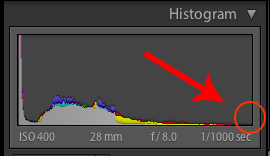
Your darkest image’s histogram should look something like this with a gap on the right side.
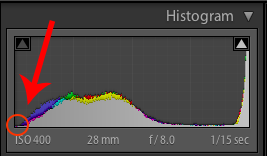
Your brightest image’s histogram should look something like this with a gap on the left side.

  • shoot raw files, they will give you the most amount of data to work with
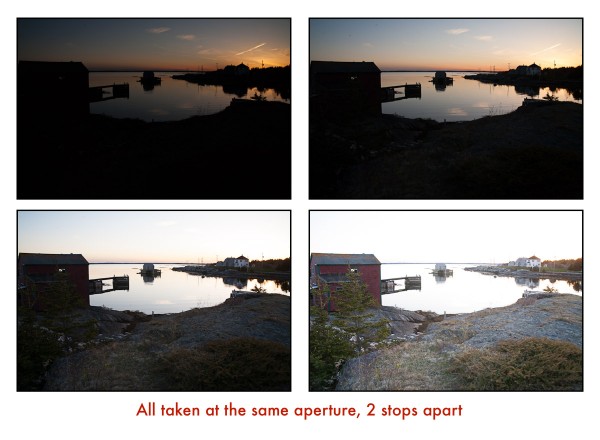
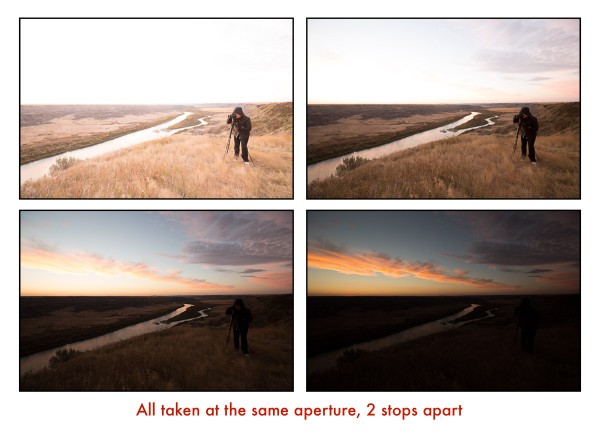
  • bracket your images 2 stops apart, because assuming you followed the tip above and have shot raw files, they carry plenty of data at least 2 stops either direction so shooting 1 stop apart will cause you to shoot more images than you need and just end up bogging down your computer in processing, OR you won’t shoot enough range
  • shoot at low ISO, ideally 100.  HDR processing introduces a lot of noise into your image so start with a lower ISO to minimize that problem.
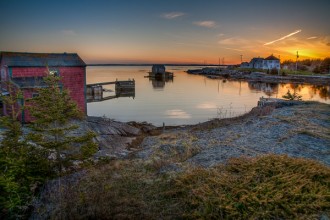
  • use a tripod as your shutter speeds will likely be fairly slow, and it also allows you to get all your bracketed shots perfectly aligned for a sharper final image.  For the image above my settings  are:  ISO 400 (I did that because the light was fading fast and I wanted to shoot a bit faster), f8 at 1/1000, 1/250, 1/60, and 1/15th of a second
  • use a remote trigger (cable release) to fire the camera, so you aren’t touching it during the exposures to reduce camera shake and a blurry image
  • change only the shutter speed, NEVER the aperture.  If you change the aperture in your bracketed images you are changing the focus from one to the next and your resulting blended HDR image will likely have some odd focus issues or halos.

This is what your bracketed set should look like.  Good coverage on both the dark and light ends of the light scale.  Notice the darkest image has lots of nice colour in the sky, whereas the brightest one has a ton of detail in the foreground area but none in the sky.  This is normal, and exactly what you want.
Tips for processing the bracketed images

I use Photomatix as my HDR tone mapping software of touch.  I find it gives me the flexibility to be able to produce both natural looking and surreal results.  Whatever software you use for your tone mapping, try some of these tips for better sunset results:

  • if there are moving clouds in the scene or trees blowing, use the software’s deghosting feature to remove of minimize those.  It will make the final result look much sharper.
  • when adjusting the tones in your software of choice keep your saturation settings low, don’t overdo it.  In Photomatix I always (let me repeat that word), ALWAYS, keep my saturday under 50!  When I pull it back into Lightroom afterwards and punch my blacks and contrast up the saturation increases with it, so it’s really easy to take it too far.
  • watch the sky for halos (white areas glowing around the edges of things) especially if the sky cloud free against something dark like a tree or building.  Halos are generally an affect that is thought of as poorly done HDR and why many people do not like the technique.  Sure you can create a surreal look but I do think you can take it too far.  Just as an example, here’s what “too far” looks like in my opinion. Do NOT make something that looks like this. Notice the extreme noise and graininess in the sky? This is caused by pushing too far.
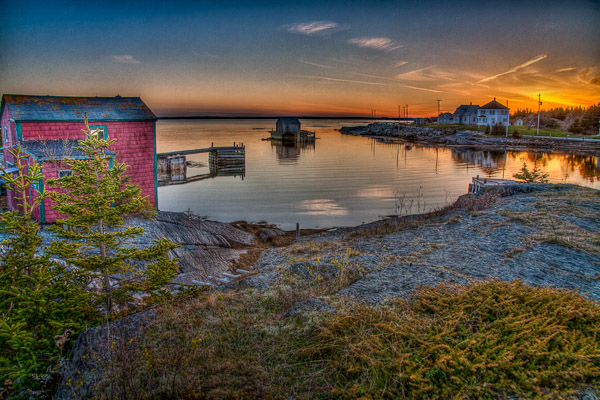

This is straight out of Photomatix. Notice how flat and drab looking it is?

Often when shooting a landscape in HDR you’ll find that one area looks good if you push it a little further, but the other half doesn’t.  Such is the case here.  I find that I can push the land and foreground area a bit further to get more detail out, but then the sky looks bad or has halos.  So you can mask back in one image of the sky if necessary, or blend the two together using Photoshop and pick which areas are best from each version.  See below for an example. Version #1 processed for a nicely blended sky.
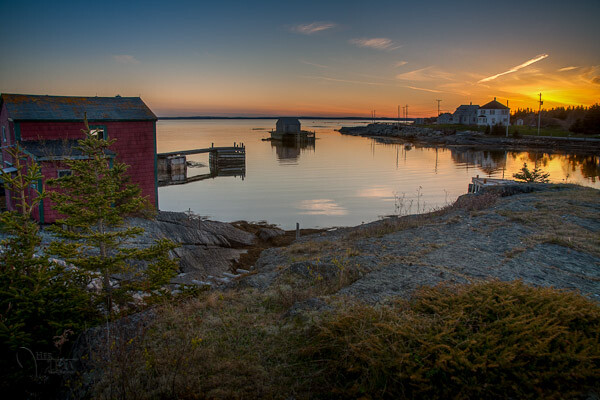
Version #2 in the middle is our over processed one from above but the foreground land looks pretty good.
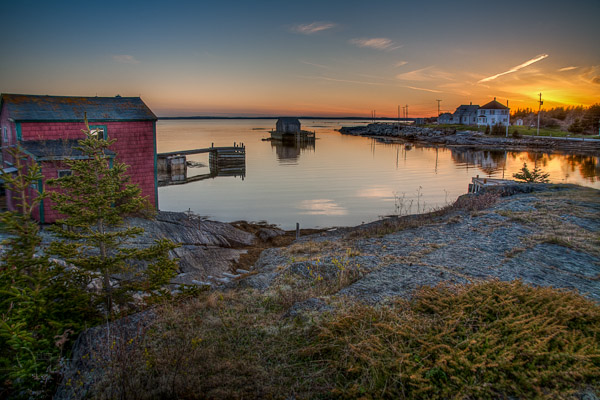
The final version above is #1 and 2 above blended together using layers and masks in Photoshop. Notice how it takes the best of both images and combines them.

HDR sunset with a person?

Let’s look at another example.  Some people say you can’t do HDR when you have a person in the shot.  Can you?   Take a look at the images below and you tell me if it works or not.
There has been no image blending on this final version, just tone mapped and tweaked in Lightroom. I do confess though that this is not  sunset, it is in fact a sunrise.  But you get the idea, it’s the same because the sun is on the horizon in both cases.

How to handle a sky with lots of fluffy clouds

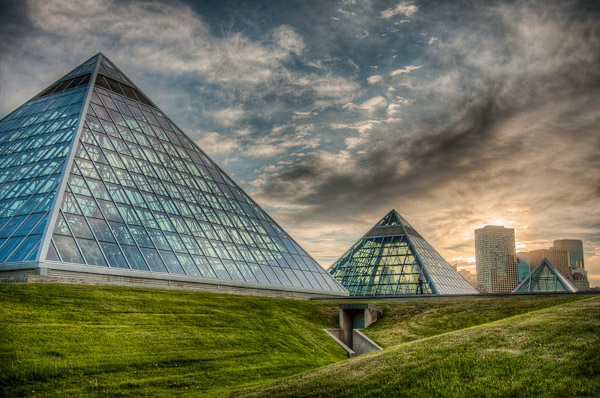
Another common problem when doing HDR for landscapes is when there are lots of big white fluffy clouds, they often tend to come out looking rather dark and foreboding.  This is another good time to use the masking technique.  In the images below I’ve processed the HDR how I like it for the foreground, nice and crisp.  But my clouds have gone too dark.  If I choose to pull back on the surreal look I lose that nice detail in the grass and pyramids.  So I’ve taken the best of both and combined them once again.
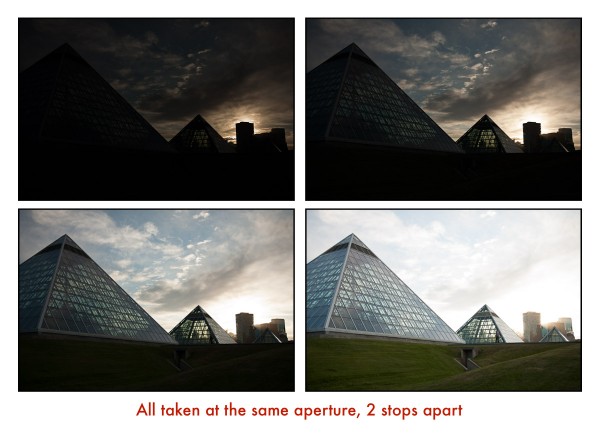
Version #1 above, processed for detail in the grass, but notice how dark the clouds are.  They were not storm clouds but they sure look like it now.   I want to get those soft fluffy ones back so I took one of the original single images from my bracketed series and combined it with this one to get the following final image which I think is much softer looking.
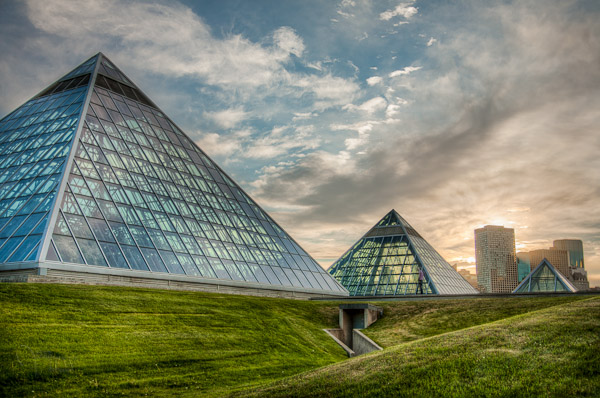
Final blended version above.  See the difference?  It’s subtle but I think it makes a huge difference to the final appearance and feel of the image.

Summary and action plan

So where to go from here is to get out and try this for yourself.  If you have some bracketed series that you’ve already shot you can go back and try processing them with these tips and see if it makes a difference.   Or better yet, get out there and go shoot tonight’s sunset or tomorrow’s sunrise if you’re a morning person.

One other unrelated tip I’ll leave you to get better sunsets in general is to find an interesting subject in front of your sunset.  Notice in these cases I have a great scene or something with a great foreground or shape (pyramids) to add some interest to the scene.  A plain old sunset on a flat horizon is really not that interesting no matter how great the colours are.  So find a suitable scene during the daytime and come back at dusk and work your magic on it.

If you want some other HDR tips you can read 10 Tips on how to do HDR photos without a tripod, for those times when you don’t have one with you, or you aren’t allowed to use it.

Have you got other little secrets or tips for creating HDR sunsets?   I’d love it if you shared with in the comments below and as always if you have a question please ask as I read and answer ALL the comments.

Post originally from: Digital Photography Tips.

Check out our more Photography Tips at Photography Tips for Beginners, Portrait Photography Tips and Wedding Photography Tips.

Tips for Great HDR Sunsets


Digital Photography School

 
Comments Off on Tips for Great HDR Sunsets

Posted in Photography


Tips to become a successful pro photographer

07 Dec

6 things to consider to be successful as a professional photographer. Just sharing my 2 cents, what do you think? If you enjoyed this – please FB share, tweet or email to friends! goo.gl Video shot on D5100: goo.gl (Amazon: goo.gl ) 50mm 1.4g: goo.gl (Amazon: goo.gl ) Gitzo GT2540: goo.gl (Amazon: goo.gl ) Join the Flickr forum: www.flickr.com twitter.com www.facebook.com www.thatnikonguy.com
Video Rating: 4 / 5

 
Comments Off on Tips to become a successful pro photographer

Posted in Nikon Videos


Small Studio Flash Tips: Ep 208: Digital Photography 1 on 1: Adorama Photography TV

04 Dec

AdoramaTV Presents Digital Photography One on One. In this week’s episode Mark responds to a couple’s question about their home studio and how best to use speedlights in a small space. Join Mark as he walks you through the basics of shooting with speedlights in a 12′ x 12′ studio. For related articles and videos, and to buy the products used in this video, go here: www.adorama.com Watch Episode 17: Sync Speed: youtu.be Watch Episode 54: Speedlights vs. Studio Strobes: youtu.be Products used in this episode: Nikon D7000 Digital SLR Camera Body, 16.2 Megapixel, 1080HD Movie, USA Warranty www.adorama.com Nikon 18mm – 55mm f/3.5-5.6G AF-S DX (VR) Vibration Reduction Wide Angle Autofocus Zoom Lens, USA Warranty www.adorama.com Canon Speedlite 580EX II, Shoe Mount Flash with Guide Number of 190 Feet / 58m at ISO 100, USA Warranty www.adorama.com Nikon SU-800 Replacement Wireless Speedlight Commander www.adorama.com Nikon SB-700 TTL AF Shoe Mount Speedlight www.adorama.com Canon EOS Rebel T3i Digital SLR Camera, 18 Megapixels, Full HD Movie Mode, Canon EF-S 18-55mm f/3.5-5.6 IS II Lens www.adorama.com Westcott 32″ White Satin Umbrella with Removable Black Cover www.adorama.com HonlPhoto 8″ Regular Speed Snoot www.adorama.com Gary Fong Lightsphere Collapsible – Half Cloud www.adorama.com Interfit Photographic Umbrella Holder with Hotshoe Adapter www.adorama.com Visit www.adorama.com for more photography videos! Send your questions to: AskMark@Adorama.com

 
Comments Off on Small Studio Flash Tips: Ep 208: Digital Photography 1 on 1: Adorama Photography TV

Posted in Nikon Videos


5 Big Tips to add Impact and Variety to your Wildlife Images

30 Nov

A Guest Post by Piper Mackay from www.pipermackayphotography.com.

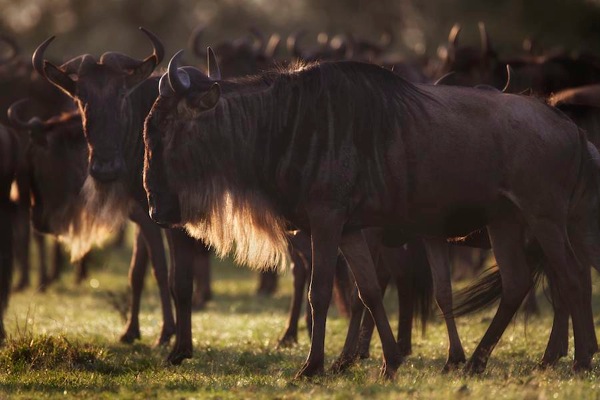
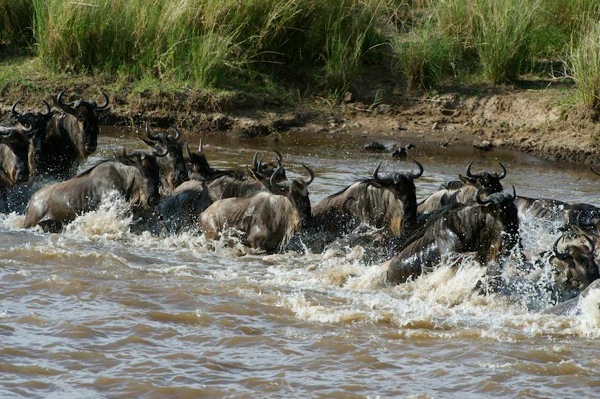
Wildlife photography can be very exciting, which generally means your adrenalin is running on overdrive. It is too easy to be caught up in the action of the moment and just snap away at what you are witnessing. What you saw was so great, yet when you view your images they just don’t seem to have the impact that you experienced. I have put together a series of images of wildebeest, generally a very boring animal that is quite drab in color. This is to help illustrate how light, mood, and motion can bring powerful visual impact to your images.

Wildlife Variety

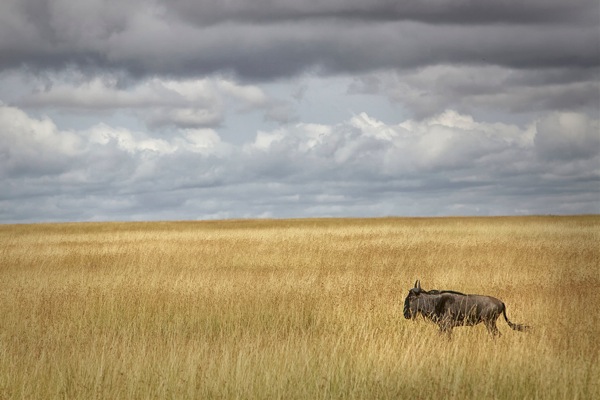
This is a Wildebeest for those of you who have not seen one.

Plan to go at the Best Time

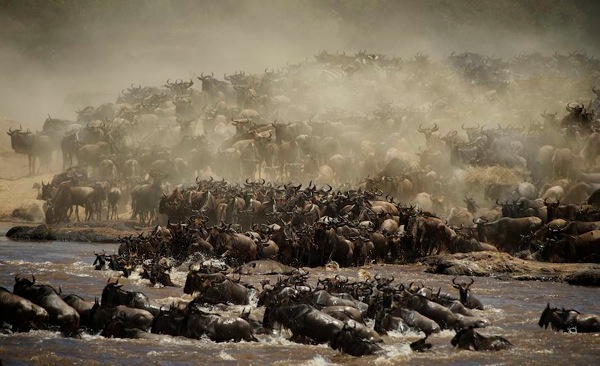
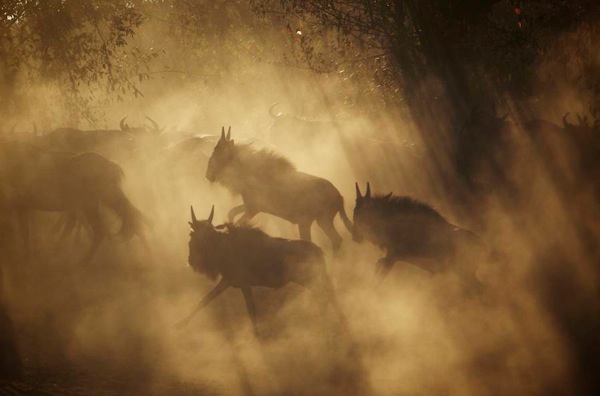
Many species migrate or give birth at particular time in a particular location. Plan you trip around these extraordinary events. This was photographed during the annual wildebeest migration crossing the Mara River in Kenya. It has been said to be the greatest wildlife show on earth. The mass of the animals and the dust kicking up gives big impact to this image. Large numbers of any species will add impact.

Wildlife Variety 1

Backlighting and Side Lighting

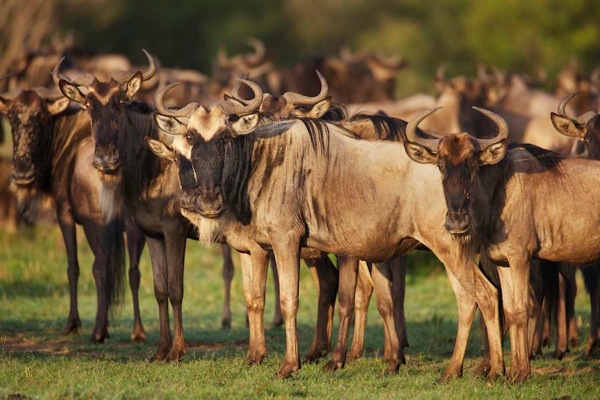
It is natural to want the beautiful golden light on a wildlife subject as you see in the first photograph, but more dramatic can be adding backlighting or side lighting shown in the image below it. Take the safe shot and then get creative. Backlighting works great on the wildebeest beards and it also creates some rim lighting. Rim light is when backlighting creates a lit edge around the subject.

Wildlife Variety 2

Wildlife Variety 3

Wildlife Variety 4

Look for Moody Elements such as Dust and Fog

This is another great time to add backlighting or side lighting. Backlighting will generally create a silhouette so I generally prefer to use side lighting in these situations. The light filters thought the elements for dramatic light and you can still see the details in your subject.

Wildlife Variety 5

Add Motion to your Image with a Pan Blur

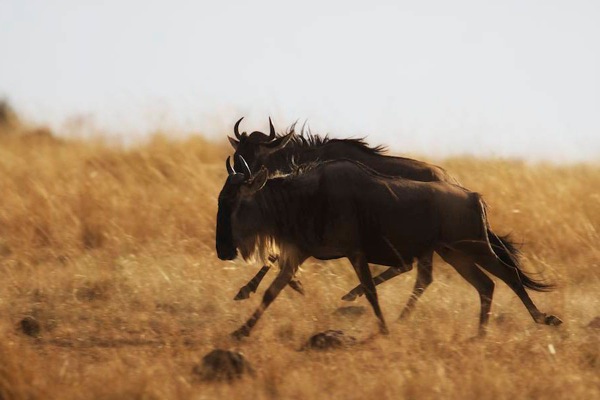
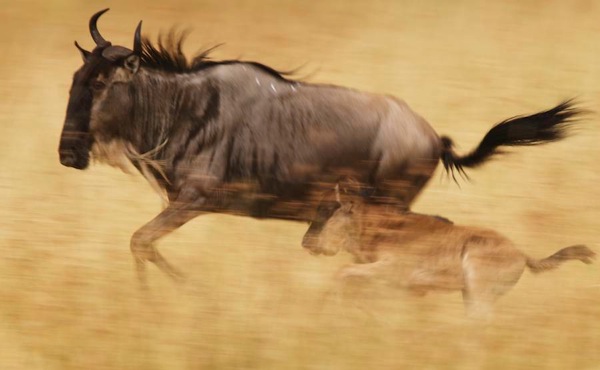
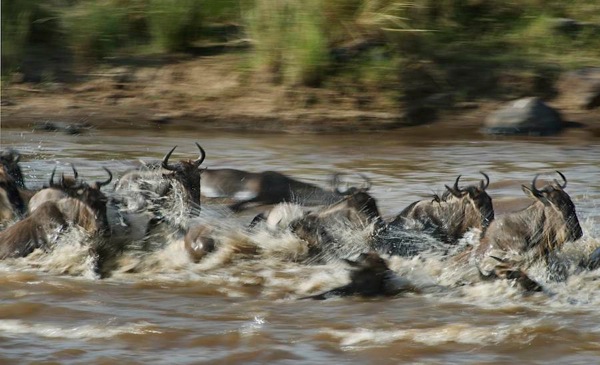
In the first image you can see the animals are in motion; notice I have a little backlighting going for added impact. However, by panning with the animals to create a blur in the background it shows a more dramatic sense of speed and motion.

Wildlife Variety 6

Wildlife Variety 7

To shoot a pan blur you need to slow down your shutter speed, 1/60-1/30 generally works, depending on the speed of your subject. You need to focus on the eye’s/shoulder of your subject, pan at the same speed as your subject while holding down the shutter. Yes, this takes lots of practice and you will delete hundreds of images, but when you get one that works it is very exciting. This is something you can practice anywhere so when the opportunity comes you are ready.

Here is another set of images to show the impact and difference between a fast shutter speed stopping the action and a pan blur to show motion. Notice in the second image the front wildebeest are in focus while the rest of the images has a slight blur giving the viewer a more powerful sense of motion.

Wildlife Variety 8

Wildlife Variety 9

Slow Down your Shutter Speed

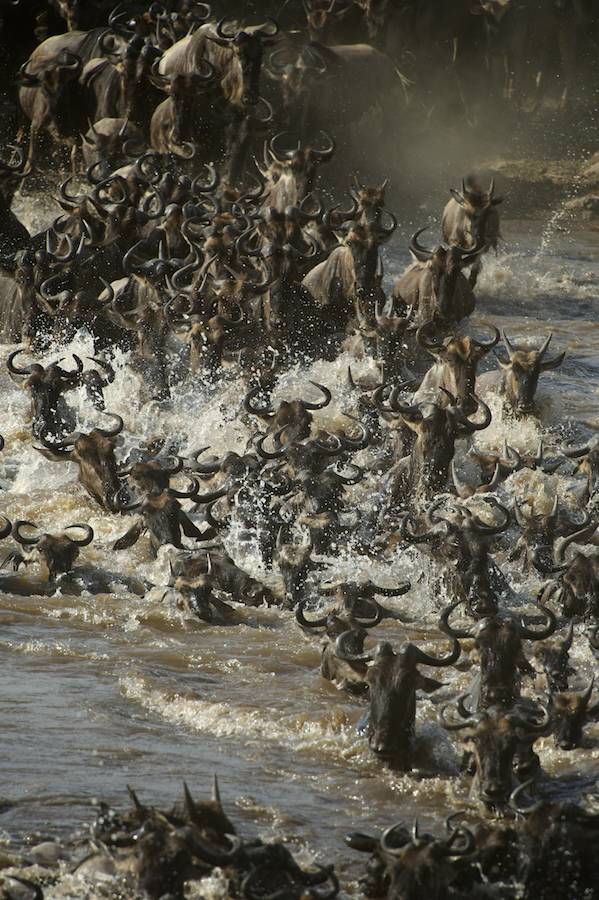
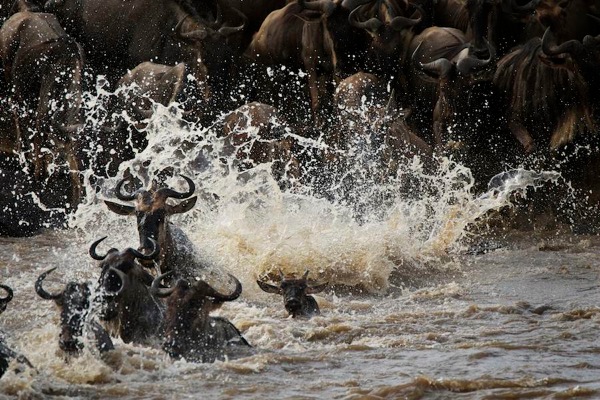
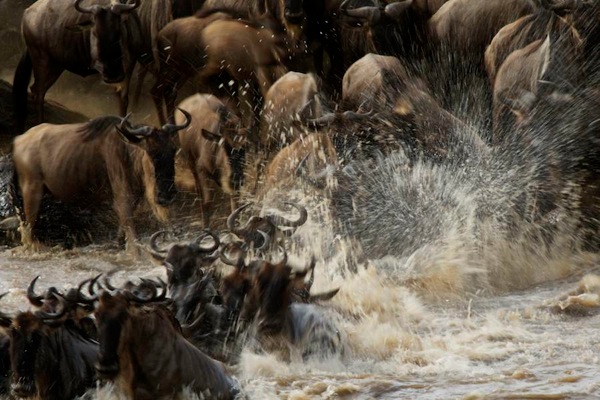
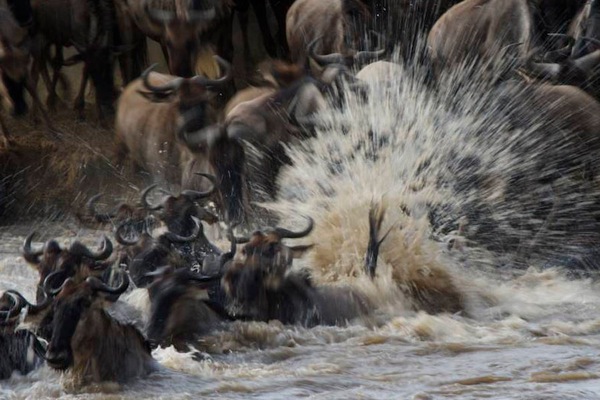
Stopping the action of animals running through water with a high shutter speed makes a dramatic image, but slowing down the shutter speed will add a different impact and variety to the story. Different from a pan blur, here you hold the camera still and slow down the shutter letting the moving element create the effect of motion. Water works great as well as tall grass that is blowing or branches moving is a tree. In the first image my shutter speed was very high to stop the action and the explosion of water. In the second I showed down the shutter to create a different mood and show the spray of the water. In the third I slowed down the shutter just a little more to really show the blast of the water.

Wildlife Variety 10

Wildlife Variety 11

These simple tips will not only add impact and variety to your images but will make them stand out in a sea of imagery on the same subject.

Wildlife Variety 12

Piper Mackay is a professional travel and wildlife photographer whose work is heavily based in Eastern Africa. She is currently leading both wildlife and cultural safaris in Kenya, Tanzania, Rwanda and Ethiopia. Her work is represented by Getty images and she is and instructor for the Travel and Editorial track at Calumet. View her work at www.pipermackayphotography.com.

Post originally from: Digital Photography Tips.

Check out our more Photography Tips at Photography Tips for Beginners, Portrait Photography Tips and Wedding Photography Tips.

5 Big Tips to add Impact and Variety to your Wildlife Images


Digital Photography School

 
Comments Off on 5 Big Tips to add Impact and Variety to your Wildlife Images

Posted in Photography


Connect: Landscape tips for smartphone shooters

30 Nov

Daniel_Berman_small.jpg

It’s all too easy to take for granted the wide dynamic range, variety of focal lengths and control over depth of field we have at our disposal. And ironically, one way to practice a a more traditional, disciplined approach to photography that introduces, rather than eliminates limitations, is to spend some time shooting with the latest smartphone. Read about how some photographers are embracing the challenges of creating compelling landscape images with their wide angle fixed-aperture smartphones.

News: Digital Photography Review (dpreview.com)

 
Comments Off on Connect: Landscape tips for smartphone shooters

Posted in Uncategorized


Photography Tips from Michael Soo on Visualizing Shots and Lighting

28 Nov

Go to SilberStudios.Tv. Were here in Silicon Valley with more photography tips from our guest, Michael Soo, a very talented commercial and fasion photographer, and the recipient of Popular Photographys prestigious Photographer of the Year award. Hes had numerous cover photos and a whos who client list from his career in fashion photography. Michael covers key photography techniques, including how to pre-visualize your shot, determining what story you intend to tell with your photos, how to learn simple lighting techniques and how to engage your models to build rapport. In this interview you’ll get vital advice for key photographic tools, as well as Michael’s inspiring stories from his own career.
Video Rating: 4 / 5

In this video I take a look at the replacement for my D40. I love this camera. Its got everything I need and more.

 
Comments Off on Photography Tips from Michael Soo on Visualizing Shots and Lighting

Posted in Photography Videos