RSS
 

Posts Tagged ‘Tips’

10 Editing Tips for Making Killer Instagram Videos

22 Aug

Extra vids for bloggers: 1, 2, 3

When it comes to movies, editing is kind of a big deal.

Without it, we wouldn’t have twist endings. (Looking at you, M. Night.) We wouldn’t have out-of-order movies to entertain our brains (Marty McFly 4ever). We wouldn’t even have beginnings, middles, and ends!

Frankly, movies would be pretty weird and probably not very good at all without editing.

Thanks to Instagram’s 4.1 update, you can now upload videos to Instagram, meaning a whole new world of video editing has opened up!

Sound, filters, transitions, sequencing — there is so much you can do to an Instagram video before uploading it. And awesomely, you can do it all on your phone.

Consider this guide an editing workshop that’ll turn your Instagram videos into cinematic artworks served 15 seconds at a time.

10 Tips for Editing Instagram Videos

You Can Now *Upload* Vids to Instagram

Instagram must’ve read our minds with the 4.1 update because we were like Man, wish we could upload #tbt vids!

Now, you totally can. You can upload any video that’s in your phone’s library, and with a quick file transfer, you can even upload videos that are sitting on your computer (we’ll show you how in the guide below!).

Being able to upload video opens up a whole new world! It means that you can get way more precise about how you shoot and edit your videos because you can use outside apps, add sound and video effects, splice together clips, and speed up or slow down your footage.

Read on to learn how to which tools and apps are the handiest, how to optimize shooting and editing within Instagram itself, and how to make a workflow for churning out really great videos!

Pre-req reading: Check out our essential guide to Instagram video if you haven’t yet. It answers all the questions you might have about Instagram video and also give you ideas to start.

How to Get Videos onto Your Phone

Shoot it on your phone.

Shooting videos on your phone is obviously the fastest way to get videos onto your phone.. But did you know there are lots of options besides shooting within the Instagram app?

Yeah! It’s actually quite refreshing to shoot video outside the Instagram app.

You’ll pick how you shoot your video based on what you want your end-result to be like. Here are a couple options and why you’d use them:

  • Your phone’s native camera app.
    Use this to shoot multiple clips that you can then arrange in the order you’d like in Instagram. This gives you more freedom with time and set-up because you don’t have to shoot in order like you do in the Instagram app. (Also, you don’t have to fear accidentally losing your work-in-progress while working in the app!)
  • A filter app.
    Use this to get a different look besides the filters that Instagram offers. We dig Vintagio (Android & iOS) and 8mm (iOS). Or you can even layer filters to come up with your own feel.
  • An advanced video editing app.
    Apps like iMovie (iOS) equip you with extra tools that give you more precise editing tools and control over sound and transitions. If you find yourself using one of these often, then you might end up shooting through these apps to make it seamless.

PRO-TIP: When you upload a rectangular video (which is what most other apps shoot in), your video will be cropped in Instagram. Instagram crops to center your video, so while you’re shooting, just envision that either side of your video will be lopped off.

Transfer files from your computer to your phone easily.

Maybe you have phone videos that you long ago saved to your computer. Maybe you have vids you shot on your DSLR. Maybe you have childhood vids transferred from old VHSs.

Whatever it is, your video’s trapped on your computer, and you need to get it to your phone so you can share its amazingness with all of your Instagram followers STAT.

The file might be too big to email to yourself and bothering with cables can be cumbersome and take time.

Here’s how to do it the e-z way:

  • Use an iFlash Drive to transfer files. This is a spacious drive (up to 16GB) that lets you quickly transfer files between your phone and your laptop. One end connects to your phone, the other a USB.
  • Use an EyeFi SD card to wirelessly send vids straight from your DSLR and onto your phone. (IT DOES THAT.) You can see how it works in the vid above!
  • Use an app like Dropbox (Android & iOS) or Cloud to store in internet-space and download it on whatever device you want, whenever you need it. If you have a iThingies, you can also use iCloud to sync your files across computers and devices.

Make Your Video Legit with Transitions

Instead of having your video abruptly switch from scene to scene all choppy-like, you can use transitions to give your video a more cinematic, elegant flow.

Use objects as a clever transition.

One really clever way to transition scenes is to use objects as a divider between two completely different shots. Check out the vid to the right to see how cool this effect is!

How to do it? Pan your camera horizontally across your first scene and place your transitional object at the end of it. (We used bags as our objects in the sample video above. Yours can be anything — a tree, a person, a telephone pole.) When your video pans half-way through that object, cut the scene.

Now, go to a new location for your next scene, and place the same object at the start of the new panning scene. Start shooting at the halfway mark of the object where you stopped your previous scene and end the scene halfway through the next object. Repeat for however many scenes you want to sequence together. The end result will look like one seamless pan that completely changes location between objects. That’s movie magic, baby.

PRO-TIP: Measure how far your object is away from your camera, so that you can make it consistent from one scene to the next.

BONUS IDEA: Place a piece of paper over your phone lens to give yourself a black screen between scenes. You can also pull it away and allow your camera to adjust exposure and come into focus as you’re filming — this ends up looking like a dreamy fade-in. Check out our example.

Use apps to add transitions between scenes.

Apps are great because they give us access to tools that previously only pros had. Case in point, iMovie (iOS) and WeVideo (Android & iOS) give you options for placing transitions between video scenes.

You can do a simple fade in/fade out, text (think silent movies!), and all the transition types that you never really thought about but have probably seen on TV or in movies.

Pull focus a.k.a. Changing depth of field

Pulling focus is this fancy thing cinematographers do to get movie-watchers to pay attention to a particular part of the screen or to spice up a moment with visual drama.

You’ve seen this in movies when an out-of-focus shot suddenly comes into sharp focus or when something that’s in the foreground falls out of focus and the background comes into focus instead.

Pulling focus can also mean simply keeping your subject in focus as they move within your shot.

The cool thing about all of this? You can do it on your phone! Here are two ways:

  • Tapping to focus.
    While your phone doesn’t have much of depth of field to work with, you will still notice certain parts of your shot going in and out of focus as you move your phone. This is especially true if one subject in your shot is a lot closer to your lens than everything else in the shot.

    As you move or as your subject moves, pay attention to how your focus changes, and tap your screen to keep what you want in focus nice and sharp. You might *want* something to fall out of focus, so tap a different part of your screen to get them to fall out of focus.

  • Using a telephoto phone lens for dramatic depth of field.
    Watch the video above to see just how dramatic of a focus shift you can get with a telephoto phone lens! Because it’s telephoto, you get a nice range of depth of field. It also has a focusing ring that lets you control exactly where focus falls in your shot.

    Another way to do it is by using an iPhone SLR lens mount to shoot phone photos and vids with SLR lenses. You read right — you can shoot videos using your SLR lenses mounted onto your phone.

Chopping & Sequencing Clips

The editing choices you make can really make your video stand out from the rest. Remember Memento? Yeah, those guys were nominated for best film editing at the Oscars for the super clever way they edited the story out of order. Now bookmark that in your brain, and get your tapping finger ready.

Plan your video.

When it comes to editing, the best thing you can do is to plan out what you’re going to shoot before you even start. This can be as quick as taking out 30 seconds to come up with a vision for your video in your mind.

Questions to ask yourself: What are you trying to get across in your video? What will the beginning, middle, and end be? How long should each clip be, so that you can fit your entire story into your time limit? Maybe your idea’s worth spanning over more than one Instagram post — how many?

Chopping.

Maybe your clip is too long or you want to sequence a bunch of clips together, but they don’t quite start or end the way you want them to. Go to town like a lumberjack on a tree trunk: chop. it. down.

How? Instagram lets you trim down video clips. After you load a video, hit Next. Then use the slider to shorten the video to the length you want. Move the video timeline underneath the slider to indicate exactly which part of the video you want to crop down to.

Most phones’ native camera apps also already have simple editing tools that let you shorten your video clips down just how you like them. In iOS, view a video in your library, and move the slider on each end of your video clip’s timeline to where you’d like it. Then hit the “Trim” button that appears in the top right corner.

Sequencing.

Sequencing is all about the order of your clips and how you transition between them. If your video is spur of the moment, you can edit as you shoot within Instagram by viewing your video and the going back to the previous screen to delete and add scenes.

However, if you’re shooting something more complex, there’s a disadvantage to editing together clips as you go within Instagram. You can’t rearrange the order of videos you’ve already placed into your Instagram video. So if you wanted to be able to do that and get more precise with how your clips transition and the order that they play, then you’ll want to use a video editing app like iMovie or WeVideo. If you work better on the big screen, you might even edit it on your computer and then transfer the file back to your phone.

Fast & Slow Motion

Slow motion is the raddest. Everyone and their mom knows it. While there has yet to emerge one great app that gives you the kind of slow-motion effects you see coming out of a Phantom Flex camera, there’s no harm in pushing the limits of slow-motion tools that currently exist in apps.

We were able to speed up the video above using Vintagio. Because the speed up and slow down tool only lets you change the speed a little bit, we ran the video through the app twice to speed it up doubly. You can do the same thing for slowing down your video.

Keep in mind, it won’t look as smooth as other slow motion videos because your phone just doesn’t shoot video at a high enough frame per second. Again, there’s no harm in playing with what you have, so experiment!

We haven’t found a great Android app for slowing down or speeding up video, but if you know of one, let us know.

Oh yeah, and if you’re into editing video on your desktop, Twixtor is a tool that manipulates video to make it look like it was shot at a higher frame per second than it actually was. In short, it gives you a slow motion effect without having to use an expensive slow motion camera.

Adding Music, Sound Effects, and Muting

One amazing advantage to being able to upload videos to Instagram is that you can edit sound on your videos before you post them!

Depending on what app you’re using for video editing, you can control the sound in your videos in all kinds of ways.

Here are some ideas:

  • Mute or lower the sound in your video
  • Record narration or sound effects to lay over your video
  • Import music from your phone’s library

If you’re wondering which apps do what, here’s a quick rundown. iMovie and Vintagio give you the ability to control volume on your video. The iMovie app in particular lets you lay over a narration or any recording that you make, as well as import music and sound effects.

Meanwhile, WeVideo doesn’t let you edit sound within the phone app, but the app syncs your video to the desktop app, which gives you sound editing options. Vintagio comes with pre-selected music that you can play over your video, too.

Filters, in Apps and By Hand

Instagram video comes with a set of squeaky new filters, but what if you’re looking for something different?

Outside apps.

8mm and Vintagio do a good job of covering specific film looks based on time period. For example, if you want a black and white ‘20s silent film look vs. a warm 70s vibe.

If those aren’t enough iMovie and WeVideo have filters, too. And if you’re into experimentation, overlap filters across apps to make your own awesome filter! You can even name it after your favorite celebrity cat.

Filters by hand.

DIY the dang thing. We’re talking hold up anything that looks like it could potentially Shooting a horror vid? Hold up some red glass over your lens.

Want to make it lo-fi? Grab some plastic to give your video dreamy vignetting.

Want to give your video a warm tint Coen brothers style? Use your sunglasses to wash your video in color. If you’re into these ideas, check out our roundup of 10 DIY Filters on the Cheap.

Dreamy lens flares.

We’ve played around with how to create intentional lens flares. Here are two fun and easy ways to do it:

1) Lens whacking is a videography technique that’s similar to free-lensing. You remove the lens from your DSLR and slightly move it away from the camera body. The purpose here is to let light hit the camera sensor to create moving light leaks, which we can attest are very pretty and –heck we’ll say it– dreamy. If you shoot on a DSLR, here’s a guide with samples.

Since phone’s don’t quite work this same way, you can still create the illusion of light leaks by having your subject backlit and letting your phone’s auto-exposure shift with the movement of your camera or your subject. This can create rays of light in your video that can look quite lovely.

2) Sprinkling water either directly on your lens or onto a clear sheet in front of your lens. Try something like a pane of glass, mylar or anything clear. Here’s our full guide on playing with water for lens effects.

360-Degree Time-lapses

Time-lapses are cool, but have you ever seen a panning time-lapse? It’s dually impressive! It’s one of those effects that stops you in your tracks because you wonder, How’d they do that?

If you’re not sure what a panning time-lapse is, it’s when your camera pans across a landscape and simultaneously shoots a time-lapse.

Two popular ways to make a panning time-lapse is by using a slider that moves your camera horizontally or by using a rotating mount that turns your camera 360-degrees.

We were able to make the 360-degree time-lapse above with a simple rotating mount called the Camalapse. You can use this mount with any camera that has a tripod thread, but we mounted our phone by pairing it with the Glif (a tripod mount for iPhones).

Just grab a time-lapse app, like Lapse-It (Android & iOS), set up how long you want to shoot your time-lapse for, twist the Camalapse (twists similar to a kitchen timer), and let ‘er go. In the end, you’ll get a rad video that all your buddies will be asking you about.

PRO-TIP: Because time-lapses are usually slow-paced, we sped ours up by running it through Vintagio’s speed-up tool two times.

STOP-MOTION & Editing Photos into Video

If you’re using the internet right now, there’s a good chance you’ve seen a stop-motion or two. Stop-motions, when well done, have the power to blow people’s minds, and that’s a good thing!

Stop-Motion Tips.
We have so many tips in our Ultimate Guide to Stop-Motion, but here are the essentials. Of utmost importance, keep your camera still. Put it on a tripod or set it somewhere where it absolutely won’t move.

Aim for consistent lighting. If this is going to take a while, shoot in a place where your light isn’t moving (i.e. the sun traveling across the sky), unless o’ course that’s what you want.

If you’re shooting and editing within Instagram, tap lightly and quickly to record, so you don’t accidentally make each clip too long. For smooth movement, each clip should be as brief as you can shoot it.

To get more precise, you can shoot individual photos for each frame in your phone’s native camera app, and then import the photos to create a video in iMovie or WeVideo. This’ll let you throw out any mess-up shots or figure out if you need to reshoot a particular part of the stop-motion.

PRO-TIP: A camera phone remote can make shooting tiny clips easier and also prevent you from accidentally moving your phone while tapping.

The Quickie Slideshow — Your Life in Instagram Flashed Before Your Eyes.

You might’ve heard about Pummelvision. It was a web app that took all of your Facebook or Flickr photos and turned them into a lightning-fast slideshow. It was like watching your life flash before your eyes! We cried, not kidding.

Everlapse is a similar idea, but it takes your most popular Instagram photos and turns them into a short reel that you can share on Instagram. We’re getting verklempt just thinking about all the memories.

Instagrammers with Vid Skillzzz

Hopefully at this point, you’ve abandoned this article and are outside shooting and maybe will not read these words until hours from now (which we’re fine with because OMG you should be out shooting!).

And if not, your brain’s about to be so full of ideas they’ll start to leak out your ears/eyeballs/face. Why will that happen? Because gathered up a list of amazing Instagram videographers for your personal inspiration.

@megancignoli — A photographer/director with a jelly-worthy talent for stop-motion. Girl’s got creativity *and* patience.

@nazfilms — A cinematographer who makes incredible experimental Instagram videos completely shot and edited on his iPhone. Watch with sound. Also, watch for his just started #flickstagramseries.

@bythebrush — A painter who needs to get into movie-making stat. Especially good for inspiration on transitions between scenes, as well as music use.

@pinot — An illustrator & animator whose animations makes us question reality.

@teresa_franco — A nurse who can wield a macro phone lens like a pro. Check out her amazing insect videos.

@mariamsitchinava — An editorial photographer who turns her stills into gorgeous filmic vignettes.

@cole_rise — While this photographer/pilot doesn’t have a lot of videos up right now, he’s one to watch.

@rokuthecat — Just because.

Related posts:

  1. Pro-Tips for Shooting Better Instagram Videos Extra vids for bloggers: 1, 2, 3 “Well that’s weird,”…
  2. FlipClips — Print Your Short Videos into Magical Flipbooks If you bought your digital camera in the past few…
  3. 10 Tips to Make Your Phone Photos Amazing;
    Plus, Our New Phoneography Blog! Phoneography is the best. No matter where you go, you’ve…

Photojojo

 
Comments Off on 10 Editing Tips for Making Killer Instagram Videos

Posted in Equipment


4 Quick Tips to Notice the Supporting Cast of Your Landscape Scene

22 Aug

Recently I took a stroll through my photo archives as a way of bench-marking my progress as a photographer and something dawned on me – I’ve begun to overcome a very troublesome disorder for photographers known as Single Subject Blindness.

Single Subject Blindness

Have You Ever…

Come home from photographing something spectacular only to have ever photograph you upload be of that one spectacular subject? I mean there’s nothing wrong with this problem – after all you are still getting a photograph of one spectacular subject, but could you have gotten more? Done something else? Seen the scene differently?

So when you think back to some of your recent photo adventures – Have you ever photographed a dramatic sunset and walked away with photographs of only the sunset? Have you ever hiked deep into a forest to photograph a waterfall to walk away with only photographs of the waterfall itself? This is what I’m calling single subject blindness and it is something I’d like to mention today and talk about how I avoid it.

Thin Ice

There’s Nothing Wrong With Main Characters – But They Aren’t The Full Story

I do want to mention that there’s nothing wrong with capturing the main characters of your scene, the sunset, the waterfall, the expansive mountain range etc, but I do think that if that’s all you’re photographing when you go out on a shoot you’re missing a big part of the scene around you – the supporting cast!

I’ve done this myself for many years – I’ll get caught up in a scene and return to my computer to see what I’ve captured only to find every photo looks the same. Lately I’ve begun to catch myself doing it in the field and I’ve found a couple of ways to break the habit.

It’s not easy though – The thing is just like in the movies, a great book, or a dramatic play the main characters draw your attention, and keep it. The supporting cast is there to move the story along, but not necessarily be the story – however, they can make for very compelling and interesting subjects when isolated and taken separately. So while we can still photograph our main subjects I think it’s also important to find ways to steer our focus from the obvious subjects to those which are more subtle.

So How Do You Steer Your Focus?

There’s no denying that it’s hard to ignore the main character of your photo shoot – after all many times it’s the reason where there in the first place. If you want to have a chance to photograph the supporting cast of your scene you have to find the strength to divert your focus, even if only for a moment, from that main event. Here are four quick tips that I use to get myself noticing the smaller details of a scene – if you can think of more tricks leave them in the comments below!

Supporting Cast

4 Quick Tips to Notice the Supporting Cast of Your Scene

  1. Step back – It’s no secret that stepping back from you camera from time to time can be a huge benefit in improving your photography. It can help you see the entire scene as a whole, it can help you see different compositions of the subject you’re photograph, and yes it can even allow you to find and isolate the supporting cast of your scene which you might have otherwise missed with your eye glued to the viewfinder. 
  2. Close Your Eyes – Take a minute or two and close your eyes. I love doing this when I’m in the middle of no where, sometimes I’ll even spin myself in a couple circles and really try to disorientate myself (make sure you can find your way home before you try this though). The reason this works is because it causes you to really focus in on your location when you open your eyes to find your bearings. You’ll have a new view of your surroundings and this will help you see something that you didn’t notice before.
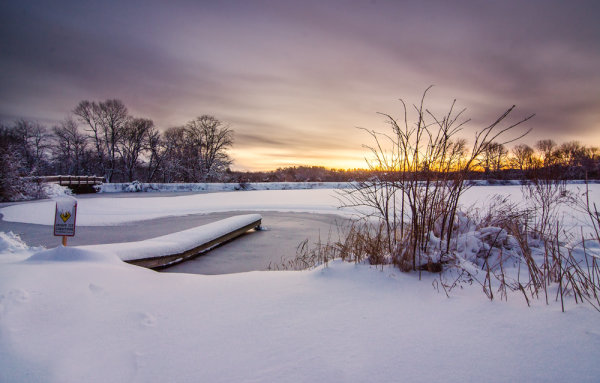
  3. Don’t Get Caught Up – I once woke up an hour before dawn in the middle of winter after a snow storm and drove to a frozen lake to photograph sunrise. I took nearly 150 shots during the 45 minutes I was there and ended up with one photograph – the one of the dock above. Of the photographs I took 95% of them looked exactly like the one above. I was cold, tired and very disappointed I didn’t make an effort to photograph other subjects during that shoot, but realized it wasn’t that I didn’t make an effort it was simply that I was caught up in photographing one subject instead of diverting my attention to other smaller details in the scene before me.
  4. Set an Alarm – If you know you’ll have a problem with number three try setting a timer. Allow yourself only a predetermined amount of time to get the shot you want from your main subject, and then once that time is up, spend the rest of your shoot looking for interesting supporting characters. This tip works wonders and it has a two fold effect – one due to the time crunch to capture the shot of your main subject you’ll find yourself working harder to get the shot you want in as short amount of time as possible, two it gets you looking for other interesting details in the scene you’re photographing.

Have You Ever Been Afflicted With Single Subject Blindness? What have You Done to Fix It?

I’d love to hear your own take on this and what you’ve done to avoid the problem in the comments below!

Post originally from: Digital Photography Tips.

Check out our more Photography Tips at Photography Tips for Beginners, Portrait Photography Tips and Wedding Photography Tips.

4 Quick Tips to Notice the Supporting Cast of Your Landscape Scene


Digital Photography School

 
Comments Off on 4 Quick Tips to Notice the Supporting Cast of Your Landscape Scene

Posted in Photography


10 Tips for Creating Great Family Portraits

19 Aug

Hood-August2013-0212-Google

With my background being in classic style studio portraiture (aka “boring”), and 25 years experience photographing portraits and weddings, I have a few tips up my sleeve for you. If you’ve never done a family or group portrait before don’t be intimidated. Be honest with the family and tell they you’re just learning, I bet they’ll be willing participants to help you out and they get some nice photos in exchange.

With a little planning, doing a family portrait should be fun for both you, and the family you’re photographing. Here are 10 quick tips to help you have a successful and fun photo session.

SUMMARY – 10 TIPS FOR BETTER FAMILY PORTRAITS

  1. Use a tripod when possible
  2. Shoot in Manual exposure mode
  3. Lock the focus or use manual focus
  4. Arrange people with heads staggered
  5. Allow kids to be kids and get goofy with them
  6. If it bends, bend it – how to help people pose
  7. Pose people to flatter them
  8. Lighting is key – get some in their eyes
  9. Expression is everything!
  10. Have a little fun with it and let go

Let’s take a look at each in more detail.

Heise-0005fsm

#1 USE A TRIPOD WHENEVER POSSIBLE

“Ugh”, I already know what you’re thinking. A tripod cramps your style. It’s too heavy and cumbersome. Your style is more free flowing. That all may be true and in some cases (like photographing kids running or doing more documentary style photography) it may be better to shoot hand held.  However, just consider another side of the coin.

When being photographed  most, if not all, people are nervous. Yes nervous! Some are down right scared, and some would even go as far to say that they “hate it”. So it is part of your job to help your subjects feel more comfortable and relaxed. That can be hard to do when you’re also nervous, especially if you’re new to portraits. But there’s a big advantage of putting that camera on the tripod.  Two actually.

#1 – it automatically forces you to slow down. That’s a good thing. You can check your settings, review the composition, and exposure to make sure you’ve got everything right. All to often it’s easy to get carried away once you put the camera up to your eye and forget to check something only to see later you had the wrong White Balance, or ISO was 6400, or you accidentally shot Small JPG. Slow down, avoid an “oops”.

#2 – it allows you to get your eye away from the camera so you can actually make eye contact with your subjects. They are very real people and they feel even more uncomfortable staring straight into your lens than they do looking at you. You can make gestures to get kids attention, or make faces. But you’ll get way better expressions by interacting with them than you will looking through the viewfinder. Try it!

Hood07-034f

#2 SHOOT IN MANUAL EXPOSURE MODE

Assuming that you are setting something up, choosing the time of day and the location carefully, you have control of all the elements. Meaning, once you get set up the exposure should not need to change. But if you put it in Aperture or Shutter priority, depending in the metering mode selected, the camera could choose a slightly different exposure for each frame. You do NOT want that! Consistency is very important.This post is sponsored by our partners Wigs

Inconsistent exposures create more work in post processing, as you have to even them all out. It also can cause a slight color shift, increase noise (if underexposed) and other undesirable things. To keep your exposures consistent through the whole shoot, use Manual Mode. Just remember that each time you change the pose, location, etc, you need to check exposure again. I just fire off a quick test shot, review the histogram, adjust if necessary and continue.

#3 LOCK THE FOCUS

Just as you do not want the exposure to change from frame to frame, neither do you want the focus to be adjusted. Assuming you’ve taken #1 to heart and are using a tripod, you will not be moving. Likely if you’ve posed your group in a relatively static position, they will not be moving. Not much anyway. We are only concerned with moving closer to, or further away from the camera. So . . .

Set your camera up to do one of the following: use focus lock, back button focus, or use manual focus. With any of those options the focus will not change from shot to shot. If you use the shutter button to focus and someone moves a little bit so that the focus dot hits the background, you got another “oops”. If you aren’t sure how to do this, consult your camera manual.

Bonus tip: If your camera has video capabilities you have a neat way of doing manual focus. Turn on the Live View so you can see the image on your screen. Hit your “zoom” button (it may have a magnifying glass or a “+” sign on it) once or twice. The image on the screen will zoom in (your lens doesn’t) so you can see what is in focus which allows for much most precise manual focusing. Press zoom again to return to normal view and turn off Live View.

Liebel-002-600px

#4 STAGGER THE HEADS

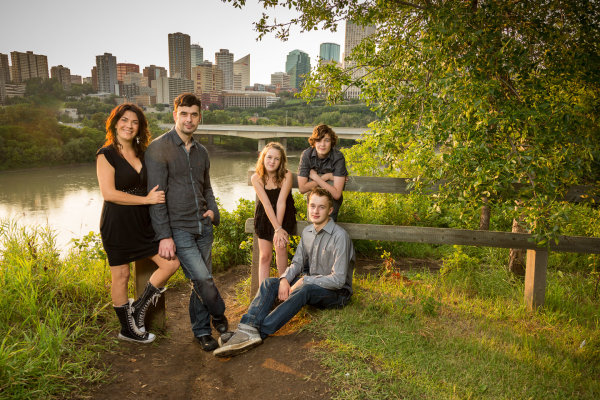
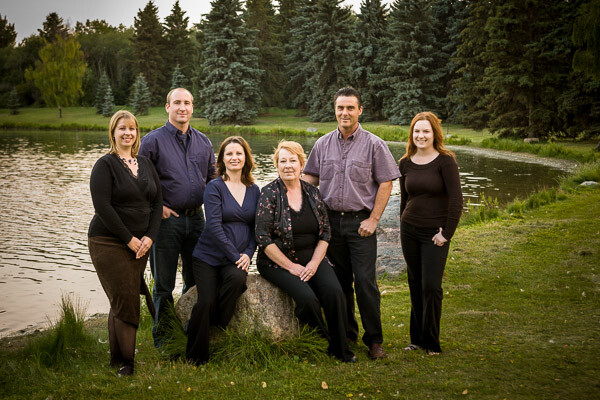
You may or may not have heard this one before, or perhaps you weren’t 100% what it meant. What you want to avoid is a boring straight line, row, or column of heads. Diagonal lines are more dynamic and add interest to an image, so try to do that with the people in your grouping.

Imagine there is a line drawn from each face to the next. Try and position them so that no head is directly on top of, or beside (same level) another. Make diagonal lines not totem poles. Use props to seat some people or bring some small folding stools. Have some people sit down, or stand up on something. Use what is naturally in the environment to pose them, or if you have nothing available just arrange them so the heights are staggered.

Stevens-017

#5 IF IT BENDS, BEND IT

This is a general rule when photographing any people and it’s a good one. People tend to stand stiff and rigged when you position them, so you need to get them to bend a few body parts to look more natural. Nobody naturally stands stiff as a board. Here are a few starters

  • get them to shift their weight to one foot and stick out one hip, away from the camera
  • get them to put a hand in a pocket, I usually recommend thumb out otherwise they have a tendancy to shove their hand to the bottom of the pocket also not looking natural
  • OR hook a finger on their belt or a belt loop
  • if they are sitting lean forward a bit and put weight on one hip
  • if standing against something have them cross one foot over the other, toe down
  • if sitting (males) put one knee up, foot flat on the ground (make sure they rotate so you aren’t looking straight into their crotch

You get the idea. The best way to get someone to do any of this is to do it yourself and have them mirror you. Face them, do the pose you want them to do, and have them mimic it exactly.

Hood-August2013-0129-Google

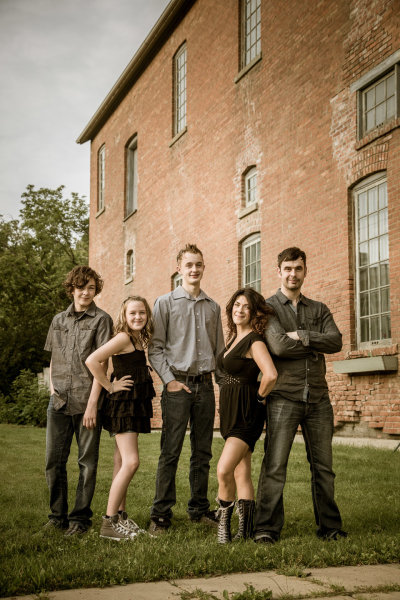
Example of bending body parts. The girls did a much better job here than the guys but even the arms bent at the elbow helps. Some people are stiff and you may have  a challenge with them. Just do your best.

#6 LET KIDS BE KIDS

I’ve found that often parents will tell their kids “you need to be good and smile” before a photo session. For many kids that puts too much pressure on them to “perform”. I usually prepare my parents by getting them to tell their kids this instead:

We’re doing to the park to take some photos. It will be a lot of fun.

That’s it! No expectations other than fun. Then prepare yourself. Bring along props, get mom to bring one of their favourite toys or books. I usually have a hand puppet and bubbles in my camera bag along with my gear. If the kids don’t want to sit and smile don’t force them. Then them run around and be kids for a while and shoot that. Play with them, make it fun. Then they may cooperate and sit for a bit a few minutes later.

When I’m photographing kids I make a total idiot of myself. I make funny noises, I sing songs (I’m really bad but they don’t care), I make fish faces, I play peek-a-boo behind the camera.  I run back and forth to the camera with the puppet. I lie on the ground, I stick my butt out. Kids are the ones that have life the right way around, it’s us adults that ruin it. Let them be kids, let them have fun. Then be ready to capture it when it happens.

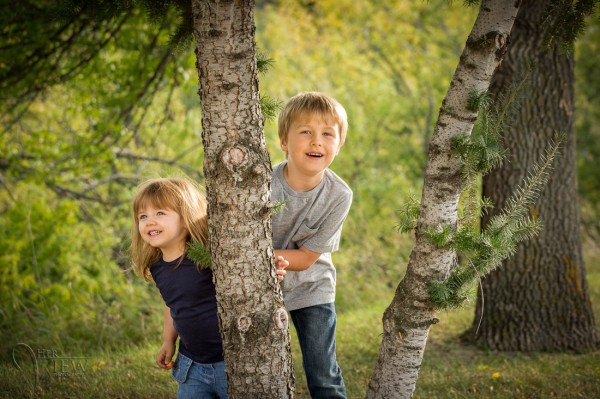
This was a game of peek-a-boo around the tree.

This was a game of peek-a-boo around the tree. Look at those genuine smiles! You can’t force those.

#7 POSE PEOPLE TO FLATTER THEM

Here’s the bottom line – if mom thinks she looks fat she isn’t going to like them no matter how great the lighting and expressions (see #8 and #9 below). So get this one right.

Be aware of people’s perceived “flaws” and work with them. A list of some quick tips.

  • If someone has a bigger bottom half, don’t pose them walking away from the camera using a wide angle lens.
  • For double chins take a slightly higher camera angle, above their eye level. Making them look up stretches it out and minimizes the chin/neck area
  • A bump on a nose will show up when they face one way and not the other (usually) study their face to find out which way to shoot them
  • When you have a couple that has a huge height difference get the man (usually the taller one) to stand with his feet further apart. That will make him slightly shorter, closing the gap a bit.
  • For really heavy people (or those overly self-conscious of their weight) use the lying down in the grass pose and pile the kids on top. Works great every time. Hides tummies, stretches out chins and makes the kids closer in size because it’s just faces.
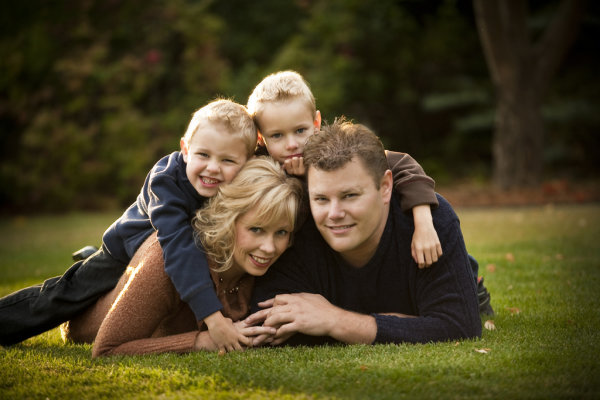
The lying in the grass, pile on top pose. Great for families with small children.

The lying in the grass, pile on top pose. Great for families with small children. This family didn’t need the pose to correct anything, it’s also just fun having the kids jump on top and squish mom and dad.

#8 LIGHTING IS KING – GET SOME IN THEIR EYES

Light can make or break any photograph, portraits are no different. The very derivative of the word photography is “drawing with light”. The biggest thing you want to make sure you do for portraits is get light into your subjects’ eyes. There are many ways to do that and that’s a whole huge topic but there are a few things you can do to set yourself up to start off with good light.

  • Choose the time of day to do the portrait! Ideally late evening about an hour before dusk is the best time for portraits. Why because the sun is lower on the horizon and you don’t get the harsh overhead light you do at midday. It’s more directional and usually a bit diffused if there’s haze on the horizon.
  • If you can’t shoot at dusk, find some shade. Get your family out of the sun, BUT make sure you don’t get the background lit up. Bright areas in the background will draw attention away from the subjects. Look for areas in the shade of large buildings, or under large trees.
  • Avoid using an overcast day simply because the lighting is even and less harsh than bright sunlight. While it is true the light is softer and less harsh, the direction isn’t great. Overcast days give you direct overhead lighting and dark eyes, especially anyone with deep eye sockets.
  • Add some light using a reflector or a flash if need be. Again this is a whole other class on lighting but learn to know when you need more light on their faces. If you cannot see a catchlight (the lightsource reflected in their eyes) then there isn’t enough light in their faces.

Just as important as getting some light in the eyes is having it come from a good direction. We’ve established overhead isn’t good direction, neither is straight from camera. So turning on your built-in pop flash isn’t going to give you good light. Neither is sticking a speedlight on top. Light direct from the camera angle flattens the subject, that is not what you want. You want the light to come from the side more, 30-45 degrees from camera is a good starting point. To learn more about this read my article on the 6 Lighting Patterns Every Photographer Should Know.

This was done just before sunset. The sun is coming just over their shoulders on the left. I used a flash in an umbrella also to the left to add light to their faces, without it they'd be in shadow.

This was done just before sunset. The sun is coming just over their shoulders on the left, behind them. I used a flash, bounced into an umbrella also to the left to add light to their faces, without it they’d be in shadow.

#9 EXPRESSION IS EVERYTHING

So if lighting is king, getting the right expressions is everything! You can totally screw up the lighting, and the pose, but if you get them laughing or making “that” face – it’ll be a big hit!  So how do you do that?

See #1 first of all. Then look at #6. Being a photographer means that sometimes you have to also become a comedian, or a clown. Knowing the right thing to say or do to make people smile is mostly experience. Sometimes you’ll get tough adults too. The dad in the photo above by the brick wall pretty much has the same expression all the time. I’ve known this family and photographed them for 13 years, they’re friends too. So I know I can bug him a little bit or get out the ducky to have some fun at his expense.

If there are small children or babies involved make sure to get their attention. It even helps to have an assistant, tell them to bring Grandma along or a friend to help out. But what always happens is you get the kids all looking and smiling, and what are the parents doing? Looking at the kids!  Oops again! I always tell the parents, “no matter what keep looking at me as I make a total fool of myself, do NOT look at your child”.

Stamhuis-0038-Google

Baby laughing, everyone else followed instructions and looked at me, success!

#10 HAVE A LITLE FUN WITH IT

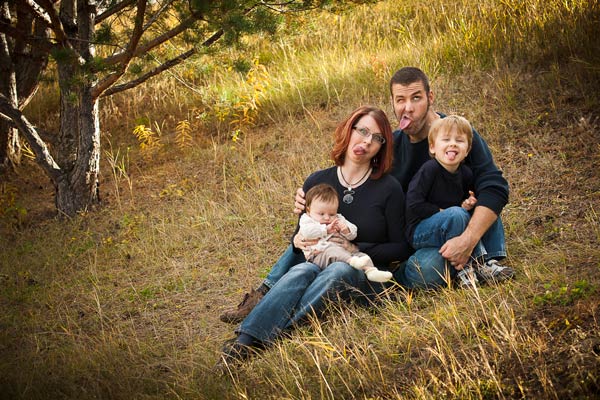
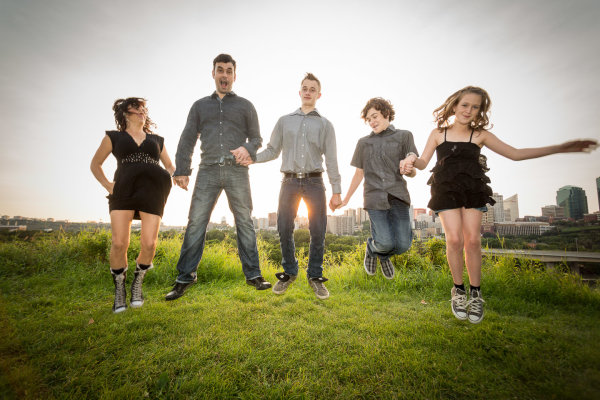
Last tip is to no take yourself so seriously. Create a few really whacky shots at the end of the session (or even in the middle if the energy seems to be fading). Tell them to do a group squish and really get them to squish. Often they will start laughing and as they pull apart you grab the shot. Do a pile on down in the grass. Ask them to jump in the air or make goofy faces (you make one too). It breaks the tension and lightens up the mood.

I volunteered my time at an event called Help Portrait last year that has photographers, make up artists and organizers giving their time to create portraits for people that otherwise couldn’t afford a professional one. They ended up sending most of the families to me, initially because I had the biggest area to do the group photo and later because the other photographers said I was the best with the kids.  To see some of my photos from that event go to Help Portrait, Edmonton  2012. 

Dino-Park-0131-600

I was making a similar face!

Hood-August2013-0263-Google

My off camera flash stopped working so this is direct from camera, not my first choice. But we were all tired and I thought this would be fun so we just went for it. Notice dad has a new expression!

BONUS TIP

Get the family to think about what they are going to wear. Some people disagree with my point of view on that, which is totally fine. But if you want to read more about it go to Clothing for Portraits.

Get out there and photograph some families and have fun!


Post originally from: Digital Photography Tips.

Check out our more Photography Tips at Photography Tips for Beginners, Portrait Photography Tips and Wedding Photography Tips.

10 Tips for Creating Great Family Portraits


Digital Photography School

 
Comments Off on 10 Tips for Creating Great Family Portraits

Posted in Photography


3 Reasons to Shoot Vertical Aspect Landscapes and 6 Tips on How to Shoot Them

08 Aug

A Guest Contribution by Todd Sisson – author of our brand new Landscape Photography eBook (currently 33% off for 7 more days only).

The majority of landscape images are photographed in the horizontal aspect. I guess this because the horizontal format approximates the way in which we perceive ‘reality.’ However landscapes look stunning in the vertical format and often the unique characteristics of the upright format suit a scene better than a horizontal* composition. I am guilty of undershooting verticals these days, primarily for commercial reasons, but in any given shooting situation I try to remind myself to seek both a vertical and a horizontal composition from a scene.

Here’s why I think you should photograph vertically and some quick tips for successful upright image making.

Reason One: Verticals are Easy to Learn

Vertical composition using a wide angle or ultra-wide lens is the fast track to making interesting landscape images. My first successful landscapes were all vertical compositions where I found a moderately photogenic foreground object and used this to lead into the greater scene. To this day I find it easier to frame up an interesting sunset in the vertical format. I use rocks, grasses, flowers – just about anything with form to introduce the viewer’s eye to the scene.

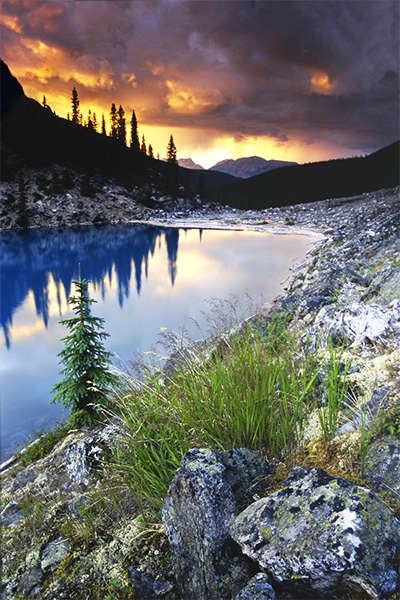
Moraine Lake, Alberta Canada (1997).  Nikon F601, Nikkor 24mm, f/16, (shutter speed unknown), Fuji Velvia and most importantly, Lee 3 stop GND filter.  This was the first image that I ever made that actually turned out how I thought it would!  Note that foreground elements don't have to be spectacular to work, they just have to be well arranged in the frame and complement the rest of the scene.  When I was learning, I found it easier to eliminate foreground distractions and make a 'tight' composition in the vertical format. As a result, I shot far too many verticals in my early days and very few good horizontal images...

Moraine Lake, Alberta Canada (1997). Nikon F601, Nikkor 24mm, f/16, (shutter speed unknown), Fuji Velvia and most importantly, Lee 3 stop GND filter. This was the first image that I ever made that actually turned out how I thought it would! Note that foreground elements don’t have to be spectacular to work, they just have to be well arranged in the frame and complement the rest of the scene. When I was learning, I found it easier to eliminate foreground distractions and make a ‘tight’ composition in the vertical format. As a result, I shot far too many verticals in my early days and very few good horizontal images…

Reason Two: Vertical Compositions can be more Dynamic

In this dPS blog post, I explained the principles of ‘dynamic landscape compositions’. What I didn’t reveal in that article (for some inexplicable reason) was that vertical compositions can often accentuate the dynamic qualities of an image – particularly when using an ultra-wide lens.

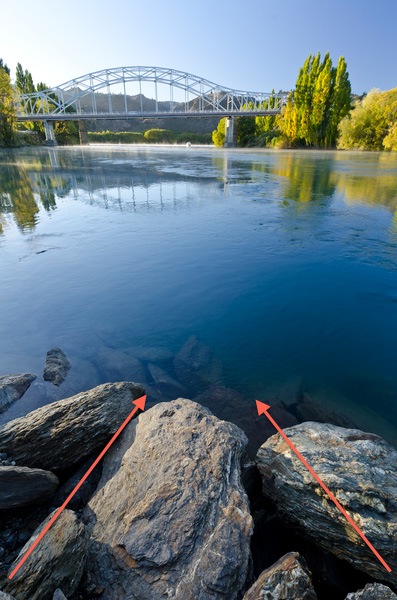
The Clutha River at Alexandra (it's not wonky, the bridge slopes downhill...).  Nikon D7000, Nikkor 12-24mm f/4 DX, Marumi Polarizer. 12 mm, f/11, 1/13th, ISO100.  The vertical format accentuated the leading lines present in the foreground rocks.  Getting low and tilting down on an ultra-wide lens distorts and extends the perceived length of leading lines in the foreground.

The Clutha River at Alexandra (it’s not wonky, the bridge slopes downhill…). Nikon D7000, Nikkor 12-24mm f/4 DX, Marumi Polarizer. 12 mm, f/11, 1/13th, ISO100. The vertical format accentuated the leading lines present in the foreground rocks. Getting low and tilting down on an ultra-wide lens distorts and extends the perceived length of leading lines in the foreground.

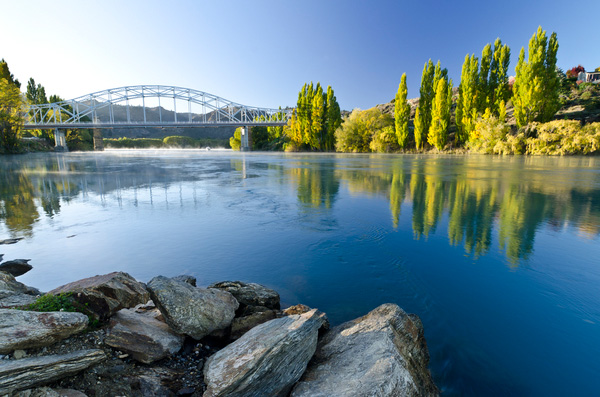
The Clutha River at Alexandra (the bridge still slopes downhill – I promise!).  Nikon D7000, Nikkor 12-24mm f/4 DX, Marumi Polarizer. 12 mm, f/11, 1/13th, ISO100.  When shooting horizontally, the bridge and trees would not be in frame if we used the same camera angles and proximity that were applied in the vertical format. In this case I had to step back and recompose to include everything, which reduced the dynamic impact of the rocks.

The Clutha River at Alexandra (the bridge still slopes downhill – I promise!). Nikon D7000, Nikkor 12-24mm f/4 DX, Marumi Polarizer. 12 mm, f/11, 1/13th, ISO100. When shooting horizontally, the bridge and trees would not be in frame if we used the same camera angles and proximity that were applied in the vertical format. In this case I had to step back and recompose to include everything, which reduced the dynamic impact of the rocks.

Reason Three: Verticals Sell Well

In the introduction I polluted the artistic sanctity of the article by mentioning ‘commercial reasons’. Five years ago we made most of our living from selling postcards of our images – horizontal postcards vastly outsell vertical postcards, and they fit better on a display stand, so I found myself inadvertently locked into a horizontal mindset (as I mentioned last week, deep thought and self-awareness are not my strong point). This sales trend is definitely mirrored in our website where the bulk of our print sales are horizontal.

However, In the past year we have ramped up our stock photography activity and this is one area where vertical images sell extremely well – especially for editorial usage and magazine covers where the format works beautifully with the vertical layout of printed media. Consequently, we are shooting a lot more vertical images. You may not be a full-time photographer but there are myriad ways to earn money from your photographic hobby these days, don’t leave money on the table – shoot verticals along with your horizontal compositions.

Vertical Shooting Tip 1: Get Low and Close

As I noted in the previous image, getting low and close accentuates the visual power of leading lines and dramatically increases the visual weight of foreground features. To go low you will need to use a tripod that has no centre column in order to get super close to the ground, I have detailed our tripod advice here which may be of interest if you are perplexed by the ins and outs of the tripod purchasing process.

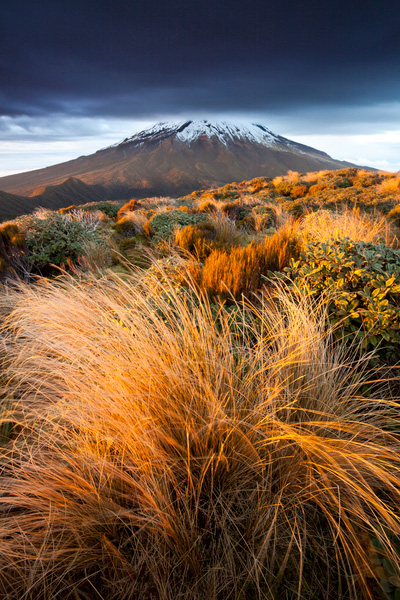
Mount Egmont New Zealand. Canon 5d mkii, Canon 17-40mm f/4 ultra-wide, Marumi polarizer. 17 mm, f/16, 1 sec, ISO100. By getting implausibly close to the foreground grass in this scene I have eliminated other distracting elements, increased the visual weight of the grasses and accentuated the leading lines in the bottom right of shot. As well as being close, I was also very low to the ground while making this image.

Mount Egmont New Zealand. Canon 5d mkii, Canon 17-40mm f/4 ultra-wide, Marumi polarizer. 17 mm, f/16, 1 sec, ISO100. By getting implausibly close to the foreground grass in this scene I have eliminated other distracting elements, increased the visual weight of the grasses and accentuated the leading lines in the bottom right of shot. As well as being close, I was also very low to the ground while making this image.

Vertical Shooting Tip 2: Get High and Close

When using an ultra-wide lens it is possible to include the full sweep of a scene and accentuate the visual dynamics of the image by getting above the foreground elements and composing vertically. To achieve this you will need a tripod that extends well above the height of your subject matter and then angle the camera downwards.

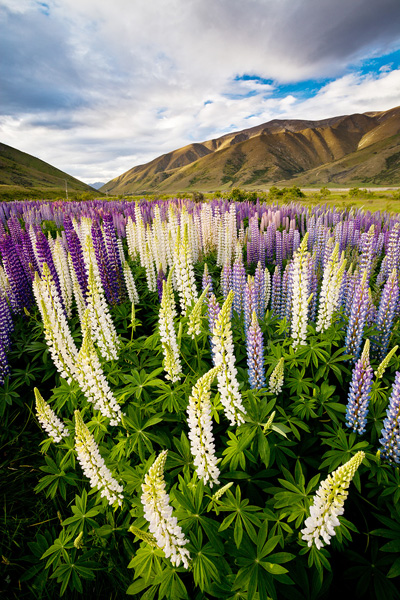
Lupine flowers, Mackenzie basin New Zealand (by Sarah Sisson). Canon 5d mkii, Canon 17-40mm f/4 ultra-wide, Marumi polarizer. 17 mm, f/16, 1/8th sec, ISO100. Sarah had to fully extend her tripod and stand on a box in order to get the camera above these chest high lupin flowers.  The high perspective meant that all of the meadow is visible  and accentuated the space between flowers in the foreground.

Lupine flowers, Mackenzie basin New Zealand (by Sarah Sisson). Canon 5d mkii, Canon 17-40mm f/4 ultra-wide, Marumi polarizer. 17 mm, f/16, 1/8th sec, ISO100. Sarah had to fully extend her tripod and stand on a box in order to get the camera above these chest high lupin flowers. The high perspective meant that all of the meadow is visible and accentuated the space between flowers in the foreground.

Vertical Shooting Tip 3: Break down the Composition

When composing strong verticals I tend to ‘break down’ the scene into foreground, midground and background (the same thinking helps with horizontal images of course). A good composition will contain interest in all three of these visual zones – which roughly approximates the rule of thirds compositional guidelines.

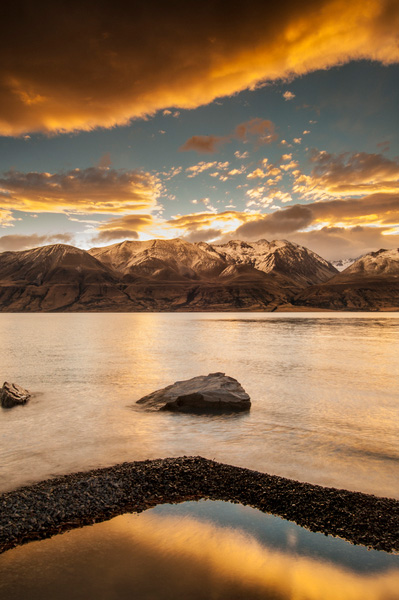
Lake Pukaki New Zealand.  Nikon D800e, Nikkor 17-35mm f/2.8 ultra-wide lens, Marumi Polarizer and Singh Ray 3 stop GND filter. This image has layers of visual interest in the foreground (gravel bar and rocks) mid-ground (reflected color & mountains) and the background (the sky). Note that the terms foreground, mid-ground and background align loosely with the principles of the rule of third – I find that I shoot more in sync with the rule of thirds for verticals than horizontals.

Lake Pukaki New Zealand. Nikon D800e, Nikkor 17-35mm f/2.8 ultra-wide lens, Marumi Polarizer and Singh Ray 3 stop GND filter. This image has layers of visual interest in the foreground (gravel bar and rocks) mid-ground (reflected color & mountains) and the background (the sky). Note that the terms foreground, mid-ground and background align loosely with the principles of the rule of third – I find that I shoot more in sync with the rule of thirds for verticals than horizontals.

Vertical Shooting Tip 4: – Leave some Space

Having just referred to the dreaded rule of thirds, I feel it my duty to throw a spanner into the works. Try messing with your vertical compositions by leaving ‘too much’ empty space. Dead space can look cool and graphic designers love it for dropping text into (sales tip).

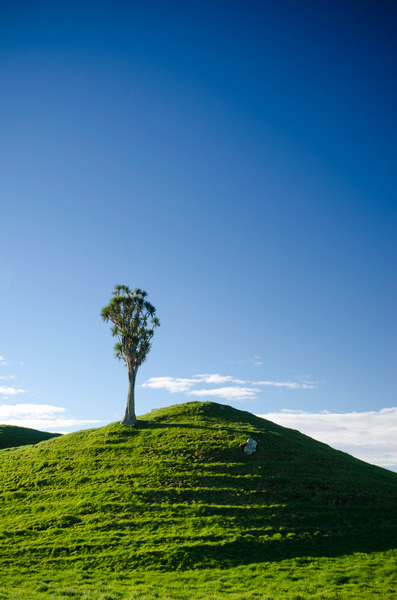
Lone cabbage tree, Taranaki New Zealand.  Nikon D7000, Nikkor 16-85mm DX, Marumi Polarizer. 35 mm, f/11, 1/20h, ISO100.  I think that vertical images often look great with plenty of empty real estate (I am a gleeful recidivist breaker of the rule of thirds). This image has sold several times as an interior page with text dropped over the sky portion.

Lone cabbage tree, Taranaki New Zealand. Nikon D7000, Nikkor 16-85mm DX, Marumi Polarizer. 35 mm, f/11, 1/20h, ISO100. I think that vertical images often look great with plenty of empty real estate (I am a gleeful recidivist breaker of the rule of thirds). This image has sold several times as an interior page with text dropped over the sky portion.

Vertical Shooting Tip 5: Try Telephoto Verticals

Telephoto verticals are a particularly attractive compositional option, particularly around mountains. Because the long edge is oriented top to bottom you can exploit telephoto compression more effectively (by allowing more foreground into the frame at longer focal lengths and emphasizing the height differential across the scene).

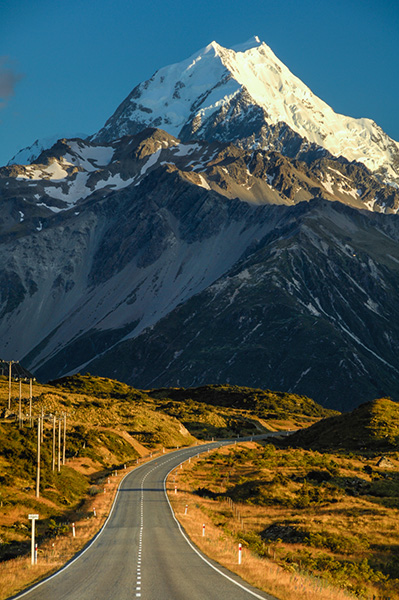
The road to Mount Cook New Zealand.  Nikon D7000, Nikkor 70-200mm f/2.8 Vrii, Marumi Polarizer. 135 mm (202mm 35mm equivalent), f/11, 1/15h, ISO100. The vertical aspect exaggerates the effects of telephoto compression in scenes like this.

The road to Mount Cook New Zealand. Nikon D7000, Nikkor 70-200mm f/2.8 Vrii, Marumi Polarizer. 135 mm (202mm 35mm equivalent), f/11, 1/15h, ISO100. The vertical aspect exaggerates the effects of telephoto compression in scenes like this.

Vertical Shooting Tip 6: Invest in an L-Bracket

An L-bracket or ‘L-plate’ is an L­-shaped (surprise, surprise!) tripod mounting plate that wraps around your camera body. This allows you to effortlessly mount your camera in the vertical orientation without having to flop the ballhead’s mounting point over on it’s side. Never again will you have to fight gravity and adjust tripod legs in order to get the camera leveled when shooting vertically – genius!

You will find a bit more information on the benefits of L-plates here on our website.

*I use the terms vertical or horizontal because the commonly used ‘portrait’ and ‘landscape’ terminology makes me abnormally irascible and grumpy. These terms are a nonsensical hangover derived from a Windows 95 printer options dialog box (maybe this riles my inner Mac Veteran). After all, a portrait can be photographed vertically or horizontally and likewise a landscape…..

Todd & Sarah Sisson are full-time landscape photographers based in Central Otago New Zealand. They are the authors of our new eBook Living Landscapes: A Guide to Stunning Landscape Photography.

Their work can be found as fine art prints & canvas prints at www.sisson.co.nz  They can be found on Facebook, Google Plus and Twitter.

Post originally from: Digital Photography Tips.

Check out our more Photography Tips at Photography Tips for Beginners, Portrait Photography Tips and Wedding Photography Tips.

3 Reasons to Shoot Vertical Aspect Landscapes and 6 Tips on How to Shoot Them


Digital Photography School

 
Comments Off on 3 Reasons to Shoot Vertical Aspect Landscapes and 6 Tips on How to Shoot Them

Posted in Photography


7 Tips That Will Take Your Vacation Photography To A Whole New Level

07 Aug

It’s summertime…and the living is easy! This is the time of year for spending more time outside, soaking up those blessed, golden rays of sunshine and hitting the beach. Of course, it’s also the time of year when you’re likely going on vacation, meaning vacation photography takes center stage after many months of you working hard and keeping your nose Continue Reading

The post 7 Tips That Will Take Your Vacation Photography To A Whole New Level appeared first on Photodoto.


Photodoto

 
Comments Off on 7 Tips That Will Take Your Vacation Photography To A Whole New Level

Posted in Photography


6 Easy Tips To Photographing Strangers In Perfect Candid Moments

05 Aug

Candid photography is responsible for the best photographs in the world. Just take a look at all the of the most striking images you’ve ever seen, almost all of these are from candid shots when photographing strangers. When photographing strangers, a photographer is bestowed many plus points: Images are considered far more credible the less contrived they are You have Continue Reading

The post 6 Easy Tips To Photographing Strangers In Perfect Candid Moments appeared first on Photodoto.


Photodoto

 
Comments Off on 6 Easy Tips To Photographing Strangers In Perfect Candid Moments

Posted in Photography


Three Useful Tips On How To Make Your Photography Backdrops Fun

31 Jul

Untitled-1

The popular image of a professional photographer is of somebody who takes portrait pictures against a purely white background. To the very top with their profession, this really is all they desire, but it is more common in a photography business to find customers who want dynamic backgrounds. These could be of the nation’s flag, or simply of different colors, however the professional photographer will also be able to provide additional options. Amateur photographers and people studying the subject at school, will also want to use more than just an ordinary white background. Rather than going for traditional colors or images like flags, it’s a good idea to shake some misconception a little by utilizing fun and dynamic photography backdrop sets to present your subjects a much more interesting picture. There are lots of ways in which you are able to improve the appearance of your respective backgrounds.

1) Get Relevant
Use striking images that is popular with customers. There will always be themes which people find interesting, like fairy-castle, racing cars, and holiday themes. It is easy to purchase posters and also other accessories that can fit into the theme, and printed backgrounds can be acquired which will satisfy your clients. By way of example, as the Twilight series is as popular as ever, a spooky theme, with large full moons, and mists, will surprise clients who want to theme their picture around the popular book and film series. Needless to say, this type of background also doubles as a ‘rock and roll’ theme, therefore it is a good purchase for those on a low cost. Bricks or walls as backgrounds will also be very popular, although sometimes your subjects will have their own ideas in what they want. Some clients have even joined together with the fun and dressed up as a comedy villain and heroine, together a backdrop of a train appearing about to run them down. These types of backdrops may bring out the fun side of clients, and also help you to capture a good portrait ones.

2) Go Wild
One other popular theme with people and one which may be turned into a fantastic and fun picture is nature image. The seaside is particularly popular, and also the photographer can enhance the image with the addition of buckets and spades. This backdrop is perfect for children, but young partners might prefer a more ‘windswept’ theme. Nature can even be charming, so performing a portrait picture of a family with their pets could be enhanced by using a ‘nature’ picture to their rear, full of animals. For anyone with an eye for the budget, self-printed images of animal prints can be quite a good alternative, or even a large print tablecloth with animal images on can be a cheaper replacement for buying printed backdrops.

3) Try it for yourself
Of course, don’t assume all professional photographers contain the budget to splash on a variety of different backdrops, which is where the principle of DIY could be a good way to come up with a fun background without splashing the cash. The best form of DIY photography backdrop is one made from torn sheets of colored paper, or ribbons, strung in the studio utilizing an old curtain rail. These could look particularly effective if you adopt a colour scheme, such as green or blue strips. Ribbons help give a classier look to the images, because they have neat edges, and appear smooth and professional. An alternative for these backdrops is by using wallpaper or print stamps to make fun and original backgrounds. See TheLAShop for excellent photography ideas.

BlogPhoto

 
Comments Off on Three Useful Tips On How To Make Your Photography Backdrops Fun

Posted in Equipment


5 Tips for Creating fun Campfire Photos

28 Jul

night-campfire-photography-featured

A couple of weeks ago I had the pleasure of meeting the Digital Photography School headmaster, Darren Rowse, in person at a conference we both attended called the World Domination Summit in Portland, OR. The message of the conference (yes, the name invokes much curiosity) is simple: community, adventure, and service. It’s a large group of people that enjoy life, live adventures constantly and give back in service of others. That’s one of the reasons why I love writing on this site so much, I get to share my experience and knowledge and help you!

Me and Darren Rowse

Me and Darren Rowse

Darren was one of the keynote speakers and he most of the attendees (3000+) inspired to move forward and live our dreams. He even fulfilled one of his childhood dreams on stage, but I’ll leave that for Darren to share with you!

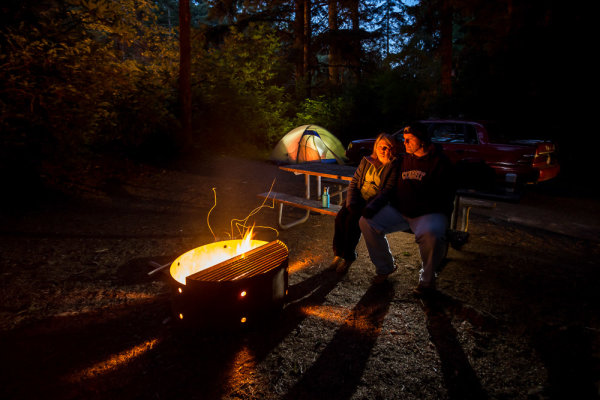
One thing I’ve always wanted to do is visit the Sea Lion Caves in Oregon. So after the conference my husband and I headed to the coast for a few days. We camped in one of the state parks, in the middle of the woods and sand dunes, it was awesome being in nature. But, being a photographer I couldn’t just sit around the campfire and do nothing, so out came the camera!

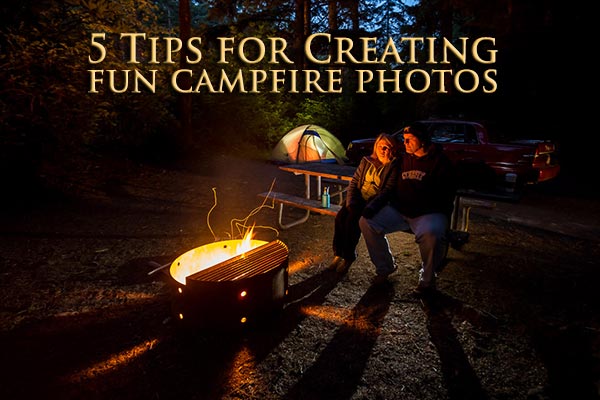
It’s really not that hard to create some really cool images that will impress your friends. I’m going to walk you through my process for creating the image above and how I adjusted as I went to get the desired result. Remember photography is a journey, not a destination, don’t expect to get it perfect on the first shot – I never do!

Here are my 5 tips for you on creating some fun campfire images.

#1 USE A TRIPOD & SELF TIMER OR REMOTE TRIGGER

A tripod is essential for doing this type of photography as you’ll be dealing with some really long exposures, mine ranged from two to ten full seconds. Make sure you have a sturdy tripod and if you want to get in some of the photos you can either use the self timer, as I did and run into the scene, or get yourself a handy wireless remote you can put in your pocket and fire the camera from your spot in the image.

#2 WAIT UNTIL IT’S DARK ENOUGH OUTSIDE

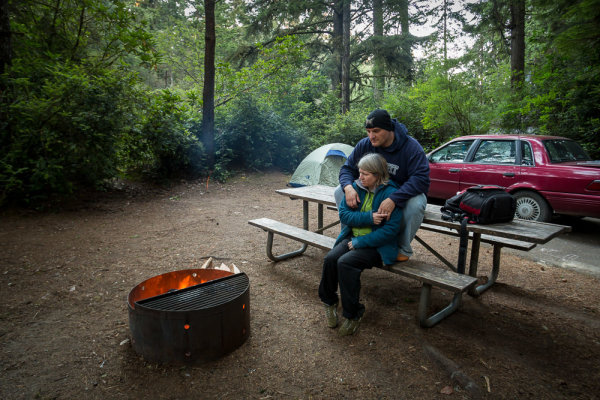
night-campfire-photography-002

ISO 400, f/4, 1/8th of a second

The image above is the first one I made and I wasn’t happy with it. It didn’t have the mood I wanted and the sky was too light. So I had a snack and waited about an hour then made the following image. I’ve given the exposure data for each shot so you can see how I adjusted it as the sun went down and the amount of light diminished.

#3 EXPOSE FOR THE BACKGROUND, KEEP IT DARK

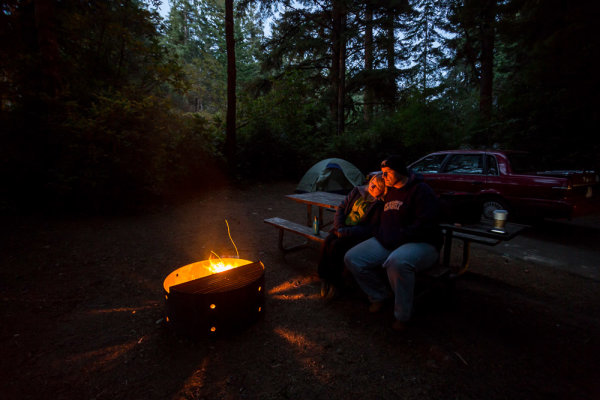
night-campfire-photography-003

ISO 1600, f/4, 2 seconds

Okay, so that’s way better but I felt it was still missing something. I really liked how the light was streaming out of the holes in the rim of the fire pit. The exposure is just right on the background but it seemed a bit boring.

Notice also that I increased the ISO to 1600. If I hadn’t my exposure at ISO 400 would have been 8 seconds. It’s pretty hard to keep perfectly still for 8 seconds so I sacrificed gaining a little bit of noise to get what I felt was a more reasonable 2 second exposure time.

#4 ADD SOME ADDITIONAL LIGHT INTO THE SCENE

Going from the last image, I knew wanted to add a bit of a light to to the tent, to make it look like it was glowing. So I took my headlamp (get one at a camping supply store or use a flashlight) and turned it on inside the tent. I aimed it at the back wall facing away from the camera so I didn’t get a hot spot, and it lit up the whole tent quite evenly. If you have a larger tent you may need more than one light inside.

**NOTE:  do NOT put fire or a gas lantern inside your tent! Please practice good fire safety habits at all times.**

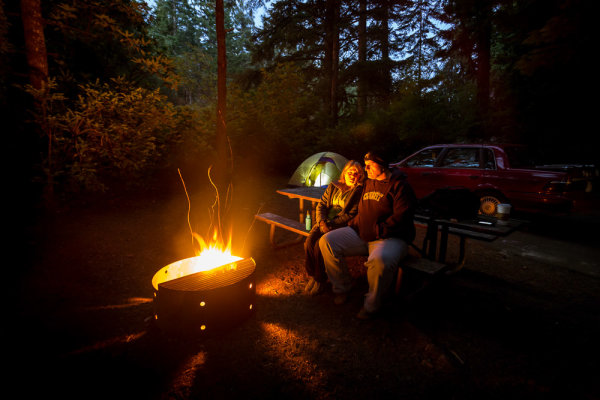
night-campfire-photography-005

ISO 1600, f/4, 2 seconds

Okay almost perfect, except for a couple of little things. As we had just put a log on the fire it was pretty intense and bright. That brings me to the last tip.

#5 SHOOT WHEN THE FIRE BURNS DOWN IF IT’S TOO BRIGHT

There’s no way to control the intensity of the fire except by darkening the whole image, but if I do that then my background will basically disappear into a black abyss. So we waited a while before doing the next image. I also added a second head lamp, this time on the picnic table seat behind us. It is pointed back towards us and I placed it careful so we’d be in front of it and the light itself wasn’t hitting the lens directly.

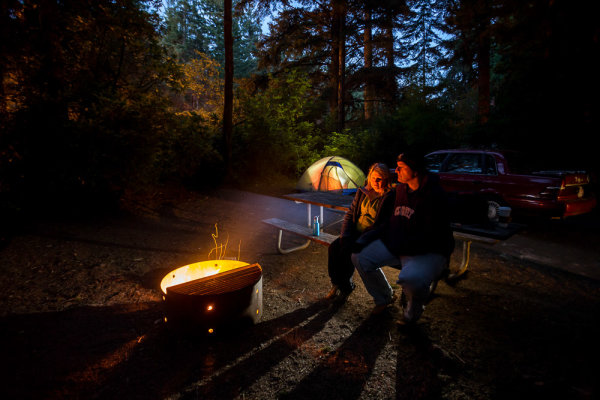
Here’s a couple of the final shots, with which I was quite pleased. I changed my camera angle a bit and re-cropped but otherwise they are very similar. Notice these last exposures were a bit longer. The light in the sky was almost completely gone so in order to get any detail in the background I had to increase the overall exposure, taking care to not overexpose the fire.

night-campfire-photography-010

ISO 1600, f/4, 5 seconds

night-campfire-photography-009

ISO 1600, f/4, 5 seconds

#6 BONUS TIP – MAKE SURE TO FOCUS THEN TURN IT OFF

Focusing at night is very tricky because your camera can’t see in the dark, neither can you! The best way to focus is to have your friend hold a light where you’re going to sit (or put it on a chair). Aim the light directly at the lens, which will allow the camera to “see” it and lock focus on that spot. Once it’s locked, just switch to manual focus, taking care not to bump the camera or accidentally turn the focusing ring. If you move the camera or recompose the scene, just do the same procedure over again.

ADDITIONAL READING

If you want to read more about other night photography techniques I’ve done a couple of article on Light Painting and some special effects. Links to them below:

  • Light Painting Part one – the photography
  • Light Painting Part two – photoshop
  • Three Special Effects for Night Photography

ACTION PLAN

Since we still have a little bit of summer left in the Northern Hemisphere, if you plan on doing a little camping take the camera gear along and give this a try! You may find your travel companions get into it and have a little fun with it as well. Also gives you a great way to do some fun group photos. You can also use flash if you’re so inclined and skilled. Please do share your images with us and any other tips you want to add that I may have missed.

Cheers, Darlene

Post originally from: Digital Photography Tips.

Check out our more Photography Tips at Photography Tips for Beginners, Portrait Photography Tips and Wedding Photography Tips.

5 Tips for Creating fun Campfire Photos


Digital Photography School

 
Comments Off on 5 Tips for Creating fun Campfire Photos

Posted in Photography


Dog Days of Summer: Tips for Shooting in the Midday Sun

26 Jul

Extra photos for bloggers: 1, 2, 3

Whoever said “If you can’t take the heat, get out of the kitchen” probably wasn’t aware we would be making such a liberal interpretation of the saying.

Heat comes from sun. Summer sun is bright. Bright light is tricky to photograph.

It’s no secret that bright midday sun is one of the more challenging types of light to expose properly. We’re talking blown out highlights, harsh shadows, squinty subjects… oh my!

Don’t sweat it, friends. This guide will show you how to get the best shots in the midday sun.

We can wrangle those top-down rays with quick easy fixes to soften harsh light, resolving your bright light issues before you even have time to hashtag them.

How else are you going to document that tan you’ve been working on all summer?

Pro Tips for Midday Shooting 

p.s. We’re hiring for an amazing opening at Photojojo. We’re looking to re-invent what/how/where we publish online, and we’re seeking one amazing somebody to lead the charge. Learn more and apply for our Editorial & Community Lead.

p.p.s. Tell friends!

Why It’s Cool

Summer is a great season for shutterbugs… between the golden mornings and evenings we’ve got, like, 2 extra hours of daylight to bask and snap in. And nothing says summer like bright, colorful, high-contrast photos! So why are you spending this extra shooting time inside?

Light is everything to photographers, so take the camera outside and stop actin’ like it’s not. It’s always high noon somewhere, so you might as well turn down those ISO settings and learn how to beat the heat.

Use these tips and tools to improve your lighting skills by shaping, bouncing, blocking, and even adding it back afterwards. You’ll perfect your sharp shootin’ so you can keep exposing when bright light is unavoidable, anytime of year.

Ingredients:

  • Any kind of camera
  • Lens filters – polarized, neutral density (ND), or your own DIY
  • Fill light – a reflector, foam board, or flash
  • Shade
  • Photo editing software or app
  • A friend or model

SLAP A FILTER ON IT

before

Think of lens filters like a sweet pair of shades for your camera. They come in all shapes and sizes (including phone sized), so no man or machine will be left squinting in the sun.

Generally – exposing for bright daylight requires some combination of small aperture setting and high shutter speed. Your camera’s sunnies… or, er… filters are one of the easiest ways to reduce the amount of light entering the lens and re-gain creative control in harsh lighting conditions.

Yep. That means shallow depth of field and slow shutter speeds are no longer out of the question! Since they’ll reduce your exposure by a few stops – neutral density (ND), polarized, or DIY filters will be your best bets for softening a case of the midday brights.

Need a FILTER hack? Try using your own sunglasses as a filter on your phone, point & shoot, or DSLR (depending on the size of your lens). Play with the composition a little and use your glasses as a frame within your photos.

ARE YOU FILL-IN’ THE HEAT YET?

before

There are two great ways to fill in and break up harsh shadows caused by overhead light: Bouncing light and flashing it.

Yeah… we said “flash”.  Sure, the concept of fighting light with more light may sound like an idea from another galaxy, but it’s actually necessary to get the right exposure on a backlit subject. Oh, and diffusing said flash will help to produce a more flattering end result!

Similarly, a reflector or white foam board will bounce the light, filling in shadows caused by an overhead light source (like that giant one we call “the sun”.) Pretty much any flat, white object can bounce light. You could even use a pocket-sized version in your phoneography.

Need a FILL hack? Look down! Lightly colored surfaces (like sand or concrete) will bounce a nice glow on your subjects. Scout out a spot near one of these bright patches when you’re lacking the extra arms to hold a reflector in place.

SHADY BUSINESS

before

When you’re getting scorched or just plain fed up, scour the area for a patch of shade. It can be manmade or au naturale, just watch out for spotty light! Buildings and trees are a good place to start your quest.

When there’s no shade to be sought, there are a couple easy ways to create your own. Keep an umbrella or a sheet on hand for such occasions. Not only will you soften that pesky light, you may even earn yourself a cool nickname like “MacGyver of the Shadows”.

Once your shade is in check, position your subject in front of an equally shaded background (near the edge of the shadow they’re under). Now when you shoot you’re getting the best of the shade AND the light. Like a boss.

Need a SHADE hack? Try using a bed sheet as a scrim. Throw it over something tall and place your subject beneath it. Or have a photoshoot while your beach towel is hanging out to dry!

EDITABLE INSURANCE

beforeKinda like a bad sunburn – there’s not much you can do after the fact to fix it an overexposed picture. No… not even with aloe vera.

It’s much easier to recover underexposed areas of a picture using photo editing software. That’s like photography SPF, dude.

To underexpose photos on your phone, tap the screen to focus on a bright area of your shot before hitting the shutter. Snapseed and VSCOcam are great apps that will help you edit your photo. You can change your exposure, adjust fill, and fix your photo’s highlights all from the comfort of your palm.

When shooting from your camera, play it safe by bracketing for exposure, underexposing back-lit subjects, and shooting RAW.

Two great ways editing software can help recover a photo taken in tricky bright light are:

1) Adjusting the levels to take back the shadows in the foreground of your photo, and

2) Using layers and masking tools to combine 2 images of a correctly exposed foreground (with an overexposed background), and vice versa.

Taking It Further

  • When you salvage important details (like eyes), deliberate overexposure can give your photos a surreal, dreamy look.
  • When your background is interesting and noteworthy, silhouettes are a great way to add drama and tell a story.
  • Some filters can reduce your exposure enough stops to create a really long exposures… wait for it… in the DAYTIME. Check it these out and give it a go!

Jenny Sathngam is a tutorial writer/photographer for Photojojo. She is based in Austin, TX – where cloudless, triple-digit summers last most of the year and shooting in the midday sun is more practice than theory. (Model: Sanetra Stewart)

Related posts:

  1. Pro-Tips for Shooting Better Instagram Videos Extra vids for bloggers: 1, 2, 3 “Well that’s weird,”…
  2. Summer Guide: Keep in Touch with Friends via Photo Apps! Extra photos for bloggers: 1, 2, 3 Prom, graduation, senior…
  3. Halloween Photo Tips — Our Ghoulish Guide to Scary Snaps How can you not love a holiday that encourages you…


Photojojo

 
Comments Off on Dog Days of Summer: Tips for Shooting in the Midday Sun

Posted in Equipment


4 Quick Tips For Getting The Most Out of Lightroom Presets

25 Jul
Image created with Daylight to Sunset preset

Image created with Daylight to Sunset preset

This post was written to coincide with my latest deal over at the DPS sister site – Snapndeals. Over the years I’ve created and stockpiled tons of presets in Lightroom, just for personal use. I finally made them available to the public earlier this year at the request of many of my blog readers and the feedback has been amazing! The collection on Snapndeals includes all of the presets I have released (80 total in 7 different groups) and they are all, of course, fully customizable. I put a ton of work into these and I really think you will love them!

So Lightroom presets are something I’ve become really obsessed with. I use them with pretty much 100% of my family photos and about 70-80% of my other images. Sometimes it’s just one click and I can take an image from it’s RAW state to a completely post processed and finished image. Other times I can apply a preset and be about 80-90% finished. From there it’s just a few minor adjustments to get the image looking great but the total time saved by adding the preset is still incredibly valuable. So here’s a few tips for using my new JamesB Lightroom Presets to help your workflow and create amazing images. Let’s go!

1) Spend Some Quality Time Familiarizing Yourself With The Presets

I’ve found that using presets becomes more efficient the more you use them. If you use them rarely, you aren’t very familiar with the presets you own. Therefore, when it comes time to use one you have to wade through them all to find the right one which can take a lot of time (especially with a collection of 80 presets like this one). When you use presets regularly you memorize where each one is, you know where your favorite presets are and how to get to them fast, you know which presets will work better for certain images. When you get into this mindset, your workflow in Lightroom really becomes optimized. And who among us doesn’t need more time on our hands?

I broke the presets into 7 different groups and each group has presets that were specifically designed for different genres/styles of photography. That doesn’t mean you can’t use a portrait preset on a landscape image, I’ve done that several times. But more often that not, I use travel presets for travel images. Portrait presets for portrait images.

2) Create A New Folder For Your Absolute Favorite Presets

Screen Shot 2013-06-21 at 10.10.11 AMOver time, you’ll discover that there are certain presets that you use quite often. Feel free to create a new folder in your presets catalog and the drag your favorites into that one. A few of my favorites are Day At The Zoo and Bright and Sunny from my “Family Lifestyle” set, B&W Film Grain and B&W High Contrast from my “Monochrome” set, Sweet Pea Vintage in my “Nostalgia Film” set and Rome in my “Travel” set.

Creating a new folder in the presets panel is easy, although not very intuitive if you haven’t done it before. Clicking the + mark at the top right won’t do it, that’s just for creating new presets. You have to hover over your presets and right click, choose New Folder and then give the folder a name. Then it’s as easy as dragging the presets from one folder to another.

3) Don’t Be Afraid To Fine Tune

The Develop module can be pretty intimidating to those who haven’t used it before. There are a LOT of options over there. A lot of ways to make a photo look great, and a lot of ways to make a photo look terrible! When you add a preset, you’ll be able to see the changes that it made over on the right side of Lightroom. If the photo doesn’t look just how you were hoping, go over and play around with the sliders a bit to get it just where you want it. The truth is, there’s no preset out there that will work perfectly for every photo, so most of the time you will have to make slight adjustments.

4) Create Your Own!

Once you’ve used presets for a while, you will start to get more and more comfortable tweaking and fine tuning them to your taste. The more comfortable you get, the more you will start using certain looks time and time again. Feel free to use some of my presets as a base or a starting point. Then add to it, change it up, tear it down and rebuild it, then create new preset that’s all your own. I do this quite often and not only is it a great learning experience, to see how much work goes in to creating a great preset, it’s also a lot of fun!

Be sure to grab a set of the presets for yourself, I promise you’ll love them!

A Few Samples Of Images Created Using My Presets

_MG_2302 1DS_3478 1DS_5603 1DS_6004 Death_Valley_Cactus-X3


Post originally from: Digital Photography Tips.

Check out our more Photography Tips at Photography Tips for Beginners, Portrait Photography Tips and Wedding Photography Tips.

4 Quick Tips For Getting The Most Out of Lightroom Presets


Digital Photography School

 
Comments Off on 4 Quick Tips For Getting The Most Out of Lightroom Presets

Posted in Photography