Sony has just announced a brand-new full-frame camera, the Cyber-shot RX1R II. Successor to the RX1 and RXIR, the new model brings some significant updates, most notably the same sensor and hybrid AF system as the company’s flagship mirrorless interchangeable lens camera, the A7R II. We’ve had our hands on the R1XR II and we’ve put together some first impressions. Click through to read more
Tag: Time
-
4 Ways the Time of Day Affects Your Photographs
You have probably heard the saying, “The early bird gets the worm,” and in some ways that phrase can be repurposed to apply to photographers as well. “The early photographer gets the picture” isn’t always true in a literal sense, but learning to recognize changes that happen throughout the day, and how they affect your pictures is critical to developing a deeper understanding of photography in general. If you’re looking for a way to enhance your own photography, get better shots, or just try something new, getting up early to take some photos in the morning hours can have a dramatic impact on your pictures.
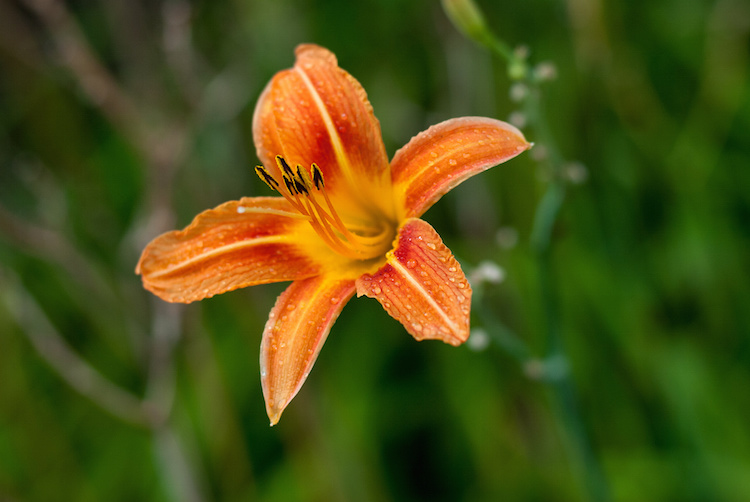
What you will see below is a collection of shots that are similarly-composed, but taken at different times of the day. The idea is not necessarily to see which picture is better, but to help you visualize and understand how much impact the time of day has on your outdoor pictures.
1 – Colors and Shadows
One advantage of shooting in the morning is that the sun is not directly overhead, which means light is diffused in the sky, and essentially coming from all directions. This helps your subjects have more even lighting, and makes it easier to get a good overall exposure since there isn’t the same degree of high contrast between light and dark areas that happens later in the day. This picture of some flowers in the morning illustrates the concept, and shows how diffused morning light can affect not just the shadows, but the color and vibrance of the picture as well.
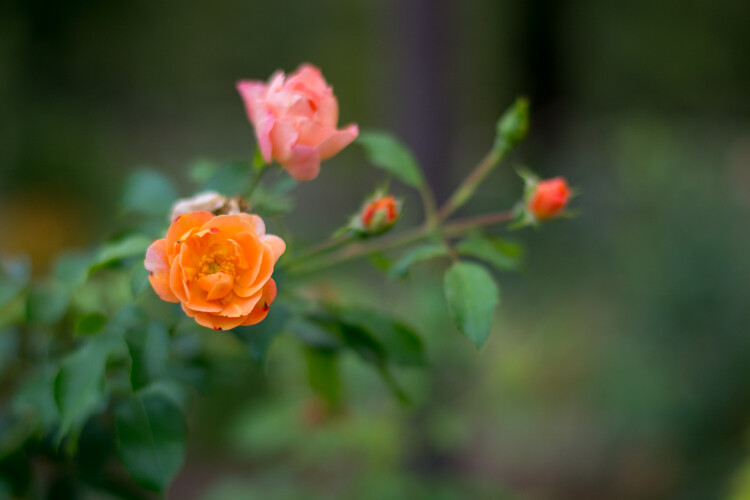
Flowers at 7:30am: 50mm, f/1.8, ISO 200, 1/180th of a second
Revisiting the same scene later in the day revealed an image that is similar in overall composition but quite different in some significant ways. The colors on the orange flower are not as rich and vibrant as they are in the morning photo, and the individual petals create harsh shadows that can be somewhat distracting.
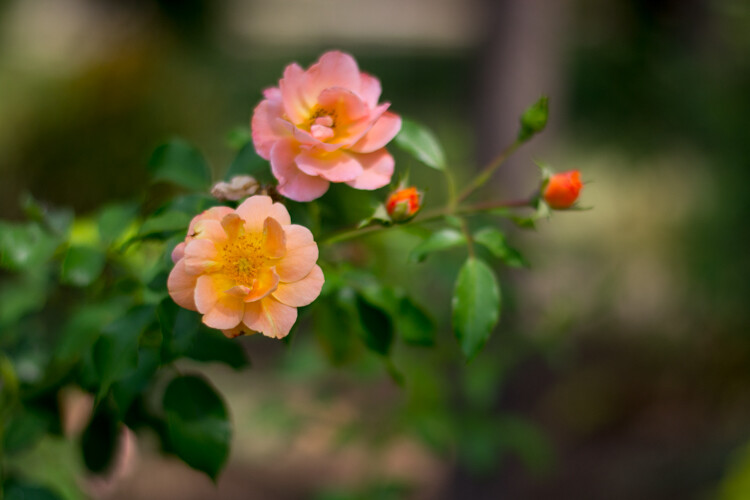
Flowers at 1:45pm: 50mm, f/1.8, ISO 200, 1/6000 second
While taking photos later in the day often means you have more light available, it comes with an important tradeoff: the midday sun often often leads to a greater degree of contrast with brighter highlights and darker shadows. However, this is not to imply that shooting later in the day is an inherently bad idea. Learning to shoot at different times of the day is not just about knowing how things are lit, but understanding how nature itself changes. Different times of day are not necessarily better or worse, but each has its own set of opportunities and challenges.
Notice how the pink flower has opened up and is much more vibrant than in the morning. No amount of early sunlight can coax a flower into full bloom, and sometimes you simply have no choice but to shoot later in the day if you want to get a particular picture. Wildlife shooters often take pictures in the morning or evening, but not necessarily because of the light. They do it because many animals are simply much more active at that time, than in the middle of the day.
One of the best solutions, which is not always possible but does offer some creative opportunities, is when you can get pictures in the middle of a cloudy or overcast day. That scenario gives you the nature advantages of shooting in the middle of the day, with the lighting advantages of morning or dusk. In this final picture, which was taken during a moment of thick cloud cover, you can see how the pink and orange flowers are in full bloom, while the light is much more similar to the morning image. The shadows are soft and diffused, which lends a warm and pleasant feeling to the image.
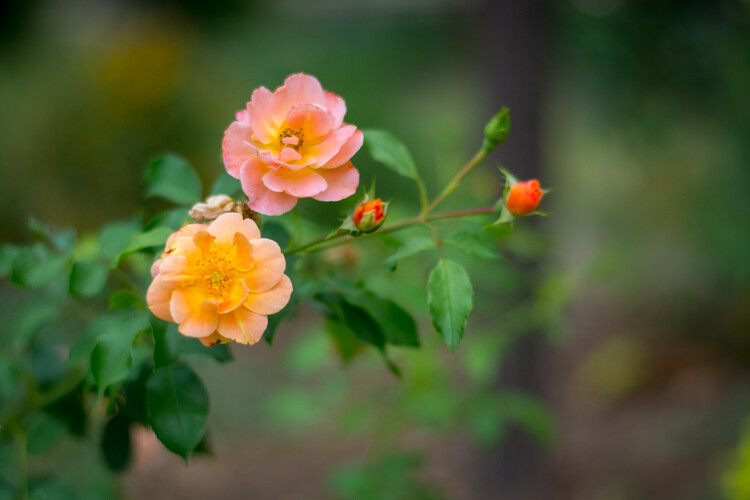
Flowers on an overcast day: 50mm, f/1.8, ISO 400, 1/6000 second
2 – Background Elements
One nice thing about shooting pictures in the morning is how the early sun can cast a nice even light on your subject. But, there are other elements of a photographic composition to take into account as well. Here are two pictures of some seed pods on a magnolia tree, taken a few hours apart. In these examples you can see that the morning light doesn’t just affect the color and shadows on the subject, but has a notable impact on the background elements, and other parts of the picture as well.
In the first image the subject (i.e. the seed pod in the foreground) is evenly lit, with nicely saturated colors, and the composition has a nice warm tone overall. There are a few drawbacks though – the building in the background which faces to the east is so brightly lit it’s distracting, and the sky does not yet have the rich blue tones that can happen later in the day.
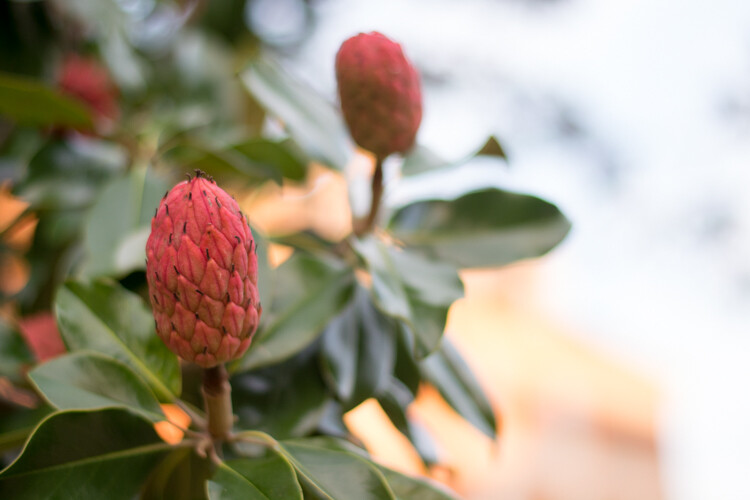
Magnolia seed pods at 7:30am: 50mm, f/1.8, ISO 400, 1/500 second
Here’s the same composition taken a few hours later, which illustrates that shooting in the bright sunlight has some tradeoffs tradeoffs that are both good and bad. While the building in the afternoon photo is not overexposed and the sky has more of a pleasing blue tint, the subject is somewhat backlit which causes a bit too much contrast for my liking.
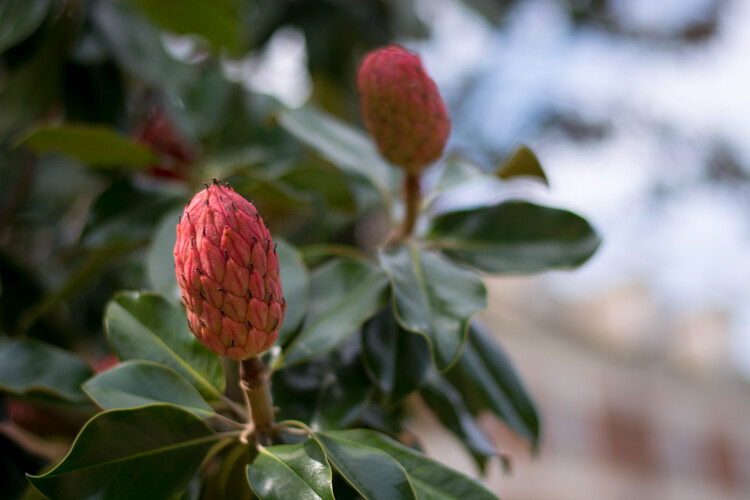
Magnolia seed pods at 2:35pm: 50mm, f/1.8, ISO 100, 1/1500 second
Again, the message here is not about why taking pictures at a particular time of day is better or worse, but understanding the effect it will have on your images. Some of the problems with the afternoon picture could be mitigated if I simply took the picture from a different angle or used another subject. I could also have used the pop-up flash on my camera as a fill flash which would have fixed some of the shadows on the subject. These challenges also become a little easier to work with if you are taking pictures of people and not immovable inanimate objects because you can tell them where to go, bring umbrellas, or use structures to manipulate the light.
3 – Even Lighting
I already gave some examples of how the early morning sun can have a pleasant effect on a single subject, but it can also cast an entire scene, or even a landscape, in an entirely different light compared to the afternoon. This image of a path on the Oklahoma State University campus is one of the most pleasing examples of how shooting in the morning can give you an incredible advantage when it comes to just working with light. The entire scene is evenly lit, and even the undersides of the tree branches are green. There are no harsh shadows and the morning light creates a warm and welcoming feeling overall.
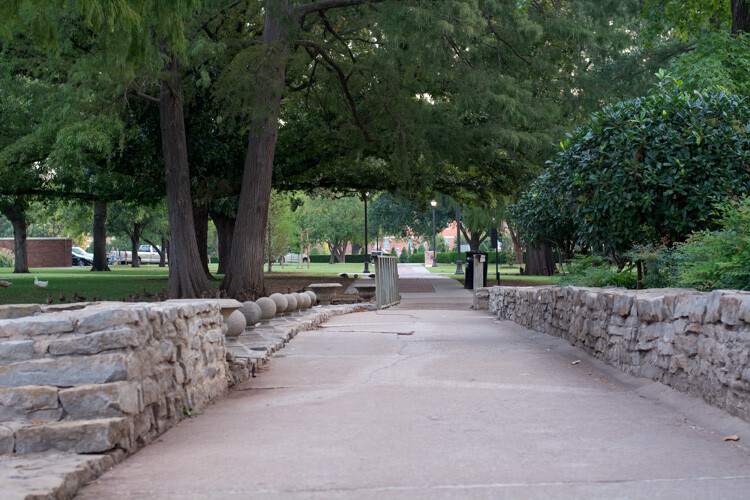
Path at 7:30am: 50mm, f/4, ISO 400, 1/60 second
In the next image you can clearly see evidence of some of the challenges posed by midday sunlight. The image is awash with contrasting areas of light and dark, and the shadows on the path are disjointed and distracting. There is no one clear focal point for the image, and the undersides of the leaves are so dark they are almost unrecognizable. It looks like an entirely different scene, even though it was the same location.
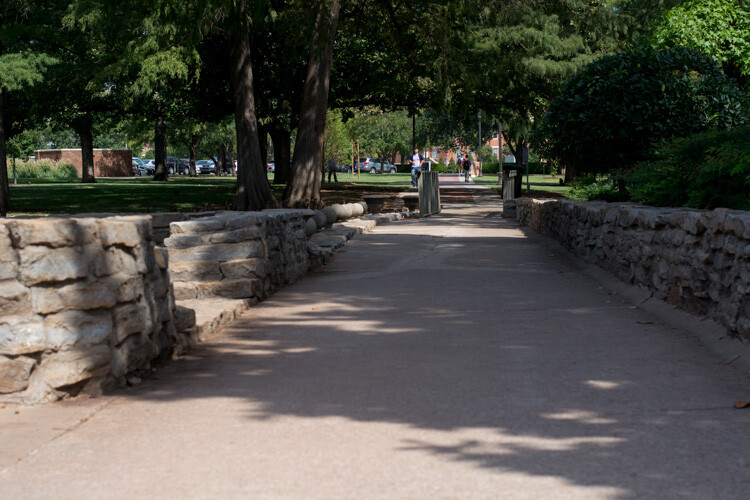
Path at 1:45pm: 50mm, f/4, ISO 200, 1/1500 second
The final image in this series illustrates one additional hurdle that must be overcome when shooting during the day – other people. In most parts of the world, and especially on a college campus, there simply is not much human activity in the early morning. Later in the day you will usually find yourself contending with workers, pedestrians, students, tourists, children playing, or a variety of other types of individuals who might inadvertently get in the way of letting you take the picture you want.
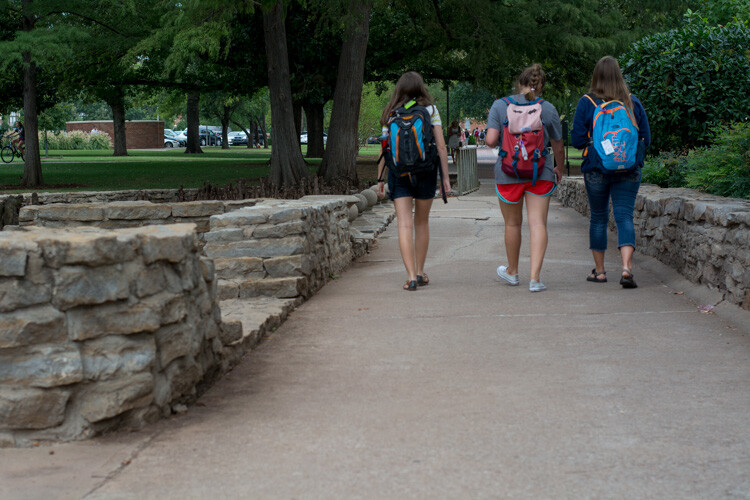
Path at 12:15pm: 50mm, f/4, ISO 400, 1/1500 second
Almost any outdoor photographic situation will have far fewer people around in the wee hours of the morning, which can not only give you better pictures, but a greater sense of peace and calmness as you go about the business of taking photos. The other point to note about the image above with the students walking, is that even though there was plenty of cloud cover which meant nice evenly-diffused lighting, the undersides of the trees are much darker than in the 7:30am photo. This illustrates how even though cloudy and overcast days are great for photos, there are still some aspects of shooting in the morning or evening that can be advantageous.
4 – The Human Impact
Finally, here’s one more example of how pictures in the morning can be much different than pictures later in the day. This bronze statue is a friendly sight for shoppers and drivers in downtown Stillwater, Oklahoma. Taking his photo as the sun is creeping over the horizon yields a well-lit image with a hometown feel, as the shops of main street recede into the background. Colors are even and not overly-saturated, and there is neither too much, nor too little, contrast on the statue itself.
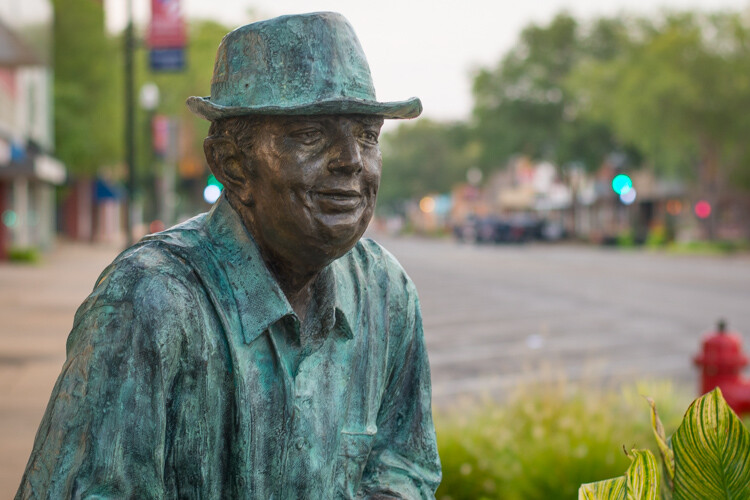
Bronze Man at 7:30am: 50mm, f/2.8, ISO 200, 1/60 second
The same photo in the late afternoon looks dramatically different, but not just because of the lighting. In the second picture (below) the light is clearly coming from overhead, as the top of his shoulders and side of his hat are much brighter and the contrasting light is creating much deeper shadows on his overcoat. This is not necessarily a bad thing, as the result is an image that shows more texture on the statue, even though one of the tradeoffs is that the side of his head is shrouded in shadow. However, the most critical difference here is the background, which is now filled with passing shoppers and parked cars. The picture seems cluttered, the focal point is less obvious, and instead of a friendly small town main street it now seems like a sterile commercial shopping center.

Bronze Man at 4:15pm: 50mm, f/2.8, ISO 200, 1/1500 second
Hopefully these examples give you a better idea of how the time of day in which you take pictures can dramatically affect not just the lighting, but many aesthetic elements of your photographic compositions as well. What are your favorite tips for shooting at different times of the day? Leave your thoughts in the comments below.
googletag.cmd.push(function() {
tablet_slots.push( googletag.defineSlot( “/1005424/_dPSv4_tab-all-article-bottom_(300×250)”, [300, 250], “pb-ad-78623” ).addService( googletag.pubads() ) ); } );googletag.cmd.push(function() {
mobile_slots.push( googletag.defineSlot( “/1005424/_dPSv4_mob-all-article-bottom_(300×250)”, [300, 250], “pb-ad-78158” ).addService( googletag.pubads() ) ); } );The post 4 Ways the Time of Day Affects Your Photographs by Simon Ringsmuth appeared first on Digital Photography School.
-
Fox Talbot’s historical Mousetrap camera leaves UK for first time, heads to Tokyo
One of the first cameras to make a permanent photographic image has left the UK for the first time to be part of an exhibition hosted by the Japan Camera Museum in Tokyo. The so-called Mousetrap camera, used by William Henry Fox Talbot in his early experiments in creating the negative process in the 1830s, is the centre-piece of an exhibition entitled Kingdom of Elegance, Mahogany and Brass which shows off early cameras from the UK’s photographic industry. Sponsored by The British Embassy, the exhibition displays cameras owned by the Royal Photographic Society, the National Media Museum of the UK and a private collector called Kobayashi Yas.
-
Brace Yourself, it’s Time for Back to School!

Headed back to school, or know someone who is? Well, it’s time to prep yourself for the most photogenic year ever!
Check out our list of school supplies that are sure to put the cool in Back to School.
(…)
Read the rest of Brace Yourself, it’s Time for Back to School! (22 words)
© Erin for Photojojo, 2015. |
Permalink |
No comment |
Add to
del.icio.us
Post tags:
-
CamSwarm app may soon allow for easy capture of bullet time sequences
‘Bullet time’ effects, as seen in the 1999 movie ‘The Matrix,’ tend to be expensive and time-consuming to produce, requiring an array of synchronized cameras. Researchers at Columbia University are developing an iOS app that would make it easier for consumers to capture bullet time sequences. Read more
-
How to Shoot and Process a Time Lapse Movie – Quick Method
The other day I was in the city and I was watching the clouds because they were moving so fast. It was a sign that bad weather was on the way, but I also knew the clouds would be a good opportunity to try some time lapse photography.
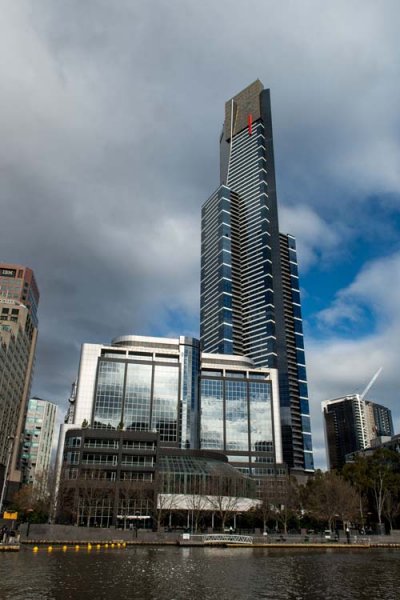
There are many ways of taking a series of images to use for time lapse photography. My camera was setup on a tripod and set to take a photo every five seconds over 10 minutes. In total 120 images were taken, however that number is up to you. The other day I took 300 images to use for one.
You can do this in various ways and it is best to check your camera manual to see if you can take photos at intervals. If you can’t then you may have to use something like an intervalometer or just manually take a photo every five seconds or whatever interval you choose.
When I got home I did some research and found a fairly easy way of putting the images together to get a quick time lapse. Follow along a I show you how you can do this as well.
Lightroom
The 120 images were imported into Lightroom. If you are unsure of how to Import photos then look at this article: Quick Tip: Importing to Lightroom Made Easier.
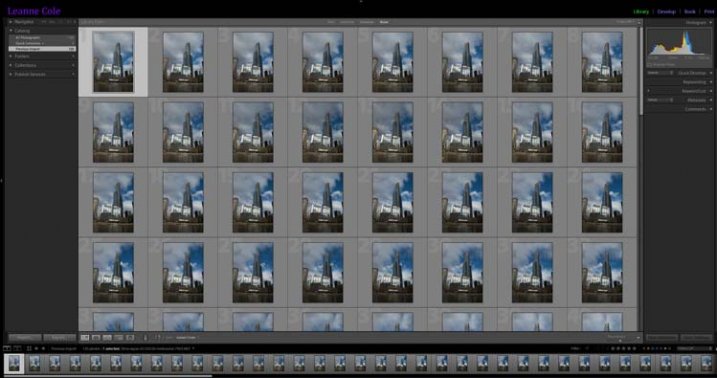
The images for the time lapse in Lightroom
Choose the first image and you do some basic processing to it in the develop module. I straightened, then cropped, a bit of a building out of the side of it, brought out the shadows and highlights.
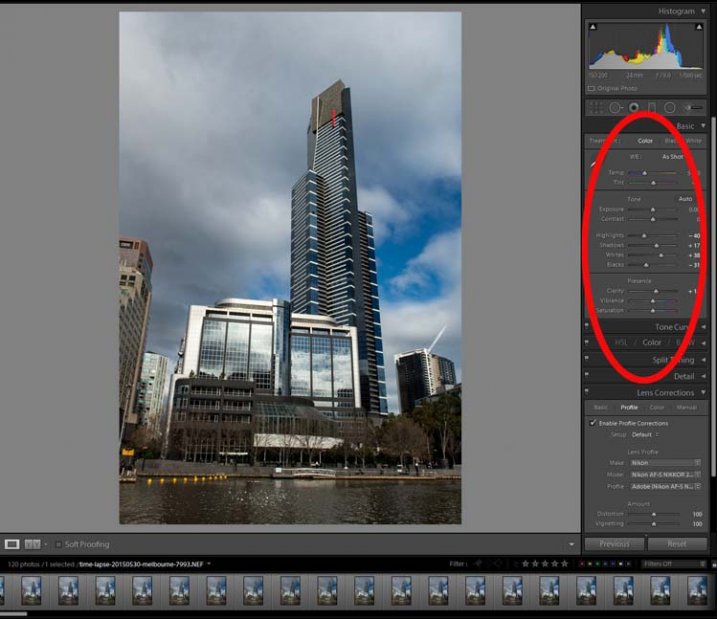
Processing done to the first image.
Select all images for the time lapse and click Sync, in the bottom right of the Develop module.
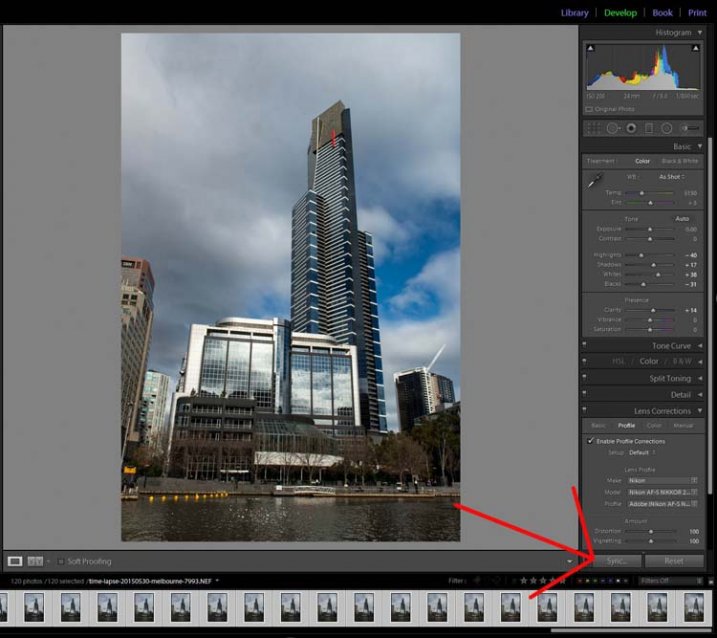
The Sync Button
When the window to Synchronize Settings comes up, tick the box at the bottom to Check All. You want all the changes that you made to the first image to be applied to all of them. They are basically all the same image except for the changes that you want to use for the time lapse.
Press Synchronize in the bottom right of the window. You will see that all the images change and are now ready to be exported.
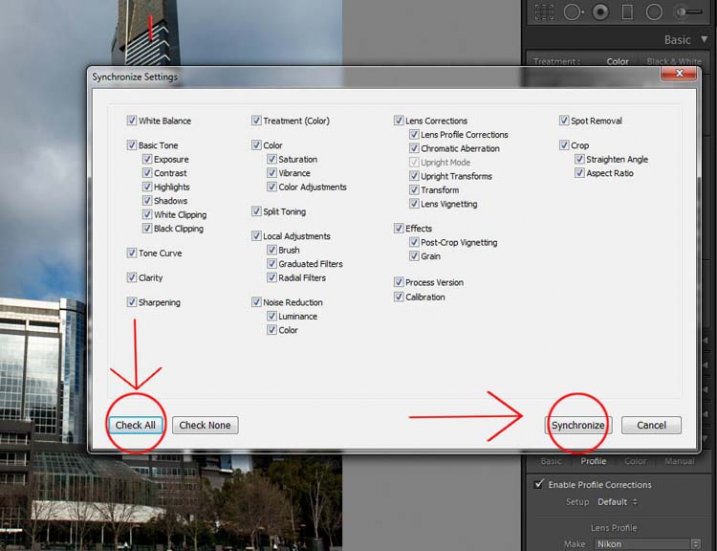
Synchronizing the images.
Exporting the Sequence
There are a few things to consider when you export them, one is the way you rename them. If the number or sequence isn’t at the front of the file name then there may be software problems to put them in the right sequence. It doesn’t make a difference with Photoshop CC.
The images should be changed to jpeg. It is only for the internet so you can use a low resolution, 72 dpi is okay. The size of the image was changed to 1980 pixels for the longest side, which is a good size for videos and for HD.
In the following image you can see which export settings I used for the Time Lapse sequence images.
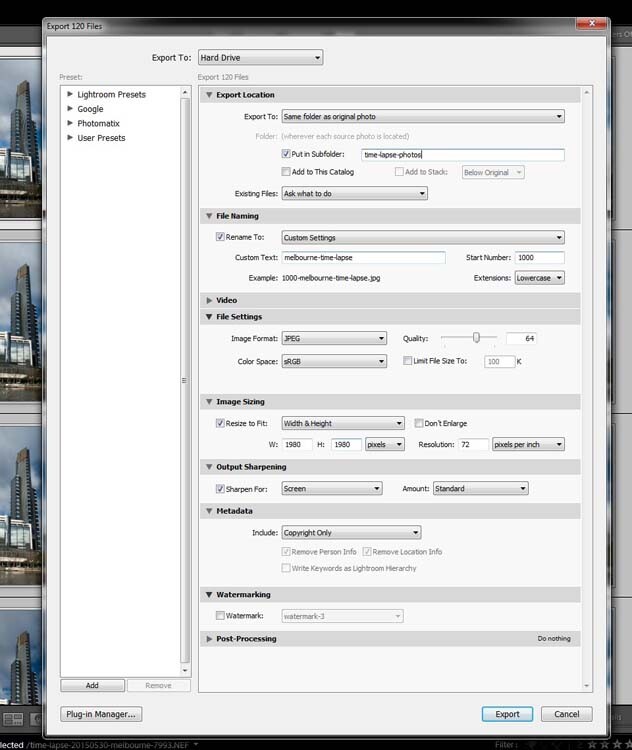
Exporting the images.
Press Export. Then, to put the images together to make the time lapse you will need to move into Photoshop.
Photoshop CC
In Photoshop you need to go to File and Open. (File > Open) Go to the folder with the exported images and select the first one in the sequence. In the same window, before you press Open, make sure you check the box that says Image Sequence which is down near the bottom.
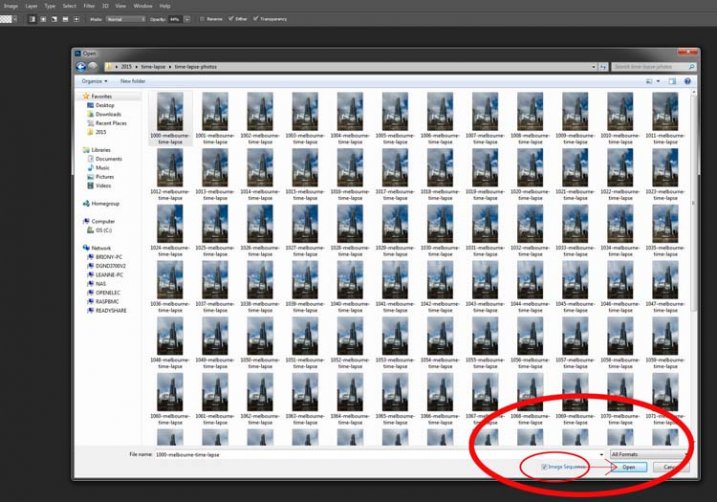
Getting the images ready for the time lapse.
Once you have checked it, select Open.
Before Photoshop opens them a new window will come up asking you how many frames per second you want to use.
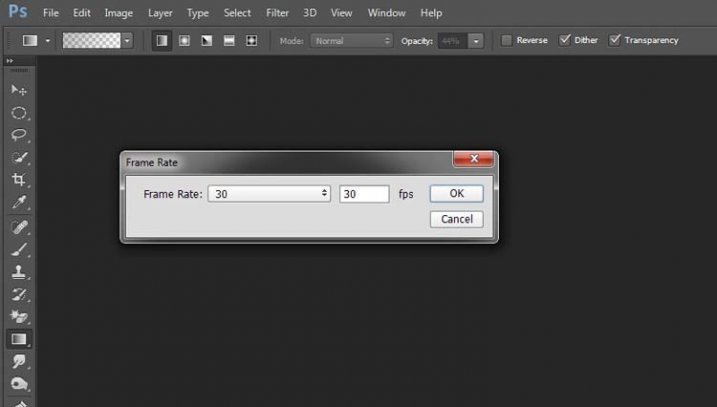
Setting the frame rate.
At this stage you can just click OK; you will have a chance to change it later on if you want to make it slower or faster.
To make it a time lapse you need to open another window in the Photoshop main window. Go up to Window in the main menu at the top, and then down to Timeline and select it. (Window > Timeline)
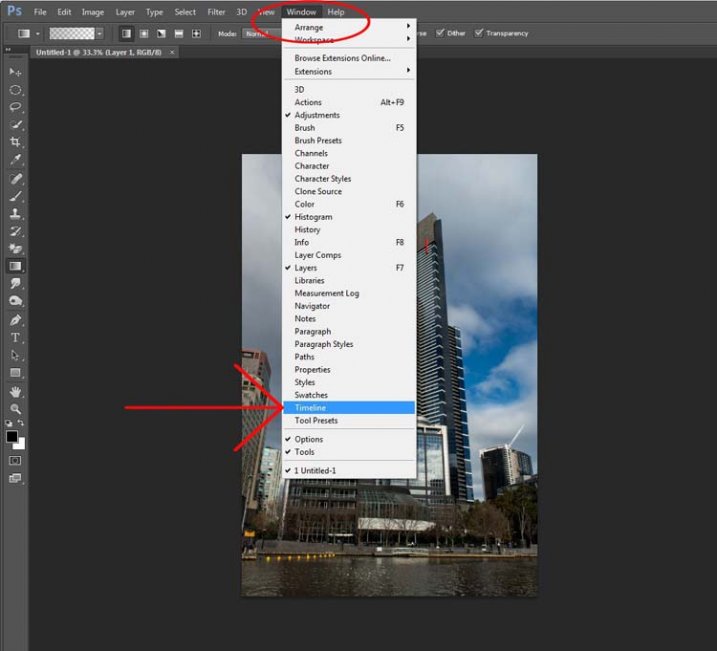
Opening the Timeline.
You will see a new window appear down the bottom. Look at the following image:
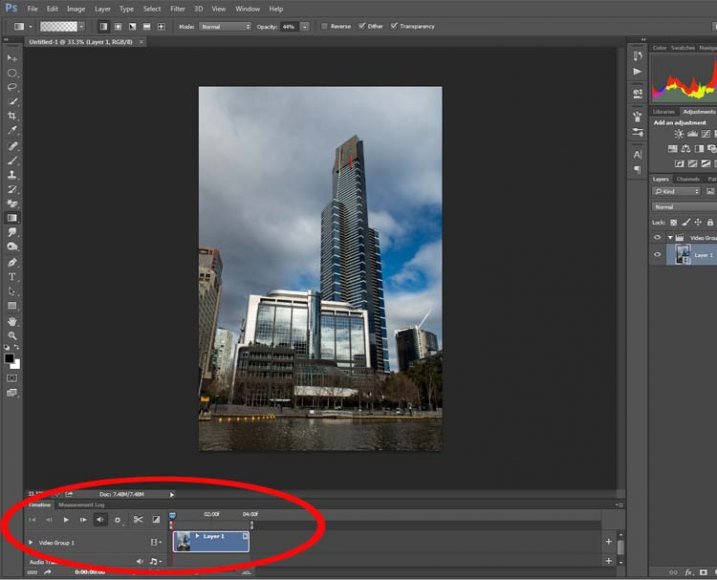
Looking at the Timeline.
If you press the play button you will see your time lapse run.
If you want to change the Frame Rate this is the time to do it. In the Timeline Window, up in the top right corner, you should be able to see a down arrow with lines next to it, click on that and a drop-down menu will appear. Go down and select Select Timeline Frame Rate…
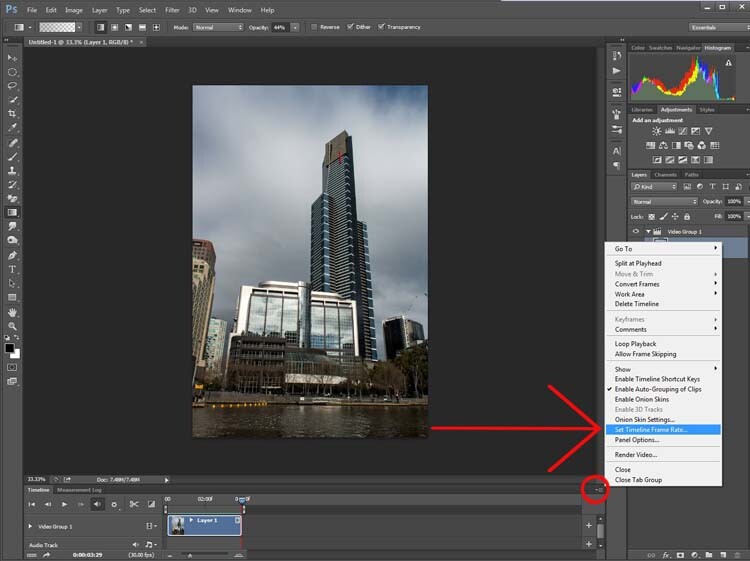
Changing the frame rate.
You can change this as many times as you like. Keep doing it until you get a frame rate you like. Once you are happy with how long it runs for, you can render the video.
Go up to File, then select Export. In the drop down menu choose Render Video. (File > Export > Render Video)
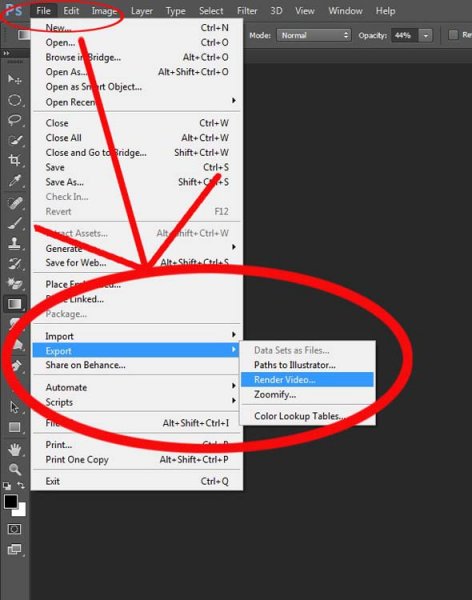
Exporting the video.
After initializing, the Render Video window will come up. In this Window you can name your video and decide in what format you want it saved.
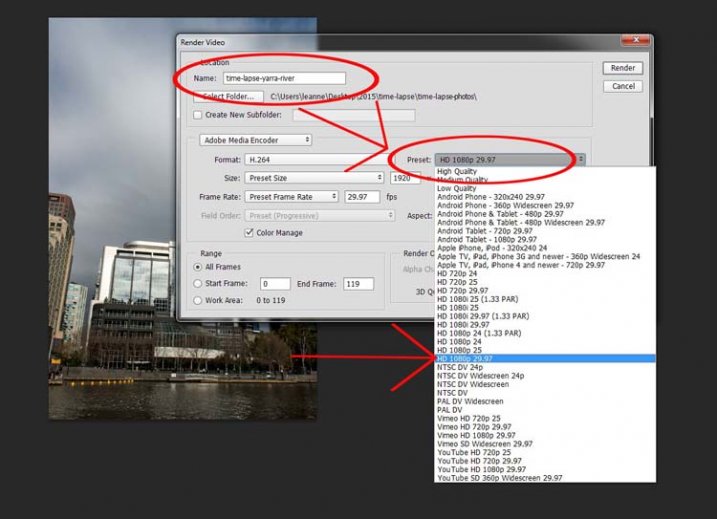
Working out the video type.
Set it on one of the HD settings and you will get an MP4 video. It gives you quite a good video.
If you decide you really like doing them there are lots of other methods, this is just a quick way to do time lapse movies using Lightroom and Photoshop CC.
googletag.cmd.push(function() {
tablet_slots.push( googletag.defineSlot( “/1005424/_dPSv4_tab-all-article-bottom_(300×250)”, [300, 250], “pb-ad-78623” ).addService( googletag.pubads() ) ); } );googletag.cmd.push(function() {
mobile_slots.push( googletag.defineSlot( “/1005424/_dPSv4_mob-all-article-bottom_(300×250)”, [300, 250], “pb-ad-78158” ).addService( googletag.pubads() ) ); } );The post How to Shoot and Process a Time Lapse Movie – Quick Method by Leanne Cole appeared first on Digital Photography School.
-
What Time is it? It’s Time-lapse Time!

You’ve been drooling over time-lapses lately, and with good reason.
They’re perfect for capturing the buzz of a cityscape, the fun of your pool party and the awesomeness of storm-clouds moving over your hometown.
We’ve rounded up the best time-lapse tools for everyone from DSLR wielding pros to time-lapse newbz. You can finally snag perfect time-lapses … time after time.
Click Here Fast, We’ll Time You!
(…)
Read the rest of What Time is it? It’s Time-lapse Time! (310 words)
© Erin for Photojojo, 2015. |
Permalink |
No comment |
Add to
It’s Time-lapse Time!”>del.icio.us
Post tags:
-
Hasselblad returns to roots with new aerial camera series, this time with no moving parts
Hasselblad has announced a new aerial camera that it says provides the ‘ultimate’ in image quality for aerial photographers. The camera, the Hasselblad A5D, has no moving parts and as such avoids unintentional internal mechanical movements that aircraft vibrations can cause. Read more
-
What Time is it? It’s Time-lapse Time!
You’ve been drooling over time-lapses lately, and with good reason.
They’re perfect for capturing the buzz of a cityscape, the fun of your pool party and the awesomeness of storm-clouds moving over your hometown.
We’ve rounded up the best time-lapse tools for everyone from DSLR wielding pros to time-lapse newbz. You can finally snag perfect time-lapses … time after time.
Click Here Fast, We’ll Time You!
(…)
Read the rest of What Time is it? It’s Time-lapse Time! (310 words)
© Erin for Photojojo, 2015. |
Permalink |
No comment |
Add to
It’s Time-lapse Time!”>del.icio.us
Post tags:
-
NYC Comes Alive Around Massive Mural in Time Lapse Video
[ By Steph in Art & Street Art & Graffiti. ]
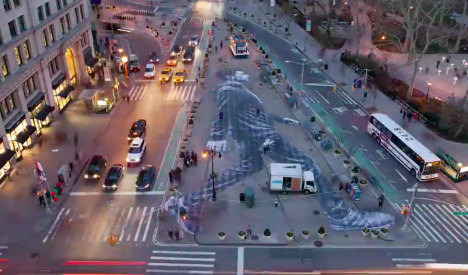
A 150-foot-tall figure of a man walking materializes on a Manhattan sidewalk, slowly coming into focus as the city awakens around it, in a new time-lapse video. French photographer and street artist JR directs a team of workers who can be seen scrambling around the piece like worker bees as the hours pass, the sun arcs over the site and thousands of people mill by.
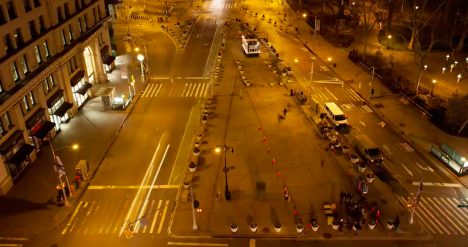
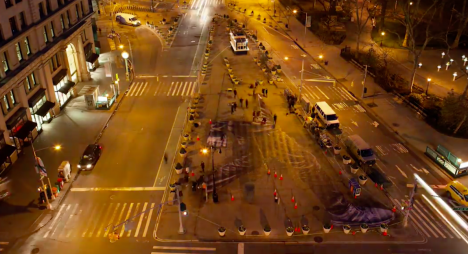
The New York Times commissioned JR to create the piece for an accompanying story on walking in the city, and produced the video. A camera perched atop the adjacent Flatiron building captures the action as the team wets the pavement before dawn, preparing to adhere the giant paste-up.
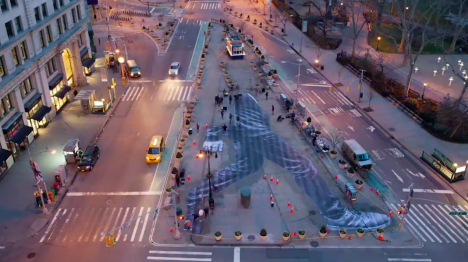
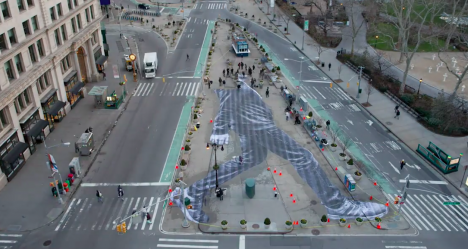
It’s cool to see the process behind installing a wheat paste project this big, and the time lapse shows just how much work goes into it despite the fact that it’s not being hand-painted onsite.
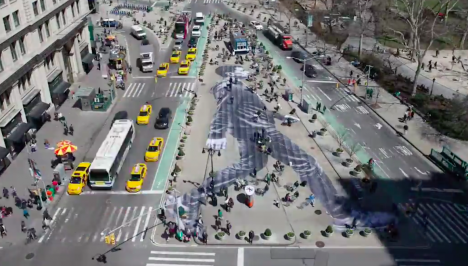
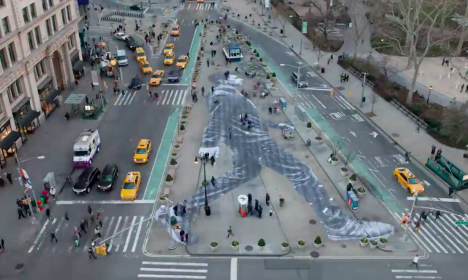
JR is known for journalistic murals made of his own photography, putting giant faces all over urban structures like walls, roofs, streets and train cars. The photo-realism is especially effective when it’s paired with aging, deteriorating surfaces.
Want More? Click for Great Related Content on WebUrbanist:
Towers Transformed: Massive Geometric Mural Collaboration
Five distinct styles come together in a duo of massive geometric murals with ‘Recycles,’ a collaboration created for the street art curation …
Click Here to Read More »»

Time-Lapse Tagging: Short Film Reveals Secrets of Graffiti
You see the finished pieces all over – ornate, curved and layered – but rarely get such a vivid and complete all-angle, real-time view of how their …
Click Here to Read More »»

Industrial Silos to Public Art: Massive Mural for Vancouver
Six industrial silos along the heart of Vancouver’s waterfront have been transformed into colorful, towering human figures in a massive mural project by …
Click Here to Read More »»


[ By Steph in Art & Street Art & Graffiti. ]
[ WebUrbanist | Archives | Galleries | Privacy | TOS ]