RSS
 

Posts Tagged ‘These’

Work Perks: These 13 Offices Are Way More Fun Than Yours

01 Dec

[ By Steph in Design & Fixtures & Interiors. ]

fun offices main

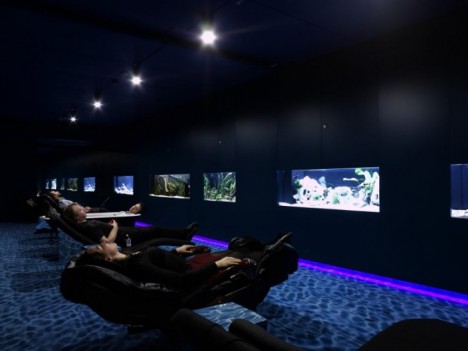
Maybe you wouldn’t grumble about going back to work on Mondays if your office had putting greens and slides, meetings were held in tree houses, and you could work from ski lift pods or ball pits. Some of the perks at the world’s most fun workplaces – mostly made up of tech companies, natch – include three free meals a day, nap areas, fish tank relaxation rooms, full bars, arcades, skate ramps and spiraling slides worthy of theme parks.

Chartboost
fun offices chartboost 2

fun offices chartboost 3

fun offices chartboost 1

Based in San Francisco, the world’s largest games-only technology platform worked with Blitz Architecture to create a fun, interactive environment for employees and visitors alike. Chartboost’s headquarters include a ‘photo op’ wall with an 11-foot-tall dinosaur, a game room with a ball pit and a giant LEGO wall, and five conference rooms with classic game themes like Donkey Kong, Super Mario and the Legend of Zelda.

Red Bull
fun offices red bull swings

fun offices red bull skate ramp

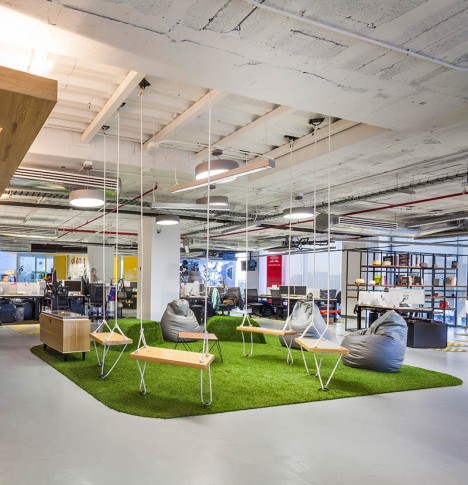
Red Bull’s Mexico City office boasts a grassy hangout spot full of swings for meetings, while the Santa Monica location features an incredible skate ramp that runs through the entire interior.

Missing Link
fun offices missing link 1

fun offices issing link 3

fun office smissing link 2

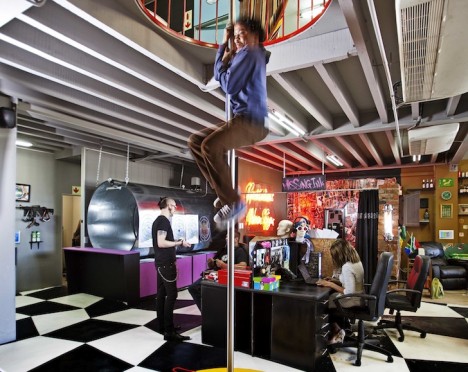
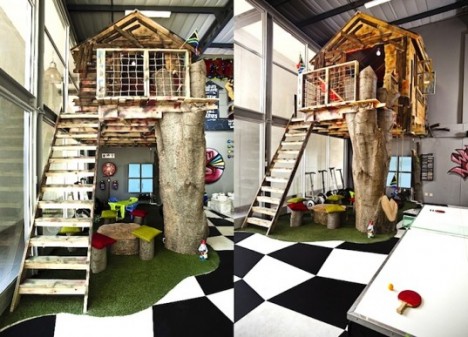
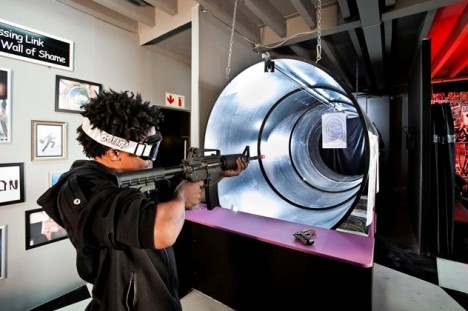
South Africa’s Missing Link, a presentation strategy company, sourced salvage materials to put together a fun and imaginative office in just six weeks. The results include a treehouse, fire pole, playground slide, shooting range and caravan.

YouTube
fun offices youtube 1

fun offices youtube 2

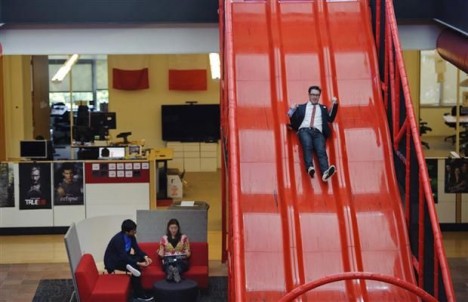
YouTube’s main headquarters in San Bruno, California mixes work and play with a massive red slide, a putting green, an Olympic-sized swimming pool, nap pods and bicycles and scooters to get around the sizable complex.

Google
fun offices google zurich

fun offices google zurich 2

fun offices google zurich 3

fun offices google zurich fish tank

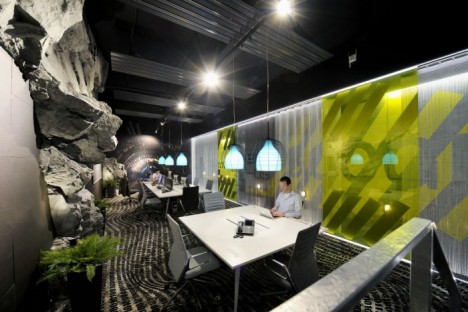
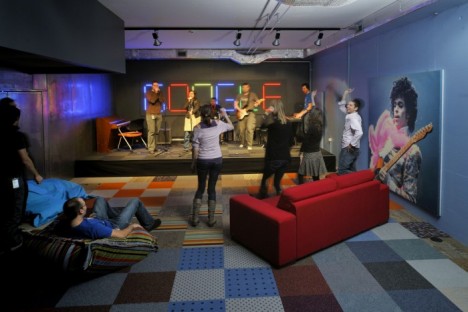
Google is renowned for having not only an enviable range of employee perks, but also some incredibly creative work environments at their offices around the world. The Zurich location is particularly noteworthy with its fish tank relaxation room, ski lift work pods, slides, karaoke room and multiple game rooms.

Next Page – Click Below to Read More:
Work Perks These 13 Offices Are Way More Fun Than Yours

Share on Facebook


[ By Steph in Design & Fixtures & Interiors. ]

[ WebUrbanist | Archives | Galleries | Privacy | TOS ]


WebUrbanist

 
Comments Off on Work Perks: These 13 Offices Are Way More Fun Than Yours

Posted in Creativity


How To Shoot Fashion Shows Easily With These 6 Simple Tips

21 Jul

How To Shoot Fashion Shows

Hi there FashionPhotographyBlog.com readers, today we have a special guest joining us. Based in the Netherlands, Sander Van Leeuwen, has worked in fashion and commercial photography as well as film. He’s also been a loyal follower of FPBlog for many years now and had taken the time to write to us in a response to an article we had previously posted on how to shoot fashion shows.


We thought what he wrote was so insightful and it listed factors that the original post oversaw, that we decided that it would benefit a lot of you who may be trying to shoot fashion shows for the first time and not quite sure what to expect of the experience. We have invited Sander Van Leeuwen to share with us his 6 simple tips that can make shooting through the commotion of a fashion show just a little bit easier by being prepared for the experience.


We do want to want to make a disclaimer though before we start, and remind everyone that fashion shows are live events, and can be, by nature, a stressful affair. Like in wedding photography, if you miss the moment, you miss the moment. There is no going back!  The buzzing environment of fashion shows may not be everyone’s cup of tea, (perhaps not even for Sander) though some people thrive in these kind of situations. We just want you to be prepared, so you can be on your game and not miss those moments photographing powerful shots of the models on the runway. Take it away, Sander!


Hi folks, actually it’s kind of stupid that a lot of camera people (were) shooting the same show… the craziness during a show I did (the Amsterdam International Fashion Week 2009)… It was my first big show. I actually liked some of the parts (the parties and being with a lot of famous people (and) designers), but I hated the actual shooting, since it was kind of stressful. My experience:


1. Professional shows have good light: especially with the good high ISO performance, nowadays this is not an issue.


2. 70-200 mm is a good range. The only thing is most of the time you can’t shoot full body on the turn. But with 200 mm you can shoot nice full body shots during the whole runway and you can make some nice close ups of accessories.


3. DON’T USE FLASH! With a lot of photographers the chance is big you’re ruining someone else s picture with your flash, or someone else is ruining yours. Good organizations even officially forbid to use flash (if not other photographers will look at you (like) they are going to kill you).


4. A monopod is a must have. It happens that there is very little space and you can stand steady between all other photographers.


5. Take a bottle of water with you since waiting can be really make you tired and thirsty.


6. If it’s a multiple show even, try to make friends with some of the photographers so you can help each other when this is needed (save good spots for example) and you can have a nice chat while waiting… Did I mentioned waiting already? 😉


I hope this helps some photographers a little!


Kind Regards, Sander

Savale.nl


Did you find these tips useful? Please share this post on social media if you did 🙂


Also, if you have your own tips not covered in this list, please write them in the comments box. We will love to hear what tips you have.


Lastly, if you would like to be featured as a guest writer like Sander Van Leeuwen did, do send us a message and get in touch with us. We would like to hear from you. For more details on how to contribute to FashionPhotographyBlog.com click here –> CONTRIBUTE TO FPBLOG HERE


Fashion Photography Blog

 
Comments Off on How To Shoot Fashion Shows Easily With These 6 Simple Tips

Posted in Uncategorized


Printable Electronics Make These Headphones Just 1mm Thick

02 Jun

[ By Steph in Gadgets & Geekery & Technology. ]

ultra-slim headphones 6

While an ordinary pair of headphones might consist of 50-something energy-intensive components from various manufacturing processes, this ultra-thin design uses printable electronics to cut that number down to an incredible 8. The ‘roll to roll’ process uses technology as the main material for the design, simplifying its composition and cutting out all unnecessary parts.

ultra-slim headphones 1 ultra-slim headphones 4

Designer Maxime Loiseau explores the adaptability and flexibility of printed electronic circuits in place of wires, used in conjunction with a plastic welding process that joins together larger, simpler pieces rather than a bunch of small injection-molded components. That means the whole product can be made on a single production line.

ultra-slim headphones 5

The wireless Bluetooth version is only a single millimeter thick, including the speakers, which rely on the vibration of a piezoelectric cell to produce sound that’s comparable to more conventional headphones. On the wired version, a single paper-thin cable hangs from one side, leaving the other free. The junction of the cable and the speaker is highlighted in a bright color to spotlight just how flat it is.

ultra-slim headphones 2

“The project doesn’t change the way we will use headphones,” says Loiseau. “The purpose here is to offer a reflection about producing electronic devices in a smarter way. The more materials are advanced, the more they are paradoxically easy to work. Through one production process, we can then using less process, less material, energy and pieces. At the same time, I tried to use the possibilities of the process to create an aesthetic result from it, a more fair product, with no superfluous parts.”

Share on Facebook


[ By Steph in Gadgets & Geekery & Technology. ]

[ WebUrbanist | Archives | Galleries | Privacy | TOS ]


WebUrbanist

 
Comments Off on Printable Electronics Make These Headphones Just 1mm Thick

Posted in Creativity


Improve Your Photography in 10 Days with These 10 Tips

18 Feb

For beginners, learning the ins and outs of the fundamentals can often seem daunting. Intermediate photographers might feel confident of their grasp of the photography basics, but find themselves lacking inspiration. Even seasoned photographers might occasionally find themselves stuck in a rut. So we put together a list of tips you can use to get your shutter firing and improve Continue Reading

The post Improve Your Photography in 10 Days with These 10 Tips appeared first on Photodoto.


Photodoto

 
Comments Off on Improve Your Photography in 10 Days with These 10 Tips

Posted in Photography


Don’t Miss Out: Soon These 12 Photography Training Deals Will Be Gone Forever

31 Dec

As 2014 races to an end – so too are our amazing 12 photography deals of Christmas.

Screen Shot 2014 12 30 at 8 26 05 pm

In just on 48 hours (as the calendar ticks over into 2015 US Eastern Time) these fantastic deals will close forever.

Among them are some great savings to be had – up to 88% off resources that will help you make 2015 the year of great photos!

The Most Popular Deals of 2014

Each year we get readers ask for our recommendation on the best deals to pick up so as this all comes to an end we like to reveal the best selling deals so you can see what is hot!

Of course the best deal is what is right for you. All these deals come with 60 day money back guarantees so if you’re not quite sure if a deal is for you you can pick it up and then get your money back if you find it doesn’t meet your expectations.

It’s also worth saying that while the first 4 in the list stood out from the rest of the pack considerably – there wasn’t a great deal between the other 8 in the list!

  1. 70% off the Photoshop Artistry Course – this was our biggest deal over on SnapnDeals when we ran it earlier in the year and again was clearly the hottest deal of the 12 days. Pick it up while you can at this never before seen price.
  2. 88% off Hacking Photography’s Lightroom Presets Bundle – our biggest discount of the year and a no brainer if you’re a Lightroom user as it gets you 100 professionally designed Lightroom presets for just $ 10.
  3. Landscape Photography eBooks for $ 10 – our best selling Landscape Photography eBooks normally retail for $ 30… in this deal they are yours for $ 10 or both for $ 19 with a bonus.
  4. Portrait eBooks for $ 7! – this deal gets you any of our 4 Portraits eBooks for $ 7 or you can pick them all up with a bonus for $ 21
  5. $ 10 eBook Day – no surprises here, we put 10 great dPS eBooks up for just $ 10 each. Also hot in this day was our Photo Nuts bundle (4 great eBooks for $ 25).
  6. Ed Verosky’s Macro eBook for $ 7 (or his library at 78% off) – Ed’s eBooks are always very popular – this year was no different to previous times we’ve featured them.
  7. Natural Light for $ 7 – this best selling eBook is gorgeous and sold like crazy when we set it live on day 5!
  8. Essential Guide to Black and White Photography – one of our newest eBooks at a price never before seen.
  9. 60% off our Going Pro eBook – if you’ve ever dreamt of making money from your photography this one is for you.
  10. Save $ 40 on Gavin Gough’s Post Lightroom Tutorials – perfect if you want to brush up on your Lightroom post processing skills.
  11. Save $ 60 on KelbyOne 12 month Membership – get 365 days of amazing photography training for just 55 cents per day.
  12. Save 50% on Lighting on Location Course – while it is at the bottom of the list this course is one of our favorites. Written by our own editor and PACKED with some of the most practical and actionable information on Lighting Portraits – a bargain at this price.

These deals all end at midnight US Eastern time 31 December (as we see in 2015) so act now to pick up yours!

googletag.cmd.push(function() {
tablet_slots.push( googletag.defineSlot( “/1005424/_dPSv4_tab-all-article-bottom_(300×250)”, [300, 250], “pb-ad-78623” ).addService( googletag.pubads() ) ); } );

googletag.cmd.push(function() {
mobile_slots.push( googletag.defineSlot( “/1005424/_dPSv4_mob-all-article-bottom_(300×250)”, [300, 250], “pb-ad-78158” ).addService( googletag.pubads() ) ); } );

The post Don’t Miss Out: Soon These 12 Photography Training Deals Will Be Gone Forever by Darren Rowse appeared first on Digital Photography School.


Digital Photography School

 
Comments Off on Don’t Miss Out: Soon These 12 Photography Training Deals Will Be Gone Forever

Posted in Photography


Don’t Miss Out: These 12 Photography Deals Will Disappear With 2014

25 Dec

Over the last 12 days we’ve presented you with some amazing daily deals on photography training resources in our 5th annual 12 days of Christmas.

Screen Shot 2014-12-25 at 8.32.04 pm

The savings this year were our biggest yet and we had a lot of really positive feedback from readers who picked up some fantastic deals.

As in previous years we did get a few sad messages from readers who missed deals along the way asking if there was any way to get them.

As a result – today we’re opening all 12 deals back up again for one last chance.

So if there’s a deal you regret missing or you might have missed one of our emails – you’re in luck. Here they are!

  • Deal 1: Over 50% off Ed Verosky’s Introduction to Close Up & Macro Photography (or bundle all Ed’s books and save 78%)
  • Deal 2: 65% off David J. Nightingale’s Essential Guide to Black & White Photography (newly published in 2014)
  • Deal 3: $ 40 off post-production Lightroom video tutorials with Gavin Gough (or bundle it for more savings)
  • Deal 4: dPS Portraits titles $ 7 each… (or all 4 for an amazing $ 21!)
  • Deal 5: Save 65% on Natural Light by Mitchell Kanashkevich (one of our most popular eBooks ever)
  • Deal 6: $ 60 off KelbyOne online photography training (a year’s training for a few cents per day)
  • Deal 7: Going Pro dPS eBook kit – 60% off (always a top seller)
  • Deal 8: 70% off Photoshop Artistry: Fine Art Grunge Composition course (the was the most popular deal of the 12 days)
  • Deal 9: 100 professional Lightroom presets – over 88% off! (our biggest discount of the lot and a big seller this year)
  • Deal 10: 50% off Portrait Lighting on Location course (created by our own Managing Editor)
  • Deal 11: $ 10 Landscape photography ebooks – Save 66% (newly published in 2014)
  • Deal 12: All dPS eBooks $ 10! (these sold like hotcakes yesterday)

All these will be available until midnight US Eastern time on 31st of December, after that they will be gone for ever – so get to it and grab yours today!

googletag.cmd.push(function() {
tablet_slots.push( googletag.defineSlot( “/1005424/_dPSv4_tab-all-article-bottom_(300×250)”, [300, 250], “pb-ad-78623” ).addService( googletag.pubads() ) ); } );

googletag.cmd.push(function() {
mobile_slots.push( googletag.defineSlot( “/1005424/_dPSv4_mob-all-article-bottom_(300×250)”, [300, 250], “pb-ad-78158” ).addService( googletag.pubads() ) ); } );

The post Don’t Miss Out: These 12 Photography Deals Will Disappear With 2014 by Darren Rowse appeared first on Digital Photography School.


Digital Photography School

 
Comments Off on Don’t Miss Out: These 12 Photography Deals Will Disappear With 2014

Posted in Photography


Elevate Your Landscape Photography Skills To The Next Level With These Easy Tips

25 Oct

My experience has taught me that landscape photography is great for everyone who’s just starting out with photography because landscapes give you the chance to improve your photography skills without annoying a model or someone else. This is how I started with photography after all. Ladscapes are also great for learning the basics of photography, since you have all the Continue Reading

The post Elevate Your Landscape Photography Skills To The Next Level With These Easy Tips appeared first on Photodoto.


Photodoto

 
Comments Off on Elevate Your Landscape Photography Skills To The Next Level With These Easy Tips

Posted in Photography


Say “Hello” to these Pro Quality Phone Mics

04 Aug

Extra photos for bloggers: 1, 2, 3

Whether you’re working on your next documentary film, recording a music video or creating your own audio-autobiography you need top quality sound.

The Mighty Mic and the Loud and Clear Lapel Mic are here to save the day and your audio woes.

The shotgun design of the Mighty Mic picks up high quality sound just where you point it. Background noise be gone! Plug it right into your audio jack to upgrade your sound catching capabilities.

When your subject is too far off to hear, clip the Loud and Clear Lapel Mic on ‘em to pick up the sound you need. Add its fuzzy fur cover to reduce wind noise. You can record even the breathiest of speakers on a gusty beach.

Learn More About the Might Mic
$ 70 at the Photojojo Shop

Learn More About the Loud and Clear Lapel Mic
$ 37 at the Photojojo Shop


© Britta for Photojojo, 2014. |
Permalink |
No comment |
Add to
del.icio.us

Post tags:


Photojojo

 
Comments Off on Say “Hello” to these Pro Quality Phone Mics

Posted in Equipment


Avoid These 10 Mistakes That Can Ruin Your Image Quality

08 Jul
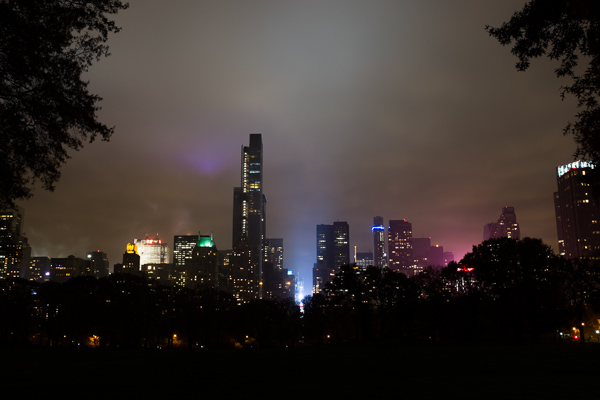
Central Park South.

Central Park South.

How many times have you captured an amazing image only to view it on your computer, or as a print, and realize that you screwed something up along the way.

Unfortunately, the only way to stop doing a lot of these easy-to-make mistakes is to have an image ruined by them.  Once you screw up an image you’ll quickly learn not to make the same mistake again.

Here are the most frequent ways I see photographers ruining their images. Avoid these 10 mistakes that can ruin your images

1. Leaving Image Stabilization on when using a tripod

Everyone learns this tip too late. Image stabilizers (in your lens) usually make your images sharper by reducing camera shake. However, when your camera is on a tripod and perfectly still, the motor can actually cause shake! I know a few of you are shaking your head right now as I did when I learned this. If you couldn’t figure out why your tripod images weren’t perfectly sharp, this is usually the reason, although a strong wind or touching the tripod or camera while shooting can do this as well.

2. Not using a fast enough shutter speed
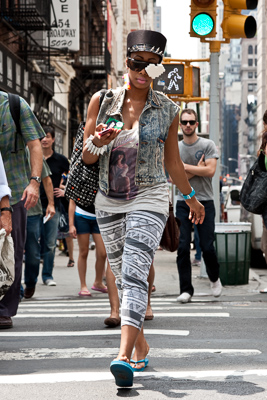
Lego Girl, SoHo.

Lego Girl, SoHo.

Unless you are on a tripod, to achieve a sharp shot your shutter speed needs to be at least 1 over your focal length.  So if you are shooting at 50mm your shutter speed needs to be at least 1/50th of a second (and I like to add a little leeway to that to be safe).  If you are on a cropped sensor, remember that a 50mm lens might be the equivalent of an 80mm or 100mm view, so make sure to adjust for that.

For moving subjects, 1/320th of a second is my ideal speed to freeze motion.  For fast moving objects such as cars or sports, I prefer an even faster shutter speed.

Be especially careful when shooting on Aperture Priority mode or in the auto settings, because it is easy for the camera to set the shutter speed to a setting that will introduce blur into your image without you noticing.  For this reason I frequently like to shoot in Shutter Priority mode.

3.  Not focusing exactly on the most important object, especially when shooting with a large aperture

If you are shooting with a small aperture, such as f/8 and above, you will often have leeway, but especially when shooting with a large aperture (like f/2), you need to make sure that the most important element in the image is the sharpest.  If this is not the case, it might not always be noticeable on the monitor, but it will show up when you make a print.

This is especially important when doing portraiture. Missing the sharpness on the eyes often means ruining the image.

Be especially careful when the element you are focusing on is small, because it will be very easy for the camera to focus on the area behind it instead. This is a mistake that is frequently made by newer photographers. In these tricky situations you need to pay attention to whether the autofocus is picking up the small element.

4. Not raising your ISO up higher when needed

In situations where the light is not strong and you need a fast shutter speed and a large aperture, don’t be afraid to raise your ISO. I see too many people afraid to go above ISO 200.  I use ISOs of 800, 1600 and even 3200 a significant amount. Many digital cameras, especially ones made within the last four years, can handle these ISOs.  Yes it will add noise to your photos, but in many cases you will notice that despite the noise, the technical quality of your images will be better. Noise can look very pleasing, especially on the newer digital cameras.
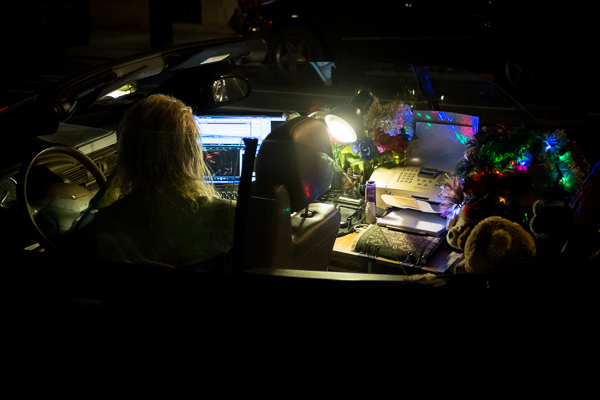
Mobile Office, Midtown.

Mobile Office, Midtown. ISO 3200

5. Moving while you shoot

This is my biggest pet peeve, by far.  I am normally a very calm person, but when I see this it makes me want to grab the photographer and shake them silly.  I see so many people that take photos without breaking their stride.  Stop your motion every time you take a shot, if even for a second!  Keep your hands still!  It’s not difficult.  Respect every image that you take enough to stop and think about it for a second, and your images will ultimately respect you when they turn out well in print.  Sorry, that is the end of my rant for the day.

6. Over-sharpening

Be careful of over-sharpening your photos. I see this happen all too often. Particularly with high resolution cameras with the right settings, your images often will only need a minimal amount of sharpness. If you overdo the sharpness it will actually have the reverse effect, making your image look fake or as if it was blown up to a larger size.
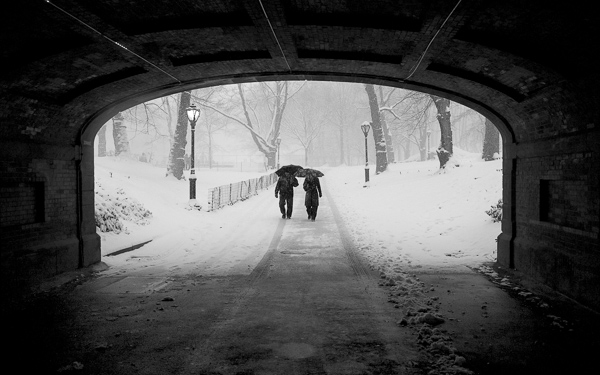
Couple in Snowstorm, Central Park

Couple in Snowstorm, Central Park

7. Resizing your images after you sharpen them

Sharpening should be the last step after you have sized the image to your final print size. If you sharpen your image and then resize them it will negatively affect the quality of your photo.

8. Not using the correct color space: ProPhoto RGB > Adobe RGB > sRGB

You should always keep your digital photo in the largest colorspace possible. While digital printers cannot yet print all of the colors in ProPhoto RGB, and many printing services prefer you to send them your files in Adobe RGB. When processing my RAW images to Tiff files I always convert them to the ProPhoto colorspace because it is the largest. Why not save your files with the most amount of color information possible?  Many cameras will allow you to set this in the settings.

However, did you know the sRGB is the best colorspace to show your images on the web? Yes, when printing your images it is best to keep them in ProPhoto or Adobe RGB, but when rendering them for viewing over the web, convert them to sRGB.

When you convert an image to a different colorspace, always make sure to do it as a copy of the original image. If you convert a ProPhoto image to sRGB and save it, you will not be able to retrieve that color information if you then convert it back to ProPhoto.

Bow Bridge in Fall, sRGB

Bow Bridge in Fall, sRGB.

Bow Bridge in Fall, Adobe RGB

Bow Bridge in Fall, Adobe RGB. A subtle but noticeable difference.

9. Not using exposure compensation (+/-)

When shooting in overly light or dark situations in Aperture Priority or Shutter Priority mode, the light will fool the camera’s sensor.  For instance, if you photograph in a dark alleyway, your camera’s sensor will try to overly brighten the scene, while if you capture an image with a lot of bright sky or white snow, the camera will try to overly darken the scene.

This is where your exposure compensation comes in.  It is a vital tool for any photographer, especially in tricky lighting situations.

10. Not resetting your camera

Take a look at your camera settings at the beginning of the day and frequently throughout a day of shooting. Some of the most common settings to forget to reset are a high ISO from the night before, your exposure compensation, your white balance setting, and checking your autofocus switch.

Final thoughts

A few final notes that must be mentioned.  With digital images, you can always fix many problems later in post-production. However, there is still no substitute for getting the image perfect in camera.  Processing is necessary in some way for every digital image, but the more extreme, the more you can damage the quality of your images.

It is tough to notice the effects of many of these mistakes when viewing the images on the web or on a monitor, but when you zoom in close to the details or make a print, especially a print of a decent size, these effects with be very noticeable.

The post Avoid These 10 Mistakes That Can Ruin Your Image Quality by James Maher appeared first on Digital Photography School.


Digital Photography School

 
Comments Off on Avoid These 10 Mistakes That Can Ruin Your Image Quality

Posted in Photography


Don’t Know What to Shoot? These 4 Photography Exercises Will Keep You Motivated

19 Jun

Whether you’re just getting into photography, or if you’ve been at it for years; you can keep yourself rejuvenated, and keep the creative juices flowing by always trying new things.

If you’re feeling uninspired photographically, that’s a sign that you need to shake things up by trying something completely different, or at least something that isn’t your usual style. You might be surprised at how small exercises can boost your creativity while teaching you new techniques and solidifying old principles in your mind.

Who knows, you might even discover a new passion!

To give your brain a little kick in the butt, challenge yourself to try some of these photography exercises. Even if they aren’t new to you, going out shooting with a new purpose feels refreshing and may lead to something completely new.

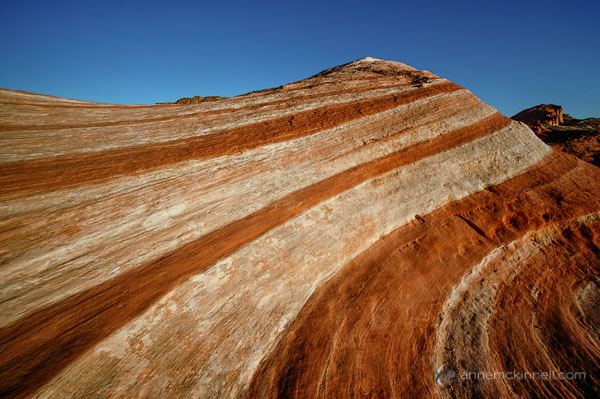
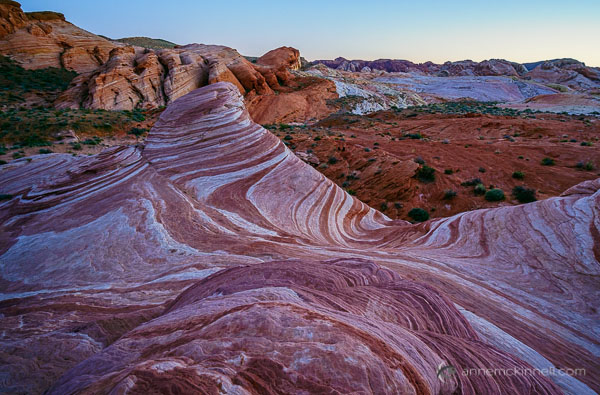
Fire Wave at Valley of Fire State Park, Nevada, by Anne McKinnell

Fire Wave at The Valley of Fire State Park, Nevada, taken from a high perspective on an opposite hilltop

1. Change your perspective

Photographers often get in the habit of shooting at eye-level which tends to make photos repetitive and somewhat common. We know this, and so we take the odd shot on our knees or even occasionally lying on the ground.

But is this really enough? Aren’t there other vantage points?

Challenge yourself to go out shooting and never shoot from eye-level for a whole day. Instead, find a new vantage point any time you take a picture. Get yourself up high above your subject, and crouch and shoot from a low angle. But that’s just the beginning. Ideally, you should try shooting your subject from a variety of angles.

Take one shot from below and one from above. Then, take one even lower, and one even higher, if possible. Then, step back a bit. Then step forward. Move to your right, and move to your left. Taking the same picture from many positions adds variety and will help you understand it better. Plus, you may discover a way of seeing something that you didn’t expect.

If you resolve to do this with every picture you take, you’ll begin to really understand the subtle effect that perspective has on an image, which points of view work for which subjects, and how this can inform your shooting style from here on out.

Fire Wave at Valley of Fire State Park, Nevada, by Anne McKinnell

Another perspective on Fire Wave, this time taken up close, from a low angle.

2. Create a story

Rather than trying to capture your subject in one single image, try doing a series instead. Create what LIFE Magazine coined a “photo essay” – a series of images surrounding a single subject or group of subjects, each of which pinpoints a different aspect of its nature. This can be as simple as zooming in on its finer details, or photographing it in different contexts. This method of doing things defines the subject not only by how it appears in a single moment, but also by the way it changes (and the way it stays the same) over several moments. It also helps to craft your visual storytelling abilities.

Choose one subject and cover it completely, the way a journalist would. Do this either by photographing every aspect of it you can think of, photographing it through the course of a day, or by revisiting it over and over throughout a week. Include shots at different distances and using different focal lengths – include some close-up details and some wide compositions – and whittle all the shots down to around ten final images, making sure that no two photos are alike. When you have your picks, try to organize them in an order that tells a coherent story, whether it’s narrated or implied.

Terlingua Ghost Town Texas by Anne McKinnell

These three photos are from Terlingua, a ghost town in Texas.

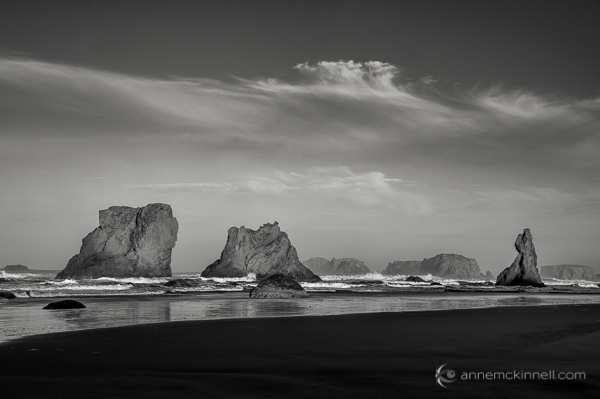
3. Shoot in Black and White

For a whole day, turn your camera to Black and White mode and don’t take it off. Of course, you can convert your RAW images to black and white after-the-fact in post-processing, but as an exercise, try shooting them in Black and White.

At first the limitation may seem frustrating, but Black and White photography requires a completely different way of seeing the world in terms of shape, form, and contrast, rather than through the common visual cues that you’re used to. Composing your photos in this way will invariably improve your compositions in colour photography, too. You can play with contrast settings in-camera or in post-processing to perfect the highlight to shadow ratio which defines a good monochrome image.

Bandon Beach, Oregon, by Anne McKinnell

Bandon Beach, Oregon.

4. Make manual long exposures

For this exercise, you’re going to take full advantage of digital photography’s instant feedback, and use it to play with making manual long exposures.

With your DSLR mounted firmly on a tripod, set the ISO to 100, set the aperture to the smallest opening (the largest f number like f/22 for example), and set the shutter speed to Bulb mode. When the camera is to Bulb mode, the shutter will stay open for as long as the shutter button is held down, but it’s a better idea to attach a wired remote shutter release to prevent camera shake.

Once you have your composition and your focus set, press and hold the button on the remote to hold the shutter open for a few counted seconds. Just guess how many seconds will be required based on the light level. Then, check your results. If the image is too bright, try again, but count half as many seconds. If the image is too dark, count twice as many seconds – or more, if necessary. Do this over and over again, in different scenarios and lighting situations. This practice will hone your ability to read the levels of light present at any given time.

You’ll get the most interesting results if there is a certain amount of movement in your frame, such as drifting clouds in the sky, crowds of people, or running water. The longer your exposure is, the more blurred that movement will appear to the point where water may seem like nothing more than mist, and people will disappear from the image altogether. If you have a solid neutral density filter your exposures can be even longer, creating more extreme effects.

Folly Beach Pier, Charleston, South Carolina by Anne McKinnell

Folly Beach Pier, Charleston, South Carolina – 2 second exposure.

Folly Beach Pier, Charleston, South Carolina by Anne McKinnell

Folly Beach Pier, Charleston, South Carolina – 30 second exposure.

Don’t wait until you start feeling uninspired to try these exercises! Keep your photography energized and creative by trying something new on a regular basis. Even if it doesn’t turn out to be your “thing”, it’s fun and you’re bound to learn something.

The post Don’t Know What to Shoot? These 4 Photography Exercises Will Keep You Motivated by Anne McKinnell appeared first on Digital Photography School.


Digital Photography School

 
Comments Off on Don’t Know What to Shoot? These 4 Photography Exercises Will Keep You Motivated
Posted in Photography