RSS
 

Posts Tagged ‘Take’

Take flight over Australia: aerial photos by Scott McCook

21 Jan

Take flight over Australia: Aerial photos by Scott McCook

Originally a tailing pond image, I have created a fictional piece of work to convey a story about Australia riding the mining boom, Boddington Western Australia

Scott McCook is a native Australian and an award winning landscape photographer with a serious passion for aerial photography. All of the images that you see in this article were shot from the skies high above remote areas of Australia and New Zealand. His goals are to not only highlight the beauty in areas that are remote and far removed from the public eye, but also to illustrate the impacts that industry can have on the world around us.

To see more of his work, check him out on Facebook and Instagram.

What inspired you to begin your aerial work?

Big Lagoon Shark Bay, an isolated birrida, these birridas are gypsum clay pans that used to be saline lakes

I have two main sources of inspiration, the first of which is my drive to photograph what hides in plain sight. This started many years ago with astrophotography, which was something I pursued in my earlier days of landscape photography. The idea of something so beautiful hiding above cities and street lights every night with many people never even seeing the Milky Way with their own eyes drove me to the dark spots of Western Australia (of which there are many) to capture the incredible beauty of the Milky Way and show people here in Western Australia what’s in their backyard every night.

This concept of showing people, via my imagery, what hides just below the surface (or above your head) is what fanned my obsession for aerial photography. It’s the very same principals, the idea that these beautiful and sometimes abstract landscapes that we see every day from the ground can explode into life from the air.

My second source of inspiration is to show people the impact of mankind on nature, as in the case of my mining aerial imagery. It’s showing people areas that they would never normally be able to see on that scale. It has the possibility to empower people to make their own opinion on these landscapes and how far man will go to chase our precious resources.

I should also mention that there are a number of truly amazing landscape photographers based out of Australia that inspire me on a daily basis. The collective of landscape photographers from ND5 put life back into the aerial genre here in the last 10 or so years and their work sparked my interest in what our beautiful country has to offer from the air. Photographers like Tony Hewitt, Christian Fletcher and Peter Eastway have not only supplied inspiration over the years but have been great mentors for myself and many other budding landscape photographers here in Australia.

What’s your favorite aspect of aerial photography?

Shark Bay Western Australia, coastal floodplain

It really comes down to two questions: Is it the unique photography? Or the thrill of being in a plane or chopper?

I think it’s the pure thrill and enjoyment of flying that keeps bringing me back and then it’s the excitement of having no idea what incredibly unique moment or landscape you’ll capture from the air. Often with aerial photography, it feels like you’re an early explorer, going over uncharted territory, the feeling is quite amazing because often we are lucky enough to be the first people shooting a location from the air.

This is often the case because you can travel to very remote locations in a short amount of time. You can really feel the excitement come over you when you know you’re shooting something completely new. So let’s go with 50% the thrill, 50% the photography, how’s that for a safe answer?

What lenses and equipment do you normally shoot with?

Perth, Western Australia. Alcoa Tailing Ponds

Everything!!! Would be my short answer, but the slightly extended answer is as follows:

My Full-frame Go to Kit:

  • Nikon D810
  • Nikon 24-70 F2.8
  • Nikon 70-200mm F2.8 VR2
  • Sigma 35mm F1.4 Art

My Medium Format combo:

  • Phase XF + IQ150
  • 80mm blue ring Shnieder
  • Mamiya 35mm

When it comes to aerial photography I have found shooting large sensor MF images really helps with not only print but the editing process, but the extra data can make all the difference to your creative vision and post processing.

How do you go about composing a shot from that high up in the sky?

Useless Loop salt farm, the different colors coming from varying stages of the process and product, Western Australia

You often have a very small window space to shoot from and you’re traveling 160km an hour at around 1500 ft, so the ground is going fast, very fast! This means you need to be on your game, with the camera settings tuned into something you would possibly find in sports photography: high shutter speeds, high ISO and looking for that sweet spot aperture.

Research using Google Maps is the key to this scenario – often I will know what is coming up, so I’m preparing myself physically (putting my arms in positions thought not humanly possible) and mentally as well, thinking ‘What orientation do I want this area in?’ Then in a matter of seconds your shooting window comes and before you know it, it’s gone. You can ask the pilot to lock into a loop pattern over the area, but time is money and I find if you can nail it first go, you can be onto the next location and maximize your shooting time and minimize your wallet taking a beating.

How much planning goes into a single aerial photography trip?

Southern Alps, New Zealand, this is an image of the ice that feeds the Fox Glacier in the South Island

Weeks or months. I did two very different aerial expeditions last year which I’ll touch on because of the difference in planning. The first was to Shark Bay Western Australia, a World Heritage Listed area and a location that is totally mind-blowing from the air. I spent around four weeks using Google Maps (My Maps) to scan areas of Shark Bay to shoot. Once I found a potential location I would run a screen grabbed image through Lightroom and the de-haze filter, along with some minor color balance adjustments – this helps me envision what I will be shooting when I arrive to the location.

The satellite images provided by Google are pretty good but with a little tweaking you can really get some detail from them and this helps me know what I’ll be coming across when we’re in the air. I would then save these screen grabs along with the location drawn onto a map, these will then be loaded onto my iPad and used when I’m discussing the flight plan with the pilot. This is extremely helpful because it allows our pilot to see exactly what we want to shoot and where it is, allowing him/her to be more precise.

The other shoot I did was in the Southern Alps of New Zealand in May last year. This was from a Hughes 500 Helicopter with all the doors off. Now, this shoot was different because using Google Maps to do reconnaissance is very limited. Why? Well because it’s a mountainous region it’s a lot harder to use the aerial perspective for a gauge on what you’re going to see. Adding to the difficulty is the fact that the snow in such areas is highly reflective, meaning large areas of Google Maps data can be blown out.

Being in a chopper allows us to hover and hold locations, so there’s no need to try and capture that one moment in a split second. We can now spot an amazing location and tell our awesome pilot (thanks Michael from Mountain Helicopters Fox Glacier, complete legend!) to head on over and bank the chopper in just the right spot. This type of aerial expedition feels far more like exploring on foot, just with the added bonus of a multi million dollar piece of machinery giving us the gift of flight wherever we want.

Okay, so slightly different than traveling by foot but I have to admit it’s an incredibly beautiful experience when you fly with all the doors off in such a location.

How do you think drones will impact aerial photography?

Shark Bay, Western Australia

How do I think drones will impact aerial photography? EVERYWHERE! That happened fast didn’t it? I’m still waiting on drone delivery of alcohol in bars, so I feel they haven’t quite achieved their full potential yet.

On a more serious note it’s impacting photography right now, the whole aerial genre has exploded in the last few years. The effect I think is largely positive, if anything it’s sparking the passion of photography in more and more people. I notice many drone operators will start off just wanting to fly drones as their primary objective and in time they develop a love for photographing the world from above, and proceed to learn the photography side of things properly.

On the not-so-positive side I’ve seen it very rapidly develop a bad name in some areas due to pilots breaking the rules and flying dangerously. This puts a bad spin on aerial photography, and in most cases the actions of very few are ruining the potential for some amazing shots for many people. But in general, I think drones are having a positive impact. Do I fly drones? Not yet, I still need my buzz! Looking at the world fly past via an iPad or iPhone just doesn’t quite do it for me yet, I like to be up there experiencing it.

What’s your favorite aerial image to date and how did you go about getting the shot?

Dirk Hartog Island, Western Australia. Coastal Sand Dunes, spot the Kangaroo tracks coming in from top of frame

It’s really hard to pick just one image, but I’m going to have to go with an image I captured near Dirk Hartog Island Western Australia. It was around 7:30am in the morning on our 5th and last day of shooting the an area called Shark Bay. Paul Hoelen and I had decided that we would burn some fuel and head over to a remote strip of sand dunes. This particular area wasn’t shot often because you had to spend a fair bit of time and money to just get there so we were pretty excited about finding some untouched landscape.

Upon our arrival we found what we were after, beautiful clean dunes, we shot the location and both nodded to each other in appreciation of our gamble paying off. We then spoke to our pilot Ryan and said lets head south then home, as we made our way down the coast something happened, Paul can barely contain himself, he’s just waving his arm and pointing down “Scott, Scott, Scott!!! Down, look down!”, I look over and this gorgeous half moon shaped sand dune just appears from nowhere. It was so out of place in relation to the rest of the landscape, like mother nature had just created the most stunning sand dune possible then placed it hidden away for Paul and I to find.

I haven’t got to the really cool bit yet, so after shooting this mind blowing sand dune, we get back to our motel that night and load up the images, I go straight to the sequence of this stunning half moon dune and start looking at the images, I zoom in 50% and suddenly spot tracks, it’s kangaroo tracks! This perfect set of Kangaroo tracks is cutting into my composition and up the spine of the sand dune. I couldn’t believe it, the chances of all those things lining up were incredibly rare and it’s why I love photography so much. Yes it’s skill and creativity, but it has equal doses of luck.

How do you keep yourself inspired?

The Salt Farms of Useless Loop Shark Bay, Western Australia

I get much of my inspiration from the amazing, kind-hearted and adventurous landscape photographers I’ve made friends with along the way. It’s so cool in this amazing field we’re in, the community is a place you can draw many things from and inspiration is available everywhere. Beyond that I gain much inspiration from the people who have come before me, I read a lot and attempt to piece together the past as it helps pave the road to my future in this craft.

What are your aerial photography goals for 2017?

Arteries of coastal floodplains pump across the land, Carnarvon, Western Australia

Push the aerial genre to new heights, pardon the pun! I love aerial photography, I am well and truly hooked. I look at 2017 as my chance to challenge myself within this genre, I enjoy story telling via my aerial imagery and look forward to sharing that this year.

Behind the Scenes

This is the Hughes 500 Helicopter with all the doors taken off that was used for the flight over the Southern Alps of New Zealand. Huge thanks to Michael from Mountain Helicopters Fox Glacier!

The below video was shot when I snagged my favorite image to date. It gives you a great idea of the feverish pace at which you are taking images while shooting aerials in a plane.  
Articles: Digital Photography Review (dpreview.com)

 
Comments Off on Take flight over Australia: aerial photos by Scott McCook

Posted in Uncategorized


10 More Photography Tips to Help Take Your Images to the Next Level

12 Jan

A while back I wrote an article that was quite popular: 10 photography tips to take your photography up a level. In this article, I bring you 10 extra tips from all aspects of photography. Enjoy!

10 More Photography Tips to Help Take Your Images to the Next Level

#1 – What’s more than meets the eye?

Let me ask you something, what would you do? You meet someone attractive, you are head over heels, and then you start actually talking to them. You then uncover the most superficial person you have ever met. That person is all looks and not much else. You would lose interest, right? Because looks by themselves are good enough to make you interested, but if there is nothing sustaining that interest, you’re gone. This is the same thing in Photography,

This is the same thing in photography. A beautiful composition is nice, but what is in your image that is designed to keep the viewer’s attention? What is it about your image that is more than meets the eye? Is it saying something deeper? Is it making a point? Showing a concept? Add meaning to your images to keep the viewer engaged.

#2 – Know your opportunity

I believe there are only four times when you control the image. The first is at the moment of exposure (when you shoot), the second is in post-processing, the third is in sequencing and editing, and the fourth is while printing. So, when shooting, have these things in mind in order to shoot with clarity.

Example, you shoot an image and it is overexposed (because of the camera’s limitation). But it doesn’t end there as you know that you have another opportunity in the post-processing phase to recover details. Or you shoot something with a nice texture but it doesn’t have the effect you want. It doesn’t end there, you know that you can print and blow it up real big to have the effect you seek. Or you shoot an image that can’t stand by itself. Once again it doesn’t end there, you know you have another similar image that can make a diptych.

The point is that making an image is only the first step. There’s a whole process that comes afterward when you can get the effect you desire. So it’s important to know that what you have in the camera is the starting point and not the end.

#3 – Pay attention to this detail (after your background)

10 More Photography Tips to Help Take Your Images to the Next Level

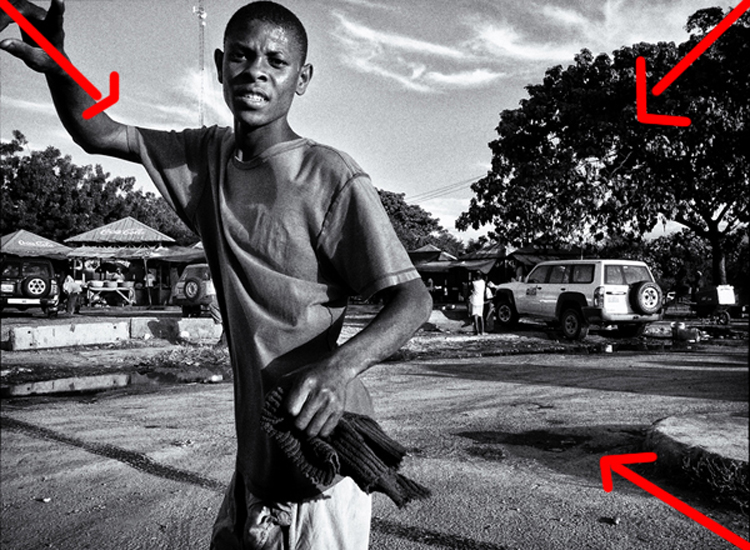
In the first 10 tips article, I suggested that you pay attention to the background first. Now I would like to add another thing to pay attention to before your subject – the corners. You see there is a strong dynamic with the corners, they draw you into the frame, towards the dead center and if you can align some lines there, it’s like surfing a big wave, it just draws your eye even more!

In the image above we have the guy’s hands, the shape of the tree and the shadow on the bottom right corner just pulling you into the image. So, pay attention to your background, watch your corners, and then look at your subject.

#4 – Dennis Rodman-ize it

10 More Photography Tips to Help Take Your Images to the Next Level

Let’s face it, it’s hard to get attention in this ever increasing attention deficit world. Dennis Rodman had been in the NBA for years, but he was receiving few endorsement contracts. He was a good player but didn’t shine enough. Then came the Rodman with the crazy hair and style, even as a kid I knew his name because he simply looked different.

That brings us to photography, you are probably doing something a certain way, so can you Dennis Rodman-ize it? Shoot in a different way that makes your work pop above and beyond what you normally do? For example, landscapes are usually shot with a wide angle, what if you shot landscape abstracts with a telephoto? Or used a special processing technique on your images that gave them a certain look?

#5 – Work on your name

You probably know the wine experiment, where they gave people wine to drink, one was expensive and the other was cheap. Everyone, of course, preferred the expensive wine over the cheap one, even if it was the same wine. Here’s the REAL KICKER, when they scanned the brains of the people who drank the wine, their brain actually made them believe they were drinking expensive wine, and it literally tasted better. Their perception altered their reality.

10 More Photography Tips to Help Take Your Images to the Next Level

With that in mind, work on your images but also on your name or brand. Try to get as much recognition as you can, it will alter people’s perception of your work. I remember a photographer who had decent work, and then that person got famous literally overnight. Let me tell you, even I, knowing all that I know about psychology, now see his work in a better light.

It’s crazy, and probably a bit sad, but that’s just the way it is. The story of Joshua Bell also illustrates this point well. This guy makes $ 1000 per minute playing on a million dollar violin, yet he got a meager $ 32 and a few cents when they had him play anonymously in a metro. Same guy, same skill – different context, different result.

#6 – Get luckier

Let’s not mince words here, luck plays a big role in photography. That Cartier-Bresson shot of the man jumping? That was 100% luck because he couldn’t even see what he was shooting through a hole.

Why is luck such a big deal? Because you DO have to be there at the right moment, and so does your subject, the light, etc. Truth be told, you need the skill and the eye to seize the moment, but if you are not there, the shot won’t be yours.

10 More Photography Tips to Help Take Your Images to the Next Level

So taking into account the luck factor, shoot more often. You’ll get luckier and luckier every time you do. By making more photo opportunities, you’ll be making more images. So if you used to go out once, go out twice, etc.

I mean, who do you think will have a better chance at getting a job? The one that applies for one job, or the one that applies for 10? Skill and creativity are multiplying forces, but it doesn’t matter how skillful you are if you are a couch potato. Sharpen your skills and get out there to get lucky.

#7 – Scramble everything

There was this cool experiment where they gave this guy upside down glasses, so everything was inverted. They wanted to pour him a drink, and he turned the cup upside down (because he believed it was upside down). Imagine the world upside down and how hard it would be to live like that. The kicker? After 10 days he adapted to the upside down vision, and could even ride a bike!

10 More Photography Tips to Help Take Your Images to the Next Level

Sometimes we just get used to how we shoot, we get complacent, that’s normal. So scramble things up. If you normally shoot color, try b/w, if you like portraits try street photography, if you are a film shooter, try digital, etc. It’s like the “Dennis Rodman-ize” tip, but this is more designed to shake you out of complacency rather than to bring attention to your work.

#8 – Revisit your images
10 More Photography Tips to Help Take Your Images to the Next Level

Two photographers can look at the same scene, and yet see two different things. The difference is their knowledge about photography. You probably have some hidden gems in your images that you’ll probably never uncover if you do not revisit your images. You made them, but when you revisit them you do so with new eyes, and you will see them differently.

You will be amazed at what you find. Images that you believed were boring and/or ruined will be seen in a new light. You may ask yourself, “How did I miss that?!? There are quite a few images that I have overlooked, that’s why I have a no-delete policy. Maybe I can’t see what my future self will see or what my future self will be into.

#9 – Let go of preconceptions

10 More Photography Tips to Help Take Your Images to the Next Level

I receive emails daily from photographers around the world. The one thing many seem to struggle with is that they don’t live in a big city. It is understandable, but just because you can’t find the images you have in your mind doesn’t mean they are not there. You just need to let go of your preconceived ideas and be more open to what is in front of you.

Some people tell me they wish they had more money to travel. Evidently, the image in their mind is of travel, but an image doesn’t need to be travel photography to be good, does it? It’s good to have a general idea of what you want, but also to be open to the possibilities.

Some people get hung up on relationship breakups, passing by great, if not better opportunities in front of them. Likewise, seeing what is possible right in front of us allows us to maximize our opportunities as photographers.

#10 – Remember it’s all plastic

10 More Photography Tips to Help Take Your Images to the Next Level

It’s a hard concept to grasp, especially as a beginner, but remember that photography is plastic. Exposure? Plastic. Colors? Plastic. White Balance? Plastic. Sharpness. Who said every image needed to be averagely exposed, with white balance set perfectly by grey card, and super sharp? The first thing I do as a photographer in Lightroom is to clip my blacks. I LOVE clipping my blacks. I never set my white balance with a grey card, I just look at the image and hear what it creatively calls for, then do that.

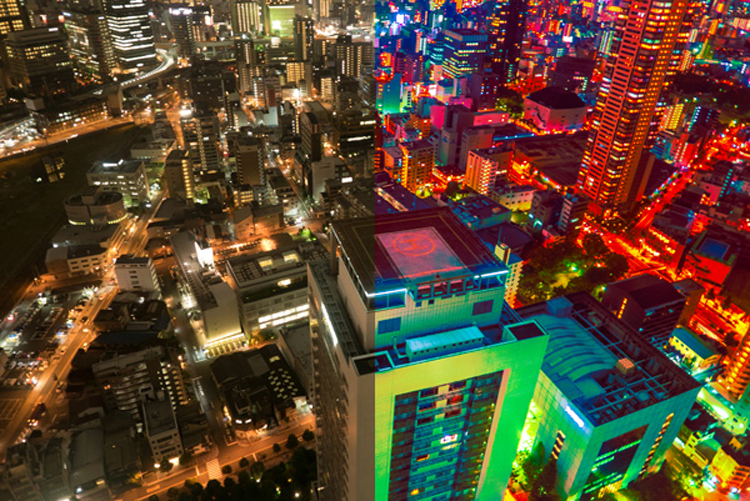
Photo of a bride and groom? Probably needs to be on the warmer side so that the viewer can get some emotional cues from that. Shot these plastic surgeons? I’ll put my white balance on the cool side to reinforce the surgical cleanliness. Whatever you are doing right now, remember all of it is plastic. Who said images needed to be in a square or rectangle? Who said portraits have to contain faces? Who said colors had to be realistic (see above)? Who said paper and canvas was the only printing options…..you get the gist!

Conclusion

There you have it, 10 more photography tips to help you in your photography journey. I hope you resonate with some of them. Be yourself, stay focused and keep on shooting.

10 More Photography Tips to Help Take Your Images to the Next Level

googletag.cmd.push(function() {
tablet_slots.push( googletag.defineSlot( “/1005424/_dPSv4_tab-all-article-bottom_(300×250)”, [300, 250], “pb-ad-78623” ).addService( googletag.pubads() ) ); } );

googletag.cmd.push(function() {
mobile_slots.push( googletag.defineSlot( “/1005424/_dPSv4_mob-all-article-bottom_(300×250)”, [300, 250], “pb-ad-78158” ).addService( googletag.pubads() ) ); } );

The post 10 More Photography Tips to Help Take Your Images to the Next Level by Olivier Duong appeared first on Digital Photography School.


Digital Photography School

 
Comments Off on 10 More Photography Tips to Help Take Your Images to the Next Level

Posted in Photography


Take a look at a 380-shot mosaic of Apple’s new campus created with a 100MP Phase One camera

06 Jan

A composite of 380 100MP aerial images has been created of the site of Apple’s new campus by photo mapping and data company SkyIMD. The company usually provides the kit for other aerial photographers to use, but on this occasion wanted to show off the amount of detail that can be captured with a Phase One iXU RS1000 100MP aerial camera. The company used software to create flight paths over the 0.5 square mile construction site and spent just thirty minutes shooting 420 images with the camera attached to a Cessna 172 light aircraft.

When combined to create a single picture of the whole area, the images allow dramatic magnification so that people in the scene can be picked out – even though the plane was flying at 2000ft with a lens just longer than standard for the format.

The Phase One iXU RS1000 industrial camera uses the same CMOS sensor that is used in the IQ3 100 back for the XF 645-style DSLR body, but in this case it is used in a body with no moving parts. The firm used a Rodenstock 90mm lens with the body and once all 420 images were combined and cropped to the equivalent of 380 images, the file measured 4.76GB. SkyIMD used Photoshop’s Photomerge feature to combine the images, but to maintain manageable amounts of data the company divided the images into batches of over 70 covering specific areas of the site. Once the batches were combined those composites were also combined to create the final image, which you can see on the SkyIMD website.

SkyIMD’s Michael Estigoy has provided some detail about how the image was shot and created.

All of the images were captured using our FAA/EASA/ANAC STC certified Aerial Camera Platform. The platform mounts to the strut of a plane (Cessna) and holds the PhaseOne iXU RS1000 90mm camera in a vertical (nadir) position.

During the pre-flight process, we used a software program called Flight Planner from AeroScientific (http://www.aerosci.info/flightplanner/) to create our flight paths, and calculate the frequency of the intervalometer based on the speed, altitude and desired GSD (ground sample distance).

Using the PhaseOne iX Capture Software, we set the exposure and ISO to obtain the best image balance we could. There was some consideration given to capture as much detail as possible – balancing the exposure between not making the shadows too dark and whites/brights too blown out.

We loaded up the flight plan on our iPad – we use an application called Galileo Offline Maps (https://galileo-app.com/) – to depict the flight lines and line up our airplane. Our pilot, who has years of experience flying missions like this, lined up the plane at the speed and altitude we calculated pre-flight, and then flew the lines straight and level. I controlled the camera operation and made sure that the image quality and coverage was being captured successfully.
The parcel required us to fly 7 flight lines to capture the imagery. We flew one grid.
We are planning follow up flights and will fly a double grid pattern on those, or a cross hatch pattern, to capture more images and enable us to create better mosaics and perhaps a 3D model or flyover.

Stitching and imaging process
We typically use photogrammetry software such as those offered by Pix4D and Agisoft. However, this time I elected to try and use Adobe Photoshop to create the Mosaic. I used the Photomerge function.

We had a total of 420 images. We have a high-powered computer (8 core i7, 64GB RAM, m.2 SSD drives, etc., GeForce GTX video card), but 420 is almost impossible to process all at once. I grouped the images into six separate folders, each representing an area of parcel. Each group shared some images with the other groups in order to facilitate matching. After each group, or chunk, of images was merged, I corrected them for distortion and then merged the groups together. After merging, any major flaws were cut out and images were sourced to fill in the holes.

Photoshop used 90% of our installed RAM and approx. 700 GB of scratch disk space on two m.2 SSD drives to complete each group, including the final mosaic.

As mentioned on our site, we did not take any time to massage the resulting mosaic Photoshop produced. I may have adjusted curves, performed some slight sharpening, and that’s about it. There are obvious mis-alignments and distortions in the image. We wanted to share the image rather than spend another week making it perfect.

The final image was cropped to the final size. I had seen the plans Apple submitted to the City of Cupertino and wanted to try and represent that area of view (pages 3 & 4 of this PDF – https://s3.amazonaws.com/apple-campus2-project/Site_Plan1_Submittal7.pdf). The crop was made visually. We eliminated the use of about 40 photos, hence the approx 380 images mentioned on our site.

The image was too large for TIFF or JPG format so it was saved as a Photoshop Large Document (.PSB). In order to support the zooming feature on our web, we used a photoshop plugin from Microsoft:
http://research.microsoft.com/en-us/um/redmond/groups/ivm/HDView/HDPhotoshopPlugin.htm. This created the thousands of tiles for zooming.

I used Openseadragon for the javascript/web enablement for the zoom/interactive viewer:http://openseadragon.github.io/

Articles: Digital Photography Review (dpreview.com)

 
Comments Off on Take a look at a 380-shot mosaic of Apple’s new campus created with a 100MP Phase One camera

Posted in Uncategorized


Shots from a drone help photographer take first place in Travel Photographer of the Year awards

18 Dec

2016 Travel Photographer of the Year

Joel Santos, Portugal Winner, Travel Photographer of the Year 2016/www.tpoty.com

Salt Desert, Danakil Depression, Afar, Ethiopia. This unique aerial photo shows the salt miners guiding a dromedary and donkey caravan through this desert’s unique salt patterns.

A photographer from Portugal has won the £4000 top prize in 2016’s Travel Photographer of the Year competition with a pair of portfolios of volcanic landscapes and, in contrast, a document of the life of fishermen in Ghana. Joel Santos is the first Portuguese winner of the competition, as well as the first to win with a set of images shot from a drone.
Winners of other categories in the competition went away with cash and accessories, while the best portfolios in the ‘Mankind’, ‘Land, Sea, Sky’ and ‘Journeys & Adventures’ sections won a Fujifilm X camera and lens. The Young Travel Photographer of the Year was Darpan Basak, a 14-year-old from India, while an 18-year-old from the USA, Courtney Moore, won the 15-18-year old category, and Ankit Kumar from India won the 14 and Under section.

The competition attracted entries from 123 countries, and a selection of the winning images will be exhibited in Hull, UK, between 18th May and 30th June, and again at the University of Greenwich, London, during August.

For more information and to see the winners in all categories visit the Travel Photographer of the Year website.
Press Release

ON TOP OF THE WORLD

Travel Photographer of the Year 2016 winners are revealed

From fiery lava flows to a magical, snow-swirled New York street scene that echoes an impressionist painting and from the imperious gaze of an elusive, endangered Iberian lynx to wonderfully minimalist images of West Kirby, England, the winning images in the 2016 international Travel Photographer of the Year awards (TPOTY) have been revealed, and they are stunning.
Photographers from 20 countries have won awards, and the winning images will go on show at TPOTY exhibitions at the UK City of Culture celebrations in Hull from 18th May to 30th June 2017 and at 10 Stockwell Street, Greenwich at the University of Greenwich, London from 4th August to 3rd September 2017.

Joel Santos becomes the first-ever Portuguese overall winner in the award’s 14-year history, beating photographers from 123 countries to take the title of Travel Photographer of the Year 2016. His winning entry features a delicate and intimate portfolio depicting traditional fishing in Ghana and – in another first for TPOTY – an aerial portfolio captured using a drone, giving a bird’s eye view of one of the hottest places in the world, Ethiopia’s Danakil Depression.

The Young Travel Photographer of the Year 2016 is 14-year old Darpan Basak from India, 18-year old Courtney Moore (USA) won Young TPOTY 15-18 and Ankit Kumar (India) won Young TPOTY 14 and Under.

In the portfolio categories, former overall TPOTY winner Craig Easton won ‘Land, Sea, Sky’, with two German photographers – Sandra Bartocha and Stephan Fürnrohr
– each being awarded ‘Best Single Image’ in the category. China’s Ruiyuan Chen took first place in ‘Mankind’, with Jeremy Woodhouse (UK) winning the award for Best Single Image, and Beniamino Pisati (Italy) won ‘Journeys & Adventures’, with Lluís Salvadó (Spain) winning Best Single Image.

In the single image categories, ‘Shaped by Light’ was won by Chinese photographer Biran Zhao, Michele Palazzo (Italy) won ‘Cities – Architecture & Spaces’ and Luke Massey (UK) won ‘Wildlife & Nature’.

Briton Alison Cahill came first in the New Talent award, and fellow Brit Rufus Blackwell won the HD video category Travel Shorts. Finally, Italy’s Marina Spironetti took first prize in Smart Shot, the category for images taken on a mobile phone or tablet.

Travel Photographer of the Year is judged by an international panel of judges that includes Deputy Editor in Chief, Fotomagazin, Germany, Manfred Zollner, champion jockey turned travel photographer Richard Dunwoody and Jerry Tavin (co-president of Glasshouse Images and founder of Young Photographers’ Alliance).

Awards and prizes
In addition to the significant international exposure that comes with winning TPOTY, Joel Santos receives £4,000, a selection of StaaG luxury leather travel goods and sterling silver accessories (worth over £1250), £500 to spend on the Páramo clothing of his choice, and a Plastic Sandwich personalized leather portfolio case.

For their success in Journeys & Adventures; Land, Sea, Sky, and Mankind, Beniamino Pisati, Craig Easton and Ruiyuan Chen each receive a Fujifilm X-Series camera and lens of their choice. The winner of the Best Single Image award in each portfolio category receives a giclée fine art print from Genesis Imaging.

Biran Zhao, Luke Massey and Michele Palazzo, the winners of Shaped by Light; Wildlife & Nature, and Cities – Architecture and Spaces will each enjoy a five or six- day winter or summer voyage for two people along Norway’s stunning coastline with Hurtigruten, and receive a Torres Insulator Jacket from Páramo.

Alison Cahill receives a set of luxury leather travel goods from StaaG, a personalized leather portfolio case from Plastic Sandwich, Photo Iconic tuition and a Páramo Halcon Traveller jacket for winning New Talent, while Marina Spironetti and Rufus Blackwell each win £500, a Páramo Halcon Traveller jacket and a Plastic Sandwich portfolio case, for winning ‘Smart Shot’ and the HD Video category respectively.

Young TPOTY winner Darpan Basak receives £500, Photo Iconic photography tuition and a Plastic Sandwich leather portfolio case. Each Young TPOTY age group winner receives £250 plus Photo Iconic photography tuition. The awarded photographers in Young TPOTY also receive destination guides from SNAPP Guides, as do certain awarded photographers in a number of other categories

To see all the winning images across all categories, visit the 2016 Winners’ Gallery at www.tpoty.com.

2016 Travel Photographer of the Year

Joel Santos, Portugal Winner, Travel Photographer of the Year 2016/www.tpoty.com

Lake Bosumtwi, Ashanti, Ghana. The Ashanti people fish from the traditional wooden padua.

2016 Travel Photographer of the Year

Courtney Moore, USA (age 18) Winner, Young TPOTY 15-18/www.tpoty.com

Island Beach State Park, New Jersey, USA. On a particularly windy day, this fox was sitting only a few yards away from the ocean as sand pelted against his fur.

2016 Travel Photographer of the Year

Ankit Kumar, India (age 13) Winner, Young TPOTY 14 and Under/www.tpoty.com

Lake Natron Tanzania. A flock of Lesser flamingos take flight above Tanzania’s salt and soda Lake Natron.

2016 Travel Photographer of the Year

Beniamino Pisati, Italy Winner, Journeys & Adventures portfolio/www.tpoty.com

Bayankhongor, Mongolia. Horses are present in all aspects of life in Mongolia. A popular saying is: “A Mongol without a horse is like a bird without wings”.

2016 Travel Photographer of the Year

Alison Cahill, UK Winner, New Talent, Eye to Eye/www.tpoty.com

Son & Dad Barbers, George Town, Penang, Malaysia. Portrait of Elyas the head barber and owner of Son & Dad.

2016 Travel Photographer of the Year

Craig Easton, UK Winner, Land, Sea, Sky portfolio/www.tpoty.com

West Kirby, Wirral, UK. A lone Buddhist monk walks around the boundary wall of the West Kirby Marine Lake.

2016 Travel Photographer of the Year

Ruiyuan Chen, China Winner, Mankind portfolio/www.tpoty.com

Daliang Mountains, Sichaun province, China. Portraits of the ethnic Yi people, who live in great poverty.

2016 Travel Photographer of the Year

Biran Zhao, China Winner, Shaped by Light/www.tpoty.com

Baiyu County, Ganzi, Sichuan Province, China. Every morning, the nuns walk around the mountain as practice lesson. Regardless of the season, they walk year after year, day in and day out.

2016 Travel Photographer of the Year

Luke Massey, UK Winner, Wildlife & Nature/www.tpoty.com

Sierra de Andújar National Park, Andalucia, Spain. In 2001 there were less than 100 Iberian lynx left in the wild. Fifteen years later there are now more than 400, but it is still, unfortunately, the rarest cat in the world.

2016 Travel Photographer of the Year

Rudi Sebastian, Germany Joint Runner-up Wildlife & Nature/www.tpoty.com

Berlin, Germany. In a small pond at the rural border of Berlin, male moor frogs in their bright blue mating colour try to mate with a common toad, which almost drowned. It took about 30 minutes before she managed to free herself and reach dry ground.

2016 Travel Photographer of the Year

Michele Palazzo, Italy Winner, Cities: Architecture & Spaces/www.tpoty.com

Flatiron Building, Manhattan, New York, USA. While walking through the Jonas snowstorm that swept across the East Coast, I captured this shot of the Flatiron Building against a backdrop of swirling snow.

Articles: Digital Photography Review (dpreview.com)

 
Comments Off on Shots from a drone help photographer take first place in Travel Photographer of the Year awards

Posted in Uncategorized


Take an entertaining look back at the cameras that came before SD cards

13 Dec

Looks like we’re not alone in our love of cameras from the early days of digital photography: YouTuber The 8-Bit Guy has published a thoroughly entertaining look back at cameras that used floppy disks and other memory media that preceded the humble SD card. He revisits the Sony Mavica FD-7, Mavica FD-85, Panasonic SD4090 and the Mavica CD-350. Take a look at the video and see if it sparks any memories of cameras from your past, and then head over to our Throwback Thursday feature on the floppy-disk-using Mavica FD-91.

Articles: Digital Photography Review (dpreview.com)

 
Comments Off on Take an entertaining look back at the cameras that came before SD cards

Posted in Uncategorized


How to See and Photograph Light – 6 Tips to Help you Take Better Photos

13 Dec

I was teaching a class recently and someone asked me how they could have made a particular set of landscape images better. Should they have used a different aperture, shutter speed, etc.? “You couldn’t have made those photos any better because the light was terrible.” I explained. You must learn to see and photograph light to take better photos.

How to See and Photograph Light - 6 Tips to Help you Take Better Photos

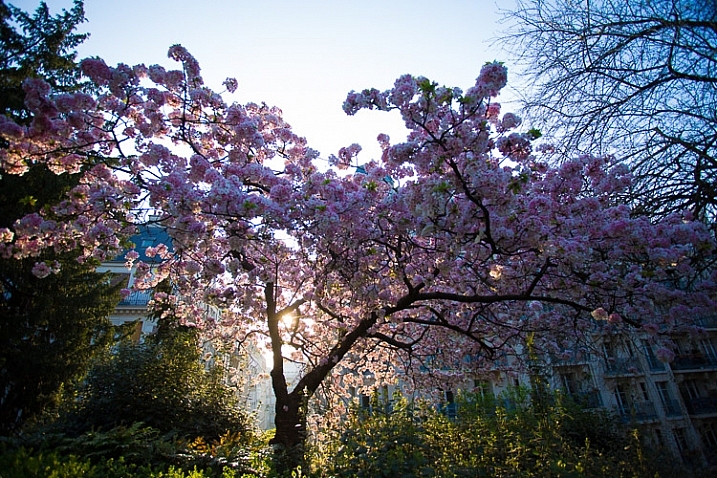
Blossoms at dawn, Paris.

There are times when interesting photos can be made in bad light. But I will unequivocally say that in most cases (as there are always exceptions to the rules, right?) when you have boring light you will have boring photos.

Interesting light transforms any subject. It reveals and enhances the subject’s natural qualities. In many ways, it brings your subject to life. If you follow only one piece of advice in photography it should be this:

“Light makes photography. Embrace light. Admire it. Love it. But above all, know light. Know it for all you are worth, and you will know the key to photography.” George Eastman.

How to See and Photograph Light - 6 Tips to Help you Take Better Photos

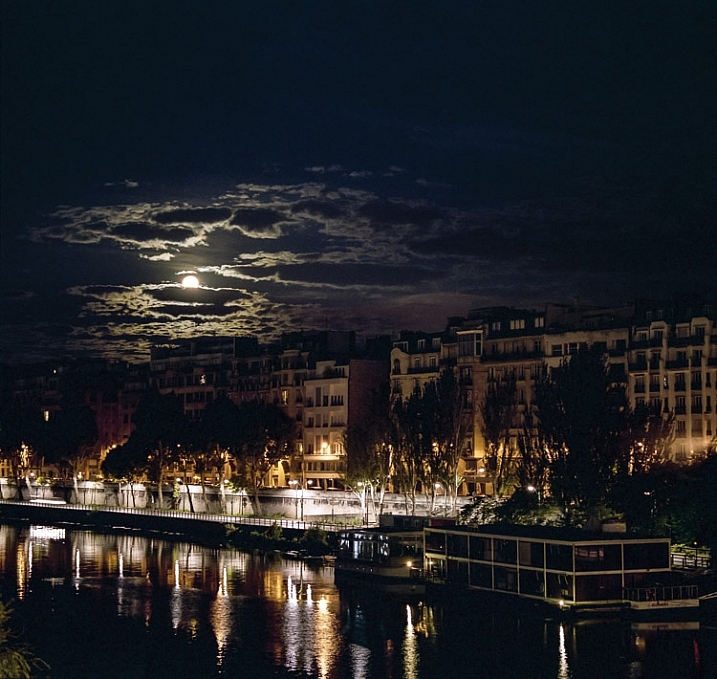
Moonset on the Seine.

In this article, I am going to explore light in many forms, but it’s not a technical article. This is about the how you compose with light, how its different forms affect your subject, the emotions that light communicates, and how when you really chase light you’ll learn to create more compelling and memorable images.

In every single one of these photos, I will say that the subject is the light. The light might be subtle, or very obvious, but what compelled me to snap that shutter was what the light was doing. Here are some tips to get you more involved with capturing the mesmerizing qualities of light.

1) Notice light

“It’s not what you look at that matters, it’s what you see.” Henry David Thoreau

How to See and Photograph Light - 6 Tips to Help you Take Better Photos

This first step seems like a stupidly simple piece of advice right? I mean who doesn’t notice light? Most people notice the obvious aspects of light – it’s a sunny day, it’s stormy, it’s twilight. There is so much more to light, though. It’s a rich, varied and complex entity. Light is creating hundreds of different effects all around us all the time.

The first piece of advice I always give to all my students is – look for what the light is doing and look for light sources. You’re out and you see a beautiful shaft of light on a wall. Ask yourself – where is it coming from? Is it direct or is it being reflected off of something? Is it bouncing off the wall and doing something else?

As you move around light alters – as you enter a square, go under a tree, move behind a building – it’s bouncing and reflecting off so many things. Light is being filtered through leaves, through different urban and natural materials. It’s this constantly changing aspect that you need to become very familiar and intimate with. Light is always changing – as clouds drift across the sun, as the hours pass, as weather systems move.

How to See and Photograph Light - 6 Tips to Help you Take Better Photos

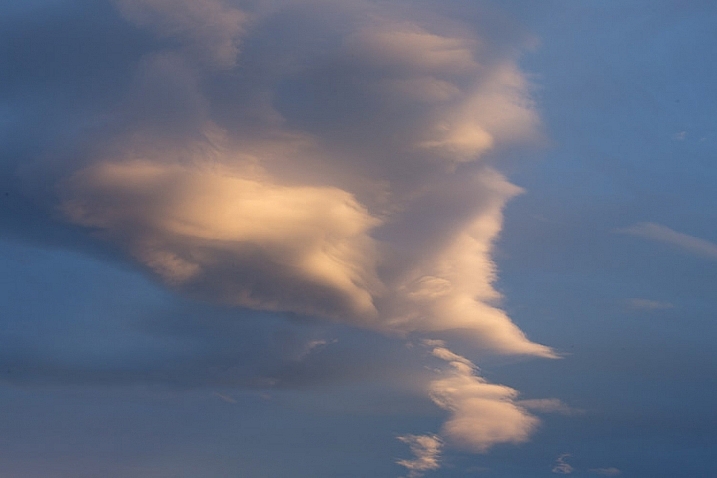
See the shadows on the clouds?

Become a light detective

There are, of course, many times when the light is super flat. We have many days in London where cloud cover is very dense and the light is very flat and gray. Or back in California, where I grew up, in the height of summer at midday the light is hard and almost flat in its piercing white intensity. Then you have to work harder to look for alterations in light. But like life itself, change is something we can consistently rely on.

You’ll also start to notice that when the light outside changes, it also changes the light inside. A drop in the vibrancy of the light outside will make the light inside seem warmer and stronger.

Becoming a good photographer is like becoming a light detective. What is light doing to your subject? What is it revealing about your subject?

How to See and Photograph Light - 6 Tips to Help you Take Better Photos

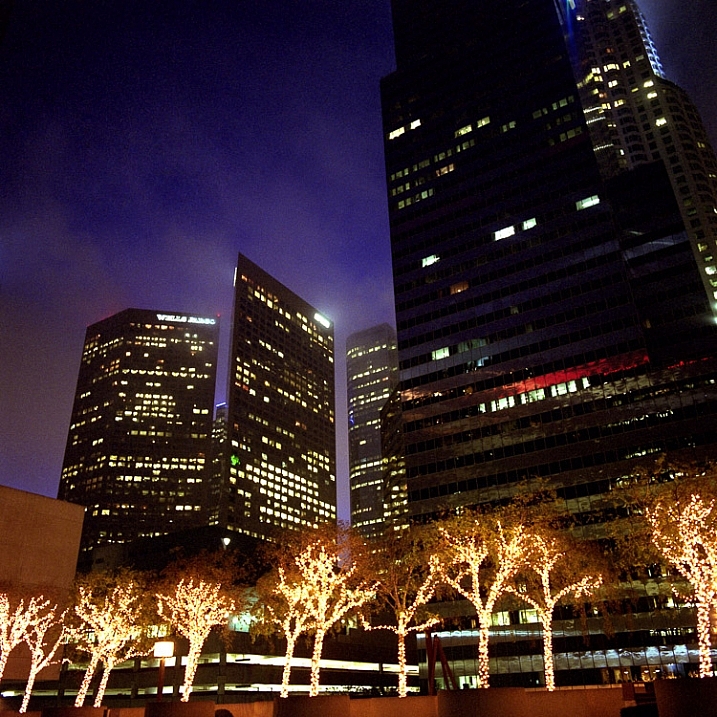
Los Angeles downtown at dawn.

2) Use light to create emotion in your images

“A great photograph is a full expression of what one feels about what is being photographed in the deepest sense and is thereby a true expression of what one feels about life in its entirety.” Ansel Adams

For me, light always creates an emotion, a feeling, or a sense of mood. It doesn’t have to be a strong feeling or even a positive one, but it does have to create an impact with me that goes beyond the initial pleasingness to the eye. I am constantly searching to capture a feeling in my images. Light is a very powerful way to communicate emotions.

So I want you to look at the light in the following photos and ask yourself – how do they make me feel? Light can be a powerful and dramatic element in your photos, creating a deep feeling of awe, about the grand beauty of the world.

How to See and Photograph Light - 6 Tips to Help you Take Better Photos

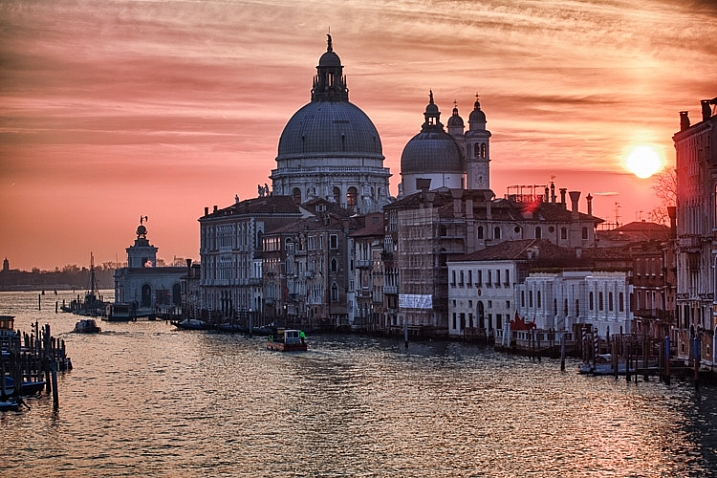
Dawn over the Grand Canal Venice, Italy.

Light enhances the subject

Of course, the photo above would have been interesting without the dramatic sunrise, after all, it is Venice and the subject is incredible. What the beautiful light adds, though, is a big pop of color, adding a layer of depth and enhancing the awe-inspiring feeling of these amazing buildings. The dramatic color and light matches and enhances the dramatic subject.

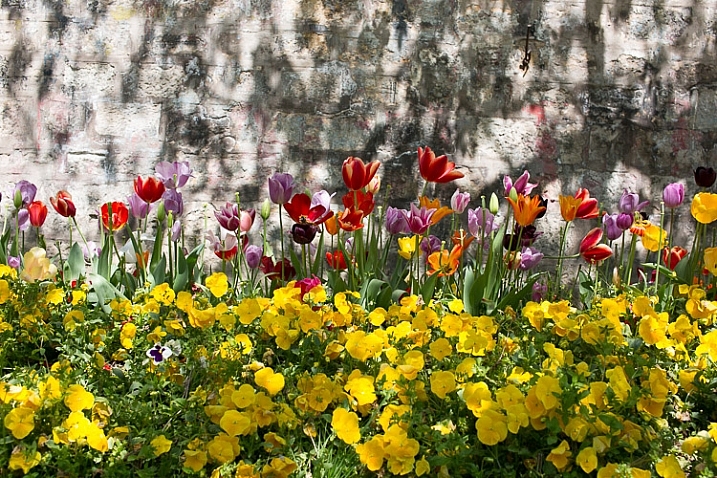
It doesn’t have to be big subjects, though. This simple shot of pretty flowers would be quite boring if it didn’t have this lovely dappled light on it. It’s simple but very evocative. If you are starting out, or trying to refresh your basic skills, focusing on detailed shots like this, and what light is doing to the elements in the world around you, is a fantastic way to start playing with, and capturing the magic of light.

How to See and Photograph Light - 6 Tips to Help you Take Better Photos

Tulips in bloom Istanbul Gulhane park

I have mentioned interesting and beautiful light. So what is interesting light? Well, to me it’s any light that communicates an emotion, a feeling, or a mood. It’s light that makes you feel something. Even if that’s melancholy.

How to See and Photograph Light

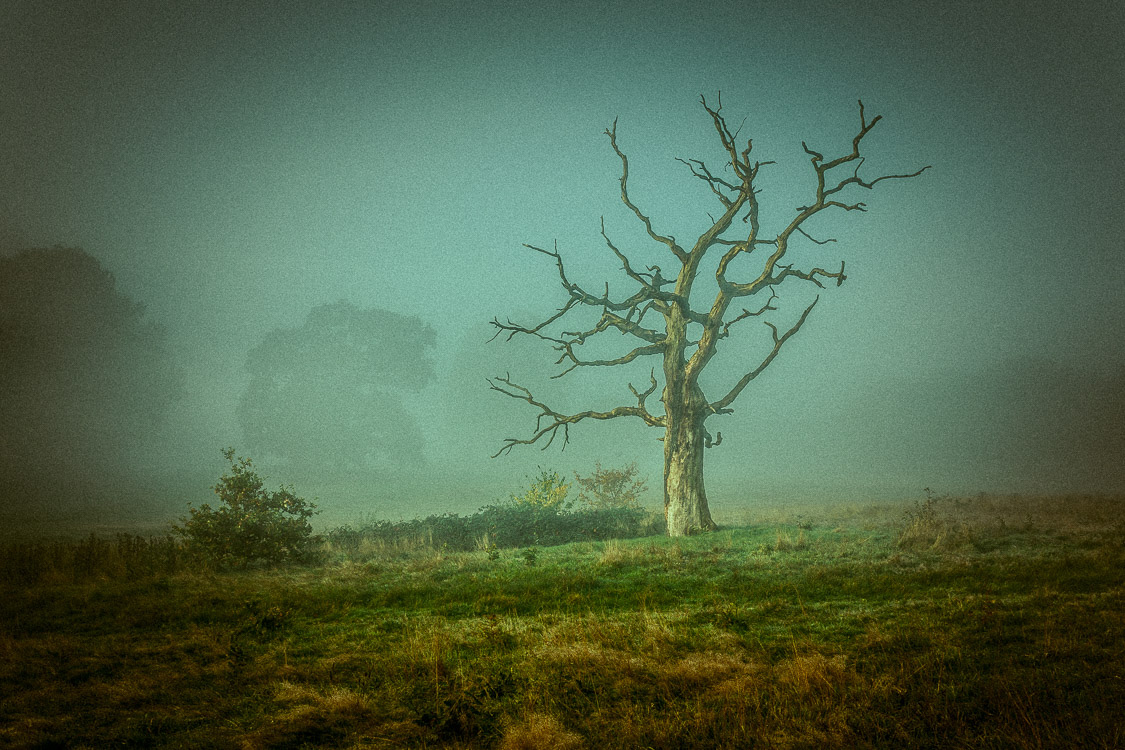
Lone tree on a foggy morning on Hampstead Heath London, at dawn.

I shot the photo above on a cloudy autumnal morning. The light was very diffuse, very subtle, but it was still pretty and interesting to me. It matched the location I was in – the wild heathers and grass along with the stark leafless tree standing alone.

Can you see how the light emphasizes the natural qualities of the tree? How the amazing wild branches, stripped bare, almost like someone’s mind going crazy, are enhanced by the soft light?

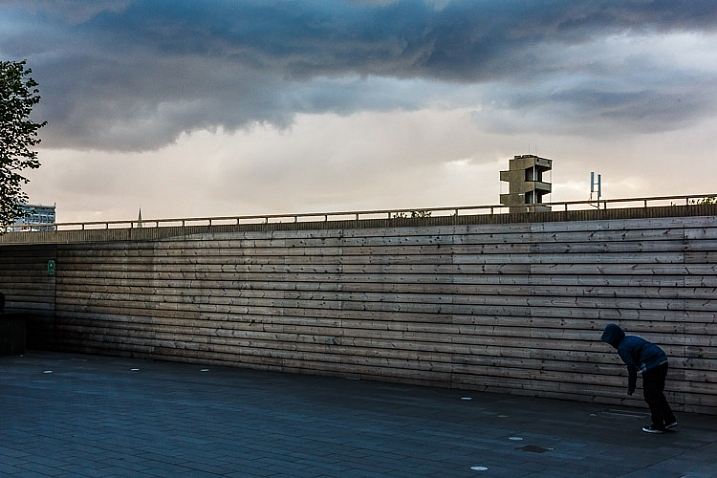
In the photo below, to me, the light is offering an amazing feelingof foreboding.

How to See and Photograph Light - 6 Tips to Help you Take Better Photos

Dark days ahead, London.

3) What is the color of light?

“Light, that first phenomenon of the world, reveals to us the spirit and living soul of this world through color.” Johannes Itten

Color from light is produced when white light is split by a prism into the colors of the rainbow. You also get artificial effects created by the myriad of things that light reflects onto and bounces off.

For me, color is the second most powerful force in my photography, and getting a sense of the color of light is a great way to start using light and color in your compositions.

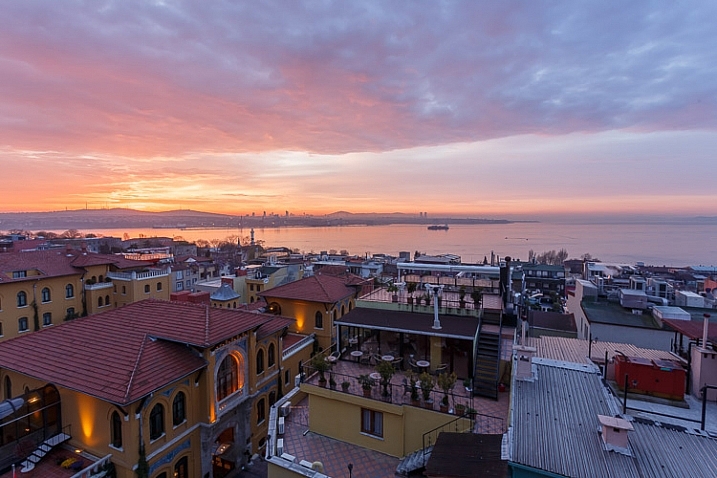
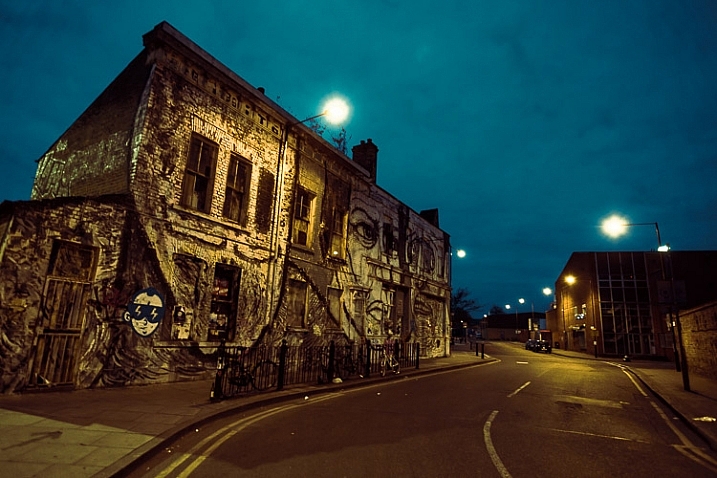
Compare the color of the light in the following three images.

How to See and Photograph Light - 6 Tips to Help you Take Better Photos

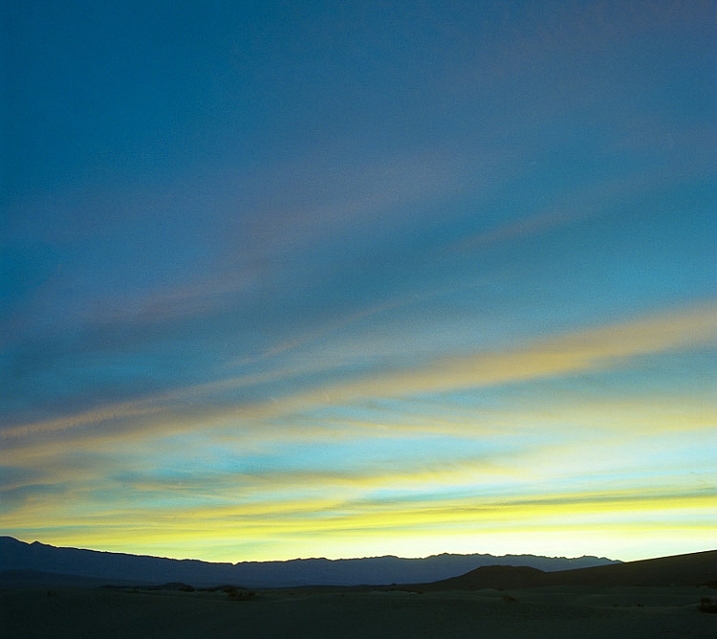
Dawn over Death Valley, California

How to See and Photograph Light - 6 Tips to Help you Take Better Photos

Sunrise over the Bosphorus, Istanbul Turkey at dawn.

How to See and Photograph Light - 6 Tips to Help you Take Better Photos

Near Hackney Wick station London at dawn.

Light is always full of color – even if it’s piercing white. And it’s doing something to the color of your subject.

4) Light can make even dull and boring subjects interesting

“In the right light, at the right time, everything is extraordinary.” – Aaron Rose

Interesting light doesn’t have to just be natural, or even beautiful. Light of all kinds creates mood and feeling within a photo. Your aim is to ensure that the light helps to create a story of some kind for your image, that it tells you something about what it’s like to stand right there, where you were.

How to See and Photograph Light

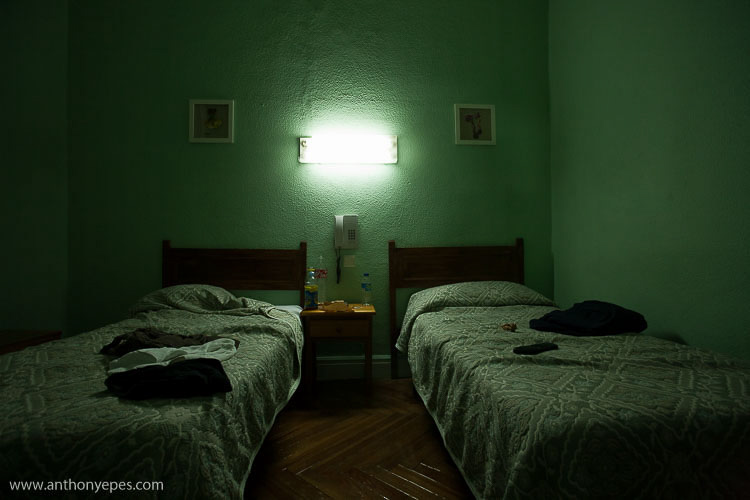
Hotel room, Madrid, Spain.

Above is a great example of harsh light that usually I wouldn’t go near – but it works in this photo because it works well for the subject. I rarely take photos using such unflattering hard lighting. But in a grim hotel room in Madrid, it enhances the feeling of loneliness that the twin (disconnected) beds give off, with the bleak looking paint color. That burst of light wraps up the photo into a nice melancholy package. See, even horrible light can be interesting (in the right circumstances)!

Then you also have the issue of beautiful, gorgeous light making rather dull subjects suddenly quite interesting.

How to See and Photograph Light - 6 Tips to Help you Take Better Photos

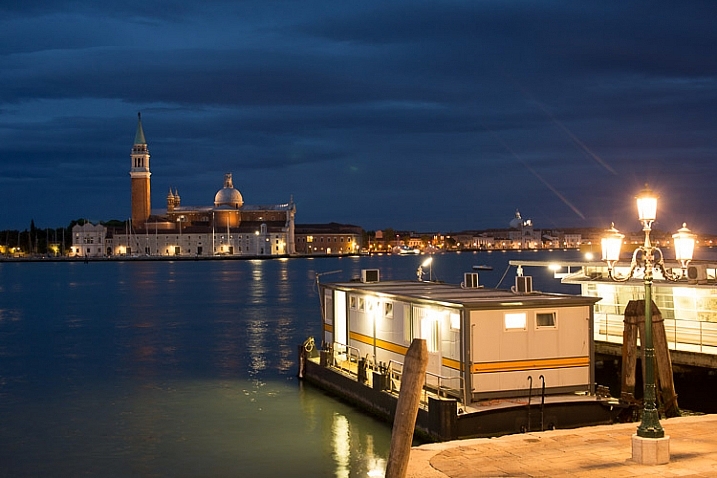
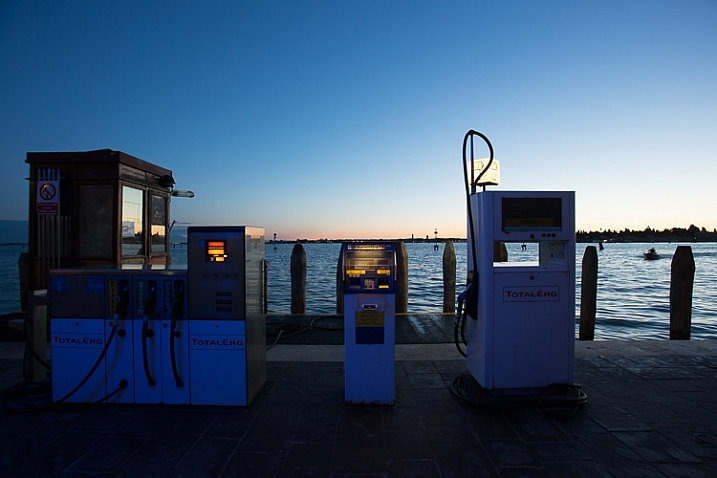
Gas pumps for boats in Venice, at dawn.

Without the rich blue light, this would not be an interesting photo. Plus what gives it another layer of interest are the pops of artificial light.

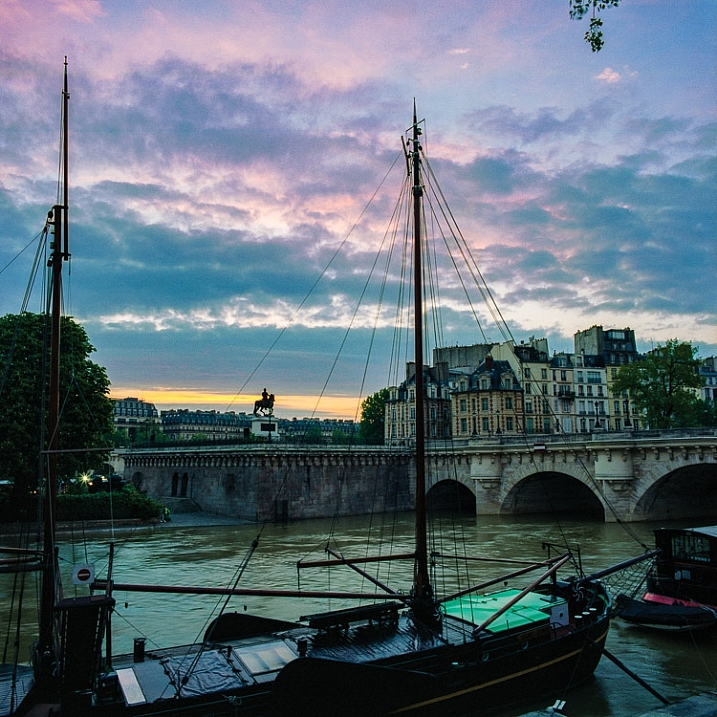
This following photo has a fascinating subject. But imagine this scene on a gray, drab Parisian morning, when all you want to do is dive into a cafe and eat several pains au chocolat?

How to See and Photograph Light - 6 Tips to Help you Take Better Photos

A dawn Idyll on the Seine, Paris.

The light is bringing everything to life – the gray stone buildings, the grayish-green water, the black and browns of the boats. This would be a totally boring photo without that magical light and sky.

5) Use light to tell a story

“There is only you and your camera. The limitations in your photography are in yourself, for what we see is what we are.” – Ernst Haas

I think photographs are at their strongest when they enhance the inherent qualities of the subject you are photographing when they add another layer of story to the photo.

What story do you want to tell?

I photograph a lot of cities at dawn; it’s my main subject at the moment. Dawn, though, becomes very repetitive to photograph. It’s often so pretty, but just how many epic sunrises can you photograph? So one of my favorite things to do is to juxtapose that beautiful, ethereal light of dawn with the broken, used or decaying elements of our cities.

How to See and Photograph Light - 6 Tips to Help you Take Better Photos

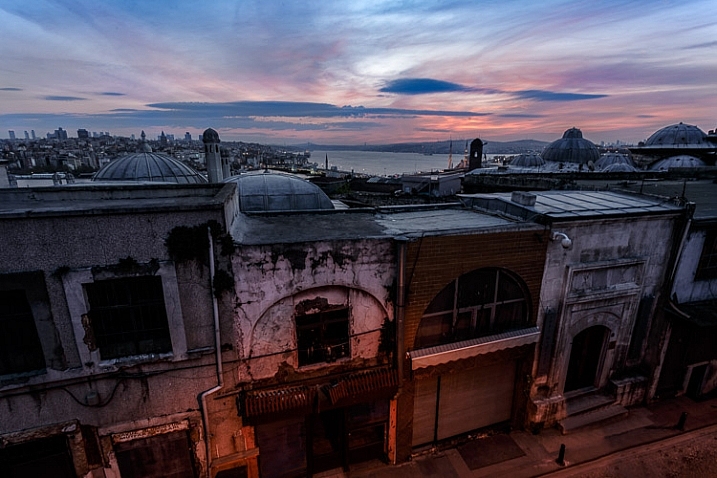
Ancient vista, Istanbul at dawn.

I think it says so much. The hopeful light of dawn, with the heavy feeling you get from the urban scene, and feeling of human impact.

I also love to photograph dawn when the street lights are still on. That mix of the best light nature produces, with that hard functional light we humans create for our cities, is a very interesting thing to play with. The light is telling you more about what it’s like to be exactly where you are – it’s helping to tell the story of your subject.

How to See and Photograph Light - 6 Tips to Help you Take Better Photos

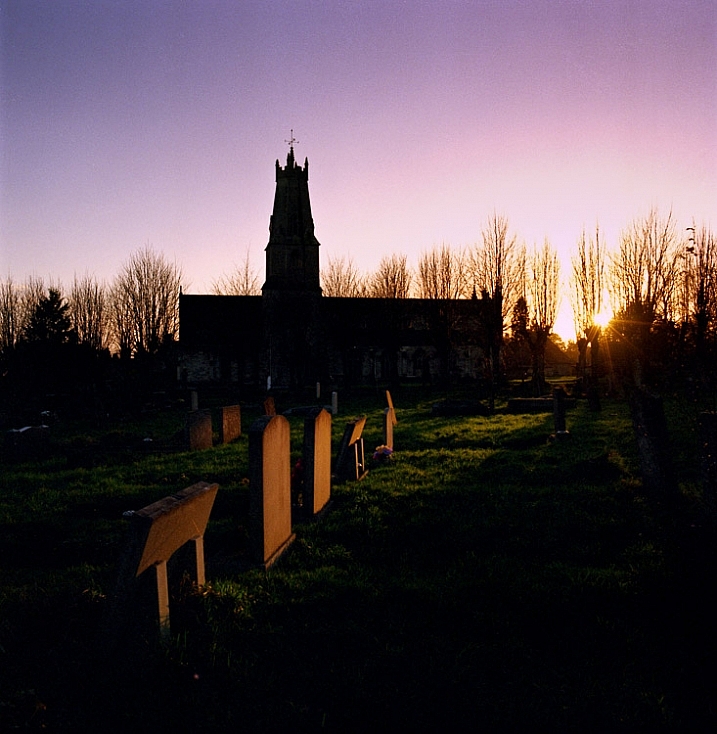
Last light on gravestones, Stroud, England.

In the photo above I was in this graveyard on a winter’s afternoon. I noticed that the sun was starting to set and realized that if I waited, the sun would fall perfectly between the trees, lighting up the gravestones. This stream of light through the trees only lasted a minute or two, but it shows that when you really pay attention to light you can start to anticipate what it’s going to do, and how it will affect your photos. Without that stream of beautiful light the scene would have been really boring.

6) Chasing light is an adventure

“Photography is a love affair with life.” – Burk Uzzle

Photography is such an amazing creative pursuit. I love how it connects me so much more to the world around me. Learning to pay attention to light and how to capture it is one of the best ways to elevate your photography. Becoming intimate and familiar with light will help you become really present with the beauty and wildness of this amazing world.

How to See and Photograph Light - 6 Tips to Help you Take Better Photos

I would encourage you to photograph light – just for the sake of it. It’s a wonderful, thrilling adventure to always be chasing the light.

I’d love to know if you how you go about capturing light and use it in your photos. Please comment below, I love hearing your ideas.

googletag.cmd.push(function() {
tablet_slots.push( googletag.defineSlot( “/1005424/_dPSv4_tab-all-article-bottom_(300×250)”, [300, 250], “pb-ad-78623” ).addService( googletag.pubads() ) ); } );

googletag.cmd.push(function() {
mobile_slots.push( googletag.defineSlot( “/1005424/_dPSv4_mob-all-article-bottom_(300×250)”, [300, 250], “pb-ad-78158” ).addService( googletag.pubads() ) ); } );

The post How to See and Photograph Light – 6 Tips to Help you Take Better Photos by Anthony Epes appeared first on Digital Photography School.


Digital Photography School

 
Comments Off on How to See and Photograph Light – 6 Tips to Help you Take Better Photos

Posted in Photography


How to Use Light Painting to Take Incredible Car Photos

28 Nov

Whether you drive a beat up station wagon from the 80s or a finely tuned Porsche, light painting is an excellent way to photograph your car and truly make it shine! Light painting results in incredibly unique and impressive images. With a bit of persistence and creativity, you can create pictures that look like commercial photoshoots – even without heavy editing.

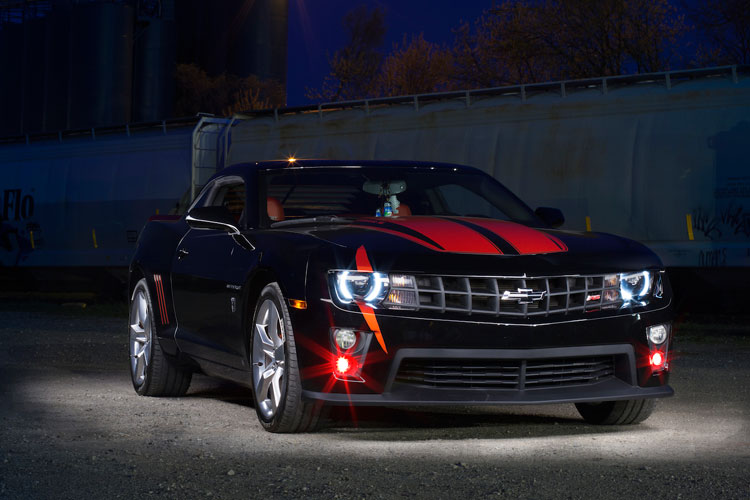
A photo of a car taken using the light painting style

The reason that a light painted picture looks so incredible is because the light is literally wrapping around the subject. Normally, we see objects lit from only one angle, often the sun, which can get a bit dull at times. In addition, there will be cool reflections on the body of the car that trace the path of your light, giving the shot a highly commercial look.

Getting started

What’s the first step? Clean the car! Light makes every speck of dirt and grime become immediately visible. Unless you are going for a grungy style, you’ll want to make sure the car is squeaky clean.

Since light painting involves leaving the shutter of the camera open for some time, you will need to wait until it is dark outside. If you try light painting during the day, you will get a completely white image as the sensor collects all the sunlight.

Alternatively, if you have room in your garage, you could park your car in there and cover all windows so that there is no ambient light.

Your light source

One of the cool things about light painting is that you don’t need to invest thousands or even hundreds of dollars in equipment to get started. Literally, any light source can be used, whether it is a professional video light or simply a flashlight app on your mobile phone.

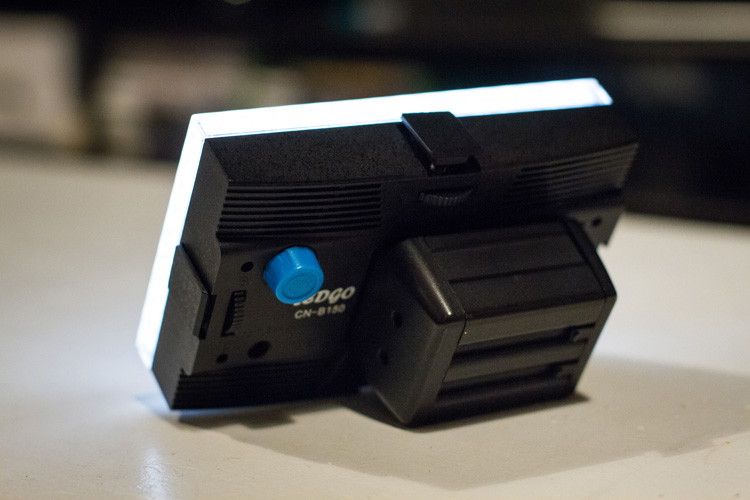
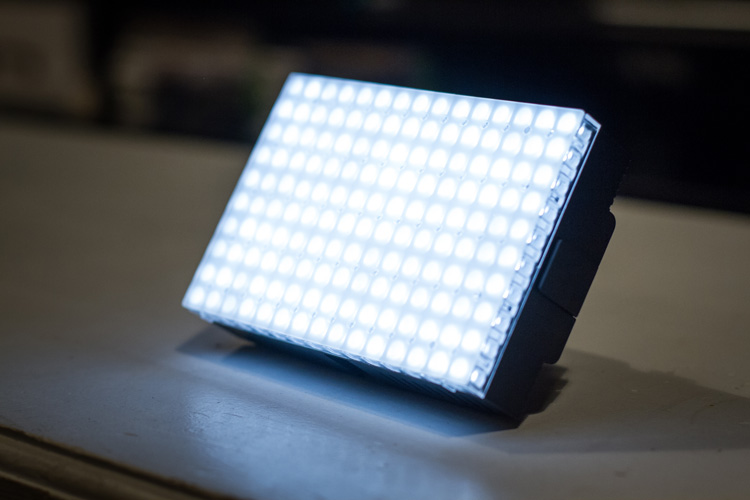
For my example picture, I will be using an LEDGo Portable Video Light, which is a small but powerful light that I can hold in my hand.

video-light-for-light-painting-1

video-light-for-light-painting-2

One drawback of this type of light source is that it throws light everywhere, including back at the camera. If possible, you will want to find some way to shield the light so that it is directed only at your subject. Professional light painting lights, like the Westcott Ice Light, have flaps that prevent the light from spilling everywhere.

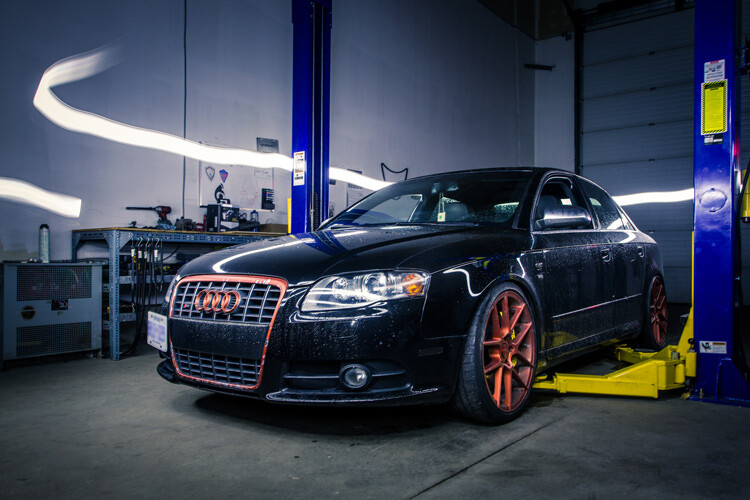
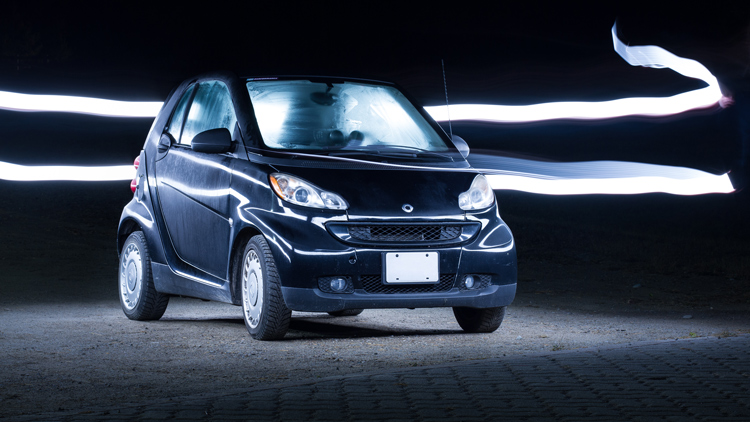
A light painted car where the light source is visible

In this example, the light source was seen by the camera, which created a unique halo effect around the car.

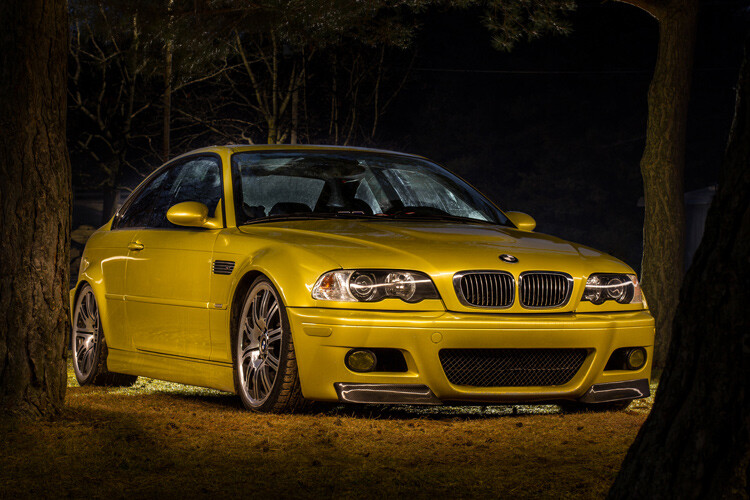
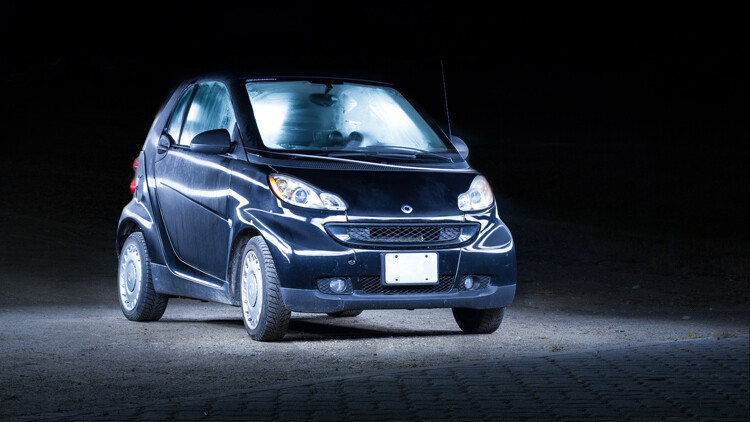
A light painted car with the light source not visible in the final image

In this image, the light was shielded from the camera and pointed only at the car, so that the light path isn’t visible.

Setting up the shot

Perhaps the most important piece of equipment you will need for light painting is a sturdy tripod. This is because you will be taking a picture that lasts for many seconds. A tripod that shifts over the course of the picture, or that is blown around by wind, will result in some serious frustration and blurry images.

You don’t need a special or expensive lens for light painting – any lens will do! When you are setting up your tripod, remember how zoom influences a picture. Shooting from close with a wide angle lens will make the car look fatter. Shooting from a distance with a bit of zoom will lessen the distortion.

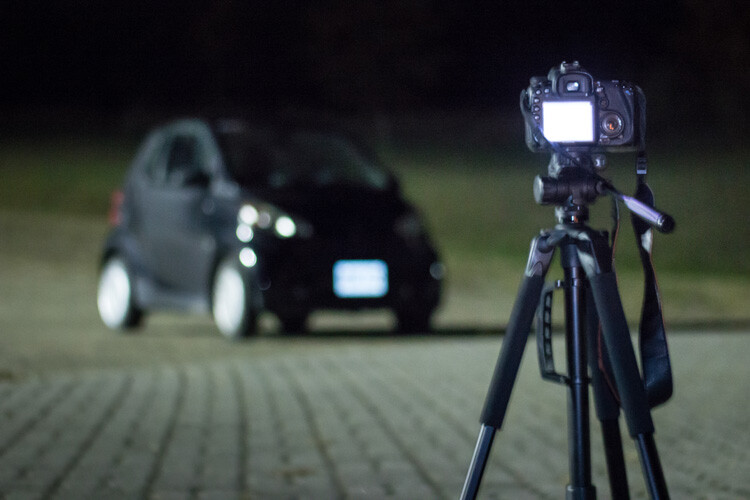
Behind the scenes of light painting car photography

Behind the scenes of the setup. There is some light filtering in from the left from a streetlight, but I can use my camera settings to reduce the effect of that ambient light.

Exposure settings

The first goal will be to get a base exposure. This requires that you go full manual on the settings. If you leave the camera on auto, it will try to compensate for the low light and may pop up the flash.

To make an image with a black background like the one in my example, you will want your base exposure to be very dark. If you want more of the surroundings to be visible, you can make your base exposure lighter. Be aware, however, that will mean that you are more likely to show up in the final image as you walk around the car with your light.

  1. First, select a low ISO so the sensor doesn’t collect much light from the surrounding area. As an added benefit, using a low ISO will also result in a very high-quality image.
  2. Next, you will want to choose a fairly narrow aperture. This will keep a large portion of the image in focus. It will also help to make the image darker, as needed.
  3. Last, choose a shutter speed that gives you a bit of time to paint the car. For my purpose, I chose 25 seconds.

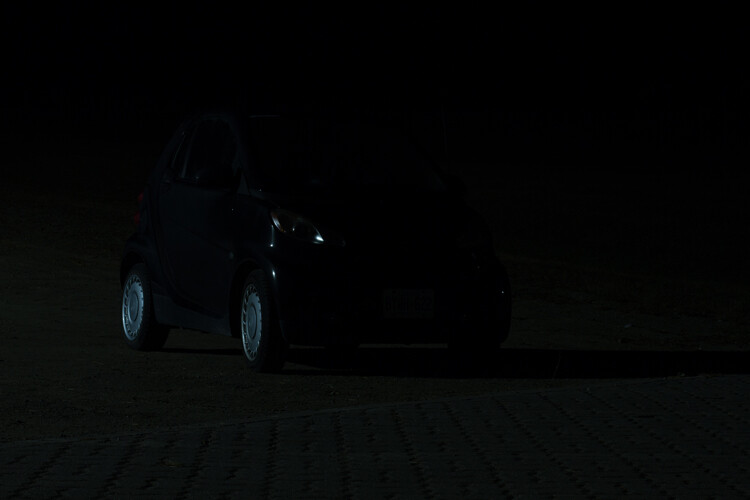
As you can see below, this base image is nearly completely dark. This is perfect. Now the final image will only be what I paint with my light.

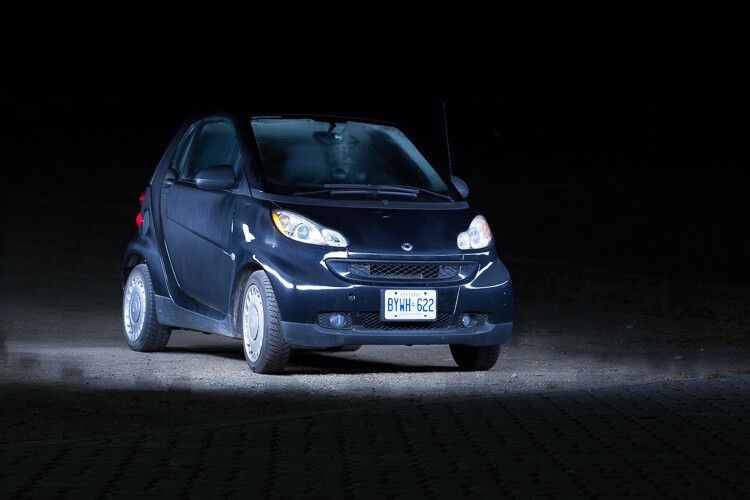
The base exposure for a light painting car image

The base exposure for my image was ISO 100, f/9, 25 seconds.

Let there be light (painting)

Now we’re ready to start painting!

You can either have a friend press the shutter button, or you can put the camera on a short timer so that you can start light painting immediately after the shutter releases.

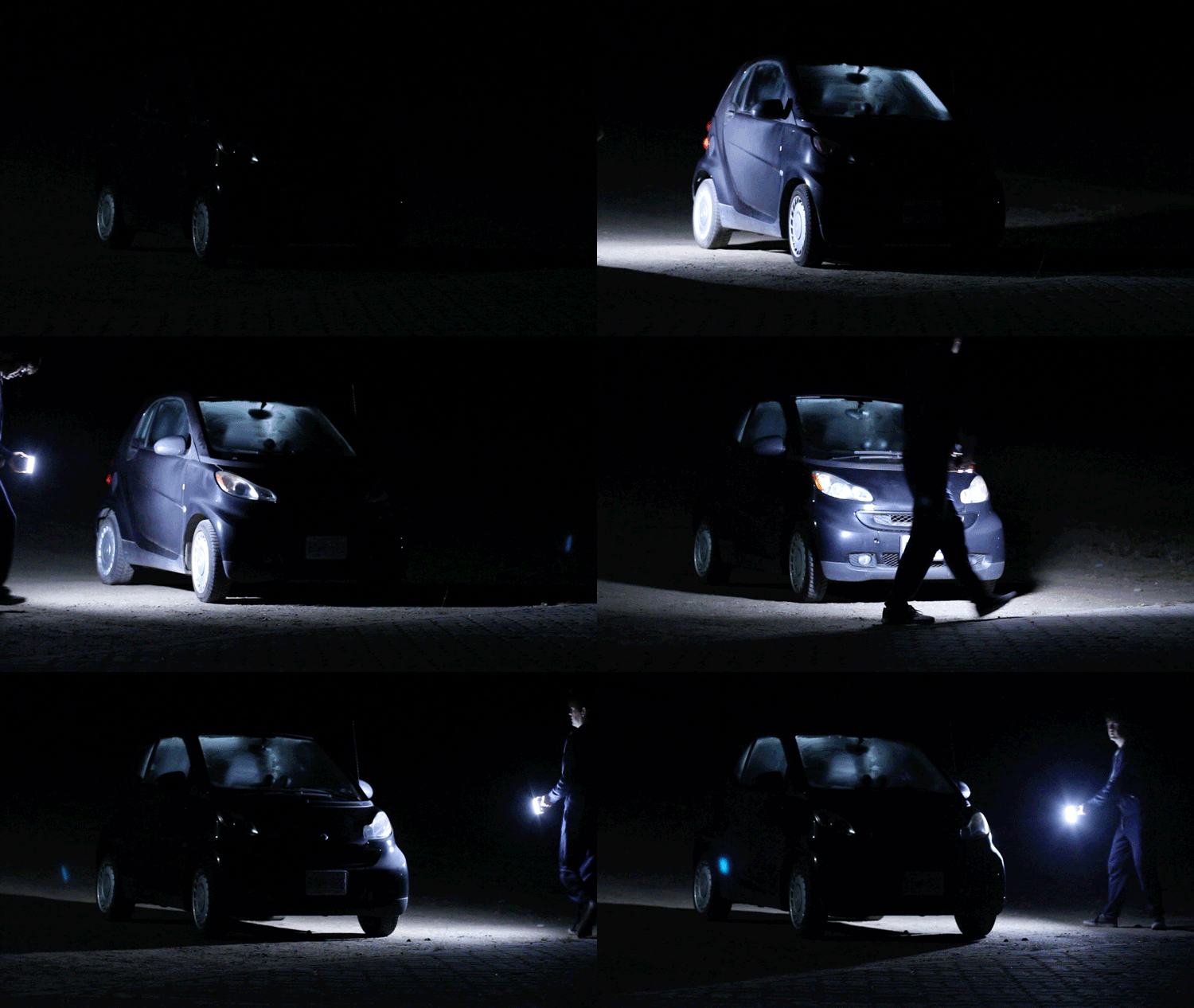
There will inevitably be a bit of trial and error as you try to find the right angles at which to paint the car. Pay close attention to how the light is reflecting in the body of the car and try to find ways to make it look flattering. Typically this involves moving the light at a uniform level so that there is a clean and crisp line of light reflected on the car.

light-painting-example

Chances are you’ll have to throw away a lot of images because parts of the car weren’t lit well enough, or the reflections looked messy. Don’t let this discourage you. The more you practice, the more you will get a feel for how to move the light.

Don’t forget to play a little bit. Waving your light around in circles, for example, can make some cool light trails and some memorable images.

A light painted car with light trails

A light painted car with light trails

How come you don’t show up in the final image?

A camera can only see objects that have light shining on them. When you aim the light source away from yourself and keep moving the entire time the picture is being taken, you simply won’t be in one place long enough for the camera to record your image.

If you do see yourself faintly in the final image, this can be due to one of three things:

  • You might have been caught in the light reflecting off of the car (or accidentally lit yourself up).
  • There might be too much ambient light. Try adjusting the settings to make your base exposure a bit darker.
  • You stood still in one place for too long, keep moving.

Typically, these ghostly appearances can be fixed easily enough with Photoshop later on, though you may want to adjust some settings to save yourself some time in the editing room.

Controlling the power of your light

If you find that your light isn’t having so much of an effect on the final image, there are two ways to control this.

To effectively make your light more powerful, you can choose a wider aperture (lower f-stop number) or raise the ISO. Either of these options will make the camera more sensitive to all light, including the light in your hand. Be aware that these changes will also affect your base exposure for the ambient light conditions. So you may also need to change the length of the shutter speed in order to keep the image properly dark.

If all else fails, your last option might be to simply to purchase a more powerful light. Yes, it is possible to do light painting with a small flashlight, but if you are serious about light painting, it might be a good idea to upgrade to something with a bit more power and control.

Making some final edits

Often, light painted pictures look pretty awesome right out of the camera. By pulling the picture into an editing program like Lightroom, you can make some simple tweaks to complete the image.

The original, straight from camera image of a light painted car

This is the image straight from the camera. It has a really unique look, even before we do any edits. You can see that my feet were caught in the reflected light and will need to be edited out.

It’s a good idea to shoot your light painting images in RAW. Shooting in RAW as opposed to JPG gives you some extra flexibility when it comes time to edit.

General adjustments

First, you’ll want to find a nice looking white balance. Light painted cars often look very sleek with a steely, cold white balance, but you can experiment to find a nice balance for the car you are working with.

As I mentioned earlier, it’s important to make sure the car is clean before you photograph it. Any minor imperfections or dirty spots that might still be visible can be removed using the spot healing tool in Photoshop or similar editing programs. You may also want to use this tool to reduce or remove bright and distracting glare reflecting off the car. I used this method to remove a harsh reflection in the example picture just above the front wheel.

Selective adjustments

Next, you may want to take some time to selectively lighten or darken parts of the image. In the course of your light painting, it is possible that you might have spilled some light into an area of the picture that you wanted to leave dark. You can control this by using gradients or adjustment brushes to precisely control the amount of light on different areas of the image.

For my picture, I wanted the light to quickly fall off around the car. I was able to emphasize this by using gradients and a vignette to darken the edges of the image.

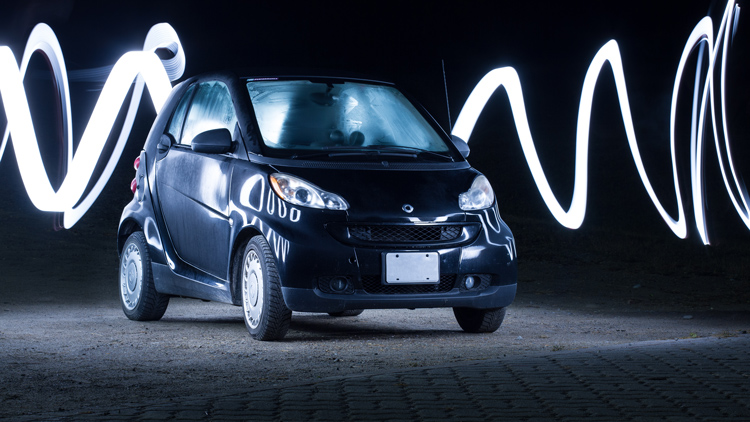
The final edited image of a light painted car

As you can see, the final image isn’t drastically different than what came out of the camera! This final image in a combination of two of the images, borrowing some features from both shots.

Get out there and start light painting

Light painting is a very fun, simple and rewarding style of photography. It doesn’t take any special equipment to get some incredible and truly creative results that will amaze your friends. Give it a try and share your light painted car images in the comments below.

googletag.cmd.push(function() {
tablet_slots.push( googletag.defineSlot( “/1005424/_dPSv4_tab-all-article-bottom_(300×250)”, [300, 250], “pb-ad-78623” ).addService( googletag.pubads() ) ); } );

googletag.cmd.push(function() {
mobile_slots.push( googletag.defineSlot( “/1005424/_dPSv4_mob-all-article-bottom_(300×250)”, [300, 250], “pb-ad-78158” ).addService( googletag.pubads() ) ); } );

The post How to Use Light Painting to Take Incredible Car Photos by Frank Myrland appeared first on Digital Photography School.


Digital Photography School

 
Comments Off on How to Use Light Painting to Take Incredible Car Photos

Posted in Photography


Rugged Luxury: Take Your Queen Bed On the Road In This Modern Camper

08 Nov

[ By SA Rogers in Technology & Vehicles & Mods. ]

tvan-mk4-trailer-main

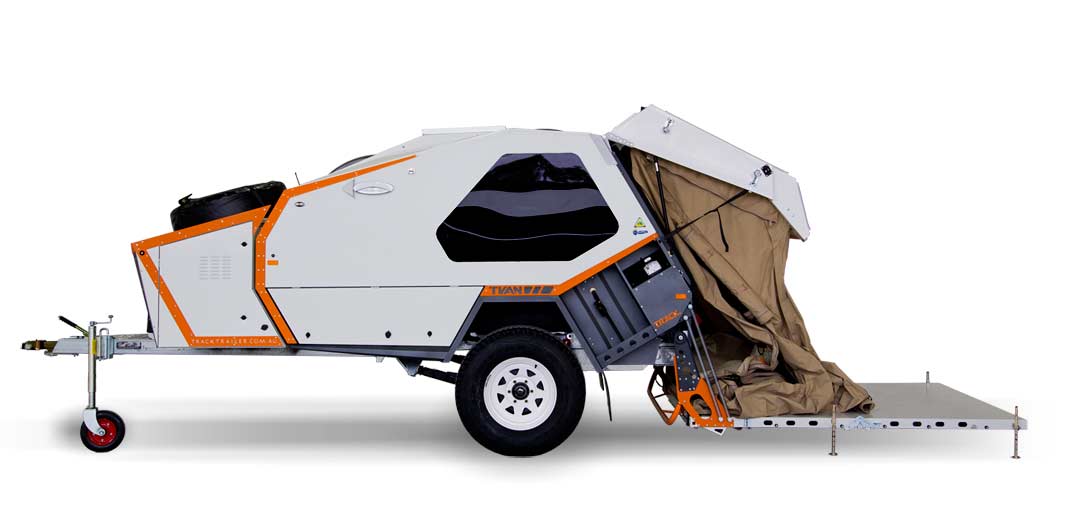
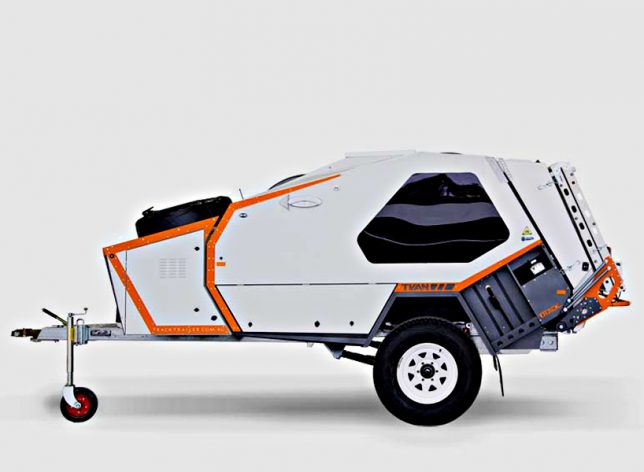
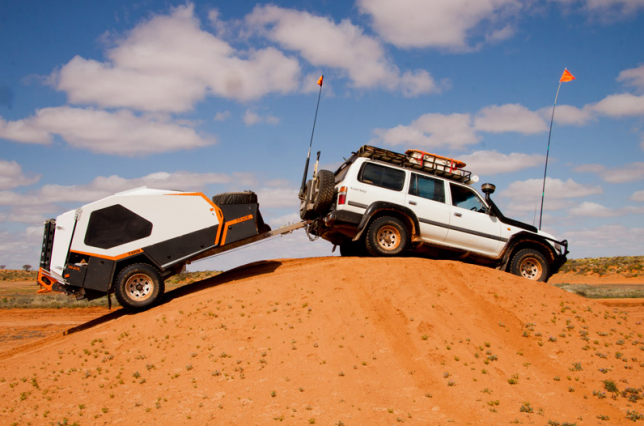
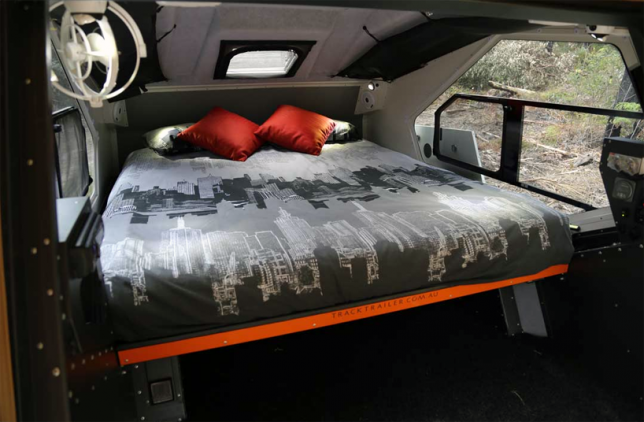
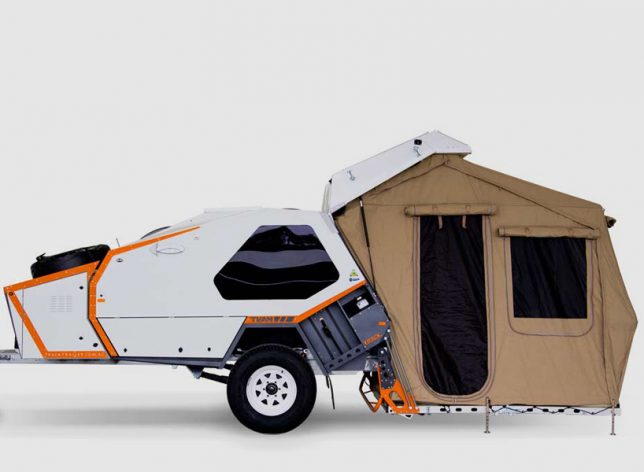
If your camping style is somewhere in between sleeping under the stars and ‘glamping’ with all the comforts of home, Track Trailer’s MK4 ‘Tvan’ camper has your number. Designed to be towed behind standard trucks and SUVs, it’s basically a hotel room on wheels, packing a queen-sized bed, two kitchen configurations, air conditioning and a quick-erect tent to multiply the available space.

tvan-trailer-3

tvan-trailer-7

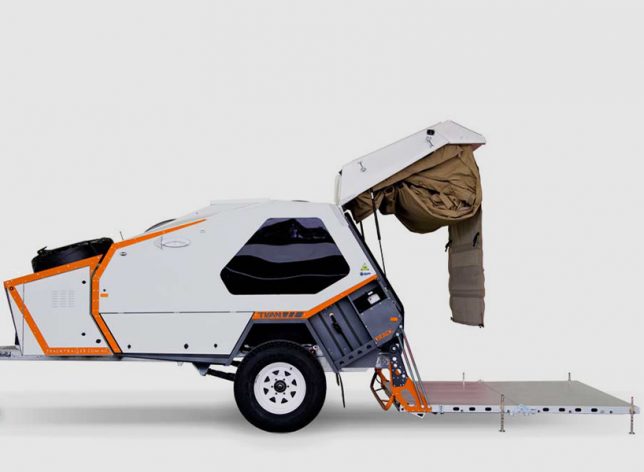
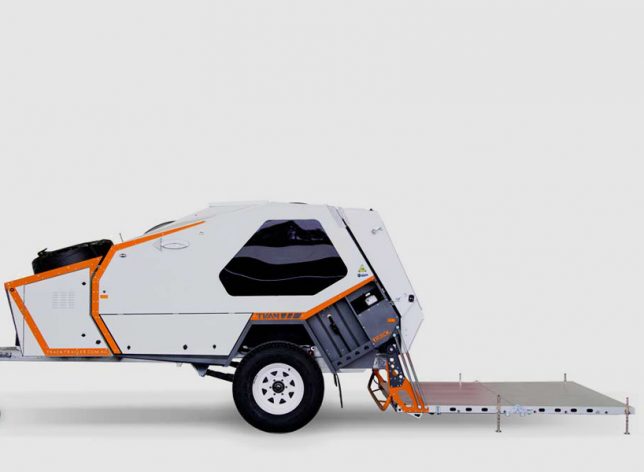
The latest in a series of Tvan designs, this camper trailer enables the most rugged of adventurers to go deep into the wilderness, and it’s gotten a thumbs-up from explorers of Australia’s most punishing desert landscapes. The Tvan is manufactured in Melbourne and has been around since the early ’80s, and features MC2 suspension, a riveted steel and aluminum cabin body, hot-dipped galvanized chassis, and a rear folding platform for the tent, which stows away in its own compartment.

tvan-trailer-4

tvan-trailer-5

tvan-trailer-6

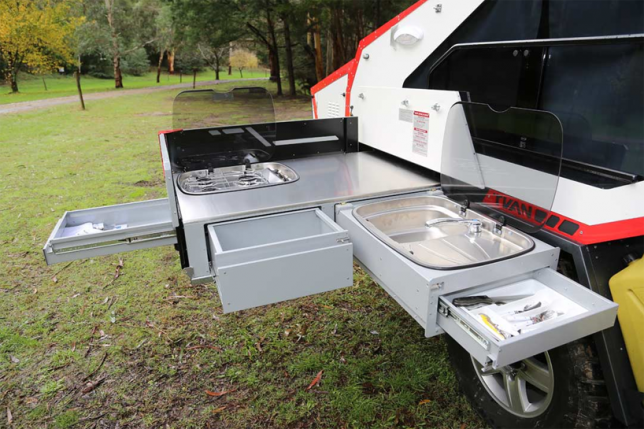
The slide-out kitchen offers a surprising number of features, including four burners, a sink, counter space and three storage drawers, and it all packs up tight for travel, remaining secure even when you’re driving over rocky terrain. There’s an integrated windshield that deploys simply by raising it into position so windy conditions don’t blow out the flames on the range.

tvan-trailer-2

tvan-trailer

tvan-trailer-8

The cabin itself is substantial enough to block out noise, sun, heat, cold and wind, and when the tent is in use, it secures to the hard fold-out floor, keeping it up off the ground. The rear hatch is assisted by gas struts to make it easy to open and close, and the whole thing is aerodynamic, making it easy to tow.

Share on Facebook


[ By SA Rogers in Technology & Vehicles & Mods. ]

[ WebUrbanist | Archives | Galleries | Privacy | TOS ]


WebUrbanist

 
Comments Off on Rugged Luxury: Take Your Queen Bed On the Road In This Modern Camper

Posted in Creativity


How to Take Cool Food Photos in Your Refrigerator

18 Oct

Nothing gets me more excited creatively than coming up with different scenarios or ideas to further develop and hone my photography skills. For me, this is what makes photography so interesting and never dull. Yes, it can be frustrating and challenging. However, there are so many ways and endless possibilities for capturing images.

title

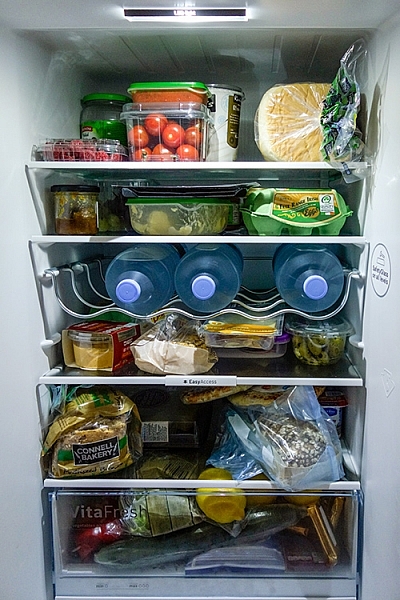
Bottled water in a refrigerator.

A picture is worth a thousand words, as the phrase goes. But I also like the story behind the photograph or image. Recently, I came across online the work of Mexican photographer, Felix Hernandez Rodriguez, who has a wonderful behind the scenes (BTS) video of his “The Love Car | The Making Of”.

I won’t spoil it for you by describing it in words. Instead, I feel It is best that you watch it for yourself at your leisure (see below).

Got lemons – make lemonade

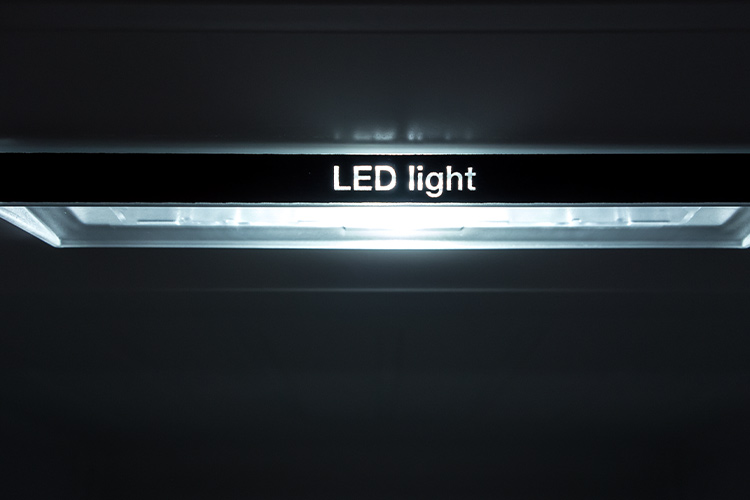
Anyway, I had the misfortune back in July during a hot spell, of my refrigerator (or fridge is the term I use for this apparatus), deciding to just quit. I got a replacement and the first thing I noticed was the LED light inside. So it got me thinking, could I possibly use that one light source and produce decent enough shots with it?

led-light

An LED light inside a refrigerator.

Taking photos inside a fridge sounds a bit daft, I hear you say. However, for this article I will show you that even a daft idea can be cool. (Pun intended)

Shooting inside a fridge

I approached this project in five ways:

  1. Taking photos of the food or items just using the LED light source inside the fridge.
  2. Try to create decent food shots while working with two major constraints, time and size. Time: I couldn’t leave the fridge door open for long periods of time, which meant I had to set up my scenes and shoot fast.
  3. Size was another factor, especially in trying to get different POV shots
  4. Get imaginative and create a shot that the viewer doesn’t realise it was taken in a fridge.
  5. Just go with the flow.

Preparation

My fridge is relatively small in comparison to refrigerators in the US or Canada, so taking the food items out and storing them in a cooler bag for an hour or so wasn’t an arduous task. However, if you have a huge refrigerator, the next time time you do a clean out of your refrigerator may be the time to try out this project.

full-fridge

A packed refrigerator full of food items.

The space I was working with was really small, 19” x 19” x 33”, so I decided I would use my Sony RX100 which has a 35mm focal range equivalent of 28-100mm.

empty-fridge

The inside of my fridge which is relatively small in comparison to refrigerators in the US and Canada.

Initial shots

My initial test shots were random, in order to test the lighting and to determine what camera settings I would end up using. Shooting in RAW, I settled on an aperture of f/2.8, ISO 400 and a shutter speed of 1/50 – 1/60 and handheld the camera. I didn’t want to go higher with the ISO, as to keep noise down to a minimum. A wide open aperture allowed for the background to remain out of focus.

I left everything in the fridge and took some random shots of food items.

cherry-tomatoes-taken-underneath-glass-shelf

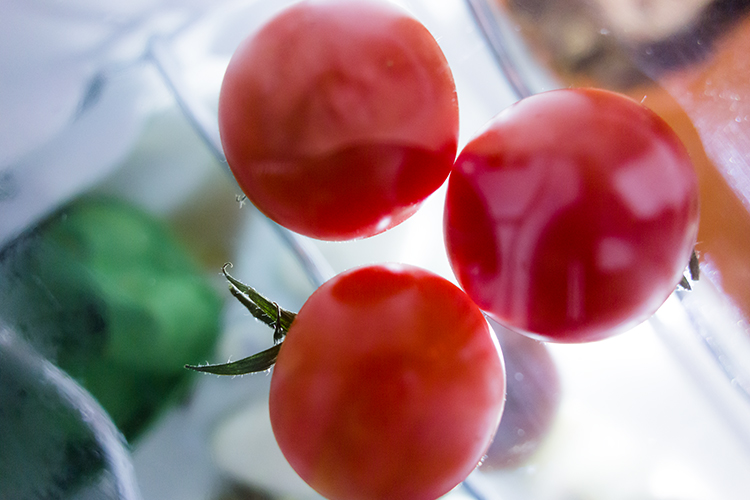
Cherry tomatoes taken from underneath a glass shelf in the refrigerator.

The Shots

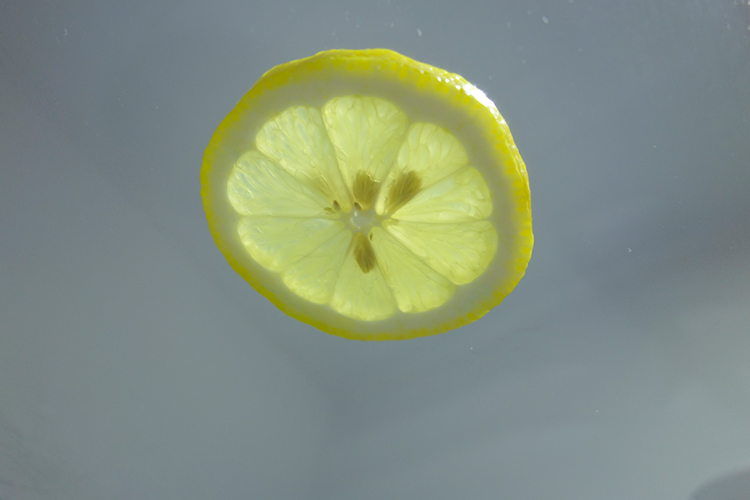
Next was to take everything out of the fridge and start with just the top shelf left. It was nearest the light source and I wanted to see what type of shots I would get. From taking many shots at different angles, an idea sprung to mind. I wanted a slice of lemon shot from underneath the glass shelf. Later in post-production, I added in the frosted glass along with the broken glass effect to give it more zest! (Sorry pun intended again).

apple

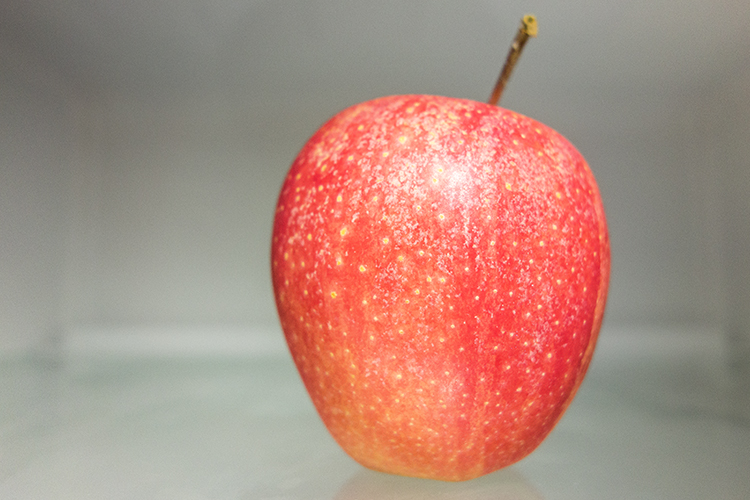
A red apple taken sitting on a shelf inside a refrigerator.

lucy-with-turtle-beans

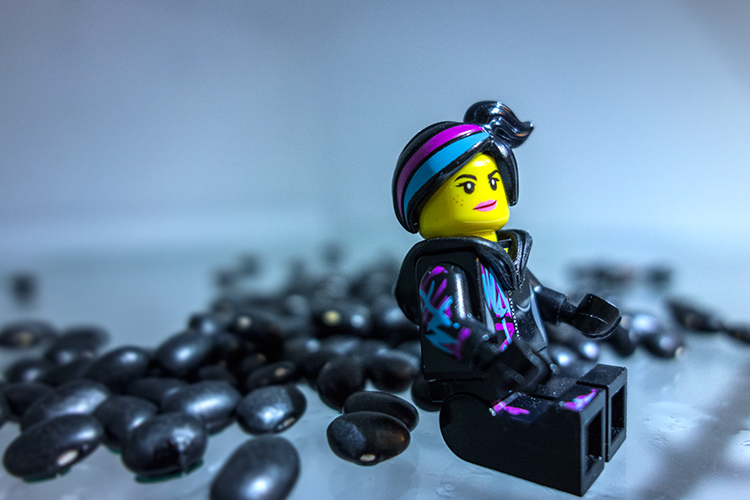
A test shot with Lucy and some turtle black beans.

lemon-sooc

A slice of lemon taken from underneath a glass shelf. This is straight out of the camera.

lemon-with-broken-glass

This is the same shot as above but I added a frosted glass and broken glass effect for impact in the editing process.

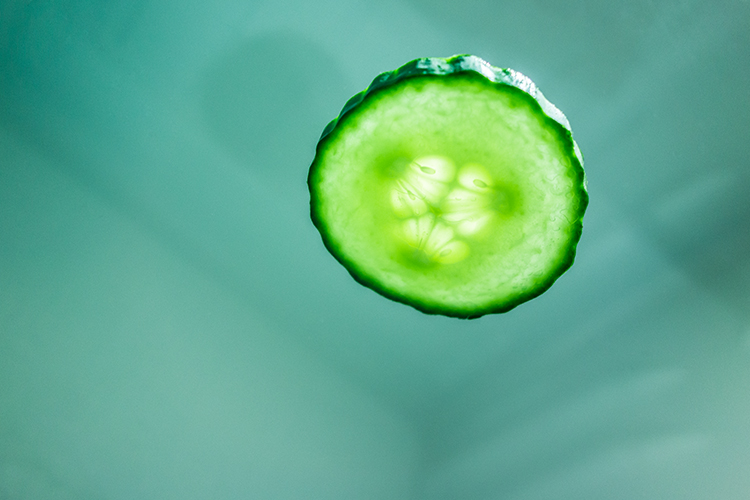
I also took a slice of cucumber. Notice how it appears to have a sad face?

cucumber

A poor sad looking cucumber!

Second setup

The next plan of attack was placing items on the bottom part of the fridge, as in the furthest point away from the light source. I wasn’t really expecting to get any decent shots. But I was pleasantly surprised. I felt the shots had an almost ethereal feeling to them.

jack-sprat-with-grapes

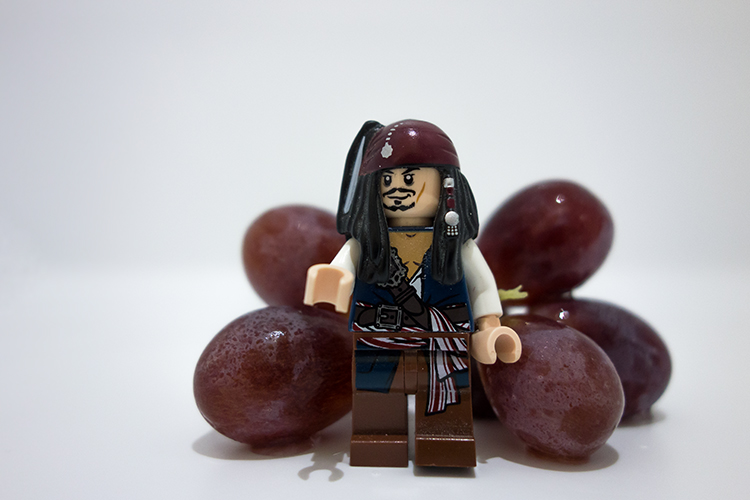
A Jack Sparrow lego figure with a bunch of red grapes.

fruit-composition

A fruit composition sprayed with a little water inside the refrigerator.

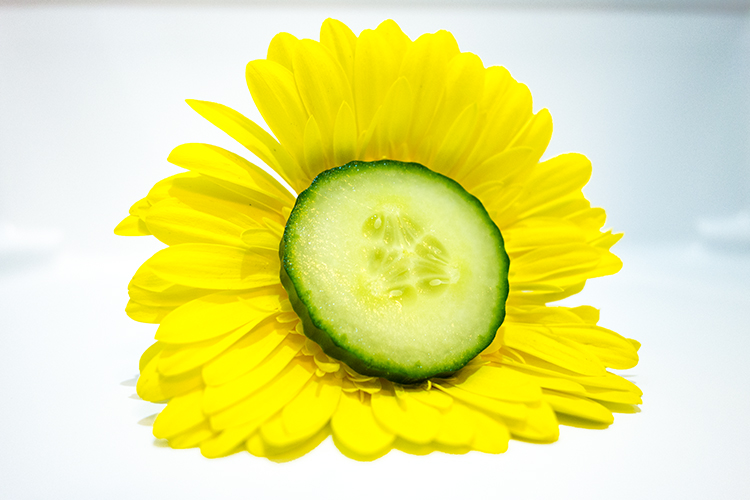
flower

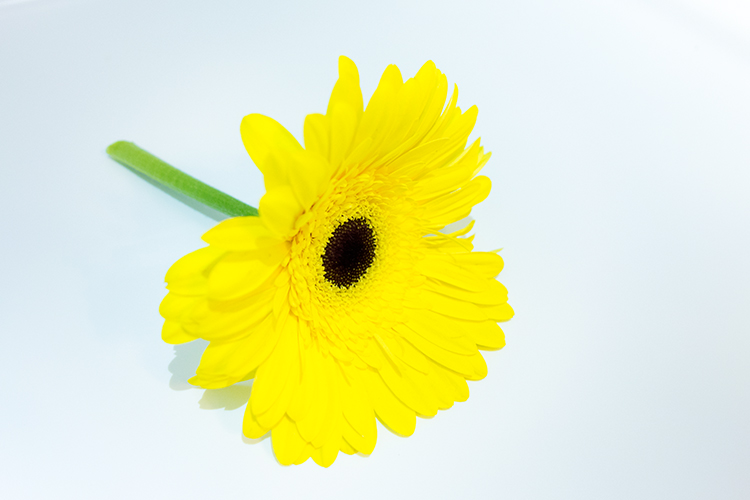
A yellow flower taken inside the refrigerator.

flower-and-cucumber

The sad looking slice of cucumber looked happier against the flower!

Key Takeaway Points

Unless you have a moderately small refrigerator, this project is most likely not for you. Was it worth doing? In my opinion, any excuse to take photographs is well worth doing.

I found it was better to take the shots over a few days. This allows for planning what type of shot and what food or other items to use. Plus you need the least amount of time to have the fridge door opened. Spray water on the food so that the light catches the water droplets to add depth to the shot.

Have you had a crazy idea for a personal project? If so please leave a comment or share your images and story below.

googletag.cmd.push(function() {
tablet_slots.push( googletag.defineSlot( “/1005424/_dPSv4_tab-all-article-bottom_(300×250)”, [300, 250], “pb-ad-78623” ).addService( googletag.pubads() ) ); } );

googletag.cmd.push(function() {
mobile_slots.push( googletag.defineSlot( “/1005424/_dPSv4_mob-all-article-bottom_(300×250)”, [300, 250], “pb-ad-78158” ).addService( googletag.pubads() ) ); } );

The post How to Take Cool Food Photos in Your Refrigerator by Sarah Hipwell appeared first on Digital Photography School.


Digital Photography School

 
Comments Off on How to Take Cool Food Photos in Your Refrigerator

Posted in Photography


How to Take Your Portrait Photos From Good to Great with a Single Click

12 Oct

Do you enjoy portrait photography? Are you a Lightroom user? You’re going to love what we’ve just released today!

It’s our all new Adobe Lightroom® presets bundle: 101 Lightroom Portrait Presets.

NewImage
With our new presets pack, transforming your portrait shots is a breeze.

And for a limited time, the pack can be yours for the special introductory price of just USD $ 20 (that’s 60% off).

Check it out here.

In this comprehensive Portrait Presets pack you’ll get the following collections:

  • Art Series (7 presets): Get the look from the early 1900’s through to the 90’s.
  • Black and White (10 presets): A variety of black and white presets to give you that b&w portrait look.
  • Film Series (8 presets): Nothing beats the authenticity of film. These presets will re-create that professional film feeling.
  • Fix (20 presets): Fix a range of of issues including contrast, grain, highlights and sharpness.
  • Tone (14 presets): Change an array of tonal qualities.
  • Traditional Series (8 presets): Tweaks to give your portraits that classic look. Including Beach,
  • Outdoors, and Worn, amongst others.
  • Touch Up Kit: 37 brushes to help you touch up eyes, hair, lips and skin.

Created by professional photographer and author Rachel Devine, she’s done all the hard work for you so you can get the perfect edit for every portrait, without the fuss.

Here’s a short video of Rachel showing how easy it is to use these presets:

Simply apply the effect and adjust as desired… it’s fast and easy!

You’ll save a whole heap of processing time, while giving your portraits an instant “pop”. See Rachel demonstrate in the video on our product page.

Transform your photos in just one click. Pick up our 101 Lightroom Portrait Presets today – while we’re still offering it at the introductory price.

Please note: a copy of Adobe Lightroom is required to use these presets.

Also: Haven’t used presets before? No worries. Full instructions are included in the pack.

Lastly: like all our products this one has a 60 day satisfaction guarantee. If you buy it and find for whatever reason that it doesn’t suit your needs simply contact our support team and we’ll arrange a refund – no questions asked.

googletag.cmd.push(function() {
tablet_slots.push( googletag.defineSlot( “/1005424/_dPSv4_tab-all-article-bottom_(300×250)”, [300, 250], “pb-ad-78623” ).addService( googletag.pubads() ) ); } );

googletag.cmd.push(function() {
mobile_slots.push( googletag.defineSlot( “/1005424/_dPSv4_mob-all-article-bottom_(300×250)”, [300, 250], “pb-ad-78158” ).addService( googletag.pubads() ) ); } );

The post How to Take Your Portrait Photos From Good to Great with a Single Click by Darren Rowse appeared first on Digital Photography School.


Digital Photography School

 
Comments Off on How to Take Your Portrait Photos From Good to Great with a Single Click

Posted in Photography