RSS
 

Posts Tagged ‘System’

DEAL: Save 72% off Lightroom Editing System for Travel Photography

08 Jul

Travel lightroom presetsIt’s day 2 of our Summer Sale and today we have a special Adobe Lightroom Presets Travel pack* for you with a 72% Saving.

This “system” normally sells for $ 176, but it’s being offered to dPS readers for the special price of $ 49 USD – a massive 72% saving.

One of the best parts about travelling is documenting your trip with pictures. But what’s not so great is pending hours weeding out the stinkers from the keepers. And editing them to look as awesome as possible.

What if you could systemize and cut the editing process in half?

And reduce the struggle, endless fiddling and overwhelm with all the features and options of Lightroom editing tools?

Well, now you can thanks to the Lightroom Rapid Editing System for Travel Photography.

Pro travel photographer Viktor Elizarov got tired of drowning in digital images. And spending more time processing pictures than taking them.

So he searched for a better way. And after a year testing different approaches and systems with lots of trial and error – the Rapid Editing System was born.

And he wants to share it with you.

Learn how to automate 80% of your editing process so you save time on repetitive tasks. And have more free time to spend on fun tasks (like taking pictures).

Viktor’s system features a large collection of Lightroom Presets specifically for travel photography. And will help take your photos from good to great – fast.

Viktor normally sells his system for $ 176, but he’s offering it to dPS subscribers for the special price of $ 49 – a 72% saving.

Here’s everything you get:

  • 90+ page eBook with step by step tutorial on how to use Lightroom Rapid Editing System
  • 20 1-Click LANDSCAPE Style presets
  • 20 1-Click CITYSCAPE Style presets
  • 20 1-Click PEOPLE Style presets
  • 10 1-Click Fall Colors Style presets
  • 10 1-Click Winter Colors Style presets
  • 10 1-Click Spring Colors Style presets
  • 10 1-Click Summer Colors Style presets
  • 41 TOOLKIT adjustment presets
  • “Reset All” preset that reverts your image to its original state
  • Documentation and Installation Instructions
  • Source RAW and JPEG photos used in the tutorials

If you love travel photography – or just want to speed up your post processing – don’t miss out.

But hurry! This valuable offer for the Lightroom Rapid Editing System for Travel Photography only lasts 24 hours – secure it for yourself and save 72% today only.

*Note: You’ll need a copy of Adobe Lightroom installed to use these presets.

googletag.cmd.push(function() {
tablet_slots.push( googletag.defineSlot( “/1005424/_dPSv4_tab-all-article-bottom_(300×250)”, [300, 250], “pb-ad-78623” ).addService( googletag.pubads() ) ); } );

googletag.cmd.push(function() {
mobile_slots.push( googletag.defineSlot( “/1005424/_dPSv4_mob-all-article-bottom_(300×250)”, [300, 250], “pb-ad-78158” ).addService( googletag.pubads() ) ); } );

The post DEAL: Save 72% off Lightroom Editing System for Travel Photography by Darren Rowse appeared first on Digital Photography School.


Digital Photography School

 
Comments Off on DEAL: Save 72% off Lightroom Editing System for Travel Photography

Posted in Photography


Apple patents system for disabling cameras in no-photography areas

01 Jul

Apple has been awarded a patent that describes a mobile camera technology that can interpret infrared signals, which could then be used to disable the camera from recording at events like concerts, among other things.

An infrared transmitter would send encoded data to the device, which would be processed by the phone. Depending on the application, the device may temporarily disable its built-in camera in locations where photography and video capture are forbidden, for example music venues, classified company areas or museums. With the system activated a ‘RECORDING DISABLED’ message would pop up on the smartphone screen when the user tries to take a photo or video. The patent even mentions the ability to add a watermark to any images or video captured when certain infrared signals are detected. 

The patent also describes use of this technology to provide additional information or visuals in a different scenario: for example, an art gallery. Pointing a smartphone camera at an IR transmitter positioned next to a painting could provide more information on the device’s screen about the artwork. The patent also mentions applications in retail environments.

There is understandably some concern about how and where such systems would be implemented. Arguably, most people would be fine with concert venues protecting the intellectual property of their acts or companies preventing industrial espionage, but there are concerns that the technology could also be used to undermine the freedom of the press. As usual, the existence of a patent does not necessarily mean we’ll ever see the final product, but in this case it might be worth at least keeping an eye on how the idea is being developed further. You can read the full patent document on the USPTO website.

Articles: Digital Photography Review (dpreview.com)

 
Comments Off on Apple patents system for disabling cameras in no-photography areas

Posted in Uncategorized


How to Use the Zone System to Learn about Metering and Exposure Compensation

16 Jun

When you first move off auto, you realize how much control you have over your camera. You get to choose the aperture, shutter speed, ISO, and be able to manually select the autofocus point, among many other things. In short you get control over everything!

You also get full control over the exposure, or brightness, of the image. You decide you where to set the exposure for each image – something that the camera does not always get correct. The reason the camera doesn’t get it right all the time is because the in-camera light meter doesn’t always know how the brightness level of the subject. What tricks the light meter is bright or dark tones.

So how do you take back control of the exposure, and compensate for the camera’s errors? The process of correcting your exposure is referred to as Exposure Compensation. For more on that read: How to Use Exposure Compensation to Take Control of Your Exposure. However, before you add any exposure compensation, you first need to know how much to compensate, and understand exactly what your camera’s light meter is doing. This is why learning how to meter is important. If you are unfamiliar with the term metering, it is the process of measuring light values.

The first thing to grasp when is how your camera’s light meter sees the world. Put simply, it sees everything in grayscale. This means that all your camera sees is a world of tones; a colourless world. It cannot differentiate trees from people, people from snow, etc. (Although more modern in-camera light meters will now also recognize colour, the same basic principles apply.)

The other critical element to know is that your meter wants to make everything middle-gray, commonly referred to as 18% gray. Remember that! Right it down! Keep it with you in your camera bag until it’s firm in your memory! It’s very important!

Everything you need to know about doing exposure compensation correctly hinges off 18% gray. If your scene has a lot of bright areas in it, such as snow or sand for example, your camera will want that to be 18% gray. If you’re photographing a person in dark clothing, your camera will also want to make that 18% gray. Your camera doesn’t know your subject is actually meant to be black, nor does it know that all of that white in the viewfinder is actually snow. Leaving your camera’s meter at zero, or Meter as Read (MAR), can cause your photo to be over or under exposed.

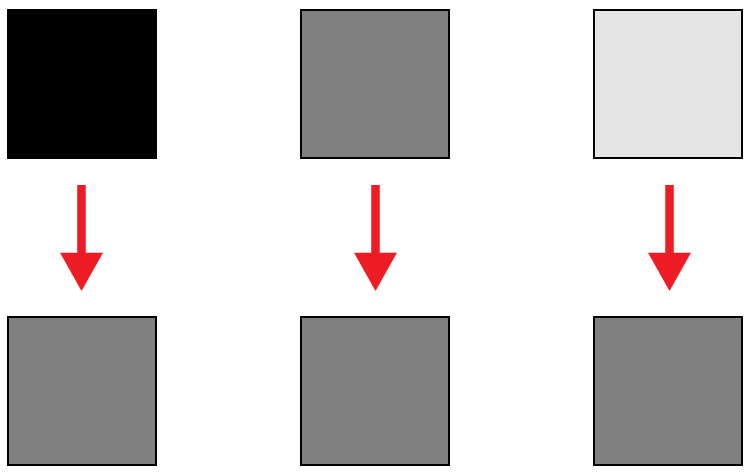
Here is an illustration of what your camera meter will do. Tones will end up 50% grey.

Here is an illustration of what your camera meter will do. All tones will end up 18% or middle gray.

So how does knowing how your camera will meter, help you to decide how much exposure compensation to apply? This is where knowing a little about the Zone System can come in handy.

What is the Zone System?

The Zone System was developed by the late Ansel Adams and Fred Archer. In essence, it was a system used to meter and continue on in the dark room when developing images. I’m not going to discuss the Zone System in its entirety – that could be something for a future article – but at its core, the Zone System will greatly help you decide how much exposure compensation to add or subtract.

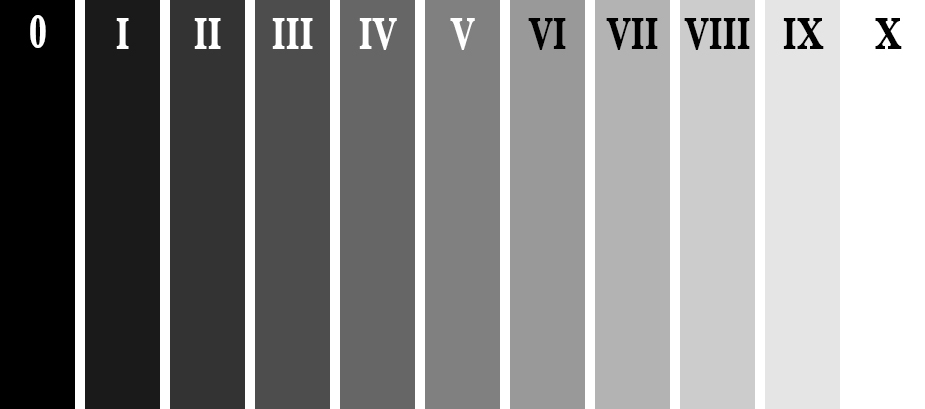
The Zone System

The Zone System

Above is an illustration of the Zone System. In it are 11 zones, denoted by Roman numerals. Here is a quick rundown of examples for each Zone:

  • Zone 0: Pure black, no detail. This is would be the edge of a negative film.
  • Zone I: Near pure black with slight tonality, but no detail.
  • Zone II: This is the first Zone where detail starts to show; the darkest part of the image where detail is recorded.
  • Zone III: Average dark materials.
  • Zone IV: Landscape shadows, dark foliage.
  • Zone V: Middle-gray, what your light meter sets to.
  • Zone VI: Average Caucasian skin tone.
  • Zone VII: Very light skin; shadows in snow.
  • Zone VIII: Lightest tone with texture.
  • Zone IX: Slight tone without texture, (e.g., glaring snow).
  • Zone X: Pure white with no detail. This would be light sources, or reflections of light sources.

This next piece of information is the other piece to the exposure compensation puzzle:

Each Zone is separated by exactly one stop of exposure.

Now that you have the information, how do you use it?! You know that you camera is metering for Zone V, or middle-gray, now consider your subject. How light or dark is it? If you were photographing a bride’s white dress, that would be very bright with texture; so going by the chart that would fall into Zone VII or VIII, which makes the exposure compensation required for correct exposure PLUS two or three stops (the difference between Zone V and where your subject should fall).

RV-02383-slideshow

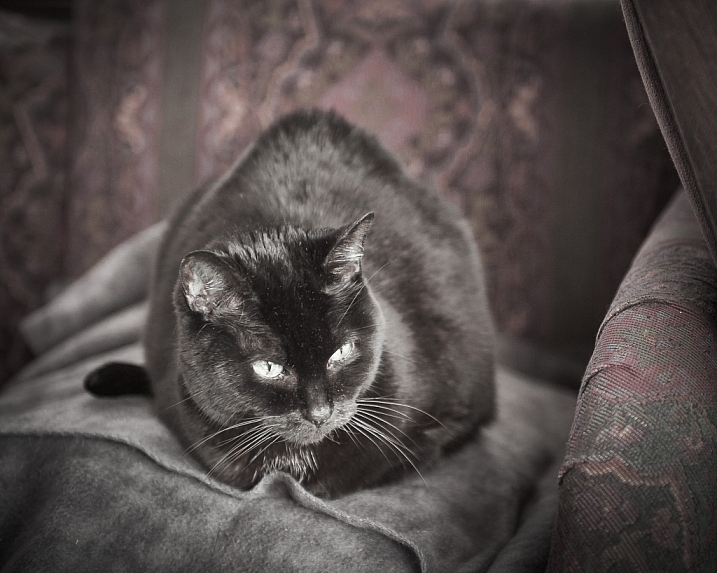
Shot at zero exposure compensation. Black cat is gray or Zone V.

RV-02383-slideshow (1)

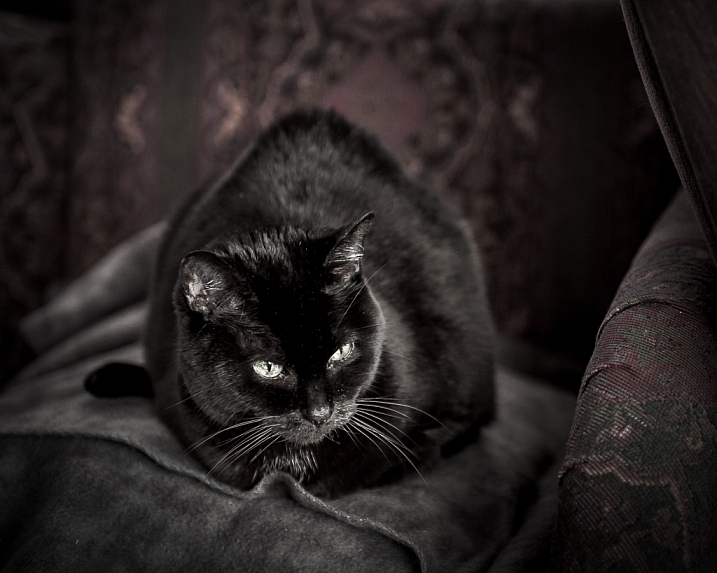
Shot at -2 stops black cat is now black or Zone III.

As an experiment, try photographing a piece of plain white paper. First, make sure that there is no exposure compensation added – your meter should be in the middle. Take a photo. Next, add +2-stops of exposure compensation. This will bring your exposure to Zone VII. Then, take another photo. Notice the difference? The first image should be very close to middle-gray, or Zone V, where the last image should be bright white, but still show detail in the paper.

External Light Meters

Another tool that may be helpful to you, is an external handheld light meter. They work the same way as your camera’s light meter in that they meter for middle-gray, but they have the added advantage of being to reading what’s known as Incident Light: that which is falling on the subject, not reflected from it. Your camera’s meter is a reflected light meter; it reads the light that has been reflected or bounced off your subject. This may seem obvious, but there is a big difference between incident light and reflected light. Reflected light is greatly affected by tone – the darker your subject is, the less light that will be reflected, whereas the brighter your subject is the more light that will be reflected. However, the incident light – or light coming from the light source – will remain the same no matter what the tones are in your subject. By using an external light meter, you are reading the light directly from the source; unaffected by the tone of the subject.

However, do be careful when you are using an external light meter that you read the incident light from the subject’s position. You may be in the shade, for example, and your subject in the sun. If you were to read the incident light for your position,you would be getting a reading for the shade area, and not the sun, which is the light that’s falling on your subject!

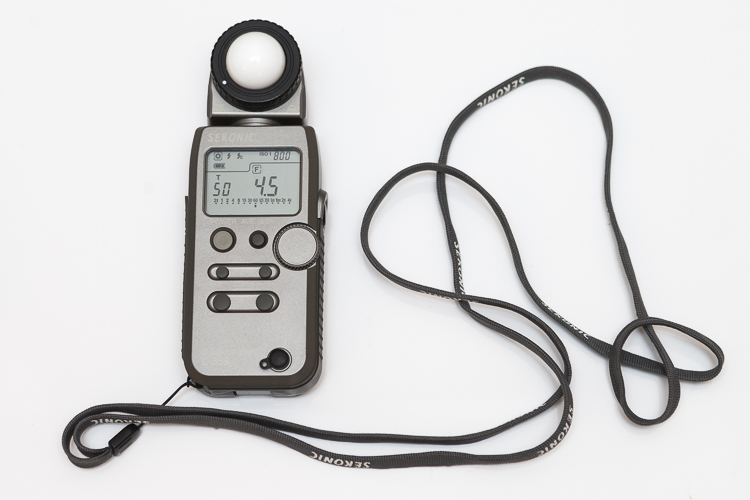
This is an external light meter. It's a Sekonic L-358, and is able to meter ambient light but also meter flash.

This is an external light meter. It’s a Sekonic L-358, and is able to meter ambient or natural light as well as flash.

Summary and application

Now that you know what your light meter is doing, and how to correct it with exposure compensation, you are on your way to getting more consistent and correct exposures.

Before you press the shutter button next time, do consider what the tones in your scene are like. Are there lots of brighter tones, or more darker tones? If your frame has more brighter tones, the exposure compensation will need to be more on the plus side to render them correctly. However, if there are more darker tones, your exposure compensation will be more toward the minus side of your meter. If you feel there are equal amounts of bright and dark tones, you may find that you don’t need to add any compensation at all.

teaching-eg-028-slideshow

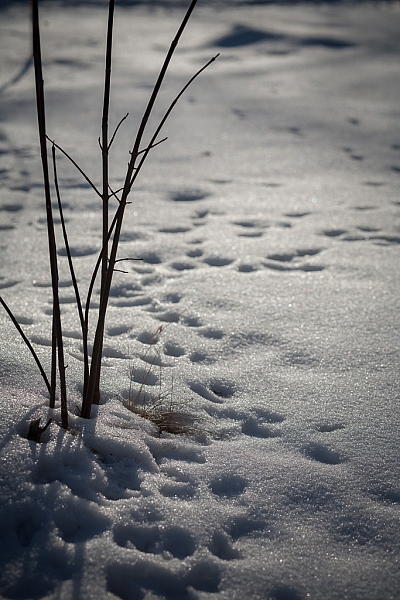
Snow shot at zero exposure compensation is gray, or Zone V.

teaching-eg-028-blog1100

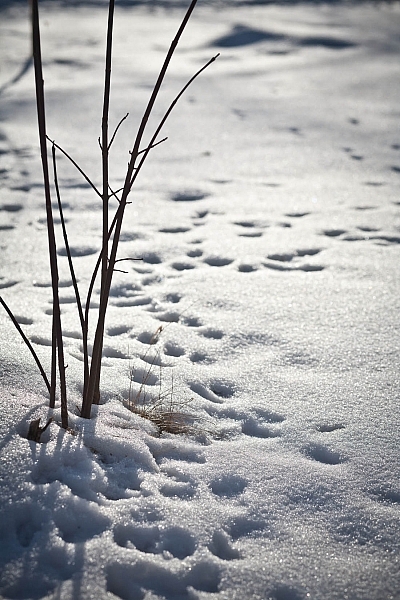
Snow shot at +2 is now white with detail or Zone VII.

If you’re ever unsure of how much exposure compensation to add or subtract, take a test shot at zero, or in the middle. This will help you decide the direction in which you need to go.

googletag.cmd.push(function() {
tablet_slots.push( googletag.defineSlot( “/1005424/_dPSv4_tab-all-article-bottom_(300×250)”, [300, 250], “pb-ad-78623” ).addService( googletag.pubads() ) ); } );

googletag.cmd.push(function() {
mobile_slots.push( googletag.defineSlot( “/1005424/_dPSv4_mob-all-article-bottom_(300×250)”, [300, 250], “pb-ad-78158” ).addService( googletag.pubads() ) ); } );

The post How to Use the Zone System to Learn about Metering and Exposure Compensation by Daniel Smith appeared first on Digital Photography School.


Digital Photography School

 
Comments Off on How to Use the Zone System to Learn about Metering and Exposure Compensation

Posted in Photography


Google Art Camera uses robotic system to take gigapixel photos of museum paintings

19 May

The Google Cultural Institute, an online virtual museum with high-quality digitizations of artifacts from across the globe, recently added more than 1,000 ultra-high-resolution images of classic paintings and other artwork by Monet, Van Gogh and many others. A new robotic camera system Google has developed called ‘Art Camera’ has made it possible for the organization to add digitizations faster than ever before.

Previously, Google’s collection included only about 200 digitizations, accumulated over approximately five years. Art Camera, after being calibrated to the edges of a painting or document by its operator, automatically takes close-up photos of paintings one section at a time, using a laser and sonar to precisely adjust the focus. This process results in hundreds of images that are then sent to Google, where they’re stitched together to produce a single gigapixel-resolution photo.

Instead of taking the better part of a day to photograph an item, as the old technology did, Art Camera can complete the process in less than an hour; speaking to The Verge, Cultural Institute’s Marzia Niccolai said a 1m x 1m painting can be processed in half an hour. Google has built 20 Art Cameras and is shipping them to museums around the world for free, enabling the organizations to digitize their artwork and documents. The resulting gigapixel images can be viewed here.

Via: Google Official Blog
 

Articles: Digital Photography Review (dpreview.com)

 
Comments Off on Google Art Camera uses robotic system to take gigapixel photos of museum paintings

Posted in Uncategorized


Elinchrom launches new EL-Skyport Plus system to include hotshoe flashes in wireless lighting networks

05 May

$ (document).ready(function() { SampleGalleryV2({“containerId”:”embeddedSampleGallery_9814466852″,”galleryId”:”9814466852″,”isEmbeddedWidget”:true,”standalone”:false,”selectedImageIndex”:0,”startInCommentsView”:false,”isMobile”:false}) });

Swiss studio flash manufacturer Elinchrom has launched the next generation of its Skyport wireless triggering system that allows photographers to include hotshoe flash units in their lighting set-ups. The EL-Skyport Plus system includes a newly designed transmitter that has a swivelling head that the company says helps to optimize reception, while the new receiver features a hotshoe mount for triggering ‘almost any’ brand of hotshoe flash.

The units work via 2.4Ghz radio communications, have a range of 656ft/200m and offer 16 channels with four groups.

The EL-Skyport Transmitter Plus costs $ 89.99 and the kit that includes the transmitter and the hotshoe receiver costs $ 139.99.

For more information visit the Elinchrom website.


Press release:

The Latest Evolution of the Skyport

Introducing the New EL-Skyport Plus System

The next generation Skyport is here and allows you to take full control of your flashes from the palm of your hands.

The EL-Skyport Plus follows the successful launch of the EL-Skyport Transmitter Plus HS for Canon® and Nikon®, for those shooters requiring Hi-Sync. The new EL-Skyport Plus system is compact and robust, using readily available AA batteries. The Skyport Plus offers an extended range of up to 656 feet (200 m) and controls the power of all Skyport enabled Elinchrom flash units. With eight individual frequencies and the choice of standard and speed protocols, there are 16 frequency options, each with four groups. The EL-Skyport Transmitter Plus is compatible with almost every camera. The transmitter head folds down for reduced profile and easier subject viewing while shooting.

Compatible with Most Flash Systems
The EL-Skyport Receiver Plus will trigger almost every flash system and features a built-in hot shoe to trigger speedlights, while enabling them to also be conveniently mounted onto a lighting stand.
When used in conjunction with a Skyport HS Plus Transmitter, most speedlights set at full power can also be incorporated into Hi-Sync applications (using high shutter sync speeds to freeze motion and control ambient light).

“Elinchrom has long prided itself on providing as much control as possible to its photographers. The new Skyport Plus continues that tradition by allowing shooters to take and maintain complete control no matter what they are shooting. When it comes to Living Light, no company does it better than Elinchrom.” said Jan Lederman, MAC Group President.

The Elinchrom Skyport Plus system is retro compatible with the existing Skyport Speed system, and forward compatible to the additional frequencies offered by the latest Elinchrom ELB and ELC units.

EL-Skyport Plus To Go Contents
* EL-Skyport Transmitter Plus contains:
* EL-Skyport Transmitter Plus
* 2.5 mm to PC sync cord
* Wrist strap
* 2-year warranty

EL-Skyport Universal Plus set contains:
* EL-Skyport Transmitter Plus
* EL-Skyport Receiver Plus
* 2.5 mm to PC sync cord
* 3.5 mm to 3.5 mm sync cord
* 3.5 mm to 6.35 mm adapter
* Wrist strap
* 2-year warranty

Articles: Digital Photography Review (dpreview.com)

 
Comments Off on Elinchrom launches new EL-Skyport Plus system to include hotshoe flashes in wireless lighting networks

Posted in Uncategorized


Fotodiox introduces extra large WonderPana Free Arc system for Canon EF 11-24mm wide zoom

31 Mar

$ (document).ready(function() { SampleGalleryV2({“containerId”:”embeddedSampleGallery_4391102760″,”galleryId”:”4391102760″,”isEmbeddedWidget”:true,”standalone”:false,”selectedImageIndex”:0,”startInCommentsView”:false,”isMobile”:false}) });

US accessory manufacturer Fotodiox has announced an XL version of its WonderPana Free Arc filter system for wide angle lenses that it says is designed specifically to allow users of the Canon EF 11-24mm F4L USM lens to use filters over the front element. The Canon super-wide zoom has no filter thread of its own and the front element is heavily convex, so fitting filters in the traditional way is impossible. The WonderPana Free Arc system positions a filter holder over the front of the lens that takes 186mm screw-in filters and/or 80mm rectangular filter sheets. The holder is enormous so that large filters can be used to avoid vignetting when the lens is used at its widest setting.

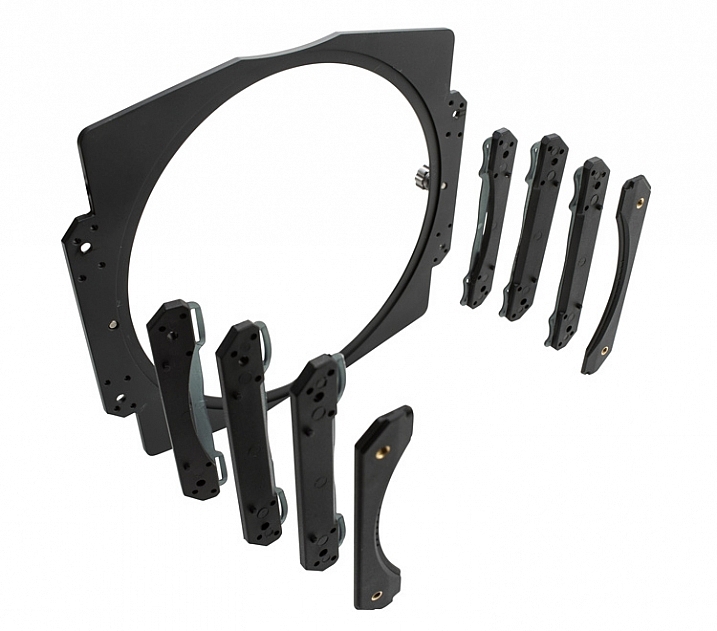
The Free Arc clamps the hood of the lens between its collar and the screw-on filter-holding cone, and provides a 186mm thread for the company’s screw-in filters. A set of brackets can also be attached to the cone that allow two square filters to be fitted as well. The system makes it possible to fit one round filter and one square filter at the same time, and the whole filter stage is rotatable so graduated filters can be positioned to suit the subject.

The Fotodiox WonderPana Free Arc XL costs $ 225.95 and the 183mm filters start at $ 99.95. For more information visit the Free Arc page on the Fotodiox website.


Wide? Ultra-wide? WonderPana has you covered.

Ultra wide-angle lenses are typically impossible to filter due to their bulbous front lens element, lack of filter threads and potential for severe vignetting. The ALL NEWWonderPana FreeArc XL, however, is the latest in our line of aluminum filter collars that let you to attach our massive 186mm filter options, like ND 4-1000 and circular polarizers, to wide and ultra wide-angle lenses.

Perfect for landscape and architectural photographers and filmmakers, we designed the WonderPana FreeArc XL to suit Canon’s new breed of 11-24mm lens. Durable and lightweight enough for hand-held shooting, it can be ready at a moment’s notice to answer any image challenge that requires filters. You can even keep it installed on your lens as a critical layer of lens protection. Just check out our video below to learn more:

Articles: Digital Photography Review (dpreview.com)

 
Comments Off on Fotodiox introduces extra large WonderPana Free Arc system for Canon EF 11-24mm wide zoom

Posted in Uncategorized


Leica announces price and details of its 35mm F1.4 lens for the T system

24 Mar

$ (document).ready(function() { SampleGalleryV2({“containerId”:”embeddedSampleGallery_3566641259″,”galleryId”:”3566641259″,”isEmbeddedWidget”:true,”standalone”:false,”selectedImageIndex”:0,”startInCommentsView”:false,”isMobile”:false}) });

Leica has formally announced the specifications and price of the Summilux-TL 35mm F1.4 lens for its T-series mirrorless camera. The lens, which is available now, will cost $ 2395/£1650. Leica says that the lens performs at its best wide open, with maximum resolution achieved at F1.4 – though its own MTF charts suggest this is only true in the center of the imaging circle.

Designed to suit the Leica T’s compact footprint, the Summilux-TL F1.4 can also be used on the Leica SL in crop-sensor mode.

Made with a total of 12 elements in 8 groups and a closest focus distance of 0.4m, the lens acts as a standard focal length for the APS-C sensor of the T. Focus can be achieved manually as well as in auto mode, and the smallest aperture on offer is F16.

The lens measures 77 x 70mm/3.0 x 2.7in, weighs 428g/15oz without the hood and will be available in anodized black or silver. Leica originally announced that it would make the lens when it released firmware 1.4 for the T at the end of 2015. We should expect a Leica APO-Macro-Elmarit-TL 60mm F2.8 ASPH in the autumn.

For more information see the Leica website.


Press release:

LEICA SUMMILUX-TL 35mm f/1.4 ASPH.

Introducing a new reference lens in the APS-C system category

Leica Camera has today introduced a new addition to the Leica T Camera System portfolio – the Leica Summilux-TL 35mm f/1.4 ASPH. – an extremely fast prime lens with a classic focal length. Set to become the reference lens in the APS-C category, it offers exceptional imaging performance.

The Leica Summilux-TL 35mm f/1.4 ASPH. delivers maximum sharpness, and superb resolution and colour reproduction when shooting wide open, throughout its aperture range, and at all distances from its closest focusing limit to infinity. It also produces stunning pictures with that unmistakeable ‘Leica look’ and a unique and beautiful bokeh.

Considering the outstanding speed and extraordinary image performance, this 35mm lens is surprisingly compact – and, thanks to the internal focusing system, its overall length remains unchanged in use. Furthermore, the lens’ manual focusing ring enables the smoothest adjustments to be made when shooting.

As with all other Leica lenses, the Leica Summilux-TL 35mm f/1.4 ASPH. has been designed by Leica’s own specialists in Wetzlar, Germany, and represents a perfect union of optical and technical expertise. This combination of cutting-edge technology and the highest quality materials ensures consistently excellent results

As indicated by the ‘TL’ in its name, the Leica Summilux-TL 35mm f/1.4 ASPH. is the first of two new prime lenses for the Leica T Camera System that is fully compatible with the bayonet mount of the Leica T, as well as the L-mount of the Leica SL-System. The second TL lens, the Leica APO Macro-Elmarit-TL 60mm f/2.8 ASPH., will be available from Autumn 2016.

Availability and pricing

The Summilux-TL 35 mm f/1.4 ASPH. is available now in a choice of black or silver anodised finish from authorised Leica stockists in the UK, at a suggested retail price of £1,650 including VAT. A matching lens hood is also available at an SRP of £65 including VAT.

Additional information can be found at uk.leica-camera.com

Articles: Digital Photography Review (dpreview.com)

 
Comments Off on Leica announces price and details of its 35mm F1.4 lens for the T system

Posted in Uncategorized


Nissin adds radio receiver unit to Air system for branded flash units

15 Mar

Flash manufacturer Nissin has announced it has produced a receiver unit for its NAS wireless flash communication system that allows flash units from Canon, Nikon and Sony to be used within its radio command structure. The new Air R units are designed to convert flashguns that usually rely on line-of-sight optical control when used off camera in a group to come under the company’s 2.4GHz radio network.

Once mounted into the hotshoe of the receiver flash units from Nissin and other brands compatible with Canon, Nikon or Sony systems can be controlled by either an Air transmitter from the hotshoe of the camera, or by a Nissin flash unit that features the Air commander mode – such as the new i60A.

The receiver is equipped with eight channels and can work in one of three groups. The system allows flash exposure compensation of +/-2EV and manual output from full to 1/128th power. The company says the NAS Air system has a range of 30m and supports high speed sync at shutter speeds of up to 1/8000sec. The Nissin Air R units will cost £59.94 or £109.98 with a Nissin Commander Air 1 transmitter.

For more information see the Nissin website or the Kenro website for an English version.

Nissin Air R Specifications:

Compatibility: For Nissin, Canon and Sony flashguns
Wireless system: Radio
Radio specifications: 2.4GHz ISM band
Channel: 8 channels. Auto or manual select
Flash groups: A, B, C (3 groups)
Power source: 2 AAA batteries (not included)
Guide number: Low GN mode / High GN mode (default)
Mode (set at NAS Commander): TTL, manual and manual zoom
EV Compensation on flash: (TTL) -2.0 – +2.0 in ½ EV increments (manual)
Each group can be adjusted independently or synchronised
Manual output: 8 steps of manual output 1/128, 1/64, 1/32, 1/16, 1/8, 1/4, 1/2, 1/1 – full power
Manual zoom: Manual adjustment 24 / 35 / 50 / 70 / 85 / 105 / 135 / 200mm
Continuous shooting speed: 10 shots per second
Number of flashes: Approx 5000
Transmission distance: Maximum 30 metres (dependent upon the environment)
High Speed Synchronisation: 1/8000 sec (controlled by NAS Commander)
External sync socket: Standard PC sync cable
Mode: TTL, N, M zoom, no setting is needed, all settings controlled from the NAS commander
Synchronisation modes: No setting is needed, controlled by NAS commander
Mounting: Built-in stand, cold shoe / 1/4” tripod bush
Dimensions: 60 (L) x 60 (W) x 50 (H) mm
Weight: 55g (excluding batteries)


Press release:

NISSIN LAUNCHES NEW RECEIVER AIR R RANGE 

Kenro Ltd, the specialist photographic and audio-visual equipment supplier, is delighted to announce the launch of a series of revolutionary new products from the Nissin Air System range.
 
Kenro is the exclusive UK distributor for Nissin, a market-leading producer of electronic flash units for photographers. Nissin has a history of developing innovative products with phenomenal quality standards, and the Nissin Receiver Air R is no exception.

The Receiver Air R is a game-changing new addition to the Nissin Air System (NAS) 2.4GHz radio transmission wireless flash system. Compared with the traditional optical wireless transmitters, 2.4GHz radio transmission is less susceptible to the usual issues caused by not having clear line of sight between transmitter and receiver, and provides coverage of up to 30 meters (98 feet). In addition, radio transmission ID technology gives each of the NAS-compatible devices a unique identity to prevent misfiring in the event of signal interference.

The Nissin Commander Air 1 was launched last year and has been very well-received by camera users all over the world – the Receiver Air R adds a new dimension of flexibility to this already popular product. Combined with the Nissin Commander Air 1, it allows a photographer to wirelessly control almost any kind of Nissin camera flash and original manufacturer’s flash in the current market with NAS and TTL & HSS support. Camera users who currently own a Canon, Sony or Nikon original flash will be able to make their existing flashes compatible with the Nissin Air System, utilising full TTL.

High Speed Sync up to 1/8000 seconds, zoom and manual power output can all be controlled wirelessly at a competitive price without giving up quality and reliability. What’s more, one Commander transmitter can control up to 21 separate Air R receivers, which can be programmed into three groups to give the camera user an almost limitless range of lighting options without having to spend precious time readjusting flashguns between shots.

Paul Kench, Managing Director, Kenro, says: “This is a great new addition to the Nissin Air System that will really open up the creative opportunities available to photographers and camera users and allow them to be much more flexible in their approach to lighting, without the need to replace all their existing kit. The Receiver Air R range expands the possibilities without breaking the bank.”

The Nissin Receiver Air R range is available now:
NFG014NR: Nissin Receiver Air R Nikon – SRP £59.94 inc. VAT
NFG014N/AP: Nissin Commander Air 1 + Receiver Air R Nikon – SRP £109.98 inc. VAT
NFG014SR: Nissin Receiver Air R Sony – SRP £59.94 inc. VAT
NFG014S/AP: Nissin Commander Air 1 + Receiver Air R Sony – SRP £109.98 inc. VAT
NFG014CR: Nissin Receiver Air R Canon – SRP £59.94 inc. VAT
NFG014C/AP: Nissin Commander Air 1 + Receiver Air R Canon – SRP £109.98 inc. VAT

Articles: Digital Photography Review (dpreview.com)

 
Comments Off on Nissin adds radio receiver unit to Air system for branded flash units

Posted in Uncategorized


Sony announces development of wireless flash control system

08 Mar

To kick off WPPI in Las Vegas, Sony has announced that it’s developing a wireless radio flash control system for its range of flashguns. Consisting of the FA-WRC1M radio commander and FA-WRR1 receiver, the system will provide control over 15 flashes in 5 groups up to 30m away. It will offer sync speeds up to 1/250th sec as well as a high sync speed. No pricing has been given, but Sony estimates the system will be available this summer in the US and Canada.

Press release:

Sony Announces Development of New Wireless Lighting Control System at WPPI 2016

LAS VEGAS, Mar. 7, 2016 – Sony Electronics, a worldwide leader in digital imaging and the world’s largest image sensor manufacturer, has today announced plans to release a new wireless lighting control system to meet the growing demands of professional Sony photographers.  

Designed for compatibility with their ? interchangeable cameras and external flash units, the new lighting system will include the FA-WRC1M wireless radio commander as well as the FA-WRR1 wireless radio receiver.  A prototype of the new system will be on display in Sony’s booth at WPPI 2016.  

With a maximum range of 30m (approx. 98 feet), the new radio controlled system will allow for an extremely flexible wireless flash shooting experience with exceptional performance in all types of shooting conditions. In total, the system can control a maximum of 15 separate flash units in up to 5 groups of flashes.   While using the system, photographers have the ability to control the exposure of connected flash units either manually or automatically depending on preference.   Additionally, the new lighting control system will be capable of flash sync speeds of up to 1/250th of a second with high speed sync (HSS) available as well.  

The new Wireless Lighting Control system will be available this summer at authorized retailers throughout the US and Canadian markets.  Pricing and detailed specifications will be released at a later date.

Articles: Digital Photography Review (dpreview.com)

 
Comments Off on Sony announces development of wireless flash control system

Posted in Uncategorized


Review of the Vü Professional Filter System

21 Feb

Filters are wonderful little tools that help modify the light coming through your camera lenses, and alter what is recorded onto the sensor or film, whichever the case may be. Different filter types exist for varying purposes; polarizing filters deepen sky color and remove glare and reflections from shiny surfaces, a UV filter screens out ultraviolet light and adds a protective surface over the camera lens, while a graduated neutral density (GND) filter allows you to expose a foreground properly while avoiding a bright, blown-out sky.

The Vü filter system represents the higher-tier of camera accessories in this segment of hardware, and I was fortunate enough to have a couple of weeks using them.
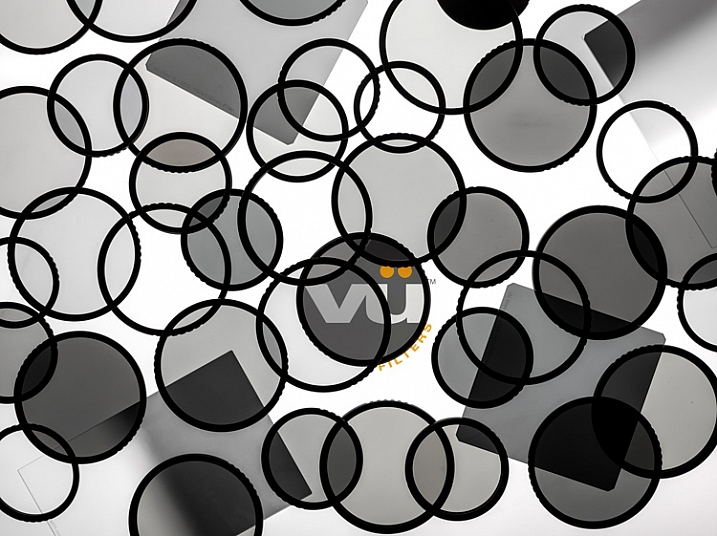
VU_Layout_wLogo

Image courtesy of Vü Filters

Upon opening the complete set of the company’s filters, the first thing I noticed was the quality and attractiveness of the packaging. All of the boxes were constructed of very sturdy material, clearly marked, and conveyed a great sense of style.

The set I received consisted of several filters and accessories, including a filter holder, drop-in filters, and lens adapters for the lenses I specified when ordering (in this case, a Canon EF-S 50mm f/1.8, and Canon EF-S 24mm f/2.8 STM). As my time was limited, I restricted my use to the screw-on Circular polarizing Filter ($ 59-126 depending on filter size)), the 10-stop Neutral Density (ND) Filter ($ 144) and Drop-in Filter Holder ($ 150).

If you’re looking for a quick, overall thought on the system, it’s generally good. The filters are high-quality and are very well constructed.

Circular Polarizing Filter
Vu_CPOL_Group_Left

Image Courtesy of Vü Filters

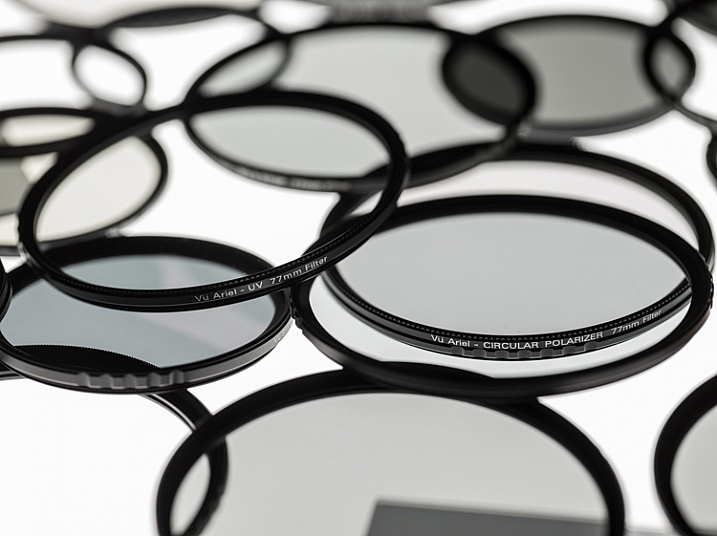
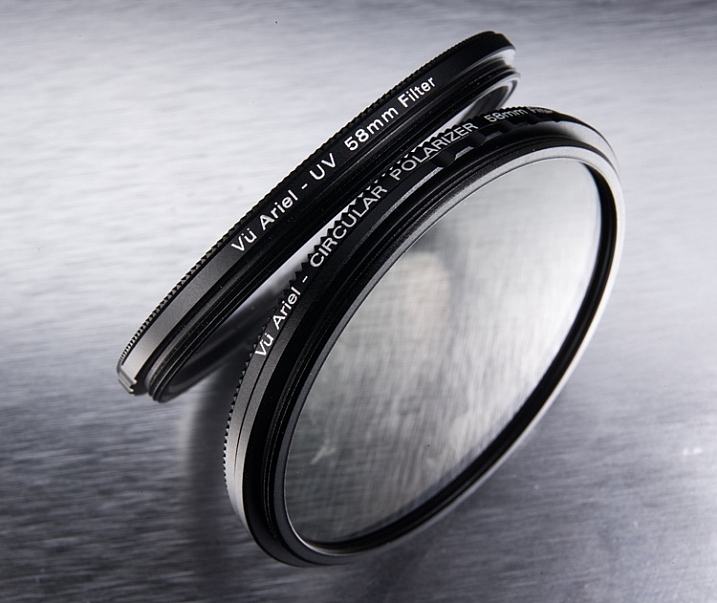
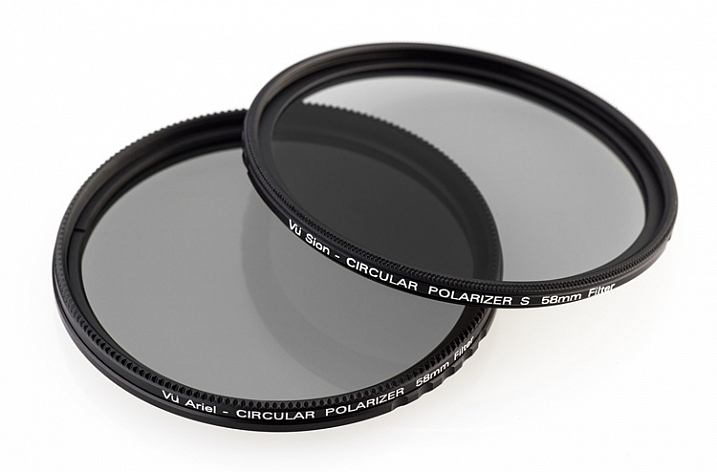
The circular polarizing filter did just what I expected. It darkened the desired areas in my photo, removed any extra shininess from the image, and generally smoothed the photo over, giving it a look that is hard to discern or describe, but which definitely exists.

The circular polarizer tends to smooth out rough points, darkens skies, and removes some of the reflective properties of shiny surfaces.

The circular polarizer tends to smooth out rough points, darkens skies, and removes some of the reflective properties of shiny surfaces.

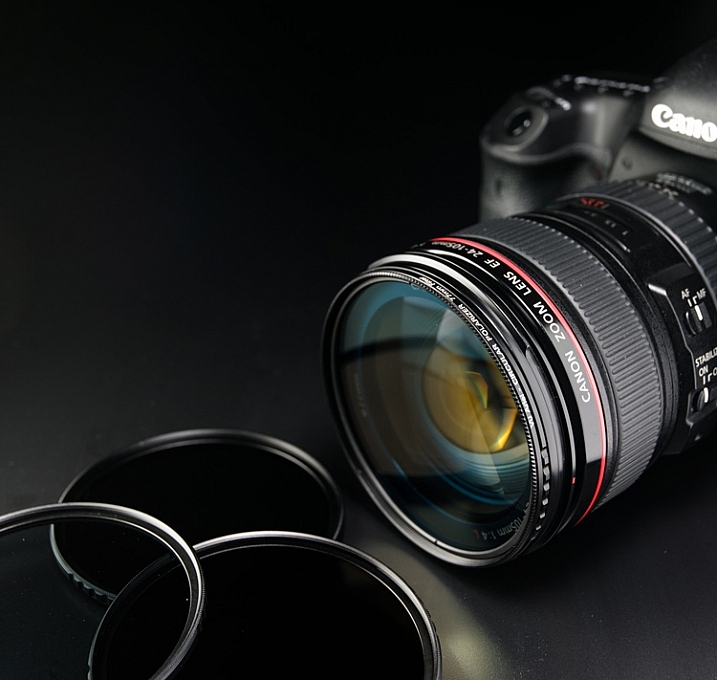
Using this filter was the easiest, as it only required I that connect it to the step-down adapter for my particular lens size, and then screw that assembly onto the lens itself.
Ariel_Lens_01

Image courtesy of Vü Filters

As with all polarizing filters, this one works best when light is coming from the right angle, in this case, about 45 degrees. Using it when light is directly in front of, or behind you, won’t yield much or any of an effect on your image.

Again, the polarizer helped darken this sky a bit more to where I wanted it to be.

Again, the polarizer helped darken this sky a bit more, to where I wanted it.

10-Stop Neutral Density Filter
VFH100_CanonFront_CPOL_NDGrad

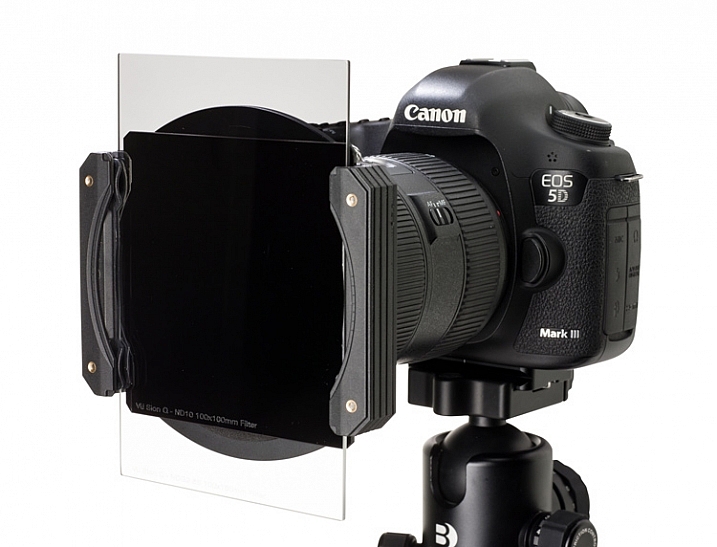
Image courtesy of Vü Filters showing the filter holder, 10-stop ND, and Graduated drop-in filters mounted on a Canon lens.

I was most excited to try the 10-stop neutral density filter. The purpose of this filter is to reduce the amount of light coming through the lens. As you might imagine, this particular filter reduces that amount by 10 stops of light, which is quite a bit. The beauty of it, is that you can use a much slower shutter speed in daylight, and capture long exposure images when it would normally be impossible.

I tried this myself using the Vü 10-stop ND filter, and was extremely happy with the results. I was able to capture the ebb and flow of the ocean waters at our nearby beach, well after the sun had risen. With the filter, 25 and 30 second exposures were possible, which produced shots that I would never have thought possible.

The 10-stop neutral density filter allows you to take long-exposure shots when there is plenty of light available.

The 10-stop neutral density filter allows you to take long exposure shots when there is still plenty of light available.

The Vü ND filter fortunately does not suffer from common ailments of other dark, lower quality filters, such as color shifting near the corners of the lens. Tones remain faithful and consistent across the entire image.

To me, that’s the grand measure of the usefulness of this system; shots that would have been impossible, or extremely difficult to create, can now be accomplished using these types of accessories. As a photographer, it opens up a multitude of ideas and situation I can now explore.

Drawbacks of the system

Of course, everything can’t be roses, and I did have a couple of complaints about the Vü system.

First and foremost, as wonderfully performing and artfully constructed as the system is, I’m afraid that some novices may get a bit lost figuring out how to use them, creating a barrier to entry that could easily be avoided.

The boxes of filters, and bags of adapters, come devoid of any instructions, inside or out. An advanced user that has experience with different filter systems will figure it out rather quickly, but someone who lacks this experience will likely fuddle around until they eventually understand how everything fits together.

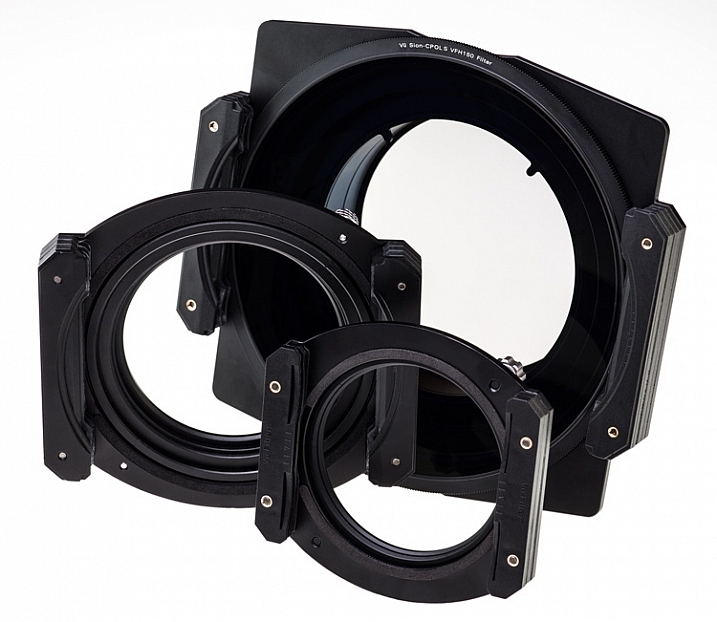
VFH150_Parts Vu_FilterHolder_Group_02

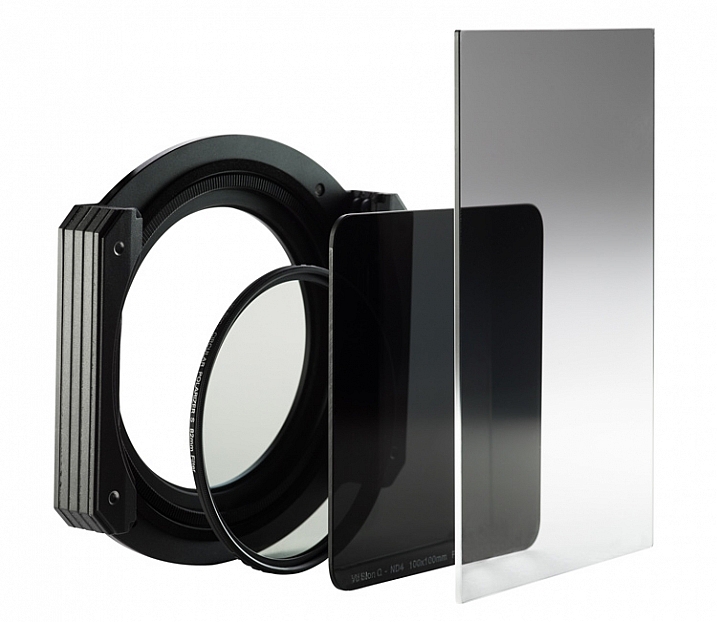
As an example, attaching the 10-stop ND filter to my camera’s lens (a Canon 60D with the Canon EF-S 24mm 2.8 STM) was a bit of a chore. The large metal filter holder was required, since this particular filter is the drop-in type, meaning the filter is a large square piece of thick glass. The filter slides vertically into the holder attachment, which is then attached to the lens via an adapter ring, suited for your lens’s filter size.

Another example of long-exposures at daytime with the neutral density filter.

Another example of long-exposures at daytime with the neutral density filter.

It took several tries to get this right, and in the end was no small feat. I wasn’t positive after I was done that I had attached it correctly, but it functioned without any issues, so I’m assuming I did. A simple set of instructions for each piece would negate this problem altogether in my opinion.

The Vü website gives details and information about the products themselves, but I couldn’t find a support section where a user could quickly fetch instructions.
VFH100_FilterGroup

Once you figure out how to attach the product to your camera, and put them together, the filters and holder feel very solid and well constructed. Several sizes of adapter rings are available, to ensure the filters will fit almost any lens, and additional accessories for the system are also available. The holder, as I mentioned before, is large and a bit unwieldy, and using it without a tripod would be difficult.

My contact at the company was very helpful and knowledgable, and made sure everything got to me as quickly as possible.

Editor’s note: the video below was provided by the supplier when we discussed this issue with them. This should help solve the problem.

Summary

At the end of the day, regardless of any assembly difficulties I might have experienced, I found the filters very attractive from several standpoints. The filters were obviously made with the serious photographer in mind, and didn’t skimp on materials, strength, or quality.

VU_TableTop_06 Ariel_Hero_f32

Pricing is, in my opinion, below what you would expect for this level of craftsmanship. Ordering their whole line would be expensive, but picking and choosing individual filters within the system, would prove affordable for most photographers.

Most importantly, the filters themselves work fabulously, and produce very good images. Some in the industry still consider filters to be a degradation to image quality, but after seeing the images these filters can produce, I slide off the fence into the more positive side of the field, and would use these accessories in all of my work.

Have you given Vü filters a try? Sound off below and tell us your experience!

Learn more about Vü filters, including the full product line, and you can purchase them online at Amazon.

googletag.cmd.push(function() {
tablet_slots.push( googletag.defineSlot( “/1005424/_dPSv4_tab-all-article-bottom_(300×250)”, [300, 250], “pb-ad-78623” ).addService( googletag.pubads() ) ); } );

googletag.cmd.push(function() {
mobile_slots.push( googletag.defineSlot( “/1005424/_dPSv4_mob-all-article-bottom_(300×250)”, [300, 250], “pb-ad-78158” ).addService( googletag.pubads() ) ); } );

The post Review of the Vü Professional Filter System by Tim Gilbreath appeared first on Digital Photography School.


Digital Photography School

 
Comments Off on Review of the Vü Professional Filter System

Posted in Photography