RSS
 

Posts Tagged ‘System’

Gudsen launches Moza Air 3-axis powered stabilization system

05 Apr

Chinese stabilization brand Gudsen has announced a new addition to its Moza range of powered gimbals that’s aimed at users of compact system cameras and small-to-medium sized DSLRs. The Moza Air can carry a maximum payload of 5.5lbs and offers powered 3-axis stabilization as well as remote control features. Gudsen claims it is ‘the smartest camera stabilization and control system for mirrorless cameras and DSLRs.’

The handheld device uses a single joystick on its handle for the photographer to control the direction the camera will face and the modes the gimbal operates in, while a smartphone app allows the same controls to be applied from a distance of 10m. The app also allows users to program motion-orientated time-lapse sequences with the head turning or tilting by increments to match the shooting settings of the camera. An optional thumb controller is also available that additionally provides start/stop functions for some camera models. Having an app and a thumb controller means that the system can be carried by one person while another controls the direction of the camera.

The gimbal is capable of 360-degree rotation in yaw, tilt and roll axes and with a dual-handle included users can opt to have the camera above or slung below the hand grip. The Moza Air is powered by three 2000mAh lithium batteries that run the system for up to four hours.

The Gudsen Moza Air costs $ 599. For more information and to read the full spec of the device visit the Gudsen website.

Manufacturer information

About MOZA Air

MOZA Air is a versatile and interactive camera stabilization system designed for mirrorless cameras and most DSRLs to capture smooth and cinematic videos. It is a 3-axis handheld gimbal stabilizer that gives the operator ability of controlling over the camera and gimbal via the handgrip or the MOZA wireless thumb controller. With a max payload of 2.5kg or 5.5 lbs, it can support Sony A7S, Panasonic GH5, Canon 5D Mark III and others. With high precision encoded motors and advanced motion control technology built into the MOZA Assistant App, it allows for shooting motion time-lapse with your iPhone.

Articles: Digital Photography Review (dpreview.com)

 
Comments Off on Gudsen launches Moza Air 3-axis powered stabilization system

Posted in Uncategorized


Modular Urbanism: Coin-Operated System of Portable Street Furniture

26 Mar

[ By WebUrbanist in Design & Furniture & Decor. ]

share stack system

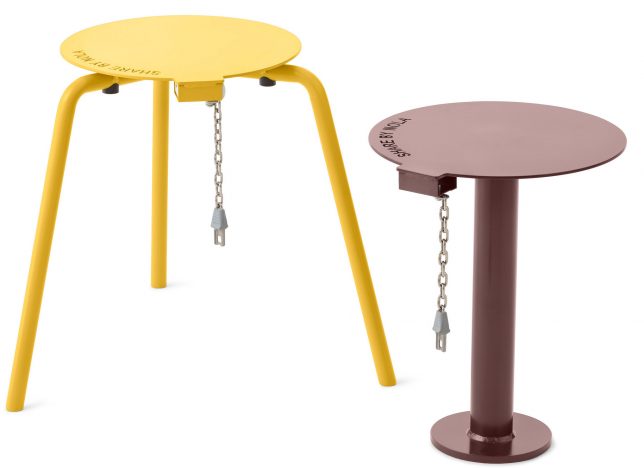
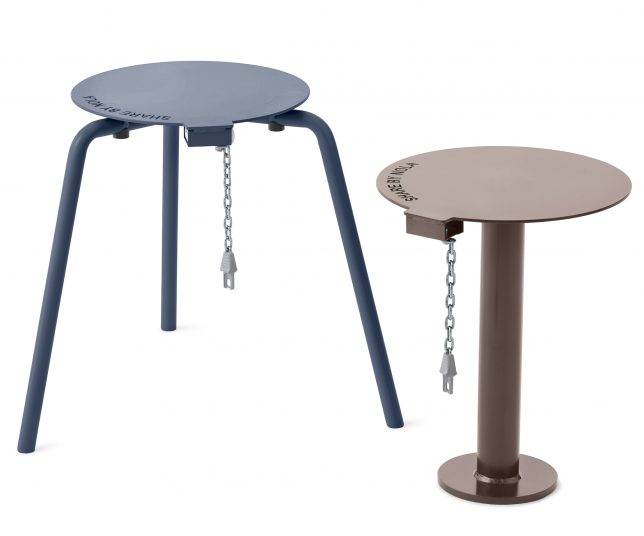
Much like coin-based cart systems found in supermarkets and airports, these stackable stools (which double as table surfaces) can be borrowed, moved around and returned with ease. Unlike fixed-position urban benches and tables, this design by Thomas Bernstrand lets users control their own experience, setting up a solo seat or group of seats and surfaces in the sun or shade as desired.

share stool stack

While not foolproof, of course (anyone intent on stealing them or leaving them out could do so), the furnishings do demand a small deposit to encourage people to to put them back when they are done. Also, the dangling chain and branded mark could help deter their disappearance into people’s homes.

share system

In the United States, where the maximum value of an everyday-use coin is fairly small, the incentive would be correspondingly diminished. But in Euro countries where denominations are typically higher, the price of failing to return the items would be significantly higher.

shair chairs

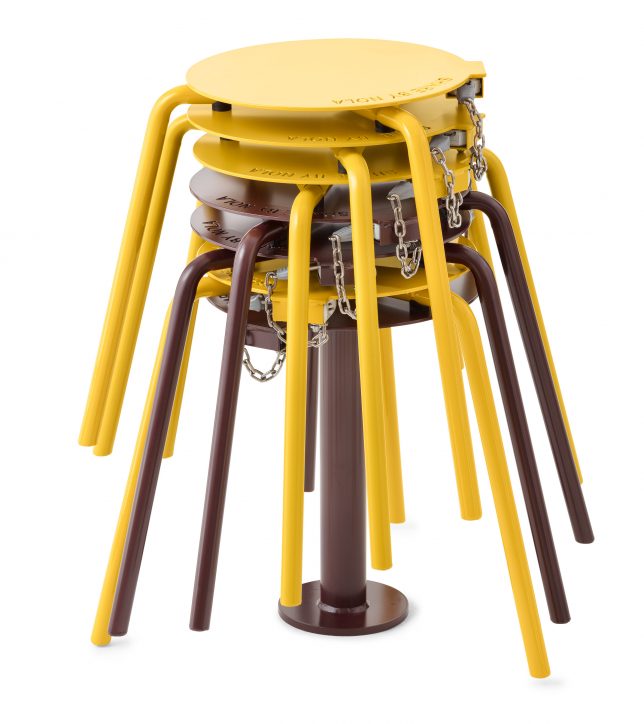
The metal stools are made to be heavy and durable, keeping them from being knocked over in the wind and making them suitable to frequent outdoor use. They also stack neatly into columns, taking up less space on the streets (or in shopping centers or parks or squares) when not in use.

share series chairs

The designs are an extension of the Share Series, a set of seats and other objects with similar coin-operated functionality intended for public use.

seats

Other pay-to-sit urban furniture projects include a chair series by Vincent Wittenberg, a bit more comfortable looking but they also take up more space on sidewalks.

Also: Fabian Brunsing, a Berlin-based artist and designer, took a different approach the problem (a bit more tongue-in-cheek). His bench uses coin deposits (but in this case non-refundable) that allow you to use a public bench. But when your time runs out: stand up fast to avoid the spikes.

Share on Facebook


[ By WebUrbanist in Design & Furniture & Decor. ]

[ WebUrbanist | Archives | Galleries | Privacy | TOS ]


WebUrbanist

 
Comments Off on Modular Urbanism: Coin-Operated System of Portable Street Furniture

Posted in Creativity


Updated: A look at the Panasonic DC-GH5’s autofocus system

16 Mar
Pushing forward – Panasonic’s improvements to the autofocus system on the GH5 are impressive, but a few quirks remain.
Out of camera JPEG cropped to taste | ISO 250 | 1/500 sec | F5.1
Photo by Carey Rose

Panasonic’s GH-series has always been a line of highly capable video-centric hybrid cameras, and the GH5 is no exception. Despite this, Panasonic’s work on the autofocus system has resulted in some impressive stills-shooting performance; the camera comes with with updated DFD technology, autofocus custom settings so you can tailor the camera to the movement of your subjects and 9fps shooting in Raw and JPEG with autofocus.

It sure sounds like a winning combination, but that doesn’t mean it’s perfect. Take a look at our updated first impressions review to learn more.

See how the Panasonic GH5 did in our autofocus tests

Check out the GH5 at a rugby match

Articles: Digital Photography Review (dpreview.com)

 
Comments Off on Updated: A look at the Panasonic DC-GH5’s autofocus system

Posted in Uncategorized


In memoriam: Olympus brings down the curtain on the Four Thirds system

11 Mar

It probably shouldn’t be a surprise but it’s still a little sad to see it in print: the latest catalogue from four-thirds.org states that production of Olympus’s Zuiko Digital line of Four Thirds lenses has been discontinued.

It’s been six and a half years since the launch of the last Four Thirds mount camera, so it’s understandable that Olympus has decided to move on, but we thought we’d look back at Four Thirds: what it meant and where it led.

The first Four Thirds camera: the Olympus E-1. Built around a 5MP Kodak CCD, the E-1 arrived around two years after Olympus first announced a collaboration with Kodak.

Where it all started

In 1999, Olympus engineer Katsuhiro Takada selected the 4/3″-type sensor as being the optimal size to allow smaller cameras capable of high quality images. Olympus developed the lens mount and communication protocols and was joined by other makers including Kodak, Fujifilm and Panasonic. The Four Thirds system website was launched fourteen years ago tomorrow.

Four Thirds was the first ILC system specifically designed for digital. This not only meant a wholly new lens system, providing the focal lengths that make sense for the sensor size (at a time when most camera companies were making do with selling film lenses mounted on smaller sensors), but also adopting a policy of making telecentric designs, which project light straight onto the sensor, rather than at increasingly challenging angles, towards the edge of the sensor.

Panasonic’s first Four Thirds camera: the still beautiful DMC-L1.

Unfortunately, the telecentric lens designs often ended up being relatively large, meaning that the system didn’t end up being significantly smaller than APS-C cameras. Unfortunately, the decision to use 4/3″-type sensors also meant that the viewfinders in most of the models were even smaller than those that still plague most low-end APS-C DSLRs.

My personal favorite. The Olympus E-620 was the Four Thirds camera that, to my mind, offered the best balance of size and capability.

While the Four Thirds system is no longer with us, it’s worth giving credit for the innovations it played host to. For a start, it was the first interchangeable lens system to offer live view. It wasn’t the slickest of implementations: seemingly unsure whether live view was supposed to offer an immediate digital preview (with phase detection still available) or provide the precision of contrast detect AF and live view magnification, the E-330 offered both. And was duly given short shrift by DPReview founder Phil Askey in his review.

It may be out of production, but the Olympus US website says the 90-250mm F2.8 is still in stock. It’ll cost you $ 5999.99

The system evolves

However, the most significant development to come out of Four Thirds, though, was its successor, Micro Four Thirds, the world’s first mirrorless interchangeable lens camera system (indeed the system for which the term was coined). Micro Four Thirds persisted with the Four Thirds type sensor but by abandoning the mirror box (and the telecentric design philosophy) was able to fully deliver on the size benefits that had originally been promised.

Without a mirror to move out of the way, live view came into its own and a whole new class of camera was born.

Lessons from the Four Thirds system led directly to the creation of the world’s first mirrorless system: Micro Four Thirds. And between Panasonic’s GH5 and Olympus’s E-M1 II, a lot of interesting things doing on, 18 years after the sensor size was chosen.

Credit should be given to Olympus for working to provide cameras (specifically the E-M1s) that were designed to continue to give good performance for those users who’d bought the highest-end Four Thirds lenses.

Long live Four Thirds

The history of photography is full of defunct systems and obsolete mounts. Even though the curtain has come down on Four Thirds, you can still buy a camera that will make good use of its lenses. The king is dead…

Articles: Digital Photography Review (dpreview.com)

 
Comments Off on In memoriam: Olympus brings down the curtain on the Four Thirds system

Posted in Uncategorized


Cinetics announces new Lynx camera slider and motion control system

07 Mar

Cinetics has announced Lynx, its next generation camera slider and motion control system for photographers and filmmakers. It claims that Lynx is designed to set up and use quickly and easily, incorporates advanced motor control for very precise camera slides, pans, and tilts, and also allows users to program and operate the system through a mobile app.

The company is turning to Kickstarter for preorders, following successful Kickstarter campaigns for other products.

Lynx will be available in three kits: a Base Slider kit, which allows for manual moves, a Motorized Slider kit, which adds a slider motor and controller, and a Three Axis Slider kit, which adds motorized pan and tilt head.

A $ 499 Kickstarter pledge will secure you the Basic Slider Kit, a $ 999 pledge will get you the Motorized slider kit, and a $ 1499 pledge put you in line for the full Three Axis Slider kit. Final non-Kickstarter pricing was not announced.

$ (document).ready(function() { SampleGalleryV2({“containerId”:”embeddedSampleGallery_1450207459″,”galleryId”:”1450207459″,”isEmbeddedWidget”:true,”standalone”:false,”selectedImageIndex”:0,”startInCommentsView”:false,”isMobile”:false}) });

Press Release

Cinetics Announces Lynx: Camera Slider and Multi Axis Motor Control System That Masters Timelapse and Video Moves

Fourth Kickstarter Campaign Offers World Class Motion Control System Made Possible by Feedback and Support from Engaged Customer Base

Austin, TX. – March 07, 2017 – Cinetics, designers and manufacturers of lightweight and portable cinematic systems for videographers and filmmakers, is adding a next generation product to its arsenal of motion control, dolly, and tripod systems for photographers, filmmakers and videographers. Lynx™ is an ultra-smooth camera slider and multi axis motor control system that masters the art of timelapse and is capable of making precision video moves. Following the overwhelming success and community support of three previous Kickstarter campaigns, Cinetics will once again turn to Kickstarter for preorders of Lynx and offer its loyal community of photographers, filmmakers, and videographers a discount on the new system.

“Lynx is our 4th motion control project, and it’s our very best. It’s a compact camera slider built with input from an amazingly engaged customer base,” explains Justin Jensen, founder of Cinetics. “It’s a ready-to-run, three axis motion control kit that sets up quick and easily, is strong, fast and quiet, and can be driven by a mobile app. We are confident that Lynx will consistently perform as well as other, more expensive, compact motion control systems on the market.

Lynx is manufactured using the finest materials and incorporates the latest in motor control technology to enable precise, quick and quiet slides, pans and tilts. A beautifully-designed mobile app allows easy and intuitive remote system control while its joystick design and accelerometer controls take live camera movement to an entirely new level. Lynx is designed for fast and easy set up, can run preset programs or be configured creatively to perform complex moves for incredible cinematic results.

Lynx is available in three primary kits: Base Slider, Motorized Slider and Three Axis Slider.

The Lynx Base Slider allows users to create manual video moves. The motor control can be added to the slider at any time.

The Lynx Motorized Slider kit includes the manual slider plus the slider motor and controller for a complete linear motion control system.

The Lynx Three Axis Slider includes the complete Lynx motorized slider and motorized pan and tilt head.

Articles: Digital Photography Review (dpreview.com)

 
Comments Off on Cinetics announces new Lynx camera slider and motion control system

Posted in Uncategorized


Cinetics Lynx motion control system review

07 Mar

As an astronomer and visual artist, I use the arts to communicate science. My main way of doing this is through a series of Science & Symphony films that get presented with orchestras in concerts around the world. Since 2008 I have been shooting time-lapse sequences of the night sky and incorporating them into many of these films. My stills and sequences of observatories in Chile, the U.S., and the South Pole have also been featured in many science documentaries.

One way of giving time-lapse sequences a more cinematic look is by using a motion control system. These programmable systems move your camera with high precision as you shoot your scene. I have used several of them since 2008, so I was quite happy to preview this brand new system introduced by Cinetics. 

The Cinetics Lynx is a light, portable and compact (yet sturdy) system that lets you program precise three-axis moves for video, stop motion, and time-lapse sequences. Its main components (slider, motors and motion controller) have their own soft cases for easy portability. You can even carry the slider preassembled in its own case to save time when working in the field. The standard length of the slider is 24 inches (61 cm), but the system comes with an additional set of carbon fiber rails, stored in their own carrying case compartment, for a total extended length of 48 inches (122 cm). The total weight of the system is under 13 lb (5.9 kg).

The Lynx motion control system at its standard 24-in (61 cm) length. (Photo courtesy of Cinetics)

It’s apparent that a lot of thought was put into designing a system that takes only minutes —and a single hex key— to assemble. Extending the slider with the second set of rails and replacing the belt with a longer one takes approximately 5 minutes. The slider comes with a set of built-in legs to rest it on the ground or against a wall (when inclining it). The legs spread out at a series of pre-determined positions, which avoids having an uneven slider.

The motor units are very compact and each one requires a single screw to install. The motion controller can be attached to the pan motor via an ingenious snap-on attachment and the system battery is conveniently housed inside the motion controller. These two features avoid the need for installing additional support accessories and contribute to the simplicity and compactness of Lynx. 

Motion controller snapped onto the pan motor. (Photos courtesy of Cinetics) Pan and tilt motors with motion controller. 
Slider and adjustable legs. Slider motor.

When assembled to the 24 inch length, the system can easily be installed on a single tripod without the unit tipping over, even when the camera is at either end of the slider. My first test in the  studio was to see how the system behaved using a single but sturdy tripod/head configuration. I used a Gitzo systematic tripod and ball head with hydraulic lock.

Despite the sturdiness of the system, images taken at either extreme of the slider – when mounted on a single tripod – may need to be rotated slightly in order to align them. For a load of 5.7 lb (2.6 kg) the images needed to be rotated ±0.6 degrees with respect to an image taken at the center of the slider. This can be corrected in post-processing by key framing image rotation and letting software interpolate the rotation angles.

I extended the Lynx slider to its 48in. length and took it to the Chicago Lakefront to shoot for a new film I’m producing. With two Gitzo carbon fiber tripods easily attached, I leveled the slider, and proceeded to program the system. Lynx includes an Arca-Swiss style camera plate to quickly set your camera and, on the Cinetics website, you can choose from a comprehensive list of cables to control the shutter.

The Lynx system extended to 48 inches (122 cm) in length and supported by two Gitzo carbon fiber tripods. The leveling tripod on the left has an adjustable center column while the other one has a ball head. These make leveling or inclining the slider fairly easy. Location: Sundial Plaza, Adler Planetarium, Chicago

Once set up, it’s easy to program the motion controller. You simply slide the camera to the first position, adjust the pan and tilt as desired, and save the position as your first keyframe. Then, you slide it to the second position, adjust the pan and tilt, if necessary, and set your next keyframe. Once the beginning and ending keyframes are established, you can program the parameters for your time-lapse sequence, including duration between keyframes (time), shutter speed, and the interval between shots.

The Lynx motion control system at its standard 24-in length (61 cm). From L to R on the slider: slider motor, tilt motor, pan motor with controller snapped on and a Nikon D5 with an Arca-Swiss style camera plate.

The controller’s display shows you the total number of resulting shots. One thing that impressed me about the Lynx motion controller is that it not only lets you set up at least 5 keyframes, but it lets you program a different set of sequence parameters between each pair of keyframes! For example, you could program sets of keyframes in order to progressively change the exposure and interval times throughout a time-lapse – useful if you know that the lighting conditions are going to change during the sequence.

There are two motion modes available: shoot-move-shoot (S-M-S) mode and continuous mode. In S-M-S mode the camera is moved only between shots. In continuous mode, however, photographs can be taken as the system moves. This is useful for taking video or time-lapse sequences that incorporate motion blur. You also have the option of ramping up and down the motion speed when shooting video and time-lapse in continuous mode. (The S-M-S time-lapse mode has a built-in ramp, but unfortunately, it is not adjustable at this point.) Each segment of the programmed motion can have its own kind of motion. For example, you can have an S-M-S segment followed by one with continuous motion. 

Once you have programmed a motion you have the ability to save it as a preset for later recall. When you’re ready to start the sequence simply choose Run, step back, and voilà!

Finally, you also have the ability of continuing a sequence by reversing the motion (called bounce) as many times as you want. This is a great feature, but I wish it were possible to bounce the motion after a sequence has started, since this is something you might decide to do once shooting is in progress. Other systems let you do this, and also give you the ability to tell the camera to continue shooting even after it has reached the last keyframe.

Another thing I would like to see in a future software update is the ability to quickly preview the entire run in continuous mode. Even when the intent is to take a time-lapse sequence one could quickly preview the motion by shooting video and tweaking the motion, if necessary.

501 one-second exposures (F4, ISO 100 at 18mm) with an interval of 2 seconds during a total shooting time period of 16.7 minutes. Since these scenes were shot during the changing illumination conditions of the blue hour, the white balance and exposure values were keyframed and interpolated using Lightroom and LRTimelapse. All sequence images were taken with a Nikon D5 and Nikkor 14-24mm f/2.8 and rendered as 24-fps videos. (ISO 100, F4, at 18mm)

I decided to use the Lynx to take a time-lapse sequence by centering the field of view on Henry Moore’s sundial in Chicago, moving my camera from the left all the way to the right end (over a period of 17 minutes), while panning my camera to the left so I could keep the sundial at the center of the frame. The combination of slide and pan resulted in the illusion of the camera moving along an arc around the sundial when the displacement motion was actually along a line.

I then set up a time-lapse of Anish Kapoor’s Cloud Gate (the reflective sculpture nicknamed The Bean) in Millennium Park. Have in mind that the farther your main subject is from the camera, the harder it will be to notice parallax (the displacement in the apparent position of an object viewed along two different lines of sight).

The Lynx system extended to 48 inches (122 cm) in length and supported by two Gitzo carbon fiber tripods. Location: Millennium Park, Chicago

Nevertheless, for the particular composition I had in mind, I avoided getting too close to the sculpture. I slid and panned the camera to the right while tilting it up (in order to end up with less ground and more blue-hour sky) over a period of 20 minutes. Taking advantage of the dark blue that remained in the sky, I also placed the system right in front of Cloud Gate and simply tilted the camera up over a period of 8.4 minutes.

For the first sequence of Cloud Gate at Millennium in Chicago, I combined 604 one-second exposures with an interval of 2 seconds over a period of 20 minutes. I programmed Lynx to slide, pan, and tilt.  (D5 and Nikkor 14-24mm F2.8; ISO 125, F4, at 16mm).

For the second Cloud Gate sequence, I took 254 one-second exposures with an interval of 2 seconds over a period of 8.5 minutes, and simply tilted the camera upward (D5 and Nikkor 14-24mm F2.8; ISO 400, F4.5, at 16mm).

Note that the Lynx system can be used vertically or inclined, though when inclined you can only point the camera along the direction of the slider if you want to avoid an unleveled horizon. If, for example, you wanted to shoot perpendicular to the direction of an inclined sliding motion then you would need a leveling wedge (not included) to compose your shot.

One has the option of programming the Lynx motion controller via Bluetooth with a smartphone app. Having two options for programming the unit is very welcome but, surprisingly, I thought that programming the controller using the app was less straightforward and somewhat confusing, but the app’s GUI was re-designed after I tested it. There’s definitely room for improvement in future versions of the Lynx app. Having said that, I like that on the app one can control the exposure values to a fraction of a second and use the smartphone’s IMU (a combination of accelerometers and gyroscopes) to slide the cart.

In conclusion, the Lynx is a light, portable, and sturdy three-axis motion control system that can be set up very quickly. Its relatively light weight and compact design lets you carry it around in the field very easily, and its smooth and precise motion can be programmed with multiple keyframes. I can definitely recommend this motion control system and I look forward to future firmware and app updates.

Pros:

  • Light and compact
  • Quick and easy set up
  • Lets you program at least 5 keyframes, each with independent set of parameter values and motion modes
  • Ability to save presets

Cons:

  • Leveling wedge is not included

Updates I’d like to see:

  • Ability to preview motion in continuous mode
  • Ability to edit parameters in saved presets
  • Ability to adjust ramping on S-M-S time-lapse mode
  • During a sequence in progress, ability to decide what to do once the camera has reached the last keyframe

José Francisco Salgado, PhD is an Emmy-nominated astronomer, science photographer, visual artist, and public speaker who creates multimedia works that communicate science in engaging ways. His Science & Symphony films have been presented in 175 concerts and lectures in 15 countries.

José Francisco is a seasoned night sky and aurora photographer and filmmaker. If you would like to view, photograph, and learn about the Northern Lights then you can inquire about his Borealis Science & Photo Tours in Yellowknife, Canada.

You can follow him on: Flickr, Instagram, 500px, Facebook,  and Twitter

Articles: Digital Photography Review (dpreview.com)

 
Comments Off on Cinetics Lynx motion control system review

Posted in Uncategorized


Phottix launches Ares ll radio flash triggering system with more channels

04 Mar

$ (document).ready(function() { SampleGalleryV2({“containerId”:”embeddedSampleGallery_2255968885″,”galleryId”:”2255968885″,”isEmbeddedWidget”:true,”standalone”:false,”selectedImageIndex”:0,”startInCommentsView”:false,”isMobile”:false}) });

Independent flash and accessories manufacturer Phottix has announced the next generation of its Ares remote flash triggering system that brings with it additional channels and improved security. The Ares ll transmitter and receiver have also both been given a facelift to include a new clearer control layout and LCDs to display functional information.

The new system offers a total of 16 radio channels, twice the number of the previous model, and can now deal with 4 groups of flashes. The units also include digital ID so that users can be sure other photographers in the area won’t interfere with their signal.

Using the first four channels the Ares ll can trigger Phottix Strato-compatible flash units, such as the Mitros+ hotshoe gun and the Indra studio heads, while all channels will trigger hotshoe flash units attached to an Ares ll receiver. The system allows a maximum flash sync speed of 1/250 sec, and both trigger and receiver are powered by two AA batteries each.

While the new units have a much more user-friendly design they have lost 50m of range compared to the original Ares, and can only operate at up to 150m – which is still enough for most uses. The units are compatible with the hotshoe and flash foot of cameras and flash units from ‘most major camera and flash systems (including Sony)’ according to Phottix.

The new Ares ll transmitter costs $ 54.95, as does the receiver. For more information visit the Phottix website.

Press Release:

The Phottix Ares II Flash Trigger – 16 Channels of Awesomeness

Welcome to the family
Introducing Phottix’s newest budget-friendly flash trigger system – the Phottix Ares II. The transmitter and receiver system boasts the latest technology and is perfect for manual shooting with studio lights or hot shoe flashes. Better yet: The popular original Phottix Ares system was a standalone product within the Phottix ecosystem – not so for the Ares II. The Phottix Ares II will join the Phottix ecosystem and be compatible” with other Phottix products.

Features:
• Transmitter and Receiver with LCD display
• 16 Channels (Strato II compatibility on channels 1-4)
• 4 Groups, A-D
• Digital ID Codes (0000 – 9999)
• 150m Range
• Compatible with other Phottix products*

The Ares Wireless Trigger took the world by storm when it was released in 2012 the Ares was a simple and affordable way to use off-camera flash. The Ares transmitter and receiver units were popular and lauded by some of the biggest names in the industry for its design and reliability.

More Channels and Digital ID:
Pick from 16 channels. The first four channels offer compatible with the Phottix Strato II Receiver – and can be used to trigger Phottix products such as the Mitros+ and Indra series of studio lights with built-in Strato II receivers. Use the Digital ID function for the ultimate in secure triggering – no one can trigger your flashes unless using your four-digit Digital ID code.

Universal Hot Shoe
The Ares II Transmitters and Receivers have been design to be compatible with most major camera and flash systems (including Sony). The Ares II is at home on Canon, Nikon, Sony (MIS), Pentax, Panasonic, Fuji and Olympus cameras and compatible with most hot shoe flashes (triggering from the X-Sync pin)

Articles: Digital Photography Review (dpreview.com)

 
Comments Off on Phottix launches Ares ll radio flash triggering system with more channels

Posted in Uncategorized


Elinchrom ELB 1200 portable flash system to launch this summer

02 Mar

$ (document).ready(function() { SampleGalleryV2({“containerId”:”embeddedSampleGallery_9219200983″,”galleryId”:”9219200983″,”isEmbeddedWidget”:true,”standalone”:false,”selectedImageIndex”:0,”startInCommentsView”:false,”isMobile”:false}) });

Elinchrom has introduced its new ELB 1200 portable lighting system for photographers, a model that builds upon the company’s existing ELB 400 system introduced in 2015. The new system features three new flash heads, the Action, Hi-Sync, and Pro, as well as a TSA-approved ‘Air’ lithium-ion battery capable of powering 215 full-power flashes and 80 minutes of continuous LED use. 

In addition to the TSA-approved ‘Air’ version of the battery, Elinchrom also has an ‘HD’ version with a higher capacity that can power 400 full-power flashes and 120 minutes of continuous light. The batteries are also capable of powering accessories via a 5v USB outlet, and they can both be switched into a ‘shipping mode’ for long distance travel.

The three aforementioned flash heads feature a daylight-balanced and dimmable LED CRI 92 lamp, which Elinchrom says is equivalent to a 250w Halogen lamp. The Hi-Sync flash head supports shutter speeds as fast as 1/8000s. The company expects the ELB 1200 to be available in the ‘middle of 2017,’ with pricing information being provided at a later date.

Check out Elinchrom’s product video below to see the kit in action.

Articles: Digital Photography Review (dpreview.com)

 
Comments Off on Elinchrom ELB 1200 portable flash system to launch this summer

Posted in Uncategorized


OPPO 5x smartphone zoom system sample images

01 Mar

Yesterday smartphone maker OPPO announced an innovative 5x zoom system for smartphone cameras that uses a dual-camera in combination with a prism and periscope-style lens design. It’s only 5.7mm tall, and therefore could fit into even the thinnest smartphones. Unfortunately, OPPO did not release too much technical information but there are a few prototype devices available to shoot with at the OPPO both at the Mobile World Congress. We gave the camera a quick try, and had a closer look at the sample images and embedded EXIF to find out more.

The camera app on the prototype phones is kept very simple, with the main feature being a big zoom button. One tap on the latter makes the camera jump from wide-angle to a 2x zoom factor; a second tap jumps to the full 5x magnification. There are no intermediate zoom settings. The sample images below were taken at those respective lens settings and show a well-illuminated test scene at the OPPO booth.

 Wide-angle, ISO 189, 1/189 sec
 2x zoom, ISO 115, 1/100 sec
 5x zoom, ISO 111, 1/50 sec

The camera produces 12MP images and in the EXIF data aperture at all zoom settings is reported as F2.0. At ISO 189, sensor sensitivity is the highest at the wide-angle setting. It decreases to ISO 115 at the 2x zoom setting and ISO 111 at the 5x setting. Shutter speed is reported at 1/100 sec at the wide-angle and 2x setting and 1/50 sec at the tele setting.

There is no way of knowing if the reported EXIF is accurate but, looking at the scene and considering the tele-portion of the lens construction is optically stabilized, it could well be the case that at the tele settings the light fall-off on the OPPO system is much less significant than on a conventional zoom with changing apertures. The image quality of the samples seems to support the ISO data, with the zoomed images not showing noticeably more image noise or less detail than the wide-angle shot.

Of course, we are looking at a prototype device here and the image output of an eventual production phone might look very different. Nonetheless, the sample images out of the prototype do look promising and we hope to see an OPPO device with the 5x zoom system being launched soon.

Articles: Digital Photography Review (dpreview.com)

 
Comments Off on OPPO 5x smartphone zoom system sample images

Posted in Uncategorized


Review of the Wine Country Camera Filter Holder System

28 Feb

In this article, I will go over why I switched to using the Wine Country Camera filter holder system from others I’d previously used. As well I’ll cover some of the system’s key features so you can decide if it’s right for you as well.

Since the late 60s and early 70s photographers have been using drop-in (slide-in) filters in front of their lenses. The holders which accept such products are usually used for neutral density filters, polarizers, color filters, and sometimes effect filters.

But there has been a problem with this type of holder, even since its inception.  They’re usually poorly made with cheap plastic or mixed aluminum materials. And that’s just the holder’s materials. Other problems are the placement of the polarizers which can cause vignetting, manufacturing errors, and much more.

Review of the Wine Country Camera Filter Holder System

The Wine Country Camera filter holder and vaults.

Although I inherited a Cokin filter kit from my grandfather, my first self-purchased kit was a Lee Filter Foundation Kit. The product is made of plastic, which makes it light weight. But it also makes it vulnerable to bending and breaking.

Eventually, Formatt Hitech released their newer aluminum filter kit, and I made the switch and used it for a couple of years… until now.

Wine Country Filter Holder Materials

Review of the Wine Country Camera Filter Holder System

One of the many tactile points of contact on the holder.

Wine Country Camera was born out of the need for quality filter systems and ongoing standards. Every aspect of the filter kit has been deeply considered and well thought-out from the bottom up, or backward to forward.

Instead of plastic or aluminum, premium materials are used, with purpose. For example, instead of a standard dial, a wooden dial is used, so your fingers don’t freeze in cold weather. That can also be said for the wooden grips on the front of the holder. Every part of the holder is tactile so you know when you’re turning, rotating, and pushing. It’s so tactile that you can even maneuver the holder and filters while wearing gloves.

How It’s Unique

By now you likely already recognize that the holder system from Wine Country Camera is unique. But to reiterate why I thought so, I wanted to point out some of the features that are unlike any other holder on the market.

googletag.cmd.push(function() {
ruleset_slots.push( googletag.defineSlot( “/1005424/_dPSv5topic-rhs(300×250)”, [300, 250], “pb-ad-0” ).addService( googletag.pubads() ) ); } );

Coin locks

Many locations around the system carry the Wine Country Camera logo, a wine glass. At first, you might think it’s about branding. While that might be true, the more important reasoning is so that you know when items are right side up. For example, the filter vaults have this beautiful coin which is turned to lock or unlock the filter. When the wine glass is upside down, the vault is unlocked. When it’s standing on its stem, the vault is locked.

Review of the Wine Country Camera Filter Holder System

The coin which locks and unlocks filters from the vaults.

Vaults

Speaking of the vaults, these are a new concept, already mastered. The vaults are made of a polymer, similar to that found in a Glock. They’re extremely strong. No joke – they can’t be bent. The moment I filled one of my vaults with a filter, I dropped it (I got it on video too). To my surprise, there was no damage to the glass filter inside. The vault serves multiple purposes.

  • The vault seals the space between filters and the holder so that you do not need those annoying foam gaskets.
  • Makes it extremely easy to insert and remove filters from the holder with or without gloves.
  • Protects the filters from normal wear and tear and minor dings.

Vaults are available for 100mm square filters as well as graduated filters. Along with the vaults are two red buttons on the holder. The buttons are designed to remove the friction holding the two outer filters in place. That way you can safely move graduated filters up and down with ease, safely.

Review of the Wine Country Camera Filter Holder System

The red buttons which help adjust how the filters sit in the outer two slots.

Customer service above and beyond

It’s worth noting that due to the high-quality standards of Wine Country Camera, they have identified a flaw of other manufacturers. Although there are so-called standards among filters, they’re not always followed precisely while making the filters. Here is what they said:

Service Advisory: We are noticing that some Lee grads have been produced at a thickness outside of their specification. If you experience difficulty installing your grad, contact us immediately and we will resolve it for you.

As you can see, Wine Company Camera is replacing their filter vaults with new ones, for customers experiencing an issue of their filters not fitting. It’s not their fault, but they’re correcting the issue for their customers. Lots of thumbs up for that customer service decision!

Using the filter holder

The holder allows for three filters to be used at any given time. The reason for this is that the Wine Country Camera filter holder uses an internal polarizer. Because the holder keeps the polarizer in the back, instead of the front like most filter holders, it opens the doors for a third filter.

googletag.cmd.push(function() {
ruleset_slots.push( googletag.defineSlot( “/1005424/_dPSv5topic-rhs(300×250)”, [300, 250], “pb-ad-1” ).addService( googletag.pubads() ) ); } );

Typically when a Circular Polarizer is placed in front of the Neutral Density filters, you lose a slot and have a giant 105mm ring to attach a Circular Polarizer (CPL) too. But with the Wine Country Camera system, the polarizer is easily removed with two red clips and turned using the beautiful wooden dial.

Review of the Wine Country Camera Filter Holder System

The wood dial which turns the internal polarizing filter.

Last, and not least is that because of the extremely low profile of the filter holder, and the polarizer being in the back, there is a reduced the risk of vignetting. The system has been tested as wide as 17mm without any vignetting. That’s a huge jump from the 24mm limit I had with the Formatt Hitech and Lee systems (even with the wide angle adapter rings). I photograph at 20mm quite often and have always experienced vignetting, although minor. Until now.

Is it worth the price?

I’ll be the first to admit when the Wine Country Camera filter holder system was initially announced I was shocked by the price. Especially when compared to systems from other manufacturers. But after getting my hands on it, I understand why.

The amount of pride, thought, and effort that went into every millimeter of the product is the highest possible quality. It’s not cheap plastic. It’s not cheap metal. But for the curious minded, I thought I would include a price comparison on my kit before and after. I will leave out my Neutral Density filters for right now I’m still using my Formatt Hitech Firecrest ones in the Wine Country Camera holder. (I’ll likely switch to WCC once they have their own ND filters)

Wine Country Camera System

  • Holder with internal polarizer, two vaults, and one Adapter Ring: $ 449
  • Two extra 100x100mm square vaults (I have four square filters): $ 75
  • One 150x100mm rectangular vault: $ 35
  • Three Adapter Rings: $ 150
  • Total: $ 704

Formatt Hitech

  • 100mm Aluminum Holder: $ 47.99
  • Four Wide-Angle Adapter Rings:
  • Polarizer Ring: $ 19.99
  • 105mm Firecrest Circular Polarizer SuperSlim: $ 229.99
  • Total: $ 481.92

As mentioned, the price for the Wine Country Camera system is more. But keeping in mind the advantages of the system, the materials used, and that you have the vault advantage, it’s worth the extra money up front. The $ 257.08 savings on a different system might save you up front but could cost you in the long term. Maybe on parts falling apart, lower quality materials breaking, light leaks on your photographs, and potentially more.

But I know that not everyone can afford the kit, so it may not be for you. But if you are like me and want the best of the best when it comes to your photography, then you’ll save up and take the plunge when it’s right for you.

Review of the Wine Country Camera Filter Holder System

Bonus for high megapixel cameras

googletag.cmd.push(function() {
ruleset_slots.push( googletag.defineSlot( “/1005424/_dPSv5topic-rhs(300×250)”, [300, 250], “pb-ad-2” ).addService( googletag.pubads() ) ); } );

Something else to keep in mind, for anyone with a high megapixel camera, like a D810, A7RII or a medium format camera – is that many polarizers have an issue with reflections on higher resolution sensors. The one from Wine Country Camera does not have this issue. The polarizer fits inside the holder body, eliminating reflections and allowing geared rotation. Wine Country Camera worked with a high-end optics manufacturer to develop the highest possibly quality polarizer. Their polarizer uses 2.5mm thick Schott optical glass that is fire polished, and free of surface aberrations. Considering their CPL is less expensive (when purchased alone) than the previous one I was using, it’s nice to know my optics are protected.

Keeping it together

Before theWine Country Camera system, I was using the Mindshift Gear Filter Hive to hold everything in one place. The small bag is incredible, can be stored in a backpack, clipped to a belt, or hung from a tripod.

I was happy to find the Wine Country Camera system almost completely fits in the same bag. Everything but the holder itself fits inside. But fortunately, Wine Country Camera provided a very protective case for the holder and its attached polarizer.

Review of the Wine Country Camera Filter Holder System

Final thoughts

As I mentioned earlier, I was originally a skeptic for the Wine Country Camera system. But I have fallen in love with it. I am so gratefully that this company has now taken steps to improve the lens filter system, as the industry has needed this change for a long time.

I love that every adjustment possible on the holder can be done with the left hand.  That way the right hand can be kept on the camera. To me, the price is worth it, the features are worth it, the quality in craftsmanship is worth it. I hope you recognize the same.

Have you taken a look at the Wine Country Camera filter holder yet? What are your thoughts?

googletag.cmd.push(function() {
ruleset_slots.push( googletag.defineSlot( “/1005424/_dPSv5topic-rhs(300×250)”, [300, 250], “pb-ad-3” ).addService( googletag.pubads() ) ); } );

The post Review of the Wine Country Camera Filter Holder System by Scott Wyden Kivowitz appeared first on Digital Photography School.


Digital Photography School

 
Comments Off on Review of the Wine Country Camera Filter Holder System

Posted in Photography