RSS
 

Posts Tagged ‘Studio’

Sphericam Beast studio camera lives up to its name with 6K 10-bit Raw 360-degree video

12 Nov

Sphericam has introduced ‘Beast,’ its new pro-grade 360-degree VR camera. This beastly model features four 1″ 4096 × 2160 image sensors, four 190º fisheye lenses, and four M.2 SSD drives with a 2.8 GBs bit rate. This combination of hardware enables the camera to record ‘more than’ 6K resolution footage, according to Sphericam, at 60 fps in a 10-bit Raw format (30fps for stitched content). Beast is designed for use by studios and other companies in need of pro-grade VR hardware.

Beast spent ‘several months’ in development, says Sperhicam, and was recently launched at NAB in NYC on November 9. In addition to recording ultra-high-resolution 360-degree videos, Beast can livestream content to headsets or the web, making it suitable for broadcasters as well as filmmakers. The company hasn’t yet revealed how much Beast will cost, nor when it plans to commercially launch the camera.

Via: Digital Trends

Articles: Digital Photography Review (dpreview.com)

 
Comments Off on Sphericam Beast studio camera lives up to its name with 6K 10-bit Raw 360-degree video

Posted in Uncategorized


Microsoft Surface Studio morphs the photographer’s desktop into a studio

27 Oct

$ (document).ready(function() { SampleGalleryV2({“containerId”:”embeddedSampleGallery_6194580448″,”galleryId”:”6194580448″,”isEmbeddedWidget”:true,”standalone”:false,”selectedImageIndex”:0,”startInCommentsView”:false,”isMobile”:false}) });

Microsoft today expanded its Surface lineup, announcing the ‘world’s thinnest LCD monitor’ but in an exciting form factor: a touch-based all-in-one desktop PC with a 28″ 4.5K PixelSense display. The 4500 x 3000 3:2 display sports 13.5 million pixels, and at 192 PPI almost approaches the 218 PPI figure of the 5K Retina iMac, but with 10-point multi-touch capabilities. Like the 5K iMac, the display’s color gamut extends to DCI-P3 (25% larger than sRGB), something photographers routinely editing and printing will appreciate. Microsoft is calling the 10-bit display ‘TrueColor’.

But the real story here is the touch-based, pen-enabled display. Wacom Cintiq: take a hike. Apple iMac: mice and Wacom pens are so yesterday. The Surface Studio literally combines these devices into one, allowing you to draw directly on the surface with the precision Surface Pen. With a simple push of the screen, you can adjust the angle of the display down to a 20-degree orientation – then use it like a drafting table. And the new Bluetooth Surface Dial radial accessory will allow you to change settings, like the color you’re drawing with or brush size, on-the-fly. The display and dial sense each other, and with time and adoption we expect to see all sorts of creative solutions emerge that integrate the capabilities of the display, dial and pen. 

The new Microsoft Surface Studio is a powerful all-in-one desktop with a 28″ 4.5K wide-gamut PixelSense display touting touch, pen and dial capability. It easily folds down to drafting table-esque low angle for easy drawing and image editing.

A number of apps at launch, like Paint 3D and Sketchable, will support enhanced capabilities with the dial and pen, and we expect creative applications, like Adobe’s Creative Suite, to quickly follow suit, particularly because Microsoft has made it easy for developers to do so. Microsoft’s approach with Windows 10 and its hardware products prioritizes a unified app experience across all devices. With one operating system, app developers simply build new UI layers on top of existing apps, meaning less work for developers (than building a whole new app for, say, iOS) and, perhaps more importantly, a consistent user experience: Photoshop on the Surface is just like Photoshop on a desktop PC, but with an added pen/touch layer. 

Microsoft’s approach prioritizes a unified app experience across all devices. 

To keep the display on the Surface Studio thin, Microsoft put a lot of the guts of the Surface Studio in the base, and the specs are impressive. Three configurations ranging from $ 2,999 to $ 4,199 are available, all using Intel’s 6th generation Quad core i5/i7 processors with 8, 16, or 32GB RAM. Every Studio comes with a dedicated nVidia discrete GPU, with the lower two configurations using the GTX 965M with 2GB GDDR5 memory, and the highest configuration using the GTX 980M with 4GB GDDR5 memory. There are a number of connectivity options, including 4 USB 3.0 ports, SD card reader, Mini Displayport, Bluetooth 4.0, 802.11ac Wi-Fi, Gigabit ethernet, and Xbox Wireless. A 5MP/1080p Windows Hello capable front-facing camera is built in, as are 2.1 Dolby Audio speakers, and dual microphones.

Microsoft also announced three new Surface Book models with Performance Bases, touting 6th generation Intel Core i7 processors and more than twice the graphics processing power of the original Surface Book.

Windows 10 Creators Update promises ease of creation, sharing and experiencing 3D models and mixed reality (with accompanying VR headsets).

Microsoft is pushing their Surface solutions as tools for creatives, with a big focus on 3D. To that end the Windows 10 Creators Update, slated for early 2017 release, updates a number of apps to allow users to work seamlessly with 3D models, including ones they can generate themselves by scanning real-world objects with their phone. The popular Paint app will now be Paint 3D, and over the next year the popular Microsoft Office suite will also gain 3D capabilities. The Creators Update also promises ease of creation, sharing and experiencing mixed reality. Microsoft announced that HP, Lenovo, Dell, Acer and ASUS will ship the first VR headsets capable of mixed reality through the Creators Update.

Microsoft’s newly announced products are available for pre-order today, and early adopters of the Surface Studio will get a free Surface Dial. For more coverage and details on today’s launch event, head over to Microsoft’s dedicated site on the launch event.

Press Release:

NEW YORK — Oct. 26, 2016 Microsoft Corp. on Wednesday unveiled a broad vision to empower a new wave of creativity with a major update coming to more than 400 million Windows 10 devices and the introduction of Surface Studio, Surface Dial and a more powerful Surface Book.

Expanding the Surface family, Surface Studio is a new class of device that transforms from a workstation into a powerful digital canvas, unlocking a more natural and immersive way to create on the thinnest LCD monitor ever built.1 With a stunning ultra-HD 4.5K screen, Surface Studio delivers 63 percent more pixels than a state-of-the-art 4K TV. Surface Studio works beautifully with pen, touch and Surface Dial — a new input device designed for the creative process that lets you use two hands on the screen to compose and create in all new ways.

Launching as a free update in early 2017, the Windows 10 Creators Update will enable anyone to create, share and experience in 3-D and mixed reality, connect people faster to those they care about most, and empower every gamer to be a broadcaster. And with the Creators Update, Microsoft Edge will be the first browser to fully embrace 3-D.

“At Microsoft, our mission is to empower every person and every organization on the planet to achieve more,” said Satya Nadella, CEO, Microsoft. “With Windows 10, Microsoft Surface and the medium of Mixed Reality, we aim to empower the builders, the makers and the creators with the tools to create, collaborate and express themselves in new ways.”

Surface Studio turns your desk into a creative studio

Surface Studio is a new class of device designed for how people naturally create and bring ideas to life. The 28-inch PixelSense™ Display immerses the user in 13.5 million pixels of pure, true-to-life color, and the Zero Gravity Hinge allows the screen to effortlessly adjust to each stage of the creative process. When the screen transitions from Desktop Mode to Studio Mode, it sits at a 20-degree angle, the same angle as a standard drafting board, making it ideal for sketching, writing and designing.

The 6th Generation Intel® Core™ processors accelerated by a discrete NVIDIA® GeForce® GPU deliver smooth and immersive graphics performance and the power to run professional programs such as Siemens’ NX™ software,2 taking people through their workflow from end to end. Now architects can sketch their ideas with the Surface Pen, put them into production using powerful 3-D modeling software, and review and mark up plans with a client, all on one device.

Surface Studio starts at $ 2,999 estimated retail price (ERP) USD. It is available for pre-order today in the U.S. through Microsoft Stores, MicrosoftStore.com and BestBuy.com, and will begin shipping in limited quantities this holiday with broader availability in early 2017.

Surface Dial — a new spin on creativity

Surface Dial is a new peripheral designed for the creative process. It integrates with Windows 10 to work with Surface for a faster and more intuitive way to scroll, zoom and navigate. The Dial also enables a set of unique experiences exclusive to Surface Studio. When you place the Dial directly on the screen, it brings up a set of digital tools specific to the app that is open, allowing people to more seamlessly move through their workflow. For example, with Surface Dial, artists can change the color or the size of their brush tip as they paint without ever moving the pen away from the screen. The combination of Dial, pen and touch creates a more immersive and tactile way for people to create in digital environments. Partners like BlueBeam Inc.,2 Drawboard,2 Mental Canvas,2 Siemens PLM Software,2 Silicon Benders,2 Smith Micro Software, Inc.2 and StaffPad have already optimized their software to take advantage of the new experiences Surface Dial provides.

Surface Dial is available for pre-order today in the U.S. through Microsoft Stores, MicrosoftStore.com, select Best Buy locations and at BestBuy.com, and will be available for $ 99 ERP USD starting Nov. 10.

The most powerful Surface Book yet

Microsoft also introduced Surface Book with Performance Base, making the most powerful laptop in its class even better. The three new Surface Book models feature 6th Generation Intel® Core™ i7 processors and pack more than twice the graphics processing power as the original Surface Book. Plus Surface Book with Performance Base brings 16 hours of battery life3 into the same sleek, versatile design people love. With Surface Book with Performance Base, engineers can spin 3-D CAD models with thousands of parts, designers and developers can render large files quickly, and gamers can play more of their favorite games. No other laptop combines similar battery life, performance and pixels in as lightweight a package.

Surface Book with Performance Base starts at $ 2,399 ERP USD. It is available for preorder today at Microsoft Stores,4MicrosoftStore.com and select retailers in the U.S., Canada, Australia and New Zealand, and is available starting Nov. 10.

The Windows 10 Creators Update

Empowering everyone to create, share and experience in 3-D

With the Windows 10 Creators Update, Microsoft unveiled a comprehensive vision across hardware and software to bring 3-D to everyone.

Microsoft introduced a new way to bring your ideas to life with Paint 3D. Building on the popularity of Microsoft Paint, with more than 100 million monthly users on Windows, Paint 3D will be your all-new, easy-to-use 3-D art studio. The company also introduced the new online community Remix3D.com, connecting creators and creations around the world. Remix 3D will enable all-new scenarios for creators, including the ability for Minecraft players to share their 3-D creations broadly with the Remix 3D community.

To inspire a new wave of creativity, Microsoft is partnering with Trimble to bring the 3-D modeling program Sketchup — and its millions of creators and creations from 3D Warehouse — to Remix3D.com.

To further demonstrate the possibilities of 3-D in Windows 10, Microsoft showed how easy it is to use your phone to capture a real-world object in 3-D — like a sand castle from your family vacation — to save, personalize and share as a 3-D memory or photo. To bring your ideas to life, Microsoft is also adding support for 3-D in Word, Excel and PowerPoint over the next year, which means with the Windows 10 Creators Update, Office features will work seamlessly with 3-D models.

Everyone is welcome to start creating and sharing in Paint 3D today by joining the Windows Insider Program at insider.Windows.com. To learn more about 3-D in Windows 10, go to http://www.Remix3D.com.

Empowering everyone to experience mixed reality

Mixed reality blends the virtual world with the real world to change the way people create, communicate, learn and play across virtual reality, augmented reality and everything in between. To demonstrate the possibilities of mixed reality, the company showed a proof of concept together with Houzz — a leader in home renovation and design. Using the Microsoft Edge browser on HoloLens, Houzz users could preview products in their own home before they buy. Microsoft Edge was the first browser to bring inking to the web, and will be the first browser to fully embrace 3-D.

The Creators Update will be the most powerful and affordable way to experience mixed reality. Microsoft announced that HP, Lenovo, Dell, Acer and ASUS will ship the first VR headsets capable of mixed reality through the Creators Update. Coming in 2017, these accessories will contain built-in sensors to enable inside-out, six-degrees of freedom for simplified setup and to more easily move around your home as you experience virtual worlds —no markers required.

Less powerful VR accessories today start at over $ 500 ERP USD. With the Windows 10 Creators Update, the new VR accessories will work with affordable laptops and PCs and start at just $ 299 ERP USD.

Windows 10: the best platform for 4K gaming and in-game broadcasting

Gaming has exploded in popularity as both spectator entertainment and as a sport. The Windows 10 Creators Update will make it easy for every gamer to create and enjoy live game streams and customized eSports tournaments on the fastest, most reliable multiplayer network, Xbox Live.5

The Creators Update will include Beam system integration on Xbox One and Windows 10 for interactive broadcasting and viewing of gameplay on Xbox Live, with even more features yet to be announced. And with interactive broadcasting, you don’t just watch your favorite streamer play, you interact in real time right along with them.

The Creators Update will also bring the power of user-generated tournaments via Arena on Xbox Live, where anyone can define the rules of competition, invite friends and track tournament progress seamlessly across devices, whether it’s on Windows 10 or Xbox One.

Plus, with a Windows 10 gaming PC, you’re able to play games like “Forza Horizon 3,” “Gears of War 4” and more in 4K,6 the highest possible visual fidelity that this holiday’s biggest blockbusters can deliver.

A faster way to connect and share with people who matter most

With the Windows 10 Creators Update, Microsoft is putting the people you care about most at the center of your experience — right where they belong — with Windows MyPeople. Now, with the Windows 10 Creators Update, your most important friends, family and co-workers will be instantly accessible across any Windows PC.

With MyPeople, you can pin your favorite contacts to the Windows task bar and easily drag and drop any document, photo or video right on top of the contact for easy sharing. Get unique notifications, called “Shoulder Taps,” from your most important people and easily open and see an integrated view of emails, IMs, shared documents and more, all in one place. The Windows MyPeople experience will be integrated across Universal Windows Platform (UWP) apps for easy sharing.

More to come

Windows Insiders will be able to preview the Windows 10 Creators Update through the Windows Insider Program at https://insider.Windows.com. 3-D and mixed reality for everyone, in-game broadcasting and MyPeople are just some of the new experiences coming to the Windows 10 Creators Update in early 2017. Additional productivity, creativity, security and gaming features will also be included and announced soon.

Microsoft (Nasdaq “MSFT” @microsoft) is the leading platform and productivity company for the mobile-first, cloud-first world, and its mission is to empower every person and every organization on the planet to achieve more.

1 Average cross-section thickness across entire display

2 Sold separately

3 Surface Book with Performance Base features 16 hours of battery life for local video playback.

4 Where available

5 Network claim: Independent IHS Markit study, June/July 2016. Tested on Xbox One versus PlayStation 4 on top five selling games with matchmaking; results may vary, not an endorsement. Visit xbox.com/betternetwork.

6 Games sold separately. 4K functionality available with supported games, monitors and graphics chips. Check PC to determine graphics chip compatibility.

Articles: Digital Photography Review (dpreview.com)

 
Comments Off on Microsoft Surface Studio morphs the photographer’s desktop into a studio

Posted in Uncategorized


Google Pixel XL added to mobile studio test scene comparison

26 Oct

Google’s Pixel and Pixel XL have garnered plenty of interest for their imaging capabilities since they were launched in the beginning of October. They each offer a 12.3MP camera with an F2.0 lens and a 1/2.3″ sensor – the same size used in yesteryear’s compact cameras – sporting 1.55µm sized pixels. The Pixel phones also utilize gyroscope-based stabilization for some seriously smooth video recording.

We got our hands on a Pixel XL review unit, and while we wait for the clouds to part outside for some real-world samples, we put it in front of our studio test scene. Take a look below at its JPEG and Raw performance in daylight and low light. It’s quite impressive: the lens is relatively sharp across the frame, and our low light Raw shots show that despite receiving 1.33 EV less light than the iPhone 7, the Pixel shows only slightly more noise, meaning it comfortably outperforms the iPhone camera in low light.*

$ (document).ready(function() { ImageComparisonWidget({“containerId”:”reviewImageComparisonWidget-20506681″,”widgetId”:423,”initialStateId”:null}) })

Related: Google’s Pixel phones: what you need to know

*Multi-frame noise reduction – used in low light by both the Pixel and iPhone 7 – may skew results in either direction for either camera, providing better performance for static subjects, or potentially blurry images for moving ones.

Articles: Digital Photography Review (dpreview.com)

 
Comments Off on Google Pixel XL added to mobile studio test scene comparison

Posted in Uncategorized


Bowens introduces Generation X studio and portable flash heads with TTL radio control

07 Oct

UK flash manufacturer Bowens will use the PhotoPlus Expo to launch its new range of Generation X flash heads in the USA. The new range has a completely new design and features a portable model that is powered by an in-body rechargeable battery.

There are four heads in the new range: the XMT 500, XMS 500, XMS 750 and XMS 1000, all of which offer radio controlled triggering and control via new on-camera transceiver XMSR Trigger. The XMS mono-block heads are designed for indoor and in-studio use while the XMT 500 takes a removable lithium ion cell that the company claims delivers up to 500 full power bursts per charge. This portable head also offers TTL control for Canon, Nikon and Sony users.

All of the new heads have a high speed sync mode that allows shutter speeds as short a 1/8000sec, and the XMSR radio remote allows such high speed shooting with any brand of camera. The XMT 500 has a minimum flash duration of 1/10,309sec, and the XMS heads have shortest durations of 1/5180sec, 1/4800sec and 1/4400sec, which makes them all suitable for freezing action and moving subjects.

The XMS 500 has 7 stops of adjustable power, while the XMS 750 and XMS 1000 offer 8 stops. The XMT can manage 9 stops and has a lowest output of just 2Ws. The battery-operated head has recycle times of between 0.01 and 2 seconds, and the XMS 1000 can also recover from a full power burst in 2 seconds. Bowens claims each of the heads has a flash-to-flash consistency of +/-30°K and +/-0.05 stops.

Bowens is particularly proud of a new adjustment lever that allows the heads to be tilted very quickly without the user having to wind open a bolt. The new lever just flips open to allow the angle of the head to be adjusted and then flips back to lock the head in position.

XMT 500            $ 1,799.99/£1199
XMS 500            $ 1,099.99/£799
XMS 750            $ 1,299.99/£899
XMS 1000          $ 1,499.99/£999
XMSR Trigger    $ 289.99

For more information see the Bowens website.

Press release

Bowens Launches Game Changing Generation X Flash Range

Upper Saddle River, N.J. (October 5, 2016) – Manfrotto Distribution, Inc., distributor of Bowens products in the United States, proudly announces the launch of the new Generation X flash range by Bowens. These innovative units will debut in the U.S. at PhotoPlus Expo in New York City later this month and mark a renaissance for the legacy lighting manufacturer.

Generation X comprises two new flash systems: XMT – an all-in-one battery unit for location lighting and XMS – engineered to be the go-to system for photographers who need a function-rich and completely reliable flash in the studio.

Announcing the launch, David Hollingsworth, Marketing Manager, said, “Generation X is just the first step in relaunching Bowens to the imaging world. These barrier-breaking new products combine state-of-the-art technology and cutting-edge design and are the result of many months of very intense market research and product development. They will be the vanguard of our plans for ongoing and regular new unit roll-outs in coming months and years.”

Added Hollingsworth, “We believe these are simply the best lights in their class available on the market today. New-look Bowens is creating beautifully designed and engineered products, tailored to our customers’ needs.”

John Gass, Technical Director said, “Generation X is the result of highly-focused analysis of our customers’ feedback through the years. These new units are revolutionary products which we believe are absolutely unbeatable in their class in terms of functionality, aesthetics and cost.”

He added, “For decades, customers have frequently described our products as ‘workhorses’ in the studio and on location. Now the workhorse has been transformed into a stallion; we tested the XMS at full power every five seconds over consecutive days and we couldn’t force this product to overheat.”

Generation X – at a glance:
The all-new 500Ws XMT boasts TTL and high speed sync functionality (up to 1/8000s) compatible with Canon, Nikon and Sony cameras: 9-stops of flash power adjustment; flash durations as short as 1/10309s: faster recycle times than ever before (as rapid as 0.01s): easy swap lithium-ion battery provides up to 500 full power flashes per charge: rear curtain sync; sync delay and strobe mode allow creative set-ups on the move.

The XMS, available in 500,750 and 1000Ws models (all fully controllable via the XMSR 2.4 Ghz radio control and trigger) features multi-voltage operation. These units offer outstanding specification with faster recycling times and flash durations. The XMSR model includes groundbreaking Bowens ‘Sync Offset’ functionality, enabling photographers to embrace any brand of camera to shoot at high sync speeds – up to 1/8000s.

The following models will be available this fall:
XMT 500 $ 1,799.99
XMS 500 $ 1,099.99
XMS 750 $ 1,299.99
XMS 1000 $ 1,499.99
XMSR Trigger $ 289.99

For additional information or to learn more about Bowens products, visit: https://www.manfrotto.us/bowens.

Articles: Digital Photography Review (dpreview.com)

 
Comments Off on Bowens introduces Generation X studio and portable flash heads with TTL radio control

Posted in Uncategorized


Updated: iPhone 7 and iPhone 7 Plus added to mobile studio scene comparison

30 Sep

When the most popular camera in the world gets a major update, it’s a newsworthy event all around. We’ve put the 12MP iPhone 7 and iPhone 7 Plus cameras in front of our studio test scene to see what they (and their new Raw capture abilities) can do.

$ (document).ready(function() { ImageComparisonWidget({“containerId”:”reviewImageComparisonWidget-55056378″,”widgetId”:405,”initialStateId”:2855}) })

The iPhone 7 Plus includes both wide-angle and telephoto lenses. However, because the telephoto lens is 1.3EV slower, the phone will sometimes use a digitally zoomed shot from its brighter wide-angle lens in low light when in ‘telephoto’ mode.

For this reason we’ve focused on getting the Raw images for the iPhone 7 Plus, to ensure we’re seeing the results from telephoto lens/sensor. It’s reasonable to assume that the wide-angle JPEGs will look the same as those from the iPhone 7.

Please also note that the 7 Plus has also used a much faster shutter speed for its low light telephoto shot, presumably to avoid camera shake on the unstabilized telephoto lens/camera.

Articles: Digital Photography Review (dpreview.com)

 
Comments Off on Updated: iPhone 7 and iPhone 7 Plus added to mobile studio scene comparison

Posted in Uncategorized


iPhone 7 and 7 Plus added to mobile studio scene comparison

29 Sep

The iPhone 7 and 7 Plus don’t exactly break new ground for mobile photography. As has been the case in the past, Apple has embraced emerging technology that other manufacturers already offer in their devices. But when the most popular camera in the world gets a major update, it’s a newsworthy event all around. We’ve put the 12MP iPhone 7 and its bigger dual-cam sibling in front of our studio test scene to see what they (and their Raw capture abilities) can do.

See the iPhone 7 and iPhone 7 Plus in our studio test scene

Articles: Digital Photography Review (dpreview.com)
 
Comments Off on iPhone 7 and 7 Plus added to mobile studio scene comparison

Posted in Uncategorized


Tips for Fast and Effective Studio Product Photography

23 Sep

This is the second part of a series that will explore a studio setup aimed at product photography. You can see the first here: Equipment Tips for Quick and Efficient Studio Product Photography.

Although this is built primarily for product photography you can use it for a few other genres. In this second part I will be going hands on with an actual shoot. I will show you how to set up a shoot based on the equipment from part one and go over some tips that I have gathered over the years of using it. If you haven’t read part one yet, head over there and give it a quick look so that you are up to speed with how we are about to implement that system.

PICTURE 1

Getting set up

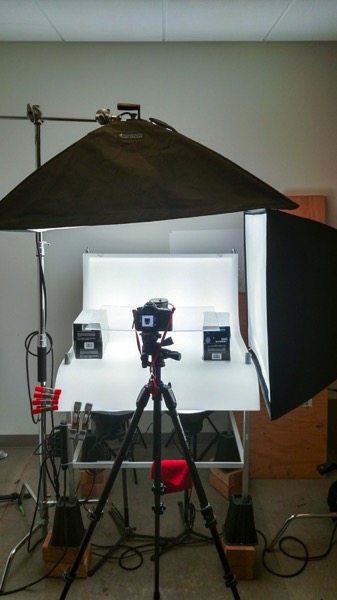
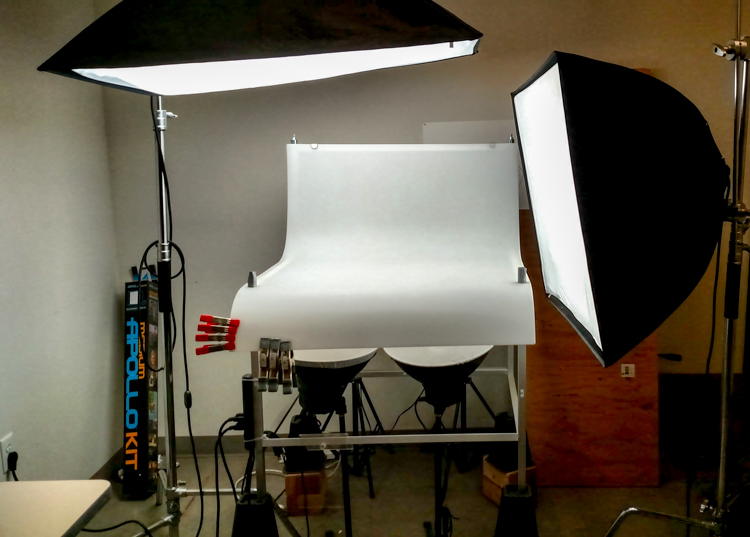
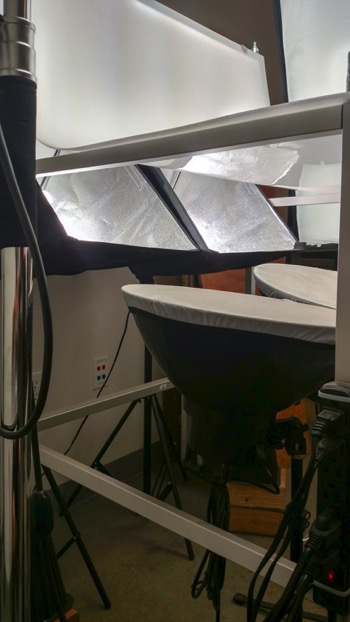
Now that you are caught up let’s dive in. For almost every shoot I start by turning on my table lights. Those include the lights behind and beneath my table to allow the surface to glow from within (see photo above).

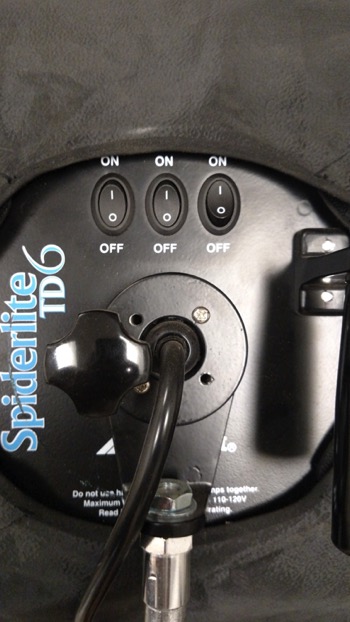
I have one of my Spiderlite TD6 heads above the table aimed straight down. This really helps fill in the top of the product and knock down the shadows caused by the table that underlights the product. My second TD6 light is the one that moves around my set. This is my main light as it is set brighter than the others and it is responsible for the main direction of light.

Settings for my lights will differ slightly from what you will need but this is a good starting point. The overhead TD6 is set for 30% power. The two Flashpoint lights under the table are set to 50% power. I have two small fluorescent softboxes behind the table at full power. My main TD6 is usually at 66% power (two switches turned on).

PICTURE 2 PICTURE 3

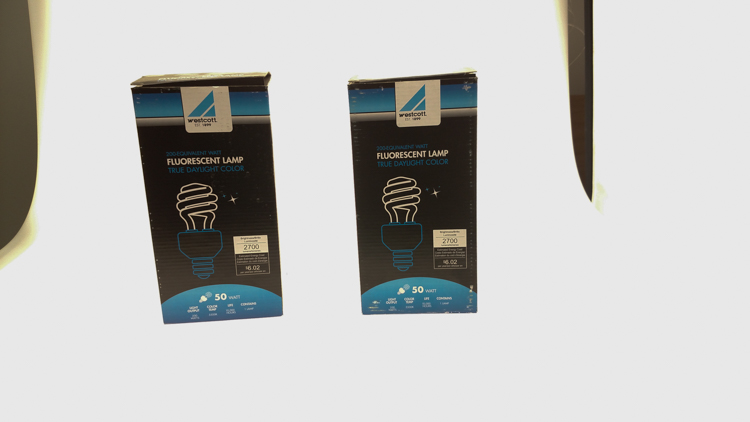
These are the settings I run on my lights, and they work for almost all of my clients that need photos shot for their Amazon, Ebay, Etsy stores or their online company catalog. You need to realize that all bulbs are not created equal and that if you are mixing different daylight balanced fluorescents that colors can come out altered in your shots.

Set the color balance

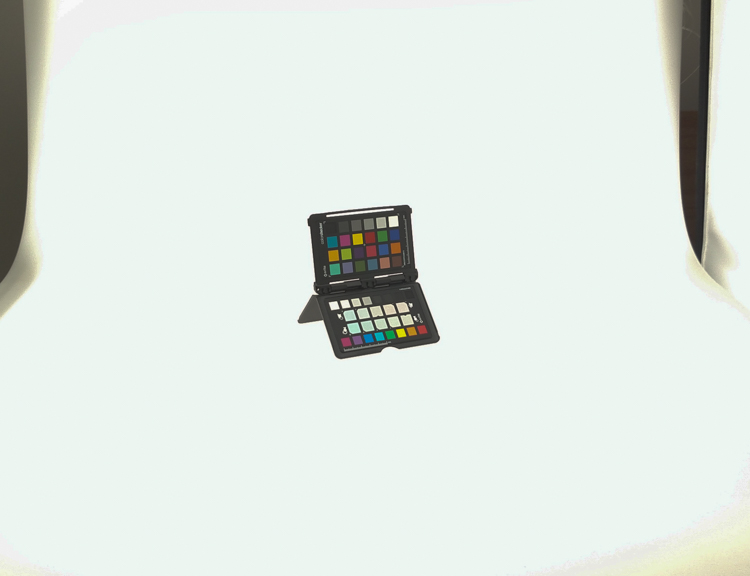
To counter this problem, invest in the Xrite color checker. Make a custom profile for your camera using your lights and this will ensure that colors are accurate. To find more information on incorporating the Xrite into your workflow check out this article by Andrew Gibson: How to Use the X-Rite ColorChecker Passport to Obtain Perfect Color.

PICTURE 4

Set the exposure

As for my camera, I have one of my custom buttons pre-programmed and ready to go, I simply switch to C2 and I am shooting in seconds. My C2 settings are fixed for Manual Mode at f/16 and 1/6th of a second, highlight detection on, and a square crop. This will get me very close with my studio setup. If I need a little more blowout on my white table I slow my shutter speed, or alternatively if any clipped whites creep into my product I can increase the shutter speed.

PICTURE 5

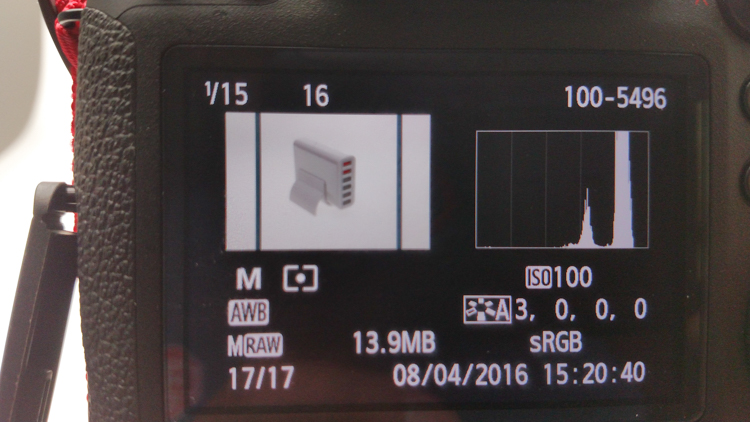
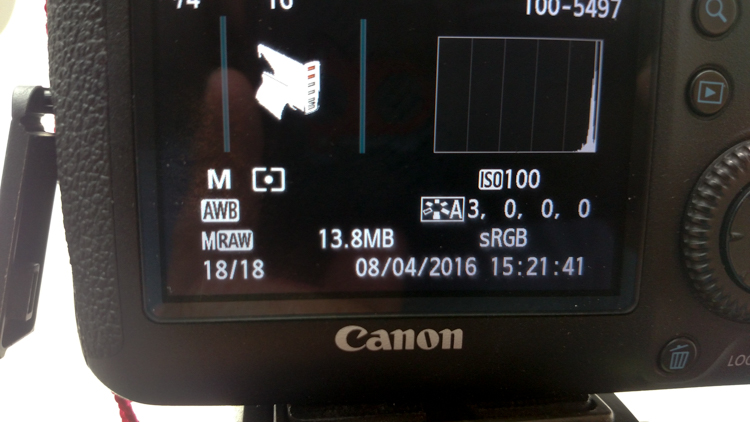
I also find that manual focus is much faster in this situation. Focus hunt happens a lot during shoots and it eats time quickly when you are shooting 20+ products with 4+ angles per part. With a quick flick of a button on the back of my camera, I can enter Live View mode, zoom in, and get the exact focus that I would like. I shoot with highlight detection on so that when the image comes up for review anything that is clipped will flash black.

PICTURE 7

From there I am able to determine if I obtained a proper exposure. The histogram doesn’t help very much here as it is always going to be spiked to the right because I am purposely blowing out the background. I have also set my camera to crop the image to a square as this tends to be the only format my customers want for this style of photography.

Make a raised platform

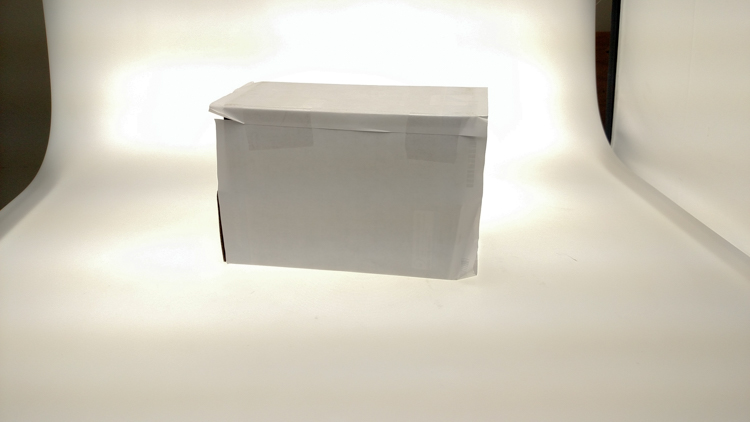
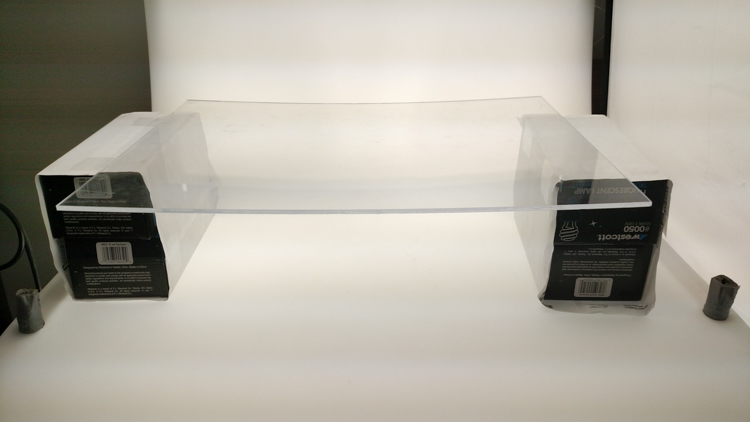
A big tip that I can share with you is to use a raised platform. The reason you need a raised platform is because when an object gets placed directly on the table surface it tends to add a glaring highlight to the bottom of the product. The tabletop and the highlight are so close in terms of power it becomes difficult to blow out your table and keep the highlight on the bottom of your product from clipping. I have a super easy solution to get around this dilemma. What I did was take two boxes, stack them on top of each other, and then wrapped both in regular old white printer paper.

PICTURE 8

PICTURE 9

If you leave them unwrapped then you will have black strips reflecting in your product. The next thing I did was get a sheet of clear acrylic from Lowes. It is a quarter inch thick, and is 18×24″. It cost me around $ 20. I place this acrylic on top of the wrapped boxes which raises the shooting surface by seven inches.

PICTURE 10

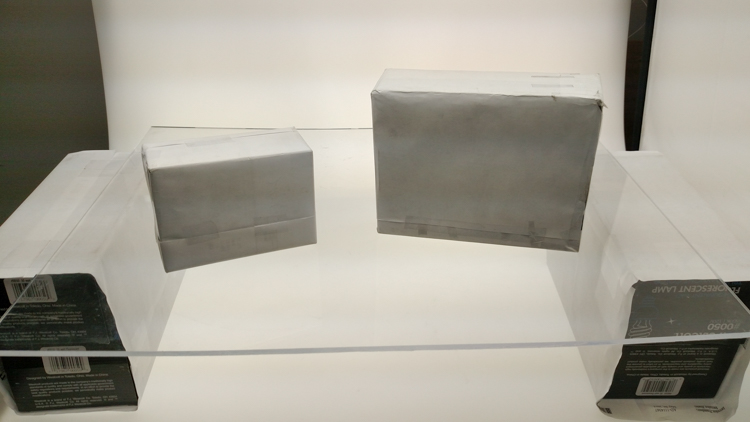
What this does is allow the table to blow out, but because of light falloff it prohibits the product from being overly lit on the bottom and clipping the highlight. While I was at it I wrapped two smaller boxes of different sizes in white paper as well. I use these quite often to bounce light back into the shadows.

PICTURE 11

Ready to place the subject

Now that we have gone over power settings for the lights, the configuration of my camera, and some tips on knocking down blown highlights by raising the surface, let’s set up an actual shoot. We will ease into it and start with something that doesn’t give you a whole lot to think about. Let’s do a regular coffee mug.

I placed the mug directly in the middle of the acrylic. The overhead light is directly over the mug aimed down. The other TD6 is at 90 degrees, hitting the mug from camera right.

PICTURE 12

Picture-13b

The resulting image is 95% ready to go online almost straight out of the camera. There are a few things you might want to obsess over, like adding more white reflection and narrowing the dark gap. But honestly, it’s ready to go as is. I did say this was an easy subject so let’s move onto something a bit harder, shall we?

Let’s try a harder subject

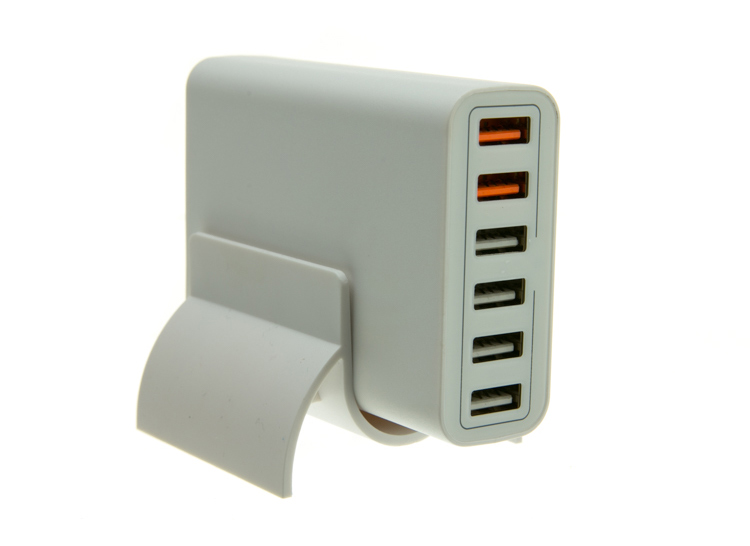
The next thing we will attempt is something that gives plenty of photographers fits; a white subject on a white background. Well, because we have a blown out table top and we are controlling the amount of light that the tabletop is introducing to our subject, it actually isn’t difficult to get great results.

Let’s start with the same lighting. Light from directly above, and one more light at 90 degrees to camera right. Straight out of camera we can see we did a pretty good job.

Picture-14b

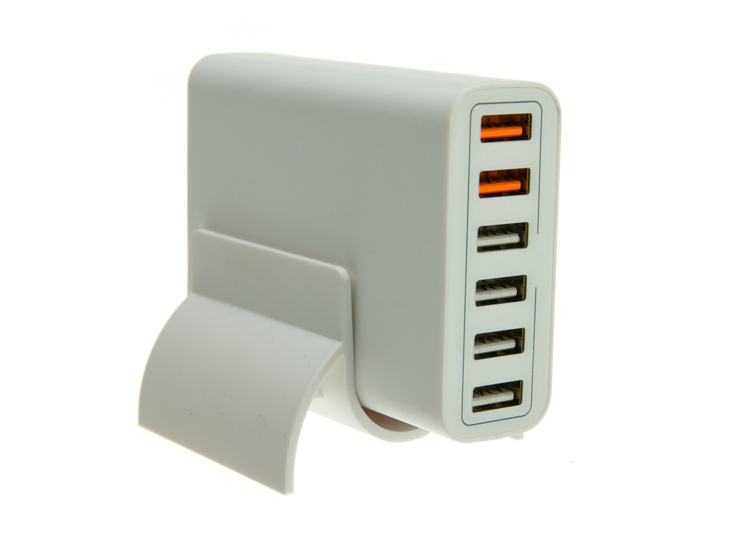
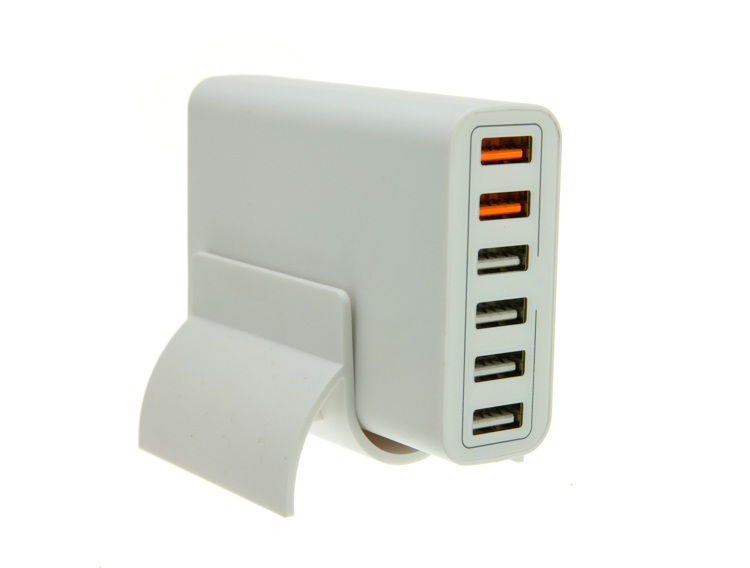
There is no major clipping going on the subject yet the background is completely white. There is not a lot of shape and dimension to the item, however. So let’s move the right light so that instead of 90 degrees it is 45 degrees. Now the light will hit the product on the front of this USB hub. Bingo.

Picture-15

We now have highlights on the leading edges which helps give it shape and dimension. It’s very close, but we can still do a little better. Let’s add one of those white wrapped boxes we made earlier to the shadow side and bounce some of our key light back into the product.

PICTURE 16

Picture-17b

Now what we get is just a subtle fill in the shadow and that just about does it for this product. Yes, we could obsess further over some other details and finesse it some more, but remember this is a speed table. We are trying to get products on and off the table quickly. This image would pass for all of my clients.

Shooting reflective surfaces

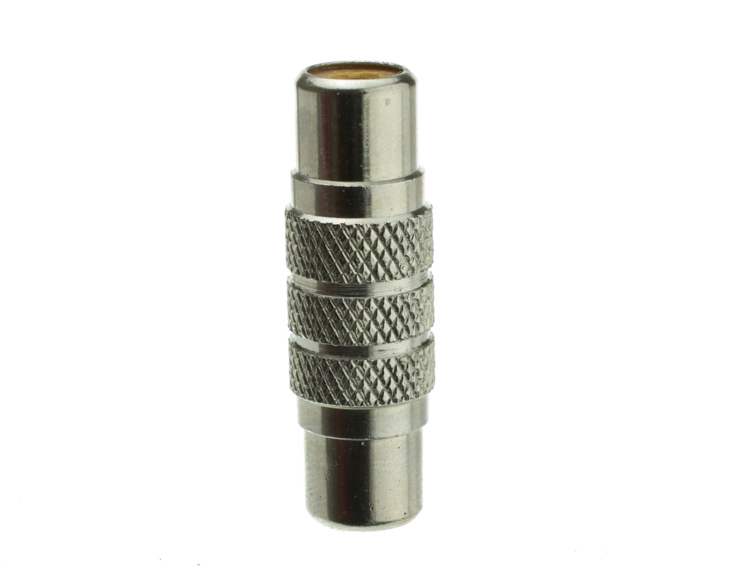
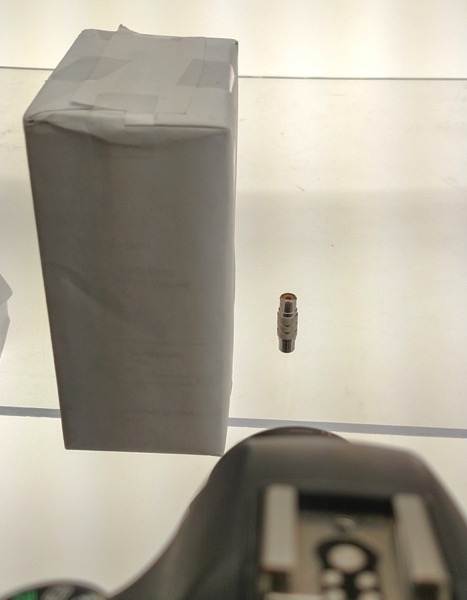
For our final demonstration let’s do a reflective surface. Leaving the lights exactly the same as the previous shot (again because this is about speed) I will remove the white box that is acting as a fill and shoot this RCA adapter.

PICTURE-18b

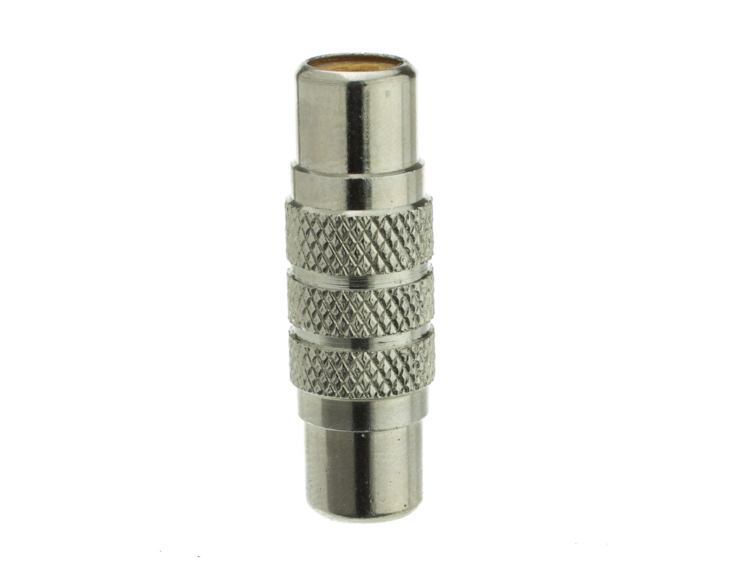
Again right out of camera it is pretty good. You can see some red reflecting on the shadow side in the lower left which is coming from a red bag out of frame, and there is a really dark strip running down the left/center side. Let’s clean those two things up and try again. I will remove the red bag from out of the frame and put the smaller white box fairly close to the adapter.

PICTURE 19

picture-20b

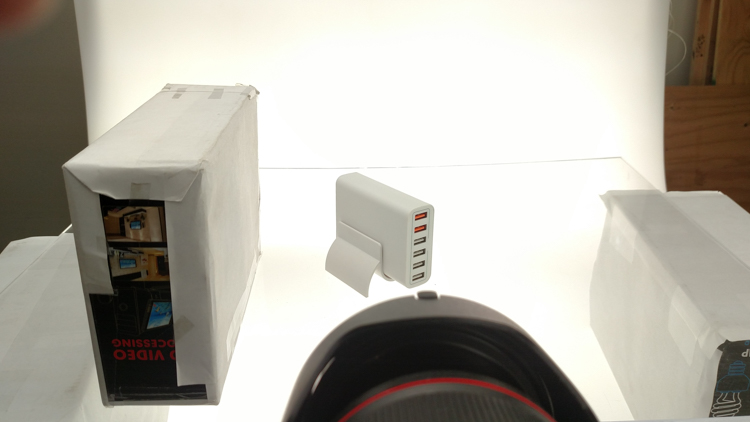
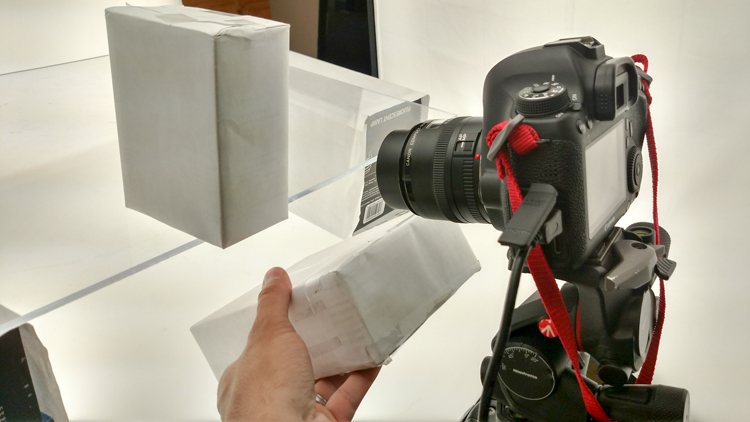
With just those two changes it has made a large difference in the shot. Let’s try and clean this up a tad more. The reason there is a black line is because it is reflecting the much darker room behind the camera. Using the angle of incidence I will use my large white box just below my lens and throw light back into the subject.

PICTURE 21

picture-22b

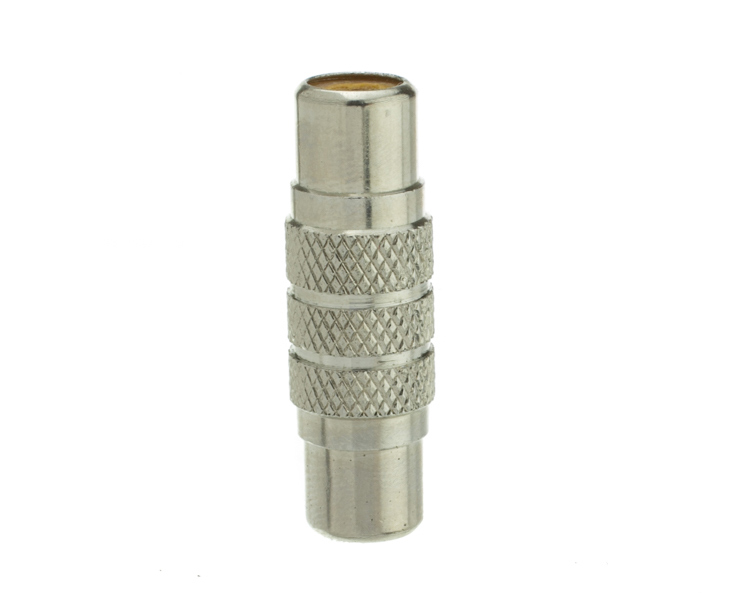
There we go! A perfectly acceptable image for an online catalog. The RCA adapter is cleanly lit, no harsh black lines, a fully white background and it is already squared because of our camera settings. This image is ready to go.

Read more info about shooting reflective surfaces here.

Summary

The reason I built this system is for speed. If you are trying to knock out 100 products a day, with this system you could absolutely do it. I know because I have done it.

Of course, there is the third and final part of the process and that is editing using your favorite software.

I use Lightroom, and it will really going up your product photography game. You need it to catalog all of your client’s images, keep track of the part numbers, export to their specification and clean up shoot errors using very little time.

Please share your questions and comments in the space below.

googletag.cmd.push(function() {
tablet_slots.push( googletag.defineSlot( “/1005424/_dPSv4_tab-all-article-bottom_(300×250)”, [300, 250], “pb-ad-78623” ).addService( googletag.pubads() ) ); } );

googletag.cmd.push(function() {
mobile_slots.push( googletag.defineSlot( “/1005424/_dPSv4_mob-all-article-bottom_(300×250)”, [300, 250], “pb-ad-78158” ).addService( googletag.pubads() ) ); } );

The post Tips for Fast and Effective Studio Product Photography by Jacob Macias appeared first on Digital Photography School.


Digital Photography School

 
Comments Off on Tips for Fast and Effective Studio Product Photography

Posted in Photography


Phottix introduces Canon RT version of its battery-powered Indra500 TTL studio flash head

23 Sep

Flash and accessory manufacturer Phottix has announced a new version of its Indra500 studio head that has a built-in TTL radio receiver for Canon’s RT flash system. The new head can be controlled directly from a Canon RT radio Speedlite in the hotshoe of a compatible camera or by using a Canon ST-E3 or Phottix Laso transmitter instead. The head can be used in flash networks alongside 600EX ll-RT and 430EX lll-RT radio-controlled Speedlites as well as non-RT flash guns that are fitted with a Laso receiver. The Laso receiver converts optically-triggered flashguns so that they can be controlled via 2.4GHz radio signals.

In all other ways the Indra500 LC TTL head is the same as Phottix’s standard Indra500 heads that offer TTL control with Canon, Nikon and Sony cameras via the Phottix Odin radio communication system. The heads have a maximum output of 500W/s and provide high speed sync options as well as manual output control across eight stops from 1/128th power. The heads take Bowens S-mount accessories and can be powered by the Phottix Indra 500mAh li-ion battery pack or via a mains adapter.

The company hasn’t announced a price for the Indra500LC TTL but the existing heads retail for $ 1419 including the battery, battery cable, a 5in reflector and a carry case.

For more information see the Phottix website.

Press release

Another Phottix First: Phottix Indra500LC TTL Studio Light compatible with the Canon RT System

Phottix presents the first studio light system compatible with Canon’s radio flash system. The Indra500 TTL, introduced in 2014, was the next generation of Phottix’s innovative TTL products – the Indra500LC takes that one step further – incorporating the radio control and triggering of the Canon RT and the Phottix Laso triggering systems. The Indra500LC gives photographers 500W/s of TTL power, opening up new possibilities and allowing photographers to shoot in shutter and aperture priority modes with incredible power.

High Speed Sync
With the Phottix Indra500LC TTL’s High Speed Sync function photographers can shoot at higher sync speeds* allowing wider apertures while still being able to control ambient light. In manual mode the Indra500LC offers 8 stops of power adjustments – from full power to 1/128 in 1/3rd stop increments. With Stroboscopic Mode, the Phottix Indra can be used for special effect and creative shooting with flash frequencies of 1-100HZ and flash counts of 1-100 times.

Built-in Triggering
The Phottix Indra500LC TTL has the power and control of the Canon RT and Phottix Laso triggering systems built-in. Switch between TTL and Manual modes, adjust EV and manual power levels and use high speed sync, all from the Canon ST-E3, compatible Canon RT Speedlites and the Phottix Laso Transmitter – no extra hardware is needed.

Canon non-RT Flashes
One of the best things of the Phottix Laso Triggering system is its ability to incorporate older non-radio Canon flashes into a photographer’s workflow. There’s no need to set aside older non-RT flashes such as the venerable 580 EXII – add a Phottix Laso Receiver and gain the ability to control and trigger it. Add legacy flashes, Canon RT-enabled flashes – and the Phottix Indra500 LC for a complete lighting solution.

“This the next logical step for the Indra series,” said Phottix CEO Steve Peer. “Canon users can now build on their current lighting system and retain the amazing functionality that system offers”

The Indra500LC comes with a Li-Ion battery, cables, charger, carrying bag and a new, smaller 5” reflector to make the Indra500 LC easier to pack and take on location.

*On compatible cameras.

Articles: Digital Photography Review (dpreview.com)
 
Comments Off on Phottix introduces Canon RT version of its battery-powered Indra500 TTL studio flash head

Posted in Uncategorized


Polaroid LED photo studio color box light offers portable, low-heat lighting

03 Sep

A new Polaroid-branded LED photo studio color box light has been introduced: a 907g / 2lb lightweight offering with an attachable handgrip, remote control and quiet operation easy-press buttons. Information including the color temperature, brightness and mode, as well as battery life, are displayed on an integrated LCD.

The new color box light is designed to be highly portable with support for both handheld and tripod usage; it can also be connected to other photo boxes for larger projects. According to Polaroid, the light features 600 LEDs and can achieve up to a 93% efficiency. 

The Polaroid LED photo studio color box light is available from Amazon now for $ 120.

Articles: Digital Photography Review (dpreview.com)
 
Comments Off on Polaroid LED photo studio color box light offers portable, low-heat lighting

Posted in Uncategorized


Canon EOS 5D Mark IV added to studio scene comparison

30 Aug

As soon as our Canon EOS 5D IV test unit arrived we put it straight to work, both out and about in Seattle and in the studio. The EOS 5D IV has just been added to our studio test scene comparison tool, so you can easily compare it to its peers. Our dynamic range test results will be following shortly.

For now, check out how the EOS 5D IV compares to its peers and competitors in our studio by clicking on the link below.

Canon EOS 5D Mark IV studio test scene

*Raw images have been processed with an early beta build of Adobe Camera Raw. Image quality may not represent the final version of the plugin, but is likely to be close.

Articles: Digital Photography Review (dpreview.com)
 
Comments Off on Canon EOS 5D Mark IV added to studio scene comparison

Posted in Uncategorized