Lens adapter manufacturer Metabones has announced new firmware for its Speed Booster and Smart Adapters that brings on-sensor phase detection autofocus to owners of Sony’s Alpha 7R ll and the Olympus OM-D E-M1. Read more
Tag: Speed
-
Demystifying Shutter Speed
One of the most crucial factors of making any photograph is the selection of the shutter speed. It is not always an easy task to decide what shutter speed you should select, to correspond to the aperture or ISO setting you have chosen. It can be a little overwhelming, and sometimes discouraging, to learn how to select the proper shutter speed to produce whatever your desired photo may be. You might still be shooting in full auto just because you can’t seem to have any luck with manually selecting your exposures. Luckily, once you understand the basic concept of shutter speed in relation to photography, this aspect will become much easier and almost intuitive.
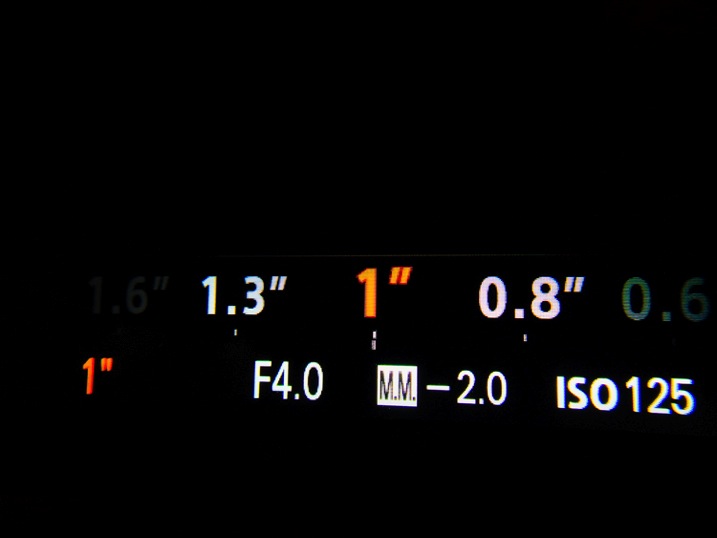
Let’s take a look at what shutter speed really is, and how to better understand it, so you can begin to have more control over your photography.
What is shutter speed?
First things first, what exactly do photographers mean when they say “shutter speed”? This refers to the amount of time that the shutter of the camera is open. Shutter speed can be easily compared to blinking. Close your eyes, then open them for about one second. Now close them again. You have just performed a one second exposure with your eyes. Though very simplified, the exact same thing happens inside your camera when you press the shutter release button. The shutter opens, and remains open, for whatever duration you have set your camera to expose. This lets in light through the lens which interacts with whatever receptor you’re using (film or digital sensor), in order to produce a photograph. In reality, it might help you to refer to shutter speed as shutter time.
How does shutter speed affect a photograph?
As I have said, shutter speed is one of the biggest assets you can control in order to produce the type of photograph you want. Now, the shutter is not to be confused with aperture. Aperture has nothing to do with the amount of time that light is allowed to enter your camera. Aperture simply refers to the size of the opening through which the light passes when the shutter opens. The larger the opening is, the more light that enters your camera. The shutter speed, on the other hand, controls how long light is allowed to linger in order to make the photograph. Got it? Good.
So since shutter speed is related to time, it naturally means that it will directly affect how motion is recorded by your camera. This is where an infinite amount of creativity can be applied to your photographs. You may have heard a photographer say, “I used a really fast shutter speed to freeze the motion.” What they means here is that he or she used a shutter speed that was much faster than whatever motion was happening in the scene. The faster the motion, the faster the shutter speed will need to be, in order to arrest the movement. This is the very reason beginner photographers can become frustrated when photographing sports, children, or pets. They simply don’t understand that the shutter speed must be set in relation to the subjects motion to produce a desired outcome.
Take a look at this quarter that I froze mid-roll by using a fast shutter speed of 1/1250th of a second.

The flipside of the shutter speed coin comes into play when you want to impart a sense of motion, or to intentionally use blur within your composition. There is no better illustration of this than when working with moving water and waterfalls. Photographers will often use a long shutter time in relation to the speed of the water in order to produce that smooth, almost fog-like appearance that many of us love (or hate) to see. This again, comes down to relativity. A longer shutter time will be needed to blur a slow moving subject. A faster moving subject will not require as long of a shutter time in order to produce the same effect.
Here’s that same quarter shot at 1/50th of a second.

Things to keep in mind about shutter speed.
As with virtually everything else that has to do with photographic technique, there are not absolutes when it comes to how you choose to manipulate your shutter speed. It always comes down to whatever it is you are trying to express through your photograph. However, this doesn’t mean that there aren’t other things that you should know which are related to shutter speed. Two of the most important things you need to know is how aperture and ISO interact with shutter speed.
Aperture
Aperture is the best friend, and worst enemy of your shutter. As you have already learned, aperture controls the size of the opening in your lens and is measured in “stops”. Stops are indicated by the usage of f-numbers. Understanding how aperture is measured is the most difficult aspect of the subject. It is actually somewhat counter intuitive and that is why it becomes so confusing. Basically, the larger the f-number, the SMALLER the physical opening becomes. It might help to think of aperture as a window in your home. The larger the window the more light can come through. When shooting at larger apertures (smaller f-numbers like f/2.8, etc.) you have a lot of light coming into your camera so your shutter time doesn’t have to be as long in order to reach the desired exposure. The opposite is also true. When you are shooting at smaller apertures (bigger f-number like f/22) a longer shutter time will be required to produce the same exposure that was achieved at the larger aperture.
Here you can clearly see why less light can come through a smaller aperture.

Let’s say a certain shutter time at a certain aperture gives you a properly exposed image. You then switch to a higher f-number. If you don’t increase your shutter time, this image will be underexposed compared to the previous one because you have essentially made the window into your camera smaller. The take-away point here is that a change in aperture must also be accompanied by a change in shutter speed if you wish for the overall exposure to remain the same.
It should also be noted that aperture plays a key role in the perceived depth of field of a photograph…but that’s another article.
ISO
ISO is a measurement of light sensitivity. It is fairly straight forward to understand. The higher the ISO number, the more sensitive the camera sensor, or film, is to the light coming in through the lens. Although most modern cameras are capable of selecting ISO in smaller increments, when first learning about how ISO relates to shutter time it might be easier to use increments in powers of two; meaning ISO 100, 200, 400, 800, 1600, etc. Each time the ISO number doubles, the sensitivity to light also doubles. So ISO 200 is twice as sensitive as ISO 100.
We can then easily relate ISO to shutter speed using a one second exposure to simplify the math. Let’s say we find that a proper exposure of a scene requires ISO 100 and a one second exposure time. If we increase the ISO to 200 then we have doubled the sensitivity so we can now get the same exposure using half a second instead of one second. If we further increase the ISO to 400 then we can get the same results from a ¼ second exposure. As you have probably already deduced, increasing your ISO is an easy way to allow for an increase in shutter speed to compensate for subject movement, or for low light.
Take a look at these three images. I was able to get virtually identical results each time even though I decreased the exposure from 1 second to ¼ of a second just by increasing my ISO.


Be aware though, increasing your ISO will add grain (noise) to your final image to some extent depending on your camera and equipment. Still, it is almost always more acceptable to live with a little increased grain in an image, than to underexpose or miss the shot completely.
Understanding what shutter speed means to your images doesn’t have to be a complicated issue at all. Shutter speed, or more accurately shutter time, is simply a measure of how long you choose for light to enter your camera to make an image. Learning how shutter time relates to other aspects of photography is slightly more complex. That doesn’t mean that it should discourage you from experimenting and seeing first hand how ISO, aperture, and shutter time come together to produce different types of images.
Have more questions about shutter speed? Post them in the comments below.
googletag.cmd.push(function() {
tablet_slots.push( googletag.defineSlot( “/1005424/_dPSv4_tab-all-article-bottom_(300×250)”, [300, 250], “pb-ad-78623” ).addService( googletag.pubads() ) ); } );googletag.cmd.push(function() {
mobile_slots.push( googletag.defineSlot( “/1005424/_dPSv4_mob-all-article-bottom_(300×250)”, [300, 250], “pb-ad-78158” ).addService( googletag.pubads() ) ); } );The post Demystifying Shutter Speed by Adam Welch appeared first on Digital Photography School.
-
Speed boost: Sony SLT-A77 II review posted
The Sony SLT-A77 II uses that company’s translucent mirror technology in combination with an AF system that Sony claims is dramatically improved over its predecessor. It boasts 12fps continuous shooting with AF, not to mention a 24MP sensor, built-in Wi-Fi with NFC, 2.4M dot OLED viewfinder and a tiliting/swiveling LCD. We put its impressive AF claims to the test. Read review
-
Weekly Photography Challenge – A Need for Speed
In this set of speed busting images you can see the effect that using a fast shutter speed can have on your images. If you want to photograph a moving subject and freeze them in mid-action, that is what is required.

By TexasEagle
Weekly Photography Challenge – A Need for Speed
This week your challenge is to find something moving – fast! It could be traffic on a busy street, or something involving sports of some kind. Just get out there and work on using a fast shutter speed to freeze the subject at the peak of action.
You can try the following settings to help you get sharp images:
- Continuous focus mode, will continually focus on the moving target as long as you have the button pressed part way down.
- Zone focus or having some or all of your focus points active. That allows the camera to pick where to focus.
- Back button focus – this is how the sports shooters I know do work.
- High speed or continuous drive – so you take a few shots in succession when you press and hold the shutter button.
- Shutter priority set to a fast setting. You will usually need at least 1/500th or faster to freeze anything moving quickly. NOTE: if you do use shutter priority keep an eye on your exposure. If the aperture is flashing at you in the viewfinder it means your shutter speed is TOO fast and the aperture cannot open wide enough to make a good exposure. In that case you may have to increase your ISO – but just keep an eye on it. OR use aperture priority set to your widest aperture which in turn will automatically give you the fastest shutter speed possible in that light. If it’s not fast enough – bump that ISO!
Here are a few examples to get you started:

By Danny Perez Photography

By Contact-Centres-Highland

By BANAMINE

By Mark Robinson

By Ib Aarmo

By USAG- Humphreys

By Pepe´ Cam Photography
Share your fast images here:
Simply upload your shot into the comment field (look for the little camera icon in the Disqus comments section) and they’ll get embedded for us all to see or if you’d prefer upload them to your favourite photo sharing site and leave the link to them. Show me your best images in this week’s challenge. Sometimes it takes a while for an image to appear so be patient and try not to post the same image twice.
googletag.cmd.push(function() {
tablet_slots.push( googletag.defineSlot( “/1005424/_dPSv4_tab-all-article-bottom_(300×250)”, [300, 250], “pb-ad-78623” ).addService( googletag.pubads() ) ); } );googletag.cmd.push(function() {
mobile_slots.push( googletag.defineSlot( “/1005424/_dPSv4_mob-all-article-bottom_(300×250)”, [300, 250], “pb-ad-78158” ).addService( googletag.pubads() ) ); } );The post Weekly Photography Challenge – A Need for Speed by Darlene Hildebrandt appeared first on Digital Photography School.
-
26 Speed Busting Fast Shutter Speed Images
Last week we saw some ethereal and mysterious long exposure photos. Now let’s go the opposite way and look at some images there would not be possible without fast shutter speeds (with a couple that have some help using flash to freeze motion too).
Images at either end of the shutter speed scale give us a chance to capture life in an altered state; one we cannot see with our eyes. Long exposures blur things beyond recognition and add mystery. Short exposures freeze things in time and space and capture literally a millisecond of time in an image.
Add flash and you can stop bullets, speeding arrows and more. Enjoy the world of high speed photography:
Bubbles by Chloe Veltkamp on 500px
Jump to the beach by Lily Nedolya on 500px
Patience my friend, patience. by Lasse Lundh on 500px
Spinning Reverse by Rajat Bhargava on 500px
Focus by Tin Man on 500px
Dancing on the Water by Teddy Winanda on 500px
High Flyer by Tony Antoniou on 500px
The flying car by Tristan Shu on 500px
skaugvold451 by Peter Skaugvold on 500px
Jump ! by Rarindra Prakarsa on 500px
Super Dog by Abbrar Cheema’s photography on 500px
Volley by Mary Ruiz on 500px
Soft Touch by Max Rinaldi on 500px
A Splash of Rose by Anthony Chang on 500px
Head shake by Derek Watt on 500px
Show Time by Max Rinaldi on 500px
Oops~! by kimerajam . on 500px
Crossing the river by Edwin Leung on 500px
Splash!!! by Ástur Montes on 500px
JOYFUL by Ario Wibisono on 500px
Inle Smoker by Vichaya Pop on 500px
Bang by Jinsoo Park on 500px
Burn Crew Concept by Philippe Lejeanvre on 500px
Turkestan Shrike ‹Lanius phoenicuroides› hunting Spiny-tailed Lizard by igano Kabamaru on 500px
Mudskipper (Oxudercinae) by igano Kabamaru on 500px
Watch Out! by Gary Brookshaw on 500px
googletag.cmd.push(function() {
tablet_slots.push( googletag.defineSlot( “/1005424/_dPSv4_tab-all-article-bottom_(300×250)”, [300, 250], “pb-ad-78623” ).addService( googletag.pubads() ) ); } );googletag.cmd.push(function() {
mobile_slots.push( googletag.defineSlot( “/1005424/_dPSv4_mob-all-article-bottom_(300×250)”, [300, 250], “pb-ad-78158” ).addService( googletag.pubads() ) ); } );The post 26 Speed Busting Fast Shutter Speed Images by Darlene Hildebrandt appeared first on Digital Photography School.
-
6 Ways to Use Shutter Speed Creatively
In many ways, shutter speed is an inaccurate term. I read an article a few years ago and the photographer referred to shutter speed as shutter time. The logic was spot on. A shutter always opens or closes at the same “speed”. The key value is how long the shutter stays open, hence shutter time. On Canon cameras the shutter speed function (shutter priority) on the mode dial is abbreviated to Tv, which stands for “Time Value”, and is a more accurate description of what this article is about. I am going to refer to shutter time as opposed to shutter speed, it sounds crazy, but it will make more sense. The reason this definition is important is because, we are going to be looking at how you can use the time that the shutter is open (and gathering light onto the sensor) creatively.
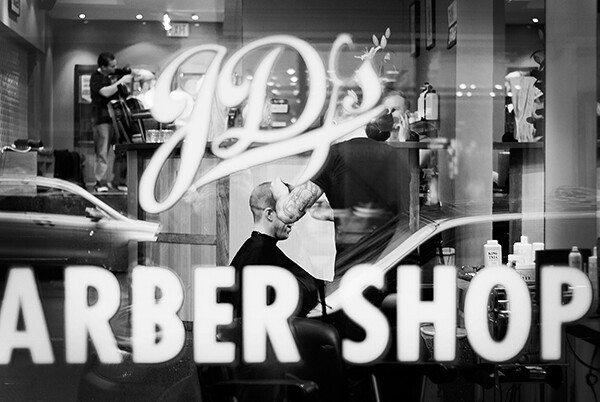
In a sense, shutter time is a bit like time travel. You camera’s shutter can open and shut in 1/8000th of a second. Think about that. Take one second, divide it by 8000 and one of those units is the time your shutter was open. That is very quick. On the other end of the spectrum, you can shoot super long exposures of 20 or 30 minutes. That means the shutter stays open for that length of time. Again, amazing. Think of all that light falling onto the sensor during that time, and the images that can be created doing so.
The shutter time becomes more than simply a moment in time, it could be a split second (literally) or a few seconds. The resulting image will capture and freeze the moment or, with a longer shutter time, there will be blurred movement. This is the fun part of photography. In many ways, your camera can “see” events that happen which you cannot. The camera can capture a frozen moment and suspend your subject in that moment forever, this is like magic. The compelling images are amazing to see and are reasonably easy to make, so let’s take a look at a few of them and see how they are done.
6 Ways to Use Shutter Speed Creatively
1. Freezing the moment
These are the images we all know about; ones that have captured a frozen moment in time. Normally these are sports images, the winning goal, or the knockout punch connecting. They are intriguing to most people and are compelling because we can’t freeze the moment in our eyes. We see a moving, continuous rendition of the events happening in front of us. You have seen “slo-mo” shots of the winning goal; the frozen moment image is that equivalent.
These images take a bit of practice to get right. Lets assume for a moment, you are photographing a soccer match. It is great to get action shots, but you will want to get any shots of the teams scoring goals. You will then need to have the correct lens. In sports photography, it will be a pretty long zoom or telephoto lens. Most sports photographers will use 400mm and longer. You will also need to keep your camera steady. A tripod in these cases is somewhat impractical as you need to be able to move the camera quickly and easily to follow the game. A monopod is normally what works best.
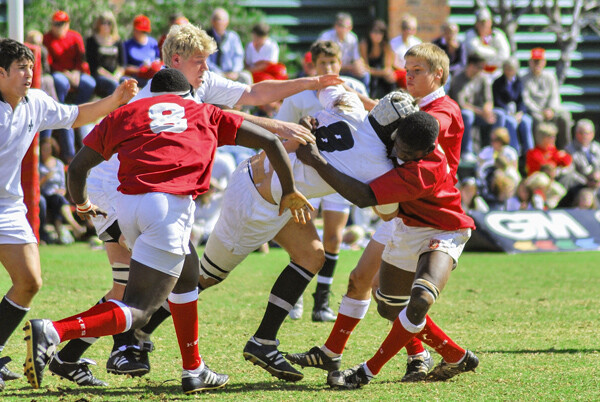
Depending on the lighting conditions you need to make sure you have a shutter time that captures the players in mid-action. You also need to take the lighting into consideration. If you are shooting in an outdoor arena, the natural light may be sufficient, but if you are in an indoor arena, you might need to be more aware of your exposure. In that case, you may need to push your ISO up high enough to allow you to freeze your subject. In most sports 1/1500th of a second is the starting point for freezing action. In very fast sports like ice hockey, soccer, rugby and so on, you may need to be shooting at even faster speeds than that. This is how you set up the shots.
Technique
How to do it: Set your aperture to an aperture setting of f/2.8 or f/4.5. This will allow for a quicker shutter time, which will in turn freeze the action. If you are shooting a sporting event in the sunlight, you may need to have your shutter time set to 1/1500 or faster. If this is still not freezing the action, make the shutter time even quicker. Try and anticipate the action and release the shutter at the moment you think it will happen. Be aware that your focus will need to be spot on. With a wide aperture, you run the risk of misfocusing and missing a shot. I once heard a sports photographer say this ” If you see the goal in your viewfinder, you missed the shot”. When you do get that shot though, it will be worth it.
2. The decisive moment
Henri Cartier-Bresson coined the phrase, “The Decisive Moment”. Do a google image search on Cartier-Bresson and the decisive moment, you will see many of his great images. He was well known as a street and people photographer, and he believed that you need to choose the precise moment when something happens to hit the shutter release. As you can imagine, this is not easy. Sometimes this might mean you need quick reflexes.
 Most of the time, it requires patience. He would often set up the shot, get the framing right and then wait. You don’t want to wait for hours, but be patient, sit there for 20 or 30 minutes and watch the scene. Take note of how people are moving into, and out of your frame. When time is right, or the perfect subject (person, vehicle, animal, whatever you choose) moves into the best position, release your shutter at that moment. This will take practice and more than a few shots to get it right, but when you do, you will be ecstatic. The shot will look candid, but you will know what it took to get that image. Many people assume Cartier-Bresson’s images were simply shot quickly from the hip, but much of the time they were planned and he waited patiently for the decisive moment.
Technique
How to do it: You need to think of a scene you would like to capture, visualize it. You may want to capture the comings and goings at a coffee shop in your city. You may want to have someone with a red coat sitting outside, sipping coffee. You should then set up and frame your shot, then sit there until the scene unfolds. Someone with a yellow jacket may sit down, which might work too. So be flexible, but be patient, sooner or later the shot will unfold.
3. Abstract and creative blur
As I said earlier, shutter time is a bit like time travel. You can capture an infinitesimally small slice of a moment, and in other cases you can capture seconds, or even minutes. When the shutter is open, light is coming through your lens and falling onto the cameras sensor. If you allow this to happen for a long enough time, some part of your image will blur. Sometimes blur in an image is unwanted. This happens when your shutter time is too long, your camera moves unintentionally, and the image is ruined.

A close-up image of a flower, shallow depth of field blurs the background, but the yellow stamens are in focus.
The kind of blur I am talking about here is intentional blur. This technique can be used to make slightly, or completely, abstract images, depending on the shutter time. The longer the shutter time, the more movement there is, and the more blur you will see. Blurring can be the result of your subject moving, you moving the camera, or both. If your subject is moving and the camera moves, the blur can be very dynamic. If your camera is on a tripod and the subject moves, this creates a sense of speed.
Technique
How to do it: Set your aperture to f/5.6 or higher (smaller opening). Attempt this in low light conditions, just before and just after sunset. Set your shutter time to 1/10th of a second or longer. Release the shutter and move the camera quickly from left to right. You can rotate the camera, move it up and down, or even just shake it in your hand while the shutter is open. In this technique, you will be moving the camera and the scene could have moving elements in it too (i.e. a car or a bus could be driving past, or people could be walking in the scene). The results will be random and unusual, but with practice, you can create some pretty compelling abstract images.

Camera swirl, this image was made by rotating the camera anti-clockwise while the shutter was open
4. Low light exposures
The goal in low light exposures is to have the scene in focus, and only one part in the scene moving. This is particularly interesting at night when you get light trails from a vehicle driving through your scene. You can do this in the early evening or evening if it has become dark. These images are compelling because the light trails from the vehicle seem to hang magically in the air while the vehicle itself is invisible. Another great time to shoot longer exposures is during the blue hour; the 20 to 30 minutes of soft blue light that fills the sky after the sun has set. This is a great time to do longer exposures too as the sky will look blue and your subject (a city or a landscape scene) will be well lit.
Technique
How to do it: Set your camera up on your tripod. Select an aperture setting of f/8 to f/11. Set your shutter time to expose correctly for the scene. Depending on the light your shutter time could be anywhere from 1/10th of a second to three or four seconds. As it gets darker, your shutter time will need to increase. Set yourself up in a position where something will be moving – cars, boats or even people can work well for this. Take a few shots to see how it is all working and make any adjustments. The important technique here is timing. If you want to get a shot with the car lights streaming through your shot, time it so that you release the shutter as the car is in the best place in your scene, similar to the decisive moment.
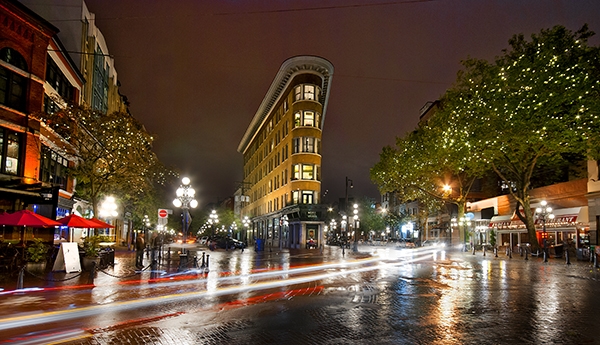
This scene works well because the light trails add some dynamic interest to the image
5. Long exposures
As the name suggests, these are longer shutter times. In some cases, they may be 20-30 seconds long, but for some really interesting images, you will want keep the shutter open for 15-20 minutes. Long exposures require the use of a 10 stop Neutral Density filter. This filter will block out the light sufficiently to allow you to open your shutter for long periods of time. The results can be amazing. You can use the ND filter in the day to make your shutter time longer. “Why would I want to do that?”, you might ask. You might have a scene with a windmill in it and you want to blur the movement of the windmill as it rotates. You might also want to create a seascape scene where the waves look silky and smooth. In these cases, an ND filter will be very useful.
Technique
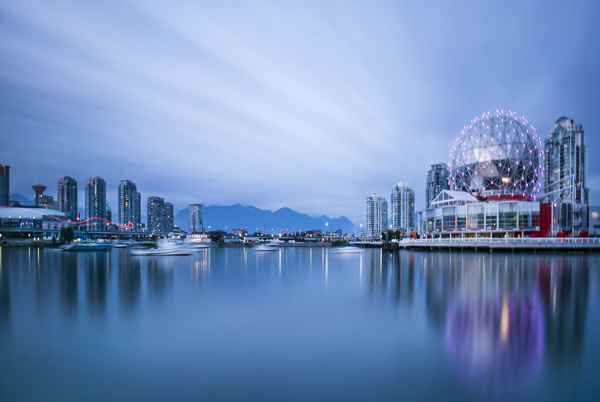
ISO 100, f/11, just under 13 minute exposure.
How to do it: Set up your camera on a tripod. Set your aperture to anywhere between f/11 and f/16. In these images, you will want to have an exposure time of 15-30 seconds and longer. You will need a cable release to go beyond 30 seconds on your exposure. You want a lot of movement in the scene, whether it is light trails or clouds moving across the sky. The longer you have the shutter open, the more surreal the image will become.
If you have an ND filter, set up your shot first, use autofocus to get everything in focus, then switch your camera to manual focus. The reason is, once you put the ND filter on your lens, the scene will become very dark. If your camera is on autofocus, it may struggle to find a focal point. If that happens, your lens will “hunt” for something to focus on and you won’t be able to get the shot, or it may be out of focus. So, once you have focused your image, switch to manual focus and mount the ND filter onto your lens to make the shot. Be aware, long exposure photography can really eat up battery life, so carry spare batteries if you have them, especially on cold winter evenings!
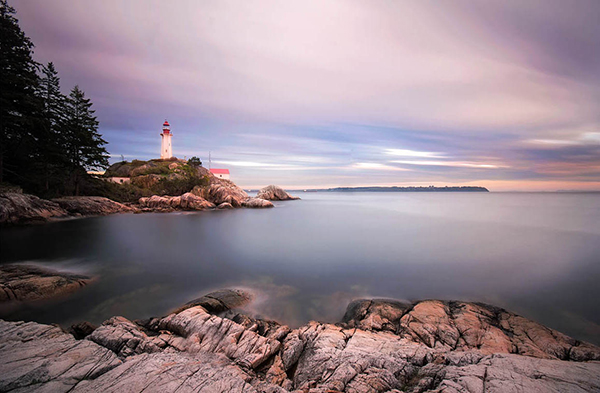
This image was exposed for four minutes, which softened the water and the clouds
6. Panning
This technique, when done correctly, can produce amazing results, but it’s not easy. Panning is when you focus on a subject that is moving, and you move your camera in a horizontal plane with them. During that movement, you will release the shutter. Your exposure time will depend on the subject and the light, but in this technique you don’t want to freeze the action, you want to suggest movement. A longer shutter time is preferable, so you may be shooting at 1/30th or slower. To pan effectively, you will need to practice a few shots, here are some pointers.
Technique
How to do it: Firstly, stand with a wider stance than normal. When you pan with your subject, move your body from the hips up. Timing is key, release the shutter when you think the subject is in a good position in the frame. Follow through, don’t stop the movement when you release the shutter, keep moving with your subject (and at the same speed as the subject) until the shutter closes (think golf swing).
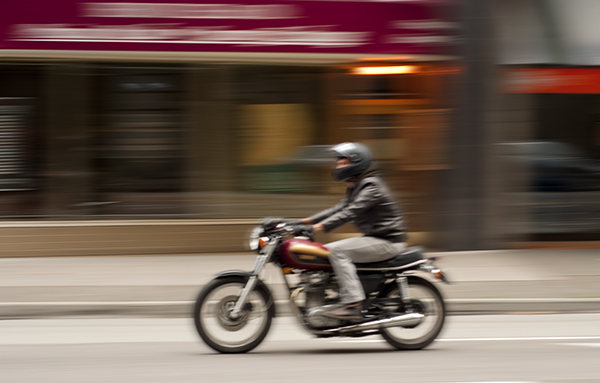
A panning shot creates a very unique sense of movement.
The next step is to go out there and get these shots. I would recommend you make an effort to try at least 20 to 30 shots of each of these techniques. Play with the settings, see what works and what doesn’t. Let me know what you think and maybe even put some of the results in the comments, lets see what you get.
googletag.cmd.push(function() {
tablet_slots.push( googletag.defineSlot( “/1005424/_dPSv4_tab-all-article-bottom_(300×250)”, [300, 250], “pb-ad-78623” ).addService( googletag.pubads() ) ); } );googletag.cmd.push(function() {
mobile_slots.push( googletag.defineSlot( “/1005424/_dPSv4_mob-all-article-bottom_(300×250)”, [300, 250], “pb-ad-78158” ).addService( googletag.pubads() ) ); } );The post 6 Ways to Use Shutter Speed Creatively by Barry J Brady appeared first on Digital Photography School.
-
Sony Alpha 77 II firmware update improves AF speed
Sony has released a firmware update for the SLT-a77 II, its 24MP semi-pro APS-C camera. Firmware 2.00 claims improved autofocus speed in all light conditions, but notably a 2.5x improvement in low light. Support for XAVC-S full HD video recording is also added. Read more


