RSS
 

Posts Tagged ‘Speed’

Elinchrom adds Sony compatibility to its high speed sync Skyport Plus HS wireless controller

11 Aug

Lighting manufacturer Elinchrom has introduced a version of its high speed sync Skyport remote flash trigger and controller that is compatible with Sony cameras. The new Skyport Plus HS transmitter allows Sony camera users to synchronize their shutter with Elinchrom flash heads using speeds of up to 1/8000sec. The system has been in use for some time for Canon and Nikon users, but now Elinchrom has added Sony to the list of camera brands with which the transmitter works.

Elinchrom’s high speed sync system is called Hi-Sync and varies from hotshoe style flash units in the way it produces light for short shutter speeds. While HSS modes in speedlights tend to use pulsing flash that gradually covers the camera sensor as the shutter slit passes by, Hi-Sync just uses a relatively long-duration burst. The company has introduced a system it calls OverDrive Sync that allows the user to calibrate the timing of the burst to the opening and closing of the individual camera’s shutter to ensure the two events coincide. This ODS system also allows a certain degree of exposure manipulation as photographers can tailor their shutter to different segments of the flash output curve.

The Skyport Plus HS 2.4GHz radio transmitter has a range of 200m/656ft when used without obstruction between the camera and the head, and 60m/196ft when used indoors. It system offers 20 channels for normal shooting and 20 more for high speed shooting, which can be arranged in 4 groups, and an AF illuminator to assist in low light conditions.

The Elinchrom Skyport Plus HS costs $ 249.95 USD / €249 EUR / £199 GBP.

For more information see the Elinchrom website.

Sony camera compatibility

 A7  A7 ll  A7r  A7r ll  A7s
 A7s ll A33 A37 A55 A57
A77 A77 ll A99 A100 A230
A290 A330 A350 A380 A390
A450 A500 A550 A560 A580
A700 A850 A6000 RX1 NEX-7K

Press release:

Elinchrom expands the family of EL-Skyport Plus HS transmitters to Sony users !

Since the launch of the Skyport Plus HS for Canon and Nikon, Sony users have been patiently awaiting their dedicated Transmitter. As promised, the most advanced Skyport ever is now available to Sony users. This will give them the ability to control and visualize power settings for all their compatible Elinchrom lights and the capability to shoot at speeds up to 1/8000s in Hi-Sync mode.

Visual Feedback Interface
The Large LCD display of the Skyport HS features two-way control via a visual feedback interface that lets you see the exact power up to 10 compatible Elinchrom lights in your setup right on the transmitter.

Users can control the modelling lamp and power of each flash unit directly from the Skyport transmitter, which instantly shows the updated settings.

This provides unsurpassed levels of “two-way communication and control” for every light in your setup, right from your camera.

Hi-Sync opens up the world of flash photography
Elinchrom Hi-Sync technology lets you go beyond the X-Sync of your camera. Photographers can simply switch to Hi-Sync mode and access sync speeds up to 1/8000s to freeze motion, overpower the sun, darken backgrounds or use a wider aperture. The ODS (Over Drive Sync) enables users to fine tune the Skyport Plus HS transmitter’s trigger signal to optimize exposure at high shutter speeds while gaining up to 2 more f-stops of light.

Even more
The Skyport HS has 20 frequency channels that can be used for either Normal or Speed mode. The transmitter attaches easily and securely to the hotshoe with its one-touch quick-lock mechanism, and is powered by 2x AA batteries. Users can also enjoy a range of up to 656ft (200m) outdoors, and up to 196ft (60m) indoors.

The Skyport HS continues the Elinchrom commitment to quality
Providing photographers with tools to enhance their shooting experience whilst also showing how Elinchrom is looking firmly ahead to the future. The Skyport HS represents a seamless extension of the EL-Skyport family since it is also compatible with the three previous generations of Elinchrom flash units (those using the EL-Skyport Transceiver RX module for Style RX, Digital RX, and Ranger RX systems, and those with integrated EL-Skyport modules for the BRX, D-Lite RX, ELC Pro HD, and ELB series.)

Other camera systems are currently being evaluated for future release.

EL-Skyport Plus HS Features
* Large LCD with unique, real-time display of remote flash power settings
* Easy access buttons and rotation ring for fast setup and control
* 20 Channels, 4 Groups for Normal and Speed Sync Modes
* Hi-Sync, up to 1/8000sec with Sony, Canon and Nikon cameras
* Extended working range up to 656ft (200m)
* AF Illuminator and sure-lock mounting foot
* USB port for future-proof upgrades

The EL-Skyport Transmitter Plus HS is now available for Sony, Canon and Nikon cameras.
EL19371 – EL-Skyport Transmitter Plus HS for Sony
EL19366 – EL-Skyport Transmitter Plus HS for Canon
EL19367 – EL-Skyport Transmitter Plus HS for Nikon
Street Price: $ 249.95 USD / €249 EUR / £199 GBP

Specifications
Frequency Band : 2.4 GHz
Channels : 40; (20 in Normal mode – green / 20 in Speed mode – red)
Groups : 4: 1, 2, 3, 4
Flash synchronization :
Normal: limited to the native X-sync of your camera
Hi-Sync mode: up to a 1/8000 sec.*
2nd curtain sync: only Canon
Range : Up to 200m (656’) for triggering
AF Assist Beam : Yes
Connection :
Foot for Sony hotshoe (19371) Canon hotshoe (19366) and Nikon hotshoe (19367)
Mini-USB for firmware updates
2.5 mm remote release
Power source : 2x AA batteries
Indicators and Controls :
LCD screen display:
Sync mode, group, channel, ODS activation, Hi-Sync activation, shutter mode, remaining battery power, flash unit name, flash unit ID, flash unit power level, flash unit modelling level.
Buttons:
Group selection, test, rotation ring to change values, confirmation, on/off and refresh.
There are also 4 buttons with variable functionality:
Power +/-, Modelling lamp off/prop/free, Individual unit selection and setup on the dashboard. Menu up, menu down and exit in the setup menu.
Dimensions : 84.1 x 68.3 x 58.5 mm (3.3 x 2.7 x 2.3”)
Weight : 120 g ( 0.27 lbs.) without batteries

Articles: Digital Photography Review (dpreview.com)

 
Comments Off on Elinchrom adds Sony compatibility to its high speed sync Skyport Plus HS wireless controller

Posted in Uncategorized


Weekly Photography Challenge – Speed

30 Jul

Earlier I shared a collection of images that show speedy subjects.

Weekly Photography Challenge – Speed

Dave Young

By Dave Young

Chester Lam

By Chester Lam

Your job this week is to find and photograph a subject that is fast. Try and capture speed in whichever way you want – freeze it or blur it. Remember shutter speed controls motion in your image.

Share your images below:

Simply upload your shot into the comment field (look for the little camera icon in the Disqus comments section) and they’ll get embedded for us all to see or if you’d prefer upload them to your favourite photo sharing site and leave the link to them. Show me your best images in this week’s challenge. Sometimes it takes a while for an image to appear so be patient and try not to post the same image twice.

Fred Dawson

By Fred Dawson

Nuno Sousa

By Nuno Sousa

Moyan Brenn

By Moyan Brenn

Derek Raugh

By derek raugh

googletag.cmd.push(function() {
tablet_slots.push( googletag.defineSlot( “/1005424/_dPSv4_tab-all-article-bottom_(300×250)”, [300, 250], “pb-ad-78623” ).addService( googletag.pubads() ) ); } );

googletag.cmd.push(function() {
mobile_slots.push( googletag.defineSlot( “/1005424/_dPSv4_mob-all-article-bottom_(300×250)”, [300, 250], “pb-ad-78158” ).addService( googletag.pubads() ) ); } );

The post Weekly Photography Challenge – Speed by Darlene Hildebrandt appeared first on Digital Photography School.


Digital Photography School

 
Comments Off on Weekly Photography Challenge – Speed

Posted in Photography


Speed Up Your Photography Site

17 Jul

Speed Up Your Photography Site

I recently started paying more attention to my site’s loading speed since that is a very important aspect of Google’s algorithm. Google wants to provide a great user experience and a slow site will be penalised.  As a photographer I have lots of images and many images are really big – I really like my full screen slide show very much.


So what to do if you’re a WordPress user with lot’s and lot’s of big images?  Below is a workflow and some of the free tools and WordPress plugins I’m using to load faster and rank higher.


4 Easy And Free Steps to Speed Up Your Site And Rank Higher #photography
Click To Tweet


 – Start by testing your site loading speed. I use Pingdom.com’s Free Loading Speed Test Tool. Make a note of the  and/or rank and refer to this later on to evaluate your success.


– Trash un-necessary plugins that might cause your site to load slower.  Just today I trashed 3 plugins that didn’t contribute anything, on the contrary, they just bloated my site and made it load slower. Take a long hard look and weigh the benefits vs. the cost.  Kill your darlings.


– Optimize and re-size your images. It might seem contradictory to first tell you to trash plugins and in the next step tell you to install a new one, but believe me – this will really help. I’m using the free WP plugin EWWW Image Optimiser. There are a number of other ones as well but I really like the bulk optimise option of EWWW. it took me about 15 minutes to optimise and re-size all of my images on my site – Sweet!


– Cloudflare – speed up your site.  This free tool allows You to dramatically speed up and at the same time protect Your site by distributing your content around the world –  so it’s closer to your visitors = speeding up your site.


Having done all the steps above I saw an instant improvement – going from a load time of about 9 seconds (which means that my site was in the slowest 10%) to a load time of about 4-5 seconds. This puts my site in the fastest 40% – Not bad for a very image heavy site!


IMAGE SOURCE:

Feature image & image 1: courtesy of Per Zennstrom


Fashion Photography Blog

 
Comments Off on Speed Up Your Photography Site

Posted in Uncategorized


4 Batch Processing Techniques to Speed Up Your Workflow in Lightroom

09 Jun

0 copy

Lightroom is a fantastic program for keeping your photos organized, but it also provides many tools to speed up your editing workflow. You can even process many photos at once with batch editing. These techniques are by far the biggest time savers Lightroom provides. Once you start using them you’ll wonder how you ever edited each image individually.

Technique 1: Applying presets on import

Presets are hugely popular, and for good reason. They allow you to apply frequently used edits and adjustments to photos, instead of having to manually adjust the settings for each new image. But did you know you can apply your favorite preset during import and cut out a lot of steps?

1 copy

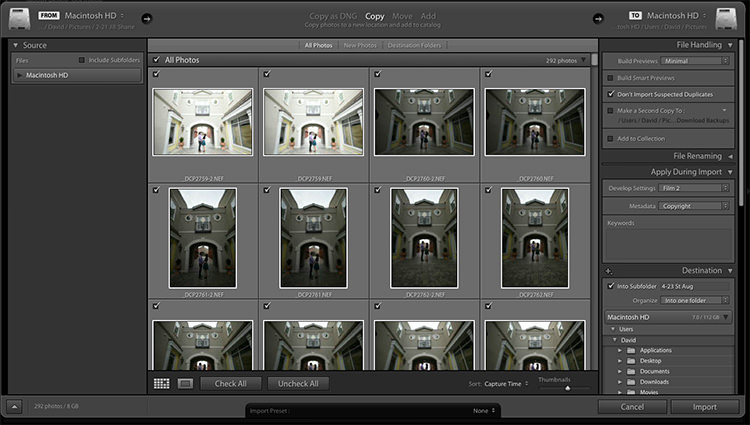
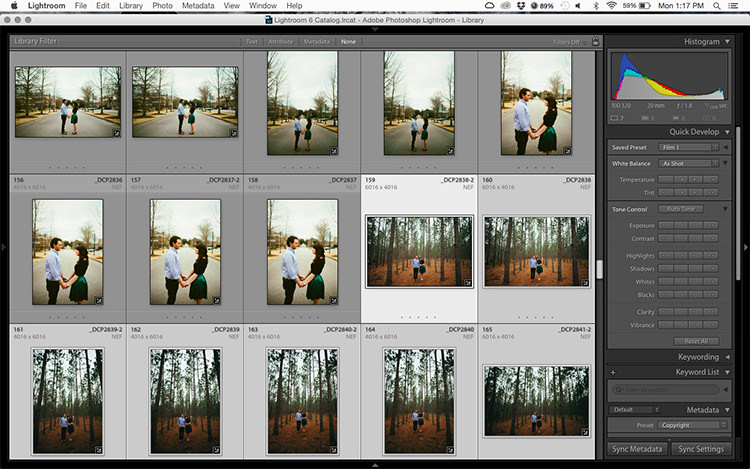
Step 1: Start an import in the library module

2 copy

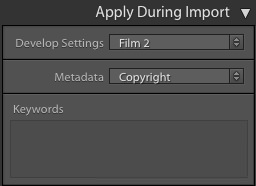
Step 2: On the right panel in the import dialog you’ll see the “Apply During Import” module.

Step 3: If you have a base preset, or a most commonly used one, select it here and click import to have it automatically applied to all of the photos as they are imported into Lightroom.

This not only skips a lot of clicks for you, but it applies them faster than selecting them individually in the develop module later.

Technique 2: Apply presets in the Library module

Applying presets on import is great if all the photos are similar, but you may need to use different presets on varying scenes, poses, etc. Instead of applying these one image at a time, you can select them in the library module and apply them in a group. This trick is great for weddings, or similar shoots where you may be inside then outside, or have constantly changing light conditions.

3 copy

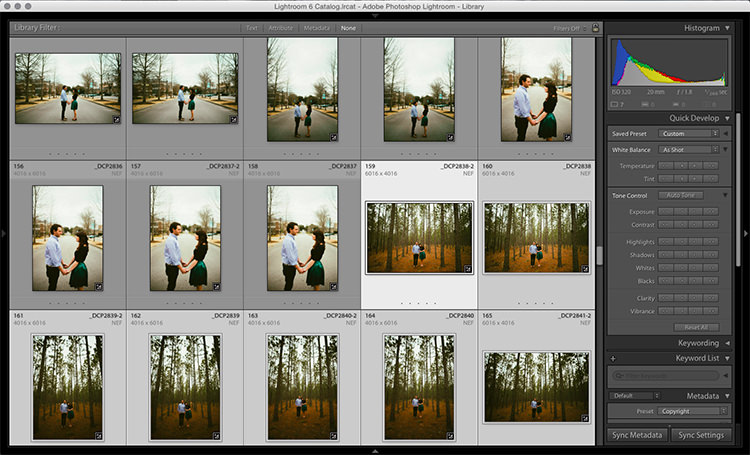
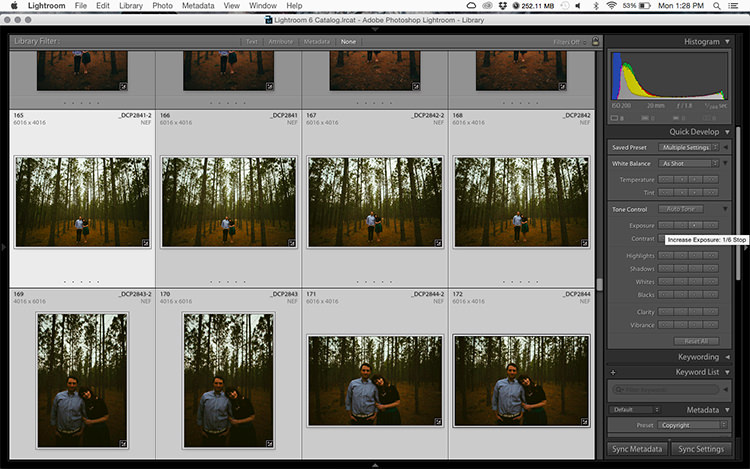
Step 1: Click the first image in the set, then hold down the Control button and click any others to which you want to apply the same preset.

4 copy

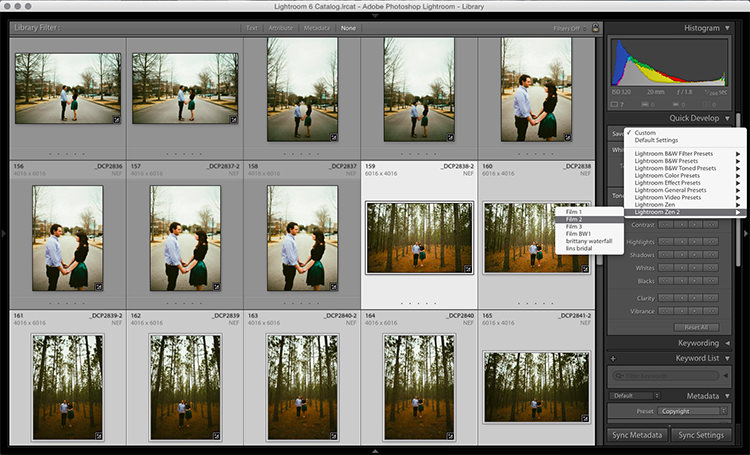
Step 2: At the top of the Quick Develop panel, click the drop down menu under “Saved Preset” and select the new preset. It will update the settings from that preset to all the selected photos.

5 copy

Step 3: Repeat for each changing scene as needed.

Technique 3: Edit in the Library module

The Library module runs much smoother, and processes changes faster than the Develop module. Since you have already applied your presets to the images, you will mostly need to make broad adjustments to your photos now. The Library module can edit the major adjustments like white balance, exposure, contrast, and more. Even better, you can apply these adjustments to multiple photos at once, making them more consistent, and saving you a lot of time.

6 copy

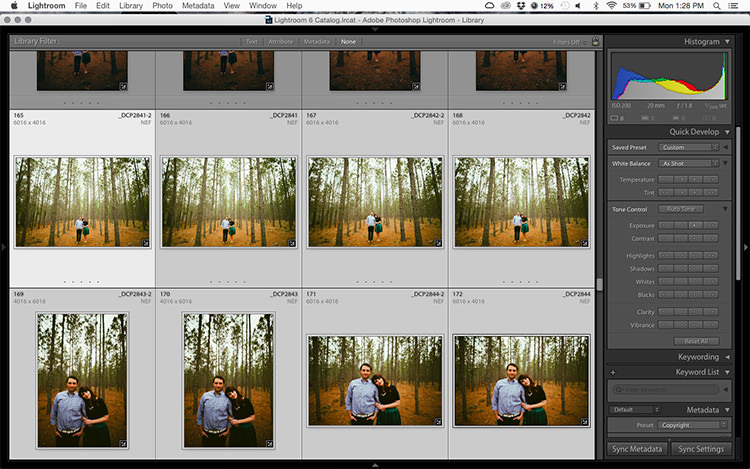
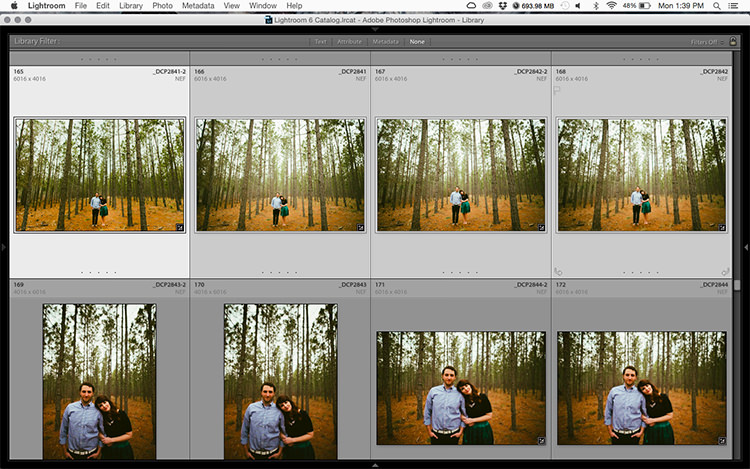
Step 1: Select a group of images as above (CTRL + click to add to your selection) in the Library module.

7 copy

Step 2: In the Quick Develop panel on the right, click the arrows under Exposure, Contrast, and any other applicable options, to apply the changes to all selected photos at once.

Step 3: You can use the + and – key to enlarge or minimize the library view, allowing you to get a better view of the adjustments you are applying.

Technique 4: Sync adjustments across multiple photos in the Develop module

After applying the broad adjustments, you may need to fine-tune a few things in your images. These may include changes like a curve adjustment, add a gradient filter to fine tune a bright sky, etc. These are changes you have to make in the Develop module, but you can still apply them in batches, instead of doing them one photo at a time.

8 copy

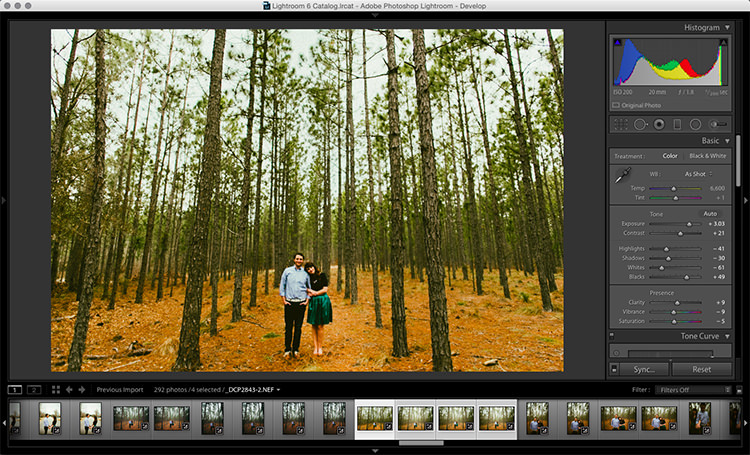
Step 1: In the Develop module, apply the adjustments to a single photo.

Step 2: In the Develop filmstrip or Library grid view, select multiple photos (CTRL + click).

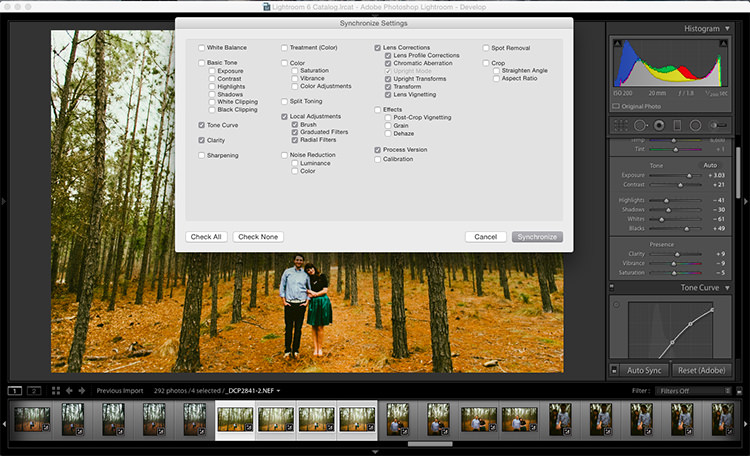
Step 3: At the bottom of the right hand panel, select “Sync”, it will be the left button beside “Reset”

9 copy

Step 4: Check the options that you want to sync with all the selected photos. These should include any adjustments you just made in the Develop module.

10 copy

Keep in mind

When batch editing, be careful you don’t sync anything that you don’t want applied to all of the selected images. If you use the adjustment brush on skin in one photo and sync that to another photo, chances are that the subject has moved slightly, and the brush will be applied to the wrong part of the image.

Stick with it!

Do you think these batch editing techniques have a spot in your workflow? For me, learning to batch edit allowed me to cut my wedding editing time down to a fraction of what it was before. You can focus on the big picture and style of each shoot, and not get lost spending 10-15 minutes on every image. Batch editing lets you get more work done in less time, and that is fantastic!

Do you have any additional tips to add? Please do so in the comments below.

googletag.cmd.push(function() {
tablet_slots.push( googletag.defineSlot( “/1005424/_dPSv4_tab-all-article-bottom_(300×250)”, [300, 250], “pb-ad-78623” ).addService( googletag.pubads() ) ); } );

googletag.cmd.push(function() {
mobile_slots.push( googletag.defineSlot( “/1005424/_dPSv4_mob-all-article-bottom_(300×250)”, [300, 250], “pb-ad-78158” ).addService( googletag.pubads() ) ); } );

The post 4 Batch Processing Techniques to Speed Up Your Workflow in Lightroom by David Childers appeared first on Digital Photography School.


Digital Photography School

 
Comments Off on 4 Batch Processing Techniques to Speed Up Your Workflow in Lightroom

Posted in Photography


An Exercise to Learn and Practice Shutter Speed at Home

13 May

Practice-shutter-speed-f11-1:60

One of the most important choices you make when taking a photograph is deciding what shutter speed to use. The shutter speed controls how much light comes into your camera, and how motion is recorded.

A faster shutter speed will freeze action and slower shutter speeds can create a blur. Both choices can produce great pictures. In this simple exercise that you can do at home with a ceiling fan, you will have the opportunity to practice setting your camera on different shutter speeds, and seeing how each affects motion in the image.

It’s best to do this during the day when there is some ambient light in the room. You might choose to shoot this with the ceiling lamp on or off, either will work. Or you might try both ways to see which you like better.

To get started, set your camera on shutter priority, or manual mode, and do a few test shots to check your exposure. Put your camera on a tripod for the most consistent results. I also chose to focus on the silver plate on the lamp of the ceiling fan to create consistency. It can be tricky in an exercise like this because your auto focus can get confused and focus on the ceiling, the blades, or the chain cord. (Note: you might try back button focus here, or use autofocus and then lock it or switch to manual).

Practice shutter speed using a ceiling fan/

f/8 at 1/125th, ISO 1600.

Start your series at 1/125th of a second. Notice that I focused on the metal plate on the lamp, and how sharp it is. The blurring in the fan blades is caused by motion.  Also look at the chain. It’s sharp toward the lamp, but the focus gradually falls off as it gets toward the pulls.

Now slow your shutter speed down to 1/60th, and see what happens. If you are shooting in manual mode, remember that when you change your shutter speed, you must also change your aperture or ISO too.

Practice shutter speed using a ceiling fan/

f/11 at 1/60th, ISO 1600.

Notice the blur in the blades at 1/60th. Next, look closely and you can also see that the pull chains show some movement. The depth of field is deeper as well, see how much is in focus between the metal plate on the lamp and the pulls.

Now, slow it down a little bit more.

Practice shutter speed using a ceiling fan/

f/13 at 1/40th, ISO 1600.

What do you notice at 1/40th? The blades seem to be moving faster because of the blur, but nothing has changed with the fan. There is a greater depth of field also, much of the pull chain is in focus now.

Let’s slow it down even more.

Practice shutter speed using a ceiling fan/

f/20 at 1/4, ISO 1600.

Now, at 1/20th, the blades have taken on a new look and the chain is more in focus. Let’s slow it down a little more and see what happens.

Practice shutter speed using a ceiling fan/

f/32 at 1/8th, ISO 1600.

At 1/8th of a second, the blades are almost indistinguishable, and note that the metal plate is not as sharp as in the other photos. Ceiling fans are seldom perfectly still when the fans are moving and you can see slight movement in the metal plate.

Now, let’s go back and speed things up. Try a shutter speed of 1/250th and see what happens.

Practice shutter speed using a ceiling fan/

f/5.6 at 1/250th, ISO 1600.

Compare this to the first image, which was shot at 1/125th of a second. You can see that the blades still have motion, and notice the difference in the depth of field. At f/5.6, the chain is considerably more out of focus than at f/32.

Next, change your shutter speed to 1/500th.

Practice shutter speed using a ceiling fan/

f/4 at 1/500th, ISO 1600.

At 1/500th, the fan blades show motion. Now try 1/1000th.

Practice shutter speed using a ceiling fan/

f/2.8 at 1/1000th, ISO 1600.

At 1/1000th of a second, the fan blades are frozen. It’s almost as if the fan isn’t turning. Notice the difference in the depth of field. The pull chain is out of focus due to the narrow depth of field at f/2.8.

Here are a couple of real world examples of how you might apply this to your photography:

Shutter speed 1/30th - the water is partly frozen.

Shutter speed 1/30th – the water is partly frozen.

Shutter speed 1/2 second the water becomes silky and smooth

Shutter speed 1/2 second the water becomes silky smooth

You can also do this exercise by keeping your aperture consistent and changing your ISO. So what did you learn by doing this exercise? Give it a try and share your photos and what you learned below.

googletag.cmd.push(function() {
tablet_slots.push( googletag.defineSlot( “/1005424/_dPSv4_tab-all-article-bottom_(300×250)”, [300, 250], “pb-ad-78623” ).addService( googletag.pubads() ) ); } );

googletag.cmd.push(function() {
mobile_slots.push( googletag.defineSlot( “/1005424/_dPSv4_mob-all-article-bottom_(300×250)”, [300, 250], “pb-ad-78158” ).addService( googletag.pubads() ) ); } );

The post An Exercise to Learn and Practice Shutter Speed at Home by Vickie Lewis appeared first on Digital Photography School.


Digital Photography School

 
Comments Off on An Exercise to Learn and Practice Shutter Speed at Home

Posted in Photography


Major Leica SL firmware update brings better AF, new top shutter speed

15 Apr

Leica has introduced firmware version 2.0 for its SL (Typ 601) camera that brings a major change to the camera’s focusing as well as a new top shutter speed of 1/16,000sec. The firmware takes the number of AF points available in single point mode from 49 to 529. Leica claims it has also made improvements to the autofocusing system’s speed, accuracy and tracking abilities.

Exposure compensation gets a new access point with the update and can now be controlled via the top dial and the thumb wheel on the camera’s rear, while the longest exposure timed by the camera goes from 60 seconds to 30 minutes. The company says that it has created a new top shutter speed of 1/16,000sec by using the fast-reactions of the aperture in the system’s SL lenses.

General image quality of JPEG files is also said to have been optimized, as has the focus peaking feature, and Raw files can now be magnified in review mode.

For more information see the Leica firmware download page.


Press release:

Leica releases firmware update 2.0 for Leica SL mirrorless camera system

New firmware enhances camera performance, handling and workflow

Leica Camera has released a new firmware update for the mirrorless Leica SL camera system. Firmware version 2.0 can be downloaded by registered Leica SL owners from the Leica Owners’ Area (https://owners.leica-camera.com). Alternatively, customers can bring their camera to any Leica Store or Leica’s Customer Service department in the UK, for a complimentary update service.

The numerous new features included in firmware update 2.0 have been designed to further improve the performance of the Leica SL and enable a faster photographic workflow. For example, the autofocus function has been revised and optimised. Already impressively fast in combination with SL-Lenses, it now offers even faster focusing, increased precision and optimised subject tracking. A further enhancement increases the number of AF focusing points available for the single point AF setting to 529.

Also new in firmware 2.0 is direct exposure compensation controlled by the top dial and the click wheel on the back of the camera, in the three automatic exposure modes, P, T and A. The firmware update also extends the range of shutter speeds. Timed exposures of up to 30 minutes can now be captured automatically without additional support and, thanks to the fast, electronically-controlled aperture of the lenses, exposures can be made with the highest shutter speed of 1/16,000s.

Additional improvements have been introduced with regard to JPG quality, white balance, the video menu, Auto ISO options and the focus peaking function. Pictures taken in DNG format can now be magnified for better image evaluation, and the camera is also now compatible with all Leica flash units. An update to the app to allow the use of the optimised functions, and three noise reduction settings, complete the improvements provided by this latest firmware update.

More information can be found at uk.leica-camera.com.

Articles: Digital Photography Review (dpreview.com)

 
Comments Off on Major Leica SL firmware update brings better AF, new top shutter speed

Posted in Uncategorized


CP+ Canon interview: ‘important to increase development speed’

02 Mar
Mr. Go Tokura, Group Executive ICP Group 2, Image Communications Products Operations, Canon Inc. Pictured at the CP+ show in Yokohama Japan, 2016. 

As well as reporting on the newest gear, we use the opportunity of visiting the CP+ show in Japan to sit down and talk to senior executives from the major camera and lens manufacturers. This year, we were fortunate enough to spend some time with Mr Go Tokura of Canon. 


Canon has had a big year with the launch of the enthusiast-focused EOS 80D and the professional EOS-1D X Mark II. Can you summarize your strategies for catering to these two different market segments?

With regard to the 1D X Mark II, this is an Olympics year.  In years when the Olympic Games are held, one of our objectives is to launch a flagship model within our DSLR lineup to try to capture the professional user market. So this is a big objective in terms of strategy.

As for the 80D, we have entry-level DSLR models under the Rebel brand and the 80D is the level just above – designed to ensure that users can maximize its features in the best way possible. That’s in terms of price, operability, usability and that sort of thing. In recent years the entry-level market segment has been weakening, but the level above that, where we’re targeting advanced amateur users, is becoming an increased focus. The 70D is doing well and is quite popular among our users, and for that reason we expect a lot of interest in the 80D.

Some of our readers were disappointed that the 80D does not include 4K video. Why did you decide not to include this feature?

As you know, in our DSLR lineup we incorporate both video functions and traditional stills DSLR functions. Among our DSLR users we’re still seeing a strong emphasis on the stills photography function. 

We’re promoting our DSLRs as providing both stills and video features – the best of both worlds, you might say. However with regard to the 80D, the main emphasis was to maximise the stills side of the camera. Then, with the aim of increasing the user base, we add movie features to this established stills shooting feature set.

The EOS 80D offers an easy-to-use video feature set, and its new 18-135mm kit lens is compatible with Canon’s new inexpensive Power Zoom unit for convenient handling in video mode. But it’s not 4K-capable, and as yet, no camera in Canon’s sub-pro DSLR lineup is, either.

Do you think there is space in the enthusiast DSLR market for a more capable video camera? Which maybe does offer 4K?

We are considering this and we recognize that this is a feature which might be in demand in the future.

Do you think that Dual Pixel AF will ever be equal to conventional phase-detection DSLR focus, and if so, when will this happen?

It’s very difficult to predict timing, of course, but we want to make Dual Pixel AF surpass conventional phase-detection in terms of performance. 

Dual Pixel AF is a technology which has huge potential for mirrorless cameras. A lot of our readers are still very hopeful for future Canon enthusiast mirrorless models. Is there anything that you would like to say to them?

Obviously I can’t be particularly concrete when talking about our future product planning, but this is something that we are looking at. Something that is under consideration. There are some features, such as AF, which have not yet caught up with DSLRs, so given the current state of affairs it would be a little unrealistic to say that we will suddenly start offering a professional mirrorless camera. There’s still a performance gap that needs to be addressed. 

If we assume that at some point in the future Canon will create an enthusiast or professional mirrorless camera, what are your benchmarks?

This is just my personal opinion. In my view there are two key features that have to be addressed. The first is autofocus, particularly tracking of moving subjects. The other is the viewfinder. The electronic viewfinder would have to offer a certain standard. If those two functions were to match the performance of EOS DSLR camera performance, we might make the switch.

Tremendous progress has been made in electronic systems.  However in terms of AF, pro-level AF functions, and the range of shooting situations that professional photographers can respond to, there’s still a gap between DSLRs and mirrorless systems.

The Canon EOS M3 is Canon’s most convincing mirrorless camera to date, but it isn’t the model that a lot of Canon users have been hoping for. According to Mr Takura, autofocus and electronic viewfinder performance has to improve before Canon will consider launching an enthusiast-focused mirrorless product. 

When I spoke to Mr Maeda last year he told me that he was focused on increasing the speed of product development at Canon. Have you seen a change?

I can’t give any concrete details here but this is a goal that we’re working to achieve. 

The reason I ask is that it seems that compared to the past, the entry-level ILC market seems to be moving rather slowly right now, whereas in terms of development speed, the enthusiast and semi-pro ILC market is moving quite quickly. 

Yes, I agree. For this reason, it’s becoming increasingly important that we do increase development speed.  That’s why it’s considered a very important objective that we’re continuing to address.

What is your strategy for growth in this changed market? What do you need to do to differentiate?

One of the differences between us and our competition is the EF lens lineup. We have a very broad base of EF lens users and we don’t want to do anything that would sacrifice their loyalty, so it’s a very high priority for us to satisfy their needs and meet their demands. 

With regard to the overall market, maybe there’s a lack of vigor and it could be viewed as shrinking. Looking at the compact camera market, the bottom end is dropping considerably and the competition is smartphones. Smartphones offer a very easy, convenient way of taking photos. However in the high-end compact segment, at the high end there are cameras that offer functions and performance that smartphones cannot compete with and here we’re seeing growth. So in the compact market, offering features that smartphones cannot compete with is a way of differentiating and invigorating the market. 

You mentioned loyalty. How important is it to you to continue to update older models via firmware even perhaps after end of life?

Of course we’d like to provide every level of support we can, even to users of older models. Should an opportunity arise we’ll obviously offer firmware updates so that they can get the most out of the models that they have purchased. However a lot of the performance depends on the hardware itself. There is only so much you can get out of older or out of date hardware. There are new devices incorporated in newer models which make possible improved performance, so there’s a kind of tradeoff. Unless newer hardware is introduced, sometimes it’s not possible to get the performance.

One of the areas where we’ve been pleased to see improvement from Canon is in sensors. What are your priorities in terms of sensor development in the future?

Increasing resolution and increasing sensitivity are ongoing objectives and that’s not going to change, but on top of that, as I’ve mentioned there’s an emphasis on merging stills and movie functions. So two priorities for future sensors are lower power consumption and increasing processing speed. 

The Canon EOS-1D X Mark II is a significant, albeit iterative upgrade to the 1D X. We should expect new flagship models in Olympic years, says Mr Tokura. 

As you develop semi-professional lines like the EOS 5D and 1D-series, where are you most focused in terms of improvement?

When we look at a model that we want to upgrade, we don’t take a single item of specification and choose to work on that and not other aspects. We try to improve all features to the same degree. The EOS 5DS however was an exception. Resolution was increased markedly, off the charts compared to anything we had done before. But that’s the exception. Usually we won’t try to boost any one feature over and above the rest of the feature set.

Our approach when it becomes time to launch the next generation of the EOS-1D X or the 5D, is that we try to raise performance across the board as best we can.

Editor’s note:

I last spoke to Mr Tokura in 2014, and although Canon has been pretty busy in the two years since then, when it comes to the big picture it might appear that not much seems to have really changed. The company still lacks a convincing mirrorless camera, as competitors like Sony continue to set a faster and faster pace of technological development at the semi-pro end of the ILC market.

But at least we have a clear sense of what it would take for Canon to make a ‘switch’ to mirrorless. Although Mr Takura acknowledges that the technology has advanced a lot, he still sees autofocus and the experience of using an electronic viewfinder as being the two key areas where mirrorless cameras lag behind DSLRs. Whether you agree with him or not, the implicit promise that Canon intends to improve Dual Pixel AF to the point where it rivals the best professional DSLR autofocus systems should be very exciting. 

Canon is big enough that it doesn’t need to worry too much about being left behind quite yet (Mr Takura’s point about Canon EF users is a good one – there are more than 100 million EF lenses out there, something that Sony certainly cannot boast) but I do sense a shift, of sorts, in my conversations with Canon representatives in recent months. Mr Maeda, who in conversations with us has stressed the importance of speeding up product development, is moving up inside the company. More than ever, his influence is, I think, being felt quite keenly by the managers that report to him. When I asked Mr Takura whether increasing development speed was still a priority, he answered with a knowing smile. It’s very clear that yes – it most definitely is. 

Articles: Digital Photography Review (dpreview.com)

 
Comments Off on CP+ Canon interview: ‘important to increase development speed’

Posted in Uncategorized


ISO, Aperture, Shutter Speed Guide for Product Photography

24 Feb

Who said you have to be a professional photographer to take a good picture—but wait, a great product image requires more than just lights, aim and shoot! When you are shooting products to sell on your ecommerce store, you want to achieve the best results possible. A remarkable product image can give your online store a professional look that tells Continue Reading

The post ISO, Aperture, Shutter Speed Guide for Product Photography appeared first on Photodoto.


Photodoto

 
Comments Off on ISO, Aperture, Shutter Speed Guide for Product Photography

Posted in Photography


DxO ONE gets 1/20,000sec top shutter speed and better handling via firmware version 1.2

01 Dec

The DxO ONE smartphone companion camera is to benefit from a host of improvements and new features when the company releases new firmware early in December. General handling will be improved with what DxO vaguely describes as ‘instant access to advanced capture parameters and photo information with a simple swipe’ and ‘more control over the entire photo and video capture process’. The DxO ONE will also be compatible with the Apple Watch via a new app designed especially for it, and the DxO ONE will go on sale in Apple Stores. 

New features in firmware version 1.2 include the broadening of the shutter speed range to encompass 30-1/20,000sec, and continuous shooting – though the company doesn’t say at what rate. The video mode will allow manual control of aperture, ISO, white balance and ‘more’. 

DxO says that the changes have been instigated by user feedback from photographers, and that the new firmware will make the device ‘even more powerful’. For more information visit the DxO website.


Press release:

FOR IMMEDIATE RELEASE

Powerful new features added to the DxO ONE connected camera via software update

Version 1.2 available as a free download for existing DxO ONE users early December

PARIS and SAN FRANCISCO—November 24th, 2015—DxO announced today the availability of the first major software update for the award-winning DxO ONE Professional Quality Connected Camera. The DxO ONE app version 1.2 will be available early December via the iTunes App Store, and will introduce new camera controls based on direct feedback from DxO’s rapidly expanding community of photographers. Version 1.2 makes the DxO ONE camera even more powerful, including new ways to view and interact with advanced photo info, and provides more control over the entire photo and video capture process including via a companion Apple Watch app. The DxO ONE connected camera is now also available in select Apple retail stores nationwide, as well as on Apple’s online store.

“Using the camera has become second nature to me—it’s crazy good. I never imagined standing in a pit lane at a major motorsports event and immediately being able to provide a PR rep images of his team’s pit stop literally seconds after the car pulled away,” said John Thawley, whose images have been featured in print for companies such as Ferrari, Jaguar, Lexus, and Maserati. “I’ve been equally impressed with the DxO team and their responsiveness to feedback and suggestions. It’s nice working with a company that is listening, and I can’t wait to see what the DxO ONE team does next.”

The way you interact with the DxO ONE is even better, thanks to new features that let users get instant access to advanced capture parameters and photo information with a simple swipe. Continuous shooting offers users the ability to shoot several photos in a row by simply depressing the shutter button. The manual focus mode now provides one tap access to hyper-focal distance, and the ability to reposition the magnification loupe for critical focusing. At the request of pro photographers, the shutter speed range has been expanded for capturing even faster motion (1/20000) and longer low-light exposures (30s). Users can now capture high quality video with full manual control of aperture, ISO, white balance and more. DxO ONE selfies are now available in every capture setting and mode, including the ability to record high quality video selfies, ready to share with the world. There’s even a new companion app that lets users remotely trigger a DxO ONE camera with their Apple Watch.

The image scientists, engineers, and designers at DxO are committed to refining the connected camera experience. This relentless pursuit of perfection has been aided by the generous outpouring of support and direction provided by DxO ONE photographers, many of whom, like John Thawley, are established and respected members of the professional community. Thanks to this tight feedback loop, DxO ONE owners can expect to receive a regular cadence of exciting new features in the months and years to come.

Pricing and availability

The DxO ONE Professional Quality Connected Camera is available for purchase at dxo.com and photo retailers for a price of £449 (including VAT). Purchase price includes DxO FilmPack Elite, and for a limited time, DxO OpticsPro Elite (a £258 value). 

The DxO ONE iOS app update, and companion Apple Watch app will both be available as free downloads via the iTunes App Store early December. New firmware, also available at the same time, can be easily downloaded via the app and installed on the DxO ONE. 

Articles: Digital Photography Review (dpreview.com)

 
Comments Off on DxO ONE gets 1/20,000sec top shutter speed and better handling via firmware version 1.2

Posted in Uncategorized


Leica T firmware 1.4 promises to boost AF speed and overall camera responsiveness

29 Oct

Leica has released a major firmware update for its T (Typ 701) APS-C mirrorless camera. Firmware 1.4 promises to make autofocus twice as fast, and improves touchscreen responsiveness by three times. The company has also announced plans to release two new prime lenses for the T in 2016. Read more

Articles: Digital Photography Review (dpreview.com)

 
Comments Off on Leica T firmware 1.4 promises to boost AF speed and overall camera responsiveness

Posted in Uncategorized