RSS
 

Posts Tagged ‘Simple’

8 Simple Guidelines for Capturing Spectacular Sunrise and Sunset Images

26 Mar

When we are asked to think of popular subjects for landscape photography, images of beautiful sunsets immediately come to mind. What outdoor photographer worth his or her salt doesn’t have at least a couple of images of the sun dipping below the horizon? In most people’s minds, it is an easy thing to capture; the beauty and scale of the event itself should carry the photo, with minimal interaction from the photographer.
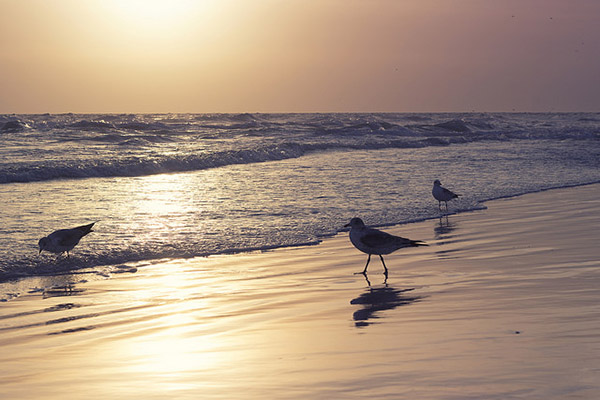
bird_trio

But is this really the case?

Unfortunately, it’s not. Unless you’re relying on luck alone, you’ll need to possess a few seeds of knowledge (eight in this case) to get you started in capturing that epic sunrise or sunset. None of these guidelines are difficult to comprehend, and can vastly improve your chances of properly capturing one of mother nature’s most incredible events.

1. Scout the Location

As tempting as it is to just show up at a convenient location and start shooting, you greatly increase your chances of success by planning the shoot in advance. The first thing you’ll want to determine is the best location from which to shoot.

Pick a location that is out of the way of road and foot traffic, where you’re unlikely to be disturbed. Go to the location in broad daylight before the shoot, and ensure your view of the horizon will be unobstructed and free of any hazards.

The most important factor after the location is time of the day. Obviously, this will vary depending on whether you’re capturing a sunrise or a sunset. Is there a storm coming? If your shooting time coincides with an approaching or recently-ended storm, the results can be staggering. Rain and storm clouds can add a dramatic layer of dimension to the scene.

Lastly, you can pinpoint the perfect time to shoot by using an online tool or smartphone app to determine precise sunrise and sunset times for your exact location. Many low-cost (and sometimes free) solutions are out there, including SunSeeker, Daylight Free, and the excellent Photographers Ephemeris to name a few.

sunset_article3.jpg

2. Sunrise, or Sunset?

If you’re familiar with color temperature, you’ll know that there is a slight difference in the appearance of light at sunset versus what you’ll see at sunrise. Early morning light tends to be cooler (higher blue) than light in the late evening, which leans toward more warm color castings consisting of orange and red.

Since we know there are differing color temperatures at work here, you might need to adjust for this, depending on what feel you’re going for, either through warming or cooling filters, or adjustments in post-production to add or remove warmth into the color profile of the final photograph.

Be aware that physical filters used on your camera will degrade image quality slightly, due to the addition of another obstacle for light to pass through between your subject and your camera’s sensor
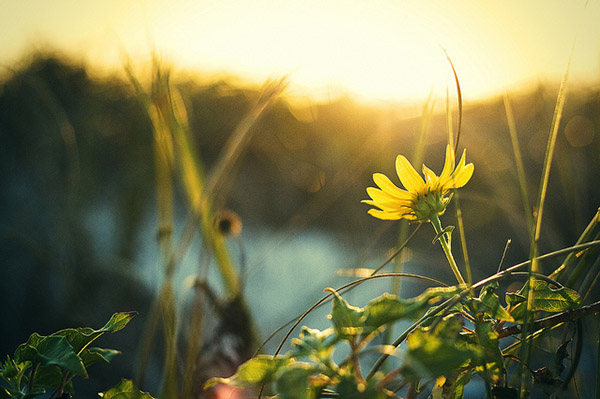
daisy

3. Plan your Shots

Another important step to accomplish before heading out is to plan out what you hope to achieve in the photo. What look are you going for?  Is there a definitive subject lit by the sunlight, or will the sunset itself be the star of the show?

This is also a great time to determine any other special considerations, such as the possibility of shooting an HDR (High Dynamic Range) photo. If that’s the case, you’ll need to prepare your camera for bracketed exposures to capture the full range of tones in the scene. Since these type of scenes normally consist of bright spots and shadows, this is a great way to produce some truly dramatic images.

4. Gather the Proper Gear

Obviously you can’t capture the right shot without the right gear; so make sure you have it all ready to go before you head out. First and foremost, you’ll want to bring your tripod. Sunrises and sunsets are potentially low-light situations (depending on what part of the sunset you’re trying to capture), so you want a steady base for your camera.

Secondly, you’ll want to determine what lens to use for the shot.  Even though beautiful landscapes can be captured using a 35mm or 50mm focal length (for sensors with a 1.6 crop factor – 56 to 80mm on a full frame system), a wide angle lens is preferred, including any zoom lenses that can capture a length of 25mm and below (40mm on a full frame system).  If you have a prime lens at these lengths, you will have a better chance of catching an even sharper image.  Using a wide angle lens will allow you to capture a more vast, sweeping portion of the scene.

Do you own and use screw-on filters for your camera?

Although using filters can degrade image quality a bit, due to the addition of another obstacle for light to pass through between your subject and your camera’s sensor, there are some that could be useful here, such as a GND (graduated neutral density) filter, to darken the upper portion of the sky a bit. Filters such as UV (ultraviolet) or polarizing filters may actually be a hinderance in these situations, and should be avoided. These filters reduce the amount of light coming in to the sensor, further increasing the required exposure time, which may not be idea if you’re trying to freeze any motion in the shot.
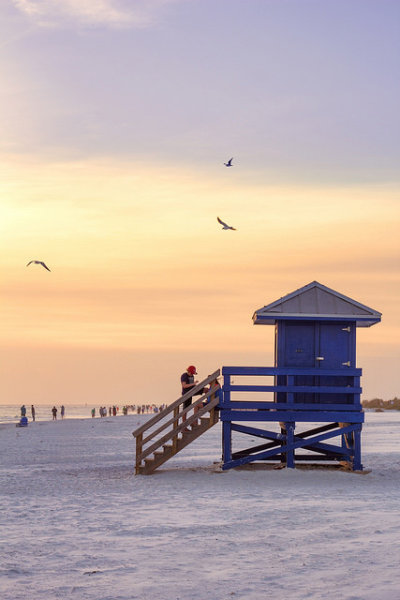
lifeguard_shack

5. Use the Right Settings

Another item that can be set up before you arrive to your shoot is the settings on the camera itself.

Since you’re shooting landscape, you’ll want to use a smaller aperture such as f/8, f/11 or even higher to maximize the depth of field and capture a sharp image throughout. If you’re using a tripod, this isn’t a problem.

Although shooting in manual mode is the norm here, to allow for minor changes in exposure compensation, I prefer to shoot almost everything in A/Av (aperture priority mode). This way I can lock in my aperture and let the camera choose a proper shutter speed. Since low-light situations like this can confuse the camera and you run the risk of overexposure, you can use your camera’s exposure compensation settings to fine-tune the exposure a bit lower.

A low ISO should also be used such as 100 or 200, to ensure there isn’t a lot of noise in the final shot. Again, with a tripod this isn’t an issue, but if you’re hand-holding for the shot, you will need to bump the ISO up to get a shutter speed that’s fast enough to avoid a disappointingly blurry photo.
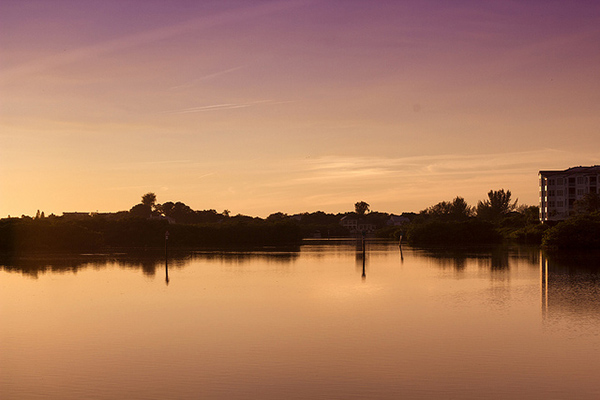
inlet_sunset

Another useful trick to increase warmth in your final shot is to set WB (white balance) to the “sunny” or “cloudy” setting instead of “auto”. Although you can certainly add warmth in post-processing, your initial image from the camera will be warmer if you make this adjustment now.

And of course, ALWAYS shoot in RAW! To a certain extent, shadows and highlights that are lost in a shot can be recovered in post-processing later.

6. Compose for Interest

Alright, the preparation is over, now we get to the fun part! Once you’re on location, and are ready to take the shot, you’ll want to make considerations for composition.

The most common error in shooting sunsets or sunrises is composing the horizon exactly in the middle of the photo. While this can work in some cases, it normally causes a bit too much symmetry and can make the picture uninteresting.

Take a moment to look the scene over; what part is the most dramatic? Are there any parts that aren’t as interesting of a focus?

Once you have identified that, simply compose the shot to include more of the most dramatic scenery. If you have an angry, cloudy sky that accentuates the sunlight, let that occupy the upper 2/3 of the scene. If you have an interesting foreground or landscape below the sun, and a less-intriguing sky, let that occupy the bottom 2/3 of the image. You want to draw the viewer into the horizon, and then let their eyes drift to the most dramatic part of the image.
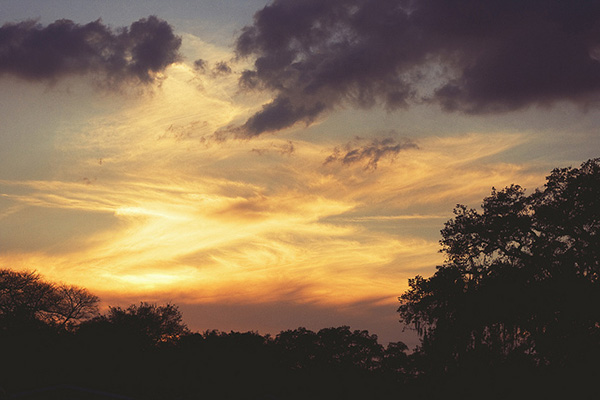
purple_sunset

7. Waiting for the Right Shot

If you already have experience shooting landscapes, you know that sometimes waiting is the name of the game. Because of the dynamics of natural lighting, a scene can completely change from one hour to the next, and sometimes even one minute to the next.

Now is the time to be creative! Try different exposure times, play with your exposure compensation settings for different tones. Let the clouds and sun change positions, and reshoot, or try a slightly different angle.

Maybe even allow different subjects to come in and out of frame, and shoot them in the foreground against the sunrise or sunset. The longer you’re at the location shooting, the more variety of shots you’ll end up with.


pier

Sunset article4

8. Don’t Leave Too Early

Lastly, one of the most common things you’ll hear about capturing sunsets, in particular, is to stick around after the sun dips below the horizon. This is certainly true, as the entire dynamic of a scene changes at this point.

Tones, colors and hues in the sky usually become more saturated and dramatic. You’ll need to allow for the loss of your main source of light, but it’s hard to deny some of the most beautiful images can be shot right after the sun is out of sight.

The post 8 Simple Guidelines for Capturing Spectacular Sunrise and Sunset Images by Tim Gilbreath appeared first on Digital Photography School.


Digital Photography School

 
Comments Off on 8 Simple Guidelines for Capturing Spectacular Sunrise and Sunset Images

Posted in Photography


8 Simple Guidelines for Capturing Spectacular Sunrise and Sunset Images

26 Mar

When we are asked to think of popular subjects for landscape photography, images of beautiful sunsets immediately come to mind. What outdoor photographer worth his or her salt doesn’t have at least a couple of images of the sun dipping below the horizon? In most people’s minds, it is an easy thing to capture; the beauty and scale of the event itself should carry the photo, with minimal interaction from the photographer.

bird_trio

But is this really the case?

Unfortunately, it’s not. Unless you’re relying on luck alone, you’ll need to possess a few seeds of knowledge (eight in this case) to get you started in capturing that epic sunrise or sunset. None of these guidelines are difficult to comprehend, and can vastly improve your chances of properly capturing one of mother nature’s most incredible events.

1. Scout the Location

As tempting as it is to just show up at a convenient location and start shooting, you greatly increase your chances of success by planning the shoot in advance. The first thing you’ll want to determine is the best location from which to shoot.

Pick a location that is out of the way of road and foot traffic, where you’re unlikely to be disturbed. Go to the location in broad daylight before the shoot, and ensure your view of the horizon will be unobstructed and free of any hazards.

The most important factor after the location is time of the day. Obviously, this will vary depending on whether you’re capturing a sunrise or a sunset. Is there a storm coming? If your shooting time coincides with an approaching or recently-ended storm, the results can be staggering. Rain and storm clouds can add a dramatic layer of dimension to the scene.

Lastly, you can pinpoint the perfect time to shoot by using an online tool or smartphone app to determine precise sunrise and sunset times for your exact location. Many low-cost (and sometimes free) solutions are out there, including SunSeeker, Daylight Free, and the excellent Photographers Ephemeris to name a few.

sunset_article3.jpg

2. Sunrise, or Sunset?

If you’re familiar with color temperature, you’ll know that there is a slight difference in the appearance of light at sunset versus what you’ll see at sunrise. Early morning light tends to be cooler (higher blue) than light in the late evening, which leans toward more warm color castings consisting of orange and red.

Since we know there are differing color temperatures at work here, you might need to adjust for this, depending on what feel you’re going for, either through warming or cooling filters, or adjustments in post-production to add or remove warmth into the color profile of the final photograph.

Be aware that physical filters used on your camera will degrade image quality slightly, due to the addition of another obstacle for light to pass through between your subject and your camera’s sensor

daisy

3. Plan your Shots

Another important step to accomplish before heading out is to plan out what you hope to achieve in the photo. What look are you going for?  Is there a definitive subject lit by the sunlight, or will the sunset itself be the star of the show?

This is also a great time to determine any other special considerations, such as the possibility of shooting an HDR (High Dynamic Range) photo. If that’s the case, you’ll need to prepare your camera for bracketed exposures to capture the full range of tones in the scene. Since these type of scenes normally consist of bright spots and shadows, this is a great way to produce some truly dramatic images.

4. Gather the Proper Gear

Obviously you can’t capture the right shot without the right gear; so make sure you have it all ready to go before you head out. First and foremost, you’ll want to bring your tripod. Sunrises and sunsets are potentially low-light situations (depending on what part of the sunset you’re trying to capture), so you want a steady base for your camera.

Secondly, you’ll want to determine what lens to use for the shot.  Even though beautiful landscapes can be captured using a 35mm or 50mm focal length (for sensors with a 1.6 crop factor – 56 to 80mm on a full frame system), a wide angle lens is preferred, including any zoom lenses that can capture a length of 25mm and below (40mm on a full frame system).  If you have a prime lens at these lengths, you will have a better chance of catching an even sharper image.  Using a wide angle lens will allow you to capture a more vast, sweeping portion of the scene.

Do you own and use screw-on filters for your camera?

Although using filters can degrade image quality a bit, due to the addition of another obstacle for light to pass through between your subject and your camera’s sensor, there are some that could be useful here, such as a GND (graduated neutral density) filter, to darken the upper portion of the sky a bit. Filters such as UV (ultraviolet) or polarizing filters may actually be a hinderance in these situations, and should be avoided. These filters reduce the amount of light coming in to the sensor, further increasing the required exposure time, which may not be idea if you’re trying to freeze any motion in the shot.

lifeguard_shack

5. Use the Right Settings

Another item that can be set up before you arrive to your shoot is the settings on the camera itself.

Since you’re shooting landscape, you’ll want to use a smaller aperture such as f/8, f/11 or even higher to maximize the depth of field and capture a sharp image throughout. If you’re using a tripod, this isn’t a problem.

Although shooting in manual mode is the norm here, to allow for minor changes in exposure compensation, I prefer to shoot almost everything in A/Av (aperture priority mode). This way I can lock in my aperture and let the camera choose a proper shutter speed. Since low-light situations like this can confuse the camera and you run the risk of overexposure, you can use your camera’s exposure compensation settings to fine-tune the exposure a bit lower.

A low ISO should also be used such as 100 or 200, to ensure there isn’t a lot of noise in the final shot. Again, with a tripod this isn’t an issue, but if you’re hand-holding for the shot, you will need to bump the ISO up to get a shutter speed that’s fast enough to avoid a disappointingly blurry photo.

inlet_sunset

Another useful trick to increase warmth in your final shot is to set WB (white balance) to the “sunny” or “cloudy” setting instead of “auto”. Although you can certainly add warmth in post-processing, your initial image from the camera will be warmer if you make this adjustment now.

And of course, ALWAYS shoot in RAW! To a certain extent, shadows and highlights that are lost in a shot can be recovered in post-processing later.

6. Compose for Interest

Alright, the preparation is over, now we get to the fun part! Once you’re on location, and are ready to take the shot, you’ll want to make considerations for composition.

The most common error in shooting sunsets or sunrises is composing the horizon exactly in the middle of the photo. While this can work in some cases, it normally causes a bit too much symmetry and can make the picture uninteresting.

Take a moment to look the scene over; what part is the most dramatic? Are there any parts that aren’t as interesting of a focus?

Once you have identified that, simply compose the shot to include more of the most dramatic scenery. If you have an angry, cloudy sky that accentuates the sunlight, let that occupy the upper 2/3 of the scene. If you have an interesting foreground or landscape below the sun, and a less-intriguing sky, let that occupy the bottom 2/3 of the image. You want to draw the viewer into the horizon, and then let their eyes drift to the most dramatic part of the image.

purple_sunset

7. Waiting for the Right Shot

If you already have experience shooting landscapes, you know that sometimes waiting is the name of the game. Because of the dynamics of natural lighting, a scene can completely change from one hour to the next, and sometimes even one minute to the next.

Now is the time to be creative! Try different exposure times, play with your exposure compensation settings for different tones. Let the clouds and sun change positions, and reshoot, or try a slightly different angle.

Maybe even allow different subjects to come in and out of frame, and shoot them in the foreground against the sunrise or sunset. The longer you’re at the location shooting, the more variety of shots you’ll end up with.

pier

Sunset article4

8. Don’t Leave Too Early

Lastly, one of the most common things you’ll hear about capturing sunsets, in particular, is to stick around after the sun dips below the horizon. This is certainly true, as the entire dynamic of a scene changes at this point.

Tones, colors and hues in the sky usually become more saturated and dramatic. You’ll need to allow for the loss of your main source of light, but it’s hard to deny some of the most beautiful images can be shot right after the sun is out of sight.

The post 8 Simple Guidelines for Capturing Spectacular Sunrise and Sunset Images by Tim Gilbreath appeared first on Digital Photography School.


Digital Photography School

 
Comments Off on 8 Simple Guidelines for Capturing Spectacular Sunrise and Sunset Images

Posted in Photography


Photo Magnetism: Super Simple Photo Magnets

04 Oct

Extra photos for bloggers: 1, 2, 3

Simple is the name of the game with these photo magnets.

Using only a few ingredients you can turn small photos into awesome pieces of refrigerator art.

They are fun to make, easy on the brain and cute as all get out. Once you make the first one you’ll want to start an assembly line of relaxation. A very productive assembly line of relaxation.

Simple, short and sweet. Score!

Make Super Simple Photo Magnets

Why It’s Cool

Sometimes it’s nice to have a project to do that doesn’t take much set up or clean up… AND that makes a super cute finished product!

These photo magnets fit the easy bill and dazzle like special little gems showcasing your memories.

Ingredients:

  • Photos
  • Scissors
  • A Quarter
  • A Pen
  • Glue that will adhere to glass and metal (we used “Liquid Fusion”)
  • Small circular magnets (.75 inch in size)
  • Clear glass circles – they look like large squished down marbles and are usually labelled “decorative fillers” at the craft store

STEP 1: Ring Around the George Washington

before

Use a quarter to trace a circle around the part of your photo that you want to turn into a magnet.


STEP 2: Cut a circle

before

Cut out the circle you just traced.

Make sure you cut off the pen marks because those will be magnified if ya don’t get rid of them.

STEP 3: A light layer of glue

before

Place glue on the flat side of a glass circle.

Get a nice thin even layer on the entire back of the circle. A little goes a long way.

STEP 4: Make it permanent

before

Place your circular photo face down in the glue.

Hold the image down in the glue for 30 seconds to make sure the photo doesn’t drift around.

STEP 5: Glue the magnet

before

Place a light layer of glue on one side of the magnet.

Adhere the magnet to the back of the the photo you just glued down.

Let the glue dry for a couple of hours, and you’re all set (cuz so is the glue)!

Taking It Further

  • Place a set of the photo magnets in a mint tin for a sweet and simple little photo gift.
  • Words and phrases look cool under the glass circles…take photos of text you’d like to have magnified up on your fridge.
  • Cut all of your circles from the same photo. When they’re on the fridge they’ll be a tiny photo puzzle.

Related posts:

  1. DIY Speech Bubble Photo Fridge Magnets Sticking your photos under refrigerator magnets is old hat. Making…
  2. The DIY CanFrame: Transform a Tin Can into a Simple Photo Frame in 15 Minutes Beautiful! Simple! Cylindrical! All the qualities you look for in…
  3. Magnetic Photo Rope: The Perfectly Simple Photo Frame That Isn’t a Photo Frame We’ll admit it: when we first saw this thing, we…


Photojojo

 
Comments Off on Photo Magnetism: Super Simple Photo Magnets

Posted in Equipment


Can computer corrections make simple lenses look good?

30 Sep

lenses2.png

Modern lenses tend to be large and expensive, with multiple glass elements combining to minimise optical aberrations. But what if we could just use a cheap single-element lens, and remove those aberrations computationally instead ? This is the question scientists at the University of British Columbia are asking, and they’ve come up with a way of improving images from a simple single element lens that gives pretty impressive results. Click through to read more.  

News: Digital Photography Review (dpreview.com)

 
Comments Off on Can computer corrections make simple lenses look good?

Posted in Uncategorized


Beautifully Simple: School Bus Turned Minimal Mobile Home

26 Aug

[ By WebUrbanist in Technology & Vehicles & Mods. ]

bus home finished project

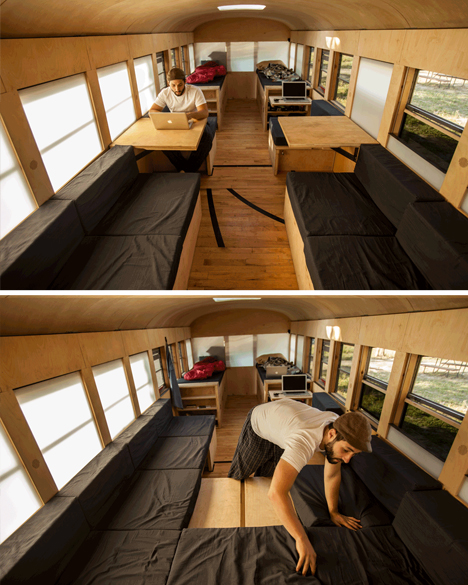
You could make a strong case for this vehicle being barely recognizable as such. The dimensions, fenestration and over spatial configuration give good clues that this space may have once been a school bus, but the finishes, furnishings and built-ins go above and beyond bare-bones adaptive reuse.

bus converted exterior retrofit

Architecture student Hank Butitta was sick of drafting imaginary buildings in studio courses destined never to be built, and sought (with help from his younger brother Vince) to steer his education in a more hands-on direction.

bus conversion program diagram

For his final thesis project at the University of Minnesota, Hank bought a bus for $ 3,000, added $ 6,000 to improve it, and spent fifteen weeks creating this amazing multifunctional mobile home.

bus adjustable seating area

We should start with the evolution of the programmatic diagram, described and illustrated in simple terms: “The even spacing of the window bays allow for the volume to be broken down into modular units of 28 inches square, leaving an aisle that is also 28 inches wide. The modular units are then grouped to create four primary zones: Bathroom, Kitchen, Seating, and Sleeping.”

bus multifunctional sleeping space

From there, a series of rules and strategies evolved, like: keep the space as open as possible, so the 225 square feet available area does not get broken down into cramped compartments.  The result is a limitation of objects built above the bottom edge of each window and an open-feeling floor plan. Hank also “developed a thin wall system integrating structure, insulation, electrical, lighting, and facing, leaving the interior open for occupation. The ceiling is covered in plywood flexed by compression, and the floor is reclaimed gym flooring, complete with 3-point line.”

bus cab storage space

Throughout the project, there are clever and deceptively simple ways to redeploy structure to address different needs on demand, like a bed system that allows for different sleeping configurations, and seats that with secret flip-up and slide-out panels to allow for further lounging or additional overnight guests. Storage is tucked and hidden throughout, integrated into other built-ins wherever spare space was available. The detailing throughout is minimal and consistent, but don’t let that fool you: a great deal of thought and work went into that apparent simplicity.

Share on Facebook


[ By WebUrbanist in Technology & Vehicles & Mods. ]

[ WebUrbanist | Archives | Galleries | Privacy | TOS ]


WebUrbanist

 
Comments Off on Beautifully Simple: School Bus Turned Minimal Mobile Home

Posted in Creativity


7 Simple Ways a Blog Can Get You More Photography Clients

04 Aug

By Ramsay Taplin

Are you a photographer who dreams of taking your photography business to the next level?

Well, one of the things that creative people (like artists, writers and, yes, photographers) forget is that you grow a business by marketing it – not necessarily by just being good at what you do. There are plenty of good photographers out there.

So what’s the problem?

Not all photography businesses have a huge budget to spend on marketing.

And that’s where a blog comes into it.

In this post I’m going to talk about how you can start a blog (or use an existing one) to get you more clients for your photography business. I don’t run a photography blog but I’ve got a bit of experience with helping small businesses grow using content marketing.

I’ll use a few examples from photographers I know as well as taking some sweet ideas from similar small businesses doing the same thing.

Not all blogs/websites are created equal

For the purposes of this article I thought it would be important to make a few distinctions.

And let’s start by highlighting the fact that a regular “brochure” website is not the same as a blog. Not by a long way.

What’s the difference between a blog and a website?
So what’s the difference? Well, a website is something that generally has static content – pages like About Us, Services, Gallery, Contact and so on. A blog is something that you update regularly with new content. The newest posts usually appear at the top. This comes with a huge set of advantages – some you might never have considered.

Can the two work together?
Absolutely. In fact, that is the ideal situation. The best way to set your photography website up is to make sure it has a blog integrated seamlessly with the rest of the website. Having a blog on a separate domain name is good but not nearly as good as building one under your main brand name. I’ll explain why later.

Where do I get started?
If you don’t have a blog (or a website) and want to learn more I’ve done a video and a full walkthrough on blog hosting that helps you understand how it all works together and how to get started the right way the first time around. You can also check out this Wiki later on for some hosting alternatives.

So how can a blog bring you more photography clients?

Now that we’ve got some of the preliminary stuff out of the way let’s jump into the meat and potatoes of the post.

1. A blog helps to build trust
The first thing to note about a blog is that it helps you build a lot of trust with your potential customers and clients. This is an extremely important part of growing a business these days because a huge amount of your customers will research you before they engage your services. In fact, some people say that one in three people look at the website before engaging the business.

Part of this means having a well designed website that showcases your work and part of it means showing your personality. This is especially important for things like wedding photography where your client will want to have a good relationship with you as it is such an important day for them.

LisaK

A few cool shots from Lisa K’s blog.

Tasmanian photographer Lisa K does this extremely well by having her blog as the homepage of her photography website. The articles she posts are about her daily life and family but always showcase some stunning photographs that would, no doubt, help to create an initial “buzz” and trust with a potential client.

2. A blog helps to increase your reach
The most important part of marketing a business is reach – you need to get in front of new people as often as possible.

This can be quite a difficult concept to understand because we are usually told that loyalty and repeat customers is the most important. Well, if you have five loyal clients who bring you the majority of your business but one drops off then you’re in trouble. A better scenario is to reach new people regularly and then convert them into loyal customers by providing a quality service. Reach is always more important than loyalty for growth.

So how does a blog help to increase your reach?

Well, it gives people something to share and a platform for you to promote all the cool intricacies of your business. People are very unlikely to share around just a portfolio site (unless it’s incredible!) but if you publish a quirky or unique blog post that’s different to your regular material you might find it makes the rounds on Pinterest or Twitter and brings you some new clients.

For example, let’s say you have some hilarious wedding photos of brides trashing their dresses. They’d look look good in a portfolio but imagine the difference it would make if you combined them into one blog post called 10 Hilarious Photos of Brides Ruining their Expensive Dresses. Much more entertaining and shareable.

3. A blog can get you more exposure locally
Google is now giving a lot of weight to local listings. What this means is that if someone types in “photographer” into a Google search they are going to get result from their local area. Here’s an example:

Screen Shot 2013 08 01 at 1 17 37 PM

As you can see, in South Australia I get a Wikipedia result and then the next few are all local South Australian photographers.

Now, a blog can help you take this to the next level in a few ways. The main one is that every blog post you publish will increase your visibility for local terms. For example, if you do a blog post called 25 Beautiful Landscape Photos from Around Sydney you are more likely to rank for terms relating to those photographs to people in Sydney.

Or, you might do a blog post about every photo shoot that you do with local businesses. When people see those photos on those businesses websites or marketing materials and then look it up on Google you’re more likely to appear. So you can piggyback off the success of your client and your quality photos to get more business.

4. A blog gives your website multiple new points of entry
This point strongly relates to the previous one but is worth mentioning on it’s own.

Every time you publish a blog post it (if set up correctly) publishes with it’s own unique web address called a permalink. For example, let’s say you do a post called 5 Interesting Photos from New York that post’s permalink would be something like www.yourwebsite.com/5-interesting-photos-from-new-york/

The great thing about this is that Google will index each post like this in the search results separately depending on what people search for, and how authoritative your website is. This is quite a complicated field we’re getting into now so if you’re interested you can read this SEO for blogs article or this list of SEO tips from Darren.

The main point, however, is that for every blog post you publish you’re creating a new set of keywords through which people can enter your blog.

A great real-world example is my mate Tim from SA TECHFLOOR who told me the other night that since he started blogging and posting photos of his flooring jobs he’s getting more and more phone calls every day. As each one has a different set of keywords (carpet, concrete, bamboo, timber, etc.) he’s got a lot of entry points he didn’t previously.

5. A blog can help your website rank higher
Now, one of the cool things about the previous few points is that if you do them all within your own website you can cause that website to rank higher on Google for important terms like “photographer in [your city]“.

Google likes to show results that are both fresh and of the highest quality. So if you have a small five page website with not much changing, Google might not think it’s all that useful.
If, on the other hand, your website has an active blog with lots of new posts, people sharing it on social media and so on, Google is likely to think it’s more useful for their customers (people searching) and thus rank it higher.
Organic ctr by search position 1 20 png

A graph of the click through rate of the top search results thanks to Search Engine Watch.

As you can see in the image above, this can lead to an immediate increase in business because the first result in Google gets over 35% of the traffic for that page. Worse still, the first page gets over 95% of clicks so if you aren’t in the first few results you’re getting overlooked.

6. A blog can help you form new collaborations
A good online friend of mine, Jamie Swanson, runs two photography blogs. One of them is embedded in her main business website and acts as a promoter of her main services. Her second blog, however, is called The Modern Tog and it’s all about running a photography business.

I wanted to mention her second site because it is a great example of someone who has set up something slightly out of the box and created a lot of new connections because of it.

For example, Jamie contacted me through Blog Tyrant about a year ago and I put her in touch with the content editor at ProBlogger. This lead to her writing a hugely successful post about Pinterest that, in many ways, has lifted her reputation online as someone who knows about photography and the marketing side of photography.

It wouldn’t have happened without the blog.

7. A blog can help reduce client friction
Client friction is what happens when they visit your site, like your stuff but for some reason don’t make contact. It could be because they don’t like your prices or it might be something a little bit more intangible like not really “feeling the vibe”.

James Field runs one of Adelaide’s best wedding photography businesses and has a great little video on his website that is a cool example of something you can do to get your clients to know you better.

Now, James’s video isn’t on a blog but it’s the perfect kind of cross-platform content that a blog is perfect for. For example, you could do a series of these types of videos showing how the wedding day pans out for your clients. These could then bring you traffic from YouTube as well as reducing client friction on your blog.

Tips for your photography blog

So now you’ve got some reasons as to why you might want to have a blog on your photography businesses website. But once you’ve got the blog what are some things you can do to make sure it succeeds?

  • Be personal
    People will love your photos (if you’re good) but they might not like you. Try to figure out who your audience is an, if possible, make sure you are personal and friendly.
  • Know your brand
    Know who you are targeting and what keyword they might be looking for on Google. This will help you craft the right content.
  • Make sure it loads fast
    People are getting less and less patient when it comes to websites. In fact, a one second delay can affect conversions by up to 7%.
  • Find a way to be different
    Don’t just publish the same stuff everyone else is. Take a leaf out of BuzzFeed’s book and use content we’ve all seen to come up with something fun, shareable and relevant.
  • Make your blog your “home base”
    In my guide to social media I talk about the fact that your blog should be your base for all your social media activities. This way, all the Tweets, Pins and Shares that you get go towards growing your blog’s traffic and rankings.

Do you run a photography blog?

I’d be interested to hear how many DPS readers have photography blogs and whether or not they’ve helped to get more customers vs just a static website. What has worked for you? Leave a comment and let us know!

Ramsay runs Blog Tyrant – a blog about trying to make a living from the couch and other internet marketing ideas. Find him on Google+ today.

Post originally from: Digital Photography Tips.

Check out our more Photography Tips at Photography Tips for Beginners, Portrait Photography Tips and Wedding Photography Tips.

7 Simple Ways a Blog Can Get You More Photography Clients


Digital Photography School

 
Comments Off on 7 Simple Ways a Blog Can Get You More Photography Clients

Posted in Photography


Textures Made Simple

22 Jul

A contribution from Lori Peterson

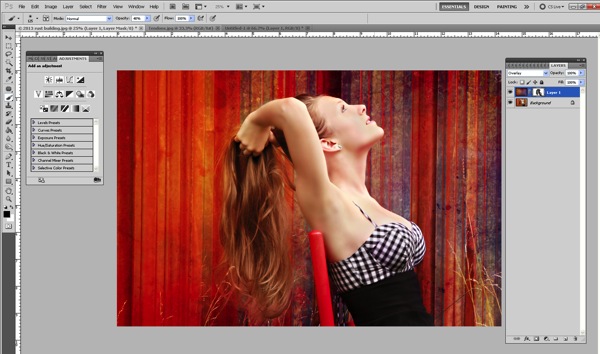
One of the most intimidating editing for some photographers is integrating textures. Textures can transform the mood and overall effect of an image. It can bring about a change that makes the image go from a nice photograph to a piece of fine art. There are an abundance of textures that can be found on the Internet and yet photographers are sometimes hesitant to use them because they feel overwhelmed or don’t understand that using them can actually be very simple. Once you get used to using textures you can usually decide what tones you want to bring in and how you want to use them.

We are going to do two edits on the same image with the same texture but use two different techniques. Typically I will change the technique I use based on the amount of editing I think the image needs in order to really use the texture. You can use multiple textures and stack them in Photoshop and change their opacity. You can even vary which technique you use on each layer. The fun thing about Photoshop is that if you use layers you can play around with your image. If you don’t like the effect, you simply delete the layer!

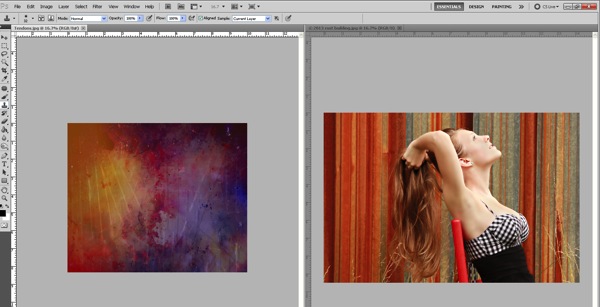
We are going to start by opening and image and a texture.

Image 1

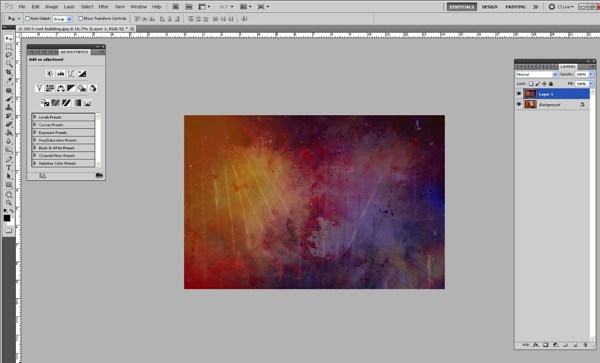
Now we will just drag the texture on top of our image.  Size it over your image by using CTRL + T and dragging the corner to make it fit.

Image 2

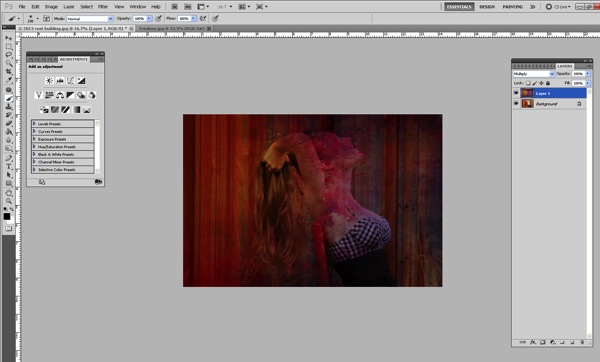
I typically will change my blending mode to screen or multiply (depending on the image) so that I can see the image underneath.

Image 3a

Now we need to remove the texture off her and her skin. We can do this one of two ways.

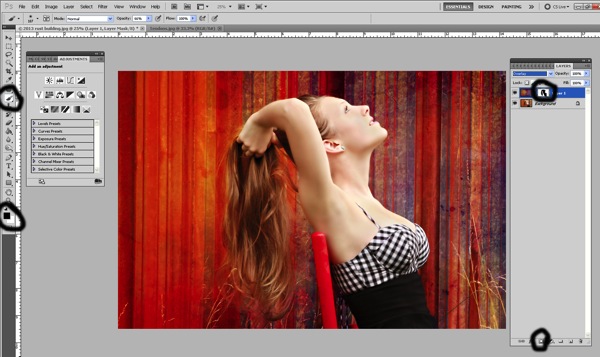
First of all we can just add a layer mask and then remove it off of her and her skin using a soft brush.

Image 4

It can be tedious to do it that way because as you get into parts of hair and closer to where her skin meets the texture you will need to make your brush smaller. 

If you prefer, you can remove the texture this way instead:

Once you overlay your texture, go ahead and change the opacity so that you can see underneath the texture. Add your layer mask, you will need that to correct any mistakes or to refine the technique we are about to do.

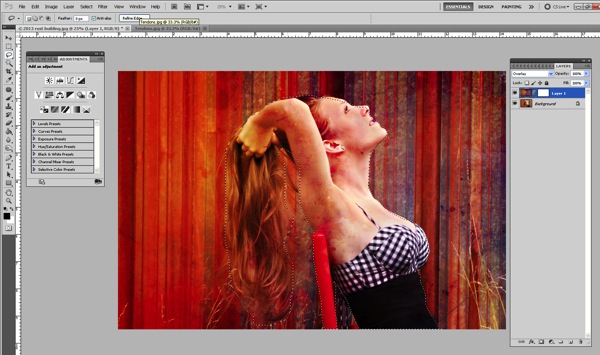
Make sure that the texture itself is what is highlighted. Select your lasso tool and then go around your subject. It doesn’t have to be perfect, but it will take you a little practice to get the hang of it!

Image 5

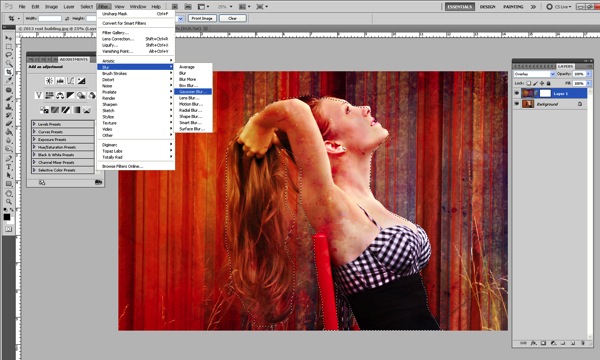
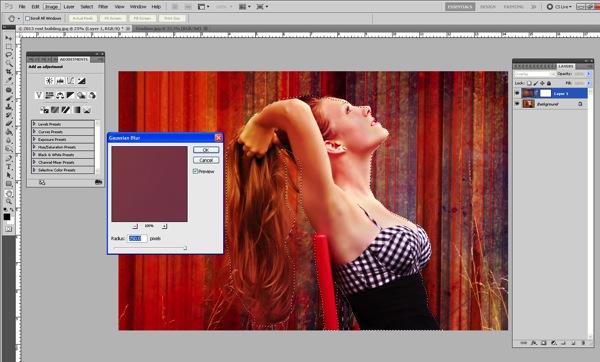
Once you have your subject highlighted using the lasso tool, then go up to Filter > Blur > Gaussian Blur.

Image 6

Push the slider all the way over to the right.

Image 7

This will blur the texture on the subject. It doesn’t blur the subject!

Now we need to refine the removal of the texture off our subject, which is much easier now that the texture is blurred.

Click on the layer mask and use your soft brush at a lower opacity to take off the parts of the texture you really want to remove. Since it has been blurred already, it’s not as difficult and tedious to remove.

Image 8

Then you can change your blending modes to fit the look you are trying to get for your image. You can also stack textures and leave the parts that you want or remove the parts you don’t.

Textures can really enhance and change the look of your overall image. They can bring more depth and more color. They can change the mood. They are fun to experiment with and once you learn how to use them fluidly you can really do a lot in Photoshop to change your images.

This was my final image using the Tendons texture overlay. 
?
Image 9

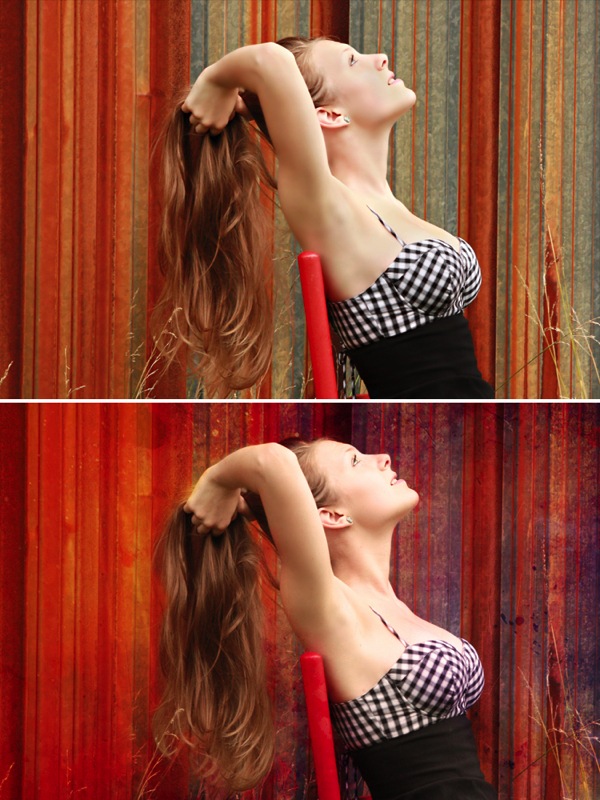
Here’s the before and after so you can really see how the image changed. 

Before After Image

Lori Peterson is an award winning photographer based out of the St. Louis Metro Area. Her dynamic work ranges from creative portraits to very unique fine art photography. Lori’s work can be seen at www.loripetersonphotography.com and also on her blog at www.loripetersonphotographyblog.com. You can follow her on Facebook at https://www.facebook.com/LoriPetersonPhotography.

Post originally from: Digital Photography Tips.

Check out our more Photography Tips at Photography Tips for Beginners, Portrait Photography Tips and Wedding Photography Tips.

Textures Made Simple


Digital Photography School

 
Comments Off on Textures Made Simple

Posted in Photography


Minimalist Photography ~ 4 Tips To Keep It Simple With A Maximum Impact

08 Jun

Minimalism is a very subjective concept in the art world. The Webster dictionary defines it as follows: A style or technique that is characterized by extreme spareness and simplicity. Some love it, others hate it, but no one seems to be indifferent. Many artists thrive in the openness of the concept, others have a problem with the lack of definition and direction. Many of us are drawn to ‘less is more’ with simple lines, geometric patterns, strong shadows, contrasting colors, lone subjects, etc. For others, deciding what to leave out of the frame to make a stronger image is a difficult exercise. Here are a few tips and examples to get you started in your quest for minimalist imagery.

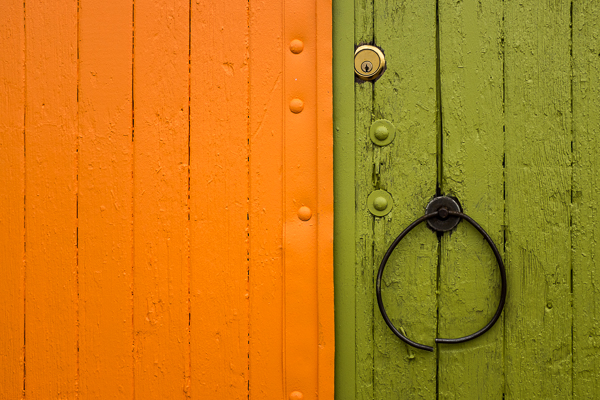
©Valerie Jardin ~ Contrasting colors make for great minimalist subjects.

©Valerie Jardin ~ Bright colors make great minimalist subjects.

1. Composition

“Keep it simple” doesn’t mean “keep it boring”. Contrary to what you may think, a minimalist approach requires a lot of creativity. The use of negative space is an integral part of minimalist photography.  A well placed subject doesn’t have to be large to have a big impact.  Deciding what to leave out of the frame and create a stronger image can be challenging and often requires a lot of practice until it becomes the way you see. I recommend training yourself to make those decisions in camera instead of cropping unwanted distractions in post processing. A clever use of depth of field will also isolate your subject from the background by shooting with an aperture as wide (smallest number) as your lens will allow.

2. Textures and colors

A bright color or contrasting colors make great minimalist subjects. The same applies to textures. The viewer should be able to almost feel the texture. Sometimes it’s all about finding a creative angle to make the photograph. Don’t be afraid the experiment. Shoot straight on, shoot high or  low, work your frame until you get the shot that will speak to you.

3. Lines and geometric patterns

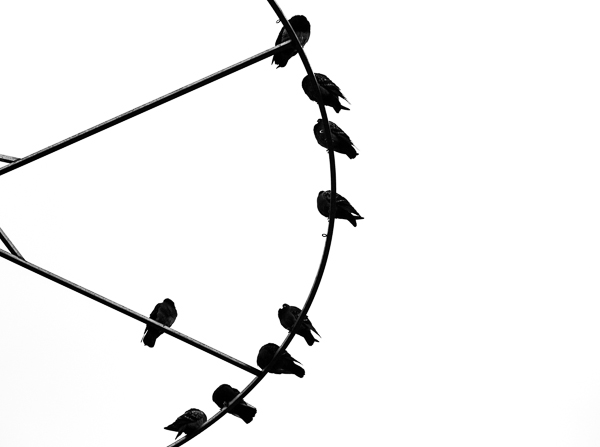
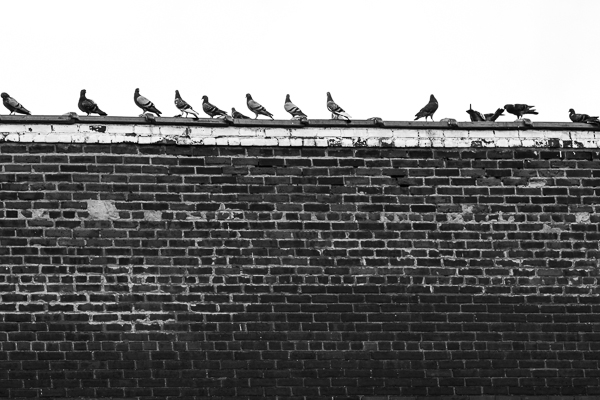
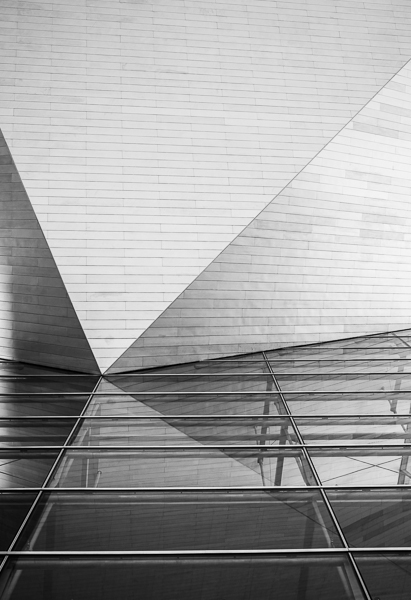
Strong lines make strong images. A good place to get started with minimalist photography is by paying attention to modern architecture around you. Leading lines, and other geometric shapes, can make great backdrops for minimalist pictures. Isolating a bird on a power line, if done well, can make a great minimalist shot. There are great opportunities around you all the time, you just have to learn to see them and that requires practice.

4. Telling a story

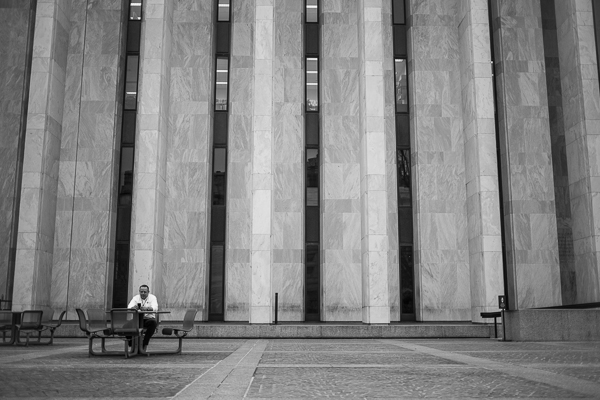
Push your minimalist photography to the next level by telling a story. Minimalist street photography showcases an interesting urban landscape with a human element. The human element, however small, becomes the focal point of the image. Yet, it’s the interesting background that draws the photographer to make the shot. Symmetry, lines, curves, shadows all play a vital part in making the photograph. Sometimes the story and the environment come together spontaneously and it’s the photographer’s job to see it and respond quickly. Other times it require a bit of patience for the right subject to walk through the frame. A minimalist approach to photography can be applied in nature as well as in an urban environment. You can practice anywhere, so get out there and open yourself to a different way of seeing with your camera!

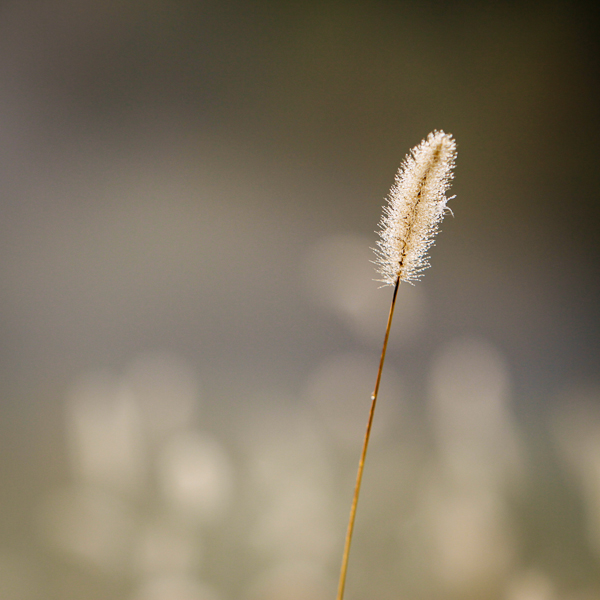
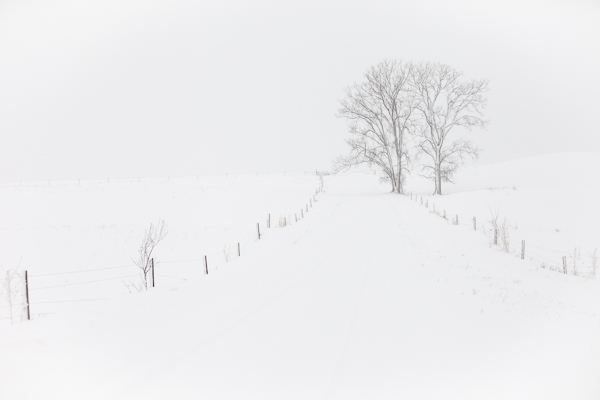
©Valerie Jardin ~  The use of negative space is an integral part of minimalist photography.

©Valerie Jardin ~ The use of negative space is an integral part of minimalist photography.

©Valerie Jardin

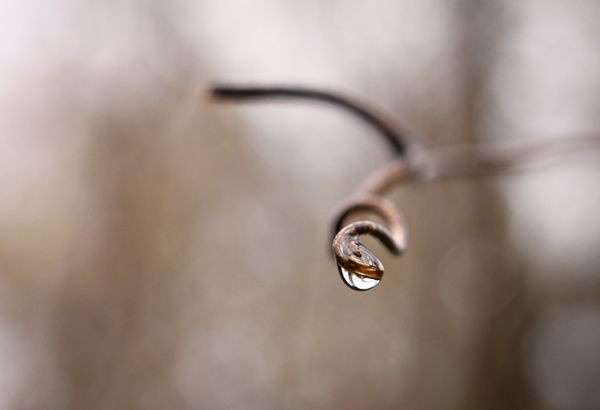
©Valerie Jardin ~ Using a shallow depth of field will allow you to isolate your subject from a distracting background.

©Valerie Jardin ~ You can use a minimalist approach in nature as well as in an urban environment.

©Valerie Jardin ~ You can use a minimalist approach in nature as well as in an urban environment.

©Valerie Jardin

©Valerie Jardin

©Valerie Jardin

©Valerie Jardin

©Valerie Jardin

©Valerie Jardin

©Valerie Jardin ~ Strong lines make strong images.

©Valerie Jardin ~ Strong lines make strong images.

©Valerie Jardin

©Valerie Jardin

©Valerie Jardin

©Valerie Jardin

©Valerie Jardin ~  The viewer should be able to almost feel the texture. Sometimes it’s all about finding a creative angle to make the photograph.

©Valerie Jardin ~ The viewer should be able to almost feel the texture. Sometimes it’s all about finding a creative angle to make the photograph.

©Valerie Jardin ~ In minimalist street photography The human element, however small, becomes the focal point of the image.

©Valerie Jardin ~ Minimalist street photography showcases an interesting urban landscape with a human element.

©Valerie Jardin ~ The human element, however small, becomes the focal point of the image.

©Valerie Jardin ~ The human element, however small, becomes the focal point of the image.

Post originally from: Digital Photography Tips.

Check out our more Photography Tips at Photography Tips for Beginners, Portrait Photography Tips and Wedding Photography Tips.

Minimalist Photography ~ 4 Tips To Keep It Simple With A Maximum Impact


Digital Photography School

 
Comments Off on Minimalist Photography ~ 4 Tips To Keep It Simple With A Maximum Impact

Posted in Photography


3 Stupidly Simple Reasons Why Most People’s Photography Does Not Improve

01 May

Image by Darwin Bell

I’m presuming that this article will not apply to most of us… but after 3 conversations in the last week which revealed the same photography problems in 3 different people – I thought I’d better jot them down.

Warning: none of this is rocket science sometimes the basics need to be said!

1. You don’t Take Your Camera With You

If you don’t practice using your camera you’re unlikely to ever grow in your understanding of and skill in photography and if you rarely have it with you – you’ll not get that practice.

Does that mean you need to lug your DSLR and all your cumbersome gear around with you all the time?

Maybe – I have friends who are never without their main camera – but if that’s just not practical, at least make sure you have a smaller point and shoot or even a decent camera phone with you at all times. While the quality of the images you take might not be as great with these cameras – at least you’ll be practicing your composition, thinking about light, color and other aspects of photography.

2. You’re Going too Fast

Many of us lead life at such a fast pace that we rarely stop to see the opportunities right before us to take wonderful images.

You can carry your camera around with you 24/7 for the rest of your life but unless you learn to slow down and to look at the world a little differently you may never actually use it.

As a result – I guess one of the tips I find myself giving to some that I talk to is to find ways to slow down – or at least slow down temporarily to set aside time to be a bit more intentional about photography. It might start by taking a walk with the main objective of doing some photography but could also be something bigger like a weekend away with your camera or even taking a photography class or tour.

For me its about building photography into your daily rhythm and in time it starts to become a more natural thing as you get in the habit of seeing life a little differently.

3. You are Worried what Others Will Think

I’ve come across quite a few people lately who suffer from ‘framing paralysis’.

They take their camera with them and they even slow down enough to see the photographic opportunities around the – but there’s just something that stops them lifting their camera up to frame the shot.

When I dig a little I’ve found in most of these instances the person is simply worried about what others around the will think if they use their camera. Will they look stupid? Will people think that they’re photographing them?

Its a feeling I’ll admit to having myself in the past and when I asked about it on our Facebook page the other day it seems that it’s quite common.

I guess the key to moving through framing paralysis is to grow your confidence as a photographer. For me the more photos I took and the more I began to exercise the discipline of taking images the easier it got. Another friend of mine got over his paralysis by finding a photography buddy to go out with – two of the taking shots somehow seemed less confronting than him doing it alone.

What do You Think?

Of course the above are very simple things that hold many people back and there are bound to be others that readers here at dPS might have experienced. I’d love to hear from you on two fronts:

  1. what other simple things hold you (or other photographers) back from improving?
  2. what tips and solutions would you give others facing these problems?

I’m looking forward to hearing more from the dPS community on this!

Post originally from: Digital Photography Tips.

Check out our more Photography Tips at Photography Tips for Beginners, Portrait Photography Tips and Wedding Photography Tips.

3 Stupidly Simple Reasons Why Most People’s Photography Does Not Improve


Digital Photography School

 
Comments Off on 3 Stupidly Simple Reasons Why Most People’s Photography Does Not Improve

Posted in Photography


A Simple 3 Step Culling Workflow: The “Editing Out” Culling System

29 Apr

Introduction

This tutorial has been transcribed from the SLR Lounge Lightroom 4 Workshop on DVD, a 14 hour Lightroom 4 A – Z guide with over 130 tutorials for mastering Lightroom from start to finish. The Digital download can be purchased from SLR Lounge while the physical copy is available through Amazon Prime.

Overview

In this article, we will go over one of our culling systems that we use at Lin and Jirsa Photography. We currently use the “Editing In” System at our studio, but in this article, we will go over the “Editing Out” System. Both systems are fast and effective; however, the “Editing In” System works a bit better for us (We will cover that “Editing In” workflow in an upcoming tutorial). Keep in mind that there is no one right culling system, so feel free to set up one that works best for you.

Either way, it is a good idea to keep your culling system as streamlined as possible. Our “Editing Out” System is a quick way to cull through images, so keep reading to see how you can save time in your production workflow!

KISS – Keep It Simple Stupid

As mentioned before, it is best to have a simple culling system because it can save you a lot of time. In most cases, the KISS acronym is quite fitting. Keep it simple, stupid. Seconds saved per image can end up being hours by the time you work through a large image catalog. Sometimes, photographers create rather complex culling systems to try and keep their images meticulously organized right from the start. For example, they may use the 5-star rating system like the one below.

  • 5 stars = Portfolio photo
  • 4 stars = Blog photo
  • 3 stars = Average photo (delivered)
  • 2 stars = A little potential but unsure (undelivered)
  • 1 star = Reject image

While this kind of a rating system sounds great in theory, it can become too cumbersome when working from image to image since it requires you to carefully analyze each image and make too many decisions at once. “Is it good enough to keep, if so, is it blog worthy, or portfolio worthy, etc.” This is why we stress creating a simple culling system. We won’t truly know what images are blog or portfolio worthy until we are done culling, editing and finishing our images. At that point, we can scan through and quickly select and mark our blog/portfolio images in just a minute or two. Trying to make that decision during the initial culling is not only time consuming, it is impossible to make correctly.

So, let’s go over the 3 steps of the “Editing Out” System that you can adopt into your workflow to help speed things up.

The 3 Step “Editing Out” Culling Process

If you have seen our Lightroom 4 Workflow System DVD, you know that Lin & Jirsa Photography currently uses the “Editing In” System, which we mentioned earlier. In the “Editing Out” System, we will select all of our images in the catalog as a “pick” by pressing “P”. Then, we will go through each individual image and reject the images we do not want to deliver. The “Editing Out” System is simple because we now only have 1 choice : keep the image and move to the next or reject the image by pressing “X.”

Immediately, our workflow process has moved from 5 possible decisions with 5 different keystrokes, to only 1 decision and 1 keystroke.

Step 1: Flag All Images as Picks
We need to flag all images in our catalog as a Pick. Return to the Grid View by pressing “G.” Then, select all of your images by pressing “Ctrl + A.” Next, press “P” to flag all images as Picks. Then deselect your images by pressing “Ctrl + D.” This will allow us to go through our images and un-flag them during the culling process.

Step 2: Filter by Flag Status
Next, we need to filter our images, so that when we “reject” an image it disappears from view. We are going to filter by flag status, so click on the first flag, as shown below. Now, we can only see flagged images. Anytime we press “X” to mark an image as a “reject” it will disappear from view.

11_filter-flag-status

Step 3: Culling Images
While we view and cull our images, we want to have as much screen space as possible. Press “F” twice to go into Full Screen Mode. Then press “Tab” to get rid of the left and right panels. Double-click on your image to view the image in full screen. Now, we are going to start culling our images. If you want to reject an image, press “X.” Since the Filter is set to only display “Flagged” images, any rejected image will automatically disappear from the lineup. Continue moving through your images by pressing the Right Arrow on your keyboard.

With the “Editing Out” System, we only have 1 option to consider, is the photo deliverable, or is it not. Is it worth keeping, or is it not. Deciding on whether it belongs on your blog, or portfolio should really come after all the images have been finalized and edited, not during the initial culling.

If you turn off all filters, you can see that the rejected images are grayed out. If you want to look at the rejected photos, just turn on the Rejected Filter, down in Filters.

So, hopefully this article was helpful to you. In the next culling article, we will show you are simple “Editing In” workflow. Just remember to keep your culling system simple, and it will save you many hours of time!

Learn More with the Lightroom 4 Workshop Collection!

This was a sample tutorial from the Lightroom 4 A to Z DVD which is one of the DVDs in the Lightroom 4 Workshop Collection. A collection of nearly 30 hours of video education teaching everything from Lightroom basics to advanced raw processing techniques.

The LR4 Workshop Collection also includes the critically acclaimed Lightroom 4 Preset System which is designed to enable users to achieve virtually any look and effect within 3-5 simple clicks. From basic color correction, vintage fades, black & white effects, tilt-shift effects, faux HDR, retouching, detail enhancing, and so much more. Click the links above to learn more.

Post originally from: Digital Photography Tips.

Check out our more Photography Tips at Photography Tips for Beginners, Portrait Photography Tips and Wedding Photography Tips.

A Simple 3 Step Culling Workflow: The “Editing Out” Culling System


Digital Photography School

 
Comments Off on A Simple 3 Step Culling Workflow: The “Editing Out” Culling System

Posted in Photography