RSS
 

Posts Tagged ‘shot’

Long Shot 2017 is Saturday, June 10th. Will you be shooting?

08 Jun

Here in Seattle, we are pretty excited when summer arrives. Granted, the warm weather doesn’t actually get here until sometime in mid-July, but that doesn’t stop us from leaving the socks at home and heading out without a raincoat (and then complaining about the inevitable rain and hashtagging all of our Instagram photos with #junuary).

One of the ways we celebrate the coming of summer is with the Photographic Center Northwest’s (PCNW) Long Shot – a global 24-hour photo shoot that is open to anyone, anywhere, with any camera (yes, including your phone). Long Shot isn’t a competition; it’s an opportunity to take a day to focus on photography, share what you capture and see what other photographers are doing. It’s also a way PCNW raises awareness and funds to support its photographic mission.

Photo by Luke Peterson | Long Shot 2016

This year’s Long Shot is on Saturday, June 10th. Between 9AM Pacific on Saturday and 9AM Pacific on Sunday, participating photographers around the world ‘chase the light’. You photograph whatever you want, wherever you are. If you register (there is a $ 20 suggested donation), you can submit up to 5 favorite images from the day and a jury will pick one of your images to include in the annual Long Shot slideshow and pop-up exhibit in Seattle on June 17th. You don’t have to attend the pop-up to participate, and you don’t have to participate to attend the pop-up.

“Ode to 18th Century” by Anna Ream | Long Shot 2016

If you choose not to register, you can still take photographs and share them on social media using the hashtags #longshot2017, #photocenternw and #pcnw. Your images won’t be included in the slideshow or exhibit, but you’ll still be part of a worldwide community of photographers taking part in a fun event.

Take a look at the Long Shot 2016 slideshow to see what last year’s participants photographed. (Note: There are a lot of beards.) What will you photograph this year, if you participate?

Articles: Digital Photography Review (dpreview.com)

 
Comments Off on Long Shot 2017 is Saturday, June 10th. Will you be shooting?

Posted in Uncategorized


Video: first person view of a spacewalk, shot by an action cam

19 May
 
There’s literally nothing cooler than outer space. And getting to see a first-person view of a spacewalk, shot by an action camera, is both fascinating and exciting. The above video was taken on March 24th by ESA astronaut Thomas Pesquet. It also shows NASA astronaut Shane Kimbrough.

The two are shown preparing a dock and making repairs to components at the International Space Station. From the Youtube post:

“The primary task was to prepare the Pressurized Mating Adapter-3 (PMA-3) for installation of the second International Docking Adapter, which will accommodate commercial crew vehicle dockings. The PMA-3 provides the pressurized interface between the station modules and the docking adapter. The pair disconnected cables and electrical connections on PMA-3 to prepare for its robotic move, which took place on Sunday, March 26. PMA-3 was be moved from the port side of the Tranquility module to the space-facing side of the Harmony module, where it will become home for the docking adapter, which will be delivered on a future flight of a SpaceX Dragon cargo spacecraft. The spacewalkers also installed on the starboard zero truss a new computer relay box equipped with advanced software for the adapter.

The two spacewalkers lubricated the latching end effector on the Special Purpose Dexterous Manipulator “extension” for the Canadarm2 robotic arm, inspected a radiator valve suspected of a small ammonia leak and replaced cameras on the Japanese segment of the outpost. Radiators are used to shed excess heat that builds up through normal space station operation.”

Articles: Digital Photography Review (dpreview.com)

 
Comments Off on Video: first person view of a spacewalk, shot by an action cam

Posted in Uncategorized


We shot the Boeing 737 Max 9’s first flight with a Sony Cyber-shot RX10 III

14 May

The Boeing 737 Max 9, shortly after landing. There’s enough latitude in the RX10 III’s Raw files to allow for moderate shadow and highlight adjustment.

28mm (equiv) F4.5, ISO 100

As has been amply demonstrated in the past, I’m an aeroplane nerd. So when Boeing offered us the chance to shoot the first flight of its brand new Boeing 737 Max 9 last month, I jumped at the chance. I might even have pushed a couple of my colleagues out of the way.

In the end, three of us headed over to Boeing Field in Seattle for the first flight – Dan, (who couldn’t care less about aeroplanes), with a Panasonic FZ2500; me, the super-nerd with the Sony RX10 III, and Carey, an impartial observer, with a Panasonic GH5 (to film me and Dan arguing). We’ll be publishing a longer article comparing our results soon, but in the meantime, with the 737 Max 9 just (temporarily, hopefully) grounded, we thought you might like a sneak preview.

The 737 Max 9 at the end of the runway at Boeing’s Renton assembly plant, seconds before starting its takeoff roll.

400mm (equiv) F4, ISO 100

I am on record as having described the Sony RX10 III’s lens as being ‘made of magic’. I just don’t understand how a 24-600mm lens built into a compact (ish) camera can be as sharp as it is. Since as Arthur C. Clarke so memorably said, any sufficiently advanced technology is indistinguishable from magic anyway, and bearing in mind that I’m no expert in advanced optical technology, magic is the explanation I’m sticking with.

It was for that reason that when the question came up of which cameras we should bring, I grabbed the RX10 III from our stockroom. I might even have pushed Dan out of the way…

As well as 20MP stills, the RX10 III also shoots 4K video. Because we were trying to compare two cameras, and Boeing didn’t seem too keen on our suggestion that the Max 9 take off at least five times for accurate side-by-side tests (sorry Rishi, we did ask), we decided not to worry about shooting any video. The RX10 III takes nice-looking video, and if you’re curious you can see several examples of its footage in our full review.

Grant Hindsley is too tall. It’s an unfair advantage.

24mm (equiv) F4, ISO 100

First flights are always a bit of a lottery in terms of timing. I’ve shot a couple of them, and things rarely go exactly according to schedule. The 737 Max 9 takeoff was delayed by a couple of hours, which we spent standing around, stamping our feet to stay warm and teasing Grant Hindsley from the Seattle PI (above) about his great height. When the plane started to taxi, things happened very quickly. No time for comparing how mode x compared to mode y – we just had to start shooting.

In high speed capture mode, the RX10 III can shoot at up to 14 fps, in Raw + JPEG, with focus locked. Since we were shooting a large airplane, pretty much at infinity, moving from infinity to infinity by way of infinity, having focus locked (at infinity) was fine.

What I hadn’t anticipated is that when focus is locked, so is the RX10 III’s zoom. It makes complete sense when you think about it, but the lens won’t zoom with the shutter button half pressed. For this reason, I had to zoom and recompose a couple of times during the Max 9’s takeoff run, but even with this interruption, I still captured a lengthy sequence of sharp images of the plane rocketing past our position, and into the sky.

The 737 Max 9 lifts off from the runway at Renton, for its first flight.

400mm (equiv) F4, ISO 100

While the RX10 III can be a somewhat frustrating camera to use (I really dislike its fussy user interface and I can’t wait for the inevitable Mark IV to finally clean it up) that lens really is something. From 24mm right through to 600mm, I took home images that are sharp and contrasty from edge to edge, and free from noticeable distortion. Having such a wide (and usable) zoom range in a single camera allows for incredible versatility.

Zooming out to a medium focal length of 50mm let me capture one of the members of the assembled press taking a quick shot on his iPhone as the 737 Max 9 was towed to its gate after the flight…

50mm (equiv) F4 ISO 100

Dan and I we were shooting alongside photographers from various news outlets and picture agencies (and of course slightly beneath Grant, from the PI) and while they juggled with huge telephoto primes, swapping for wides for crowd shots and then back again, I just nudged the RX10 III’s zoom rocker switch in the desired direction.

The 737 is on final approach? Nudge.. nudge… to 600mm. It’s taxiing into the gate below our balcony? No problem. Nudge… nudge… back to 50mm. And then out again to 600mm for a shot of the pilot waving from her window. Done.

… and moments later, zooming in let me capture Boeing’s chief deputy test pilot Captain Christine Walsh waving from the window of the 737 Max 9 as it taxis to the gate after the first flight.

600mm (equiv) F5, ISO 100

We’ll be publishing Dan’s images from the Panasonic FZ2500, and a short video from the day very soon. For now, take a look at the gallery, which includes out of camera JPEGs and converted Raw files, as well as Raw files for download.

Sony Cyber-shot RX10 III sample gallery

$ (document).ready(function() { SampleGalleryV2({“containerId”:”embeddedSampleGallery_2851627643″,”galleryId”:”2851627643″,”isEmbeddedWidget”:true,”standalone”:false,”selectedImageIndex”:0,”startInCommentsView”:false,”isMobile”:false}) });
Articles: Digital Photography Review (dpreview.com)

 
Comments Off on We shot the Boeing 737 Max 9’s first flight with a Sony Cyber-shot RX10 III

Posted in Uncategorized


Upper Yosemite Falls Moonbow – Getting The Shot

12 May
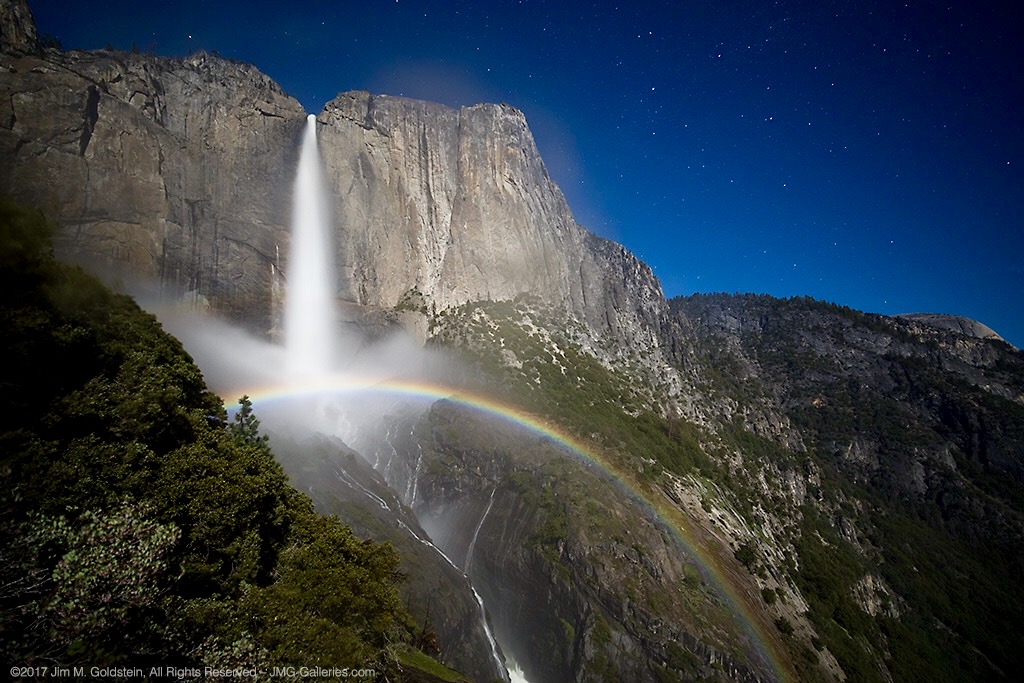
Upper Yosemite Falls Moonbow - May 9 2017

A large moonbow arcs across the mist from Upper Yosemite Falls, Yosemite National Park

There are quite a few photos in my portfolio that I look back upon and question my sanity due to the absurd conditions I’ve endured to capture them. This particular photo is up there on the insanity scale.  This past winter has seen extraordinary snowfall levels in the Sierras and now that Spring has rolled around the water levels are quite high in Yosemite Valley due to the snow melt.  That translates to huge waterfalls and under the right conditions moonbows (rainbows at night via moonlight).

I’ve taken moonbow photos from the Upper Yosemite Falls trail several times, but this year was like none other. I took up position in a new spot this year with a good friend Brian Hawkins. Our hike started off innocently enough with a hike that started at 4:30PM and later ended at 5:30AM. The reason for the long duration of the shoot was a combination of bringing a lot of gear (3 Canon DSLRS, 2 tripods and 4 lenses plus extra layers of clothes) and the interest in shooting multiple time lapses + stills. Time lapse sequences run a couple hours and the moonbow wasn’t going to appear until 11:30PM.

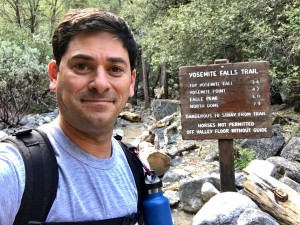
Start of the Upper Yosemite Falls moonbow hike (4:30PM)
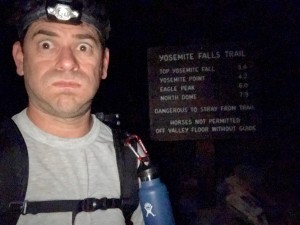
End of the Upper Yosemite Falls moonbow hike (5:30AM)

Now that I type it all out It really is rather nuts. I of course don’t think this before the hike because I have selective memory issues or quite simply my elevator doesn’t go to the top floor when it should.

Hiking with a full photo backpack means slow going on a hike that is 1.5 miles with a 1250 foot elevation gain. Leaving “early” affords me the time to properly stake out the right location, set up all 3 camera, eat and start shooting. On the way up the focus is squarely on the task at hand and making it to the setup spot early.

Waiting in heavy mist and gusty winds.

Are we having fun yet? Waiting in heavy mist and gusty winds. Only 4 hours to go.

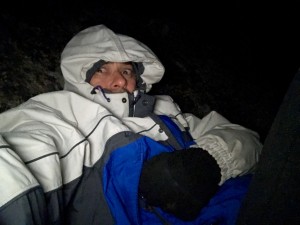
The most painful part of the excursion is the wait. This year this was particularly true given the setup spot quickly became inundated with heavy mist from the falls when the wind kicked up (10mph gusts). Without exaggeration we were waiting in a windy rainstorm. A sane person might consider moving to avoid the heavy mist, but once you’ve invested the time to setup multiple cameras and climb down steep side trails it quickly becomes a less attractive option. This of course was constantly second guessed through out the night as conditions remained miserable. Eventually we called uncle and left the cameras running but took shelter an 1/8th of a mile away on the main trial to stay dry.

So what does one think during the hours of waiting for the moonbow to appear and during the moonbow sequence run? Let me tell you in order of thought.

  1. I am so freaking wet and cold.
  2. I should have brought more layers to stay warm and dry.
  3. It’s so wet I’m not sure any of this footage will come out.
  4. I don’t think I could have carried anything more.
  5. What the f*ck are you thinking that this would be a good idea!
  6. I’ve never seen conditions so good for moonbows, but it’s too good. There’s too much water.
  7. What was that noise!? F*ck it better not be a mountain lion. Crap it was just my jacket hood rubbing against my head.
  8. I can’t feel my fingers. I should use those hand warmer things. Cr*p they’re in my camera bag back in the heavy mist. Forget it I’d rather have cold hands than get wet again.
  9. I wonder if my batteries died. I better go check.
  10. Upon returning repeat all the above thoughts
  11. I am so freaking cold. I am never going to do this again. I don’t know what I was thinking.
  12. Now that it’s so wet and windy how am I going to retrieve all my gear
  13. Holy sh*t! I can’t believe I’m here at 3AM

Then after all of this I get to my camera to see the most amazing sight, Yosemite Falls roaring full of water with the biggest moonbow I’ve ever seen. All those earlier thoughts are lost as I get more stills taken. The results, like the photo above, are like a narcotic that wipes my mind clear. With the photo high in place packing up is less cringeworthy albeit still miserable. Trying to remember, pack and not leave behind gear and accessories for 3 cameras is tough enough, but particularly mentally challenging when cold and tired. Fortunately years of experience and more importantly being a little too anal for my own good make this a little easier.

Unlike years past the extra effort of trying to dry off gear took some extra time. It also required another round of gear packing. By the time this was all complete the hike down could begin at 3:50AM.

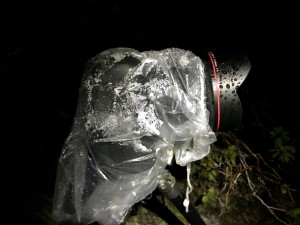
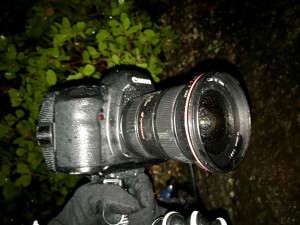
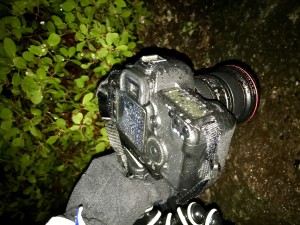
Canon 5D Mark IV + Canon 11-24 drenched from the heavy mist off the falls.
Canon 5D Mark II + Canon 16-35mm Mark II drenched from the heavy mist off the falls.

The hike down was cold, but dry and thus in my mind warm. On the way down thoughts of mountain lions hiding in the shadows quickly subside, instead focusing on not twisting an ankle due to fatigue or carelessness. Also important is to not step on the many millipede that crawl across the trail. In between dodging millipedes I’m left wondering how well my footage and still came out. Cold and tired I’m thinking it’s doubtful anything could have come out and back to questioning why I thought this was a good idea.

Fast forward 7 hours as I write this and it’s become apparent several shots came out, but I won’t know how much until I’m back home. Between three cameras it’s likely it worked out. I really shouldn’t do this again, but come next year I’m sure all this will be mentally blocked and I’ll be making a similar hike / moonbow shoot just like I did in 2011, 2012, 2013, 2014, 2016 and this year. Apparently I’m a slow learner.

Authors Note: Excuse the typos if any as I typed this on my phone and I’m still very sleep deprived.

The post Upper Yosemite Falls Moonbow – Getting The Shot appeared first on JMG-Galleries – Landscape, Nature & Travel Photography.


JMG-Galleries – Landscape, Nature & Travel Photography

 
Comments Off on Upper Yosemite Falls Moonbow – Getting The Shot

Posted in Equipment


Shooting the moon: behind the shot with Peter Alessandria

14 Jan

Shooting the moon: behind the shot with Peter Alessandria

I planned this shot out two weeks in advance. I knew I wanted the moon to encompass Lady Liberty’s crown and torch. I love the ferry passing in front. This is a single exposure.

Peter Alessandria is not only an award winning, full-time professional photographer but he also happens to be a resident DPReview community member. He recently submitted an image of the moon aligned with the Statue of Liberty, which we selected as a Top 10 image for our 2016 Reader’s Best Shots (Places), that garnered quite a bit of praise – as well as some skepticism. Many people wanted to know just how he could accomplish such a shot and if it was indeed the ‘real deal’.

With that in mind, Peter got in touch with us and we worked with him to create a ‘behind the shot’ guide to shooting the moon. As you can imagine, quite a bit of planning and dedication goes into getting any of the shots that are presented here in this how to guide.

To see more of Peter’s work check out his Instagram and the following websites:

www.greatproductshots.com
www.superstarheadshots.com
www.peteralessandriaphotography.com

What kind of equipment do you use to get those incredible moon photos?

Strawberry Moon rising above the World Trade Center. Shooting just after sunset left plenty of light in the sky for this single exposure. Taken from about five miles out.

Peter Alessandria: I currently shoot with a Canon EOS 6D and 70D. I like the 6D for its relatively low noise, high ISO files and the 70D for the swivel screen and the extra reach (at a given focal length) the APS-C sensor gives. My current lens of choice for most of my moon shots is the Sigma 150-600mm F5-6.3 | C.

You also need a sturdy tripod and cable release. Since you’re shooting at night, a head lamp or flashlight can also be helpful if there’s no ambient light. And of course depending on the time of year, weather protection for you and your camera may be necessary.

Do you have any apps or websites that you use to plan out where the moon will rise or set?

This photo (single exposure) was taken during the Super Moon we had in Nov. 2016. The moonrise came just after sunset meaning there was still a lot of light in the sky and on the Statue.

The main app I use to get my moon shots is The Photographer’s Ephemeris (TPE). The web browser version is free to use on your phone or computer while the app for Android and iOS is $ 4.99. Two additional apps that track the moon are “PhotoPills” (iOS) and “PlanIt!” (Android), these two Apps are also useful for shooting the Milky Way which I do a lot of.

TPE works by showing me where and when the moon (and sun) will rise and set based on my location. It includes moon phases and other useful information and allows me to plot the trajectory of the moon as it moves through the night sky. This is helpful since I want to identify where the moon’s path will intersect with my target. Lining the moon up with iconic landmarks such as the Empire State Building or Statue of Liberty, makes for dramatic and unusual photos.

Editor’s note: Star Walk is another excellent App that can be used to help plan shots of this nature.

Apps and gear aside, how do you go about planning to get to a prime vantage point or location to get the shot?

Moonrise Empire State Building (single exposure). This shot was taken last summer from seven miles out and required setting up in an old abandoned landfill in New Jersey.

Planning a shot with TPE is only the first half of the process. The second part is to find accessible locations on the ground that have clear lines of sight. This is where Google Map’s Street View comes in. Once I find the trajectory line I want, I use Street View to go to potential locations and see if there are any obstructions on the ground. This part can take hours since my optimal location is often to be as far away from my landmark as possible.

A couple of things to keep in mind when using Street View: images may be several years old so even though it looks good on the computer, when you arrive it may not end up being a good location. And Street View obviously only provides info on streets which Google has photographed. Sometimes when making these shots, the best location isn’t on a public street. Thus I sometimes end up in places I am not supposed to be, and as a result I was stopped by law enforcement eight times in 2016. Thankfully, the police have always been reasonable – and even helpful – once they found out what I was up to.

Once you’ve found out the time and the approximate position in which the moon will rise, what steps do you need to take to make sure that you nail the shot?

This is a photo (single exposure) of the full moon rising behind the Statue of Liberty in New York Harbor took a couple of weeks of planning.

The moon rises and sets at different times every night. Over the course of the month, rise/set times progress about 45-50 mins per day. This means you’ll need to check your charts carefully to make sure you aren’t late. You usually only have a few seconds to capture the exact moment of perfect alignment so it pays to be ready. Also, due to fluctuations in the Earth’s rotation and the Moon’s orbit, the spot on the horizon where the moon appears to rise/set also changes every night. In the long term certain locations repeat, but in the short term this means I have to make a new plan for almost every shoot.

Next, the moon doesn’t travel in a straight line (relative to the rise and set points) as it passes overhead. In the Northern Hemisphere the moon arcs to the south as it rises and then arcs back to the north as it sets. The arc is more dramatic the farther north you go and it arcs in the opposite direction in the Southern Hemisphere. This means to get my shots, I have to anticipate the path of the moon along its arc relative to the height of my landmark (TPE does give elevation and angle information but I’ve never quite figured out how to use it).

So if I want a shot of the moon atop the spire of the Empire State Building, I need to anticipate the moon’s path and how long it will take to reach that point. I often end up ‘leading’ the moon (like a skeet shooter does with a clay target) since I have very limited time to reposition if my calculations are off.

Of course none of this matters if clouds or rain are in the forecast, so make sure to check the weather ahead of time.

Since camera settings are often a topic of discussion when it comes to photos like these; what settings do you find yourself using most often?

Living in New Jersey means seeing the Statue of Liberty from behind. To see her face means traveling to Red Hook, Brooklyn and paying as much as $ 30 in tolls from NJ!

There are lots of factors that determine the proper exposure for these shots. Generally speaking, I try to keep my shutter to less than 2 seconds – and closer to 1 second or less if possible – to avoid motion blur of the moon (a sharp landmark is more important than a sharp moon but you still need to be conscious of this). My aperture is usually wide open (F5.6-6.3) on the Sigma 150-600. Even at 600mm, the lens is sharp enough to get good shots. My ISO is generally in the 160–320 (or occasionally higher) range.

One advantage of shooting the moon when it’s low on the horizon is that it is easier to get everything properly exposed in one shot. The general rule is the higher the moon gets the brighter it gets (assuming clear skies). Even though my NYC landmarks are usually pretty well lit, they are no match for the moon once it gets above 30-40 degrees on the horizon. Since the moon is reflecting sunlight, it is by far the brightest thing in the scene which exceeds the dynamic range of most cameras. Therefore, once it gets above a certain point, you will probably need to bracket your shots and combine them later in post. This is also why I prefer shooting the moon around sunrise or sunset. The ambient light in the sky makes it easier to capture everything in one exposure.”

The moon looks unusually large and colorful in your images, why is that?

Moonrise behind the World Trade Center (single exposure). This is an extreme example of how distance affects the relative size of the moon. This photo was taken from 23 miles away making the moon appear huge.

There are three factors that determine the size of the moon:

  • Most of my photos are shot when the moon is low on the horizon and the moon appears larger when it is on the horizon than when it is overhead.
  • I am often at 300-600mm FF equivalent on these shots. The telephoto compression enhances the apparent size of the moon.
  • I try to find locations as far away from my landmarks as I can. This is because the greater the distance I am from the landmark, the larger the moon appears relative to the landmark. Of course the farther away you are the more difficult it becomes to find a clear line of sight. I usually look for elevated locations for this reason.

When it is low on the horizon the moon appears red or yellow for the same reason the sun does: its light has more atmosphere to travel through than when it is directly overhead. Particles in the atmosphere (moisture, dust, pollution) tend to scatter the blue (shorter) wavelength of light while allowing the longer red wavelength light to pass through to our eyes. As the moon rises there is less atmosphere to contend with so the light we see becomes more white.

Anything else you’d like to say?

New Year’s Day 2017 Crescent Moonset – taken from Brooklyn, NY.

First I want to give a shout out to the readers and staff of DPReview. Back in 2002, when I was new to photography and had a question, it was the amazing DPReview forum members that helped me out. And for the last 15 years I’ve relied on the great, in-depth news and reviews the DPReview staff provides. I still visit here several times per week to stay up to date on the world of photography. Thank you DPReview for being such an important part of my photography career! (Editor’s note: Thanks Peter, your check is in the mail.)

I also want to thank my friend and colleague Jen Khordi. Jen founded the New Jersey Photographers Facebook group (closed – 1,600+ members) and brought myself and Jo Hendly on as co-admins. Jen introduced the TPE app to the group and was one of the first to see its potential in connection with NYC landmarks. If you live in the NJ/NY/PA area send us a Facebook request so we can add you to the group.

I’ll close by saying you don’t need to live near New York City to capture cool moon photos. Look for familiar landmarks in your own town or city and then plan your shot the next time the lunar cycle allows it. Your friends and neighbors will love it!”

To see more of Peter’s work check out be sure to check out his website and to find out just how Peter got his start as a professional photographer check out this video and give his about me section a read on his website. 

Articles: Digital Photography Review (dpreview.com)

 
Comments Off on Shooting the moon: behind the shot with Peter Alessandria

Posted in Uncategorized


A shot in the dark: Casio launches 1.9MP camera for ultra low-light photography

06 Dec

Casio has announced an addition to the Exilim Outdoor Recorder line with a model that is designed to take stills and video in extremely dark conditions. The EX-FR110H uses a back-illuminated CMOS sensor with 1.9 million extra-large pixels that Casio claims are better at recording light when there isn’t much of it around.

Aimed at cavers, campers and those who enjoy a night safari the camera offers ISO 51200 and new noise suppression circuitry as well as a high speed EXilim engine HS ver.3.

Samples from Casio compare images taken with the FR110H with those taken on the company’s regular cameras

The camera features an f/2.8 lens with the angle of view of a 20mm on a full frame camera, while the 3in LCD screen has a special setting for working in very low light. The camera follows the detachable format of the FR series so that the body and the lens unit can be separated for remote capture with feature control maintained via Bluetooth. Casio says the camera is drop-, water-, freeze- and dust-proof, and that it can record Full HD video at 30fps and with 3 stops of stabilization.

Despite the camera’s low-light credentials, in the product information Casio helpfully points out that you can’t take pictures in the absence of light.

The Casio Exilim FR110H will be an Asia-only product, and will be released for sale on 9th December. For more information see this translation of the Casio product page.

Articles: Digital Photography Review (dpreview.com)

 
Comments Off on A shot in the dark: Casio launches 1.9MP camera for ultra low-light photography

Posted in Uncategorized


How to Choose the Right Camera Mode to Get the Shot You Want

02 Dec

When starting out in photography, one of the scariest and most confusing things for a beginner is deciding which camera mode to use. While the automatic modes provide a bit of a safety net for those just starting out, there will come a time when you either want to or have to, take greater control of your camera to get the results you desire. But how do you know what camera mode to use?

Aperture Priority Mode

Aperture Priority mode is a perfect choice for a scene like this where you know you’ll want deep depth of field to keep the entire scene in focus.

First off, I won’t discuss any of the automatic modes here. A full discussion of what those do can be found here: Camera Modes Explained for Newbies. What I’d like to do here is discuss specific situations and the appropriate mode for each. Before we dive into that, I’ll explain the basics before we move forward.

Aperture

The aperture is the opening of the lens, which determines exactly how much light enters the camera and strikes the imaging sensor. The aperture also affects the field of focus from foreground to background, otherwise known as depth of field. A shallow depth of field is one that has a sharp focus on the subject, while objects in front of or behind the subject are out of focus. Deep depth of field is when the entire image is in sharp focus from foreground to background. And of course, you can have a depth of field that is somewhere in between those two.

Aperture is shown as a number on your lens, usually as a ratio. For instance, lenses with a maximum (widest) aperture of f/1.8 will have a very shallow depth of field. That same lens set to f/16 will have a deeper depth of field. An easy way to remember this is smaller numbers give you less and higher numbers give you greater depth of field.

Aperture Priority

When you know you want the background blurred, setting a wide aperture to create a shallow depth of field is key. Aperture Priority mode can be used in cases like this (keep reading to learn more on that a bit later).

Shutter Speed

Shutter speed determines the amount of time light strikes the sensor when it enters the camera. The faster the shutter speed, the less light strikes the sensor. In addition, shutter speed is directly responsible for how movement is rendered in an image. Shutter speeds are referred to in fractions of a second, such as 1/125th, 1/60th, or 1/1000th. Faster shutter speeds, such as 1/500th, freeze motion, while slower shutter speeds, such as ½, 1 second, or even 30 seconds,  will show motion as more of a blur. The longer the shutter speed, the more blur motion will create.

ISO

Your camera’s ISO determines how sensitive it is to light. Lower numbers such as ISO 100 or 200 mean your camera is less sensitive to light and are used in bright situations, such as in direct sunlight. When there is less light, such as in shade, or indoors, you might use a higher ISO such as 800, 1600, or 3200 to make your camera more sensitive to light. ISO plays an important part in the various situations I will discuss going forward, so always keep in mind that you can change this setting, and don’t be afraid to raise your ISO if needed.

Camera Modes

Before going any further, I want to clarify that there are multiple ways to get a specific desired result with your camera, using any of these modes. Once you understand the relationship between shutter speed, aperture, and ISO, you’ll be able to do whatever you like in any of these modes.

But which mode is best for which situation? You’ll have to visualize your image to decide.

Program Mode

"<yoastmark

Program Mode resides on the advanced side of the camera mode dial, usually denoted by a P. In this mode, the camera will set the aperture, ISO, and shutter speed for you. So when should you use Program Mode?

Program Mode is good when you’re not looking for any effect in particular. Your camera, when set to Program Mode, will attempt to give you a proper exposure that can be handheld, meaning you won’t be required to use a tripod to steady your camera. This is a good mode for when you’re just casually photographing and just want to be sure your exposures are right.

It is a lot like Automatic Mode in that regard, except that you have the ability to override, or shift, the exposure the camera sets, as well as many other settings such as white balance and picture style. In addition, while in Auto mode, the camera will pop your flash up when it thinks it needs more light. But in Program Mode the flash will not pop up unless you tell it to.

Aperture Priority

On some cameras, this mode is simply denoted by an A on the mode dial, while on Canon cameras it is denoted as Av, meaning Aperture Value. In any case, in this mode, you set the aperture and ISO you want and the camera will set the appropriate shutter speed for you. So when should you use Aperture Priority mode?

Aperture Priority

When you want a shallower depth of field, such as in a portrait, using Aperture Priority and setting a wide aperture is an excellent choice.

To determine the answer, visualize your finished image in your mind’s eye. What do you want it to look like? Generally speaking, if you’ve decided that the most important factor in your image is a specific depth of field, you’ll want to use Aperture Priority Mode so that you can force your camera to give you the depth of field that you want. For instance, if you’re making a portrait, you probably want your subject in sharp focus, but you may also want the background to be a little blurred, to keep your viewer’s focus on the subject. An out of focus background can create a setting without distractions for the viewer. So you might decide you want to use a fairly wide aperture such as f/4, to create enough depth of field to keep your subject sharp, but let the background blur nicely.

But watch your shutter speed too

It’s important to note, however, that you also need to keep an eye on the shutter speed setting. While the camera will set this for you, unlike in Program Mode, the camera is not going to try and give you a fast enough shutter speed to handhold. If there isn’t enough light, this will result in a slower shutter speed that may not be fast enough to freeze any subject movement. This could result in a slight blur due to unsteady hands or slight movement by your subject. If the shutter speed chosen by the camera (based on the aperture you’ve set) isn’t fast enough to freeze motion in this situation, you’ll need to raise your ISO. Raising your ISO will effectively increase the shutter speed given for the aperture you’ve set.

Aperture Priority Landscape

Aperture Priority is a great choice when photographing a landscape where you want a deep depth of field, and the shutter speed doesn’t need to be set at anything specific to capture motion a certain way.

For landscape photography

Another situation for Aperture Priority would be a landscape photo, where you may want greater depth of field to keep the entire scene in focus. In this situation, your primary goal is to get lots of depth of field to keep the entire scene in focus, so you’d set an aperture of f/11 or even f/16 to capture a greater amount of the scene sharply. In this situation, if you’re using a tripod, the shutter speed may not be as big of a factor for you.

But if you’re handholding the camera,  you will want to pay attention to the shutter speed the camera sets to ensure it’s fast enough to avoid camera shake. In addition, if there is moving water or clouds, or the wind is blowing the trees or grass, you’ll want to ensure that the shutter speed the camera sets is appropriately stopping that movement to your liking. If not, you’ll want to adjust your ISO so the camera sets a more appropriate shutter speed.

Shutter Priority

Panning using Shutter Priority

When you know you need a specific shutter speed, such as this image where a panning technique was used, Shutter Priority is often the best choice.

Shutter Priority is usually denoted using an S on most cameras, while Canon uses Tv, representing Time Value to denote Shutter Priority mode. Shutter Priority Mode is just the opposite of Aperture Priority. In this mode, you set the shutter speed you want, as well as the ISO, and let the camera choose the appropriate aperture.  This mode is an excellent choice when you’ve decided that rendering motion in a certain way is the key component of your image.

Shooting sports

For example, suppose you are photographing a sporting event. Most likely, you’ll want to freeze the action of the athletes on the field. To do so, you need a fast shutter speed, such as 1/500th or even 1/1000th. In shutter priority, you’ll need to again keep an eye on your ISO to ensure that the camera is giving you a proper exposure. Usually, the exposure indicator in your viewfinder will flash to show that at the current settings, proper exposure cannot be achieved. In this case, raise the ISO to achieve the correct exposure for the shutter speed you want.

Shutter Priority for Fast Action

You might want to use Shutter Priority Mode when you know you need a fast shutter speed to stop action, such as when photographing sports.

As another example, let’s say you want a slower shutter speed to create a panning effect. Again you would set the correct shutter speed to create the effect, and let the camera adjust the aperture. Any time the primary concern is the appearance of motion in an image, Shutter Priority is a good choice for shooting or camera mode.

Panning in Shutter Priority mode

Another example of using a slow shutter speed to create a panning effect in Shutter Priority Mode.

Manual Mode

Once you’re comfortable with changing settings and you really want to take control of your camera, Manual mode is the way to do that. You will set all of your settings according to how you want your final image to look. There is one caveat, however. Your settings will also be dependent on the available light in the scene. So if you want a fast shutter speed, and deep depth of field, you’ll probably need to raise your ISO a bit. Or compromise on one of the other settings as well.

Watch the meter

Just keep an eye on your camera’s meter and it will help you find the right combination of shutter speed, ISO, and aperture. The other modes do a nice job of taking some of the load off your brain by allowing you to choose one setting to have priority, but sometimes you just need to take full control.

Silhouette in Manual Mode

Manual Mode is the best choice when you want to create an effect that the camera’s normal exposure modes just don’t normally do, such as this silhouette.

Exposures long than 30 seconds

One instance where you’ll need to do this is when creating an exposure longer than 30 seconds. Today’s cameras don’t have shutter speeds for longer than that, so you would need to calculate in your head how long to keep the shutter open, and then use the Bulb setting to do so. Any time the camera can’t properly calculate exposure is a good time to use Manual Mode.

manual-mode-long-exposure

When creating images using a long exposure, such as this one with an exposure time of two minutes, Manual Mode is the best (or possibly only) choice.

Another time to use Manual Mode is when the lighting in a scene is especially challenging, such as when there are a lot of dark shadows. Your camera will try to expose for the deep shadows, causing the highlights to overexpose. Using a manual setting to override the camera’s choices will work well in achieving a satisfactory exposure.

Summary

As I mentioned, there are many ways to capture an image and arrive at similar settings. But each time I’m out photographing, I go through the following checklist in my head:

  1. Do I want deep or shallow depth of field?
  2. Do I want to stop action or is some motion blur okay?
  3. Which of the above two choices is more important for this image?
  4. Is one of the priority modes suitable for the available light of the scene?

The answer to those four questions should lead you to the correct mode for the shot you want.

Shutter Priority for fast action

Shutter Priority can be used when photographing sports to set a fast shutter speed to stop action.

googletag.cmd.push(function() {
tablet_slots.push( googletag.defineSlot( “/1005424/_dPSv4_tab-all-article-bottom_(300×250)”, [300, 250], “pb-ad-78623” ).addService( googletag.pubads() ) ); } );

googletag.cmd.push(function() {
mobile_slots.push( googletag.defineSlot( “/1005424/_dPSv4_mob-all-article-bottom_(300×250)”, [300, 250], “pb-ad-78158” ).addService( googletag.pubads() ) ); } );

The post How to Choose the Right Camera Mode to Get the Shot You Want by Rick Berk appeared first on Digital Photography School.


Digital Photography School

 
Comments Off on How to Choose the Right Camera Mode to Get the Shot You Want

Posted in Photography


DJI publishes film shot entirely with Inspire 2 drone

18 Nov

A couple days ago DJI introduced a pair of new drones with some very impressive specifications, especially when it comes to video. One could even argue that DJI just leapfrogged traditional camera manufacturers when it comes to video capabilities, and impressively so.

To highlight the potential of the new Inspire 2 drone, DJI worked with cinematographer Claudio Miranda, ASC (Life of Pi) to produce a 13-minute short film called The Circle, shot entirely on the Inspire 2. It’s an impressive piece of work and gives you a sense of what the new drone and camera are capable of.

If you want to learn more, Dan Chung over at NewsShooter has published a short article exploring the implications of these new drones and cameras, including some behind-the-scenes videos from the filming of The Circle. There’s also a video with the colorist who graded the film from Raw footage shot on the Inspire 2. If you’re interested in aerial photography, or even where video technology on small cameras is headed, it’s worth a look.

Articles: Digital Photography Review (dpreview.com)

 
Comments Off on DJI publishes film shot entirely with Inspire 2 drone

Posted in Uncategorized


How to Capture the Perfect Action Shot in Sports Photography

08 Oct

Sports photography is a fun challenge for any photographer. There is plenty of intensity and emotion to be found at any competitive event. These elements combine to create the potential for some truly memorable images.

At the same time, the speed and unpredictability of some games can be intimidating. Especially if you are used to dealing with slower-moving subjects, like portraits or landscapes.

Never fear! This article will arm you with helpful knowledge so that your next brush with sports photography will result in some fantastic captures.

Getting your settings right
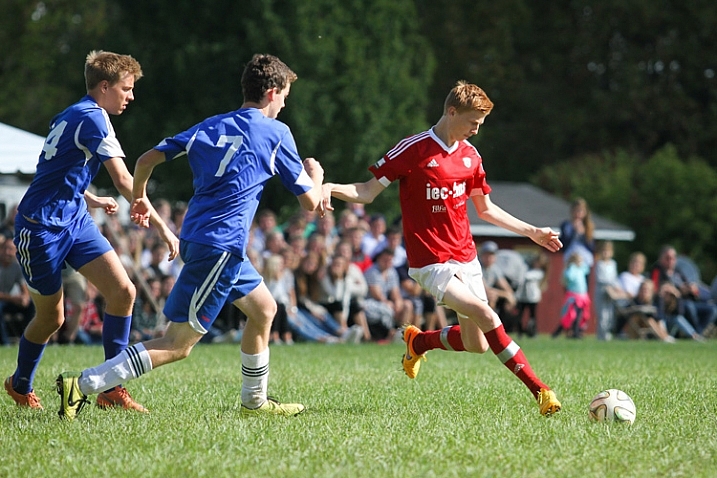
A soccer player about to kick a soccer ball, captured with a high shutter speed

This image was taken at 1/1600th of a second, which freezes the action completely. This super fast shutter speed is possible because there is a lot of sunlight.

Chances are that you’ve probably taken your fair share of blurry sports photo. Typically, players or athletes are moving at high speeds, and your camera doesn’t necessarily know for itself how to compensate.

Freezing the action

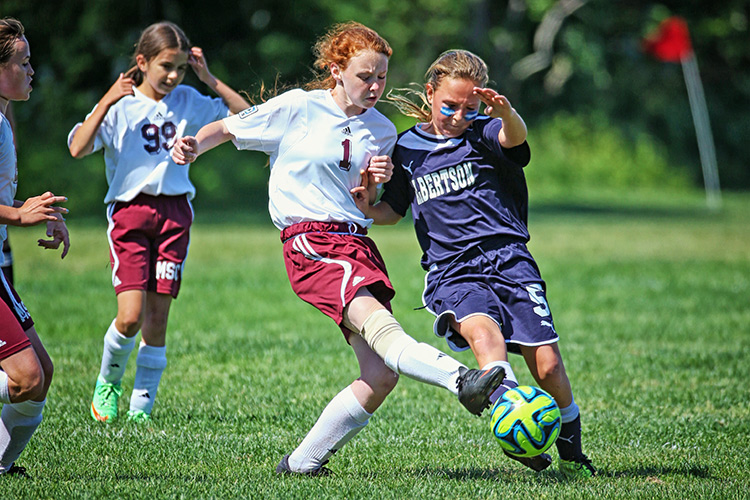
If you want to freeze the action in a photo, you’ll need to use to choose a fast shutter speed. But, how fast does it need to be? Well, that depends on the sport. 1/250th of a second should be enough to freeze kids playing soccer, but you’ll need to go a lot faster if you want to capture a baseball in mid-flight. Experiment and find what shutter speed you need to use in order to produce sharp images.

Adding motion

On the other hand, you can also experiment with slowing down the shutter speed and panning your camera throughout the picture to create a sense of speed and movement. It takes a bit of practice to get right, but if you match the speed of your subject, you can hold them in focus while the directional blur emphasizes the sense of movement.

Whenever possible, you will want to use a wide aperture, such as f/3.5 or lower. This will create a narrow depth-of-field, and helps the players to stand out, as the background distractions will be blurred.
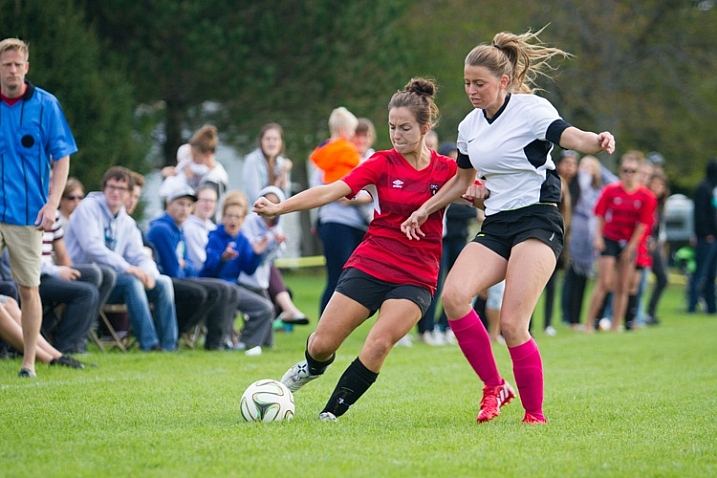
Two soccer players fighting for the ball with spectators watching the game behind them

This image was shot at an aperture of f/2.8 so that the spectators in the background don’t distract from the players chasing the ball.

If the sport is being held outside during overcast conditions or indoors with consistent lighting, consider using manual exposure mode and settings. It may take a bit of time to figure out, but you’ll get much more reliable and consistent images.

Pick your spots

When you first arrive at the field, arena, gym or track, consider all of your potential angles and options. Your options will be different depending on whether you have a short or a long zoom lens.

For many sports, you won’t be able to cover every angle. Getting up close with a wide-angle lens means you won’t be able to capture plays on the other side of the field. While using a long zoom means you may struggle to capture play right in front of you.

Find the “sweet spots” – the places on the field of play which are the perfect distance away for your camera and lens combination. You’re going to get your best images when the play is in these areas. Rather than trying to get an incredible picture when play is far away on the other side of the field, be patient and prepare so that you make the most out of every opportunity when play is in your sweet spots.
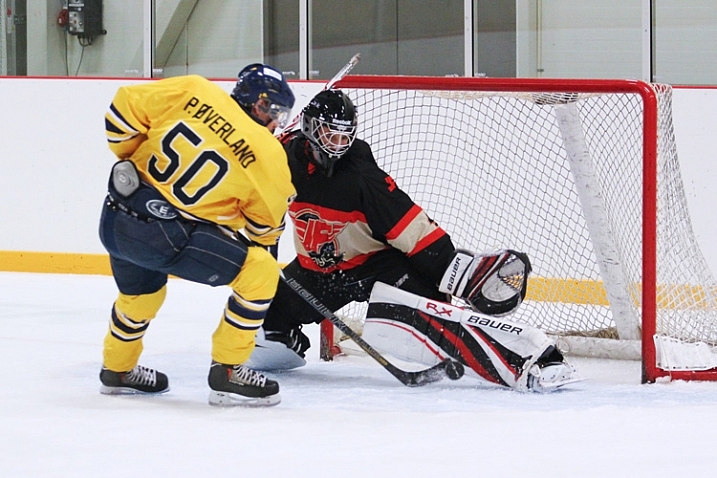
A hockey player tries to deke around the goaltender

When I stand near the benches with a 70-200mm lens, this play in front of the net is right in my sweet spot, which allows for strong composition.

Where possible, it’s a good idea to put yourself in a position where the players will be coming towards you. This allows you to see faces and get a better sense of depth than if you shoot from the sidelines and get a side profile view of everyone.
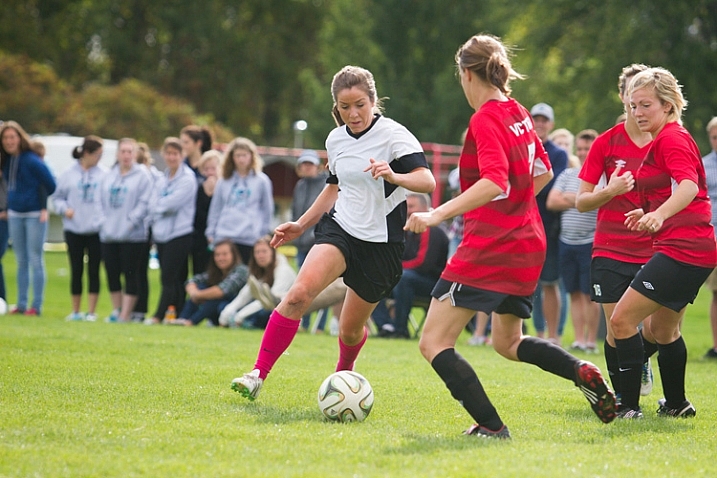
A female soccer player attempts to dribble the ball through two defenders

Get in the middle of the action

If you want to take a sports photo that will be memorable, you need to bring the viewer in as close as possible. Typically, this means using a zoom lens like the 70-200mm. If you don’t have a long zoom lens, simply get as close as possible to the field.

Perspective changes quite a bit as you zoom in. A wide-angle shot looks very different than a shot with full zoom (long telephoto). Consider how you can use this change in perspective to find some unique captures.

Many first-time sports photographers are nervous to zoom right into the middle of the action. Yes, it does come with some risks. You’re likely to snap plenty of frames where an unexpected zig or zag took the player partially out of the image. This is part of sports photography. Even the professionals aren’t able to nail the perfect shot every time.
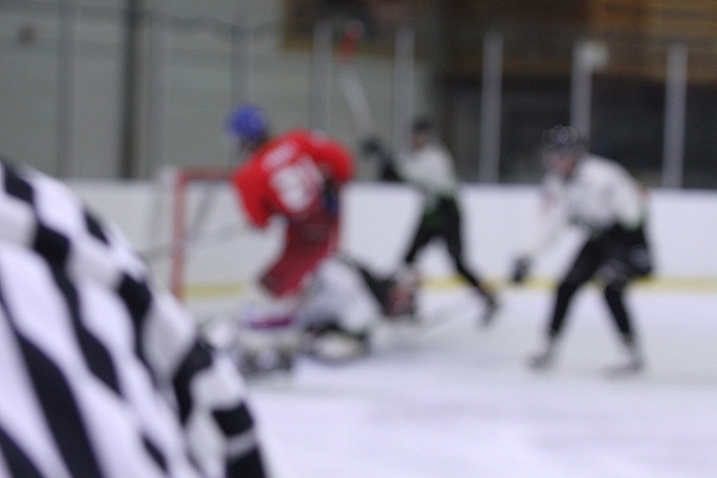
A hockey picture where the focus has missed

In this shot, the referee passed in front of the camera and messed up the focus. Don’t feel upset if some pictures turn out like this! These kinds of images will be very familiar to any sports photographer.

Risks sometimes pay off

If you have trouble following the play, it definitely is an option to play it safe by taking a wider shot and then cropping in closer afterward. But by taking a high risk, high reward approach to composition will result in some magnificent images!

Another reason to use zoom: To capture expressions!

The most memorable sports shots show faces full of emotion – whether that is the joy of the game, the thrill of victory or the agony of defeat.
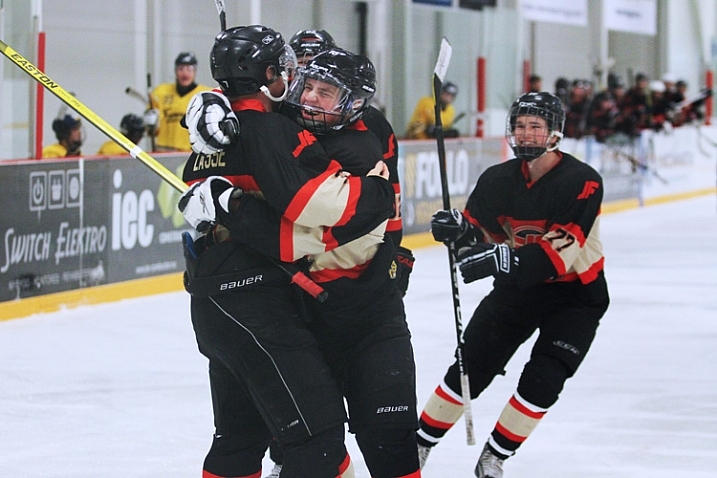
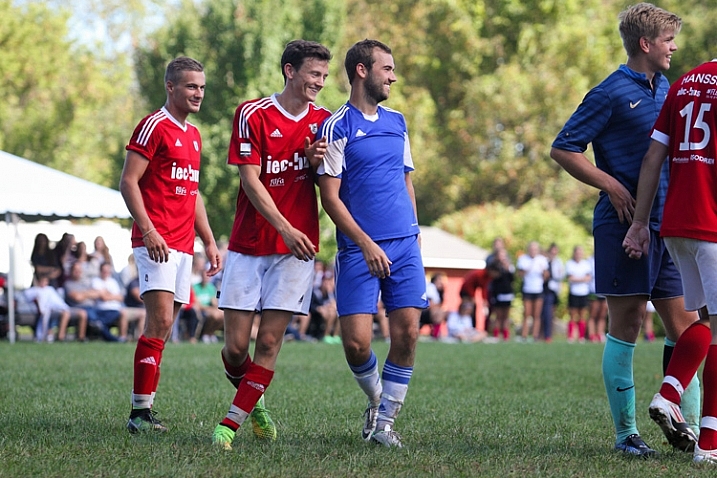
Image of hockey players celebrating on the ice after a goal

Image of two soccer players laughing while preparing for a corner kick

Timing is everything

There seems to be a furious competition between manufacturers to see who can make a camera that takes the most images per second.

Burst mode is an incredibly useful tool for sports photography, but all too often it can be a crutch. Just because you can take 10 pictures in one second doesn’t mean you should.
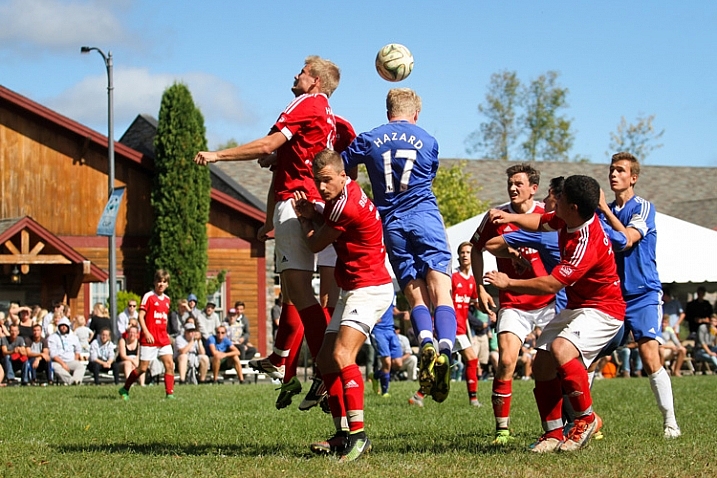
Soccer players attempting to head the ball into the net from a corner kick

Having the ability to take pictures in bursts should be secondary to anticipating the action. Understanding of the game and having a sense for what is going to happen next is more important than burst mode in every case. If you return from every event with thousands of pictures, all taken a fraction of a second apart, it’s going to be a strenuous job of sorting and finding the keepers.

With that said, burst mode can be a great tool if you don’t want to miss any opportunities and have lots of room on your card.

Lastly, don’t spend the whole game chimping! Chimping is when you get so caught up checking out all of your sweet pictures on your camera’s LCD screen that you miss an incredible play that happens right in front of you. Your pictures will still be there when the game is over. Focus on getting your shot!

Hitting your focus

Having the perfect settings, composition and timing won’t count for anything if you miss your focus.

With the possibility for spectators, colourful advertisements, and other players in the background of your images, your camera’s focus might wander and lock onto the wrong target.

For sports photography especially, you might want to consider using back button focus. With this method, your focus is controlled by a button on the back of your camera, which you can reach with your thumb. The shutter button doesn’t influence the focus at all.

By separating the actions of focusing and taking the picture, you will have greater control and independence over both roles. You may need to consult the manual for information on how to switch your camera to back button focus.
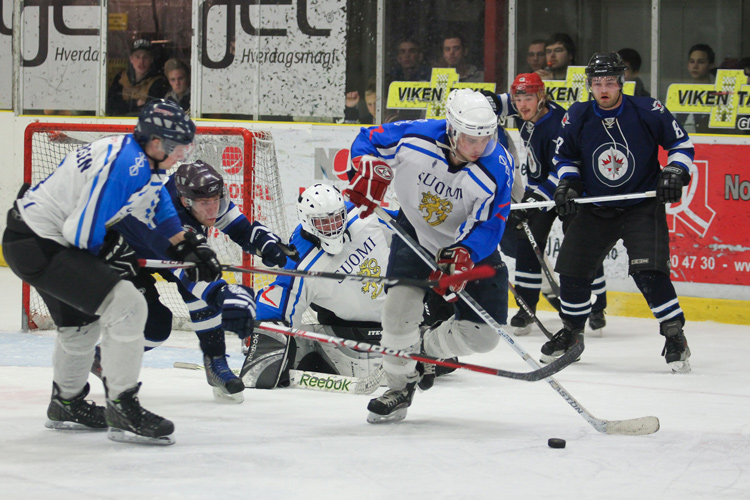
An sports action shot of hockey players fighting for the puck

Focus modes

Your camera comes with different focus modes that you can use to get more reliable results, even when dealing with fast and unpredictable subjects. The process for selecting these modes will be a bit different for every camera, so consult your manual for information on how to switch to these options.

First off, you can allow your camera to use all the focus points to determine the best target to lock onto. This can often go wrong, however, as the camera may choose the wrong point, leaving you with an out-of-focus image.

You can get a bit more specific with zone focus, which allows you to select a group of focus points that the camera uses to determine what it focuses on. This focus mode gives up greater control over what the camera locks onto, but still leaves some room for error.

If you want to be very precise, single point focus allows you focus based on just one point of your choosing. This is great if you want to focus on a specific player in a group. The drawback is that is may not be as accurate, and you may need to be very steady in order to stay locked on target.
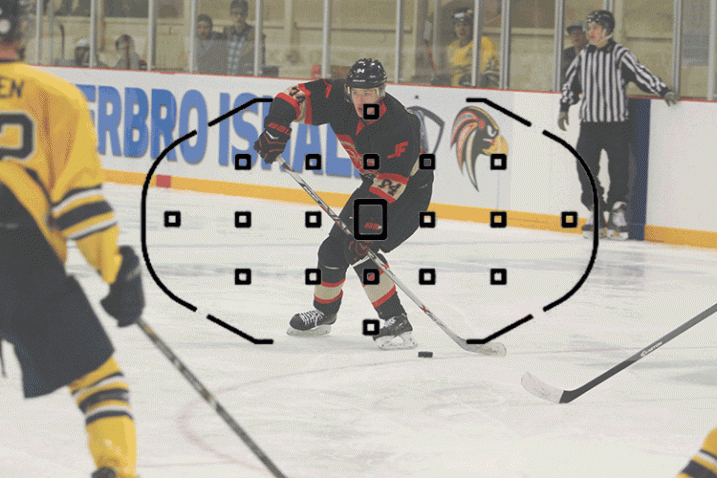
Shows all the different focus modes

This image shows three different focus modes as seen through a Canon 7D: Full Auto Focus, Single Point Focus, and Zone Focus

You can also select how the focus will track. These settings may have different names from manufacturer to manufacturer, but they do the same thing.

Continuous or AF-C (Nikon) / AI Servo (Canon):  In this mode, your focus will constantly seek for as long as you are holding your focus button down. This is ideal for moving subjects, and should be your first choice for sports.

Single or AF-S (Nikon) / One Shot (Canon):  In this mode, your focus will find a target and lock, even if you continue to hold down your focus button. While this is often slightly more accurate than servo focus, your subject may have already moved out of focus by the time you take the shot.

AF-A (Nikon) / AI Focus (Canon):  This mode is an intelligent blending of the two previous modes – it will determine if the target is moving and will lock or track accordingly.

Making the most of the focus technology your camera has to offer will play a big role in snapping some excellent sports shots!

Bonus tips and tricks

If you are photographing a car race or a long jump event, it can be a real challenge to track your subject in action. A fast moving car or runner isn’t an easy target for a lot of cameras.

One surefire way to hit your focus even under these tricky conditions is to prefocus. When using this technique, you pick a spot somewhere ahead on the track to carefully set your focus. Then, when your subject comes through, you simply snap the picture and voila!
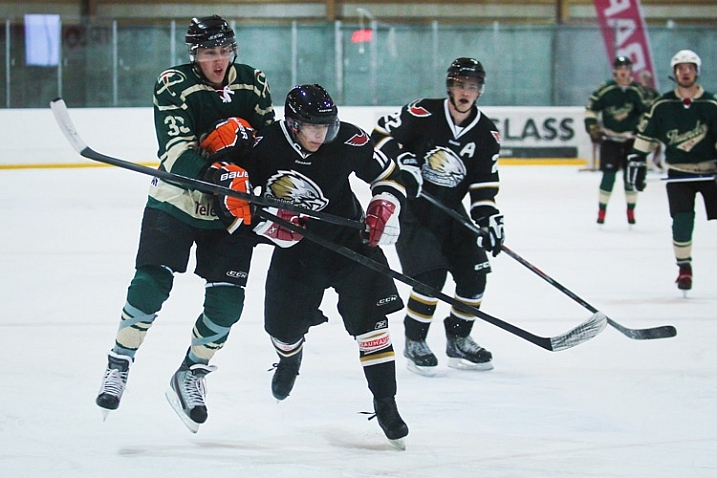
Two hockey players in mid air after a body check collision

If you want to add drama and action to your images, consider shooting from a lower angle. This perspective can often make athletes seem heroic or larger than life. Shooting from a lower angle also means the background will show spectators or the opponents behind the player, giving a better sense of the setting and action.

Take Lots of Pictures!

When you get home and load the images on your computer, you’re going to find that many of your shots have missed focus, have players in awkward or unflattering angles, or other annoying distractions. This is perfectly normal! It isn’t easy to capture the chaos of sports, and you’re going to need to throw out a lot of shots.

Over time, as your feel for the game from behind the camera improves and as you begin to master these techniques, you will find yourself coming home with more and more keepers!

googletag.cmd.push(function() {
tablet_slots.push( googletag.defineSlot( “/1005424/_dPSv4_tab-all-article-bottom_(300×250)”, [300, 250], “pb-ad-78623” ).addService( googletag.pubads() ) ); } );

googletag.cmd.push(function() {
mobile_slots.push( googletag.defineSlot( “/1005424/_dPSv4_mob-all-article-bottom_(300×250)”, [300, 250], “pb-ad-78158” ).addService( googletag.pubads() ) ); } );

The post How to Capture the Perfect Action Shot in Sports Photography by Frank Myrland appeared first on Digital Photography School.


Digital Photography School

 
Comments Off on How to Capture the Perfect Action Shot in Sports Photography

Posted in Photography


Behind the Shot: The Shadow Towers

01 Oct

In this article I’d like to take you on a nighttime adventure to the remote Torres Del Paine National Park in Chilean Patagonia. This highly photographed park has attracted many photographers, and for good reason: it offers incredible mountainous landscapes and wonderful weather conditions, making for very interesting photography. 

There are many hiking routes in the park, which range from relatively easy to hard. After visiting Patagonia in 2014 to scout for my ‘Giants of the Andes’ workshop and Fitz Roy Hiking Annex, I regretted not being able to explore more of the hiking trails. I swore to go back and do some more hiking and shooting. I did just that earlier this year, just before guiding my groups. It was a bit of an adventure, and things didn’t always go as I had planned, but I got a few results I’m happy with. This article is about one of them, entitled ‘The Shadow Towers’.

‘The Shadow Towers’, Parque Nacional Torres Del Paine, Chile.
Canon 5Ds R, Samyang 14mm F2.8

Getting There and Being There

The Torres Del Paine are the distinctive three granite peaks of the Paine Massif. They are visible from long distances away, but to truly appreciate them, you really need to hike closer. It’s a day hike, taking a few hours to reach the base camp at the bottom of the Torres and another hour or two (depending on your fitness level) from camp to the lagoon from which I took the shot. This last leg is pretty tough with several hundred meters of elevation gain, along a path which is sometimes quite steep.

My planning went more or less like this: I had rented a car from El Calafate, Argentina, a few days before, and planned to drive all the way to Torres Del Paine and do the hike all in one go, if weather agreed. The moon was going to be full, and it was going to rise directly opposite the Torres, which I had hoped would illuminate the tops of the peaks and make for a very interestingly-lit shot. A couple of days beforehand the forecast indicated clear skies, and it seemed like everything was going as planned.

Back to El Calafate. I picked up my car early in the morning and made the 6-hour drive to the park. Upon reaching the start of the trail, I packed the necessities – tent, sleeping bag, some food and all my photography gear in a backpack (which weighed in at a not-too-comfortable 15+ Kg) and began hiking. The sun was shining strongly and I was wearing a light shirt and shorts for most of the hike, even though it was already autumn. 

The hike to base camp wasn’t too hard. It seemed long after all the driving but elevation gain was moderate, at least after the first several km. Beautiful sights were abundant throughout. After about 4 hours I reached camp in the late afternoon and set up my tent. I was a bit tired but I couldn’t get any peace. I decided to climb to the viewpoint that same evening.

I left the tent – and everything else which wasn’t crucial – in camp, and started the steep hike. It wasn’t easy at all with the heavy weight on my back, but I made the effort and after 1 or 1.5 hours, I was standing on the rocky edge of the glacial lagoon at the Torres viewpoint – Mirador de las Torres. Last light was approaching and I used the remaining visibility to find a sheltered place to put my sleeping bag for the night. I had heard that there was a cave nearby but didn’t have the time to find it, and so I settled for a spot surrounded by rocks, which would shelter me from strong winds. I did a bit of scouting around the lagoon before dark, to find a suitable composition.

My sheltered bivvy spot. Pardon the cell phone shot.

Darkness fell and I had to rest a bit from the long day and tough hike. I was waiting for the moon to rise when clouds began rolling in. I was very disappointed, since that meant I wasn’t going to get the kind of light I was hoping for. I kept on waiting and viewing the movement of the clouds and moon. At some point the moon began peeking between the clouds and producing interesting patches of light on the lagoon and the mountains. It was then that I knew I had an opportunity to create a good shot.

The light was changing very rapidly at this point, and due to the strong moonlight, I could see very contrasty shadow moving over the lagoon, which was exceptionally beautiful and exciting. I took several shots in the changing light. At some point, the moon was strongly illuminating the lagoon and foreground rocks, while the Torres themselves remained in shadow. It was an awesome sight, and I tried to convey what I saw with my camera.

Another shot I took on the same shoot, with different composition and light conditions.

After finishing my shoot I went back to the sleeping bag and rested a bit, hoping to shoot some more later with different light. But as it often is with nature photography, things began to deteriorate quickly. More and more clouds came over and I decided to try to get some sleep before trying again. I got perhaps half an hour of bad sleep when it started to rain on me. This was an unexpected turn of events and I was afraid I’d have to sleep in a wet sleeping bag, which was really not how I had planned to pass that night.

Luckily I had a very good sleeping bag (thank you Feathered Friends!) which was highly water resistant, and apart from some dampness in the zipper area, kept me protected and dry. Still, I have to admit lying there, hiding in the sleeping bag under pouring rain, utterly alone at night, more than an hour’s hike away from any other living soul, wasn’t too much fun. 

After a few hours or rain, the sun was about to rise. Sadly, the Torres were shrouded in fog by then, rendering them completely invisible. The hikers who were arriving to see the sunrise were disappointed. I packed my gear and hiked back down, all the way to the car. Even the 2-minute drive to the nearby restaurant was agony, but once I got my big, juicy hamburger I was a happy man.

Settings and Execution

I took this shot with my Canon 5DsR and Samyang 14mm F2.8 lens. The image is focus stacked from 2 exposures, since I used F2.8 and depth of field was quite small. One image was focused on the foreground rocks, the other on the mountains in the background. Since I used an ultra-wide angle lens, 2 images were enough to cover the depth range.
I used ISO 800 and a 13 second exposure. Here are the 2 original RAW files.

Composition

The main element in the composition is a virtual spiral running from the big rock on the right, through the foreground rocks and all the way to the mountains. Here’s an illustration.

I decided to leave a relatively large space above the Torres to show some more of the texture and movement on clouds, and to leave some room above the left peak.
The most important part of the image is the obscure silhouette of the Torres – giving it its mysterious feel, and, of course, its title.

Post Processing

As time goes by, I tend to do less and less post processing. This is both an aesthetic decision and an ideological one. The main things I put an emphasis on here are maintaining fidelity to the actual scene as I saw it and making sure the final image still looked like a night shot, while still keeping details in the dark areas.

The first thing I did was correct the lens aberrations using ACR’s profile correction. I also made a few global adjustments, shown below. No local adjustments were done.

I then saved the 2 files as TIFFs and went on to Photoshop. I put the images as layers and used Edit > Auto Align Layers to align them. After aligning, I cropped the image a bit.

As to the focus stacking itself: to get the sharp parts from both images, I used the eraser tool to expose the right section of each of the shots. This was done by eye.
At this stage I had a focus-stacked, almost complete image, needing but a few last adjustments. Firstly, since the image was still too bright (as visible in the histogram), I used the curves tool to darken the image with more emphasis on the lighter parts. I wanted a darker result, to better convey the night atmosphere and to be more realistic, all that without losing detail in the shadows.
After taking the contrast down in ACR, I wanted to take it back up a bit in a controllable fashion. To do this I used luminosity selections. I selected a mid-range mask and applied a levels adjustment layer on it. 

I also added a bit of local contrast using dodge and burn in LAB color mode, to avoid color shifts. I added some saturation, to bring out the natural colors in the lagoon and rocks, performed size reduction and some sharpening and I was done. 


Erez Marom is a professional nature photographer, photography guide and traveler based in Israel. You can follow Erez’s work on Instagram, Facebook and 500px, and subscribe to his mailing list for updates.

If you’d like to experience and shoot some of the most fascinating landscapes on earth with Erez as your guide, you’re welcome to take a look at his unique photography workshops around the world:

Land of Ice – Southern Iceland
Winter Paradise – Northern Iceland
Northern Spirits – The Lofoten Islands
Giants of the Andes and Fitz Roy Hiking Annex – Patagonia
Tales of Arctic Nights – Greenland 

Selected articles by Erez Marom:

  • Behind the Shot: Dark Matter
  • Mountain Magic: Shooting in the Lofoten Islands
  • Behind the Shot: Nautilus
  • Behind the Shot: Lost in Space
  • Behind the Shot: Spot the Shark
  • Quick Look: The Art of the Unforeground
  • Whatever it Doesn’t Take
  • Winds of Change: Shooting changing landscapes
  • On the Importance of Naming Images
  • Parallelism in Landscape Photography

Articles: Digital Photography Review (dpreview.com)

 
Comments Off on Behind the Shot: The Shadow Towers

Posted in Uncategorized