RSS
 

Posts Tagged ‘shot’

Behind the shot: Praia da Adraga at blue hour

16 Jul

If you recognize Nicolas Alexander Otto’s name, it may be because we featured some of his work a while ago. The Germany-based landscape shooter has graciously agreed to share the story behind one of his images, titled ‘The Living Infinite’, a shot he captured on a trip to Portugal’s Praia da Adraga beach. He walks us through everything that went into making the image – from planning the trip to his post-processing technique. 

By Nicolas Alexander Otto

To explain my process, I should start with a little bit of background information. When I have a timeframe set and know that I will be on the road during that period I dive into the planning phase first, trying to make the most of the time I have available. I then try to organize my shooting itinerary accordingly, checking for all the different options available for good light: sunrise and sundown times, same goes for the moon, the tidal schedule and the position of the milky way.

In this particular case I knew I was going to be at the ocean and the moon would set in the western skies during blue hour for three successive days. Hence, I knew I had to be at the Portuguese coastline by then, originally starting from Germany and driving all the way through France and Spain to get there.

My main focus on the trip was a beach called Praia da Adraga, located near Sintra. I planned to get my shot in the early morning hours, knowing the blue hour would provide me with the gentle light necessary and the moon would add that little something to the sky, keeping it from falling flat, although much would depend on cloud coverage.

Knowing my goal I looked up the tidal schedule next and noticed that the waves should be splashing around the famous sea stacks on the beach right around the time the moon would enter my frame. It’s important to note that I had been at that location two times prior to planning this, but tools like Google Earth and the Photographer’s Ephemeris make pre-visualizing shots fairly manageable without prior visits – I highly recommend using them. I checked the weather upon arrival and had to sit out a night of drizzle, already fearing I might not get the shot I had imagined. Luckily, it stopped once I woke up and grabbed my gear.

On Location

The evening before I had already scouted the location and taken some test shots looking for the right composition so I knew I didn’t need much time, just a short break in between showers to reel in my desired shots.

During my third trip to the beach I noticed huge differences compared to my previous visit. A fellow photographer whom I met while walking towards the sea stacks told me that severe winter storms had altered the appearance of the beach, washing away quite a bit of sand rendering the sea stacks much higher than I remembered them, and revealing more rocks in the foreground as well. However, when I looked at where the moon would enter the frame on Photographers Ephemeris I saw that almost none of them would be in my composition.

I knew I had to battle against the rising tide and might face issues with camera shake, especially with my 36MP Nikon D800, so I utilized my heaviest tripod: a 3.4kg Slik 780 DX Pro. If burrowed in the sand a little, it’s almost completely resistant against the incoming surge as long as it’s not much more than knee high.

Composition-wise I went for a classic, dynamic two thirds setup with the waves’ receding flow drawing the viewer’s gaze into the image, right past the sea stacks out onto the ocean and the moon looming overhead in the left third of the frame. I tried to leave at least a little bit of separation between the rocks as their dark surfaces can be heavy and distracting if clumped up, drawing too much of the viewer’s attention to a single area.

It took me some time to get an incoming wave to create those leading lines I had imagined. Sadly, the image ended up being a bit too dark, so I would need to brighten the exposure a little in post processing and work on the contrast. To blame was the fact that dawn had already kicked in and I had to readjust my camera settings each minute, and at that moment I tried adding a ND filter. When an especially promising wave came in, rather than adjusting my settings, I pressed the remote shutter and got exactly the wave patterns I was imagining. No other subsequent exposure came even close to it, unfortunately, thus I had to choose this one despite its technical shortcomings.

It can be quite difficult to capture waves because the shutter speed has to match the their force to shape beautiful streaks of spume, without them stopping or clumping up at a rock, breaking the rhythm of the lines. Oftentimes a shorter exposure doesn’t create any dynamic addition to the image and a longer one would render most of the wave motion invisible.

Here are the settings used for my shot:

Camera: Nikon D800
Lens: Nikkor AF-S 18-35mm F3.5-4.5 G ED
Focal length: 18mm Shutter speed: 3,5 sec
Aperture: F5.0
ISO: 100
Filter: Haida ND64

Post-processing

Exposure adjustments made to brighten the image.

I knew I needed to brighten the image overall, however I did not not want to alter the colors in any way to preserve the natural hues that the magical blur hour light supplied. Also, I knew I had to make local adjustments to the micro contrast, which is why I did not use clarity just yet because I wanted to keep the clouds nice and smooth.

At this point some adjustments to sharpening are made, along with correction for vignetting but none for distortion.

I rarely ever sharpen my whole image which is why I used a mid-range mask here to cover only the stronger contrasted edges of the rocks and sky. Even though I do use lens corrections I almost always dial down the distortion; on the one hand because the Nikon 18-35mm G ED has almost no distortion to begin with and on the other because a little distortion, in my opinion, adds to the dynamism of the image, especially in landscape photography. And for the most part I keep the standard noise reductions settings as is.

Next I imported the image into Photoshop and here you already can see all the different adjustments I made to the image on the right (first switched off so you can see the difference). Before I start working on anything else, I usually get rid of dust spots – thus the base layer is renamed to “clean”, indicating I’ve already cleaned up the image.

As a second step I used Nik Color Efex Pro 4 here for some more global adjustments, and afterwards I used luminosity masks to target specific tonalities of the image, adding more contrast selectively to the sand and sky. Due to the very even overall exposure (not taking into account the rocks), most of the masks are not altered after the tonality selection.

In Color Efex Pro 4 I first used the Pro Contrast and Detail Extractor with these settings:

At this point I wanted to add a bit more contrast to the sky and the foreground without darkening the rocks to prevent having to brighten them up again later in the processing, since that is never a good idea to begin with. The rest of the image benefited from a little more punch overall, though. I also balanced out a little bit of the cyan toning with the ‘Correct Color Cast’ setting, because at this stage I felt like it might be deviating a bit too much from what the scene looked like in my recollection.

The detail extractor is an incredibly powerful filter, which is why I seldom use it at more than 5%. I would also recommend painting the effect in rather than using control points for masking in more complex situations. But in this case, the selections that the program generated suited my needs and I went with it. I tried to prevent the detail extractor from brightening the waves and sky, as it tends to brighten darker parts of the image recovering information in the dark tones. Furthermore, longer exposed skies and waves looking too crisp, for me at least, often kind of defeat the purpose of taking long exposures in the first place. However, the dark rocks were already brightened up a little bit which was a desirable result in this case.

After these adjustments the image already had more punch, but still lacked some differentiation in the narrow tonalities of the sand and the incoming surf – something common with blue hour shots. Additionally, I wanted the sky to be just a bit more dramatic. For this I added different curves layers with various luminosity masks generated with Tony Kuypers famous TK Panel.

First, with a ‘Lights 3’ and a ‘Lights 1’ mask, I emphasized the waves in between the rocks, both grouped together and masked with a gradient in order not to affect the sky (you can see the gradient masks in the first screenshot).

The same procedure was then used to get more detail out of the immediate foreground waves by using a ‘Midtones 3’, and again for the rocks, and foreground using a ‘Darks 2’ mask (this was actually applied later in the workflow and is called ‘contr5’ in the image above).

Next I wanted to introduce a bit more drama to the sky, so I used a ‘Midtones 3’ mask in order to select a wide tonal range in the sky, and darkened them only a small amount to make the undersides of the clouds stand out more.

In the end I darkened the rocks a little – just a tiny amount because I love images with prevalent darker tones – using a ‘Darks 3’ mask (this would’ve also simply been achieved by painting out the detail extractor added earlier).

As a last step I added a minor dodge and burn alteration to call attention to the small water splashes on the right sea stack: a very subtle, almost unnoticeable effect.

My final actions, as per usual, included resizing and converting into RGB color space. Usually I choose 900px for the web, but in this case I chose 1200px for this DPR article, so you can see more of the details.

I hope you enjoyed this behind-the-scenes look at my process!

Articles: Digital Photography Review (dpreview.com)

 
Comments Off on Behind the shot: Praia da Adraga at blue hour

Posted in Uncategorized


How to Use a Travel Photography Shot List to Come Home with Better Photos

01 Jul

Checking off your travel photo listWant to bring back travel photos that your friends actually enjoy viewing on Facebook? Want to make sure you don’t miss anything when visiting a new culture? Then it’s time to make a list!
We all have our easy ruts we fall into when photographing, but travel, for me, is about expanding my view. That’s why I take a travel shot list and try my darnedest to get at least one of each shot when visiting a new location.

What’s on my list?

Here are some tips for you to help make a travel photography shot list for your next trip. Feel free to use my list and add to it with your own ideas.

1 – People – old, young, and in-between

Spread out your people photos between age ranges. I’ve seen a bazillion images of old ladies from Cuba, while often missing are people like me; middle aged and fairly normal, even a bit boring. Round out your people photos with more variety, is all I am saying.

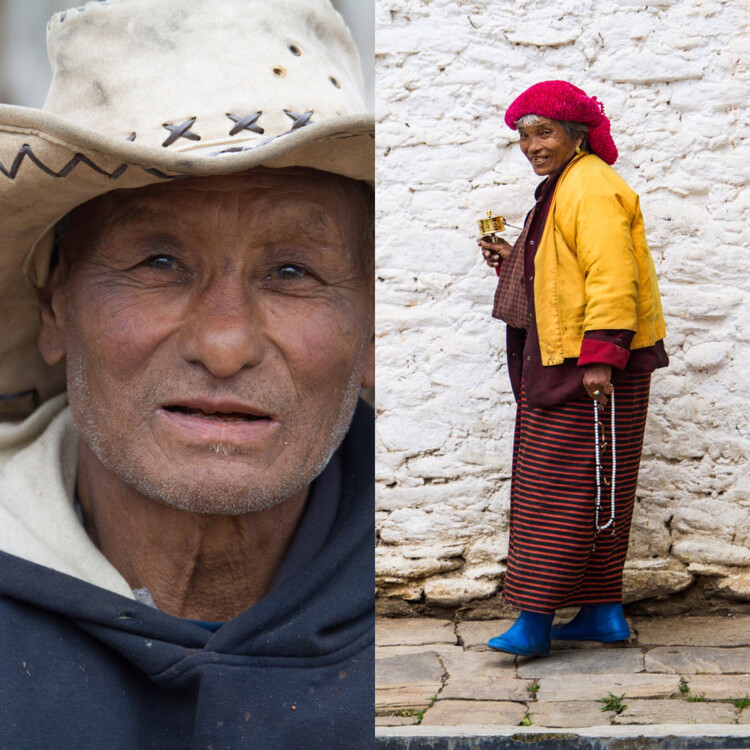
Portraits in Bhutan

What’s not to love about those shoes and that smile?

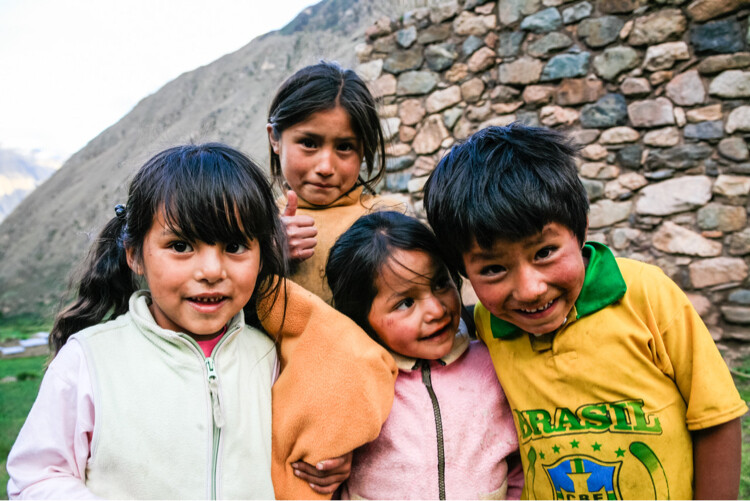
Kids are an easy target as they often love having their picture taken. You will need to be aware, though, that not all parents wish for their children to be photographed. That’s the crux of it; parents worry how the images this stranger just took will be used. Sometimes all it takes is a simple “Hello” first to the parents to gauge if taking photos is okay. If language is a barrier, you can also point to your camera, then to the children with an inquisitive look on your face. Either way, no matter the answer, respect the parent’s choice.

Peruvian kids

Kids playing in Inca ruins, Peru

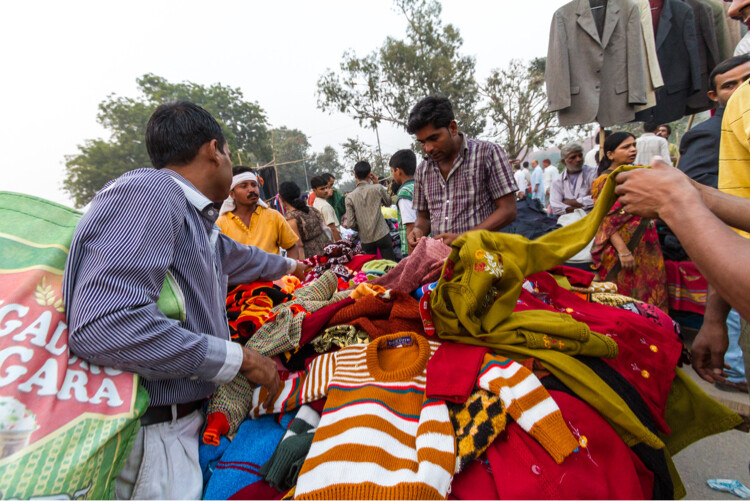
Delhi street market scene

Street scene in Delhi, India with people my age.

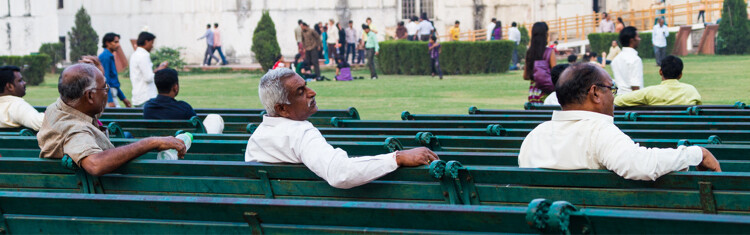
Men at Red Fort, Delhi, India

People watching at the Red Fort, Delhi, India

2 – Food – preperation, presentation, social aspect

Food brings us together. It’s a basic need we can all relate to, even if we don’t know exactly what we are about to eat.

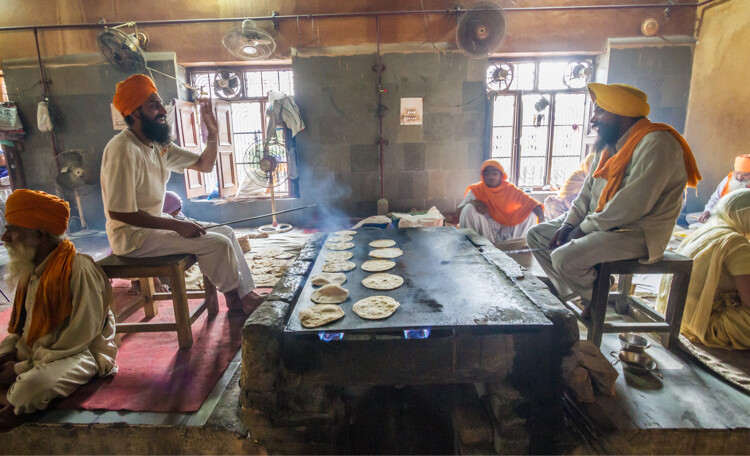
Cooking at a Sikh Temple

Inside the commercial sized kitchen at the Golden Temple in Amritsar, India

Don’t just shoot the Instagram-worthy image of a plate of the amazing new delicacy you are experiencing, find a way to shoot the preparation of food. Get behind the counter (where it’s allowed) to see how it’s cooked, and where it comes from. As you plan to share these photos (why else are you taking them?), you may find that a large, and often hidden, swath of your friends and followers have a strong interest in food prep.

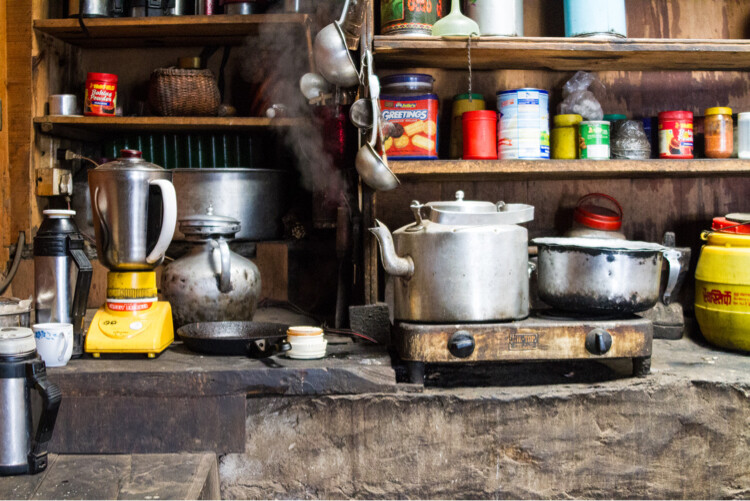
Buddhist monastery kitchen in Nepal

The full kitchen at a monastery, high in the Himalayas of Nepal

3 – Architecture – old, new, juxtaposed

In some locations the old and the new architecture matches, Bhutan comes to mind. I watched artisans paint a brand new home with traditional patterns and motifs from the nearby 400 year old monastery. Everything there fit a certain style.

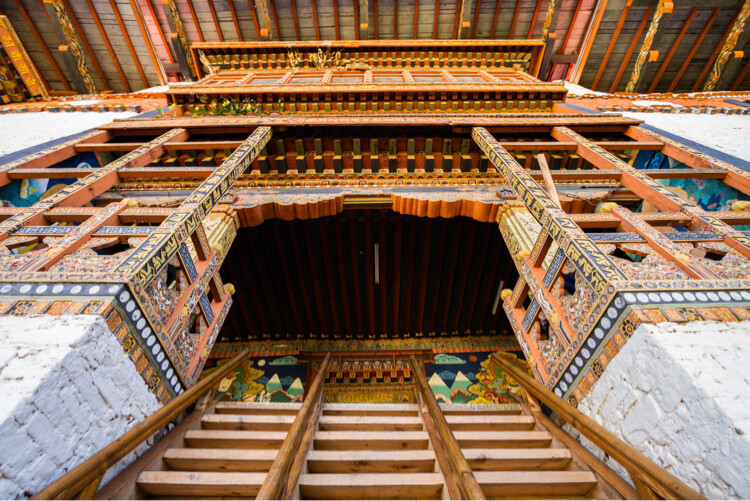
Buddhist Temple in Punakha, Bhutan

Looking up at the Punakha Temple, Bhutan

Then we have countries making vast changes from the old style to what constantly evolves as modern – think of Tokyo or Dubai. Look for the differences even where you think there is just one style.

4 – Water – how is it used?

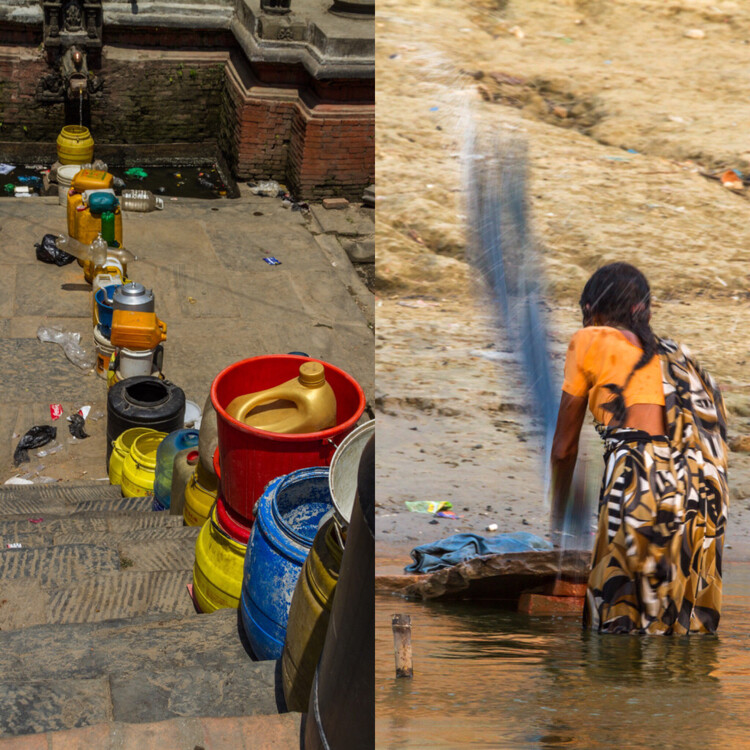
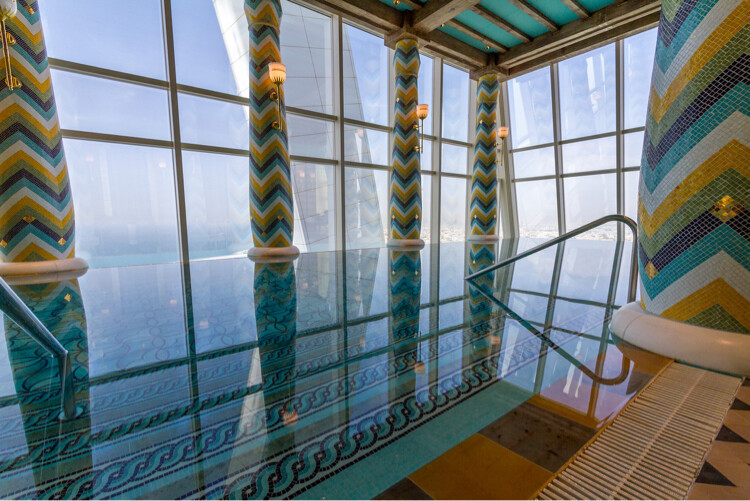
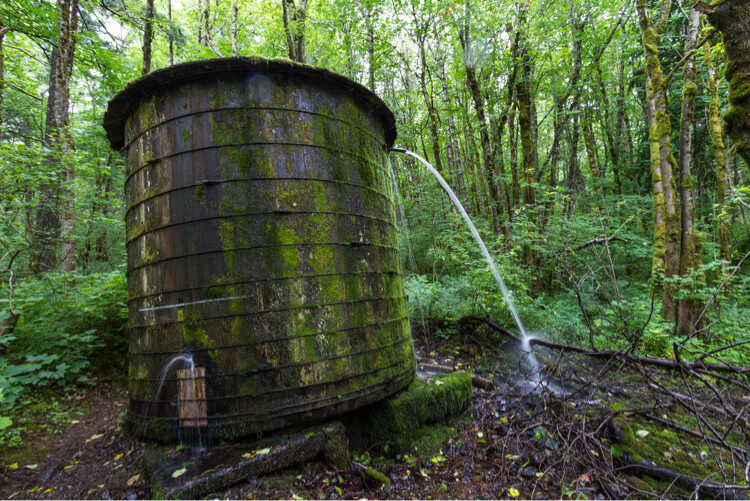
While food brings us together, water is even more vital to our lives. In California we are familiar with our current drought, but forget that not every place has this problem. Some places are quite extravagant with their use of water, while it is a scarcity in others.

Water in use in Nepal and India

Scarcity of water in Kathmandu means water lines, while a woman in Varanasi, India, washes her clothes in the river.

How do the locals use water? Do they wash their laundry in the rivers? Are there fountains everywhere? Are their cities built along waterways, or with vast ports?

Infinity pool and Dubai

An infinity pool 23 stories up in the Burj al-Arab, Dubai, UAE

Old water storage tank overflowing and leaking

In the woods of Oregon, there is often way too much water.

5 – Transportation – private and public

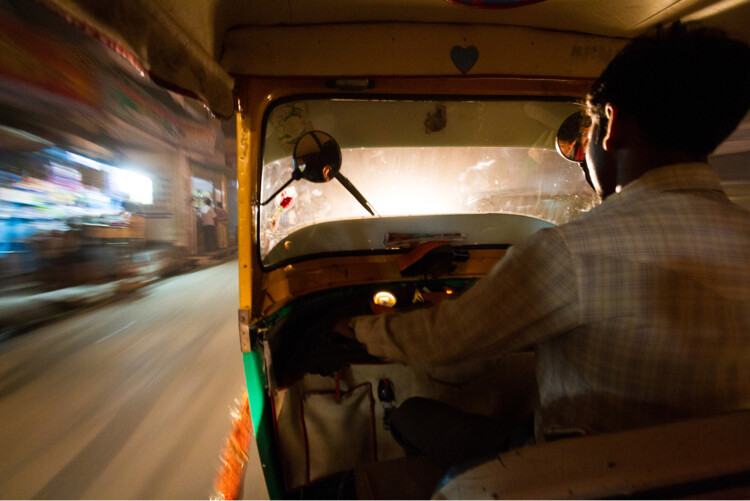
How do people get around? At home we have our patterns, and often don’t see the other forms of transport we might use. But when you travel, it will hopefully be obvious how the people there transport themselves.

Tuk-tuk ride at night

Tuk-tuks in Amritsar, India, are the easiest way to get around town.

It might a passel of buses, camels, rickshaws, taxis, or Maseratis.

Also, how are goods moved? Does your location have shipping traffic and a lot of cargo? From continent to continent, the methods for moving goods from here to there can be vastly different.

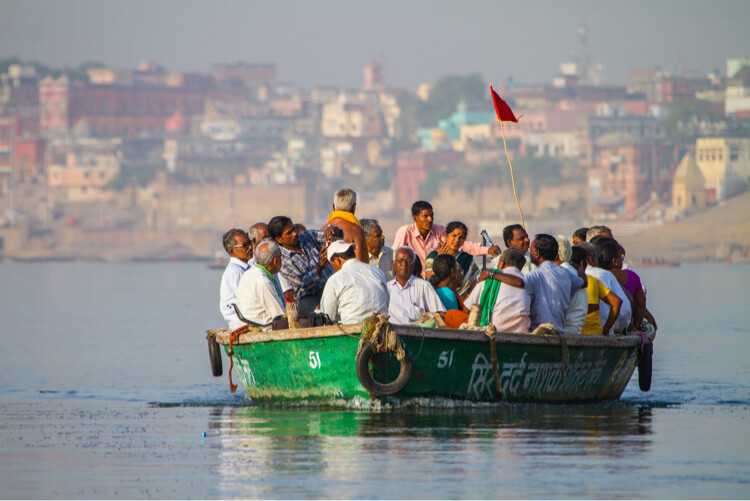
Boating on the Ghanges River

Boating along the Ghanges River in Varanasi, India

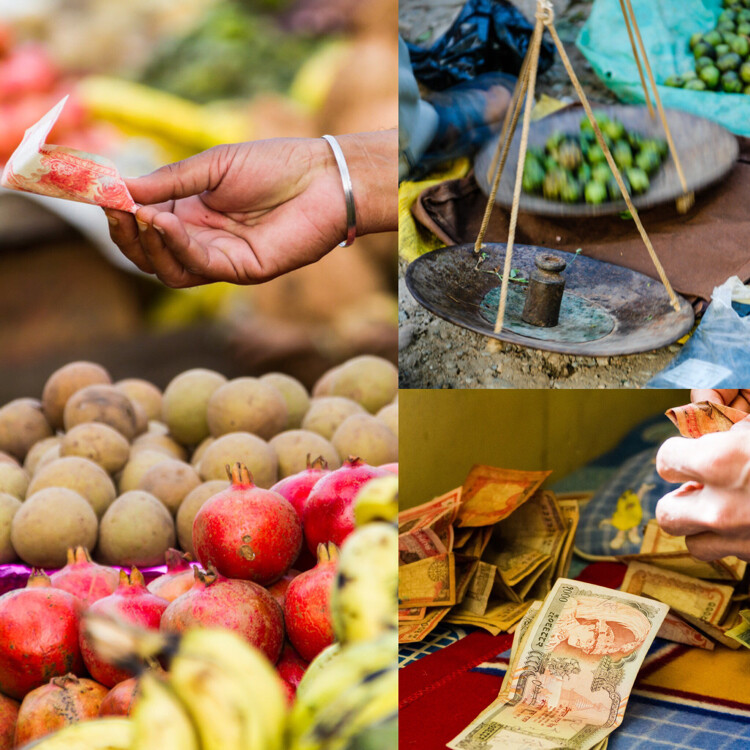
6 – Commerce – macro and micro

When I think of macro-commerce I think of things like whole industries like: agriculture, tourism, and banking.

With micro- commerce, I think of markets and vendors, where money actually changes hands. Who’s selling what, and who is buying? Is there a special technique to transactions?

image

Try to capture both the large scale, and intimacy of commerce, and show how things may be very similar, or very different from what you are used to back home.

7 – Nighttime

When the sun goes down, don’t stop shooting! Learn to find light, and exploit its unique qualities during the night. Maybe you have some moonlight or some neon in your location. No matter the source, there is still light at night.

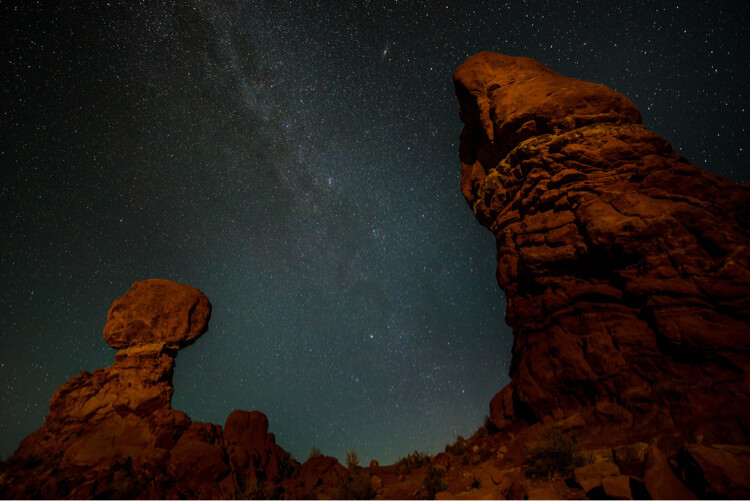
Balanced Rock, Arches National Park, at Night

Balanced Rock in Arches National Park, Utah, USA takes on a new look at night.

Does your location shut down when the sun hits the horizon? Or does it rally for an all-night bender?

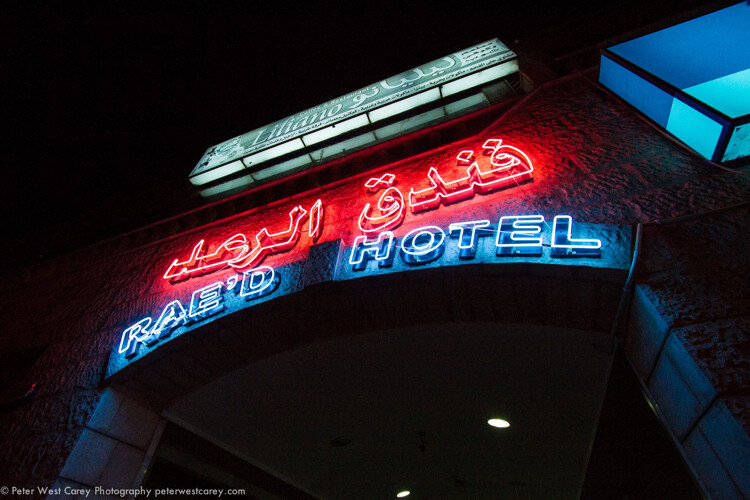
I found the markets in Aqaba, Jordan come to life once the heat of the day was done. I also found that the town had way more neon signs than I ever expected, but hadn’t bothered to notice while touring in the daylight. Get out at night and explore.

Noel in Aqaba, Jordan

Neon in Aqaba, Jorda

image

8 – Religion

How different parts of the world practice religion has always fascinated me. There isn’t a single part of this globe, that does not have some nod to the local religion, in some aspect of their lives.

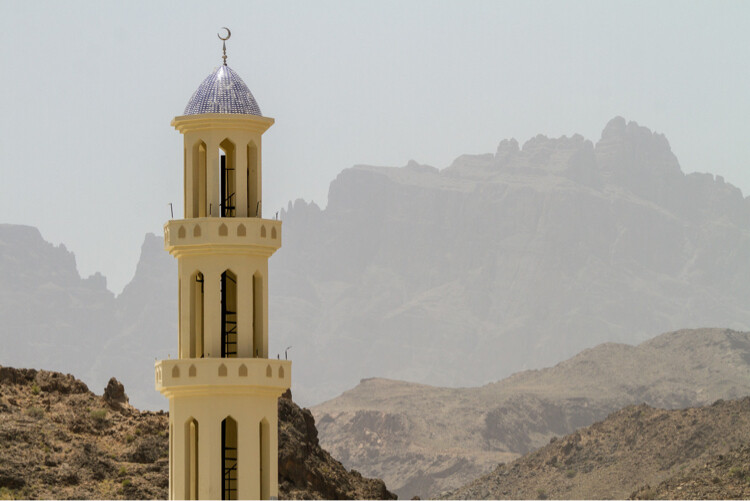
Minaret of a mosque in Oman

Colorful minaret in Jebel Shams area of Oman

It may be subtle, such as a small altar to burn incense, or it could be the overt repetition of churches across a city. Travel is a time to break out of your routine and try new things. Stick your head (respectfully) inside a temple. Tour a mosque. Visit a cemetery to see the influence of religion on those in the past.

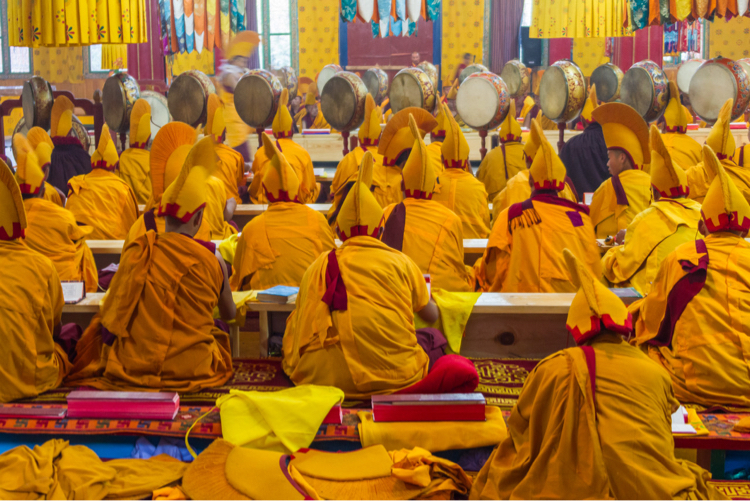
Buddhist monks in ceremony, Bhutan

Photography inside many Buddhist temples in Bhutan is banned, but on the night of this retreat for monks from all around the valley, I was allowed to shoot the ceremony.

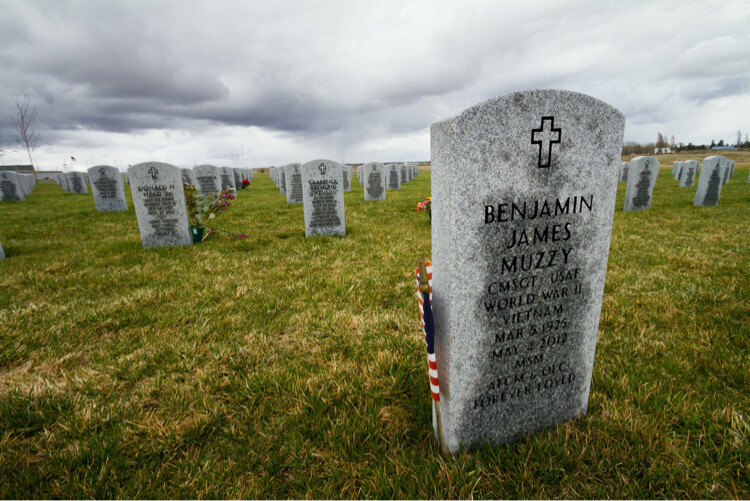
Military tombstones and flags located in Eastern Washington, USA

Military tombstones and flags located in Eastern Washington, USA

9 – Landscapes – natural and manmade

I love landscapes, so they come easy to me. But, I have not always been a fan of cities and people. So, it takes me some effort to really appreciate the organization and layout of a nice cityscape. But it’s always worth it to bring back a mix of both in your images.

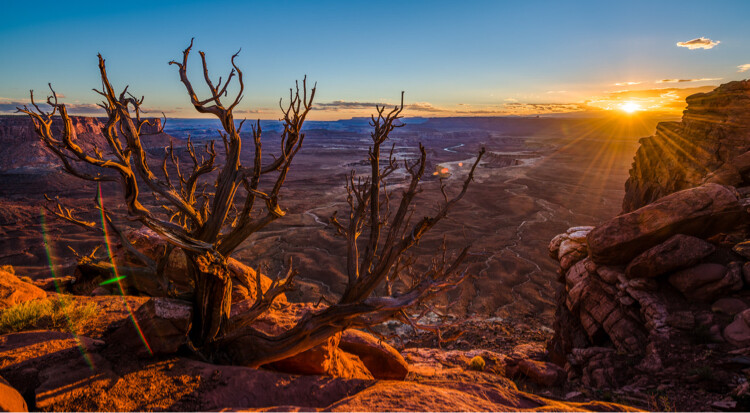
View of Canyonlands National Park at sunset

No people to see. Canyonlands National Park, Utah, USA.

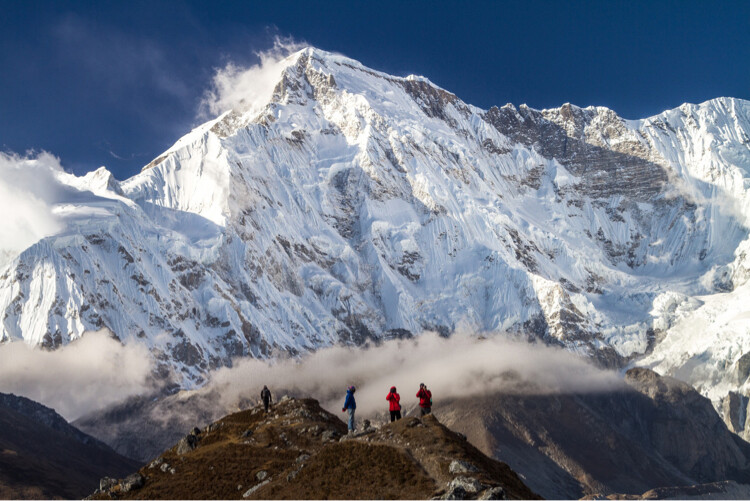
Photographers and Cho Oyu, Nepal

A few people give a sense of scale to Cho Oyu, the 6th highest mountain in the world, Gokyo, Nepal.

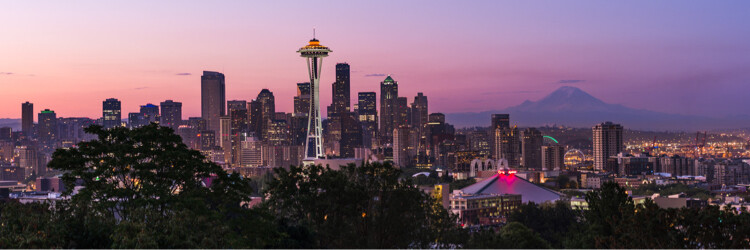
Sunrise view of Seattle, Washington and Mount Rainier

Here there are a lot more people in Seattle, Washington, USA

I am reminded of the craze for photos of Iceland. I’ve seen my fill, and rarely was a single cityscape in the mix. Black sand beaches with ice, waterfalls, all that stuff shows up – but most photographers have left out the manmade landscape. Include it! At least once.

10 – Icons – clichés big and small

I know people who refuse to shoot iconic locations. “They’ve been over shot and I wouldn’t be caught dead shooting them,” is a common refrain. Ignore those people.

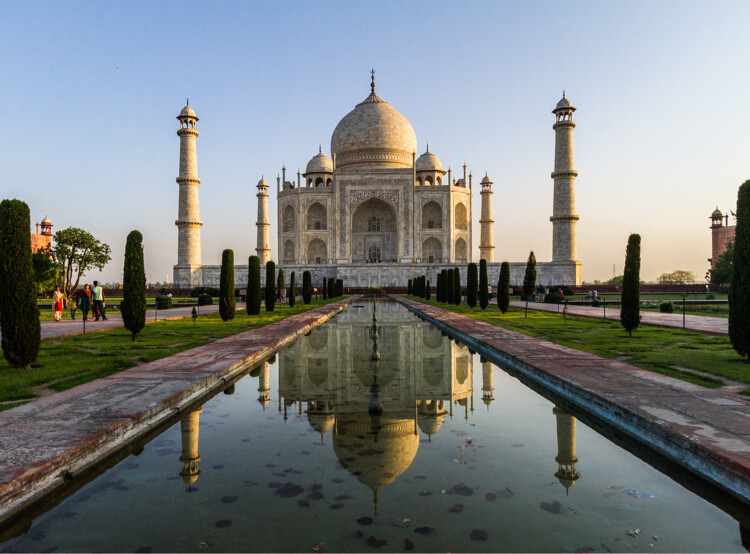
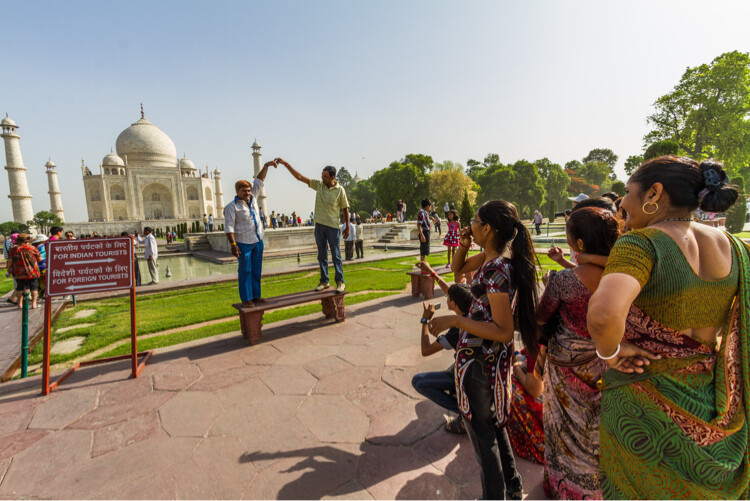
Taj Mahal and reflection

The classic Taj Mahal view.

You’re traveling, so have fun. Shoot the Eiffel Tower if you’re in Paris. Hit up Mesa Arch in Canyonlands National Park, and why not get a reflecting pool image of the Taj Mahal, or a cigar smoking lady in Havana? Do it. Get a posed photo of Masai Mara villagers, a llama in front of Machu Picchu, pretend to push over the Tower of Pisa.

Heck, even get a photo of that same waterfall everyone else visiting Iceland has shot.

That being said, you probably shouldn’t share only the cliché shots. Unless you’re on assignment to shoot something highly unique, go ahead and hit the clichés, then move on to the rest of the list. Better yet, look around your cliché location for something new to bring back and share.

Tourists at teh Taj Mahal

The not-so-classic view of the Taj Mahal, but a lot more fun.

11 – Wildlife – domestic and truly wild

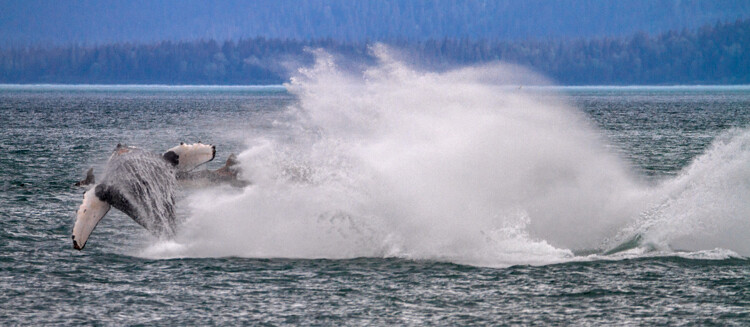
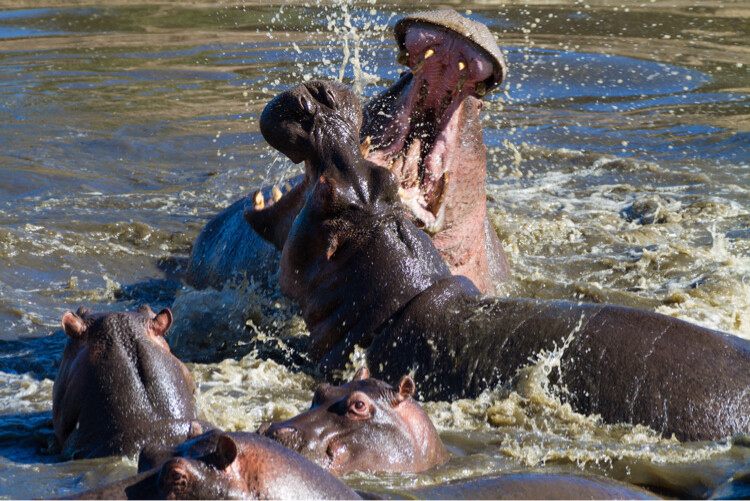
My daughter’s obsession with taking photos of cats in Morocco sticks with me as a reminder to not ignore the domestic animals, along with the wild. I’ve photographed big cats in India and Africa, tarantulas in Peru and breaching whales in Alaska. But, I’d be remiss if I didn’t convey the fact that the town of Essouira, Morocco, with its fresh fish markets, is a haven for cats of all kinds.

Breaching humpback whales, Alaska, USA

Humpback whales in Alaska, USA

FIghting Hippos, Serengeti National Park, Tanzania

Fighting hippos in the Serengeti National Park, Tanzania

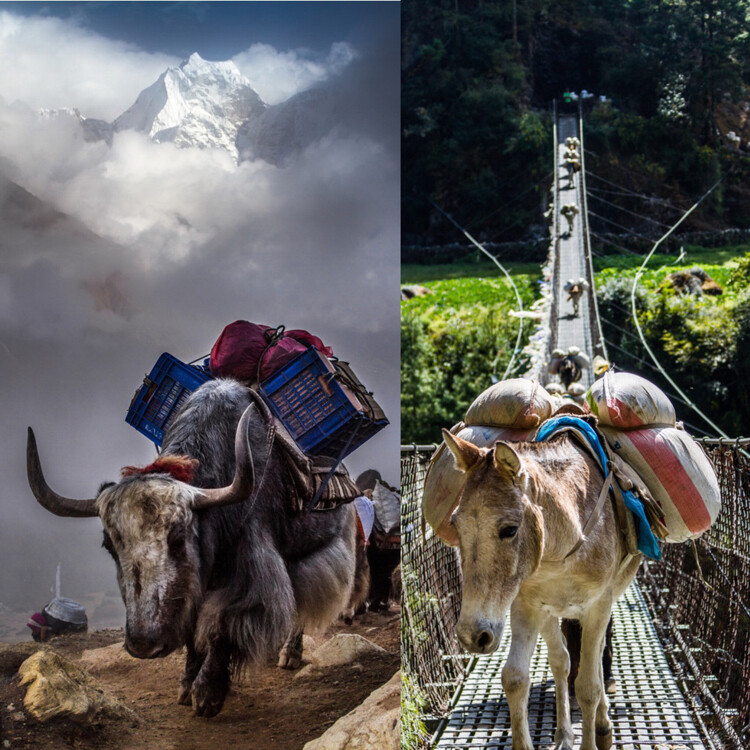
What about the beasts of burden? The donkeys, llamas, horses and camels? Put those on your list as well.

image

12 – All the pretty plants and flowers

Some of us just don’t care that much about plants. A green thing giving off oxygen at home is the same as a green thing giving off oxygen halfway across the world.

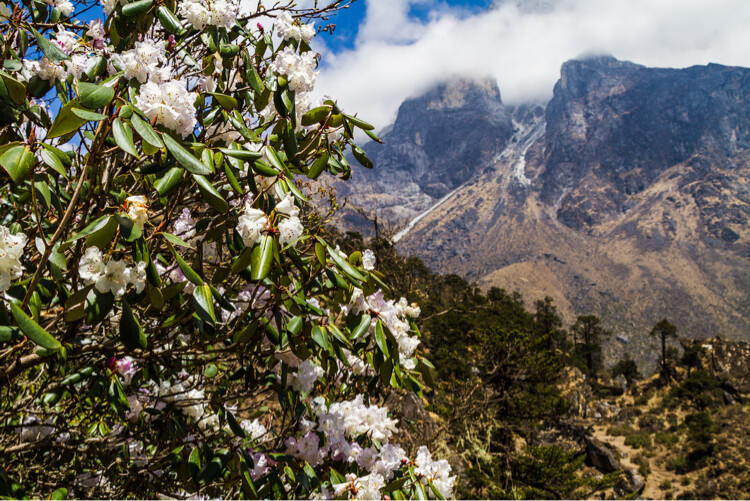
Rhododendrons in the Himalayas, Nepal

Rhododendrons at 14,000′ up in the Himalayas

But, I had no clue there were rhododendrons in the Himalayas of Nepal, much the same (but smaller), as both the ornamental and wild versions, I knew in Washington state growing up. When you get down to the tropics, the plants certainly get exotic, don’t they? Grab their wonderful colors and adaptations to share with friends back home.

Conclusion

This list can be just a start for your own customized version. Take it, shape it, make it your own. Put your favorite things on the list, but also keep those that don’t interest you. Growth as a photographer comes from trying new things and shooting new subjects.

Lastly, when it’s time to share your trip photos, I would suggest using 2-4 images from each category when making an online album. This will force you to pick only the best and it will give your viewers a good cross section of what you saw on your travels.

googletag.cmd.push(function() {
tablet_slots.push( googletag.defineSlot( “/1005424/_dPSv4_tab-all-article-bottom_(300×250)”, [300, 250], “pb-ad-78623” ).addService( googletag.pubads() ) ); } );

googletag.cmd.push(function() {
mobile_slots.push( googletag.defineSlot( “/1005424/_dPSv4_mob-all-article-bottom_(300×250)”, [300, 250], “pb-ad-78158” ).addService( googletag.pubads() ) ); } );

The post How to Use a Travel Photography Shot List to Come Home with Better Photos by Peter West Carey appeared first on Digital Photography School.


Digital Photography School

 
Comments Off on How to Use a Travel Photography Shot List to Come Home with Better Photos

Posted in Photography


How to Use Bracketing to get Your Best Shot – 3 Different Methods

29 Jun

One of the most difficult and frustrating parts about shooting with film, back before the days of digital photography, was the limited amount of attempts you had to get the photo you wanted. I remember carrying around spare rolls of film in a fanny (waist) pack on a trip to Walt Disney World years ago, and carefully considering each photo, lest I get one setting wrong and blow the entire shot.

How to use bracketing3 Different methods(1)

Back then you had to wait days, or even weeks, to get your pictures back from a processing lab, and if a picture was too dark, grainy, or out of focus there was nothing you could do about it at that point. Fortunately, digital cameras are far more forgiving than their film-based counterparts, and have many systems in place to make sure you do get the shot you want. But even then, sometimes things still don’t quite work out.

Thanks to a technique called bracketing, you can use the power of your camera, combined with the space available on most memory cards, to make sure you always end up with just the right photo every time.

What is Bracketing?

bracketing-typewriter

There’s a classic children’s tale called Goldilocks and the Three Bears, in which a young girl enters the home of the bears and helps herself to their food, furniture, and futons. With each set of items there are three options: two that don’t quite work out and one that is, as the story goes, just right. While the story could be seen as a cautionary tale about the dangers of sneaking into the home of wild animals, and sleeping in their beds uninvited, its lessons can also be applied to photography.

Essentially, Goldilocks demonstrates the concept of bracketing, by giving herself many options so she can make sure to have at least one that is precisely what she is looking for. In photography there are various types of bracketing, but all involve taking multiple photos, so as to ensure you have at least one good picture. Bracketing can also be used to combine different elements of various photos together to get the best of all versions. The three most common versions of bracketing involve exposure, focus, and white balance.

If you have ever struggled to get just the right shot, or want to learn a new technique to improve your photography, this might be just the thing you’ve been looking for.

Exposure Bracketing

Modern digital cameras are pretty good when it comes to evaluating a scene, and giving you just the right exposure. You can even use different metering modes where your camera looks at either the whole scene, just the center, or even a specific part of the photo like the highlights or some faces. If you know precisely how to control your camera to get the shot you want, you can use these various metering modes, in tandem with your camera’s built-in light meter, to get just the right exposure.

However sometimes it pays to take a few extra pictures to make sure you, like Goldilocks, get an image that is just right. This is where exposure bracketing comes in handy since you can take several additional photos, some underexposed and some overexposed, to make sure you go home with the perfect picture.

bracketing-exposure-tree

There are several ways to go about using the bracketing technique, and one of the most simple is to put your camera in Program Mode and use your camera’s exposure compensation function.

First, take a picture that appears to be properly exposed. Then use the exposure compensation option to intentionally underexpose your image by one or two stops (-1 or -2). More than two stops is generally unnecessary. You are of course free to do so, but it’s quite rare that your camera’s meter would be off so much as to require more than two stops of exposure compensation to get the picture you want.

Then use exposure compensation to intentionally overexpose your image by one or two stops (+1 or +2), and in the end you will have at least three photos from which to choose: one that your camera thinks is properly exposed, one that is underexposed, and one that is overexposed. This may seem kind of redundant, but it’s a nice insurance policy to make sure you get just the right photo you want. It works especially well if you are shooting landscapes, or other outdoor scenery, as the bright sunlight coming from overhead can sometimes cause your camera to meter a scene improperly, even if you think you have everything set up just right.

Bracketing for HDR

Another benefit of using exposure bracketing, is that it lets you create stunning works of art using a technique known as HDR, or High Dynamic Range. This requires the use of exposure bracketing, a tripod, and often some special software like Photoshop, Lightroom, or Aurora HDR Pro, to combine several photos into one.

To get started with HDR you need at least three images, bracketed in full stops of exposure. Take one image properly exposed, then underexpose by one or two stops, and then overexpose by one or two stops. Some cameras do this bracketing automatically with a built-in bracketing function (AEB) but I often find that I like to control the exposures manually with exposure compensation, or by using manual mode. You can use more than that, but if you are just starting out three bracketed photos should be sufficient.

Once you have your bracketed photos, load them into the software of your choice, and you can instruct it to combine them into a single photo that takes the best parts of all the images and creates a single frame-worthy masterpiece. To see this in action, first look at the following image, which despite having a fairly even exposure overall, still suffers in a few areas.

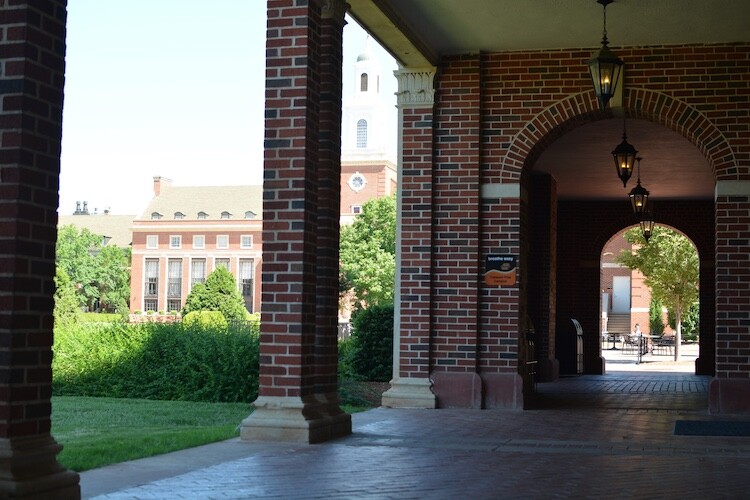
This is an un-retouched JPEG image straight from my camera. The overall exposure is good but the sky is bright white and the hallway is a bit too dark.

This is an un-retouched JPEG image straight from my camera. The overall exposure is good, but the sky is bright white and the hallway is a bit too dark.

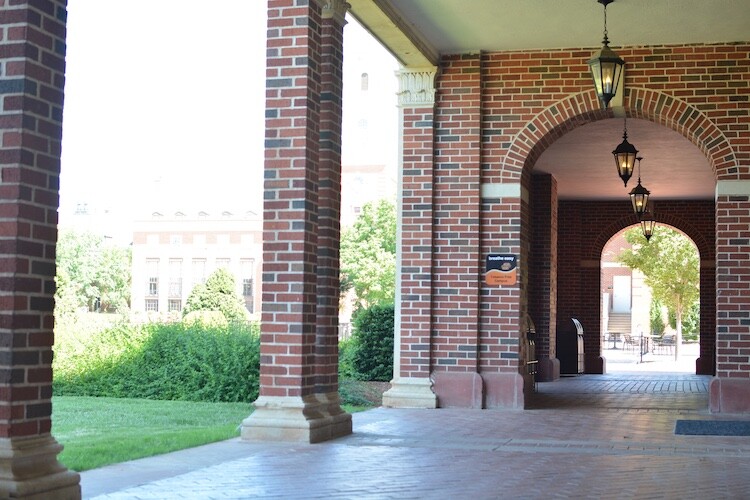
I used exposure compensation to overexpose the image by two stops, which lost almost everything in the sky, but brought out much more detail and color in the darker areas of the hallway.

The same image, over-exposed by two stops.

The same scene, overexposed by two stops.

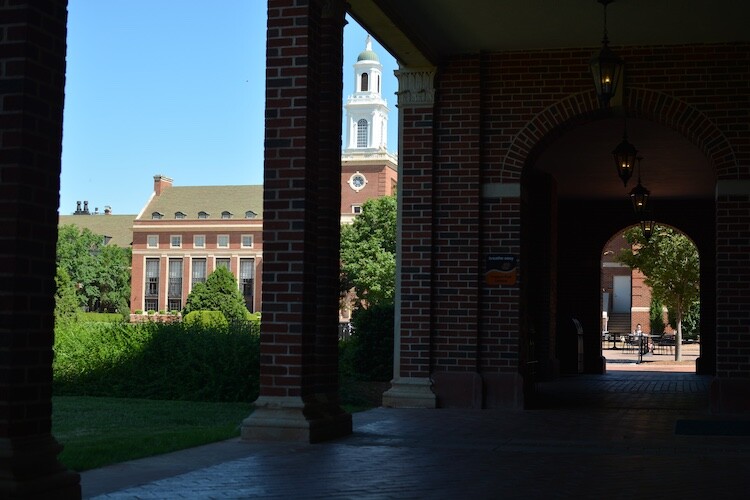
Then I took a third image, this time underexposing by two stops, which made the dark parts really dark, but brought out much more color in the sky.

This image was intentionally under-exposed by two stops.

This image was intentionally underexposed by two stops.

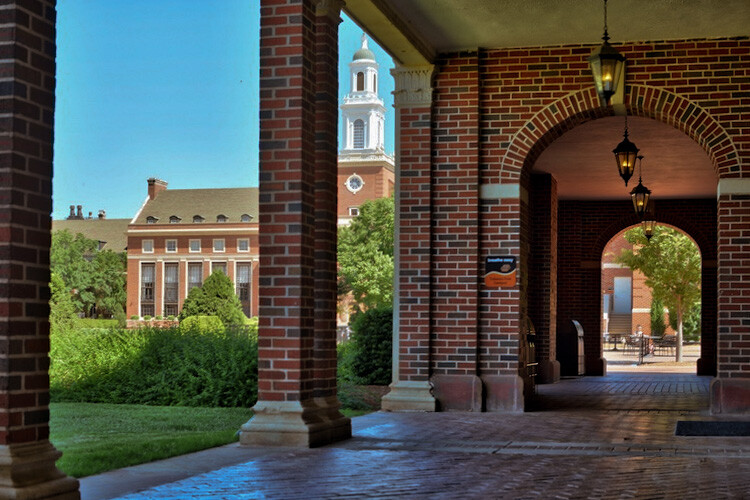
Finally, I used Aurora HDR Pro to combine all three bracketed JPEG images into one that contains the best of all worlds. This shows how useful bracketing can be, and might give you some ideas for how to use it in your own photography.

This final image was made using Aurora HDR Pro to combine all three bracketed shots into one, and final edits in LR including correcting the tilting building.

This final image was made using Aurora HDR Pro to combine all three bracketed shots into one, and final edits in LR including correcting the tilting building.

In recent years the image sensors on many cameras have gotten so good, that the use of exposure bracketing is not as critical as it was in days gone by. If you shoot in RAW instead of JPG, a single image will often contain so much information in the highlights and shadows, which you can recover using Lightroom or Photoshop, that you simply don’t need to take separate images and combine them later. One major disadvantage of this is the file sizes, which on some RAW formats can be anywhere from two to 10 times as large as a JPG file. At the end of the day though, exposure bracketing is still a valuable technique that many photographers rely on to get just the right result, and you might enjoy trying it out to see if it works for you.

Focus Bracketing

Another way to apply the bracketing technique is to take several images that are focused at various distances, which is especially critical when doing close-up photos or taking macro shots. On most cameras the autofocus generally works great to make sure things are crystal clear and tack sharp. But, when using very shallow depth of field, or focusing on objects that are extremely close, it’s not always going to produce the most reliable results.

Often when doing this type of photography you will end up with pictures that are just slightly out of focus in one direction or another, either in front of the subject or behind it, and there is no way to fix that in Photoshop, or any other image editor.

I made this image by slowly adjusting the focus on my lens while I took several shots. Only one had the single strand sharp and in focus, but that one picture was all I needed.

I made this image by slowly adjusting the focus on my lens while I took several shots. Only one had the single strand sharp and in focus, but that one picture was all I needed.

The solution to this problem is to take not one picture, but several, and use manual focus instead of automatic. I start by intentionally focusing not on the subject but slightly behind it, then I slowly turn the focusing ring on my lens as I take several images in a row. I know it can be a bit intimidating to shoot using manual focus, but once you try using this technique, you will probably start to see how useful it can be.

When you have your set of images loaded in Lightroom, or another image editor, you can then pick out the exact one you want, instead of hoping you got one in focus while relying on your camera’s built-in autofocusing algorithm. If you want to get into an even more advanced technique with focus bracketing, you can actually combine all your photos into one super-sharp image using a technique called focus stacking. But if that seems like a bit much for you, it’s still worth your time to try regular focus bracketing, just to make sure your close-up subjects are tack sharp.

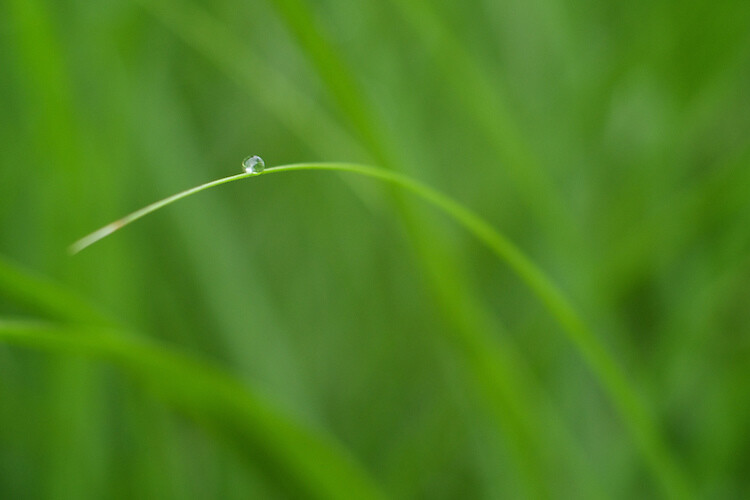
Nailing focus on the water drop was almost impossible, so I took several images while focusing manually to make absolutely sure I got at least one good image.

Nailing focus on the water drop was almost impossible. So I took several images while focusing manually, to make absolutely sure I got at least one good image.

White Balance Bracketing

The final technique I want to discuss here is similar to the other two types of bracketing in that it also involves taking several photos of the same scene, while adjusting a single parameter. In this case it’s the white balance, instead of the exposure or focus. Most casual photographers use the Automatic White Balance setting on their cameras, which does a pretty good job most of the time. But every now and then it can leave an image with an ugly green or red tint, or all pale and washed out, because of improper white balance.

The lighting conditions here wreaked havoc with my camera's Auto white balance, so I took five separate exposures and manually adjusted the white balance each time in order to make sure I got one good shot.

The lighting conditions here wreaked havoc with my camera’s Auto white balance. So, I took five separate exposures, and manually adjusted the white balance each time, in order to make sure I got one good shot.

White balance bracketing can be very useful if you shoot JPG, because your camera’s Auto white balance setting is not always as reliable as you want it to be. However, if you shoot RAW you have complete freedom to alter white balance as much as you want using a program like Lightroom, Photoshop, or almost any other image editor. Because the RAW format does not discard any photo data like JPG does, white balance bracketing is not needed when you are shooting. That gives you far more flexibility for fine-tuning things like white balance, as long as you are willing to take the time to do it.

Do you find bracketing to be useful in your own photography? When have any of these techniques been especially useful to you? Share your thoughts, and any pictures as well, in the comments below.

googletag.cmd.push(function() {
tablet_slots.push( googletag.defineSlot( “/1005424/_dPSv4_tab-all-article-bottom_(300×250)”, [300, 250], “pb-ad-78623” ).addService( googletag.pubads() ) ); } );

googletag.cmd.push(function() {
mobile_slots.push( googletag.defineSlot( “/1005424/_dPSv4_mob-all-article-bottom_(300×250)”, [300, 250], “pb-ad-78158” ).addService( googletag.pubads() ) ); } );

The post How to Use Bracketing to get Your Best Shot – 3 Different Methods by Simon Ringsmuth appeared first on Digital Photography School.


Digital Photography School

 
Comments Off on How to Use Bracketing to get Your Best Shot – 3 Different Methods

Posted in Photography


Explore Mars with 360-degree image shot by NASA Curiosity Rover

11 Jun

Earlier this year, NASA released a 360-degree image from the perspective of the Curiosity Mars Rover. The scene is made up of a combination of multiple exposures taken with the rover’s 2MP ‘Mastcam’ camera, which we wrote about back in 2012.

The resulting image is pretty incredible, and if you have access to a Google Cardboard viewer you can experience it in 3D. So if you’ve got a free few minutes this weekend, why not explore the surface of Mars? 

Articles: Digital Photography Review (dpreview.com)

 
Comments Off on Explore Mars with 360-degree image shot by NASA Curiosity Rover

Posted in Uncategorized


Hero shot: Rollocam introduces Hercules pocket motorized dolly

26 Apr

$ (document).ready(function() { SampleGalleryV2({“containerId”:”embeddedSampleGallery_8306737849″,”galleryId”:”8306737849″,”isEmbeddedWidget”:true,”standalone”:false,”selectedImageIndex”:0,”startInCommentsView”:false,”isMobile”:false}) });

A pocket-sized motorized camera dolly that runs on an AAA batteries is in the works from US company Rollocam. Hercules is programmable and consists of a three-wheeled body with a tripod screw and a single press-button controller. It’s designed to drive in straight lines or arcs, and is suitable for making movies as well as time-lapse sequences. A collection of accessories also allow it to rotate for 360° panoramas, while different sized wheels alter the speed at which it can travel. Two of the wheels are hinged to allow the user to set a curved path of travel, and the whole unit disassembles for packing away.

Rollocam says the device can support a 10lb weight, and that it can travel at seven speeds, from 2.5 to 20.3cm/1 to 8in per second, according to the wheels fitted. In time-lapse mode it can be set to travel between 0.13 and 12.7mm/0.005 and 0.5in, across eight settings, with intervals of 1 to 60 seconds.

Launched as a Kickstarter project last year the campaign raised over $ 380,000, and as the funds increased additional features were added – such as the use of magnets on the metal Rollocam track to stop the dolly and send it back in the other direction. The company says it is also now working on a camera trigger that synchronizes with the traveling dolly so that time-lapse frames can be recorded in an automated move-shoot-move sequence.

The basic Hercules costs $ 125 on a pre-order deal, and the premium kit with extra wheels, a panorama plate and a mounting plate for heavier cameras costs $ 249. For more information visit the Rollocam website.

Articles: Digital Photography Review (dpreview.com)

 
Comments Off on Hero shot: Rollocam introduces Hercules pocket motorized dolly

Posted in Uncategorized


Shot With #PhotojojoIris

16 Apr

We put our Iris Phone Lenses into the hands of a few of our favorite Instagrammers. Just look at what they with ‘em!
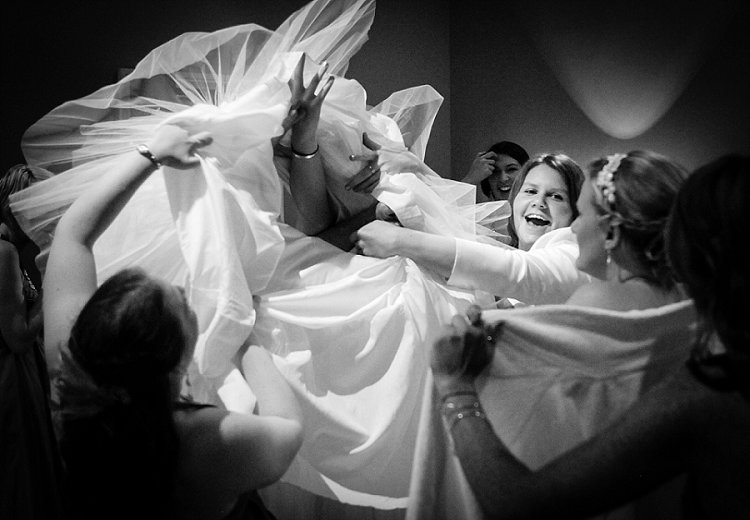
Impressed? Grab your own set, and take $ 20 off with the coupon Iris20off.

Buy Now or Learn More

And, if you don’t have an iPhone 6, no sweat. Scroll along to see more phone lens options.

(…)
Read the rest of Shot With #PhotojojoIris (0 words)


© laurel for Photojojo, 2016. |
Permalink |
No comment |
Add to
del.icio.us

Post tags:


Photojojo

 
Comments Off on Shot With #PhotojojoIris

Posted in Equipment


The Not So Decisive Moment – How to Increase Your Chances of Getting the Best Shot

02 Mar

To a certain extent Henri Cartier-Bresson has a lot to answer for. Yes, he’s certainly one of the photography greats, and his work has inspired countless photographers, but his book “ The Decisive Moment ” and the meaning of its title, is frequently misunderstood by many, and has created a whole raft of confusion.

Many photographers have made the assumption that Cartier-Bresson was referring to a sort of magic moment, where the photographer manages to instinctively see a perfectly formed image in a fraction of a second, bring the camera up to their eye, and take the image in its perfect form, before moving on. Interestingly, the French version of the book is called “Images on the Run”, which seems to almost suggest the opposite. This couldn’t be further from the truth, and a study of his contact sheets tells a rather different story.

001

I’ve been photographing weddings professionally in a photo journalistic style, for well over 10 years. When I started out, I too thought that capturing these types of images was simply about looking and reacting. However, I soon learned that by taking control and being proactive, rather than reactive, I could significantly increase my chances of getting the shot.

There really isn’t a magic formula, and is possible to stack the odds in your favour, to greatly improve your chances of getting the image. Sometimes it really is luck and good reactions, but more often than not, the techniques outlined below will produce more consistent and predictable results.

Set up your camera

On a very practical level, it’s vital that you have the right camera, and that it’s set up correctly. It must be quick, with virtually no shutter lag at all. You’ll also need to get used to timing your shutter actuations. This can be done with practice, by repeatedly photographing moving objects, such as passing cars or bikes, until you’ve completely gotten the feel of the timing, and speed of the shutter release. This is vital, as the coordination between your eye, the shutter release, and the camera needs to be instinctive, to achieve the split second timing that’s needed.

You might find that shooting with a prime lens is faster as well. Using a zoom will inevitably waste precious seconds zooming in and out, it’s often quicker to just move. You might also find that the focus on a prime lenses is a bit quicker, and that you compose better with a prime attached to the camera, rather than a zoom.

002

As far as camera settings are concerned, again, it’s all about anticipation. Set up the camera, wait, and shoot. Often this will mean using a number of auto controls – have a go at using auto ISO, auto white balance (to be corrected from the RAW files in Lightroom) and generally shoot in aperture priority mode. For this type of photography, the moment is far more important than your choice of depth of field, and even having the camera on full programme mode is okay. It’s all about emotion and expression, timing and anticipation, and the fewer distractions you have to achieve this goal, the better. If you are a manual shooter, then setting the exposure in advance is critical.

Finally, it’s also worth mentioning, that having a camera that writes to the memory card reasonably quickly, is important too. You’ll likely need to fire off several shots relatively rapidly, and waiting for the camera to write the card is a pain. Often buying faster, high quality cards is the answer, maybe changing the camera to record slightly smaller jpegs might work – again the priority is timing, speed, and anticipation for this type of photography. If you need to sacrifice using massive file sizes, to gain the speed you need, then so be it.

003

Pre-planning and envisioning

Think about where the type of pictures you want are likely to happen. It’s hopeless to randomly go out looking for photographs, you really have to put yourself in the best situation, at the best time, to increase your chances of getting the pictures you’re after. If you are a street photographer for example, then you’ll probably want to head out in the middle of the day, maybe on a weekend, when the streets are more likely to be filled with people. There will be many more interactions, and your chances of success are higher. It all begins with deciding exactly what type of pictures you want, and where the most likely place are that you will get them.

Once you are in place, also pre-visualizing the types of shots you want, will give you focus and purpose. If you’re photographing at an outdoor market for example, how about setting yourself the task of photographing human connections, maybe as people are chatting, handing over money or goods, etc? Or how about looking for interesting juxtapositions between shop window displays, and people standing or passing in front of them? This may all sound rather prescriptive but, by setting yourself some parameters, you’ll get your creative juices going, focus your attention, and increase your chances of success. There’s nothing worse than not knowing what you want, randomly taking pictures, waiting for something to happen.

004

Set the scene

It’s important to look for the elements in the image that you can actually control. For example, finding some nice light, a great background, or a place where an image will work well compositionally. Having set the stage, it’s then simply a case of waiting for something to happen on the stage, to complete the picture. This is so much better than looking for something to happen in hunting mode, where you are trying to react to things all over, and have no control over any of the photographic elements. The chances of getting a strong image with the former method, are significantly higher. It might take longer, and you may shoot fewer frames, but the overall quality of the end result will be better.

Work at the image

Looking at his contact sheets, Cartier-Bresson always took several exposures of the same scene or moment. He very rarely got the shot in one take, and it’s a great relief to realize that he worked the scene. This means that you need to take a number of frames, in fairly quick succession – not on continuous (burst) shooting mode, but close enough together to record subtly different expressions, juxtapositions of people in the frame, and changes of angle and composition. You should aim to keep moving – try the shot a little to the left, then the right, maybe a step forward or back, or a little higher or lower. Photography should keep you fit, and you should always be moving. You can then go through the different frames once they are downloaded, and select the strongest image.

005

Being unobtrusive and body language

Generally people will be aware that you’re taking pictures. I don’t think that it’s a particularly good approach to stalk your subject from behind a huge 400mm lens, it’s much better to use something smaller and less intrusive, to be closer to the subject and more involved in what’s going on. You can even interact with people as you’re taking pictures, which makes you much less threatening, and consequently people will behave in a much more natural and relaxed way in front of you and your camera.

Being non-threatening can be as simple as smiling, looking relaxed, keeping your body language open and friendly, and just being respectful of people’s personal space. Yes, you’re an observer, but you have to observe from a position of being emotionally and physically involved. You’ll gain much more acceptance from your subjects, and the pictures will be more authentic and natural. That’s not to say that your presence should influence the scene in any way, it’s just that you have to be accepted, to be able to photograph people behaving naturally. If your subjects insist on fake posing, and smiling for the camera, you need to work harder.

A great way of making this work is to move in and out of the scene really quickly – essentially this means waiting for a scene to unfold a little distance from you. As the moment is about to happen, walk towards the scene, camera ready to go. Very quickly, shoot as you are close to the action, then continue to walk out of the scene. If you combine this with unobtrusive body language, you can remain essentially invisible.

006

Eye contact

Human eye contact is a powerful communication which you can use to your advantage. I think that people can almost sense when they are being watched, and avoiding eye contact (in a non-threatening way) can be a powerful technique. If you want to photograph a group of people, it’s amazing how close you can get to them, if you seem to be diverting your attention to something else. It’s then often possible to get the shot without disturbing them, as they feel as though your interest is elsewhere. We also naturally have an inclination to look at our subject as we take the camera down from our eye, so try to avoid doing that. You’ll be much less intrusive and conspicuous to your subject, particularly if you seem to be focussing your attention on some other subject away from them.

Insert Image 007 MISSING??

Anticipation

This means simply imagining what could happen next, you need to become an expert in human behaviour, and be ready for what you think is about to happen. Often, with a bit of practice, you’ll be right, and you’ll have prepared yourself to get the shot.

As an example, part of my job as a wedding photographer, is to take pictures of people laughing and enjoying themselves. Good expressions are vital, and getting the timing right is the key. I listen for people telling an amusing tale, that will inevitably end in laughter. It’s no good waiting until they are laughing to bring the camera to my eye and take the shot – I need to be ready beforehand, and choose my moment. It’s also worth saying that often there will be laughter at the original joke, then someone will but in with secondary after joke, creating even more hilarity, which often makes an even better image than the first one – so be patient and wait.

The same principal can be applied to all sorts of situations – imagine what is going to happen next, prepare for it, and photograph it, if and when it happens. Often something else will happen, so you also need to be prepared to be flexible. Make sure that when you get what you were expecting, that something else even better doesn’t happen and you miss it.

008

No chimping

The moment is often after when you think it’s going to be – just as you are checking your screen. This is what I call the chimping effect. Many, many times I’ve taken an image, had a quick look down at the screen on the back of the camera, only to realize that I have just missed something better. Don’t look at the screen. Keep your camera ready, and always wait – even if you think you’ve got the shot.

Similarly, you will often miss great shots, just at the point when you are tired and have given up. You need to keep going and going – I know that the longer I shoot, the more high quality images I will get. I also know that by having a complete break for five minutes or so every hour, I am able to keep quick and alert for longer. However it’s weird the number of times that I have just given up on a scene, that something suddenly interesting happens.

009

When it looks like there’s nothing to photograph – think again

Very rarely is there not a photograph to be taken somewhere – it comes down to the photographer’s skill in making images. This is particularly hard with transient, and moving subjects like people. But, people do constantly interact, do things, and move around. It might be that you can’t get the exact image you have in mind, but try to think more laterally, and look for something completely different. In a situation like this it becomes a case of mind over matter, work at keeping your creative thinking fresh and flexible, and you will find an image somewhere.

Practically speaking, changing lenses, moving position, or trying a new technique can spark some creative thought. However, very often it’s just a case of looking and waiting… then looking and waiting some more. There are always images to be had, often they are small fleeting moments, but they are always there.

010

It’s behind you

This isn’t a joke. Weirdly, and frequently, I’ll be looking for an image in front of me, not having much luck, then realize that I should have been looking the other way. Often just turning right around, will present a completely new range of photographic possibilities. Sometimes the picture really is just behind you – you only need to turn around and look.

Primary and secondary subjects making the moment

Try to make a photograph by adding another element in the frame, i.e. having a primary and secondary subject. It could be that both subjects make an okay picture on their own, but if they are combined into one image, they become much stronger. If the image explores a relationship between the two subjects it’s even better. Maybe one offers a commentary on the other, or there is an echoing of shape or gesture.

011

Waiting, waiting and waiting

I’ve mentioned being patient several times, and the amount of time spent looking and waiting for success in this type of photography is phenomenal. Never give up – just wait, poised for action. Linger a little longer, just outside your comfort zone you might well find that there are a number of great images to be had.

As with anything, practice is the one thing that will really make a difference, and this can be both photographic practice, as well as observational practice. Try to develop skills in reading people, anticipating moments in your everyday life, and practice your observational skills. Combine this with the other techniques above, and you will soon find that you are able to make some of these seemingly magic moment images happen. You will have become proactive in your photography, rather than reactive, and your success rate will be considerably higher.

You Decide

So I urge you to give these tips a try, and see if you can come away with better candid images. Please share your thoughts and experiences in the comments below.


googletag.cmd.push(function() {
tablet_slots.push( googletag.defineSlot( “/1005424/_dPSv4_tab-all-article-bottom_(300×250)”, [300, 250], “pb-ad-78623” ).addService( googletag.pubads() ) ); } );

googletag.cmd.push(function() {
mobile_slots.push( googletag.defineSlot( “/1005424/_dPSv4_mob-all-article-bottom_(300×250)”, [300, 250], “pb-ad-78158” ).addService( googletag.pubads() ) ); } );

The post The Not So Decisive Moment – How to Increase Your Chances of Getting the Best Shot by Andrew Hind appeared first on Digital Photography School.


Digital Photography School

 
Comments Off on The Not So Decisive Moment – How to Increase Your Chances of Getting the Best Shot

Posted in Photography


Behind the Shot: Prince of the Night

12 Dec
‘Prince of the Night’. Parque Nacional Los Glaciares, Argentinian Patagonia, April 2014

In this article I’d like to take you far away to Parque Nacional Los Glaciares, a well known national park in Argentinian Patagonia. I visited Patagonia in April 2014 and spent a month scouting for my ‘Giants of the Andes’ photo workshop and Fitz Roy Annex. I shot in several locations in Argentina and in Chile, and among those, I spent several nights in Campo Poincenot, a camp offering relatively short hiking distances to some very good view points of Mount Fitz Roy, one of Patagonia’s most renowned landmarks.

On one of these days we hiked to Laguna Sucia (‘Dirty Lagoon’ in Spanish). It’s so named because before the glacier that formed it receded, the lagoon was always littered with icebergs. When I visited, there were no icebergs to be found anywhere near the bank.

The hike to Laguna Sucia isn’t long, but it’s mostly on loose rock, which is no fun at all. Basically you need to always watch your step: some rocks might shift and tumble when you step on them, others are covered with ice so you might slip – you get the idea.

Loose rock on our way to Laguna Sucia. Image courtesy of Santiago Siro Folcini.

Since we wanted to shoot the lagoon and Mount Fitz Roy both at night and during sunrise, we decided to camp there, but as we didn’t want to carry the tents, we only carried our sleeping bags and inflatable mats. We set up our ‘sleeping quarters’ under a large boulder close to the lagoon and went on to explore the area.

Setting up camp in a most unusual location. Image courtesy of Santiago Siro Folcini

After shooting the lagoon and the mountain at sunset, I started looking for nighttime compositions. I was thinking about shooting the moonlight glowing on the very top of the mountain (the same way the sun glows on tops of mountains producing Alpenglow), so I had to wake up before moonrise. This meant it was going to be very, very dark, and thus I had to compose and leave the tripod at the same place, so when I returned, I only had to find it, attach the camera and I’d be ready to shoot. I found a composition I liked, set the tripod and went back to ‘camp’. The moonrise was at about 3 a.m., so we set up the alarm for 2:30 and went to sleep.

Upon waking up, things didn’t look so good. Clouds had accumulated and blocked the moonlight, so all plans for glow fell through. We were quite disappointed but decided to stay around and see what happened. And surely enough, half an hour or an hour later, the clouds dispersed and the mountain was bathing in moonlight. This was the moment I had been waiting for. I went back to the tripod (which was still at the same spot) and took the shot.

Before discussing how I made the shot, I’d also like to show you two additional images I took at the same place, at later stages. I call them ‘Prince of Crimson’ and ‘Prince of Gold’, and it’s pretty clear why when you see the colors. I really like these images (‘Crimson’ is probably the best of the three), but I had much less to say about them, and so I chose the night image as the topic for this article. By the way, I named the images so to allude to the name of the mountain, literally meaning ‘Son of King’.

If only I had left the tripod in the same place for the last shot… I’m still sad about it!

Settings and Execution

To shoot this image, I used my Sony A7R and a Canon 16-35 F2.8L with a Metabones III adapter.
The image is a composite of 3 different shots, each taken for a slightly different purpose. Let’s view the untouched Raw files.

The leftmost image is a relatively short exposure for the sky and reflection. It was taken at ISO 6400, F2.8 and 30sec exposure. The middle image is a longer exposure, just over 2 minutes at ISO 1600, F2.8 to preserve the luminosity. From this image I took the mountain itself and the other parts of the background, except for the sky which at this exposure time had unwanted startrails. The last image was taken with very similar parameters to the second, but the focal point was on the foreground. I used this image to focus-stack the foreground and background, to get sharpness across the image.

Composition

The composition isn’t very complicated. The only point really worth mentioning is that the specific location was chosen since the rocks in the foreground follow a similar contour to that of the mountains’ reflection. This contributes greatly to the flow of the image. 

Post Processing

As I’ve mentioned, the image is a composite of the 3 shots above. Before combining them, I needed to make some initial tweaks in Adobe Camera Raw (ACR). The first thing I did was apply the lens profile, to avoid aberrations and counteract some of the vignetting. I also changed the white balance to better match what I had seen with my eyes, and made some other minor adjustments, visible in the screenshot below.

Next I did some local adjustments. I brightened the foreground (to balance the global contrast) and boosted contrast and clarity in the reflection part, to enhance detail.

I was then ready to combine the images. This wasn’t such a hard task, as the different parts were very distinct. I placed the three images as layers in Photoshop and aligned them (Edit->Auto Align layers). The top layer was the sky layer, and I had to delete the mountain from it in order to get the cleaner version of it from the mid layer. I selected the part I wanted to delete, refined the selection (Select->Refine Edge) and deleted it, exposing the layer below. Once done, I merged the two top layers.

I was left with a top layer with a blurry foreground, and a bottom layer which I had to expose to get the sharp foreground rocks. I manually deleted the foreground, following the contour of the rocks to avoid exposing the blurry reflection in the bottom layer.

Once finished, I merged the layers and was left with a flattened image.

My next goal was to increase local contrast and enhance detail in the image, which has a lot of flat parts. Initially, I used luminosity selections to enhance contrast without losing detail in the highlights or shadows. I selected the midtones and used a levels adjustment layer to boost contrast.

At this point I was pretty happy with all but the higher-left part of the image. It felt too bright compared to the foreground and the right side, so I needed to work on that separately. I selected the bright parts and refined the selection once again. I then used a levels adjustment layer to darken it, while keeping it brighter than the other parts of the image, which made sense as it was directly lit.

The last task was to take care of unwanted color, caused by high ISO and shadow recovery. As you might notice, the sky is spotted with purple blotches, and the foreground seems too green. Both these color problems were dealt with in the same way: a color blend layer. The process is as follows: you duplicate the image layer, select blend mode ‘color’, and then whatever the pixel color on the top layer, it passes to the bottom layer as well. To cancel the purple in the sky, I had to select the sky without selecting the stars. I did that by selecting the whole image, and then subtracting a very light luminosity selection, until I had a selection which almost didn’t contain stars. I then used the pipette tool to sample the sky’s blue color and gently painted it in.

The same was done with the foreground rocks. I sampled the foreground color I wanted and painted a color layer, until the rocks were grey, as they were in reality.

All that was left was to convert to the sRGB color space, perform size reduction and sharpening and I was finally done.


Erez Marom is a professional nature photographer, photography guide and traveler based in Israel. You can follow Erez’s work on Instagram, Facebook and 500px, and subscribe to his mailing list for updates.

If you’d like to experience and shoot some of the most fascinating landscapes on earth with Erez as your guide, you’re welcome to take a look at his unique photography workshops around the world:

Land of Ice – Southern Iceland
Winter Paradise – Northern Iceland
Northern Spirits – The Lofoten Islands
Giants of the Andes and Fitz Roy Annex – Patagonia
Tales of Arctic Nights, Part I and Part II – Greenland
Earth, Wind and Fire – Ethiopia

Selected articles by Erez Marom:

  • Behind the Shot: Dark Matter
  • Mountain Magic: Shooting in the Lofoten Islands
  • Behind the Shot: Nautilus
  • Behind the Shot: Lost in Space
  • Behind the Shot: Spot the Shark
  • Quick Look: The Art of the Unforeground
  • Behind the Shot: Watery Grave
  • Whatever it Doesn’t Take
  • Winds of Change: Shooting changing landscapes

Articles: Digital Photography Review (dpreview.com)

 
Comments Off on Behind the Shot: Prince of the Night

Posted in Uncategorized


PIX 2015: Brian Ach and getting the right shot

29 Oct

Brian Ach has shot for just about every big-name publication you can think of, and he’s photographed his share of A-list celebrities, including a stint as Prince’s official tour photographer. In short, he knows how to get the shot. But he argues there’s an important distinction between getting shot and getting the right shot, and it all comes down to context. Read more

Articles: Digital Photography Review (dpreview.com)

 
Comments Off on PIX 2015: Brian Ach and getting the right shot

Posted in Uncategorized


InVisage posts short movie shot with its QuantumFilm HDR smartphone sensor

27 Oct

For a few years now, InVisage has been working on a new kind of smartphone image sensor that claims to offer higher dynamic range and zero rolling shutter than the chips currently found in mobile devices. It appears the technology is now at a stage where its benefits can be demonstrated, and for this purpose InVisage has commissioned a short movie called Prix  shot entirely on a prototype device using InVisage’s QuantumFilm technology. Read more

Articles: Digital Photography Review (dpreview.com)

 
Comments Off on InVisage posts short movie shot with its QuantumFilm HDR smartphone sensor

Posted in Uncategorized