RSS
 

Posts Tagged ‘shot’

QA: Lighting a 1,300-Person Group Shot [Magnum Opus]

23 Jul

Reader Albert Yee asks, via Twitter:

Ever shoot a group of 1,300 before? Trying to wrap my head around a possible assignment: Teachers and staff in a basketball arena.

1,300? 1,300. Hmm.

Lighting 1,300 people indoors is a Herculean task, no matter how you slice it. Can you do it? Do you wanna do it? How would you charge for it? Lotsa questions.

Let's jump in.

Read more »
Strobist

 
Comments Off on QA: Lighting a 1,300-Person Group Shot [Magnum Opus]

Posted in Photography


Photographer Finn Beales shares his best (mobile) shot

10 Apr

Taking-a-break-from-the-apocalypse.jpg

Photographer Finn Beales primarily uses his Canon EOS 5D Mark III when shooting for major brands as well as media outlets, but he also uses his smartphone to capture poignant moments like this image of his son floating in the Blue Lagoon in Iceland, which recently won the children’s category in the annual Mobile Photography Awards. Learn more about Beales’ work on connect.dpreview.com.

News: Digital Photography Review (dpreview.com)

 
Comments Off on Photographer Finn Beales shares his best (mobile) shot

Posted in Uncategorized


Photographer’s smartphone shot earns front page position on NYT

03 Apr

nyts-front-page-instagram-maybe-not-the-end-of-photography.png

Photographer Nick Laham found himself in a tight spot as he squeezed into a locker room bathroom stall to take portraits of the New York Yankees during a spring training session earlier this year. He used both his DSLR and his smartphone to take the photos, but it was his iPhone-captured and Instagram-processed images that earned the attention of the New York Times, which ran Laham’s portrait of baseball great Alex Rodriguez on the front page of the Sunday edition. Read more at connect.dpreview.com.

News: Digital Photography Review (dpreview.com)

 
Comments Off on Photographer’s smartphone shot earns front page position on NYT

Posted in Uncategorized


Teton Gravity Research posts video shot with 4K Gyro-stabilized system

01 Apr

69914b43-ccc1-406f-8a46-b2c5e0d7d7a3.jpg

Action sports video production company Teton Gravity Research (TGR) has posted the first video shot with the GSS C520, a five-axis gyro-stabilized 4K cinema system by GSS (Gyro-Stabilized Systems). The C520 is compatible with the RED Epic, Arri Alexa M and Sony F55/HDC-2500 video cameras. For this video, the system was fitted with a RED Epic video camera and mounted on a helicopter to capture 4K stabilized footage of San Francisco, California. (via FStoppers)

News: Digital Photography Review (dpreview.com)

 
Comments Off on Teton Gravity Research posts video shot with 4K Gyro-stabilized system

Posted in Uncategorized


How I shot and edited it: The Second Severn Crossing

24 Mar

Second Severn Crossing - how I shot and edited

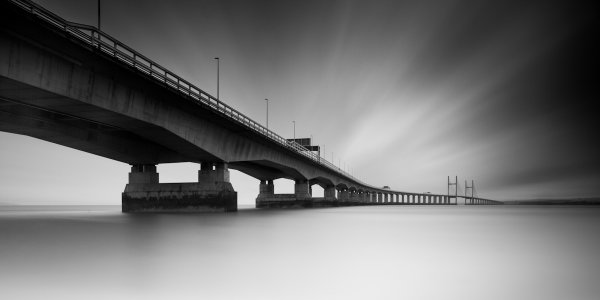
The image above is a long exposure taken of the Second Severn Crossing, a motorway bridge that crosses the River Severn, just outside Bristol, England.  I have been asked a number of times how this image was processed, what software/plug-ins were used, so I thought it would be a useful exercise to explain it here.

Shooting the image

I had been thinking about this shot for a while and I knew that there were a couple of important elements that I needed to consider when trying to capture the image:

  • I was really keen to get low, relative to the bridge, and shoot a wide-aspect image across the river.   Fortunately, there is a footpath that runs along the river bank, under the bridge, that is easily accessible by car (Google maps link).
  • I wanted to capture a long exposure so I could contrast the movement of the clouds against the static structure of the bridge.  Therefore, there was no special planning in terms of weather or time of day, as I was happy with a cloudy sky in the middle of the day, as long as there was a strong wind – fortunately, over the 2012 Christmas period, the UK offered those conditions in abundance.
  • I wanted to fill the frame with silky-smooth water, so as the River Severn is a tidal river with one of the largest tidal ranges in the world, I ensured that I would arrive at the location around high tide.

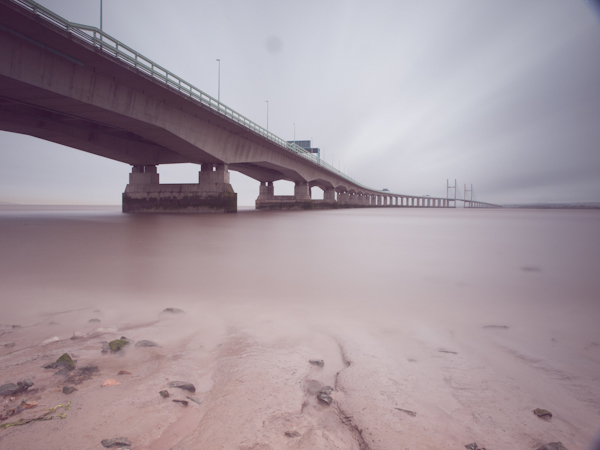
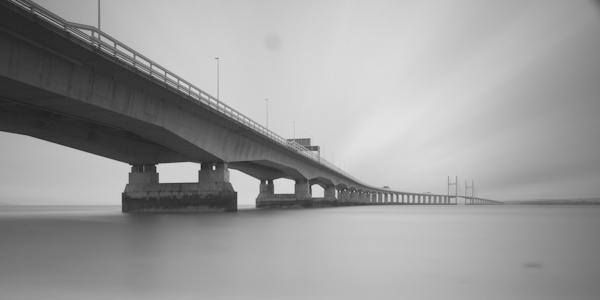
The image, as captured straight out of the camera, is shown below:

How I shot and edited - second severn crossing - image 1

The image was taken at ISO100, 12 mm, f/10, with a 5 minute exposure (299 seconds to be precise).  I used a 2-stop graduated neutral density filter to evenly match the exposure of the sky with the river, and used a 10-stop neutral density filter to produce the long exposure.   As the highlights of the scene were easily contained, I over-exposed the image to ensure that I captured the maximum amount of movement in the clouds, knowing I would be able to correct the exposure/contrast during post processing.

Processing the image

The processing of this image was performed in Adobe Lightroom 4.

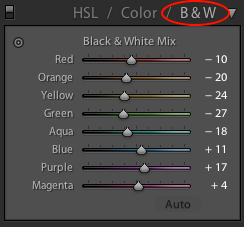
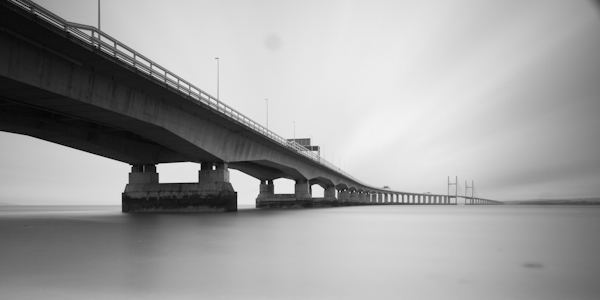
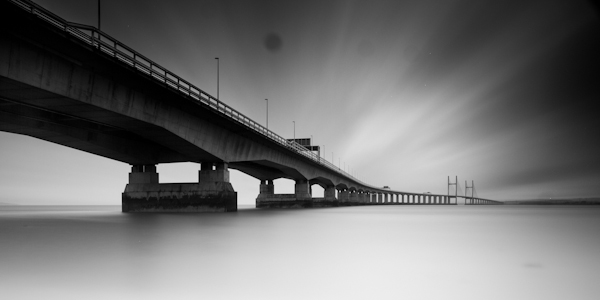
The first step was to convert the image to black and white using the B&W selector in the colour panel (on the development pane).

lightroom BandW selection

How I shot and edited - second severn crossing - image2

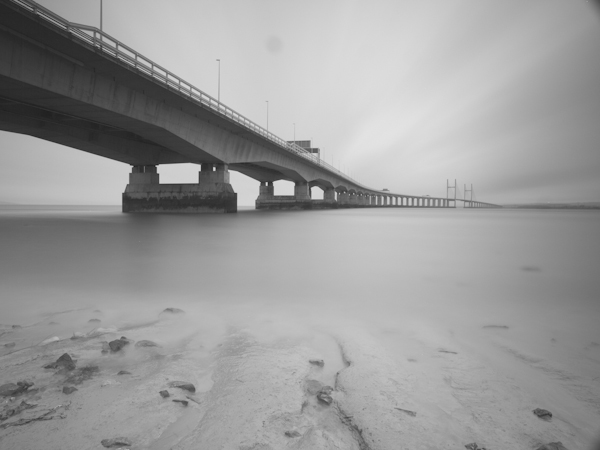
The initial image after a straight B&W conversion, lacking in contrast

Given the significant amount of foreground, I decided to crop the image at this point, using a 2:1 aspect ratio, to give the wide-aspect image I was after and to stop the foreground being a distraction during the rest of the processing.

How I shot and edited - second severn crossing - image3

Cropped to a 2:1 aspect ratio

I then needed to address the lack of contrast and over-exposure of the initial image.  Therefore, I set the white (+33) and black (-40) points and adjusted the contrast (+40) to set the overall exposure for the image.

How I shot and edited - second severn crossing - image3-1

Initial exposure adjustments made

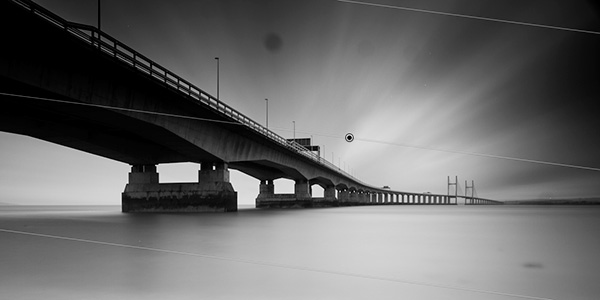
I then applied a graduated filter to the sky (shown below) to adjust the exposure (-1.74), contrast (+100), clarity (+100) and highlights (+12).  I wouldn’t usually increase either the contrast or the clarity to +100, let alone both, but in this instance doing so acts to bring out a full range of tones within they sky and so emphasise the movement captured in the clouds (the increase in contrast/clarity is also a very good way of highlighting any dust spots present in an image!).

How I shot and edited - second severn crossing - image4

Showing the graduated filter being applied to give impact to the cloud movement in the sky

Next, I applied a graduated filter, from the bottom of the frame, to the water (shown below).  I used it to increase the exposure (+0.80) and reduce clarity (-100) in order to brighten the water and reduce the local contrast to give that bright, smooth water effect that can be key to an image such as this.

How I shot and edited - second severn crossing - image5

Showing the graduated filter being applied to the lower section of the image to smooth out the water

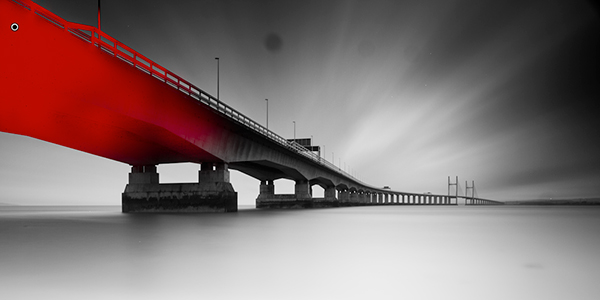
When applying the graduated filter to the sky, it also acted on the bridge in the top left corner of the frame, making it overly dark, losing detail.  Therefore, I used the adjustment brush to paint a mask over the affected portion of the bridge, using a low flow, in order to be able to build up the desired effect gradually.

How I shot and edited - second severn crossing - image6

The mask drawn with the adjustment brush is shown in red

To the adjustment mask, I applied an increase in the exposure (+1.08) and shadows (+18) to bring out some of the detail in the bridge that was lost after applying the graduated filter over the sky.

How I shot and edited - second severn crossing - image7

Nitce the extra detail now visible in the upper left portion of the bridge after application of the adjustment mask

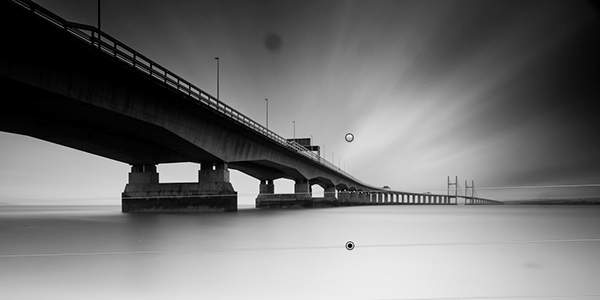
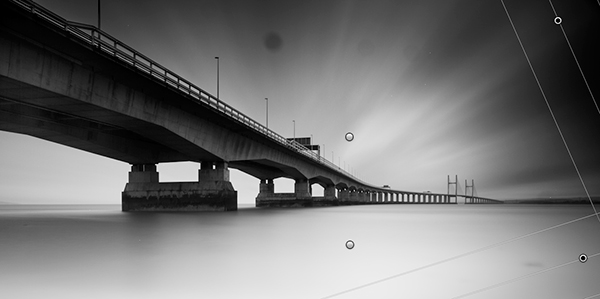
I then applied a graduated filter to each corner on the right hand side of the image, shown below.  The top graduated filter was required to subtly blend a vignette caused by me stacking the 10-stop filter and the ND filter holder.  The bottom graduated filter was required to tone down the water at the edge of the frame.  The exposure was reduced in both instances.

How I shot and edited - second severn crossing - image8

The two final graduated filters shown merged into the same image here)

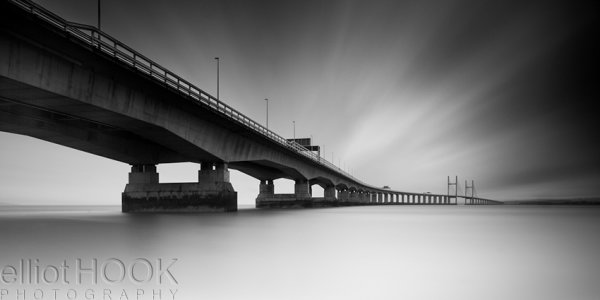
The final edit that needed to be made to the image was to remove all of the dust spots (you’ll be glad to know I’ve since had my sensor cleaned) and hot pixels (the bright white pixels that result from the extreme exposure time) to give the final image:

How I shot and edited - the second severn crossing - final image

The final image (click to enlarge)

So there you go, using a few relatively simple edits, it was possible to produce this high-contrast black and white long exposure without the need for any additional plug-ins or software packages outside of Lightroom 4.  The initial image may have lacked impact and that can often be the case with long exposure shots, however by shooting in raw, you can exploit the captured detail to create the image you had envisioned.

If you would like some tips to help you take long exposure images, such as the one above, please check out this earlier post.


Post originally from: Digital Photography Tips.

Check out our more Photography Tips at Photography Tips for Beginners, Portrait Photography Tips and Wedding Photography Tips.

How I shot and edited it: The Second Severn Crossing


Digital Photography School

 
Comments Off on How I shot and edited it: The Second Severn Crossing

Posted in Photography


How I Got The Shot: Desert Road

20 Mar
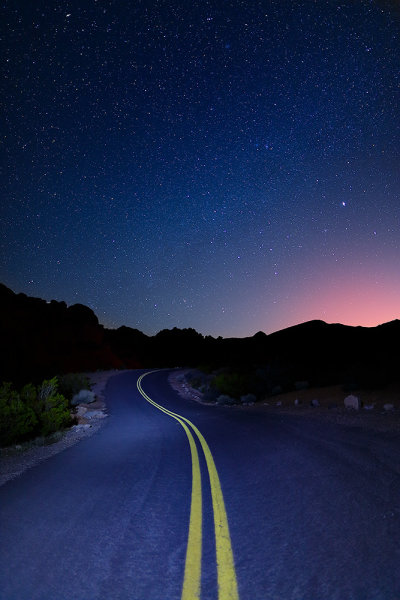
This is the final image I created from a single shot, processed twice.  Taken with the Canon EOS-1D X, EF 24mm f/1.4L II.  Exposure 15 seconds, f/1.4, ISO 800.

This is the final image I created from a single shot, processed twice. Taken with the Canon EOS-1D X, EF 24mm f/1.4L II. Exposure 15 seconds, f/1.4, ISO 800.

Some exposure situations become difficult to handle in-camera without a little post processing later on.  A perfect example is this shot of a desert road in Valley of Fire State Park, Nevada, that I took a week or so ago.  There was no moon, which made it a great night for capturing the stars, but an awful night for capturing the road surface in the foreground.

First, I needed an exposure for the stars.  I started with my usual base exposure for that, 15 seconds, ISO 800, f/1.4.  That gave me exactly what I wanted on the stars, but the foreground was too dark.  I was prepared for this, having brought an LED flashlight with me to “paint” the foreground.  So, during the next 15 second exposure, I held the flashlight on for five seconds, shining it indirectly down the road.  I did not aim it straight at the road, I simply aimed it down the road, allowing the light to skim along the road.  This avoided any hot spots. The 5 second exposure with the flashlight was the result of some experimentation with time. The entire 15 seconds created overexposure on the foreground, so I scaled it back to 5 seconds, and was pretty happy with that.

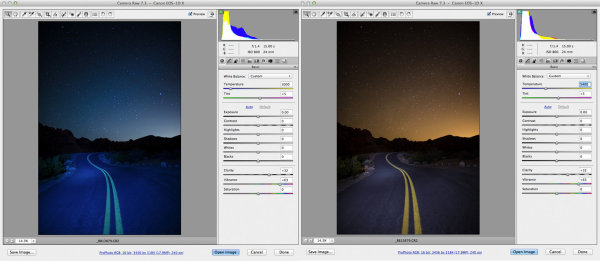
In the screen shot on the left, I adjusted the white balance to render the sky the way I wanted it- that deep indigo we normally see.  In the shot on the right, I adjusted the white balance so the road looked the way I remembered it.

In the screen shot on the left, I adjusted the white balance to render the sky the way I wanted it- that deep indigo we normally see. To do this, I simply adjusted the color temperature to 3000°K. In the shot on the right, I adjusted the white balance so the road looked the way I remembered it. Again, I used the color temperature setting and adjusted it to 5400°K.

I always shoot RAW when shooting landscapes.  There are several reasons for that, but one of the biggest for me is that I can adjust my white balance for creative purposes in post processing.  As you can see, if I tried to adjust for the sky, correcting that yellow cast that came from the glow of a distant city, the road became a deep blue area.  But if I corrected for the road, the sky became this garish orange.

There are two ways this could have been fixed. The first one could have been done in camera.  By taking a color correction gel, commonly called a CTO gel (Color to Orange), I could have warmed up the light on the road and then as I adjusted the white balance for the sky, the road would have fallen into place.  However, I did not have a CTO gel handy.  So I made the adjustments in Photoshop ACR.

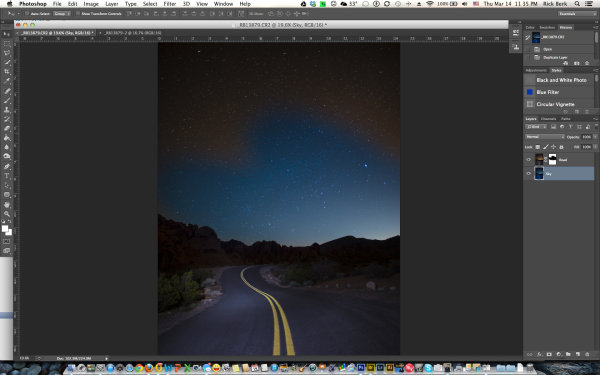
When I adjust the white balance like this, during RAW processing, I tend to avoid the presets such as “Daylight” or “Shadow” or “Tungsten”.  I find I have much finer control by using the color temperature slider, which allows me very fine control over the color tone of the image.  I opened the file in Adobe Camera Raw, and adjusted the white balance for the sky, as shown above on the left, to 3000°K.   Then I opened that image in Photoshop.  I then reopened the image in ACR, and adjusted the white balance again, but this time for the road, as shown above on the right, to 5400°K.  I then duplicated the layer of the properly white balanced road, onto the layer with the properly white balanced sky.  I created a layer mask on the top layer, of the road, and masked out the orange sky, allowing the blue sky to show through.  The distant mountains silhouetted against the sky gave a perfect delineation for the layer mask, making it an easy blend.  After I got the layers the way I wanted them, I simply flattened them, did a few saturation and contrast adjustments, and had my final image.

This image shows the two layers stacked, with the layer mask.  The mask has only partially been painted in.  After adding the layer mask to the layer, you use black or white and paint over the layer.  Black hides the layer, while white reveals the layer.

This image shows the two layers stacked, with the layer mask. The mask has only partially been painted in. After adding the layer mask to the layer, you use black or white and paint over the layer. Black hides the layer, while white reveals the layer.

Post originally from: Digital Photography Tips.

Check out our more Photography Tips at Photography Tips for Beginners, Portrait Photography Tips and Wedding Photography Tips.

How I Got The Shot: Desert Road


Digital Photography School

 
Comments Off on How I Got The Shot: Desert Road

Posted in Photography


Ricoh concept camera makes spherical panoramic images in one shot

07 Feb

1Screen-Shot-2013-02-06-at-12.34.27-PM.png

Ricoh exhibited a concept camera at CP+ that captures spherical panoramic images and sends them wirelessly to smartphone or tablet. Apparently produced mainly to gauge market reaction, Ricoh released no technical info on the camera apart from the fact that it uses two opposed 180-degree lenses whose images it combines into one spherical panorama. Users can zoom in on the image elements and swipe to look around the sphere; they can also zoom out to a circular image. The company imagines printing images on spheres as a potential product concept, and is considering video capture as well as stills.

News: Digital Photography Review (dpreview.com)

 
Comments Off on Ricoh concept camera makes spherical panoramic images in one shot

Posted in Uncategorized


Kurv Editorial Shot in Berlin

29 Jan

The Video


I have just recently returned from a six-week trip to Europe. I wish I could write an entire blog post just about my trip because there were so many beautiful and amazing moments. But this is a blog about fashion photography so I must keep to the subject at hand. Out of the six weeks overseas, two weeks were spent in Berlin. I can’t even begin to describe the place. It was so amazing, so much fun, that I literally could’ve spent another 2 months there. My Berlin was trip was not only about pleasure, though, as I ended up doing quite a bit of work there as well. I prepared and printed some large scale prints that were to be shown at an exhibit in my name in Amsterdam after my Berlin trip. I also held another epic Fashion Photography Workshop in Berlin. I also shot another editorial for Kurv Magazine.


I have the good fortune of naming Yoram Roth as one of my dearest, closest friends. Along with being just an amazing person in my life, he also helped produce my Kurv Editorial. Yoram is responsible for making me aware of a location on the outskirts of Berlin called Beelitz. Beelitz is an abandoned mental hospital that was occupied by the Germans during the second world war and then taken over by the Russians after the war ended and Germany was divided in to East and West Germany. The place now stands empty with it’s history, charm and alluringly jaded past. I knew I had to shoot there. I saw picture of Beelitz in Yoram’s portfolio two years prior to this and the images had just stayed with me over the years. I knew before I left NYC I was going to try and shoot in Berlin at this location. So my prep for this shoot started about 2 months before I actually shot.


The first thing I did was reach out to Kurv to ask them if I could shoot an editorial for them at this location. Once I got the approval, I reached out to a couple of agencies that represent hair, make up and stylists to see who they represent and who would be in town and available for this editorial. Once I landed in Berlin, Yoram and I drove out to the location so I could take some location shots of the place and start compiling a shot list. Just using my iPhone, I shot about 40 pictures of the hallways, balconies and guest rooms. I then reconnected with one of the agencies that I had reached out to while still in NYC, Perfect Props, because I liked the team they put together for me.  We had a meeting with the team at the agency . I showed them the mood boards, the location stills and  some of my ideas for the models. I reached out to many modeling agencies both in Berlin and Hamburg and  I finally settled on Lina Spanenberg from Mega Models in Hamburg and Medea who is a trained ballerina and model who is living in Berlin. I wanted a lot of emotion and movement on this shoot, and I felt with Medea’s trained background in dance, she could give me some amazing movements.


We got to the location a little past 9 AM. We rented a mobile make up/location van because we needed to have a space with electricity (Beelitz does not have any available electricity) and also room for the clothes to be hung. While make up and hair was being done on the two models, Anja Niedermeier, the stylist, and I walked through the property and I showed her the exact locations I would be shooting in so she could formulate which outfits would fit best with the corresponding location.


The place is a little creepy, with it’s background and subsequent abandonment. There were some rooms I just didn’t have the nerve to go into. There was a bathroom that was just downright frightening. And the whole day I kept having the feeling that someone was watching us, someone was behind the walls, following us through out the day. Thank God we were a team of 9 people! Safety in Numbers, I always say!


And speaking of the team, they were just awesome!  Karla Neff was our make up artist. Karla is a California girl living in Berlin so it was great having that Cali energy on board. Acacio Da Silva works with Karla a lot, so they were the perfect duo for hair and make up. Anja and I had spoken so many times before we the shoot that we were completely in synch with each other by the day of the shoot. So once again, I obviously couldn’t have  pulled off this type of shoot without the entire team working together to make great images.


For technical aspects, I used available light. I pushed my ISO’s on my D3X to 1,000 or more. Or less, depending on the light in the space. I didn’t want any artificial light on this shoot. I wanted to capture the natural, decrepit, dark, moody available light and really pick up on the textures on the walls and floors.


I FTP’d the images to my retouch artist back in NYC and then spent the next two weeks leaving my Skype on so I could get those 4 AM skype calls from her because we were on a tight deadline and in two different time zones!


I’m back, I’m busier than ever and have some big surprises in store in the upcoming month for this blog. So stay tuned! Also, for those of you joining us in NYC for the Fashion Workshop, we’ll see you soon!


Elizabeth Skadden did the great Behind The Scene Video on this Kurv shoot. A very special thanks to her! She has since moved to NYC and we have some exciting news to share with you in the upcoming weeks but in the meantime, check out her work at elizabethskadden.com !! Also a very special thanks to Yoram Roth! Check out his photography website: roth-photo.com. Also, last but not least, a very, very special thank you to Proyecto Oniric for letting me use his music one more time. I can’t tell you how much this man’s music has inspired me over the years. Go to his website, show your love. Feel his genius: proyectooniric.com


Fashion Photography Blog

 
Comments Off on Kurv Editorial Shot in Berlin

Posted in Uncategorized


How I Shot And Edited It – Mesa Arch At Sunrise

26 Jan

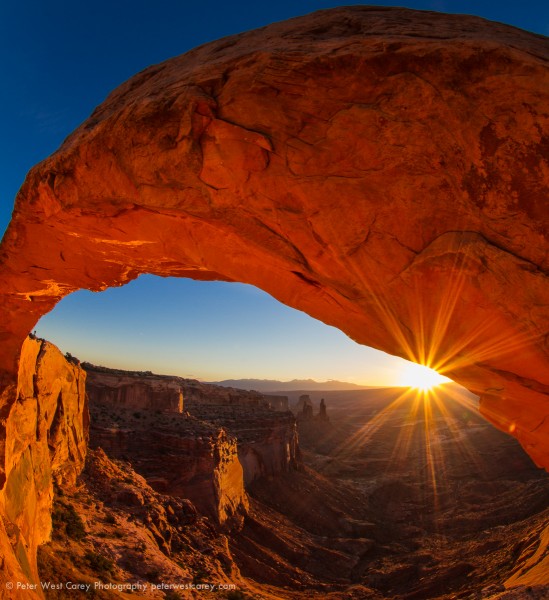
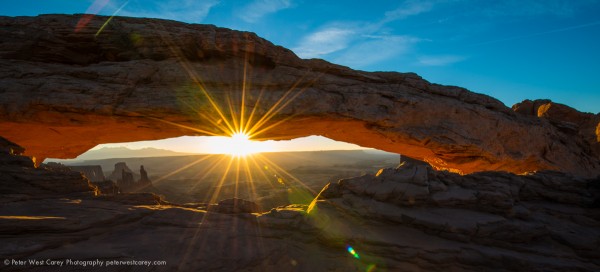
Of the images I brought back from a trip to Utah’s Canyonlands and Arches National Parks this past Fall, the one above recieved the most comments and requests for info. For starters, this is a shot of Mesa Arch in Canyonlands National Park, which is famous for the fact that the bottom of the arch glows from reflected sunlight just after sunrise on most mornings. Most shots look like this:
I had seen images of this arch before and was keen to shoot it with fellow Puget Sound photographer Michael Riffle when he suggested it. He made the suggestion and knew the location so I trusted in his judgement (while he noted it would be crowded) and I did little other prep.

Setup

Getting to the location is straight forward. But the catch: Michael tells me we need to leave early from Moab, the nearest town where we are staying. I think we left at 4:30am, but the details of the clock are fuzzy. There is a short walk from the parking lot and the whole setup is fairly accessible.

Why did we need to leave so early? Two reasons: 1) This location is popular and 2) it is small. I didn’t realize how small this arch was. I was thinking it was on the order of Landscape Arch in neighboring Arches National Park, which is at least a hundred meters long. Not so with Mesa Arch. To give you a frame of reference, here is what we were greeted with upon arrival.
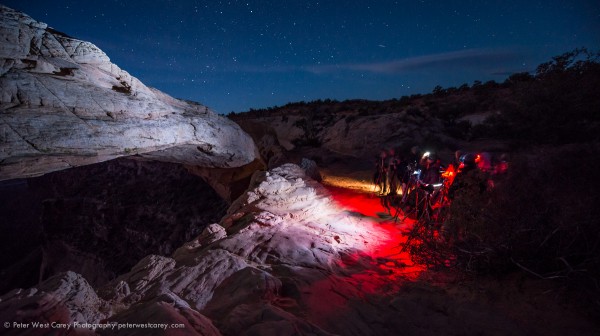
For someone who loves shooting far-off places with not so many people, this scene astounded me. I can count a dozen cameras in this setup. This is at 6:30am and the sun is not due for another hour.

I decided to set my camera on the far side of the arch in this image and Michael strong armed (politely) his way into the middle of the crowd. By the time I was set up, another six photographers arrived. In the end, over two dozen would be shooting.
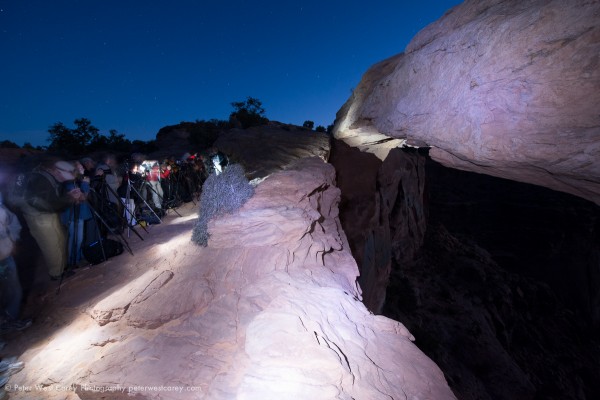
I was lucky this day as BorrowLenes.com had lent me a Nikon D800E and 14-24mm lens for this trip. As well as a Canon 8-15mm L fisheye. This meant I was able to setup the Nikon at the location you see above and wait for the sun. I was then able to use the 8-15mm on my Canon 7D and walk around for different composures. It is possible the setup kept me sane.
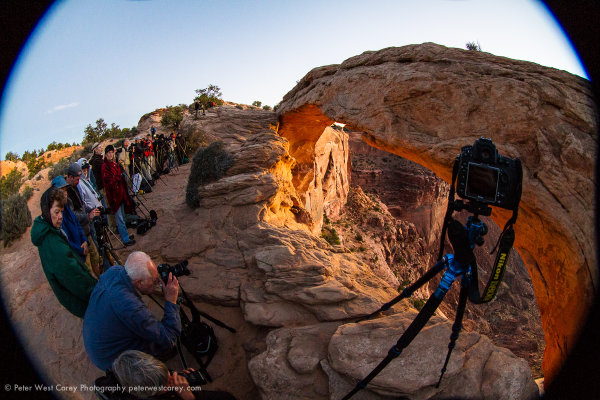
I tested some shot ideas with the 8-15mm L and liked one where I was right at the edge of the cliff and below and to the right of my tripod as in the picture above. Here’s a test shot before the sun came up.
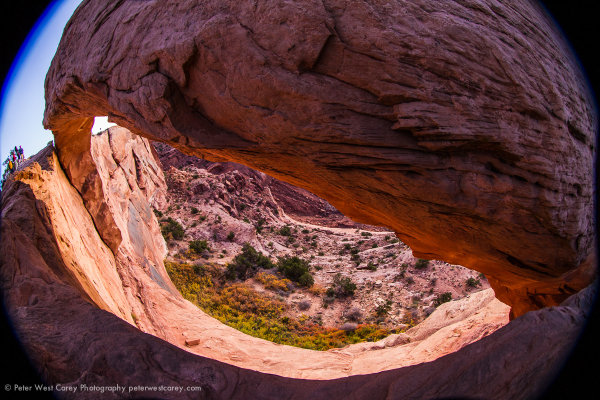
Shooting

After fiddling with the location, the sun finally broke the horizon. You would think Tom Cruise was seen walking naked through LA with the sound of snapping shutters behind and to the side of me. The long, long wait for some was finally paying off. I wasn’t happy with the Nikon shots at the time so I kept experimenting with the fisheye.

It was then that a local Utahan noted he got great shots by hanging over the edge. I love rock climbing and am comfortable on cliffs so, making sure I wasn’t in anyone’s shot (amazingly enough, it was possible) I leaned to the edge and hung my arm down.

Taking a couple test shots, I switched to Manual Mode and chose ISO 100 for the best quality image now that the sun was up, 8mm for the widest wide angle I could get, f/20 because I wanted a nice star burst pattern to the sun and 1/10 of a second to balance things out.

It took a number of tries to get the shot I wanted and I would take a few, move the camera slightly, take a few more. It was really shooting in the dark as my torso was over the edge with my arm hanging down and wrist bent back, while trying to avoid getting my body in the shot (at 8mm, the field of view is 180 degrees).

This is the resultant image, straight out of the camera:
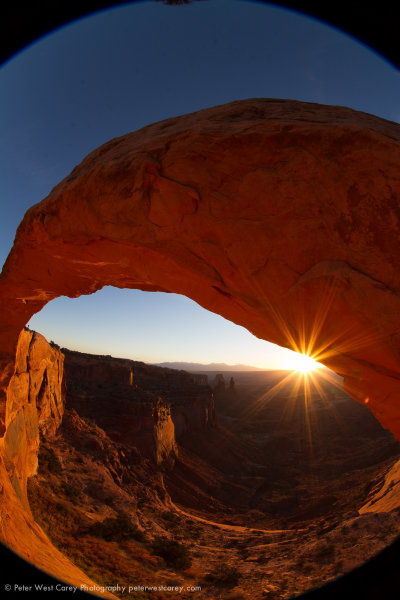
Satisfied, we shot for a few minutes more and then headed back to town.

Editing

Upon arriving home it was time to play with the image. I knew what I wanted and I started by straightening and cropping the image to cut out the black areas. All the edits below are handled in Adobe Lightroom.
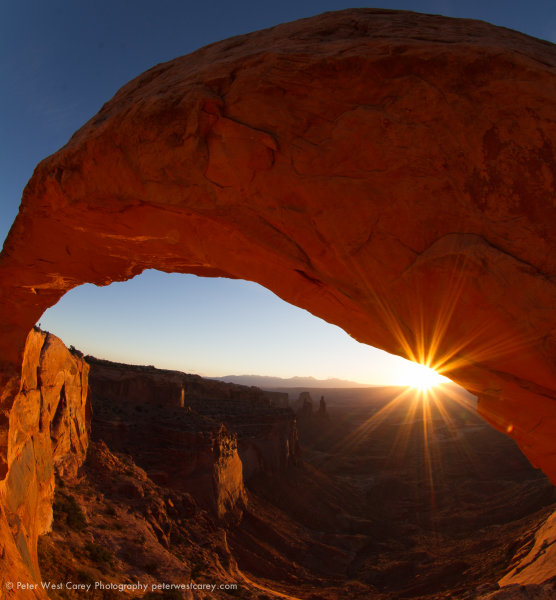
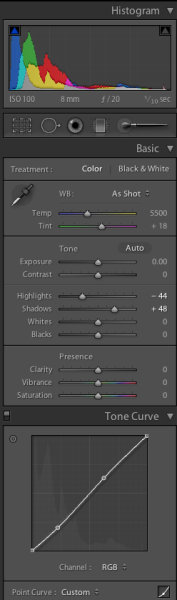
I then adjusted the Tone Curve to add some contrast, but I didn’t pull in the sides as the image was already pushing the edge of the Histogram. I cut Highlights by 44 and enhanced Shadow detail by +48.
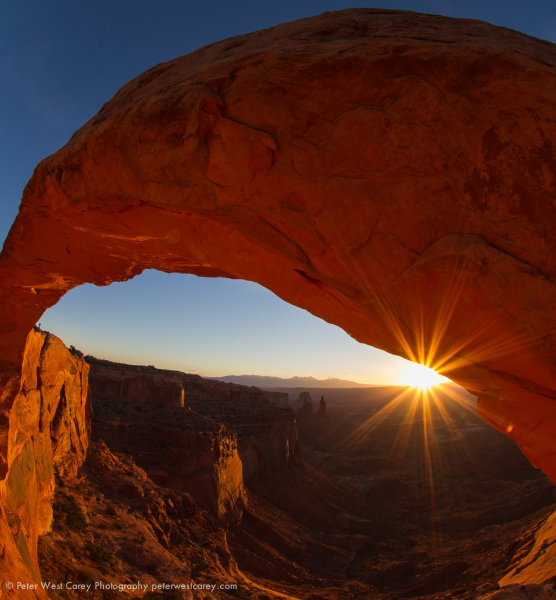
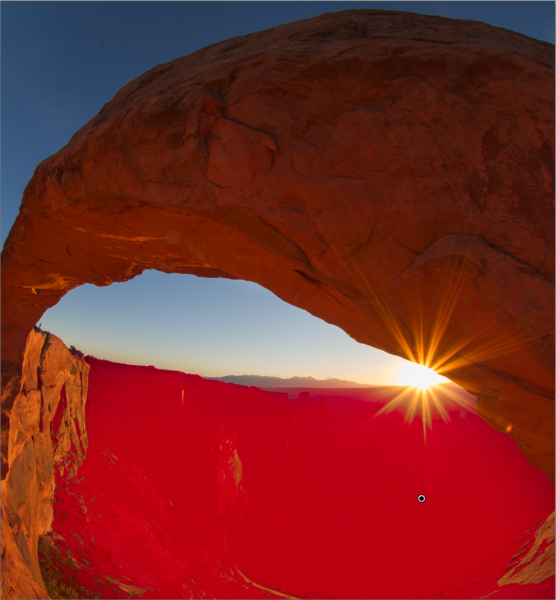
After that, it was time to liven up the valley floor. Using the Adjustment Brush, I painted over the valley floor and increased exposure by +.73 and Clarity by +48 to add some sharpness. I like to use the Clarity often on rock features to make them ‘harder’. The red in the image below represents the painted area for those settings.
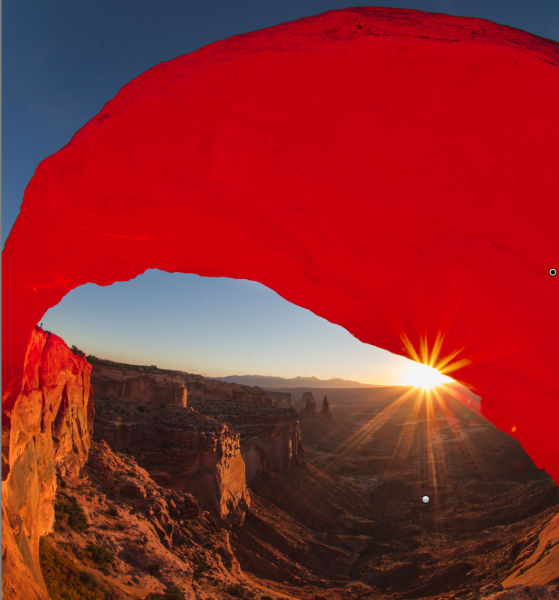
Now I want more life in the arch itself and I use a new brush to paint that. Exposure is +.73 and Clarity is +43.
After removing some dust spots (I’ll spare you the screen shots, but if you click through the images above you can probably spot them), I adjusted the crop angle slightly before the last set of adjustments.
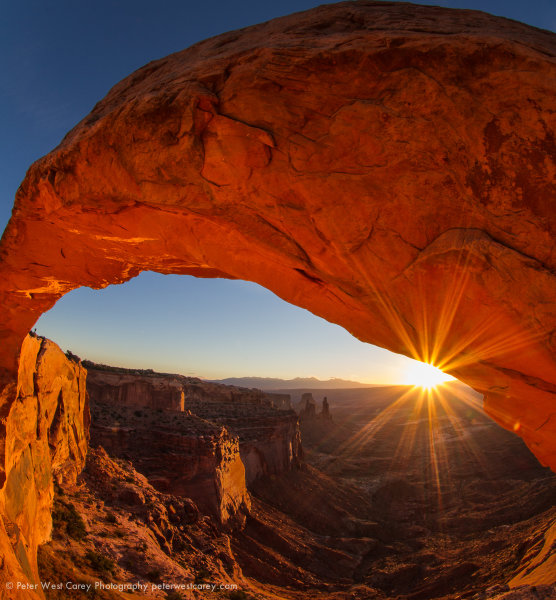
Both the face of the arch and the valley floor are brighter and more vivid. Wanting a little more ‘pop’, I increased the overall Vibrance by +31 (this brings more blue to the sky and orange to the rock and sun) as well as a Blue Saturation of +40 to help the sky.
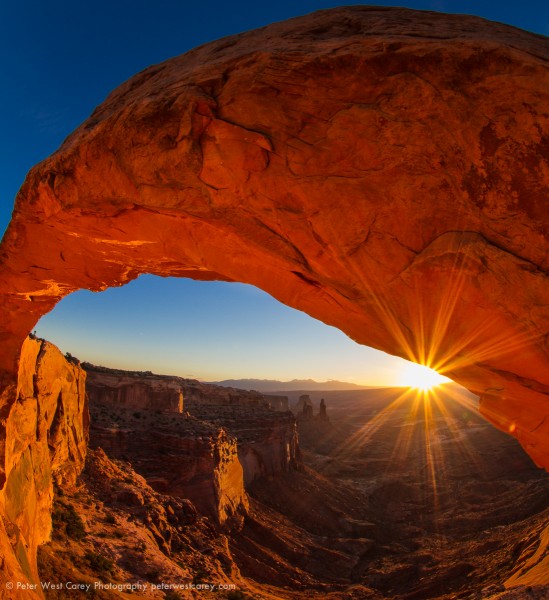
And that was it!

The keys for me for this shot were:

  1. Knowing the space I would be able to crop using the Canon 8-15mm L Fisheye on a cropped sensor camera.
  2. Stopping down my aperture to get the star burst effect.
  3. Placing the sun near the rock to gain the most from the burst (it works best when there is something for the sun rays to contrast with).
  4. Taking a chance and shooting blind from a unique angle.
  5. Listening to the advice of others.
  6. Being courteous to others wishing to get their own shot.
  7. Minor edits to bring the vision to fruition.
  8. Borrowing the right gear (thanks again to BorrowLenses.com)

If you have question, please ask. I will do my best to address them.


Post originally from: Digital Photography Tips.

Check out our more Photography Tips at Photography Tips for Beginners, Portrait Photography Tips and Wedding Photography Tips.

How I Shot And Edited It – Mesa Arch At Sunrise


Digital Photography School

 
Comments Off on How I Shot And Edited It – Mesa Arch At Sunrise

Posted in Photography


Nikon Tears – Video shot on D800.

20 Jan

This is a film Nikon asked me to shoot to show the capabilities of the D800 in different shooting scenarios as a professional DP. The film was shot almost entirely on the D800, with just a few shots on the D4. Mainly using the Nikkor 24-70mm F2.8, but also a few shots on the 105mm Macro (for the close ups of the eyes). The film was lit and professionally graded and edited in Los Angeles. Didn’t have very much light with me, so it was challenging at times, but a good representation of what the average amateur or semi-professional shooter might have with him in terms of equipment etc. I mainly used 1/100th degree shutter, as it improves almost all video without becoming visibly narrow and “shuttery”. All in all, the camera is very good in video mode and easy to use. Access to the only three things that are important when shooting video; shutter, ISO and F-stop was easily reached through dedicated buttons, rather than being hidden in some deep crap menu like on most other cameras. Very little rolling shutter, no visible artifacts and a decent exposure latitude. Not as good as a Red or an Arri Alexa, but for a DSLR it’s pretty impressive. As with all digital cinematography, you need to protect your highlights at all costs. Do not fall into the trap of “ISO-ing” up to compensate for not having any lighting like 99% of the clips on YouTube do. That will burn backgrounds/highlights into unrecoverable oblivion and look shit. Sometimes this means having no information in the
Video Rating: 5 / 5