RSS
 

Posts Tagged ‘Shooting’

Secrets to Shooting the Northern Lights

15 Jan

One sale now 32% OFF at Snapndeals: Collier’s Guide to Night Photography in the Great Outdoors eBook. Now only until January 26th, 2016


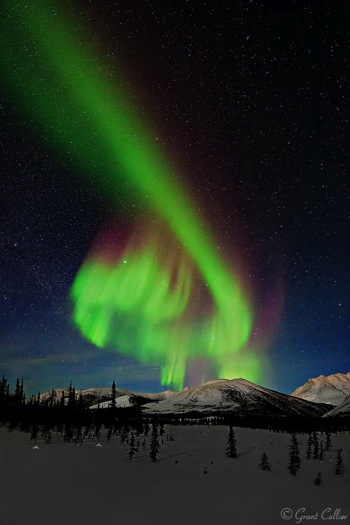
Of all the phenomena you can view in the night sky, the Northern Lights may be the most spectacular. The lights are created by charged particles from the sun, interacting with gaseous particles in our atmosphere. These lights also appear in the southern hemisphere, where they are known as the Southern Lights. Another name for both is the Aurora Borealis.
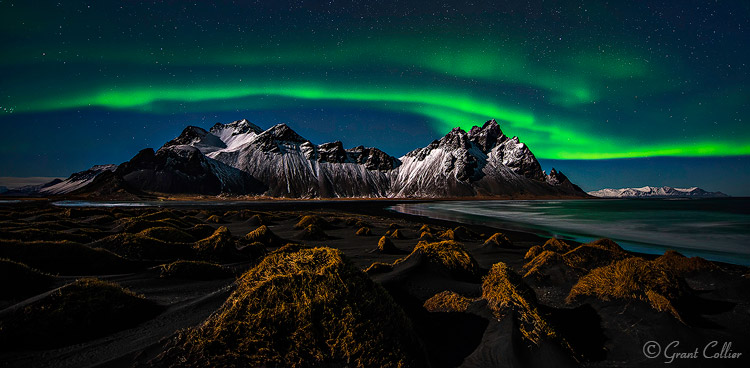
Grant Collier Northern Lights 1

Vesturhorn Mountain, Iceland – 14mm lens, f/2.8, for 10 seconds at ISO 1600

How to find Northern Lights

You can view a forecast for the Northern Lights online here. This website gives you a general idea of where the Northern Lights will be visible on any given night. For example, if you are in the northern continental United States, you might be able to see the Northern Lights if the forecast is 5 or higher. However, to get the best chance of viewing the Northern Lights, you’ll need to travel even farther north. To discover the best locations, try to find a day when the forecast on the above website is a 1 or 2. Anywhere within the bright green circle is a prime viewing spot for the Northern Lights. Some places that are somewhat easier to access in prime viewing areas are Wiseman, Alaska; Yellowknife, Canada; Iceland and northern Norway.

What lens to use

When shooting the Northern Lights, it is very helpful to use a fast lens that has an aperture of f/2.8 or wider. These lenses can let more light into the camera, which will yield higher quality images at night. A good option is the Rokinon 14mm f/2.8, which costs round $ 300. This is an ultra-wide angle lens, which is important when photographing something as expansive as the Northern Lights. Another option is the Nikkor 14-24mm f/2.8. This is a phenomenal lens, but it does cost almost $ 2,000.
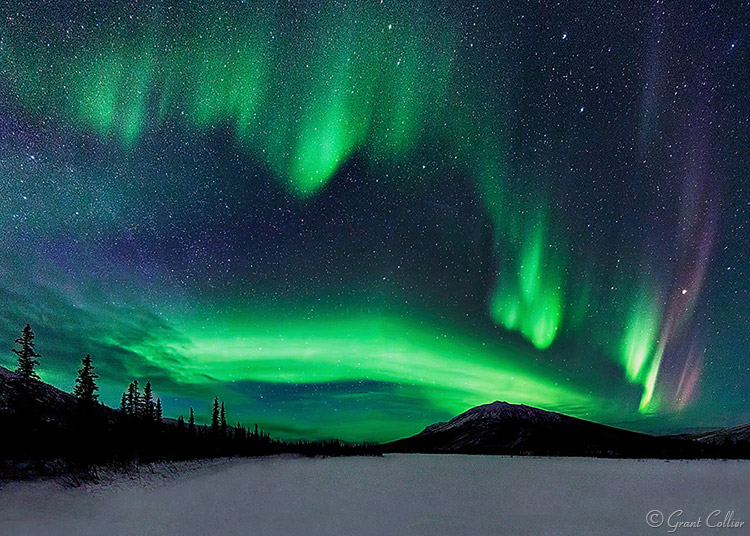
Grant Collier Northern Lights 2

Wiseman, Alaska – 14mm lens, f/2.8, 15 seconds, ISO 6400.

Camera settings and exposure

You’ll typically need to use the widest aperture on the lens, and for shutter speed, you’ll normally want to use exposures between 10-15 seconds. If the lights are moving rapidly in the sky, they can start to blur too much with longer exposures. If the Northern Lights aren’t moving rapidly, you can get away with exposures of 20-30 seconds. You should use the highest native ISO on your camera that doesn’t cause the highlights to be overexposed (a native ISO is one that is represented by a number, as opposed to letters, like H1 or H2). Be careful, though because when the Northern Lights become really bright, it is possible to overexpose the shot.

I recommend underexposing the images a little, so that you won’t risk blowing out the highlights, if the lights suddenly brighten. You’ll want to frequently check your histogram to make sure you’re not coming close to clipping the highlights. If you are, you’ll need to lower the ISO or exposure length.
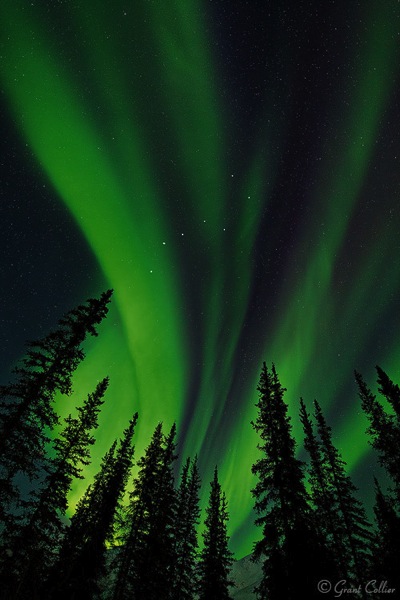
Grant Collier Northern Lights 3

Wiseman, Alaska – 14mm lens, f/2.8, 8 seconds, ISO 6400.

Stitching images

The Northern Lights can fill up most of the sky, and even ultra-wide angle lenses may only capture a portion of the display. To overcome this problem, you can create stitched images to capture more of the scene. A stitched image is one where you take multiple shots, each comprising a small part of the scene you want to photograph. You then later use computer software, like Lightroom or Image Composite Editor (Windows only), to stitch these images together, to produce an image of the whole scene. The great thing about stitched images is that they will also produce larger images with more detail, and less noise.

If the aurora is bright and moving fast, you’ll typically want to use a very wide lens, like 14mm, to create a single-row stitched panorama. You’ll have to take all of the images pretty quickly, otherwise, the aurora can move so much that the images won’t stitch together seamlessly. If the aurora is relatively dim, it doesn’t tend to move as fast. In this situation, it’s possible to do multi-row stitched panoramas with up to 20 images. These large stitched images can help minimize noise, which is more noticeable when the aurora is fainter. I recommend a 24mm lens to capture such images.
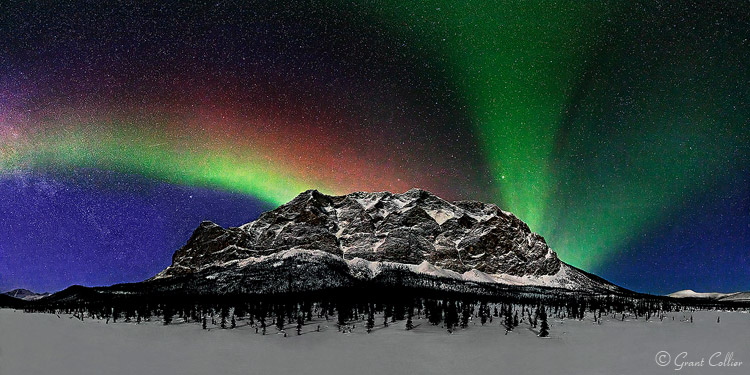
Grant Collier Northern Lights 8

Supapak Mountain, Alaska – 24mm lens, f/2.8, 10 seconds, ISO 6400, 9 images stitched together.

When to look for the lights

The best time of the year to photograph the Northern Lights is near the spring and autumn equinoxes, in March and September. The Northern Lights tend to be somewhat more active during those months than others. Never plan a trip to photograph the Northern Lights between late-April and early-August. During this time, it isn’t dark for very long, if at all, at the far northern latitudes. If you plan a trip in December or January, it will be dark much of the day, if not all of the day. However, it can be bitterly cold during this time, so spring and autumn is still preferable for all but the most adventurous photographers.
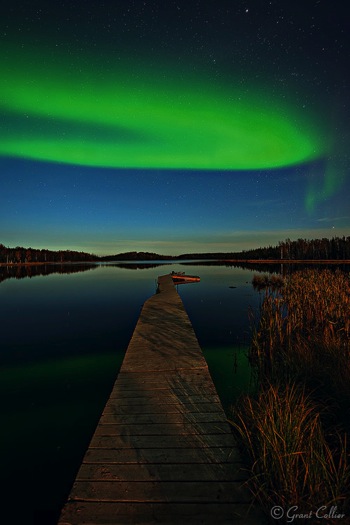
Grant Collier Northern Lights 5

Yellowknife, Canada – 15mm lens, f/2.8, 30 seconds, ISO 1600.

Grant Collier Northern Lights 7

Brooks Range, Alaska – 14mm lens, f/2.8, 10 seconds, ISO 6400.

Other considerations

Since it can be so cold when shooting the Northern Lights, it’s possible that your lens will fog up over the course of the night. Lenses fog up much faster when they are taken from a warm location to a cold one. One way to prevent this is to keep your camera equipment cold, by storing it in the trunk of your vehicle rather than in a warm room. You will, however, want to store your batteries in a warm location, as cold batteries do not last as long as warm ones, so this can help maximize battery life. Another option to prevent a lens from fogging up is to attach hand warmers to the side of it using rubber bands to help keep it warm.
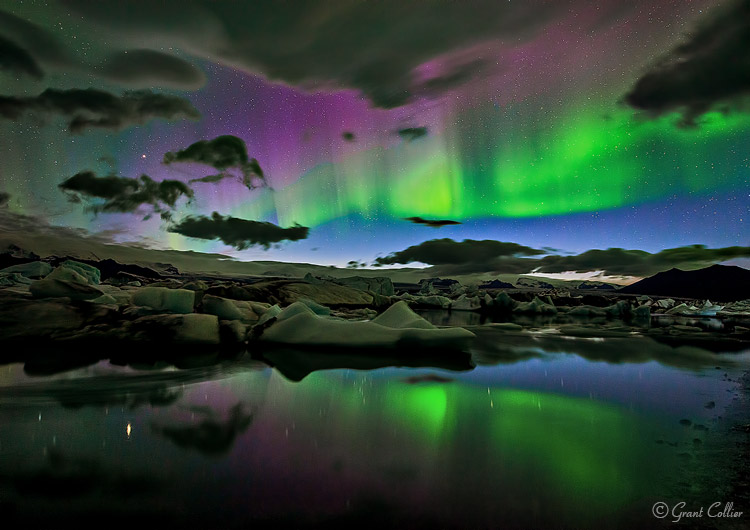
Grant Collier Northern Lights 6

Jokulsarlon Lagoon, Iceland – 19mm lens, f/2.8, 20 seconds, ISO 3200.

You can shoot the Northern Lights under almost any moon phase. The aurora will be brighter under no moon, but any foreground in your shot will likely be rendered as a dark silhouette. Under a full moon, the foreground will be well-illuminated and the aurora will be fainter, but this may not matter. The Northern Lights are often so bright that they will be easily visible under a full moon. My favorite time to shoot the Northern Lights is under a moon that is 20%-50% illuminated. It will be dark enough to see the stars and aurora a little better than under a full moon, and you’ll still be able to render a lot of detail in the foreground. In order to be able to shoot under a variety of conditions, I recommend planning a trip so that you arrive near a new moon, and leave near a full moon.
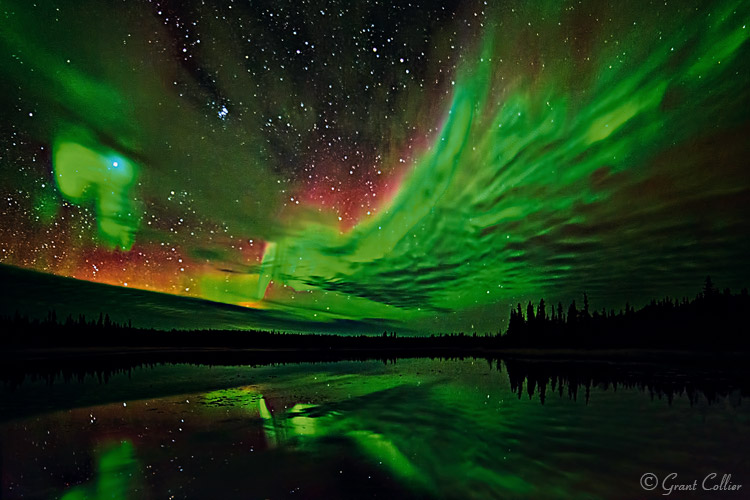
Grant Collier Northern Lights 4

Yellowknife, Canada – 14mm lens, f/2.8, 15 seconds, ISO 6400.

Practice near home first

One mistake I’ve seen photographers make is to go on an expensive trip to see the Northern Lights without having done any night photography beforehand. They come away with subpar images that are out of focus, or improperly exposed. Unless you live in an area where you can see the Northern Lights, I recommend becoming proficient in night photography before paying for an expensive trip to see the aurora. Photographing the Northern Lights is more difficult than photographing most other night scenes. The lights can move fast and may not appear for very long, so you need to be able to make the most of your time when the lights are out. If you practice with easier subjects beforehand, you should be able to come away some great images!
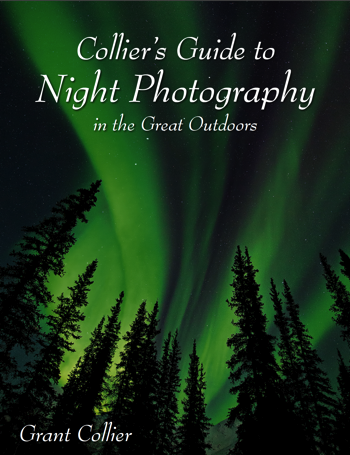

Screen Shot 2015 12 27 at 5 15 21 PMOne sale now 32% OFF at Snapndeals: Collier’s Guide to Night Photography in the Great Outdoors eBook. Now only until January 26th, 2016


googletag.cmd.push(function() {
tablet_slots.push( googletag.defineSlot( “/1005424/_dPSv4_tab-all-article-bottom_(300×250)”, [300, 250], “pb-ad-78623” ).addService( googletag.pubads() ) ); } );

googletag.cmd.push(function() {
mobile_slots.push( googletag.defineSlot( “/1005424/_dPSv4_mob-all-article-bottom_(300×250)”, [300, 250], “pb-ad-78158” ).addService( googletag.pubads() ) ); } );

The post Secrets to Shooting the Northern Lights by Grant Collier appeared first on Digital Photography School.


Digital Photography School

 
Comments Off on Secrets to Shooting the Northern Lights

Posted in Photography


Lightroom plug-in for Pentax 645Z tethered shooting now available

10 Dec

Ricoh has announced a software plug-in for Adobe Lightroom supporting tethered shooting with the Pentax 645Z medium-format camera. Creative Cloud Lightroom subscribers can also take advantage of integration with Lightroom Mobile, making it possible to comment on and adjust photos remotely via the cloud. The Pentax Tethered Capture Plug-In is available now from Ricoh.


Press release:

Ricoh Imaging Delivers Tethered Capture to its Acclaimed PENTAX 645Z Camera

Highly requested software plug-in to enhance the PENTAX 645Z’s in-studio photo-shooting with Adobe® Lightroom® capabilities available today

DENVER, December 9, 2015 – Ricoh Imaging Americas Corporation today announced the immediate availability of the highly anticipated PENTAX Tethered Capture Plug-In for use with Adobe® Lightroom®. The software plug-in enhances the tethered capture capabilities of the PENTAX 645Z medium-format camera by enabling files to easily be uploaded into Adobe Lightroom during a studio session, where they can readily be viewed, shared and edited.

Adobe Lightroom is the digital photo processing and editing software favored by many professional and advanced amateur photographers, making the use of the new PENTAX Tethered Capture software both cost effective and efficient as there is no additional software package to purchase and learn. In addition, with the new capabilities of Lightroom Mobile, uploaded images may be viewed and adjusted by a photographer’s colleagues or clients from any remote location, anywhere in the world.

“Since Lightroom is already the de-facto standard for many photographers to edit and develop their images, this new plug-in is especially welcome. It makes studio use of the PENTAX 645Z camera easier, more efficient and, ultimately, faster than ever,” said Chris Knight, a New York-based portrait photographer. “Using Lightroom, I am able to quickly share photos with my clients, who are even able to view and comment from remote locations.”

Since its launch in June 2014, the PENTAX 645Z camera has been embraced by a wide range of photographers. The PENTAX Tethered Capture Plug-In is being offered to further enhance the user experience, and is a free option that can be downloaded starting today at: http://www.ricohimaging.co.jp/english/support/download_digital.html

Main Features

  • The PENTAX 645Z camera supports industry-standard Adobe DNG (Digital Negative) RAW files, which ensures optimal image quality. The in-camera DNG file format effectively eliminates any RAW file incompatibility issues, thus allowing the photographer to confidently import DNG RAW files during a tethered session.
  • Adobe Lightroom Creative Cloud users can use Lightroom Mobile to connect to tethered sessions via cloud services to comment and adjust photographs and return those edits to the photographer from anywhere in the world.
  • Adobe Lightroom offers an exceptional cataloging system that allows photographers to capture and catalog tethered sessions with confidence.
  • The PENTAX Tethered Capture Plug-in for Adobe Lightroom is an easy-to-install, powerful and streamlined tethering solution that allows any photographer to manage their own workflow from capture to output.
  • Adobe Lightroom users can download and apply presets to any tethered capture session thus eliminating the need to process every raw file individually.

Articles: Digital Photography Review (dpreview.com)

 
Comments Off on Lightroom plug-in for Pentax 645Z tethered shooting now available

Posted in Uncategorized


Vallerret Photography Gloves are designed for outdoor winter shooting

03 Dec

Vallerret, a Norway-based startup, is looking for funding on Kickstarter for some cold weather photography gloves. Currently in prototype form, the Vallerret Photography Gloves are designed for adventurous photographers who shoot outside in cold temperatures, aiming to eliminate the hassle that comes with bulky, cumbersome gloves while protecting hands from snow and ice.

Vallerret’s gloves are made with ‘flip-tech’ finger caps that can be peeled back when it is time to adjust dials and change settings. The knuckles and cuff are made of neoprene, the interior features a merino wool liner and the palm and inner fingers are coated with a non-slip grip, though there’s no mention of capacitive touch screen capability, which is increasingly common. Catering specifically to photographers, the design includes an SD card pocket just above the cuff and a microfiber strip for cleaning a lens. Vallerret has partnered with a ski glove manufacturer, hoping to tailor the gloves to active photographers who might also wear them snowboarding.

The campaign has raised more than half its funding goal, and offers a pair of Vallerret Photography Gloves for a pledge of 550 kroner, or about $ 64. Shipping is estimated to start in March 2016, assuming the campaign and manufacturing progress as planned.

Articles: Digital Photography Review (dpreview.com)

 
Comments Off on Vallerret Photography Gloves are designed for outdoor winter shooting

Posted in Uncategorized


Keeping up with the big boys? Shooting pro sports with the Sony a7R II

05 Nov

On paper, the Sony a7R II is one of the best-specified cameras we’ve ever tested, and it is generating a lot of interest. We wanted to see whether the a7R II’s impressive specifications live up to their promise in the real world, so we decided to subject it to perhaps the ultimate stress test: a professional sporting event. DPReview writer Jordan Stead headed to a pre-season NFL game to see what the a7R II could bring to the football field. Read more

Articles: Digital Photography Review (dpreview.com)

 
Comments Off on Keeping up with the big boys? Shooting pro sports with the Sony a7R II

Posted in Uncategorized


Shooting Spine-Chilling Spots:Q&A With Thomas Windisch

30 Oct

BOO! Did we scare you? No? Well, we have something else to get you in the Halloween mood.

We’re talking about the extremely eerie photos of abandoned buildings taken by urban explorer, Thomas Windisch.

We spoke with Thomas and learned his tips for finding and photographing what he calls “beauty in decay.”

Read on for our Q&A with Thomas! (You may wanna keep the lights on…)

(…)
Read the rest of Shooting Spine-Chilling Spots:
Q&A With Thomas Windisch (888 words)


© Taylor for Photojojo, 2015. |
Permalink |
No comment |
Add to
Q&A With Thomas Windisch”>del.icio.us

Post tags:


Photojojo

 
Comments Off on Shooting Spine-Chilling Spots:Q&A With Thomas Windisch

Posted in Equipment


Two Methods for Shooting Star Trails Made Easy

23 Oct

As a landscape photographer, it can be easy to find stunning subject matter to photograph during the day. At night, things become more difficult as the sun goes down, but there is still plenty to photograph. With some patience, you can create stunning images featuring the stars as your backdrop, or even your subject.

star trails, night, photography, sky, astrophotography

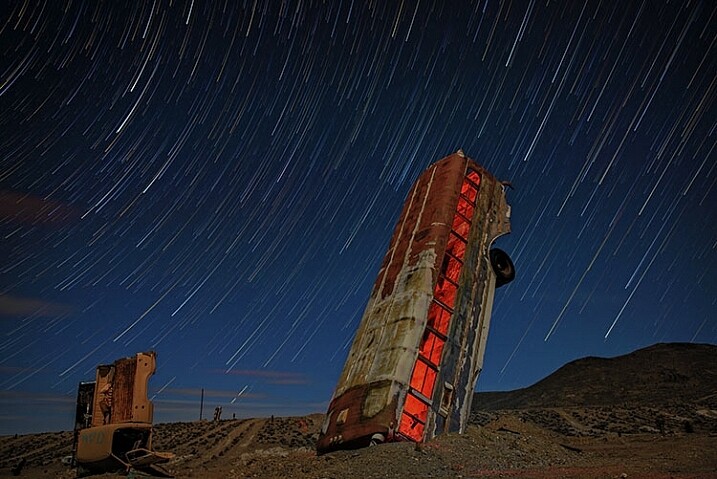
This image is a composite of 156 separate exposures, merged using StarStax software. Each exposure was ISO 400, f/2.8, 30 seconds. The red glow inside the bus was done by shining a red LED flashlight inside the bus from the other side, during one of the exposures.

Equipment list

Before you get started, you’re going to need a few things:

  • A good sturdy tripod is absolutely essential, I’m using an Induro GTT204M2.
  • A wired remote for your camera is also a necessity. Which model you use will depend on the camera you have.
  • A fully charged battery is a must. The vertical grips that are available for some cameras, allowing you to use two batteries at once for longer life, can also be helpful.
  • A flashlight can come in handy, both for finding your way to the location, and for light painting in the foreground.
  • Finally, a large memory card, or two if your camera has dual slots, will be needed.

#1 – The One-Shot Method

There are two ways to photograph star trails. The first is the old-fashioned way, using a single exposure.

For this method, exposures can range anywhere from several minutes, to several hours. This method was the only way to photograph star trails in the days before digital cameras. When using the single exposure method, your camera needs to be in manual mode, with the shutter speed set to Bulb. Some cameras have a separate mode for Bulb. It is like manual mode, but the shutter stays open for as long as the release button is depressed. A time controller such as the Nikon MC-36A, or Canon TC-80N3 can make things easier by allowing you to lock the shutter button down, or program a set amount of time for the exposure.

ISO should be set to 400. You’ll want to set your aperture somewhere around f/4. The wider the aperture is open, the brighter the star trails will be. If you are photographing in a completely dark setting, with no moonlight, the stars will likely be the brightest object in your scene. Once you’ve set your aperture, you need to decide how long a star trail you want. The longer the exposure, the longer the trails.  The image below was a 30 minute exposure.

This image was created as a single exposure. Exposure time was 30 minutes, ISO 100, f/5.6. The star trails are dimmer due to the smaller aperture, the fact that the moon was still in the sky, and light pollution from the city in the distance, seen as the glow to the right.

This image was created as a single exposure. Exposure time was 30 minutes, ISO 100, f/5.6. The star trails are dimmer due to the smaller aperture, the fact that the moon was still in the sky, and light pollution from the city in the distance, seen as the glow to the right. The street in the foreground was painted with an LED flashlight for several seconds during the exposure.

One thing you need to be concerned with when using a single long exposure is Long Exposure Noise Reduction. If you choose to photograph star trails using a single exposure, the heat generated on the imaging sensor adds noise to the image. Turning on Long Exposure Noise Reduction reduces that noise by using a method known as dark frame subtraction. I previously discussed dark frame subtraction in the article The Night Sky In Landscape Photography. Long Exposure Noise Reduction doubles the length of time needed to make an image. The camera first takes the exposure. In this case, let’s say the exposure is one minute.Long Exposure Noise Reduction then requires another minute to reduce the noise created by the long exposure. That means if you make a star trail exposure for 15 minutes, your camera will be unavailable to take another picture for 30 minutes. You’ll need to make sure you have enough battery to keep the camera powered while it carries out Long Exposure Noise Reduction.

This is a single exposure of 10 minutes, ISO 400, f/5.6.

This is a single exposure of 10 minutes, ISO 400, f/5.6.

In addition to Long Exposure Noise Reduction, another consideration is the length of the exposure itself. There is nothing worse than standing next to your camera while it makes a 30 or 45 minute exposure, and two-thirds of the way through the exposure, a car goes past, shining its headlights across the scene and ruining the exposure. It’s happened to the best of us.

#2 – Merging Multiple Exposures

This is where the second method for photographing star trails comes in. With the advancement of digital imaging, stacking multiple exposures has become possible, and has made creating star trail images easier than ever. By taking a series of drastically shorter exposures, then stacking them in software such as StarStaX, you can increase your flexibility as a photographer, because there are two benefits to this method. The first is that since the exposure are shorter, you can turn off Long Exposure Noise Reduction. The second benefit is that even if a car drives by to ruin the exposure, it’s only one small piece of the sequence, so you can just delete the one frame that was ruined.

StarStaX works by blending a series of images, allowing you to capture the motion of stars in the sky, similar to a single exposure. The one drawback to using software like StarStaX is if clouds are also moving across the sky, it has a tendency to create a stepped shape with them that doesn’t look natural. Better Star Trails Photographs with StarStax is an excellent tutorial for using StarStaX.

Camera settings

To use the stacking method for shooting star trails, set your camera to Manual mode and your camera’s drive to Continuous. Start with your aperture set to f/4. This setting can be adjusted, but the wider the aperture, the brighter the trails. However, be careful to ensure you have enough depth of field, and aren’t overexposing the stars. Shutter speed will be 30 seconds. ISO should be set to 400. Using the time controller or remote for your camera, release the shutter, and use the locking mechanism to keep the shutter button on the remote depressed. With the camera in continuous drive mode, as each exposure ends, another will begin until you stop it. This also minimizes the pause between each exposure, which can cause small breaks in the star trails when the exposures are merged. Alternatively you can use an intervalometer feature if you camera has that, or similar type of remote.

star trails, night, photography, sky, astrophotography

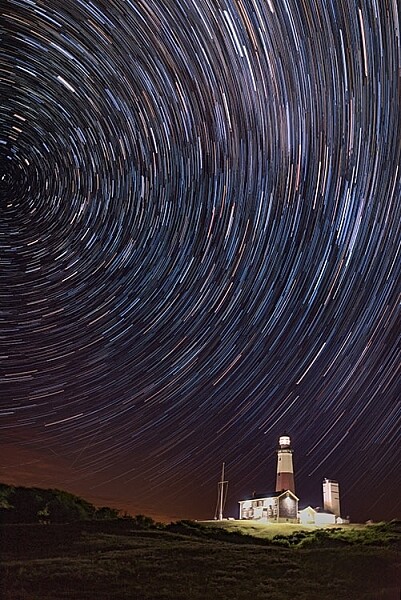
This image is a combination of 121 exposures merged in StarStaX. Each exposure was 15 seconds, ISO 400, f/1.4. To keep the lighthouse from being so bright that it would overpower the star trails, a 3-stop soft-edged graduated neutral density filter was used.

It can be easy to forget the rules of composition when photographing star trails, so don’t get so fixated on the stars that you forget to look at the foreground as well. Chances are your foreground will be shrouded in darkness. A flashlight can come in handy for painting the foreground object with light to make it stand out in the darkness. Colored gels can allow you to get creative with the light painting. When stacking images, you’ll only need to illuminate your foreground for a single frame, as StarStax will use the illuminated exposure for that foreground object.

By the same token, there may be a time where your foreground object is brightly illuminated, as with the lighthouse image above. So I carry a set of graduated neutral density filters, even when shooting at night. For the lighthouse image, I mounted a Vü filters 3-stop soft-edged ND grad on my lens, so that the dark side of the filter was over the bottom half of the frame. This allowed me to keep the lighthouse exposure dim enough to still allow the stars to register in the exposure as well.

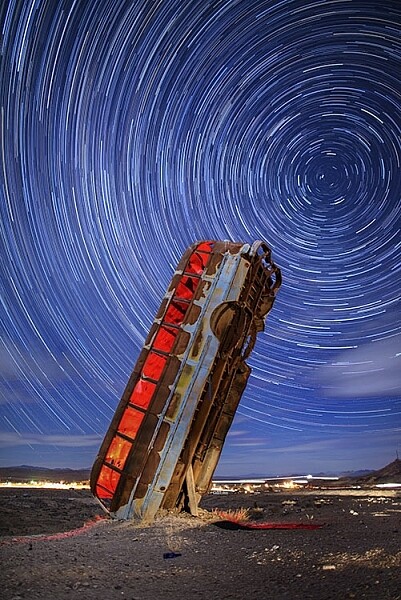
This image was created by merging 116 separate exposures in StarStax software in comet mode. Each exposure was 30 seconds, ISO 400 at f/2.8. A red LED flashlight was shone inside the bus for the first exposure.

This image was created by merging 116 separate exposures in StarStax software in comet mode. Each exposure was 30 seconds, ISO 400 at f/2.8. A red LED flashlight was shone inside the bus for the first exposure.

Once you’ve found your foreground, think about the direction you are facing. When facing north, star trails will form concentric circles. When facing away from the north, star trails will simply be slanted lines or arcs in the sky. Both can create interesting and awe-inspiring images.

Now that you know you don’t have to put your camera away when the sun goes down, you need to find some dark sky to get the best results with star trails. The International Dark Sky Association has a great tool on their website to help you find the best places for night sky photography.

Show some of your best star trail images below!

googletag.cmd.push(function() {
tablet_slots.push( googletag.defineSlot( “/1005424/_dPSv4_tab-all-article-bottom_(300×250)”, [300, 250], “pb-ad-78623” ).addService( googletag.pubads() ) ); } );

googletag.cmd.push(function() {
mobile_slots.push( googletag.defineSlot( “/1005424/_dPSv4_mob-all-article-bottom_(300×250)”, [300, 250], “pb-ad-78158” ).addService( googletag.pubads() ) ); } );

The post Two Methods for Shooting Star Trails Made Easy by Rick Berk appeared first on Digital Photography School.

Digital Photography School

 
Comments Off on Two Methods for Shooting Star Trails Made Easy

Posted in Photography


A Beginner’s Guide to Choosing Shooting Mode

22 Sep

Even the most seasoned veteran photographer may use a pre-programmed mode occasionally in order to concentrate immediately on a shot rather than take the time to calculate exposure and miss the opportunity for the great image. But if you are a beginner at photography or want to advance your photography skills beyond the use of Auto mode, begin by adventuring away from the green box.

When you are setting up your camera to capture an image, there are four basic results to consider: wide depth of field, shallow depth of field, motion blur or freeze motion. How do you know which mode to use to control these basics of photography? Let’s take a look.

Nikon-Canon-mode-dail

Auto (Green box)

In Auto mode, your camera will automatically set the shutter, aperture, ISO, white balance, and even the pop-up flash for you.

Advantages: This is a great option for beginners with a digital camera – but don’t become dependent on it! Only use it until you learn to take control of your camera.

Disadvantages: In certain lighting conditions the auto settings may produce undesirable images. For instance, a portrait that is heavily back-lit might just produce a silhouette. In low-light, you may end up with blurry and grainy images; also in low-light, the camera may choose to fire the flash to give more light and many camera models don’t provide a way to disable the flash if you don’t want it.

When to use: Any time you want to use your camera just as a point and shoot camera, this is your mode.

This portrait was intentional shot into the sun in Auto Mode. While the camera did a decent job with exposure, it might be a 1/2 stop under exposed. Auto exposure settings choose by the camera are 1/250th of a second at f/6.3 with ISO of 100. while the shutter speed and ISO are good, a wider aperture would have lessened the DOF and made the background less distracting.

This portrait was an intentional shot into the sun in Auto mode. While the camera did a decent job with exposure, it is a 1/2 stop under-exposed. The auto exposure settings chosen  are 1/250th of a second at f/6.3 with ISO of 100. While the shutter speed and ISO are acceptable, a wider aperture would have lessened the DOF and made the background less distracting.

Program (P)

In Program mode, your camera will automatically set the shutter speed and aperture, but will allow you to choose ISO, white balance, exposure compensation and flash options.

Advantages: This is a great next step for a beginner who wants to take a little more control of their camera and improve their images.

Disadvantages: As in Auto mode, certain lighting conditions may lead to unpredictable results, due to the partial automatic settings which leave some results to chance.

When to use: Use this mode if you want to take a good first step to ultimately taking complete control of your camera’s options.

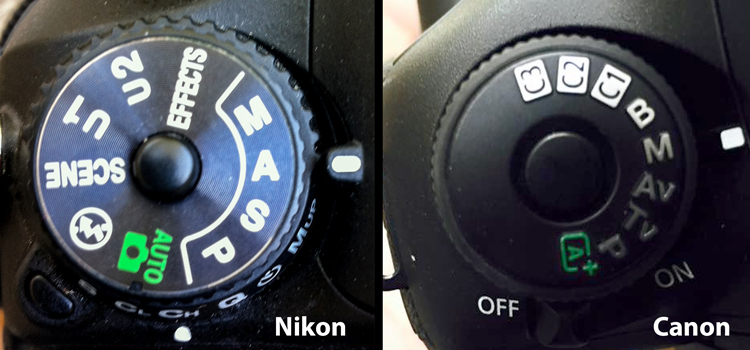
Shutter Priority (TV – Canon) (S – Nikon)

In Shutter Priority mode, you select the shutter speed and ISO and the camera will automatically choose the proper f-stop for what it determines to be the correct exposure.

Advantages: Great for controlling freeze action and motion blurring of moving objects.

Disadvantages: In this mode you have control of your shutter speed, so you must be careful that your camera can choose an f-stop to give you a proper exposure. The type of lens you have available to use comes into play here. Most cameras can shoot at a very fast shutter speeds, but if your lens doesn’t have a large enough aperture to match that shutter speed the resulting image will be under-exposed.  For example, if you are shooting with a shutter speed of 1/4000th of a second, and the proper exposure for the speed of the subject requires an f-stop of f/2.8, but the widest opening on your lens is f/3.5, the image will be under-exposed.

When to use: Use this mode when you want to control the motion of the object you are photographing. Use a fast shutter speed if you want to freeze the motion or use a slow shutter speed if you want to blur the motion. This mode is also useful when using large mm lenses where you need to set a fast shutter speed to avoid blurred images due to camera shake.

Choosing shutter priority and setting shutter to 1/8th of a second to blur the water.

Shutter priority with a shutter to 1/8th of a second was used to blur the fast moving water.

Here are some suggested shutter speeds for Shutter Priority:

  • Freeze very fast motion – 1/3000th of a second
  • Athletes in motion – 1/500th to 1/1000th of a second
  • Birds in flight – 1/1000th to 1/2000th of a second
  • People walking – 1/250th of a second
  • Panning moving objects – 1/30th to 125th of a second
  • Blurring fast moving water – 1/8th of a second
  • Blurring slow moving water – 1/2 to 1 secondshutter

Aperture Priority (AV – Canon) (A – Nikon)

In Aperture Priority mode, you select the aperture and ISO and the camera will automatically choose the proper shutter speed for what it determines to be the correct exposure.

Advantages: Other than Manual mode (next paragraph), Aperture Priority is the most popular shooting mode photographers use, mainly because it controls what is in focus in your image. And in most cases the item you have in focus is the element that will make or break the success of your image.

Disadvantages: In low-light situations your camera may choose a very slow shutter speed that will produce a blurry image, either because of movement by the subject or camera shake.

When to use: Use this mode when you want to control the Depth of Field (DOF) of your image. The larger the aperture the more light reaches your camera’s sensor and the shallower the DOF. Reversely, the smaller the aperture the less light reaches your camera sensor and the deeper the DOF. Beware that changing your aperture will also affect your shutter speed. More light from large apertures requires a faster shutter speed and less light from small apertures requires a slower shutter speed.

Using Aperture Priority to set a larger aperture to increase DOF

Aperture Priority to set a larger aperture to increase DOF.

Here are some suggested f-stops for Aperture Priority:

  • Landscapes -f/8 or higher for more DOF
  • Portraits – Large aperture  (f/2.8) for shallow DOF to blur the background
  • Macro – f/8 or higher for more DOFaperture

Manual (M)

Manual mode allows you to change both the shutter speed and aperture settings independently from each other. No settings will be automatically set by the camera. Your camera’s built-in light meter will guide you on the exposure it determines to be correct, but you have complete control to adjust the shutter and aperture separately to get the exposure you determine to be correct for the image you are creating. Before you use the manual mode it is recommended that you have an understanding of the exposure triangle (shutter speed, aperture and ISO) and how each will affect your final image.

Advantages: This mode gives you complete creative control of the image you are capturing.

Disadvantages: While this mode has many creative advantages, you must be careful to always check the exposure with every image, especially when shooting in fast changing lighting conditions.

When to use: After you have learned to use this mode and learned the effects and results of the settings and how they work together, you will use this mode almost every time.

Here Manual mode was used to control the DOF and to use a slow shutter speed to blur the waterfalls.

In Manual mode, a small aperture was used to control the DOF while also setting a slow shutter speed to blur the motion of the waterfall.

Scene Modes

Scene mode is very similar to Auto mode. You choose the scene you are shooting and the camera will choose settings for you optimized for that scenario. Different camera models may have different scene modes, but listed here are some of the most popular:

  • Sports – Camera will increase ISO and use a fast shutter speed to capture fast action.
  • Landscape – Camera will use a small aperture to maximize the DOF; flash may also be disabled.
  • Portrait – Camera will use a large aperture to  throw the background out of focus. Some models of cameras will also use face recognition in this mode.
  • Macro – Camera will choose small aperture to give as much DOF as possible.

Advantages: As with the Program mode, these Scene modes are a beneficial starting point for beginners and will often give a better result than shooting in Auto mode.

Disadvantages: While these settings can produce desirable images at times, the results may vary and will not be reliable.

When to use: While these scene modes may be a step up from Auto mode for beginners, use these options as a starting point to learn your camera, understand its workings, and upgrade your photography skills.

Aperture-Shutter


So which mode is the best?

It is completely up to you which mode you feel most comfortable using. But if you are using the Auto, Scene or Program modes and you want to improve your photography, learning how to set exposures using the exposure triangle of shutter, aperture and ISO will help you make the best possible choices to create better images.  The two most popular modes used by professional photographers are Manual and Aperture Priority. Remember, professionals were once beginners too. Enjoy your camera experiences, no matter which mode you choose!

googletag.cmd.push(function() {
tablet_slots.push( googletag.defineSlot( “/1005424/_dPSv4_tab-all-article-bottom_(300×250)”, [300, 250], “pb-ad-78623” ).addService( googletag.pubads() ) ); } );

googletag.cmd.push(function() {
mobile_slots.push( googletag.defineSlot( “/1005424/_dPSv4_mob-all-article-bottom_(300×250)”, [300, 250], “pb-ad-78158” ).addService( googletag.pubads() ) ); } );

The post A Beginner’s Guide to Choosing Shooting Mode by Bruce Wunderlich appeared first on Digital Photography School.

Digital Photography School

 
Comments Off on A Beginner’s Guide to Choosing Shooting Mode

Posted in Photography


Landscape Photography – Shooting the Same Location Through the Seasons

06 Sep

2-for-1 special

As part of Landscape Photography Week here on dPS, we’re offering TWO for the price of ONE on our best-selling Living & Loving Landscape Photography ebooks!

Click here to take advantage of this offer.


Put up your hand if you like shooting landscape photography, and are always looking for new places – but only photograph them once, maybe twice, and then think you are done with that area.

I am guilty of the same thing. I go looking for places to photograph, take photos of them, and think I will go back but never do. Perhaps this is something we need to rethink.

Consider how the seasons affect landscapes and what changes happen throughout the year. In Australia the traditional owners of the land, or the indigenous people, have different seasons to the European ones, there are six of them. They are very descriptive of what happens, though the usual seasons of autumn, winter, spring, and summer can still provide lots of differences to give the same place different aspects.

Autumn

Put up your hand if you like shooting landscapes, are always looking for new places, but only photograph them once, maybe twice, and then think you are done with that area.  I am guilty of the same thing. I go looking for places to photograph, take photos of them, and think I will go back but never do. Perhaps this is something we need to rethink.  Consider how the seasons affect landscapes and what changes happen throughout the year. In Australia the traditional owners of the land, or the indigenous people, have different seasons to the European ones and there are six of them. They are very descriptive of what happens. Though the usual seasons of autumn, winter, spring and summer can still provide lots of differences to give the same place different aspects.  Autumn  The most obvious thing about autumn is the changing of the leaves. In some parts of the world, this happens a lot more and nearly all trees lose their leaves. In Australia it doesn’t happen so much and many of the native trees are evergreen and retain their leaves all year round. Having said that, there are also many introduced species that do, and in towns and some areas in the country you can find trees that have those beautiful, golden colors associated with autumn.  The changing of the leaves isn’t the only thing to look for. On billabongs, swamps and dams, you will often find low level mist creating wonderful moods. If you go out early in the morning, wait for the sun to rise and you can get some great effects from the sun rays as they hit the water.  There, sunrises are more interesting and sometimes there is a golden light that is associated with that time of morning that you can only see at that time of year. The golden hour that is normally associated with sunsets is there to give your landscape that rich color. It isn’t too cold in the mornings, but the weather is changing as winter approaches.  Before you go to bed check what the forecast will be the following day. What you are looking for is the weather to get worse, such as rain being forecast. In the morning before the sunrise take a look outside at the sky. If the sky is clear and there are no clouds, you won’t get that beautiful color that you get when the sun reflects off the clouds. If the sky is very grey, go back to bed, the change has already happened.  Winter  In winter the sun doesn’t go so high, so you can get long shadows all day. The shadows are softer and have a moist feel to them, especially in the morning when there is dew all over the ground. You can take photos at any time of the day and it is the best time of the year to photograph.  Frosts and fogs can give the landscape a completely different look, and heading out on a foggy morning can be well worth it. It is cold, but the images will make you glad you went. If you know it is going to be foggy or frosty in the morning you need to just head out, as you may not get many mornings with either of these. If you stay out long enough you might also be rewarded with an amazing sunny afternoon.  Stormy skies and rain can give another dimension to your images. Large storm clouds or grey skies can give a landscape a completely different look to when there are blue skies. Look for cloudy skies and breaks in the sun to give the scene in front of you a great effect.  Winter often means bare trees. Once the leaves have been stripped from them there are branches that can give your images interesting shapes and shadows. If you like photos with lots of mood, it is a perfect time to get it, especially if you get a great fog to go with them.  There is an array of colors that you don’t see at other times of the year. The dew in the early mornings makes everything wet which can bring out the colors and give you wonderful naturally saturated images.  Some of the most beautiful landscapes I have ever seen were taken when there is a blanket of snow. Unfortunately, in most places here, it never snows. If you live somewhere where it does, you should use it, brave the cold and just get out there and make the most of it.  Spring  The most obvious aspect of spring is flowers. It might be flowers in the garden, or wildflowers growing in their natural environment. Having them blooming in the landscape leaves no doubt that it is spring.  It is beginning to warm up as summer approaches, and, while the weather is getting better, there is also going to be lots of rain and more stormy skies as spring is often the wettest time of the year. You could try taking photos of your landscapes in the rain, it will give them a different look.  Spring is also the time that many baby animals are born, so you can see new life everywhere you look.  Waterfalls, creeks and rivers run faster and have more water in them as the snow melts. Go to your favorite waterfalls and see how the extra water adds more volume. You will get something quite different than you would if you photographing them at the end or the height of summer.  Summer  This can be the harshest season in Australia. It is dry and hot. Most of the grasses in the landscape die off, leaving brown grass everywhere. There is an absence of color and the landscape is very different to what you find in winter. The hot sun will also leach out all the color in what you see. A beautiful landscape that you get in other times of the year will look desaturated.  The light is harsh and hard. The sun is higher in the sky and the shadows are shorter. Going out to get nice pictures in the middle of the day is too hard, and often too hot. Though it shouldn’t stop you from trying. See what you can get and see if you can show that heat in the images. If you get those extreme days where the temperature is above 100°F then it won’t matter when you go, it will be horrible.  On a positive note, if you know the next day is going to be a scorcher, check for clouds and head out somewhere great for a landscape as you can be fairly certain that you will get the most magnificent sunset. You need clouds to get a great one and the more the better, but you don’t want overcast or you won’t see the setting sun. Don’t forget to hang around for an hour afterwards to get the best of it. Summer is the best time for those amazing sunsets, and over water means you get double.  In Australia it is very hot at that time of the year, but usually after a few days of intense heat it gets broken by a big thunder storm. You can head out, somewhere where you will be protected, and take some photos of the lightning and thunder clouds as they approach.  Using the Seasons for Your Photography  Think of your favorite places that are nearby, places you can get to easily. What are they like at different times of the year? How can you show those differences? It could give your photography a new focus, give it a try. I’ve been doing it for the last couple of years and it is amazing how you can get very different images from the same location.  If you have an area that you love photographing but feel as though you have exhausted it, consider documenting the change throughout the seasons with your camera.

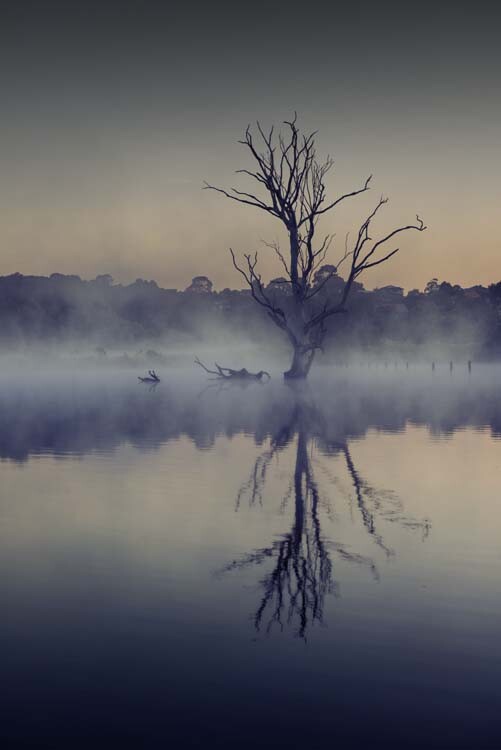
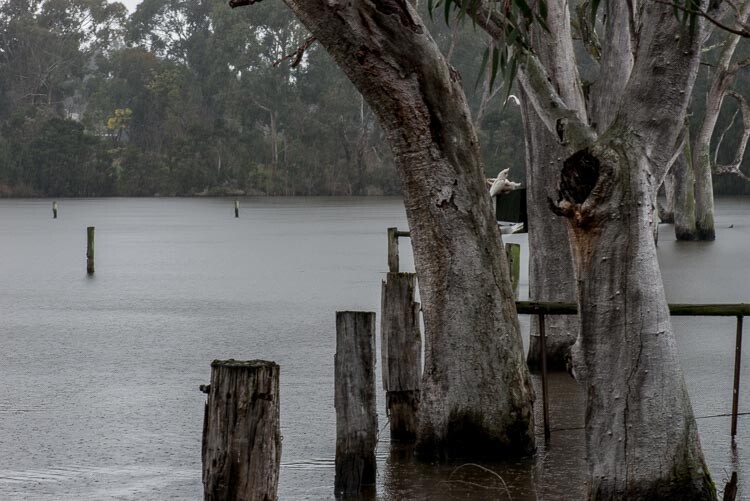
Autumn brings low mist over the water in Banyule Flats.

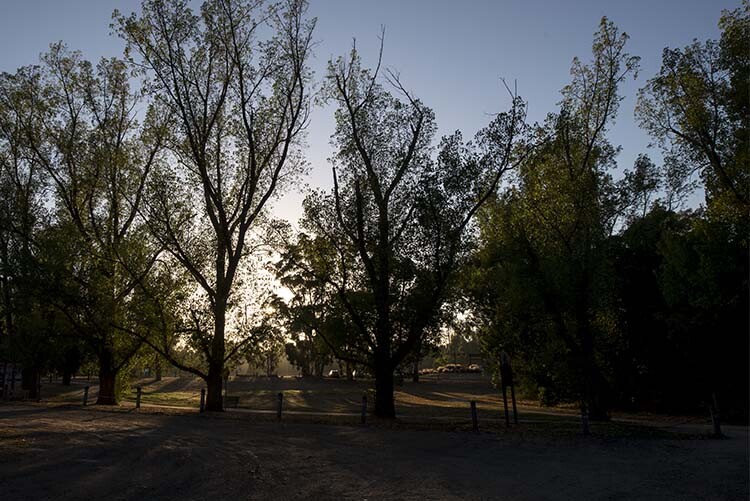
The most obvious thing about autumn is the changing of the leaves. In some parts of the world, this happens a lot more and nearly all trees lose their leaves. In Australia it doesn’t happen as much, and many of the native trees are evergreen which retain their leaves year round. Having said that, there are also many introduced species that do have color changing leaves, and in some towns and areas in the country you can find trees that have those beautiful, golden colors often associated with autumn.

The changing of the leaves isn’t the only thing to look for. On billabongs, swamps and dams, you will often find low level mist creating wonderful moods. If you go out early in the morning, and wait for the sun to rise, you can get some great effects from the sun rays as they hit the water.

In those types of locations, sunrises are more interesting and sometimes there is a golden light associated with that time of morning, that you can only see at that time of year. The golden hour that is normally associated with sunsets is there to give your landscape that rich color. It isn’t too cold in the mornings, but the weather is changing as winter approaches.

cole-landscape-photography-seasons-0009

Autumn’s early morning golden glow through some trees.

Before you go to bed at night, check what the forecast will be the following day. What you are looking for is the weather to get worse, such as rain in the forecast. In the morning before the sunrise take a look outside at the sky. If the sky is clear and there are no clouds, you won’t get that beautiful color that only happens when the sun reflects off clouds. If the sky is very grey, go back to bed, the change has already happened.

Winter

cole-landscape-photography-seasons-0012

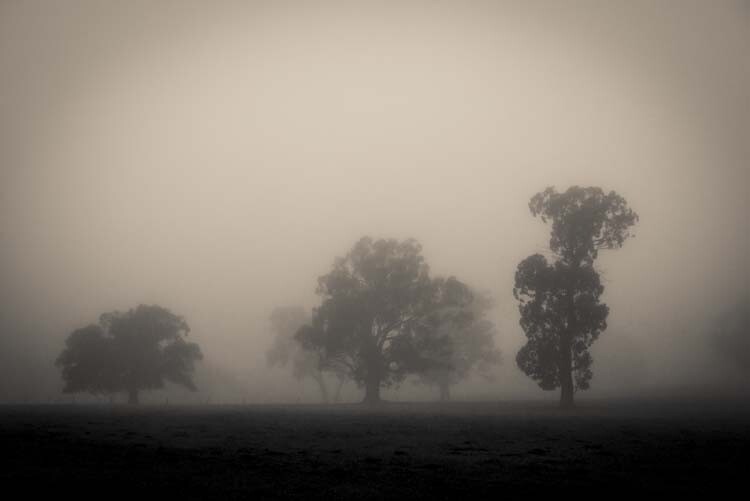
Thick fog in the countryside, in the middle of winter.

In winter the sun doesn’t get as high in the sky, so you can get long shadows all day. The shadows are softer and have a moist feel to them, especially in the morning when there is dew all over the ground. You can take photos at any time of the day, it is the best time of the year to photograph.

Frosts and fogs can give the landscape a completely different look, and heading out on a foggy morning can be well worth it. It is cold, but the images will make you glad you went. If you know it is going to be foggy or frosty in the morning you need to just head out, as you may not get many mornings with either of those conditions. If you stay out long enough you might also be rewarded with an amazing sunny afternoon.

Stormy skies and rain can give another dimension to your images. Large storm clouds or grey skies can give a landscape a completely different look compared to those with blue skies. Look for cloudy skies, and breaks in the sun, to give the scene in front of you a great effect.

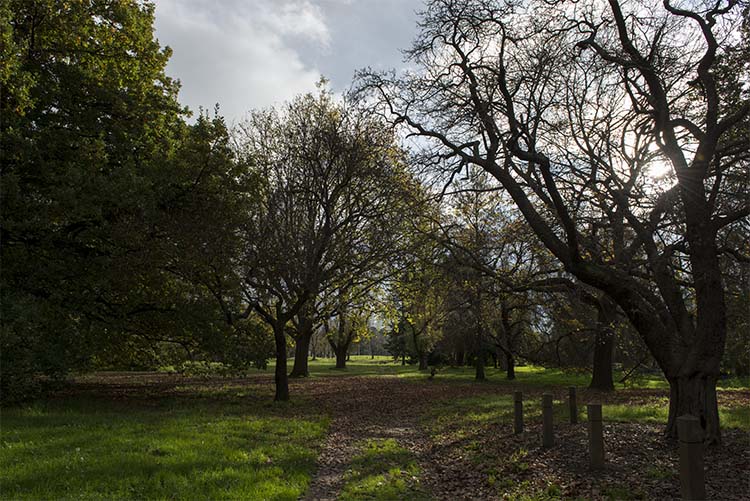
Winter often means bare trees. Once the leaves have been stripped from them, there are branches that can give your images interesting shapes and shadows. If you like photos with lots of mood, it is a perfect time to get that, especially if you get a great fog to go with the bare trees.

cole-landscape-photography-seasons-0010

A typical Australian winter with some bare trees, long shadows and saturated colors.

There is an array of colors that you don’t see at other times of the year. The dew in the early mornings makes everything wet which can bring out the colors and give you wonderful naturally saturated images.

Some of the most beautiful landscapes I have ever seen were taken when there is a blanket of snow. Unfortunately, in most places here, it never snows. If you live somewhere where that it does, use it. Brave the cold and just get out there and make the most of it.

Spring

cole-landscape-photography-seasons-0014

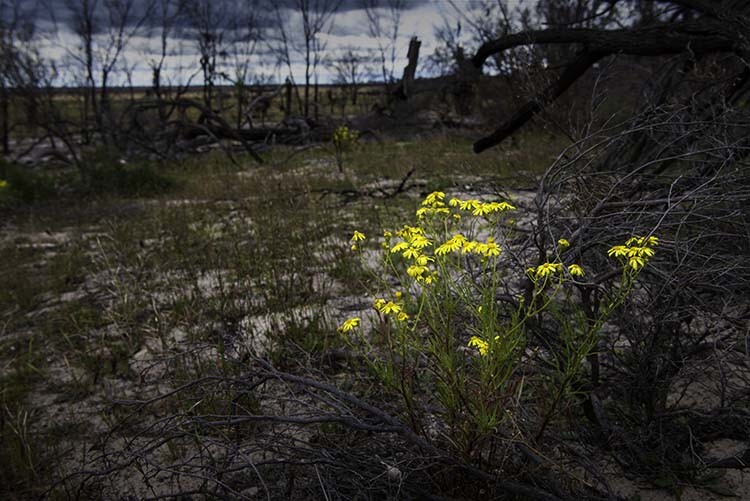
Wildflowers add some color during spring.

The most obvious aspect of spring is flowers. It might be flowers in the garden, or wildflowers growing in their natural environment. Having them blooming in the landscape leaves no doubt that it is spring.

It is beginning to warm up as summer approaches, and, while the weather is getting better, there is also going to be lots of rain and more stormy skies, as spring is often the wettest time of the year. You could try taking photos of your landscapes in the rain, it will give them a different look.

cole-landscape-photography-seasons-0015

A spring rain on Banyule Flats.

Spring is also the time that many baby animals are born, so you can see new life everywhere you look.

Waterfalls, creeks, and rivers run faster, and have more water in them as the snow melts. Go to your favorite waterfall and see how the extra water adds more volume. You will get images that are quite different than you would if you photograph there at the end, or the height, of summer.

Summer

cole-landscape-photography-seasons-0008

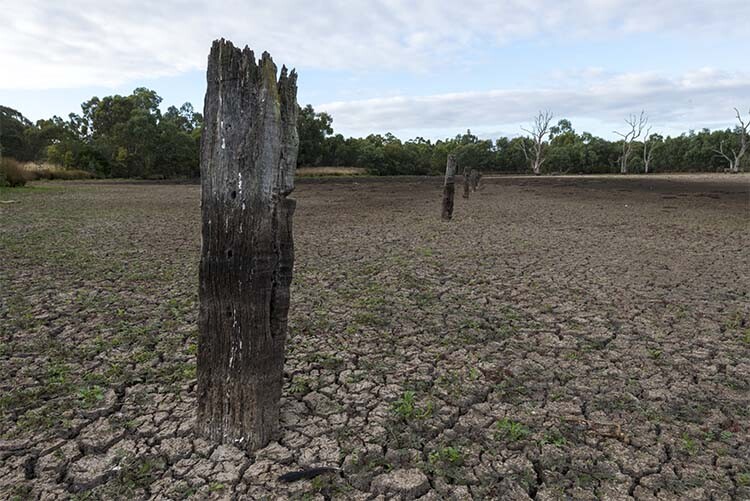
Summer often dries out the swamp in Banyule Flats

This can be the harshest season in Australia. It is dry and hot. Most of the grasses in the landscape die off, leaving brown grass everywhere. There is an absence of color and the landscape is very different to what you find in the winter. The hot sun will also leach out all the color in what you see. A beautiful landscape that you get at other times of the year, will look desaturated.

The light is harsh and hard. The sun is higher in the sky and the shadows are shorter. Going out to get nice pictures in the middle of the day is too hard, and often too hot – though it shouldn’t stop you from trying. See what you can get and if you can show that heat in the images. If you have extreme days where the temperature is above 100°F (37.8°C) then it won’t matter when you go, it will be horrible.

cole-landscape-photography-seasons-0013

On a very hot summer day in the early evening, the sun is still very strong, and the shadows still harsh.

On a positive note, if you know the next day is going to be a scorcher, check for clouds and head out to a great landscape photography location, as you can be fairly certain that you will get the most magnificent sunset. You need clouds to get a great one and the more the better, but you don’t want overcast or you won’t see the setting sun. Don’t forget to hang around for an hour afterwards to get the best of it. Summer is the best time for amazing sunsets, and over water means you get double.

In Australia it is very hot at that time of the year, but usually after a few days of intense heat it gets broken by a big thunder storm. You can head out, somewhere where you will be protected, and take some photos of the lightning and thunder clouds as they approach.

Using the seasons for your photography

Think of your favorite places that are nearby, places you can get to easily. What are they like at different times of the year? How can you show those differences? It might your photography a new focus, give it a try. I’ve been doing it for the last couple of years and it’s amazing how you can get very different images from the same location.

If you have an area that you love photographing but feel as though you have exhausted it, consider documenting the change throughout the seasons with your camera.


Here on dPS this is landscape week – here is list of what we’ve covered so far. Watch for a new article (or two) on landscape photography daily for the next few days.

  • 6 Tips for Better Low-Light Landscape Photography
  • Landscape Photography and the Human Element
  • 5 Ways a Telephoto Lens Can Improve Your Landscape Photography
  • Landscape Photography from the Side of the Road
  • 32 Majestic Landscape Photos to Inspire Your Wanderlust
  • Weekly Photography Challenge – Landscape

googletag.cmd.push(function() {
tablet_slots.push( googletag.defineSlot( “/1005424/_dPSv4_tab-all-article-bottom_(300×250)”, [300, 250], “pb-ad-78623” ).addService( googletag.pubads() ) ); } );

googletag.cmd.push(function() {
mobile_slots.push( googletag.defineSlot( “/1005424/_dPSv4_mob-all-article-bottom_(300×250)”, [300, 250], “pb-ad-78158” ).addService( googletag.pubads() ) ); } );

The post Landscape Photography – Shooting the Same Location Through the Seasons by Leanne Cole appeared first on Digital Photography School.

Digital Photography School

 
Comments Off on Landscape Photography – Shooting the Same Location Through the Seasons

Posted in Photography


Serious zoom: Sony Cyber-shot RX10 II shooting experience

26 Aug

We’ve been toting around the Sony RX10 II for a little while now, testing its ability to capture 4K video, high speed stills and super slow motion video clips. And while a superzoom may not be DPReview writer Dan Bracaglia’s first choice for his favored rock-and-roll and street subjects, he ultimately came around to the impressive capabilities of this camera. Read more

Articles: Digital Photography Review (dpreview.com)

 
Comments Off on Serious zoom: Sony Cyber-shot RX10 II shooting experience

Posted in Uncategorized


One One-Thousandth of a Second: Shooting Sports and Fast Action

05 Aug

Whether you’re a sports fan or not, if you’re a photographer, you’ll probably find yourself taking photos of some fast-paced competitive action at some point. If you’re used to shooting in a nice, controlled environment, like a studio, or if you’re used to street photography, where your subjects are probably walking at a normal, relatively slow pace, shooting a sporting Continue Reading

The post One One-Thousandth of a Second: Shooting Sports and Fast Action appeared first on Photodoto.


Photodoto

 
Comments Off on One One-Thousandth of a Second: Shooting Sports and Fast Action

Posted in Photography