RSS
 

Posts Tagged ‘Shooting’

Shooting With Your Creative Team & Post Production

18 Jul

Make It happen & Post-Production


Hi FashionPhotographyBlog.com readers,

Last time we talked about how to communicate with your creative team clearly using mood boards, today we are talking about how to make the process of shooting with your team and taking the shots into post-production run smoothly. So here we go…


Once everyone on the creative team and everything for the shoot is confirmed, I’ll reach out to agencies and find a girl that suits the idea. This isn’t always the case. Oftentimes you’ll see a model and be inspired by their look. 


Be sure to send out a call sheet the day before your shoot. This serves as a reminder for everyone as to the time and location of the shoot as well as provides everyone with the contact information for all involved. This is a standard protocol on any professional shoot.


fashion-photoshoot-run-sheet-example

 Then… Shoot! If you keep everything organized and set yourself a bit of a time table to stick to, you’ll be on track for a successful shoot. For “Surrealia,” we managed to shoot two models with several looks in just a few hours.


Remember, make it fun! If everyone is enjoying what they’re doing, it will show. Put on some music – ask the model what their favorite band is or put on something that sets the mood to help convey the feeling in the images.


Post-Production


I know, this is the least fun part of any shoot. The edit. Jocelyne and I decided to pick our final images together and made sure our selects portrayed the model and clothing nicely.


As with any good retouch.. It took forever. Well worth it though! After retouching the images and converting to black and white, it was time to send them off to Matt for illustration.


The process I went through with Matt is basically the same as the process you go through when sending images off to a retoucher:


1) Send over the images and let them do their thing (of course, with a general sense of guidance from you.)

2) You’ll receive a “first round” which you can mark up anything you dislike or don’t see fit and send it back for revisions.

3) Repeat the process of markups and revisions until the image is complete. Don’t forget to be conscious of budget when working with a retoucher.


Working with Matt was fantastic. There was bright color, organic shape, line; all the elements we had like in the editorials we found when doing our research. Except they suited us! Matt did an excellent job of taking those elements we liked and translating them to suit his vision and compliment my photographs.


The result? A batch of images I’m proud to have my name on and remain some of my favorites to this day.


The best thing you can do when planning a shoot is be meticulous. Leave no leaf unturned. Be sure to think of every detail and put your stamp on it. The same type of work goes into planning a test, however you don’t need as extensive a concept. It can be as simple as just shooting a portrait.


Hope you liked my posts about finding, planning and working with a creative team. As always, if you have any questions, feel free to leave a comment below or shoot me an email.


Until next time.. See ya!

Alana


IMAGE SOURCE:

Feature image: Ophelia by Gregory Crewdson

Image 1: courtesy of Alana Tyler Slutsky


Fashion Photography Blog

 
Comments Off on Shooting With Your Creative Team & Post Production

Posted in Uncategorized


3 Rookie Mistakes to Avoid When Shooting on a White Background

05 Jul

Because the ubiquitous white background portrait is so commonplace, many people think it’s easy to achieve. Simply put your subject in front of the camera against a white background, preferably with a flash or strobe, and take the picture.

how-to-shoot-white-seamless-tutorial

Unfortunately it’s not as simple as that. Doing just that would result in a photo with either a gray, dull, muddy toned background. The best possible result would be an off-white background after you have done some edits. That’s not the only issue though, you’d be dismayed to see unwanted shadows everywhere too.

I have replicated the setup with my little model Sven – Kristoff’s beloved reindeer in the movie Frozen. It is easier doing this on small scale subject as the lights are oversized in comparison. With people, to do this to scale, you need to have massive size octoboxes and flags. But this tutorial will show you the process clearly.

Here are 3 rookie mistakes to avoid when trying to achieve a 100% pure white background:

Mistake #1 The background is not lit properly

The background must be lit with approximately two stops more light, than the amount of falling on the subject. For example, if you want to photograph your subject at f/8, set your background lights to two stops brighter, so the meter would read f/16 on the background.

Note: You need to meter both background lights separately, so that when metering for the main light (on the subject) you would turn the background lights off, and vice versa. When both the background and main lights are on, your meter should still give you f/8 on the subject, because you are metering the light that falls on your subject and not on the background.

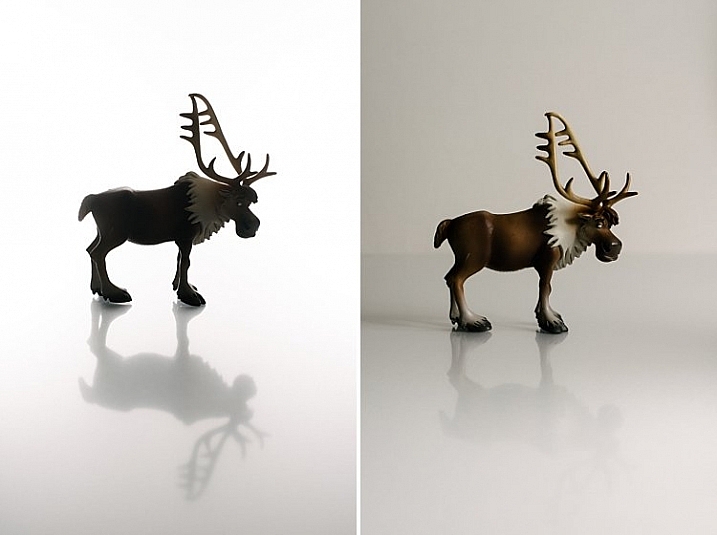
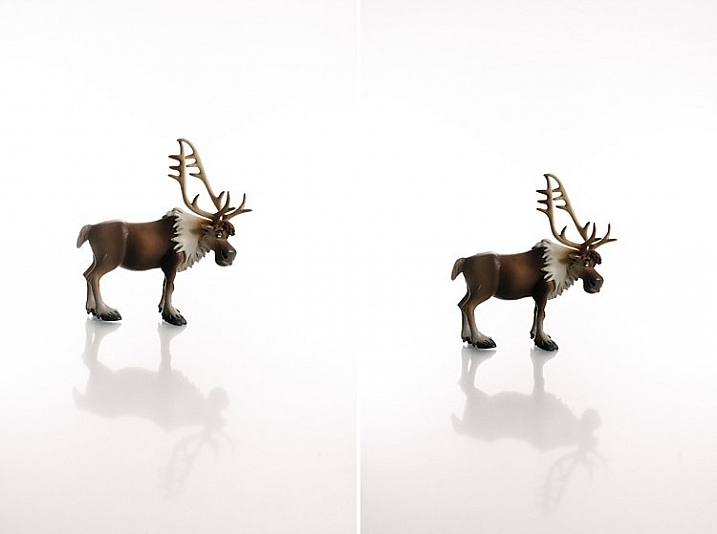
The photo below (right) shows what it looks like when you don’t light the background at all. You get a tone and color other than the intended white. In the photo on the left the background was lit, but there was no main light illuminating the subject; thus the resulting image is almost a silhouette of the subject.

how-to-shoot-white-seamless-tutorial

My camera settings for all the shots in this setup were: ISO 250, 1/160th of a second, shot at f/8 for Sven, (the background read f/16). The speedlights were set to 1/16th power. I rarely use them at full power because the batteries run out very quickly that way. If you are using the SB900 Nikon, firing at 1/1 power, not only does it drain the batteries very quickly, but also makes the flash overheat. Nikon has solved this problem with the SB910. These are some reasons why I did not shoot this at ISO 100. The camera used was a Nikon D750, which handles noise superbly, so that ISO is not an issue. Two SB910s and one SB900 were used for this setup.

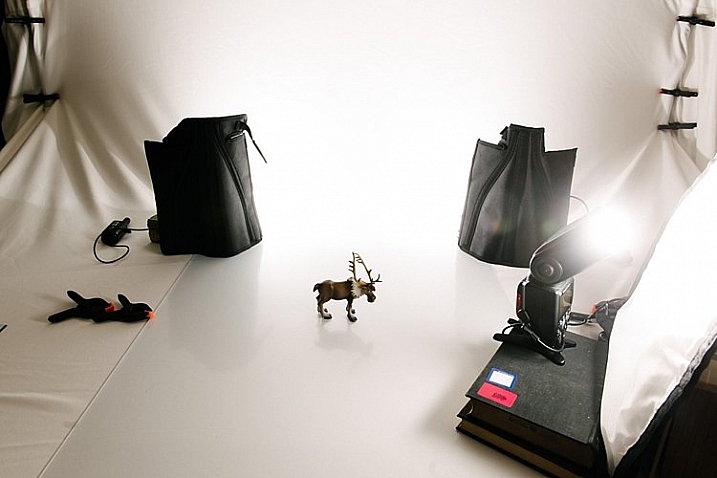
The photo below shows a pull back of the setup with only the left background light firing.

how-to-shoot-white-seamless-tutorial

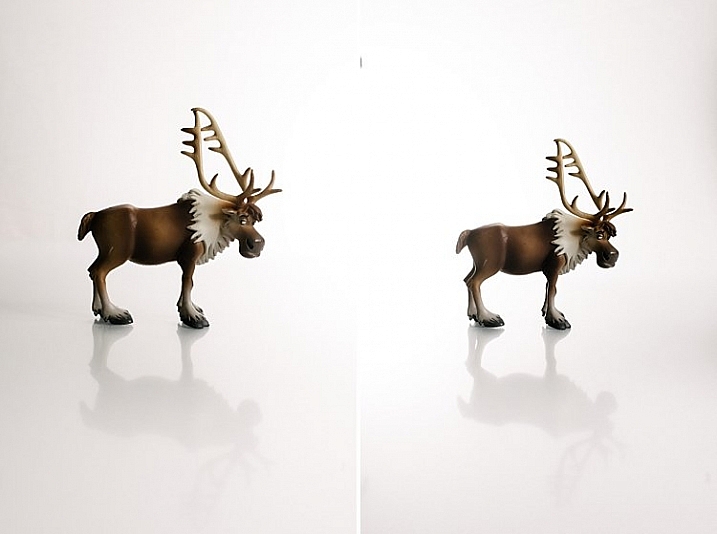
You will notice in the two images below that only the right background light fired on the left photo, and only the left background light fired on the right photo. This lighting is acceptable of course if that were your intention. The main light was positioned at a 45 degree angle on camera right. I wanted to bounce my flash onto the white rogue bender to modify it.

how-to-shoot-white-seamless-tutorial

You may also notice that on the left photo (above) there is a pleasing shadow of Sven behind him on the background – because the left background light didn’t fire. Where the background light did fire on the left, this shadow was eliminated (right photo above).

Below is the setup with all three lights firing correctly.

how-to-shoot-white-seamless-tutorial

Now that you have your background and main lights set up, you need to make sure these lights only hit the intended subject. This leads us to the next rookie mistake… separation.

Mistake #2 Not enough subject background separation

Because the background lights are so much brighter, you need to separate them from the main subject. There are two key ways of doing this:

  1. Flagging
  2. Distance

Flagging

You can use anything block to flag your lights; the black side of a reflector, black cardboard sheets, black foam core. Black does not let light in, instead it absorbs light rather than bounces it. It also blocks light from seeping through to places where you do not want it. If you don’t flag (block) your background lights, your subject will get a halo effect and look very backlit.

Distance

Once you have flagged your lights, you need to distance your subject far enough away the background (and background light) so that any spills won’t touch your subject. This depends on your personal preference and intention of course – you may want some spill on your subject for a certain look or effect, or you may not.

If you do want some spill on your subject, make sure to run a few tests with various lenses, as chromatic aberration tends to occur around the edges due to the abundance of light. Some lenses are prone to chromatic aberration irrespective of aperture, while others can handle it very well even at wide apertures, where it is most commonly observed. Also, be careful with the amount of spill you allow so as not to chop off parts of your subject from the spill overexposure.

how-to-shoot-white-seamless-tutorial

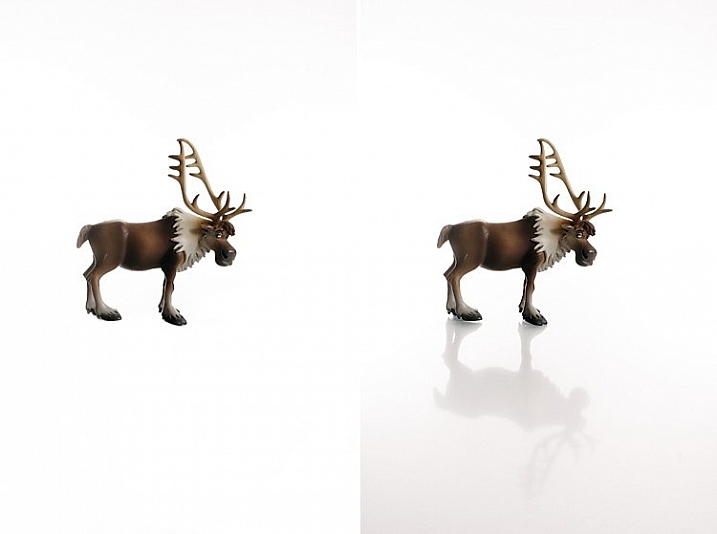
The photos above show a properly lit Sven. The two background lights firing at f/16 and the main light firing at f/8. There are no unwanted shadows on the background, as was my intention. However, I wanted to have a reflection and shadow in the foreground. This leads nicely to the third rookie mistake to avoid…a floating subject.

Mistake #3 The subject is floating

If you do not include some floor shadows, your subjects will look like they are floating on white air, or cut out and pasted on a white sheet of paper.

The best tip for avoiding floating subjects is to use a reflective surface like translucent white plexiglass, or white tile sheet, as a base for your subject to stand on. You can adjust the opacity of this reflection in Photoshop during post-processing, but having the reflection shows that your subject is planted firmly on solid ground.

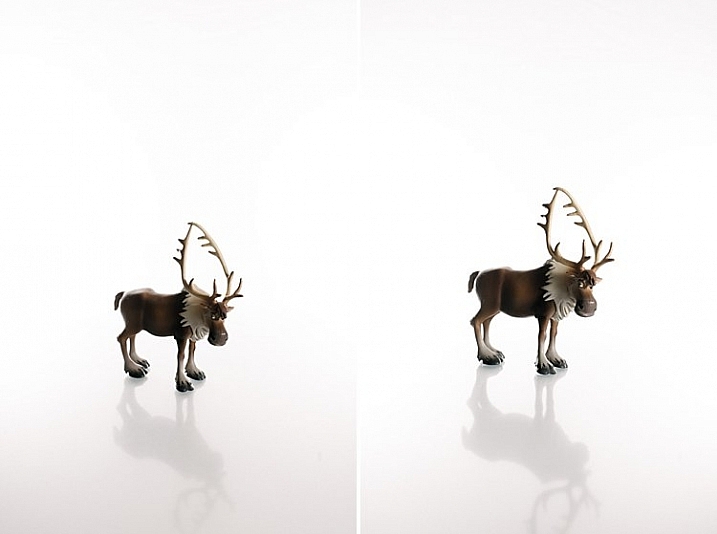
how-to-shoot-white-seamless-tutorial

The left image shows Sven floating, and on the right you see the reflection showing Sven standing on solid ground. The latter looks more pleasing and natural, and not like a cut-and-paste job.

Bonus Mistake #4 Overexposed background

Be careful not to add too much light to the background. If you go past pure white and really overexpose it, the white will start almost glowing around the subject just like if you had sun flare outdoors. It lowers contrast and your subject looks like that have a bit of a halo, as you can see in the images below.

white-seamless-overexposed-background_0000

For more tips on a white or high key background see: 4 Tips for a Perfect White Background in High Key Photography

Conclusion

I hope this little tutorial has shed some light on basic techniques for shooting a white background, where you want the background to be 100% white, and that it has dispelled any mystery over how to achieve this look. If you have other more advanced techniques, do share them here!

googletag.cmd.push(function() {
tablet_slots.push( googletag.defineSlot( “/1005424/_dPSv4_tab-all-article-bottom_(300×250)”, [300, 250], “pb-ad-78623” ).addService( googletag.pubads() ) ); } );

googletag.cmd.push(function() {
mobile_slots.push( googletag.defineSlot( “/1005424/_dPSv4_mob-all-article-bottom_(300×250)”, [300, 250], “pb-ad-78158” ).addService( googletag.pubads() ) ); } );

The post 3 Rookie Mistakes to Avoid When Shooting on a White Background by Lily Sawyer appeared first on Digital Photography School.


Digital Photography School

 
Comments Off on 3 Rookie Mistakes to Avoid When Shooting on a White Background

Posted in Photography


Mosh Pits and Sunsets: Shooting with the Panasonic GX85

07 Jun

Panasonic Lumix DMC-GX85 Real World Experience 

An evening of challenge light, both in terms of temperature and brightness, couldn’t stop the Panasonic GX85. Edited to taste in ACR. ISO 3200, 1/500 sec at F2.8. Shot at 50mm (equiv. ) using the Panasonic Lumix G 25mm F1.7 lens.SO 3200

I’ve been working on our forthcoming review of the Panasonic Lumix DMC-GX85 for two weeks now and as I put the finishing touches on the technical portion of the write-up, I wanted to share some highlights of my shooting experience with the camera, specially in two very different shooting environments.

While I’ve been using the GX85 to shoot street photos and portraits of friends, this past Saturday I brought it along to a music festival in Seattle’s industrial SoDo neighborhood called Big BLDG Bash. I shoot a lot of live music for my blog, mostly with a Nikon D750, 50mm F1.8, 20mm F1.8 and flash. But after using the GX85 for a couple of weeks, I felt relatively confident in the Panasonic’s ability to keep up.

The GX85 handled challenging AF scenarios all night long. Out of camera JPEG.  ISO 6400, 1/500 sec at F4.5. Shot at 50mm (equiv. ) using the Lumix G Panasonic 25mm F1.7 lens. 

Seven stages, both indoor and outdoor, gave me a chance to test out the GX85’s autofocus and overall performance in a variety of scenarios. And the non-stop music meant that this would be a good test of the battery life, too. 

Of course after a night of rocking out I figured the GX85 needed some peace and quiet, so I also brought it shooting around one of my favorite places in Seattle: Golden Gardens, a beach along the city’s Northwest coast. There I put the GX85’s articulating touchscreen and near-silent electronic shutter to good use as I photographed both strangers and other wildlife enjoying the beautiful day and later, the sunset.

I love articulating LCDs, especially ones with touch interfaces. The GX85 makes it so simple to get creative with your framing. Edited to taste in ACR. ISO 640, 1/640 sec at F2.8. Shot at 48mm (equiv. ) using the Panasonic Lumix G X Vario 12-35mm F2.8. 

Rock and roll

But let’s start with some rock and roll. I arrived at the venue around 9:00pm, with plans to shoot as many acts as possible, using mostly available light, until everything wrapped up around 2am. 

Since starting work on the GX85, I’ve found myself very attached to the Panasonic Lumix G 25mm F1.7. Maybe because it reminds me so much of using my own Nikon 50mm F1.8. Both are lightweight, affordable lenses that offer excellent results. I also brought along the Lumix G Vario 7-14mm F4 lens. 

Panasonic’s Depth from Defocus technology is really impressive. Having already run the GX85 through our AF test (more on that in the forthcoming review) I knew it was more than capable of maintaining focus on a moving subject while shooting at 6 fps. But that testing had been done in bright daylight, and I was eager to see if those results would hold up in low light.

Great Spiders is one of Seattle’s best rock and roll bands. This image in particular was shot one-handed as a cold one graced my other hand during the set — a crucial part of real world testing. Edited to taste in ACR. ISO 6400, 1/320 sec at F1.8. Shot at 50mm (equiv. ) using the Panasonic Lumix G 25mm F1.7 lens.

Looking back through my images shot in continuous drive at 6 fps I am impressed. The hit rate isn’t quite what I enjoy with my full frame DSLR (nor did I expect it to be), but it’s still very high.

The majority of the show was shot using a single point in continuous AF mode. One of my absolute favorite features is touch-pad AF. With one’s eye to the finder, simply touch the screen with your thumb to drag your AF point around. The GX85 is remarkably responsive in this regard; and shooting with touch-pad AF is ridiculously simple. 

I did also try using both face detect and subject tracking, two AF modes I’ve had success using in good light, but had poor results in this environment, which is not all that surprising given the challenging shooting conditions.

Edited to taste in ACR. ISO 6400, 1/500 sec at F4.5. Shot at 14mm (equiv. ) using the Panasonic Lumix G Vario 7-14mm F4 lens.

Overall, I was very happy with the GX85’s performance at Big BLDG Bash. Sure I got some funny looks from dual-DSLR-toting hot-shots, but after field testing cameras like the Sigma Quattro, I’m use to that. One of the best feature of the GX85 is how light it is, especially with lenses like the 25 F1.7, 7-14 F4 and even the 12-35mm F2.8. All of those, with the exception of the 25mm are image stabilized lenses, meaning they can take advantage of the GX85’s Dual I.S. system which combines sensor and lens based image stabilization.

Of course, IS doesn’t do a whole lot for me if I’m shooting stills of bands thrashing around stage, but for hand-held video, it is a true blessing.

Shot at ISO 6400 1/50 sec F4 in 4k/24p. Shot at 50mm (equiv.) using the Panasonic Lumix G 25mm F1.7 lens.

Though my experience with the GX85 at Big BLDG Bash was largely positive, I did have some frustrations: Many times I found myself attempting to flip the camera on in a hurry in an effort to capture a fleeting moment of rock and roll glory, only to accidentally switch the camera to video mode and initiate video capture.

This unfortunate occurrence is due to the illogical placement of the mode dial in relation to the on/off switch. The mode dial sits directly above the on/off switch, and because Manual Video mode is directly to the left of Manual mode on the mode dial, it’s easy to bump the dial to this position while turning the camera on in a hurry. 

Also, Panasonic is one of the few companies that does not offer a minimum shutter speed setting in Auto ISO, something that would have been hugely helpful for me shooting fast subjects in low light.

Donormaal performing at the Hangar 1 stage. Edited to taste in ACR. ISO 6400, 1/400 sec at F1.7. Shot at 50mm (equiv. ) using the Panasonic Lumix G 25mm F1.7 lens.

By 11pm my first battery died. By 1am my second battery died. Around 1000 images and 20 videos into the show and the GX85 was dead. Good thing I packed my Nikon just in case!

Beach day

The next day I made my way out to Golden Gardens which is about a 10 mile bike ride from my apartment. A backpack packed to the brim with picnic supplies left little room for camera gear, fortunately the GX85 with 12-35mm F2.8 was just small enough to make the cut. 

Once I got to Golden Gardens and started shooting, one of the GX85’s biggest pitfalls became more apparent, specifically, in regard to its field sequential 16:9 electronic viewfinder. While in low light, color tearing and the rather small image view (due to displaying a 3:4 image in a 16:9 aspect ratio) is less noticeable, it is VERY noticeable in bright light. For these reasons I stuck to shooting using the LCD only while at Golden Gardens. This of course put me in flare’s way, fortunately the GX85 can be operated with one hand, freeing your other hand to shade the sun’s rays from the LCD. 

I don’t shoot birds in flight, I prefer birds at rest. Out of camera JPEG shot in the Scenery JPEG style . ISO 200, 1/1600 sec at F3.5.  Shot at 70mm (equiv. ) using the Panasonic Lumix G X Vario 12-35mm F2.8 lens.

In fact, I spent the majority of the day using the touchscreen with the camera set to it electronic shutter mode. This allowed to discreetly take images, whether of folks walking through the frame, or waterfowl. Speaking of the E-shutter, I am happy to report that at no time was I forced to use it to avoid shutter shock. The GX85 features a newly designed shutter that appears immune from the issues we’ve experienced with previous M43 cameras.

The scenic views also gave me a chance to try out some of the GX85’s JPEG picture styles. The above scene was taken using using the ‘Scenery’ style, while the below was taken using the new ‘L.monochrome’ style. 

Out of camera JPEG shot in the L.monochrome style. ISO 200 at 1/320, F9. Shot at 70mm (equiv. ) using the Panasonic Lumix G X Vario 12-35mm F2.8 lens. 

The GX85 offers four customizable buttons, one of which I assigned to ‘Photo Style,’ for easy access. The new L.moncohrome picture style is pretty cool in certain shooting scenarios . And it’s nice to see Panasonic jumping into the fun of releasing a moody analog b/w mode. I really hope this trend of trying to capture specific film ‘looks’ in JPEG profiles continues. I much prefer it to the trend of tacky creative filters.

Back to custom buttons, I left the Quick menu assigned to its default and assigned another button to toggle the touchscreen on/off. I set the final button to ‘Focus area set,’ so that I could still move my AF point while using the LCD with the touchscreen off.  

While I mostly shot using the touch functionality, I occasionally found that when shooting vertically, my nose would move the AF point. Which is both hilarious and frustrating.

The Takeaway

The GX85 is an excellent choice for street photographers, though I wish it was weather-sealed. Out of camera JPEG. ISO 200, 1/80 sec at F2.8 Shot at 52mm using the Panasonic Lumix G X Vario 12-35mm F2.8 lens. 

The GX85 is arguably Panasonic’s most compelling camera to date. Sure, it doesn’t use the new 20MP Four Thirds chip from the GX8, but it makes good use of its 16MP sensor by removing the AA filter for better detail retention. Moreover, its new shutter mechanism means that shutter shock is a non-issue. And its 5-axis in camera IS makes it the steadiest Panasonic M43 camera to date, not to mention its offers outstanding 4K video. But most importantly, its a really fun and practical camera to shoot with, regardless of whether you’re shooting a concert in the dark, or a lazy day at the beach. 

Now, should someone buy this over (say) a Sony a6000? Before I answer that, let me make it clear that the reason I compare the GX85 to the a6000 is because despite its age, the latter is probably the camera I end up recommending most to friends and family, due to its excellent all-round performance and price point. 

Another low angle shot brought to you thanks to the GX85’s articulating touchscreen. And yes, the seaweed was very smelly. Thankfully, I did not have to lay in it.  Out of camera JPEG. ISO 200, 1/500 sec at F14. Shot at 52mm (equiv.) using the Panasonic Lumix G X Vario 12-35mm F2.8 lens. 

In short, reasons to purchase the GX85 over an a6000: Better/more affordable lens selection, excellent sensor-based IS (plus Dual I.S.), an outstanding touchscreen with class-leading interface and excellent 4K video. On the other hand, with the Sony, you get a better EVF, better overall image quality and a hybrid AF system. Though the GX85 handles itself quite well in the last two regards.  

At the end of the day, the GX85 is a great camera, with a couple of things, like its EVF and fumbly controls holding it back. But as a complete package, it has a lot going for it. Enough so that I would not hesitate to recommend it to anyone looking for a lightweight, capable interchangeable lens camera.

Out of camera JPEG. ISO 200, 1/400 sec at F5. Shot at 70mm (equiv.) using thePanasonic Lumix G X Vario 12-35mm F2.8 lens.

$ (document).ready(function() { SampleGalleryGridV2({“galleryId”:”5699693136″,”isMobile”:false}) })

Panasonic Lumix DMC-GX85 Real World Samples

65 images • Posted on May 26, 2016 • View album
Sample photoSample photoSample photoSample photoSample photoSample photoSample photoSample photoSample photoSample photoSample photoSample photoSample photoSample photoSample photoSample photoSample photoSample photoSample photoSample photoSample photoSample photoSample photoSample photoSample photoSample photoSample photoSample photoSample photoSample photoSample photoSample photoSample photoSample photoSample photoSample photoSample photoSample photoSample photoSample photoSample photoSample photoSample photoSample photoSample photoSample photoSample photoSample photoSample photo

Articles: Digital Photography Review (dpreview.com)

 
Comments Off on Mosh Pits and Sunsets: Shooting with the Panasonic GX85

Posted in Uncategorized


To St. Helens and Back: Olympus TG-Tracker Shooting Experience

30 May

Olympus has been in the rugged camera business for a very long time, with its first model, the Stylus 720SW, released way back in 2006. Ten years later the company has made the leap to action cams. 

The TG-Tracker is a camcorder-shaped device that can capture 4K/30p and 1080/60p video as well as timelapses. The F2 lens has a whopping 204° field-of-view ‘on land’ and 94 degrees when you take it diving with its included underwater lens protector. It features a 7.2MP, 1/2.3″ BSI CMOS sensor paired with the company’s latest TruePic VII processor. (If 7.2 Megapixels sounds a bit low for 4K, you’re right – the camera has to interpolate in order to produce 4K as well as 8MP stills.)

The TG-Tracker captures every data point you could possibly want from an action cam.

Design-wise, there are two things that stand out. First is the camera’s flip-out (but non-articulating) 1.5″ LCD, which is mainly used for menu navigation. Second is what Olympus calls a built-in ‘headlight,’ capable of projecting up to 60 lumens of light.

What really makes the TG-Tracker unique, as its name implies, is tracking. It records location, altitude or water depth, temperature, orientation, and acceleration. All of this data is shown on graphs in the app, allowing you to see the pictures you took at a certain altitude or in a specific area of the map.

There are two other neat tricks the camera can do thanks to all these sensors. First, if the accelerometer detects a sudden change in equilibrium, it will put a chapter marker in your videos. Also, the TG-Tracker can detect when the camera goes underwater and switch the switch to the appropriate white balance setting.

All of this metadata is viewable in the Olympus Image Track app, which is where you can preview your photos and videos and then transfer them to your mobile device (save for 4K video)

To see how the TG-Tracker functions in the real world, we sent it to Mount St. Helens, an 8363 foot-tall stratovolcano most famous for its major eruption in 1980. But before we get into that, let’s take a look at the design and what it’s like to use this action camera.

Articles: Digital Photography Review (dpreview.com)

 
Comments Off on To St. Helens and Back: Olympus TG-Tracker Shooting Experience

Posted in Uncategorized


Fast machines: Shooting motocross with the Nikon D5 and Canon 1D X II

18 May

Introduction

Big cameras. Big performance.

The Nikon D5 and Canon EOS-1D X Mark II are purpose-built machines. Firing at 12 and 14 frames per second respectively, they are designed for speed and durability to help you make sure you get the shot no matter what conditions you find yourself in. Conditions like those at the Evergreen Speedway in Monroe, Washington recently, where DPR staffers Dan Bracaglia and Carey Rose went to get some preliminary findings on the cameras’ AF systems.

Bear in mind we’re camera reviewers, and not pro sports photographers – we’re actively working to get the Nikon and Canon cameras into the hands of working pros to get some real-world opinions on them. But for now, we thought there was some value in sending Dan out to get some early findings from the 1D X Mark II, which had arrived only recently into our offices, and Carey out with the D5, the review of which is fully under way. Since these cameras are likely to be shot alongside each other at many a major sporting event, we figured we’d try our best to do the same and compare our results.

The Nikon D5

by Carey Rose

Flyin’ high. Photographed in Auto Area AF. Nikon 24-70 F2.8E VR @ 38mm | F11 | 1/250 sec | ISO 100

For someone as interested in motorcycles as I am, it’s almost embarrassing to admit that this was my first time watching motocross in person, much less photographing it. And even though we were shooting a Sunday ‘practice’ session, it proved a good test for Nikon’s flagship sports shooting machine. As riders brapped and blipped their engines, rocketing around the track at over 40 mph, I snapped and clacked the D5 away at 12 fps nearly the whole time. You just don’t realize how nice all those frames per second are until you really – truly – need them.

But before we get to the burst rate and the photos, let’s dig into the D5’s autofocus system a bit. The continuous autofocus modes I chose to try out were 3D Tracking, single-point, Group Area AF and Auto Area AF. Here’s what all those modes mean, how they behave and some common use cases.

  • 3D Tracking utilizes the D5’s phase-detection autofocus module for distance information and combines that with color readings from the RGB metering sensor to effectively track subjects around the frame with a single point. Put another way, place your chosen AF point over your subject, initiate autofocus, and the point should stick to that subject whether you or your subject move. Frankly, it’s worked so well in my experience that I default to this mode almost all the time for general shooting.
  • Single-point AF utilizes depth tracking from the phase-detection module to effectively track an object that is moving towards or away from the camera, so long as you keep the point over that subject. Despite how good 3D Tracking performs, it can still sometimes be fooled. If you know your subject’s trajectory and can comfortably follow that subject with the AF point over it, this mode also comes with a high degree of precision.
  • Group Area AF works very similarly to the single-point method, but uses a tight group of 5 AF points instead of one. With a larger ‘zone’ of focus coverage, it should be easier to follow unpredictable subjects in this mode, and it’s commonly used for photographing birds in flight.
  • Auto Area AF works basically by letting the camera take over entirely. Like 3D Tracking, this mode uses the camera’s PDAF module and metering sensor in tandem to intelligently discern what it should be focusing on. It will usually bias to objects closer to the camera, so watch your foregrounds, but it should also intelligently be able to read colors, and in Nikon’s newest models, faces and eyes. This is a good mode for photographing people at events, or if you don’t have time to react and just need to get a photograph, there’s a chance Auto Area AF will get you what you need.

It goes without saying that all of these modes, despite how computationally intensive they may be for the D5, work perfectly well at its full burst rate (not mirror lock-up mode).  And as someone who is used to 5fps bodies, the higher frame rate is something to behold. 

12 fps

After some quick and informal testing, I soon started to take 12 fps for granted. Slowing down the D5 in ‘Continuous Low’ mode to 6 fps to simulate a less sports-oriented body was torturous. Predictably, instead of getting a solid six-to-eight shots of a rider flying past me with wide-ish framing, I’d get maybe two or three. I was often left wanting an additional shot in-between the few that I managed to get, and because of this, I ended up trying to get just a single shot at the right moment and hoping that my timing worked out. It often didn’t. Back to 12 fps mode for me.

A high frame rate gives you more compositional options in situations such as this, where two riders are constantly changing their positions relative to each other. Nikon 70-200 F2.8G VR II @ 200mm | F5.6 | 1/1250 sec | ISO 400

Following and focusing with single-point AF

But of course, 12 fps is useless if you can’t see what you’re shooting. The good news is that the viewfinder blackout is so short on the D5 even at 12 fps that I was able to pan and follow a fast-moving rider at a very close distance with ease. Nikon’s 3D Tracking worked well (more on that later), but because I could see so clearly in ‘real time’, using single-point continuous autofocus and just keeping a point over my subject was a completely viable option when panning and this approach netted a high number of ‘keepers.’ What’s more, the frame coverage of the D5’s autofocus array is so generous that I rarely felt compositionally constrained by picking a single point to keep over my subject.

Of course, for the sake of some variety, sometimes it’s best not to follow the action and just let it pass you by. Nikon 300m F4 PF | F5.6 | 1/500 sec | ISO 100

Group AF

Group AF on the D5 works similarly to single-point, but with the idea that a tight group of points will give you greater precision than just one point alone. The idea is great in principle and it usually worked well, but there were a handful of times where I let a part of the group stray off the rider, and the camera quickly readjusted to focus on the background. Part of this is probably due to to the fact that I had the AF system set up for ‘erratic’ subjects since 3D tracking and single-point worked so well in this mode, but in any case I tended to avoid Group AF for the rest of this shoot. 

Motorcycles in flight. Nikon AF-S 300mm F4 PF | F4 | 1/1600 sec | ISO 100

3D Tracking

One of the most exciting autofocus developments for DSLRs in recent years, Nikon’s 3D Tracking, worked as well as I have come to expect with only a single exception. When at wider focal lengths and attempting to initiate tracking on a rider at a distance, the D5 would usually just not be able to find my subject. The user manual reflects this though, saying that the camera collects color information from focus points surrounding the one you’ve chosen, storing that information and using it to initiate tracking.

So with a distant rider, the D5 was seeing mostly the dirt color, despite the bright colored clothing of my intended subject. In any case, if I let the subject get a little closer, or if I used longer lenses that produce inherently shallower depth-of-field, 3D Tracking proved itself to be pretty magical, constantly re-focusing and re-positioning the autofocus point in the viewfinder even when I was shooting at 12fps.  

Nikon’s 3D Tracking did a great job of tracking this rider with a single AF point pegged to his riding suit. Nikon AF-S 300mm F4 PF | F4 | 1/1000 sec | ISO 100

Auto Area AF

The last mode I experimented with was Auto Area AF, which is usually a mode that I tell people to avoid using. The D5 might just change my mind on that one. The camera was able to find a moving subject and hit it with anywhere from one to nine AF points almost every single time.

1 2 3 4 5

In the above series of (unedited) images, Auto Area actually directed the camera to focus on the background first. But then in the middle of that 12 fps burst, focus snapped to the rider flying through the air in front of me within two frames. I generally prefer a higher degree of control than Auto offers, but I can see this mode being genuinely helpful if you have milliseconds to get a shot and you don’t have time to place an autofocus point manually.

All those buttons

One of the best parts of the new D5 (and its sister model, the D500) is the level of button customization regarding autofocus modes. I am a back-button AF shooter, as I do sometimes like to pre-focus and wait for a subject to enter the frame without having to switch into manual focus. But even with the shutter button decoupled from any autofocus functionality whatsoever, I can assign AF-ON to be 3D Tracking, then assign the FN1 button on the front of the camera (under my ring finger) to switch to single-point continuous autofocus, and then also assign a full press of the AF joystick to switch into Auto Area mode.

So without even shifting my grip, I’ve got three different autofocus modes at my fingertips. This is incredibly handy as I often found myself changing AF modes depending on my lens, my position and the riders’ movement.

Having watched this rider come around this corner a number of times, I wanted to focus on just how much dirt he kicked up as he plowed through the scene. Having de-coupled autofocus and my shutter button, I pre-focused just behind where his rear tire is, shot a burst as he entered and exited the viewfinder with the tight framing I wanted and I didn’t have to worry about the focus shifting or missing (an admittedly minor concern with the D5). Nikon 300mm F4 PF | F4 | 1/2000 sec | ISO 200

So, now that we’ve seen how the Nikon D5 performed, let’s move on to Canon’s EOS-1D X Mark II.

Articles: Digital Photography Review (dpreview.com)

 
Comments Off on Fast machines: Shooting motocross with the Nikon D5 and Canon 1D X II

Posted in Uncategorized


Rice Hill: Shooting in Riisitunturi National Park

15 May

$ (document).ready(function() { SampleGalleryV2({“containerId”:”embeddedSampleGallery_1500727350″,”galleryId”:”1500727350″,”isEmbeddedWidget”:true,”standalone”:false,”selectedImageIndex”:0,”startInCommentsView”:false,”isMobile”:false}) });

Riisitunturi is a national park in the Posio municipality in Finnish Lapland. It is situated in the south of Lapland and sports a sub-Arctic climate, but due to its inland location it can get extremely cold. I spent a few weeks scouting the area in early 2015 and 2016 to prepare for my workshop there, and I have to admit I fell in love with it.

Covering an area of 77 square kilometers, the park is in a mountainous area and lies almost entirely at an altitude of over 300 meters above sea level. It is most known for its twin hills (Riisitunturi means ‘Rice Hill’ in Finnish), home to a forest of spruce trees, the main (winter) photographic attraction in the area. There are also multiple swamps in the park.

‘The one-hour, mildly-strenuous hike to the top
is very rewarding’

In winter, due to heavy precipitation and a very humid climate, the spruce trees are covered in a thick white blanket of frost-snow. When climbing up the trails to the hilltop, the snow gets deeper and the trees shorter and more sparse. And that is exactly the point: while the trees at the bottom are full-sized and usually too big to capture, the hilltop trees are more manageable and beautifully isolated, and retain their white cover even when the lower trees are stripped bare on a windy or warm day. The one-hour, mildly-strenuous hike to the top is very rewarding.

The spruce trees typical to Lapland’s forests are tall and close together, making them impossible to isolate and hard to photograph.

Due to the unending variety of both the trees and the weather conditions one can witness on the hilltop, I’d definitely recommend spending multiple days exploring the park. The snow-laden trees assume a myriad of shapes and forms, often imitating worldly scenes incredibly accurately.

A completely different atmosphere on a gloomy day. The snow-laden spruces barely stand out from the similarly-colored background, contributing to the magical feel of the image.

The trees look very different during a clear sunrise compared to a foggy day, changing their appearance once more under a cloudy gloom. And once the sun comes out, it’s a whole new ballgame. The colors change – no longer pink and red, but a new element enters the equation and your images can benefit from it.

The star-burst works best when located in small openings – and the snow-laden trees have plenty of those.

I hope you agree the park is amazingly beautiful and photogenic. But what do you need to know and be prepared for in order to shoot there? First of all, be ready for extreme cold. It may not be the case (global warming takes its toll on Lapland, with weather conditions ever more volatile), but early in winter temperatures can sometimes plummet to -30 degrees Centigrade or so.

‘Several thermal layers and
a heavy down jacket are essential’

It is indeed very, very cold, so make sure you’re well dressed. Several thermal layers and a heavy down jacket are essential. Warm gloves and good thermal boots are also needed if you’re to spend several hours shooting the trees.

Secondly, you have to have either snow-shoes or skis. The snow might be packed at the bottom, but the higher up you venture up the hill, the deeper and fluffier it is. Without a way of spreading your weight, you’ll simply sink down to your waist, which makes walking utterly impossible.

Yours truly struggling up the hill. If you look carefully, you can see snow stuck throughout the length of my trousers, remnants of sitting (and occasional sinking) in the snow. Image courtesy of Tiina Törmänen.

While I tend to shoot ultra-wide most often, in Riisitunturi I found myself mostly shooting with a 24-70mm lens, for several reasons.

Firstly, the sheer effort of moving. Snow-shoeing is physically demanding, and sometimes good conditions come and you simply don’t have the time to move to the right location – a task which would require long minutes. A longer focal length gives you a bit more flexibility and the opportunity to get closer without wasting precious time. Please note that I’m not saying that a 24-70 can replace an ultra wide lens – just that it can sometimes be more practical when time is of the essence and movement is problematic. I do use my 16-35mm in Riisitunturi, more and more as time passes.

‘Shooting from farther away gives you the ability to better balance the image’

Secondly, while the spruces on top of the hill are much shorter than the ones below, they are still often higher than a human. This means a lot of perspective issues if you shoot them up close, and potentially having a large part of your image as empty space. Shooting from farther away gives you the ability to better balance the image, and produce more realistic, less contorted shots.

Regarding technique – Riisitunturi has a very special trait which makes shooting with a tripod hard, sometimes impossible. The snow, in some places, is just too darn deep, and tripod legs sink in and can’t be stabilized. The simple solution is to shoot hand-held (or use a monopod), which works pretty well most of the time, especially if you have a stabilized lens. It’s not the end of the world if you need to use higher ISO and a wider aperture to get the shot. It obviously doesn’t work at night or at other low-light scenes, so sometimes you’ll have to fight with the tripod.

All in all, Riisitunturi is a wonderful location for winter photography. It’s not too hard to access, there are decent accommodation options in the area and you can easily spend a few days exploring it, either alone or with a group. I hope this article gives you the needed motivation and knowledge to do so. Enjoy!


Erez Marom is a professional nature photographer, photography guide and traveler based in Israel. You can follow Erez’s work on Instagram, Facebook and 500px, and subscribe to his mailing list for updates.

If you’d like to experience and shoot some of the most fascinating landscapes on earth with Erez as your guide, you’re welcome to take a look at his unique photography workshops around the world:

White Wonderland – Lapland
Land of Ice – Southern Iceland
Winter Paradise – Northern Iceland
Northern Spirits – The Lofoten Islands
Giants of the Andes and Fitz Roy Hiking Annex – Patagonia
Tales of Arctic Nights – Greenland
Earth, Wind and Fire – Ethiopia

Selected articles by Erez Marom:

  • Behind the Shot: Dark Matter
  • Mountain Magic: Shooting in the Lofoten Islands
  • Behind the Shot: Nautilus
  • Behind the Shot: Lost in Space
  • Behind the Shot: Spot the Shark
  • Quick Look: The Art of the Unforeground
  • Behind the Shot: Watery Grave
  • Whatever it Doesn’t Take
  • Winds of Change: Shooting changing landscapes
  • On the Importance of Naming Images
  • Hell on Earth: Shooting in the Danakil Depression
  • Parallelism in Landscape Photography

Articles: Digital Photography Review (dpreview.com)

 
Comments Off on Rice Hill: Shooting in Riisitunturi National Park

Posted in Uncategorized


Frame by frame: ‘live view’ continuous shooting with the Sony a6300

13 Apr

One of the features we were excited by when the a6300 was announced was the promise of ‘live view’ while shooting continuous bursts of shots. Now we’ve used and tested it, what do we think?

What’s the big deal?

Autofocus systems on mirrorless cameras have been getting better and better with each generation of cameras, to the point that the best of them match (and in some circumstances, exceed) the performance we expect from similarly priced DSLRs.

However, many models still lag behind DSLRs in their ability to show you what’s going on while in continuous shooting mode. The common trick of showing a playback of the last captured image makes it hard to keep up with a moving subject, especially if it moves unpredictably, so that you can’t just compensate for the lag.

The a6300 isn’t the first mirrorless camera to try to offer a live view while continuous shooting (several Nikon 1 models, which use comparatively small sensors to allow fast read-out, even manage to give an uninterrupted feed), but it’s still a rare enough feature to make it worth investigating.

What did we find?

We shot the a6300 side-by-side with the Canon EOS 7D (a DSLR that offers the same 8 fps frame rate as the Sony) and found something interesting. The a6300 has a shorter blackout period than the Canon but turns out to only be showing a single updated frame between each capture. At lower, 5 fps shooting rate, we saw two or three frames on display between captures.

That sounds terrible. It sounds like cheating. but it’s not quite the end of the story. Watch the beginning of the video again – the real-time playback – it looks pretty convincing, doesn’t it?

The fact that it looks so convincing left us wondering: why does the screen ever black out? Why doesn’t the camera just continue to show the ‘live’ image until the next one is available? We think we know the answer.

Note the way that the image doesn’t just cut to black – it fades to black then abruptly cuts to the next update. We believe this is trying to achieve something like the ‘black frame insertion’ technology used in some modern TVs: inserting a black frame prompts your brain to imagine what’s happened between the two frames it’s seen, rather than being distracted by the contradiction between perceiving a sense of movement but seeing static images.

Does it work?

In real-world shooting this is pretty convincing: we only discovered the camera was just showing single images when we recorded it at 240 fps, and even then it took us a while to convince ourselves that we weren’t looking at an error stemming from a clash in display and capture frequencies (temporal aliasing).

So, while the display is only showing you eight frames per second (one between each capture), it’s doing so in a way that gives your brain a convincing sense of motion. The question we wanted to answer was: ‘if the blackout between frames is short enough, and the motion looks fairly convincing, is it as easy to follow action as with a DSLR?’

We spent some time trying to shoot rugby with the a6300 to see how easy it was to follow the game’s fast and unpredictable action. The results were mixed – the camera gave enough information for you to be able to follow the action to a reasonable degree, but not as much as you might want.

The a6300’s live view provided enough information to let us follow the action, but not as much as a high-end DSLR, which meant we reacted more slowly to anything unexpected.

Alongside the a6300 we were also shooting with the Nikon D5, not as direct comparison but because we also need to shoot sports with it. As you might expect, the $ 1000 mass-market a6300 wasn’t as good as Nikon’s $ 6500 professional sports-oriented camera, but it’s the way that it fell short that was interesting.

Although the video further up the page shows that the a6300’s live view looks a lot like real motion and its blackout is shorter than the EOS 7D’s, in use it becomes clear that your brain actually can make use of the extra information the 7D gives you about the subject’s movement.

For example, at the rugby we found that we could keep pace with the action when shooting with the Sony but it would take us longer to react if we made the mistake of believing a player’s dummy-pass and started moving in the wrong direction. With the DSLR we’d spot our mistake sooner and turn back to the real action faster. 

At set pieces, where you have a good idea of what’s going to happen next, the a6300 could shoot with confidence.

Having looked at what the camera’s doing and then put to real-world use, we’d conclude that the a6300’s continuous shooting live view more successful than its single frame update makes it sound. It’s convincing enough to let you keep up with fast action, but there’s still room for improvement as soon as anything unexpected happens.

Articles: Digital Photography Review (dpreview.com)

 
Comments Off on Frame by frame: ‘live view’ continuous shooting with the Sony a6300

Posted in Uncategorized


Sony Cyber-shot RX10 III 4K sample footage and shooting summary

04 Apr

4K Video Sample Reel

All video was shot in Sony’s XAVC 4K codec, at 4K/24p (except for the high-frame rate samples). Shutter speed was locked at 1/50 sec, aperture was manually selected on the lens and the camera was left in Auto ISO. Both manual focus and continuous autofocus were used.

Carey’s shooting impressions

The Sony Cyber-shot RX10 III is a conventional product for Sony. That might sound slightly negative at first, but really it means that the RX10 III is built well, attractively designed, packed with great technology and is capable of capturing excellent images. Unfortunately, it also means that there’s some usual Sony foibles at work; the menu system is horrid, there’s no touch screen, there’s some operational weirdness carried through from the rest of the Cyber-shot line, and some of the ergonomics could use some work.

The standout feature on the RX10 III is its lens. As you can plainly see from our samples gallery, the 24-600mm F2.4-4 lens is stellar. What’s more, while the camera is somewhat hefty for a ‘compact,’ it doesn’t feel unbalanced in your hand. When you combine that stable hand-holdability with the RX10 III’s optical stabilization, the average user will be able to get smooth telephoto video and sharp telephoto photos with ease. The XAVC 4K codec also means video will be crisp and detailed, the flat S-Log2 Gamma control (which was not used in the sample video above) and audio in / out ports indicate that the RX10 III will appeal to aspiring videographers as well.

What about downsides? Well, even if you’ve come from another Sony camera, you’ll need to spend some time figuring out where your menu options are. As mentioned in our RX1R II review, even the video and audio recording settings are spread not just across multiple pages, but also multiple sections of the menu. We also wish Sony would add things like video capture resolution and frame rate to the ‘Function’ menu in movie mode. And though it’s to be expected with such a wide zoom range, some users will be turned off by the amount of time it takes to zoom that impressive lens in and out. Unlike Sony’s a7 cameras, you cannot half-press the shutter to acquire focus in movie mode. It’s either continuous AF or manual focus. My last major gripe is that, like on other Sony cameras, the C1 and C2 buttons require a contorting of the hand to operate.

Overall, though, once you get used to some workarounds and get familiar with the camera, the RX10 III represents one of the most versatile and capable all-rounders I’ve ever used.

Rishi’s shooting impressions

Pros

The standout feature of Sony’s new RX10 III is, without a doubt, its lens. It’s got incredible reach, and with a maximum aperture of F2.4-4, remains relatively bright throughout its zoom range. Brighter max apertures help keep noise (and ISO) levels low, and afford relatively good depth-of-field control (or background blur). A look at our equivalent aperture diagram indicates the RX10 III is well ahead of its nearest competitor, the Canon G3 X (lower equivalent aperture is better for any given focal length). The RX10 III’s lens is also far brighter than Nikon’s 24-500 DL, which ranges from a max aperture of F2.8 on its wide end to F5.6 on its tele end. That said, if you really don’t have much of a need beyond 200mm equivalent, the RX10 II retains a brighter aperture for most of its zoom range, save for on the wide end where the RX10 III is slightly ahead (F2.4 vs F2.8).

The lens appears sharp edge-to-edge even wide open at 24mm equivalent, at 70mm, 200mm, and 600mm. Granted, these are JPEGs we’re looking at, which are sharpened (with a class-leading sharpening engine, no less), so we’ll have to reserve final judgement for when we’ve been able to analyze the Raws, but, suffice it to say we’re thoroughly impressed by the performance of the lens so far. Good performance wide open is important on smaller sensor formats: it means you don’t have to stop down too much and deprive the smaller sensor of more light, which also helps combat diffraction-induced softness (which starts at earlier F numbers with smaller sensor formats, as diffraction is correlated with equivalent aperture).

Sony’s recent improvements in its JPEG engine also mean very high detail retention through smart sharpening and noise reduction that very effectively reduces noise while maintaining detail at high ISOs. This 220mm shot has plenty of detail despite being shot at the tele end of the zoom, and at ISO 320, which is approximately ISO 2500 equivalent on full-frame, assuming equivalent sensor efficiency and performance. Impressive. 

Pair that lens and JPEG engine with a stacked 1″-type high dynamic range, high sensitivity CMOS sensor, and you’ve got a very impressive camera. The stacked sensor design marries a separate chip for memory and signal processing circuitry to the image sensor itself, which allows all that data to be read off the image sensor faster. The faster readout offers a number of benefits: faster autofocus, and fast frame rate video, as well as oversampled 4K video generated from 6K readout.

Cons

How about downsides? There are plenty, ergonomically. The Cyber-shot philosophy is starting to make less and less sense with such high-end offerings, and we wish Sony would instead essentially brand this as an Alpha camera, conferring upon it the advantages of the Alpha line and a consistent user-experience across all their cameras. For example, it doesn’t make sense that the ‘Focus Settings’ option can’t be assigned to the center dial back button on a Cyber-shot, yet can on an Alpha – it’s one of my favorite ways to make that button have dual function: click it to use the 4-way dial to move the AF point in any Flexible Spot mode, or click it and turn the dial to change AF area. As it is, on any Cyber-shot, you can’t assign this option, instead requiring you to leave the button assigned to ‘Focus Standard’ – lest you wish to lose control over focus point placement. That means you’ll have to waste yet another custom button for AF area mode.

Thankfully, pressing that back dial’s center button now toggles the camera into AF point selection mode (like the a6300), which means you don’t always have to first press it to the move the AF point, but this isn’t ideal: I’d also like access to whatever custom functions I’ve assigned left, right, and down to on that 4-way dial. I don’t understand why Sony doesn’t simply include an AF point selection joystick, or add a touchscreen for that matter.

It’s high time to marry state-of-the-art technology with an incredible user experience.

Particularly problematic across all Sony cameras is the menu system. As I wrote in our a7R II review: ’22 AF options are split across 11 different submenu pages under two different main menu headers,’ and things aren’t any better for the RX10 III either. The lack of organization is inexplicable, but what makes it even worse is the lack of a customizable ‘My Menu’. Furthermore, now that these cameras are both stills and video powerhouses, there need to be separate customizations for each. Currently, if I assign a button to ‘Focus Magnifier’ to get around the fact that the camera doesn’t automatically magnify focus as I turn the focus ring in any video mode, that button becomes entirely redundant in stills mode, where the camera does do so.

There are countless other examples of button customizations that are relevant to video, but entirely useless in stills – for a camera body with rather limited customizable buttons and dials, there really shouldn’t be any assigned physical controls that are only useful in one shooting mode. And as Carey mentioned, there also remain the customizations (like movie frame rate or codec) that remain unassignable to the Fn menu, requiring a menu dive, which should be avoided at all costs considering the disorienting, unorganized menu system.

Frankly, Sony would benefit from hiring a firm dedicated to UI to re-design the physical controls, menus and button/dial interface completely from scratch. It pains me to see such refined technological achievement placed into hands of photographers, only to hear ‘I wouldn’t shoot it because I’m constantly fighting the ergonomics’ or ‘it just isn’t a pleasure to use’. An ergonomic overhaul would go a large way to addressing such complaints. 

Articles: Digital Photography Review (dpreview.com)

 
Comments Off on Sony Cyber-shot RX10 III 4K sample footage and shooting summary

Posted in Uncategorized


Lights… Camera… Stinging nettles? Our Sony a6300 video shooting experience

01 Apr

The Sony a6300 has some of the most comprehensive video specs of a mass-market camera, so it seemed like a perfect excuse to embark on a video project. DPReview writer Richard Butler is a self-professed beginner when it comes to video, so he set out to see what he could do with the little Sony as he tested the camera’s video features. Find out about the his exploration of videography in our updated Sony a6300 first impressions, or just watch the mini-documentary above he shot, produced and directed.

Articles: Digital Photography Review (dpreview.com)

 
Comments Off on Lights… Camera… Stinging nettles? Our Sony a6300 video shooting experience

Posted in Uncategorized


How Thinking Film and Shooting Digital Can Improve Your Photography

27 Mar

Film is not dead. But since the advent of digital photography, about 20 years ago, film has certainly taken a back seat. Since just over a decade ago, when digital cameras were widely available to the masses, film has almost been completely replaced. However, there’s a lot to be learned from the disciplines of analog days, before the ability to take photos so instantly, and at a phenomenal rate and remarkable quality, was made accessible to everyone with a digital camera.

think film shoot digital creative project_0000

Back in film days, we only had a limited amount of frames we could shoot on one roll. Often the camera sat for days and weeks until we had shot all the frames on the roll of film. We then carefully rewound the film and packaged it off to the film developers, then we wait…hours, days, weeks before we even saw the images we shot. Shooting film was no doubt a methodical exercise in process and patience.

think film shoot digital creative project

But, film has made a comeback in recent years. Many professional digital photographers have added film to their arsenal, others have made the complete switch back to film, and there are those who never made the switch to digital in the first place. Exciting days for analog in this predominantly digital age!

One way to learn from the disciplines of shooting film is to think in film mode.

think film shoot digital creative project

Go out with your camera with the following restraints:

  1. Set yourself an imaginary film roll number. Limit the number of frames you can shoot to 12, 24, or 36.
  2. Keep your ISO to a set number like 100, 200, 400, or 800 – which are the common film speeds from those days.
  3. Use only one lens. I’m sure not many of us, unless we were professionals then, walked around with an array of lenses in hand. Often we just used one lens, carried no back up film, or batteries, or external flash!

think film shoot digital creative project

Now shoot like you have a film camera in your hand and adopt these mindsets:

1.Don’t spray and pray!

When you take a photo, bear in mind how many frames you have left, and think carefully before you press the shutter. You cannot spray and pray with film, therefore have to exercise restraint. Look at things carefully, with an intentional eye, and imagine what the scene might look like before you take the shot. This helps you compose the frame more meticulously, and look at the light and dark contrast of the scene with more discernment.

think film shoot digital creative project

2. Think of a story or theme, or limit yourself to one place.

Boundaries are always helpful, they stretch you to think outside the box, more than when you have all the freedom in the world to photograph anything you please. It also helps make a cohesive story at the end, should you wish to collate your photos together on a blog or in an album.

think film shoot digital creative project

3. Don’t fear deep darkness or the raging midday sun.

Film is so good at retaining details in highlight and shadow areas of a photograph, that the dynamic range of the image is miles better compared to the digital camera image. Film also has a very forgiving nature when it comes to underexposure and overexposure over a wide range of stops. So with your film brain on, don’t fear extreme brightness or deep darkness. However bear in mind the settings to use that could help you in such circumstances.

When your subject is in bright daylight, and you don’t have a light meter handy, adopt the sunny f/16 rule. This means you use the following settings: aperture f/16 and your shutter speed set to the reciprocal of your ISO, or film speed. For example, if you have set your ISO to 100, this means your aperture will be f/16 and your shutter speed to the closest of 100 which is 1/125 (or any equivalent exposure value such as f/11 at 1/250, or f/8 at 1/500).

think film shoot digital creative project

4. Go where the light is

Whether it be natural light or any other available light, whether under the brightness of the sun or just candelight in a room, find the light. Film is extremely sensitive to light and if you adjust your shutter speeds in low light accordingly, you will be surprised at how well film can capture ambient light. Remember when shooting in low light, steady yourself or your camera, lower your shutter speed and adjust your aperture (open it wide). Your ISO cannot be changed; with film you only have two sides of the exposure triangle to play with.

think film shoot digital creative project

5. Edit for a film look

Nowadays there is a plethora of Lightroom presets, and Photoshop actions, that replicate the film look. If you are a dab hand at Photoshop, you can probably do it yourself from scratch. The main elements you are after to replicate the general film look are: pastel tones, creamy highlights, soft shadows, low and controlled contrast, reduced saturation, matte look (reduced black output), creamy skin tones, and some grain. Of course the actual overall look depends of the type of film used, but this list would encompass the general look and feel that film gives to an image.

think film shoot digital creative project

The photos I have used in this article were taken with a D700 and a 35mm f/1.4G, captured one day in London when I went out thinking film and shooting digital. I shot 22 frames out of 24 in three hours, nailed 19, botched two and fixed one in Photoshop.

think film shoot digital creative project

I hope you try this exercise and have fun with it. Share below in the comments how many frames you managed to shoot under great restraint, and then celebrate!

think film shoot digital creative project

amzn_assoc_placement = “adunit0”;
amzn_assoc_enable_interest_ads = “true”;
amzn_assoc_tracking_id = “dpsgeneral-20”;
amzn_assoc_ad_mode = “auto”;
amzn_assoc_ad_type = “smart”;
amzn_assoc_marketplace = “amazon”;
amzn_assoc_region = “US”;
amzn_assoc_linkid = “6710d26f550e9793f41475ee806fee9e”;
amzn_assoc_emphasize_categories = “13900861”;
amzn_assoc_fallback_mode = {“type”:”search”,”value”:”digital cameras”};
amzn_assoc_default_category = “Photo”;

googletag.cmd.push(function() {
tablet_slots.push( googletag.defineSlot( “/1005424/_dPSv4_tab-all-article-bottom_(300×250)”, [300, 250], “pb-ad-78623” ).addService( googletag.pubads() ) ); } );

googletag.cmd.push(function() {
mobile_slots.push( googletag.defineSlot( “/1005424/_dPSv4_mob-all-article-bottom_(300×250)”, [300, 250], “pb-ad-78158” ).addService( googletag.pubads() ) ); } );

The post How Thinking Film and Shooting Digital Can Improve Your Photography by Lily Sawyer appeared first on Digital Photography School.


Digital Photography School

 
Comments Off on How Thinking Film and Shooting Digital Can Improve Your Photography

Posted in Photography