RSS
 

Posts Tagged ‘Shooting’

Sony a9 shooting experience: Here’s why I’m impressed

24 Apr

Introduction

Sony’s looking to storm the sports photography market with its new a9 mirrorless camera.

When I started shooting sports for college publications, I was stuck working with 3 fps. Then I graduated to a new camera offering 5 fps, and gravitated towards weddings and events. Now that I’ve been with DPReview for a year and a half, I’ve gotten used to 12, 14, 18 and 24 frames per second for shooting just about everything.

To be blunt, past a certain threshold, burst shooting speeds don’t net me appreciably more keepers in my usual style of photography. But that won’t be the case with everyone, and honestly, it doesn’t hinder my enthusiasm with regards to the new Sony a9, even though that’s one of its headline features. Even setting burst speeds aside, this camera is among the best I’ve ever used, bar none. Here’s why.

Background

During my time at DPReview, Sony’s always left me feeling a little conflicted.

On one hand, the technology and features crammed into the company’s cameras are always impressive; during my interview for this job, our own Rishi Sanyal showed me Eye AF on an a7R II, and I accidentally blurted out an expletive as my jaw dropped – it was something I’d never seen before. On the other hand, I’ve consistently found the usability of Sony’s cameras to be a primary concern for me. The interface and general operation were laggy enough to be irksome, I got lost in the menus all the time (movie options should never be nonsensically shuffled among stills options), and there were times that I felt I was fighting the camera to get it to just do what I wanted.

Sony’s RX100 V is an incredibly capable pocket camera, but the series hasn’t seen any ergonomic or UI improvements in two generations.
Photo by Samuel Spencer

The list of qualms I have with the a7-series in particular is full of items that, on their own, are quite insignificant; but as the list grows, they all combine to make for cameras that I almost never choose for personal work or play. But the sheer volume of improvements and refinements in the a9 are having me singing a different tune.

So, what exactly has changed with the a9?

Despite similarities to the a7-series at first glance, a lot.

The buttons and dials all come with better haptic feedback. The AF joystick replaces an eternity of clicks when moving the AF point. When you flip the screen out, the eye sensor is disabled, which resulted in fewer missed shots when working at odd angles. Boot-up time is shorter. Battery life is way better. The interface is more responsive. I don’t get lost in the menus at all anymore. All of these changes add up to a camera that is more transparent, in the sense that it just ‘gets out of the way’ more than any previous Sony camera I’ve used, and lets me get on with taking pictures.

The controls, the feel and the operation of the new a9 have all been improved relative to Sony’s a7-series of full frame mirrorless cameras.

Even if you don’t use the full 20 fps (electronic shutter) burst speed, shooting anything you could want without any intrusive shutter noise (important for delicate moments during, say a wedding reception) without any blackout whatsoever is a revelation. Sure, the RX100 V and Olympus E-M1 II both also offer fully electronic shutters and silent operation, but neither has a full-frame image sensor, neither can show you a live view during bursts (only slideshows of images being taken), and the a9 suppresses rolling shutter so ably that it’s one more thing that I almost never have to worry about.

I had a big hand in the reviews of Nikon’s D5 and Canon’s EOS-1D X Mark II, and while the optical viewfinder blackout on both of those cameras is incredibly short, I have to stress that the Sony a9 goes one step further in that it shows no blackout whatsoever. None. This camera makes it easier than ever to simply follow the action, and catch exactly the moment you want.

An additional plus – this camera has taken the preliminary crown (review units are forthcoming) for the best mirrorless autofocus system I’ve ever used. We were given the opportunity to photograph hockey, figure skating and a full-on track meet, and the a9 rarely let me down. Watch our site next week, when we’ll be able to post actual photos and videos from these events for you to examine for yourself.

What’s the catch?

Okay, there’s a few catches here.

First of all, do you need 20 fps? I don’t. There are, of course, those that will. But that feature, that incredibly fast readout speed of that new 24MP sensor, is something you’re paying for if you shell out $ 4,500 for this new camera, even if you’re only interested in the other (not insignificant) improvements outlined above.

I shot over 2,800 images during our shooting experience with Sony in New York. That caused me worries about card space (even with a 128GB card), cost me hard drive space, and cost me time during downloading and editing. I’m no pro sports shooter, so take this with a grain of salt, but I’m having a hard time convincing myself that I got an appreciably greater number of keepers because of the a9’s burst rate than I would have with a slower-shooting camera. Heck, I even switched to 10fps halfway through to save card space, and I still came away with images I was pleased with. And it’s worth noting that the absence of any blackout whatsoever is still incredibly awesome, even at 10fps.

This image is from the first occasion where I really soaked a camera in the name of a shoot; photographing the King County Search and Rescue team during a training exercise as part of my job for Puget Sound Energy. That D800 and 24-70mm F2.8 are still in good working order, though the rubber zoom ring on the lens had started to come a little loose.
ISO 1600 | F4 | 1/100 sec
Photo copyright Puget Sound Energy, image via Flickr

Also, Sony’s made claims that the a9 is weather resistant, but after handling the camera and flipping out the port doors, battery door and memory card doors, I just don’t have the same faith that it would survive a downpour that a D5, 1D X II or E-M1 II could shrug off. That said, this isn’t necessarily a common requirement, but it’s something to keep in mind. Were I to take a personal a9 into a rainstorm, I’d gaff tape the heck out of it.

And lastly, where are the XQD card slots? Yes, the a9 has an amazing buffer that I never once hit, but that buffer takes a good amount of time to clear. Incorporating XQD cards would also have meant my download times would be appreciably reduced at the end of the day, plus they’re simply more durable for demanding situations. After having used them extensively on Nikon’s D500 and D5, I’m sold: for sports cameras, faster media is the way to go.

The wrap

Looking forward – does the a9 have what it takes to steal the hearts of sports shooters around the globe? Only time will tell. Okay, time, durability and quality of professional service and support.

Professional sports and action photographers have demanding jobs, and it goes without saying that learning a new camera system is not usually something they’re looking to add to their workload. But the a9 might just be worth it.

Sony says it’s rolling out more robust professional support, with one-day turnaround for loaner units when a camera needs repair, and walk-in service centers in New York and Los Angeles (with more coming soon), and better support throughout Canada. That’s promising, for sure, but in a chicken-and-egg dilemma, do you want to be among the first to adopt the Sony system and test the validity of those claims for yourself, or wait to see what other professionals who switch have to say? 

For a professional wedding and event photographer who isn’t spending hours in inclement weather, I’d say the Sony a9 is worth a look if you’re used to Dx-series cameras from Nikon, and 1D-series models from Canon. With the a9, you’ll save a ton of weight, have a higher frame rate (again, only relevant if you need it), and likely have an easier time following the action than with even the best DSLRs. 

But it must be said, the cost of switching systems isn’t something to be sneezed at – and it’s something we’ll be looking at in detail in a forthcoming article, so stay tuned.

Articles: Digital Photography Review (dpreview.com)

 
Comments Off on Sony a9 shooting experience: Here’s why I’m impressed

Posted in Uncategorized


Sony a9 shooting experience: Here’s why I’m impressed

23 Apr

Introduction

Sony’s looking to storm the sports photography market with its new a9 mirrorless camera.

When I started shooting sports for college publications, I was stuck working with 3 fps. Then I graduated to a new camera offering 5 fps, and gravitated towards weddings and events. Now that I’ve been with DPReview for a year and a half, I’ve gotten used to 12, 14, 18 and 24 frames per second for shooting just about everything.

To be blunt, past a certain threshold, burst shooting speeds don’t net me appreciably more keepers in my usual style of photography. But that won’t be the case with everyone, and honestly, it doesn’t hinder my enthusiasm with regards to the new Sony a9, even though that’s one of its headline features. Even setting burst speeds aside, this camera is among the best I’ve ever used, bar none. Here’s why.

Background

During my time at DPReview, Sony’s always left me feeling a little conflicted.

On one hand, the technology and features crammed into the company’s cameras are always impressive; during my interview for this job, our own Rishi Sanyal showed me Eye AF on an a7R II, and I accidentally blurted out an expletive as my jaw dropped – it was something I’d never seen before. On the other hand, I’ve consistently found the usability of Sony’s cameras to be a primary concern for me. The interface and general operation were laggy enough to be irksome, I got lost in the menus all the time (movie options should never be nonsensically shuffled among stills options), and there were times that I felt I was fighting the camera to get it to just do what I wanted.

Sony’s RX100 V is an incredibly capable pocket camera, but the series hasn’t seen any ergonomic or UI improvements in two generations.
Photo by Samuel Spencer

The list of qualms I have with the a7-series in particular is full of items that, on their own, are quite insignificant; but as the list grows, they all combine to make for cameras that I almost never choose for personal work or play. But the sheer volume of improvements and refinements in the a9 are having me singing a different tune.

So, what exactly has changed with the a9?

Despite similarities to the a7-series at first glance, a lot.

The buttons and dials all come with better haptic feedback. The AF joystick replaces an eternity of clicks when moving the AF point. When you flip the screen out, the eye sensor is disabled, which resulted in fewer missed shots when working at odd angles. Boot-up time is shorter. Battery life is way better. The interface is more responsive. I don’t get lost in the menus at all anymore. All of these changes add up to a camera that is more transparent, in the sense that it just ‘gets out of the way’ more than any previous Sony camera I’ve used, and lets me get on with taking pictures.

The controls, the feel and the operation of the new a9 have all been improved relative to Sony’s a7-series of full frame mirrorless cameras.

Even if you don’t use the full 20 fps (electronic shutter) burst speed, shooting anything you could want without any intrusive shutter noise (important for delicate moments during, say a wedding reception) without any blackout whatsoever is a revelation. Sure, the RX100 V and Olympus E-M1 II both also offer fully electronic shutters and silent operation, but neither has a full-frame image sensor, neither can show you a live view during bursts (only slideshows of images being taken), and the a9 suppresses rolling shutter so ably that it’s one more thing that I almost never have to worry about.

I had a big hand in the reviews of Nikon’s D5 and Canon’s EOS-1D X Mark II, and while the optical viewfinder blackout on both of those cameras is incredibly short, I have to stress that the Sony a9 goes one step further in that it shows no blackout whatsoever. None. This camera makes it easier than ever to simply follow the action, and catch exactly the moment you want.

An additional plus – this camera has taken the preliminary crown (review units are forthcoming) for the best mirrorless autofocus system I’ve ever used. We were given the opportunity to photograph hockey, figure skating and a full-on track meet, and the a9 rarely let me down. Watch our site next week, when we’ll be able to post actual photos and videos from these events for you to examine for yourself.

What’s the catch?

Okay, there’s a few catches here.

First of all, do you need 20 fps? I don’t. There are, of course, those that will. But that feature, that incredibly fast readout speed of that new 24MP sensor, is something you’re paying for if you shell out $ 4,500 for this new camera, even if you’re only interested in the other (not insignificant) improvements outlined above.

I shot over 2,800 images during our shooting experience with Sony in New York. That caused me worries about card space (even with a 128GB card), cost me hard drive space, and cost me time during downloading and editing. I’m no pro sports shooter, so take this with a grain of salt, but I’m having a hard time convincing myself that I got an appreciably greater number of keepers because of the a9’s burst rate than I would have with a slower-shooting camera. Heck, I even switched to 10fps halfway through to save card space, and I still came away with images I was pleased with. And it’s worth noting that the absence of any blackout whatsoever is still incredibly awesome, even at 10fps.

This image is from the first occasion where I really soaked a camera in the name of a shoot; photographing the King County Search and Rescue team during a training exercise as part of my job for Puget Sound Energy. That D800 and 24-70mm F2.8 are still in good working order, though the rubber zoom ring on the lens had started to come a little loose.
ISO 1600 | F4 | 1/100 sec
Photo copyright Puget Sound Energy, image via Flickr

Also, Sony’s made claims that the a9 is weather resistant, but after handling the camera and flipping out the port doors, battery door and memory card doors, I just don’t have the same faith that it would survive a downpour that a D5, 1D X II or E-M1 II could shrug off. That said, this isn’t necessarily a common requirement, but it’s something to keep in mind. Were I to take a personal a9 into a rainstorm, I’d gaff tape the heck out of it.

And lastly, where are the XQD card slots? Yes, the a9 has an amazing buffer that I never once hit, but that buffer takes a good amount of time to clear. Incorporating XQD cards would also have meant my download times would be closer to three minutes instead of thirty at the end of the day, plus they’re simply more durable for demanding situations. After having used them extensively on Nikon’s D500 and D5, I’m sold: for sports cameras, faster media is the way to go.

The wrap

Looking forward – does the a9 have what it takes to steal the hearts of sports shooters around the globe? Only time will tell. Okay, time, durability and quality of professional service and support.

Professional sports and action photographers have demanding jobs, and it goes without saying that learning a new camera system is not usually something they’re looking to add to their workload. But the a9 might just be worth it.

Sony says it’s rolling out more robust professional support, with one-day turnaround for loaner units when a camera needs repair, and walk-in service centers in New York and Los Angeles (with more coming soon), and better support throughout Canada. That’s promising, for sure, but in a chicken-and-egg dilemma, do you want to be among the first to adopt the Sony system and test the validity of those claims for yourself, or wait to see what other professionals who switch have to say? 

For a professional wedding and event photographer who isn’t spending hours in inclement weather, I’d say the Sony a9 is worth a look if you’re used to Dx-series cameras from Nikon, and 1D-series models from Canon. With the a9, you’ll save a ton of weight, have a higher frame rate (again, only relevant if you need it), and likely have an easier time following the action than with even the best DSLRs. 

But it must be said, the cost of switching systems isn’t something to be sneezed at – and it’s something we’ll be looking at in detail in a forthcoming article, so stay tuned.

Articles: Digital Photography Review (dpreview.com)

 
Comments Off on Sony a9 shooting experience: Here’s why I’m impressed

Posted in Uncategorized


Ask the staff: How are you shooting the cherry blossoms?

16 Apr

Mention ‘the Cherry Blossoms’ to a Seattleite and they’ll know exactly what you mean: the week or so in early spring when the University of Washington’s cherry blossom trees are in full bloom on ‘the Quad.’ It’s a thing.

It’s also beautiful, if you can work around the mobs of people who flock there each year. The unpredictable, often dismal weather and the crowds make for interesting challenges to overcome, but DPR staff are always up for a challenge. So we gathered at the Quad recently, each equipped with a camera and lens of our choosing, and challenged ourselves to take our best cherry blossom shot. Take a look at the video above to see how we fared.

Articles: Digital Photography Review (dpreview.com)

 
Comments Off on Ask the staff: How are you shooting the cherry blossoms?

Posted in Uncategorized


Opinion: Shooting DNG on the Sigma sd Quattro H is a game changer

09 Apr

Introduction

With the changing of the seasons comes a big change in how I shoot Sigma cameras.
ISO 100 | 1/1600 sec | F5.6
Photo by Carey Rose

Fifteen years.

That’s how long it’s been since the release of the SD9, Sigma’s first digital camera, which was also the first camera to use the layered Foveon sensor design. From then on, for better or for worse, Sigma has continued to refine its unique layered sensors. While no one will argue that their cameras are capable of insanely sharp output, you still have to put up with an awful lot of shortcomings.

Early on, there was the low pixel density. And there’s still poor battery life. And Huge file sizes. Long card write times. Heat. Lots of heat. (And there’s plenty of other image quality concerns, as well).

But significantly, fifteen years is also the length of time we’ve had to use Sigma’s Photo Pro software to get any sort of decent results from these cameras. In the early days, you were almost forced into it, as the SD9 didn’t shoot JPEGs and Adobe Camera Raw support that was present up until the Merrills was laughable or simply non-existent. So until now, if you wanted to shoot Raw on a Sigma digital camera, you’d have to fire up Sigma Photo Pro and wait. And wait. And wait some more. And then relaunch it once it crashes, because crashing was a foregone conclusion (though to be fair, it is far less stable on Mac OS than Windows).

We as a staff collectively find, even above and beyond all of Foveon’s shortcomings, that the biggest hurdle to using Sigma cameras is their very own software. Even now, in the year 2017, Sigma Photo Pro is just painfully slow and unstable.

But Sigma is that rare company that listens to its customers. Last year while at CP+ in Japan our Technical Editor Rishi Sanyal was afforded a rare opportunity to sit down with the ever-charming, warmly receptive and almost unusually frank Sigma CEO Kazuto Yamaki and talk all things camera and optics. One of the topics covered was the usability of Sigma cameras, where we re-stressed the common request for wider Raw support of Sigma cameras but, more importantly, outlined what might go into making the most flexible DNG possible from Foveon Raw data. Just a short year later, the new sd Quattro interchangeable lens cameras can shoot DNG format Raw files straight out of the camera.

A hearty thank you.

And this just might be what Sigma needed to do to bring Foveon tech to the mass market – a place it really hasn’t been before.

Sigma + DNG = <3

The sd Quattro cameras’ ability to shoot in DNG means is that you can finally edit your Foveon Raw files using a converter other than Sigma Photo Pro. As you might expect, there’s a few caveats. When you enable DNG capture on the Quattro H, you don’t have an option to simultaneously capture a JPEG (although there is a whopping 13MB JPEG embedded in every DNG, should you want to dig it out).

The highest resolution output you can get from these is 25.6MP, which is the same resolution as the top sensor layer, as opposed to the upscaled 51MP files that are possible when shooting JPEG in-camera or using Sigma Photo Pro with an X3F file (but if you think you might want those files, check out the comparison at the end of our samples gallery). And while upscaled 51MP may sound suspect, the pixel-level sharpness of the Foveon files means it may not be as gimmicky as it initially sounds (we’ll reserve final judgement until after our in-depth testing).

Lastly, you’d better have a big memory card – the DNG files weigh in at around ~150MB each*. For comparison, uncompressed Raw files from the Nikon D810, Sony a7R II and Fujifilm GFX 50S weigh in at around 70MB, 85MB and 110MB, respectively (and two out of those three offer lossless compression to bring those sizes down anyhow).

Out-of-camera white balance Adjusted in Adobe Camera Raw
Despite setting the white balance manually in-camera, the default DNG output was too yellow for my taste, but adjustments in ACR were a breeze. Click through to see the crazy sharpness.

Okay, enough with the caveats. Opening these DNG files in Adobe Camera Raw is an almost surreal experience. You still get the absolutely astounding crystalline sharpness Sigma’s cameras are known for, but now you can make any adjustment you’d ordinarily make to a Raw file, and with a decently powerful computer, it all happens in real time. No more making a small adjustment and waiting ten seconds (or thirty) for a full re-render.

So far, the files appear as flexible as one would expect from Raw: white balance works wonderfully, and you can turn all noise reduction and sharpening off. We’re still examining if the 12 bit DNGs are losslessly gamma compressed 14-bit data as we’d asked for, but it’s not clear this would matter anyway: 12-bit DNGs and 14-bit X3Fs show similar flexibility thus far, which makes sense given the comparatively lower base ISO dynamic range of these cameras.

The fun factor

So editing the DNG files is great, even if you need to pick up a couple extra hard drives to store them. But the real kicker for me is that it changed the way I shoot this camera relative to previous Sigmas. It’s just more fun.

ISO 100 | 1/500 sec | F4
Photo by Carey Rose

I ended up using the camera more and taking more photos just to see how the camera would render various scenes – and I was regularly blown away. I no longer had to worry about living with the JPEGs and poor white balance, and I didn’t have to go through a whole batch of X3F files over the span of an entire evening with Sigma Photo Pro.

Previous Foveon cameras I’ve used were good for some quirky fun, but I never really considered picking them up off the shelf after we’d put the wraps on our older sample gallery. But now, without the workflow woes of the past, the sd Quattro H is something I’m going to be using a lot more often. If you’ve never tried a Sigma camera before, now is the time to pick one up and have a go for yourself.

See our Sigma sd Quattro H sample gallery

$ (document).ready(function() { SampleGalleryStripV2({“galleryId”:”4388344015″}) })

Sample photoSample photoSample photoSample photoSample photo

*Foveon sensors don’t directly capture red, green and blue information, nor do they require the demosaicing process required by Bayer sensors, so they require totally different processing (hence the historic lack of good Raw support). The Quattro H performs the necessary deconvolution and interpolation process required to derive red, green and blue information for each pixel, so that the Raw processing software doesn’t need to. Unfortunately that means having to save three 12-bit values for every pixel (which, given the lower resolution of the camera’s lower two layers, means storing twice as much data as was actually captured), resulting in 150MB files.

Articles: Digital Photography Review (dpreview.com)

 
Comments Off on Opinion: Shooting DNG on the Sigma sd Quattro H is a game changer

Posted in Uncategorized


Advanced Shooting Modes: What They Are and When to Use Them

06 Apr

Are you ready to get off Auto? When most people get started in digital photography, the first thing they do is set the shooting mode dial on the top of the camera to Auto. It makes sense to let the camera make decisions about things while you’re just getting used to using it.

In Auto mode, the camera makes decisions not only on the Aperture, Shutter Speed, and ISO but also on many other factors such as White Balance, Focus Mode, Focus Points and Metering Mode.

After awhile, you might start to choose one of the automatic scene modes such as portrait, sports, landscape or night, if your camera has those options. This gives the camera a bit more information about what you’re shooting so it can make better decisions for you.

But at some point, you are going to want to take control and make those decisions for yourself. Your camera is smart, but it’s not an artist! This is where the advanced shooting modes come in.

The Exposure Triangle

Before we get into discussing advanced shooting modes, you need to understand the concept of how the exposure triangle works.

First, there is shutter speed – the length of time that the shutter is open. This is the easiest part of the triangle to understand; the longer the shutter is open, the more light comes in and hits your camera’s sensor.

The San Diego skyline by Anne McKinnell - Advanced Shooting Modes: What They Are and When to Use Them

ISO 100, 24mm, f/22, 80 seconds

Second, there is the aperture – the variable opening in your lens through which the light passes. The opening is round and works just like the pupils in our eyes. On a bright day, you squint, making the pupil smaller to let in less light. When the light is dim, your pupil is larger to let in more light.

Generally speaking, a small aperture opening and a long shutter speed may allow the exact same amount of light in as a large aperture opening and a short shutter speed. Choosing this balance between aperture and shutter speed is the key, and your choice will depend on what you are trying to achieve with your photograph.
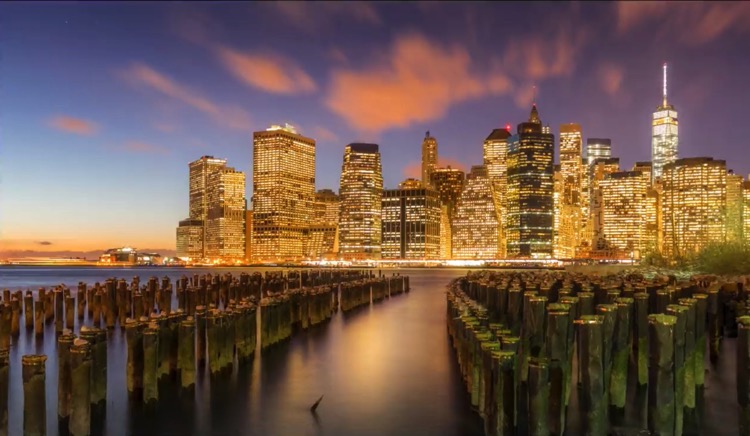
The third and final factor in determining exposure is ISO – the sensitivity of your camera’s sensor to light. For those of you who remember the film days, ISO is similar to ASA, the speed of the film. Essentially, it’s best to leave ISO at a low setting such as 100 (other photographers will recommend using high ISO as needed – do your own research and experiment with your camera). But if you’re in a low-light situation, you might need to increase it so that less light is required to make a good exposure.

Advanced Shooting Modes: What They Are and When to Use Them

Big Bend Ranch State Park, Texas. ISO 200, 10mm, f/18, 1/10th of a second.

Advanced Shooting Modes

There are five main advanced shooting modes available on most digital cameras:

  1. P for Program Mode
  2. A or Av for Aperture Priority Mode
  3. S or Tv for Shutter Priority Mode
  4. M for Manual Mode
  5. B for Bulb Mode

Many professional photographers frown upon using anything other than Manual Mode. But I respectfully disagree. A camera is just a tool and a smart one at that! There’s nothing wrong with letting your camera do what it’s good at as long as you are controlling the factors that are important to you.

Program Mode

In Program Mode, your camera chooses the shutter speed and aperture. You can control other factors like white balance, focus mode, focus points and metering mode. Program mode is a good place to start when you’re just coming off of auto mode and learning how to use your camera settings. But it isn’t where you want to stay because aperture and shutter speed are the key to taking control of your images.

Aperture Priority Mode

When you use Aperture Priority Mode, you tell the camera what aperture you want to use, and it will calculate the appropriate shutter speed to make a good exposure. The size of the aperture affects depth of field, which is a critical concept when you want to take creative control of your images.

When you have a very large aperture opening, such as f/2.8, you are going to have a shallow depth of field. That means that whatever you focus on will be sharp, but everything in front and behind it will be out of focus.

On the other hand, when the aperture opening is small, such as f/22, you have a large depth of field, so more things that are in front and behind your focus point will also be sharp.

The difference between large and small apertures - Advanced Shooting Modes: What They Are and When to Use Them

Try them all

The best way to understand this is to try it out for yourself. Put your camera in Aperture Priority Mode and take the exact same photograph using each aperture setting. Then look at the photos on your computer and you’ll see the effect that aperture has on the depth of field.

What you’ll find is that photos with a large aperture have a soft background and photos with a small aperture have a background that is in focus. For me, depth of field is the most important factor in my photography, so I almost always use Aperture Priority Mode.

Organ Pipe Cactus National Monument Arizona - Advanced Shooting Modes: What They Are and When to Use Them

ISO 100, 33mm, f/18, 1/25th of a second. For this image, it was important to keep everything sharp from the closest cactus in the foreground to the mountains in the background. So I chose a small aperture to ensure I had good depth of field.

F-Numbers are Tricky

Before we leave this topic, there’s one thing that many people find confusing and that is the f-stop numbers. A large aperture opening is represented by a small number and a small aperture is represented by a large number. I don’t want to get into too much math here, but my trick for remembering how this works is to think of it like a fraction. 1/2 is larger than 1/8, so f/2 is a larger opening than f/8.

Shutter Priority Mode

When you use Shutter Priority Mode, you tell the camera what shutter speed you want to use, and it will calculate the appropriate aperture to make a good exposure. This mode is most useful when you have moving objects in your frame and you want to either freeze the motion or blur the motion.

For example, if you are photographing a bicycle race, you probably won’t be happy with just any old shutter speed. You’ll likely want to use a relatively long exposure, such as half a second or one second, to blur the motion of the bicycles going by. Or you’ll want a fast shutter speed such as 1/500th of a second to freeze the motion. Anything in between would look out of focus.

Shooting waterfalls is another good example of when to control the shutter speed for the silky water effect.

Englishman River Falls, Vancouver Island, British Columbia - Advanced Shooting Modes: What They Are and When to Use Them

ISO 100, 180mm, f/22, 1/10th of a second.

Manual Mode

When you are in Manual Mode, you must tell your camera both the aperture and the shutter speed you want to shoot at. You will use your camera’s light meter to determine whether the settings you have entered will create a good exposure, then adjust the settings based on whether you have too much or not enough light.

In Manual Mode you are in complete control and practicing with it will give you a good grasp on how aperture and shutter speed work together. Once you understand this, it may be more convenient to use either Aperture Priority Mode or Shutter Priority Mode to accomplish your goals.

Bulb Mode

Bulb Mode allows you to extend the shutter speed beyond the camera’s built-in limit, which is usually 30 seconds. You can use this mode to photograph the streaks of clouds moving across the sky, or at night to photograph star trails.

To use Bulb Mode, press the shutter button and hold it down. The shutter will open and stay opened until you release the shutter button. But of course, this method isn’t practical because you can’t just stand there holding the shutter button down for 10 minutes! Plus, having your finger touching the camera during a long exposure will cause camera shake and your photo would be blurry.

Star trails at Joshua Tree National Park, California - Advanced Shooting Modes: What They Are and When to Use Them

This photo was made using an intervalometer programmed to make a 7-second exposure every 15 seconds for two hours. Then all the images were stacked to create the star trails.

The best way to use Bulb Mode is to use a shutter release cable (or a remote trigger). This allows you to press the button on the cable to open the shutter and then lock it opened so you can walk away and come back later to release it. Another option, instead of using a cable release, is to use an intervalometer which will allow you to program how long you want the shutter to be opened and even program multiple shots. For example, you can set it to take a 2-second exposure every 5 minutes for an hour.

Conclusion

Remember, the camera is your tool to use any way you like to make your art. The shooting modes are just some options that are available to you so you can accomplish your creative goals. Have fun and experiment!


Shooting modes are just one of the camera settings you’ll want to master to take control of your camera and your photography. My new eBook Taking Control: Essential Camera Skills for Beginners will help you understand what all the knobs and dials on your camera do and how to use them for creative control over your images.

The post Advanced Shooting Modes: What They Are and When to Use Them by Anne McKinnell appeared first on Digital Photography School.


Digital Photography School

 
Comments Off on Advanced Shooting Modes: What They Are and When to Use Them

Posted in Photography


Juggling with one hand: Leica M10 shooting experience

14 Mar
A slightly blurry jet-lagged elevator selfie, which – yes – I could have taken on an iPhone. At least I didn’t add a fake film rebate…

Rangefinders are weird. The idea that superimposing a small ghostly image in the middle of a tunnel-type optical viewfinder is in any way superior to focusing with an SLR, (let alone using autofocus) is frankly bizarre, in this day and age.

In the digital world, a lot of people use the word ‘rangefinder’ rather lazily, to mean anything with a viewfinder positioned on the upper left of its back, but real rangefinders are uncommon. So uncommon, in fact, that Leica (the company which arguably perfected the technology) has made only ten substantially new cameras of this type since the mid 1950s.1

Grabbed quickly on my way back to my hotel on the new 35mm Summilux, this F2 snapshot isn’t pin sharp but by the time I’d nailed focus, the dog had moved.

I’ve always had a soft spot for the M-series, but if I’m being honest, their appeal has always been at least as much romantic as practical. They’re finely constructed, some of my favorite photographers used them, and they look beautiful. More so the film models, admittedly, but the M10 still retains a lot of the same aesthetic appeal as my all-time camera crush, the M6. Maybe I’m just shallow.

I also collect vinyl. Not because I believe it sounds better than CD or MP3 (it doesn’t), but because I’ve always been a pops and crackles kind of guy, and when it comes down to it, I don’t trust music that doesn’t weigh something. If that makes me a hipster, I’ll save you the bother of leaving a snarky comment and just admit it now.2

Speaking of music, I’ve heard it said that if you write a song on a banjo, and the song works, then it’s probably a good song. The point of course being that because the banjo is so simple, and so limited an instrument compared to (say) the electric guitar, it forces the composer to focus on the essentials of structure and melody.

One of relatively few examples of successful zone focusing from my trip. I estimated subject distance at a little over 6 feet (one an a bit me’s) and shot waist-level on the 35mm Summilux at F5.6 to give a small margin for focus error. 

I can’t play the banjo, but I feel much the same way about shooting with a rangefinder, compared to (say) a modern DSLR. It’s a substantially less versatile tool, which forces me to slow down and think more about the photographs I take (and what kind of photographs I take). A day of shooting with the M10 can be very rewarding for this reason, but it can also be hugely frustrating. I’ve been spoiled by zoom lenses, autofocus and multi-zone metering for the better part of 20 years. At this point, shooting with a rangefinder, even a relatively sophisticated digital rangefinder like the M10, can feel a bit like trying to juggle with only one hand, and frequently did, on this trip.

“Who needs autofocus when you’ve got zone focusing?”

‘Who needs autofocus when you’ve got zone focusing?’ That’s a comment I just read on the Internet. Who needs autofocus, you ask? I do, apparently, judging by the miserable hit-rate I achieved during my first experiments with zone focusing. To my credit, I did get better, but accurately estimating distance by eye is tricky, and takes practice.

A less successful example of zone focus, also taken with the 35mm Summilux. I like this shot, and on film I’d probably call it acceptably sharp, but it’s not sharp enough for a DPReview sample gallery. My distance estimate was a bit off (the wall behind my subject is where the plane of focus has ended up) and it looks like a touch of camera-shake has crept in, too. 

Here’s a tip though – using their own height as a reference, most people can estimate distance roughly by imagining themselves lying down, and asking ‘How many me’s away is that person/thing?’

Try it now – it’s OK, I’ll wait.

See what I mean? Fortunately, I’m a simple, easy-to-visualize, boringly average, already-engraved-on-the-focus-ring 6ft in height, and that’s about the right distance away for a lot of candid street portraits. Shooting in this way, I’d position the focus ring at 6ft, set a conservative aperture of around F5.6-8 to account for some slop, and bingo – things would usually end up more or less in focus.

Note my use of the word ‘usually’ and the term ‘more or less’…

Nailed it. A successfully zone-focused F4 shot, taken in the same indoor market as the previous image. The small size and unobtrusive appearance of the M10 (once the ostentatious red dot has been taped over) tends not to draw much attention. 

The last time I shot with a rangefinder for any length of time I was using an M3, usually loaded with black and white film. Truly accurate focus didn’t bother me much, back then. Aside from anything else, being a 3-dimensional medium, film is very forgiving of minor focus errors. Not so the perfectly flat sensors inside digital cameras. And let me tell you, 10 years’ subsequent training as a professional pixel-peeper (try saying that when you’ve been moderating comments all day) is hard to shake. 

Working with the M10, one of the first things I had to get over was the learned fallacy that a shot is only worth keeping if the subject is exactly in focus. Maybe one day I’ll be able to judge distance and framing with 100% accuracy when shooting from the waist, but I’m certainly not there yet. Until then, and for the sake of my own sanity, I’m trying to to concentrate a little more on caring a bit less. 

Small and discreet

The M10 is small and discreet enough that often, you can snap quick moments without getting in anyone’s way or attracting too much attention. But in order to do this, you’ve got to be quick. You can’t standing there dumbly for ages like a second-rate living statue, fiddling with focus or exposure with the camera to your eye, or fretting over exact framing.

Often during my shooting, if the light was reasonably consistent I’d check accurate exposure using the built-in meter from time to time, but keep aperture, shutter speed and ISO locked. At this point, with the lens set to the hyperfocal distance for whatever aperture, taking a picture became a simple matter of raising the camera to my eye, and pressing the button. 

One thing I’ve greatly enjoyed doing with the M10 is shooting with some classic lenses. This F4 portrait of my friend and frequent tour-guide Emi was shot on my 1950s Nikon 5cm F1.4 S.C., (still my all-time best junk shop find). While it’s not in the same league as more modern optical designs, it’s lovely for portraits. Just be aware of curvature of field…

The transition to pre-setting exposure and focus wasn’t natural, (I’m a control freak, I suppose), but I found shooting like this with a 28mm Elmarit at F8, and either focusing hyperfocally or guestimating focus using the ‘how many me’s?’ method to be quite freeing. It certainly made me much more agile.

In fact, sacrilegious as this might sound to some readers, I think that the M10 is at its best when used essentially as a point and shoot camera – for street photography at any rate.  

Taken at F8 (possibly F11…) on the 28mm F2.8 Elmarit, this shot is one of a sequence of images taken at the lens’s hyperfocal distance. Used in this way, the M10 basically becomes a point-and-shoot camera. 

Speaking of 28mm, while I’m normally more of a 35mm fan, I found myself reaching into my bag for the wideangle frequently when shooting with the M10. Partly for the luxury of a bit more depth of field when shooting street scenes, and partly because I enjoyed being able to live inside the entire area of the M10’s viewfinder. Although slightly improved compared to the Typ 240, it’s still hard to see all four of the the 28mm framelines in a single glance, but given that the finder itself covers roughly a 28mm field of view, for the most part you can just ignore the framelines completely.

Another hyperfocal shot taken with the Elmarit 28mm, I waited as this group of people descended the staircase, and took a series of images. This one is my favorite. 

When the M10 is used like this, photography becomes a very immersive experience. The finder is brighter and more natural than an SLR’s ground-glass projection, and much more immediate than even the best electronic viewfinder. The 28mm F2.8 Elmarit is tiny, too, and without a hood attached, it does not occlude the finder. Even the premium 35mm F1.4 Summilux is a small lens by DSLR standards. Having that kind of quality in a compact, unobtrusive full-frame package happens to be one of the few unequivocal arguments in favor of rangefinder cameras in the 21st Century, and one that is made loudly (and justifiably) by Leica fans today.

One of the reasons I enjoyed shooting with the M10 so much when traveling is that I’m getting old, and I really don’t like having a lot of weight hanging around my neck when I’m out and about. I walked almost 70 miles in 3 days in Tokyo and Kyoto, and that would have been miserable with a full-frame DSLR and equivalent lens outfit. My back hurts enough already.


Some observations:

  1. When I was in Kyoto, the M10 got pretty soaked, repeatedly, and continued to work perfectly. Your experience may vary.
  2. Battery life is fine. It’s not something you need to worry about. You can easily get 500 shots on a single charge if you’re not using live view all the time.
  3. Connecting a Leica rangefinder to my phone to view and upload images felt very odd, somehow, but worked well enough.
  4. If nothing else, I sincerely wish the M10 had some kind of horizon level guide. I swear I have one leg longer than the other.
  5. The M10’s long startup time had less practical effect on my photography than I expected, but I did miss a few shots.
  6. Aspherics aren’t everything. The Minolta M-Rokkor 40mm F2 is a superb little lens, if you can live with the inaccurate frame-lines in the M10’s viewfinder.

Someone commented on my gallery of samples recently to the effect that ‘in Japan you can’t miss’, but I assure you, you can miss. And I know that because I did miss – a lot.

Several times I raised the M10 to my eye and tried to take a shot, forgetting the camera was turned off, and in the ~1.5 seconds it takes to power up, the scene had changed and the moment had passed. One day, it seemed as if I had the wrong lens mounted the entire day. Every time I switched lenses I’d see a shot that would have worked perfectly with the previous lens, and by the time I’d changed back, once again the moment had gone.

On a murky day in Kyoto3 I apparently forgot everything I’d ever learned about metering, and had to push each of my Raw files by at least +1EV in Lightroom to even see what it was I had tried to capture. A humbling experience, to say the least. 

Rangefinder focusing is tricky, but newer Leica lenses (like the 35mm F1.4 Summilux) have impressively little curvature of field. What this means in practical terms is that provided your subject doesn’t move, it is possible – with practise – to focus and recompose, even at wide apertures. This portrait (which I’ve cropped a little) was shot in a moving train at F2.8.

Despite offering automatic exposure, live view and all the rest, the M10 doesn’t make life easy for a photographer who’s not used to rangefinder shooting. It definitely provides the smoothest operational experience of any digital M-series I’ve used to date (although our sample does have a habit of crashing from time to time during image review) but the simple fact of the matter is that as I said in the first sentence of this article, rangefinders are weird.

“I would have come back from Japan with more in-focus, correctly-framed shots had I traveled with a DSLR”

Off-center focusing is tricky (there’s a reason why a lot of well-known shallow dof images captured on Leicas have their main subject positioned in the center of the frame) and when shooting using the optical finder, framing might charitably be described as ‘approximate’ 4. Off-the-curtain center-weighted metering takes some mastering, too.

Without question, I would have come back from Japan with more in-focus, correctly-framed shots had I traveled with a DSLR. I’m not afraid to admit it. But at the end of the day, would I have had as much fun? I doubt it – and I certainly wouldn’t have thought as much about my process. 

$ (document).ready(function() { SampleGalleryV2({“containerId”:”embeddedSampleGallery_6037658348″,”galleryId”:”6037658348″,”isEmbeddedWidget”:true,”standalone”:false,”selectedImageIndex”:0,”startInCommentsView”:false,”isMobile”:false}) });


1 I’m being pretty strict about omitting sub-variants in that total. The M6 spawned a bazillion special editions for example, most of which I can only assume still languish unused in dentists’ safes, and given that it’s essentially just a (slightly) modernised M3, I’m hesitant to call the fully-mechanical M-A a ‘substantially new camera’. An argument could be made that the Monochroms deserve their own appellation but I’ll leave that to the pedants to decide.

2 Although I would like to lobby for a general Internet policy whereby terms can only be used as insults when the thrower of the insult understands what the term means, and – ideally – when the term itself actually means something to start with. Who’s with me?

3 This article was actually called ‘The Kyoto Photo-call’ for about five minutes, before Allison made me change it.

4 Personally, I find shooting with anything longer than 50mm on a rangefinder to be very frustrating, for this reason.

Articles: Digital Photography Review (dpreview.com)

 
Comments Off on Juggling with one hand: Leica M10 shooting experience

Posted in Uncategorized


Fujifilm GFX 50S: on the streets of Tokyo, a shooting experience

09 Mar

Introduction

Edited to taste in Adobe Camera Raw and cropped in slightly | ISO 200 | 1/60 sec | F2.8

Japan has long been at the top of my list of places I would like to journey to. Like my coworker, Carey Rose, I enjoy traveling with a camera as a means to create a visual travel diary or log of my adventures.

This year, I was fortunate enough to cover the CP+ trade show in Yokohama, Japan for DPReview. Of course one does not simply fly all the way to Japan for work and not spend some extra time exploring. And so I delayed my flight back by three days, so that I could have some time to check out Tokyo, a city I’ve long admired from afar in the pages of street photography books and magazines.

Originally, I was going to bring my Leica M6 + 40mm F2 Rokkor  (a camera I too often neglect) to explore the streets of the World’s largest city. But when Fujifilm informed us they’d have a sample GFX 50S we could take home from the show, my plans changed.

It was weird, at first, shooting street photography on a medium-format digital camera.
Edited to taste in ACR | ISO 800 | 1/800 sec | F2.8

To be honest I never really considered the prospect of trying to shoot street photography with a digital medium-format camera. In fact, the only digital medium-format camera I’ve spent any considerable time using is the Pentax 645Z. And while capable in many situations, the 645Z is pretty cumbersome to walk around with, being 630 g/22.3 oz heavier than the Fujifilm.

I already had my heart set on shooting a single focal length in the 40mm Rokkor, so I didn’t really mind that the only lens Fujifilm could provide was the 63mm F2.8, which is equivalent to 50mm. I really enjoy limiting my focal length when traveling, it tends to give me more mental clarity into what I’m seeing and forces me to move my feet and change my perspective more.

Handling

Out of camera JPEG | ISO 100 | 1/500 sec | F2.8

In short, I love the ergonomics of this camera. The grip is extremely comfortable, it’s well-weighted (at least with the 63mm F2.8 on), and most control points can be accessed using the camera with a single hand.

Stopped for a beer at the Tokyo Sky Tree, mostly to be a tourist, but also to take this photo of the GFX 50S at 350m above the city.

In fact, I’d go as far to say that in terms of ergonomics and comfort, I’d prefer to spend the day walking around with the GFX 50S over a Nikon D810 or Canon EOS 5D SR (with similar-sized lenses) for a few reasons. For one, all three camera bodies weigh nearly the same: The 5D SR is 845 g (29.8 oz), the D810 is 879 g (31 oz) and the GFX 50S is 919 g (32.5 oz). Moreover, the grip on the Fujifilm is just so much more comfortable, especially when holding the camera for an extended period of time (believe me, I’ve spent very long days with the both the Canon and Nikon in tow).

Fujifilm colors + a high resolution sensor = Lovely files.
Edited to taste in ACR and cropped in slightly | ISO 100 | 1/400 sec | F6.4

I also love the control layout. The top plate is very similar to that of the gold award-winning Fujifilm XT-2, though the GFX has no dedicated exposure compensation dial. Both the shutter speed and ISO dial can be locked. I mostly used the camera during the day in full manual with my shutter speed held at 1/500 sec to freeze any movement I encountered. When I saw something I wanted to shoot, I simply raised the camera to my eye and adjusted my ISO and aperture accordingly. This quickly became a very effective and natural way to shoot (though I acknowledge I could have kept my ISO closer to base in some of these images. Using Auto ISO also would have helped) .

The GFX 50S gives users two ways to move one’s AF area or point: via the joystick or the touchscreen. Fujifilm could have easily skipped the touchscreen in a camera like this, but I’m glad they didn’t. While I did not use it much for AF point placement (mostly because the joystick is fabulous), I did enjoy employing the touchscreen while flipping back through images (also pinch to zoom is nice). Oh, and the screen flips out both vertically and horizontally (like on the XT-2), which is very useful. I found myself framing with the LCD probably 25% of the time.

Notes from shooting

When I framed up this image, there was no subject in it. But thanks to the sluggish AF, by the time the shutter fired, boom, I had a subject!
Edited to taste in ACR | ISO 200 | 1/1250 sec | F5.6

For the most part, my experience shooting with the GFX 50S was positive. Maybe it was all the canned coffee I was drinking, or the excitement of exploring somewhere new, but I thoroughly enjoyed myself while shooting with it. That said, I had a few frustrations:

Autofocus, as you might expect from a contrast detect system, is quite sluggish. Not only that, it’s also pretty loud. And when fully racking focus from minimum to infinity, the 63mm F2.8’s lens barrel extends considerably. The camera is also a tad slow to start up. It’s really useful that the on/off switch is located in front of the shutter (like on any Nikon DSLR), but I missed a couple decisive moments due to the combination of sluggish start up and slow autofocus.

That said, while AF is slow, it is both accurate and precise (in good light). This is the positive of a mirrorless camera using a CDAF system.

AF speeds are a bit sluggish which sometimes resulted in me missing decisive moments. Fortunately I had a lot of time to compose this image.
Edited to taste in ACR | ISO 400 | 1/1900 sec | F3.2

I only shot using the GFX 50S in AF-S, using a single point. AF coverage is excellent, extending out nearly to the edge of the frame and, as I mentioned, the joystick is an effective way to painlessly move the AF point. When I first was handed the camera, I switched it into AF-C and instantly started to feel nauseous due to the constant, very slow hunting. I quickly switched it back to AF-S.

Because I mostly shot with the GFX 50S in decent light while in Japan, once I was back in Seattle, I was curious to see how its autofocus would hold up in crummy light. The answer: poorly. Using a dimly-lit bar as my scene (settings around ISO 12800, 1/60 sec at F2.8), the GFX 50S proved largely unable to focus on anything. This is not all that surprising given its contrast-detect AF system. And I still got some shots, I simply switched the camera to manual focus and used focus peaking.

Thank God the GFX 50S is weather-sealed. This was shot moments before it started to downpour and I had no umbrella.
Edited to taste in ACR | ISO 400 | 1/800 sec | F4

Another stumbling point is the EVF experience. Although resolution is pretty high (3.7 million dots) the viewfinder image gets noticeably ‘crunchy’ when focus is initiated, and moiré and ‘shimmering’ can be very distracting in some scenes, especially cityscapes.

This didn’t bother me quite as much as it bothered my colleague, Barney. But as soon as he pointed it out to me, I couldn’t unsee it. 

That’s pretty much it for things I did not like, back to things I did: the camera is weather-sealed, and not just a little weather-sealed, but very weather-sealed. One day, while out exploring part of the Asakusa district in Northeast Tokyo, I got caught in a heavy rain storm. Now, contrary to popular belief, we don’t get heavy rain in Seattle, just drizzles, mists and spits. This is to say, I was not prepared for the rain that would fall. Fortunately, the GFX 50S was.

I was also really quite pleased with the camera’s battery life. Fujifilm introduced the new NP-T125 battery, and it’s enormous, which is awesome. I shot constantly for two and a half days without needing to charge it up once.

The images

I was able to crop this file in nearly 50% and still have a nice image thanks to the camera’s high pixel count.
Edited to taste in ACR and cropped in considerably | ISO 12,800 | 1/90 sec | F2.8

So I obviously enjoyed using the camera but what about the files? Well, you be the the judge. Adobe just updated Raw support for the camera earlier this week and boy did I have a fun time playing with these files. The above, for instance, is cropped in nearly 2x.

Raw files also seem to have excellent dynamic range. I was able to pull exposures quite far. I was also able to recover a ton of blown highlights from the Sens?-ji Temple photo at the bottom of this article (first image in the gallery). This is due to a behavior we found regarding high ISO files having extra data in the highlights. But we’ll go more in depth on that in the review. To be honest, as a former X100-series owner, using this camera reminded me just how much I love Fujifilm colors and skintones. And processing Raw files allowed me to go back and apply any one of the lovely Film Simulations in post.

I forgot how lovely Fujifilm colors are.
Edited to taste slightly in ACR | ISO 800 | 1/500 sec | F4.5

The take away

There’s something really strange/enticing about being able to shoot casually with a digital medium-format camera. And despite some sluggishness in its operation, the GFX 50S was  surprisingly good for street and travel photography.

And while the entire experience was a bit overwhelming from a cultural perspective (I speak no Japanese and spent a lot of time alone with my thoughts listening to Tom Waits) exploring Tokyo with what I believe to be one of the most exciting digital cameras in a long time, was truly remarkable. I’m already planning a return trip.

So if you’re not going to read any of this article, here’s my takeaway: the Fujifilm GFX 50S is fun and easy to use and the files look awesome. What more can I say?

$ (document).ready(function() { SampleGalleryV2({“containerId”:”embeddedSampleGallery_3627631444″,”galleryId”:”3627631444″,”isEmbeddedWidget”:true,”standalone”:false,”selectedImageIndex”:0,”startInCommentsView”:false,”isMobile”:false}) });
Articles: Digital Photography Review (dpreview.com)

 
Comments Off on Fujifilm GFX 50S: on the streets of Tokyo, a shooting experience

Posted in Uncategorized


Fujinon MK18-55 T2.9 cine lens: First impressions and shooting experience

22 Feb
Setting up the Fujinon MK18-55mm T2.9 cine lens with the Sony FS7 and Zacuto rig. (I accidentally left the matte box back at the office. Shh… don’t tell anyone.)

Fujifilm is a respected name in the photography world thanks in part to its highly regarded X-series cameras and lenses. However, Fujifilm is also a major player in the professional cinema market, producing cinema lenses with prices that reach upward of $ 90,000. The company is now extending its cinema expertise into what it calls the ‘emerging production’ market: users who need capabilities and features beyond what’s available in standard DSLR or mirrorless lenses, but who don’t have a budget to spend tens of thousands of dollars on a single lens.

The Fujinon MK18-55mm T2.9 cinema lens is the first in Fujifilm’s new MK line of Super 35 lenses designed specifically for this market. It will be joined later in the year by the matching MK50-135mm T2.9 lens, giving users complete coverage of the very useful 18-135mm range of focal lengths. The MK line is based on the company’s Cabrio line of cinema lenses, which have prices starting around $ 15,000, and both lens lines share the same coatings and basic mechanical build. At $ 3,799, the MK18-55 is still a bit pricey by photography standards, but a relative bargain for a high quality cinema lens.

Sony E-mount on a Fujinon lens? Read our First Look slide show to learn why.

Despite being a Fujifilm product, this lens uses Sony E-mount. (We discuss Fujifilm’s reasons for choosing E-mount in our First Look slide show.) As a result, I tested the lens attached to a Sony FS7, a Super 35 camera that’s very popular among this segment of users.

Shooting with the MK18-55mm T2.9

We only had a couple days to do our testing, so I threw together a quick shoot highlighting one of the Pacific Northwest’s favorite sports – climbing – and met up with local climber Jay Griffin at The Mountaineers climbing wall in Seattle. This scenario was perfect for shooting with focal lengths across the range of the lens, as well as for some good follow focus opportunities.

TL;DR – I really like this lens. In fact, I won’t even make you wait to get to the video, so here it is:

Video shot using the Fujinon MK18-55mm T2.9 cine lens and Sony FS7 camera. All footage was captured in DCI 4K/24p using Sony SLog3, edited in Final Cut Pro X, and graded using LUTs from Color Grading Central.

I chose to shoot the entire video shoulder-mounted, so I set up the FS7 on a Zacuto Recoil rig with rails, a Z-Drive follow focus, and a Gratical Eye viewfinder, along with the FS7’s remote grip. This is a fairly straightforward setup, but it takes a few minutes to arrange all the pieces so that everything works correctly and is ergonomically arranged for the camera operator

Setting up the rig highlighted one of the important features of the MK lenses: they’re matched. For this shoot I only had the MK18-55mm available, but later in the year Fujifilm will be adding the MK 50-135mm to the line as well; both lenses share the same weight and dimensions. In a two-lens shoot, it would be incredibly easy to switch between the two while leaving things like matte boxes and follow focus in place. Also, since both lenses have identical T-stops it would be easy to match exposure as well.

Using the lens was a joy. As with most cinema lenses, it’s completely mechanical, and build quality is outstanding. Every movement feels well damped, and one gets the immediate sense that it’s a high quality piece of precision equipment.

One place where this mechanical build is immediately noticeable is the focus ring. Unlike most modern DSLR or mirrorless lenses, which continue to spin after reaching the end of their focus range, the MK18-55mm has hard stops.

Working with a follow focus is a breeze thanks to the mechanical lens design and geared focus ring.

It was simple to set up the Z-Drive follow focus with the standard pitch gearing on the focus ring, and thanks to the 200 degree focus rotation angle it was easy to make precise focus adjustments, using peaking in the viewfinder as a guide. The large rotation angle made it easy to adjust for small movements or to follow Jay when he moved slowly. You don’t get this level of precision with the shorter focus throw of most DSLR lenses, and you certainly don’t get it with focus-by-wire!

I didn’t notice any obvious signs of lens breathing, a phenomena that causes a lens’s field of view to change slightly as a lens is focused. Breathing is fairly common on stills camera lenses, and it rears its ugly head when you’re trying to do something like rack focus between two subjects. Cine lenses are designed to suppress lens breathing, and as far as I could tell the MK18-55 did so extremely well.

Like other cine lenses, the MK18-55mm has a parfocal design, meaning it should maintain precise focus during zooming. Still photographers often don’t care much about this since it’s simple to zoom and then refocus before taking a shot. For video work, however, you sometimes want the zoom to be part of the shot. Loosing focus mid-zoom is a big deal.

Since I was using a shoulder mount rig without an assistant, it wasn’t very practical to test the parfocal performance of the lens with Jay. However, back in the studio I lined up the lens with our studio scene and confirmed that its performance is excellent in this regard; once focused, the subject remains in focus throughout the zoom range.

 Shooting with the Fujinon MK18-55mm T2.9 lens and Sony FS7.

It should be pretty obvious by now that I really enjoyed using the MK18-55mm. In addition to finding it well designed and delightful to work with, I was very pleased with the footage I captured. Optical performance appears to be outstanding. Based on my brief experience I would have no qualms about shooting a full project with this lens. It’s exciting to see Fujifilm entering this market, and I’m really looking forward to future lenses in the MK line.

Now, bring on the MK50-135mm so I can use the set!

Articles: Digital Photography Review (dpreview.com)

 
Comments Off on Fujinon MK18-55 T2.9 cine lens: First impressions and shooting experience

Posted in Uncategorized


6 Tips for Shooting Long Exposure Night Photographs

16 Feb

In this article I am going to share with you six tips that I have found to produce amazing long exposure night photographs. I have learned the hard way by making every mistake possible and through that finding what really does work.

So here are the 6 tips to make your long exposure photographs at night:

6 Tips for Shooting Long Exposures at Night

Tip #1: Try to avoid using a Neutral Density filter

On this photo (below) I did a 25 second exposure. That is quite a long exposure and to help prevent it from blowing out, I took the photo right at the end of sunset. There was less light, so that I didn’t have to put an ND Filter on.

6 Tips for Shooting Long Exposures at Night

If you put an ND filter on it is going to give you a color cast during long exposures. Yes you can use a polarizer, but avoid Neutral Density filters. Shoot when the sun is going down and keep your camera at a low ISO like 100 or 200. Don’t get me wrong, I love ND filters but not at night.

Tip #2: The best time for long exposures is 25 seconds

I know that’s a bold statement. Not as bold as stating that French food is the best in the world, but still a bold statement. Here is why I recommend this; I’ve found that when I shoot at 25 seconds it makes the water silky and the clouds stretchy and this has a beautiful look that sells well. Obviously it’s also an artistic choice, but as a photographer you likely want people to buy your photos. The best indicator that people like your photos is that they buy them.

Here is an example:

6 Tips for Shooting Long Exposures at Night

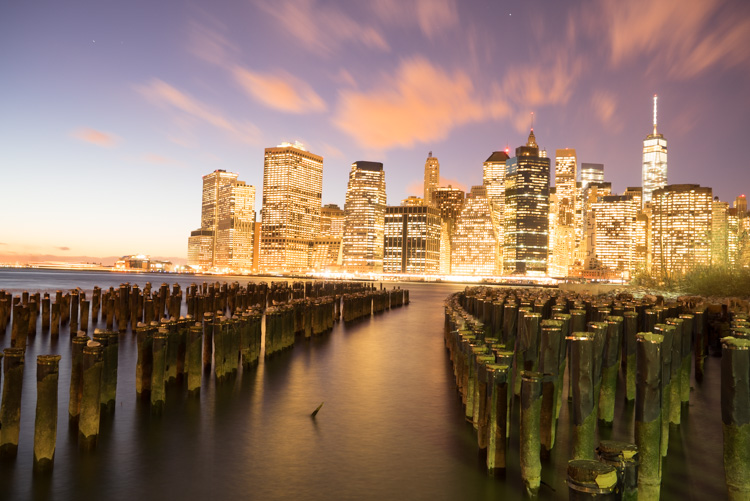
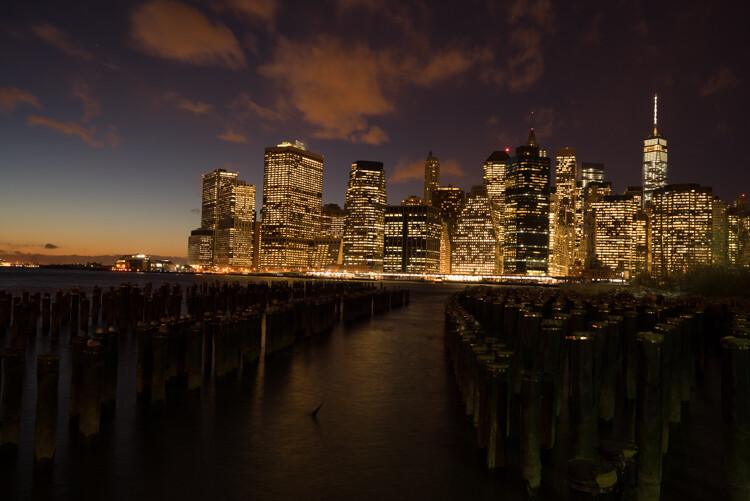
First I started with a 6 second exposure.

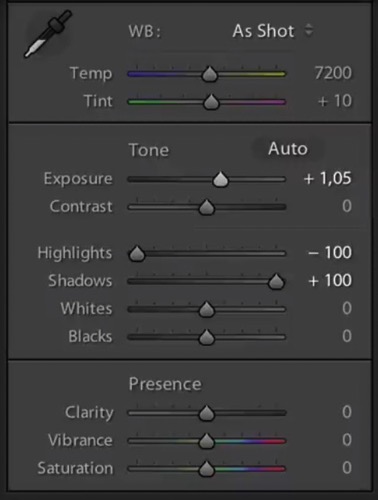
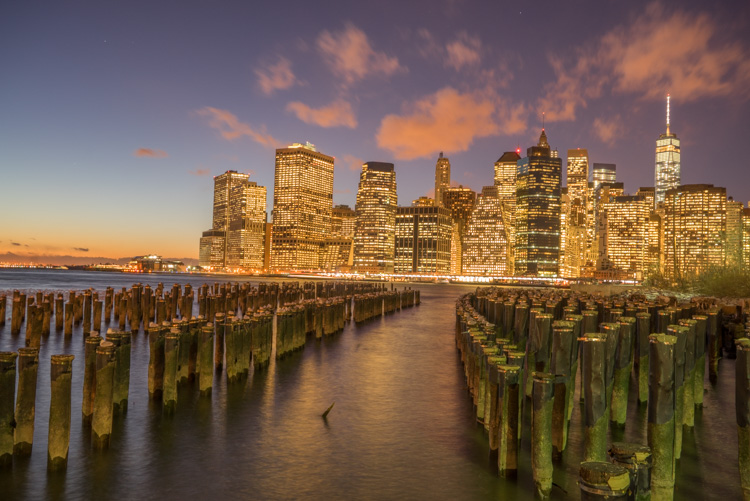
Now, in taking the photo I exposed the image for the highlights. So when you open up the shadows, bring down the highlights, and boost the exposure a little bit like so:

6 Tips for Shooting Long Exposure Night Photographs

I do have all the details of the photo, but the only problem is that the clouds were not moving and the water is not silky.

6 Tips for Shooting Long Exposure Night Photographs

So I went ahead and put the exposure time to 25 seconds. Now it does seem like the highlights in the photos are a little burnt, but I have found that on city lights it doesn’t really matter that much because it still works great on a print.

To conclude; 25 seconds is the best long exposure, you don’t even need a remote, you just need to put your camera on the 2-second timer and go into manual shooting mode, use a low ISO, and an aperture that is going to work like f/7 or f/8.

If your photo is too bright you can adjust the aperture to f/14 and if it is too dark you can even put your aperture to f/4. Just make sure you check your focus to ensure the background is sharp.

Tip #3: Try different exposures of the same scene

Even though I said that 25 seconds exposure is the best, it’s always good to shoot different exposures because this may be different for your situation. For example, I thought that this first image was my go-to photo.

6 Tips for Shooting Long Exposure Night Photographs

But in the end the one that I am going to retouch and going to send to the gallery is this one.

6 Tips for Shooting Long Exposure Night Photographs

So you already have your camera setup and on a tripod. Go ahead and try 8 seconds, 15 seconds, 25 seconds all without touching the tripod and then when you are evaluating your photos for retouching you will have several options.

Tip #4: Shoot towards the sun

When you are doing a long exposure without an ND filter (so as to avoid the color cast, tip #1), a good thing to do is to shoot toward the sun. When it is behind the horizon line it will always give you a nice sky with lots of color and gradations.

You can see on this photo that the sun is setting on the left.

6 Tips for Shooting Long Exposure Night Photographs

And as I turn the camera more away from the sun and back towards the city you get this view.

6 Tips for Shooting Long Exposure Night Photographs

You can see that we get less and less details in the sky. But if you shoot where the sun sets you will always have great details even after sunset, and it is the right time for these type of photos.

Tip #5: Make sure you have water and the sky in your photo

Those are two important things for a long exposure which help to really elevate your photos into what I like to call miracle photos.

Tip #6: Try to get the clouds coming towards you

You can study meteorological information to get a sense of which direction the clouds are moving and try to position your shot accordingly. There are even a few apps which great for this.

As I said, this is not always easy but I got lucky on this one. The clouds are going to be stretchy and create leading lines and that help make this photo really interesting.

6 Tips for Shooting Long Exposure Night Photographs

I hope this helped you and you will be able to capture beautiful places at the perfect time. Please share your long exposure night photos in the comments below.

** NOTE ** If you’d like to know more about this subject, learn more about my brand new course on night photography here, so you can take stunning night photos too!

googletag.cmd.push(function() {
tablet_slots.push( googletag.defineSlot( “/1005424/_dPSv4_tab-all-article-bottom_(300×250)”, [300, 250], “pb-ad-78623” ).addService( googletag.pubads() ) ); } );

googletag.cmd.push(function() {
mobile_slots.push( googletag.defineSlot( “/1005424/_dPSv4_mob-all-article-bottom_(300×250)”, [300, 250], “pb-ad-78158” ).addService( googletag.pubads() ) ); } );

The post 6 Tips for Shooting Long Exposure Night Photographs by Serge Ramelli appeared first on Digital Photography School.


Digital Photography School

 
Comments Off on 6 Tips for Shooting Long Exposure Night Photographs

Posted in Photography


The Benefits of Shooting in Auto Mode

14 Feb

I can still hear the words I was told when I bought my first DSLR ringing in my ears just as clearly as if I heard them this morning. “You have to learn to shoot in manual mode.” When I started to get serious about photography I had no idea what aperture, shutter, or ISO meant, and thought P meant Professional. I didn’t know what I was doing at all and because everyone seemed to say so, I dove right into YouTube tutorials and online articles about how to get away from the dreaded Auto Mode setting on my camera. After all, no serious photographer would be caught dead using Automatic…right?

The Benefits of Shooting in Auto Mode

Auto Mode – don’t knock it until you try it. And even then, maybe give it a second chance.

The truth, like most things in life, isn’t so black and white. Auto mode, while often derided by online commenters and popular YouTube photographers, is not the scourge upon modern photography that some people claim. While it might not be the best way to get exactly the picture you want, and learning to shoot in manual is, of course, a rewarding and hugely beneficial way to increase your skills as a photographer, there is nothing inherently wrong with using Auto.

In fact, there are some clear benefits to using Auto. So, I’d like to explore some of its advantages and offer a few reasons why you shouldn’t feel so bad if you set your expensive DSLR camera on that familiar green Auto setting.

It just works – usually

It is certainly true that you have a much better idea of the picture you are trying to take than your camera does. However, it’s also true that you may not know how to (or care) make your camera do what you want it to do, in order to get the picture you want. Photographers sometimes talk about

use-auto-mode-gum-ball

Photographers sometimes talk about the decisive moment, which was a term used by Henri Cartier-Bresson to describe that instant in which all the elements within the frame come together to form the perfect photographic opportunity. Unfortunately, many amateur photographers will wistfully watch that moment pass by because they are fiddling with aperture controls and thinking about shutter speeds.

I’m all for learning more about how to use your camera (I write for DPS and that’s what we do!) but sometimes it’s nice to just put your camera in Auto mode and let it do all the grunt work for you.

The trade-off

Modern cameras are filled to the brim with all sorts of high-tech enhancements compared to their counterparts from days gone by, and along with this has been a string of steady improvements to their built-in Auto mode. For the most part, shooting in Auto will give you a well-exposed picture that will probably suit your needs. The downside is that your camera might make different choices than you prefer when it comes to selecting an aperture, shutter speed, or ISO value, and if there is not enough light you will likely see the pop-up flash rear its ugly head.

use-auto-mode-food

This is when you may start thinking about learning to use some of the other modes on your camera. But, if you don’t mind the creative decisions your camera makes or just don’t feel like learning the complexities of the Exposure Triangle, then, by all means, go ahead and shoot in Auto Mude. After all, it’s about the picture, and if you’re happy with the results then why not keep using it?

Auto lets you focus on other things too

When you take your camera out to record a moment, memory, or special event, there is usually a lot going on around you and that little black box in your hand. There may be people, kids, music, animals, wind, rain, or a combination of all that, plus much more.

An experienced photographer will know exactly how to set her camera to get the kind of pictures she is looking for and will know just what settings to tweak and change in order to get the right images. However, even experienced photographers can get a bit overwhelmed when there is so much going on, and for casual photographers, it is even worse. It’s times like these when Auto mode can be your best friend. You should not only not feel embarrassed about using it, but my advice is to openly embrace that comfortable little green setting.

The Benefits of Shooting in Auto Mode

Missing the shot due to not knowing the settings

One of the worst times for a photographer is that sinking feeling when you realize you just missed the shot. Even photographic veterans have been known to leave the lens cap on from time to time. If you are just getting started with photography or trying to improve your skills, then fiddling with aperture controls or trying to figure out the right metering mode for a particular scene is enough to make you want to toss your camera out the window in frustration. Many a photographer has missed the opportunity to take a picture because they were wrestling with camera settings and trying to get things just right before clicking the shutter.

By contrast, using Auto can free you up to take pictures while also taking in the rest of the experience around you. Instead of worrying about the ISO, trying to figure out what shutter speed to use, or wondering if you need to use the flash, Auto mode will just take care of these for you. The trade-off is that the results might not be exactly what you wanted (maybe you were going for a shallower depth of field, or would have preferred to not use the flash). But at least you’ll walk away with some pictures while also having the freedom to talk to other people, take in the scene, and be present in the moment. That is unless you accidentally leave your lens cap on!

The Benefits of Shooting in Auto Mode

Auto can help you understand your camera

One of the biggest barriers to entry for people who want to learn more about cameras and photography is all the technical details inherent in the art form. Understanding the basic elements of exposure is enough to make your head swim. On top of that, there are all sorts of other considerations like white balance, focal length, megapixels, etc. The list goes on and it often seems like a cruel and unforgiving proposition that is more alienating than inviting.

Fortunately shooting in Auto mode is a great way to dip your toes into the more complex aspects of photography, provided you don’t mind doing a little bit of legwork on your own.

The Benefits of Shooting in Auto Mode

Embedded in the metadata of every single picture, whether taken on an iPhone or a high-end DSLR, is a whole slew of information known as EXIF data. Most image editing programs, even basic ones like Apple Photos or online solutions like Flickr and Google Photos, let you peek inside the EXIF data to find out more about the technical underpinnings of a photo.

What Auto mode can show you

If you take pictures using Auto mode all the details such aperture, shutter speed, and ISO are saved in the EXIF data along with a slew of additional information like your camera model, whether the flash fired, what type of metering mode was used, even the location of the picture if your camera has GPS capability. Looking at the EXIF data of your photos, and other photos you see online is a fantastic way to learn about the technical aspects of photography so you can get a better sense of how the picture was taken. It’s almost like getting a movie on DVD or Blu-Ray and watching the behind-the-scenes bonus features or listening to the director’s commentary, in that you can get a good idea of what creative decisions were made in order to get the final result.

If you have ever wanted to get more serious about shooting in Manual or one of the semi-automatic modes on your camera, try shooting in Auto and then using the EXIF data to replicate that same shot in Manual mode. Then tweak the settings like aperture or shutter speed and you will start to see how changing these values affects the final image. But be careful – doing this can open you up to a much larger world of photography by helping you learn to creatively control your camera in ways you might have never thought possible!

The Benefits of Shooting in Auto Mode

Conclusion

There’s some kind of a stigma attached to Auto mode, where people sometimes think you are less of a photographer if that’s all you use. I liken this to people who get into arguments about Ford versus Chevy, Android versus iPhone, or any of the other sorts of silly things over which people tend to squabble. If you use Auto and you like it,

If you use Auto Mode and you like it, then by all means, keep using it! Certainly, it’s nice to have more control over your camera, but some people find that by giving up control and just using Auto they are free to focus on other things that matter more to them. If that sounds like you, then by golly (as my dad would say) put your camera mode dial to the green square and click away.

googletag.cmd.push(function() {
tablet_slots.push( googletag.defineSlot( “/1005424/_dPSv4_tab-all-article-bottom_(300×250)”, [300, 250], “pb-ad-78623” ).addService( googletag.pubads() ) ); } );

googletag.cmd.push(function() {
mobile_slots.push( googletag.defineSlot( “/1005424/_dPSv4_mob-all-article-bottom_(300×250)”, [300, 250], “pb-ad-78158” ).addService( googletag.pubads() ) ); } );

The post The Benefits of Shooting in Auto Mode by Simon Ringsmuth appeared first on Digital Photography School.


Digital Photography School

 
Comments Off on The Benefits of Shooting in Auto Mode

Posted in Photography