RSS
 

Posts Tagged ‘Shoot’

KitSplit: Shoot with Super Fancy Gear for Very Little Moola

12 Sep

We’re ‘bout to get you all geared up for photo-snapping funmazement.

We’ve teamed up with KitSplit for a great giveaway! (We’re kinda mad we can’t win ourselves).

Win $ 100 in Photojojo gizmos and $ 100 in gear rental from KitSplit.

What’s a KitSplit? We’re glad you asked. Read along for complete giveaway rules and a formal introduction to our pals, the KitSplitters.

(…)
Read the rest of KitSplit: Shoot with Super Fancy Gear for Very Little Moola (833 words)


© laurel for Photojojo, 2016. |
Permalink |
No comment |
Add to
del.icio.us

Post tags:


Photojojo

 
Comments Off on KitSplit: Shoot with Super Fancy Gear for Very Little Moola

Posted in Equipment


How to Shoot Vertical Panoramas (Vertoramas)

01 Sep

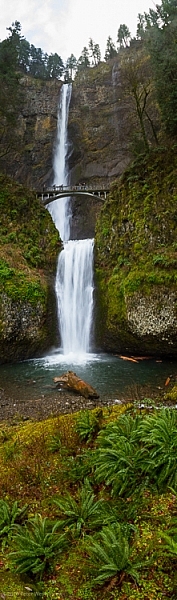
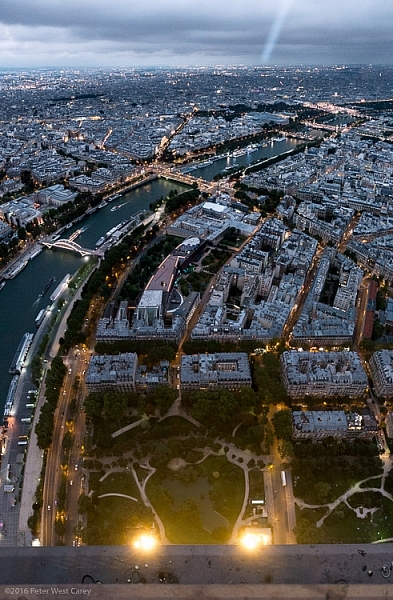
PWC-Oregon2012-0205-0684-PanoThe Eiffel Tower. The Statue of Liberty. Redwood trees. Not all the world fits into our horizontal frame of it. Some of it climbs up and up! For those images you need to learn a new technique; vertical panoramas, or vertoramas as they are known.

What are vertoramas?

A vertorama is simply a panorama, but shot vertically. It is for the tall things of the world, and uses much of the same techniques as a panorama, but with some important considerations I’ll touch on later in this article.

They are as simple as two shots combined to capture more foreground, or a chance to capture the tallest of the tall things on the planet without a wide-angle lens. They are a great option when you don’t have a super-wide angle lens, or you want to capture more detail than that wide angle lens will provide in one shot.

Picking the best subjects

Tall things are the obvious choice for making vertical panoramas, but also look at your normal images to see what can be included in the foreground.

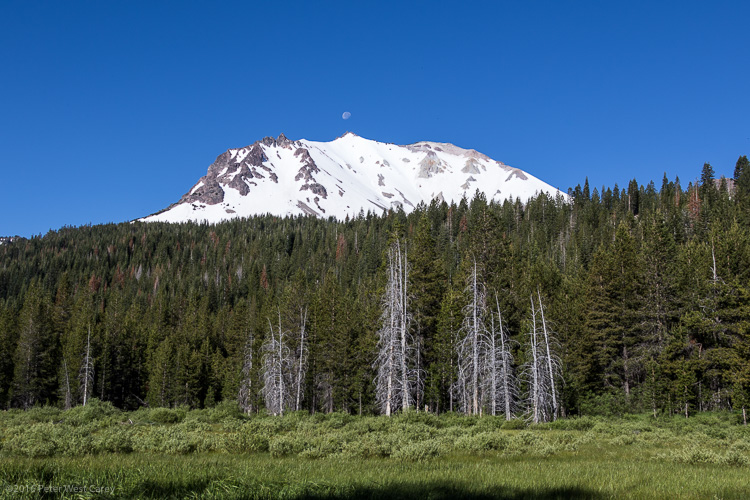
For instance, this view of Mount Lassen in Lassen Volcanic National Park is pretty enough.

PWC-Travel2016-0624-8343

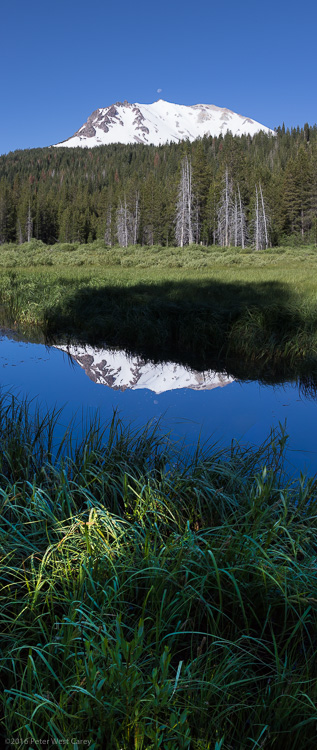
But what else is going on in the foreground? And not just the foreground, but the extreme foreground?

PWC-Travel2016-0624-8329-Pano

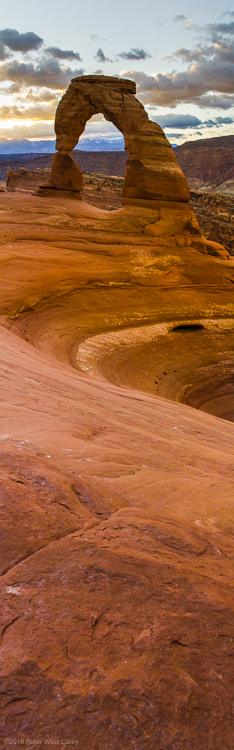
A Vertorama can take your normal landscape image and give it depth, like this image of Delicate Arch in Utah.

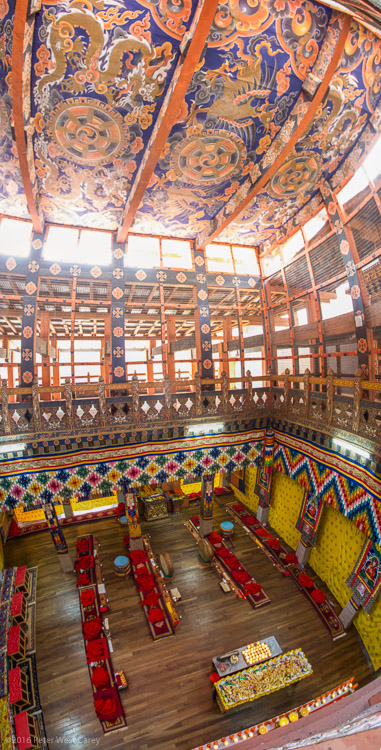
I pick subjects where my vantage point gives me something above and below a level view of the subject. This view of a temple in Bhutan is such a location, as I was on a balcony with subjects below and certainly above.

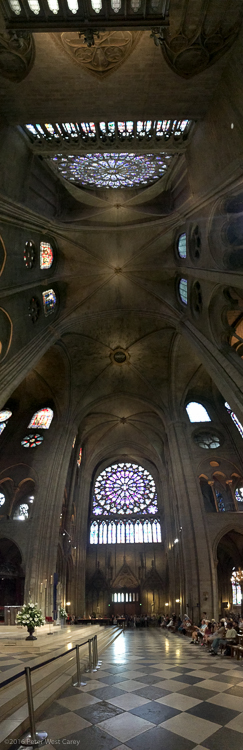
Vertoramas are also used to emphasize the enormity of an area. In this case I used my iPhone’s panorama mode, turned the phone sideways, and kept panning up and up, and then back over the top of my head (flexibility is a key with this format!) to show the grandeur of the structure. Shot inside the amazing Cathedral Notre-Dame de Paris.

PWC-France2015-083121-0711

Waterfalls, statues, buildings, trees, landscapes…they are all ripe for the format.

How to shoot vertoramas

Shooting vertoramas is not much different than shooting panoramas, but there are some important considerations. First, if you need help with panoramas, dPS writer Barry J Brady has a good article on them here: How to Shoot Panoramic Photos. The settings are the same for vertical panos, but you need to make sure you can pan all the way up with your subject, which is sometimes hard to do with a tripod.

Where it gets a little trickier is in the distance of your subject. This is fundamentally different than panoramas, because for the most part, panoramas have a roughly equal distance from the camera to all parts of the scene. Roughly.

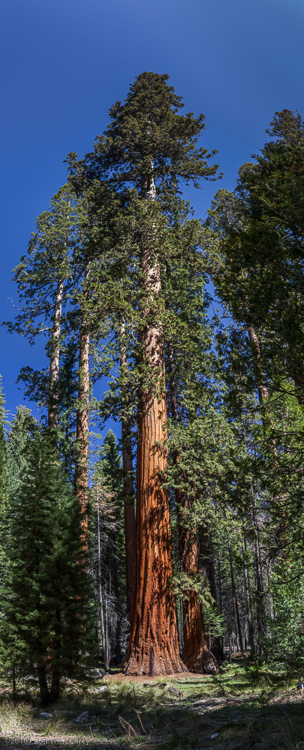
But a vertorama often has a subject leading away from it and this can cause distortion.Can you imagine the truck of this redwood tree being much closer than the 200 foot tall top?

PWC-Sequoia in Mariposa Grove

In which case, give yourself plenty of room at the bottom of the image as that will be your constriction point when you go to crop. I shoot landscape orientation (camera in horizontal position) for almost all of my vertoramas, in order to have enough space to crop.

Editing Options

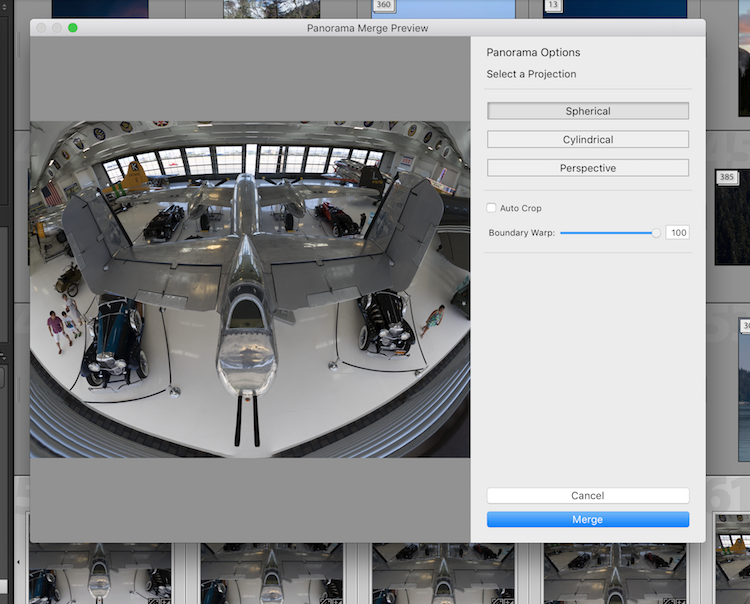
I find more and more that the PhotoMerge -> Panorama feature in Adobe Lightroom works just fine for vertoramas. So does the same feature in Photoshop proper, maybe 80% of the time. Where it comes up short is in the variety projections.

PWC-Vertorama-screenshot

If you are looking for a little more power, try AutoPano Giga by Kolor (now owned by GoPro). There are a number of projections that can help with vertoramas, including Hammer. Plus it has the fun Little World projection that helps make those funky, little world images.

Both programs are run just as they would be for a horizontal panorama.

Things to consider

Sometimes I look at vertoramas and I think they have no place in our digital world. When so much of what we view is on a horizontal screen, it’s hard to see their full beauty. You can turn your phone sideways, but you’re still missing the scale of the shot. Have you found yourself scrolling a lot in this article, and maybe not even seeing the whole images?

PWC-France2015-083117-0943-Pano

That being said, I love how vertoramas look when they are printed. Printing can be done at Costco, Walgreens or any place that prints panoramas.

Vertoramas can be trickier to shoot than a regular panorama as your tripod doesn’t typically pan up and down as smoothly as side to side. I suggest getting more acquainted with shooting these images handheld. It’s not hard to do.

Also, use your smartphone camera. That panorama mode works perfectly fine when you pan the camera skyward. Most newer phones even realize you made a vertorama and flip the image so it looks proper.

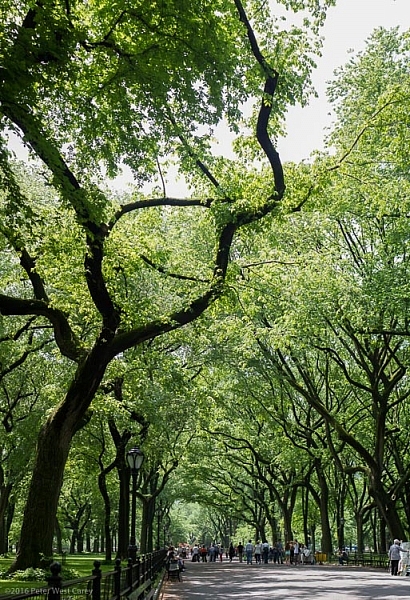
Lastly, vertoramas don’t all need to be skinny and tall. They are also used to create a more formal aspect, even a nice square, of a subject hard to capture in a single frame. This image of Central Park in New York is an example as it was shot with a 50mm lens on a crop sensor camera, far from being wide angle. But the result is a nice, wide image that gives more depth to the scene. See also: 5 Steps to Rock the Brenizer Method.

A vertical panorama of trees and tourists in Central Park, New York City, New York, USA

A vertical panorama of trees and tourists in Central Park, New York City, New York, USA

Conclusion

Vertoramas are a fun way to explore the world. They stretch our normal view, and force us to think creatively to capture what we are after. I personally love the format for what the extra foreground can bring to the story.

If you’ve shot vertoramas before, what are some of your favorite subjects? Any other advice you might give to beginners? Please share in the comments below, along with your vertical panorama images.

googletag.cmd.push(function() {
tablet_slots.push( googletag.defineSlot( “/1005424/_dPSv4_tab-all-article-bottom_(300×250)”, [300, 250], “pb-ad-78623” ).addService( googletag.pubads() ) ); } );

googletag.cmd.push(function() {
mobile_slots.push( googletag.defineSlot( “/1005424/_dPSv4_mob-all-article-bottom_(300×250)”, [300, 250], “pb-ad-78158” ).addService( googletag.pubads() ) ); } );

The post How to Shoot Vertical Panoramas (Vertoramas) by Peter West Carey appeared first on Digital Photography School.


Digital Photography School

 
Comments Off on How to Shoot Vertical Panoramas (Vertoramas)

Posted in Photography


Shoot for Love

15 Aug

Hello there, It’s been a hot minute since I updated this page, but that doesn’t mean I haven’t been shooting and sharing how I make what I make! Kaestle and […]
Jake Garn Photography

 
Comments Off on Shoot for Love

Posted in Uncategorized


How to Shoot Real Estate Photography Using Natural Light

14 Aug

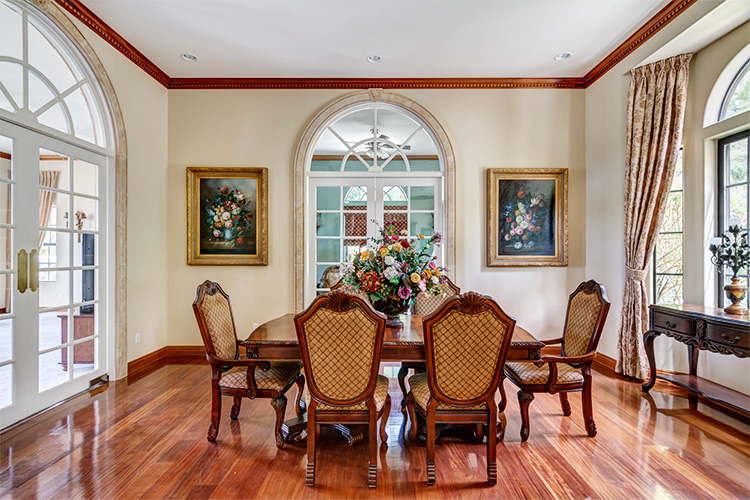
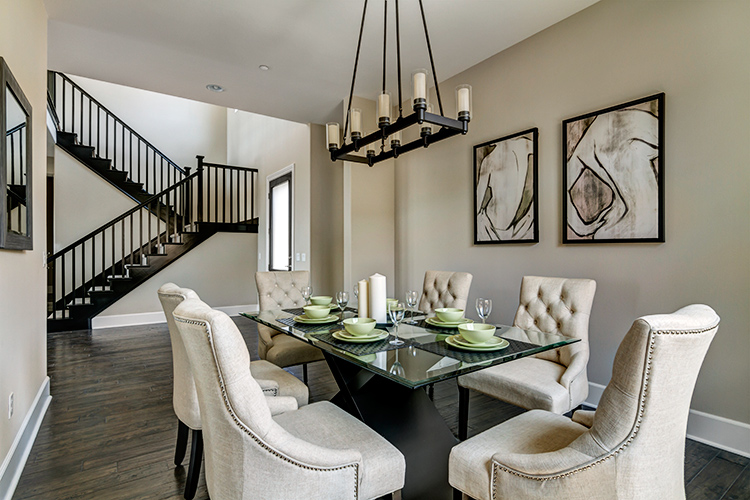
There’s something about the way sunlight illuminates a room. The light pours over surfaces, metal fixtures gleam, wood detail shines, and the edges of furniture upholstery glows. Natural shadows produced by different objects convey a sense of depth. A naturally-lit image gives you a feel for what it would be like to see the space in person.

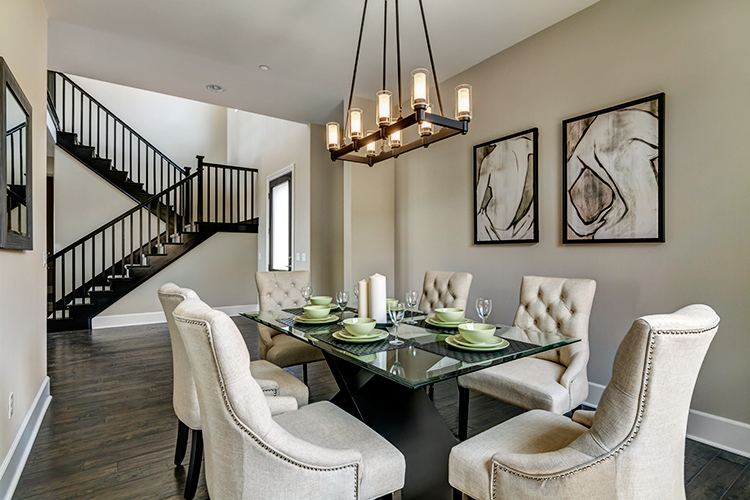
1 dining

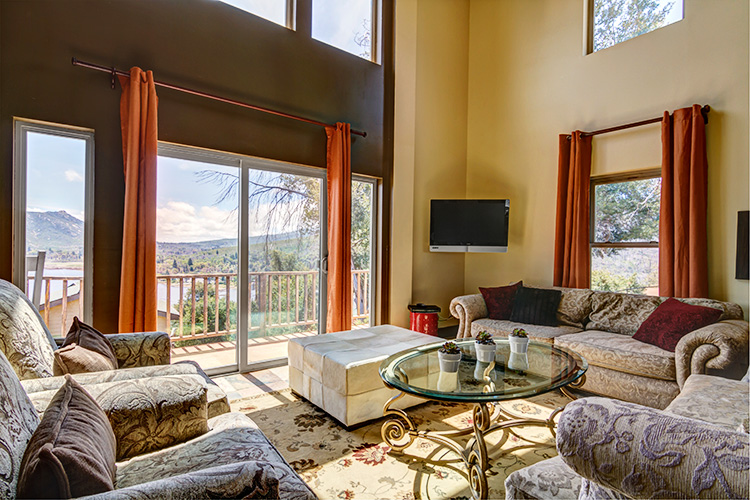
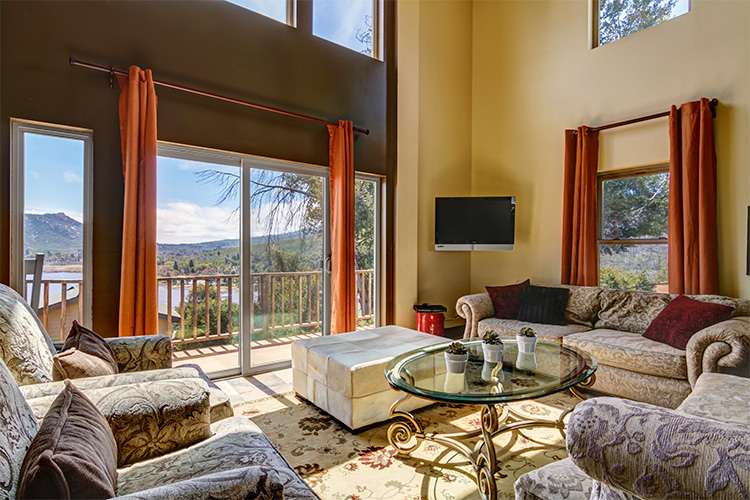
The following will give you a basic understanding of equipment needs, how to manage contrast and mixed lighting in a room, and HDR shooting techniques to get you started doing real estate photography using natural light.

Equipment

Shooting with natural light has the benefit of a short equipment list. A camera, tripod, and wide angle lens is all you need.

  • Camera: A DSLR with auto-bracketing will increase your shooting speed and ease.
  • Tripod: Your tripod should be sturdy enough that your camera will stay put if you need to manually adjust camera settings, while shooting a series of bracketed images.
  • Wide Angle Lens (with lens hood): For cropped sensor cameras, the Tokina 11-16mm is a fantastic choice for real estate photography. The Canon 10-22mm is also a great option. You’ll be able to handle just about any real estate shooting situation with either of these aspherical lenses. For full frame cameras you’ll want a lens in the 16-35mm range. A lens hood is necessary to prevent lens flare.
  • Not required, but definitely a bonus: Circular Polarizer. In addition to deepening blue skies, a circular polarizer can be very helpful in reducing glare on windows, foliage and pool surfaces.

Sunlight on the exterior

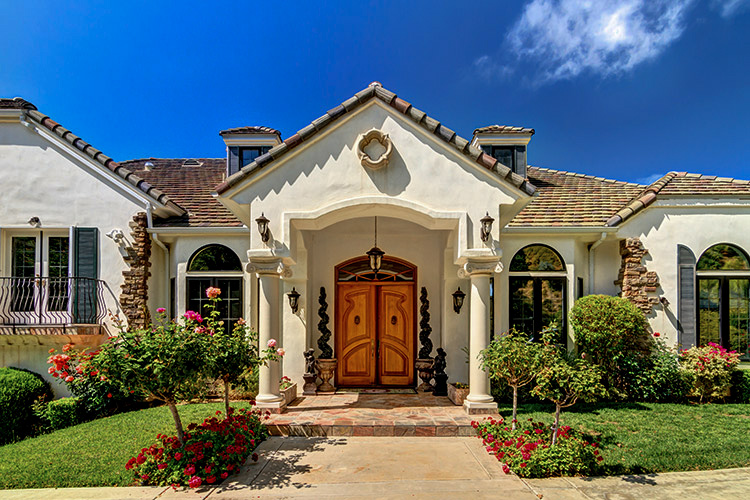
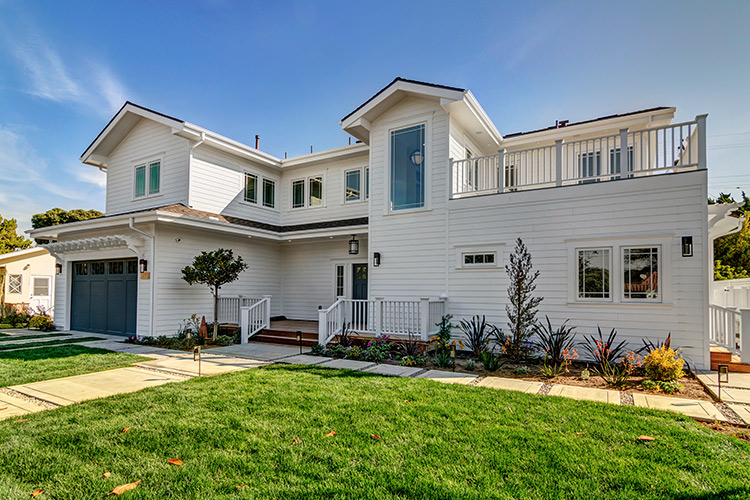
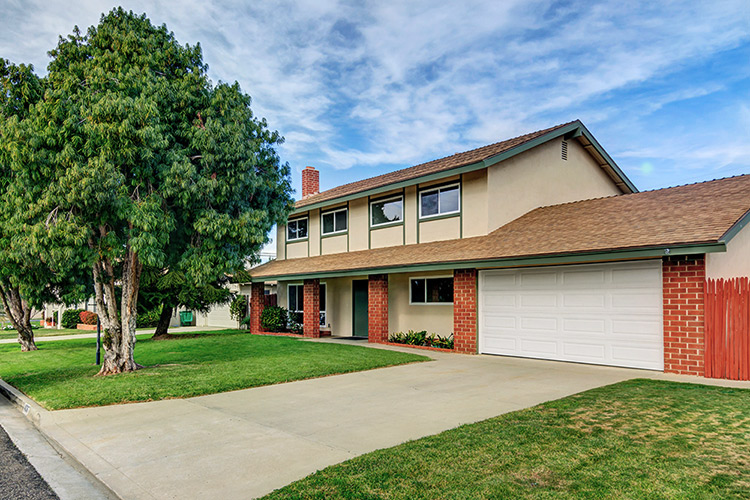
A sunny day is the best canvas for your exterior shots. Try to schedule your shoot during a time of day when the sun will be shining on the front of the house. Ask your client (or check Google Maps) to see which direction the house faces. You want capture the front exterior in its best light, as it’s almost always used as the featured image for the property’s listing.

2 exterior sun darlene

If it’s not possible to shoot the exterior in sunlight, don’t fret. Shooting HDR (explained later on) will help perk up a shady exterior.

851 Cabrillo Ave 05 Exterior print

4036 Baldwin Lane 01 ExteriorFront

Camera position within a room

There’s usually one ideal spot in a room, to position your camera to showcase the best angle. A room’s best angle usually shows:

  1. As much of the room as possible.
  2. The most aesthetically pleasing furniture and/or architectural elements.

For the natural light photographer, finding that spot depends on two things: available space, and window brightness.

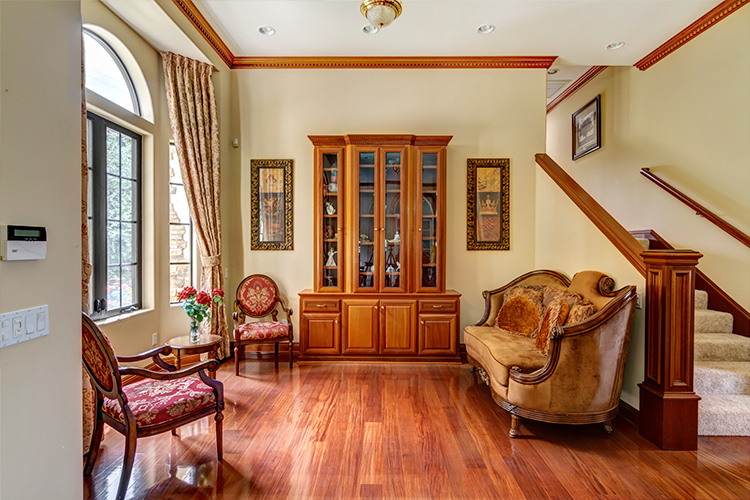
Most importantly, you need to pick a space you can physically occupy. For smaller houses and rooms, quite often your only choice is the doorway, as it is likely to be the only spot where you can fit behind the tripod, and still squeeze enough of the room into your shot. Capturing three walls in your shot will give the viewer a better idea of the size and space of the room.

Rooms large enough to offer more than one shooting location often have windows lacking shades or blinds. Pick a spot in which extremely bright windows are angled more than 45 degrees away from center of your lens’ field of view. Doing so will help you avoid a high-contrast shooting situations and potential lens flare, which will in turn reduce your time spent in post-production.

4 side light

The shooting location for this image placed the bright window at a 90-degree angle to the lens, minimizing contrast, as well as producing a pleasantly side-lit scene. An out of frame kitchen window, provided supplemental light from the right.

5 low contrast window

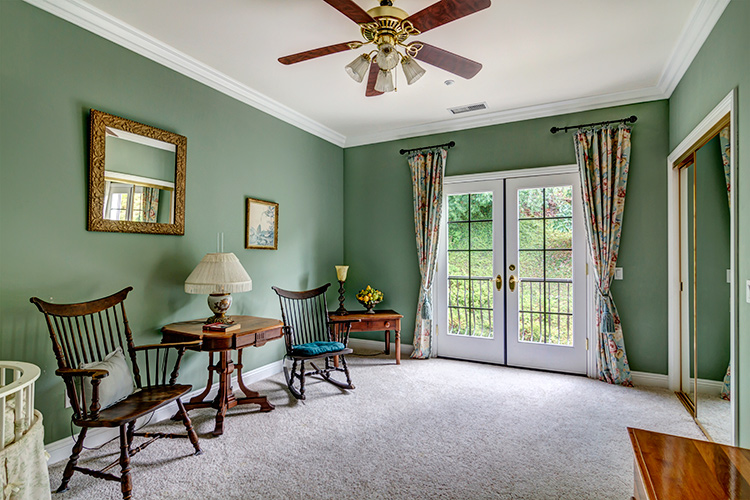
This room’s patio doors looked directly onto a foliage-covered hillside, resulting in a reduced contrast between interior and exterior, and less work required in post-production.

Working with windows

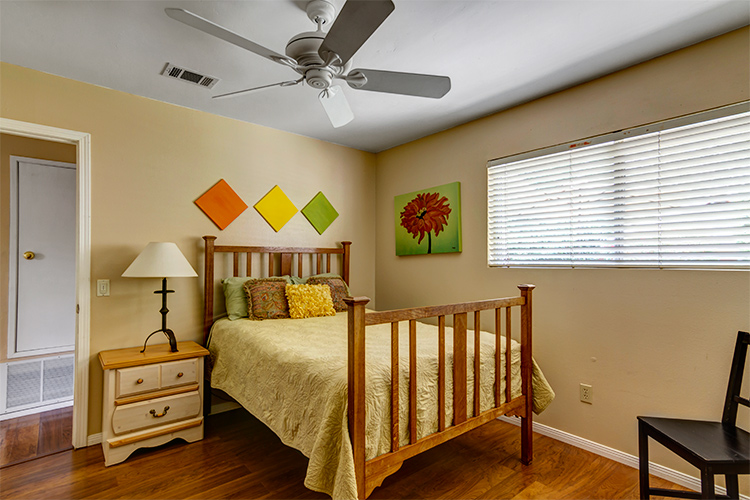
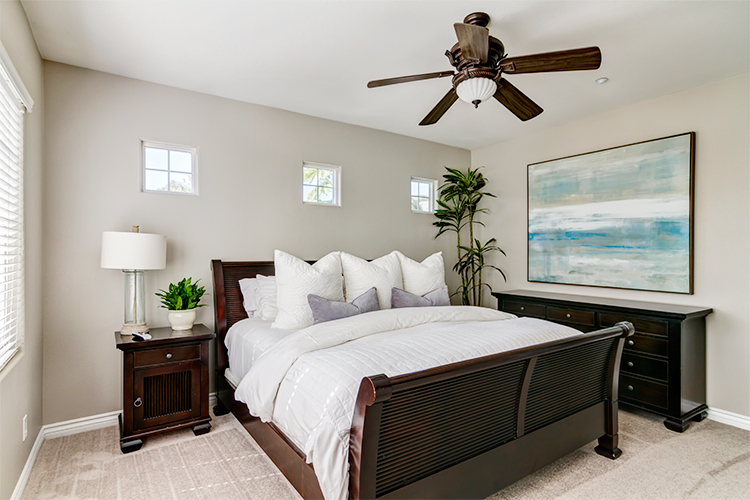
The windows in smaller rooms, such as bedrooms and bathrooms (in which your shooting position is limited) usually have blinds or shades. If the windows are bright, consider closing them at least partially, to reduce contrast between the interior and exterior – especially if the view outside is not an additional selling point for the house. This cuts down on the overall contrast of the scene, while still illuminating the room. It also prevents direct light from hitting your lens, minimizing flare and ghosting.

6 bed shades

Blinds are angled at 45 degree to cut down on scene contrast.

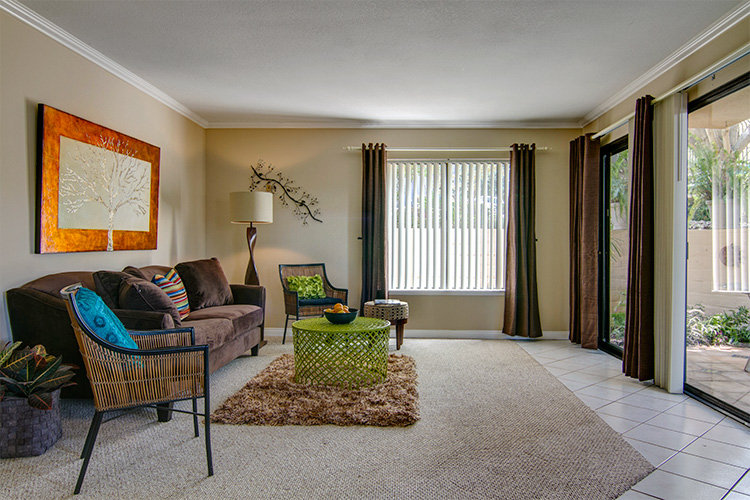
7 living partial

Blinds on the brightest window are partially closed, whereas the patio door blinds were left open.

Shooting HDR

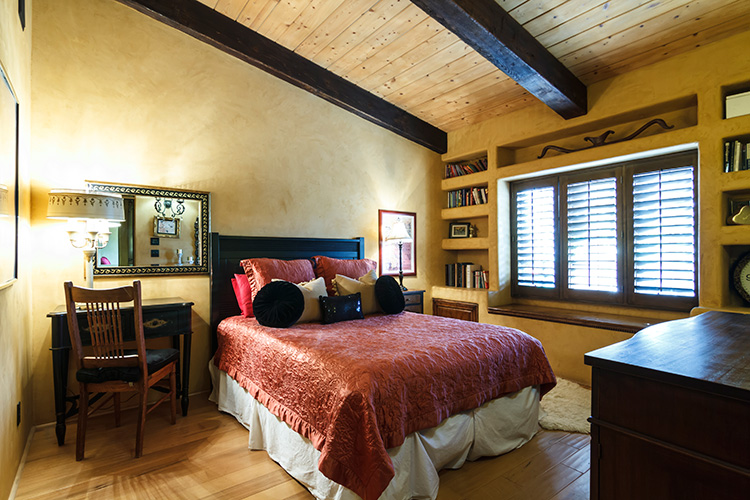
Natural light can create beautiful images, but they do require some extra work in post-production. Rarely can a single exposure handle the range of contrast produced by an interior space with windows. HDR techniques will help remedy shadowy corners and bright windows, properly exposing all parts of the space.

8 bed no hdr

From a single exposure.

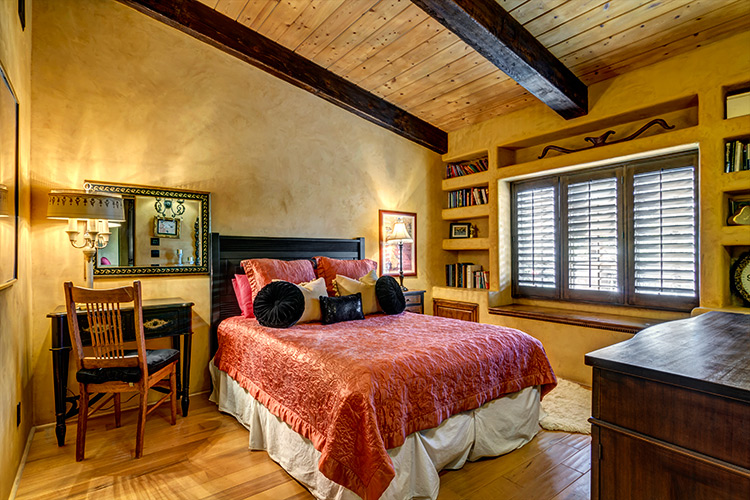
9 bed hdr

HDR composite created with nice bracketed images.

To create an HDR image, you’ll need to shoot a series of bracketed images. Tiny rooms without any windows, such as washrooms and closets, usually require three images bracketed by 1-1.5 stops. In most rooms 5-7 images will do the trick. High-contrast spaces containing bright interior lighting and/or windows, may require nine bracketed images. For rooms with exterior views, sometimes HDR programs have difficulty rendering the contrast, no matter how many bracketed images you shoot, and the composite starts to look unnatural.

In general, it’s difficult to achieve a natural look within an image that contains a room with a view. For finer control over this interior/exterior blending process, consider shooting an image to expose for the view out the window, then using Photoshop to mask the view into the HDR composite image of the room.

10 view hdr

HDR composite image.

11 view hdr+extra image
HDR composite with an additional image exposed for the view masked into the windows with Photoshop (above). Even though the change is subtle, the potentially distracting overexposed window scene is now closer to proper levels, making it easier for the viewer’s eye to move from the interior to exterior, and back again.

Mixed lighting inside

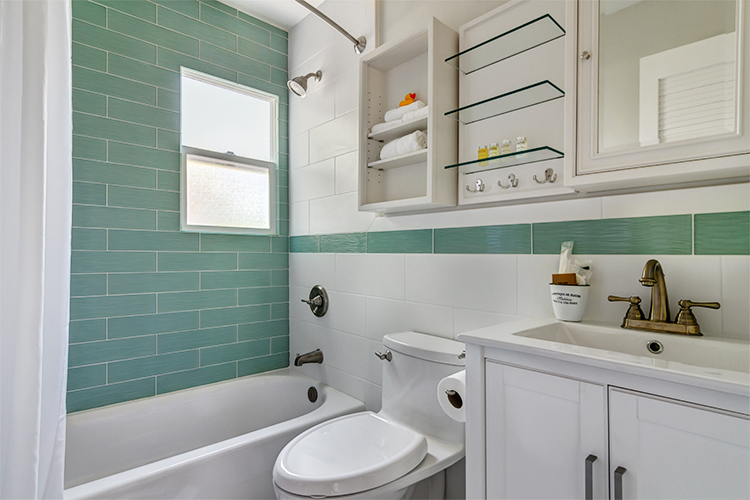
One of the difficulties of working with natural light, is dealing with mixed lighting situations. If enough light is coming in through the windows, you can choose to leave interior lights off, resulting in a single daylight color temperature throughout the image. Leaving interior lights off works especially well when window light is sufficiently illuminating the room, the light fixtures themselves aren’t in the frame, and the palette of the room is mostly white.

12 bath sunlight only

Lights off in this bathroom resulted in a fresh and clean look.

13 bed sunlight only

The window light was so abundant in this bedroom that turning the interior lights on could have arguably made the scene look unnatural.

14 living sunlight only

The interior lights were kept off to avoid mixing tungsten with daylight for this shot. Turning them on wouldn’t have added much illumination, as the sunlight was quite bright on its own.

If the room isn’t bathed in sunlight, or contains light fixtures like pendants or chandeliers that should be on display, make sure to turn them on. You’ll end up with multiple color casts that will require correction later, but there’s a point at which simplifying the lighting just to speed up post-production, starts to undermine the ambiance of the room.

15 living mixed

Mixed lighting in the living room above, and the bedroom below, required a significant amount of color correction in production, but resulted in more inviting and warmer looking spaces.

16 bedroom mixed

You can reduce your color correcting time by masking in the lights, the same way you would the view outside a window. Shoot the room with the lights off, then with the lights on. Create two HDR composites of each lighting situation, then mask in the illuminated lights. This works well with fixtures that don’t provide much illumination but should be seen turned on.

17 dining chandelier off

HDR composite with chandelier off.

18 dining chandelier on

HDR composite with the illuminated chandelier masked in with Photoshop.

Conclusion

Shooting real estate with only sunlight and interior lighting lends a beautiful, natural aesthetic to your images. When setting out, remember:

  • A wide angle lens is a must-have, along with camera and tripod.
  • Shoot the exterior bathed in sunlight, if possible.
  • Avoid shooting directly into extremely bright windows.
  • Adjust shades and blinds to control contrast within a room.
  • Decide how to deal with mixed lighting, and shoot different variations to give yourself plenty of options in post-production later.

Please post your questions and share your real estate photos in the comments below.

googletag.cmd.push(function() {
tablet_slots.push( googletag.defineSlot( “/1005424/_dPSv4_tab-all-article-bottom_(300×250)”, [300, 250], “pb-ad-78623” ).addService( googletag.pubads() ) ); } );

googletag.cmd.push(function() {
mobile_slots.push( googletag.defineSlot( “/1005424/_dPSv4_mob-all-article-bottom_(300×250)”, [300, 250], “pb-ad-78158” ).addService( googletag.pubads() ) ); } );

The post How to Shoot Real Estate Photography Using Natural Light by Lauren Schroeder appeared first on Digital Photography School.


Digital Photography School

 
Comments Off on How to Shoot Real Estate Photography Using Natural Light

Posted in Photography


Planning A Shoot With A Creative Team

18 Jul

Plan a shoot!


Hey FashionPhotographyBlog.com readers,

Last time we discussed what is a creative team and how to find one. Once you have assembled your creative team, it’s time to plan a shoot together. I’ll be using the experience from one of my previous shoots to talk about this process. 


I’m going to walk you through some of the planning behind my editorial for Kenton Magazine, “Surrealia,” however, the same basic principles apply to planning a test.


Get Inspired! 


Come up with a concept and do your research. The idea behind this shoot started when talking to an illustrator, and good friend, Matt Tedford. (Check out his work, he’s awesome!) We wanted to collaborate on an editorial so took some time to sit down and look at other editorials which incorporate illustration.


These were our two favorites:


– Defragmentation of Beauty by Marcin Tyszka for 25 Magazine

– Abbey Lee Kershaw by Greg Kadel for Numero


One thing we planned on doing was to use seamless and have a simple background. This way nothing detracts from the illustration. This idea of a non-distracting background was apparent in both the editorials we favored and reaffirmed our initial plan.


By dissecting what we saw in our two favorite stories, together we decided on a general direction for where the illustrations should go. From Greg Kadel’s images, we loved the use of bright pops of color and cutouts around the model. From Marcin Tyszka’s shoot, we loved the organic, free feeling the illustrations had and the use of line. I left a lot of the illustration to Matt, without too much guidance, because I trust his aesthetic. Good thing too, it turned out amazing!


marcin-tyszka-25-magazine Marcin Tyszka


abbey_lee_kershaw-numero-magazine-shot-by-greg-kadelGreg Kadel


Find your team


After deciding on what type of style we want for illustration, we decided to keep the clothing simple as to not distract or fight with the artwork to be added later. Being a bit inspired by Givenchy’s Spring 2012 collection and current trends, we decided on high contrast clothing and the use of the peplum. Simple, classic and chic. Hair was to be simple, down with beautiful curls and body. Makeup was decided to be pretty natural with a light smokey eye to define the face a bit, in order to compliment the hair and clothing.


We had our idea, now we had to find our team. Be sure to look for creatives that will compliment your concept. If a hairstylist is fantastic at big, beautiful waves but doesn’t favor doing up-dos (which is what you’re planning on doing), perhaps keep them on hold until you have a shoot that requires that big, beautiful wavy hair that they excel at. If someone is enjoying what they’re doing, it will show.


Styling was easy. Jocelyne, a stylist and all around awesome person that I’ve worked with before was the obvious choice. Her style matched exactly what we were looking for. She is great at keeping it simple and classy without over styling with accessories or trying to do too much at once (which is quite common, especially among stylists just starting out.) Fashion doesn’t have to be about excess! Often, less is more.


For hair and makeup we got lucky and were able to find one artist that is excellent at both! I had seen Mayela’s work around and loved her portfolio. I contacted her with details about our shoot and next thing we knew, she said yes and it was time to shoot!


So now that you have planned your shoot, got inspired and found your team it’s time to get ready to shoot. However, with a team of people on board. How do you communicate your photographic vision effectively with your team. Stay tuned, because next time we will be discussing how to communicate your ideas clearly using mood boards.


IMAGE SOURCE:


Feature image: Defragmentation of Beauty by Marcin Tyszka for 25 Magazine (left) & Abbey Lee Kershaw by Greg Kadel for Numero (right)

Image 1: Defragmentation of Beauty by Marcin Tyszka for 25 Magazine

Image 2: Abbey Lee Kershaw by Greg Kadel for Numero


Fashion Photography Blog

 
Comments Off on Planning A Shoot With A Creative Team

Posted in Uncategorized


Fly-by: Learn how to shoot the Milky Way from an airplane

24 Jun

Photographing the Milky Way from the ground can be challenging in itself, but photographer Ian Norman has taken the challenge to new heights. In a new video tutorial, he explains how he and his partner Diana Southern photographed the Milky Way from an airplane. 

Together, the couple make up the team behind Lonely Speck, a blog dedicated to astrophotography. They were on a flight to Budapest when they began to wonder if they could capture the Milky Way from the plane. Sure enough, after some trial and error outlined in the video above, they found it was possible. Ian explains in the tutorial how he layered multiple exposures in post-processing to reduce noise in his final images.

The results are pretty amazing. We know what we’ll be doing next time we get bored on an overnight flight. 

Articles: Digital Photography Review (dpreview.com)

 
Comments Off on Fly-by: Learn how to shoot the Milky Way from an airplane

Posted in Uncategorized


The good, the bad and the ugly of aerial photography – Part 1: Why shoot aerials?

18 Jun

Man has always had the dream of flight – but so has the photographer. It’s a unique experience to shoot from the air, and it has some incredible benefits in many senses. But as one might discover, it often carries a number of problems and a hefty price tag. I personally started my romance with serious aerial photography about three years ago, and I’ve been hooked ever since. My experiences have mostly been amazing but admittedly not always so, and I’ve come to wonder what makes photography flights in different settings so… well, different.

In this series of articles I’ll try to survey my own experience with aerial shooting, including the different aircrafts to shoot from, what equipment to use, what technicalities to put an emphasis on and of course, the prices. I’ll talk about some of my aerial shoots, and explain what distinguished them and what I learned. Aerial photography can be wonderful and exhilarating, but it can also be disappointing if you don’t know what you’re getting yourself into. I hope the following articles help with this.

An aerial panorama of one of the most epic light shows I’ve ever seen. Wonderfully clear sun rays were peeking from between the thick cloud layer and the jagged mount Molhøgtinden and its surrounding peaks in the Lofoten Islands during my workshop there. I was stunned with excitement and couldn’t believe my eyes. After a few seconds I shook my head, picked my jaw up and went back to shooting. This image is the result.

So what makes aerial photography so darn good? A great many things. First of all, it allows for a new – and extremely different – angle of shooting. There’s a huge difference in the angle of view when shooting from the ground, or even from a mountaintop, and when shooting from hundreds of meters above the landscape. The same scenery gains another dimension, and the viewer gets a much better understanding of the surroundings. Perspective deformations are also less pronounced since there’s less of a difference in distance to the subject’s different parts.

An aerial shot of Deadvlei, Namibia. It’s incredible to realize that most of the clay pan is actually devoid of trees – which is hard to perceive when you’re down there.

It can be claimed that only from the air, one can see the landscape for what it really is. Unseen parts of the setting can be exposed, for example ones that are obscured by mountains, and with good visibility, one can see and shoot much farther than from the ground. In the image below, shot from a helicopter in Holuhraun, Iceland, several of these advantages are demonstrated: first of all, when shooting from the ground, it was impossible to get a shot of the lava which includes the caldera itself. Secondly, this angle allows for inclusion of the lava river in the background, which contributes a great deal to the composition.

In addition, some landscapes are hard to get to – not to mention shoot – from the ground, especially close enough to make them interesting. A good example of this is an erupting volcano. If the lava flow is strong, it can be impossible to go near the eruption point itself, but from the air, it can often be seen quite clearly.

But it’s really not limited to volcanoes. Instead of traversing miles and miles on foot, camping, climbing and struggling, one might take a short flight, shoot a location and fly back in time for dinner. Sounds enticing, and it truly is. Moreover, it’s quite addictive, so much so that when visiting a new location, I often feel like I have to shoot it from the air, even if there isn’t much sense in it. One mustn’t forget that aerial photography is an experience to cherish, not to be taken for granted. Do it when you must, when it offers real benefits, and not just as a means to shoot without making an effort.

The terminal of Ilulissat glacier, Greenland.

In the next article in the series I’ll talk about the two most popular aircrafts for aerial photography.


Erez Marom is a professional nature photographer, photography guide and traveler based in Israel. You can follow Erez’s work on Instagram, Facebook and 500px, and subscribe to his mailing list for updates.

If you’d like to experience and shoot some of the most fascinating landscapes on earth with Erez as your guide, you’re welcome to take a look at his unique photography workshops around the world:

White Wonderland – Lapland
Land of Ice – Southern Iceland
Winter Paradise – Northern Iceland
Northern Spirits – The Lofoten Islands
Giants of the Andes and Fitz Roy Hiking Annex – Patagonia
Tales of Arctic Nights – Greenland
Earth, Wind and Fire – Ethiopia

Selected articles by Erez Marom:

  • Behind the Shot: Dark Matter
  • Mountain Magic: Shooting in the Lofoten Islands
  • Behind the Shot: Nautilus
  • Behind the Shot: Lost in Space
  • Behind the Shot: Spot the Shark
  • Quick Look: The Art of the Unforeground
  • Behind the Shot: Watery Grave
  • Whatever it Doesn’t Take
  • Winds of Change: Shooting changing landscapes
  • On the Importance of Naming Images
  • Hell on Earth: Shooting in the Danakil Depression
  • Parallelism in Landscape Photography

Articles: Digital Photography Review (dpreview.com)

 
Comments Off on The good, the bad and the ugly of aerial photography – Part 1: Why shoot aerials?

Posted in Uncategorized


4 Tips for Pre-Visualizing – Look Before You Shoot

11 May

For a limited time only at Snapndeals, May 10-24th only get 33% OFF Timeless Portraits & Natural Light Black & White Portraiture, a 2-eBook Bundle by Wayne Radford.

Pre-visualizing is an art form, that I believe, is not taught enough these days. It is the foundation for an artist or photographer to establish lighting, background, foreground elements, composition, and harmony. You need to establish all this before lifting a camera to your eye. Let’s look at some techniques and tips for pre-visualizing.

1 – BACKGROUND

Are there any distracting elements behind the subject that draw your eye away, e.g., bright hotspots such as sun coming through trees, strong geometric shapes, or bright colours. If these are a problem, move the subject or camera position around to avoid or minimize their effect.

PHOTO 1

2 – FOREGROUND

Can you use any foreground elements to help create framing – examples would be rocks or foliage. Even getting down very low to blur the foreground will create a framing effect.

3 – COMPOSITION

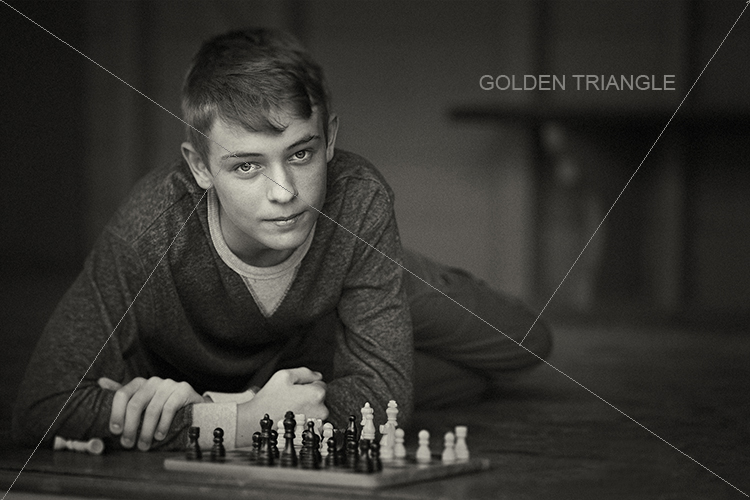
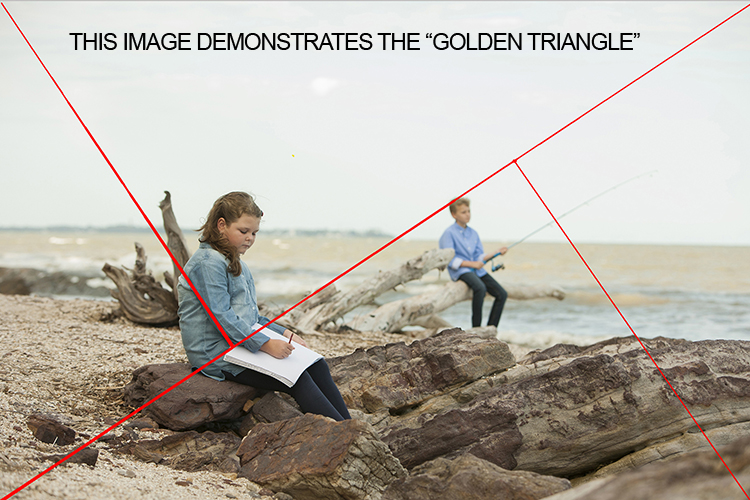
Look around for shapes and perspectives that create more interest and lead your viewer around the scene. Example: I like to use the Golden Triangle instead of the Rule of Thirds, so I’m looking for elements that balance with that in mind. There is a sample below and you can read: Divine Composition With Fibonacci’s Ratio (The Rule of Thirds on Steroids) for more comprehensive information. Of course, it’s built-in as part of the cropping tools of Photoshop CS6 (and LR) and later, but I suggest learning to see this way before post-production adjustments.

4 – HARMONY

This one is the most overlooked aspects of composition. I want my subject’s face to stand out, so I generally choose backgrounds that are complimentary to their clothing for colour, and depth of tone for black and white. Also, try minimizing any additional colours in the background that clash with the subject. Yes it sounds complex, so I’ve added some study examples to make it easier. (clothing colour selection is also important, but that’s a subject of its own for another day). Next time you watch a movie, look at the colour coordination of clothing and scenes.

PHOTO 1

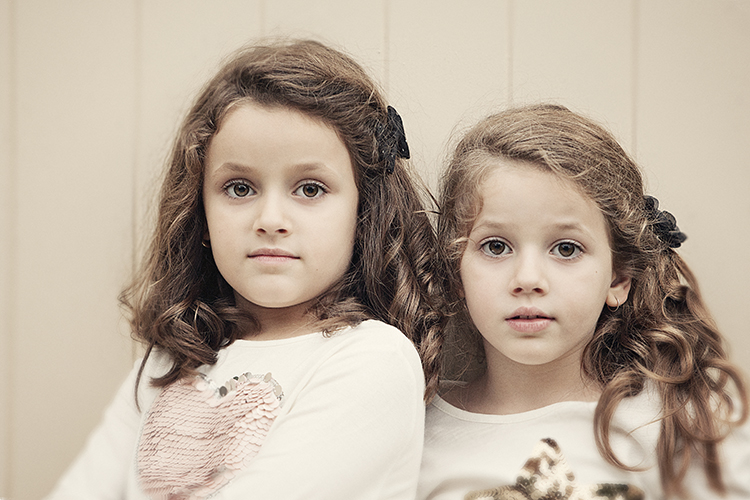
I chose an old painted door as the background for these two girls as it had the same hues (colour tones) as their clothing and skin. Look at your subject’s clothing colours, and then find a background tone that will compliment it. This will make them stand out from the background and not create a distracting colour contrast. An example would be if the background were green or blue.

The simpler, less cluttered backgrounds work best, especially when the colour tones harmonize. Keep the subject at least a meter or more away from the background, and use a wide aperture of f/1.2-2.8 to create a shallow depth of field.

PHOTO 2

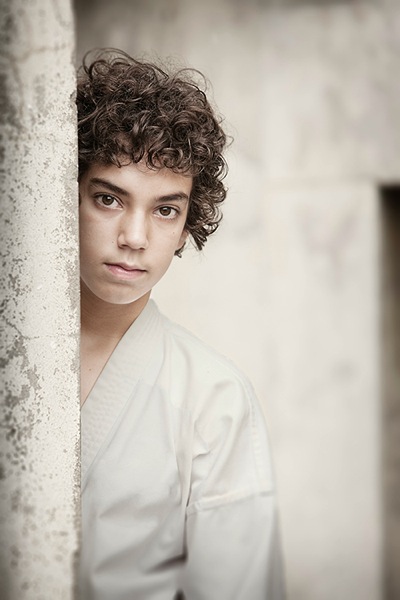
Be careful that the subject doesn’t blend into the background. In this study I first looked for the light direction, then looked at the background colour and tone. It was a yellow painted wall which normally would record brighter than his face, but as it was undercover in shade, it rendered quite dark. Looking at his clothing colours I knew that there would be separation that could be controlled in Photoshop without any problem, if necessary. Again distance from subject to background, combined with an f/2.8 aperture setting, creates a lot of background blur which allows the subject to pop. Note, there are no distracting background elements.

PHOTO 3

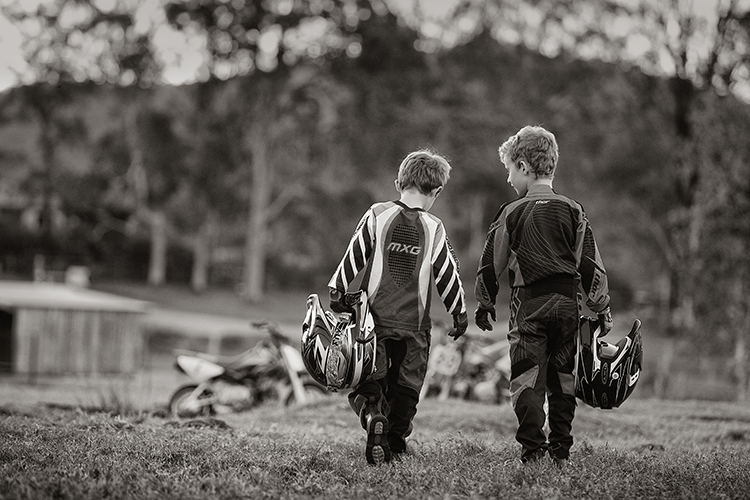
When searching for suitable locations, you may find lots of distracting objects and textures that will make your image busy. This is when pre-visualizing where the camera and subject should be placed, and what you want to be included in the background should be used.

In this image of the two boys, I noted that the trees and shed were too cluttered and distracting. By placing the boys a good distance from the shed and trees, and again setting the lens to create a shallow depth of field, (f/2.8 70-200mm lens) I was able to achieve good subject to background separation. The bikes were important to the story, so I placed them in the background to give the boys a direction to walk. Also, note the rim lighting on their hair gives extra separation.

PHOTO 4

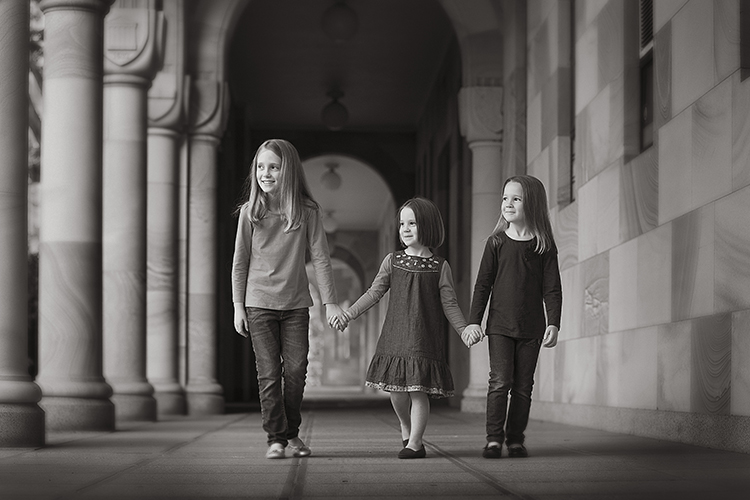
Pre- visualizing this scene is an easy one for a trained eye – find the light, look at the background. Here you can see the light wrapping around the columns, creating graduated shadows, and a diminishing background that gives depth to the overall image. In this study, the light is cross-lighting them at 90 degrees to their bodies, so turning their faces to the light creates modelling on their faces, which adds shape to their faces.

The background almost has a 3D look in the way it diminishes. Column over column, and arches layering over each other, creates great depth.

The following study is an example of how I try to pre-visualize a portrait session

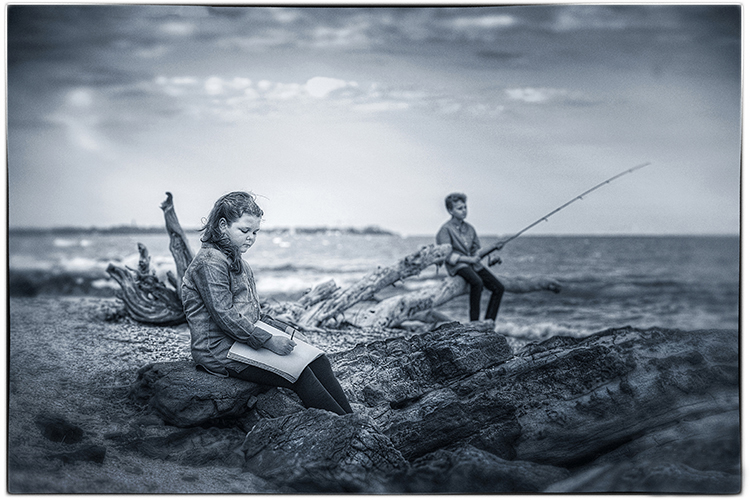
When I found this beach location (below), I was overloaded with ideas on how I was going to use it. This is the opposite to writers block, where you become void of ideas. Instead, you can be over excited with creative ideas and forget the basics that make a portrait work.

The first consideration was the direction and quality of light. In this study the open sky (right hand side of the photo, over the ocean) was the main light. Note the sun was setting over a hill behind the children, so I am using the soft light provided by the open sky. While it is a fairly flat light and very soft, it provides enough cross lighting to enhance texture and shape in the clothing and rocks. Notice the small specular light, rim lighting her legs, and the shadows in her clothing. These are helpful indicators to the direction of light when it is flat.

PHOTO 5

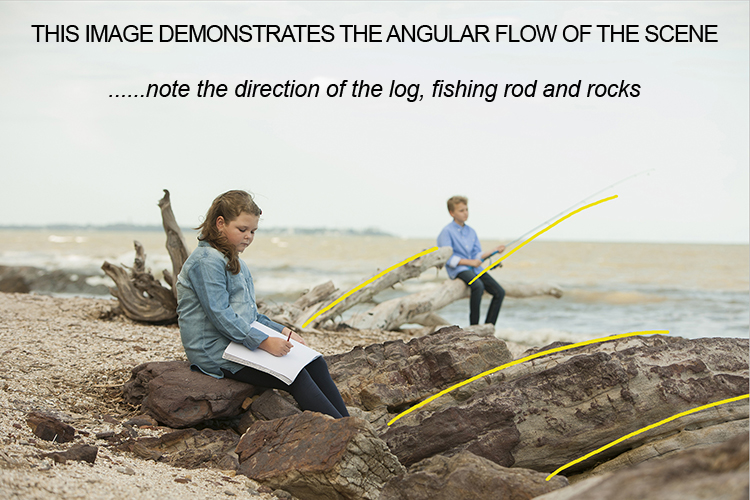
The next consideration is the placement of the subjects in relationship to the light, and the natural props such as the rocks and driftwood. Those props are the things that get photographers excited, the challenge is how to use them creatively. Remember this is all done before lifting the camera to your eye – the art of pre-visualizing. I also noticed the angular shape in the rocks curving towards the ocean, this matched the angle of the driftwood.

PHOTO 6

The girl was placed on the most distant rock (also the flattest one for comfort) so the light was coming from her front left-hand side, creating some modelling to her clothes and face. It also allowed the image to read from left to right.

The boy was placed on the driftwood, with his rod angled to match the driftwood branch beside him. It’s also a similar angle to the diagonal line running from top right to bottom left in the image. My only disappointment was the horizon line running through the girl’s head. It wasn’t possible to move the camera any lower, and raising the camera higher would have placed the boy’s head near the horizon line. Moving the girl wasn’t an option either due to the awkward shapes of the rocks. I was happy to leave it that way, as the shallow depth of field had created enough background blur to allow her to separate from the background.

PHOTO 7

Canon 5D + 70-200 f/2.8 IS lens – F4 @1/800th – ISO 400
Hand-held at ground level
Photoshop CS6 – Alien Skin Exposure 7

When you learn the art of pre-visualizing, you will look at your work with greater satisfaction. You will know that you alone created the image to the best of your ability, using all the artistry skills of light and composition before even raising the camera to your eye. Not everything is created in the computer, I believe pre-visualizing is another tool in the journey of craftsmanship.

For a limited time only at Snapndeals, May 10-24th only get 33% OFF Timeless Portraits & Natural Light Black & White Portraiture, a 2-eBook Bundle by Wayne Radford.

googletag.cmd.push(function() {
tablet_slots.push( googletag.defineSlot( “/1005424/_dPSv4_tab-all-article-bottom_(300×250)”, [300, 250], “pb-ad-78623” ).addService( googletag.pubads() ) ); } );

googletag.cmd.push(function() {
mobile_slots.push( googletag.defineSlot( “/1005424/_dPSv4_mob-all-article-bottom_(300×250)”, [300, 250], “pb-ad-78158” ).addService( googletag.pubads() ) ); } );

The post 4 Tips for Pre-Visualizing – Look Before You Shoot by Wayne Radford appeared first on Digital Photography School.


Digital Photography School

 
Comments Off on 4 Tips for Pre-Visualizing – Look Before You Shoot

Posted in Photography


4 Questions to Ask Yourself Before You Shoot to Help Improve Your Photography

09 May

One of the nice things about mobile phones is that virtually all of them have cameras built in, which means almost anyone can be a photographer and has at their disposal quite an advanced piece of technology, capable of creating stunning images with the tap of a button. Some people prefer dedicated cameras like a DSLR or mirrorless model, and others like to carry a small point-and-shoot or even use good old-fashioned film. However, good photography has much less to do with the gear and is more about the person taking the image.

With that in mind, here are four questions to ask yourself the next time you take out your camera and start snapping away. If you stop and think about these, it will help improve your photography and you will take better photos:

  1. What is the purpose of the picture?
  2. What do I want my viewers to see or feel?
  3. How can I use my surroundings to create the image I want?
  4. How can I control my camera to get the image I want?
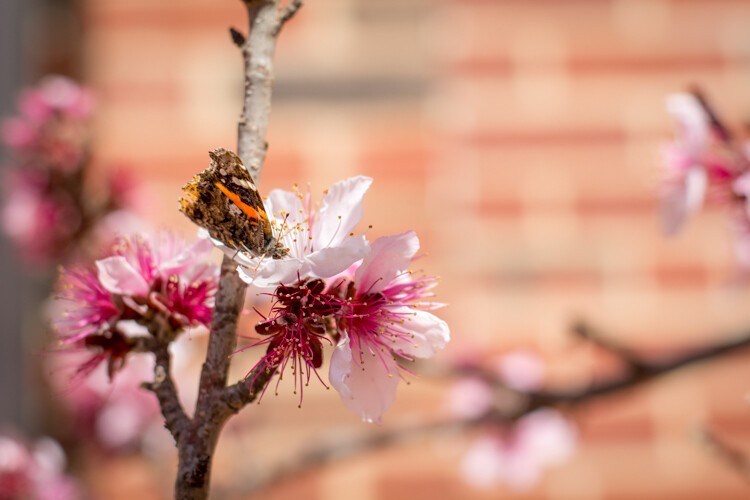
five-questions-before-photos-butterfly-flower

You could stop reading right now after seeing those questions and get to work on improving your photos, but I want to dig a little deeper into each one, to see how answering them can help you improve as a photographer and artist.

1 – What is the purpose of the picture?

Think back to the last time you sat scrolling through images on Instagram, Facebook, Flickr, or another image sharing site. Perhaps you just looked through some pictures at random, and maybe you even gave a precious few the much-coveted like, double-tap, or star rating. What was it about those photos that caught your eye and made you pause for a second or two? Recently a study carried out by Microsoft found that, thanks to smartphones and the rapid pace of our modern tech-infused lifestyles, people have an average attention span of only eight seconds. That’s shorter than a goldfish! A similar study carried out in the year 2000 found that attention spans then were roughly 12 seconds, which means things are only getting worse as we become more and more connected via technology.

You might very well have a shorter attention span than this infant. And it's a good bet your audience does too.

You might very well have a shorter attention span than this infant, and it’s a good bet your audience does too.

This has profound implications for photographers because it means that in the already-crowded landscape of digital pictures, your photos are not only vying for attention among thousands or millions of other images, but you have even less time to grab the viewer’s attention than ever before. To combat this, you need to make it abundantly clear to your viewers just what precisely is the point, of any given picture you take. In other words, your photos should have a clear subject – whether it’s a person or people, a flower, a kitten, a plane, a train, or even an automobile.

Look through your own pictures and ask yourself, “What’s the point?” If you can’t answer that question, then chances are that the photos won’t mean much to anyone else who sees them either. When I first got into photography I took all kinds of pictures of things that I thought might be interesting at the time, but looking back on them I honestly can’t tell you what is the purpose of many of those images. If I had taken the time to make sure the images had a clear purpose, instead of just pointing my camera at whatever I thought might look cool, I would have more important photos and much richer memories too.

I shot this photo about 10 years ago, and while I'm sure I had some kind of purpose I honestly can't remember what the point of it was supposed to be.

I shot this photo about 10 years ago, and while I’m sure I had some kind of purpose, I honestly can’t remember what the point of it was supposed to be.

2 – What do I want my viewers to see or feel?

So now you have a clear subject in mind for your picture, and you’re all ready to snap the shutter on your DSLR, mirrorless, or even mobile phone. But wait, there’s more to consider before you start eating up that memory card, and flooding your favorite social networks with more photos. Now that you know what the purpose of your photo is, take the concept one step further and ask yourself what feelings, symbols, or other elements you want to impart on your viewers.

Do you want them to feel happy, sad, curious, introspective, or nostalgic? Do you want to stir them up so as to take action for a particular cause? Do you want them to notice things other than what might be the main subject of the image, and spend time digesting and interpreting your photos to gain a deeper understanding of the world around them?

five-questions-before-photos-bubbles

I didn’t just want those who saw this picture to think “Oh, some students playing with bubbles.” I wanted people to smile and feel the same sense of delight as the girl in the middle.

Humans are visual creatures, and as a photographer you are in the unique position of using a visual artistic medium to transmit thoughts and emotions. In this sense, photography is a form of one-way communication as you invite your viewers to engage with your images, and take something away from them. For example, here’s what might appear to be a rather mundane picture of a plastic duck:

Is it a duck...or is it something more?

Is it a duck…or is it something more?

My goal in taking that picture was to have my viewers see more than just a basic rubber duckie. I specifically chose the time of day, angle of my camera, foreground and background elements, and exposure settings (i.e. f/1.8 aperture) to create this image, so that my viewers might see more than a kid’s bath toy. Perhaps they would think back to their own childhood, or maybe even invent a fantasy backstory for this duck standing guard at the edge of a precipice. It might seem like a simple image, but to me there was a lot more going on here, and by asking myself some deeper questions before I took the picture I got a better image as a result.

The same lesson applies to photography in general, and you have a powerful image-capturing tool at your disposal, to not just make snapshots, but tell stories and communicate with your audience. Going through some of these questions might seem like a lot of work when all you want to do is just pull out your camera and snap a few photos. But, as you work on doing this more and more, it will soon become second nature and you will see a noticeable increase in the quality of even your most mundane images.
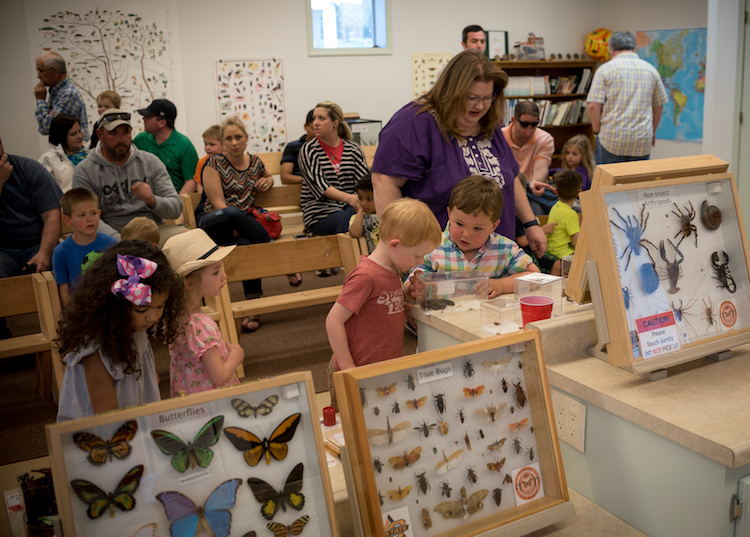
This picture is just a quick snapshot that's not going to win any awards, but I shot it in such a way so as to provide context, invite the viewer to feel slightly squirmy, and hopefully see more than just the some kids in a room.

This picture is just a quick snapshot that’s not going to win any awards, but I specifically took it in such a way so as to provide context, invite the viewer to feel slightly squirmy, and hopefully see more than just some kids in a room.

3 – How can I use my surroundings to create a better photo?

One of the easiest ways to create a more compelling, interesting, and visually appealing photograph is to take a few seconds and examine the context in which the picture is being taken. Then try to position yourself, your subject, or even just your camera in such a way as to create maximum visual impact, and help you get precisely the photo you are trying to capture.

As an illustration of this take a look at the photo below. When I took it, I made several quick decisions with regard to my surrounds in order to get a better picture, than if I had just settled for a quick snapshot. As the child was walking down the street I followed from a short distance in order to get a photo of him, and adjusted my viewpoint so the sailboats would occupy the left side of the frame. I crouched down low to get a better angle, and positioned myself so that the boy’s head and shoulders were above the horizon and showing through a clear portion of sky instead of a tree or building. I also scooted over so the white paint line was leading towards the center of the picture, rather than off to the side. All this was done in a matter of seconds, since I knew this particular moment would be quite fleeting.
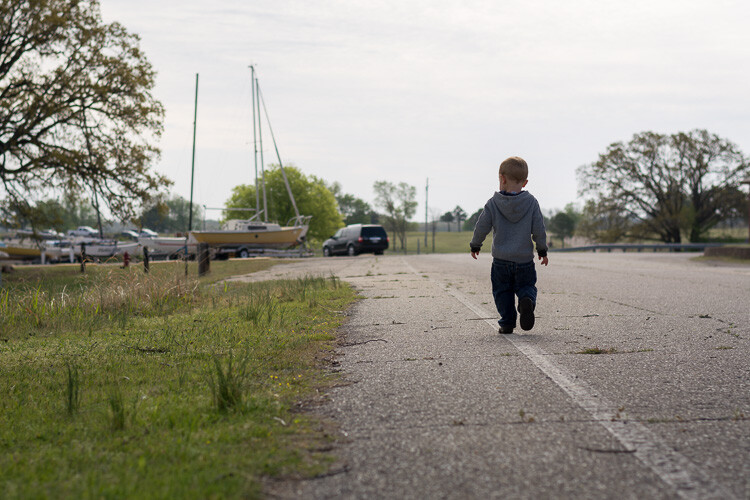
five-questions-before-photos-marina

The result is a picture that, in my opinion, is elevated several notches above what otherwise might be a quite ordinary picture of a kid walking down the street. It also provides clear answers to the two previous questions:

  1. What is the purpose of the picture? To show a child walking down the street.
  2. What do I want my viewers to see or feel? A bit of nostalgia, a connection to the boy, perhaps a bit of hopefulness for the future.

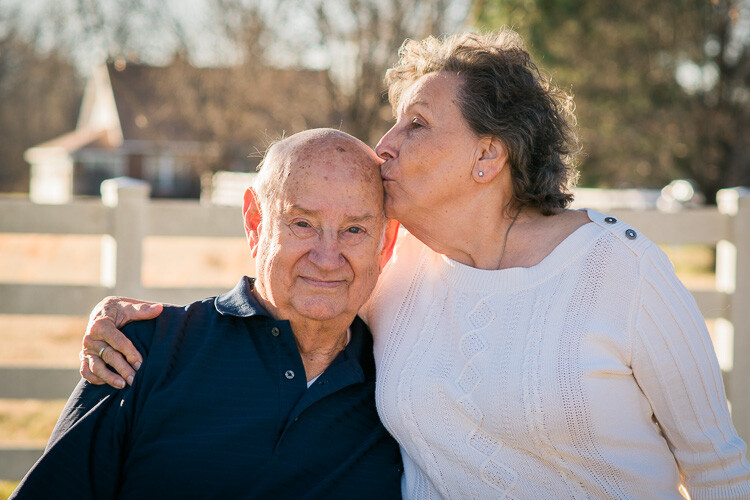
Recently I had the privilege of photographing four generations of one family, so I chose a location that would evoke feelings of a certain time period and place my subjects in a very specific context. What you see below is the direct result of me choosing to use the environment to elevate the impact of the photo. In order to create a sense that the couple had a long and rich history together, I placed them a few meters in front of a white fence, with an old farmhouse occupying the top-left portion of the frame. I could have taken the picture from many other angles, with very different scenery around them, but what you see here is the result of a very specific artistic choice on my part, in order to get precisely the photo I wanted.
five-questions-before-photos-couple-barn

You can do the same thing, and it doesn’t require any special equipment or educational training. All you need is to keep your eyes open, examine the world around you when you take photographs, and use the environment to give your images a richer sense of time, place, and context.

4 – How can I control my camera to get the image I want?

Many people take great pictures without ever straying from the Auto option on their camera dial, and if you have a mobile phone or point-and-shoot you may not have any other options besides Auto. I know from personal experience how scary it can be to move away from Auto. For years I wondered why I would ever bother leaving that safe little green option when it did a pretty good job – especially since every time I ventured into another mode such as Aperture Priority, Shutter Priority, or (gasp!) full Manual, I never seemed to get the results I was looking for. What you may not realize if you stick with Auto, is that a whole new world of photography wonder is right in front of you, just waiting to be discovered if you can learn how to control your camera a bit more.
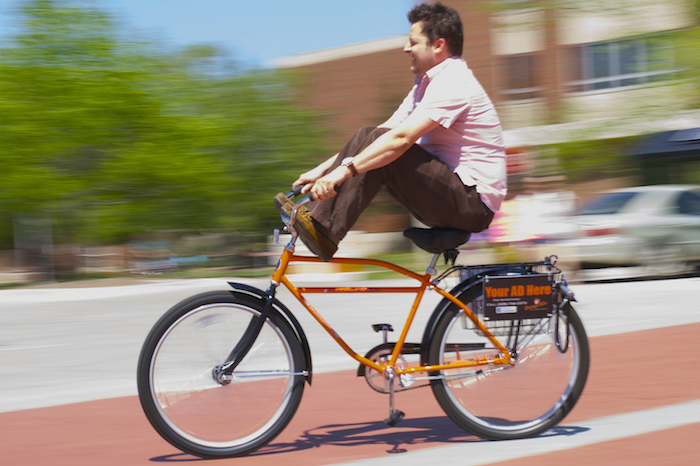
It's virtually impossible to get pictures like this using the Auto mode.

It’s virtually impossible to get pictures like this using the Auto mode.

Learning to control the aperture of your lens, the shutter speed of your camera, and the ISO sensitivity of your image sensor can make all the difference between a forgettable snapshot, and a wall-worthy masterpiece. It takes a little while to learn the fundamentals, but once you get the hang of it you will find yourself asking technical questions in order to solve artistic problems. I am constantly pressing buttons and flipping dials when I take pictures (even if it’s just my kids in the back yard) so I can get exactly the image that’s in my head, and not the picture that my camera thinks I want to take.

If this sounds hopelessly complicated, look down at the keyboard the next time you are at a computer. Remember when it took you agonizing minutes just to peck out a few words or sentences? Now you probably don’t look at the keyboard at all, and typing isn’t something you really think about anymore. You think of the words you want to appear onscreen, and your fingers naturally move to the right letters on the keys. The same thing happens with practice when you learn to use other modes on your camera, and your pictures will be much improved as a result. The bottom line is that if you, not your camera, decide which aperture, shutter speed, and ISO to use, you will get better pictures.
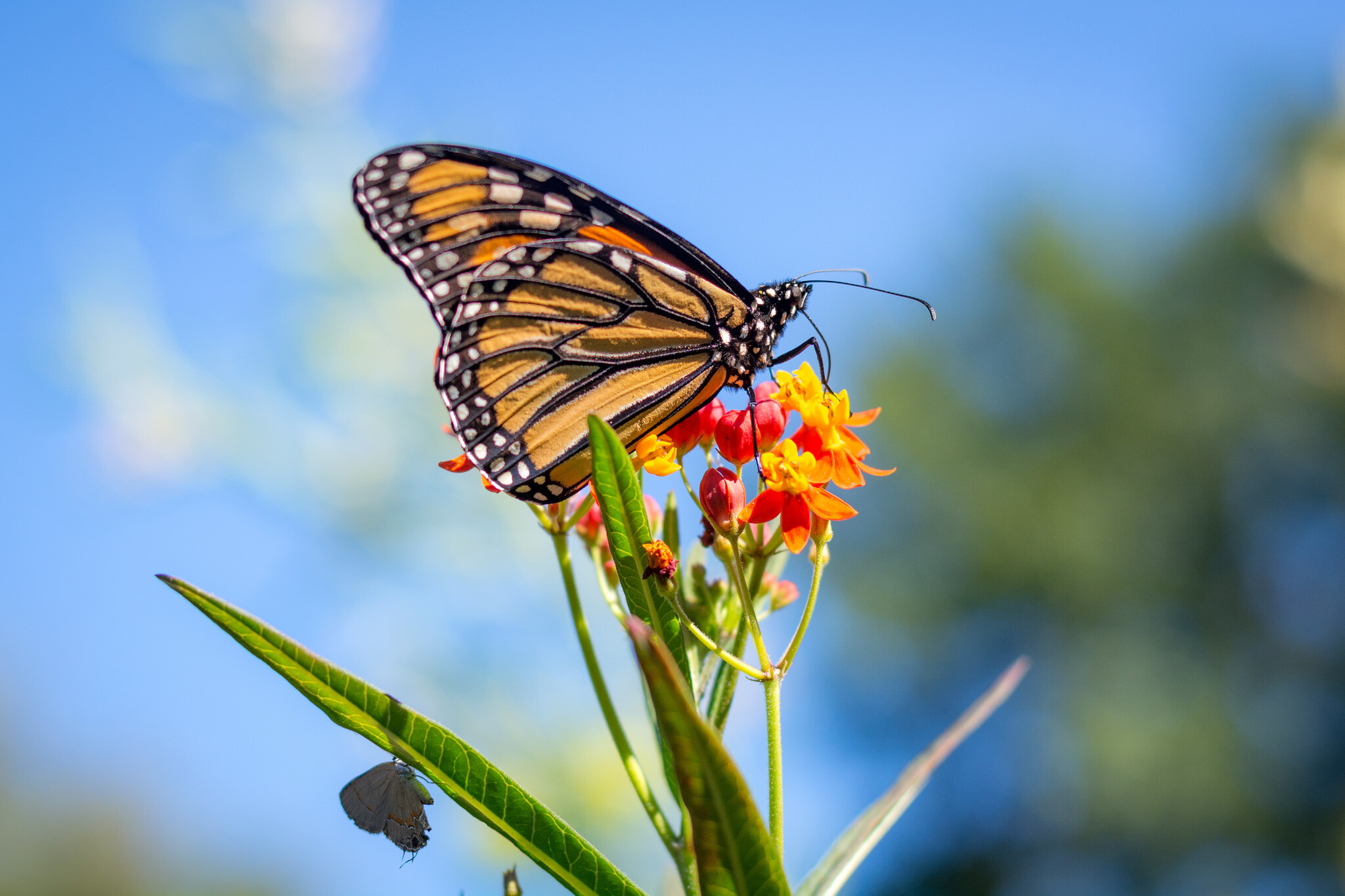
five-questions-before-photos-butterfly

Now that you have read my four questions, I’m curious to know your side of things too. Are there any tips you have found that work well for you to get better images? What are some of the best practices you have learned over the years? Share your thoughts in the comments below.

googletag.cmd.push(function() {
tablet_slots.push( googletag.defineSlot( “/1005424/_dPSv4_tab-all-article-bottom_(300×250)”, [300, 250], “pb-ad-78623” ).addService( googletag.pubads() ) ); } );

googletag.cmd.push(function() {
mobile_slots.push( googletag.defineSlot( “/1005424/_dPSv4_mob-all-article-bottom_(300×250)”, [300, 250], “pb-ad-78158” ).addService( googletag.pubads() ) ); } );

The post 4 Questions to Ask Yourself Before You Shoot to Help Improve Your Photography by Simon Ringsmuth appeared first on Digital Photography School.


Digital Photography School

 
Comments Off on 4 Questions to Ask Yourself Before You Shoot to Help Improve Your Photography

Posted in Photography


4K from Space: ISS astronauts shoot 3D movie of planet Earth

07 May

Astronauts based on the International Space Station have been working as movie makers to help create a 3D film featuring the planet Earth as viewed from space. A Beautiful Planet was shot in 4K using Canon’s cinema camera system, and will be shown in IMAX theaters from the end of the month. The film includes dramatic views of the planet lit up at night as well as overhead perspectives on weather systems and the Northern Lights.

A Beautiful Planet IMAX® Trailer

Footage for the film was collected by six space station astronauts over the course of three missions from November 2014, after Canon EOS C500 and EOS-1D C cameras were delivered to the ISS via an unmanned supply ship with a collection of lenses. Made in association with NASA, the film aims to educate viewers about Earth, but also to highlight the effects humanity has on the planet.

For more information on the film and where you can see it visit the IMAX website.

Press release

IMAX® Film ‘A Beautiful Planet’ Features “Out Of This World” Canon 4K Imagery

Using Canon Cameras and Lenses, Teams Shooting from the International Space Station Capture Breathtaking Images of Our Planet from a Vantage Point Few Get to See

MELVILLE, N.Y., April 14, 2016 – The future of 4K filmmaking is looking up — in fact, all the way to space. A Beautiful Planet, the latest 3D space documentary from acclaimed filmmaker Toni Myers and IMAX Entertainment, made in cooperation with NASA, will premiere in IMAX in New York on April 16 and was shot primarily in space using Canon cameras and lenses.  The film will be shown to the public exclusively in IMAX® and IMAX® 3D theaters beginning April 29.

The Canon EOS C500 4K Digital Cinema Camera and EOS-1D C 4K cameras were transported from Earth to the International Space Station (ISS) in November 2014 via an unmanned supply ship, and were received by NASA astronaut Terry Virts, astronaut Samantha Cristoforetti from the European Space Agency and Cosmonaut Anton Shkaplerov. This was the first time that 4K cameras were brought aboard the space station for a commercial film project. During a six-month mission at the ISS, Virts, Cristoforetti and Shkaplerov worked closely with NASA astronauts Kjell Lindgren, Butch Wilmore, Scott Kelly, and Kimiya Yui of the Japan Aerospace Exploration Agency (JAXA) to take turns using Canon’s advanced digital cameras and lenses to film footage of lightning storms, the continents, volcanoes, coral reefs and bright city lights on Earth for the film. One of the film’s greatest and most dramatic highlights, the striking imagery of the Northern Lights–or the aurora borealis– was captured by NASA astronaut Kjell Lindgren. These awe-inspiring images were previously unattainable in such stunning resolution.

The Canon EOS C500 4K (4096 x 2160-pixel) Digital Cinema Camera is capable of originating uncompressed RAW output for external recording to meet the demands of premium cinematic productions and other top-quality production markets. It features a Super 35mm, 8.85-megapixel CMOS image sensor, DIGIC DV III Image Processor and an expansive range of recording and output options specifically for 4K and 2K image acquisition. The compact, lightweight Canon EOS-1D C Digital SLR camera delivers outstanding video performance and provides video recording at 4K (4096 x 2160-pixel) or Full HD (1920 x 1080-pixel) resolution to support high-end motion picture, television production and other advanced imaging applications.

‘A Beautiful Planet’ joins Canon at NAB
A gallery of still images taken on the ISS with the Canon EOS-1D C camera and Canon lenses during the shooting of the film will be shown at the Canon booth # C4325 at the National Association of Broadcasters (NAB) trade show, April 18-21, 2016 in Las Vegas, NV. During NAB, the film’s Director of Photography, James Neihouse, ASC, will speak at Canon’s stage on the challenges and benefits of shooting in space. Joining him will be Marsha Ivins, a consultant on the film, former NASA astronaut, and a veteran of five space shuttle missions. Neihouse has worked on more than 30 IMAX films including Space Station 3D and Hubble 3D and trained more than 25 shuttle and space-station crews on the intricacies of large-format filmmaking.

The documentary, A Beautiful Planet was produced, written, and directed by Toni Myers, and is narrated by Academy Award®-winning actress Jennifer Lawrence.

About A Beautiful Planet
A Beautiful Planet is a breathtaking portrait of Earth from space, providing a unique perspective and increased understanding of our planet and galaxy as never seen before. Made in cooperation with the National Aeronautics and Space Administration (NASA), the film features stunning footage of our magnificent blue planet — and the effects humanity has had on it over time — captured by the astronauts aboard the International Space Station (ISS). From space, Earth blazes at night with the electric intensity of human expansion — a direct visualization of our changing world. But it is within our power to protect the planet. As we continue to explore and gain knowledge of our galaxy, we also develop a deeper connection to the place we all call home. From IMAX Entertainment and Toni Myers — the acclaimed filmmaker behind celebrated IMAX® documentaries Hubble 3D, and Space Station 3D — A Beautiful Planet presents an awe-inspiring glimpse of Earth and a hopeful look into the future of humanity.

Articles: Digital Photography Review (dpreview.com)

 
Comments Off on 4K from Space: ISS astronauts shoot 3D movie of planet Earth

Posted in Uncategorized