RSS
 

Posts Tagged ‘Settings’

10 Must-Have Camera Settings for Concert Photography

16 Sep
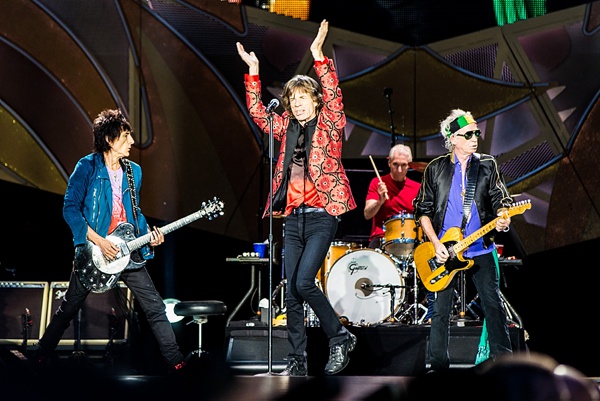
The Rolling Stones

The Rolling Stones: Nikon D800, 185mm at f4, 1/320, ISO 1600

The correct camera settings are key to getting awesome concert photos in low light situations. Maybe you were in this situation before. You used the full automatic mode in front of the stage and – BAM- the little flash monster sitting on top of your camera pops up and throws the ugliest light you can think of onto the singer’s face. At this point, a lot of frustrated concert photography beginners just take their cameras home and never shoot a concert again. But wait, in this article I’ll share the camera settings I use all the time during concert shoots and I promise they’ll help you to immediately boost your career as concert photographer. Let’s start.

1) Aperture Priority Versus Manual Exposure Mode

I started off using aperture priority mode; you tell your camera the aperture you want to use and the camera sets the shutter speed accordingly. This is a great option for a beginner to use, because you’ll be stressed enough with all the other things going on around you. However, I soon recognized that only manual mode would give me the flexibility I was looking for. I set aperture, shutter speed, and ISO and then change them on the fly using the internal exposure bar in the viewfinder. I am constantly checking my LCD screen and have a look at the histogram to see if my exposure is correct.
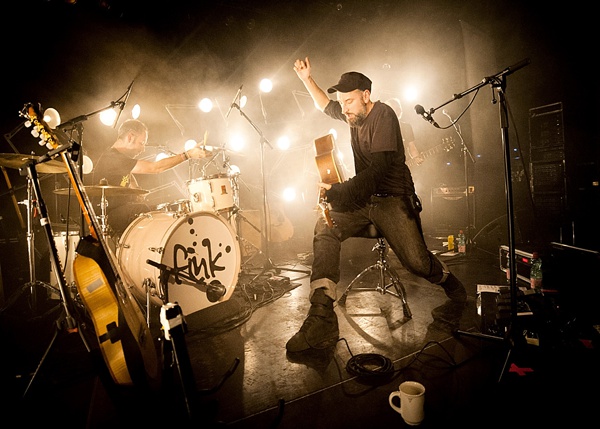
Fink

Fink: Nikon D700, 14mm at f/2.8, 1/200, ISO 3200

2) Use the Lowest Aperture Number

When deciding which lenses will work best for concert photography, you’ll always come to the same conclusion: use fast lenses and shoot them wide open. Set your aperture to the smallest number on your lens e.g. f/1.8 (which reflects a big aperture). This allows the most possible light to enter your sensor and is a must-have setting in ultra low-light stage conditions. The best zoom lenses have an aperture of f/2.8, the best prime lenses f/1.4 or f/1.8. For Beginners on a budget I suggest to get a 50mm f/1.8, which is cheap and therefore a no-brainer for concert photography.

3) Use a Fast Shutter Speed

Have you ever been on a concert where the artist was hyperactive jumping from one side of the stage to the other? To freeze these movements you have to use a fast shutter speed. In general, I set my shutter speed at 1/200sec and faster. Otherwise you risk blurred photos.

Miley Cyrus

Miley Cyrus: Nikon D800, 340mm at f/4.8, 1/320, ISO 1600

4) High ISO Values

ISO or film speed refers to the sensitivity of an analog film. Today the term is used for the sensitivity of your digital sensor. The higher the ISO setting the less light is needed for a proper exposure, but the more noise you will encounter in your pictures. Depending on the ability of your camera a good starting point for ISO is a setting of 1600. If my shutter speed is too low, I will crank up the ISO setting to 3200 or 6400.

5) Spot Metering

Set your camera’s internal light meter to spot metering. This takes a light reading limited to the center of your viewfinder (a very small percentage, and some cameras allow you to choose where to meter – check your manual). When shooting concerts, you will often find yourself in a situation where the artist is lit by a spotlight and the rest of the stage is almost dark. When using spot metering mode, place the artist’s face in the middle of your viewfinder and you’ll get the right exposure for it. When using the Matrix (or evaluative) metering setting, the camera will take a light reading at several points in the scene and you’ll probably get overexposed faces if the background is dark.
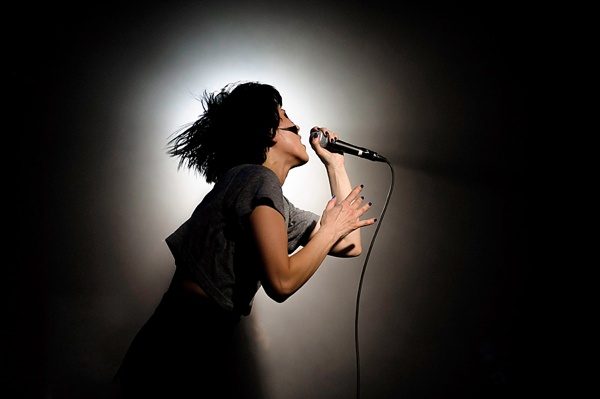
Atari Teenage Riot

Atari Teenage Riot: Nikon D700, 50mm at f/1.8, 1/2500, ISO 1600

6) Use the Middle Autofocus Point

On your camera, only use the central focus point in low light situations. This will be the most accurate one. If you don’t always want to have the artist in the middle of the frame, you have to recompose. Simply push your shutter button halfway down to focus on the artist’s face. By holding the shutter button halfway down you lock focus. Now move your viewfinder until you get the desired framing and push the shutter button fully down.

To use this technique, you have to set your camera to Autofocus single (AF-S for Nikon, One Shot for Canon) mode, otherwise the camera focuses continuously while you’re reframing your picture. You can also set the AF-ON button to focus, which I prefer.

7) Use Auto White Balance

I use the auto white balance setting on my camera. The reason being is that I shoot in RAW format and can therefore adjust the white balance setting in post-production anyway.

Skunk Anansie

Skunk Anansie: Nikon D700, 85mm at f/3.5, 1/500, ISO 1600

8) Multiple Shot (Burst) Mode

Set your camera to multi-shot mode (may be called High Speed shooting mode). It allows you to rapidly shoot three to four photos in a row (depending on the frames per second of your camera model. It’s more likely that at least one of the four photos is tack sharp whereas the others might not be in focus.

9) Never Use Flash

First, you are not allowed to use a flash in concert photography. Imagine ten photographers burst their flashes at the same time. This would be quite annoying for the artist. Second, straight flash pictures don’t look awesome.
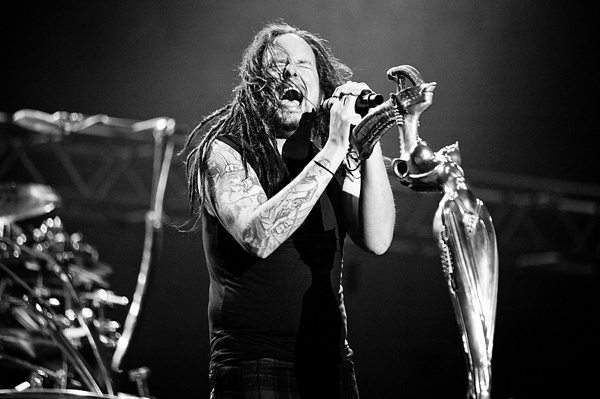
Korn

Korn: Nikon D700, 130mm at f/2.8, 1/250, ISO 3200

10) Shoot in Raw Format

Always shoot concerts in RAW format. If you shoot in JPEG mode, the internal camera computer adds contrast, saturation and sharpness to your photos. These files look great when you open them on your computer, but don’t leave much freedom in post-production. If you shoot in RAW format, the camera does not process the photo at all. The advantage is that you can change parameters like exposure, white balance, saturation, contrast, clarity and so on afterwards.

Here is a summary of my ten must have camera settings:

  1. Use manual exposure mode
  2. Use your lowest aperture number
  3. Use fast shutter speeds
  4. Use high ISO values
  5. Use spot metering
  6. Use your middle autofocus point
  7. Use the auto white balance setting
  8. Use burst mode
  9. Never use flash
  10. Shoot in RAW format

With these camera settings you will be able to get great results when shooting in low light conditions such as concerts.
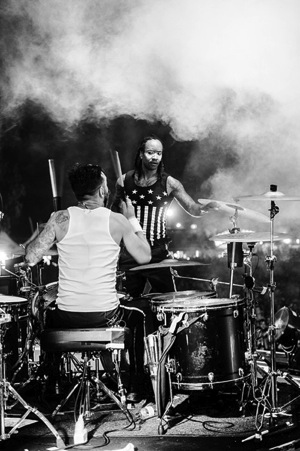
The Prodigy

The Prodigy: Nikon D800, 85mm at f/1.8, 1/320, ISO 1600

Zola Jesus

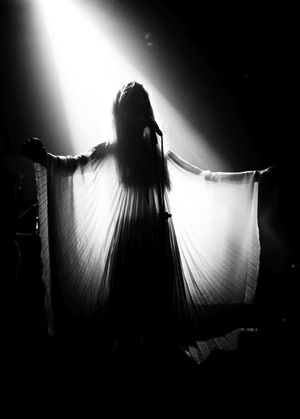
Zola Jesus: Nikon D700, 50mm at f/1.8, 1/200, ISO 1600

Being a concert photographer can be tough. There are a lot of industry secrets that nobody is talking about and it took me almost six years to reveal them.

So I decided to write the Guide to Rockstar Concert Photography which is a step-by-step guide which will provide you with all the information necessary from shooting your first concert, learning which camera gear and settings you need, how to build an awesome portfolio, understanding the rules of the photo pit, getting signed by magazines, shooting exclusively for your favorite bands, and making money with your work.

This guide is available for the first and only time at SnapnDeals at a 50% off discount to help you getting started to become a Rockstar Photographer too.

The post 10 Must-Have Camera Settings for Concert Photography by Matthias Hombauer appeared first on Digital Photography School.
Digital Photography School

 
Comments Off on 10 Must-Have Camera Settings for Concert Photography

Posted in Photography


A New Photographer’s Guide to Camera Settings

29 Mar
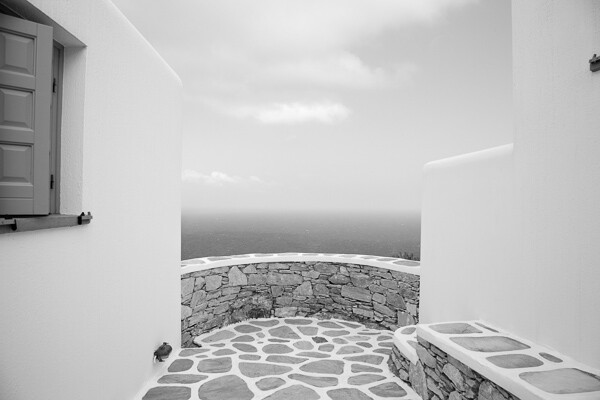
Folegandros, Greece.

Folegandros, Greece – 24mm focal length at f/11

Without experience, looking at the endless functions and dials on a camera can seem daunting, and it is at first, especially with many of the newer digital cameras that have about 5,000 functions (I’m looking at you Nikon).

Luckily, you only have to learn the major functions at first to significantly improve your photography. It might take a few reads through the content below, but it does not take long to learn the most important abilities of your camera to significantly improve your photography.

Depth of Field

Before we delve into the settings, you first need to understand depth of field. The term refers to the area in front of, and behind the subject, that the camera is focused on that is acceptably sharp. We use the term acceptably sharp because as you get further from the object you are focusing on, the sharpness gradually declines.

Another way to think of depth of field is as a range of sharpness. A shallow depth of field refers to a small range of acceptable sharpness, while a deep depth of field refers to a large range of acceptable sharpness in an image.

Venice, Italy.

Venice, Italy – 70mm focal length at f/5.6. This image has a fairly shallow Depth of Field; the oar and wave are sharp, while the rest is out of focus.

When standing at the same distance away from your scene, there are three ways to alter the depth of field:

  1. Changing your aperture setting
  2. Changing the focal length on your camera (i.e. 24mm versus 200mm lens) will give you the appearance of more depth of field.  Technically, this is an optical effect due to the magnification, but it will create the appearance of more depth of field.
  3. Changing the focus distance. Focusing on a closer subject will give you less depth of field than focusing on a subject at a distance.

Focal Length (wide-angle versus telephoto)

Changing your focal length alters the relationship in size between the foreground objects and the background objects. It also affects the appearance of depth of field due to the change in magnification.

Wide angle:   a wide angle lens (i.e., 28mm) will make foreground subjects larger in comparison to the background. This allows you to have a main subject that is prominent in the foreground while simultaneously fitting in more of the background, since it is proportionally smaller. When standing at the same distance from your subject, there is the appearance of more depth of field throughout the frame with a wide angle lens than with a telephoto lens when the same aperture is used.

Folegandros, Greece

Folegandros, Greece – 24mm focal length at f/11. Notice the size of the foreground stones in relation to the middleground stones.

Telephoto:  a telephoto lens will compress and tighten the view. The longer the focal length, the larger the background objects will appear in comparison to the foreground objects. This makes the background objects look closer to the foreground objects than with a wide-angle view.

While not a steadfast rule, portraits are often thought to be more flattering when a slightly telephoto lens is used (around 80mm to 120mm), which will compress a person’s features. If you photograph someone with a large nose at close distance with a 17mm lens, that nose will look gigantic when compared to the subject’s ears.

Florence, Italy.

Florence, Italy – 170mm focal length at f/6.3

ISO

Before you learn about the Aperture and Shutter Priority modes, you need to understand ISO. The ISO setting is a way to change the sensitivity of your camera’s sensor to light.

ISO is the first setting you should set when you walk out the door and you should always be aware of what it is set at. Practice altering it, because once you get familiar with ISO you will change it constantly.

A lower ISO number (100, 200, or 400) means that the camera sensor will not be as sensitive to light but the quality of the image will be to the best of the camera’s ability. Low ISO images will have little to no digital noise. The best times to shoot with a low ISO are in strong daylight, when using a tripod, or when using studio lights.

A high ISO number (800, 1600 or 3200) means that the camera sensor will read more of the light, but the tradeoff is that the images will have digital noise. Higher ISOs are generally used when the light is not ideal and one does not have a tripod. You should review your camera’s ISO abilities to find the upper limit that you are comfortable using. Higher end cameras typically have a stop or two more ISO ability than entry level cameras.

East Village, NYC.

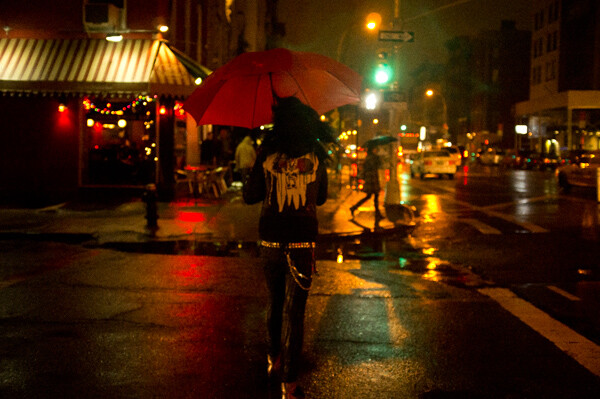
East Village, NYC ISO 3200. – grainy, but beautiful

The key here is to not be afraid to raise your ISO. Its capability has improved so much that many cameras can shoot at ISO 800, 1600, and 3200 or even higher for some. It is much better to have the ideal shutter and aperture settings when creating an image than having the ideal ISO setting. Grain is beautiful, while bad aperture and shutter settings are not.

Once your ISO is set, you will then have to figure out whether you want to shoot in Aperture Priority or Shutter Priority mode.

Aperture Priority (A/Av)

The aperture is the hole in the lens that allows light to enter the camera. The term f-stop (i.e. f/2.8, f/3.5 … f/16) is a number that refers to the size of the aperture opening, where f/2.8 is a much larger opening than f/16. Using Aperture Priority Mode will allow you to alter your f-stop and the camera will then use its internal light meter to choose a corresponding shutter speed to expose the scene correctly.

A “smaller” aperture (which refers to a larger number, such as f/16) will allow for a deeper depth of field in a scene but will allow less light to enter the camera.

Montalcino, Italy.

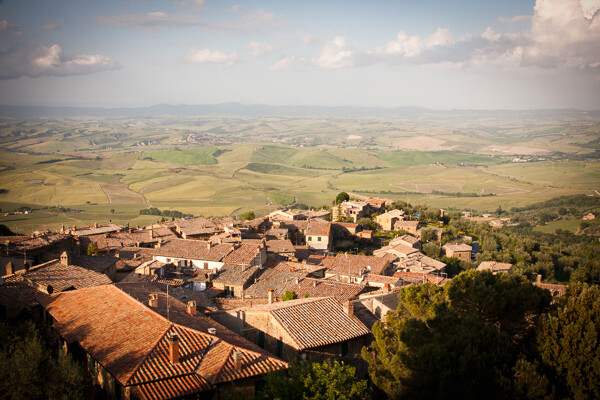
Montalcino, Italy 28mm focal length at f/14.  The small aperture yields a deep depth of field.

The photo above is an example of this type of deep depth of field, which occurs with a small aperture. The chimney in the foreground is perfectly sharp and both the mid-ground and background are very sharp.

A “larger” aperture (which refers to a smaller number, such as f/2.8) will create a shallow depth of field (with more bokeh, or out of focus blur) and will allow more light to enter the camera.

63mm Focal Length at F2.8.

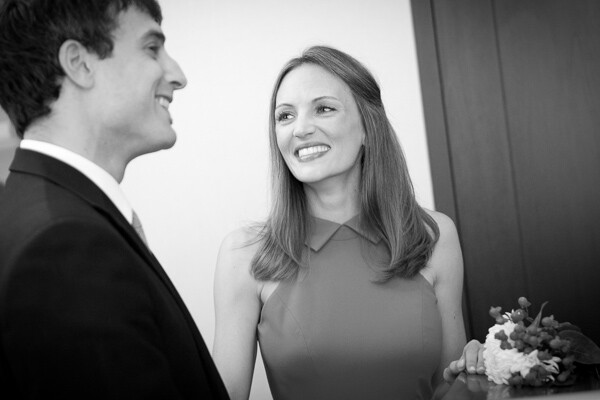
63mm focal length at f/2.8 in a dark setting. The large aperture yields a very shallow depth of field.

The primary reason to shoot in Aperture Priority mode is to control your depth of field and it is a common way of shooting for portraiture and for event and wedding photography, especially in situations where the events are held in venues with low levels of light.

While the above photograph looks bright, it was taken in a fairly dark room. Because it is shot at f/2.8, only the bride’s eyes are perfectly sharp. When photographing with a shallow depth of field, always make sure the most important element is in focus.

Shutter Priority (T/Tv)

Shutter speed is the speed at which the camera’s shutter opens and closes to allow light to reach the sensor or film. Using the Shutter Priority mode will allow you to set your ideal shutter speed, while the camera will pick a corresponding aperture to expose the scene correctly.

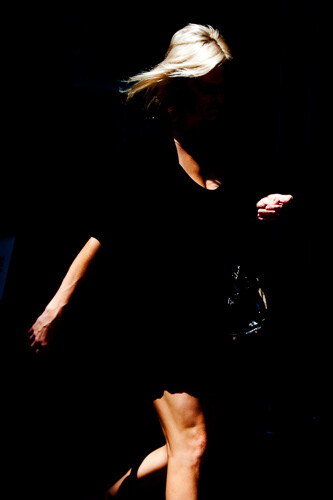
A faster shutter speed (a smaller fraction, such as 1/320th of a second) will allow less light to reach the sensor but will freeze your subject’s motion or offset the camera shake when your camera is handheld. 1/320th and faster is an ideal setting to freeze motion in people.

SoHo, NYC.

SoHo, NYC 1/320th of a second with an 80mm focal length

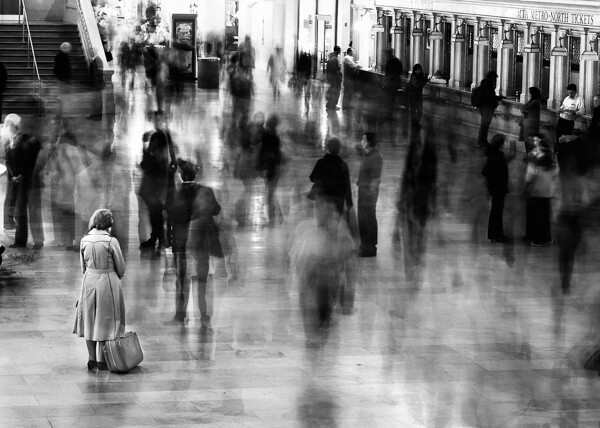
A slower shutter speed (a larger fraction, such as 1/8th of a second) will allow more light to reach your sensor and, if slow enough, will create blur in an image. Depending on the rate of motion of your subject, anywhere from approximately 1/30th to 30 seconds and more will introduce noticeable motion blur. A tripod is recommended when introducing blur into your scene, although it is possible to handhold the camera and achieve a sharp background and blurred subject if the subject is moving fast enough.

Grand Central, NYC.

Grand Central, NYC 6 seconds at f/8. The woman is sharp because she remained motionless.

*Important:  to offset blur caused by handheld camera shake, the shutter speed must be at least 1 over the focal length. So if your focal length is 100mm, your shutter speed should be at least at 1/100th of a second. Add some leeway into that rule when you can, so 1/125th or 1/160th at 100mm will be safer. When using cropped sensors (such as APS-C or micro-4/3rds), the real focal length is the important number. If your APS-C camera sensor has a 1.6x crop, a 100mm lens will have the equivalent of 160mm view, leading you to need at least 1/160th of a second to achieve sharpness.

The main reason to shoot in Shutter Priority is to freeze or introduce motion into your scene. I use this mode primarily when traveling, exploring, at dusk when I’m handheld and the light is low, or shooting street photography.

Manual Mode (M)

Manual mode allows you to set the shutter, aperture, and ISO settings without the camera’s interference. This is a difficult way to shoot because you need to know the strength of the light to set your camera accordingly, but even if you do not want to photograph this way it can be worth practicing in manual mode to help you better understand light.

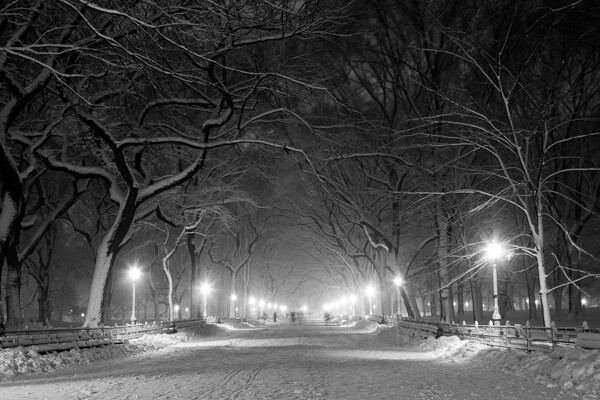
Manual mode is ideal when you use a tripod and have the time to fine tune the exposure. It is also good in situations where the lighting is consistent, such as on overcast days, photographing indoors, or when using strobe lights or flashes.

Poets' Walk, Central park, NYC.

Poets’ Walk, Central Park, NYC 15 seconds at f/11, ISO 100. 28mm focal length on tripod.

However, the Shutter Priority and Aperture Priority modes are very important to use, particularly in situations where the lighting is variable. On a sunny day where you are shooting both into and away from the sun, it is beneficial to use these modes because it is usually not practical to continually change your manual settings every time you alter your direction. Let the camera do some of the work.

Exposure Compensation (+/-)

Exposure compensation is the +/- mode on your camera that is used when you are in the Aperture or Shutter Priority modes. Increasing the exposure to the plus side will brighten a photo and decreasing it towards the minus side will darken a photo.

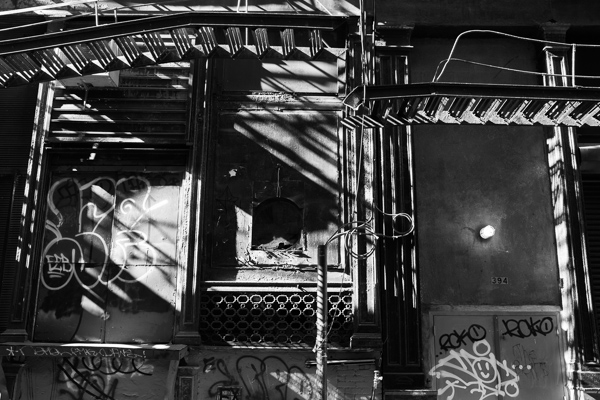
This is especially helpful when you are in an overly bright or dark situation that can fool the camera’s light meter, such as a scene with a lot of bright sky or a scene in a dark alleyway. The camera will read these levels and try to turn these overly bright or dark situations into gray. We typically do not want that.

When capturing a bright scene, cameras will read all the bright areas and calculate that it needs to darken the photo to achieve the correct exposure. You would need to raise the exposure compensation to offset this. When photographing in a dark alleyway, cameras will try to brighten the blacks to gray, leading you to need to offset this by lowering the exposure compensation.

Cortlandt Alley.

Cortlandt Alley, NYC – The camera’s light meter slightly overexposed the image

Cortlandt Alley.

Cortlandt Alley, NYC –  Correctly exposed

Bonus – White Balance

Focus on the above settings first, but once you feel comfortable with them, the next step is to study up on white balance.

The post A New Photographer’s Guide to Camera Settings by James Maher appeared first on Digital Photography School.

Digital Photography School

 
Comments Off on A New Photographer’s Guide to Camera Settings

Posted in Photography


Abandoned on Film: 15 Terrifying Desolate Movie Settings

10 Jun

[ By Steph in Abandoned Places & Architecture. ]

Abandoned Places in Movies Main

Sometimes, the setting of a film is almost more important than the plot itself, and that’s particularly true with abandoned places. Crumbling ruins of hospitals, prisons, houses, schools and other facilities seem to host echoes of past residents and events, often radiating a sense of trauma and loss. Of course, the catch – at least, in fiction and fantasy – is that these places aren’t really abandoned after all. Here are 10 (more!) abandonments, real and invented, that feature prominently in scary movies and television shows.

Abandoned Sanitorium – Death Tunnel

Abandoned Places in Movies Death Tunnel

Death Tunnel may not be the greatest horror film ever made, but it’s the setting that’s the real star of the show. This 2005 movie about five college women locked into a Kentucky hospital where 63,000 people died from a disease known as the ‘white plague’ was filmed at the real life Waverly Hills Sanitorium in Louisville. And that part about thousands of people dying there? It’s actually true. Treated with little more than fresh air and sunlight in an era before antibiotics, the tuberculosis patients admitted to the hospital invariably ended up in the 500-foot tunnel located beneath the hospital, called a ‘body chute.’ The dead were secretly lowered into the tunnel and loaded on a train so that the remaining patients wouldn’t give up hope that they’d get out alive.

Built in 1910, Waverly Hills closed in 1961 after the advent of advanced medical care drastically reduced the number of patients coming in. Plans are underway to turn it into a hotel that will play up its ‘haunted’ history.

Abandoned Town – Silent Hill

Abandoned Places in Movies Silent Hill

‘Silent Hill’ is based on a real place. This seemingly fictional setting of a series of video games and a movie is based on Centralia, a borough of Pennsylvania that has been abandoned as a result of a mine fire that has burned underground since 1962. Prior to the 1980s, it had about 1,000 residents; there are just a handful left today despite the town being condemned. The blaze beneath Centralia has opened steam pits, sink holes and carbon monoxide vents. The fictional Silent Hill is located in West Virginia, and the reasons for its abandonment are far more frightening.

Abandoned House: The Abandoned

Abandoned Places in Movies The Abandoned

In the 2006 film The Abandoned, an adopted American film producer returns to her hometown in Russia after receiving a phone call from a notary public that she had inherited her family’s abandoned farm. When Marie arrives at the house to learn more about the family she never knew, a man tells her he received the same phone call, and that they’re twins. But once inside, the pair find that the dead residents of the house don’t really want them to leave.

Hidden Subway Tunnel Under London – Raw Meat

Abandoned Places in Movies Raw Meat

Released overseas as ‘Death Line’, Raw Meat is a 1973 movie set in an abandoned subway tunnel under London. Inspired by the many real-life abandoned tube stations of the area, Raw Meat envisions these creepy, darkened subterranean settings filled with a family of cannibals descended from Victorian railway workers.

Abandoned City – New York in I Am Legend

Abandoned Places in Movies I Am Legend

The idea of a once-bustling metropolis utterly abandoned (by humans, anyway) serves as fodder for all sorts of fiction, from books to films. The 2008 adaptation of ‘I Am Legend’ starring Will Smith is just one of many giving us a glimpse of what New York City might look like if it were allowed to fall into ruin, taken back over by the forces of nature. Smith stars as a lone survivor of an epidemic that has turned most of the population into bloodthirsty mutants.

Next Page:
Abandoned On Film 15 Terrifying Desolate Movie Settings

Share on Facebook


[ By Steph in Abandoned Places & Architecture. ]

[ WebUrbanist | Archives | Galleries | Privacy | TOS ]


WebUrbanist

 
Comments Off on Abandoned on Film: 15 Terrifying Desolate Movie Settings

Posted in Creativity


Why Your Camera Settings Don’t Matter

07 Mar

Have you ever opened up a photography magazine, saw a photo you liked and spotted the little blurb which reveals the camera settings? The conclusion you might be tempted to make is that the aperture, focal length, shutter speed, ISO and flash settings you see there somehow “made” that photo. And worse, you might try to remember those settings as Continue Reading

The post Why Your Camera Settings Don’t Matter appeared first on Photodoto.


Photodoto

 
Comments Off on Why Your Camera Settings Don’t Matter

Posted in Photography


How to Restore a Canon T2i to Default Settings

15 Feb

Check out Bas Rutten’s Liver Shot on MMA Surge: bit.ly www.mahalo.com This video explains how to restore your Canon T2i to it’s original default factory settings.See the rest of our T2i Videos: www.youtube.com Check Out These Related Mahalo Pages: DSLR Buying Guide: www.mahalo.com DSLR Comparison Guide: www.mahalo.com How to clean your DSLR: www.mahalo.com Digital SLR Camera: www.mahalo.com Check Out these Mahalo How-To Playlists: How To Apply Makeup: www.youtube.com How To Become a Pharmacist: www.youtube.com How To Become a Photographer: www.youtube.com How To Dance the Fox Trot: www.youtube.com How To Dance the Salsa: www.youtube.com How To Dance the Waltz: www.youtube.com How To Flirt: www.youtube.com How To Get 3 Stars on Angry Birds 1st World: www.youtube.com How To Get 3 Stars on Angry Birds 2nd World: www.youtube.com Free Royalty Free Music by DanoSongs.com
Video Rating: 4 / 5


D3100 Examples of high ISO settings star photos

11 Jan

Just a quick example of the different ISO settings I have attempted to use in my attempts to carry out time lapse of the star filled night sky. This is an FYI just to give you an idea of the quality that you can capture using ISO 1600 or ISO 1800 and also the difference in the amount of stars you can pick up. Shutter speed obviously plays a part as well but this video is to highlight what you could expect from higher ISO settings in regards to capturing stars at night. Hope it helps. Camera used Nikon D3100 DSLR


Nikon D90 Settings

07 Jan

How to find all of the necessary settings on the Nikon D90 DSLR camera in order to take control of the camera’s exposure.


Best settings for ‘CineStyle’ with Canon 5D-7D-60D-600D (t3i)-550D (t2i) [TIPS&TUTORIAL]

04 Jan

Best settings Picture profile for “Film/Cine look” with Canon HDSLR 5D,7D, 60D, 600D (rebel t3i), 550D (rebel t2i) -Video Mode- Tip & tutorial sharing for the Film makers community. Based on my personal tests and experience. *This is what I found best and quite similar to CineAlta cameras curves & matrix* *Technicolor, M. Bloom & LaForet suggest same settings except for saturation @ -2 while I suggest minimum level for post-production&color grading* *ISO increments of 160 is also a recommended setting. Watch the result with these settings : youtu.be Tutorials playlist : www.youtube.com If you have questions and want more tips, tutorials & “how to” videos : leave a comment below. Hope it can be useful & helpful. Subscribe here : www.youtube.com * Official website : LFK13.com * FaceBook facebook.com * Twitter : twitter.com — tutorial canon eos 600d t3i 5d 7d 60d 550d cinestyle “film look” film maker “picture profile” community dslr best settings “how to” questions tips test short help camera “short film” programs technology howto “graphics software” custom diy software electronics digital need technicolor profile cinealta “Short Film” Tip “Software Tutorial”


Nightclub Photography TV Ep. 7 (Part 1): Aperture Settings

26 Dec

www.nightclubphotography.tv – PART 1 Myles talks about aperture settings and how they affect nightclub photography. Myles is a San Diego based nightclub photographer and event photographer. Aside from photography, Myles is a seasoned business consultant and marketer who helps business owners and photographers get more clients and grow their businesses. Subscribe to NPTV! www.youtube.com Connect on Google + plus.google.com Stay connected with Myles on Facebook www.facebook.com Follow Myles on Twitter twitter.com San Diego Event Photography Pros 101 Market St. #435 San Diego, CA 92101 (619) 962-6263

This Photoshop CS5 tutorial explores how to brighten the eyes by using the Quick Mask tool and Smart Sharpen filter. Watch more at www.lynda.com This specific tutorial is just a single movie from chapter nine of the Photoshop CS5: Portrait Retouching course presented by lynda.com author Chris Orwig. The complete Photoshop CS5: Portrait Retouching has a total duration of 11 hours and 2 minutes, and explores the deep resources for portrait retouching available in this program, while inspiring photographers to do their creative best with everything from blemishes to backdrops. Photoshop CS5: Portrait Retouching table of contents: Welcome 1. Getting Started 2. Basic Color Correction 3. Color-Correcting Skin Tones 4. Reducing Blemishes and Cleaning Up in Adobe Camera Raw 5. Reducing Blemishes and Cleaning Up in Photoshop 6. Cleanup Project 7. Correcting Tone 8. Reducing and Removing Wrinkles 9. Enhancing Eyes 10. Enhancing Eyelashes and Eyebrows 11. Improving Lips 12. Enhancing Teeth 13. Improving Hair 14. Improving Makeup 15. Enhancing Skin 16. Softening Skin in Practice 17. Making Body Improvements 18. Structural Image Enhancements 19. Retouching Workflow: Project 1 20. Retouching Workflow: Project 2 Conclusion
Video Rating: 4 / 5


Canon 7D Settings

05 Dec

How to find all of the necessary settings on the Canon 7D DSLR camera in order to take control of the camera’s exposure.

 
Comments Off on Canon 7D Settings

Posted in Photography Videos