Brian Ach has shot for just about every big-name publication you can think of, and he’s photographed his share of A-list celebrities, including a stint as Prince’s official tour photographer. In short, he knows how to get the shot. But he argues there’s an important distinction between getting a shot and getting the right shot, and it all comes down to context. Read more
Tag: Right
-
Wide lens, right price? Nikon 24mm F1.8G ED real-world samples
Earlier this year Nikon expanded a series of F1.8 primes with the 24mm F1.8G ED, sitting alongside 20mm and 35mm models. Compact and lightweight, it hits a $ 750 price point that’s relatively reasonable, considering the F1.4 version retails for over $ 2000. We’ve spent some time shooting with the new 24mm prime – take a look at its performance out and about. Read more
-
Backing Up Your Digital Photos: Is Cloud Storage Right for You?
In today’s digital era, it’s so simple to copy your photos onto your laptop hard drive and forget about them, thinking they’ll be there whenever you need them. But if your laptop crashes or gets stolen, and you haven’t backed up your photos in another place, then they’re gone forever. Most forms of digital storage are unreliable in the long term. Hard drives crash, computers die, and CDs and DVDs get scratched up and become unusable.
If you want to preserve your digital photographs then it is important to develop a strategy to back them up. Many people have started looking to the cloud as a place to store their photos. Could cloud storage be right for you?

Here are a few questions you should ask yourself if you’re considering cloud storage:
- Do you want to use a free storage service, such as Google Photos or Apple Photos? Or are you willing to pay for a service with more features? If so, how much are you willing to pay?
- Do you want to use cloud storage as a backup solution for all of your photos or just some key ones? How much data do you have? How often will you need to access your photos?
- What types of files do you have? Camera raw files? Tiff files? JPEGs? All of the above?
- How fast is your internet connection? Uploading files to the cloud can be very slow.
There are a few free applications, such as Google Photos and Flickr. These services could be a good option to back up your digital photo library if you don’t want to spend any money. The problem with a lot of them is that they either compress your photos, which means a loss in resolution and quality, or dditionally they don’t support RAW or TIFF files. So if you’re a raw shooter then this isn’t a great solution for archiving your photo library.
Luckily there are a number of services which will store your digital photographs for a small fee. There are many different companies that provide cloud storage, so I’ve decided to focus on only a few in the rest of this article. Be sure to do your research and find a service that fits your backup needs.
A Few Options for Cloud Storage
Google Drive
Google Drive is a relatively cheap and reliable cloud storage service. All Google accounts are given 15GB of free storage. From there you can pay as little as $ 1.99/month for 100GB, $ 9.99/month for 1TB, and up to $ 299.99/month for 30TB. Google Drive allows you to organize your own folders and supports all photo file types.
Amazon Cloud Drive
Amazon Cloud Drive touts an impressive unlimited photo storage plus 5GB for video and other file types for only $ 11.99/year. Additionally, if you have an Amazon Prime account, then this service is already included as part of your subscription. The one catch is that file uploads are limited to 2GB per individual file, so if you have files that are larger than that then you may not be able to upload them.
Microsoft One Drive
Microsoft One Drive has plans that offer 15GB for free, 100GB for $ 1.99/month, and 200GB for $ 3.99/month. Additionally, Microsoft is currently running a deal where you can get the Office 365 application package and 1TB of storage for $ 6.99/month. A big disadvantage to this service is that you cannot store more than 200GB without purchasing additional apps from Microsoft. But if you have less than 200GB, then One Drive is a really cheap option for back up.
Dropbox
The Basic plan gives you 2GB of storage for free. Upgrading to a Pro account will give you 1TB of storage for $ 9.99/month. The highest level plan is a Business account which will give you unlimited storage for $ 15/month per user. Dropbox doesn’t offer the most competitive prices among cloud providers but it’s a popular option that you may find reliable. However, if you have more than a terabyte of data, and files that break the size limits of some of the other unlimited providers, then Dropbox may be the best option for you.
Mediafire
Mediafire is one of the cheapest cloud storage options among the major players in the market. They offer 10GB of storage for free and up to a terabyte for only $ 2.49/month. Most impressively, their Business accounts offer up to 100 terabytes of storage for $ 24.99/month. If you’re looking to get into cloud storage for relatively cheap, then Mediafire is definitely a good bet.

Alternatives to Cloud Storage
Cloud services are not the only option you should investigate as a place to store your digital photos. Like any other digital backup, cloud storage isn’t full-proof. A quick internet search will show you numerous horror stories of peoples’ data being lost in cloud storage glitches and failures. This section of the article will explore a few other possibilities for saving your digital photos.
External Hard Drives
External hard drives are a good option if you need a lot of readily accessible storage for an affordable price. I use one terabyte Toshiba drives that only cost about $ 60. There are many other brands that offer similarly priced drives. One advantage external hard drives have over cloud storage is speed of access. You can store these files and keep them in your home or office, meaning they are readily accessible. Trying to download files you have stored on the cloud can be extremely time consuming.
Another advantage is cost; hard drives are relatively cheap when compared to continuously paying for monthly fees for cloud storage over the longterm. The drawback of hard drives is that they will eventually fail. Many are only reliable for 2-5 years, so it is important to back up your files to multiple places. But if you can’t afford a RAID hard drive system and you have a lot of data to backup, external hard drives are a good place to start.

Flash Drives
USB flash drives are another option for backing up data in your home or office. Prices are continually dropping on flash drive storage. Flash drives don’t have a lot of storage capacity, but 16GB flash drives are as cheap as $ 6. This makes them one of the most inexpensive options to back up your most prized images. I use them to back up my portfolio and store the memory sticks at a relative’s house. It’s not a solution for all of my data, but it gives me an added layer of backup that could save some of my best photos in the event of a disaster.
CDs/DVDs
You can also back up your data on CDs or DVDs, but at this point I wouldn’t recommend it. This kind of media is quickly becoming obsolete, and while it’s cheap, CDs and DVDs are easily damaged or corrupted. Additionally, you can’t store that much data on discs. Most CDs have a capacity of 700MB and DVDs cap out at less than 5GB. On top of this, many computer manufacturers, such as Apple, aren’t including disc drives in a number of their products. This means you’ll have to purchase an external drive just to read your discs in the future. You’re better off storing files on a hard drive or flash drive with a USB connection.

Conclusion
Ultimately, there is no holy grail, one-size-fits-all solution for backing up your digital photos. The main theme is that you should not rely on a single source of backup because it can easily become a point of failure. If you haven’t stored your photos in more than one place and that one backup fails, you’re likely going to be out of luck.
Backing up your photos doesn’t need to be expensive; it just requires that you be strategic. I believe that cloud storage is best utilized as part of an overall storage strategy for your digital photographs, rather than the only point of backup.
Is cloud storage right for your backup needs? That is for you to decide. I hope this article gives you a starting point to get you on the path to reliably backing up your digital photos.
googletag.cmd.push(function() {
tablet_slots.push( googletag.defineSlot( “/1005424/_dPSv4_tab-all-article-bottom_(300×250)”, [300, 250], “pb-ad-78623” ).addService( googletag.pubads() ) ); } );googletag.cmd.push(function() {
mobile_slots.push( googletag.defineSlot( “/1005424/_dPSv4_mob-all-article-bottom_(300×250)”, [300, 250], “pb-ad-78158” ).addService( googletag.pubads() ) ); } );The post Backing Up Your Digital Photos: Is Cloud Storage Right for You? by Dan Bullman appeared first on Digital Photography School.
-
Photography Etiquette – What’s the Right Approach?
Whether you have a DSLR, a pocket camera, or simply use your mobile phone to take snapshots, there are some simple rules of photography etiquette that you can follow to make the shooting experience more enjoyable for you, as well as everyone else around you. Some of these tips might seem obvious, but even if you think you already know what to do, or not to do, when taking pictures it might be worth reading just as a refresher.
It’s easy to notice the speck of sawdust in your brother’s eye and note when other people are violating simple rules of etiquette. But sometimes it’s difficult to recognize the plank in yours, and see if you have a few habits that could be changed. These are short and simple lessons that I have learned the painful way over the years. I hope you can benefit from my mistakes and avoid these pitfalls in your own photography.
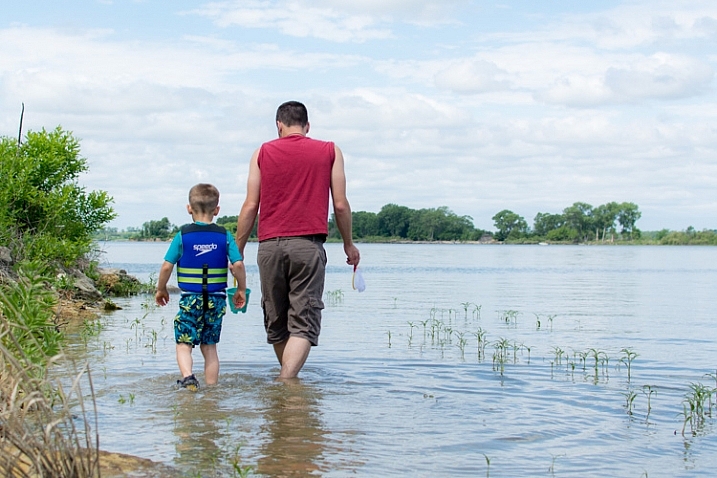
Be discrete (i.e. don’t be the center of attention)
I can recall being at weddings and parties where I thought I was the king of the room just because I had a camera, however, all the while I was only making other people annoyed or frustrated because of my behaviour. One of the most difficult thinks for new photographers to realize is it’s not about you. It’s about everyone else, and you just happen to be the one documenting things.
Have you ever stood up in the middle of a wedding to get a shot of the bride and groom? Have you muscled your way to the front of a group of kids so you could capture little Timmy opening his birthday present? Have you found yourself running back and forth on the sidelines of a high school football game trying to photograph some highlights, while pushing a few players and coaches out of the way? If so, you might have indeed gotten a good picture, but you might also have unknowingly caused some hurt feelings in the process.

This might be a decent shot, but to get it I had to work my way through the crowd and potentially block the view of people behind me. I’m not sure it was worth the trade-off.
As photographers it can be tough to take a more discrete approach, but often that is exactly what we should be doing. It might sound counterintuitive, but staying out of the way can often yield the best results because we are taking other people into consideration. This goes double if you’re not even the official photographer, you just happen to be in attendance with your camera. Everyone around you is trying to enjoy the experience, and couldn’t care one whit about whether or not you have a camera. They just want to watch the wedding, see Timmy open his present, or experience the game-winning goal along with everyone else. From their point of view, a person with a camera who is running around frantically or blocking their field of view is an annoyance, not an asset.

A while back I went around taking pictures at a high school production of “Pride and Prejudice.” I thought people would excuse my actions since I had a camera, but in reality I was likely bothering the audience and possibly even distracting the performers.
To remedy this situation, try to find alternative viewpoints that won’t ruin the experience for other people, but still yield good pictures. It might be good to buy or rent a zoom lens for special occasions, or do some searching online for how people have taken photos in similar situations without being rude or disruptive. You might actually find yourself getting more interesting photos, and looking at things from new angles that you had never considered, which could not only benefit you as a photographer and be a pleasant surprise for the individuals whose pictures you are taking.
Ask for permission before taking pictures
Here’s a bit of information no one told me when I first got into photography as a serious hobby – not everyone wants their picture taken. Years ago when I was a wet-behind-the-ears photographic newbie I took my camera everywhere, and photographed everything and anyone. If I was shooting landscapes or nature this was not a problem at all, but when we had friends over, or went to events, it became a bit of an issue. One that I hope you might be able to avoid.
The more I got into photography the more I realized that not everyone likes being on camera, and not every event demands hundreds of snapshots. I can recall times when we were out with friends or at a party or social event, and having people around me freeze-up or give me the cold shoulder, because I had morphed from friend to photographer. I thought that my camera gave me some kind of unwritten license to take pictures of everyone around me, but in truth most of them just wanted to go about their business and not have a camera in their face. Simply asking for permission would have solved a lot of problems, and avoided some hurt feelings along the way. Even though it can be a bit awkward, it’s worth the trouble if it avoids animosity down the line.

I checked with the parents before getting my camera out and snapping pictures at this birthday party.
The next time you’re at a party, celebration, or sporting event, take a minute and ask the hosts or some of the other guests if they mind you taking photos. It takes almost no time at all, and can reap incredible rewards throughout the event – Uncle Bob, notoriously shy around cameras, might appreciate that you were willing to ask his permission and not only grant it, but loosen up a bit as a result. Coach Taylor will be glad you asked, could point you to some of the better spots on the sidelines, and be willing to accommodate some special requests you might have. Grandma Agnes might not want her photo taken at all, and even though you won’t get as many good shots, you will help the rest of the guests ease up and enjoy the evening a little more.

A baptism is a solemn and formal affair – definitely not the time to be annoying others with a camera. Get permission first, take a few good shots (without the flash, if at all possible) and put your camera away.
On a related note if you are a guest at a major event like a wedding it’s a good idea to check with the official photographer before you get up and start taking your own shots. He or she has likely been paid hundreds, or thousands of dollars, specifically to get good pictures. So while you may enjoy walking around with your camera and getting some pictures, you might by unwittingly annoying the couple, or the guests by your actions. My advice is to sit back and just enjoy the event or ceremony, and let the people whose job it is to capture amazing pictures do their work.
Ask for permission before sharing pics
We live in a time when almost everything is shared online, and nearly everyone has some sort of social media presence on Facebook, Twitter, Instagram, Flickr, Tumblr, and many others. The key word here is almost: not everyone is online, and not everyone wants their photos shared on social networks. Even though you might be well within your legal rights to snap pics of other people (especially in public places) and post them to your social networks, you might be inadvertently hurting some feelings, or damaging your close relationships by doing so. The solution here is simple, and only takes a few seconds – ask permission before posting. Not only is it simply a nice thing to do, it can actually help strengthen whatever bond you do have with the people in your pictures. They may have had other people post their picture online and been upset by it. Whereas, there is a very real chance that you could impress them with your honesty and candor by asking if it’s okay to share their photo online.

Even though you can’t see these kids’ faces in this picture, I still asked their parents for permission before sharing this picture. They appreciated the gesture and gladly agreed.
Be a participant, not a photographer
In his song “The Gambler,” the American country singer Kenny Rogers crooned,
You’ve got to know when to hold ’em, know when to fold ’em, know when to walk away.
His logic can be applied to photography also. You’ve got to know when to take pictures, and when to put your camera away. It’s entirely possible, and I would say quite likely, that the people around you at any given event or situation don’t want someone running around snapping pictures. Were you invited to your neice’s piano recital? Great! Keep your camera in your pocket, sit back, and enjoy her performance. If you really want a few pictures you can ask her to pose by the piano after the event is over. Are you going on a road trip with some friends? Awesome! But remember they invited you because they enjoy your company and conversation, not because they wanted to see you constantly snapping pictures and inviting them to look at the screen on your camera. You might be saying things like, “Check out this great shot I just got!” but the message you’re sending to your friends is, “My camera is more important than you.”

Sometimes less is more. We were invited to a birthday party for our friend’s daughter, and rather than spend the whole time on my camera I fired off a few shots here and there, then spent the rest of the time visiting with adults, playing with kids, and just enjoying the celebration.
A lot of these etiquette rules walk a fine line. It’s up to you to gauge each situation and decide where the boundaries should be placed. The bottom line is that you may want to reexamine your approach to photography in some situations, and decide if a different course of action might be better for you and everyone else involved.
What about you? What are some of the tips and etiquette rules you have learned over the years? Share your thoughts in the comment section below.
googletag.cmd.push(function() {
tablet_slots.push( googletag.defineSlot( “/1005424/_dPSv4_tab-all-article-bottom_(300×250)”, [300, 250], “pb-ad-78623” ).addService( googletag.pubads() ) ); } );googletag.cmd.push(function() {
mobile_slots.push( googletag.defineSlot( “/1005424/_dPSv4_mob-all-article-bottom_(300×250)”, [300, 250], “pb-ad-78158” ).addService( googletag.pubads() ) ); } );The post Photography Etiquette – What’s the Right Approach? by Simon Ringsmuth appeared first on Digital Photography School.
-
Tips for Using Speedlights to Create the Right Lighting for Outdoor Portraits
In these two video tutorials brought to us by ExpoImaging, NYC photographer Erik Valind shows two different tips:
#1 – How to create artificial sun with a speedlight
#2 – Creating soft light during midday harsh light
Gear and things mentioned in the videos:
- ExpoImaging ROGUEGELS-U Rogue Photographic Design Rogue Gels Universal Lighting Filter Kit
- Rogue Photographic Design ROGUERELG2 FlashBender 2 Large Reflector, Bounce Flash, Snoot, Gobo (Black/White)
- Other things available from Rogue Photographic Design
googletag.cmd.push(function() {
tablet_slots.push( googletag.defineSlot( “/1005424/_dPSv4_tab-all-article-bottom_(300×250)”, [300, 250], “pb-ad-78623” ).addService( googletag.pubads() ) ); } );googletag.cmd.push(function() {
mobile_slots.push( googletag.defineSlot( “/1005424/_dPSv4_mob-all-article-bottom_(300×250)”, [300, 250], “pb-ad-78158” ).addService( googletag.pubads() ) ); } );The post Tips for Using Speedlights to Create the Right Lighting for Outdoor Portraits by Darlene Hildebrandt appeared first on Digital Photography School.
- ExpoImaging ROGUEGELS-U Rogue Photographic Design Rogue Gels Universal Lighting Filter Kit
-
How to Use the Right Captions on Your Photos to Better Connect With Viewers
30 years ago, we used slides, prints and albums to share photos with family and friends. Now, between Facebook, Instagram, Flickr, Google+ and 500px, you have more options than ever to share your photos. The problem is, how do you connect to this much larger audience?
Sharing a story alongside your photo will help you connect with your followers, and often turn a great photo into something spectacular.
When you share a photo, people may wonder where it was taken, why you were there, what made you photograph the scene, or what was going through your head the moment you snapped the shutter. These are all questions that can be spun into a narrative and shared along with your photo.
The right caption draws viewers into the image
Here’s an example. Which of the following captions draws you in and makes the photo more interesting for you?
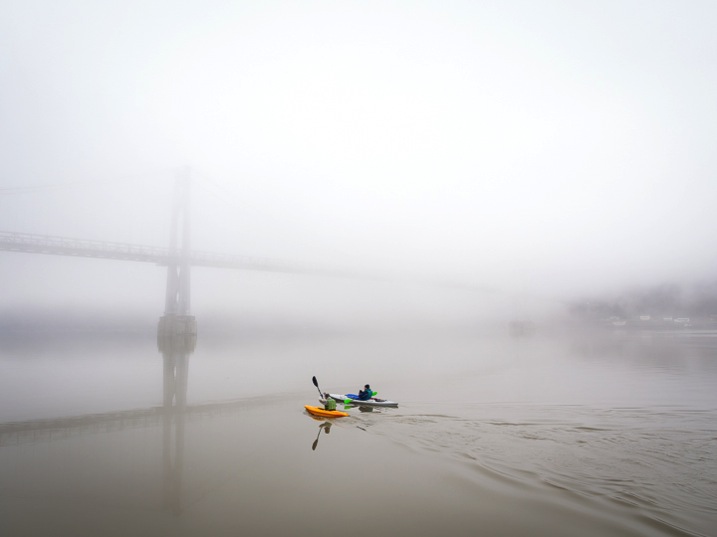
Caption 1: Kayakers on the Hudson River
Caption 2: Springtime in upstate New York is full of variable weather. The changing temperatures coupled with different types of precipitation can make for beautiful and unpredictable landscapes. On this particular morning, the Hudson River was covered in a thick fog and knowing how fleeting that can be, I hurried down to the waterfront hoping to capture some shots. Out of nowhere, two colorful kayakers appeared, adding life to my scene as they cut their way down the river and disappeared into the abyss.
I may be biased, but for me it’s Caption 2. Seeing a beautiful photo with a story attached to it pulls me in. It puts me in the same space that the photographer was in when they took the photo, enriches my experience, and ultimately makes the photo, which was good in the first place, a great one.
If you went to a yard sale and and saw a beautiful glass bowl for $ 20 you may think, “Well, that’s a bit steep for a simple bowl at a yard sale.” But, I bet your mindset would change if the owner told you a story about the bowl — how she acquired it at a glass blowing factory in Halifax back in the 1950s, how it was one of just a handful made and how the bowl moved around the United States with her and family for the past 60 years. Now $ 20 seems like a bargain!
Nothing changed, you just got some more information. A story enriched your understanding, and in turn, completely changed how you experienced something.
Here’s another example:

Caption 1: The Mohonk Mountain House after an ice storm
Caption 2: It was early December and an ice storm had just ripped through the Hudson Valley leaving debris, destruction, and a clear blue sky in its wake. My wife and I began our hike that day at a lower elevation, and realized as we got higher that the entire forest was encased in ice. It was a winter wonderland that was both beautiful and dangerous. Limbs of trees were scattered everywhere, boulders were slick with ice and in some spots, five foot long icicles hung like stalactites above our heads. As we made our way to the top of the mountain, I stepped into a small gazebo overlook and focused on the Mohonk Mountain House and surrounding landscape, letting the icicles in the foreground frame my shot.
There’s nothing wrong with the first caption, but the second caption really paints a picture in the viewer’s mind and places them there with you.
Here’s another shot I took this winter. In the past I would have shared it with Caption 1 below, but instead I shared it with Caption 2, and found that it really resonated with my audience.

Caption 1: Winter Sunset
Caption 2: It was a Friday night and I rushed out of work wanting to photograph something. I made a quick stop at home, put on boots, and grabbed my snowshoes just in case. With so much snow on the ground I racked my brain for a spot that I could easily get to with the potential for a decent sunset shot. Luckily, this incredible vista is just down the street from me. I got there when the sky was beginning to turn all sorts of colors, hurriedly set up my tripod, and captured this winter sunset. I stayed for a little while, watching blues give way to pinks, yellows and oranges until all the color in the sky was gone and my frozen hands signalled to me that it was time to go home.
Viewer experience is enhanced
Not every photo needs a page of text written alongside it, but it’s been my experience that adding a couple of sentences, rather than just a few words (or none at all), greatly enhances the experience of the viewer. It helps them to connect to your photo and ultimately with you as a photographer.

Caption 1: The Space Needle in Seattle
Caption 2: After an afternoon touring Seattle and Pike Place Market, my wife and I headed over to the Olympic Sculpture Park but found it was closing just when we arrived. Disappointed that I wasn’t able to capture any images of the park, I turned my camera around towards the city as we left and captured this unique view of the iconic Space Needle.
Summary
When I share a photo, I want people to respond to it. I want them to share in the moment and feel what I was feeling when I took the photo. Your story might seem mundane to you, but to your audience it gives them a closer look at who you are and how you think — as a person and a photographer.
googletag.cmd.push(function() {
tablet_slots.push( googletag.defineSlot( “/1005424/_dPSv4_tab-all-article-bottom_(300×250)”, [300, 250], “pb-ad-78623” ).addService( googletag.pubads() ) ); } );googletag.cmd.push(function() {
mobile_slots.push( googletag.defineSlot( “/1005424/_dPSv4_mob-all-article-bottom_(300×250)”, [300, 250], “pb-ad-78158” ).addService( googletag.pubads() ) ); } );The post How to Use the Right Captions on Your Photos to Better Connect With Viewers by Joe Turic appeared first on Digital Photography School.
-
How to Select the Right Camera Memory Card
In today’s market if you want to buy a camera memory card, you may find it challenging to select the right one. A card comes with the following criteria; type, speed, price, capacity. If you want to buy a high capacity card with low price it might come with a low transfer speed. If you wish to buy a high transfer speed with high capacity card it may come with a really high price. If you want to strike a balance between both, you really have to compromise on quality.
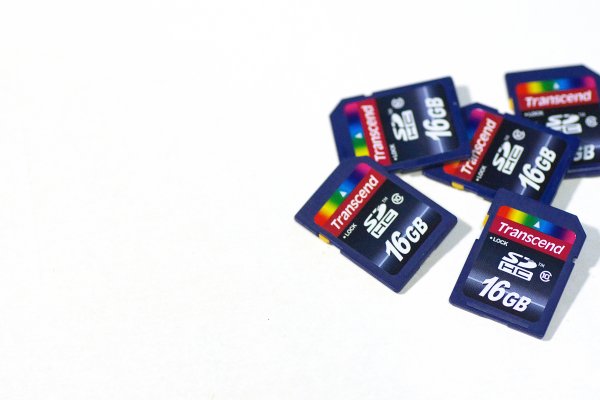
By Paul Hudson
What is a memory card?
A small removable memory medium which can be used to store data on one medium and to transfer the data to another medium.
Let’s see each criteria which will help you decide on a memory card in detail.
Capacity
This one is fairly straightforward, and not a big deal. A 32GB memory card can hold up to about 1000 RAW photographs. Assuming that one RAW file size is 30MB, in general a Canon 5D MKIII will produce a RAW file between 25-35MB in size. Likewise a 16GB card can hold up to about 500 photographs, and so on. If you shoot in jpeg format, then a 32GB card can hold around 3200 photographs, assuming you have your jpeg settings as fine in detail, and large in file size. With that setting a jpeg file will come in at an average size of 10MB on a Canon 5D MK III camera.
Types
There are many types of memory cards available on the market ranging from Micro SD card, SD card, CF card, M2 (from sony). But there are only three type of cards being used primarily in the photography world, Secure Digital (SD) card, Eye-fi card, Compact Flash (CF) card.
Micro SD card
Micro SD card is a miniature version of the SD card and meant to be used in mobile phones. This card has capacity, as well as transfer speed restrictions. That is why it is used primarily in Smartphones where one can store music and apps, or any other relatively less active data.
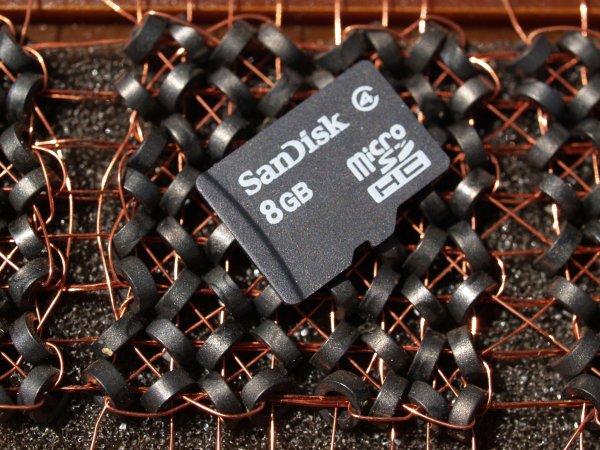
By Daniel Sancho
Secure Digital card (SD card)
This type of the card is widely being used in digital cameras, primarily in point and shoot cameras and secondarily being used in professional cameras. The constraint in using this card is the capacity of the card. The initial high capacity is only 2GB when introduced in 1999. But as the time and technology progressed a later version as SDHC is introduced with a higher capacity of 64GB in 2006 (HC means Higher capacity). The recent third iteration of SD card been announced in 2009 as SDXC cards (XC stands for extended capacity). This type of card offers up to 2TB and increased transfer speed.
Eye-fi card
These are unique SD cards that come with built-in WiFi. This allows you to transfer the data to your computer or a cloud based service or even to your Smartphone directly, thus enabling you to clear off the memory as you shoot, without having a need to replace the memory card. It is even possible to geotag your photographs with the available wireless service, but with less accuracy though.

By bfishadow
There seems to be a promising future for this card!
Compact Flash card (CF card)
First introduced in 1994, CD cards have high speed, and high capacity. This is the reason why CF cards occupy the primary card slot in professional cameras. Present SD cards are equalling the speed and capacity of CF cards, but camera manufacturers are not leaving CF cards just yet. They often provide slots for both an SD and CF card, but some photographers wish they would offer two SD card slots instead. This provides some extra space inside the camera and saves money for the photographer (CF cards costs roughly twice that of SD cards). Hopefully they will switch the importance to SD cards in the near future.
As the name suggests this is a flash memory which aids high speed reading/writing speed, and has a higher capacity too.
Speed
Speed in SD cards
All memory cards come with speed, either mentioned or not. Speed here means both writing and reading. The one indicated on the card is the maximum speed the card can read, but the most important thing is the write speed. Read speed is the time taken to read the data from the card and the write speed is the time taken to write the data. Simply put read speed comes into action when you transfer the data from the card, write speed comes into play when you shoot. In general the write speed is about half of the speed of read speed in SDHC cards. In few other cards both the read and write speeds are about the same.

By Simon Yeo
The speed of cards have been classified into classes by the SD Association, which are referred to below. The speeds are primarily meant for video recording, where sustained recording (write) is required and it is supposed to be the minimum worst case scenario speed.
You really need to give weight to this one single-most important factor, when you buy a memory card. All SD cards have a class noted on them. Check the attached diagram below:
Class Minimum Speed 2 2MB/s 4 4MB/s 6 6MB/s 8 8MB/s 10 10MB/s Later, in 2009 another class, UHS, was introduced by the SD association and is designed for SDHC and SDXC memory cards. UHS utilizes a new data bus that will not work in non-UHS host devices. If you use a UHS memory card in a non-UHS host, it will default to the standard data bus and use the “Speed Class” rating instead of the “UHS Speed Class” rating. UHS memory cards have a full higher potential of recording real-time broadcasts, capturing large size HD videos and extremely high quality professional HD.
Courtesy – SanDisk website.
UHS Class Minimum Speed 1 10MB/s 3 30MB/s Speed in CF cards
By Laurie Cooper-Murray
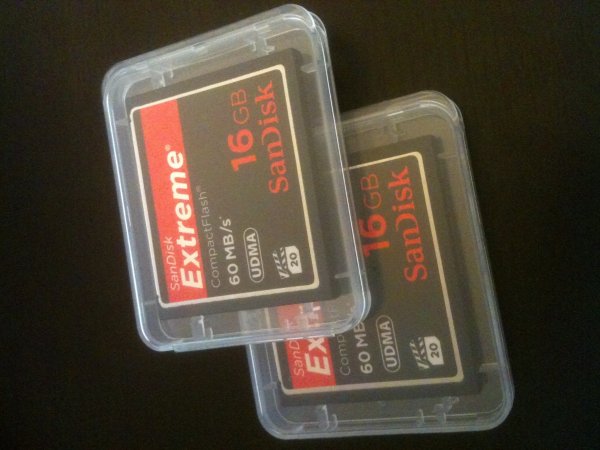
When it comes to CF cards the speed is often mentioned as X times and in many cards it’s been mentioned as MB per second, which is pretty straight forward. Whereas when the speed is mentioned as 600X or 1066X what exactly does it means? X means 150Kb per second. It is a standard brought over from optical media recording. Now to find out what exactly the speed is of 600X – to find this multiply 600 by 150 and divide the result by 1000. The final result is in MB per second. Eg., a 600X speed card is capable of 90MB per second read speed (600?150/1000).
The latest CF cards come with the UDMA 7 which improves in clearing the camera’s buffer memory quickly, which allows the camera to get ready for the next burst. Firmware upgrade is required for the Canon 5D MKIII (yours may require it also, check with the manufacturer) camera to make full use of UDMA 7.
Price
By Phil Romans
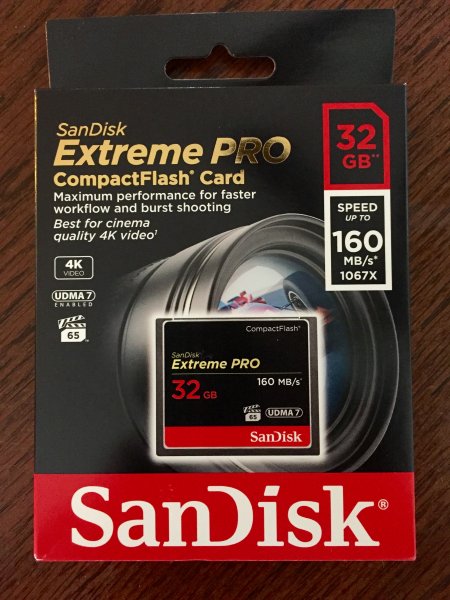
When it comes to price, the fastest card is the primary criteria which decides the price. The next deciding factor is capacity of the card. An SD card is 50% of the price in the same capacity CF card. So, if you want to buy a high speed card with same capacity you will need to pay more. On the other side if you want to buy a high capacity card at a lower price, it is possible to do so but you’ll get a lower speed card.
Notes
- If you use two cards at different speeds, the lowest speed is the deciding criteria for the burst. For instance if you use a CF card at 90 MB/sec in one slot and an SD card having the capacity of 45MB/sec (and you set RAW files for both cards) then you won’t get the advantage of 90MB/sec and the possibility of missing the shot. You have to use both cards at the same speed.
- If you do not upgrade to the latest firmware for the 5D MKIII camera, the host memory will perform for UDMA 6 which significantly consumes more time in clearing the buffer memory.
- I wish the camera manufacturers would switch to SD cards completely for both slots. The speeds of the SD card already matches with the CF cards, there is no point paying twice the price, and we’d get the added bonus of saving space inside the camera.
- In few cases the SD card speed is higher than CF cards. For instance SanDisk Extreme Pro speed is 280 MB/sec but from the same manufacturer the CF card’s maximum speed is 160 MB/sec.
Hope you have gotten a bit of information from this article. Do share your thoughts in the comments.
googletag.cmd.push(function() {
tablet_slots.push( googletag.defineSlot( “/1005424/_dPSv4_tab-all-article-bottom_(300×250)”, [300, 250], “pb-ad-78623” ).addService( googletag.pubads() ) ); } );googletag.cmd.push(function() {
mobile_slots.push( googletag.defineSlot( “/1005424/_dPSv4_mob-all-article-bottom_(300×250)”, [300, 250], “pb-ad-78158” ).addService( googletag.pubads() ) ); } );The post How to Select the Right Camera Memory Card by Navan Viswa appeared first on Digital Photography School.
-
Anatomy of a Green Screen Shot: How to Use It Right
I have a family that I shoot several times a year, They’re “show people” , all outgoing and crazy and fun, and after at a certain point, the mom, Ginette, said to me, “You know, I love all of the perfect and beautiful shots that you get of us, but I think it’s time to show the world the kind Continue Reading
The post Anatomy of a Green Screen Shot: How to Use It Right appeared first on Photodoto.
-
The Top 5 Sales Mistakes Costing You Money Right Now
What would you do if you could book more clients and earn more money with your photography? If you’re like me then you’d probably just blow it all on that new lens you’ve been thinking of buying for the past few months. You likely have a few clients every now and then, but for some reason they’re either not booking you and going with someone else, not buying your prints, or they’re just doing a disappearing act never to be heard from again after your first meeting. The truth is that you’re probably making one or several of the sales mistakes listed below and it’s costing you a lot of money.

1. Being too focused on making a sale and not helping your client
Have you ever helped your friend make a decision on whether or not to buy that new lens or camera body? You probably shared your experience and listed six reasons why they should or shouldn’t make the purchase. You weren’t going to profit from the sale but you helped your friend make the best decision for them and their situation. You didn’t focus on making a sale. You were trying to help your friend, and that’s exactly how you need to handle clients.
You’re the photography expert. They are coming to you for help. Yes they want you to make great photos, but they also want you to lead them through the rest of the process. They need your help to buy the right print packages, canvas wraps, and albums. Basically they need you to help them spend their money! So just help them like you would any good friend (except you probably can’t borrow the canvas prints of their family, like you would borrow a friend’s new lens).
Don’t try to sell to your clients. How do you feel when a bad salesperson starts trying to run their awful pitches on you? Your clients feel the same way and will probably want to run away the moment you start “selling”.
2. Asking questions and not shutting up

Have you ever tried to have a conversation with someone that doesn’t stop talking? They’ll ask you a question and then give you their answer without listening to you. Too many photographers do that exact thing when they’re meeting with clients. They get so excited, and they want to share everything with their clients that they don’t give anyone else a chance to talk. Clients end up thinking that the only reason the photographer asked any questions was just to listen to themselves talk. Or worse, the clients think that the photographer doesn’t care about anything they have to say.
After you ask a question, stop talking. Literally just shut up. Don’t say a word until the other person speaks. When they finish speaking, take a breath and see if they have even more to say while you sit there listening.
You’re not there to ask questions so that you can answer them. You’re there to listen to whatever truths your client will share with you. That’s how you find out how you can help them (refer up above to mistake number one).
3. Not being an expert of your own product

You know why I like tour guides? Because they know EVERYTHING about the tour you’re following them on. They know all the important stats, the history, and answers to almost every question you can come up with. How embarrassing would it be if your tour guide wasn’t very familiar with the exhibits? You’d feel like your time was wasted right?
That’s exactly how clients feel when photographers don’t know their products inside and out. When you don’t know how much your prints costs, or what options are included, or all of the different ways a package can be structured, it makes your clients start to worry about giving you their money. Definitely not what we want our clients thinking about. Sure you’re an expert at photography, but now the client wants to buy. Are you an expert at selling your product?
Or to phrase it better, are you an expert at helping clients buy your product?
You should know your product as well as you know your photography. Remember, your product is more than only the photos you make. In what ways can you help your clients make a buying decision?
4. Missing the most important person at your meeting

Who is the most important person to have at your meeting? The decision maker. It’s a simple answer, but so many photographers have meetings that end up being a waste of time. Have you ever met with a client only to have them say they needed to check with so-and-so before deciding? How much time would you have saved if that person was there for your meeting, or even on the phone? Some photographers never talk to the decision maker even once throughout the whole process. They’ll have three meetings with different people that all have to check with someone else. It’s a complete waste of time.
A worse mistake is when the decision maker is present, but the photographer doesn’t realize it, or they think the wrong person is the decision maker. The photographer spends all his time talking to one person, but ignoring the most important one! Then they wonder why they didn’t book the client. Make sure you have an opportunity to communicate directly with the decision maker, whomever that may be. It’ll save you a lot of wasted effort.
5. Not being brave enough to ask for the sale

I have a friend who does a great sales presentation with his clients. He explains the benefits, makes everyone laugh and they truly feel like he’s helping them with whatever they need. His clients are often ready to buy when he reaches the end of his presentation. They literally want to give him their money and all he has to do is ask.
Instead of asking them to sign the contract or if they’d like to put down a deposit that day, he mumbles something like, “I know this a big decision so go ahead and think about it and let me know what you decide.”
That is not asking for the sale. That’s avoiding asking. That’s putting it off. That’s not being brave enough to ask for your money.
How do you close a deal? You ask for the sale. It doesn’t have to sound like you’re asking for the sale either. There are many different ways to do this. You can ask how they’d like to pay, cash or credit. You can ask which package they’d like to purchase. You can even just ask them if they’d like to sign the contract. I know it sounds crazy, but if you did your job during the meeting, then they’ll be ready to sign your contract right there in front of you.

You’ve done a great job of learning your craft. You’re a great photographer but no one’s hiring you. It’s not your photography that’s the problem. It’s just that you’ve been too busy to focus on the sales part of the business. Not everyone is cut out to make a living at photography but you’re not like everyone else. You can do this. Learn how to correct the mistakes mentioned above and your sales will increase, your clients will be much happier, and you might be at the start of a great photography career. How amazing would that be?
googletag.cmd.push(function() {
tablet_slots.push( googletag.defineSlot( “/1005424/_dPSv4_tab-all-article-bottom_(300×250)”, [300, 250], “pb-ad-78623” ).addService( googletag.pubads() ) ); } );googletag.cmd.push(function() {
mobile_slots.push( googletag.defineSlot( “/1005424/_dPSv4_mob-all-article-bottom_(300×250)”, [300, 250], “pb-ad-78158” ).addService( googletag.pubads() ) ); } );The post The Top 5 Sales Mistakes Costing You Money Right Now by Mark Tioxon appeared first on Digital Photography School.
-
DSLR versus Mirrorless: Guide to help you decide which is right for you?
Recently there has been a great deal of buzz in the photographic community regarding a few terms that might sound a little odd or strange, like “mirrorless” or “micro four thirds.” These refer to different types of cameras that might not be as popular as standard DSLR models right now, but many think are the future of photography. However, just understanding what everything means can be an exercise in frustration, especially when all you likely want to do is buy a camera you can enjoy using.
By Nadir Hashmi
To that end, I’m going to try and dispel a bit of the confusion regarding mirrorless cameras and hopefully give you some information so as to make an informed choice the next time you are in the market for a new piece of photography gear. We’ll explore some of the history of how cameras are constructed, as well as discuss some of the benefits and drawbacks to this new technology, but I’m going to stop short of making the subjective judgement call about whether mirrorless cameras are better than DSLRs. For me it’s not about which camera is better than the other, it’s about finding one that works with your style and lets you shoot the photographs you want. You can debate all this in the comment section if you like, but what I’m here to do is simply present information and try to be as unbiased as possible.
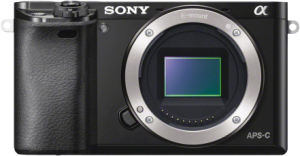
The Sony a6000 mirrorless camera has all the features of most standard DSLRs, but is much smaller and weighs far less. (Image courtesy Sony)
What is a mirrorless camera?
To understand the word mirrorless it helps to know a bit about the way most DSLR cameras are built. Almost all Canon, Nikon, Sony, and Pentax interchangeable-lens cameras share a similar industrial design: light enters through the lens and gets bounced off a mirror, through a special prism, to end up at the viewfinder. When you click the shutter button, the mirror flips up, which allows light to hit the actual image sensor on the camera, and voila your photograph is taken. This process might seem like a high-tech solution, but it’s actually a bit of an anachronism. Long before digital cameras existed, most of their film-based counterparts employed this same method to get light to the viewfinder, because it was a useful way to compose your photo before clicking the shutter. But thanks to advances in modern technology, this flip-up mirror method is no longer necessary, and a whole new breed of cameras is beginning to make inroads into modern digital photography. These new models have no flip-up mirror, and thus the term “mirrorless” was born.
There are many different types of mirrorless cameras on the market: some have interchangeable lenses, others offer a single built-in lens, and some with their own types of image sensors and other characteristics that are suited to more niche markets. But the one thing they all have in common is the absence of a flip-up mirror.
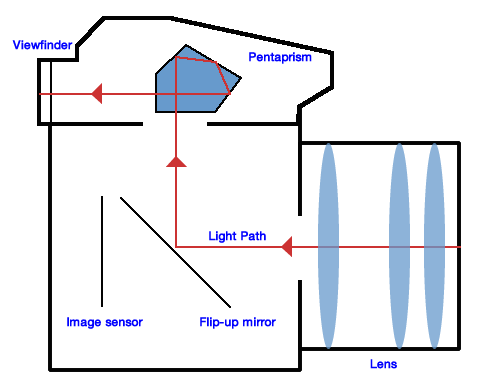
Believe it or not, you probably already own a mirrorless camera. All smartphone cameras are mirrorless, as are most point-and-shoot models. Instead of a tiny little viewfinder that you hold up to your eye, you can see a preview of your image right on the phone or on the back of the camera itself. And if you like shooting your DSLR in “Live View” mode, where you look at the rear LCD screen to compose your shots instead of the viewfinder, you are essentially using it as a mirrorless camera already. (The click you hear when you enter Live View is the mirror flipping up. It stays like that until you exit Live View.) In fact, many of the higher-end mirrorless cameras have even gone so far as to replicate the traditional eyepiece viewfinder, but instead of reflecting incoming light from a mirror, it simply shows a very tiny version of what would normally be displayed on the back of the camera.
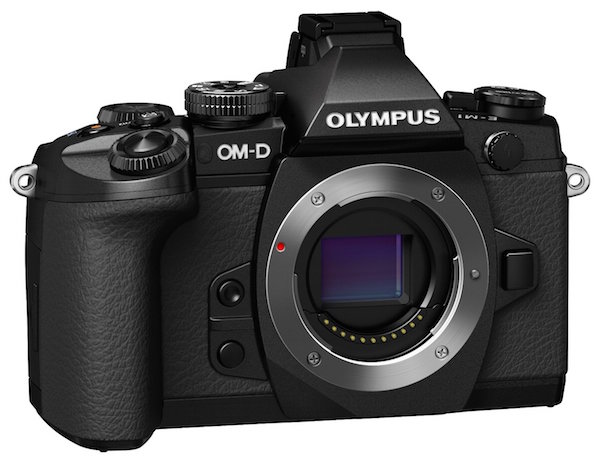
The Olympus OM-D EM-1 is a mirrorless camera that also includes a traditional-style viewfinder. (Image courtesy of Olympus)
Sensor size
Another component of mirrorless cameras that is a bit more technical in nature, but just as important to understand, is that of sensor size. In digital cameras the image sensor is essentially a piece of digital film that captures light, in much the same way actual film does. Full-frame DSLR cameras have image sensors that are the same size as a piece of 35mm film, but most consumer-grade DSLRs, and virtually all mirrorless models, are crop-sensor cameras. This means that the image sensor is smaller, which has two notable implications:
- They are not as sensitive to incoming light as full-frame cameras.
- They affect the way lenses behave when it comes to focal lengths and depth of field.
The most common format of mirrorless cameras are in a category developed by Olympus and Panasonic called Micro Four Thirds, which refers to the size and shape of the image sensor itself as well as the types of lenses that can be used on these models. Other mirrorless cameras use an APS-C sensor, which is the same size sensor used in common DSLRs such as the Canon Rebel T5i and Nikon D3200 (however, even Canon and Nikon use slightly different image sensor sizes), but there are some models such as the Sony A7R that use full-frame sensors as well.
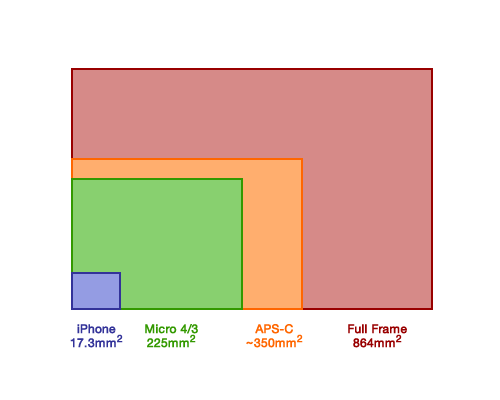
In terms of surface area, full frame image sensors reign supreme. But cameras with smaller sensors are still quite capable, and there is more to a camera than the size of its sensor.
While it’s doubtful we will see crop-sensor cameras (whether micro four thirds or APS-C) reach the same high ISO sensitivities as full-frame models, many of them today are perfectly capable of shooting at values such as 3200 or 6400 without too much degradation in image quality.
As for the lens behavior, shooting on a crop sensor camera means that your focal lengths will not look the same as on a full-frame camera. For example, on a micro four thirds camera a 30mm lens behaves similar to a 60mm full-frame lens. A 100mm lens acts like a 200mm, and so on. For most people this is fine, and they learn to adapt to the differences in lens behaviour over time. For some photographers this a significant detriment that, combined with how depth of field behaves a little different on crop versus full frame cameras, ends up being a deal breaker.
As I mentioned earlier, it’s not about finding out which type of camera is better – that question is unanswerable. Instead, it’s important to simply know the various details of micro four thirds and other mirrorless cameras, in order for you to make an informed decision if you are thinking about purchasing new gear.
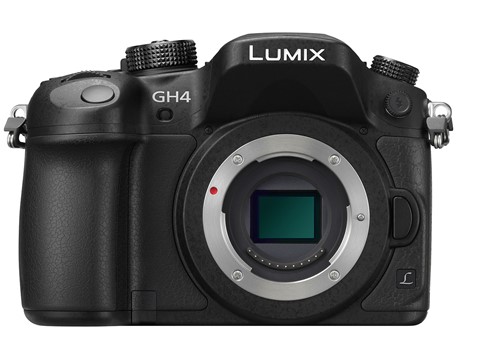
Even though the Panasonic Lumix GH4 is uses a smaller micro-four-thirds sensor, it produces photos on par with most APS-C sensors and even shoots 4K video. (Photo courtesy of Panasonic)
However, one benefit of crop sensor cameras that is important to note is their price; they are significantly cheaper than their full-frame counterparts. The cheapest full-frame camera costs around $ 1500 and they can easily cost many times that amount. On the other hand, some micro four thirds models start at a couple hundred dollars which makes them much more affordable for most people. It’s important to know that mirrorless cameras are not just for beginners, or those who like to shoot in Auto. Many photographers are buying these cameras, and some professionals have even switched entirely from heavy, expensive, DSLR models to their much lighter and more portable mirrorless counterparts.
As you can see, thanks to advances in modern technology the age-old flip-up mirror design in most cameras is not really needed anymore, but we are still a little way off from mirrorless replacing traditional DSLR designs entirely.
Benefits of mirrorless cameras
These new types of cameras offer some significant benefits over traditional DSLRs, but come with some important limitations as well. Remember, we’re not here to discuss which one is better – that’s something that only you can answer, given your unique needs as a photographer. It is important to know that mirrorless cameras do have some notable selling points, but also some drawbacks as well.
Size
By K?rlis Dambr?ns
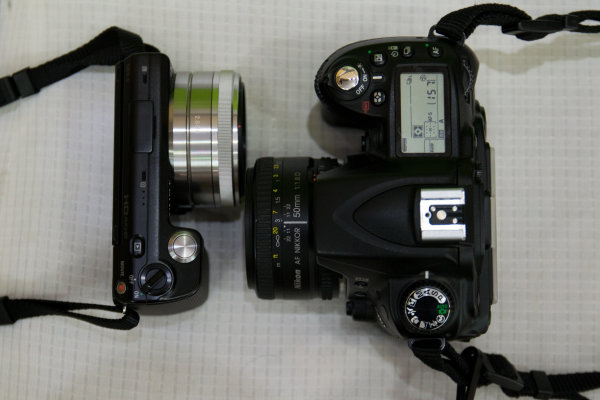
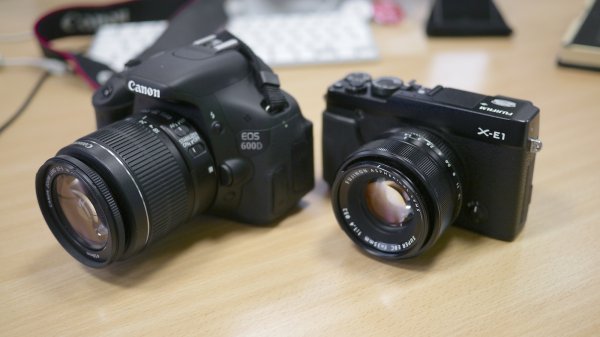
Perhaps the most significant difference between mirrorless and traditional DSLRs is their size: because the flip-up mirror mechanism, combined with the light-reflecting prism, are no longer needed these cameras are typically much smaller in size and weigh less too. This can be important if you are someone who likes to take your camera with you wherever you go, especially if the weight of your DSLR starts to drag you down after a day of shooting. It also means the lenses are smaller too, so you can fit several in your camera bag whereas before you might have only had room for one or two.
More accurate image preview in the viewfinder
Another benefit that mirrorless cameras enjoy over DSLRs, is a viewfinder that displays a more accurate representation of what your final photograph will look like. If you look through the viewfinder of your DSLR and adjust settings like ISO, aperture, and shutter speed, you might notice that the image in the viewfinder doesn’t change. It’s not until you actually take a photograph that you see what effect your alterations had on the photograph. At that point you can look at the picture on the rear screen and judge whether you need to change things for subsequent pictures. Because mirrorless cameras use electronic viewfinders, you can see in realtime the effect that things like aperture and ISO adjustments will have on your pictures before you press the shutter. This can have a dramatic effect on how you shoot, as it removes some of the guesswork with your camera settings.
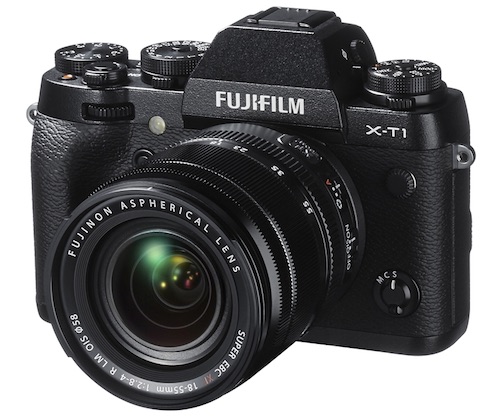
The mirrorless Fuji XT1 uses an APS-C size sensor but is much smaller than traditional DSLRs, making it a compelling option for photographers who value portability along with excellent image quality. (Photo courtesy of Fujifilm)
Focus peaking and sound
There are other benefits to mirrorless cameras as well such as focus peaking (the ability to see, when focusing manually, the exact pixels on your image that are in focus), quieter operation due to the lack of a flip-up mirror, and fewer overall moving parts which means a longer theoretical lifespan. But in order to get an accurate view of the situation, let’s take a look at some of the disadvantages as well.
Drawbacks of mirroless cameras
Things are looking quite promising over in Mirrorless Land, but it’s not all sunshine and roses just yet. There are some notable drawbacks to this technology, and if you don’t look at all the details you might end up with a camera that is ill-suited to your needs as a photographer.
Battery life
Currently one of the most significant limitations is that of battery life: they just don’t last as long. The only time a traditional DSLR draws power, when not in Live View mode, is when it is actively metering the scene or writing picture data to the memory card. No power is used at all if you hold the camera up and look through the viewfinder, and because of this it is fairly common to get up to a thousand pictures or more on a single battery charge. Power usage is a bit different on mirrorless cameras for two reasons. First, batteries are smaller because the cameras themselves are smaller, and second they essentially operate in live view mode 100% of the time. Mirrorless cameras generally get a couple hundred shots on a single battery charge, which is nothing to sneeze at, but nonetheless a significant difference between them and their old-school brethren.
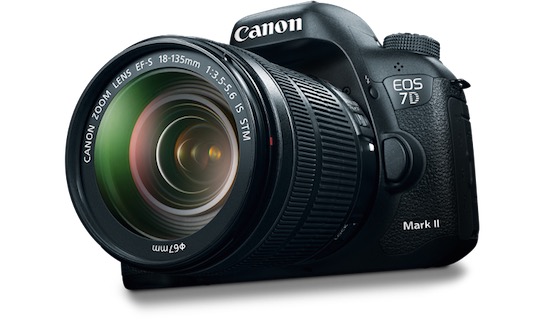
DSLRs might be based on old technology, but don’t count them out just yet. They are preferred by many photographers, and still have some advantages over mirrorless cameras. (Photo courtesy of Canon)
Focusing system
Another limitation that is worth mentioning is the focusing system. Most mirrorless cameras use a technology called contrast detection, which is simply not as fast as the traditional phase-detection method used in DSLRs. While the former gives you access to a wider area of the frame in which to focus, it simply cannot match the speed of the latter which limits the appeal of mirrorless camera for things like sports and fast-moving wildlife photography. Some manufacturers are starting to utilize phase detection in their mirrorless models, as well as hybrid systems that offer the best of both worlds, but for now it’s safe to say that standard DSLRs are generally better suited for sports, wildlife, and other types of action photography.
Other
Of course there are other limitations such as fewer lens options, LCD screen refresh rates that can’t always keep up with DSLR viewfinders, and more, but as technology advances much of this is being addressed.
Which is best for you?
Will mirrorless cameras ever reach full parity with DSLRs? Some think so, but others are not fully convinced. The important thing to remember is it’s not about what other people think; it’s about what matters to you. If you find a camera you like, and it serves your purposes as a photographer, then it really doesn’t matter whether it’s a DSLR, micro four thirds, full frame, medium format, or plain old 35mm film camera. If it can take the pictures you want to take, then it’s probably the right camera for you.
googletag.cmd.push(function() {
mobile_slots.push( googletag.defineSlot( “/1005424/_dPSv4_mob-all-article-bottom_(300×250)”, [300, 250], “pb-ad-78158” ).addService( googletag.pubads() ) );
} );The post DSLR versus Mirrorless: Guide to help you decide which is right for you? by Simon Ringsmuth appeared first on Digital Photography School.

