RSS
 

Posts Tagged ‘REVIEW’

Just Posted: Panasonic Lumix DMC-TS5 Review

13 Jul

thisisart.jpg

We’ve just posted our review of the Panasonic Lumix DMX-TS5/FT5. In the latest of our series of reviews of this year’s crop of waterproof tough compacts we’ve put the TS5 through our usual studio and real-world tests to get a feel for how well it performs. On paper, the 16MP TS5 is one of the best specified cameras of its type, offering built-in GPS, Wi-Fi and NFC (near field communication) inside a tough body and Leica-branded lens. Does it live up to expectations? Read our review to find out.

News: Digital Photography Review (dpreview.com)

 
Comments Off on Just Posted: Panasonic Lumix DMC-TS5 Review

Posted in Uncategorized


Camera review: Samsung Galaxy S4 smartphone

12 Jul

galaxys4.jpg

Samsung’s successor to the popular Galaxy S3 has a lot to live up to, especially given the S3’s impressive performance as a camera. We’ve put Samsung’s latest flagship smartphone, the Galaxy S4, through our rigorous imaging tests to see if it meets the high expectations set for the new model. Read our full camera review now on connect.dpreview.com.

News: Digital Photography Review (dpreview.com)

 
Comments Off on Camera review: Samsung Galaxy S4 smartphone

Posted in Uncategorized


App Review: Mextures

11 Jul

Es vergeht kaum ein Monat, in dem nicht mehrere neue Fotoapps für das iPhone erscheinen. Der Großteil ähnelt sich dabei in Aufbau und Konzept. Aber manchmal tauchen doch welche auf, die es schaffen, sich durch Besonderheiten von der Masse abzuheben: Die Texturen-App „Mextures“ ist so ein Fall.

Konzept

Unter den Tausenden von Fotoapps sticht die App Mextures (entwickelt vom amerikanischen Fotografen Merek Davis) durch einen sehr eleganten Ansatz heraus: Man bearbeitet in der App nicht direkt Fotos, sondern fügt mitgelieferte Texturen zu den Bildern hinzu.

Das klingt auf den ersten Blick nicht sonderlich originell, sondern eher nach einer Instagram-Kopie, die Besonderheit liegt bei Mextures aber in den Details der Umsetzung: So sind die mitgelieferten Texturen nicht nur sehr hochauflösend, sondern auch hochwertig.

Der Prozess der Anwendung der Texturen ist für eine mobile Applikation erstaunlich komplex gestaltet und arbeitet mit unterschiedlichen nicht-destruktiven Ebenen, wie man sie von Photoshop und anderen professionellen Bildbearbeitungsprogrammen kennt.

Das Kombinieren von mehreren Texturen in jeweils einem der zwölf verschiedenen Blendmodi und stufenlosen Opazitätsgraden in Kombination mit der Speicherung dieser sogenannten „Formulas“ ist der Kern von Mextures.

Im Gegensatz zu anderen Bildbearbeitungsapps, die Ähnliches anbieten, erzeugt der Nutzer also hier tatsächlich individuelle Effekte und packt nicht nur Vorgefertigtes auf seine Bilder, das die Ergebnisse bei allen Nutzern gleich aussehen lässt.

Allein mit den 70 enthaltenen Texturen in zwölf Modi und der Transparenzeinstellung auf einer Ebene könnte man schon sehr viele Variation produzieren, die multiplen Ebenen vervielfachen die Möglichkeiten.

Mextures Design

User Experience und Design

Mextures kommt durchweg in einem hochwertigen Look and Feel daher, das konsistent durchgehalten wird: Auf schwarzem Hintergrund mit minimalistisch-stilvollen Icons bearbeitet man seine Bilder und wird dabei nicht sonderlich von den Menüs abgelenkt.

Auch der Workflow in dem extra für die App entwickelten User Inferace ist nach kurzer Eingewöhnungsphase ziemlich intuitiv. Nach der Auswahl des zu bearbeitenden Bildes, das man wahlweise vorab quadratisch beschneiden kann, entscheidet man sich für ein Texture-Pack (die Texturen sind in verschiedene Themen-Packs unterteilt) oder eine Formula (mitgeliefert werden auch „Guest Formulas“ von anderen Fotografen) und kann direkt loslegen.

Die oberen zwei Drittel des Bildschirms sind dabei für das aktuelle Bild reserviert, unten werden ja nach Bearbeitungsschritt die Textures, die Ebenen oder die Blendmodi angezeigt, zwischen denen man mittels der Menüleiste in der Mitte hin- und herwechseln kann.

Schließlich werden auf den Ecken des Bilds selbst per Klick weniger häufige Werkzeuge und Optionen eingeblendet, allen voran ein Schieberegler zum Einstellen der Transparenz der aktuellen Ebene.

Mextures ist insgeamt sehr einfach zu bedienen und wirkt gut durchdacht, die Macher haben sich im positiven Sinne bis hin zur Benennung der Blendmodi sehr stark vom Aufbau der Ebenenpalette in Photoshop inspireren lassen.

Mextures Bearbeitung

Einzig ein paar Kleinigkeiten nerven den Nutzer im Workflow ab und zu: So wird etwa beim Abbruch einer Bearbeitung und beim Speichern mit den veralteten, blauen Notifications gearbeitet, die auf Dauer eher irritieren und die dauereingeblendeten, großen Favoritenicons auf den Texturen wären auch nicht unbedingt notwendig gewesen.

Exportier- und Ladevorgänge der fertigen Arbeiten dauern darüber hinaus relativ lange und man bekommt keinerlei Fortschrittsbalken oder ähnliches Feedback über den Stand des Prozesses angezeigt.

Fazit

Mextures ist eine rundum gelungene Fotoapp mit einem originellen Konzept, die als Ergänzung (nicht Ersatz) zu diversen anderen Bildbearbeitungsapps auf das Smartphone jedes Fotografen gehört, der Ambitionen hat, unterwegs Bilder zu bearbeiten.

Die Ergebnisse und Effekte von Mextures sind dabei bewusst subtiler als bei anderen Fotoapps und applizieren eben nicht heftige Effekte auf die Fotos, bis jedes Foto wie das von jedem anderen User aussieht.

Falls man in der App irgendwann noch die Möglichkeit bekommt, eigene Texturen zu laden und der Workflow ein bisschen schneller werden sollte, dann kann man Mextures uneingeschränkt weiterempfehlen. Und jetzt bitte auch noch eine Version für Android.


kwerfeldein – Fotografie Magazin

 
Comments Off on App Review: Mextures

Posted in Equipment


Just posted: Olympus Body Cap Lens 15mm F8 review

11 Jul

bcl-review-news.png

Just posted: Our review of the Olympus Body Cap Lens 15mm F8. In essence this is a tiny three element optic hidden inside a body cap, and probably the cheapest lens of any description made by any camera manufacturer. But is it any good? In the latest of our lens reviews in collaboration with DxOMark, we take a look both at how well it performs in studio testing, and in real-world use. Does it have any place in the Micro Four Thirds user’s camera bag? Click through to find out.

News: Digital Photography Review (dpreview.com)

 
Comments Off on Just posted: Olympus Body Cap Lens 15mm F8 review

Posted in Uncategorized


Just posted: Nikon Coolpix AW110 Review

06 Jul

aw110-trans.png

We’ve completed the third in our series of underwater/rugged camera reviews, this time covering the Nikon Coolpix AW110. This camera is loaded with features, including a GPS system with maps and landmarks, plus Wi-Fi that gives the ability to control the camera from your smartphone. Click the link to read the review, and don’t forget that we’ll be comparing all six cameras in a few weeks.

News: Digital Photography Review (dpreview.com)

 
Comments Off on Just posted: Nikon Coolpix AW110 Review

Posted in Uncategorized


Just posted: Pentax MX-1 review

02 Jul

specs.jpg

We’ve just posted our Pentax MX-1 review. Designed to recall the golden days of camera design, the Pentax MX-1 features a bright F1.8-2.5 28-112mm equivalent zoom lens, a 12MP 1/1.7″ sensor, and a 3-inch, 920K-dot tilting LCD screen. Brass plates top and bottom are a minor feature of the MX-1 that Pentax was nevertheless careful to highlight as giving that old camera feel, even showing signs of wear over time. A retro look and feel is great, but does that translate into a good camera for modern times? Click through to read our review.

News: Digital Photography Review (dpreview.com)

 
Comments Off on Just posted: Pentax MX-1 review

Posted in Uncategorized


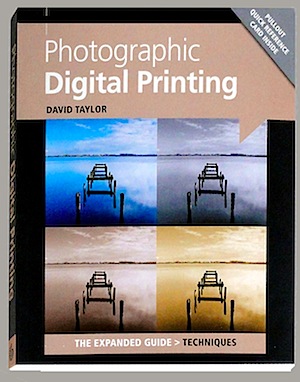
Photographic Digital Printing [REVIEW]

30 Jun

Photographic Digital Printing.jpgIn my experience, personal printing is a declining art. Walk through any retail photo dept and you’ll see hordes of people sitting at digital print stations pumping out bundles of 6×4 inch prints from their precious memory sticks and CDs.

Many of these keen printers will be women, turning happy snap family digi shots into photo records, destined for albums.

The Photographic Digital Printing book will be of no use to them… after all, those auto digi printers do a fine job!

However, it’s the real, rusted on photographers who want quite a bit more from their printing efforts.

As author David Taylor says: ‘It used to be so simple. Once, there was little choice if you wanted a printer. Generally, the same manufacturer made the only printer available for a particular computer printer model. … Printers allow a photographer to control every aspect of image making, from the initial exposure through to the final print.’

Things have sure changed since then: the range of printer types has exploded for one thing. The range of media has similarly expanded, as has the ‘ink’ used.

Ink? Well, for starters there are colour laser printers at affordable prices. Possibly, the only brake on laser printers moving into photo printing further is their inability to use coated papers due to the laser’s heat.

Dye sublimation printers are another type that have positive aspects but, again, fall foul of a limited range of papers and size limits.

Inkjet printers are ubiquitous and are able to produce prints at relatively low cost onto an amazing range of papers and surfaces.

Inkjet printers are divided into two subsets: dye-based and pigmented. The book goes into considerable detail on each type, with descriptions about how ink is placed onto paper, the technology involved and their comparative benefits and disadvantages. This information should be of considerable benefit to new buyers tossing up on the pluses and minuses of each.

Other topics follow: computer to printer communication; printer makers; the various media you can print to. In this area, the range is truly amazing: paper in a wide variety of surfaces, weights and types. Then there is canvas media, transparent film and other surfaces.

On the topic of paper alone, the book spends 20 pages delving into the fibres used, weight, opacity, sizes, surfaces, finish, brightness and texture. Would you like to use Baryta paper, water coloured, calendared or resin coated paper? Perhaps your printing needs will be answered by using artisan papers made by such companies as Hahnemüle or Canson or St Cuthbert’s Mill?

If you have reached around page 50 in the book you will need to make a commitment to take the whole business seriously, commit yourself to the whole technology — or simply head back to your local photo print shop! It’s a serious game!

Strapped in? With David Taylor at the helm, let’s explore more topics: colour and calibration; colour channels; colour management; profiling; image preparation; bit depth; using JPEG or RAW files; understanding histograms.

There is much information about the role of Photoshop in print making. A great deal of this information will cross over and be of help in your original image capture. After all, it’s difficult to print an incorrectly exposed or post processed image. So the book moves into detailed descriptions on how to work with curves, layers, sharpening, etc.

In the closing chapters of the book we finally get to make a print! And even then the info keeps rolling!

How to store a print. How to mount a print. Book binding. Exhibiting. Black and white printing. And troubleshooting.

For me, the big surprise is that there is so much information in such a small book and information which is camera and printer non-specific — unlike some other publications which are dedicated to brand name printers.

An excellent book on the subject.

Author: D Taylor.
Publisher: Ammonite Press.
Distributor: Capricorn Link.
Size: 18x15x1cm. 192 pages.
ISBN: 978 1 90770 874 9.
Price: Get a price on Digital Printing (The Expanded Guides: Techniques) by (David Taylor) at Amazon (currently 24% off).

Post originally from: Digital Photography Tips.

Check out our more Photography Tips at Photography Tips for Beginners, Portrait Photography Tips and Wedding Photography Tips.

Photographic Digital Printing [REVIEW]


Digital Photography School

 
Comments Off on Photographic Digital Printing [REVIEW]

Posted in Photography


Just posted: Olympus Tough TG-2 iHS Review

29 Jun

tg2-homepage.png

We’ve just posted the second in our series of rugged/underwater camera reviews. This time around, we’re taking a look at the Olympus Tough TG-2 iHS, whose main claim to fame is its 25-100mm lens, which has a maximum aperture of F2 at wide-angle. The TG-2 also boasts a fully-featured GPS, limited manual controls, wireless flash control, and a unique ‘tap control’ feature. For all the details – and our conclusions – follow the link.

News: Digital Photography Review (dpreview.com)

 
Comments Off on Just posted: Olympus Tough TG-2 iHS Review

Posted in Uncategorized


Just posted: Canon EF 200-400mm f/4L IS USM Extender 1.4x review

25 Jun

200-400.png

Just posted: Our quick review of the Canon EF 200-400mm f/4L IS USM Extender 1.4x: the world’s first SLR lens with a built-in switchable teleconverter. It’s been two years in the making, but when Canon offered to show us a production version of its professional super-telezoom, we couldn’t help but be intrigued. In this review we’ve teamed up with DxOMark to bring you full optical test data of this unique lens, backed up by some quick real-world examples. So how does it perform? Click through to find out. 

News: Digital Photography Review (dpreview.com)

 
Comments Off on Just posted: Canon EF 200-400mm f/4L IS USM Extender 1.4x review

Posted in Uncategorized


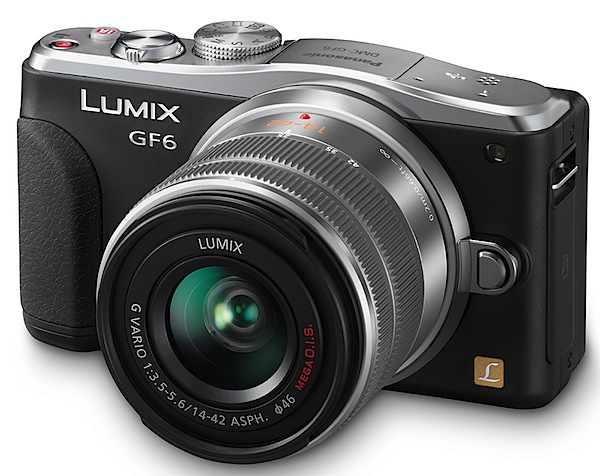
Panasonic Lumix DMC-GF6 Review

25 Jun

Panasonic Lumix DMC-GF6 Review.jpg

The advance of mirrorless interchangeable lens cameras is still a developing tale.

The GF6 is a good example of where we’re at, but don’t think for one moment that what the camera offers is indicative of what a MILC camera should offer.
Panasonic Lumix DMC-GF6 top.jpg

Panasonic Lumix DMC-GF6 back.jpg

Panasonic Lumix DMC-GF6 side.jpg

The beauty of this style of camera is that it’s small, with access to a range of lenses that are similarly compact in size. It can be used as a point-and-shoot, it’s pocketable (with lens removed) and equipped with a sufficient number of controls that most people will cotton on to.

One price you pay with the GF6 is that there is no turret viewfinder, a big help in bright ambient light, nor is there access to an optional finder. There is however, a vari-angle touch screen LCD that tilts vertically through an approximate 180 degrees arc.

The CMOS captures a maximum image size of 4592×3448 pixels, leading to a 39x29cm print.

Video can be shot in AVCHD or MPEG4 formats, up to Full HD 1920×1080 pixels resolution. And you can shoot stills during a video recording.

Panasonic Lumix DMC-GF6 Features

At first sight, the camera is attractive. A soft chrome top deck and the rest in black.

Controls

Top deck: at left is a button to activate the flash cell; just right of the latter is the mode dial holding positions for auto, PASM, ‘creative’ video; two custom settings; panorama shooting; scene modes (23 in all) and a creative control mode that takes you into a magic world of 19 shooting styles that include a retro look, high and low key effects, mono, cross processing etc.
Scene modes.jpg

Creative control.jpg

If you get the feeling, from the scene modes and creative control effects in the GF6, that this is a dabbler’s camera … you’d be right! The more expert may scoff at this situation but, if it helps photographers to get more out of their camera, I’m all for it.

Moving further to the right you see the shutter button, on/off button, direct access to the intelligent auto mode and the video record button.

One annoyance: the video record button is only mills away from the iAuto button … too easy to hit the latter when you really wanted to activate the former. Far better to have placed the video button on an edge as most other camera do.

The camera’s rear is fairly simple in layout: replay; screen display options; four way control dial offering exposure variation, AF modes, white balance options, single/continuous shooting and self timer. Central is the menu/set button.

Beneath the control dial is a quick access menu button and a Function button.
My main gripe with this arrangement is that the control dial has four positions (AWB, etc) but each of these is identified by tiny white text on a silver background. Impossible to see!
Menu 1.jpg

The menus are clearly laid out.

But there are some novel aspects to this camera that are unique: one is the stop motion feature. You can set the camera to shoot images at predetermined intervals or fire them off manually.
Buddha.JPG

Pots 1.JPG

Cinema 2.JPG

There is easy wireless connectivity via Wi-Fi with compliant smart phones and tablets that lets you monitor the camera’s view from a smartphone and set zoom, focus, shutter release, shutter speed, aperture and exposure compensation.

With High Dynamic Range, the camera merges three shots with differing exposure levels into a single picture; this will help with subjects of an extreme bright to dark brightness range.

The Instant Transfer feature allows data to be transferred automatically to the device whenever the shutter is fired. You can also do this via the touch screen.

ISO Tests

Panasonic Lumix DMC-GF6 ISO 160.JPG

Panasonic Lumix DMC-GF6 ISO 400.JPG

Panasonic Lumix DMC-GF6 ISO 800.JPG

Panasonic Lumix DMC-GF6 ISO 1600.JPG

Panasonic Lumix DMC-GF6 ISO 3200.JPG

Panasonic Lumix DMC-GF6 ISO 6400.JPG

Panasonic Lumix DMC-GF6 ISO 12800.JPG

Only at ISO 6400 did noise begin to intrude. At ISO 25600 the noise was much higher but resolution held up surprisingly well.

Panasonic Lumix DMC-GF6 Review Verdict

Quality: above average with precise colour rendering and fine resolution.

Why buy the Panasonic Lumix DMC-GF6: budget level entrée into the world of interchangeable lens photography.

Why not by the Panasonic Lumix DMC-GF6: no viewfinder.

In other respects I found the camera to be quite spiffy and easy to use. If you’re keen to dip your toe into interchangeable lens photography, want to post process RAW files, shoot decent video etc … this one’s for you!

The beauty of the GF6 is that you can get around the various modes with great ease. Not too challenging.

Panasonic Lumix DMC-GF6 Specifications

Image Sensor: 16 million effective pixels.
Metering: Multiple, centre-weighted and spot.
Effective Sensor Size: Four thirds 17.3×13.0mm CMOS.
Lens Factor: 2x.
Compatible lenses: Micro Four Thirds.
Exposure Modes: Auto, Program AE, shutter and aperture priority, manual.
Shutter Speed: 60 to 1/4000 second; flash sync 1/160 sec.
Burst Speed: 4.2 fps.
Memory: SD/SDHC/SDXC cards.
Image Sizes (pixels): 4592×3448 to 1712×1712. Movies: 1920×1080, 1280x720p, 640×480.
Viewfinder: 7.6cm LCD screen (1,040,000 pixels).
File Formats: JPEG, RAW, JPEG+RAW, AVCHD/MPEG4, MPO (3D).
Colour Space: Adobe RGB, sRGB.
ISO Sensitivity: Auto, 160 to 12800 (25,600 with boost).
Interface: USB 2.0, AV, HDMI mini, WiFi, DC input.
Power: Rechargeable lithium ion battery, AC adaptor.
Dimensions: 111x65x38 WHDmm.
Weight: Approx. 323 (inc battery).
Price: Get a price on the Panasonic DMC-GF6 16MP Mirrorless Compact System Camera with Lens Kit at Amazon.

Post originally from: Digital Photography Tips.

Check out our more Photography Tips at Photography Tips for Beginners, Portrait Photography Tips and Wedding Photography Tips.

Panasonic Lumix DMC-GF6 Review


Digital Photography School

 
Comments Off on Panasonic Lumix DMC-GF6 Review

Posted in Photography