RSS
 

Posts Tagged ‘REVIEW’

13 August, 2013 – Sony DEV-50 Review. The Year’s Best Gadget

13 Aug

Does anyone really need a 12X pair of digital 3D binoculars with built-in HD camcorder? Likely not. But the new Sony DEV-50 is an absolute blast to use, and is my suggested best gadget of 2013.

"Having been to Antarctica with Michael and Kevin, I would say after having traveled the world and shot nearly my entire life as an exhibiting photographer,  it was one of my highlights in my life and I talk about it, all the time.  The images and experience of seeing something visionary and nearly extinct from the world, to see and experience the wildlife and scenery that does not fear humans is amazing.  The images I shot there won me two Smithsonian awards and nearly 18 other international awards". – Tim Wolcott

 Find Out More Now
These Expeditions Will Sell Out Quickly. They Always Do

 Find Out More Now
These Expeditions Will Sell Out Quickly. They Always Do


The Luminous Landscape – What’s New

 
Comments Off on 13 August, 2013 – Sony DEV-50 Review. The Year’s Best Gadget

Posted in News


What’s up dock? Sigma USB Dock review

13 Aug

usbdock.png

Sigma has been doing lots of good things recently, and one of its most interesting recent products is the USB Dock. This device connects a lens to a computer and, in concert with Sigma’s Optimization Pro software, allows the user to do such things as update the firmware and configure detailed autofocus microadjustment settings. In our quick review we take a close look at how it works and what it can do. Click through to find out more.  

News: Digital Photography Review (dpreview.com)

 
Comments Off on What’s up dock? Sigma USB Dock review

Posted in Uncategorized


Join the Q: In-depth Pentax Q7 review

09 Aug

q7reviewthumb.jpg

We’ve just published our review of the Pentax Q7. The Q7 is of course the latest miniature interchangeable lens camera in Pentax’s Q line, and the first to use a larger 12MP 1/1.7 inch BSI CMOS sensor. Despite a larger sensor than its predecessors, the Q7 is fully compatible with all seven of Pentax’s existing Q-mount lenses, and offers a range of fun and useful features designed to appeal to enthusiasts and novices alike. But is it any good? Click through and read our full review to find out. 

News: Digital Photography Review (dpreview.com)

 
Comments Off on Join the Q: In-depth Pentax Q7 review

Posted in Uncategorized


Peak Design Capture Camera Clip v2 review

08 Aug

You may have read the article we wrote on Peak Design’s Leash & Cuff a little while back? The crazy bunch at Peak Design are at it again, this time with a version 2 release of their primary product, Capture

GET CAPTURE v2.0 ON KICKSTARTER

As of right now, 4,875 people have backed their current Kickstarter for over half a MILLION dollars!… Amazing crowd supported project! Well, being a Peak Design Pro, I’m very lucky to already be using Capture v2.0 and wanted to pen an article about it and how it has changed from version to version and how it could help you.

Peak_Design_V2_Simon_Pollock

A brief catch up – what is “Capture” …well, in very basic terms, Capture is a device that you can attach to pretty much any belt / bag strap / backpack shoulder strap etc, that allows you to quickly and securely mount your camera on that device via the included baseplate. So if you want to go hands free while you’re out shooting, you simply slot your camera into Capture and you’re good to go, then when you see a photograph you want to make, on press of a button and you’re firing. You can see the image above, I have my little Sony NEX 5r mounted on the shoulder strap of my thinkTankPhoto Retro 7 camera bag, it makes it so easy when I’m down the park with my 3.5 year old – I can run, kick, jump, swing and hide with my hands free, then, when he’s doing something awesome like climbing a massive tree, I can whip the camera out of its little metal home and SNAP, I’ve capture my moment.

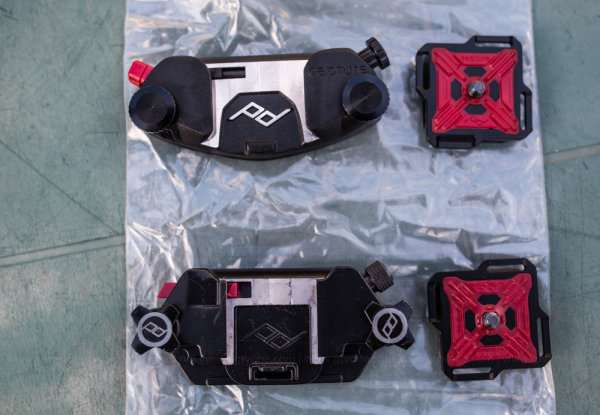
In the photograph below, you can see some of the changes from version one (bottom) to version two (top) including the following (based on my two weeks solid use and not the specs on the website)

  • Easier ‘mouth’ where you slide your camera in – makes slotting your camera away easier (in my opinion) 
  • No more sharp edges / less round edges – while I love and still use v1.0, the v2.0 feels…grown up..
  • The red button you use to release your camera now has a little simple twist lock to stop accidental ejection..
  • The screw (top right of units) now secures the camera plate solid, so you can actually use Capture on top of a monopod / tripod..
  • Capture now has the ability to mount little cameras such as GoPro so you can use capture to shoot yourself falling off your bike – etc!

Capture_Peak_Design_V1_vs_v2_Simon_Pollock

Here’s a couple of photographs that show you how you can use Capture for the top of a tripod or monopod and in the second photo you can see the Sony is tethered with Peak Design’s “Leash”

Peak_Design_Simon_Pollock

Capture being used to mount the Sony directly onto the 3LeggedThing tripod furniture

Peak_Design_Simon_Pollock

Capture being used to mount the Sony directly onto the ‘Bob’ 3LeggedThing Monopod furniture

I’m use Capture v2.0 and v1.0 with Peak Design’s Leash and Cuff system (for those among you that are saying…ohhh, I might drop my camera… you can’t!)

Take a look at the version two Capture camera clip system video on KickStarter and see for yourself… If you have any questions about how the clip works, what I shoot with it / my workflow / how I use Capture, please don’t hesitate to ask in the comments below.

–Sime


Post originally from: Digital Photography Tips.

Check out our more Photography Tips at Photography Tips for Beginners, Portrait Photography Tips and Wedding Photography Tips.

Peak Design Capture Camera Clip v2 review


Digital Photography School

 
Comments Off on Peak Design Capture Camera Clip v2 review

Posted in Photography


Just posted: Sigma 17-70mm f/2.8-4 DC Macro OS HSM ‘C’ lens review

05 Aug

sigma1770review.png

Just posted: Our review of the Sigma 17-70mm f/2.8-4 DC Macro OS HSM | C. This lens occupies its own little niche in the market, as an upgrade to the typical 18-55mm zoom that offers both usefully extended zoom range and a faster maximum aperture. It also includes Sigma’s ‘Hypersonic Motor’ for silent focusing, and built-in Optical Stabilisation. In the latest of our lens reviews prepared in partnership with DxOMark, we see whether it should be top of the short-list for SLR owners looking to progress beyond their kit lens.

News: Digital Photography Review (dpreview.com)

 
Comments Off on Just posted: Sigma 17-70mm f/2.8-4 DC Macro OS HSM ‘C’ lens review

Posted in Uncategorized


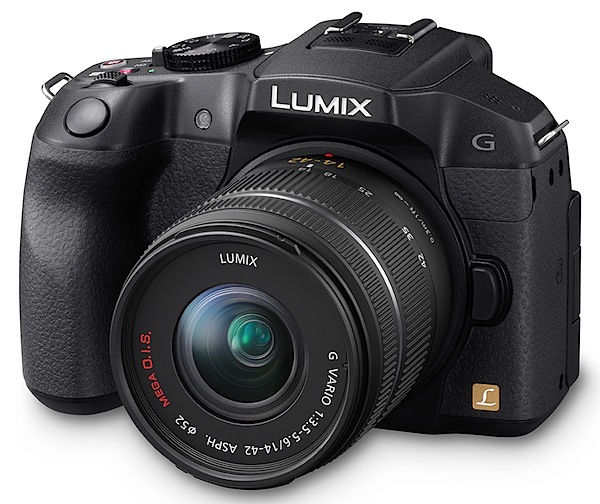
Panasonic Lumix DMC-G6 Review

02 Aug

Panasonic Lumix DMC-G6 Review.jpg

If it looks like a DSLR, feels like a DSLR, works like a DSLR and takes pictures like a DSLR, it probably is a DSLR. Izznit?

Nup. This ‘un is a MILC — mirrorless interchangeable lens camera … one of the many models now proliferating on the market like rabbits.

In reality, the major difference between this MILC and true blood DSLRs is that, with the former, the top Live viewfinder presents an electronic view of the shot you’re about to fire, while the DSLR delivers an optical view, thanks to a prism and a series of mirrors …just like the ole time film cameras used to do!

True, the electronic view is not as razor sharp as the optical, it does look a bit ‘electronic’ and very alike to the view delivered on the rear LCD screen, but when you’re outdoors, as many of you know, the rear screen can be washed out in bright light, so Live View to the rescue.
Panasonic Lumix DMC-G6 back.jpg

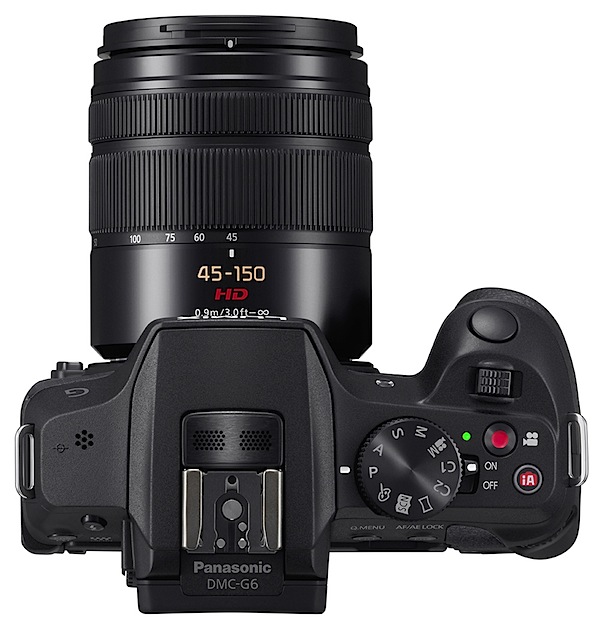
Panasonic Lumix DMC-G6 Review Top.jpg

The review camera was furnished with a Panasonic-made G Vario lens of f3.5/14-42mm specs.

The G6 is a welcome addition to the lineup. In stills, it can pull a maximum image size of 4608×3456 pixels, leading to a 39x29xcm print.

In video capture, it can shoot AVCHD or MPEG4 formats at Full HD 1920×1080 pixel resolution using a Class 4 card or better. And you can shoot stills while recording video. Auto focus tracking locks on the subject and maintains focus even as it moves.

Panasonic Lumix DMC-G6 Handling

It sure feels like a DSLR! And it is a comfy feel in the hand, mostly thanks to the pronounced speed grip and overall good balance.

Top deck controls: there’s a hot shoe on top centre to accept an auxiliary flash (in addition to the lower powered internal flash beneath the hot shoe).
Creative Guides.JPG

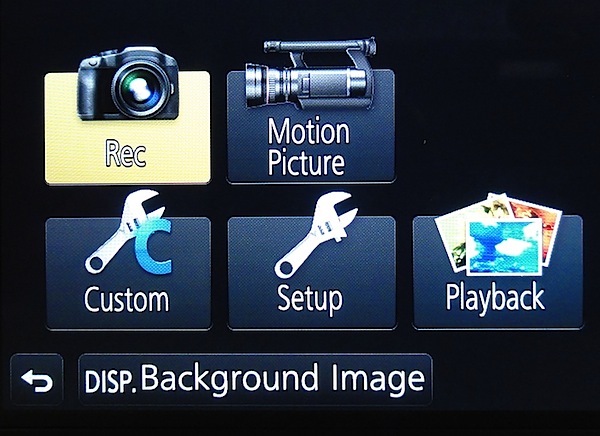
Panasonic Lumix DMC-G6 Menu 1

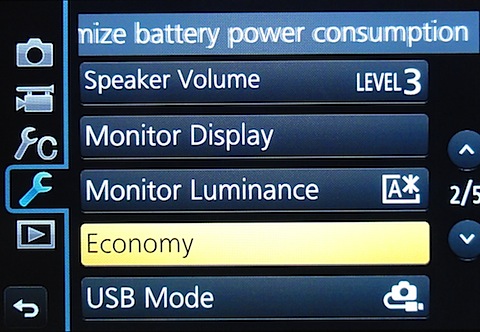
Panasonic Lumix DMC-G6 Menu 2

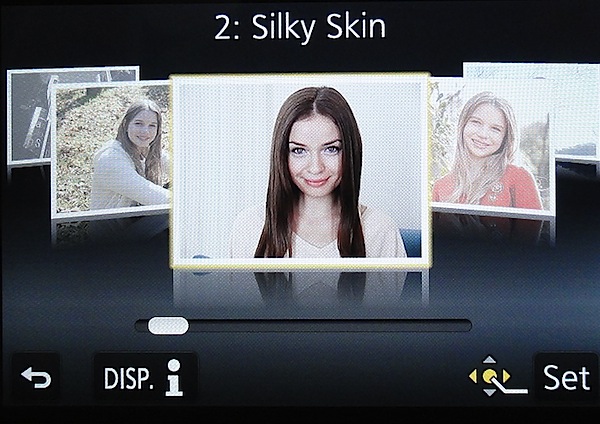
Farther right is the mode dial with positions for PASM, creative video, two custom modes, panorama, a scene guide and a creative control mode. The scene guide offers 23 sample pictures shot by pro photographers which you can use as a helper in making your own shots …like silky skin, glistening water etc. The creative control mode has 19 filters (old days, sunshine, retro, etc. The effect parameter of each mode is adjustable.

And, for what it’s worth, the camera can only shoot panos while held in an horizontal attitude, unlike the methods that some other cameras can deliver.

If you want to shoot in auto mode you move your finger farther right and tap a tiny red button marked ‘iA’. The power lever is set into the side of the mode dial. Close by is the familiar video record button, hemmed in by the mode dial, power lever and intelligent auto button …it is not the most ideal position for this button and takes quite a bit of precise pressure to operate.

Forward on the top deck is a control I had not seen before: a lever that could be used in either of two ways: it could drive any exposure compensation you desire by +/- five f stops; or with specific power-driven lenses, it can operate the zoom. Additionally, just to the rear and over the corner edge of the camera is a control dial which adjusts aperture or shutter while in those modes.

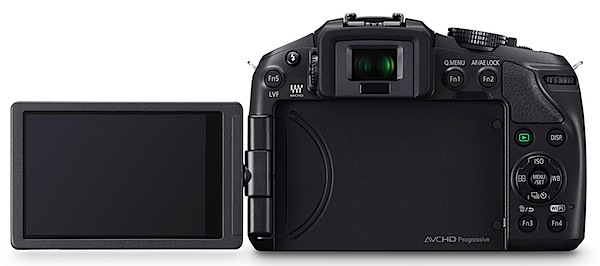
Rear: the 7.6cm LCD touch screen is a vari-angle screen that can be rotated 180 degrees laterally and 225 degrees vertically. At the extreme left is the internal flash release and a function button that switches between top and rear finder; to the right are two more function buttons. Flanking the screen are the replay button, another for display options plus two more function buttons. The jog dial has positions for menu; ISO setting; direct setting of options for AWB, colour balance etc; continuous shooting and self timer; AF options.

A 3.5mm terminal is set into the camera’s right side to accept an external microphone.

Overall, not a fully packed brigade of external controls. The viewfinder menu is not overly complex.


Narrabeen lake 2.JPG

Seats 2.JPG

Trees 2.JPG

Panasonic Lumix DMC-G6 Features

A Wi-Fi connection allows users to connect the G6 to their smart phone or tablet at a touch, while still and movie shooting can be driven remotely from the smart phone screen.


Roof original.JPG

Roof retouched.JPG

And a couple of unusual features: time lapse and stop motion video shooting; a novel Clear Retouch function lets you edit out unwanted parts of a picture after shooting by simply tracing over them on the monitor with a fingertip; I tried this and it works (above)! But only with large areas of unwanted image data: don’t think you can remove wicked Uncle Ted from a family group shot!

Panasonic Lumix DMC-G6 ISO Tests

Panasonic Lumix DMC-G6 ISO 160.JPG

Panasonic Lumix DMC-G6 ISO 400.JPG

Panasonic Lumix DMC-G6 ISO 800.JPG

Panasonic Lumix DMC-G6 ISO 1600.JPG

Panasonic Lumix DMC-G6 ISO 3200.JPG

Panasonic Lumix DMC-G6 ISO 6400.JPG

Panasonic Lumix DMC-G6 ISO 12800.JPG

Panasonic Lumix DMC-G6 ISO 25600.JPG
It’s only at ISO 6400 that the image begins to degrade. Much the same at ISO 12800.

By ISO 25600 the show’s over: much noise, artefacts and a washed out image.

Panasonic Lumix DMC-G6 Review Verdict

Quality: above average.
Why buy the Panasonic Lumix DMC-G6: looks and works like a DSLR.
Why not: a bit complex for the raw amateur.

If you get the feeling that this camera attempts to bridge the needs of the enthusiast and the dabbler, you’re right. Just check out the creative and scene guides.

However, I would not be unhappy to use it on an advanced shoot!

Panasonic Lumix DMC-G6 Specifications

Image Sensor: 16.1 million effective pixels.
Metering: Multiple, centre-weighted and spot.
Effective Sensor Size: Four thirds 17.3×13.0mm CMOS.
Lens Factor: 2x.
Compatible lenses: Micro Four Thirds.
Exposure Modes: Auto, Program AE, shutter and aperture priority, manual.
Shutter Speed: 60 to 1/4000 second; flash sync 1/160 sec.
Burst Speed: 7 fps.
Memory: SD/SDHC/SDXC cards.
Image Sizes (pixels): 4608×3456 to 1712×1712. Movies: 1920×1080, 1280x720p, 640×480.
Viewfinders: Turret finder: 1,440,000 pixels. 7.6cm LCD screen (1,040,000 pixels).
File Formats: JPEG, RAW, JPEG+RAW, AVCHD/MPEG4, MPO (3D).
Colour Space: Adobe RGB, sRGB.
ISO Sensitivity: Auto, 160 to 12800 (25,600 with boost).
Interface: USB 2.0, AV, HDMI mini, WiFi, DC input.
Power: Rechargeable lithium ion battery, AC adaptor.
Dimensions: 122x85x71 WHDmm.
Weight: Approx. 390 (inc battery).
Price: Get a price on the Panasonic Lumix G Series DMC-G6 with 14-42mm II Lens Kit or body only.

Post originally from: Digital Photography Tips.

Check out our more Photography Tips at Photography Tips for Beginners, Portrait Photography Tips and Wedding Photography Tips.

Panasonic Lumix DMC-G6 Review


Digital Photography School

 
Comments Off on Panasonic Lumix DMC-G6 Review

Posted in Photography


Just posted: OMG Life Autographer Quick Review

02 Aug

autographer-news.jpg

Just posted: Our quick review of the Autographer from OMG Life. Billed as the ‘world’s first intelligent wearable camera’, it’s designed to take pictures automatically triggered by the output from five built-in sensors. The camera has a super wideangle lens with a 136° angle of view, a 5MP CMOS sensor, and 8GB of built-in memory for image storage. It also has Bluetooth for connection to a smartphone. It’s certainly intriguing, but how well does it work?

News: Digital Photography Review (dpreview.com)

 
Comments Off on Just posted: OMG Life Autographer Quick Review

Posted in Uncategorized


Panasonic Lumix DMC-GX7 First Impressions Review

01 Aug

previewstory.jpg

Prior to its announcement today, we had the opportunity to use Panasonic’s new high-end Lumix DMC-GX7 mirrorless interchangeable lens camera. As well as a redesigned 16MP Live MOS sensor, the GX7 features a tilting camcorder-style EVF, a tiltable rear LCD screen and a silent mode designed to capture full-resolution still images without the mechanical shutter. Click through for our hands-on first impressions review. 

News: Digital Photography Review (dpreview.com)

 
Comments Off on Panasonic Lumix DMC-GX7 First Impressions Review

Posted in Uncategorized


Review: Landscapes in Lightroom 5 eBook

31 Jul

Landscapes in Lightroom 5: The Essential Step-by-Step GuideFriend and fellow landscape photographer Michael Frye has released a new ebook today:

Landscapes in Lightroom 5: The Essential Step-by-Step Guide 

Use code lr520 to save 20%

This discount is good through Sunday August 4th midnight PST.

Michael is equally as talented as a teacher as he is as a photographer. His ebook includes a great combination of tips, tricks, overview information, videos and even downloadable image files to practice on. The design is clean and most importantly the information is invaluable if you’re looking to get the most out of Lightroom 5 with your landscape and nature photography.

Included in the ebook:

  • Lightroom 5 “Development Module” improvement/feature overview
  • Detailed workflow discussions and examples
  • Numerous comparisons of images processed with Lightroom 5, 4 and 3
  • 8 videos detailing discussed techniques
  • DNG Raw file downloads to practice with as you read 6 LR development examples
  • and a lot more

Be sure to take advantage of the 20% discount with code lr520 and download a copy.


Copyright Jim M. Goldstein, All Rights Reserved

Review: Landscapes in Lightroom 5 eBook

The post Review: Landscapes in Lightroom 5 eBook appeared first on JMG-Galleries – Landscape, Nature & Travel Photography.


Related Stories

  • Review: Landscapes in Lightroom 5 eBook – Enclosure
Feed Ads by FeedBlitz
powered by ad choices


JMG-Galleries

 
Comments Off on Review: Landscapes in Lightroom 5 eBook

Posted in Equipment


31 July, 2013 – The Digital Print – a review and video interview

31 Jul

Our friend and colleague Jeff Schewe has written a new book titled The Digital Print. It has just been published and is available as of today from leading book sellers.

We now have a review of the book online. The page also includes a ten minute long streaming video interview with Jeff conducted by Kevin Raber.


"Having been to Antarctica with Michael and Kevin, I would say after having traveled the world and shot nearly my entire life as an exhibiting photographer,  it was one of my highlights in my life and I talk about it, all the time.  The images and experience of seeing something visionary and nearly extinct from the world, to see and experience the wildlife and scenery that does not fear humans is amazing.  The images I shot there won me two Smithsonian awards and nearly 18 other international awards". – Tim Wolcott

 Find Out More Now
These Expeditions Will Sell Out Quickly. They Always Do.


The Luminous Landscape – What’s New

 
Comments Off on 31 July, 2013 – The Digital Print – a review and video interview

Posted in News