RSS
 

Posts Tagged ‘REVIEW’

The Magic of Digital Nature Photography [BOOK REVIEW]

08 Sep

The Magic of Digital Nature PhotographyI like these books for more than the obvious reason that they contain a wealth of help in their pages.

For one thing they’re an easy read so, after a hard day behind the camera, you can relax at home and read it for pleasure, not only soaking up all the useful info but enjoying the largish pictures within its pages.

Author Rob Sheppard intentionally laid out all the practical info and creative suggestions you would need to take your images to a higher level: which lenses and accessories are best for the purpose; the pluses and minuses of RAW vs JPEG; how do you stalk an animal? How about landscape composition?

Satisfying it may be, but many amateurs are unaware their work is just that: amateur. Sure, it takes effort, but it is worth while to lift your game, tune up your senses and place your image making on a higher plane.

Sheppard confesses that he has enjoyed photography since he was a kid and remembers entering a B&W print of a local scenic spot in the local newspaper’s photo contest and recalling his pride in the photo — but it didn’t win!

He still enjoys being out and about with a camera, having shot images from Peru to Newfoundland, Florida to Washington and admits he wants to ‘get you excited about getting out and taking photographs of your own special subjects.’

First the spiritual: Sheppard believes that ‘nature photography definitely deepens, widens and expands our sense of life. He believes you can shoot pictures of your favourite subjects; most times you can shoot many shots of your favourite subjects and yet capture totally different images than another person may take.

A touchy feely sort of book? You betcha!

In a chapter titled ‘Connections’ Sheppard asserts that whilst we may have many connections to the natural world, these are not always recognised. He suggest you connect with the subject in the picture, then connect again with the subject when you look at the final image. The final pleasure comes in sharing the image with others, helping them also to connect with the subject.

Then down to practicalities: choice of camera is important but what may work well for one person may not be OK with another. Educate yourself about differing camera types, decide on which type of nature photography you wish to pursue and make sure you can tote your camera into the field, making sure you don’t spoil your adventures with a pile of gear that weighs you down.

In a section titled ‘Megapixels and Quality’ he comes down heavily on the hype over pixel count: after all, megapixel counts are less about image quality and more about size.

Useful chapters follow on lenses, suitable focal lengths for scenic work, suitable camera mounts. Then follow discussions on exposure; lens aperture vs shutter speed; working in auto vs Program AE vs aperture or shutter priority vs manual exposure; reading a screen histogram; ISO settings; how to determine white balance.

Without light you can’t capture too much in the way of a digital scenic! That much is obvious. But what quality of light? Hard or soft? Front lit or backlit? And its colour?

There follows some handy help on how to model and shape the light on your scenic using reflectors or diffusers, by warming it with a change to the white balance, a change to the exposure, adding another light source, adding a grad filter etc.
The general tone of the book is more in the nature of help rather than a pile of techy details, which makes it an easy and encouraging read.

If you’re into scenics, this is for you!

But, as I said, don’t expect ‘a pile of techy details!’

Author: R Sheppard.
Publisher: Pixiq.
Distributor: Capricorn Link.
Length: 192 pages.
Size: 28x22x12mm.
ISBN: 978 1 4547 0813 1.
Price: Get a Price on The Magic of Digital Nature Photography at Amazon (currently 39% off)

Post originally from: Digital Photography Tips.

Check out our more Photography Tips at Photography Tips for Beginners, Portrait Photography Tips and Wedding Photography Tips.

The Magic of Digital Nature Photography [BOOK REVIEW]

Digital Photography School

 
Comments Off on The Magic of Digital Nature Photography [BOOK REVIEW]

Posted in Photography


A Review of the Think Tank City Walker 30

06 Sep

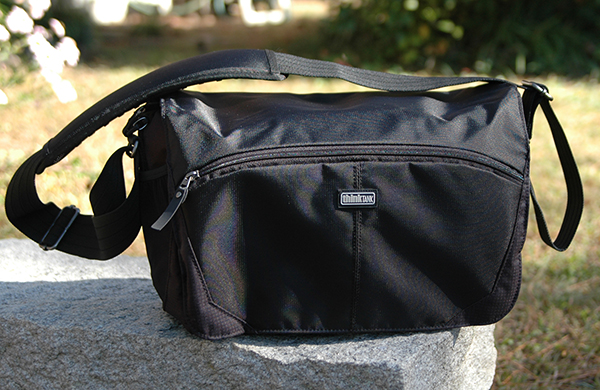
All in all, this was a pretty good summer– except, of course, for the trip that didn’t happen.  I was supposed to hit the road with some friends last month, but events beyond our control pulled the rug out from under us at the last minute.  My bags were packed.  I was ready to go.  The taxi was waiting outside my door.  OK– not really, but my Think Tank City Walker 30 really was packed and I am all out of cheesy musical metaphors.  I took a few shots of this pretty amazing bag before I unpacked it and thought I’d share a few impressions.  I see so many articles about packing gear for travel and it’s always some big rolling case that fits an entire studio’s worth of equipment and a sherpa to roll it.  But what about a simple bag full of basics?

This is my eighth Think Tank bag (Hey– don’t judge me…I can quit any time I want!) and I’m pretty sure it’s quickly becoming my favorite.  I generally don’t write “fresh-out-of-the-box” reviews.  I prefer to put a product through its paces for a while before formulating an opinion or recommendation.  But since the 30 is a larger version of the City Walker 20 that I’ve been using for about ten months, I think we’re in the clear.  Certain things jump out at you when you pick up any Think Tank bag, and the City Walker messenger-style bags are no exception.  Superior construction is at the top of the list.  Even a light-weight bag like the City Walker is obviously built to last.  Everything from the zippers to the straps are designed with efficiency, durability, and comfort in mind.

CityWalker30-001

The Think Tank City Walker 30

So, what’s the big deal about yet another shoulder bag?  Besides its soft-sided, light-weight design, the entire City Walker line boasts the one thing I love most about Think Tank bags– it doesn’t scream, “Hey, I’m a camera bag!  Come steal me and my $ 8,463.75 worth of gear!”  Conceived with the needs of the urban street photographer or photojournalist in mind, the CW is also perfect for any photographer looking for a way to travel light– regardless of whether it’s on assignment, vacation, or a day out with the family.  As with all things Think Tank, there is an abundant supply of pockets, compartments, and dividers, and the dedicated interior laptop/iPad pocket is a huge welcome addition.  But perhaps the coolest feature of this camera bag is that it doesn’t have to be a camera bag at all.  The entire padded gear section can be removed, converting from camera bag to messenger bag or overnight bag (and back again) quickly and easily.

CityWalker30-006

The padded gear section is held in with Velcro and is easily removable.

Fresh out of the box, the City Walker doesn’t look like it’s going to hold all that much, but it really does.  Here’s a quick look at the gear I had packed for the trip, with plenty of room to spare.

CityWalker30-003

Packed and ready to go.

1.    Laptop

2.    Memory cards (Think Tank Custom Pixel Pocket Rocket)

3.    SB800 Speedlight in an internal side pocket

4.    16-35mm lens

5.    Nikon D90 with 24-70m lens attached

6.    70-200mm lens

7.    Two Think Tank DSLR battery holders

8.    CapturePRO Camera Clip from Peak Design

9.    Included Think Tank rain cover in an internal side pocket

10.    NOT pictured, but stashed in the pockets:  Business cards, notebook,, pens, lens cloth, AA’s, miscellaneous cords, chargers, and Peanut m&m’s.

The fact that you can completely remove the gear section adds some great diversity.  It actually wasn’t until my trip got cancelled that I realized I can completely pack for a long weekend with nothing more than my two City Walkers– some basic gear in the 20 and clothes in the 30 (or the other way around).  This photo shows almost a week’s worth of clothes and other essentials in the 30 with plenty of room to spare.

CityWalker30-007

Whereas I use different bag and configurations for different jobs and assignments, the City Walker 30 could easily be that one go-to bag for some professionals, as well as serious hobbyists and amateurs looking for a reliable, durable, comfortable bag with quick access to all of the gear.

As a travel bag it would be tough to be beat.  I’ll let you know next summer.

Post originally from: Digital Photography Tips.

Check out our more Photography Tips at Photography Tips for Beginners, Portrait Photography Tips and Wedding Photography Tips.

A Review of the Think Tank City Walker 30


Digital Photography School

 
Comments Off on A Review of the Think Tank City Walker 30

Posted in Photography


Olympus PEN E-P5 Review

05 Sep

Olympus E-P5.jpg

The Olympus PEN E-P5 sure took some getting. Following a briefing by Olympus it was two months before I actually got my sticky fingers on one in the review-atorium. And even then I had to fight, persuade and jollify every Olympus contact I had. It seems every man, beast and journalist wanted a P5.

So, what’s so special?

I know it has nothing to do with photography and camera technology, but this little number sure pulls the heart strings in the retro stakes.

Coinciding with the 50th anniversary of the legendary PEN F film camera, the PEN E-P5 is a digital update of a classic that offers much in digital capture. Its all metal cased body shrieks of Olympus classic — and even a touch of Leica!
Olympus E-P5 back.jpg

The review camera was supplied with the f2.0/12mm, f1.8/45mm and the f1.8/17mm lenses.

Olympus PEN E-P5 Features

Pretty stunning specs:

  • 16.05 million effective pixels
  • Live View CMOS.
  • Mechanical shutter runs from 60 seconds to 1/8000 second; Time and Bulb exposures.
  • Time lapse shooting of stills or movies. Set a time interval between 1 second to 24 hours, setting how many shots the camera will capture in a series (1-99).
  • Built-in Wi-Fi.
  • 5-Axis Image stabilisation.
  • Focus peaking emphasises the contours at the point of focus in white or black.
  • LCD screen can be tilted to face upwards at an 80 degree angle and downwards at a 50 degree angle.

The maximum image size is 4608×3456 pixels, enough to make a 39x29cm print.

Video can be shot in MPEG4 format, up to Full HD 1920×1080 resolution. If you shoot stills in the middle of a video recording, the latter stops.

The stabiliser works remarkably in video shooting but you have to watch focus; a tap on the shutter button and AF comes to heel!

Handling: the camera is nicely balanced in the hand, thanks to a moderate sized speed grip at the right edge. Whilst you could operate the P5 one-handed, it feels better with two.

Pocketability: camera body will fit into one pocket; a lens or two should fit into another.

Controls: pop up flash is to the left, with its switch just beneath; external flash and accessory shoe mid deck.
Photo story 1.JPG

Photo story 2.JPG

The mode dial has positions for auto and PASM; movie settings; the novel photo story setting.
Scene mode.JPG

Art Filter.JPG

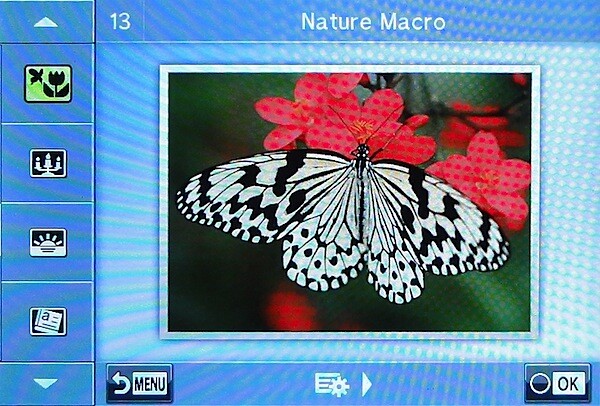
Then there are 23 scene modes, including landscape, children, macro, fish eye etc; here are also found 12 Art Filters: Pop Art, Light Tone, Diorama etc.

Photo story: in this fun mode you can shoot multiple shots, then combine them into a single image. Over this you can add handwritten text.

Still on the top deck: the shutter button; on/off lever; and a function button.

On the leading and rear edges are found two dials: when rolled, the for’ard, sub dial can adjust such matters as ISO setting and exposure compensation; the rear, main dial is used to adjust aperture value or white balance.

Put another way: when shooting manually, moving the dial at the front of the camera adjusts the aperture while the back dial affects exposure time. At rear, the dial changes the ISO value and white balance.
Menu.JPG

Shooting tips.JPG

Rear: video record button; a two position lever (see below); menu; info; four way jog dial offering access to exposure compensation, flash options, burst shooting and self timer, AF area positioning.

Lower down are found the replay and erase buttons.

Carving 2.JPG

Narrabeen lake 4 Dramatic tone.JPG

Tree 3 Key line.JPG

The big deal with the P5 is the ease in which it can be linked with a smart device, such as an iPad or smart phone. You can synchronise the screens of the smart device and the E-P5 so you can mirror the camera’s LCD view on the smart device, then control it by touching the smart device display as if it were your camera. Great for self-portraits and for remotely shooting dangerous subjects like wildlife that may be startled or even turn on you! You can even use your smart device to embed GPS info into your shots.

There is no turret finder on the P5, but you can acquire an optional hi def VF-4 viewfinder, with an impressive 1.48X magnification, a high res 2.36 million dot LCD.

Olympus PEN E-P5 ISO Tests

Olympus Pen E-P5 ISO 200.JPG

Olympus Pen E-P5 ISO 400.JPG

Olympus Pen E-P5 ISO 800.JPG

Olympus Pen E-P5 ISO 1600.JPG

Olympus Pen E-P5 ISO 3200.JPG

Olympus Pen E-P5 ISO 6400.JPG

Olympus Pen E-P5 ISO 12800.JPG

Olympus Pen E-P5 ISO 25600.JPG
Only by ISO 3200 was noise becoming an issue. At ISO 6400 still looking good and sharp. At ISO 12800 noise was up but still useable IMHO. At ISO 25600 noise well up but, for certain subjects, useable.

Olympus PEN E-P5 Review Verdict

Quality: above average
Why you’d buy the P5: plenty of control.
Why you wouldn’t: too good for run-of-the-mill snap-shooting!

I liked the P5 but felt some of the controls unnecessary: like the two control dials.

Olympus PEN E-P5 Specifications

Image Sensor: 16.05 million effective pixels.
Metering: Multi pattern, centre-weighted averaging, spot.
Effective Sensor Size: 17.3×13.0mm (22.5mm diagonal) Live MOS.
Lens Mount: Micro Four Thirds.
35 SLR Lens Factor: 2x.
Shutter Speed: 60 sec to 1/8000 second, Time, Bulb. Internal/external flash sync: 1/320/250 sec.
Continuous Shooting: 9 fps.
Memory: SD/SDHC/SDXC cards and Eye-Fi.
Image Sizes (pixels): 4608×3456 to 640×480. Movies: 1920×1080, 1280×720, 640×480.
LCD Screen: 7.6cm LCD (1,037,000 pixels).
File Formats: JPEG, RAW, JPEG+RAW, MPEG4.
Colour Space: sRGB, Adobe RGB.
ISO Sensitivity: Auto, 200 to 25600.
Interface: USB 2.0, HDMI mini, AV, accessories.
Power: Rechargeable lithium ion battery, DC input.
Dimensions: 122.3×68.9×37.2 WHDmm.
Weight: 420 g (inc battery and card).
Prices: Get a price on the Olympus E-P5 (body only) or Olympus E-P5 17mm with a f1.8 and VF.

Post originally from: Digital Photography Tips.

Check out our more Photography Tips at Photography Tips for Beginners, Portrait Photography Tips and Wedding Photography Tips.

Olympus PEN E-P5 Review


Digital Photography School

 
Comments Off on Olympus PEN E-P5 Review

Posted in Photography


Need the speed? Sigma 18-35mm F1.8 DC HSM in-depth review

02 Sep

18-35-news.png

Sigma’s 18-35mm F1.8 DC HSM has generated a lot of excitement since its announcement in April, as the fastest zoom ever made for SLRs. Designed for use on APS-C / DX format cameras, it offers a 28-54mm equivalent zoom range, and promises similar depth of field control to an F2.8 zoom on full frame. But can an F1.8 zoom really work? Read our detailed review to find out.  

News: Digital Photography Review (dpreview.com)

 
Comments Off on Need the speed? Sigma 18-35mm F1.8 DC HSM in-depth review

Posted in Uncategorized


100 Clever Digital Photography Ideas [Book Review]

02 Sep

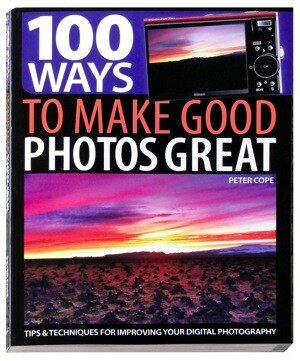
100 Ways to Make Good Photos GreatSometimes you need more than a guide to specifics in using a digital camera for ambitious image making. It is possible to overload your brain with info on lenses, lighting, camera controls and the rest of the tech jungle.

Sometimes it’s better to just look behind the curtain and pick up some tips on how to make good photos great. As the book says!

Author Peter Cope makes the point early in the book that during the 2012 London Olympics ‘exciting, emotional and iconic images flashed around the world …’

He observes that ‘What made these images unique and different from those that press photographers’ captured was that most came from amateur or casual photographers … grabbed shots ‘taken on a purely opportunist basis.’

Little thought went in to these ‘point and shoot’ pictures, much as they may have been enjoyed. But sometimes we need more: photos rather than snaps. Cope’s book sets out to help you not only shoot technically excellent photos but to create images that have something to say. The layout of the book is ideal for the purpose: for one thing, the size is enough to accommodate large pictures along with concise blocks of text that explain the issues.

For example, the page on red eye from flash suggests ways to avoid the dreaded issue: increase the ISO; use an external flash unit; and — last resort! — remove it in post.

Similarly, with the chapter on how to conceive great landscape photos which, after people, are possibly the most photographed subjects there are!

Cope’s tips go this way: great landscape photos should be in sharp focus from the nearest point to the most distant; follow the rules of composition closely, including the rule of thirds; use lead in lines to draw peoples’ attention to the landscape’s main subject; shoot at different times of day; watch the effect of weather on the scene; use polarising or graduated filters.

You won’t find much specific techy stuff in the book, except for a few pages on such matters as lens choice, exploiting your camera’s aperture controls, mastering ISO settings, astro photography, macro photography and then there’s a longish section on software manipulation. Most of the book is encouraging, handholding help.

The techy section also includes includes optimum ways in successfully sharpening an image, using ‘auto fixes’ such as auto enhance, auto tone and auto levels. Some will shy away from such easy fixes but, in Cope’s view, if the ‘adjustment works and delivers a great image’ — use it.

Within its pages are chapters on a whole variety of people photography, along with subtle suggestions on how to deal with human subjects. Like: shoot plenty of shots of children … they move fast! And, when shooting people at work, shoot fast! In straight portrait photography, establishing eye contact can establish a strong connection or sometimes be unsettling.

There are also whole pages devoted to ideas like ‘transplanting’ a whole sky, creating scenes that might otherwise not exist … if it were not for the magic of our old friend Photoshop!

An excellent publication that’s highly readable just as a book or as a complete reference guide.
Oh and it would make an excellent ebook that you could take with you on a shoot!

Author: P Cope.
Publisher: David & Charles.
Distributor: Capricorn Link.
Length: 144 pages.
Size: 25x19x11mm.
ISBN 1 4463 0300 9.
Price: Get a price on 100 Ways to Make Good Photos Great

Post originally from: Digital Photography Tips.

Check out our more Photography Tips at Photography Tips for Beginners, Portrait Photography Tips and Wedding Photography Tips.

100 Clever Digital Photography Ideas [Book Review]


Digital Photography School

 
Comments Off on 100 Clever Digital Photography Ideas [Book Review]

Posted in Photography


Do you need 41 megapixels? Our Nokia Lumia 1020 camera review

30 Aug

TS1600x1200~sample_galleries-7331844753-6420586538.jpg

The 41-megapixel Lumia 1020 melds technology first debuted on the Pureview 808 with a relevant operating system and the optical image stabilization introduced in Nokia’s Lumia 920 that allows significantly better image quality in low light. But do these great ideas translate into a great photographic experience? Our sister site, connect.dpreview.com has put the Lumia 1020 through its picture-making paces to find out how well its impressive imaging technology works in the real world.  

News: Digital Photography Review (dpreview.com)

 
Comments Off on Do you need 41 megapixels? Our Nokia Lumia 1020 camera review

Posted in Uncategorized


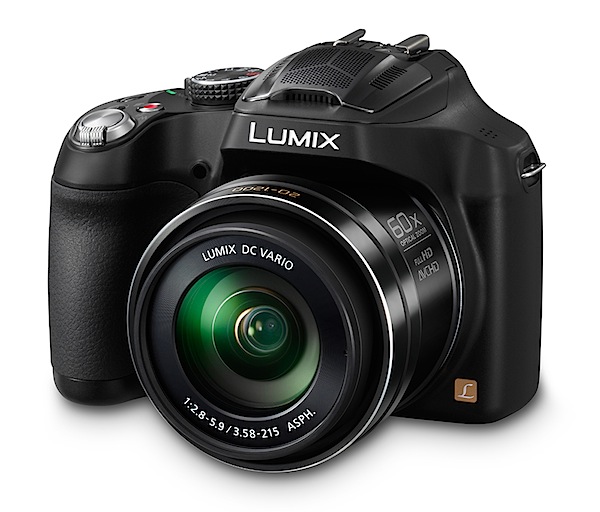
Panasonic Lumix DMC-FZ70 Review

27 Aug

Panasonic Lumix DMC-FZ70.jpg

What a whopper! It looks like a compact digital camera but sure as hell offers far more than your average CDC.
Narrabeen lake tele 2.JPG

Narrabeen lake wide 1.JPG

The 60x zoom runs all the way up to a 35 SLR equivalent of 1200mm but — note this! — it begins from a super wide 20mm equivalent. That means you can shoot close shots of sports players from the sidelines and then cover cramped interiors with the same camera. You can also buy a 1.7x tele conversion lens that will take the focal length to 2040mm! Beat that!

The maximum image size is 4608×3456 pixels, large enough to make a 34x29cm print.

Video can be shot in either AVCHD or MPEG4 formats at Full HD 1920×1080 pixel resolution. But no, you can’t shoot stills mid video recording.

Another spec to die for is a 9fps continuous shooting rate at full resolution; moderating this is a continuous rate of 5fps with full AF in play.

Panasonic Lumix DMC-FZ70 back.jpg

Panasonic Lumix DMC-FZ70 top.jpg

Panasonic Lumix DMC-FZ70 Features

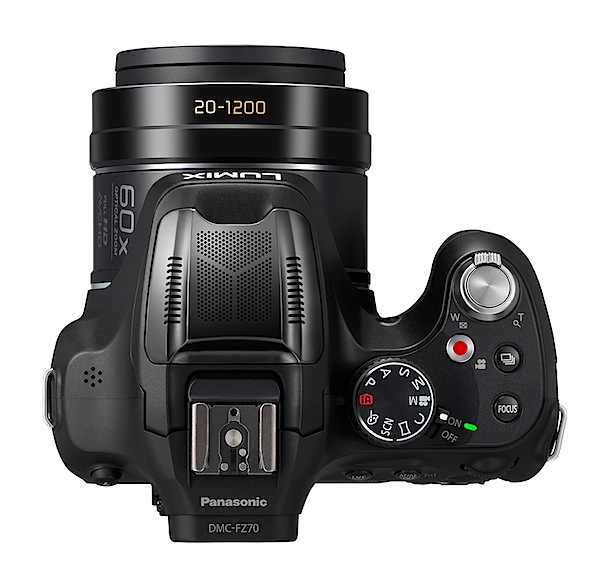
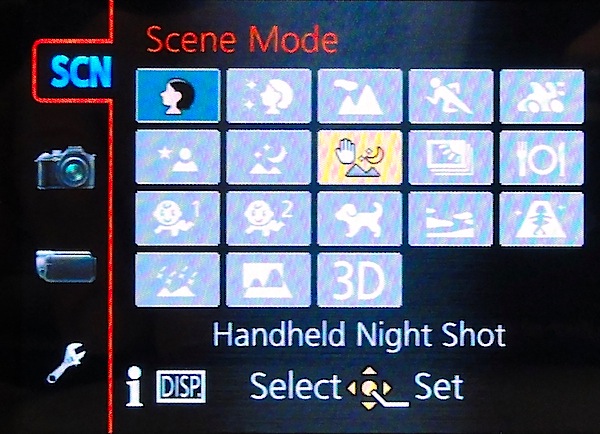
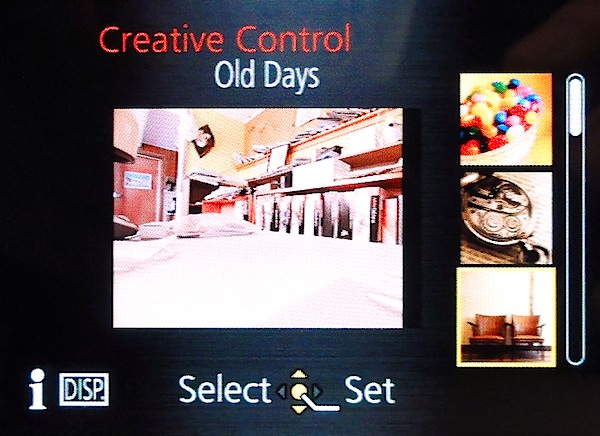
Controls: the top deck houses the mode dial with positions for intelligent auto, PASM, creative video, custom mode, scene mode, panorama shooting, scene and creative control modes.
Scene mode.JPG

Creative control.jpg

In scene mode you can choose from portrait, scenery, panning, HDR and 14 other settings. This feature alone should tell you heaps about the intended market: those with tonnes of ambition but little real photographic knowledge.

Creative control takes you further and into a re-rendering mode that can impart to a picture the feelings of a retro or old days look, high or key, sepia, dynamic monochrome, impressive art, high dynamic, cross processing plus a miniature or toy effect plus quite a few others.

Close to the mode dial is the shutter button, encircled by the zoom lever; the red video record button; a burst shooting button; and finally, a button that can lock in focus mid shoot … haven’t seen one of these before.

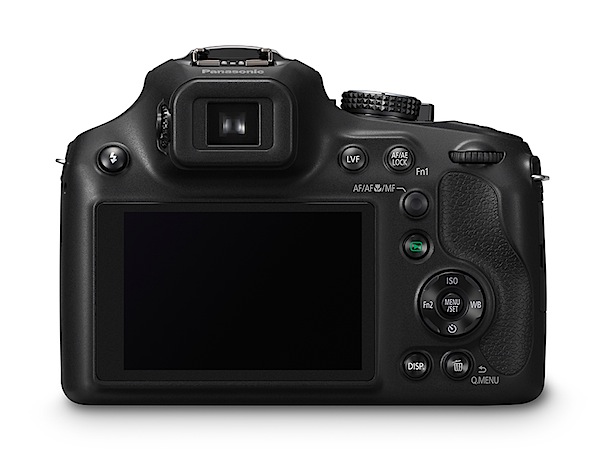
The camera’s rear has the flash activation button at extreme left; top viewfinder focus; a button to switch between the turret finder and the rear LCD screen; one to lock focus and exposure; the rotating rear dial that takes you through selection of settings; replay; the four way jog dial that offers control of ISO, white balance, self timer and function selection; centred is the menu button.

Lower are buttons for display options and access to a quick menu.

Battery and memory card are loaded via a door at the base of the camera.

I found the control arrangement to be entirely logical and non-confusing.

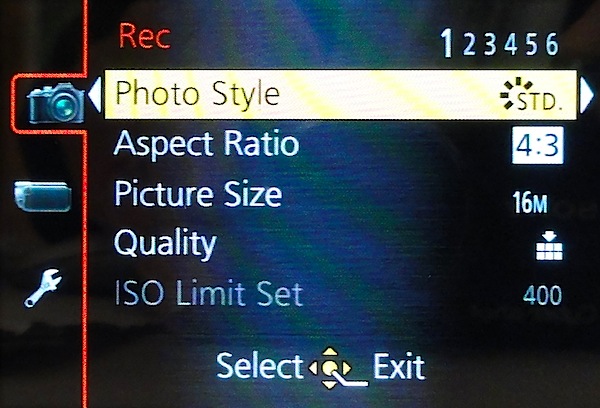
Menu.jpg

The menus are similarly well laid out and abundantly clear in their intent.
Narrabeen lake island.JPG

Family and kayaks 1.JPG

Some Notes

I had taken temporary ownership only a matter of hours before I took it out on a shooting essay: I found the camera to be well-balanced and easy to operate, even tapping controls during a video shoot.

The zoom needs special mention: don’t think for a moment that you can hand hold it with the focal length anywhere past 10x. No way José!

The zoom action is smooth and, amazingly, provides minimal steps along way. The stabiliser is most effective. A fine effort.

Notable is the wind noise protection thanks to a special wind shield built onto the microphone’s housing.

The rear LCD screen is of course virtually useless for viewing outdoors, so the top viewfinder comes in to play, although it offers less resolution.

The panorama mode offers four options: pan left or right; pan up or down.

Startup Time

It took two seconds to power up and let me take my first shot. Follow ons came in as fast as I could tap the button.

Distortion

No problems at the wide or tele ends of the zoom. A fine piece of glass.

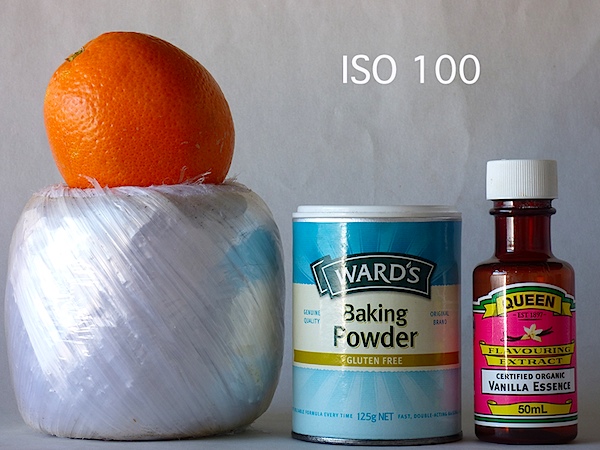
Panasonic Lumix DMC-FZ70 ISO Tests

Panasonic Lumix DMC-FZ70 ISO 100.JPG

Panasonic Lumix DMC-FZ70 ISO 400.JPG

Panasonic Lumix DMC-FZ70 ISO 800.JPG

Panasonic Lumix DMC-FZ70 ISO 1600.JPG

Panasonic Lumix DMC-FZ70 ISO 3200.JPG
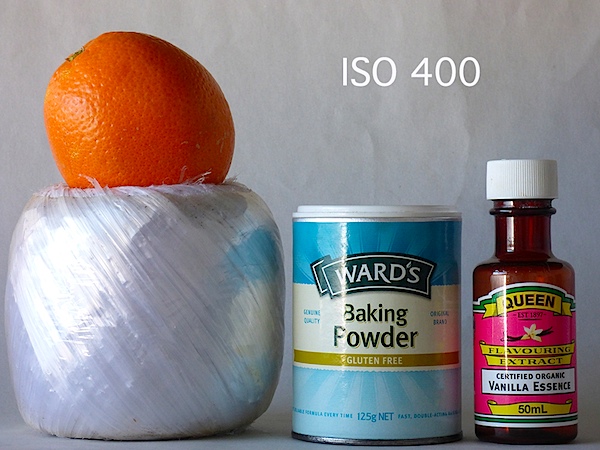
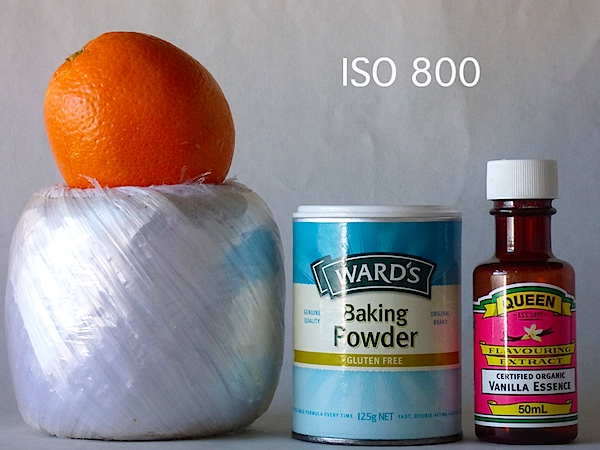
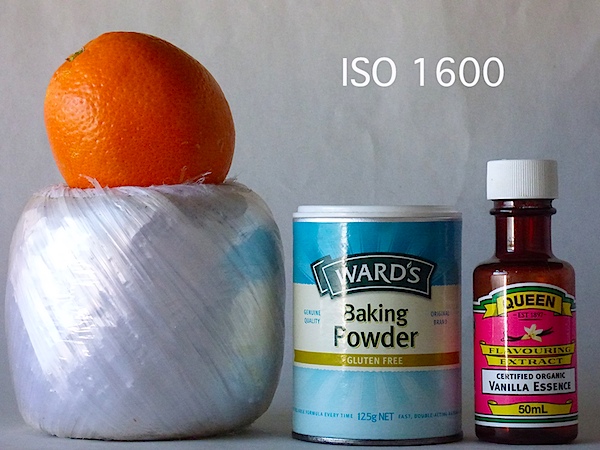
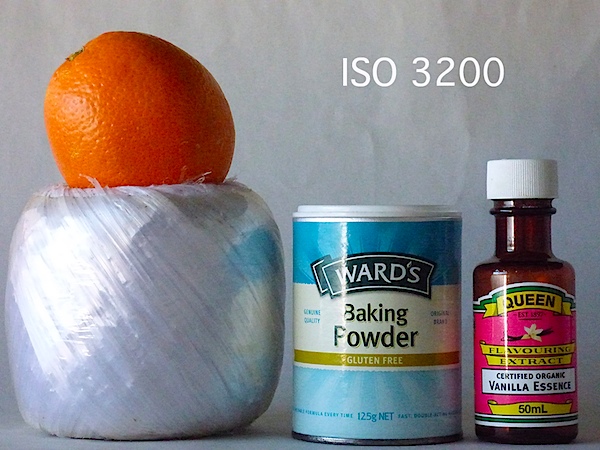
Only by ISO 1600 did some noise appear but with sharpness still acceptable; by ISO 3200 a blue colour cast appeared over the image, with noise up and sharpness down.

Panasonic Lumix DMC-FZ70 Review Verdict

Quality: average.
Why you’d buy it: that 60x zoom! excellent AF and stabiliser action; feels good in the hand.
Why you wouldn’t: bulky for some.

I well remember handling my first camera with a 10x lens …it was a Kodak I think! I thought the world had taken a turn for the best. Now look where we are!

Top gear.

Panasonic Lumix DMC-FZ70 Specifications

Image Sensor: 16.1 million effective pixels.
Sensor: 11mm CMOS (6.17×4.55mm).
Metering: Multi, centre-weighted, spot.
Lens: Leica DC Vario-Elmar f2.8-5.9/3.58-215mm (20-1200mm as 35 SLR equivalent)
Exposure Modes: Auto, Program AE, shutter and aperture priority, manual.
Shutter Speed: 8-1/2000 second.
Memory: SD/SDHC/SDXC plus 200 MB internal.
Image Sizes (pixels): Stills: 4608×3456 to 480×480.
Movies: 1920×1080, 1280×720, 640×480.
Continuous Shooting: 9fps max.
Viewfinder: Turret (202,000) and 7.6cm LCD screen (460,000).
File Formats: JPEG, RAW, MPO 3D, MPEG4, AVCHD.
ISO Sensitivity: Auto, 100 to 6400 (with boost).
Interface: USB 2.0, HDMI mini.
Power: Rechargeable lithium ion battery.
Dimensions: 130x97x118 WHDmm.
Weight: 606 g (inc battery).
Price: Get a price on the Panasonic LUMIX DMC-FZ70 at Amazon.

Post originally from: Digital Photography Tips.

Check out our more Photography Tips at Photography Tips for Beginners, Portrait Photography Tips and Wedding Photography Tips.

Panasonic Lumix DMC-FZ70 Review


Digital Photography School

 
Comments Off on Panasonic Lumix DMC-FZ70 Review

Posted in Photography


Sony A3000 1st-Impressions Review: An SLR-like camera with the heart of a NEX

27 Aug

A30001.jpg

The Sony A3000 is essentially a 20.1MP mirrorless camera that uses the same E-mount as the Sony NEX, yet which has the look and feel of a traditional SLR. Though not the first manufacturer to take this approach, Sony is the first to achieve the low starting price point of $ 399 for body and lens. It’s a bold move; click through to read our first impressions review to see what we think in more detail.

News: Digital Photography Review (dpreview.com)

 
Comments Off on Sony A3000 1st-Impressions Review: An SLR-like camera with the heart of a NEX

Posted in Uncategorized


21 August, 2013 – Leica 50mm f/2 APO Summicron ASPH Review

21 Aug

Every now and then a new lens comes along, that while necessarily expensive, sets photographer’s hearts a-flutter with its potential for extreemly high image quality.

Such a lens of the new Leica 50mm f/2 APO Summicron ASPH. Our contributor Mark Dubovoy has been using one for a few weeks on his Leica M as well as on a Monocrom. Find out what Mark thinks of the new 50mm APO.


"Having been to Antarctica with Michael and Kevin, I would say after having traveled the world and shot nearly my entire life as an exhibiting photographer,  it was one of my highlights in my life and I talk about it, all the time.  The images and experience of seeing something visionary and nearly extinct from the world, to see and experience the wildlife and scenery that does not fear humans is amazing.  The images I shot there won me two Smithsonian awards and nearly 18 other international awards". – Tim Wolcott

 Find Out More Now
These Expeditions Will Sell Out Quickly. They Always Do


The Luminous Landscape – What’s New

 
Comments Off on 21 August, 2013 – Leica 50mm f/2 APO Summicron ASPH Review

Posted in News


B-Grip Camera Holster Review

18 Aug

10428898-origpic-b69c54
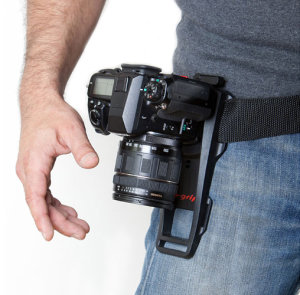
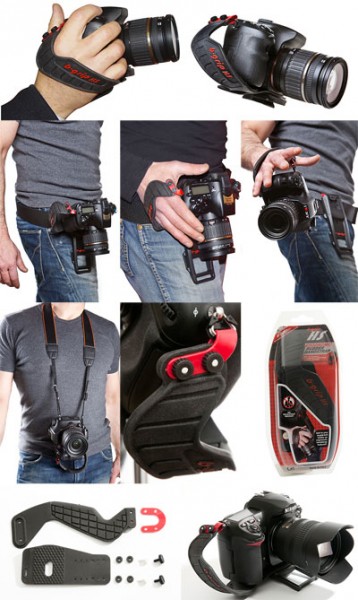
The B-Grip (short for “belt grip”) is a way to carry your camera on a belt, rather than around your neck. The camera is carried around in the holster with a quick release plate that’s easily accessed when you’re ready to shoot. It’s best paired with the hand strap also available, and it is this pair which I was sent for review by a local reseller. I tested this grip out on the busy weekend of an anime convention which I attend every year and usually take about 1000 photos a day for each of the two days. For Saturday I used the B-Grip. For Sunday I switched back to my preferred strap, a Sun Sniper strap. This way I was able to get a good comparison of the two.

Pros

  • It looks damn sexy! I posted the product photo to my facebook page when I got the holster for review and the most common comment was how cool/badass/sexy it looked. For a photographer who needs to look cool, this will not harm your image one bit.
  • This will save your neck and shoulders, as the weight of the camera and lens is moved to your hips, which can carry that weight far more easily. The advertising says “carry your camera comfortably”, and it is comfortable!
  • When holstered, the camera is very secure. I was concerned at first but after putting it all together I could see there was no way the camera would come loose. It’s probably more secure than a standard strap, since it doesn’t swing about.
  • The experience of going hands-free without worrying where a dangling camera might go if you bend over or turn around is a liberating one.

Cons

JU0157HSWebDual

  • The major problem I faced with the holster is the necessity for a strap you slip your hand into before you can remove it from the holster. The alternative is no strap which means your own hand’s grip is the only thing stopping the camera from hitting the ground. I think that’s too risky, especially when trying to holster/unholster your camera.
  • The strap is a thick, flexible, slightly grippy rubber. It’s a little tricky to adjust to the right size, and can be quite difficult to put your hand into when you’re even a little bit sweaty.
  • The event I was shooting had me stopping to take photos every couple of minutes, so I was constantly holstering/unholstering my camera. I started leaving my hand in the grip all the time, and then I just stopped holstering it altogether, so I ended up always holding the camera in my hand and as a result my arm became tired.
  • Not only did this make my arm tired, but it also meant my hand wasn’t free. It took a few seconds to lift my shirt (which naturally fell over the holster), holster the camera and take my hand out of the grip in order to get my hand free. Long enough to be awkward when offered a hand to shake.
  • There’s an optional extra attachment for the grip on the camera that allows you to mate the plate for the holster onto a tripod mount. This is a solution for photographers who want to swap between handheld and tripod, but the adapter is plastic and I prefer metal for tripod plates.
  • Also, the grip is not compatible with my panorama head. This may not be a problem for many photographers (although stills/video shooters may have a similar issue), but the attachment is slow and fiddly enough – with some small plastic nuts used which could easily be dropped and lost – that I’d rather never have to remove the B-Grip from my camera.
  • Every time I wanted to sit down I had to slide the camera and belt around to my side, which then got in the way a bit.

Thoughts

  • I really like the concept of the holster mount, and the benefits are very nice indeed, however for the types of photography I do and the relatively burdensome process of adding and removing the B-Grip from the camera, I don’t think it’s suited to me.
  • I can imagine this being a great tool for a street photographer for example. You could walk around for hours, the camera securely stashed out of the way and not swinging about, then slip your hand in the grip when you come across a photo opportunity. Once you’re done, holster the camera again and go on your way.
  • It’s very true that you need the right tool for the right job, and there are many jobs which demand many different tools. The B-Grip is not a tool for the jobs I do however.

bgrip-friend-g-media-res

Conclusion

  • I find it hard to do a fair review of this holster, as I feel that it simply wasn’t a tool that benefited me, yet for another photographer it could be exactly what they need.
  • There are some annoyances, such as the finicky wrist strap and a slower process to add/remove the camera attachment than I’d rather.
  • The parts that did work for me – the weight of the camera being supported on my hips, being completely hands free and not worrying about a camera swinging around on a strap – were truly a liberating feeling.
  • For the right photographer, this could be a dream come true. But not for me. I’ll be sticking with my Sun Sniper.
  • To keep all of my reviews consistent I’ll still give the B-Grip a score, but please interpret it in the context of what I said above: 6/10

If you regularly find yourself in a situation where you carry your camera with you and stop for occasional shots, or have to have your camera secure without the possibility of it swinging around, the B-grip is a great solution. You can pick one up at Protog.

If you’d like to see early impressions and photos from other camera gear that I’m reviewing, pop over to Facebook and like my page. I post that kind of thing regularly!

Post originally from: Digital Photography Tips.

Check out our more Photography Tips at Photography Tips for Beginners, Portrait Photography Tips and Wedding Photography Tips.

B-Grip Camera Holster Review


Digital Photography School

 
Comments Off on B-Grip Camera Holster Review

Posted in Photography