RSS
 

Posts Tagged ‘REVIEW’

X is for zoom? Our Fujifilm XF 55-200mm F3.5-4.8 R LM OIS review

25 Sep

xf55200news.png

We’ve just posted our review of the FUJINON XF 55-200mm F3.5-4.8 R LM OIS, Fujifilm’s first telephoto zoom for its X system mirrorless cameras. We’ve been out and about with the lens taking hundreds of real-world pictures, and looked at them closely to find out what it can deliver in terms of image quality. We’ve also looked at how the system’s integrated software corrections for lens aberrations such as distortion affect the final out-of-camera JPEGs in comparison to RAW files. Click through to read all about it.  

News: Digital Photography Review (dpreview.com)

 
Comments Off on X is for zoom? Our Fujifilm XF 55-200mm F3.5-4.8 R LM OIS review

Posted in Uncategorized


More of a good thing: Sony Cyber-shot DSC-RX100 II review posted

24 Sep

rx100ii_news.jpg

We’ve just posted our full review of the Sony Cyber-shot RX100 II. Following on the success of the RX100 is no easy feat, but just the same the RX100 II does so with a new BSI CMOS sensor. Also new to this model is an accessory port/hotshoe, Wi-Fi connectivity with NFC, and a tiltable display. Did Sony make a good camera even better? Click through to read our full analysis.

News: Digital Photography Review (dpreview.com)

 
Comments Off on More of a good thing: Sony Cyber-shot DSC-RX100 II review posted

Posted in Uncategorized


Nikon Coolpix A Review

24 Sep

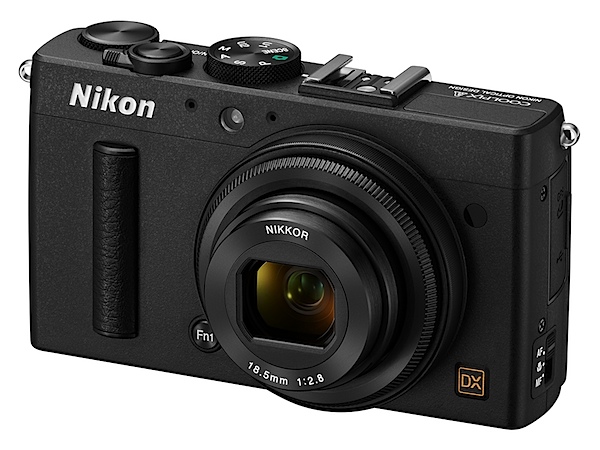
Nikon Coolpix A BK_front34l_lo.jpgMy how the game has changed. A few months ago everyone was agog (and still are!) with maxi zoom cameras. Now it seems a few major makers seems to be intent on feeding the market with large aperture, fixed focal length cameras. Among them: Ricoh, Sony, Fujifilm, Sigma.

I’ve used quite a few of these and have to admit their effective use demands quite a bit of restraint and understanding. There’s no point in venturing out to a sports event with the desire to catch superb, close up on-field action; similarly, there’s no joy in banging away on animal and kiddie shots as they duck and weave in an attempt to foil the photographer’s intent; likewise, water-borne subject matter where you have little control of the camera-to-subject distance.

These specialist cameras come into their element where the photographer has complete control: portraits, people shots in general, landscapes, interiors and so on. Another use for them is to go ‘commando’ and hold the camera out from your body, roughly aiming at your target, banging away when you think you’ve caught a ‘live’ one!

Their main attraction is that the photographer can work with fewer concerns to distract him or her: no zoom to worry about (or be distracted by!); just set the aperture and shutter speed … and go shoot!

Where they really sing and dance is where the sensor is on the large side, as with this camera. Another factor (hopefully) is where the camera maker has installed an above average quality lens.
Nikon Coolpix A_BK_back.jpg

Nikon Coolpix A_BK_top_lo.jpg

Nikon Coolpix A_CMOS.jpg

The Nikon Coolpix A has a largish CMOS sensor, in DX format, sized as 23.6×15.7mm, or nearly half the original 35mm frame.

The f2.8 lens is fast-ish and has a 35 SLR equivalent focal length of 28mm that is, to my mind, an ideal focal length for fixed lens photography.
Dee Why church int 2.JPG

The lens has a seven-blade iris diaphragm which avoids the artefacts captured by odd-shaped lens irises, capturing natural out of focus blurs and highlights.

The 16.2 megapixel capture creates a maximum image size of 4928×3264, enough to make a 42x28cm print. You can capture in JPEG or NRW (RAW) images at 14-bit depth.

Video? Full HD MPEG4 video at 1920×1080 pixel resolution. Due to the unusual video recording arrangement (see below), you can’t shoot stills mid video.

Nikon Coolpix A Features

The magnesium and aluminium alloy body is accompanied by a small leather speed grip patch at the right edge of the body and the rear corner.

The camera is without an optical low-pass filter, so expect superior rendering performance and images with superior resolution.

The ISO range runs up to 25600, thanks to an expansion routine.
The camera has in-camera movie editing and you can save a single frame as a still JPEG image.

Continuous shooting at approximately 4fps.
Flowers.JPG

Nikon Coolpix A Controls

Nikon has taken an unusual route to external control points, some of which may take a bit of getting used to.

First up, there is a function button tucked away beneath a corner of the lens; to this can be assigned such functions as AE and AF lock, RAW capture, AF etc.

The lens itself has a focus ring which comes in to play when you select manual focus from a three position selector (other positions: AF and macro). The camera includes autofocus with manual override: when the shutter button is held halfway down and the focus ring is turned the camera focuses automatically.

Top deck: at left is the flash pop up trigger; further right is the mode dial with auto, PASM positions, scene modes (portrait, candle light, silhouette etc), U1 and U2 custom settings.

The shutter button also stands in as the power button; you swing the lever and power turns on, then you shoot, then swing the lever again to turn off the power.

Flanking the above is the command dial to cycle through menu choices.

Rear: at left of the LCD screen is the exposure compensation button, ISO access, screen zoom, screen enlargement in playback, among other options.

To the right of the screen is replay, menu, four way jog dial, an ‘i’ button which takes you into an information display of current settings.

I have to say I did not find the whole arrangement intuitive. To get my head around some of the functions took a careful study of the manual.

For example: there’s no red video record button. To shoot video you tap the ‘i’ button and choose that mode. To get out of it you enter the menu and choose single frame shooting. Far from an ideal arrangement!
Menu 1.jpg

Menu 2.jpg

Menu 3.jpg

The viewfinder menu is extensive and one that I had no quibble with.

To me, one of the joys of a fixed focal length lens is simplicity of use. The menu and options arrangement make life unnecessary difficult on the shooting front.

Nikon Coolpix A Accessories

Some nice new add-ons could well heighten your experience with the Coolpix A.

One of these is an optical viewfinder DF-CP1, with a high eye point, approximately 90% frame coverage and 0.52x magnification.

The camera further supports accessories for Nikon SLRs, such as Nikon Speedlights and the GPS Unit GP-1. The wireless mobile adapter WU-1a can also be used, for easy uploading and sharing of captured images and movies to a smart device.

Nikon Coolpix A ISO Tests

Nikon Coolpix A ISO 100.JPG

Nikon Coolpix A ISO 400.JPG

Nikon Coolpix A ISO 800.JPG

Nikon Coolpix A ISO 1600.JPG

Nikon Coolpix A ISO 3200.JPG

Nikon Coolpix A ISO 6400.JPG

Nikon Coolpix A ISO 12800 equiv.JPG

Nikon Coolpix A ISO 25600 equiv.JPG

A good result all the way to ISO 6400. It was only when we reached above that level and the camera resorted to ISO expansion did we see evidence of noise and loss of definition.

At ISO 25600 equivalent the shots would be ‘acceptable’, depending on subject. But plenty of noise!

Startup Time

It took about two seconds from power on to first shot; follow-ons came in at a little over a second apart.

Distortion

Very slight barrel distortion was evident at frame edges.

Dee Why beach 1.JPG

Nikon Coolpix A Review Verdict

Quality: above average in resolution and colour quality but notice the edge vignetting in the beach shot.

Why you would buy the Nikon Coolpix A: you like the idea of a fixed focal length lens.

Why you wouldn’t: fiddly control points; I have encountered better stabilisers when shooting video.

Nothing more to say except that this one would make an excellent camera, especially when paired to a fully accessorised Nikon DSLR.

Nikon Coolpix A Specifications

Image Sensor: 16.2 million effective pixels.
Metering: Multi, centre-weighted and spot.
Sensor: 23.6×15.7mm CMOS.
Lens: Nikkor f2.8-5.6/18.5mm (28mm as 35 SLR equivalent).
Exposure Modes: Program AE, shutter and aperture priority, manual.
Shutter Speed: 30 to 1/2000 second.
Continuous Speed: 4fps.
Memory: SD/SDHC/SDXC cards.
Image Sizes (pixels): 4928×3264 to 2464×1632. Movies: 1920×1080, 1280×720, 640×480.
Viewfinder: 7.6cm LCD (921,000 pixels).
File Formats: JPEG, NRW (RAW), MPEG4.
ISO Sensitivity: Auto, 100 to 25600 (with boost).
Interface: USB 2.0, HDMI mini, accessory.
Power: Rechargeable lithium ion battery, AC adaptor.
Dimensions: 111×64.3×40.3 WHDmm.
Weight: 299g (inc battery and SD card).
Price: Get a price on the Nikon Coolpix A at Amazon.

Post originally from: Digital Photography Tips.

Check out our more Photography Tips at Photography Tips for Beginners, Portrait Photography Tips and Wedding Photography Tips.

Nikon Coolpix A Review


Digital Photography School

 
Comments Off on Nikon Coolpix A Review

Posted in Photography


Nikonos reborn? Our first impressions review of the submersible Nikon AW1

19 Sep

News2.jpg

The Nikon 1 System has been around for a couple of years now, but the emergence of the AW1 signals a radical departure from what has been the norm. Functionally very similar to the 14MP J3 which Nikon announced earlier this year, the AW1 is waterproof to 15m (49ft), shockproof from 2m (6.6 ft), and freezeproof. It’s being announced alongside two equally rugged lenses, and a range of colorful silicone skins for underwater and wet weather use. We had the opportunity to use the new camera recently, and we’ve put together a first impressions review covering its design, operation and key features. Click through for a link. 

News: Digital Photography Review (dpreview.com)

 
Comments Off on Nikonos reborn? Our first impressions review of the submersible Nikon AW1

Posted in Uncategorized


Our Fujifilm X-M1 review: big photo quality in a small package?

17 Sep

X-M1_Black_Front_16-50mm.png

We’ve completed our review of the Fujifilm X-M1, which is the company’s lowest-priced X-Trans-based mirrorless camera. It takes the sensor from the X-E1 and X-Pro1 and puts it in a simpler, more portable body. Fujifilm also added a tilting 3-inch LCD and Wi-Fi, which puts the X-M1 on much the same level as mirrorless cameras like the Panasonic Lumix GF6 and Sony NEX-5T. For a detailed look at the X-M1, follow the link.

News: Digital Photography Review (dpreview.com)

 
Comments Off on Our Fujifilm X-M1 review: big photo quality in a small package?

Posted in Uncategorized


Accessory review: Vanguard Up-Rise 33

16 Sep

33-front.jpg

With a smart look and clean design, the Vanguard Up-Rise 33 stands out from the pack. Capable of holding a small to medium DSLR, the Up-Rise 33 also expands to allow room for a 13-inch notebook computer, or contracts if you have less to carry. It has served as a good commuter companion for one of our reviewers for about eight months. Read how it performed in his review.

News: Digital Photography Review (dpreview.com)

 
Comments Off on Accessory review: Vanguard Up-Rise 33

Posted in Uncategorized


All About Flash [Book Review]

15 Sep

All About FlashIf there’s one thing that flummoxes many of us, it’s flash. Onboard or off camera.

Mark Cleghorn’s book gives away the techniques he’s learned over the course of nearly 30 years as a photographer, well-known in Europe and the US.

Beginning with a single on-camera flash effectively and creatively, then moving all the way up to four or more units in multiple wireless groups, he describes how to shoot the best images possible in a variety of situations.

He outlines the methods in minimising distracting details in an image with a single flash; he shows how to diffuse and spread the light by using a number of flash accessories; then, a method of illuminating the background with a second flash; described is an unusual ‘sandwich’ trick with two flash units pointing towards each other; finally, a method of establishing a basic studio set up on location using only three accessory flash units.

Some photographers begin sweating and shaking at the slightest talk of using flash. The trick is to use flash for the right reasons and with the right approach. The approach is to use it for the right reason, not out of habit!

Early on in the book a question is posed: is flash really necessary? Now that top end DSLR cameras can capture high quality images at high ISO settings, with fast lenses, image stabilisers and slow shutter speeds, we can shoot almost round the clock both outdoors and indoors.

Despite this benefit, you still need quality light of the right quality and appropriate strength pointed in the right direction. That is not to say that tonnes of light will answer the need.

As Cleghorn says: ‘I have always had to control the light in some way, whether to increase the amount to record an accurate skin tone, or perhaps to use a desired aperture setting to control the depth of focus.’ His underlying message is ‘control’. Which is right about where most budding, ambitious photographers go wrong.

Then, the question is posed: what is flash good for?

Most will use it as a fill light, which is arguably the best use of onboard flash illumination; this is optimised further if you can lower/lift the flash’s output.

Some will use flash as a key light, some will use it as a catch light for the eyes and others will deploy flash as means of separating the planes in a subject, to lift background information, create a mood of drama, add an accent or introduce modeling into the subject.

Then there are the special talents of flash that no other lighting can rival: one is to freeze motion, with or without the use of first or second shutter curtain sync.

Another use is to add light to a scene where there is no other light, by bouncing it off a wall or ceiling or by taking the flash off camera and increasing the amount of shadow in the image.

Types of flash are listed: all the way from portable accessory units to portable strobes and all the way up to powerful (and not so portable) studio strobes.

More topics: how flash works; output consistency of different units; the role of ISO, lens aperture and shutter speeds.

A subject which often baffles many is the role of a flash meter. These can accurately measure the balance between ambient light and flash output. Cleghorn emphasises that he has used a meter throughout his career and, while he has changed cameras and flash units over the years, use of a meter has remained constant.

The book moves onto info on using wireless flash, the role of accessories such as umbrellas, soft boxes, bounce cards, gels etc.

There are ample illustrations throughout, making the book a rare beast on the photographic bookshelf.

Top book for a tricky subject.

Author: M Cleghorn.
Publisher: Pixiq.
Distributor: Capricorn Link.
Length: 112 pages.
Size: 28x22x10mm.
ISBN: 13 978 1 4547 0244 3.
Price: Get a price on All About Flash at Amazon.

Post originally from: Digital Photography Tips.

Check out our more Photography Tips at Photography Tips for Beginners, Portrait Photography Tips and Wedding Photography Tips.

All About Flash [Book Review]


Digital Photography School

 
Comments Off on All About Flash [Book Review]

Posted in Photography


Olympus OM-D E-M1 – Review extended with more AF insights

13 Sep

E-M1.jpg

We’ve had more time to shoot with the Olympus E-M1 and have extended our coverage of its AF performance. In addition to incorporating real-world Continuous Autofocus examples and commentary, we’ve also spent more time shooting with it alongside an E-5, to see exactly how the two compare, and amended our impressions accordingly.

News: Digital Photography Review (dpreview.com)

 
Comments Off on Olympus OM-D E-M1 – Review extended with more AF insights

Posted in Uncategorized


Canon EOS 70D review gains test scene samples

12 Sep

70dwidget.jpg

We’re working towards completing our review of the Canon EOS 70D and have been shooting our test scene with a production camera. We’ve published the test shots, including downloadable Raw files of both the daylight and low light scene. The EOS 70D review will also be one of the few chances to see our outgoing test scene and our new, more challenging, more informative scene alongside one another. Click through to see how it performs.

News: Digital Photography Review (dpreview.com)

 
Comments Off on Canon EOS 70D review gains test scene samples

Posted in Uncategorized


Olympus O-MD E-M1: First Impressions Review

10 Sep

lifestyle2.jpg

The O-MD E-M1 has just been announced and takes its place as both Olympus’ flagship Micro Four Thirds camera and the successor to the E-5 DSLR. We’ve been spending some time with a production unit, taking the new 16.3 megapixel Live MOS sensor for a spin in a variety of conditions. Follow the link to learn more about this high-end mirrorless interchangeable lens camera.

News: Digital Photography Review (dpreview.com)

 
Comments Off on Olympus O-MD E-M1: First Impressions Review

Posted in Uncategorized