RSS
 

Posts Tagged ‘REVIEW’

Slight improvement? Nikon D610 First Impressions Review

08 Oct

D610.jpg

The 24MP D610 is Nikon’s latest enthusiast-targeted full-frame DSLR. Coming fairly hot on the heels of the D600, the 610 gains a new shutter mechanism, which is responsible for two out of the camera’s three new features. We’ve had the chance to handle the D610 and have prepared a first impressions review of the refreshed enthusiast full framer.

News: Digital Photography Review (dpreview.com)

 
Comments Off on Slight improvement? Nikon D610 First Impressions Review

Posted in Uncategorized


Shaking up the market? Pentax K-3 First Impressions Review

08 Oct

K-3.jpg

Ricoh’s Pentax K-3 is the first DSLR we’ve encountered that allows you to totally disengage its low-pass filtering – letting you choose between maximum detail and moire suppression – it’s also the first to wear the new parent company’s branding. The more we looked at the K-3 the more we found it offers over the existing K-5 models. Read our First Impressions Review to examine the fine changes with no false detail.

News: Digital Photography Review (dpreview.com)

 
Comments Off on Shaking up the market? Pentax K-3 First Impressions Review

Posted in Uncategorized


DxOMark Mobile Report added to our Apple iPhone 5s review

07 Oct

shared:DxOMark-logo-520.jpg

We have added DxOMark’s Mobile Report to our camera review of the Apple iPhone 5s. The report includes DxO Lab’s usual industry-standard scientific measurements and analyzes 14 aspects of mobile imaging including detailed image quality assessment, flash performance, autofocus reliability and more to calculate a final score. Click through to read our Apple iPhone 5s review and go to page 8 for the DxO Mark mobile report.

News: Digital Photography Review (dpreview.com)

 
Comments Off on DxOMark Mobile Report added to our Apple iPhone 5s review

Posted in Uncategorized


Canon Powershot N Review

06 Oct

PowerShot N_3.jpg

You never know in this reviewing game: one day it’s a DSLR, then a MILC, rapidly followed by a compact camera. Each with its own attractions, each with its own foibles … but few that really break convention very much.

Then, suddenly, the door bangs open and in comes a crazy, ground-breaking innovation. Is it a pack of cards, ciggies or business card holder?

NOTA: none of the above!

It’s Canon’s entry into the fashion world of desirable gadgets.

PowerShot N_5.jpg

PowerShot N_10.jpg

Canon Powershot N Features

Gone is the usual myriad of external controls. Absent are cascading viewfinder menu options. Gone is a top-mounted viewfinder. Missing is a comprehensive instruction manual … in its place is a pamphlet ‘Getting Started’ with the instructions covering only one side of the A3 paper. Oh and there’s a CD with a more elaborate instruction manual in linked files.

Before heading out on a shooting spree I suggest you thoroughly immerse yourself in either or both! Don’t want to be caught with your shutter down in the wild outdoors! For one thing, the camera is ‘driven’ by touch screen operation and well implemented it is too. But manual controls? De nada!
camera in hand 1.jpg

camera in hand 2.jpg

In construction, the camera is a fold out job to form an L shape; with screen swung 90 degrees outwards, the l8x zoom lens faces forwards, protruding some 18mm. So you hold the camera facing forward to take pictures with the screen facing upwards …or you can fold the screen back onto the body and hold it like a normal camera. In either configuration, outdoors the screen washes out.

Want to zoom? Simply rotate a metallic ring at the front of the camera body and just aft of the lens itself.

At this stage I have to warn you that holding the camera is a little nerve-wracking. For one, it’s tiny. It’s light. And there are no handholds that you usually find on DSLRs or many compacts, so you’re on your own. There are two lugs, one one either side of the camera so I suggest you string some sort of neck-bearing strap to prevent you dropping the little beast!

One note: the camera accepts micro cards: microSD, microSDHC and microSDXC. So that will be your first buy before you head out shooting.

My usual habit with a new camera to review is to fire up and start shooting straightaway. But the N floored me right at the starting gate. Having a touch screen I saw a large red button at left, tapped it and the N began video recording. Gave up on the stills front.

I scanned the external controls. At left is the power button.
Creative.jpg

On the right edge, a tiny toggle that swings between normal shooting and creative mode. The latter shoots a bracket of five shots bearing different treatments: washed out; underexposed; diffused top and bottom of shot (1200×1200 pixels); centre enlarged; edges whited out. A lot of fun!

Lower down is a mobile device connect button. The N offers integrated Wi-Fi and one-touch connectivity to smartphones or tablets.

Then, beneath that is the replay button and the card slot.

Forward of the lens ring is another ring which gives you manual control of the camera: focus confirmation and shutter firing.

Front of camera: at the top right corner is a tiny clear button. Waffor? It’s the flash. Believe me!
Menu 1.jpg

Menu 2.jpg

The menu options are minimal, allowing control of the touch shutter, AF, the stabiliser etc. You can also choose shooting modes that include Miniature Effect, Soft Focus, Toy Camera Effect and Monochrome.

There’s a novel option that commands the camera to shoot a four second movie before every still shot resolution. Sort of a ‘behind the scenes’ video of your still shooting efforts!
Stairway.JPG

Flowers 2.JPG

And that’s about it.

The 12.1 megapixel CMOS captures a maximum image size of 4000×3000 pixels, enough to make a 34x25cm print.

Full HD video at 1920x1080m pixel resolution can be shot. No, you can’t shoot stills mid video recording.

Startup Times

About a second from startup to first shot; under a second per shot from then on.

Distortion

No problems.

Canon Powershot N ISO Tests

Canon PowerShot N ISO 80.JPG

Canon PowerShot N ISO 400.JPG

Canon PowerShot N ISO 800.JPG

Canon PowerShot N ISO 1600.JPG

Canon PowerShot N ISO 3200.JPG

Canon PowerShot N ISO 6400.JPG

I made four attempts to shoot my favourite orange/bicarb and vanilla. AF was the problem… it just wouldn’t lock in.

Eventually, I managed to shoot the run from ISO 80 to 6400. The sharpness and lack of noise was OK up to ISO 1600. At ISO 3200 sharpness fell off noticeably; noised still quite low. At ISO 6400 sharpness had dropped noticeably but noise was still low.

Thinking that my efforts were suffering from operator error or newbie complex, I shot a test shot at ISO 6400 outdoors. Perfect. Sharpness 100 per cent. I can only put it down to the camera’s general unhappiness with AF at close quarters.

Canon Powershot N Review Verdict

Quality: about average.
Why you’d buy it: glam cam!
Why you wouldn’t: fiddly for experienced photographers.

The N is available in white or black.

I found some aspects of the N quite irritating: for one, the lens and shutter rings are easily perplexing … I often found I had to do a visual check to find either.

Pick up the camera and I often did not know which way was up.

Despite this, the N is the perfect companion for the smart phone set and has obvious ambitions to surpass the latter’s picture taking prowess. Doubt it will tho’!

Canon Powershot N Specifications

Image Sensor: 12.1 million effective pixels.
Metering: Multi pattern, centre-weighted, spot.
Exposure Modes: Auto, Program AE.
Sensor: 11mm CMOS.
Lens: f3.0-5.9/5-40mm. 35 SLR equivalent: 28-224mm.
Shutter Speed: 15 to 1/2000 second.
Memory: microSD/microSDHC/microSDXC.
Image Sizes (pixels): 4000×3000 to 640×480. Movies: 1920×1080, 1280×720, 640×480, 320×240.
LCD Screen: 7.1cm LCD (461,000 pixels).
File Formats: JPEG, MPEG4.
Continuous Shooting: 2.3 fps.
ISO Sensitivity: Auto, 80 to 6400.
Interface: USB 2.0, Wi-Fi.
Power: Rechargeable lithium ion battery, DC input.
Dimensions: 79x60x29mm WHDmm.
Weight: 195 g (inc battery and card).
Prices: Get a price on the Canon PowerShot N at Amazon.

Post originally from: Digital Photography Tips.

Check out our more Photography Tips at Photography Tips for Beginners, Portrait Photography Tips and Wedding Photography Tips.

Canon Powershot N Review

The post Canon Powershot N Review appeared first on Digital Photography School.


Digital Photography School

 
Comments Off on Canon Powershot N Review

Posted in Photography


Views Across the Landscape [Book Review]

06 Oct

NewImageAgain, another large format book, sized precisely to best show off the subject matter.

As befits this subject, the pictures get priority and so they should … text takes the back seat but not to a demeaning degree.

Author Peter Watson is a self-taught photographer and has authored five other books, all to do with landscape photography. In his view ‘recent developments in digital technology have simplified landscape photography.’ Perhaps this could have been better said as the arrival of digital photography has simplified landscape photography.

How so? Well, for one thing the burden of establishing, equipping and operating a darkroom has gone, along with the bane of keeping chemicals fresh, enlargers clean and dust free and the pain of long hours of operation, mostly at night. In nearly all forms of photography today, software is king!

Photographers now have total control over the process, right from concept through to the tap on the shutter and on to the final print. Never before has the photographer had complete control.

While we can now enjoy enormous control post exposure there are still limits to what can be achieved and many a trap may lay in waiting for the unwary. What may emerge after software processing can only be as good as the original material: RIRO or Rubbish In Rubbish Out!

Landscapes are a demanding subject. You have no control over the subject, none over the lighting of it, its placement or orientation. Watson’s attitude is that it is sanguine to adopt techniques that require minimal post exposure adjustment; as he says ‘post processing should be considered the icing on the cake, not the main recipe.’

The book begins by suggesting research methods for prospective subjects, location hunting, the ‘right equipment’ and accessories such as tripods and pan heads, filters … even down to the right clothing for the location.

The chapter headings show the way:

  • Equipment
  • Technique
  • Light in the Landscape
  • Composition and Design
  • Taking a Closer Look
  • Landscape Locations

In terms of equipment the book is realistic: beware of buying and using a digital camera with a ‘kit lens’ included in the purchase price; they are all built with a smaller maximum aperture and mostly offer lower resolution than fixed focal length primes lenses.

There is some basic info on lens apertures and shutter speeds, understanding histograms, the use of filters, etc.

Then, to my mind, some of the most important elements in successful and satisfying landscape photography are outlined: finding the best viewpoints and using light.

With the former, location recces using Google Earth lets you ‘fly’ to anywhere in the world, check out sample photos of the area in question and even scout a shooting position. The message is search for a shooting spot by discovering one with a useful foreground.

With the latter, light can impart mood, atmosphere, tranquility, harmony etc. Visit the location at different times of the day and year. Notice its angle, colour, strength and distribution.

In scanning the book I was struck at how the author/photographer used light to lift the quality of his landscape images. If the same images had been shot at different times of the day or at times when the light was a less powerful element those pictures would not have ‘worked’.

There are four pages of pictures and text on how to use mist in photographing the landscape: a fine balance is essential; too much landscape will diminish it; too little will leave you wondering what you’re looking at. Balance is crucial.

IMHO the book’s purchase is worth it for the value of the pictures alone!

Author: P Watson.
Publisher: Ammonite Press.
Length: 192 pages.
Size: 25x25x12mm.
ISBN 978 1 90770 884 8. Price: Get a price on Views Across the Landscape

Post originally from: Digital Photography Tips.

Check out our more Photography Tips at Photography Tips for Beginners, Portrait Photography Tips and Wedding Photography Tips.

Views Across the Landscape [Book Review]

The post Views Across the Landscape [Book Review] appeared first on Digital Photography School.


Digital Photography School

 
Comments Off on Views Across the Landscape [Book Review]

Posted in Photography


Olympus PEN E-P5 review – just how mighty is the latest PEN?

04 Oct

ep5.jpg

We’ve been shooting with the Olympus PEN E-P5 for some months now and have just completed our review. The arrival of the E-M1 may have grabbed the limelight in recent weeks but the latest PEN deserves its share of the attention. Although it continues the classic PEN look, it shares most of its specifications with the E-M5, which should make it pretty special – but what’s it like to use? Read our review to find out.

News: Digital Photography Review (dpreview.com)

 
Comments Off on Olympus PEN E-P5 review – just how mighty is the latest PEN?

Posted in Uncategorized


3 October, 2013 – Black Magic Pocket Cinema Camera Review

03 Oct

Whereas the rate of change in the still camera industry seems to have reached something of a plateau, video is rife with developments. A small Australian company called Black Magic has just started shipping the Blackmagic Pocket Cinea Camera which is shaking up the video marketplace.

I have just spent the past week working in the field with it and my review is now online. Also published today is an article titled The Making of Algonquin Autumn, which describes the process of making a short film with the BMPCC over this past weekend.


"Having been to Antarctica with Michael and Kevin, I would say after having traveled the world and shot nearly my entire life as an exhibiting photographer,  it was one of my highlights in my life and I talk about it, all the time.  The images and experience of seeing something visionary and nearly extinct from the world, to see and experience the wildlife and scenery that does not fear humans is amazing.  The images I shot there won me two Smithsonian awards and nearly 18 other international awards". – Tim Wolcott

 Find Out More Now
These Expeditions Will Sell Out Quickly. They Always Do


The Luminous Landscape – What’s New

 
Comments Off on 3 October, 2013 – Black Magic Pocket Cinema Camera Review

Posted in News


A Review of Think Tank Photo’s “My 2nd Brain”

30 Sep

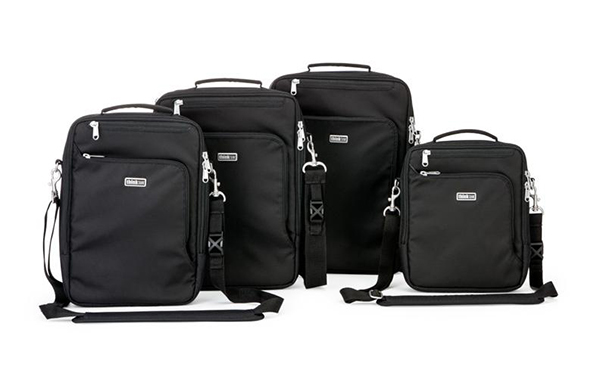
Think Tank has just launched a new line of bags, setting their sights this time not only on the photographic community, but on the Mac-obsessed public at large. My 2nd Brain is a laptop/iPad case that comes in four sizes and three colors (Black, Harbor Blue, and Green Mist), and is designed specifically around the dimensions of Apple products like the 15″ and 13″ MacBook Pros, the 11″ MacBook Air, iPad, iPhone, and all of the cords, cables, chargers, converters, and other accessories that have to travel along with them. Unless you drop in a small point-and-shoot, this is one Think Tank bag that’s not for cameras.

M2B-003-dPS

First Impressions

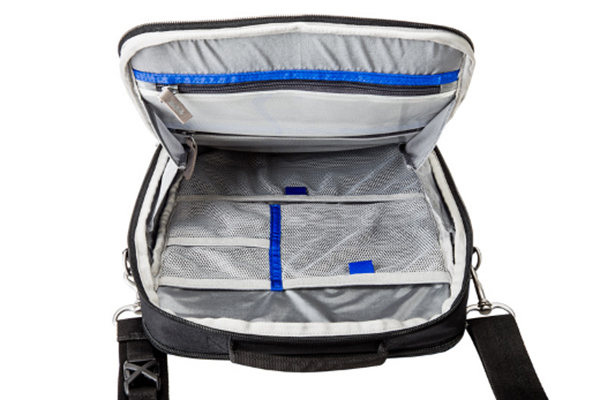
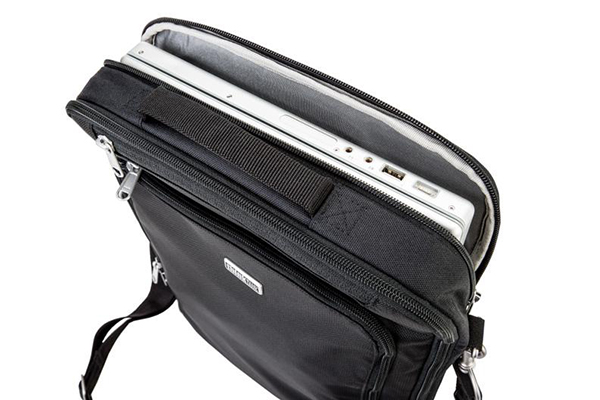
If you have ever owned a Think Tank camera bag this is going to sound very familiar. Fresh out of the box, you know you are holding a quality product in your hands that has been thoughtfully designed and built to last. High-quality, reinforced stitching, a comfortable shoulder strap, and the best zippers around help make up a durable, water-resistant exterior that’s sure to protect what’s inside without adding any unnecessary added bulk.  At first glance, you’re going to think that this bag can’t possibly hold very much. Then you are going to open it and be proven pleasantly wrong. The same attention to detail extends to the inside of the bag, where you’ll find dedicated pockets specifically for your iPad, iPhone, and laptop.

M2B-001-dPS

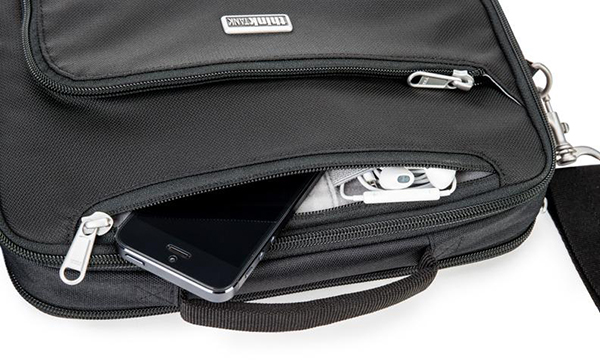
The accessory section of the bag takes up the most room, and has both see-through zippered and open-mesh pockets– plenty of room for power adapters and cords, as well as chargers, ear buds, keys, wallet, and just about any other reasonably sized item you might need to pack. An exterior zippered pocket on the front of the bag keeps pens, business cards, and small paperwork organized, while a pocket on the back is perfect for file folders, note pads, or magazines. This bag makes an awesome first impression.

M2B-005-dPS

Second Impressions

There are a few minor areas where I see room for a little bit of improvement in Version 2. I always have my phone in either a pants or jacket pocket, so I can at least feel it vibrate, even if I am someplace where I won’t be able to hear it. Unless I’m in a fairly quiet location, there is no way for me to hear my phone ring while in the M2B15, even at a pretty high volume. Additionally, the bag hangs in a vertical orientation. Another D-ring at the other end of the bag would be welcome, giving the user the added option of changing the connecting points for the strap, thus allowing it to be carried in a horizontal position as well.

My only other criticism stems from the very fact that this line of bags was designed around specific products with very specific dimensions. For instance, while a 15″ MacBook Pro fits perfectly in the laptop section of the bag, virtually any other 15″ laptop is going to be too thick for the zipper to close without a fight.  Think Tank’s Artificial Intelligence line of laptop cases is a viable option for non-Apple users, but that leaves out the “hybrid consumer” who uses an iPad and a non-Apple laptop. I think that leaving just a little bit of extra room could have accomplished the goal just as effectively without sacrificing anything in the way of padding and protection.

M2B-004-dPS

Overall

This bag is yet another great addition to the Think Tank family. Quality construction and convenience have always been Think Tank trademarks and the M2B is no exception. It is designed to keep you organized and mobile, without skimping on security or peace of mind. It does exactly what it says it does and it does it well.  In the final analysis, how much more can you ask of it?

Check out the video for more information on My 2nd Brain.

Post originally from: Digital Photography Tips.

Check out our more Photography Tips at Photography Tips for Beginners, Portrait Photography Tips and Wedding Photography Tips.

A Review of Think Tank Photo’s “My 2nd Brain”


Digital Photography School

 
Comments Off on A Review of Think Tank Photo’s “My 2nd Brain”

Posted in Photography


Canon PowerShot G16 First Impressions Review

26 Sep

intropic.jpg

Canon’s PowerShot G16 might not be a massive upgrade compared to its predecessor, but it is a a solid camera that evolves the G-series in some interesting ways. In this article, we take a look at the G16’s real-world performance and dig into its new Wi-Fi feature as well as taking a critical look at its improved video mode. We’ve also added many more images to our previously-published gallery of real-world samples. Click through for a link to our first-impressions review. 

News: Digital Photography Review (dpreview.com)

 
Comments Off on Canon PowerShot G16 First Impressions Review

Posted in Uncategorized


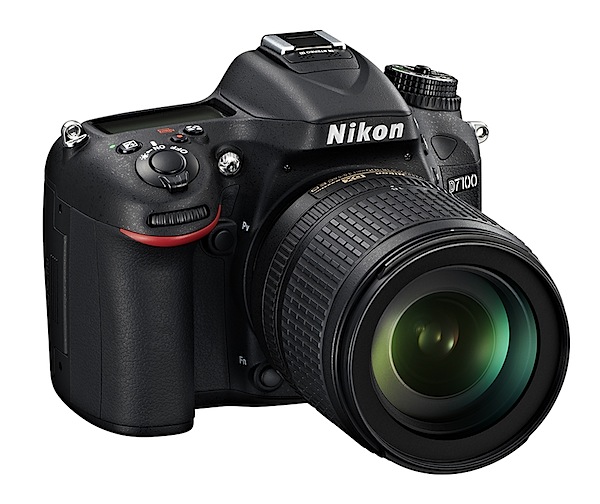
Nikon D7100 Review

26 Sep

Nikon D7100 Review.jpg

An attractive camera, aimed at the enthusiast, the Nikon D7100 follows on from the well-regarded D7000 which, I noted in my DPS review at the time, was described as a ‘professional-standard’ camera, not a professional one!

Nikon D7100 Review back.jpg

Nikon D7100 Review top.jpg

The company has bumped up the CMOS resolution to 24.1 effective pixels from the D7000′s 16.2 megapixels, reason enough to whet your appetite! However, don’t get too excited because the sensor is the same size, which means the pixels are working harder.

And that’s not all: the LCD screen is slightly larger and has increased resolution (1,229,000 pixels); the AF system performance has been lifted and given a higher low light ability; purists will appreciate the removal of an optical low pass filter. And more.

ISO range runs from 100-6400, reaching 25600 in expanded mode.

There is now a maximum rate of 6 fps continuous shooting at full resolution or 7 fps in cropped mode (4800×3200).

The camera can shoot in cropped mode for both stills and HD video. Stereo audio can be recorded via the inbuilt or an external mic.

The AF system has 51 points, with 15 of these sensors of the cross type.

You can attain spot white balance in Live View mode.

Maximum image size is 6000×4000 pixels, or 51x34m as a print.

HD video at 1920×1080 pixel resolution can be shot. If you fire off a still mid video recording, the latter will stop.

Two SD card slots can be used for overflow or backup; files can be copied between cards.

The camera is built with magnesium alloy and has water and dust resistance.

Images can be shared wirelessly with an attached WU-1a Wireless Mobile Adapter.

Possibly because I had not encountered a DSLR for some time or was a little in awe at the swell of positive comment this ‘un was generating. I took things gently at first: by that I mean I jumped in at the deep end and set about the task of shooting my ISO tests without a glance in the manual.

I dialled A on the PASM dial, adjusted the f stop, dropped the ISO mark to its start point — and shot the tests.

Very straightforward. Easy peasy. Which means there is a degree of comfortable user friendliness. Well done Nikon!

Handling

Immediately you know this is a DSLR if, like me, you’ve recently encountered a swag of compacts, MILCs etc: a bit on the bulky side, with a pronounced speed grip, but with a nice texture on the handling surfaces and evenly distributed weight, so it has an agreeable balance in the hand. With the review camera was the AF-S f3.5/24-85mm lens. Total weight: a manageable 1.2kg. Maybe a little heavy for handheld video shooting.
House and ocean.JPG

Pool.JPG

Sun shapes 2.JPG

Controls

You tend to forget the generous real estate in a DSLR, which allows largish, well-spaced control IDs. Another factor is the large, bright white ID texts used on control points.

Front: off to top left is the lens release button; to the right and flanking the lens are the flash release button, the BK button for bracketting exposure and a tiny two position lever to switching between manual and AF.

I also noticed that the lens barrel’s lever for auto and manual focus plus another on/off for VR (Vibration Reduction) crammed in very close to the manual/AF button. Suggest you get used to it!
Scene modes.JPG

Special effects.JPG

Top: at left is a generously sized mode dial with positions for auto, PASM, special effects (night vision, color sketch, high and low key etc), U1 and U2 custom settings and scene modes (portrait, child, close up, sunset etc) plus a position for flash off. I should point out that the various positions are secured by a detent button. Brilliant!

Flowers orig.JPG

Flowers color sketch.JPG

Flowers silhouette.JPG

Beneath the mode dial is a release mode dial offering shooting options: single shot, continuous low and high speeds, quiet shutter release, self timer and mirror lockup.

Still on top: the control panel display, on/off lever and shutter button, exposure compensation, the poorly placed video record button and one that allows you to directly format any card and swings you through the various metering options; just for’ard is the sub command dial. And a note: swing the on/off lever farther right and you illuminate the control display.

Rear and above the screen: replay button, trash and across to the right is the AE and AF lock button plus the main command dial.

Lower and left: menu, white balance (amongst other matters), enlarge display, image quality and size, ISO, the i button to change settings such as image size and quality, screen brightness etc.

To the right: focus selector lock then, lower down, are the Live View button and display options.

All in all, quite comprehensive. Many of them you will pick up in the early hours of ownership but I do suggest some trial shooting with manual firmly in hand in the aim of making your camera-person interface intuitive.
Menu 1.JPG

Menu 2.JPG

Menu 3.jpg

The viewfinder menu system is typically Nikon: comprehensive and clear.

Nikon D7100 ISO Tests

Nikon D7100 ISO 100.JPG

Nikon D7100 ISO 400.JPG

Nikon D7100 ISO 800.JPG

Nikon D7100 ISO 1600.JPG

Nikon D7100 ISO 3200.JPG

Nikon D7100 ISO 6400.JPG

Nikon D7100 ISO 12800.JPG

Nikon D7100 ISO 25600.JPG
Only at the ISO 6400 level does quality begin to drop off in terms of sharpness and noise.

ISO 12800 equivalent: noise up but still useable.

ISO 25600 equivalent: noise and image sharpness make this level a no-no.

Nikon D7100 Review Verdict

Quality: excellent as you would expect, with an exceptional range.
Why you would buy the Nikon D7100: an affordable DSLR with many bells and whistles.
Why you wouldn’t buy the Nikon D7100: maybe your ambition is to shoot full frame.

A well-priced DSLR with many pro features makes this number an ideal enthusiast camera.

I only question the APS-C format for those who want to make really big images or perform severe cropping. But it will sure please many a keen photographer unwilling or uncashed enough to dive into the full frame market.
Should sell by the truck load.

Nikon D7100 Specifications

Image Sensor: 23.5×15.6mm CMOS. 24.1 million effective pixels.
Metering: Multi, centre-weighted, averaging and spot.
A/D processing: 14-bit.
Lens Mount: Nikon F.
Exposure Modes: Auto, Program AE, shutter and aperture priority, manual.
35 SLR Lens Factor: 1.5x.
Shutter Speed: Bulb, 30 to 1/8000 second. Flash X-sync: up to 1/250 sec.
Continuous Speed: 5-7fps.
Memory: SD/SDHC/SDXC cards in two slots.
Image Sizes (pixels): 6000×4000 to 2400×1344. Movies: 1920×1080 to 1280×720.
Viewfinders: Eye level optical pentaprism and 8cm LCD (1,228,000 pixels).
File Formats: NEF (RAW), JPEG, NEF (RAW)+JPEG, MPEG4.
Colour Space: Adobe RGB, sRGB.
ISO Sensitivity: Auto, 100 to 6400 with expansion up to ISO 25,600.
Interface: USB 2.0, AV, HDMI mini, DC input, external stereo mic, remote, audio in- and output.
Power: Rechargeable lithium ion battery, AC adaptor.
Dimensions: 136x107x76 WHDmm.
Weight: Approx. 765 g (with battery and card).
Price: Get a price on the Nikon D7100 (body only) or Nikon D7100 with 18-105mm f/3.5-5.6 AF-S DX VR ED Nikkor Lens.

Post originally from: Digital Photography Tips.

Check out our more Photography Tips at Photography Tips for Beginners, Portrait Photography Tips and Wedding Photography Tips.

Nikon D7100 Review


Digital Photography School

 
Comments Off on Nikon D7100 Review

Posted in Photography