RSS
 

Posts Tagged ‘REVIEW’

First Impressions Review of Fujifilm X-E2 midrange mirrorless ILC

18 Oct

X-E2preview.jpg

The X-E2 represents the start of Fujifilm’s refresh of its X-series mirrorless interchangeable lens cameras. It features a 16MP X-Trans CMOS II sensor that gains on-sensor phase detection over the one used in previous models. This and a 1.04m dot LCD are the major hardware changes – the X-E2 is mainly about handling and operations tweaks. We’ve got to grips with the camera’s handling to see how it’s changed, compared to the X-E1. Click through to find out more.

News: Digital Photography Review (dpreview.com)

 
Comments Off on First Impressions Review of Fujifilm X-E2 midrange mirrorless ILC

Posted in Uncategorized


Movin’ on up: Nikon D5300 first impressions review

17 Oct

d5300thumb.png

Nikon’s latest consumer DSLR, the D5300, evolves the design of its predecessor but raises the feature bar, bringing it closer to the D7100. In fact, it’s likely that the 24MP D5300 even uses the sensor of its big brother since it also lacks an AA filter. The D5300’s larger LCD and viewfinder serve to further close the gap, while built-in Wi-Fi, GPS, and 1080/60p video recording go beyond what the D7100 offers. We’ve had some time with a pre-production D5300, and you can click through to read our first impressions review.

News: Digital Photography Review (dpreview.com)

 
Comments Off on Movin’ on up: Nikon D5300 first impressions review

Posted in Uncategorized


First impressions review: Tiny Panasonic GM1 under the microscope

17 Oct

specs.jpg

It’s not every day when you see a mirrorless interchangeable lens camera that can fit in the palm of your hand. That’s why we jumped at the chance to take a look at Panasonic’s new Lumix DMC-GM1, which offers many of the features of its larger siblings, in a much smaller package. Read our first impressions review after the link.

News: Digital Photography Review (dpreview.com)

 
Comments Off on First impressions review: Tiny Panasonic GM1 under the microscope

Posted in Uncategorized


Very big and very fast: Sony Cyber-shot RX10 first-impressions review

16 Oct

rx10.jpg

Sony’s new Cyber-shot RX10 marries the 20MP 1-inch BSI-CMOS sensor from the RX100 II with a 24-200mm Zeiss Vario-Sonnar zoom lens, with a constant maximum aperture of F2.8. On paper it’s an impressively versatile package for both still and video capture, and we’ve spent a few days with a pre-production sample to get a feel for how Sony’s most powerful Cyber-shot yet performs. Click through for a link to our first impressions review. 

News: Digital Photography Review (dpreview.com)

 
Comments Off on Very big and very fast: Sony Cyber-shot RX10 first-impressions review

Posted in Uncategorized


First impressions review of the full-frame Sony A7 and A7R

16 Oct

A7news.jpg

Sony’s new A7 and A7R bring full-frame imaging to the company’s mirrorless ILC lineup, using the established E-mount. While they’re not quite the ‘full-frame NEX’ that some loyal Sony users might have been imagining, the 24MP A7 and 36MP A7R are impressive, innovative products that demand to be taken seriously (with a price-point to match). We’ve had the opportunity to use pre-production samples of both new models, and we’ve prepared a hands-on first impressions review covering off their key features, operation, and early indications of their performance. Click through to read more. 

News: Digital Photography Review (dpreview.com)

 
Comments Off on First impressions review of the full-frame Sony A7 and A7R

Posted in Uncategorized


Olympus OM-D E-M1 Review

16 Oct

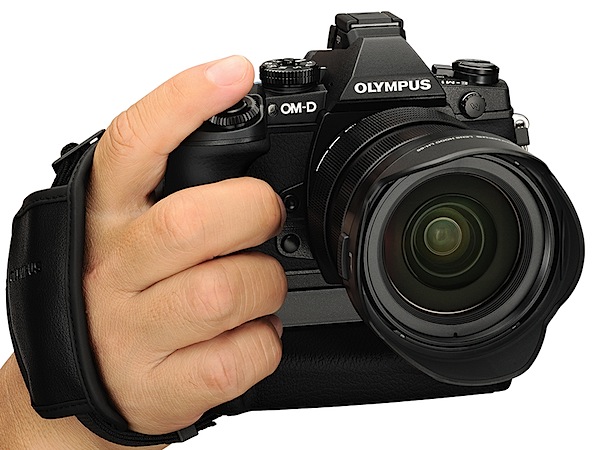
Olympus OM-D E-M1 Review front.jpg

I got the feeling the opposition was spooked by the news that this one was coming. Suddenly, major makers all over town announced press chats to bellow their wares from the heights.

Olympus has a disturbing habit of delivering tasty morsels resembling full-on meals (!) in a manner far beyond its size. In the past companies such as Nikon and Canon have been justifiably wary of the O company and its moves on the market. This looks like another one.

The retro-styled, magnesium alloy bodied E-M1 is Olympus’ flagship compact system camera and, in some very obvious ways, announces that Micro Four Thirds has well and truly arrived. Farewell Four Thirds!

The review camera was supplied with the f2.8/12-40mm lens which has the same type of sealing as the camera body. The E-M1 was loaned to me for only a few days, so this review will have to be a tad cursory … but, please forgive me if I lean on the hyperbole a bit!

First up, as far as handling goes, we see the benefits of the Micro Four Thirds system: the camera and lens are not a bulky package.

Olympus OM-D E-M1 Review back.jpg

Olympus OM-D E-M1 Review top.jpg

Olympus OM-D E-M1 Features

The first (and still current) model in the OM-D series was the E-M5 … don’t you just love the numbering system!

  • The 16.3 megapixel LiveMOS sensor has on-chip Phase Detection AF, True Pic VII image processor and a new electronic view finder. No anti-aliasing filter.
  • Dual Fast AF Technology supports both Contrast AF and On-chip Phase Detection AF, which allows users of both the Four Thirds and Micro Four Thirds systems to use their lenses.
  • There’s an enhanced 5-axis image stabiliser for improved stabilisation at lower shutter speeds.
  • ISO range: 200 – 25600.
  • Manual focus with focus peaking.
  • Focus points: 81-area multiple contrast detection AF with 37-area multiple AF phase detection AF.
  • In-camera HDR.
  • Flash: no built-in flash. Flash sync (for external unit): 1/320 sec.
  • Built-in WiFi.
  • Weather sealing: dust, splash, freeze resistance (-10?C).
  • The LCD screen tilts up and down in a vertical plane but does not tilt up and forward for self portraits.
  • Customizable buttons: two on the front.
  • Built-in microphone socket.
  • Interface: AP2 accessory port, AV/USB, HDMI connector.
  • The maximum image size is 4608×3456 pixels, which leads to a 39×29 cm print. Video is in Full HD 1920x1080pixel resolution. If you shoot a still mid video recording the video is interrupted.
  • Continuous shoot at up to 10fps.
  • The intervalometer can shoot up to 999 shots with a movie compilation at the end.
  • The Color Creator mode allows you to adjust the camera’s colour response, accessed from the Function 2 button and allows a live preview of its effects with a navigable colour wheel that changes the hue and saturation of the image.

Daisies 2.JPG

Kayak.JPG

People and model yacht.JPG

People near lake.JPG

Yachts 2.JPG

Olympus OM-D E-M1 Controls

At first, the camera appears to have a crowded control layout: but this is only because the whole kit is so modest in size!

Flanking the lens mount are a pair of buttons that offer instant, one touch white balance (targetting a white card) and a preview button that gives you an idea of the scene when stopped down. These buttons are devilishly hard to activate too!

The first — and only — shock is that the power lever is located at the left of the camera’s top deck, tucked in between two buttons which access AF options and HDR/sequential shooting. It takes some adjusting to feel relaxed with this location!

Off to the right is the mode dial. This has something I have never seen before: a two way lock to set or release the dial.
Art Filter.JPG

Scene Filter.JPG

This dial gives access to auto, PASM, Art Filters (13), Photo story (in this mode you can shoot multiple shots, then combine them into one image and then add handwritten text), Scene Filters (24), video.

Nearby are the shutter button, a front and rear control dial, Function 2 button and the familiar video record button. Tucked awkwardly into the far right corner is the Function 1 button.

On the brow of the top deck and rear panel are the top/LCD viewfinder button and a two position lever that swings from AE to AF options.

Rear: buttons for Info (screen display options) and menu plus replay and trash.
The four way jog dial has a central OK button that quickly gives access to ISO, AF/MF, flash choices, image sizes,single/continuous shooting, white balance, etc.

As you can see, there is a whole forest of choices with often more than one way to get where you’re going.

It’s worth mentioning there are three options for the touch screen: off, tap and shoot, tap to display a resizeable AF target — then tap to shoot!

Olympus OM-D E-M1 ISO Tests

Olympus  OM-D E-M1 ISO 100.JPG

Olympus  OM-D E-M1 ISO 400.JPG

Olympus  OM-D E-M1 ISO 800.JPG

Olympus  OM-D E-M1 ISO 1600.JPG

Olympus  OM-D E-M1 ISO 3200.JPG

Olympus  OM-D E-M1 ISO 6400.JPG

Olympus  OM-D E-M1 ISO 12800.JPG

Olympus  OM-D E-M1 ISO 25600.JPG

Only at ISO 6400 is noise slightly noticeable. At ISO 12800 noise is up a little more but still useable. Surprisingly, ISO 25600 would be useable for certain subjects, ie those with no large areas of continuous tone.

Some Notes

The viewing setup is to to die for: while the rear screen is excellent, the top finder is superb, sharp and bright, while seeming so close to an actual optical finder. Remember this is a mirrorless camera!

And note: there’s an underwater case for the Olympus OM-D E-M1, allowing shooting down to 45 metres. It’s equipped with a wireless flash control function and a waterproof lens port can be attached.

Olympus OM-D E-M1 Review Verdict

Quality: truly superb quality with tons of access to image management.

Why you’d buy the Olympus OM-D E-M1: excellent stabiliser for video shooting; arguably the best Micro Four Thirds camera on the market.

Why you wouldn’t: you don’t have the expertise to drive it!

And now a confession: in my rush to get shooting I found myself with a lens that was determinedly manual in operation. No way could I get it onto AF. Then I found a tiny leaflet in the lens box that imparted the secret: slip the focus ring forward and you enter auto focus; reverse it and you’re in manual.

So I ran the E-M1 for a while in manual focus and can’t rave enough about the focus peaking approach which gives a superb confirmation in the viewfinder that you’re on the right spot.

A truly remarkable camera. Want one!

Olympus OM-D E-M1 Specifications

Image Sensor: 16.28 million effective pixels.
Metering: Multi pattern, centre-weighted averaging, spot.
Exposure Modes: Auto, Program AE, shutter and aperture priority, manual.
Effective Sensor Size: 17.3×13.0mm (22.5mm diagonal) Live MOS.
Lens Mount: Micro Four Thirds.
35 SLR Lens Factor: 2x.
Shutter Speed: 60 sec to 1/8000 second, Time, Bulb. Internal/external flash sync: 1/320/250 sec.
Continuous Shooting: up to 10 fps.
Memory: SD/SDHC/SDXC cards and Eye-Fi.
Image Sizes (pixels): 4608×3456 to 640×480. Movies: 1920×1080, 1280×720, 640×480.
LCD Screen: Viewfinder (2,360,000 pixels), 7.6cm LCD (1,040,000 pixels).
File Formats: JPEG, RAW, JPEG+RAW, MPEG4.
Colour Space: sRGB, Adobe RGB.
ISO Sensitivity: Auto, 200 to 25600.
Interface: USB 2.0, HDMI mini, AV, flash, mic, WiFi.
Power: Rechargeable lithium ion battery, DC input.
Dimensions: 130.4×93.5×63.1 WHDmm.
Weight: 497 g (inc battery and card).
Prices: Get a price on the Olympus OM-D E-M1 (Body Only) or the Olympus Om-d E-m1 with 12-40mm F2.8 Lens.

Post originally from: Digital Photography Tips.

Check out our more Photography Tips at Photography Tips for Beginners, Portrait Photography Tips and Wedding Photography Tips.

Olympus OM-D E-M1 Review

The post Olympus OM-D E-M1 Review by Barrie Smith appeared first on Digital Photography School.


Digital Photography School

 
Comments Off on Olympus OM-D E-M1 Review

Posted in Photography


Fujifilm X-M1 Review

13 Oct

Fujifilm X-M1 Review.jpg

It’s been nearly two years since Fujifilm launched its pioneer X-system mirrorless camera to a surprised market.

That model, the awkwardly named X-Pro1, has been succeeded by a run of other models. So now we have the X-M1, missing a few niceties from the launch model, but undeniably an X-system camera. And, in some ways, it’s very much a ‘camera’ sort of camera. By that, I mean it looks slightly retro with satin chrome trim and a black leather-like surface and has a control interface which you should easily fall into step with.

And in one respect, more models in an interchangeable lens camera range suggests the likelihood of more lens choices. A good thing!

Many will notice the absence of an optical viewfinder, however it does have a vertically articulated rear LCD screen, so photographers working in bright sunlight will have a sporting chance of viewing their shot pre-shoot!

Fujifilm X-M1 Review Lineup.jpg

Fujifilm X-M1 Features

The 16.3 megapixel CMOS can capture a maximum image size of 4896×3264 pixels: 41x28cm as a print.

Fujifilm X-M1 Review - Lamp.JPG

Fujifilm X-M1 Review -Pattern 1.JPG

Fujifilm X-M1 Review -Pattern 2.JPG

Fujifilm X-M1 Review -Dwarfs 2.JPG

Fujifilm is long a believer in a different colour filter array than the norm to minimise moiré and chromatic aberration without the need for an optical low pass filter. This is claimed to boost resolving power.

Video: capture in Full HD 1920×1080 pixel video. And no, you can’t shoot stills mid video recording.

The ISO speed runs from 200 to 6400 and further to 12800 and ISO25600 with expansion.

The wireless image transfer function uses a free Fujifilm camera app (free download) for transfer of shots to a smart device or computer.

The review camera was supplied with the Fujinon XC f3.5/16-50mm OIS kit lens, giving a 35 SLR equivalent of 24mm–76mm.

Fujifilm X-M1 Handling

You might be able to pack the X-M1 with lens attached into a jacket pocket, but it will be a tight fit!

The camera is well-balanced and the textured leatherette assures a firm grip.

Fujifilm X-M1 Controls

Top deck: the flash pop up trigger kicks the cell up and forward, siting the light source a healthy, red eye defeating 7cm from the lens.

The mode dial has positions for auto, PASM, a custom setting, three scene positions (sport, landscape, portrait), the SR setting which automatically optimises settings to suit the scene plus a notch (Advanced) which gives access to even more (high and low key, partial colour — red, orange, yellow, green, blue, purple filter effects etc).
Fujifilm X-M1 Review -Advanced night.jpg

Then there’s an advanced setting which can handle situations such as beach/snow, moving objects, night shots etc.

If you think there’s an avalanche of shooter aids you’d be right! This gives you an inkling of the likely market: the keen, but skill-deprived enthusiast.

At the edge we find the on/off lever and shutter button; the nearby prominent main command dial can set exposure compensation, shutter speed or trawl through images in replay. And a word of warning about the latter: it would be very easy to bump this dial and accidentally set an unwanted plus or minus exposure setting!

Just ahead is a function button that takes you directly into image size and quality, metering and AF options etc.

Rear: a second command dial is at the top, then to the right of the screen is the replay button, info display options, trash. And the video record button, usefully placed at the camera’s extreme right edge.

The jog dial has positions for single and continuous shooting, AF options, macro and white balance plus a centrally located main menu button.
Fujifilm X-M1 Review -Q menu.jpg

Bottom and to the right is found the Q button which gives immediate access to the main menu options such as ISO, image size, focus and flash modes etc. A useful short cut.

The menu display is easily accessed.

ISO Tests

Fujifilm X-M1 ISO 100.JPG

Fujifilm X-M1 ISO 400.JPG

Fujifilm X-M1 ISO 800.JPG

Fujifilm X-M1 ISO 1600.JPG

Fujifilm X-M1 ISO 3200.JPG

Fujifilm X-M1 ISO 6400.JPG

Fujifilm X-M1 ISO 12800 equiv.JPG

Fujifilm X-M1 ISO 25600 equiv.JPG

Definition starts to fall off at ISO 3200. No noise at ISO 6400 but sharpness falls further. Noise up at ISO 12800 equivalent but still useable. ISO 25600 equivalent? Not useable IMHO.

Fujifilm X-M1 Review Verdict

Quality: above average.
Why you’d buy the Fujifilm X-M1: good quality, small form factor.
Why you wouldn’t buy the Fujifilm X-M1: no panorama mode.

An excellent camera for the ambitious beginner. Available in black, silver and brown.

Fujifilm X-M1 Specifications

Image Sensor: 16.3 million effective pixels.
Sensor: 23.6×15.6mm CMOS.
Metering: Multi segment, averaging, spot.
Lens Mount: Fujifilm X.
Lens Factor: 1.5x.
Exposure Modes: Auto, Program AE, shutter and aperture priority, manual.
Shutter Speed: 60 mins (Bulb); 30 sec to 1/4000 second. Flash X-sync at 1/180 sec.
Memory: SD/SDHC/SDXC.
Continuous Shooting: 5.6 fps.
Image Sizes (pixels): Stills: 4896×3264 to 1664×1664.
Movies: 1920×1080, 1280×720.
Viewfinder: 7.6cm LCD screen (920,000).
File Formats: JPEG, RAW, JPEG+RAW, MPEG4.
Colour Space: sRGB, Adobe RGB.
ISO Sensitivity: Auto, 100 to 25600.
Interface: USB 2.0, HDMI mini.
Power: Rechargeable lithium ion battery.
Dimensions: 117x67x39 WHDmm.
Weight: 330 g (inc battery, card).
Price: Get a price on the Fujifilm X-M1 with 16-50mm Lens or ;Fujifilm X-M1 Body Only.

Post originally from: Digital Photography Tips.

Check out our more Photography Tips at Photography Tips for Beginners, Portrait Photography Tips and Wedding Photography Tips.

Fujifilm X-M1 Review

The post Fujifilm X-M1 Review by Barrie Smith appeared first on Digital Photography School.


Digital Photography School

 
Comments Off on Fujifilm X-M1 Review

Posted in Photography


DxOMark Mobile Report added to our Nokia Lumia 1020 review

13 Oct

DxOMark-logo-520.jpg

We have added DxOMark’s Mobile Report to our camera review of the Nokia Lumia 1020. The report includes DxO Lab’s usual industry-standard scientific measurements and analyzes 14 aspects of mobile imaging including detailed image quality assessment, flash performance, autofocus reliability and more to calculate a final score. Click through to go to page 8 of our Nokia Lumia 1020 review for the DxO Mark mobile report.

News: Digital Photography Review (dpreview.com)

 
Comments Off on DxOMark Mobile Report added to our Nokia Lumia 1020 review

Posted in Uncategorized


DxOMark Mobile Report added to our Nokia Lumia 1020 review

12 Oct

DxOMark-logo-520.jpg

We have added DxOMark’s Mobile Report to our camera review of the Nokia Lumia 1020. The report includes DxO Lab’s usual industry-standard scientific measurements and analyzes 14 aspects of mobile imaging including detailed image quality assessment, flash performance, autofocus reliability and more to calculate a final score. Click through to go to page 8 of our Nokia Lumia 1020 review for the DxO Mark mobile report.

News: Digital Photography Review (dpreview.com)

 
Comments Off on DxOMark Mobile Report added to our Nokia Lumia 1020 review

Posted in Uncategorized


A Review of the ThinkTank Airport Commuter Camera Bag

09 Oct

If you’ve ever had to work your way through a busy airport with your gear, you know that an ordinary camera bag just isn’t going to cut it. Making sure everything is safely packed, moving through security, getting on and off your plane, working your way through yet another airport– it’s a challenge. Think Tank Photo addressed the challenge head-on not too long ago, when they introduced a new line of Airport Backpacks. The line includes (from biggest to smallest) the Airport Accelerator, Airport Commuter, and Airport Essentials, all of which meet U.S. and international carry-on standards. I’ve been putting the Commuter through its paces for the better part of a year, and– as someone who’s never owned a gear bag designed specifically around air travel– I’m really impressed.

As with all things Think Tank, the construction is impeccable. Heavy-duty zippers and stitching, comfortably padded straps and handles, as well as all of the pockets and compartments I’ve come to expect from Think Tank. While lots of pockets isn’t exactly innovative, Think Tank’s newer bags have also been designed with dedicated pockets for tablets or laptops. The Airport Backpack series is designed to hold both. The exterior-access pockets are also right where they do the most good, providing quick access to travel essentials like i.d., credentials, passports, boarding passes, and other travel necessities. A large side pocket is perfect for a bottle of water or paperback book.

All of that great exterior access doesn’t do you much good, though, if the interior doesn’t do its job well. Fortunately, the gear section of this bag is pretty remarkable. The two things I noticed while packing it were (1) how much it holds, and (2) how deep it is.  Without doing any reconfiguring of the pre-installed dividers (OK…I removed one little one in the middle), I packed three bodies, five lenses, two speelights, a set of Pocket Wizards, and all of the cards, cords, batteries, gels, film, pens, business cards, m&m’s, and all of accessories I needed.  And there was room for more.

Other “bonus features” include a locking security cable, removable waist belt, and tripod attachment straps.  To be honest, I was a little disappointed by the tripod attachment.  That great side pocket I mentioned earlier?  That’s where the feet of the tripod go, but I never felt the tripod was truly secure.  I’ll admit my tripod might be somewhat to blame– if it was more of a travel size or if it was carbon fiber I might feel differently.

The only other down side for me personally is that this is a lot of weight for my back.  It is all very well-padded and evenly distributed, but my back’s not what it used to be.  I’m hoping that an Airport 4-Sight rolling bag is somewhere in my future.

Post originally from: Digital Photography Tips.

Check out our more Photography Tips at Photography Tips for Beginners, Portrait Photography Tips and Wedding Photography Tips.

A Review of the ThinkTank Airport Commuter Camera Bag

The post A Review of the ThinkTank Airport Commuter Camera Bag by Jeff Guyer appeared first on Digital Photography School.


Digital Photography School

 
Comments Off on A Review of the ThinkTank Airport Commuter Camera Bag

Posted in Photography