RSS
 

Posts Tagged ‘REVIEW’

Nikon Df First Impressions Review: Is this retro done right?

05 Nov

backtofrontv1.jpg

The widely rumored and much-leaked Nikon Df is here. The Df is a 16MP, full-frame DSLR with the sensor from the flagship D4 sensor and the 39-point AF system from the D610 packaged in a body inspired by film cameras from the 1970s. The Nikon Df can’t shoot video, but it will accept 50 year-old non-Ai lenses. A lot of Nikon users have been asking for a ‘digital FM2’ for years. Is the Df that camera? Click through for our first-impressions.

News: Digital Photography Review (dpreview.com)

 
Comments Off on Nikon Df First Impressions Review: Is this retro done right?

Posted in Uncategorized


Sony Cyber-Shot RX100 Mark II Review

03 Nov

Sony Cyber-Shot RX100 Mark II Review.jpg

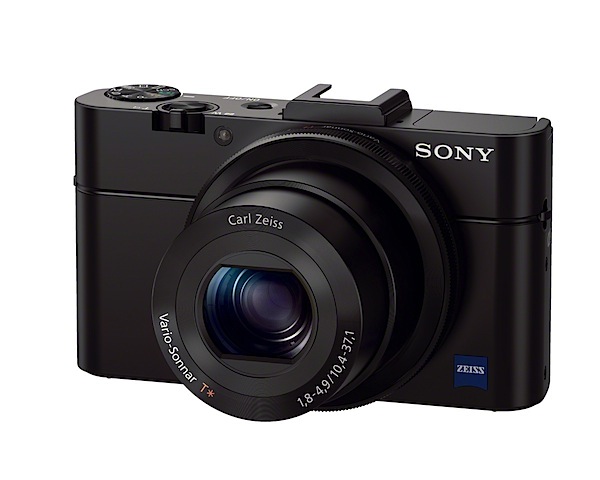
Welcome to Mark II of the Sony Cyber-Shot RX100, a neat, surprising camera that could sit happily alongside an upper level snapper (like a DSLR) in the camera bag. Unsurprisingly, it is priced at the upper level of compact digicams.

It has a reasonably fast Carl Zeiss f1.8, 3.6x optical zoom, imaging to a 20.2 million pixel CMOS, enabling the capture of a maximum image size of 5472×3080, leading to a 46x26cm print.

Video can be captured in AVHCD or MPEG4, up to a Full HD 1920×1080 pixel resolution.

Yes, you can shoot still shots in the middle of a video recording but with a click or two on the audio.

Sony Cyber-Shot RX100 Mark II review back.jpg

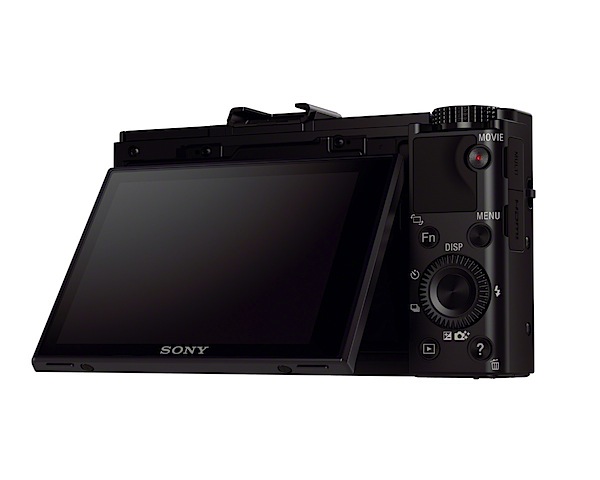
The body is made from aluminium and has a tiltable (up/down) LCD screen that responds to touch commands as well as tilting up by 84 degrees and down by 45 degrees. There is a (pricey) turret viewfinder to allow clear viewing in bright light that fits into the camera’s hot shoe; this shoe also accepts a clip on LCD screen, external flash or a microphone adaptor.

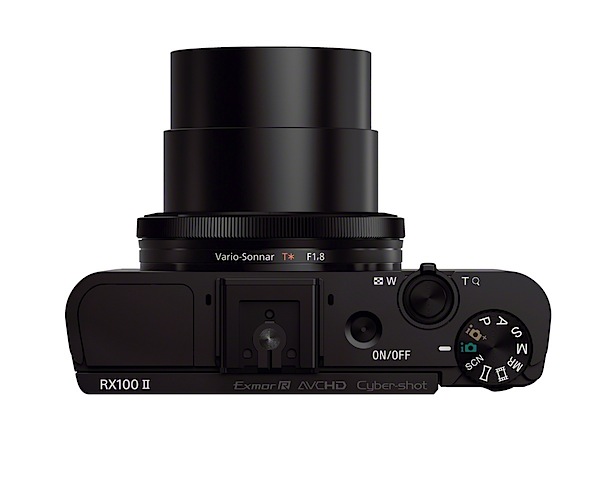
Sony Cyber-Shot RX100 Mark II Review top.jpg

Sony Cyber-Shot RX100 Mark II Features

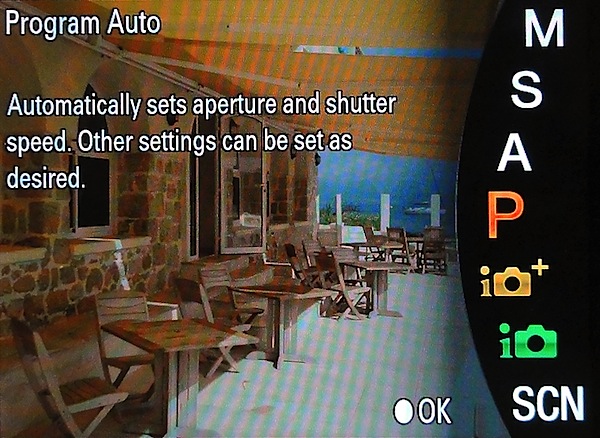
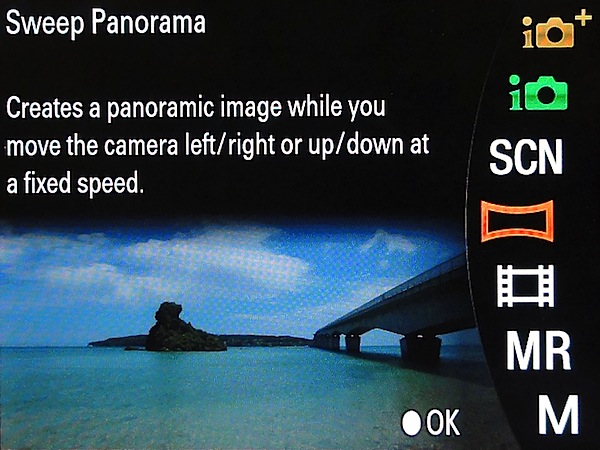
The camera control layout follows the usual Sony pattern: at extreme left is the flash cell; centre of the top surface is the multi interface shoe (or ‘hot shoe’); to the right is the power button, zoom lever and shutter button; nearby is the mode dial with positions for intelligent and superior auto exposure (!), PASM, movie, memory recall, sweep panorama and scene selection (presets for portrait, sports, macro, fireworks etc).

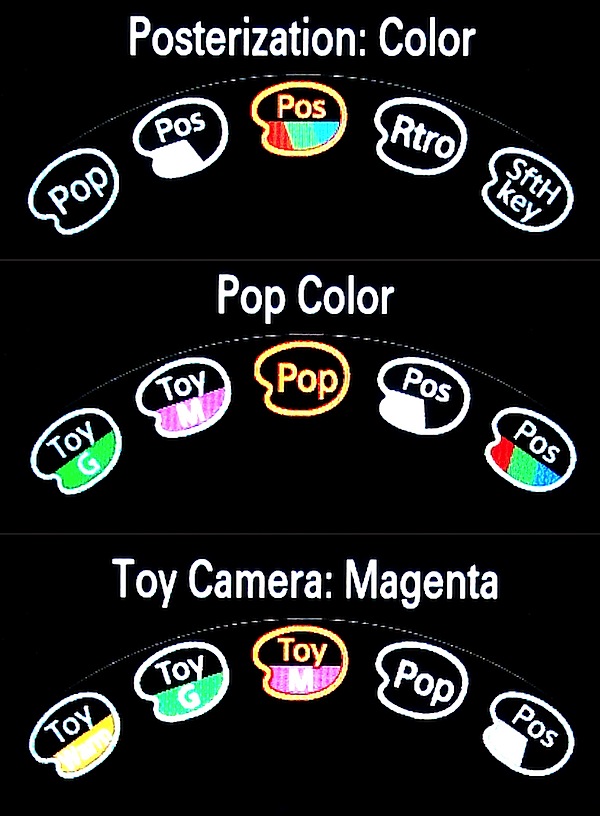
Function button.jpg

Rear: the familiar movie record button is on the top right corner; beneath it is a really useful Function button that offers exposure correction, ISO setting, AWB, the D-RANGE Optimiser and access to a wide range of effects … such as posterisation, pop colour, partial colour, retro, toy camera effect (in colorisations such as cool, warm, green, magenta). You could spend days with this item!

The D-Range Optimiser shoots a bracket of three shots with different exposures; the camera then overlays the bright area s of the under exposed image and the dark areas of the over exposed image to create an image with improved gradation. A single image with the ideal range is saved.

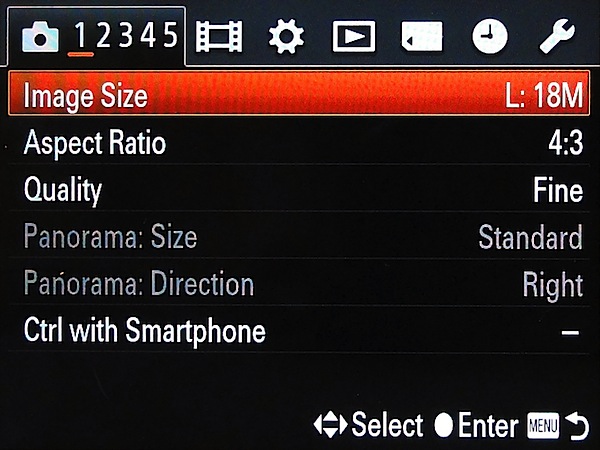
Menu 1.jpg

Menu 2.jpg

Nearby is the menu button which displays a super wide range of options. Newbies should pay deep attention to this menu … it all happens here! If you find a specific function is not working properly, it’s most likely because a ‘box’ in the menu has not been ticked!

Lower is the control wheel. Here you can select options for flash, self timer, burst shooting and exposure compensation. If your camera happens to be set to auto or intelligent auto you can access a range of picture effects, change image brightness, colour etc.

The central button of the control wheel locks in tracking focus to the subject nearest centre frame.

Lower still is the replay button and one which doubles as the image trash action and gives access to a useful information bank. I guess the latter gives the game away with the RX100: it is really a high priced beginners’ camera! Oh well!

Sweep panorama.jpg

Sony Cyber-Shot RX100 Mark II Pano 1.JPG

Sony, IMHO, has by far the best sweep panorama feature of all compact digicams: you can pan right, left, up or down and capture panos in enormous sizes. Like: 12,416×1856 pixels!

NFC

This is also Sony’s first NFC camera. Wassat?

Near Field Communication is designed to enable users to instantly share images with other NFC capable devices, such as Android smartphones, tablets, laptops or even TV.

The company’s strategy behind NFC is to simplify the connection of its RX100 II to smart devices. Once connected, users can remotely control the camera’s shutter release from the mobile device, quickly receive the captured image via WiFi and upload the transferred images straightaway to a social networking site.

But is NFC just Bluetooth or Wifi? Maybe.

Take a look at http://en.wikipedia.org/wiki/Near_field_communication for more info.

Snoopy 2.JPG

Sony Cyber-Shot RX100 Mark II Review Yacht.jpg

Distortion

No problems at either end of the zoom. A well corrected lens.

Startup

In just a little over two seconds the camera came to life after the power was tapped. Then I was able to fire off a run of shots as fast as I could tap the button.

Sony Cyber-Shot RX100 Mark II Review ISO Tests

Sony Cybershot RX100 Mark II ISO 100.JPG

Sony Cybershot RX100 Mark II ISO 400.JPG

Sony Cybershot RX100 Mark II ISO 800.JPG

Sony Cybershot RX100 Mark II ISO 1600.JPG

Sony Cybershot RX100 Mark II ISO 3200.JPG

Sony Cybershot RX100 Mark II ISO 6400.JPG

Sony Cybershot RX100 Mark II ISO 12800.JPG

At ISO 1600 sharpness dropped off slightly but noise was low. By ISO 6400 these factors were a little worse. By ISO 12800 sharpness was down further and noise up — but not by a large factor.

Sony Cyber-Shot RX100 Mark II Review Verdict

Quality: just above average.
Why you would buy the Sony Cyber-Shot RX100 Mark II: compact; fast Zeiss lens.
Why you wouldn’t buy the Sony Cyber-Shot RX100 Mark II: limited zoom range for your needs; LCD screen tilts are limited.

A surprising package in such a tiny body.

User guide.jpg

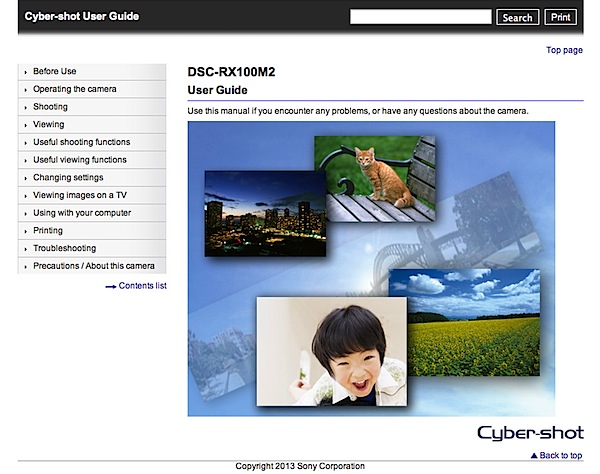
I felt the manuals to be inadequate: aside from a 37 page PDF basic guide in English and a Web-based user guide with no search facility, that was all. For a camera at this price level you could at least expect at least a decent searchable PDF manual.

Otherwise, a very good performance.

Sony Cyber-Shot RX100 Mark II Specifications

Image Sensor: 20.2 million effective pixels.
Metering: Multi pattern, centre-weighted, spot.
Exposure Modes: Auto, Program AE, shutter and aperture priority, manual.
Sensor Size: 13.2×8.8mm Exmor R CMOS.
Lens: Carl Zeiss Vario Sonnar T* f1.8-4.9/10.4-37.1mm (28-100mm as 35 SLR equivalent).
Shutter Speed: 30 to 1/2000 second.
Continuous Shooting: 2.5, 10 fps.
Memory: Memory Stick Duo, PRO Duo/PRO-HG Duo/SD/SDHC/SDXC and Micro SD/SDHC cards.
Image Sizes (pixels): 5472×3080 to 2592×1944.
Movies (pixels): 1920×1080, 1440×1080, 640×480.
LCD Screen: 7.6cm LCD (1,229,000 pixels).
Colour Space: sRGB, Adobe RGB.
File Formats: JPEG, RAW, JPEG+RAW, AVCHD, MPEG4.
ISO Sensitivity: Auto, 160 to 25600.
Interface: USB 2.0, micro HDMI, WiFi, DC, remote.
Power: Rechargeable lithium ion battery, DC input.
Dimensions: 102x58x38 WHDmm.
Weight: 281 g (with battery and card).
Price: get your hands on a Sony DSC-RX100M II Cyber-shot at Amazon here.

Post originally from: Digital Photography Tips.

Check out our more Photography Tips at Photography Tips for Beginners, Portrait Photography Tips and Wedding Photography Tips.

Sony Cyber-Shot RX100 Mark II Review

The post Sony Cyber-Shot RX100 Mark II Review by Barrie Smith appeared first on Digital Photography School.


Digital Photography School

 
Comments Off on Sony Cyber-Shot RX100 Mark II Review

Posted in Photography


Sony Xperia Z1 review: Smartphone with camera-sized sensor

01 Nov

z1.jpg

The Sony Xperia Z1 offers a 1/2.3-inch sensor — the same size found in most consumer compact cameras and significantly larger than the 1/3-inch sensors common in smartphones. The comparatively large sensor is combined with a high pixel count of 20.7MP, a fast F2.0 lens and a physical shutter button. We put the Xperia Z1 through our rigorous testing regimen. Read our review on connect.dpreview.com.

News: Digital Photography Review (dpreview.com)

 
Comments Off on Sony Xperia Z1 review: Smartphone with camera-sized sensor

Posted in Uncategorized


Canon EOS 70D review: The cutting-edge stalwart

31 Oct

newsimage2.jpg

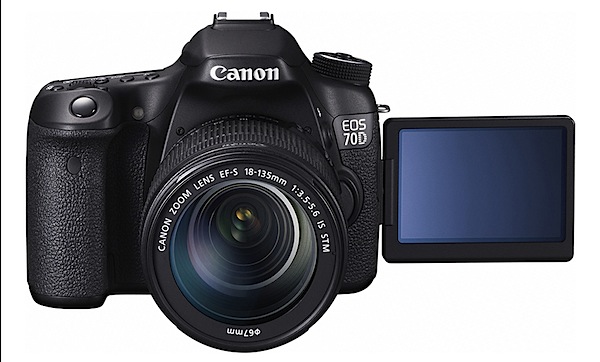
We’ve just completed our review of Canon’s EOS 70D. With its Dual Pixel AF system and built-in Wi-Fi, it’s an unusually radical departure for a series that’s tended to progress fairly conservatively between generations. So how well does it work? Are these high-tech additions enough to fend of the competition from Nikon’s very capable D7100 or Olympus’s rather impressive E-M1? Read our review to find out.

News: Digital Photography Review (dpreview.com)

 
Comments Off on Canon EOS 70D review: The cutting-edge stalwart

Posted in Uncategorized


Canon EOS 70D Review

31 Oct

Canon EOS 70D Review.jpg

It seems such a long time since this camera’s predecessor — Canon EOS 60D — was launched. And it was. About this time, three years ago and lots has happened in the interval. MILCs are here for one thing but there are still plenty of DSLR-coholics craving for an optical view of the world.

I have to admit I am prone to slaver a little when I look through an optical viewfinder. Just like the old days!

The camera was reviewed with the Canon EF-S f3.5/18-35mm IS STM lens. The camera, in Canon’s lineup, is located above the EOS 700D.
Canon EOS 70D Review top.jpg

Canon EOS 70D Review back.jpg

Canon EOS 70D Features

  • This is the first DSLR camera to have all-new Dual Pixel CMOS AF technology. Two photodiodes are mounted within each pixel, both of which can be read independently to achieve autofocus or together for image capture.
  • The AF system for stills has 19 cross-type AF points spread across the frame.
  • Effective pixel count is 20.2 megapixels on the APS-C sized CMOS sensor.
  • A 14-bit DIGIC 5+ processor is used.
  • The 70D captures full res images at up to 7 fps for a continuous burst of up to 65 JPEG or 16 RAW images.
  • HDR from three images.
  • Creative filters (grainy, soft focus, fish eye effect etc).
  • ISO range is 100-12800 (expandable to 25600).
  • The 7.7cm LCD touch screen has a 1,040,000 dot resolution.
  • With Wi-Fi connectivity, users can connect to the EOS Remote app as well as remotely use Live View mode.
  • External mic input.
  • The camera captures a maximum image size of 5472×3648 pixels or 46x31cm as a print.

Movies can be shot in MPEG4 up to Full HD at 1920×1080 pixels resolution.

Yes, you can shoot stills in the middle of a video recording but the video is briefly interrupted.

A neat feature is video snapshot: each short clip can be set to last two, four or eight seconds; you can add each clip to the tally as you shoot so you end up with a bunch of short videos, neatly edited together. To be honest, I haven’t found a place for the feature in my style of video making … but give it time!

Handling

The camera gains (or loses!) from the small sensor in that the whole package is less daunting in size and weight than a full frame DSLR.

The speed grip at right is substantial so your right fingers can grasp it securely. Left hand holds left of the body and you could maybe fire away with a single (right) handed grasp — but you’d need practice.

Controls

Tucked away, behind the lens, is the button which kicks up the flash cell; external wireless flash can also be hooked up.

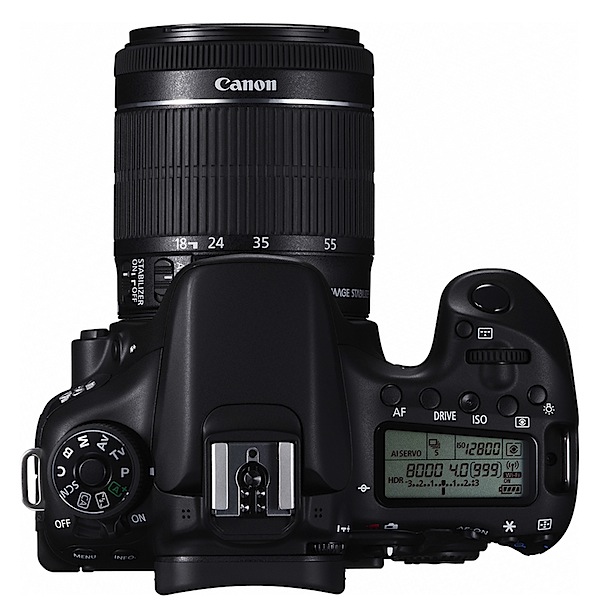
Top: against the usual approach, the power lever is sited to the extreme left, right next to the ten position mode dial. This has a useful locking button so your setting won’t shift.
Canon EOS 70D Review Scene Filters.jpg

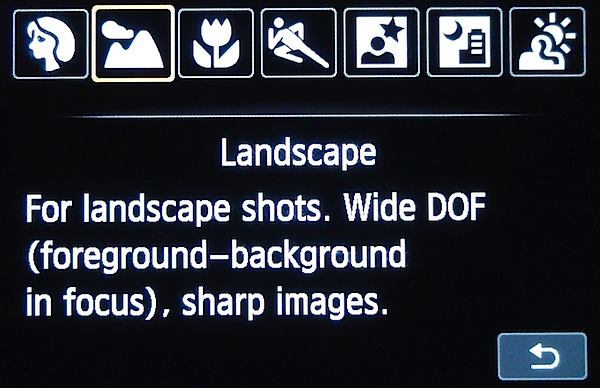
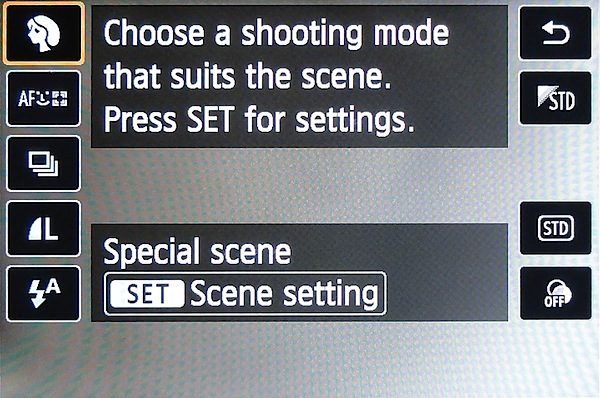
On it are positions for auto, PASM plus Bulb, flash off, special scenes (portrait, landscape etc), creative auto (aperture control, single/continuous shooting and flash options) and a custom setting.

Just beneath this dial are the menu and info buttons.

Top, off to the right: dioptric control for the optical finder, status screen (plus its light button) topped by buttons for AF, single/continuous shooting, ISO and metering mode. A little forward is the command dial, aperture/shutter speed button … and of course, the shutter button.

If you’re looking for some way to preview depth of field, then head to the lens barrel and a tiny button in its base.

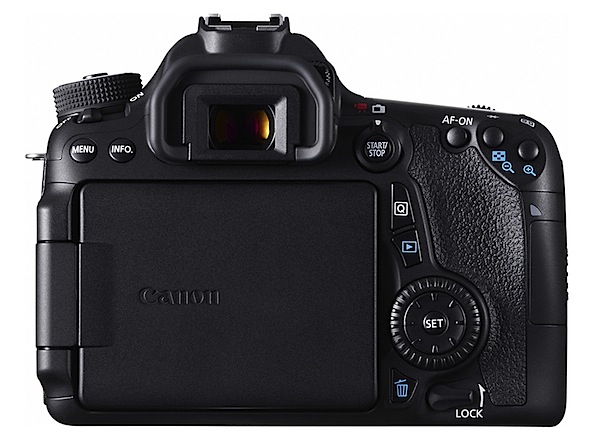
Rear: off to the right you’ll find a button and lever which takes you from the optical finder view to the Live one, then gives you the option of shooting stills or video. Quite a good arrangement.

Further right is an AF start/stop button, one for auto exposure lock and another for selection of the AF point or zone.

Lower down is the Quick control button that takes you rapidly into such areas as single/continuous shooting, metering modes, image size etc.

If you think the 70D provides multiple access points to camera controls … you’re right!
Canon EOS 70D Review Q button.jpg

Beneath the Q button is replay, trash and the multi controller (plus SET button). Lower still is the lock button which can prevent the main dial, Quick control dial and multi controller from shifting and an accidental alteration of a setting.

If you’re in the habit of passing your camera around to others for a shoot, this will lock in your carefully chosen settings!


Canon EOS 70D Review Tree.JPG

Canon EOS 70D Review Wedding girls 1.JPG

Jacaranda and house 1.JPG

Canon EOS 70D Review Chile tapestry 1.JPG

Get Going

Possibly a measure of this control layout is how easy the camera is to pick up and get going. Or not!

On test sessions my first chore is to shoot the ISO tests. Dealing with the camera’s controls fresh out of the box is usually a good indicator of camera user friendliness.

OK. Go to the mode dial. Set it to aperture priority. Next, select a small, focus friendly aperture. Move to the front command dial; there is no rear dial, so Canon calls this one the ‘main dial’. Wind it down to f16. Cool.

Next, I want to set the ISO number. Move to the tiny button on top, marked ‘ISO’.

I want to use manual focus, so I next headed for the lens barrel and switch it from AF to MF. Nearby also is the stabiliser on/off switch.

Easy peasy. And I was up and away!

The menu arrangement is comprehensive and easy to follow — but it is extensive! I suggest you become familiar with it as there are many options and you could easily find yourself bamboozled.

Canon EOS 70D ISO Tests

Canon ESO 70D ISO 100.JPG

Canon ESO 70D ISO 400.JPG

Canon ESO 70D ISO 800.JPG

Canon ESO 70D ISO 1600.JPG

Canon ESO 70D ISO 3200.JPG

Canon ESO 70D ISO 6400.JPG

Canon ESO 70D ISO 12800.JPG

Noise only became noticeable at ISO 6400. Useable.

There was a substantial increase in noise at ISO 12800. A little dodgy.

Canon EOS 70D Review Verdict

Quality: I was quite blown away by the quality of this camera’s images; not only were they super sharp but the coloration was dead accurate.

The focus was super fast and super accurate. The stabiliser works well, esp in video shooting. Note: three handheld scenes in the video clip were shot without the stabiliser in action.

So I reshot one more video shot (the wall and gate) with the stabiliser in play. Much better!

Why you’d buy the Canon EOS 70D: a DSLR that won’t break your bank or bend your shoulders.

Why you wouldn’t buy the Canon EOS 70D: check your expertise level!

One of the best new models I have seen for a while.

Canon EOS 70D Specifications

Image Sensor: 20.2 million effective pixels.
Metering: 63 zone, centre-weighted, spot, partial.
Lens Mount: Canon EF/EF-S.
Exposure Modes: Program AE, shutter and aperture priority, manual.
Effective Sensor Size: APS-C 22.3x15mm CMOS.
35 SLR Lens Factor: 1.6x.
Shutter Speed (stills): 30 to 1/8000 second and Bulb; X-sync at 1/250 sec.
Continuous Shooting: 7 fps.
Memory: SD/SDHC/SDXC cards.
Image Sizes (pixels): Stills: 5472×3648 to 480×480.
Movies: 1920×1080 (30p/25p/24p), 1280×720 (60p/50p), 640×480 (30p/25p).
Viewfinder: Optical plus 7.7cm LCD screen (1,040,000 pixels).
File Formats: JPEG, 14-bit RAW, JPEG+RAW, MPEG4.
Colour Space: sRGB, Adobe RGB.
ISO Sensitivity: Auto, 100 to 12800, 25,600 (expanded).
Interface: USB 2.0, HDMI mini, WiFi, mic, remote.
Power: Rechargeable lithium ion battery, DC input.
Dimensions: 139x104x79 WHDmm.
Weight: 855 g (inc battery).
Price: Get a price on the Canon EOS 70D (body only) or Canon EOS 70D with EF-S 18-135mm F3.5-5.6 IS STM lens.

Post originally from: Digital Photography Tips.

Check out our more Photography Tips at Photography Tips for Beginners, Portrait Photography Tips and Wedding Photography Tips.

Canon EOS 70D Review

The post Canon EOS 70D Review by Barrie Smith appeared first on Digital Photography School.


Digital Photography School

 
Comments Off on Canon EOS 70D Review

Posted in Photography


Super zoom? Olympus Stylus 1 First Impressions Review

29 Oct

stylus1-editorial.jpg

Up until recently, the only ‘real’ premium superzoom camera was the Panasonic DMC-FZ200. Two weeks ago Sony made a big splash with their pricey Cyber-shot RX10, which features a 1″-type sensor. The Olympus Stylus 1 slots in nicely somewhere between the two, offering a 1/1.7″-type sensor and constant F2.8, 28-300mm equivalent lens in an OM-D-style body. If that sounds appealing, then follow the link to read our First Impressions Review of the Stylus 1.

News: Digital Photography Review (dpreview.com)

 
Comments Off on Super zoom? Olympus Stylus 1 First Impressions Review

Posted in Uncategorized


Fro Knows Photo Beginner Flash Guide – Review

29 Oct

It’s a little past 4:00 a.m. and I just finished watching all three hours of the just-released Fro Knows Photo Beginner Flash Guide.  A lot of photography-related books and videos come across my desk, and my favorites are always those that have something to offer not only the beginner, but the advanced photographer as well. This is absolutely one of them. In this follow-up video to his Fro Knows Photo Beginner Guide, Jared Polin (the aforementioned Fro) leads you on an off-camera flash adventure, taking you from hopelessly intimidated to supremely confident in a style all his own. Not bad for a three-hour tour.  With expert assistance from friend and professional photographer Adam Lerner, viewers have a front-row seat to everything from breaking down the contents of an affordable-but-effective light kit, to a behind-the-scenes look at six professional-grade photo shoots, all lit with a single speedlight and a convertible umbrella.

fro-knows-photo-flash-guide

The Beginner Flash Guide starts literally from the ground up, planting a light stand firmly on the floor and explaining not only the contents of the light kit, but how those five or six pieces all work together to achieve professional-quality lighting without breaking the bank. Jared launched FroKnowsPhoto.com in 2010– a brand and a website that quickly became synonymous with making advanced photography techniques accessible not only to professional photographers, but also to beginners, hobbyists, and enthusiasts. The Beginner Flash Guide maintains and elevates that educational philosophy, taking what can be the confusing language and landscape of photographic lighting, and essentially handing the viewer a dictionary and a road map.

Among the nuts and bolts laid out are: The Lighting Kit Explained, Four Ways to Trigger Your Flash, Flash-to-Subject Distance, How Shutter Speed Affects Ambient Light, Understanding Flash Zoom, and Quality of Light. Plus, thirteen “Quick Tips” interspersed throughout the lessons cover some minor and some not-so-minor details on topics ranging from which rechargeable batteries you should use (lithium) to how best to interact with your subject. Word to the wise– make sure you take notes– they’ll make retaining and applying the information to your own photography much easier. An additional, non-video element is the included Flash Photography Field Guide– a six-page PDF designed to be printed and tucked away in your camera bag for quick, easy reference. The field guide does a great job of summarizing the basics covered in the videos, as well as offering suggestions for overcoming some real-world lighting challenges.

Not everyone is lucky enough to have a mentor or someone to show them the ropes when they are first trying to learn this stuff. The BFG can and will fill that void. But even if you already have a firm grasp of off-camera flash principles– or just need a refresher– the lessons in this video guide can enhance and build upon what you already know. There will always be trial and error when it comes to learning and experimenting with photographic lighting. The Beginner Flash Guide, though, can help you minimize the error.

Get your copy of the Fro Knows Photo Beginner Flash Guide here.

Post originally from: Digital Photography Tips.

Check out our more Photography Tips at Photography Tips for Beginners, Portrait Photography Tips and Wedding Photography Tips.

Fro Knows Photo Beginner Flash Guide – Review

The post Fro Knows Photo Beginner Flash Guide – Review by Jeff Guyer appeared first on Digital Photography School.


Digital Photography School
 
Comments Off on Fro Knows Photo Beginner Flash Guide – Review

Posted in Photography


Complete control: Olympus OM-D E-M1 review posted

29 Oct

em1-editorial.jpg

With a rugged, weather-sealed body, hybrid AF system, 5-axis image stabilization, Wi-Fi, and seemingly endless customizable controls, the Olympus E-M1 is arguably the most enthusiast-friendly Micro Four Thirds camera on the market.  We’ve put Olympus’ latest OM-D through our usual battery of tests – follow the link to see if the ‘Pro’ Micro Four Thirds camera has finally arrived.

News: Digital Photography Review (dpreview.com)

 
Comments Off on Complete control: Olympus OM-D E-M1 review posted

Posted in Uncategorized


Panasonic Lumix DMC-GX7 Review

20 Oct

Panasonic Lumix DMC-GX7 Review.jpg

The MILC models keep rolling out Panasonic’s door. Mirrorless Interchangeable Lens Cameras still appear to have flavour of the month gloss, so Panasonic as well as Olympus are keen to milk every drop from the technology.

This one is especially attractive, although it does appear you will have to pay for the ‘smarts’ in the camera as it leads the G Series in imaging capability.
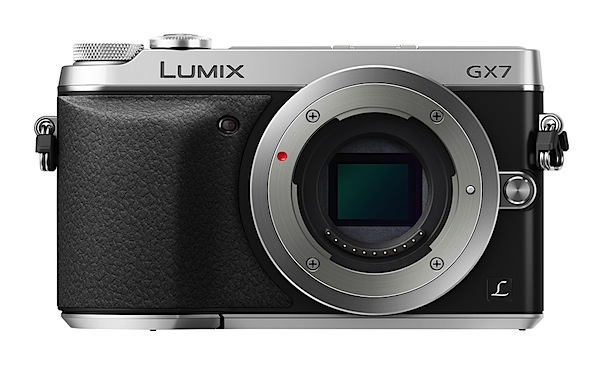
The review camera was fitted with the G Vario f3.5/14-42mm kit lens. The body is made from magnesium alloy and the camera is available in silver+black or black.
Panasonic Lumix DMC-GX7 Review back.jpg

Panasonic Lumix DMC-GX7 Review top.jpg

Panasonic Lumix DMC-GX7 Features

There’s a whole heap of attractive features on the Panasonic Lumix GX7.

  • A 16.00-megapixel Live MOS sensor.
  • Shutter speeds run to 1/8000 second.
  • The rear 7.6cm LCD screen tilts and swivels in a vertical plane, tilting up by 80 degrees and down by 45 degrees.

Panasonic Lumix DMC-GX7 Viewfinder.jpg

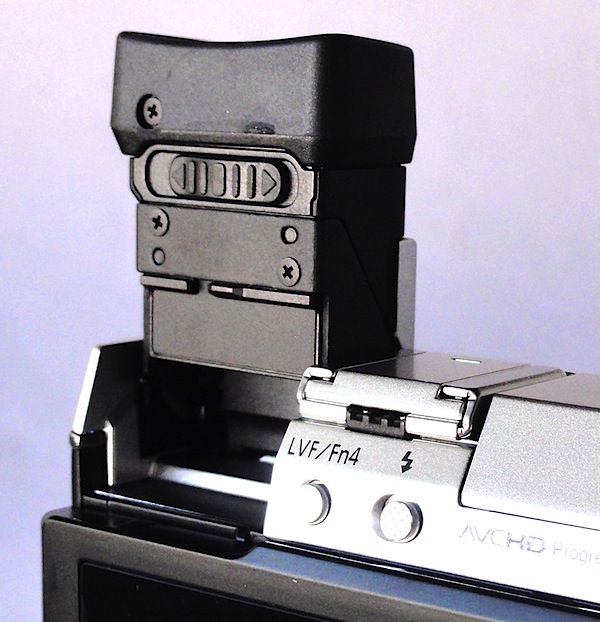
  • For the first time in a digicam the top Live View viewfinder rotates through 90 degrees, so you can view downwards.
  • The AF system has functions including Low Light AF, Pinpoint AF and One-shot AF.
  • Focus peaking can be monitored in Live View. This shows the focus peak of focus in MF and AF+MF mode.
  • The camera has Wi-Fi connectivity (IEEE 802.11 b/g/n) with NFC (Near Field Communication), supported by the Panasonic Image App for iOS/Android smart devices.
  • Touch screen AF to focus and lock on the subject and release the shutter.
    The GX7′s maximum image size is 4592×3448 pixels, sufficient to make a 39x29cm print.

Video? It can shoot in AVCHD or MPEG4 format, recording Full HD 1920×1080 pixels. I was able to record video and shoot stills mid recording.
Panasonic Lumix DMC-GX7 Review - Curl Curl beach arch.JPG

Panasonic Lumix DMC-GX7 Mural

Panasonic Lumix DMC-GX7 Window

Stabiliser

But the big news for those who may have been tossing up between Olympus and Panasonic in the quest for a MILC camera is that the GX7 now has an internal stabiliser. Up to now only Olympus offered an internal stabiliser, while Panasonic’s G series had to rely on specific lenses to keep the camera image steady.

In Panasonic’s own words: ‘The DMC-GX7 is Panasonic’s first G Series camera to offer an in-body optical image stabilisation system. Now blur-free photography can be enjoyed with classic non-digital lenses and digital interchangeable lenses without image stabilisation.’

Mind you, there always was a degree of noise from some Olympus owners that ‘Image stabilisers in Olympus cameras are mostly useless, claiming only the OM-D E-M5 as being acceptable.’

Wasn’t me that said it!

Handling

The camera is comfortable in the hand, thanks to a well-defined speed grip, nobbly surface texture and good balance. The lensless camera body is pocketable.

Controls

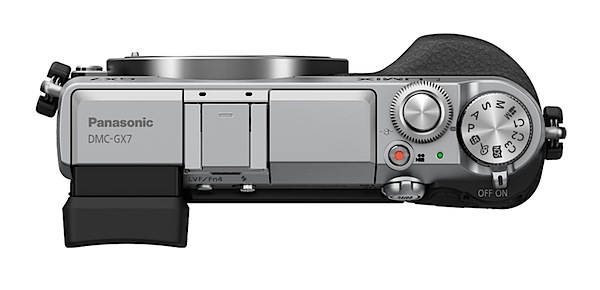
No surprises as we find the top deck relatively uncluttered. Rightwards we find the on/off lever; nearby is the red video record button.
Scene guide.jpg

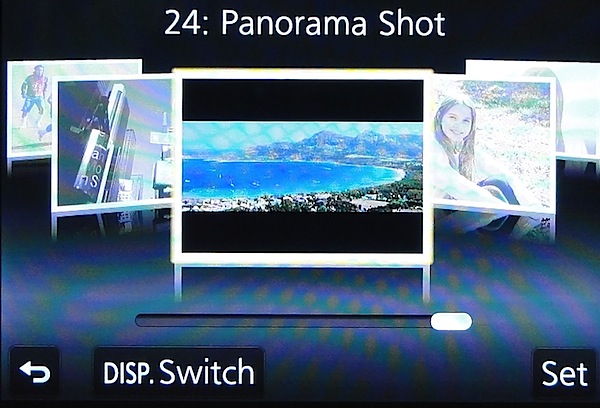
The mode dial has positions for auto, PASM, creative video (you can manually set aperture and shutter speed), three custom modes, scene guide mode (24 settings from clear portrait to sunset glow to panorama) and creative control mode (eight settings, from expressive to retro, high and low key etc).

The shutter button is encircled by the front command dial. A second command dial is placed just behind the on/off switch. Nearby is the AF/MF lever.

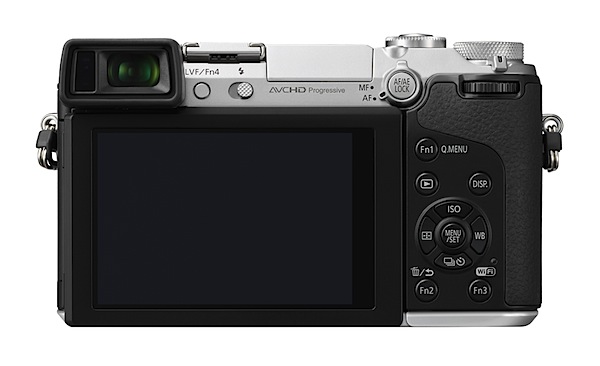
Rear panel: three function buttons, replay and trash, display options plus the four way jog dial offering access to ISO, white balance, continuous shooting, self timer and AF mode options.

Overall, the control geography is well designed, with no devious buttons or mysterious options.

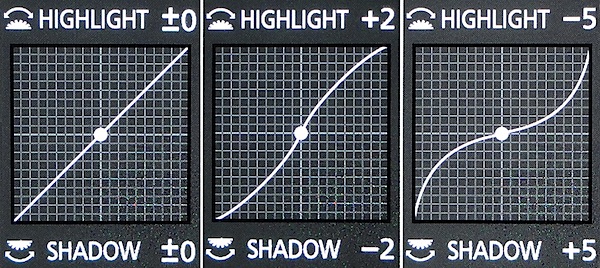
And then I fell upon a neat scheme where you can adjust the highlight and shadow curves of an image pre-shoot. Simply tap the function 2 button and you sight a series of preset curves. Alternatively, you can adjust the highlight and/or shadow section of the curves by rolling the forward or rear command dial.

Menu.jpg

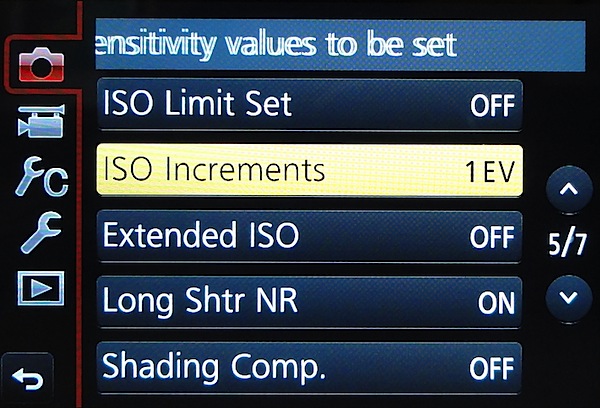
The menu setup is well-designed and not overpowering.

Curves.jpg

One feature that should tug the heart strings of video shooters is the option to completely suppress camera sounds, you know those bumps and clicks from operating the camera, rolling the lens’ zoom etc. The camera also switches the shutter from mechanical to electronic, turning off any operating sounds, and suppresses the AF assist lamp and flash. Good news.

The sad news is that there is no input for an external mic for video work.

Panasonic Lumix DMC-GX7 ISO Tests

Good quality all the way up to ISO 6400. Only at ISO 12800 is a slight appearance of noise visible. At ISO 25600 noise is up further but images are useable.

Panasonic Lumix DMC-GX7 Review Verdict

Panasonic Lumix DMC-GX7 ISO 200.JPG

Panasonic Lumix DMC-GX7 ISO 800.JPG

Panasonic Lumix DMC-GX7 ISO 1600.JPG

Panasonic Lumix DMC-GX7 ISO 3200.JPG

Panasonic Lumix DMC-GX7 ISO 6400.JPG

Panasonic Lumix DMC-GX7 ISO 12800.JPG

Panasonic Lumix DMC-GX7 ISO 25600.JPG
Quality: above average.
Why buy the Panasonic Lumix DMC-GX7: enthusiast features; compact size.
Why not buy the Panasonic Lumix DMC-GX7: no reason.

An ideal camera for the enthusiast who wants the benefits of an internal stabiliser and ability to use a wide range of lenses.

Panasonic Lumix DMC-GX7 Review Rating: 4 Stars out of 5.

Panasonic Lumix DMC-GX7 Specifications

Image Sensor: 16 million effective pixels.
Metering: Multiple, centre-weighted and spot.
Effective Sensor Size: Four Thirds 17.3×13.0mm CMOS.
Lens Factor: 2x.
Compatible lenses: Micro Four Thirds.
Exposure Modes: Auto, Program AE, shutter and aperture priority, manual.
Shutter Speed: Bulb, 60 to 1/8000 second; flash sync 1/320 sec.
Burst Speed: 5 fps.
Memory: SD/SDHC/SDXC cards.
Image Sizes (pixels): 4592×3448 to 1712×1712. Movies: 1920×1080, 1280x720p, 640×480.
Viewfinders: Turret finder: 2,764,800 pixels. 7.6cm LCD screen: 1,040,000 pixels.
File Formats: JPEG, RAW, JPEG+RAW, AVCHD/MPEG4, MPO (3D).
ISO Sensitivity: Auto, 125 to 25600 (25,600 with boost).
Interface: USB 2.0, AV, HDMI mini, WiFi, DC input.
Power: Rechargeable lithium ion battery, AC adaptor.
Dimensions: 123x71x55 WHDmm.
Weight: Approx. 402 (inc card and battery).
Panasonic Lumix DMC-GX7 Price: Get a price on the Panasonic LUMIX GX7 Body Only or Panasonic LUMIX GX7 with LUMIX G VARIO 14-42mm II Lens or Panasonic LUMIX GX7 with LUMIX G 20mm F1.7 II ASPH Lens.

Post originally from: Digital Photography Tips.

Check out our more Photography Tips at Photography Tips for Beginners, Portrait Photography Tips and Wedding Photography Tips.

Panasonic Lumix DMC-GX7 Review

The post Panasonic Lumix DMC-GX7 Review by Barrie Smith appeared first on Digital Photography School.


Digital Photography School
 
Comments Off on Panasonic Lumix DMC-GX7 Review

Posted in Photography


X-Trans in your pocket: First Impressions Review of Fujifilm’s XQ1

18 Oct

XQ1.jpg

The Fujifilm XQ1 – the follow up to the stylish XF1 – is the company’s latest attempt to make a splash in the high-end compact camera segment. The big change on the XQ1 is its use of the X-Trans II sensor with on-chip phase detection, which promises higher photo quality and snappy focusing. If that sounds intriguing, then read our initial thoughts in our first impressions review of the Fuji XQ1.

News: Digital Photography Review (dpreview.com)

 
Comments Off on X-Trans in your pocket: First Impressions Review of Fujifilm’s XQ1

Posted in Uncategorized